Philipp Kern: How to maintain an OpenWRT installation
 I wondered how to properly maintain an OpenWRT installation that needs to track trunk for one reason or another. For instance the OpenWRT release pace is quite slow and "new" devices or various fixes are only available in this particular branch.
Now the OpenWRT project does offer snapshot builds. These are images built with the default config for the particular device type. You can even upgrade most models using sysupgrade, which preserves a list of configuration files you specify when flashing the new image, instead of doing a dreadful tftp upload. But you still lose all the packages you installed and accumulate a bit of cruft when reinstalling them. If you do not flash new images, you will be unable to install kernel modules after a while, because the kernel version they're based upon was updated.
So what's suggested is this:
- You checkout the trunk from svn. You enable all the feeds you need (e.g. packages and luci) and install the packages you want. (See scripts/feeds.)
- Run make menuconfig and select the target system type and the device profile.
- make defconfig will now give you the default configuration for the selected profile. It is important to use this as the starting point.
- Again invoke menuconfig and select all the packages you need. You can get the current list of packages installed on your device with opkg list_installed. You can search in menuconfig as you would in a kernel build config screen.
- If you're happy with the configuration, save the difference to the default configuration to a file: scripts/diffconfig.sh > my-own-config
- Now start the build with make. With the package configuration I picked I need about 5 GB of disk space. It will start off compiling a toolchain, the kernel and then the packages you selected. If something seems to go wrong, you probably want to restart the build with make V=s to see the build messages (the default is pretty quiet). Some -jX option for parallel building might shorten your waiting time.
- Finally you will get an image in bin/<system type>. You want to grab the squashfs & sysupgrade image.
- Check /etc/sysupgrade.conf on the live system if files are missing. /etc/config, passwd, shadow and some other files are preserved even if they are not listed. Those are then the only files that are copied into a temporary ramdisk during upgrade and written back to the filesystem post-flash. You need to keep this file up-to-date if you include new packages that have non-UCI configuration.
- For actually executing the upgrade process, you can either use the luci web interface or start sysupgrade over SSH. For the latter you will have to copy the image yourself. If you go via luci, you should check the md5 hash presented to you against the one of the image on your disk.
- If you want to update your image, just svn update (in the hope that the OpenWRT developers did not break anything in trunk), get the new defconfig, append your saved configuration delta (the file "my-own-config" above) to .config and run make oldconfig. This will keep track of feature changes in the default configuration (like shadow password support).
As always: Take great care when you're flashing devices. The devices I bought cannot be bricked, but this might not be true for all devices that run OpenWRT. You might need and go doing a tftp image upload if something goes wrong. Check the OpenWRT wiki for instructions and possibly make your computer ready for them before starting to play with your box. For my Buffalo WZR-HP-AG300H the sysupgrade procedure is stable.

 I was working on writing tests for gnome-settings-daemon a week or so ago, and finally got blocked on being unable to set up upower/ConsoleKit/etc. the way I need them. Also, doing so needs root privileges, I don t want my test suite to actually suspend my machine, and using the real service is generally not suitable for test suites that are supposed to run during make check , in jhbuild, and the like these do not have the polkit privileges to do all that, and may not even have a system D-Bus running in the first place.
So I wrote a little

 Most of my work is in trying to avoid ways things might go wrong
which so often happens when computers are involved.
What if
 I use the
 Kannel is a quite reliable tool, but not RESTful in conversations.
That requires extra attention at other parts of the setup
to avoid breakage in special situations.
That worries me.
 My sms-to-blog gateway is not yet ready, but basic routines work.
The
 good to see that there are again Bug Squashing Parties going on, & that
quite a few people send patches to the Bug Tracking System &/or make
Non-Maintainer Uploads. here are my contributions for this week:


 How to get it
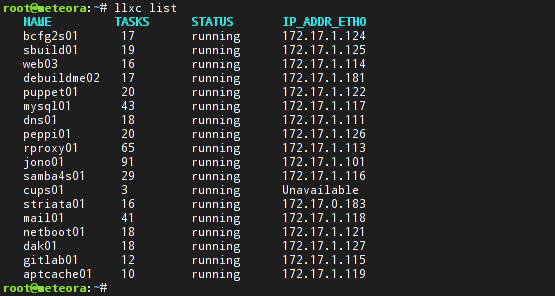
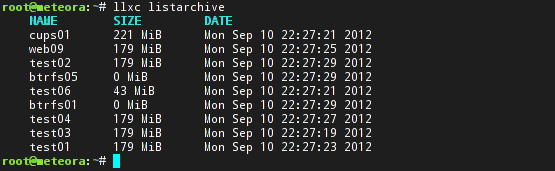
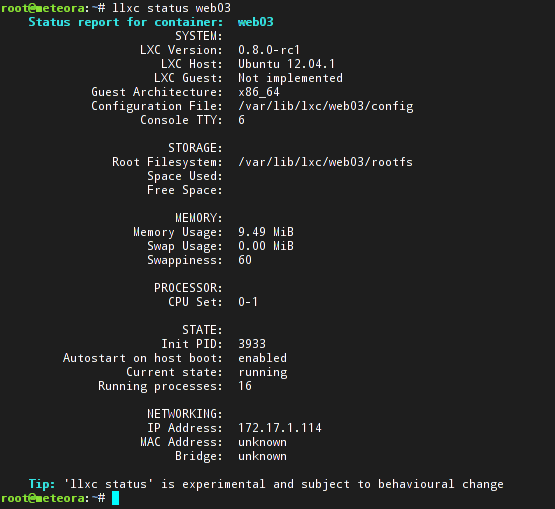
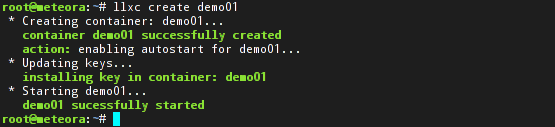
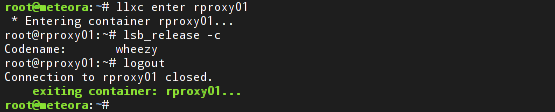
As St phane mentioned in the python3-lxc blog entry, the API hasn t yet been finalized and llxc itself is in an early state and many changes are planned, so it s definitely not meant for production use yet, but since we believe in release early, release often in the free software community, here goes
Currently, llxc.py itself is *very* Ubuntu specific and its only been tested on Ubuntu 12.04, but that will be fixed once more of its kinks have been ironed out. Some people are also working on getting python3-lxc on other distributions, which will help a lot.
The llxc.py script itself is hosted on Github:
 Thoughts about DRI.Next
On the way to the X Developer s Conference in Nuremberg, Eric and I
chatted about how the DRI2 extension wasn t really doing what we
wanted. We came up with some fairly rough ideas and even held an
 I was invited as a panelist for the
 Just about three years ago, I created the
 Last week, I was
 A couple days ago, I woke up to this exciting series of text messages
from a unfamiliar phone number.
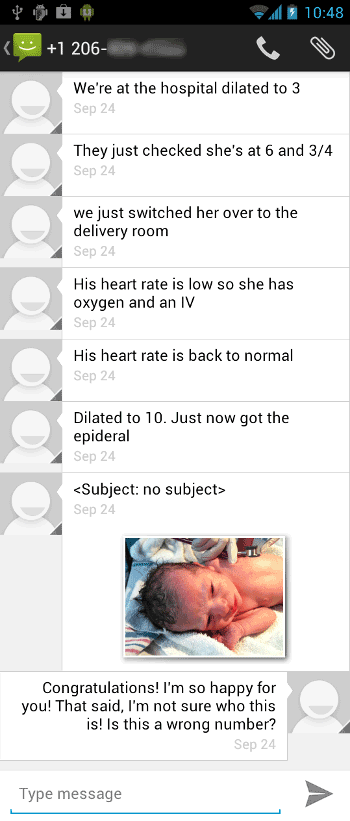 Because I've not received a reply in the last couple days, because it
was a Seattle phone number but I haven't lived in Seattle for years,
and because I don't know of anyone in Seattle who was about to give
birth, I'm pretty confident that this was indeed a case of misdirected
text messages!
But whoever you are: Congratulations! I know it was a mistake, but
that really made my day!
 Data, once put on the internet, are quite hard to delete. You can most likely delete (or ask for deleting) them from place where it has been originally distributed, but you can be never sure where else it has appeared.
Recently, I've seen several requests to remove some data from


 So, let's start with an introduction:
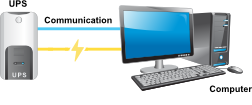 To shortly describe the main

 The last few days I have been unable to build WebKitGTK+ from git.
The problem is that make chokes the command line with an insanely long list of file names. You need a patched version of make.
 Pictured: myself debugging WebKit build issues.