Search Results: "tb"

25 March 2023

Russ Allbery: Review: Thief of Time

Review: Thief of Time, by Terry Pratchett
Series: Discworld #26
Publisher: Harper
Copyright: May 2001
Printing: August 2014
ISBN: 0-06-230739-8
Format: Mass market
Pages: 420
Thief of Time is the 26th Discworld novel and the last Death novel, although he still appears in subsequent books. It's the third book starring Susan Sto Helit, so I don't recommend starting here. Mort is the best starting point for the Death subseries, and Reaper Man provides a useful introduction to the villains. Jeremy Clockson was an orphan raised by the Guild of Clockmakers. He is very good at making clocks. He's not very good at anything else, particularly people, but his clocks are the most accurate in Ankh-Morpork. He is therefore the logical choice to receive a commission by a mysterious noblewoman who wants him to make the most accurate possible clock: a clock that can measure the tick of the universe, one that a fairy tale says had been nearly made before. The commission is followed by a surprise delivery of an Igor, to help with the clock-making. People who live in places with lots of fields become farmers. People who live where there is lots of iron and coal become blacksmiths. And people who live in the mountains near the Hub, near the gods and full of magic, become monks. In the highest valley are the History Monks, founded by Wen the Eternally Surprised. Like most monks, they take apprentices with certain talents and train them in their discipline. But Lobsang Ludd, an orphan discovered in the Thieves Guild in Ankh-Morpork, is proving a challenge. The monks decide to apprentice him to Lu-Tze the sweeper; perhaps that will solve multiple problems at once. Since Hogfather, Susan has moved from being a governess to a schoolteacher. She brings to that job the same firm patience, total disregard for rules that apply to other people, and impressive talent for managing children. She is by far the most popular teacher among the kids, and not only because she transports her class all over the Disc so that they can see things in person. It is a job that she likes and understands, and one that she's quite irate to have interrupted by a summons from her grandfather. But the Auditors are up to something, and Susan may be able to act in ways that Death cannot. This was great. Susan has quickly become one of my favorite Discworld characters, and this time around there is no (or, well, not much) unbelievable romance or permanently queasy god to distract. The clock-making portions of the book quickly start to focus on Igor, who is a delightful perspective through whom to watch events unfold. And the History Monks! The metaphysics of what they are actually doing (which I won't spoil, since discovering it slowly is a delight) is perhaps my favorite bit of Discworld world building to date. I am a sucker for stories that focus on some process that everyone thinks happens automatically and investigate the hidden work behind it. I do want to add a caveat here that the monks are in part a parody of Himalayan Buddhist monasteries, Lu-Tze is rather obviously a parody of Laozi and Daoism in general, and Pratchett's parodies of non-western cultures are rather ham-handed. This is not quite the insulting mess that the Chinese parody in Interesting Times was, but it's heavy on the stereotypes. It does not, thankfully, rely on the stereotypes; the characters are great fun on their own terms, with the perfect (for me) balance of irreverence and thoughtfulness. Lu-Tze refusing to be anything other than a sweeper and being irritatingly casual about all the rules of the order is a classic bit that Pratchett does very well. But I also have the luxury of ignoring stereotypes of a culture that isn't mine, and I think Pratchett is on somewhat thin ice. As one specific example, having Lu-Tze's treasured sayings be a collection of banal aphorisms from a random Ankh-Morpork woman is both hilarious and also arguably rather condescending, and I'm not sure where I landed. It's a spot-on bit of parody of how a lot of people who get very into "eastern religions" sound, but it's also equating the Dao De Jing with advice from the Discworld equivalent of a English housewife. I think the generous reading is that Lu-Tze made the homilies profound by looking at them in an entirely different way than the woman saying them, and that's not completely unlike Daoism and works surprisingly well. But that's reading somewhat against the grain; Pratchett is clearly making fun of philosophical koans, and while anything is fair game for some friendly poking, it still feels a bit weird. That isn't the part of the History Monks that I loved, though. Their actual role in the story doesn't come out of the parody. It's something entirely native to Discworld, and it's an absolute delight. The scene with Lobsang and the procrastinators is perhaps my favorite Discworld set piece to date. Everything about the technology of the History Monks, even the Bond parody, is so good. I grew up reading the Marvel Comics universe, and Thief of Time reminds me of a classic John Byrne or Jim Starlin story, where the heroes are dumped into the middle of vast interdimensional conflicts involving barely-anthropomorphized cosmic powers and the universe is revealed to work in ever more intricate ways at vastly expanding scales. The Auditors are villains in exactly that tradition, and just like the best of those stories, the fulcrum of the plot is questions about what it means to be human, what it means to be alive, and the surprising alliances these non-human powers make with humans or semi-humans. I devoured this kind of story as a kid, and it turns out I still love it. The one complaint I have about the plot is that the best part of this book is the middle, and the end didn't entirely work for me. Ronnie Soak is at his best as a supporting character about three quarters of the way through the book, and I found the ending of his subplot much less interesting. The cosmic confrontation was oddly disappointing, and there's a whole extended sequence involving chocolate that I think was funnier in Pratchett's head than it was in mine. The ending isn't bad, but the middle of this book is my favorite bit of Discworld writing yet, and I wish the story had carried that momentum through to the end. I had so much fun with this book. The Discworld novels are clearly getting better. None of them have yet vaulted into the ranks of my all-time favorite books there's always some lingering quibble or sagging bit but it feels like they've gone from reliably good books to more reliably great books. The acid test is coming, though: the next book is a Rincewind book, which are usually the weak spots. Followed by The Last Hero in publication order. There is no direct thematic sequel. Rating: 8 out of 10

22 March 2023

Russ Allbery: Review: The Kaiju Preservation Society

Review: The Kaiju Preservation Society, by John Scalzi
Publisher: Tor
Copyright: 2022
ISBN: 0-7653-8913-4
Format: Kindle
Pages: 264
As this novel opens, Jamie Gray, our first-person narrator, is working for the business side of a startup food delivery service named f dm d. He's up for his six month performance review and has some great ideas for how to improve the company's market standing going into pandemic lockdown. His boss has other ideas: Jamie at the bottom of the corporate ladder, delivering food door-to-door. Tom is working for a semi-secret organization with a last-minute, COVID-induced worker shortage. He needs someone who can lift things. Jamie used to go to some of the same parties, can lift things, and is conveniently available. And that's how Jamie ends up joining the Kaiju Preservation Society, because it turns out the things that need lifting are in a different dimension. This book was so bad. I think this may be the worst-written novel at a technical level that I have read since I started writing book reviews. It's become trendy in some circles to hate Scalzi, so I want to be clear that I normally get along fine with his writing. Scalzi is an unabashedly commercial writer of light, occasionally humorous popcorn SF. It's not great literature, and he's unlikely to write a new favorite novel, but his books are easy to read and reliably deliver a few hours of comfortable entertainment. The key word is "reliably"; Scalzi doesn't have a lot of dynamic range, but you know what you're getting and can decide to read him when that matches your mood. When I give a book a bad review, it's usually because I found the ideas deeply unpleasant (genocidal theology, for instance, or creepy voyeuristic sexism). That's not the problem here. The ideas are fine: a variation on the Jurassic Park setup but with kaiju and less commercialism, an everyman narrator to look at everything for the reader, a few assholes thrown in to provide some conflict sure, sign me up, sounds like the kind of light entertainment I expect from a Scalzi novel. The excuse for interdimensional portals was clever (and consistent with kaiju story themes), and the biological handwaving created a lot of good story hooks. The material for a fun novel is all present. The problem, instead, is that this book was not finished. It's the bare skeleton of a story with almost-nonexistent characters and plot, stuck in a novel-shaped box and filled in with repetitive banter and dad jokes of the approximate consistency of styrofoam packing material. When I complain about the characterization, I fear people who haven't read the book won't understand what I mean. He's always had dialogue quirks that tend to show up in all of his characters and make them sound similar. I noticed this in other books, but it wasn't a big deal. The characterization problems in this book are a big deal. I can identify four characters, total, from the entire novel: the first-person protagonist, the villain, the pilot, and the woman who does the forest floor safety training. None of those characters are memorable or interesting, but at least they're somewhat distinct. Apart from them, you could write a computer program that randomly selected character names for each dialogue line and I wouldn't be able to tell the difference. I have never given up on character identity and started ignoring all the dialogue tags in a book before. Everyone says the same thing, makes the same jokes, has the same emotional reactions, and has the same total lack of interiority or distinguishing characteristics. The only way I can imagine telling the characters apart is if you memorized the association between names and professions, and I have no idea why you'd bother. The descriptions are, if anything, worse. Scalzi is not a heavily descriptive author, but usually he gives me something to hang my imagination on. You would think that if you were writing a book about kaiju one where kaiju are quite actively involved in the story, fighting, roaring, menacing, being central to the plot you would describe a kaiju at some point during the novel. They're visually impressive giant monsters! This is an inherently visual story genre! And at no point in this entire novel does Scalzi ever describe a kaiju in any detail. Not once! The most we get is that one has tentacles and a sort of eye spot. And sometimes there are wings. There are absolutely no overall impressions, comparisons, attempts to sketch what the characters are seeing, nothing. Or, for another example, consider the base, the place where the characters live for most of the story and where much of the dialogue happens. Here is the sum total of all sensory information I can recall about the characters' home: it has stairs, and there's a plant in Jamie's room. (The person who left the plant, who never appears on screen, gets more characterization in two pages than anyone else gets in the whole novel.) What does the base look like from the outside? The inside? How many stories does it have? What are the common spaces like? What does it smell like? Does it feel institutional, or welcoming, or dirty, or sparkling? How long does it take to get from one end of it to the other? Does it make weird noises at night? I have no impressions of this place whatsoever. Maybe a few of these things were mentioned in passing and I missed them, but that's because the narrator of this book never describes his surroundings in detail, stops to look at something eye-catching, thinks about how he feels about a place, or otherwise gives the reader any meaningful emotional engagement with the spaces around him. And it's not like this story was instead stuffed with action. There is barely a novelette's worth of plot and most of that is predictable: the setup, the initial confrontation, the discovery of the evil plan, the final confrontation. For most of the book, nothing of any consequence happens. It's just endless pages of vaguely bantering dialogue between totally indistinguishable characters while Jamie repeats "I lift things." (That was funny the first couple of times; by the fifth time, the funny wore off.) The climax, when it finally happens, is mostly monologuing and half-hearted repartee that is cringeworthy and vaguely embarrassing for everyone involved. I don't really blame Scalzi for this book. I wish he had realized that it was half-baked at best and needed some major revisions, but the author's note at the end makes it clear that the process of bringing this book into the world was a train wreck. It was written in two months, in a rush, after Scalzi had already missed a deadline for a different book that failed to come together. Life happens, and in 2020 and early 2021 a whole lot of life was happening. The tone of the author's note is vaguely apologetic; I think Scalzi realizes at some level that this is not his best work. The person I do blame is Patrick Nielsen Hayden, Scalzi's editor, who is a multiple-Hugo-award-winning book editor and the managing editor of science fiction at Tor and absolutely should have known better. It was his responsibility to look at this book and say "this is not ready yet"; this is part of the function of the traditional publishing apparatus. This could have been a good book. The ideas and the hook were there; it just needed some actual substance in the middle and a whole lot of character work. Instead, he was the one who made the decision to publish the book in this state. But, well, the joke's on me, because The Kaiju Preservation Society sold a ton of copies, got nominated for several awards, won an Alex Award, and made Amazon's best of 2022 list, so I guess this was a brilliant publishing decision and the book was everything it needed to be? Maybe I'm just bad at reading and have no sense of humor? I have no explanation; I am truly and completely baffled. There are books that I don't like but that have obvious merits for people who are not me. There are styles of writing that I don't like and other people do. But I would have sworn this book was objectively unfinished and half-assed at a craft and construction level, in ways that don't depend as much on personal taste. I recommend quietly forgetting it was ever published and waiting for a better Scalzi novel, but it has a 4.04 star rating on Goodreads with nearly 32,000 reviews, so what do I know. Anyway, I was warned that I wasn't going to like this book and I read it anyway for silly reasons because I figured it was a Scalzi novel and how bad could it be, really. I brought this on myself, and I at least got the fun of ranting about it. Apparently this book found its people and they got a lot of joy out of it, and good for them. Rating: 2 out of 10

21 March 2023

B lint R czey: Building the Linux kernel in under 10 seconds with Firebuild

Russell published an interesting post about his first experience with Firebuild accelerating refpolicy s and the Linux kernel s build. It turned out a few small tweaks could accelerate the builds even more, crossing the 10 second barrier with Linux s build.
Build performance with 18 cores The Linux kernel s build time is a widely used benchmark for compilers, making it a prime candidate to test a build accelerator as well. In the first run on Russell s 18 core test system the observed user+sys CPU time was cut by 44% with an actual increase in wall clock time which was quite unusual. Firebuild performed much better than that in prior tests. To replicate the results I ve set up a clean Debian Bookworm VM on my machine:
lxc launch images:debian/bookworm  vm -c limits.cpu=18 -c limits.memory=16GB bookworm-vm
Compiling Linux 6.1.10 in this clean Debian VM showed build times closer to what I expected to see, ~72% less wall clock time and ~97% less user+sys CPU time:
$ make defconfig && time make bzImage -j18
real	1m31.157s
user	20m54.256s
sys	2m25.986s
$ make defconfig && time firebuild make bzImage -j18
# first run:
real	2m3.948s
user	21m28.845s
sys	4m16.526s
# second run
real	0m25.783s
user	0m56.618s
sys	0m21.622s
There are multiple differences between Russell s and my test system including having different CPUs (E5-2696v3 vs. virtualized Ryzen 5900X) and different file systems (BTRFS RAID-1 vs ext4), but I don t think those could explain the observed mismatch in performance. The difference may be worth further analysis, but let s get back to squeezing out more performance from Firebuild. Firebuild was developed on Ubuntu. I was wondering if Firebuild was faster there, but I got only slightly better build times in an identical VM running Ubuntu 22.10 (Kinetic Kudu):
$ make defconfig && time make bzImage -j18
real	1m31.130s
user	20m52.930s
sys	2m12.294s
$ make defconfig && time firebuild make bzImage -j18
# first run:
real	2m3.274s
user	21m18.810s
sys	3m45.351s
# second run
real	0m25.532s
user	0m53.087s
sys	0m18.578s
The KVM virtualization certainly introduces an overhead, thus builds must be faster in LXC containers. Indeed, all builds are faster by a few percents:
$ lxc launch ubuntu:kinetic kinetic-container
...
$ make defconfig && time make bzImage -j18
real	1m27.462s
user	20m25.190s
sys	2m13.014s
$ make defconfig && time firebuild make bzImage -j18
# first run:
real	1m53.253s
user	21m42.730s
sys	3m41.067s
# second run
real	0m24.702s
user	0m49.120s
sys	0m16.840s
# Cache size:    1.85 GB
Apparently this ~72% reduction in wall clock time is what one should expect by simply prefixing the build command with firebuild on a similar configuration, but we should not stop here. Firebuild does not accelerate quicker commands by default to save cache space. This howto suggests letting firebuild accelerate all commands including even "sh by passing "-o 'processes.skip_cache = []' to firebuild.
Accelerating all commands in this build s case increases cache size by only 9%, and increases the wall clock time saving to 91%, not only making the build more than 10X faster, but finishing it in less than 8 seconds, which may be a new world record!:
$ make defconfig && time firebuild -o 'processes.skip_cache = []' make bzImage -j18
# first run:
real	1m54.937s
user	21m35.988s
sys	3m42.335s
# second run
real	0m7.861s
user	0m15.332s
sys	0m7.707s
# Cache size:    2.02 GB
There are even faster CPUs on the market than this 5900X. If you happen to have access to one please leave a comment if you could go below 5 seconds! Scaling to higher core counts and comparison with ccache Russell raised the very valid point about Firebuild s single threaded supervisor being a bottleneck on high core systems and comparison to ccache also came up in comments. Since ccache does not have a central supervisor it could scale better with more cores, but let s see if ccache could go below 10 seconds with the build times
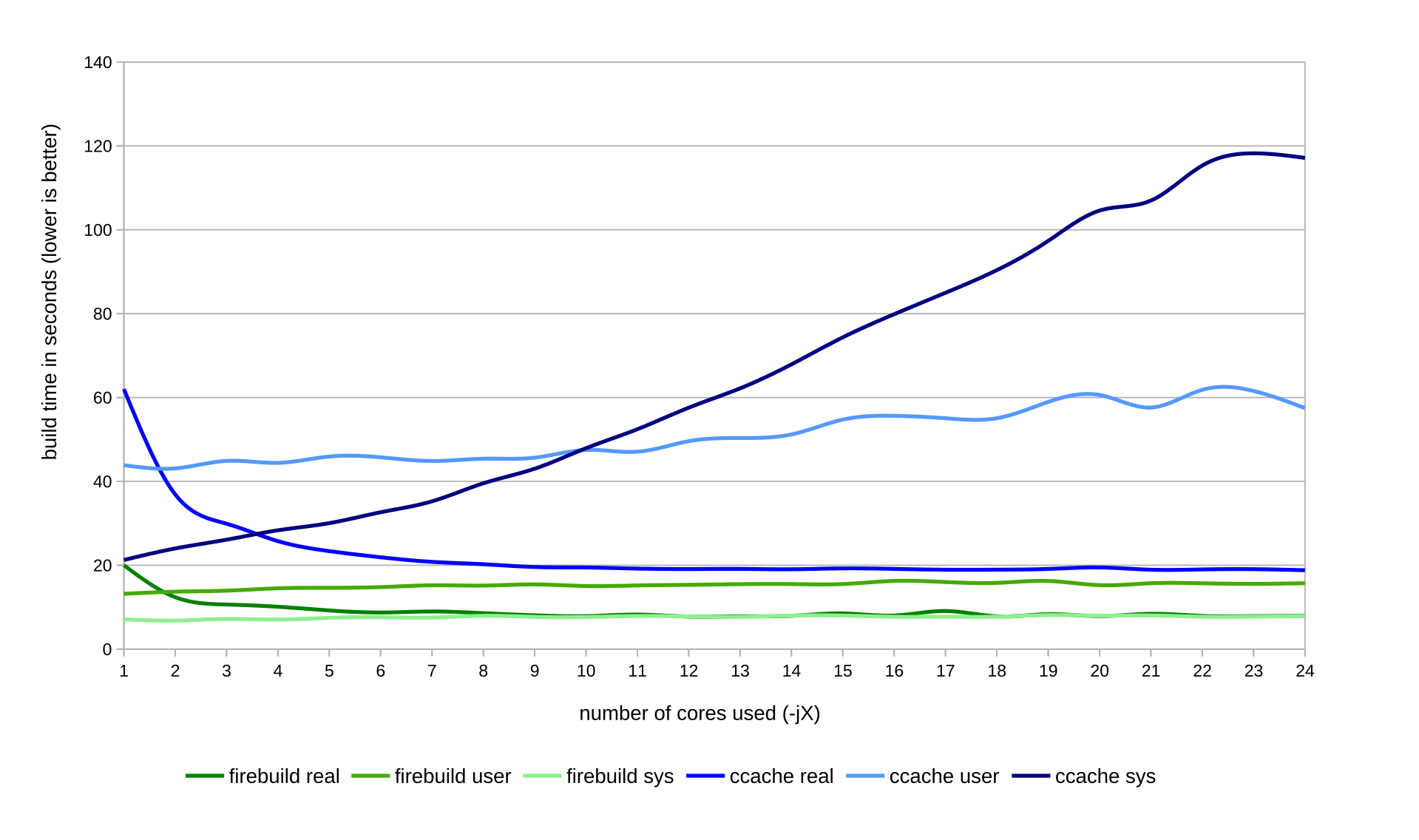
firebuild -o processes.skip_cache = [] and ccache scaling to 24 cores
Well, no. The best time time for ccache is 18.81s, with -j24. Both firebuild and ccache keep gaining from extra cores up to 8 cores, but beyond that the wall clock time improvements diminish. The more interesting difference is that firebuild s user and sys time is basically constant from -j1 to -j24 similarly to ccache s user time, but ccache s sys time increases linearly or exponentially with the number of used cores. I suspect this is due to the many parallel ccache processes performing file operations to check if cache entries could be reused, while in firebuild s case the supervisor performs most of that work not requiring in-kernel synchronization across multiple cores. It is true, that the single threaded firebuild supervisor is a bottleneck, but the supervisor also implements a central filesystem cache, thus checking if a command s cache entry can be reused can be implemented with much fewer system calls and much less user space hashing making the architecture more efficient overall than ccache s. The beauty of Firebuild is not being faster than ccache, but being faster than ccache with basically no hard-coded information about how C compilers work. It can accelerate any other compiler or program that generates deterministic output from its input, just by observing what they did in their prior runs. It is like having ccache for every compiler including in-house developed ones, and also for random slow scripts.

20 March 2023

Russ Allbery: Review: The Star Fraction

Review: The Star Fraction, by Ken MacLeod
Series: Fall Revolution #1
Publisher: Orbit
Copyright: 1995
Printing: 2001
ISBN: 1-85723-833-8
Format: Trade paperback
Pages: 341
Ken MacLeod is a Scottish science fiction writer who has become amusingly famous for repeatedly winning the libertarian Prometheus Award despite being a (somewhat libertarian-leaning) socialist. The Star Fraction is the first of a loose series of four novels about future solar system politics and was nominated for the Clarke Award (as well as winning the Prometheus). It was MacLeod's first novel. Moh Kohn is a mercenary, part of the Felix Dzerzhinsky Workers' Defence collective. They're available for hire to protect research labs and universities against raids from people such as animal liberationists and anti-AI extremists (or, as Moh calls them, creeps and cranks). As The Star Fraction opens, he and his smart gun are protecting a lab against an attack. Janis Taine is a biologist who is currently testing a memory-enhancing drug on mice. It's her lab that is attacked, although it isn't vandalized the way she expected. Instead, the attackers ruined her experiment by releasing the test drug into the air, contaminating all of the controls. This sets off a sequence of events that results in Moh, Janis, and Jordon Brown, a stock trader for a religious theocracy, on the run from the US/UN and Space Defense. I had forgotten what it was like to read the uncompromising old-school style of science fiction novel that throws you into the world and explains nothing, leaving it to the reader to piece the world together as you go. It's weirdly fun, but I'm either out of practice or this was a particularly challenging example of the genre. MacLeod throws a lot of characters at you quickly, including some that have long and complicated personal histories, and it's not until well into the book that the pieces start to cohere into a narrative. Even once that happens, the relationship between the characters and the plot is unobvious until late in the book, and comes from a surprising direction. Science fiction as a genre is weirdly conservative about political systems. Despite the grand, futuristic ideas and the speculation about strange alien societies, the human governments rarely rise to the sophistication of a modern democracy. There are a lot of empires, oligarchies, and hand-waved libertarian semi-utopias, but not a lot of deep engagement with the speculative variety of government systems humans have proposed. The rare exceptions therefore get a lot of attention from those of us who find political systems fascinating. MacLeod has a reputation for writing political SF in that sense, and The Star Fraction certainly delivers. Moh (despite the name of his collective, which is explained briefly in the book) is a Trotskyist with a family history with the Fourth International that is central to the plot. The setting is a politically fractured Britain full of autonomous zones with wildly different forms of government, theoretically ruled by a restored monarchy. That monarchy is opposed by the Army of the New Republic, which claims to be the legitimate government of the United Kingdom and is considered by everyone else to be terrorists. Hovering in the background is a UN entirely subsumed by the US, playing global policeman over a chaotic world shattered by numerous small-scale wars. This satisfyingly different political world is a major plus for me. The main drawback is that I found the world-building and politics more interesting than the characters. It's not that I disliked them; I found them enjoyably quirky and odd. It's more that so much is happening and there are so many significant characters, all set in an unfamiliar and unexplained world and often divided into short scenes of a few pages, that I had a hard time keeping track of them all. Part of the point of The Star Fraction is digging into their tangled past and connecting it up with the present, but the flashbacks added a confused timeline on top of the other complexity and made it hard for me to get lost in the story. The characters felt a bit too much like puzzle pieces until the very end of the book. The technology is an odd mix with a very 1990s feel. MacLeod is one of the SF authors who can make computers and viruses believable, avoiding the cyberpunk traps, but AI becomes relevant to the plot and the conception of AI here feels oddly retro. (Not MacLeod's fault; it's been nearly 30 years and a lot has changed.) On-line discussion in the book is still based on newsgroups, which added to the nostalgic feel. I did like the eventual explanation for the computing part of the plot, though; I can't say much while avoiding spoilers, but it's one of the more believable explanations for how a technology could spread in a way required for the plot that I've read. I've been planning on reading this series for years but never got around to it. I enjoyed my last try at a MacLeod series well enough to want to keep reading, but not well enough to keep reading immediately, and then other books happened and now it's been 19 years. I feel similarly about The Star Fraction: it's good enough (and in a rare enough subgenre of SF) that I want to keep reading, but not enough to keep reading immediately. We'll see if I manage to get to the next book in a reasonable length of time. Followed by The Stone Canal. Rating: 6 out of 10

Freexian Collaborators: Monthly report about Debian Long Term Support, February 2023 (by LTS Team)

Like each month, have a look at the work funded by Freexian s Debian LTS offering.

Debian LTS contributors In February, 15 contributors have been paid to work on Debian LTS, their reports are available:
  • Adrian Bunk did 22.0h (out of 32.25h assigned), thus carrying over 10.25h to the next month.
  • Anton Gladky did 9.75h (out of 11.5h assigned and 3.5h from previous period), thus carrying over 5.25h to the next month.
  • Ben Hutchings did 8.0h (out of 8.0h assigned and 16.0h from previous period), thus carrying over 16.0h to the next month.
  • Chris Lamb did 18.0h (out of 18.0h assigned).
  • Emilio Pozuelo Monfort did 26.25h (out of 0h assigned and 35.0h from previous period), thus carrying over 8.75h to the next month.
  • Guilhem Moulin did 20.0h (out of 20.0h assigned).
  • Helmut Grohne did 5.0h (out of 5.0h assigned and 5.0h from previous period), thus carrying over 5.0h to the next month.
  • Lee Garrett did 26.75h (out of 19.75h assigned and 12.5h from previous period), thus carrying over 5.5h to the next month.
  • Markus Koschany did 32.25h (out of 32.25h assigned).
  • Ola Lundqvist did 11.5h (out of 12.5h assigned and 11.5h from previous period), thus carrying over 12.5h to the next month.
  • Roberto C. S nchez did 5.0h (out of 9.5h assigned and 22.5h from previous period), thus carrying over 27.0h to the next month.
  • Sylvain Beucler did 32.0h (out of 17.25h assigned and 15.0h from previous period), thus carrying over 0.25h to the next month.
  • Thorsten Alteholz did 8.0h (out of 14.0h assigned), thus carrying over 6.0h to the next month.
  • Tobias Frost did 16.0h (out of 16.0h assigned).
  • Utkarsh Gupta did 24.25h (out of 49.25h assigned), thus carrying over 8.0h to the next month.

Evolution of the situation In February, we have released 44 DLAs, which resolved 156 CVEs. We are glad to welcome some new contributors who will hopefully help us fix CVEs in the supported release even faster. However, we also experienced some setbacks as a few sponsors have stopped (or decreased) their support. If your company ever hesitated to sponsor Debian LTS, now might be a good time to join to ensure that we can continue this important work without having to scale down on the number of packages that we are able to support.

Thanks to our sponsors Sponsors that joined recently are in bold.

19 March 2023

Russ Allbery: Review: Allow Me to Retort

Review: Allow Me to Retort, by Elie Mystal
Publisher: The New Press
Copyright: 2022
ISBN: 1-62097-690-0
Format: Kindle
Pages: 257
If you're familiar with Elie Mystal's previous work (writer for The Nation, previously editor for Above the Law, Twitter gadfly, and occasional talking head on news commentary programs), you'll have a good idea what to expect from this book: pointed liberal commentary, frequently developing into rants once he works up a head of steam. The subtitle of A Black Guy's Guide to the Constitution tells you that the topic is US constitutional law, which is very on brand. You're going to get succinct and uncompromising opinions at the intersection of law and politics. If you agree with them, you'll probably find them funny; if you disagree with them, you'll probably find them infuriating. In other words, Elie Mystal is the sort of writer one reads less for "huh, I disagreed with you but that's a good argument" and more for "yeah, you tell 'em, Elie!" I will be very surprised if this book changes anyone's mind about a significant political debate. I'm not sure if people who disagree are even in the intended audience. I'm leery of this sort of book. Usually its function is to feed confirmation bias with some witty rejoinders and put-downs that only sound persuasive to people who already agree with them. If I want that, I can just read Twitter (and you will be unsurprised to know that Mystal has nearly 500,000 Twitter followers). This style can also be boring at book length if the author is repeating variations on a theme. There is indeed a lot of that here, particularly in the first part of this book. If you don't generally agree with Mystal already, save yourself the annoyance and avoid this like the plague. It's just going to make you mad, and I don't think you're going to get anything useful out of it. But as I got deeper into this book, I think Mystal has another, more interesting purpose that's aimed at people who do largely agree. He's trying to undermine a very common US attitude (even on the left) about the US constitution. I don't know if most people from the US (particularly if they're white and male) realize quite how insufferably smug we tend to be about the US constitution. When you grow up here, the paeans to the constitution and the Founding Fathers (always capitalized like deities) are so ubiquitous and unremarked that it's difficult not to absorb them at a subconscious level. There is a national mythology about the greatness of our charter of government that crosses most political divides. In its modern form, this comes with some acknowledgment that some of its original provisions (the notorious three-fifths of a person clause, for instance) were bad, but we subsequently fixed them and everything is good now. Nearly everyone gets taught this in school, and it's almost never challenged. Even the edifices of the US left, such as the ACLU and the NAACP, tend to wrap themselves in the constitution. It's an enlightening experience to watch someone from the US corner a European with a discussion of the US constitution and watch the European plan escape routes while their soul attempts to leave their body. And I think it's telling that having that experience, as rare as it might be given how oblivious we can be, is still more common than a white person having a frank conversation with a black person in the US about the merits of the constitution as written. For various reasons, mostly because this is not very safe for the black person, this rarely happens. This book is primarily Mystal giving his opinion on various current controversies in constitutional law, but the underlying refrain is that the constitution is a trash document written by awful people that sets up a bad political system. That system has been aggressively defended by reactionary Supreme Courts, which along with the designed difficulty of the amendment process has prevented fixing many obviously broken parts. This in turn has led to numerous informal workarounds and elaborate "interpretations" to attempt to make the system vaguely functional. In other words, Mystal is trying to tell the US reader to stop being so precious about this specific document, and is using its truly egregious treatment of black people as the main fulcrum for his argument. Along the way, he gives an abbreviated tour of the highlights of constitutional law, but if you're at all interested in politics you've probably heard most of that before. The main point, I think, is to dig up any reverence left over from a US education, haul it out into the light of day, and compare it to the obvious failures of the constitution as a body of law and the moral failings of its authors. Mystal then asks exactly why we should care about original intent or be so reluctant to change the resulting system of government. (Did I mention you should not bother with this book if you don't agree with Mystal politically? Seriously, don't do that to yourself.) Readers of my reviews will know that I'm fairly far to the left politically, particularly by US standards, and yet I found it fascinating how much lingering reverence Mystal managed to dig out of me while reading this book. I found myself getting defensive in places, which is absurd because I didn't write this document. But I grew up surrounded by nigh-universal social signaling that the US constitution was the greatest political document ever, and in a religious tradition that often argued that it was divinely inspired. If one is exposed to enough of this, it becomes part of your background understanding of the world. Sometimes it takes someone being deliberately provocative to haul it back up to the surface where it can be examined. This book is not solely a psychological intervention in national mythology. Mystal gets into detailed legal arguments as well. I thought the most interesting was the argument that the bizarre and unconvincing "penumbras" and "emanations" reasoning in Griswold v. Connecticut (which later served as the basis of Roe v. Wade) was in part because the Lochner era Supreme Court had, in the course of trying to strike down all worker protection laws, abused the concept of substantive due process so badly that Douglas was unwilling to use it in the majority opinion and instead made up entirely new law. Mystal argues that the Supreme Court should have instead tackled the true meaning of substantive due process head-on and decided Griswold on 14th Amendment equal protection and substantive due process grounds. This is probably a well-known argument in legal circles, but I'd not run into it before (and Mystal makes it far more interesting and entertaining than my summary). Mystal also joins the tradition of thinking of the Reconstruction Amendments (the 13th, 14th, and 15th amendments passed after the Civil War) as a second revolution and an attempt to write a substantially new constitution on different legal principles, an attempt that subsequently failed in the face of concerted and deadly reactionary backlash. I first encountered this perspective via Jamelle Bouie, and it added a lot to my understanding of Reconstruction to see it as a political fight about the foundational principles of US government in addition to a fight over continuing racism in the US south. Maybe I was unusually ignorant of it (I know I need to read W.E.B. DuBois), but I think this line of reasoning doesn't get enough attention in popular media. Mystal provides a good introduction. But, that being said, Allow Me to Retort is more of a vibes book than an argument. As in his other writing, Mystal focuses on what he sees as the core of a controversy and doesn't sweat the details too much. I felt like he was less trying to convince me and more trying to model a different way of thinking and talking about constitutional law that isn't deferential to ideas that are not worthy of deference. He presents his own legal analysis and possible solutions to current US political challenges, but I don't think the specific policy proposals are the strong part of this book. The point, instead, is to embrace a vigorous politics based on a modern understanding of equality, democracy, and human rights, without a lingering reverence for people who mostly didn't believe in any of those things. The role of the constitution in that politics is a flawed tool rather than a sacred text. I think this book is best thought of as an internal argument in the US left. That argument is entirely within the frame of the US legal tradition, so if you're not in the US, it will be of academic interest at best (and probably not even that). If you're on the US right, Mystal offers lots of provocative pull quotes to enjoy getting outraged over, but he provides that service on Twitter for free. But if you are on the US left, I think Allow Me to Retort is worth more consideration than I'd originally given it. There's something here about how we engage with our legal history, and while Mystal's approach is messy, maybe that's the only way you can get at something that's more emotion than logic. In some places it degenerates into a Twitter rant, but Mystal is usually entertaining even when he's ranting. I'm not sorry I read it. Rating: 7 out of 10

13 March 2023

Russell Coker: Firebuild

After reading B lint s blog post about Firebuild (a compile cache) [1] I decided to give it a go. It s non-free, the project web site [2] says that it s free for non-commercial use or commercial trials. My first attempt at building a Debian package failed due to man-recode using a seccomp() sandbox, I filed Debian bug #1032619 [3] about this (thanks for the quick response B lint). The solution for me was to edit /etc/firebuild.conf and add man-recode to the dont_intercept list. The new version that s just been uploaded to Debian fixes it by disabling seccomp() and will presumably allow slightly better performance. Here are the results of building the refpolicy package with Firebuild, a regular build, the first build with Firebuild (30% slower) and a rebuild with Firebuild that reduced the time by almost 42%.
real    1m32.026s
user    4m20.200s
sys     2m33.324s
real    2m4.111s
user    6m31.769s
sys     3m53.681s
real    0m53.632s
user    1m41.334s
sys     3m36.227s
Next I did a test of building a Linux 6.1.10 kernel with make bzImage -j18 , here are the results from a normal build, first build with firebuild, and second build. The real time is worse with firebuild for this on my machine. I think that the relative speeds of my CPU (reasonably fast 18 core) and storage (two of the slower NVMe devices in a BTRFS RAID-1) is the cause of the first build being relatively so much slower for make bzImage than for building the refpolicy, as the kernel build process involves a lot more data. For the final build I moved ~/.cache/firebuild to a tmpfs (I have 128G of RAM and not much running on my machine at the time of the tests), even then building with firebuild was slightly slower in real time but took significantly less CPU time (user+real being 20mins instead of 36m). I also ran several tests with the kernel source tree on a tmpfs but for unknown reasons those tests each took about 6 minutes. Does firebuild or the Linux kernel build process dislike tmpfs for some reason?
real    2m43.020s
user    31m30.551s
sys     5m15.279s
real    8m49.675s
user    64m11.258s
sys     19m39.016s
real    3m6.858s
user    7m47.556s
sys     9m22.513s
real    2m51.910s
user    10m53.870s
sys     9m21.307s
One thing I noticed from the kernel build tests is that the total CPU time taken by the firebuild process (as reported by ps) was more than 2/3 of the run time and top usually reported it as taking around 75% of a CPU core. It seems to me that the firebuild process itself is a bottleneck on build speed. Building refpolicy without firebuild has an average of 4.5 cores in use while building the kernel haas 13.5. Unless they make a multi-threaded version of firebuild it seems that it won t give the performance one would hope for from a CPU with 18+ cores. I presume that if I had been running with hyper-threading enabled then firebuild would have been even worse for kernel builds as it would sometimes get on the second thread of a core. It looks like firebuild would perform better on AMD CPUs as they tend to have fewer CPU cores with greater average performance per core so a single CPU core for firebuild will be less limited. I presume that the firebuild developers will make it perform better with large numbers of cores in future, the latest Intel laptop CPUs have 16+ cores and servers with 2*40core CPUs are common. The performance improvement for refpolicy is significant as a portion of build time, but insignificant in terms of real time. A full build of refpolicy doesn t take enough time to get a Coke and reducing it doesn t offer a huge benefit, if Firebuild was available in past years when refpolicy took 20 minutes to build (when DDR2 was the best RAM available) then it would be a different story. There is some potential to optimise the build of refpolicy for the non-firebuild case. Getting it to average more than 4.5 cores in use when there s 18 available should be possible, there are a number of shell for loops in the main Makefile and maybe some of them can be replaced by make constructs to allow running in parallel. If it used 7 cores on average then it would be faster in a regular build than it currently is with firebuild and a hot cache. Any advice from make experts would be appreciated.

Russell Coker: Xmpp Tools

For a while I ve had my monitoring systems alert me via XMPP (Jabber). To do that I used the sendxmpp command-line program which worked well for it s basic tasks. I recently noticed that my laptop and workstation which I had upgraded to Debian/Testing weren t sending messages, I m not sure when it started as my main monitoring of such machines is to touch a key and see if there s a response if I m not at the keyboard then a failure doesn t bother me too much. I ve filed Debian bug #1032868 [1] about this. As sendxmpp is apparently not supported upstream and we are preparing for a release it could be that the next version of Debian is released without this working (if it s specific to talking to Prosody) or without sendxmpp (if it fails on all Jabber servers). I next tested xmppc which doesn t send messages (gives no error when I have apparently correct parameters and just doesn t send anything) and doesn t display any text output for info related commands while not giving error messages or an error return code. I filed Debian bug #1032869 [2] about this. Currently the only success I ve found with Debian/Testing for this is with go-sendxmpp. To configure that you setup a file named ~/.config/go-sendxmpp/config with the following contents:
username: JABBER-ID
password: PASSWORD
Go-sendxmpp can take a username and password on the command-line but that s bad for security as in the absence of SE Linux or other advanced security systems the password can be seen by any user on the same system who runs ps. To send a message run echo $MESSAGE go-sendxmpp $ADDR to send $MESSAGE to $ADDR. It also has the option go-sendxmpp -l to listen for incoming messages. I don t have an immediate need to receive messages from the command-line but it s handy to have the option. I probably won t be able to get a new version of etbemon in Debian for the Bookworm release. So to get go-sendxmpp to work with etbemon you need to edit /usr/lib/mon/alert.d/mailxmpp.alert and change this sendxmpp line to this go-sendxmpp line:
open (XMPP, "  /usr/bin/sendxmpp -a /etc/ssl/certs -t @xmpprec -r $host")  
open (XMPP, "  /usr/bin/go-sendxmpp @xmpprec")  

Antoine Beaupr : Framework 12th gen laptop review

The Framework is a 13.5" laptop body with swappable parts, which makes it somewhat future-proof and certainly easily repairable, scoring an "exceedingly rare" 10/10 score from ifixit.com. There are two generations of the laptop's main board (both compatible with the same body): the Intel 11th and 12th gen chipsets. I have received my Framework, 12th generation "DIY", device in late September 2022 and will update this page as I go along in the process of ordering, burning-in, setting up and using the device over the years. Overall, the Framework is a good laptop. I like the keyboard, the touch pad, the expansion cards. Clearly there's been some good work done on industrial design, and it's the most repairable laptop I've had in years. Time will tell, but it looks sturdy enough to survive me many years as well. This is also one of the most powerful devices I ever lay my hands on. I have managed, remotely, more powerful servers, but this is the fastest computer I have ever owned, and it fits in this tiny case. It is an amazing machine. On the downside, there's a bit of proprietary firmware required (WiFi, Bluetooth, some graphics) and the Framework ships with a proprietary BIOS, with currently no Coreboot support. Expect to need the latest kernel, firmware, and hacking around a bunch of things to get resolution and keybindings working right. Like others, I have first found significant power management issues, but many issues can actually be solved with some configuration. Some of the expansion ports (HDMI, DP, MicroSD, and SSD) use power when idle, so don't expect week-long suspend, or "full day" battery while those are plugged in. Finally, the expansion ports are nice, but there's only four of them. If you plan to have a two-monitor setup, you're likely going to need a dock. Read on for the detailed review. For context, I'm moving from the Purism Librem 13v4 because it basically exploded on me. I had, in the meantime, reverted back to an old ThinkPad X220, so I sometimes compare the Framework with that venerable laptop as well. This blog post has been maturing for months now. It started in September 2022 and I declared it completed in March 2023. It's the longest single article on this entire website, currently clocking at about 13,000 words. It will take an average reader a full hour to go through this thing, so I don't expect anyone to actually do that. This introduction should be good enough for most people, read the first section if you intend to actually buy a Framework. Jump around the table of contents as you see fit for after you did buy the laptop, as it might include some crucial hints on how to make it work best for you, especially on (Debian) Linux.

Advice for buyers Those are things I wish I would have known before buying:
  1. consider buying 4 USB-C expansion cards, or at least a mix of 4 USB-A or USB-C cards, as they use less power than other cards and you do want to fill those expansion slots otherwise they snag around and feel insecure
  2. you will likely need a dock or at least a USB hub if you want a two-monitor setup, otherwise you'll run out of ports
  3. you have to do some serious tuning to get proper (10h+ idle, 10 days suspend) power savings
  4. in particular, beware that the HDMI, DisplayPort and particularly the SSD and MicroSD cards take a significant amount power, even when sleeping, up to 2-6W for the latter two
  5. beware that the MicroSD card is what it says: Micro, normal SD cards won't fit, and while there might be full sized one eventually, it's currently only at the prototyping stage
  6. the Framework monitor has an unusual aspect ratio (3:2): I like it (and it matches classic and digital photography aspect ratio), but it might surprise you

Current status I have the framework! It's setup with a fresh new Debian bookworm installation. I've ran through a large number of tests and burn in. I have decided to use the Framework as my daily driver, and had to buy a USB-C dock to get my two monitors connected, which was own adventure. Update: Framework just (2023-03-23) just announced a whole bunch of new stuff: The recording is available in this video and it's not your typical keynote. It starts ~25 minutes late, audio is crap, lightning and camera are crap, clapping seems to be from whatever staff they managed to get together in a room, decor is bizarre, colors are shit. It's amazing.

Specifications Those are the specifications of the 12th gen, in general terms. Your build will of course vary according to your needs.
  • CPU: i5-1240P, i7-1260P, or i7-1280P (Up to 4.4-4.8 GHz, 4+8 cores), Iris Xe graphics
  • Storage: 250-4000GB NVMe (or bring your own)
  • Memory: 8-64GB DDR4-3200 (or bring your own)
  • WiFi 6e (AX210, vPro optional, or bring your own)
  • 296.63mm X 228.98mm X 15.85mm, 1.3Kg
  • 13.5" display, 3:2 ratio, 2256px X 1504px, 100% sRGB, >400 nit
  • 4 x USB-C user-selectable expansion ports, including
    • USB-C
    • USB-A
    • HDMI
    • DP
    • Ethernet
    • MicroSD
    • 250-1000GB SSD
  • 3.5mm combo headphone jack
  • Kill switches for microphone and camera
  • Battery: 55Wh
  • Camera: 1080p 60fps
  • Biometrics: Fingerprint Reader
  • Backlit keyboard
  • Power Adapter: 60W USB-C (or bring your own)
  • ships with a screwdriver/spludger
  • 1 year warranty
  • base price: 1000$CAD, but doesn't give you much, typical builds around 1500-2000$CAD

Actual build This is the actual build I ordered. Amounts in CAD. (1CAD = ~0.75EUR/USD.)

Base configuration
  • CPU: Intel Core i5-1240P (AKA Alder Lake P 8 4.4GHz P-threads, 8 3.2GHz E-threads, 16 total, 28-64W), 1079$
  • Memory: 16GB (1 x 16GB) DDR4-3200, 104$

Customization
  • Keyboard: US English, included

Expansion Cards
  • 2 USB-C $24
  • 3 USB-A $36
  • 2 HDMI $50
  • 1 DP $50
  • 1 MicroSD $25
  • 1 Storage 1TB $199
  • Sub-total: 384$

Accessories
  • Power Adapter - US/Canada $64.00

Total
  • Before tax: 1606$
  • After tax and duties: 1847$
  • Free shipping

Quick evaluation This is basically the TL;DR: here, just focusing on broad pros/cons of the laptop.

Pros

Cons
  • the 11th gen is out of stock, except for the higher-end CPUs, which are much less affordable (700$+)
  • the 12th gen has compatibility issues with Debian, followup in the DebianOn page, but basically: brightness hotkeys, power management, wifi, the webcam is okay even though the chipset is the infamous alder lake because it does not have the fancy camera; most issues currently seem solvable, and upstream is working with mainline to get their shit working
  • 12th gen might have issues with thunderbolt docks
  • they used to have some difficulty keeping up with the orders: first two batches shipped, third batch sold out, fourth batch should have shipped (?) in October 2021. they generally seem to keep up with shipping. update (august 2022): they rolled out a second line of laptops (12th gen), first batch shipped, second batch shipped late, September 2022 batch was generally on time, see this spreadsheet for a crowdsourced effort to track those supply chain issues seem to be under control as of early 2023. I got the Ethernet expansion card shipped within a week.
  • compared to my previous laptop (Purism Librem 13v4), it feels strangely bulkier and heavier; it's actually lighter than the purism (1.3kg vs 1.4kg) and thinner (15.85mm vs 18mm) but the design of the Purism laptop (tapered edges) makes it feel thinner
  • no space for a 2.5" drive
  • rather bright LED around power button, but can be dimmed in the BIOS (not low enough to my taste) I got used to it
  • fan quiet when idle, but can be noisy when running, for example if you max a CPU for a while
  • battery described as "mediocre" by Ars Technica (above), confirmed poor in my tests (see below)
  • no RJ-45 port, and attempts at designing ones are failing because the modular plugs are too thin to fit (according to Linux After Dark), so unlikely to have one in the future Update: they cracked that nut and ship an 2.5 gbps Ethernet expansion card with a realtek chipset, without any firmware blob (!)
  • a bit pricey for the performance, especially when compared to the competition (e.g. Dell XPS, Apple M1)
  • 12th gen Intel has glitchy graphics, seems like Intel hasn't fully landed proper Linux support for that chipset yet

Initial hardware setup A breeze.

Accessing the board The internals are accessed through five TorX screws, but there's a nice screwdriver/spudger that works well enough. The screws actually hold in place so you can't even lose them. The first setup is a bit counter-intuitive coming from the Librem laptop, as I expected the back cover to lift and give me access to the internals. But instead the screws is release the keyboard and touch pad assembly, so you actually need to flip the laptop back upright and lift the assembly off (!) to get access to the internals. Kind of scary. I also actually unplugged a connector in lifting the assembly because I lifted it towards the monitor, while you actually need to lift it to the right. Thankfully, the connector didn't break, it just snapped off and I could plug it back in, no harm done. Once there, everything is well indicated, with QR codes all over the place supposedly leading to online instructions.

Bad QR codes Unfortunately, the QR codes I tested (in the expansion card slot, the memory slot and CPU slots) did not actually work so I wonder how useful those actually are. After all, they need to point to something and that means a URL, a running website that will answer those requests forever. I bet those will break sooner than later and in fact, as far as I can tell, they just don't work at all. I prefer the approach taken by the MNT reform here which designed (with the 100 rabbits folks) an actual paper handbook (PDF). The first QR code that's immediately visible from the back of the laptop, in an expansion cord slot, is a 404. It seems to be some serial number URL, but I can't actually tell because, well, the page is a 404. I was expecting that bar code to lead me to an introduction page, something like "how to setup your Framework laptop". Support actually confirmed that it should point a quickstart guide. But in a bizarre twist, they somehow sent me the URL with the plus (+) signs escaped, like this:
https://guides.frame.work/Guide/Framework\+Laptop\+DIY\+Edition\+Quick\+Start\+Guide/57
... which Firefox immediately transforms in:
https://guides.frame.work/Guide/Framework/+Laptop/+DIY/+Edition/+Quick/+Start/+Guide/57
I'm puzzled as to why they would send the URL that way, the proper URL is of course:
https://guides.frame.work/Guide/Framework+Laptop+DIY+Edition+Quick+Start+Guide/57
(They have also "let the team know about this for feedback and help resolve the problem with the link" which is a support code word for "ha-ha! nope! not my problem right now!" Trust me, I know, my own code word is "can you please make a ticket?")

Seating disks and memory The "DIY" kit doesn't actually have that much of a setup. If you bought RAM, it's shipped outside the laptop in a little plastic case, so you just seat it in as usual. Then you insert your NVMe drive, and, if that's your fancy, you also install your own mPCI WiFi card. If you ordered one (which was my case), it's pre-installed. Closing the laptop is also kind of amazing, because the keyboard assembly snaps into place with magnets. I have actually used the laptop with the keyboard unscrewed as I was putting the drives in and out, and it actually works fine (and will probably void your warranty, so don't do that). (But you can.) (But don't, really.)

Hardware review

Keyboard and touch pad The keyboard feels nice, for a laptop. I'm used to mechanical keyboard and I'm rather violent with those poor things. Yet the key travel is nice and it's clickety enough that I don't feel too disoriented. At first, I felt the keyboard as being more laggy than my normal workstation setup, but it turned out this was a graphics driver issues. After enabling a composition manager, everything feels snappy. The touch pad feels good. The double-finger scroll works well enough, and I don't have to wonder too much where the middle button is, it just works. Taps don't work, out of the box: that needs to be enabled in Xorg, with something like this:
cat > /etc/X11/xorg.conf.d/40-libinput.conf <<EOF
Section "InputClass"
      Identifier "libinput touch pad catchall"
      MatchIsTouchpad "on"
      MatchDevicePath "/dev/input/event*"
      Driver "libinput"
      Option "Tapping" "on"
      Option "TappingButtonMap" "lmr"
EndSection
EOF
But be aware that once you enable that tapping, you'll need to deal with palm detection... So I have not actually enabled this in the end.

Power button The power button is a little dangerous. It's quite easy to hit, as it's right next to one expansion card where you are likely to plug in a cable power. And because the expansion cards are kind of hard to remove, you might squeeze the laptop (and the power key) when trying to remove the expansion card next to the power button. So obviously, don't do that. But that's not very helpful. An alternative is to make the power button do something else. With systemd-managed systems, it's actually quite easy. Add a HandlePowerKey stanza to (say) /etc/systemd/logind.conf.d/power-suspends.conf:
[Login]
HandlePowerKey=suspend
HandlePowerKeyLongPress=poweroff
You might have to create the directory first:
mkdir /etc/systemd/logind.conf.d/
Then restart logind:
systemctl restart systemd-logind
And the power button will suspend! Long-press to power off doesn't actually work as the laptop immediately suspends... Note that there's probably half a dozen other ways of doing this, see this, this, or that.

Special keybindings There is a series of "hidden" (as in: not labeled on the key) keybindings related to the fn keybinding that I actually find quite useful.
Key Equivalent Effect Command
p Pause lock screen xset s activate
b Break ? ?
k ScrLk switch keyboard layout N/A
It looks like those are defined in the microcontroller so it would be possible to add some. For example, the SysRq key is almost bound to fn s in there. Note that most other shortcuts like this are clearly documented (volume, brightness, etc). One key that's less obvious is F12 that only has the Framework logo on it. That actually calls the keysym XF86AudioMedia which, interestingly, does absolutely nothing here. By default, on Windows, it opens your browser to the Framework website and, on Linux, your "default media player". The keyboard backlight can be cycled with fn-space. The dimmer version is dim enough, and the keybinding is easy to find in the dark. A skinny elephant would be performed with alt PrtScr (above F11) KEY, so for example alt fn F11 b should do a hard reset. This comment suggests you need to hold the fn only if "function lock" is on, but that's actually the opposite of my experience. Out of the box, some of the fn keys don't work. Mute, volume up/down, brightness, monitor changes, and the airplane mode key all do basically nothing. They don't send proper keysyms to Xorg at all. This is a known problem and it's related to the fact that the laptop has light sensors to adjust the brightness automatically. Somehow some of those keys (e.g. the brightness controls) are supposed to show up as a different input device, but don't seem to work correctly. It seems like the solution is for the Framework team to write a driver specifically for this, but so far no progress since July 2022. In the meantime, the fancy functionality can be supposedly disabled with:
echo 'blacklist hid_sensor_hub'   sudo tee /etc/modprobe.d/framework-als-blacklist.conf
... and a reboot. This solution is also documented in the upstream guide. Note that there's another solution flying around that fixes this by changing permissions on the input device but I haven't tested that or seen confirmation it works.

Kill switches The Framework has two "kill switches": one for the camera and the other for the microphone. The camera one actually disconnects the USB device when turned off, and the mic one seems to cut the circuit. It doesn't show up as muted, it just stops feeding the sound. Both kill switches are around the main camera, on top of the monitor, and quite discreet. Then turn "red" when enabled (i.e. "red" means "turned off").

Monitor The monitor looks pretty good to my untrained eyes. I have yet to do photography work on it, but some photos I looked at look sharp and the colors are bright and lively. The blacks are dark and the screen is bright. I have yet to use it in full sunlight. The dimmed light is very dim, which I like.

Screen backlight I bind brightness keys to xbacklight in i3, but out of the box I get this error:
sep 29 22:09:14 angela i3[5661]: No outputs have backlight property
It just requires this blob in /etc/X11/xorg.conf.d/backlight.conf:
Section "Device"
    Identifier  "Card0"
    Driver      "intel"
    Option      "Backlight"  "intel_backlight"
EndSection
This way I can control the actual backlight power with the brightness keys, and they do significantly reduce power usage.

Multiple monitor support I have been able to hook up my two old monitors to the HDMI and DisplayPort expansion cards on the laptop. The lid closes without suspending the machine, and everything works great. I actually run out of ports, even with a 4-port USB-A hub, which gives me a total of 7 ports:
  1. power (USB-C)
  2. monitor 1 (DisplayPort)
  3. monitor 2 (HDMI)
  4. USB-A hub, which adds:
  5. keyboard (USB-A)
  6. mouse (USB-A)
  7. Yubikey
  8. external sound card
Now the latter, I might be able to get rid of if I switch to a combo-jack headset, which I do have (and still need to test). But still, this is a problem. I'll probably need a powered USB-C dock and better monitors, possibly with some Thunderbolt chaining, to save yet more ports. But that means more money into this setup, argh. And figuring out my monitor situation is the kind of thing I'm not that big of a fan of. And neither is shopping for USB-C (or is it Thunderbolt?) hubs. My normal autorandr setup doesn't work: I have tried saving a profile and it doesn't get autodetected, so I also first need to do:
autorandr -l framework-external-dual-lg-acer
The magic:
autorandr -l horizontal
... also works well. The worst problem with those monitors right now is that they have a radically smaller resolution than the main screen on the laptop, which means I need to reset the font scaling to normal every time I switch back and forth between those monitors and the laptop, which means I actually need to do this:
autorandr -l horizontal &&
eho Xft.dpi: 96   xrdb -merge &&
systemctl restart terminal xcolortaillog background-image emacs &&
i3-msg restart
Kind of disruptive.

Expansion ports I ordered a total of 10 expansion ports. I did manage to initialize the 1TB drive as an encrypted storage, mostly to keep photos as this is something that takes a massive amount of space (500GB and counting) and that I (unfortunately) don't work on very often (but still carry around). The expansion ports are fancy and nice, but not actually that convenient. They're a bit hard to take out: you really need to crimp your fingernails on there and pull hard to take them out. There's a little button next to them to release, I think, but at first it feels a little scary to pull those pucks out of there. You get used to it though, and it's one of those things you can do without looking eventually. There's only four expansion ports. Once you have two monitors, the drive, and power plugged in, bam, you're out of ports; there's nowhere to plug my Yubikey. So if this is going to be my daily driver, with a dual monitor setup, I will need a dock, which means more crap firmware and uncertainty, which isn't great. There are actually plans to make a dual-USB card, but that is blocked on designing an actual board for this. I can't wait to see more expansion ports produced. There's a ethernet expansion card which quickly went out of stock basically the day it was announced, but was eventually restocked. I would like to see a proper SD-card reader. There's a MicroSD card reader, but that obviously doesn't work for normal SD cards, which would be more broadly compatible anyways (because you can have a MicroSD to SD card adapter, but I have never heard of the reverse). Someone actually found a SD card reader that fits and then someone else managed to cram it in a 3D printed case, which is kind of amazing. Still, I really like that idea that I can carry all those little adapters in a pouch when I travel and can basically do anything I want. It does mean I need to shuffle through them to find the right one which is a little annoying. I have an elastic band to keep them lined up so that all the ports show the same side, to make it easier to find the right one. But that quickly gets undone and instead I have a pouch full of expansion cards. Another awesome thing with the expansion cards is that they don't just work on the laptop: anything that takes USB-C can take those cards, which means you can use it to connect an SD card to your phone, for backups, for example. Heck, you could even connect an external display to your phone that way, assuming that's supported by your phone of course (and it probably isn't). The expansion ports do take up some power, even when idle. See the power management section below, and particularly the power usage tests for details.

USB-C charging One thing that is really a game changer for me is USB-C charging. It's hard to overstate how convenient this is. I often have a USB-C cable lying around to charge my phone, and I can just grab that thing and pop it in my laptop. And while it will obviously not charge as fast as the provided charger, it will stop draining the battery at least. (As I wrote this, I had the laptop plugged in the Samsung charger that came with a phone, and it was telling me it would take 6 hours to charge the remaining 15%. With the provided charger, that flew down to 15 minutes. Similarly, I can power the laptop from the power grommet on my desk, reducing clutter as I have that single wire out there instead of the bulky power adapter.) I also really like the idea that I can charge my laptop with a power bank or, heck, with my phone, if push comes to shove. (And vice-versa!) This is awesome. And it works from any of the expansion ports, of course. There's a little led next to the expansion ports as well, which indicate the charge status:
  • red/amber: charging
  • white: charged
  • off: unplugged
I couldn't find documentation about this, but the forum answered. This is something of a recurring theme with the Framework. While it has a good knowledge base and repair/setup guides (and the forum is awesome) but it doesn't have a good "owner manual" that shows you the different parts of the laptop and what they do. Again, something the MNT reform did well. Another thing that people are asking about is an external sleep indicator: because the power LED is on the main keyboard assembly, you don't actually see whether the device is active or not when the lid is closed. Finally, I wondered what happens when you plug in multiple power sources and it turns out the charge controller is actually pretty smart: it will pick the best power source and use it. The only downside is it can't use multiple power sources, but that seems like a bit much to ask.

Multimedia and other devices Those things also work:
  • webcam: splendid, best webcam I've ever had (but my standards are really low)
  • onboard mic: works well, good gain (maybe a bit much)
  • onboard speakers: sound okay, a little metal-ish, loud enough to be annoying, see this thread for benchmarks, apparently pretty good speakers
  • combo jack: works, with slight hiss, see below
There's also a light sensor, but it conflicts with the keyboard brightness controls (see above). There's also an accelerometer, but it's off by default and will be removed from future builds.

Combo jack mic tests The Framework laptop ships with a combo jack on the left side, which allows you to plug in a CTIA (source) headset. In human terms, it's a device that has both a stereo output and a mono input, typically a headset or ear buds with a microphone somewhere. It works, which is better than the Purism (which only had audio out), but is on par for the course for that kind of onboard hardware. Because of electrical interference, such sound cards very often get lots of noise from the board. With a Jabra Evolve 40, the built-in USB sound card generates basically zero noise on silence (invisible down to -60dB in Audacity) while plugging it in directly generates a solid -30dB hiss. There is a noise-reduction system in that sound card, but the difference is still quite striking. On a comparable setup (curie, a 2017 Intel NUC), there is also a his with the Jabra headset, but it's quieter, more in the order of -40/-50 dB, a noticeable difference. Interestingly, testing with my Mee Audio Pro M6 earbuds leads to a little more hiss on curie, more on the -35/-40 dB range, close to the Framework. Also note that another sound card, the Antlion USB adapter that comes with the ModMic 4, also gives me pretty close to silence on a quiet recording, picking up less than -50dB of background noise. It's actually probably picking up the fans in the office, which do make audible noises. In other words, the hiss of the sound card built in the Framework laptop is so loud that it makes more noise than the quiet fans in the office. Or, another way to put it is that two USB sound cards (the Jabra and the Antlion) are able to pick up ambient noise in my office but not the Framework laptop. See also my audio page.

Performance tests

Compiling Linux 5.19.11 On a single core, compiling the Debian version of the Linux kernel takes around 100 minutes:
5411.85user 673.33system 1:37:46elapsed 103%CPU (0avgtext+0avgdata 831700maxresident)k
10594704inputs+87448000outputs (9131major+410636783minor)pagefaults 0swaps
This was using 16 watts of power, with full screen brightness. With all 16 cores (make -j16), it takes less than 25 minutes:
19251.06user 2467.47system 24:13.07elapsed 1494%CPU (0avgtext+0avgdata 831676maxresident)k
8321856inputs+87427848outputs (30792major+409145263minor)pagefaults 0swaps
I had to plug the normal power supply after a few minutes because battery would actually run out using my desk's power grommet (34 watts). During compilation, fans were spinning really hard, quite noisy, but not painfully so. The laptop was sucking 55 watts of power, steadily:
  Time    User  Nice   Sys  Idle    IO  Run Ctxt/s  IRQ/s Fork Exec Exit  Watts
-------- ----- ----- ----- ----- ----- ---- ------ ------ ---- ---- ---- ------
 Average  87.9   0.0  10.7   1.4   0.1 17.8 6583.6 5054.3 233.0 223.9 233.1  55.96
 GeoMean  87.9   0.0  10.6   1.2   0.0 17.6 6427.8 5048.1 227.6 218.7 227.7  55.96
  StdDev   1.4   0.0   1.2   0.6   0.2  3.0 1436.8  255.5 50.0 47.5 49.7   0.20
-------- ----- ----- ----- ----- ----- ---- ------ ------ ---- ---- ---- ------
 Minimum  85.0   0.0   7.8   0.5   0.0 13.0 3594.0 4638.0 117.0 111.0 120.0  55.52
 Maximum  90.8   0.0  12.9   3.5   0.8 38.0 10174.0 5901.0 374.0 362.0 375.0  56.41
-------- ----- ----- ----- ----- ----- ---- ------ ------ ---- ---- ---- ------
Summary:
CPU:  55.96 Watts on average with standard deviation 0.20
Note: power read from RAPL domains: package-0, uncore, package-0, core, psys.
These readings do not cover all the hardware in this device.

memtest86+ I ran Memtest86+ v6.00b3. It shows something like this:
Memtest86+ v6.00b3        12th Gen Intel(R) Core(TM) i5-1240P
CLK/Temp: 2112MHz    78/78 C   Pass  2% #
L1 Cache:   48KB    414 GB/s   Test 46% ##################
L2 Cache: 1.25MB    118 GB/s   Test #3 [Moving inversions, 1s & 0s] 
L3 Cache:   12MB     43 GB/s   Testing: 16GB - 18GB [1GB of 15.7GB]
Memory  :  15.7GB  14.9 GB/s   Pattern: 
--------------------------------------------------------------------------------
CPU: 4P+8E-Cores (16T)    SMP: 8T (PAR))    Time:  0:27:23  Status: Pass     \
RAM: 1600MHz (DDR4-3200) CAS 22-22-22-51    Pass:  1        Errors: 0
--------------------------------------------------------------------------------
Memory SPD Information
----------------------
 - Slot 2: 16GB DDR-4-3200 - Crucial CT16G4SFRA32A.C16FP (2022-W23)
                          Framework FRANMACP04
 <ESC> Exit  <F1> Configuration  <Space> Scroll Lock            6.00.unknown.x64
So about 30 minutes for a full 16GB memory test.

Software setup Once I had everything in the hardware setup, I figured, voil , I'm done, I'm just going to boot this beautiful machine and I can get back to work. I don't understand why I am so na ve some times. It's mind boggling. Obviously, it didn't happen that way at all, and I spent the best of the three following days tinkering with the laptop.

Secure boot and EFI First, I couldn't boot off of the NVMe drive I transferred from the previous laptop (the Purism) and the BIOS was not very helpful: it was just complaining about not finding any boot device, without dropping me in the real BIOS. At first, I thought it was a problem with my NVMe drive, because it's not listed in the compatible SSD drives from upstream. But I figured out how to enter BIOS (press F2 manically, of course), which showed the NVMe drive was actually detected. It just didn't boot, because it was an old (2010!!) Debian install without EFI. So from there, I disabled secure boot, and booted a grml image to try to recover. And by "boot" I mean, I managed to get to the grml boot loader which promptly failed to load its own root file system somehow. I still have to investigate exactly what happened there, but it failed some time after the initrd load with:
Unable to find medium containing a live file system
This, it turns out, was fixed in Debian lately, so a daily GRML build will not have this problems. The upcoming 2022 release (likely 2022.10 or 2022.11) will also get the fix. I did manage to boot the development version of the Debian installer which was a surprisingly good experience: it mounted the encrypted drives and did everything pretty smoothly. It even offered me to reinstall the boot loader, but that ultimately (and correctly, as it turns out) failed because I didn't have a /boot/efi partition. At this point, I realized there was no easy way out of this, and I just proceeded to completely reinstall Debian. I had a spare NVMe drive lying around (backups FTW!) so I just swapped that in, rebooted in the Debian installer, and did a clean install. I wanted to switch to bookworm anyways, so I guess that's done too.

Storage limitations Another thing that happened during setup is that I tried to copy over the internal 2.5" SSD drive from the Purism to the Framework 1TB expansion card. There's no 2.5" slot in the new laptop, so that's pretty much the only option for storage expansion. I was tired and did something wrong. I ended up wiping the partition table on the original 2.5" drive. Oops. It might be recoverable, but just restoring the partition table didn't work either, so I'm not sure how I recover the data there. Normally, everything on my laptops and workstations is designed to be disposable, so that wasn't that big of a problem. I did manage to recover most of the data thanks to git-annex reinit, but that was a little hairy.

Bootstrapping Puppet Once I had some networking, I had to install all the packages I needed. The time I spent setting up my workstations with Puppet has finally paid off. What I actually did was to restore two critical directories:
/etc/ssh
/var/lib/puppet
So that I would keep the previous machine's identity. That way I could contact the Puppet server and install whatever was missing. I used my Puppet optimization trick to do a batch install and then I had a good base setup, although not exactly as it was before. 1700 packages were installed manually on angela before the reinstall, and not in Puppet. I did not inspect each one individually, but I did go through /etc and copied over more SSH keys, for backups and SMTP over SSH.

LVFS support It looks like there's support for the (de-facto) standard LVFS firmware update system. At least I was able to update the UEFI firmware with a simple:
apt install fwupd-amd64-signed
fwupdmgr refresh
fwupdmgr get-updates
fwupdmgr update
Nice. The 12th gen BIOS updates, currently (January 2023) beta, can be deployed through LVFS with:
fwupdmgr enable-remote lvfs-testing
echo 'DisableCapsuleUpdateOnDisk=true' >> /etc/fwupd/uefi_capsule.conf 
fwupdmgr update
Those instructions come from the beta forum post. I performed the BIOS update on 2023-01-16T16:00-0500.

Resolution tweaks The Framework laptop resolution (2256px X 1504px) is big enough to give you a pretty small font size, so welcome to the marvelous world of "scaling". The Debian wiki page has a few tricks for this.

Console This will make the console and grub fonts more readable:
cat >> /etc/default/console-setup <<EOF
FONTFACE="Terminus"
FONTSIZE=32x16
EOF
echo GRUB_GFXMODE=1024x768 >> /etc/default/grub
update-grub

Xorg Adding this to your .Xresources will make everything look much bigger:
! 1.5*96
Xft.dpi: 144
Apparently, some of this can also help:
! These might also be useful depending on your monitor and personal preference:
Xft.autohint: 0
Xft.lcdfilter:  lcddefault
Xft.hintstyle:  hintfull
Xft.hinting: 1
Xft.antialias: 1
Xft.rgba: rgb
It my experience it also makes things look a little fuzzier, which is frustrating because you have this awesome monitor but everything looks out of focus. Just bumping Xft.dpi by a 1.5 factor looks good to me. The Debian Wiki has a page on HiDPI, but it's not as good as the Arch Wiki, where the above blurb comes from. I am not using the latter because I suspect it's causing some of the "fuzziness". TODO: find the equivalent of this GNOME hack in i3? (gsettings set org.gnome.mutter experimental-features "['scale-monitor-framebuffer']"), taken from this Framework guide

Issues

BIOS configuration The Framework BIOS has some minor issues. One issue I personally encountered is that I had disabled Quick boot and Quiet boot in the BIOS to diagnose the above boot issues. This, in turn, triggers a bug where the BIOS boot manager (F12) would just hang completely. It would also fail to boot from an external USB drive. The current fix (as of BIOS 3.03) is to re-enable both Quick boot and Quiet boot. Presumably this is something that will get fixed in a future BIOS update. Note that the following keybindings are active in the BIOS POST check:
Key Meaning
F2 Enter BIOS setup menu
F12 Enter BIOS boot manager
Delete Enter BIOS setup menu

WiFi compatibility issues I couldn't make WiFi work at first. Obviously, the default Debian installer doesn't ship with proprietary firmware (although that might change soon) so the WiFi card didn't work out of the box. But even after copying the firmware through a USB stick, I couldn't quite manage to find the right combination of ip/iw/wpa-supplicant (yes, after repeatedly copying a bunch more packages over to get those bootstrapped). (Next time I should probably try something like this post.) Thankfully, I had a little USB-C dongle with a RJ-45 jack lying around. That also required a firmware blob, but it was a single package to copy over, and with that loaded, I had network. Eventually, I did managed to make WiFi work; the problem was more on the side of "I forgot how to configure a WPA network by hand from the commandline" than anything else. NetworkManager worked fine and got WiFi working correctly. Note that this is with Debian bookworm, which has the 5.19 Linux kernel, and with the firmware-nonfree (firmware-iwlwifi, specifically) package.

Battery life I was having between about 7 hours of battery on the Purism Librem 13v4, and that's after a year or two of battery life. Now, I still have about 7 hours of battery life, which is nicer than my old ThinkPad X220 (20 minutes!) but really, it's not that good for a new generation laptop. The 12th generation Intel chipset probably improved things compared to the previous one Framework laptop, but I don't have a 11th gen Framework to compare with). (Note that those are estimates from my status bar, not wall clock measurements. They should still be comparable between the Purism and Framework, that said.) The battery life doesn't seem up to, say, Dell XPS 13, ThinkPad X1, and of course not the Apple M1, where I would expect 10+ hours of battery life out of the box. That said, I do get those kind estimates when the machine is fully charged and idle. In fact, when everything is quiet and nothing is plugged in, I get dozens of hours of battery life estimated (I've seen 25h!). So power usage fluctuates quite a bit depending on usage, which I guess is expected. Concretely, so far, light web browsing, reading emails and writing notes in Emacs (e.g. this file) takes about 8W of power:
Time    User  Nice   Sys  Idle    IO  Run Ctxt/s  IRQ/s Fork Exec Exit  Watts
-------- ----- ----- ----- ----- ----- ---- ------ ------ ---- ---- ---- ------
 Average   1.7   0.0   0.5  97.6   0.2  1.2 4684.9 1985.2 126.6 39.1 128.0   7.57
 GeoMean   1.4   0.0   0.4  97.6   0.1  1.2 4416.6 1734.5 111.6 27.9 113.3   7.54
  StdDev   1.0   0.2   0.2   1.2   0.0  0.5 1584.7 1058.3 82.1 44.0 80.2   0.71
-------- ----- ----- ----- ----- ----- ---- ------ ------ ---- ---- ---- ------
 Minimum   0.2   0.0   0.2  94.9   0.1  1.0 2242.0  698.2 82.0 17.0 82.0   6.36
 Maximum   4.1   1.1   1.0  99.4   0.2  3.0 8687.4 4445.1 463.0 249.0 449.0   9.10
-------- ----- ----- ----- ----- ----- ---- ------ ------ ---- ---- ---- ------
Summary:
System:   7.57 Watts on average with standard deviation 0.71
Expansion cards matter a lot in the battery life (see below for a thorough discussion), my normal setup is 2xUSB-C and 1xUSB-A (yes, with an empty slot, and yes, to save power). Interestingly, playing a video in a (720p) window in a window takes up more power (10.5W) than in full screen (9.5W) but I blame that on my desktop setup (i3 + compton)... Not sure if mpv hits the VA-API, maybe not in windowed mode. Similar results with 1080p, interestingly, except the window struggles to keep up altogether. Full screen playback takes a relatively comfortable 9.5W, which means a solid 5h+ of playback, which is fine by me. Fooling around the web, small edits, youtube-dl, and I'm at around 80% battery after about an hour, with an estimated 5h left, which is a little disappointing. I had a 7h remaining estimate before I started goofing around Discourse, so I suspect the website is a pretty big battery drain, actually. I see about 10-12 W, while I was probably at half that (6-8W) just playing music with mpv in the background... In other words, it looks like editing posts in Discourse with Firefox takes a solid 4-6W of power. Amazing and gross. (When writing about abusive power usage generates more power usage, is that an heisenbug? Or schr dinbug?)

Power management Compared to the Purism Librem 13v4, the ongoing power usage seems to be slightly better. An anecdotal metric is that the Purism would take 800mA idle, while the more powerful Framework manages a little over 500mA as I'm typing this, fluctuating between 450 and 600mA. That is without any active expansion card, except the storage. Those numbers come from the output of tlp-stat -b and, unfortunately, the "ampere" unit makes it quite hard to compare those, because voltage is not necessarily the same between the two platforms.
  • TODO: review Arch Linux's tips on power saving
  • TODO: i915 driver has a lot of parameters, including some about power saving, see, again, the arch wiki, and particularly enable_fbc=1
TL:DR; power management on the laptop is an issue, but there's various tweaks you can make to improve it. Try:
  • powertop --auto-tune
  • apt install tlp && systemctl enable tlp
  • nvme.noacpi=1 mem_sleep_default=deep on the kernel command line may help with standby power usage
  • keep only USB-C expansion cards plugged in, all others suck power even when idle
  • consider upgrading the BIOS to latest beta (3.06 at the time of writing), unverified power savings
  • latest Linux kernels (6.2) promise power savings as well (unverified)
Update: also try to follow the official optimization guide. It was made for Ubuntu but will probably also work for your distribution of choice with a few tweaks. They recommend using tlpui but it's not packaged in Debian. There is, however, a Flatpak release. In my case, it resulted in the following diff to tlp.conf: tlp.patch.

Background on CPU architecture There were power problems in the 11th gen Framework laptop, according to this report from Linux After Dark, so the issues with power management on the Framework are not new. The 12th generation Intel CPU (AKA "Alder Lake") is a big-little architecture with "power-saving" and "performance" cores. There used to be performance problems introduced by the scheduler in Linux 5.16 but those were eventually fixed in 5.18, which uses Intel's hardware as an "intelligent, low-latency hardware-assisted scheduler". According to Phoronix, the 5.19 release improved the power saving, at the cost of some penalty cost. There were also patch series to make the scheduler configurable, but it doesn't look those have been merged as of 5.19. There was also a session about this at the 2022 Linux Plumbers, but they stopped short of talking more about the specific problems Linux is facing in Alder lake:
Specifically, the kernel's energy-aware scheduling heuristics don't work well on those CPUs. A number of features present there complicate the energy picture; these include SMT, Intel's "turbo boost" mode, and the CPU's internal power-management mechanisms. For many workloads, running on an ostensibly more power-hungry Pcore can be more efficient than using an Ecore. Time for discussion of the problem was lacking, though, and the session came to a close.
All this to say that the 12gen Intel line shipped with this Framework series should have better power management thanks to its power-saving cores. And Linux has had the scheduler changes to make use of this (but maybe is still having trouble). In any case, this might not be the source of power management problems on my laptop, quite the opposite. Also note that the firmware updates for various chipsets are supposed to improve things eventually. On the other hand, The Verge simply declared the whole P-series a mistake...

Attempts at improving power usage I did try to follow some of the tips in this forum post. The tricks powertop --auto-tune and tlp's PCIE_ASPM_ON_BAT=powersupersave basically did nothing: I was stuck at 10W power usage in powertop (600+mA in tlp-stat). Apparently, I should be able to reach the C8 CPU power state (or even C9, C10) in powertop, but I seem to be stock at C7. (Although I'm not sure how to read that tab in powertop: in the Core(HW) column there's only C3/C6/C7 states, and most cores are 85% in C7 or maybe C6. But the next column over does show many CPUs in C10 states... As it turns out, the graphics card actually takes up a good chunk of power unless proper power management is enabled (see below). After tweaking this, I did manage to get down to around 7W power usage in powertop. Expansion cards actually do take up power, and so does the screen, obviously. The fully-lit screen takes a solid 2-3W of power compared to the fully dimmed screen. When removing all expansion cards and making the laptop idle, I can spin it down to 4 watts power usage at the moment, and an amazing 2 watts when the screen turned off.

Caveats Abusive (10W+) power usage that I initially found could be a problem with my desktop configuration: I have this silly status bar that updates every second and probably causes redraws... The CPU certainly doesn't seem to spin down below 1GHz. Also note that this is with an actual desktop running with everything: it could very well be that some things (I'm looking at you Signal Desktop) take up unreasonable amount of power on their own (hello, 1W/electron, sheesh). Syncthing and containerd (Docker!) also seem to take a good 500mW just sitting there. Beyond my desktop configuration, this could, of course, be a Debian-specific problem; your favorite distribution might be better at power management.

Idle power usage tests Some expansion cards waste energy, even when unused. Here is a summary of the findings from the powerstat page. I also include other devices tested in this page for completeness:
Device Minimum Average Max Stdev Note
Screen, 100% 2.4W 2.6W 2.8W N/A
Screen, 1% 30mW 140mW 250mW N/A
Backlight 1 290mW ? ? ? fairly small, all things considered
Backlight 2 890mW 1.2W 3W? 460mW? geometric progression
Backlight 3 1.69W 1.5W 1.8W? 390mW? significant power use
Radios 100mW 250mW N/A N/A
USB-C N/A N/A N/A N/A negligible power drain
USB-A 10mW 10mW ? 10mW almost negligible
DisplayPort 300mW 390mW 600mW N/A not passive
HDMI 380mW 440mW 1W? 20mW not passive
1TB SSD 1.65W 1.79W 2W 12mW significant, probably higher when busy
MicroSD 1.6W 3W 6W 1.93W highest power usage, possibly even higher when busy
Ethernet 1.69W 1.64W 1.76W N/A comparable to the SSD card
So it looks like all expansion cards but the USB-C ones are active, i.e. they draw power with idle. The USB-A cards are the least concern, sucking out 10mW, pretty much within the margin of error. But both the DisplayPort and HDMI do take a few hundred miliwatts. It looks like USB-A connectors have this fundamental flaw that they necessarily draw some powers because they lack the power negotiation features of USB-C. At least according to this post:
It seems the USB A must have power going to it all the time, that the old USB 2 and 3 protocols, the USB C only provides power when there is a connection. Old versus new.
Apparently, this is a problem specific to the USB-C to USB-A adapter that ships with the Framework. Some people have actually changed their orders to all USB-C because of this problem, but I'm not sure the problem is as serious as claimed in the forums. I couldn't reproduce the "one watt" power drains suggested elsewhere, at least not repeatedly. (A previous version of this post did show such a power drain, but it was in a less controlled test environment than the series of more rigorous tests above.) The worst offenders are the storage cards: the SSD drive takes at least one watt of power and the MicroSD card seems to want to take all the way up to 6 watts of power, both just sitting there doing nothing. This confirms claims of 1.4W for the SSD (but not 5W) power usage found elsewhere. The former post has instructions on how to disable the card in software. The MicroSD card has been reported as using 2 watts, but I've seen it as high as 6 watts, which is pretty damning. The Framework team has a beta update for the DisplayPort adapter but currently only for Windows (LVFS technically possible, "under investigation"). A USB-A firmware update is also under investigation. It is therefore likely at least some of those power management issues will eventually be fixed. Note that the upcoming Ethernet card has a reported 2-8W power usage, depending on traffic. I did my own power usage tests in powerstat-wayland and they seem lower than 2W. The upcoming 6.2 Linux kernel might also improve battery usage when idle, see this Phoronix article for details, likely in early 2023.

Idle power usage tests under Wayland Update: I redid those tests under Wayland, see powerstat-wayland for details. The TL;DR: is that power consumption is either smaller or similar.

Idle power usage tests, 3.06 beta BIOS I redid the idle tests after the 3.06 beta BIOS update and ended up with this results:
Device Minimum Average Max Stdev Note
Baseline 1.96W 2.01W 2.11W 30mW 1 USB-C, screen off, backlight off, no radios
2 USB-C 1.95W 2.16W 3.69W 430mW USB-C confirmed as mostly passive...
3 USB-C 1.95W 2.16W 3.69W 430mW ... although with extra stdev
1TB SSD 3.72W 3.85W 4.62W 200mW unchanged from before upgrade
1 USB-A 1.97W 2.18W 4.02W 530mW unchanged
2 USB-A 1.97W 2.00W 2.08W 30mW unchanged
3 USB-A 1.94W 1.99W 2.03W 20mW unchanged
MicroSD w/o card 3.54W 3.58W 3.71W 40mW significant improvement! 2-3W power saving!
MicroSD w/ card 3.53W 3.72W 5.23W 370mW new measurement! increased deviation
DisplayPort 2.28W 2.31W 2.37W 20mW unchanged
1 HDMI 2.43W 2.69W 4.53W 460mW unchanged
2 HDMI 2.53W 2.59W 2.67W 30mW unchanged
External USB 3.85W 3.89W 3.94W 30mW new result
Ethernet 3.60W 3.70W 4.91W 230mW unchanged
Note that the table summary is different than the previous table: here we show the absolute numbers while the previous table was doing a confusing attempt at showing relative (to the baseline) numbers. Conclusion: the 3.06 BIOS update did not significantly change idle power usage stats except for the MicroSD card which has significantly improved. The new "external USB" test is also interesting: it shows how the provided 1TB SSD card performs (admirably) compared to existing devices. The other new result is the MicroSD card with a card which, interestingly, uses less power than the 1TB SSD drive.

Standby battery usage I wrote some quick hack to evaluate how much power is used during sleep. Apparently, this is one of the areas that should have improved since the first Framework model, let's find out. My baseline for comparison is the Purism laptop, which, in 10 minutes, went from this:
sep 28 11:19:45 angela systemd-sleep[209379]: /sys/class/power_supply/BAT/charge_now                      =   6045 [mAh]
... to this:
sep 28 11:29:47 angela systemd-sleep[209725]: /sys/class/power_supply/BAT/charge_now                      =   6037 [mAh]
That's 8mAh per 10 minutes (and 2 seconds), or 48mA, or, with this battery, about 127 hours or roughly 5 days of standby. Not bad! In comparison, here is my really old x220, before:
sep 29 22:13:54 emma systemd-sleep[176315]: /sys/class/power_supply/BAT0/energy_now                     =   5070 [mWh]
... after:
sep 29 22:23:54 emma systemd-sleep[176486]: /sys/class/power_supply/BAT0/energy_now                     =   4980 [mWh]
... which is 90 mwH in 10 minutes, or a whopping 540mA, which was possibly okay when this battery was new (62000 mAh, so about 100 hours, or about 5 days), but this battery is almost dead and has only 5210 mAh when full, so only 10 hours standby. And here is the Framework performing a similar test, before:
sep 29 22:27:04 angela systemd-sleep[4515]: /sys/class/power_supply/BAT1/charge_full                    =   3518 [mAh]
sep 29 22:27:04 angela systemd-sleep[4515]: /sys/class/power_supply/BAT1/charge_now                     =   2861 [mAh]
... after:
sep 29 22:37:08 angela systemd-sleep[4743]: /sys/class/power_supply/BAT1/charge_now                     =   2812 [mAh]
... which is 49mAh in a little over 10 minutes (and 4 seconds), or 292mA, much more than the Purism, but half of the X220. At this rate, the battery would last on standby only 12 hours!! That is pretty bad. Note that this was done with the following expansion cards:
  • 2 USB-C
  • 1 1TB SSD drive
  • 1 USB-A with a hub connected to it, with keyboard and LAN
Preliminary tests without the hub (over one minute) show that it doesn't significantly affect this power consumption (300mA). This guide also suggests booting with nvme.noacpi=1 but this still gives me about 5mAh/min (or 300mA). Adding mem_sleep_default=deep to the kernel command line does make a difference. Before:
sep 29 23:03:11 angela systemd-sleep[3699]: /sys/class/power_supply/BAT1/charge_now                     =   2544 [mAh]
... after:
sep 29 23:04:25 angela systemd-sleep[4039]: /sys/class/power_supply/BAT1/charge_now                     =   2542 [mAh]
... which is 2mAh in 74 seconds, which is 97mA, brings us to a more reasonable 36 hours, or a day and a half. It's still above the x220 power usage, and more than an order of magnitude more than the Purism laptop. It's also far from the 0.4% promised by upstream, which would be 14mA for the 3500mAh battery. It should also be noted that this "deep" sleep mode is a little more disruptive than regular sleep. As you can see by the timing, it took more than 10 seconds for the laptop to resume, which feels a little alarming as your banging the keyboard to bring it back to life. You can confirm the current sleep mode with:
# cat /sys/power/mem_sleep
s2idle [deep]
In the above, deep is selected. You can change it on the fly with:
printf s2idle > /sys/power/mem_sleep
Here's another test:
sep 30 22:25:50 angela systemd-sleep[32207]: /sys/class/power_supply/BAT1/charge_now                     =   1619 [mAh]
sep 30 22:31:30 angela systemd-sleep[32516]: /sys/class/power_supply/BAT1/charge_now                     =   1613 [mAh]
... better! 6 mAh in about 6 minutes, works out to 63.5mA, so more than two days standby. A longer test:
oct 01 09:22:56 angela systemd-sleep[62978]: /sys/class/power_supply/BAT1/charge_now                     =   3327 [mAh]
oct 01 12:47:35 angela systemd-sleep[63219]: /sys/class/power_supply/BAT1/charge_now                     =   3147 [mAh]
That's 180mAh in about 3.5h, 52mA! Now at 66h, or almost 3 days. I wasn't sure why I was seeing such fluctuations in those tests, but as it turns out, expansion card power tests show that they do significantly affect power usage, especially the SSD drive, which can take up to two full watts of power even when idle. I didn't control for expansion cards in the above tests running them with whatever card I had plugged in without paying attention so it's likely the cause of the high power usage and fluctuations. It might be possible to work around this problem by disabling USB devices before suspend. TODO. See also this post. In the meantime, I have been able to get much better suspend performance by unplugging all modules. Then I get this result:
oct 04 11:15:38 angela systemd-sleep[257571]: /sys/class/power_supply/BAT1/charge_now                     =   3203 [mAh]
oct 04 15:09:32 angela systemd-sleep[257866]: /sys/class/power_supply/BAT1/charge_now                     =   3145 [mAh]
Which is 14.8mA! Almost exactly the number promised by Framework! With a full battery, that means a 10 days suspend time. This is actually pretty good, and far beyond what I was expecting when starting down this journey. So, once the expansion cards are unplugged, suspend power usage is actually quite reasonable. More detailed standby tests are available in the standby-tests page, with a summary below. There is also some hope that the Chromebook edition specifically designed with a specification of 14 days standby time could bring some firmware improvements back down to the normal line. Some of those issues were reported upstream in April 2022, but there doesn't seem to have been any progress there since. TODO: one final solution here is suspend-then-hibernate, which Windows uses for this TODO: consider implementing the S0ix sleep states , see also troubleshooting TODO: consider https://github.com/intel/pm-graph

Standby expansion cards test results This table is a summary of the more extensive standby-tests I have performed:
Device Wattage Amperage Days Note
baseline 0.25W 16mA 9 sleep=deep nvme.noacpi=1
s2idle 0.29W 18.9mA ~7 sleep=s2idle nvme.noacpi=1
normal nvme 0.31W 20mA ~7 sleep=s2idle without nvme.noacpi=1
1 USB-C 0.23W 15mA ~10
2 USB-C 0.23W 14.9mA same as above
1 USB-A 0.75W 48.7mA 3 +500mW (!!) for the first USB-A card!
2 USB-A 1.11W 72mA 2 +360mW
3 USB-A 1.48W 96mA <2 +370mW
1TB SSD 0.49W 32mA <5 +260mW
MicroSD 0.52W 34mA ~4 +290mW
DisplayPort 0.85W 55mA <3 +620mW (!!)
1 HDMI 0.58W 38mA ~4 +250mW
2 HDMI 0.65W 42mA <4 +70mW (?)
Conclusions:
  • USB-C cards take no extra power on suspend, possibly less than empty slots, more testing required
  • USB-A cards take a lot more power on suspend (300-500mW) than on regular idle (~10mW, almost negligible)
  • 1TB SSD and MicroSD cards seem to take a reasonable amount of power (260-290mW), compared to their runtime equivalents (1-6W!)
  • DisplayPort takes a surprising lot of power (620mW), almost double its average runtime usage (390mW)
  • HDMI cards take, surprisingly, less power (250mW) in standby than the DP card (620mW)
  • and oddly, a second card adds less power usage (70mW?!) than the first, maybe a circuit is used by both?
A discussion of those results is in this forum post.

Standby expansion cards test results, 3.06 beta BIOS Framework recently (2022-11-07) announced that they will publish a firmware upgrade to address some of the USB-C issues, including power management. This could positively affect the above result, improving both standby and runtime power usage. The update came out in December 2022 and I redid my analysis with the following results:
Device Wattage Amperage Days Note
baseline 0.25W 16mA 9 no cards, same as before upgrade
1 USB-C 0.25W 16mA 9 same as before
2 USB-C 0.25W 16mA 9 same
1 USB-A 0.80W 62mA 3 +550mW!! worse than before
2 USB-A 1.12W 73mA <2 +320mW, on top of the above, bad!
Ethernet 0.62W 40mA 3-4 new result, decent
1TB SSD 0.52W 34mA 4 a bit worse than before (+2mA)
MicroSD 0.51W 22mA 4 same
DisplayPort 0.52W 34mA 4+ upgrade improved by 300mW
1 HDMI ? 38mA ? same
2 HDMI ? 45mA ? a bit worse than before (+3mA)
Normal 1.08W 70mA ~2 Ethernet, 2 USB-C, USB-A
Full results in standby-tests-306. The big takeaway for me is that the update did not improve power usage on the USB-A ports which is a big problem for my use case. There is a notable improvement on the DisplayPort power consumption which brings it more in line with the HDMI connector, but it still doesn't properly turn off on suspend either. Even worse, the USB-A ports now sometimes fails to resume after suspend, which is pretty annoying. This is a known problem that will hopefully get fixed in the final release.

Battery wear protection The BIOS has an option to limit charge to 80% to mitigate battery wear. There's a way to control the embedded controller from runtime with fw-ectool, partly documented here. The command would be:
sudo ectool fwchargelimit 80
I looked at building this myself but failed to run it. I opened a RFP in Debian so that we can ship this in Debian, and also documented my work there. Note that there is now a counter that tracks charge/discharge cycles. It's visible in tlp-stat -b, which is a nice improvement:
root@angela:/home/anarcat# tlp-stat -b
--- TLP 1.5.0 --------------------------------------------
+++ Battery Care
Plugin: generic
Supported features: none available
+++ Battery Status: BAT1
/sys/class/power_supply/BAT1/manufacturer                   = NVT
/sys/class/power_supply/BAT1/model_name                     = Framewo
/sys/class/power_supply/BAT1/cycle_count                    =      3
/sys/class/power_supply/BAT1/charge_full_design             =   3572 [mAh]
/sys/class/power_supply/BAT1/charge_full                    =   3541 [mAh]
/sys/class/power_supply/BAT1/charge_now                     =   1625 [mAh]
/sys/class/power_supply/BAT1/current_now                    =    178 [mA]
/sys/class/power_supply/BAT1/status                         = Discharging
/sys/class/power_supply/BAT1/charge_control_start_threshold = (not available)
/sys/class/power_supply/BAT1/charge_control_end_threshold   = (not available)
Charge                                                      =   45.9 [%]
Capacity                                                    =   99.1 [%]
One thing that is still missing is the charge threshold data (the (not available) above). There's been some work to make that accessible in August, stay tuned? This would also make it possible implement hysteresis support.

Ethernet expansion card The Framework ethernet expansion card is a fancy little doodle: "2.5Gbit/s and 10/100/1000Mbit/s Ethernet", the "clear housing lets you peek at the RTL8156 controller that powers it". Which is another way to say "we didn't completely finish prod on this one, so it kind of looks like we 3D-printed this in the shop".... The card is a little bulky, but I guess that's inevitable considering the RJ-45 form factor when compared to the thin Framework laptop. I have had a serious issue when trying it at first: the link LEDs just wouldn't come up. I made a full bug report in the forum and with upstream support, but eventually figured it out on my own. It's (of course) a power saving issue: if you reboot the machine, the links come up when the laptop is running the BIOS POST check and even when the Linux kernel boots. I first thought that the problem is likely related to the powertop service which I run at boot time to tweak some power saving settings. It seems like this:
echo 'on' > '/sys/bus/usb/devices/4-2/power/control'
... is a good workaround to bring the card back online. You can even return to power saving mode and the card will still work:
echo 'auto' > '/sys/bus/usb/devices/4-2/power/control'
Further research by Matt_Hartley from the Framework Team found this issue in the tlp tracker that shows how the USB_AUTOSUSPEND setting enables the power saving even if the driver doesn't support it, which, in retrospect, just sounds like a bad idea. To quote that issue:
By default, USB power saving is active in the kernel, but not force-enabled for incompatible drivers. That is, devices that support suspension will suspend, drivers that do not, will not.
So the fix is actually to uninstall tlp or disable that setting by adding this to /etc/tlp.conf:
USB_AUTOSUSPEND=0
... but that disables auto-suspend on all USB devices, which may hurt other power usage performance. I have found that a a combination of:
USB_AUTOSUSPEND=1
USB_DENYLIST="0bda:8156"
and this on the kernel commandline:
usbcore.quirks=0bda:8156:k
... actually does work correctly. I now have this in my /etc/default/grub.d/framework-tweaks.cfg file:
# net.ifnames=0: normal interface names ffs (e.g. eth0, wlan0, not wlp166
s0)
# nvme.noacpi=1: reduce SSD disk power usage (not working)
# mem_sleep_default=deep: reduce power usage during sleep (not working)
# usbcore.quirk is a workaround for the ethernet card suspend bug: https:
//guides.frame.work/Guide/Fedora+37+Installation+on+the+Framework+Laptop/
108?lang=en
GRUB_CMDLINE_LINUX="net.ifnames=0 nvme.noacpi=1 mem_sleep_default=deep usbcore.quirks=0bda:8156:k"
# fix the resolution in grub for fonts to not be tiny
GRUB_GFXMODE=1024x768
Other than that, I haven't been able to max out the card because I don't have other 2.5Gbit/s equipment at home, which is strangely satisfying. But running against my Turris Omnia router, I could pretty much max a gigabit fairly easily:
[ ID] Interval           Transfer     Bitrate         Retr
[  5]   0.00-10.00  sec  1.09 GBytes   937 Mbits/sec  238             sender
[  5]   0.00-10.00  sec  1.09 GBytes   934 Mbits/sec                  receiver
The card doesn't require any proprietary firmware blobs which is surprising. Other than the power saving issues, it just works. In my power tests (see powerstat-wayland), the Ethernet card seems to use about 1.6W of power idle, without link, in the above "quirky" configuration where the card is functional but without autosuspend.

Proprietary firmware blobs The framework does need proprietary firmware to operate. Specifically:
  • the WiFi network card shipped with the DIY kit is a AX210 card that requires a 5.19 kernel or later, and the firmware-iwlwifi non-free firmware package
  • the Bluetooth adapter also loads the firmware-iwlwifi package (untested)
  • the graphics work out of the box without firmware, but certain power management features come only with special proprietary firmware, normally shipped in the firmware-misc-nonfree but currently missing from the package
Note that, at the time of writing, the latest i915 firmware from linux-firmware has a serious bug where loading all the accessible firmware results in noticeable I estimate 200-500ms lag between the keyboard (not the mouse!) and the display. Symptoms also include tearing and shearing of windows, it's pretty nasty. One workaround is to delete the two affected firmware files:
cd /lib/firmware && rm adlp_guc_70.1.1.bin adlp_guc_69.0.3.bin
update-initramfs -u
You will get the following warning during build, which is good as it means the problematic firmware is disabled:
W: Possible missing firmware /lib/firmware/i915/adlp_guc_69.0.3.bin for module i915
W: Possible missing firmware /lib/firmware/i915/adlp_guc_70.1.1.bin for module i915
But then it also means that critical firmware isn't loaded, which means, among other things, a higher battery drain. I was able to move from 8.5-10W down to the 7W range after making the firmware work properly. This is also after turning the backlight all the way down, as that takes a solid 2-3W in full blast. The proper fix is to use some compositing manager. I ended up using compton with the following systemd unit:
[Unit]
Description=start compositing manager
PartOf=graphical-session.target
ConditionHost=angela
[Service]
Type=exec
ExecStart=compton --show-all-xerrors --backend glx --vsync opengl-swc
Restart=on-failure
[Install]
RequiredBy=graphical-session.target
compton is orphaned however, so you might be tempted to use picom instead, but in my experience the latter uses much more power (1-2W extra, similar experience). I also tried compiz but it would just crash with:
anarcat@angela:~$ compiz --replace
compiz (core) - Warn: No XI2 extension
compiz (core) - Error: Another composite manager is already running on screen: 0
compiz (core) - Fatal: No manageable screens found on display :0
When running from the base session, I would get this instead:
compiz (core) - Warn: No XI2 extension
compiz (core) - Error: Couldn't load plugin 'ccp'
Thanks to EmanueleRocca for figuring all that out. See also this discussion about power management on the Framework forum. Note that Wayland environments do not require any special configuration here and actually work better, see my Wayland migration notes for details.
Also note that the iwlwifi firmware also looks incomplete. Even with the package installed, I get those errors in dmesg:
[   19.534429] Intel(R) Wireless WiFi driver for Linux
[   19.534691] iwlwifi 0000:a6:00.0: enabling device (0000 -> 0002)
[   19.541867] iwlwifi 0000:a6:00.0: firmware: failed to load iwlwifi-ty-a0-gf-a0-72.ucode (-2)
[   19.541881] iwlwifi 0000:a6:00.0: firmware: failed to load iwlwifi-ty-a0-gf-a0-72.ucode (-2)
[   19.541882] iwlwifi 0000:a6:00.0: Direct firmware load for iwlwifi-ty-a0-gf-a0-72.ucode failed with error -2
[   19.541890] iwlwifi 0000:a6:00.0: firmware: failed to load iwlwifi-ty-a0-gf-a0-71.ucode (-2)
[   19.541895] iwlwifi 0000:a6:00.0: firmware: failed to load iwlwifi-ty-a0-gf-a0-71.ucode (-2)
[   19.541896] iwlwifi 0000:a6:00.0: Direct firmware load for iwlwifi-ty-a0-gf-a0-71.ucode failed with error -2
[   19.541903] iwlwifi 0000:a6:00.0: firmware: failed to load iwlwifi-ty-a0-gf-a0-70.ucode (-2)
[   19.541907] iwlwifi 0000:a6:00.0: firmware: failed to load iwlwifi-ty-a0-gf-a0-70.ucode (-2)
[   19.541908] iwlwifi 0000:a6:00.0: Direct firmware load for iwlwifi-ty-a0-gf-a0-70.ucode failed with error -2
[   19.541913] iwlwifi 0000:a6:00.0: firmware: failed to load iwlwifi-ty-a0-gf-a0-69.ucode (-2)
[   19.541916] iwlwifi 0000:a6:00.0: firmware: failed to load iwlwifi-ty-a0-gf-a0-69.ucode (-2)
[   19.541917] iwlwifi 0000:a6:00.0: Direct firmware load for iwlwifi-ty-a0-gf-a0-69.ucode failed with error -2
[   19.541922] iwlwifi 0000:a6:00.0: firmware: failed to load iwlwifi-ty-a0-gf-a0-68.ucode (-2)
[   19.541926] iwlwifi 0000:a6:00.0: firmware: failed to load iwlwifi-ty-a0-gf-a0-68.ucode (-2)
[   19.541927] iwlwifi 0000:a6:00.0: Direct firmware load for iwlwifi-ty-a0-gf-a0-68.ucode failed with error -2
[   19.541933] iwlwifi 0000:a6:00.0: firmware: failed to load iwlwifi-ty-a0-gf-a0-67.ucode (-2)
[   19.541937] iwlwifi 0000:a6:00.0: firmware: failed to load iwlwifi-ty-a0-gf-a0-67.ucode (-2)
[   19.541937] iwlwifi 0000:a6:00.0: Direct firmware load for iwlwifi-ty-a0-gf-a0-67.ucode failed with error -2
[   19.544244] iwlwifi 0000:a6:00.0: firmware: direct-loading firmware iwlwifi-ty-a0-gf-a0-66.ucode
[   19.544257] iwlwifi 0000:a6:00.0: api flags index 2 larger than supported by driver
[   19.544270] iwlwifi 0000:a6:00.0: TLV_FW_FSEQ_VERSION: FSEQ Version: 0.63.2.1
[   19.544523] iwlwifi 0000:a6:00.0: firmware: failed to load iwl-debug-yoyo.bin (-2)
[   19.544528] iwlwifi 0000:a6:00.0: firmware: failed to load iwl-debug-yoyo.bin (-2)
[   19.544530] iwlwifi 0000:a6:00.0: loaded firmware version 66.55c64978.0 ty-a0-gf-a0-66.ucode op_mode iwlmvm
Some of those are available in the latest upstream firmware package (iwlwifi-ty-a0-gf-a0-71.ucode, -68, and -67), but not all (e.g. iwlwifi-ty-a0-gf-a0-72.ucode is missing) . It's unclear what those do or don't, as the WiFi seems to work well without them. I still copied them in from the latest linux-firmware package in the hope they would help with power management, but I did not notice a change after loading them. There are also multiple knobs on the iwlwifi and iwlmvm drivers. The latter has a power_schmeme setting which defaults to 2 (balanced), setting it to 3 (low power) could improve battery usage as well, in theory. The iwlwifi driver also has power_save (defaults to disabled) and power_level (1-5, defaults to 1) settings. See also the output of modinfo iwlwifi and modinfo iwlmvm for other driver options.

Graphics acceleration After loading the latest upstream firmware and setting up a compositing manager (compton, above), I tested the classic glxgears. Running in a window gives me odd results, as the gears basically grind to a halt:
Running synchronized to the vertical refresh.  The framerate should be
approximately the same as the monitor refresh rate.
137 frames in 5.1 seconds = 26.984 FPS
27 frames in 5.4 seconds =  5.022 FPS
Ouch. 5FPS! But interestingly, once the window is in full screen, it does hit the monitor refresh rate:
300 frames in 5.0 seconds = 60.000 FPS
I'm not really a gamer and I'm not normally using any of that fancy graphics acceleration stuff (except maybe my browser does?). I installed intel-gpu-tools for the intel_gpu_top command to confirm the GPU was engaged when doing those simulations. A nice find. Other useful diagnostic tools include glxgears and glxinfo (in mesa-utils) and (vainfo in vainfo). Following to this post, I also made sure to have those settings in my about:config in Firefox, or, in user.js:
user_pref("media.ffmpeg.vaapi.enabled", true);
Note that the guide suggests many other settings to tweak, but those might actually be overkill, see this comment and its parents. I did try forcing hardware acceleration by setting gfx.webrender.all to true, but everything became choppy and weird. The guide also mentions installing the intel-media-driver package, but I could not find that in Debian. The Arch wiki has, as usual, an excellent reference on hardware acceleration in Firefox.

Chromium / Signal desktop bugs It looks like both Chromium and Signal Desktop misbehave with my compositor setup (compton + i3). The fix is to add a persistent flag to Chromium. In Arch, it's conveniently in ~/.config/chromium-flags.conf but that doesn't actually work in Debian. I had to put the flag in /etc/chromium.d/disable-compositing, like this:
export CHROMIUM_FLAGS="$CHROMIUM_FLAGS --disable-gpu-compositing"
It's possible another one of the hundreds of flags might fix this issue better, but I don't really have time to go through this entire, incomplete, and unofficial list (!?!). Signal Desktop is a similar problem, and doesn't reuse those flags (because of course it doesn't). Instead I had to rewrite the wrapper script in /usr/local/bin/signal-desktop to use this instead:
exec /usr/bin/flatpak run --branch=stable --arch=x86_64 org.signal.Signal --disable-gpu-compositing "$@"
This was mostly done in this Puppet commit. I haven't figured out the root of this problem. I did try using picom and xcompmgr; they both suffer from the same issue. Another Debian testing user on Wayland told me they haven't seen this problem, so hopefully this can be fixed by switching to wayland.

Graphics card hangs I believe I might have this bug which results in a total graphical hang for 15-30 seconds. It's fairly rare so it's not too disruptive, but when it does happen, it's pretty alarming. The comments on that bug report are encouraging though: it seems this is a bug in either mesa or the Intel graphics driver, which means many people have this problem so it's likely to be fixed. There's actually a merge request on mesa already (2022-12-29). It could also be that bug because the error message I get is actually:
Jan 20 12:49:10 angela kernel: Asynchronous wait on fence 0000:00:02.0:sway[104431]:cb0ae timed out (hint:intel_atomic_commit_ready [i915]) 
Jan 20 12:49:15 angela kernel: i915 0000:00:02.0: [drm] GPU HANG: ecode 12:0:00000000 
Jan 20 12:49:15 angela kernel: i915 0000:00:02.0: [drm] Resetting chip for stopped heartbeat on rcs0 
Jan 20 12:49:15 angela kernel: i915 0000:00:02.0: [drm] GuC firmware i915/adlp_guc_70.1.1.bin version 70.1 
Jan 20 12:49:15 angela kernel: i915 0000:00:02.0: [drm] HuC firmware i915/tgl_huc_7.9.3.bin version 7.9 
Jan 20 12:49:15 angela kernel: i915 0000:00:02.0: [drm] HuC authenticated 
Jan 20 12:49:15 angela kernel: i915 0000:00:02.0: [drm] GuC submission enabled 
Jan 20 12:49:15 angela kernel: i915 0000:00:02.0: [drm] GuC SLPC enabled
It's a solid 30 seconds graphical hang. Maybe the keyboard and everything else keeps working. The latter bug report is quite long, with many comments, but this one from January 2023 seems to say that Sway 1.8 fixed the problem. There's also an earlier patch to add an extra kernel parameter that supposedly fixes that too. There's all sorts of other workarounds in there, for example this:
echo "options i915 enable_dc=1 enable_guc_loading=1 enable_guc_submission=1 edp_vswing=0 enable_guc=2 enable_fbc=1 enable_psr=1 disable_power_well=0"   sudo tee /etc/modprobe.d/i915.conf
from this comment... So that one is unsolved, as far as the upstream drivers are concerned, but maybe could be fixed through Sway.

Weird USB hangs / graphical glitches I have had weird connectivity glitches better described in this post, but basically: my USB keyboard and mice (connected over a USB hub) drop keys, lag a lot or hang, and I get visual glitches. The fix was to tighten the screws around the CPU on the motherboard (!), which is, thankfully, a rather simple repair.

USB docks are hell Note that the monitors are hooked up to angela through a USB-C / Thunderbolt dock from Cable Matters, with the lovely name of 201053-SIL. It has issues, see this blog post for an in-depth discussion.

Shipping details I ordered the Framework in August 2022 and received it about a month later, which is sooner than expected because the August batch was late. People (including me) expected this to have an impact on the September batch, but it seems Framework have been able to fix the delivery problems and keep up with the demand. As of early 2023, their website announces that laptops ship "within 5 days". I have myself ordered a few expansion cards in November 2022, and they shipped on the same day, arriving 3-4 days later.

The supply pipeline There are basically 6 steps in the Framework shipping pipeline, each (except the last) accompanied with an email notification:
  1. pre-order
  2. preparing batch
  3. preparing order
  4. payment complete
  5. shipping
  6. (received)
This comes from the crowdsourced spreadsheet, which should be updated when the status changes here. I was part of the "third batch" of the 12th generation laptop, which was supposed to ship in September. It ended up arriving on my door step on September 27th, about 33 days after ordering. It seems current orders are not processed in "batches", but in real time, see this blog post for details on shipping.

Shipping trivia I don't know about the others, but my laptop shipped through no less than four different airplane flights. Here are the hops it took: I can't quite figure out how to calculate exactly how much mileage that is, but it's huge. The ride through Alaska is surprising enough but the bounce back through Winnipeg is especially weird. I guess the route happens that way because of Fedex shipping hubs. There was a related oddity when I had my Purism laptop shipped: it left from the west coast and seemed to enter on an endless, two week long road trip across the continental US.

Other resources

7 March 2023

Robert McQueen: Flathub in 2023

It s been quite a few months since the most recent updates about Flathub last year. We ve been busy behind the scenes, so I d like to share what we ve been up to at Flathub and why and what s coming up from us this year. I want to focus on: Today Flathub is going strong: we offer 2,000 apps from over 1,500 collaborators on GitHub. We re averaging 700,000 app downloads a day, with 898 million HTTP requests totalling 88.3 TB served by our CDN each day (thank you Fastly!). Flatpak has, in my opinion, solved the largest technical issue which has held back the mainstream growth and acceptance of Linux on the desktop (or other personal computing devices) for the past 25 years: namely, the difficulty for app developers to publish their work in a way that makes it easy for people to discover, download (or sideload, for people in challenging connectivity environments), install and use. Flathub builds on that to help users discover the work of app developers and helps that work reach users in a timely manner. Initial results of this disintermediation are promising: even with its modest size so far, Flathub has hundreds of apps that I have never, ever heard of before and that s even considering I ve been working in the Linux desktop space for nearly 20 years and spent many of those staring at the contents of dselect (showing my age a little) or GNOME Software, attending conferences, and reading blog posts, news articles, and forums. I am also heartened to see that many of our OS distributor partners have recognised that this model is hugely complementary and additive to the indispensable work they are doing to bring the Linux desktop to end users, and that having more apps available to your users is a value-add allowing you to focus on your core offering and not a zero-sum game that should motivate infighting. Ongoing Progress Getting Flathub into its current state has been a long ongoing process. Here s what we ve been up to behind the scenes: Development Last year, we concluded our first engagement with Codethink to build features into the Flathub web app to move from a build service to an app store. That includes accounts for users and developers, payment processing via Stripe, and the ability for developers to manage upload tokens for the apps they control. In parallel, James Westman has been working on app verification and the corresponding features in flat-manager to ensure app metadata accurately reflects verification and pricing, and to provide authentication for paying users for app downloads when the developer enables it. Only verified developers will be able to make direct uploads or access payment settings for their apps. Legal So far, the GNOME Foundation has acted as an incubator and legal host for Flathub even though it s not purely a GNOME product or initiative. Distributing software to end users along with processing and forwarding payments and donations also has a different legal profile in terms of risk exposure and nonprofit compliance than the current activities of the GNOME Foundation. Consequently, we plan to establish an independent legal entity to own and operate Flathub which reduces risk for the GNOME Foundation, better reflects the independent and cross-desktop interests of Flathub, and provides flexibility in the future should we need to change the structure. We re currently in the process of reviewing legal advice to ensure we have the right structure in place before moving forward. Governance As Flathub is something we want to set outside of the existing Linux desktop and distribution space and ensure we represent and serve the widest community of Linux users and developers we ve been working on a governance model that ensures that there is transparency and trust in who is making decisions, and why. We have set up a working group with myself and Mart n Abente Lahaye from GNOME, Aleix Pol Gonzalez, Neofytos Kolokotronis, and Timoth e Ravier from KDE, and Jorge Castro flying the flag for the Flathub community. Thanks also to Neil McGovern and Nick Richards who were also more involved in the process earlier on. We don t want to get held up here creating something complex with memberships and elections, so at first we re going to come up with a simple/balanced way to appoint people into a board that makes key decisions about Flathub and iterate from there. Funding We have received one grant for 2023 of $100K from Endless Network which will go towards the infrastructure, legal, and operations costs of running Flathub and setting up the structure described above. (Full disclosure: Endless Network is the umbrella organisation which also funds my employer, Endless OS Foundation.) I am hoping to grow the available funding to $250K for this year in order to cover the next round of development on the software, prepare for higher operations costs (e.g., accounting gets more complex), and bring in a second full-time staff member in addition to Bart omiej Piotrowski to handle enquiries, reviews, documentation, and partner outreach. We re currently in discussions with NLnet about funding further software development, but have been unfortunately turned down for a grant from the Plaintext Group for this year; this Schmidt Futures project around OSS sustainability is not currently issuing grants in 2023. However, we continue to work on other funding opportunities. Remaining Barriers My personal hypothesis is that our largest remaining barrier to Linux desktop scale and impact is economic. On competing platforms mobile or desktop a developer can offer their work for sale via an app store or direct download with payment or subscription within hours of making a release. While we have taken the time to first download time down from months to days with Flathub, as a community we continue to have a challenging relationship with money. Some creators are lucky enough to have a full-time job within the FLOSS space, while a few superstar developers are able to nurture some level of financial support by investing time in building a following through streaming, Patreon, Kickstarter, or similar. However, a large proportion of us have to make do with the main payback from our labours being a stream of bug reports on GitHub interspersed with occasional conciliatory beers at FOSDEM (other beverages and events are available). The first and most obvious consequence is that if there is no financial payback for participating in developing apps for the free and open source desktop, we will lose many people in the process despite the amazing achievements of those who have brought us to where we are today. As a result, we ll have far fewer developers and apps. If we can t offer access to a growing base of users or the opportunity to offer something of monetary value to them, the reward in terms of adoption and possible payment will be very small. Developers would be forgiven for taking their time and attention elsewhere. With fewer apps, our platform has less to entice and retain prospective users. The second consequence is that this also represents a significant hurdle for diverse and inclusive participation. We essentially require that somebody is in a position of privilege and comfort that they have internet, power, time, and income not to mention childcare, etc. to spare so that they can take part. If that s not the case for somebody, we are leaving them shut out from our community before they even have a chance to start. My belief is that free and open source software represents a better way for people to access computing, and there are billions of people in the world we should hope to reach with our work. But if the mechanism for participation ensures their voices and needs are never represented in our community of creators, we are significantly less likely to understand and meet those needs. While these are my thoughts, you ll notice a strong theme to this year will be leading a consultation process to ensure that we are including, understanding and reflecting the needs of our different communities app creators, OS distributors and Linux users as I don t believe that our initiative will be successful without ensuring mutual benefit and shared success. Ultimately, no matter how beautiful, performant, or featureful the latest versions of the Plasma or GNOME desktops are, or how slick the newly rewritten installer is from your favourite distribution, all of the projects making up the Linux desktop ecosystem are subdividing between ourselves an absolutely tiny market share of the global market of personal computers. To make a bigger mark on the world, as a community, we need to get out more. What s Next? After identifying our major barriers to overcome, we ve planned a number of focused initiatives and restructuring this year: Phased Deployment We re working on deploying the work we have been doing over the past year, starting first with launching the new Flathub web experience as well as the rebrand that Jakub has been talking about on his blog. This also will finally launch the verification features so we can distinguish those apps which are uploaded by their developers. In parallel, we ll also be able to turn on the Flatpak repo subsets that enable users to select only verified and/or FLOSS apps in the Flatpak CLI or their desktop s app center UI. Consultation We would like to make sure that the voices of app creators, OS distributors, and Linux users are reflected in our plans for 2023 and beyond. We will be launching this in the form of Flathub Focus Groups at the Linux App Summit in Brno in May 2023, followed up with surveys and other opportunities for online participation. We see our role as interconnecting communities and want to be sure that we remain transparent and accountable to those we are seeking to empower with our work. Whilst we are being bold and ambitious with what we are trying to create for the Linux desktop community, we also want to make sure we provide the right forums to listen to the FLOSS community and prioritise our work accordingly. Advisory Board As we build the Flathub organisation up in 2023, we re also planning to expand its governance by creating an Advisory Board. We will establish an ongoing forum with different stakeholders around Flathub: OS vendors, hardware integrators, app developers and user representatives to help us create the Flathub that supports and promotes our mutually shared interests in a strong and healthy Linux desktop community. Direct Uploads Direct app uploads are close to ready, and they enable exciting stuff like allowing Electron apps to be built outside of flatpak-builder, or driving automatic Flathub uploads from GitHub actions or GitLab CI flows; however, we need to think a little about how we encourage these to be used. Even with its frustrations, our current Buildbot ensures that the build logs and source versions of each app on Flathub are captured, and that the apps are built on all supported architectures. (Is 2023 when we add RISC-V? Reach out if you d like to help!). If we hand upload tokens out to any developer, even if the majority of apps are open source, we will go from this relatively structured situation to something a lot more unstructured and we fear many apps will be available on only 64-bit Intel/AMD machines. My sketch here is that we need to establish some best practices around how to integrate Flathub uploads into popular CI systems, encouraging best practices so that we promote the properties of transparency and reproducibility that we don t want to lose. If anyone is a CI wizard and would like to work with us as a thought partner about how we can achieve this make it more flexible where and how build tasks can be hosted, but not lose these cross-platform and inspectability properties we d love to hear from you. Donations and Payments Once the work around legal and governance reaches a decent point, we will be in the position to move ahead with our Stripe setup and switch on the third big new feature in the Flathub web app. At present, we have already implemented support for one-off payments either as donations or a required purchase. We would like to go further than that, in line with what we were describing earlier about helping developers sustainably work on apps for our ecosystem: we would also like to enable developers to offer subscriptions. This will allow us to create a relationship between users and creators that funds ongoing work rather than what we already have. Security For Flathub to succeed, we need to make sure that as we grow, we continue to be a platform that can give users confidence in the quality and security of the apps we offer. To that end, we are planning to set up infrastructure to help ensure developers are shipping the best products they possibly can to users. For example, we d like to set up automated linting and security scanning on the Flathub back-end to help developers avoid bad practices, unnecessary sandbox permissions, outdated dependencies, etc. and to keep users informed and as secure as possible. Sponsorship Fundraising is a forever task as is running such a big and growing service. We hope that one day, we can cover our costs through some modest fees built into our payments but until we reach that point, we re going to be seeking a combination of grant funding and sponsorship to keep our roadmap moving. Our hope is very much that we can encourage different organisations that buy into our vision and will benefit from Flathub to help us support it and ensure we can deliver on our goals. If you have any suggestions of who might like to support Flathub, we would be very appreciative if you could reach out and get us in touch. Finally, Thank You! Thanks to you all for reading this far and supporting the work of Flathub, and also to our major sponsors and donors without whom Flathub could not exist: GNOME Foundation, KDE e.V., Mythic Beasts, Endless Network, Fastly, and Equinix Metal via the CNCF Community Cluster. Thanks also to the tireless work of the Freedesktop SDK community to give us the runtime platform most Flatpaks depend on, particularly Seppo Yli-Olli, Codethink and others. I wanted to also give my personal thanks to a handful of dedicated people who keep Flathub working as a service and as a community: Bart omiej Piotrowski is keeping the infrastructure working essentially single-handedly (in his spare time from keeping everything running at GNOME); Kolja Lampe and Bart built the new web app and backend API for Flathub which all of the new functionality has been built on, and Filippe LeMarchand maintains the checker bot which helps keeps all of the Flatpaks up to date. And finally, all of the submissions to Flathub are reviewed to ensure quality, consistency and security by a small dedicated team of reviewers, with a huge amount of work from Hubert Figui re and Bart to keep the submissions flowing. Thanks to everyone named or unnamed for building this vision of the future of the Linux desktop together with us. (originally posted to Flathub Discourse, head there if you have any questions or comments)

6 March 2023

Vincent Bernat: DDoS detection and remediation with Akvorado and Flowspec

Akvorado collects sFlow and IPFIX flows, stores them in a ClickHouse database, and presents them in a web console. Although it lacks built-in DDoS detection, it s possible to create one by crafting custom ClickHouse queries.

DDoS detection Let s assume we want to detect DDoS targeting our customers. As an example, we consider a DDoS attack as a collection of flows over one minute targeting a single customer IP address, from a single source port and matching one of these conditions:
  • an average bandwidth of 1 Gbps,
  • an average bandwidth of 200 Mbps when the protocol is UDP,
  • more than 20 source IP addresses and an average bandwidth of 100 Mbps, or
  • more than 10 source countries and an average bandwidth of 100 Mbps.
Here is the SQL query to detect such attacks over the last 5 minutes:
SELECT *
FROM (
  SELECT
    toStartOfMinute(TimeReceived) AS TimeReceived,
    DstAddr,
    SrcPort,
    dictGetOrDefault('protocols', 'name', Proto, '???') AS Proto,
    SUM(((((Bytes * SamplingRate) * 8) / 1000) / 1000) / 1000) / 60 AS Gbps,
    uniq(SrcAddr) AS sources,
    uniq(SrcCountry) AS countries
  FROM flows
  WHERE TimeReceived > now() - INTERVAL 5 MINUTE
    AND DstNetRole = 'customers'
  GROUP BY
    TimeReceived,
    DstAddr,
    SrcPort,
    Proto
)
WHERE (Gbps > 1)
   OR ((Proto = 'UDP') AND (Gbps > 0.2)) 
   OR ((sources > 20) AND (Gbps > 0.1)) 
   OR ((countries > 10) AND (Gbps > 0.1))
ORDER BY
  TimeReceived DESC,
  Gbps DESC
Here is an example output1 where two of our users are under attack. One from what looks like an NTP amplification attack, the other from a DNS amplification attack:
TimeReceived DstAddr SrcPort Proto Gbps sources countries
2023-02-26 17:44:00 ::ffff:203.0.113.206 123 UDP 0.102 109 13
2023-02-26 17:43:00 ::ffff:203.0.113.206 123 UDP 0.130 133 17
2023-02-26 17:43:00 ::ffff:203.0.113.68 53 UDP 0.129 364 63
2023-02-26 17:43:00 ::ffff:203.0.113.206 123 UDP 0.113 129 21
2023-02-26 17:42:00 ::ffff:203.0.113.206 123 UDP 0.139 50 14
2023-02-26 17:42:00 ::ffff:203.0.113.206 123 UDP 0.105 42 14
2023-02-26 17:40:00 ::ffff:203.0.113.68 53 UDP 0.121 340 65

DDoS remediation Once detected, there are at least two ways to stop the attack at the network level:
  • blackhole the traffic to the targeted user (RTBH), or
  • selectively drop packets matching the attack patterns (Flowspec).

Traffic blackhole The easiest method is to sacrifice the attacked user. While this helps the attacker, this protects your network. It is a method supported by all routers. You can also offload this protection to many transit providers. This is useful if the attack volume exceeds your internet capacity. This works by advertising with BGP a route to the attacked user with a specific community. The border router modifies the next hop address of these routes to a specific IP address configured to forward the traffic to a null interface. RFC 7999 defines 65535:666 for this purpose. This is known as a remote-triggered blackhole (RTBH) and is explained in more detail in RFC 3882. It is also possible to blackhole the source of the attacks by leveraging unicast Reverse Path Forwarding (uRPF) from RFC 3704, as explained in RFC 5635. However, uRPF can be a serious tax on your router resources. See NCS5500 uRPF: Configuration and Impact on Scale for an example of the kind of restrictions you have to expect when enabling uRPF. On the advertising side, we can use BIRD. Here is a complete configuration file to allow any router to collect them:
log stderr all;
router id 192.0.2.1;
protocol device  
  scan time 10;
 
protocol bgp exporter  
  ipv4  
    import none;
    export where proto = "blackhole4";
   ;
  ipv6  
    import none;
    export where proto = "blackhole6";
   ;
  local as 64666;
  neighbor range 192.0.2.0/24 external;
  multihop;
  dynamic name "exporter";
  dynamic name digits 2;
  graceful restart yes;
  graceful restart time 0;
  long lived graceful restart yes;
  long lived stale time 3600;  # keep routes for 1 hour!
 
protocol static blackhole4  
  ipv4;
  route 203.0.113.206/32 blackhole  
    bgp_community.add((65535, 666));
   ;
  route 203.0.113.68/32 blackhole  
    bgp_community.add((65535, 666));
   ;
 
protocol static blackhole6  
  ipv6;
 
We use BGP long-lived graceful restart to ensure routes are kept for one hour, even if the BGP connection goes down, notably during maintenance. On the receiver side, if you have a Cisco router running IOS XR, you can use the following configuration to blackhole traffic received on the BGP session. As the BGP session is dedicated to this usage, The community is not used, but you can also forward these routes to your transit providers.
router static
 vrf public
  address-family ipv4 unicast
   192.0.2.1/32 Null0 description "BGP blackhole"
  !
  address-family ipv6 unicast
   2001:db8::1/128 Null0 description "BGP blackhole"
  !
 !
!
route-policy blackhole_ipv4_in_public
  if destination in (0.0.0.0/0 le 31) then
    drop
  endif
  set next-hop 192.0.2.1
  done
end-policy
!
route-policy blackhole_ipv6_in_public
  if destination in (::/0 le 127) then
    drop
  endif
  set next-hop 2001:db8::1
  done
end-policy
!
router bgp 12322
 neighbor-group BLACKHOLE_IPV4_PUBLIC
  remote-as 64666
  ebgp-multihop 255
  update-source Loopback10
  address-family ipv4 unicast
   maximum-prefix 100 90
   route-policy blackhole_ipv4_in_public in
   route-policy drop out
   long-lived-graceful-restart stale-time send 86400 accept 86400
  !
  address-family ipv6 unicast
   maximum-prefix 100 90
   route-policy blackhole_ipv6_in_public in
   route-policy drop out
   long-lived-graceful-restart stale-time send 86400 accept 86400
  !
 !
 vrf public
  neighbor 192.0.2.1
   use neighbor-group BLACKHOLE_IPV4_PUBLIC
   description akvorado-1
When the traffic is blackholed, it is still reported by IPFIX and sFlow. In Akvorado, use ForwardingStatus >= 128 as a filter. While this method is compatible with all routers, it makes the attack successful as the target is completely unreachable. If your router supports it, Flowspec can selectively filter flows to stop the attack without impacting the customer.

Flowspec Flowspec is defined in RFC 8955 and enables the transmission of flow specifications in BGP sessions. A flow specification is a set of matching criteria to apply to IP traffic. These criteria include the source and destination prefix, the IP protocol, the source and destination port, and the packet length. Each flow specification is associated with an action, encoded as an extended community: traffic shaping, traffic marking, or redirection. To announce flow specifications with BIRD, we extend our configuration. The extended community used shapes the matching traffic to 0 bytes per second.
flow4 table flowtab4;
flow6 table flowtab6;
protocol bgp exporter  
  flow4  
    import none;
    export where proto = "flowspec4";
   ;
  flow6  
    import none;
    export where proto = "flowspec6";
   ;
  # [ ]
 
protocol static flowspec4  
  flow4;
  route flow4  
    dst 203.0.113.68/32;
    sport = 53;
    length >= 1476 && <= 1500;
    proto = 17;
   
    bgp_ext_community.add((generic, 0x80060000, 0x00000000));
   ;
  route flow4  
    dst 203.0.113.206/32;
    sport = 123;
    length = 468;
    proto = 17;
   
    bgp_ext_community.add((generic, 0x80060000, 0x00000000));
   ;
 
protocol static flowspec6  
  flow6;
 
If you have a Cisco router running IOS XR, the configuration may look like this:
vrf public
 address-family ipv4 flowspec
 address-family ipv6 flowspec
!
router bgp 12322
 address-family vpnv4 flowspec
 address-family vpnv6 flowspec
 neighbor-group FLOWSPEC_IPV4_PUBLIC
  remote-as 64666
  ebgp-multihop 255
  update-source Loopback10
  address-family ipv4 flowspec
   long-lived-graceful-restart stale-time send 86400 accept 86400
   route-policy accept in
   route-policy drop out
   maximum-prefix 100 90
   validation disable
  !
  address-family ipv6 flowspec
   long-lived-graceful-restart stale-time send 86400 accept 86400
   route-policy accept in
   route-policy drop out
   maximum-prefix 100 90
   validation disable
  !
 !
 vrf public
  address-family ipv4 flowspec
  address-family ipv6 flowspec
  neighbor 192.0.2.1
   use neighbor-group FLOWSPEC_IPV4_PUBLIC
   description akvorado-1
Then, you need to enable Flowspec on all interfaces with:
flowspec
 vrf public
  address-family ipv4
   local-install interface-all
  !
  address-family ipv6
   local-install interface-all
  !
 !
!
As with the RTBH setup, you can filter dropped flows with ForwardingStatus >= 128.

DDoS detection (continued) In the example using Flowspec, the flows were also filtered on the length of the packet:
route flow4  
  dst 203.0.113.68/32;
  sport = 53;
  length >= 1476 && <= 1500;
  proto = 17;
 
  bgp_ext_community.add((generic, 0x80060000, 0x00000000));
 ;
This is an important addition: legitimate DNS requests are smaller than this and therefore not filtered.2 With ClickHouse, you can get the 10th and 90th percentiles of the packet sizes with quantiles(0.1, 0.9)(Bytes/Packets). The last issue we need to tackle is how to optimize the request: it may need several seconds to collect the data and it is likely to consume substantial resources from your ClickHouse database. One solution is to create a materialized view to pre-aggregate results:
CREATE TABLE ddos_logs (
  TimeReceived DateTime,
  DstAddr IPv6,
  Proto UInt32,
  SrcPort UInt16,
  Gbps SimpleAggregateFunction(sum, Float64),
  Mpps SimpleAggregateFunction(sum, Float64),
  sources AggregateFunction(uniqCombined(12), IPv6),
  countries AggregateFunction(uniqCombined(12), FixedString(2)),
  size AggregateFunction(quantiles(0.1, 0.9), UInt64)
) ENGINE = SummingMergeTree
PARTITION BY toStartOfHour(TimeReceived)
ORDER BY (TimeReceived, DstAddr, Proto, SrcPort)
TTL toStartOfHour(TimeReceived) + INTERVAL 6 HOUR DELETE ;
CREATE MATERIALIZED VIEW ddos_logs_view TO ddos_logs AS
  SELECT
    toStartOfMinute(TimeReceived) AS TimeReceived,
    DstAddr,
    Proto,
    SrcPort,
    sum(((((Bytes * SamplingRate) * 8) / 1000) / 1000) / 1000) / 60 AS Gbps,
    sum(((Packets * SamplingRate) / 1000) / 1000) / 60 AS Mpps,
    uniqCombinedState(12)(SrcAddr) AS sources,
    uniqCombinedState(12)(SrcCountry) AS countries,
    quantilesState(0.1, 0.9)(toUInt64(Bytes/Packets)) AS size
  FROM flows
  WHERE DstNetRole = 'customers'
  GROUP BY
    TimeReceived,
    DstAddr,
    Proto,
    SrcPort
The ddos_logs table is using the SummingMergeTree engine. When the table receives new data, ClickHouse replaces all the rows with the same sorting key, as defined by the ORDER BY directive, with one row which contains summarized values using either the sum() function or the explicitly specified aggregate function (uniqCombined and quantiles in our example).3 Finally, we can modify our initial query with the following one:
SELECT *
FROM (
  SELECT
    TimeReceived,
    DstAddr,
    dictGetOrDefault('protocols', 'name', Proto, '???') AS Proto,
    SrcPort,
    sum(Gbps) AS Gbps,
    sum(Mpps) AS Mpps,
    uniqCombinedMerge(12)(sources) AS sources,
    uniqCombinedMerge(12)(countries) AS countries,
    quantilesMerge(0.1, 0.9)(size) AS size
  FROM ddos_logs
  WHERE TimeReceived > now() - INTERVAL 60 MINUTE
  GROUP BY
    TimeReceived,
    DstAddr,
    Proto,
    SrcPort
)
WHERE (Gbps > 1)
   OR ((Proto = 'UDP') AND (Gbps > 0.2)) 
   OR ((sources > 20) AND (Gbps > 0.1)) 
   OR ((countries > 10) AND (Gbps > 0.1))
ORDER BY
  TimeReceived DESC,
  Gbps DESC

Gluing everything together To sum up, building an anti-DDoS system requires to following these steps:
  1. define a set of criteria to detect a DDoS attack,
  2. translate these criteria into SQL requests,
  3. pre-aggregate flows into SummingMergeTree tables,
  4. query and transform the results to a BIRD configuration file, and
  5. configure your routers to pull the routes from BIRD.
A Python script like the following one can handle the fourth step. For each attacked target, it generates both a Flowspec rule and a blackhole route.
import socket
import types
from clickhouse_driver import Client as CHClient
# Put your SQL query here!
SQL_QUERY = " "
# How many anti-DDoS rules we want at the same time?
MAX_DDOS_RULES = 20
def empty_ruleset():
    ruleset = types.SimpleNamespace()
    ruleset.flowspec = types.SimpleNamespace()
    ruleset.blackhole = types.SimpleNamespace()
    ruleset.flowspec.v4 = []
    ruleset.flowspec.v6 = []
    ruleset.blackhole.v4 = []
    ruleset.blackhole.v6 = []
    return ruleset
current_ruleset = empty_ruleset()
client = CHClient(host="clickhouse.akvorado.net")
while True:
    results = client.execute(SQL_QUERY)
    seen =  
    new_ruleset = empty_ruleset()
    for (t, addr, proto, port, gbps, mpps, sources, countries, size) in results:
        if (addr, proto, port) in seen:
            continue
        seen[(addr, proto, port)] = True
        # Flowspec
        if addr.ipv4_mapped:
            address = addr.ipv4_mapped
            rules = new_ruleset.flowspec.v4
            table = "flow4"
            mask = 32
            nh = "proto"
        else:
            address = addr
            rules = new_ruleset.flowspec.v6
            table = "flow6"
            mask = 128
            nh = "next header"
        if size[0] == size[1]:
            length = f"length =  int(size[0]) "
        else:
            length = f"length >=  int(size[0])  && <=  int(size[1]) "
        header = f"""
# Time:  t 
# Source:  address , protocol:  proto , port:  port 
# Gbps/Mpps:  gbps:.3 / mpps:.3 , packet size:  int(size[0]) <=X<= int(size[1]) 
# Flows:  flows , sources:  sources , countries:  countries 
"""
        rules.append(
                f""" header 
route  table   
  dst  address / mask ;
  sport =  port ;
   length ;
   nh  =  socket.getprotobyname(proto) ;
 
  bgp_ext_community.add((generic, 0x80060000, 0x00000000));
 ;
"""
        )
        # Blackhole
        if addr.ipv4_mapped:
            rules = new_ruleset.blackhole.v4
        else:
            rules = new_ruleset.blackhole.v6
        rules.append(
            f""" header 
route  address / mask  blackhole  
  bgp_community.add((65535, 666));
 ;
"""
        )
        new_ruleset.flowspec.v4 = list(
            set(new_ruleset.flowspec.v4[:MAX_DDOS_RULES])
        )
        new_ruleset.flowspec.v6 = list(
            set(new_ruleset.flowspec.v6[:MAX_DDOS_RULES])
        )
        # TODO: advertise changes by mail, chat, ...
        current_ruleset = new_ruleset
        changes = False
        for rules, path in (
            (current_ruleset.flowspec.v4, "v4-flowspec"),
            (current_ruleset.flowspec.v6, "v6-flowspec"),
            (current_ruleset.blackhole.v4, "v4-blackhole"),
            (current_ruleset.blackhole.v6, "v6-blackhole"),
        ):
            path = os.path.join("/etc/bird/", f" path .conf")
            with open(f" path .tmp", "w") as f:
                for r in rules:
                    f.write(r)
            changes = (
                changes or not os.path.exists(path) or not samefile(path, f" path .tmp")
            )
            os.rename(f" path .tmp", path)
        if not changes:
            continue
        proc = subprocess.Popen(
            ["birdc", "configure"],
            stdin=subprocess.DEVNULL,
            stdout=subprocess.PIPE,
            stderr=subprocess.PIPE,
        )
        stdout, stderr = proc.communicate(None)
        stdout = stdout.decode("utf-8", "replace")
        stderr = stderr.decode("utf-8", "replace")
        if proc.returncode != 0:
            logger.error(
                "  error:\n \n ".format(
                    "birdc reconfigure",
                    "\n".join(
                        [" O:  ".format(line) for line in stdout.rstrip().split("\n")]
                    ),
                    "\n".join(
                        [" E:  ".format(line) for line in stderr.rstrip().split("\n")]
                    ),
                )
            )

Until Akvorado integrates DDoS detection and mitigation, the ideas presented in this blog post provide a solid foundation to get started with your own anti-DDoS system.

  1. ClickHouse can export results using Markdown format when appending FORMAT Markdown to the query.
  2. While most DNS clients should retry with TCP on failures, this is not always the case: until recently, musl libc did not implement this.
  3. The materialized view also aggregates the data at hand, both for efficiency and to ensure we work with the right data types.

4 March 2023

Matt Brown: Retrospective: Feb 2023

February ended up being a very short work month as I made a last minute decision to travel to Adelaide for the first 2 weeks of the month to help my brother with some house renovations he was undertaking. I thought I might be able to keep up with some work and my writing goals in the evenings while I was there, but days of hard manual labour are such an unfamiliar routine for me that I didn t have any energy left to make good on that intention. The majority of my time and focus for the remaining one and half weeks of the month was catching up on the consulting work that I had pushed back while in Adelaide. So while it doesn t make for a thrilling first month to look back and report on, overall I m not unhappy with what I achieved given the time available. Next month, I hope to be able to report some more exciting progress on the product development front as well.


Monthly Scoring Rubric I m evaluating each goal using a 10 point scale based on execution velocity and risk level, rather than absolute success (which is what I will look at in the annual/mid-year review). If velocity is good and risk is low or well managed the score is high, if either the velocity is low, or risk is high then the score is low. E.g:
  • 10 - perfect execution with low-risk, on track for significantly overachieving the goal.
  • 7 - good execution with low or well managed risk, highly likely to achieve the goal.
  • 5 - execution and risk are OK, should achieve the goal if all goes well.
  • 3 - execution or risk have problems, goal is at risk.
  • 0 - stalled, with no obvious path to recovery or success.

Goals

Consulting - 6/10 Goal: Execute a series of successful consulting engagements, building a reputation for myself and leaving happy customers willing to provide testimonials that support a pipeline of future opportunities.
  • I have one active local engagement assisting a software team with migrating their application from a single to multi-region architecture.
  • Two promising international engagements which were close to starting both cancelled based on newly issued company policies freezing their staffing/outsourcing budgets due to the current economic climate.
I m happy with where this is at - I hit 90% of my target hours in February (taking into account 2 weeks off) and the feedback I m receiving is positive. The main risk is the future pipeline of engagements, particularly if the cancellations indicate a new pattern. I m not overly concerned yet, as all the opportunities to date have been from direct or referred contacts in my personal network, so there s plenty of potential to more actively solicit work to create a healthier pipeline.

Product Development - 3/10 Goal: Grow my product development skill set by taking several ideas to MVP stage with customer feedback received, and launch at least one product which generates revenue and has growth potential.
  • Accelerating electrification - I continued to keep up with industry news and added some interesting reports to my reading queue, but made no significant progress towards identifying a specific product opportunity.
  • Farm management SaaS - no activity or progress at all.
  • co2mon.nz - I put significant thought and planning into how to approach a second iteration of this product. I started writing and completed 80% of a post to communicate the revised business plan, but it s not ready for publication yet, and even if it was, the real work towards it would need to actually happen to score more points here.
I had high hopes to make at least some progress in all three areas in February, but it just didn t happen due to lack of time. The good news is that since the low score here is purely execution driven, there s no new risks or blockers that will hinder much better progress here in March.

Professional Network Development - 8/10 Goal: To build a professional relationship with at least 30 new people this year. This is off to a strong start, I made 4 brand new connections and re-established contact with 9 other existing people I d not talked to for a while. I ve found the conversations energising and challenging and I m looking forward to continuing to keep this up.

Writing - 2/10 Goal: To publish a high-quality piece of writing on this site at least once a week. Well off track as already noted. I am enjoying the writing process and I continue to find it useful in developing my thoughts and forcing me to challenge my assumptions, but coupling the writing process with the thinking/planning that is a prerequisite to get those benefits definitely makes my output a lot slower than I was expecting. The slower speed, combined with the obvious time constraints of this month are not a great doubly whammy to be starting with, but I think with some planning and preparation it should have been avoidable by having a backlog of pre-written content for use in weeks where I m on holiday or otherwise busy. It s worth noting that among all the useful feedback I received, this writing target was often called out as overly ambitious, or likely to be counterproductive to producing quality writing. The feedback makes sense - for now I m not planning to change the goal (I might at my 6-month review point), but I am going to be diligent about adhering to my quality standard, which in turn means I m choosing to accept missing a weekly post here and there and taking a lower score on the goal overall. I apologise if you ve been eagerly waiting for writing that never arrived over February!

Community - 5/10 Goal: To support the growth of my local technical community by volunteering my experience and knowledge with others through activities such as mentoring, conference talks and similar.
  • I was an invited participant of the monthly KiwiSRE meet-up which was discussing SRE team models, and in particular I was able to speak to my experiences as described in an old CRE blog post on this topic.
  • I joined the program committee for SREcon23 APAC which is scheduled for mid-June in Singapore. I also submitted two talk proposals of my own (not sharing the details for now, since the review process is intended to be blind) which I m hopeful might make the grade with my fellow PC members!

Feedback As always, I d love to hear from you if you have thoughts or feedback triggered by anything I ve written above. In particular, it would be useful to know whether you find this type of report interesting to read and/or what you d like to see added/removed or changed.

3 March 2023

Russell Coker: Hyper Threading on the E5-2696v3

I just did some quick tests of hyper-threading on my new E5-2696v3 CPU. I compiled the Linux 6.0.10 kernel with and without hyper-threading enabled. Here s the times for make -j36 bzImage and make -j36 modules with HT enabled:
real    2m26.540s
user    55m25.121s
sys     9m56.443s
real    10m57.374s
user    309m21.531s
sys     58m1.070s
Here s the times for make -j18 bzImage and make -j18 modules with HT disabled:
real    2m40.501s
user    31m35.295s
sys     5m43.523s
real    11m39.313s
user    170m46.840s
sys     31m37.756s
That s 9.6% faster for bzImage and 6.4% faster for modules. So for a performance boost that s between 5% and 10% I get greater exposure to kernel security issues and more difficulty tracking CPU time. That doesn t seem like a good trade-off so I ve put the nosmt kernel command-line option back.

28 February 2023

Paul Wise: FLOSS Activities Feb 2023

Focus This month I didn't have any particular focus. I just worked on issues in my info bubble.

Changes

Issues

Review

Administration
  • Debian BTS: unarchive/reopen/triage bugs for reintroduced package servefile
  • Debian IRC: turn an old channel into a redirect to the right one
  • Debian wiki: unblock IP addresses, approve accounts

Communication
  • Respond to queries from Debian users and contributors on the mailing lists and IRC

Sponsors The pyemd/sptag work was sponsored. All other work was done on a volunteer basis.

Russell Coker: Links February 2023

Vox has an insightful interview with the author of Slouching Towards Utopia: An Economic History of the Twentieth Century [1]. The main claim of that book is that The 140 years from 1870 to 2010 of the long twentieth century were, I strongly believe, the most consequential years of all humanity s centuries . A claim that seems well supported. PostMarketOS is an interesting OS for hardware designed for Android [2]. It is based on Alpine Linux, is small, and modular. If you want to change something just change that package not the entire image. Also an aim is to have as much commonality between devices as possible, all phones with the same CPU family can run the same packages apart from the kernel and maybe some utilities related to hardware. Abhijithpa blogged about getting started with pmOS, it seems easy to do [3]. Interesting article about gay samurai [4]. Regarding sex with men or women an elderly arbiter, after hearing the impassioned arguments of the two sides, counsels that the wisest course is to follow both paths in moderation, thereby helping to prevent overindulgence in either . Wow. The SCP project is an interesting collaborative SciFi/horror fiction project [5] based on an organisation that aims to Secure and Contain dangerous objects and beings and Protect the world from them. The series of stories about the Anti-Memetics Division [6] is a good place to start reading.

26 February 2023

Russ Allbery: Review: An Informal History of the Hugos

Review: An Informal History of the Hugos, by Jo Walton
Publisher: Tor
Copyright: August 2018
ISBN: 1-4668-6573-3
Format: Kindle
Pages: 564
An Informal History of the Hugos is another collection of Jo Walton's Tor.com posts. As with What Makes This Book So Great, these are blog posts that are still available for free on-line. Unlike that collection, this series happened after Tor.com got better at tags, so it's much easier to find. Whether to buy it therefore depends on whether having it in convenient book form is worth it to you. Walton's previous collection was a somewhat random assortment of reviews of whatever book she felt like reviewing. As you may guess from the title, this one is more structured. She starts at the first year that the Hugo Awards were given out (1953) and discusses the winners for each year up through 2000. Nearly all of that discussion is about the best novel Hugo, a survey of other good books for that year, and, when other awards (Nebula, Locus, etc.) start up, comparing them to the winners and nominees of other awards. One of the goals of each discussion is to decide whether the Hugo nominees did a good job of capturing the best books of the year and the general feel of the genre at that time. There are a lot of pages in this book, but that's partly because there's a lot of filler. Each post includes all of the winners and (once a nomination system starts) nominees in every Hugo category. Walton offers an in-depth discussion of the novel in every year, and an in-depth discussion of the John W. Campbell Award for Best New Writer (technically not a Hugo but awarded with them and voted on in the same way) once those start. Everything else gets a few sentences at most, so it's mostly just lists, all of which you can readily find elsewhere if you cared. Personally, I would have omitted categories without commentary when this was edited into book form. Two other things are included in this book. Most helpfully, Walton's Tor.com reviews of novels in the shortlist are included after the discussion of that year. If you like Walton's reviews, this is great for all the reasons that What Makes This Book So Great was so much fun. Walton has a way of talking about books with infectious enthusiasm, brief but insightful technical analysis, and a great deal of genre context without belaboring any one point. They're concise and readable and never outlast my attention span, and I wish I could write reviews half as well. The other inclusion is a selection of the comments from the original blog posts. When these posts originally ran, they turned into a community discussion of the corresponding year of SF, and Tor included a selection of those comments in the book. Full disclosure: one of those comments is mine, about the way that cyberpunk latched on to some incorrect ideas of how computers work and made them genre conventions to such a degree that most cyberpunk takes place in a parallel universe with very different computer technology. (I suppose that technically makes me a published author to the tune of a couple of pages.) While I still largely agree with the comment, I blamed Neuromancer for this at the time, and embarrassingly discovered when re-reading it that I had been unfair. This is why one should never express opinions in public where someone might record them. Anyway, there is a general selection of comments from random people, but the vast majority of the comments are discussions of the year's short fiction by Rich Horton and Gardner Dozois. I understand why this was included; Walton doesn't talk about the short fiction, Dozois was a legendary SF short fiction editor and multiple Hugo winner, and both Horton and Dozois reviewed short fiction for Locus. But they don't attempt reviews. For nearly all stories under discussion, unless you recognized the title, you would have no idea even what sub-genre it was in. It's just a sequence of assertions about which title or author was better. Given that there are (in most years) three short fiction categories to the one novel category and both Horton and Dozois write about each category, I suspect there are more words in this book from Horton and Dozois than Walton. That's a problem when those comments turn into tedious catalogs. Reviewing short fiction, particularly short stories, is inherently difficult. I've tried to do a lot of that myself, and it's tricky to find something useful to say that doesn't spoil the story. And to be fair to Horton and Dozois, they weren't being paid to write reviews; they were just commenting on blog posts as part of a community conversation, and I doubt anyone thought this would turn into a book. But when read as a book, their inclusion in this form wasn't my favorite editorial decision. This is therefore a collection of Walton's commentary on the selections for best novel and best new writer alongside a whole lot of boring lists. In theory, the padding shouldn't matter; one can skip over it and just read Walton's parts, and that's still lots of material. But Walton's discussion of the best novels of the year also tends to turn into long lists of books with no commentary (particularly once the very-long Locus recommended list starts appearing), adding to the tedium. This collection requires a lot of skimming. I enjoyed this series of blog posts when they were first published, but even at the time I skimmed the short fiction comments. Gathered in book form with this light of editing, I think it was less successful. If you are curious about the history of science fiction awards and never read the original posts, you may enjoy this, but I would rather have read another collection of straight reviews. Rating: 6 out of 10

25 February 2023

Jelmer Vernooij: Silver Platter Batch Mode

Background Silver-Platter makes it easier to publish automated changes to repositories. However, in its default mode, the only option for reviewing changes before publishing them is to run in dry-run mode. This can be quite cumbersome if you have a lot of repositories. A new batch mode now makes it possible to generate a large number of changes against different repositories using a script, review and optionally alter the diffs, and then all publish them (and potentially refresh them later if conflicts appear).
Example running pyupgrade I m using the pyupgrade example recipe that comes with silver-platter.
 ---
 name: pyupgrade
 command: 'pyupgrade --exit-zero-even-if-changed $(find -name "test_*.py")'
 mode: propose
 merge-request:
   commit-message: Upgrade Python code to a modern version
And a list of candidate repositories to process in candidates.yaml.
 ---
 - url: https://github.com/jelmer/dulwich
 - url: https://github.com/jelmer/xandikos
With these in place, the updated repositories can be created:
 $ svp batch generate --recipe=pyupgrade.yaml --candidates=candidate.syml pyupgrade
The intermediate results This will create a directory called pyupgrade, with a clone of each of the repositories.
$ ls pyupgrade
batch.yaml  dulwich  xandikos
$ cd pyupgrade/dulwich
$ git log
commit 931f9ffb26e9143c56f20e0b85e6ddb0a8eee2eb (HEAD -> master)
Author: Jelmer Vernoo  <jelmer@jelmer.uk>
Date:   Sat Feb 25 22:28:12 2023 +0000
Run pyupgrade
diff --git a/dulwich/tests/compat/test_client.py b/dulwich/tests/compat/test_client.py
index 02ab6c0a..9b0661ed 100644
--- a/dulwich/tests/compat/test_client.py
+++ b/dulwich/tests/compat/test_client.py
@@ -628,7 +628,7 @@ class HTTPGitServer(http.server.HTTPServer):
         self.server_name = "localhost"
     def get_url(self):
-        return "http:// : /".format(self.server_name, self.server_port)
+        return f"http:// self.server_name : self.server_port /"
 class DulwichHttpClientTest(CompatTestCase, DulwichClientTestBase):
...
There is also a file called batch.yaml that describes the pending changes:
 1
 2
 3
 4
 5
 6
 7
 8
 9
10
11
12
13
name: pyupgrade
work:
- url: https://github.com/dulwich/dulwich
  name: dulwich
  description: Upgrade to modern Python statements
  commit-message: Run pyupgrade
  mode: propose
- url: https://github.com/jelmer/xandikos
  name: xandikos
  description: Upgrade to modern Python statements
  commit-message: Run pyupgrade
  mode: propose
recipe: ../pyupgrade.yaml
At this point the changes can be reviewed, and batch.yaml edited as the user sees fit - they can remove entries that don t appear to be correct, edit the metadata for the merge requests, etc. It s also possible to make changes to the clones. Once you re happy, publish the results:
$ svp batch publish pyupgrade
This will publish all the changes, using the mode and parameters specified in batch.yaml. batch.yaml is automatically stripped of any entries in work that have fully landed, i.e. where the pull request has been merged or where the changes were pushed to the origin. To check up on the status of your changes, run svp batch status:
$ svp batch status pyupgrade
To refresh any merge proposals that may have become out of date, simply run publish again:
svp batch publish pyupgrade

23 February 2023

Paul Tagliamonte: Announcing hz.tools

Interested in future updates? Follow me on mastodon at @paul@soylent.green. Posts about hz.tools will be tagged #hztools.

If you're on the Fediverse, I'd very much appreciate boosts on my announcement toot!
Ever since 2019, I ve been learning about how radios work, and trying to learn about using them the hard way by writing as much of the stack as is practical (for some value of practical) myself. I wrote my first Hello World in 2018, which was a simple FM radio player, which used librtlsdr to read in an IQ stream, did some filtering, and played the real valued audio stream via pulseaudio. Over 4 years this has slowly grown through persistence, lots of questions to too many friends to thank (although I will try), and the eternal patience of my wife hearing about radios nonstop for years into a number of Go repos that can do quite a bit, and support a handful of radios. I ve resisted making the repos public not out of embarrassment or a desire to keep secrets, but rather, an attempt to keep myself free of any maintenance obligations to users so that I could freely break my own API, add and remove API surface as I saw fit. The worst case was to have this project feel like work, and I can t imagine that will happen if I feel frustrated by PRs that are getting ahead of me solving problems I didn t yet know about, or bugs I didn t understand the fix for. As my rate of changes to the most central dependencies has slowed, i ve begun to entertain the idea of publishing them. After a bit of back and forth, I ve decided it s time to make a number of them public, and to start working on them in the open, as I ve built up a bit of knowledge in the space, and I and feel confident that the repo doesn t contain overt lies. That s not to say it doesn t contain lies, but those lies are likely hidden and lurking in the dark. Beware. That being said, it shouldn t be a surprise to say I ve not published everything yet for the same reasons as above. I plan to open repos as the rate of changes slows and I understand the problems the library solves well enough or if the project dead ends and I ve stopped learning.

Intention behind hz.tools It s my sincere hope that my repos help to make Software Defined Radio (SDR) code a bit easier to understand, and serves as an understandable framework to learn with. It s a large codebase, but one that is possible to sit down and understand because, well, it was written by a single person. Frankly, I m also not productive enough in my free time in the middle of the night and on weekends and holidays to create a codebase that s too large to understand, I hope! I remain wary of this project turning into work, so my goal is to be very upfront about my boundaries, and the limits of what classes of contributions i m interested in seeing. Here s some goals of open sourcing these repos:
  • I do want this library to be used to learn with. Please go through it all and use it to learn about radios and how software can control them!
  • I am interested in bugs if there s a problem you discover. Such bugs are likely a great chance for me to fix something I ve misunderstood or typoed.
  • I am interested in PRs fixing bugs you find. I may need a bit of a back and forth to fully understand the problem if I do not understand the bug and fix yet. I hope you may have some grace if it s taking a long time.
Here s a list of some anti-goals of open sourcing these repos.
  • I do not want this library to become a critical dependency of an important project, since I do not have the time to deal with the maintenance burden. Putting me in that position is going to make me very uncomfortable.
  • I am not interested in feature requests, the features have grown as I ve hit problems, I m not interested in building or maintaining features for features sake. The API surface should be exposed enough to allow others to experiment with such things out-of-tree.
  • I m not interested in clever code replacing clear code without a very compelling reason.
  • I use GNU/Linux (specifically Debian ), and from time-to-time I ve made sure that my code runs on OpenBSD too. Platforms beyond that will likely not be supported at the expense of either of those two. I ll take fixes for bugs that fix a problem on another platform, but not damage the code to work around issues / lack of features on other platforms (like Windows).

I m not saying all this to be a jerk, I do it to make sure I can continue on my journey to learn about how radios work without my full time job becoming maintaining a radio framework single-handedly for other people to use even if it means I need to close PRs or bugs without merging it or fixing the issue. With all that out of the way, I m very happy to announce that the repos are now public under github.com/hztools.

Should you use this? Probably not. The intent here is not to provide a general purpose Go SDR framework for everyone to build on, although I am keenly aware it looks and feels like it, since that what it is to me. This is a learning project, so for any use beyond joining me in learning should use something like GNU Radio or a similar framework that has a community behind it. In fact, I suspect most contributors ought to be contributing to GNU Radio, and not this project. If I can encourage people to do so, contribute to GNU Radio! Nothing makes me happier than seeing GNU Radio continue to be the go-to, and well supported. Consider donating to GNU Radio!

hz.tools/rf - Frequency types The hz.tools/rf library contains the abstract concept of frequency, and some very basic helpers to interact with frequency ranges (such as helpers to deal with frequency ranges, or frequency range math) as well as frequencies and some very basic conversions (to meters, etc) and parsers (to parse values like 10MHz). This ensures that all the hz.tools libraries have a shared understanding of Frequencies, a standard way of representing ranges of Frequencies, and the ability to handle the IO boundary with things like CLI arguments, JSON or YAML. The git repo can be found at github.com/hztools/go-rf, and is importable as hz.tools/rf.
 // Parse a frequency using hz.tools/rf.ParseHz, and print it to stdout.
 freq := rf.MustParseHz("-10kHz")
fmt.Printf("Frequency: %s\n", freq+rf.MHz)
// Prints: 'Frequency: 990kHz'

// Return the Intersection between two RF ranges, and print
 // it to stdout.
 r1 := rf.Range rf.KHz, rf.MHz 
r2 := rf.Range rf.Hz(10), rf.KHz * 100 
fmt.Printf("Range: %s\n", r1.Intersection(r2))
// Prints: Range: 1000Hz->100kHz
These can be used to represent tons of things - ranges can be used for things like the tunable range of an SDR, the bandpass of a filter or the frequencies that correspond to a bin of an FFT, while frequencies can be used for things such as frequency offsets or the tuned center frequency.

hz.tools/sdr - SDR I/O and IQ Types This is the big one. This library represents the majority of the shared types and bindings, and is likely the most useful place to look at when learning about the IO boundary between a program and an SDR. The git repo can be found at github.com/hztools/go-sdr, and is importable as hz.tools/sdr. This library is designed to look (and in some cases, mirror) the Go io idioms so that this library feels as idiomatic as it can, so that Go builtins interact with IQ in a way that s possible to reason about, and to avoid reinventing the wheel by designing new API surface. While some of the API looks (and is even called) the same thing as a similar function in io, the implementation is usually a lot more naive, and may have unexpected sharp edges such as concurrency issues or performance problems. The following IQ types are implemented using the sdr.Samples interface. The hz.tools/sdr package contains helpers for conversion between types, and some basic manipulation of IQ streams.
IQ Format hz.tools Name Underlying Go Type
Interleaved uint8 (rtl-sdr) sdr.SamplesU8 [][2]uint8
Interleaved int8 (hackrf, uhd) sdr.SamplesI8 [][2]int8
Interleaved int16 (pluto, uhd) sdr.SamplesI16 [][2]int16
Interleaved float32 (airspy, uhd) sdr.SamplesC64 []complex64
The following SDRs have implemented drivers in-tree.
SDR Format RX/TX State
rtl u8 RX Good
HackRF i8 RX/TX Good
PlutoSDR i16 RX/TX Good
rtl kerberos u8 RX Old
uhd i16/c64/i8 RX/TX Good
airspyhf c64 RX Exp
The following major packages and subpackages exist at the time of writing:
Import What is it?
hz.tools/sdr Core IQ types, supporting types and implementations that interact with the byte boundary
hz.tools/sdr/rtl sdr.Receiver implementation using librtlsdr.
hz.tools/sdr/rtl/kerberos Helpers to enable coherent RX using the Kerberos SDR.
hz.tools/sdr/rtl/e4k Helpers to interact with the E4000 RTL-SDR dongle.
hz.tools/sdr/fft Interfaces for performing an FFT, which are implemented by other packages.
hz.tools/sdr/rtltcp sdr.Receiver implementation for rtl_tcp servers.
hz.tools/sdr/pluto sdr.Transceiver implementation for the PlutoSDR using libiio.
hz.tools/sdr/uhd sdr.Transceiver implementation for UHD radios, specifically the B210 and B200mini
hz.tools/sdr/hackrf sdr.Transceiver implementation for the HackRF using libhackrf.
hz.tools/sdr/mock Mock SDR for testing purposes.
hz.tools/sdr/airspyhf sdr.Receiver implementation for the AirspyHF+ Discovery with libairspyhf.
hz.tools/sdr/internal/simd SIMD helpers for IQ operations, written in Go ASM. This isn t the best to learn from, and it contains pure go implemtnations alongside.
hz.tools/sdr/stream Common Reader/Writer helpers that operate on IQ streams.

hz.tools/fftw - hz.tools/sdr/fft implementation The hz.tools/fftw package contains bindings to libfftw3 to implement the hz.tools/sdr/fft.Planner type to transform between the time and frequency domain. The git repo can be found at github.com/hztools/go-fftw, and is importable as hz.tools/fftw. This is the default throughout most of my codebase, although that default is only expressed at the leaf package libraries should not be hardcoding the use of this library in favor of taking an fft.Planner, unless it s used as part of testing. There are a bunch of ways to do an FFT out there, things like clFFT or a pure-go FFT implementation could be plugged in depending on what s being solved for.

hz.tools/ fm,am - analog audio demodulation and modulation The hz.tools/fm and hz.tools/am packages contain demodulators for AM analog radio, and FM analog radio. This code is a bit old, so it has a lot of room for cleanup, but it ll do a very basic demodulation of IQ to audio. The git repos can be found at github.com/hztools/go-fm and github.com/hztools/go-am, and are importable as hz.tools/fm and hz.tools/am. As a bonus, the hz.tools/fm package also contains a modulator, which has been tested on the air and with some of my handheld radios. This code is a bit old, since the hz.tools/fm code is effectively the first IQ processing code I d ever written, but it still runs and I run it from time to time.
 // Basic sketch for playing FM radio using a reader stream from
 // an SDR or other IQ stream.

bandwidth := 150*rf.KHz
reader, err = stream.ConvertReader(reader, sdr.SampleFormatC64)
if err != nil  
...
 
demod, err := fm.Demodulate(reader, fm.DemodulatorConfig 
Deviation: bandwidth / 2,
Downsample: 8, // some value here depending on sample rate
 Planner: fftw.Plan,
 )
if err != nil  
...
 
speaker, err := pulseaudio.NewWriter(pulseaudio.Config 
Format: pulseaudio.SampleFormatFloat32NE,
Rate: demod.SampleRate(),
AppName: "rf",
StreamName: "fm",
Channels: 1,
SinkName: "",
 )
if err != nil  
...
 
buf := make([]float32, 1024*64)
for  
i, err := demod.Read(buf)
if err != nil  
...
 
if i == 0  
panic("...")
 
if err := speaker.Write(buf[:i]); err != nil  
...


hz.tools/rfcap - byte serialization for IQ data The hz.tools/rfcap package is the reference implementation of the rfcap spec , and is how I store IQ captures locally, and how I send them across a byte boundary. The git repo can be found at github.com/hztools/go-rfcap, and is importable as hz.tools/rfcap. If you re interested in storing IQ in a way others can use, the better approach is to use SigMF rfcap exists for cases like using UNIX pipes to move IQ around, through APIs, or when I send IQ data through an OS socket, to ensure the sample format (and other metadata) is communicated with it. rfcap has a number of limitations, for instance, it can not express a change in frequency or sample rate during the capture, since the header is fixed at the beginning of the file.

19 February 2023

Russell Coker: New 18 Core CPU and NVMe

I just got a E5-2696 v3 CPU for my ML110 Gen9 home workstation, this has a Passmark score of 23326 which is almost 3 times faster than the E5-2620 v4 which rated 9224. Previously it took over 40 minutes real time to compile a 6.10 kernel that was based on the Debian kernel configuration, now it takes 14 minutes of real time, 202 minutes of user time, and 37 minutes of system CPU time. That s a definite benefit of having a faster CPU, I don t often compile kernels but when I do I don t want to wait 40+ minutes for a result. I also expanded the system from 96G of RAM to 128G, most of the time I don t need so much RAM but it s better to have too much than too little, particularly as my friend got me a good deal on RAM. The extra RAM might have helped improve performance too, going from 6/8 DIMM slots full to 8/8 might help the CPU balance access. That series of HP machines has a plastic mounting bracket for the CPU, see this video about the HP Proliant Smart Socket for details [1]. I was working on this with a friend who has the same model of HP server as I do, after buying myself a system I was so happy with it that I bought another the same when I saw it going for a good price and then sold it to my friend when I realised that I had too many tower servers at home. It turns out that getting the same model of computer as a friend is a really good strategy so then you can work together to solve problems with it. My friend s first idea was to try and buy new clips for the new CPUs (which would have delayed things and cost more money), but Reddit and some blog posts suggested that you can just skip the smart-socket guide clip and when the chip was resting in the socket it felt secure as the protrusions on the sides of the socket fit firmly enough into the notches in the CPU to prevent it moving far enough to short a connection. Testing on 2 systems showed that you don t need the clip. As an aside it would be nice if Intel made every CPU that fits a particular socket have the same physical dimensions so clips and heatsinks can work well on all CPUs. The TDP of the new CPU is 145W and the old one was 85W. One would hope that in a server class system that wouldn t make a lot of difference but unfortunately the difference was significant. Previously I could have the system running 7/8 cores with BOINC 24*7 and I wouldn t notice the fans being louder. It is possible that 100% CPU use on a hot day might make the fans sound louder if I didn t have an air-conditioner on that was loud enough to drown them out, but the noteworthy fact is that with the previous CPU the system fans were a minor annoyance. Now if I have 16 cores running BOINC it s quite loud, the sort of noise that makes most people avoid using tower servers as workstations! I ve found that if I limit it to 4 or 5 cores then the system is about as quiet as it was before. As a rough approximation I can use as much CPU power as before without making the fans louder but if I use more CPU power than was previously available it gets noisy. I also got some new NVMe devices, I was previously using 2*Crucial 1TB P1 NVMes in a BTRFS RAID-1 and now I have 2*Crucial 1TB P3 NVMes (where P1 is the slowest Crucial offering, P3 is better and more expensive, P5 is even better, etc). When doing the BTRFS migrations to move my workstation to new NVMe devices and my server to the old NVMe devices I found that the P3 series seem to have a limit of about 70MB/s for sustained random writes and the P1 series is about 35MB/s. Apparently with the cheaper NVMe devices they slow down if you do lots of random writes, pity that all the review articles talking about GB/s speeds don t mention this. To see how bad reviews are Google some reviews of these SSDs, you will find a couple of comment threads on places like Reddit of them slowing down with lots of writes and lots of review articles on well known sites that don t mention it. Generally I d recommend not upgrading from P1 to P3 NVMe devices, the benefit isn t enough to cover the effort. For every capacity of NVMe devices the most expensive devices cost more than twice as much as the cheapest devices, and sometimes it will be worth the money. Getting the most expensive device won t guarantee great performance but getting cheap devices will guarantee that it s slow. It seems that CPU development isn t progressing as well as it used to, the CPU I just bought was released in 2015 and scored 23,343 according to Passmark [2]. The most expensive Intel CPU on offer at my local computer store is the i9-13900K which was released this year and scores 62,914 [3]. One might say that CPUs designed for servers are different from ones designed for desktop PCs, but the i9 in question has a TDP Up of 253W which is too big for the PSU I have! According to the HP web site the new ML110 Gen10 servers aren t sold with a CPU as fast as the E5-2696 v3! In the period from 1988 to about 2015 every year there were new CPUs with new capabilities that were worth an upgrade. Now for the last 8 years or so there hasn t been much improvement at all. Buy a new PC for better USB ports or something not for a faster CPU!

17 February 2023

Enrico Zini: Monitoring a heart rate monitor

I bought myself a cheap wearable Bluetooth LE heart rate monitor in order to play with it, and this is a simple Python script to monitor it and plot data. Bluetooth LE I was surprised that these things seem decently interoperable. You can use hcitool to scan for devices:
hcitool lescan
You can then use gatttool to connect to device and poke at them interactively from a command line. Bluetooth LE from Python There is a nice library called Bleak which is also packaged in Debian. It's modern Python with asyncio and works beautifully! Heart rate monitors Things I learnt: How about a proper fitness tracker? I found OpenTracks, also on F-Droid, which seems nice Why script it from a desktop computer? The question is: why not? A fitness tracker on a phone is useful, but there are lots of silly things one can do from one's computer that one can't do from a phone. A heart rate monitor is, after all, one more input device, and there are never enough input devices! There are so many extremely important use cases that seem entirely unexplored:

Next.

Previous.