Vincent Bernat: Syncing MySQL tables with a custom Ansible module
The
Code
The module has the following signature and it executes the
provided SQL statements in a single transaction. It needs a list of
the affected tables to be able to detect and show the changes.
community.mysql collection from Ansible Galaxy
provides a mysql_query module to run arbitrary MySQL queries.
Unfortunately, it does not support check mode nor the --diff flag.
It is also unable to tell if there was a change. Let s write a
specific Ansible module to workaround these issues.
Notice I recommend that you read Writing a custom Ansible module as an introduction.
Code
The module has the following signature and it executes the
provided SQL statements in a single transaction. It needs a list of
the affected tables to be able to detect and show the changes.
mysql_sync:
  sql:
    DELETE FROM rules WHERE name LIKE 'CMDB:%';
    INSERT INTO rules (name, rule) VALUES
      ('CMDB: check for cats', ':is(object, "CAT")'),
      ('CMDB: check for dogs', ':is(object, "DOG")');
    REPLACE INTO webhooks (name, url) VALUES
      ('OpsGenie', 'https://opsgenie/something/token'),
      ('Slack', 'https://slack/something/token');
  user: monitoring
  password: Yooghah5
  database: monitoring
  tables:
    - rules
    - webhooks
Prerequisites
The module does not enforce idempotency, but it is expected you
provide appropriate SQL queries. In the above example, idempotency is
achieved because the content of the rules table is deleted and
recreated from scratch while the rows in the webhooks table are
replaced if they already exist.
You need the PyMySQL package.
Module definition
Starting from the skeleton described in the previous article, here is the module definition:
module_args = dict(
    sql=dict(type='str', required=True),
    user=dict(type='str', required=True),
    password=dict(type='str', required=True, no_log=True),
    database=dict(type='str', required=True),
    tables=dict(type='list', required=True, elements='str'),
)
result = dict(
    changed=False
)
module = AnsibleModule(
    argument_spec=module_args,
    supports_check_mode=True
)
The password is marked with no_log to ensure it won t be displayed
or stored, notably when ansible-playbook runs in verbose mode. There
is no host option as the module is executed on the MySQL host.
Strong authentication using certificates is not implemented either.
This matches our goal with custom modules: only implement what you
strictly need.
Getting the current rows
The next step is to retrieve the records currently in the database.
The got dictionary is a mapping from table names to the list of rows
they contain:
got =
tables = module.params['tables']
connection = pymysql.connect(
    user=module.params['user'],
    password=module.params['password'],
    db=module.params['database'],
    charset='utf8mb4',
    cursorclass=pymysql.cursors.DictCursor
)
with connection.cursor() as cursor:
    for table in tables:
        cursor.execute("SELECT * FROM  ".format(table))
        got[table] = cursor.fetchall()
Computing the changes
Let s now build the wanted dictionary. The trick is to execute the
SQL statements in a transaction without issuing a final commit. The
changes will be invisible1 to other readers and we can
compare the final rows with the rows collected in got:
wanted =
sql = module.params['sql']
statements = [statement.strip()
              for statement in sql.split(";\n")
              if statement.strip()]
with connection.cursor() as cursor:
    for statement in statements:
        try:
            cursor.execute(statement)
        except pymysql.OperationalError as err:
            code, message = err.args
            result['msg'] = "MySQL error for  :  ".format(
                statement,
                message)
            module.fail_json(**result)
    for table in tables:
        cursor.execute("SELECT * FROM  ".format(table))
        wanted[table] = cursor.fetchall()
The first for loop executes each statement. On error, we return a
helpful message containing the faulty one. The second for loop
records the final rows of each table in wanted.
Applying changes
Back to the skeleton described in the previous article, the last step is to apply the changes if there
is a difference between got and wanted when not running with check
mode. The diff object is a bit more elaborate as it is built table
by table. This enables Ansible to display the name of each table
before the diff representation:
if got != wanted:
    result['changed'] = True
    result['diff'] = [dict(
        before_header=table,
        after_header=table,
        before=yaml.safe_dump(got[table]),
        after=yaml.safe_dump(wanted[table]))
                      for table in tables
                      if got[table] != wanted[table]]
if module.check_mode or not result['changed']:
    module.exit_json(**result)
Applying the changes is quite trivial: just commit them! Otherwise,
they are lost when the module exits.
connection.commit()
The complete code is available on GitHub. Compared to the
mysql_query module, this one supports the check mode, signals
correctly if there is a change and displays the differences. However,
it should not be used with huge tables, as it would try to load them
in memory.
mysql_sync: sql: DELETE FROM rules WHERE name LIKE 'CMDB:%'; INSERT INTO rules (name, rule) VALUES ('CMDB: check for cats', ':is(object, "CAT")'), ('CMDB: check for dogs', ':is(object, "DOG")'); REPLACE INTO webhooks (name, url) VALUES ('OpsGenie', 'https://opsgenie/something/token'), ('Slack', 'https://slack/something/token'); user: monitoring password: Yooghah5 database: monitoring tables: - rules - webhooks
rules table is deleted and
recreated from scratch while the rows in the webhooks table are
replaced if they already exist.
You need the PyMySQL package.
Module definition
Starting from the skeleton described in the previous article, here is the module definition:
module_args = dict(
sql=dict(type='str', required=True),
user=dict(type='str', required=True),
password=dict(type='str', required=True, no_log=True),
database=dict(type='str', required=True),
tables=dict(type='list', required=True, elements='str'),
)
result = dict(
changed=False
)
module = AnsibleModule(
argument_spec=module_args,
supports_check_mode=True
)
The password is marked with no_log to ensure it won t be displayed
or stored, notably when ansible-playbook runs in verbose mode. There
is no host option as the module is executed on the MySQL host.
Strong authentication using certificates is not implemented either.
This matches our goal with custom modules: only implement what you
strictly need.
Getting the current rows
The next step is to retrieve the records currently in the database.
The got dictionary is a mapping from table names to the list of rows
they contain:
got =
tables = module.params['tables']
connection = pymysql.connect(
user=module.params['user'],
password=module.params['password'],
db=module.params['database'],
charset='utf8mb4',
cursorclass=pymysql.cursors.DictCursor
)
with connection.cursor() as cursor:
for table in tables:
cursor.execute("SELECT * FROM ".format(table))
got[table] = cursor.fetchall()
Computing the changes
Let s now build the wanted dictionary. The trick is to execute the
SQL statements in a transaction without issuing a final commit. The
changes will be invisible1 to other readers and we can
compare the final rows with the rows collected in got:
wanted =
sql = module.params['sql']
statements = [statement.strip()
for statement in sql.split(";\n")
if statement.strip()]
with connection.cursor() as cursor:
for statement in statements:
try:
cursor.execute(statement)
except pymysql.OperationalError as err:
code, message = err.args
result['msg'] = "MySQL error for : ".format(
statement,
message)
module.fail_json(**result)
for table in tables:
cursor.execute("SELECT * FROM ".format(table))
wanted[table] = cursor.fetchall()
The first for loop executes each statement. On error, we return a
helpful message containing the faulty one. The second for loop
records the final rows of each table in wanted.
Applying changes
Back to the skeleton described in the previous article, the last step is to apply the changes if there
is a difference between got and wanted when not running with check
mode. The diff object is a bit more elaborate as it is built table
by table. This enables Ansible to display the name of each table
before the diff representation:
if got != wanted:
result['changed'] = True
result['diff'] = [dict(
before_header=table,
after_header=table,
before=yaml.safe_dump(got[table]),
after=yaml.safe_dump(wanted[table]))
for table in tables
if got[table] != wanted[table]]
if module.check_mode or not result['changed']:
module.exit_json(**result)
Applying the changes is quite trivial: just commit them! Otherwise,
they are lost when the module exits.
connection.commit()
The complete code is available on GitHub. Compared to the
mysql_query module, this one supports the check mode, signals
correctly if there is a change and displays the differences. However,
it should not be used with huge tables, as it would try to load them
in memory.
module_args = dict( sql=dict(type='str', required=True), user=dict(type='str', required=True), password=dict(type='str', required=True, no_log=True), database=dict(type='str', required=True), tables=dict(type='list', required=True, elements='str'), ) result = dict( changed=False ) module = AnsibleModule( argument_spec=module_args, supports_check_mode=True )
got dictionary is a mapping from table names to the list of rows
they contain:
got = tables = module.params['tables'] connection = pymysql.connect( user=module.params['user'], password=module.params['password'], db=module.params['database'], charset='utf8mb4', cursorclass=pymysql.cursors.DictCursor ) with connection.cursor() as cursor: for table in tables: cursor.execute("SELECT * FROM ".format(table)) got[table] = cursor.fetchall()
Computing the changes
Let s now build the wanted dictionary. The trick is to execute the
SQL statements in a transaction without issuing a final commit. The
changes will be invisible1 to other readers and we can
compare the final rows with the rows collected in got:
wanted =
sql = module.params['sql']
statements = [statement.strip()
for statement in sql.split(";\n")
if statement.strip()]
with connection.cursor() as cursor:
for statement in statements:
try:
cursor.execute(statement)
except pymysql.OperationalError as err:
code, message = err.args
result['msg'] = "MySQL error for : ".format(
statement,
message)
module.fail_json(**result)
for table in tables:
cursor.execute("SELECT * FROM ".format(table))
wanted[table] = cursor.fetchall()
The first for loop executes each statement. On error, we return a
helpful message containing the faulty one. The second for loop
records the final rows of each table in wanted.
Applying changes
Back to the skeleton described in the previous article, the last step is to apply the changes if there
is a difference between got and wanted when not running with check
mode. The diff object is a bit more elaborate as it is built table
by table. This enables Ansible to display the name of each table
before the diff representation:
if got != wanted:
result['changed'] = True
result['diff'] = [dict(
before_header=table,
after_header=table,
before=yaml.safe_dump(got[table]),
after=yaml.safe_dump(wanted[table]))
for table in tables
if got[table] != wanted[table]]
if module.check_mode or not result['changed']:
module.exit_json(**result)
Applying the changes is quite trivial: just commit them! Otherwise,
they are lost when the module exits.
connection.commit()
The complete code is available on GitHub. Compared to the
mysql_query module, this one supports the check mode, signals
correctly if there is a change and displays the differences. However,
it should not be used with huge tables, as it would try to load them
in memory.
wanted = sql = module.params['sql'] statements = [statement.strip() for statement in sql.split(";\n") if statement.strip()] with connection.cursor() as cursor: for statement in statements: try: cursor.execute(statement) except pymysql.OperationalError as err: code, message = err.args result['msg'] = "MySQL error for : ".format( statement, message) module.fail_json(**result) for table in tables: cursor.execute("SELECT * FROM ".format(table)) wanted[table] = cursor.fetchall()
got and wanted when not running with check
mode. The diff object is a bit more elaborate as it is built table
by table. This enables Ansible to display the name of each table
before the diff representation:
if got != wanted: result['changed'] = True result['diff'] = [dict( before_header=table, after_header=table, before=yaml.safe_dump(got[table]), after=yaml.safe_dump(wanted[table])) for table in tables if got[table] != wanted[table]] if module.check_mode or not result['changed']: module.exit_json(**result)
connection.commit()
The complete code is available on GitHub. Compared to the
mysql_query module, this one supports the check mode, signals
correctly if there is a change and displays the differences. However,
it should not be used with huge tables, as it would try to load them
in memory.
 Here is another monthly update covering what I have been doing in the free software world during August 2020 (
 A new minor release 0.2.9 of

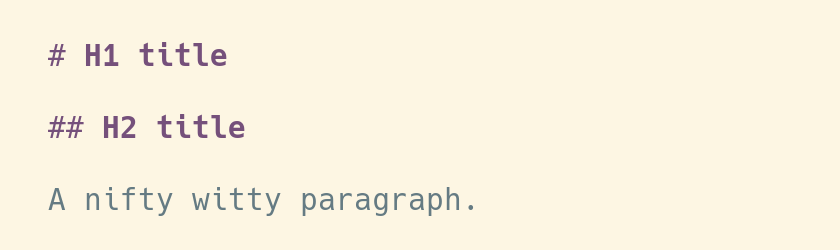
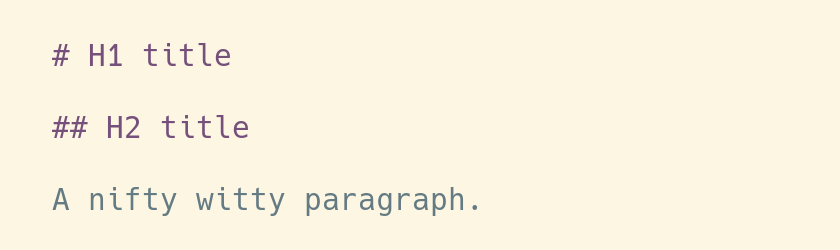 I'm mostly happy with that, except for one or two little details. I'd like to
have the titles displayed in bold, for example, so that they're easier to spot
when I skim through a Markdown file. It seems like a simple thing to ask, so I
hope there can be a simple solution.
The first steps
Let's learn the basics.
In Vim world, the rules to highlight files formats are defined in the directory
I'm mostly happy with that, except for one or two little details. I'd like to
have the titles displayed in bold, for example, so that they're easier to spot
when I skim through a Markdown file. It seems like a simple thing to ask, so I
hope there can be a simple solution.
The first steps
Let's learn the basics.
In Vim world, the rules to highlight files formats are defined in the directory
 The rabbit hole
So we could stop right here, and life would be easy and good.
However, with this solution there's still something that is not perfect. We use
the color
The rabbit hole
So we could stop right here, and life would be easy and good.
However, with this solution there's still something that is not perfect. We use
the color 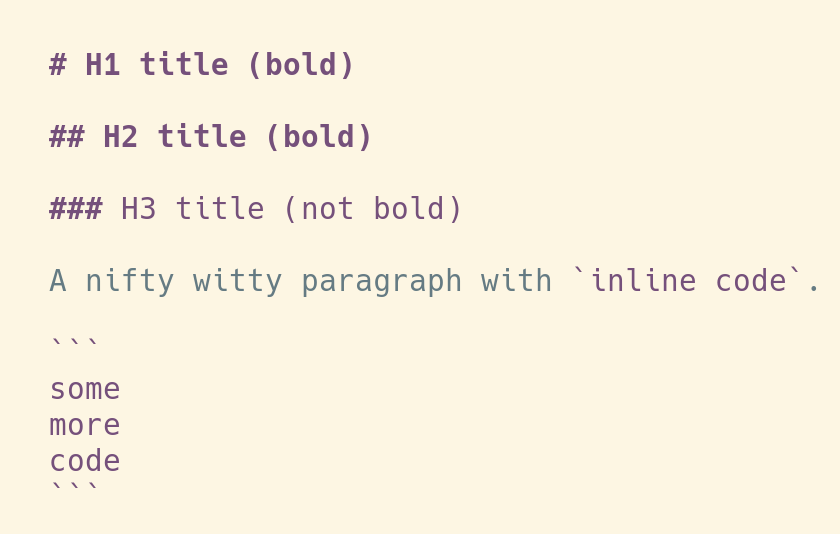 And a dark background:
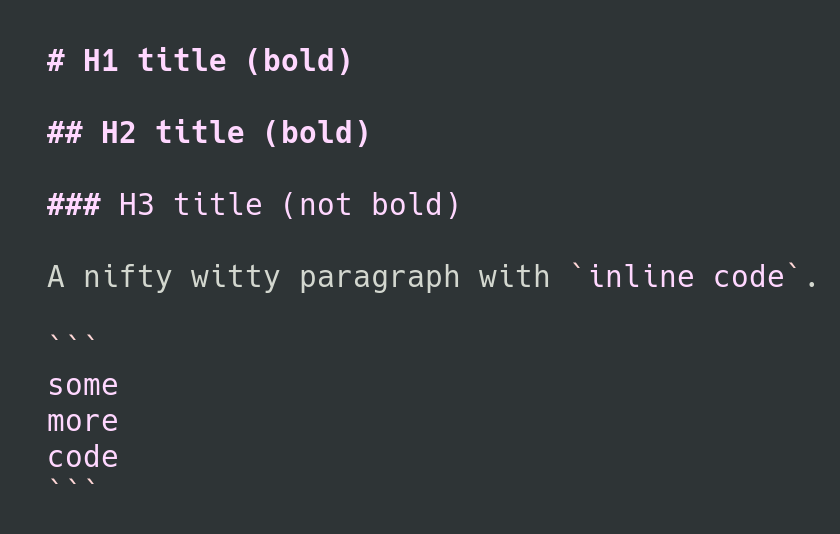 That's all, that's very little changes compared to the highlighting from the
original syntax file, and now that we understand how it's supposed to be done,
it's not much effort to achieve it.
It's just that finding the workaround to make it work for both light and dark
background took forever, and leaves the usual, unanswered question:
That's all, that's very little changes compared to the highlighting from the
original syntax file, and now that we understand how it's supposed to be done,
it's not much effort to achieve it.
It's just that finding the workaround to make it work for both light and dark
background took forever, and leaves the usual, unanswered question:  DebConf7
This tshirt is 13 years old and from DebConf7.
DebConf7
This tshirt is 13 years old and from DebConf7.

 Though as you can guess,
that's yet another story to be told. So anyway, Edinburgh.
I don't recall exactly whether the video team had to record 6 or 7 talk rooms
on 4 floors, but this was probably the most intense set up we ran. And we
ran a lot, from floor to floor, and room to room.
DebConf7 was also special because it had a very special night venue, which
was in an ex-church in a rather normal building, operated as sort of community
center or some such, while the old church interior was still very much visible
as in everything new was build around the old stuff.
And while the night venue was cool, it also ment we (video team) had
no access to our machines over night (or for much of the evening),
because we had to leave the university over night and the networking situation
didn't allow remote access with the bandwidth needed to do anything video.
The night venue had some very simple house rules, like don't rearrange stuff,
don't break stuff,
don't fix stuff and just a few little more and of course we broke them in the best
possible way: Toresbe with the help of people I don't remember
Though as you can guess,
that's yet another story to be told. So anyway, Edinburgh.
I don't recall exactly whether the video team had to record 6 or 7 talk rooms
on 4 floors, but this was probably the most intense set up we ran. And we
ran a lot, from floor to floor, and room to room.
DebConf7 was also special because it had a very special night venue, which
was in an ex-church in a rather normal building, operated as sort of community
center or some such, while the old church interior was still very much visible
as in everything new was build around the old stuff.
And while the night venue was cool, it also ment we (video team) had
no access to our machines over night (or for much of the evening),
because we had to leave the university over night and the networking situation
didn't allow remote access with the bandwidth needed to do anything video.
The night venue had some very simple house rules, like don't rearrange stuff,
don't break stuff,
don't fix stuff and just a few little more and of course we broke them in the best
possible way: Toresbe with the help of people I don't remember
 I'm not sure whether
I missed the day trip to Glasgow to fix video things or to rest or both...
Another thing I missed was getting a kilt, for which Phil Hands made a terrific
design (update: the design is called
I'm not sure whether
I missed the day trip to Glasgow to fix video things or to rest or both...
Another thing I missed was getting a kilt, for which Phil Hands made a terrific
design (update: the design is called  It seems I don't have that many more memories of this DebConf, British
power plugs and how to hack them comes to my mind and some other stuff
here and there, but I remember less than previous years. I'm blaming this
on the intense video setup and also on the sheer amount of people, which
was the hightest until then and for some years, I believe maybe even
until Heidelberg 8 years later. IIRC there were around 470 people there
and over my first five years of DebConf I was incredible lucky to make
many friends in Debian, so I probably just hung out and had good times.
It seems I don't have that many more memories of this DebConf, British
power plugs and how to hack them comes to my mind and some other stuff
here and there, but I remember less than previous years. I'm blaming this
on the intense video setup and also on the sheer amount of people, which
was the hightest until then and for some years, I believe maybe even
until Heidelberg 8 years later. IIRC there were around 470 people there
and over my first five years of DebConf I was incredible lucky to make
many friends in Debian, so I probably just hung out and had good times.
 Please do file bugs/issues if you run into issues, rough edges or unhelpful documentation, etc.

 Last month, I got selected as a


