Search Results: "otto"

7 June 2010

Sjoerd Simons: Is that a tea cosy on your head?

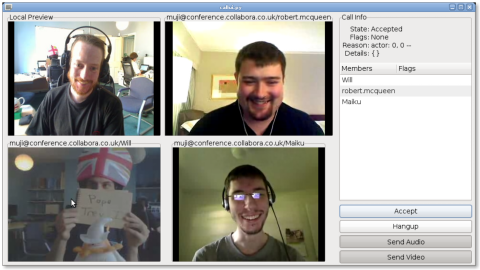
Since some time the good people at NlNet have been sponsoring Collabora to add multi-party audio/video calling to XMPP and do an implementation of this in Telepathy. This project is otherwise known as Muji. This work has resulted in: To proof it actually works, a nice screenshot of the demo client in a 4-way call: 4-way Muji Call The screenshot is featuring myself in Collabora's UK office (top-left), Robert McQueen from a hotelroom in Taipei (top-right), Will Thompson and Magical trevor also from the Collabora UK office (bottom-left) and Mike Ruprecht from somewhere in Missouri. So we were quite spread out over our little planet. Both audio and video quality was quite good, even though the network in robs hotel was a bit flaky from time to time. In case you want to try it out have a look at the MujiDemoClient page.

5 June 2010

Russell Coker: Bugs in Google Chrome

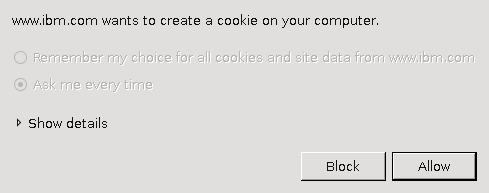
I m currently running google-chrome-beta version 5.0.375.55-r47796 on Debian/Unstable. It s the fastest web browser I ve used in recent times it s the first time that I ve run a browser that feels faster than my recollection of running IBM WebExplorer for OS/2 on a 486-66 system! It has a good feature set, and it s the only browser I ve used that in a typical configuration will make proper use of the screen space by not having a permanent status bar at the bottom of the sceen and by having tabs in the title-bar. But it s not perfect, here is a list of some bugs: Chrome Titlebar when maximisedChrome Titlebar when not maximisedRight of Chrome Titlebar when not maximised Above are three partial screen captures of Chrome, the first is when maximised and the second is when the window isn t maximised. Notice the extra vertical space above the tab in the title bar in the second picture. The third picture shows the right side of the titlebar and you can see a space below the three buttons where you can drag the window around no matter how many tabs you open that space below the three buttons is reserved. If the Chrome developers had removed the extra vertical space in the titlebar and reserved slightly more horizontal space then you would be able to drag the window around. While an anonymous commentator made a good point that the extra vertical space can be used to drag the window around when the maximum number of tabs are open, it seems that there are other ways of achieving that goal without wasting ~18 vertical pixels. Doing so would be a lot less ugly than what they did with finding text in the page. When I visit a web site that uses cookies from an Incognito Window (which means that cookies etc aren t stored) there is no option to say allow all cookies . This is really annoying when you get to a web site such as the IBM one which stores 5 cookies when you first load the page and then at least one new cookie write for every page you visit. Given that cookie data will be discarded as soon as the window is closed it seems like a good idea to have an option to allow all cookies for Incognito Windows even if all cookies aren t allowed for regular windows. Blocking all cookies would be OK too, anything but having to click on Block or Allow multiple times for each page load. The J and K keys don t work in a view of Venus version 0~bzr95-2+lenny1 (the latest version in Debian/Lenny). I once had a situation where I entered a . at the end of a domain name (which is quite legal there is always an implied dot) and Chrome then wouldn t take note of my request to accept all cookies from the domain. I haven t been able to reproduce that bug, but I have noticed that it stores the settings for whether cookies should be stored separately for domains that end in . , so www.cnn.com. is different from www.cnn.com . Iceweasel seems to just quietly strip the trailing dot. Of course this is better than Konqueror which won t even load a URL with a dot at the end. Chrome can be relied on to restore all windows rapidly after a crash, unlike Iceweasel which restores them at it s normal load speed (slow) and Konqueror which doesn t tend to restore windows. This is good as it does seem to crash regularly. In a response to my post about Chrome and SE Linux [1] Ben Hutchings pointed out that the --no-sandbox option to chrome disables the creation of a PID namespace and therefore makes debugging a lot easier, if I get a lot of spare time I ll try and track down some of the Chrome SEGVs. The JavaScript compiler is either buggy or it s not buggy in situations where people expect IE bugs. When using the Dell Australia web site I can t always order all options. When trying to order a Dell R300 1RU server with hot-plug disks in a hardware RAID array it seems impossible to get all the necessary jumpers which is a precondition to completing the order fortunately I only wanted to blog about how cheap Dell servers are so I don t actually need to complete an order. Dell s web site is also difficult in Iceweasel on occasion, so it s obviously more demanding than most sites. It might be a good test site for people who work on browsers as it s both demanding and important. When I select a URL to be opened in a new window (or when JavaScript does this) then the new tab is opened with about:blank listed as the URL. If the URL is for a PDF file (or something else that is to be downloaded) then the URL entry field is never updated to give the real URL. I believe that this is wrong, either the new tab shouldn t be opened or it should have the correct URL on display there is no benefit with a tab open to show nothing but about:blank in the URL entry field. Also if a URL takes some time to load then it may keep about:blank in the URL entry field for some time. This means that if you use the middle mouse button to rapidly open a few new tabs you won t be able to see what is to be loaded in each one. Sometimes I have several tabs loading and I m happy to close some unimportant ones if they are slow but some are worth waiting for. Overall that s not too bad. I can use Dell s site in Iceweasel, so the only critical bug is the cookies issue in Incognito Windows which makes the Incognito feature almost unusable for some sites.

31 May 2010

Gunnar Wolf: Update: A correspondingly pleasant dinner

Update: A correspondingly pleasant dinner
And just to round off my last post (and of course, following a completely non-technical thematic), what is the logical consequence of feeling introspective and blogging just before preparing dinner? Of course Dinner gets prepared with sharing it in mind. The dish ends up even looking as if meant to be served! So this was it: One of my simplest and still favorite dishes: Tostadas. But, yes, these are heterodox tostadas, as they share the basic tostadiness (a hard, roasted and cracky toasted corn tortilla with a soft leguminous layer to give it some consistency, and with... stuff on top. Yes, stuff is sometimes too generic, but that's the beauty of it). What did I come up with? In the strict order with which they were approached at feeding time, and described bottom to top:
  1. Closest to traditional, top left: Mashed beans, bits of panela cheese with little bits of chipotle and soybean-based vegetarian chorizo
  2. Something I have only seen in Guatemala, and which I intend to take a better look at next time I'm there (top right): Mashed frijoles, , cochinita pibil (canned, shame on me, and frankly lacking in taste), grated beet (betabel/remolacha/betarraga/whatnot), grated cabbage
  3. The heterodoxiest of them all, and the idea that led me to the others (center): Mashed lima/fava beans (according to Google habas), cochinita pibil, nopales, and a hint of habanero sauce.
Yum! [update] On a completely unrelated notice, but not worth opening a third post in a row... Some minutes after I published the earlier post, I got a visit to http://gwolf.org/blog/pleasant-perception-changes?utm_source=twitterfeed&utm_medium=twitter. Now, it beats me: I don't use twitter. I don't even care about twitter. And were my message so deep somebody just twitted (twat it?) right away, I still find the time lapse too short. Who's auto-twitting me? Maybe a planet or other such aggregator?

26 May 2010

Nico Golde: fail2ban + dns = fail

fail2ban is used by many people to prevent certain types of DoS attacks. I use it myself to reduce trackback spam a little bit.

While this tool becomes quite handy in such situations it is also not generally recommend because you can shoot yourself in the foot. If one of the used filters has a bug and results in incorrect parsing your fail2ban installation might end up banning arbitrary IP addresses or even your own IP range (not even mentioning IP spoofing).
There existed at least two bugs of this kind to my knowledge and since regex might not always be easy I'm sure there will be more in the future.

Since I didn't want to look for a specific regex bug in one of the filters I thought about IP spoofing again and looked at fail2bans filters. What I needed was a filter processing log entries of a service listening on a UDP socket as TCP/IP spoofing over the internet doesn't really work well these days. Finding such a filter would mean an instant win situation. To my surprise there is such a filter: config/filter.d/named.conf

This filter is used to parse log entries consisting of denied DNS queries produced by bind. Interestingly there is even an article at debian-administration describing how to setup fail2ban to mitigate a DNS DDoS attack. This is of course a bad idea and I have no idea why this filter is shipped in a default fail2ban installation. DoSing abritary IP addresses with this filter in use becomes as easy as firing up scapy and querying the server with a forged source IP:

>>> send(IP(dst="81.169.172.197",src="xx.46.63.71")/UDP()/DNS(rd=1,qd=DNSQR(qname="foao.modprobe.de")))
.
Sent 1 packets.

This ends up as:
May 26 22:32:22 modprobe named[30245]: client xx.46.63.71#53: query 'foao.modprobe.de/A/IN' denied

in the bind logs which in turn results in:
2010-05-26 22:32:05,551 fail2ban.actions: WARNING [named-refused] Ban xx.46.63.71

In this example the spoofed IP was xx.46.63.71 which is not under my control.

Mission statement: don't use fail2ban unless you really want to shoot yourself in the foot or know pretty well what you're doing :-)

25 May 2010

Russell Coker: Links May 2010

AdRevenge is an interesting concept to pay for Google Adsense adverts about how companies suck [1]. If a suitably large group of people pay to warn you about a company then it s a good signal that the company is actually doing the wrong thing. A guest post by Mili on Charles Stross blog has an interesting analysis of the economcs of Intellectual Property and concludes that content is a public good [2]. New Age Terrorists Develop Homeopathic Bomb [3], an amusing satire of medical fraud and security theatre. The sit has a lot of other good satire too. Mark Shuttleworth wrote an interesting post about new window management changes that will soon go into Ubuntu [4]. He points out that the bottom status bar in applications is a throw-back to Windows 3.1 and notes that a large part of the incentive for removing it (and using the title-bar for the status) is the work on the Netbook version of Ubuntu. This is really ironic given that the resolution of current Netbooks is quite similar to that of desktop systems that were current when Windows 3.1 came out. Omar Ahmad gave an insightful TED talk about the benefit of using a pen and paper to send a letter to a politician [5]. Sebastian Wernicke gave an amusing and informative TED talk about how to give a good TED talk [6]. His talk gives some useful ideas for public speaking that are worth considering. Catherine Mohr gave a brief and interesting TED talk about how to build an energy efficient house with low embodied energy [7]. Her blog at www.301monroe.com has the details. Stephen Wolfram (of Mathematica fame) gave an interesting TED talk [8]. He covers a lot of interesting things that can be done with computers, primarily based on the Wolfram Alpha [9] platform which allows natural language queries of a large data set. He also talks about the search for a Theory of Everything. Esther Duflo gave an interesting TED talk about using social experiments to fight poverty [10]. She describes how scientific tests have been used to determine the effectiveness of various ways of preventing disease and encouraging education in developing countries. One example of the effectiveness of such research is the DeWormTheWorld.org project which was founded after it was discovered that treating intestinal worms was the most cost effective way of getting African children to spend longer at school. David L. Rosenhan wrote an interesting research paper On Being Sane In Insane Places about pseudo-patients admitted to psychiatric hospitals [11]. It seems that psychiatric staff were totally unable to recognise a sane person who was admitted even though other patients could do so. It also documents how psychiatric patients were treated as sub-human. One would hope that things had improved since 1973, but it seems likely that many modern psychiatric hospitals are as bad as was typical in 1973. It s also worth considering the issue of the treatment in society of people who have been diagnosed with a mental illness, it seems likely that the way people are treated in the community would have similar bad results to that which was documented for treatment in psychiatric hospitals even the sanest people will act strangely if treated in an insane manner! Also it seems to me that there could be potential for using a panel of patients assembled via the Delphi Method as part of the psychiatric assessment process as it has been demonstrated that patients can sometimes assess other patients more accurately than psychiatrists! Simon Sinek gave an inspiring TED talk about how great leaders inspire action [12]. Of course the ideas he describes don t just apply to great leaders, they should apply to ordinary people who just want to convince others to adopt their ideas. Stephen Collins write a good article summarising the main reasons why the proposed great firewall of Australia is a bad idea [13]. Lenore Skenazy who is famous for letting her 9yo son catch the metro alone during broad daylight on a pre-planned route home has created a web site about Free Range Kids [14]. She seems to be starting a movement to oppose Helicopter Parenting and has already written a book about her ideas for parenting. The incidence of crime has been steadily increasing, as has the ability of the police to apprehend criminals and recover abducted children. There s no reason for children to be prevented from doing most of the things that children did when I was young!

24 May 2010

Neil Williams: HP laptop battery recall

From Planet Gnome - apologies if you read both planets but I hadn't seen this recall before it was posted by Richard Hughes. If you are affected, feedback the required metadata to upower using:
for i in /sys/class/power_supply/*/*; do echo $i; cat $i; done


My HP dv6000 laptop met the initial criteria but once I'd entered all the info, I got a message:

Your battery is not affected and is not part of this replacement program.
Thank you for your cooperation. ..... You may continue using your battery.


Which is nice.
:-)

30 April 2010

Russell Coker: Link Within

Good Things about LinkWithin For the last 10 weeks I ve been using the LinkWithin.com service to show links to other blog posts at the end of each post (the links are only shown to visitors of my blog not in the RSS feed, so people who read my posts through RSS syndication will miss this). The service shows excerpts of pictures from my blog at the bottom of each post to entice readers into reading other posts. When you click on a LinkWithin icon on my blog you visit a LinkWithin page that redirects you back to my page, so people who use that show up as new visitors being referred by LinkWithin. Currently this month LinkWithin is the fourth highest referrer to my blog, below Google, Reddit, and WebWombat.com.au so it is clearly doing some good in enticing people to read other posts that they might not otherwise read! Bad Things about LinkWithin The first problem with LinkWithin is that the Wordpress plugin was written by people who don t know much about Wordpress. Unlike every other plugin I use it doesn t support configuration options for the user in the database but instead has it hard coded in the PHP code! When you download a plugin from their web site it creates a custom zip that includes the PHP code automatically generated just for you! I have some friends using the same web server as me for running blogs, and I have to tell them you can install any plugin apart from LinkWithin it works for no-one but me . The next problem is that LinkWithin advertises that it will display related posts, it seems to be doing a poor job of that on my blog although admittedly only a minority of my blog posts have pictures so this limits what it has to work with. This has however inspired me to use more pictures in my posts. Another problem is that it produces web pages that are not valid XHTML, the following patch fixes this. --- /tmp/linkwithin.php 2010-02-22 02:09:47.000000000 +0000
+++ ./wp-content/plugins/linkwithin/linkwithin.php 2010-02-22 02:17:29.000000000 +0000
@@ -15,7 +15,7 @@
global $post, $wp_query, $linkwithin_code_start, $linkwithin_code_end; $permalink = get_permalink($post->ID);
- $content .= '<div class="linkwithin_hook" id="'.$permalink.'"></div>';
+ $content .= '<div class="linkwithin_hook" id="'.str_replace('/','-',$permalink).'"></div>';
$content = linkwithin_add_code($content);

return $content;
@@ -26,13 +26,13 @@
global $post, $wp_query, $linkwithin_code_start, $linkwithin_code_end; if ($wp_query->current_post + 1 == $wp_query->post_count)
- $embed_code = '<script>
+ $embed_code = '<script type="text/javascript">
<!-- //LinkWithinCodeStart
var linkwithin_site_id = 151382;
var linkwithin_div_class = "linkwithin_hook";
//LinkWithinCodeEnd -->
</script>
-<script src="http://www.linkwithin.com/widget.js"></script>
+<script src="http://www.linkwithin.com/widget.js" type="text/javascript"></script>
<a href="http://www.linkwithin.com/"><img src="http://www.linkwithin.com/pixel.png" alt="Related Posts with Thumbnails" style="border: 0" /></a>';
$content .= $embed_code;
Finally LinkWithin shows up badly on the FireBug analysis (see my previous post about using Firebug to speed up my blog) [1] see the below picture for details. As an aside, given that Google recommend Firebug it is rather ironic that Google Adsense related URLs cover the majority of the Firebug issues that are not caused by LinkWithin. demonstration of how Linkwithin lowers my page speed What Next? I ve sent email to the LinkWithin people about all these issues other than the FireBug problem reports, given that they haven t responded to some suggestions for over 10 weeks it seems hardly worth my effort in informing them of other issues. I m thinking of trying OutBrain.com again. 18 monthe ago I tried OutBrain but never got it working due to technical issues and then forgot about it. It has some similar features and may work better at least it has tech support people who respond to queries!

27 April 2010

Matthew Garrett: Radeon reclocking

Alex released another set of Radeon power management patches over the weekend, and I've been adding my own code on top of that (Alex's patches go on top of drm-next, mine go on top of there). I've left it stress-testing for a couple of hours without it falling over, which tells me that it's stable enough that I can feel smug. This is a pleasing counterpoint to the previous experiences I've been having, which have been rife with a heady mixture of chip lockups or kernel deadlocks. It turns out that gpus are hard.

There's a few things you need to know about gpus. The first is that if they're discrete devices they typically have their own memory controller and video memory. The second is that there's an impressive number of ways that you can end up touching that memory. The third is that they tend to get upset if something tries to touch that memory and the memory controller is in the middle of reclocking at the time.

The first and most obvious use of video memory is by the gpu itself. Accelerated operations on radeon are carried out by sending a command packet to the command processor. This is achieved by sharing a ring buffer between the cpu and the gpu, with the gpu reading packets out of that ring buffer and performing the operations contained within them. Many of these operations will touch video memory (that being the nature of most things you want a gpu to do), and if that happens bad things occur. Like the card locking up and potentially taking your PCI bus with it.

So, obviously, we don't want that to happen. The first thing we do is take a mutex that blocks any further accelerated operations from being submitted by userspace. Then we wait until we get an interrupt from the gpu telling us that the display engine has gone idle. The problem here is that we don't have a terribly good idea of how many more operations there are to complete and we don't know how long each of those operations is going to take, but this is less bad than some of the alternatives[1]. Jerome Glisse has some ideas on how to improve this to require less waiting, but the effects should still be pretty much invisible to the average user.

So we've stopped the command processor touching ram. Everything's good, right?

Well, not really. The obvious problem is that users typically want to display something, so there's a separate chunk of chip that's repeatedly copying video memory over to your monitor. That's got to go too. Thankfully, there's a convenient bit in the crtc registers that lets us turn that off, but the pretty unsurprising downside is that your screen goes blank while that's happening. So we don't want to do that. Instead, we try to perform the reclock while there's nothing being displayed on the screen - that is, while we're in the screen region where a crt's electron gun would be scanning back from the bottom of the screen to the top. It turns out that rather a lot of display assumptions depend on this happening even if there's no crt, no electron gun and no thick sheet of glass with a decent approximation of vacuum behind it, so we get to do this even if we're displaying to an LVDS. And we have about 400-500 microseconds to do it - an almost generous amount of time.

So we ask the hardware to generate an interrupt when we enter vblank and then we reclock. Except the hardware has an irritating habit of lying - sometimes we get the interrupt a line or two before vblank, sometimes we get it after we've already gone out the other side. Vexing, and not entirely solved yet - so sometimes you'll still get a single blank frame during reclock. But there are plans, and they'll probably even work.

At this point the acceleration hardware isn't touching the memory and the scanout hardware isn't touching the memory. Except it still crashes under some workloads. This one took me longer to track down, but the answer turned out to be pretty straightforward. Not all operations are accelerated. When they're not accelerated they have to be done in software. That means that the CPU has to write to the video memory itself. I'm sure you can see where this is going. This was fixed without too much trouble once I'd finished picking through the driver to work out every location where objects might be mapped into the CPU's address space, at which point it's a simple matter of unmapping them and blocking the fault handler from remapping them until the reclock is finished. Linux, thankfully, has lots of synchronisation primitives. And now everything works.

Except when it doesn't. This took a final period of head scratching, followed by the discovery that ttm (the memory allocator used by radeon) has a background thread that would occasionally fire to clean up objects. And by clean up objects, I mean change their mapping - which means updating their status in the gart, which means touching video memory. So, let's block that. And that tripped me off to the fact that even if it couldn't submit new commands, the CPU could still create or destroy objects - with the same consequences.

So, once all of these are blocked, video memory is quiescent and we can do what we want. And we do, at least once I'd sorted out the bits where I was taking locks in the wrong order and deadlocking. Depending on the powerplay tables available on your card we'll chose different rates and so your power savings will vary heavily depending on the values that your vendor provided, but the card I'm testing on sees a handy 30W drop at idle. Right now we're only changing clocks and not dropping voltage so there's potentially a little more to come.

While getting this stable was pretty miserable, the documented entry points for clock changing made a lot of this easier than it would otherwise have been. It's also probably worth noting that Intel's clock configuration registers are entirely missing from any public documentation and the dirver Intel submitted to make them work in their latest chips appeared to have been deliberately obfuscated, so thanks to AMD for making all of this possible.

[1] It's possible to insert various command packets that either indicate when they've passed or stall until a register value gets updated, but these either cause awkward problems with the cp locking or mean that the gui idle functionality never goes idle, so they're not ideal either.
26 April 2010

Christoph Egger: [Review] AI Touchbook

Having my primary working Computer, a Lenovo Thinkpad, going into repair at the end of December I finally got up to ordering on of those TouchBook ARM based netbooks I was looking at for some time. After some processing time it finally got shipped in April and arrived here last Monday, time to write up my first impressions. Some words about the Hardware. The TouchBook ships with a so called "Beagle Board" featuring a OMAP3 Processor, ARM Cortex A8 running at 600MHz, 512MiB of RAM and a 8GiB SD Card for storage. It has a 8.9" touch screen and comes with USB and Bluetooth Sticks for wireless connectivity. The Display part contains all the needed Hardware and is detachable from the bottom that is just a keyboard sitting on the secondary Battery. You can open the Top to get at 4 intern USBs (3 USB-A and one Mini-USB) where 2 of these spots are occupied already for wireless networking and Bluetooth. First experience The TouchBook comes with an US Power Adaptor only so when I got the device I was running for some tiny Adaptor to get the plug into a normal EU Power Outlet (it's incredibly hard to get one for this Direction while it's easy to get some travelling stuff to plug EU Hardware into various different Outlets!). When I finally booted it the first thing you'll notice is the touch interface for the bootloader. That's quite a difference to all-text-based old grub! The shipped SD Card offers 3 Operating Systems, one custom Linux that might well be interesting to the average User, a Ubuntu Karmic that really OK for a Debianoid Hacker- both running a XFCE Desktop - and a Android that is really slow and doesn't seem to be good at anything. Needless to say I sticked with the Ubuntu for now. What to not expect Well this is a 600MHz CPU with half a Gig of RAM running of a SD Card. So don't expect it to be good at anything that can profit from today's High-End Hardware. The good Points First of all, I have to admit that the touch screen is a neat interface, way superior to the Touchpad Area you'll normally find on a Notebook - at least if you use the stylus. It's quite different from the inside-the-keyboard trackball the thinkpads have of course. The Website claims 10h of Battery life and while I've emptied the battery much faster under certain workloads (e.g. Playing cards) it does hold that promise with emacs fired up in org-mode, IRCing on a server over SSH and the mandatory wireless working. Same for a always-on on campus day which just works. Again putting the screen on the keyboard the wrong way 'round will give you a touchscreen tablet with the keyboard out of your way, an ideal configuration for playing. And I have to admit playing games like gtkballs or aisle riot real fun. So much fun actually I'm currently thinking on whether it would be feasible to get openpandora working on it. What I'm really missing There are two Properties that are really lacking from the device which would make it (in my personal opinion at least) a whole lot better: A simple Ethernet controller I could use to go online when sitting in the server room doing some maintenance without taking my WRT with me and some slot to store the stylus when not using it where it's easy to get out (currently I'm having it in my wallet). Then there's something (maybe a Kernel Bug): The Wireless is unable to find any new Access Point after disconnecting from some and walking out of reach from that. Force-unloading the kernel module and waiting 30 minutes worked for me multiple times but that's purely inacceptable. Finally there are some minor glitches. The shiny red cover just gets dirty every time you touch the thing and the Keyboard is really small (what a surprise on a 9" device) and has some of the special Keys (like the Home key) located at unusual spots (Page-Up/Down only available through the FN modifier). Shift and End at the right side are also labeled opposite from their actual function (at least on Ubuntu). The last ugliness is the top part battery only charging when the device is running, which means you"ll have the TouchBook running all night to get the battery charged and the Battery Monitor not working at all (at least in the current version of the operating systems). Where to go now I've not yet come around to really play with the operating system (apart from installing wicd, urxvt-unicode and awesome getting the most needed of my working environment). As I'm a Debian Developer I'll definitely need a Debian running on it (although I was told it'll be slow with software compiled for armv4te) and, as it needs to be running all night anyway, I'll try out gentoo pending another SD Card for experiments. Secondly there's currently no useable conforming Common Lisp Implementation in Debian for armel as far as I can tell. As arm was already working it shouldn't be that hard, let's see if I can change that but feel free to join me! Final Notes I was thinking of some mobile-ish note-taking device and remote ssh terminal for University which the device clearly can do even for 10h away from any power plug while being some non-standard non-x86 device to toy on (It's actually my second armel next to the sheeva plug mounted on my window board. As a final Remark: This blogpost was written on the TouchBook hacking some markdown into emacs while traveling by train to Erlangen where I study on Sunday Night after having read some chapters of Cory Doctorow's Little Brother on my E-Slick E-Book reader and finished later in my Room. Maybe I'll find some time to write a review for this device as well one day!

25 April 2010

Matt Zimmerman: Ten TED talks I took in today

Starting about a year ago, I started following the release of videos from TED events. If one looked interesting, I would download the video to watch later. In this way, I accumulated a substantial collection of talks which I never managed to watch. I spent a Saturday evening working my way through the list. These are my favorites out of this batch.

23 April 2010

Wouter Verhelst: Touching up a video with Cinelerra

I found myself with a problem: trying to linearly edit a movie clip with a non-linear editor isn't very simple, nor is it meant to be. Case at hand: I have about 1 hour and 40 minutes of film material that was recorded with dvswitch, and which is 90% fine; but given what we wish to do with it, we really wish to remove the errors from the recording things like failed transitions, rogue camera movements, and so on. This is why we recorded the individual video streams on tape too, so that we could indeed do some retouching afterwards. Cinelerra, however, is not really made for that. If you want to create a transition, you need to have two segments of clips that are stuck together on the timeline, and the transition is then applied to the border between the two. You can create multiple video tracks, but you cannot cut from one track to another; you really have to add a clip to the timeline. Doing that has obvious issues if you have multiple video streams that were recorded on the same time and that can be time-synced on multiple tracks. You would prefer to just select one track or the other on a certain point in time, but cinelerra just doesn't do that. So the workflow that I found is the following: Add all video streams to the time line, each on a separate track. Make sure the to-be-touched-up stream is on top; when multiple tracks are in use, and the are not faded to 50% or so, cinelerra will only show the top stream in the final rendition. Synchronize the streams: first, create a rough alignment by moving them with the mouse. Then, press arrow-down until you can see the streams on a frame-by-frame basis. Now for each of your camera streams, do the following:
  1. In the 'main' stream, search a section that was filmed by the camera which we are trying to align.
  2. Hit 'l' to create a label
  3. Search for the exact same frame in the camera stream. It may help to disable playback for the 'main' stream temporarily to visually verify that the frame is the same in the compositor window.
  4. Move the cursor to that frame, and create another label.
  5. If the streams are indeed desynced, then one of the tracks will lead, and the other will follow. If the leading track is the 'main' track, arm the main track and any tracks that you have already synced before, and make sure to remember the audio tracks. If, on the other hand, this is the camera track, then only arm that camera track. At any rate, make sure to disarm the track(s) that are following.
  6. Use the control and arrow keys to select the first label. Use control, shift, and the arrow keys to select the section up to the second label.
  7. At the bottom right of the program window, you can see three entry boxes with time indexes. The first is the time index to your first label; the third the time index to your second label; an in between those, the second is the length of the interval from the first label to the second label. Set the contents of the first box to all-zeroes, to move the selection to the beginning of the time line; then press tab (to move to the second entry box) and enter (to confirm that you wish to create a selection of that length at the beginning of the timeline).
  8. Press Shift-Space to insert silence at the location of the selection. This will move the armed tracks to the right, and not touch the not armed tracks.
  9. If you did everything right, the two tracks should now be aligned. Move the cursor to the second label, and verify that this is true by disabling 'play' for the main track and any tracks in between the main track and the track you're syncing. The frame in the compositor window should not change if you re-enable the main track. If it does, use 'z' for undo, remove your labels and try again.
Once your video tracks are aligned, you need one final video track that comes all the way on top. This is an empty, 'override' track. Anything you put in this track will override the main track. This way, you do not have to cut from the main track to another camera; instead, you just copy from a camera track and paste on the override track. It is, of course, possible to paste onto the main track, but that has the disadvantage that you cannot easily undo such edits after a 'save' operation. Using a separate 'override' track does allow that. To copy from one track to another track without moving in time, use the following method:
  1. Select the region where you wish to select another camera.
  2. Arm the camera track that you wish to copy from, and make sure not to arm any other track.
  3. Hit 'c' to copy the clip at that point.
  4. Disarm the camera track, and arm the 'override' track
  5. Without moving or removing the selection, hit 'v' to paste onto the override track.
All this may be basic knowledge for people who are more flexed in nonlinear editors than me; but I couldn't find this procedure on the Internet, so I thought I'd put it out there so that the next person who tries this doesn't have to try for days on end to come up with this, as I had to do.

11 April 2010

Russell Coker: Debian/Testing and KDE4

I ve just upgraded my Thinkpad (which I use for most of my work) to Debian/testing with KDE4. Improvements Kde 3.5 (from Debian/Lenny) didn t properly display the applets in a vertical task bar. I want a vertical task bar because my screen resolution is 1680*1050 and I find that a less rectangular screen workspace is best for my usage patterns. In my previous post about my Thinkpad T61 I described how the sound controls weren t working [1]. These problems were fixed as part of the upgrade, KDE just does the right thing. Now when I press the buttons to increase or decrease the volume the ALSA settings are changed and a small window is briefly displayed in the center of the screen to show the new volume. Sounds are now made when I plug or unplug the power cable, this was configured in KDE 3.5 but just didn t work. Problems If I have a maximised Konqueror window and I use the middle mouse button to open a link in a new window then the new window will also be maximised. Previously when I did that the new window was not maximised. What sometimes happens is that I want to open several links from a web page in different windows, so if I can open them in non-maximised windows then I can click the title-bar or the bottom status-bar of the parent window to get it in the foreground again. Probably an ideal solution to this use-case would be to configure the middle mouse button to open a new window in the background or minimised. I can t figure out how to implement accelerator keys for window controls. In particular I like to use ALT-F9 to minimise a window (CUA89 standard). The upgrade from KDE 3.5 to KDE 4 lost this and I can t get it back. I want to have an icon on my panel to launch a Konqueror session. I don t want a large amount of space taken up for a launcher for several different Konqueror options, I just want a regular Konqueror for web browsing available at a single click. There didn t seem to be an option for this. KDE 3.5 has an option in the add widgets to toolbar dialogue to add icons for applications. I have just discovered that in KDE 4 the only way to do this is to go through the menu structure and then click the secondary mouse button. Having two ways to do something is often a good thing, particularly when the other way is the way that was most obvious in the previous version! It was annoying that the font choices for my Konsole session were lost on the KDE 4 upgrade, it s not a complex setting. Also the option to resize a Konsole session to a common size (such as 80*25) seems to have been lost. I had to spend at least 30 minutes configuring kmail to get it to display mail in much the same manner as it used to. You have to use the Select View Appearance (Theme) icon off at the right of the Search box and select Classic and then go to Select Aggregation Mode (immediately to the left) to select Flat Date View . I m happy for KDE 4 to default to new exciting things when run the first time, but when upgrading from KDE 3.5 it should try to act like KDE 3.5. I decided to use Kopete for Jabber just to preempt the GNOME people adding Mono support to Pidgin. I had to install the libqca2-plugin-ossl and qca-tls packages to enable SSL connection, missing either of those gives you an incomprehensible error condition that even strace doesn t clarify much. Given that it s generally agreed that sending passwords unencrypted over the Internet is a bad idea and that it s a configuration option in Jabber servers to reject non-SSL connections it seems to me that the Kopoete package should depend on the packages that are needed for SSL support. Failing that it would be good to have Kopete offer big visible warnings when you don t have them. I use the KDE 2 theme and the right side of the title bar of each window is a strange dappled pattern. Not sure why and I have more important problems to fix. Parts of KDE crash too often. I ll start filing bug reports soon. The management of the Desktop folder has changed. In previous versions of KDE the directory ~/Desktop had it s contents displayed in iconic form on the root window. Now by default it doesn t do that. It is possible to change it, but this is one of those things where the default in the case of an upgrade should be to act like previous versions. The way to enable the previous functionality is to go to the desktop settings (click the secondary mouse button on the background, select Desktop Settings and then under Desktop Activity change the Type: to the value Folder View and then specify the directory below. The facility to have different background colors or pictures for each of the virtual desktops seems to have been removed either that or the KDE configuration system doesn t have enough functionality to let me discover how to configure it. When the panel that I have on the left of the screen crashes everything that was next to the panel gets dragged to the left, this includes extending the width of maximised windows. Then when the panel starts again (which if lucky happens automatically) it pushes things back and if icons had been moved left it just obscures them. When using Konqueror to browse a directory full of pictures it doesn t generate thumbnail icons. When I middle-click on an icon for a picture it is opened with Konqueror not the image viewer that was used in KDE 3.5. The image viewer from KDE 3.5 had less options and therefore more screen space was used for the picture. Also the Konqueror window that is opened for this has a navigator panel at the left which I can t permanently remove. When I use Konqueror my common action is to perform a Google search and then use the middle button to open a search result in a new window. Most of my Google searches return pages that have more than one screen-full of data so shortly after opening a window with a search result I press PgDn to see the next page. That press of PgDn for some reason takes me back to the Google search. It seems that when a web page is opened in a new window the keyboard focus will be in the URL entry field, and pressing PgDn in that field takes you to the previous web page. This combination is really annoying for me. Conclusion Getting the sound working correctly is a great feature! Lots of little things are fancier and generally the upgrade is a benefit. The lack of thumbnails when displaying a folder of JPG files is really annoying though. The time taken to configure things is also annoying, I support four relatives who are just users so that probably means at least an hour of configuration work and training for each one so KDE 4 is going to cost me at least half a day because of this.

9 April 2010

Gustavo Noronha Silva: Designing from the bottom up

Have you ever seen, while dealing in a support channel with a novice that just got in touch with the power of UNIX a conversation that goes like this?:
<novice> How can I process the output of a command, so that any number of spaces gets turned into a newline?
<seasoned> What are you trying to do?
<novice> I want to list the contents of a directory, but I want one per line.
<seasoned> ls -1
I have seen this numerous times, even as one of the actors. At times I was the novice, and many times in #debian-br I was the seasoned person trying to get the novice to focus on the problem they were trying to solve, not on the solution they thought was right. While reading M ir n Duffy s awesome paper about contributing to Free Software as a designer I couldn t help but get that image brought to my memory again, and again. Specially when I read this part:
This means the language and even the approach FLOSS projects take to solving problems tend to be focused on implementation and technology rather than starting with a real-life user problem to solve and determining appropriate implementation afterwards.
That does sound like us, and it does sound like many of the solutions we come up with. While I was reading her paper, there was a reference I got very interested in checking. It s a PDF with no links in it, so I only had the number of the reference. What I would have to do is I would have to scroll to the end of the paper, and find the reference, then somehow come back to the place I was looking at. My most immediate thought was you know, maybe evince should have tabs . Why? Because I could open a new tab, go to the place the reference was at, and to go back I just needed to close the new tab. Other options require much more effort - remembering the page I was at, or maybe the scroll offset more or less, and scan for the part of the text I was at. But those are not the only options! I could have the application set a marker on where I am, and have an easy command to go back to that marker, for instance, or evince could provide a way of looking ahead without throwing away the current state at all. I m pretty sure if I look around enough I will find tools that solve this problem in a fairly good way. Now, I think that is exactly how we ended up with tabs in so many places they do not make sense in, and with so many ad-hoc solutions that solve our problems in half-assed ways. Even in browsers, we tend to use tabs as ad-hoc solutions to real problems we have no real solution to handle yet, such as I want to check this other thing out real quick, but I do not want to lose any state of this page , or I want to check this out, but not right now, so let me open it, and then I ll come back to it , or maybe even I want to look at this now, but since it is going to take a while to load, I might as well let it load in the background, and when I finish reading this I can go look at it . These are the real problems we have, and I think we need better designs that solve them for real, instead of just patching them with the ad-hoc solution that tabs are. The other extreme of the spectrum is, of course, not doing something, or even anything for lack of the perfect solution. Using this is not a real solution as an excuse to not implement something that could serve as a temporary solution to a problem may cause more frustration than having to deal with the ad-hoc solution that is tested, and being applied to other applications for some time. After all, in many cases the ad-hoc solution can be later replaced with a proper one. I guess this is another instance of the very difficult problem of balancing different realities: proper design is not always available to start something up, specially if the application is backed by individuals and not by a company or a bigger project that could bring in designers to work on it from the start. In this case having something up and running is usually a very important first step in a free software project - usually required to get enough interest to make it worth designing for.

C.J. Adams-Collier: Getting started with gtk

This is a quick tutorial for getting a first gtk-sharp app up and going. Install MonoDevelop
$ sudo apt-get install monodevelop libgtk2.0-cil-dev
Start MonoDevelop It ll be in your GNOME application menu under Applications->Programming->MonoDevelop Create a new Gtk# Project
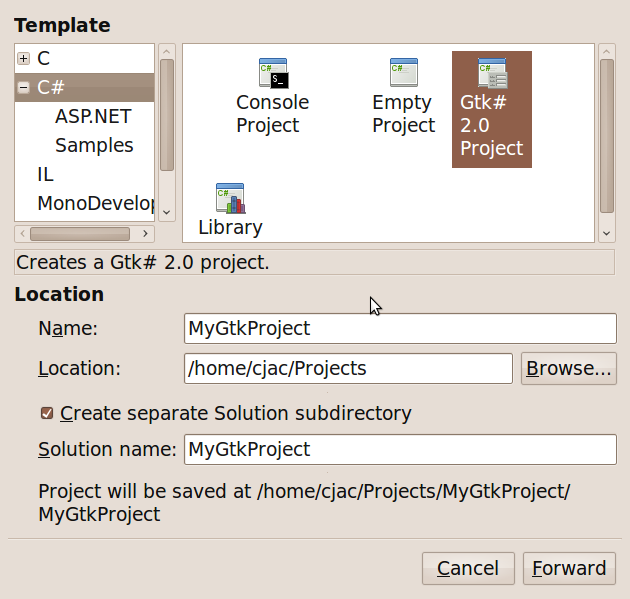
Create New Project

Create New Project

Select Gtk# 2.0 Project

Select Gtk# 2.0 Project

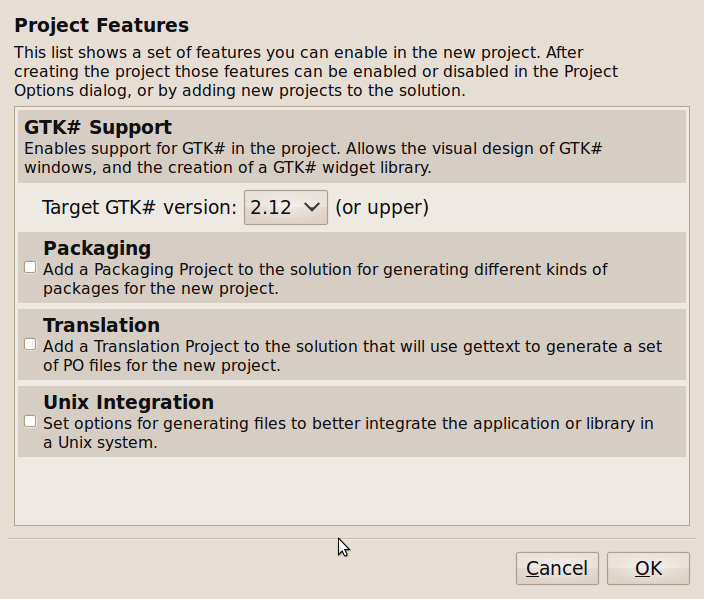
Select Project Features

Select Project Features

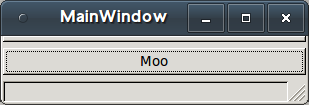
Hello World

Hello World

Run project You can run this boilerplate by pressing Ctrl-F5 Using the Designer Double-click on the file named MainWindow.cs in the Solution section. When the file opens, click the Designer button below the code view.
The Designer

The Designer

The Toolbox To add the Toolbox, press Alt-Shift-B or click View->Toolbox. Drag a VBox widget from the Toolbox to the main window.
Add VBox

Add VBox

Drop a Menu Bar widget into the top cell of the VBox, and a Statusbar into the bottom.
Insert Menu and Status Bar

Insert Menu and Status Bar

Properties grid Drop a Button widget into the middle cell of the VBox.
Add the Properties grid from the View menu (Alt+Shift+P or View->Properties).
Select the new button by clicking on it.
In the Properties grid, expand the Button Properties section and click the value of the Label field. Delete the default content and replace it with a different string.
Button with new Label

Button with new Label

Adding a Click handler Select the button in the Designer view
In the Property grid, select the Signals tab
Click twice on the text in the column to the right of the Clicked and replace Click here to add a new handler with MyButtonClickHandler
Add a click handler

Add a click handler

Click on the Source Code button below the viewer window to switch to the C code. You can use the find tool to search for the new handler you created, called MyButtonClickHandler. Ctrl-F will bring up the find dialogue.
Browse to click handler

Browse to click handler

Add some code to update the status bar.
	protected virtual void MyButtonClickHandler (object sender, System.EventArgs e)
	 
		var contextId = this.statusbar1.GetContextId("clicked");
		this.statusbar1.Push(contextId, "Clicky-Clicky" );
	 
Click handler code

Click handler code

Modify button layout The size of the running window is a little weird. I fixed mine by un-setting the Auto Size boolean and setting the Expand and Fill in the Box Child Layout section of the Properties grid.
Button layout changes

Button layout changes

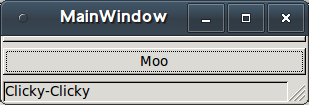
Exercise button click handler Run your application with Ctrl-F5 and click on the button. You should see the new string show up in the status bar at the bottom left of the window.
Not yet clicked

Not yet clicked

Clicked + Status update

Clicked + Status update

Add Menu items
Create File Menu Entry

Create File Menu Entry

Create File->Quit Menu Item

Create File->Quit Menu Item

Add Quit event handler

Add Quit event handler

Add Clear Statusbar Activate Handler

Add Clear Statusbar Activate Handler

26 March 2010

Martin Michlmayr: Fixing your Debian NAS from within initramfs-tools

The following article was contributed by John Cass. Note that John's instructions will also work on other NAS machines running Debian, such as QNAP devices. I had a problem upgrading my Debian kernel to 2.6.32 on the D-Link DNS-323. The upgrade looked like it worked but on reboot I had a hung machine. I tried taking the disk out, putting it in my main machine and remaking the links in /boot to the previous kernel and initrd.img but it turns out that on the DNS-323 both kernel and initrd are actually stored in flash memory (the /boot disk files are where they are built and a useful archive but are not used during the boot process). So I was stuck, and had to make a serial cable in order to find out what was going on. The instructions here and here were very useful and the CA-42 clone cost me 4 GBP on eBay and arrived within a couple of days. A delicate bit of soldering (and installing ckermit on my main machine) and I had a serial connection - I could finally see what was was happening. The upshot was, during the boot process the DNS-323 failed to mount my root partition. This was because the partition was formatted ext3 and the initrd.img had not included the ext3 module. It probably did this because I had deliberately forced mounting it as ext2 in the /etc/fstab (in an attempt to limit the write access to the disk, I want it to stay in standby for a long time but that's another post). (Remark by Martin: this is a known issue with initramfs-tools.) Anyway, having seen this, Martin was able to guide me to getting it fixed: And it should all be working!

6 March 2010

David Bremner: Mirroring a gitolite collection

You have a gitolite install on host $MASTER, and you want a mirror on $SLAVE. Here is one way to do that. $CLIENT is your workstation, that need not be the same as $MASTER or $SLAVE.
  1. On $CLIENT, install gitolite on $SLAVE. It is ok to re-use your gitolite admin key here, but make sure you have both public and private key in .ssh, or confusion ensues. Note that when gitolite asks you to double check the "host gitolite" ssh stanza, you probably want to change hostname to $SLAVE, at least temporarily (if not, at least the checkout of the gitolite-admin repo will fail) You may want to copy .gitolite.rc from $MASTER when gitolite fires up an editor.
  2. On $CLIENT copy the "gitolite" stanza of .ssh/config to gitolite-mirror to a stanza called e.g. gitolite-slave fix the hostname of the gitolite stanza so it points to $MASTER again.
  3. On $MASTER, as gitolite user, make passphraseless ssh-key. Probably you should call it something like 'mirror'
  4. Still on $MASTER. Add a stanza like the following to $gitolite_user/.ssh/config
     host gitolite-mirror
       hostname $SLAVE
       identityfile ~/.ssh/mirror
    
    run ssh gitolite-mirror at least once to test and set up any "know_hosts" file.
  5. On $CLIENT change directory to a checkout of gitolite admin from $MASTER. Make sure it is up to date with respect origin
    git pull
    
  6. Edit .git/config (or, in very recent git, use git remote seturl --push --add) so that remote origin looks like
    fetch = +refs/heads/*:refs/remotes/origin/*
    url = gitolite:gitolite-admin
    pushurl = gitolite:gitolite-admin
    pushurl = gitolite-slave:gitolite-admin
    
  7. Add a stanza
    repo @all
      RW+     = mirror
    
    to the bottom of your gitolite.conf Add mirror.pub to keydir.
  8. Now overwrite the gitolite-admin repo on $SLAVE git push -f Note that empty repos will be created on $SLAVE for every repo on $MASTER.
  9. The following one line post-update hook to any repos you want mirrored (see the gitolite documentation for how to automate this) You should not modify the post update hook of the gitolite-admin repo. git push --mirror gitolite-mirror:$GL_REPO.git
  10. Create repos as per normal in the gitolite-admin/conf/gitolite.conf. If you have set the auto post-update hook installation, then each repo will be mirrored. You should only push to $MASTER; any changes pushed to $SLAVE will be overwritten.

3 March 2010

Andreas Barth: Changes in wanna-build

During recent weeks, not only sbuild and buildd were changed, but also wanna-build. Many changes were small and don't have direct impact, but will ease our life in future. This includes a bunch of code cleanups. Most changes were done by Kurt Roeckx and me, but as usual Marc Brockschmidt and Philipp Kern were also involved. This round of changes was started with redoing our priority calculation. Up to now, any package had a fixed place in the list, and our list was built from top to bottom as far as buildd power was available (putting aside manual intervention by setting build-priority by admins). That meant of course that some packages could be stalled if buildd time isn't enough anymore, like currently on mipsen. (The queue order was determined by the following sort options: build-priority, (>= standard?), already built in the past, priority, section, name, and the first difference decided list order.) Now, of course >= standard packages are still built first, but waiting days increase priority so that old extra packages could be built before young optional package (in other words, they shouldn't stall. The new formula is about: required: 50, important: 40, standard: 30, optional: 5 [priority] + libs: 4, devel: 2 [section] + contrib: -20, non-free: -40 [component] + out-of-date: 20 [notes] + max(6, waitingdays) * 2 + manual priorities, and packages are ordered by this number, then by waitingdays, then by name.) While adding code to add bonus for long-waiting packages, we stumbled across the fact that there were non-C dates in the database stored, which in turn means that export of the database stopped to work. For fixing that we replaced the last change field in the database by an postgres now() on insert, and converted that field to an date field (instead of freetext). Which in turn broke mkstats and a few more things, which are fixed as of now. While doing that, we also introduced the format option, which allows to do queries like:
wanna-build --format='%t %u: %p/%v% +b B%B' -A mipsel --list=building
which gives output like:
2010-03-03 15:24:38.642988 buildd_mipsel-mayer: cracklib2/2.8.16-1
2010-03-03 15:30:00.341313 buildd_mipsel-rem: liblouisxml/2.1.0-1+b1
Of course, there are even better possibilities what one could do with that. :) More changes are pending, like the injector for log files was changed so that we record building times in the database. This will allow us to include build time on at least a few buildds, so that large packages cannot so easily stall all buildds completely anymore. So, more to come ...

1 March 2010

Steve McIntyre: It's been a while

Apologies for not posting in a while. I've been a little busy of late, but I promise to fill in some of the details in the next few days. Number 1: Jo and I are engaged. We went to a nice restaurant on Saturday for her birthday. I totally surprised her by asking the question in her birthday card: "P.S. Will you marry me" at the bottom. The look on her face as she said "yes" was awesome. *grin* I had already surprised her a couple of weekends back by taking her to Paris for Valentine's weekend. She didn't know we were going until we got to the checkin desk for the Eurotunnel. Now I've got a problem, though: what do I do for a surprise two weekends from now? :-)

18 February 2010

Alexander Reichle-Schmehl: RC-Bug statistics for Squeeze, calendar week 7:

Note: Please see RC-Bug statistics for Squeeze, calendar week 7 for an explanation of the numbers.
Total:699+49
Affecting Squeeze:559+41
Squeeze-only:117+23
Unfixed bugs remaining in Squeeze:442+18
Of these 442 bugs...
... are pending36+4
... are patched:65+1
... are duplicates:47+-0
... are in Non-free or contrib:10+10
... are claimed by someone:14-3
... are fixed in the delayed queue:5-1
... are somehow marked as fixed:53+14
Or in other words:
Release critical bugs left in squeeze, when ignoring all these:
262 (+2 compared to previous week). With this release managers views, 472 (+48 compared to previous week) bugs remain to be fixed somehow before we can release. Some notes: So much for this week. Let's see, how the numbers evolve in the coming seven days...

11 February 2010

Robert Collins: Using UEC instead of EC2


So, we wanted to move a Hudson CI server at Canonical from using chroots to VM s (for better isolation and security), and there is this great product Ubuntu Enterprise Cloud (UEC basically Eucalyptus). To do this I needed to make some changes to the Hudson EC2 plugin and thats where the fun starts. While I focus on getting Hudson up and running with UEC in this post, folk generally interested in the differences between UEC and EC2, or getting a single-machine UEC instance up for testing should also find this useful. Firstly, getting a test UEC instance installed was a little tricky I only had one machine to deploy it on, and this is an unusual configuration. Nicely though, it all worked, once a few initial bugs and misconfiguration items got fixed up. I wrote up the crux of the outcome on the Ubuntu community help wiki. See 1 Physical system . The particular trap to watch out for seems to be that this configuration is not well tested, so the installation scripts have a hard time getting it right. I haven t tried to make it play nice with Network Manager in the loop, but I m pretty sure that that can be done via interface aliasing or something similar. Secondly I needed to find out what was different between EC2 and UEC (Note that I was running on Karmic (Ubuntu 9.10) so things could be different in Lucid). I couldn t find a simple description of this, so this list may be incomplete:
  1. UEC runs an old version of the EC2 API. This is because it hasn t implemented everything in the new API versions yet.
  2. UEC defaults to port 8773, not port 80 (for both the EC2 and S3 API s)
  3. The EC2 and S3 API s are rooted differently: at AWS they are at /, for UEC they are at /services/Eucalyptus and /services/Walrus
  4. UEC doesn t supply a SSL API port as far as I can tell.
  5. DescribeImages has something wonky with it.
So the next step then is to modify the Hudson EC2 plugin to support these differences. Fortunately it is in Java, and the Java community has already updated the various libraries (jets3t and typica) to support UEC I just needed to write a UI for the differences and pass the info down the various code paths. Kohsuke has let me land this now even though it has an average UI (in rev 27366), and I m going to make the UI better now by consolidating all the little aspects into a couple of URL s. Folk comfortable with building their own .hpi can get this now by svn updating and rebuilding the ec2 plugin. We ve also filed another bug asking for a single API call to establish the endpoints, so that its even easier for users to set this up. Finally, and this isn t a UEC difference, I needed to modify the Hudson EC2 plugin to work with the ubuntu user rather than root, as Ubuntu AMI s ship with root disabled (as all Ubuntu installs do). I chose to have Hudson reenable root, rather than making everything work without root, because the current code paths assume they can scp things as root, so this was less disruptive. With all that done, its now possible to configure up a Hudson instance testing via UEC nodes. Here s how:
  1. Install UEC and make sure you can run up instances using euca-run-instances, ssh into them and that networking works for you. Make sure you have installed at least one image (EMI aka AMI) to run tests on. I used the vanilla in-store UEC Karmic images.
  2. Install Hudson and the EC2 plugin (you ll need to build your own until a new release (1.6) is made).
  3. Go to /configure and near the bottom click on Add a new cloud and choose Amazon EC2.
  4. Look in ~/.euca/eucarc, or in the zip file that the UEC admin web page lets you download, to get at your credentials. Fill in the Access Key and Secret Access key fields accordingly. You can put in the private key (UEC holds onto the public half) that you want to use, or (once the connection is fully setup) use the Generate Key button to have a dedicated Hudson key created. I like to use one that I can ssh into to look at a live node YMMV. (Or you could add a user and as many keys as you want in the init script more on that in a second).
  5. Click on Advanced, this will give you a bunch of details like EC2 Endpoint hostname . Fill these out.
  6. Sensible values for a default UEC install are: 8773 for both ports, /services/Eucalyptus and /services/Walrus for the base URLs, and SSL turned off. (Note that the online help tells you this as well).
  7. Set an instance cap, unless you truely have unlimited machines. E.g. 5, to run 5 VMs at a time.
  8. Click on Test Connection it should pretty much instantly say Success .
  9. Thats the Cloud itself configured, now we configure VM s that Hudson is willing to start. Click on Add right above the List of AMIs to be launched as slaves text.
  10. Fill out the AMI with your EMI e.g. emi-E027107D is the Ubuntu 9.10 image I used.
  11. for remote FS root, just put /hudson or something, unless you have a preseeded area (e.g. with a shared bzr repo or something) inside your image.
  12. For description describe the intent of the image e.g. DB test environment
  13. For the labels put one or more tags that you will use to tell test jobs they should run on this instance. They can be the same as labels on physical machines it will act as an overflow buffer. If no physical machines exist, a VM will be spawned when needed. For testing I put euca
  14. For the init script, its a little more complex. You need to configure up java so that hudson itself can run:
    cat >> /etc/apt/sources.list << EOF
    deb http://archive.ubuntu.com/ubuntu/ karmic multiverse
    deb http://archive.ubuntu.com/ubuntu/ karmic-updates multiverse
    deb http://archive.ubuntu.com/ubuntu/ karmic-security multiverse
    EOF
    export http_proxy=http://192.168.1.1:8080/
    export DEBIAN_FRONTEND=noninteractive
    apt-get update
    echo "buildd shared/accepted-sun-dlj-v1-1 boolean true"   debconf-set-selections
    apt-get install -y -f sun-java6-jre
    
    Note that I have included my local HTTP proxy there just remove that line if you don t have one.
  15. Click on Advanced, to get at the less-common options.
  16. For remote user, put ubuntu , and for root command prefix put sudo .
  17. For number of executors, you are essentially choosing the number of CPU s that the instance will request. E.g. putting 20 will ask for an extra-large high-cpu model machine when it deploys. This will then show up as 20 workers on the same machine.
  18. Click save :)
  19. Now, when you add a job a new option in the job configuration will appear tie this job to a node . Select one of the label(s) you put in for the AMI, and running the job will cause that instance to start up if its not already available.
Note that Hudson will try to use java from s3 if you don t install it, but that won t work right for a few reasons I ll be filing an issue in the Hudson tracker about it, as thats a bit of unusual structure in the existing code that I m happier leaving well enough alone :) .

Next.

Previous.