Sam Hartman: Flailing to Replace Jack with Pipewire for DJ Audio
I could definitely use some suggestions here, both in terms of things to try or effective places to ask questions about Pipewire audio. The docs are improving, but are still in early stages. Pipewire promises to combine the functionality of PulseAudio and Jack. That would be great for me. I use Jack for my DJ work, and it s somewhat complicated and fragile. However, so far my attempts to replace Jack have been unsuccessful, and I might need to even use PulseAudio instead of Pipewire to get the DJ stuff working correctly.
The Setup
In the simplest setup I have a DJ controller. It s both a MIDI device and a sound card. It has 4 channel audio, but it s not typical surround sound. Two channels are the main speakers, and two channels are the headphones. Conceptually it might be better to model the controller as two sinks: one for the speakers and one for the headphones. At a hardware level they need to be one device for several reasons, especially including using a common clock. It s really important than only the main mix go out channel 1-2 (the speakers). Random beeps or sound from other applications going out the main speakers is disruptive and unprofessional.
However, because I m blind, I need that sound. I especially need the output of Orca (my screen reader) and Emacspeak (another screen reader). So I need that output to go to the headphones.
Under Pulse/Jack
The DJ card is the Jack primary sound device (system:playback_1 through system:playback_4). I then use the
 comments
module-jack-sink Pulse module to connect Pulse to Jack. That becomes the default sink for Pulse, and I link front-left from that sink to system:playback_3. So, I get the system sounds and screen reader mixed into the left channel of my headphones and nowhere else.
Enter Pipewire
Initially Pipewire sees the DJ card as a 4-channel sound card and assumes it s surround4.0 (so front and rear left and right). It helpfully expands my stereo signal so that everything goes to the front and rear. So, exactly what I don t want to have happen happens: all my system sounds go out the main speakers (channel 1-2).
It was easy to override Wireplumber s ALSA configuration and assign different channel positions. I tried assigning something like a1,a2,fl,fr hoping that Pipewire wouldn t mix things into aux channels that weren t part of the typical surround set. No luck. It did correctly reflect the channels in things like pacmd list sinks so my Pipewire config was being applied. But the sound was still wrong. * I tried turning off channelmix.upmix. That didn t help; that appears to be more about mixing stereo into center, rear and LFE. The basic approach of getting a stream to conform to the output node s channels appears to be hurting me here.
- Turning off
stream.dont-remixactually got stereo sound to do exactly what I wanted. If I use sox to play a stereo MP3 for example, it comes out the headphones and not my speakers. Unfortunately, that didn t help with the accessibility sounds at all. Those are mono in pulse land, and apparently mono is always expanded to all channels. - I didn t try turning off channelmix entirely. I m reasonably sure that would break mono sound entirely, so I d get no accessibility output which would make my computer entirely unusable.
- I tried using
jack_disconnectto disconnect the accessibility ports from all but the headphones. The accessibility applications aren t actually using Jack, but one of the cool things about Pipewire is that you can use Jack interfaces to manipulate non-Jack applications. Unfortunately, at least the Emacspeak espeak speech server regularly shuts down and restarts its sound connection. So, I get speech through the headphones for a phrase or two, and then it reverts to the default config.
jackd and connect up Pipewire to that server. According to the wiki, Pipewire can be a Jack client. It s disabled by default, because you need to make sure that Wireplumber is using the real Jack libraries rather than the Pipewire replacements. That s the case on Debian, so I enabled the feature.
A Jack device appeared in wpctl status as did a Jack sink. Using jack_lsp on that device showed it was talking to the Jack server and connected to system:playback_*. Unfortunately, it doesn t work. The sink does not show up in pacmd list sinks, and pipewire-pulse gives an error about it not being ready. If I select it as the default sink in wpctl set-default I get no sound at all, at least from Pulse applications.
Versions of things
This is all on debian, approximately testing/bookworm or newer for the relevant libraries.
- Pipewire 0.3.51-1
- Wireplumber 0.4.10-2
- pipewire-pulse and libspa0.2-jack are also 0.3.51-1 as you d expect
- Jackd2 1.9.17~dfsg-1







 Youtube has a really nice RSS feature that is extremely well hidden.
If you postfix a Channel ID to
 Now, some user pages may have multiple valid RSS feeds because they contain multiple channels.
Remember the TED page from above? Well run:
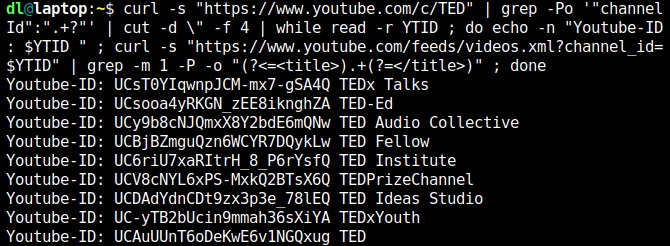 You probably want the last Channel ID listed above, the non-selective "TED" one. And that's the one from the example above.
Update
02.06.2022:
smpl wrote in and has the much better solution for the most frequent use cases:
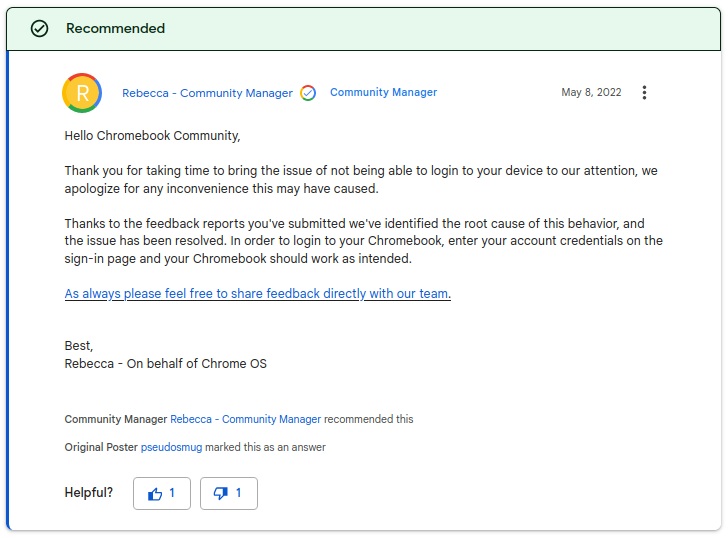
 These things are meant to be very consumer-style end-user devices. You log in with your Google account and everything works. Until it doesn't.
Just setting it up caused the first issue:
I was always thrown back to a black screen and then another login-screen despite having successfully logged in initially to create the "owner" user of the Chromebook. No error message, not useful UI feedback. Just logging in again and again and again.
The issue is ... not having a GMail account associated with my Google account. Duh!
So add a GMail.com address as the primary to your Google account and the initial setup completes.
Of course you cannot delete that GMail.com association again because the owner user is linked to the email and not the account. Well, you can delete it but then you cannot configure "owner" items of your Chromebook any more. Great job, Google. Not. Identity management 101 fail.
Kudos to
 Once I was able to login to the new Chromebook all worked fine until I started to use ssh sessions.
These always hung for 30 seconds to 10 minutes and then resumed with lots of packets lost in between and the last minute or so coming in from buffering in a burst.
This was easy to see in
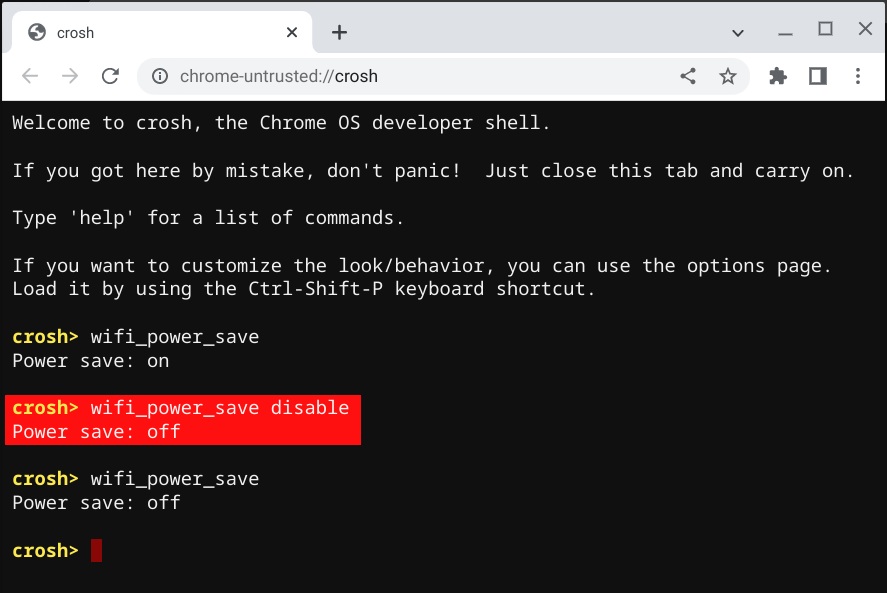 This unfortunately only lasts until the next reboot but it does persist over suspend cycles (aka closing the lid).

 Debian continues participating in Outreachy, and we're excited to announce that
Debian has selected two interns for the Outreachy May 2022 - August 2022 round.
 As promised, on this post I m going to explain how I ve configured this blog
using





 Last month I wrote about how







 TL;DR: firmware support in Debian sucks, and we need to change
this. See the "My preference, and rationale" Section below.
In my opinion, the way we deal with (non-free) firmware in Debian is a
mess, and this is hurting many of our users daily. For a long time
we've been pretending that supporting and including (non-free)
firmware on Debian systems is not necessary. We don't want to have
to provide (non-free) firmware to our users, and in an ideal world we
wouldn't need to. However, it's very clearly no longer a sensible path
when trying to support lots of common current hardware.
Background - why has (non-free) firmware become an issue?
Firmware is the low-level software that's designed to make
hardware devices work. Firmware is tightly coupled to the hardware,
exposing its features, providing higher-level functionality and
interfaces for other software to use. For a variety of reasons, it's
typically not Free Software.
For Debian's purposes, we typically separate firmware from
software by considering where the code executes (does it run on a
separate processor? Is it visible to the host OS?) but it can be
difficult to define a single reliable dividing line here. Consider the
Intel/AMD CPU microcode packages, or the U-Boot firmware packages as
examples.
In times past, all necessary firmware would normally be included
directly in devices / expansion cards by their vendors. Over time,
however, it has become more and more attractive (and therefore more
common) for device manufacturers to not include complete firmware
on all devices. Instead, some devices just embed a very simple set
of firmware that allows for upload of a more complete firmware "blob"
into memory. Device drivers are then expected to provide that blob
during device initialisation.
There are a couple of key drivers for this change: