Search Results: "daniel"

5 August 2013

Thomas Goirand: Why using Mailman when MLMMJ is available?

Daniel Pocock just wrote a blog post about how to setup mailman for virtual hosting. Well, it strikes me that mailman is a bad solution, for many reasons. First, it imposes you to use @lists.example.com lists instead of @example.com. I m not sure if that is mandatory, but at least I ve seen only mailman setups done this way. At least, it is how mostly everyone does the setup. I think that s really ugly. Any mailbox should be fine, IMO. What I found particularly lame about Mailman, is that these issues (plus the ones which Daniel listed) have been known for YEARS, though nobody came up with a patch to fix it. And it s really not hard. Why do I know it? Well, because I ve been using MLMMJ for years without such troubles. The current situation where everyone is with mailman is really LAME. Not only MLMMJ is better because it is easier to install and supports virtual hosting out of the box, but also it is written in C and is much faster than Mailman. MLMMJ has been used in high traffic lists like for SUSE and Gentoo. The fact that some major sites decided to do the switch isn t a proof that MLMMJ is perfect, but is a good indication that it at least works well without too much trouble. Also, with mailman, you have to use the subject lines to control your list subscriptions and send command to it. No need to do that with MLMMJ, because everything is controled with the mailbox extension. For example, mylist+subscribe@example.com can be used to subscribe (instead of mylist-requests@lists.example.com, then fill-in the subject line with mailman). So, if you don t like some of the (bad) limitations of Mailman, would like to test something faster, and easier to setup, have a try with MLMMJ (see mlmmj.org for more details, and see the README.Debian inside my package).

Daniel Pocock: Effectively supporting virtual domains with Mailman

When I first decided to run my own list server, I was well aware of the popularity of Mailman but I was deterred from using it by the complexity of setting up virtual hosts. In particular, 99% of the software I use for servers is packaged. Whenever I choose a new piece of software, using something that is packaged and supported is high on my list of priorities. Mailman's distribution tarball and the packages built from it only have limited support for virtual hosting. My own objective is to host lists for open source projects. As some of these projects don't have dedicated budgets, it is particularly important to find lightweight, low-maintenance solutions. Furthermore, it is important that those solutions don't detract from the time I want to invest in the projects themselves. I've developed some scripts to solve the problem: to start using them quickly, please see the README file. Here I provide a more detailed overview of the logic behind this approach. Mailman's limitations and workarounds For me, the biggest limitation of Mailman is that the site list is always linked to a single domain, which has to be chosen arbitrarily from the list of domains being hosted. Although it is not emphasized in the documentation, there is also the inconvenience of having all the lists from potentially unrelated projects appearing together on Mailman's main index page. Another limitation is that each list name must be globally unique across all domains. Some existing workarounds exist but they have limitations too. There is a virtual domain patch, but it is not clear how this handles the site list or the site index page. There is also the postfix-to-mailman script distributed by Debian and Ubuntu: using a transport-based solution looks elegant at first, but when you realise that you need to whitelist the addresses (to ensure messages are rejected at ingress rather than bounced), it becomes just as much work to maintain as the alternatives it aims to avoid: Mailman's authors do not endorse this approach. Experimenting with Sympa Deterred by Mailman's limitations, I initially went with Sympa and that seemed to run quite well for a number of years. In particular, it supports full virtual hosting out-of-the-box and all this is standard in the convenient Debian packages. From time-to-time, users have complained about the use of JavaScript in the web UI, but that was not something I could immediately resolve. However, when I upgraded to Debian 7 (wheezy), more serious problems appeared. Initially, the web UI (used for subscribing or browsing the archives) was completely broken. Anybody accessing the site would be given a download of the wws binary rather than the page that was supposed to be generated by the binary. I discovered errors about this in Apache's error.log and tried installing libapache2-mod-fcgid. The problem was resolved, but from then on, my whole web server became unstable and at least once every day I would have to restart the Apache process or it would become inaccessible. I put the details into a bug report and after not getting any feedback, decided to go and have another look at Mailman. A closer look at Mailman Looking at Mailman again, it appeared that the only way to achieve a relatively "pure" virtual hosting solution would be to run multiple installations of Mailman in different directory trees. Initially, I hoped this could be done by sharing copies of the binaries and just creating replicas of the structure under /var/lib/mailman. Looking under the hood, I discovered that the paths were compiled into the binaries and could not be easily overriden. It appears that this limitation could be overcome with some trivial patches to read directory names from the environment. The main aims of using shared binaries are disk space efficiency and also being able to benefit from security updates for the binary packages. However, if I had to patch the binaries, then I wouldn't be able to benefit from the security update packages anyway. So, it became inevitable that I would have to build binaries from source one way or another: either with a patch or by building multiple copies of each binary, each hardcoded with a different path. Putting it into practice Looking over the Mailman architecture, there are four things to be replicated for each installation:
  • init script to start a standalone qrunner per domain
  • cron jobs
  • CGI configuration from Apache (easily isolated by using a different ScriptAlias inside each Apache <VirtualHost>
  • Invocation of the Mailman binary from the mailer's aliases file
The init scripts and crontabs can be easily generated from a template (I used Debian's copies of these files as a base for that). Some of the Apache configuration can be handled by putting wildcards in the <Directory> specifications and the rest can be easily cut-and-pasted into <VirtualHost> definitions. Based on all of the above, all I had to do was run Mailman's configure script and make once for each virtual domain. I've scripted the whole process - my script is available here Managing the aliases file One particular limitation of my mailer (Postfix) is that the Mailman message processor can't be invoked directly from a rule in the virtual alias map. Scripts like this can only be invoked from the normal /etc/aliases file. This problem is not unique to Mailman: for Sympa, I also had to deal with this. The most common solution is to use the virtual file to translate all the virtual list addresses into very verbose usernames within the local domain:
Address Mapped to
widget-users@lists.example.org lists.example.org-widget-users@my-local-domain
The local part, lists.example.org-widget-users can then be used in the regular /etc/aliases file. This approach is described in the Sympa documentation and also in one of the virtual domain patches for Mailman. I've included a script for generating these alias mappings in the repository with my other scripts for building virtual Mailman installations. It would also be possible to patch Mailman itself to generate such files dynamically when new lists are created. Conclusion and next steps Using the techniques described and these small scripts, I successfully built independent virtual hosts for two of my domains, lists.lumicall.org and lists.dynalogin.org on a single mail host. Notice how each of them has the appearance of a clean, standalone Mailman installation? Going forward, I believe it would not be hard for the 2.x branch of Mailman to support this approach to virtual hosting with three changes:
  • Allowing the binaries to take their directory tree name from an environment variable or command line option or by inspecting argv[0] to discover their own location,
  • Generating the aliases file in the more verbose format and
  • Providing some convenient init script and crontab that iterates over all the domains

3 August 2013

Daniel Leidert: Setting up a network buildd with pbuilder, ccache, inoticoming and NFS

I recently bought an N54L HP microserver, which shall act as a build-daemon (buildd) for Debian packaging. The idea of my workflow is the following:
  1. do the maintenance tasks locally, usually using svn-buildpackage, quilt etc.pp
  2. build a source package locally
  3. upload the source to an incoming directory on the server
  4. watch this incoming directory and start a build process as soon as a package is uploaded
  5. put the result into an accessible directory
  6. support different vendors (debian, ubuntu)
  7. support different releases (experimental, unstable, stable, oldstable)
  8. support different architectures (amd64, i386)
  9. speed up the build process
Setting up the building environmentMy first idea was to use sbuild as described in several places. However I went with pbuilder for a long time having a setup I personally like. So I decided to stay with it. I reduce the time and work to update the configure files by using
  • one central file /etc/pbuilderrc.inc defining all the common/shared settings and
  • small configure files defining vendor, release, architecture and mirrors
Here are the relevant parts of my central configure snippet:

[..]
EXTRAPACKAGES="apt-utils debconf debconf-utils libfile-fcntllock-perl"
[..]
BASETGZ="/var/cache/pbuilder/base.$DISTRIBUTION.$ARCHITECTURE.tgz"
APTCACHE="/var/cache/pbuilder/aptcache/$DISTRIBUTION/$ARCHITECTURE/"
BUILDRESULT="/var/cache/pbuilder/result/$DISTRIBUTION/$ARCHITECTURE/"
[..]
case "$VENDOR" in
ubuntu)
MIRRORSITE="http://archive.ubuntu.com/ubuntu"
COMPONENTS="main restricted universe multiverse"
OTHERMIRROR="\
deb http://de.archive.ubuntu.com/ubuntu $DISTRIBUTION main restricted universe multiverse \
deb http://archive.ubuntu.com/ubuntu $DISTRIBUTION-updates main restricted universe multiverse \
deb http://security.ubuntu.com/ubuntu $DISTRIBUTION-security main restricted universe multiverse \
"
;;
*)
MIRRORSITE="http://ftp.debian.org/debian"
COMPONENTS="main contrib non-free"
OTHERMIRROR="\
deb http://ftp.de.debian.org/debian $DISTRIBUTION main contrib non-free \
"
;;
esac
[..]
DEBBUILDOPTS="-us -uc -j2"
AUTO_DEBSIGN=no
USE_PDEBUILD_INTERNAL=yes
[..]
You get the main idea, right? Create own files and directories for each architecture, release and vendor. Further I only want to pull build related packages into the build environment, not into the server environment. So I enabled USE_PDEBUILD_INTERNAL. I don't want to sign anything on the buildd itself and use both cores. That's what DEBBUILDOPTS and AUTO_DEBSIGN are used for. Further I saw some warnings reported during build processes. I therefor install the packages mentioned in EXTRAPACKAGES to every build enviroment. The following are the configure files for the unstable amd64 (default) and the stable i386 build environments:

VENDOR="debian"
DISTRIBUTION="sid"
ARCHITECTURE="amd64"

. /etc/pbuilderrc.inc

VENDOR="debian"
DISTRIBUTION="wheezy"
ARCHITECTURE="i386"

. /etc/pbuilderrc.inc

OTHERMIRROR+="\
deb http://security.debian.org $DISTRIBUTION/updates main contrib non-free \
"
Now to not having to update all of these environments manually there is a small parallelized script /usr/local/sbin/update-pbuilder-chroots:

#!/bin/sh

t=$(tempfile -p .upc. -s .list) exit 1

cat > $t << EOF
/etc/pbuilderrc.amd64.sid
/etc/pbuilderrc.i386.sid
/etc/pbuilderrc.amd64.wheezy
/etc/pbuilderrc.i386.wheezy
/etc/pbuilderrc.amd64.squeeze
/etc/pbuilderrc.i386.squeeze
EOF

parallel /usr/sbin/pbuilder update --override-config --configfile :::: $t tee -a /var/log/pbuilder.log

rm -f $t

exit 0
The script will make sure, that every change to the configuration file(s) will be considered (--override-config) and is run once a week via cron. The default build environment is updated on a daily base without this restriction:

@reboot root rm -rf /var/cache/pbuilder/build/*/ >> /dev/null 2>&1
@daily root test -x /usr/sbin/pbuilder && /usr/sbin/pbuilder update --configfile /etc/pbuilderrc.amd64.sid tee -a /var/log/pbuilder.log >> /dev/null 2>&1
@weekly root test -x /usr/local/sbin/update-pbuilder-chroots && /usr/local/sbin/update-pbuilder-chroots >> /dev/null 2>&1
Speeding up the build processSometimes it is necessary to recompile a package. The tool to speed up this process is ccache, which can be easily integrated into pbuilder by setting CCACHEDIR in /etc/pbuilderrc.inc. It acts like a cache for compiled files and avoids recompilation in several buildd runs.

CCACHEDIR=/var/cache/pbuilder/ccache
It is also possible to use a TMPFS for BUILDPLACE to speed up the build process itself. In this case APTCACHEHARDLINK must be disabled. Well, yeah, I don't do this.Watch an incoming directory and start the build processNot much to say about this except that the user nobody is used to run the pbuilder command. Therefor it is necessary to mention this in /etc/sudoers to allow him to do this via sudo command:

Defaults env_keep = "DH_OPTIONS DH_VERBOSE DEB_BUILD_OPTIONS DH_OPTIONS MAKEFLAGS CC CXX CPP F77 F90"
[..]
nobody ALL=NOPASSWD:/usr/sbin/pbuilder
The first line is only necessary, if a pbuilder command is started with one of these environmental variables set. This can be useful when e.g. debugging a build failure with a future gcc version that is not yet the default or when debugging a clang build issue or when creating non-stripped binary packages for creating a backtrace (BTW: When there is a common repository of all debugging symbols created?).Now to start the build process, I created an incoming directory with mods 777 at /var/cache/pbuilder/incoming/ and use inoticoming to watch it. This is started during boot via cron. The following shows the entry for the default unstable amd64 build environment:

@reboot root /usr/bin/inoticoming --logfile /var/log/inoticoming.log --pid-file /var/run/inoticoming.pid /var/cache/pbuilder/incoming --chdir /var/cache/pbuilder/incoming --suffix .dsc --stderr-to-log --stdout-to-log /bin/su -c '/usr/bin/sudo /usr/sbin/pbuilder build --autocleanaptcache ' nobody \;
Done. That's how the basic buildd works.Getting the resultsThe pbuilder BUILDRESULT directory with mods 777 is shared via NFS mount to the workstation. After successfully building the package, debsign and dput can be used as usual.Setting up the workstationI use svn-buildpackage for most of my packages. Because pbuilder won't download source tarballs on demand by default (maybe via hook?), the tarball must always be included building the source package, which then gets uploaded via dput to the buildd. This is considered in the command listed in svn-builder in ~/.svn-buildpackage.conf (note, below shows my personal layout):

svn-builder=debuild --post-dpkg-buildpackage-hook=\"dput -f buildd /usr/local/src/packages/$PACKAGE/%p_%v_source.changes\" --no-lintian -d -sa -us -uc -S
svn-override=origDir=/usr/local/src/packages/$PACKAGE
svn-override=buildArea=/usr/local/src/packages/$PACKAGE
[..]
The host buildd has been added to ~/.dput.cf:

[buildd]
fqdn = mybuildd
login = mylogin
method = scp
incoming = /var/cache/pbuilder/incoming
allow_unsigned_uploads = 1
run_lintian = 0
Done. Now the svn-buildpackage command will create a source package including the source tarball and upload it to the buildd, where the package building starts right after the upload.ConclusionsThis is the main setup which works nicely for the default build environment so far. On the TODO list is to extend this setup so I can easily deal with all the architectures and releases (point 6..8 at the beginning).

1 August 2013

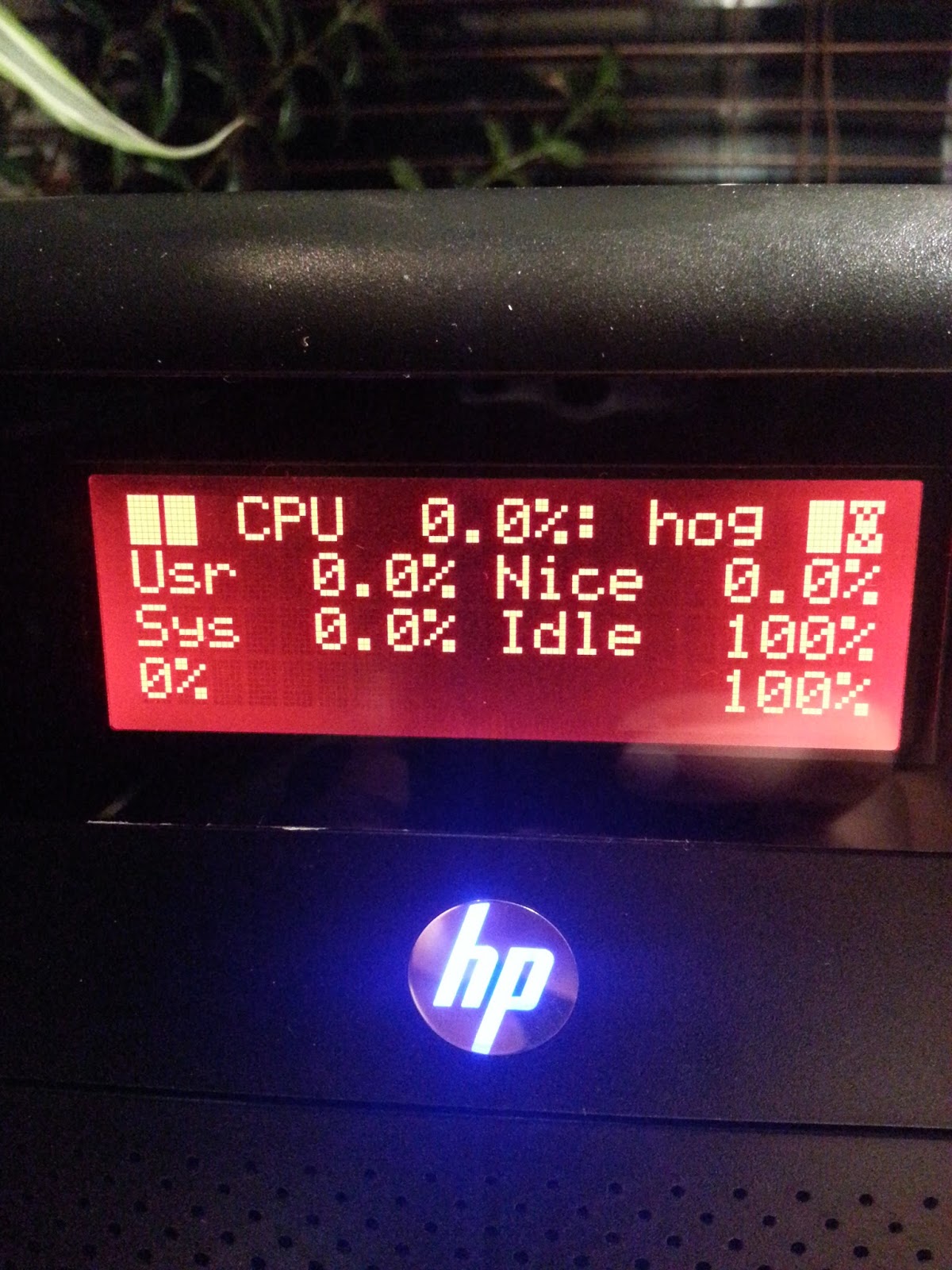
Daniel Leidert: N54L LCD-Mod with U204FR-A3 (LCDModkit) and lcdproc *pic*

N54L LCD-Mod with U204FR-A3 (LCDModkit) and lcdproc CPU screen
The picture shows my HP N54L microserver with an LCD (item no. U204FR-A3 by LCDModkit). The display is controlled via LCDd and lcdproc using the hd44780 driver. It shows the so called CPU screen here. To be continued soon ... :)

30 July 2013

Daniel Pocock: Switzerland's scariest railway (video)

Although promoted as a funicular railway, the Gelmerbahn funicular has the appearance of a giant roller coaster and all of the fun too. For all those still having nightmares about recent rail tragedies in the age of non-stop surveillance and on-line replays, the 108 degree ascent (or descent) may not be your thing. On the other hand, for those who experience the London Underground each morning, "mind the gap" takes on a whole new meaning as you see your feet hanging out the bottom of the train and the tracks descending vertically into the valley below. <video controls="" height="340" poster="http://danielpocock.com/sites/danielpocock.com/files/gbahn-preview.jpg" width="560">

<source src="http://video.danielpocock.com/Gelmerbahn.webm" type="video/webm"></source>
Click to access video on original page
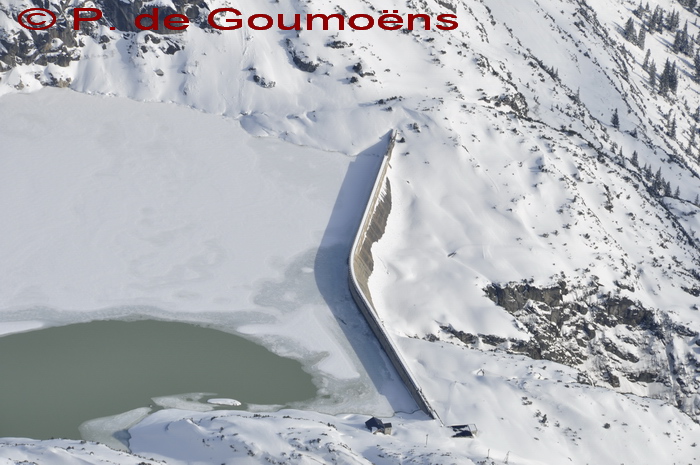
</video> and here are download links for those who prefer to download now and watch later (about 160MB): At the top At the top, there is a scenic two hour walk around Lake Gelmer, the path takes you across the top of a dam built for hydro-electric power generation. Lake Gelmer - hydro-electric dam Getting there from DebConf13 and the Debian 20th birthday For those coming to Switzerland for DebConf13 next month, the Gelmerbahn is probably a little bit too far for a day trip but makes an excellent place to stop during a 2 or 3 day tour around Switzerland. It is accessible using the all-day bus pass for the tour of 3 or 4 mountain passes or by train to Innertkirchen and then a short ride on the bus. The busses are irregular, use sbb.ch to plan the journey. Walking down the mountain from the lake to the bus stop takes about 90 minutes and for those who choose this option, the ticket is cheaper. More Swiss travel blogs Please click here to access some of my previous blogs about Swiss travel with videos and useful ideas for day trips.

28 July 2013

Daniel Pocock: This blog was slashdotted

My earlier blog about rigged elections was slashdotted over the weekend. I had an email from the slashdot team giving me advance warning, having heard the stories about other sites getting knocked offline, I immediately logged into my Ganglia console to start the tsunami watch. I then set about enabling a reverse proxy using Squid to accelerate web server performance. This took about 30 minutes to set up. I chose Squid 3 so I could use a logging format similar to Apache. The wave hits A few hours after the warning email, details appeared on slashdot and sure enough, thousands of visitors started coming to this site. As detailed previously, the site is running on Debian servers with XCP. The web site is managed by Drupal/Apache/MySQL. Everything held together very well. Ganglia demonstrated an initial surge lasting about 10 minutes. From there, traffic has tapered off gradually over 24 hours, although it still remains well above average. slashdot comments One of the most interesting things about the slashdot community are the comments. Given that nobody really wanted to defend the indefensible and nothing in my blog surpasses some of what has been in the news recently (150 charges of fraud against a single MP), most of the discussion quickly turned to a comparison of broadband policies. For those not already aware of it, the Australian Government (Labor Party) is currently rolling out fibre to the home. The project is expected to take about 10 years, although it was delivered very quickly in certain areas where the Government needs votes. Opinions are divided: people who got it first think it is great, some people feel it is too expensive (it's much more expensive than a similar service in Switzerland, for example), some people feel it will be too slow when the final stages are completed in 10 years. It appears technically stronger than the solution proposed by the alternative party.

24 July 2013

Daniel Leidert: Moving from (software) RAID 1 to RAID 5 and testing performance

Finally I finished migrating my new N54L from a 2-disk software RAID 1 (2x2TB WD20EFRX) to 3-disk RAID 5 (3x2TB WD20EFRX) using mdadm. I got an excellent mini HOWTO I followed. Resyncing and reshaping the RAID took several days ... top speed was 110.000K/s ... but left my data untouched. Finally growing the RAID now I have two partitions; one with 0.5GB (md0) and the other with 3.4GB (md1) which both host an EXT4 file system, whereas the first one is encrypted via LUKS and the second one is not. RAID device and file system configuration Below is a summary of the setup and the values I found working well for my system.
3-disk RAID 5 devicefile system
devicechunkstripe_cache_sizeread_ahead_kbtypeencryptionstridestripe-width
/dev/md064409632768ext4luks1632
/dev/md15121638432768ext4no128256
I've played around with the system a bit. Changing the chunk size on the fly however took a long time. /dev/md0 will contain some backups, so there probably will be a mixture of small and large files. So I've chosen to only test the values 64K, 128K and 512K (default) for this device. I left the other untouched as it will mainly contain large files. Performance measurement Below are the results using hdparm to measure performance. First lets take a look at the drives ...

$ hdparm -tT /dev/sd[bcd]
/dev/sdb:
Timing cached reads: 3268 MB in 2.00 seconds = 1634.54 MB/sec
Timing buffered disk reads: 438 MB in 3.00 seconds = 145.87 MB/sec

/dev/sdc:
Timing cached reads: 3292 MB in 2.00 seconds = 1646.32 MB/sec
Timing buffered disk reads: 392 MB in 3.01 seconds = 130.22 MB/sec

/dev/sdd:
Timing cached reads: 3306 MB in 2.00 seconds = 1653.18 MB/sec
Timing buffered disk reads: 436 MB in 3.00 seconds = 145.26 MB/sec

$ hdparm --direct -tT /dev/sd[bcd]
/dev/sdb:
Timing O_DIRECT cached reads: 468 MB in 2.01 seconds = 233.17 MB/sec
Timing O_DIRECT disk reads: 442 MB in 3.00 seconds = 147.15 MB/sec

/dev/sdc:
Timing O_DIRECT cached reads: 468 MB in 2.00 seconds = 233.69 MB/sec
Timing O_DIRECT disk reads: 392 MB in 3.01 seconds = 130.36 MB/sec

/dev/sdd:
Timing O_DIRECT cached reads: 468 MB in 2.00 seconds = 233.94 MB/sec
Timing O_DIRECT disk reads: 442 MB in 3.01 seconds = 146.93 MB/sec
... and now at the RAID devices ...

$ hdparm -tT /dev/md?
/dev/md0:
Timing cached reads: 3320 MB in 2.00 seconds = 1660.37 MB/sec
Timing buffered disk reads: 770 MB in 3.01 seconds = 256.05 MB/sec

/dev/md1:
Timing cached reads: 3336 MB in 2.00 seconds = 1668.07 MB/sec
Timing buffered disk reads: 742 MB in 3.01 seconds = 246.89 MB/sec

$ hdparm --direct -tT /dev/md?
/dev/md0:
Timing O_DIRECT cached reads: 974 MB in 2.00 seconds = 487.08 MB/sec
Timing O_DIRECT disk reads: 770 MB in 3.01 seconds = 256.17 MB/sec

/dev/md1:
Timing O_DIRECT cached reads: 784 MB in 2.00 seconds = 391.18 MB/sec
Timing O_DIRECT disk reads: 742 MB in 3.01 seconds = 246.42 MB/sec
... and now lets see, which actual speed we reach using dd. First lets check the encrypted device:

RAID-5 /dev/md0 (LUKS encrypted EXT4): chunk=64K, stripe_cache_size=4096,
readahead(blockdev)=65536, stride=16, stripe-width=32 ...

$ dd if=/dev/zero of=/mnt/md0/10g.img bs=1k count=10000000
10000000+0 Datens tze ein
10000000+0 Datens tze aus
10240000000 Bytes (10 GB) kopiert, 64,1227 s, 160 MB/s

$ dd if=/mnt/md0/10g.img of=/dev/null bs=1k count=10000000
10000000+0 Datens tze ein
10000000+0 Datens tze aus
10240000000 Bytes (10 GB) kopiert, 85,768 s, 119 MB/s
Well, read speed is consistently lower than write speed for the encrypted file system. Lets take a look at the non-encrypted device:

RAID-5 /dev/md1 (EXT4): chunk=512K, stripe_cache_size=16384,
readahead(blockdev)=65536, stride=128, stripe-width=256 ...

$ dd if=/dev/zero of=/mnt/md1/10g.img bs=1k count=10000000
10000000+0 Datens tze ein
10000000+0 Datens tze aus
10240000000 Bytes (10 GB) kopiert, 37,0016 s, 277 MB/s

$ dd if=/mnt/md1/10g.img of=/dev/null bs=1k count=10000000
10000000+0 Datens tze ein
10000000+0 Datens tze aus
10240000000 Bytes (10 GB) kopiert, 33,5901 s, 305 MB/s
Looks nice to me. How to set these values I use a mixture of udev, util-linux and e2fsprogs to set the values. First I checked, which values for stripe_cache_size and read_ahead_kb are working best for me. For the LUKS encrypted EXT4 I got varying results showing best performances with values of 4096, 8192 and 16384 for stripe_cache_size. I decided for the first value, because it appeared more often with the best performance than the others.

$ less /etc/udev/rules.d/90-local-n54l.rules grep stripe_cache
SUBSYSTEM=="block", KERNEL=="md0", ACTION=="add", TEST=="md/stripe_cache_size", TEST=="queue/read_ahead_kb", ATTR md/stripe_cache_size ="4096", ATTR queue/read_ahead_kb ="32768", ATTR bdi/read_ahead_kb ="32768"
SUBSYSTEM=="block", KERNEL=="md1", ACTION=="add", TEST=="md/stripe_cache_size", TEST=="queue/read_ahead_kb", ATTR md/stripe_cache_size ="16384", ATTR queue/read_ahead_kb ="32768", ATTR bdi/read_ahead_kb ="32768"
The read_ahead_kb value can also be set using blockdev. Note that this command expects a value of 512-byte sectors whereas read_ahead_kb is the size in kbyte. Therefor the difference in values:

$ blockdev --setra 65536 /dev/md[01]
Tuning the EXT4 file system performance with calculated values using tune2fs:

$ tune2fs -E stride=16,stripe-width=32 -O dir_index /dev/mapper/_dev_md0
$ tune2fs -E stride=128,stripe-width=256 -O dir_index /dev/md1
Disabling NCQ reduced the speed a lot for me, so I left the values as is and did not struggle with it:

$ cat /sys/block/sd[bcd]/device/queue_depth
31
31
31

23 July 2013

Daniel Pocock: If Assange is a rapist, what type of monsters are running Australia?

It's almost one year since Julian Assange was granted asylum by the republic of Ecuador. Newspapers often incorrectly report that he sought political asylum to avoid those disturbing rape allegations (they are not charges). The real basis of his claim to asylum, which is the foundation that asylum law is based on, is that Mr Assange is not safe from political persecution in his own country. Let's not talk about rape It's often difficult for men to talk about this subject without putting their foot in their mouth. In this case, it may be easier to understand by trying to put it in context. Safer with Mr Assange?
Just last week, our Government announced plans to expand their program of dumping poor coloured people into random countries around the Asia-Pacific region. On Monday they broke every rule in the UN's book of human rights by using the Internet to distribute gut wrenching youtube videos of a woman suffering at the hands of our immigration officers. They hope this degradation will scare away other migrants who do not meet the right economic criteria. It makes me wonder, if Mr Assange is genuinely guilty of rape despite his alleged victim boasting about her experience on Twitter, what has happened to this other woman in the care of Kevin Rudd's scorched-Earth immigration policy? Maybe because she's not a Swedish blonde, nobody cares. More racist videos from the immigration department fail to correctly inform migrants of their right to seek asylum under international law - is it possible that this offensive and misleading propaganda violates Youtube's terms of service? Crimes so bad that whistle-blowers are inevitable Former employees of the Manus Island concentration camp have stepped forward and revealed what the Government naturally doesn't want us to know. According to one former security manager, vulnerable migrants had suffered virtually every form of physical abuse, including rapes, and under orders from management in Australia, the victims were simply locked up with their abusers and no formal complaints were documented. All of a sudden, those pictures of the woman crying in the degrading video made by immigration officials take on a new meaning: she is next in line for the same destination, PNG. I somewhat suspect she would enjoy greater dignity and safety confined to Ecuador's London embassy with the so-called rapist that everybody has been distracted with. Can anybody imagine the widely discussed expression on her face improving after 20 months enforced confinement with rapists under the protection of Australia's refugee program?

22 July 2013

Daniel Pocock: Building existing autotools C/C++ projects on Android

I recently came across a requirement to build a project involving C++ code on Android. I've done this before with small C projects, for example, patching the JNI code in Lumicall. Google supplies a toolchain dubbed the Native Development Kit (NDK) for Android. Using the NDK typically involves using it's custom build system, usually duplicating all Makefile content into a file called Android.mk in each subdirectory. For large projects, that duplication doesn't sound like fun to implement and it definitely doesn't sound like fun keeping it up to date. reSIProcate: 39 Makefiles + dependencies reSIProcate is quite a large project involving multiple shared libraries, some useful demonstration apps, a SIP proxy (repro) and a TURN server (reTurn). There are 39 Makefiles and numerous dependencies. There are numerous test cases for each library and sub-project too. Sounds like a perfect fit for Android Alternative ways to proceed The Android NDK documentation pack describes a process for bypassing Android.mk files, invoking the toolchain (compiler, linker, etc) directly to build standalone apps with their own Makefile system I felt this was worth a go Two approaches are described. The first approach is to simply reference toolchain binaries (e.g. arm-linux-androideabi-gcc) using the well-known environment variables such as CC and LD. The documentation warns that in this case, support for the Standard Template Library (STL) is extremely limited. Nonetheless, I decided to try this first and found that I couldn't easily link binaries with the full STL feature set required by reSIProcate. I moved on to the second approach. The second approach involves calling the script $ NDK_HOME /build/tools/make-standalone-toolchain.sh to export a custom toolchain directory tree with full STL support. Using a little more disk space, but not so hard. Initially I had NDK version r7 on my system and I found that make-standalone-toolchain.sh was not working reliably. It appeared to complete successfully (exit status = 0) but in reality it was not copying the STL components to the custom directory. I upgraded to version r8e and the problem was resolved. Making it easy Finally, I wrote a little wrapper script that can do everything: build the custom toolchain, set up all those environment variables for the tools and then invoke the configure script with some of the special settings that are required for a cross compile. Coding problems To gain some confidence in this progress, I had already run the full reSIProcate build, including test cases, on all hosts in the Debian build farm, including some ARM hosts. This helped confirm that the code is correct for such CPUs as well as helping to identify some previously unknown errors on the more typical platforms. Nonetheless, some minor problems appeared with the build for Android:
  • Android's pthread capabilities are built into the C library so -lpthread must not be included on the linker command line. This is easily adapted using Makefile variables.
  • Although Android is Linux, some of the header locations are not quite the same. For example, references to sys/fcntl.h must be wrapped in a pre-processor conditional that uses just the path fcntl.h when __ANDROID__ is defined
After fixing a few of these minor issues, everything fell into place and the build was successful. High quality portable code The reSIProcate project has a strong tradition of providing cross-platform support. The code quality is quite good and well documented. Despite the project's large size and complicated build system, there was already a good chance of success. This may not be the case for every C/C++ project, especially those making extensive use of other shared libraries. Building the dependencies: OpenSSL on Android For the core features I wanted to use, I only needed one major dependency, the OpenSSL project. libcrypto and libssl already appear in Android. Nonetheless, their headers are not present in the NDK tree and therefore their API (and compile-time flags) can not be considered 100% stable across all handsets past and future. The solution is to build a standalone libcrypto and libssl and ship them with your own app. Fortunately this has been done before: I grabbed the code from Guardian Project's OpenSSL in github and found that it built immediately with my NDK version. To use it, simply make sure that CPPFLAGS and LDFLAGS include the necessary references to OpenSSL, as demonstrated in my script Test cases I found that make -i check would enable me to build all test cases on the build host. Naturally it would fail to run any of them as they are ARM binaries. Using -i in the make command line makes it possible to build them all anyway, ignoring the failures, for running them later. Copying the test* binaries from the .libs directories to the phone, I was able to run them immediately What next There are three further steps in this work:
  • Generalising the script to make binaries for all supported Android architectures (not just ARM)
  • Extending the script to copy the shared libraries into the build tree of a traditional Android project where they will be automatically scooped up when the apk file is assembled.
  • Writing the necessary JNI code to access the C/C++ code from Java

Daniel Pocock: Winning at any cost

It's not every day that a student messing around with keystroke loggers comes to fame through slashdot. Nonetheless, systematically rigging an election and getting sentenced to 12 months in a dorm with bars has helped raise 22 year old Matthew Weaver's profile well above that of the average script kiddie. Now let's stop and reflect on poor Weaver's future. You may be thinking that with an exchange program like this on his academic record he won't be so popular with employers. Given that he was busted by campus security rather than the FBI he won't even attract the interest of those companies who hire ex-hackers. So where could he go? How is it done in Australia? Not too long ago, when I was a student myself, one of our prominent universities was subjected to a very similar scam. Four members of the Tin Tin for NUS ticket at La Trobe University were implicated in stuffing the ballot the old fashioned way. The incidents even share the characteristics of chronic stupidity: just as Weaver had been caught voting for himself 259 times from the same IP address in a campus computer lab, team Tin Tin had tried to hand their bag of manipulated postal votes directly to the deputy returning officer rather than discretely posting them through the internal mail. According to an official report by the Deputy Returning Officer, Karsten Haley, all four candidates were charged with Dishonest Conduct and Interfering with Ballot Papers. Unfortunately, the report notes that
La Trobe University SRC Electoral Regulations do not empower the Returning Officer or Deputy to enforce charges or disciplinary procedures and the charges were never faced by the accused.
Given the seriousness of the matter, Haley did not give up his attempts to hold them to account. He escalated it to the Dean of the college and then to the University Secretary. He reports that "their disinterest was extraordinary" and that nobody would involve the police. Young Labor suspended Just over a year later, in 1997, the ALP's youth division for the state of Victoria, Young Labor, was suspended after attempts to rig the ballot to elect the Young Labor leadership team. The guilty parties were never publicly named. Nobody was formally suspended or expelled and this simply left them with more time on their hands to invest their energy in other elections. The suspension of Victorian Young Labor remained in effect for a number of years. The specific allegations about the Young Labor ballot suggest that those people particularly keen to win had printed fake student cards and given them to stooges who would impersonate other Young Labor members who had not attended to vote in person. Where are they now? It is no co-incidence that these students were (and still are) members of Labor Unity, a powerful faction within Australia's ruling Labor Party, the ALP. Most political organisations would presumably express concern about these allegations. The ALP does things differently. One of the students who withdrew his nomination in La Trobe, Mr Larocca, subsequently became Mayor in the City of Moreland, one of the ALP's strongholds. Even more remarkably from an outsider's viewpoint, another of these figures, Stephen Donnelly, is currently employed as the Assistant State Secretary of the ALP in Victoria. Communications like this newsletter reveal that he is one of the key figures in the party's pre-selection process. He has recently been appointed to direct the ALP's 2013 federal election campaign for the state of Victoria. Another co-incidence On the same weekend that Weaver was in the news for his antics, Donnelly's latest employer, the ALP's Victorian branch, was conducting pre-selection ballots to choose candidates for the upcoming federal election. So it's no surprise that Monday's newspaper headlines report fresh allegations of voting irregularities. Sadly, I've seen some of Labor Unity's bad behavior first hand. About 10 years ago I was living in South Melbourne, which is in the federal electoral district of Melbourne Ports. A young female friend of mine, a member of the local Elwood branch of the ALP, had spent election day handing out brochures for an ALP candidate in a marginal seat rather than assisting the controversial local ALP candidate, Michael Danby. A few days later I was witness to an incident where Danby aggressively confronted this young woman and demanded to know why he hadn't seen her handing out his own leaflets on polling day. He stood within centimeters of her and was literally looking down on her as he demanded some kind of apology to sooth his bruised ego. She looked terrified and barely responded. Within moments one of his handlers approached and physically moved Danby away from this young woman, I dare to think where things would have gone otherwise. Eye for talent Remarkably, at the same time, the infamous Stephen Donnelly had started shadowing Danby in his movements about the district. Fresh out of university, his talents had been recognised by Danby and he was employed in Danby's office, enabling him to continue honing his skills on a full-time basis with a tax-payer funded salary. What a remarkable contrast to the story of Weaver. Can anybody imagine a US congressman collecting Weaver from the prison gates and deploying him to an office on Capitol Hill? The biggest bankruptcy in student history Around the same time, Donnelly's Student Unity, the student arm of Labor Unity were successful in taking over the student union of my own campus, the University of Melbourne. Not long after I graduated I heard that they had been accused of skimming off $1 million from catering providers and a high-risk $46 million property transaction that put the organisation into liquidation. Unlike Mr Weaver, who's scheme at Cal State barely got off the ground, none of those involved in the Melbourne University incident has faced criminal proceedings. One ALP figure, Andrew Landeryou, spent several months in Costa Rica while wanted for questioning in the Supreme Court. His wife has just been endorsed for a seat in the Senate with support from various Labor Unity figures including Danby. The Gillard questions In 1996, around the same time that Donnelly & Co. were romping around student unions learning the tricks of the political trade, a lawyer quietly departed from the firm Slater and Gorden after an internal investigation into a property transaction linked to a union slush fund. Like Donnelly, this lawyer's next move was to take employment in the office of a Labor Party MP. More recently she was backed by Labor Unity to become Prime Minister. The union slush fund remains under investigation, frustrated by the disappearance of documents. The $60 million heist Recently I blogged about Gillard and Abbott, leaders of the two main political parties in Australia, agreeing to take $60 million of taxpayer money to fund their parties' campaigns in the upcoming federal election, giving themselves an obscenely unfair unadvantage over all other contestants. Where would that money end up? In the case of the ALP, does it appear likely that figures like the Victorian ALP's federal campaign director, Mr Donnelly, would be involved in the expenditure? National shame With this background, it becomes easier to understand the quality (or lack of it) in Australia's national leadership. When you consider that the generation responsible for the La Trobe incident, the Young Labor suspension and the MUSU bankruptcy are now growing into positions of greater responsibility in the ALP it leaves me feeling the quality of leadership is only going to get a lot worse before it starts getting better. For example, the recent incident where coloured people were fed to the sharks has nothing to do with the worldwide refugee crisis and everything to do with maintaining the dumbed-down level of political discourse that Labor Unity thugs and their followers can cope with. Real issues like climate change and energy policy, for example, appear to be beyond the pay grade of Australia's political class Ranjini - coloured, indefinite detention It is startling that up to her own recent demise, Gillard herself had repeatedly begged the public to stop asking questions about her own past and remember that Labor politicians are innocent until proven guilty - yet she had a pregnant coloured woman thrown into a concentration camp on unfounded fears about "national security". No evidence has ever been presented that poor Ranjini committed a crime, but the houses bought with money from trade unions, transactions handled through Gillard's own office, seem to be as solid as bricks and mortar. If only poor Matthew Weaver had been an Australian, how much further would his star have risen? Update: please sign the petition at change.org asking La Trobe university to re-examine the report and refer it formally to the police. If you are concerned about the plight of poor Ranjini and other people subject to Australia's domestic rendition program, please take a moment to see Letters for Ranjini

17 July 2013

Daniel Pocock: Some further observations on init replacement

My blog about replacements for SysV init received a significant number of comments Monday, revealing a solid base of community support for systemd. One reader was even generous enough to contribute a pull request fixing the reSIProcate package systemd artifact The blog wasn't intended to disparage any of the init replacements or suggest that these types of issues are show-stoppers. Rather, it was simply to demonstrate the fact that developers need to divert attention from other activities (like bug fixing, new features, etc) to correctly adapt things and support the wide range of init replacements that have emerged. As revealed in some comments like this one, systemd can even assist with privileged port assignments: it's nice a feature, but also likely to require more development time to integrate. None of these things are difficult though, they just take time. The real challenge The biggest headache is that it becomes tedious for any upstream developer to start getting into that much depth learning about each system they want to support. That is before we even start talking about how daemons and other services are managed in cloud deployments (e.g. the Juju charms from Ubuntu). For a developer to seriously integrate and test their daemon in all of these environments and make maximum use of all their features could easily take a month: without adding any new features to the application itself. In the last five years, I have personally come across all of these platforms and formal packaging systems: This is nothing to boast about: with enough time (and bandwidth to download the installer ISOs) I'm sure anybody could set up all these environments and many more. The question, though, is whether developers can afford to stretch themselves so thin, particularly on smaller projects that are not commercially supported. systemd: struggling to find documentation My first impression of systemd was that it is not widely documented. This is not the developers fault, they do provide some great documentation. Rather, at the time I was looking for it, Google's search algorithm was under the impression that systemd was a typo. Several other forum posts reveal other people had the same problem. I wasn't immediately aware of the fact that systemd has to be quoted in Google searches although I've since discovered quoting it can help find significantly more helpful details in a search. Nonetheless, this initial experience wasted time for me and it is more likely that I would have discovered things like tmpfiles.d if I hadn't lost time on that issue. In my mind, this is not a fault with systemd at all, it is just bad luck and limited time to allocate on the task. A single effort to support multiple solutions This brings me back to one of the points I made Monday, that it would be good to see a single solution that allows upstream developers to auto-generate artifacts for all common init replacements. Maybe it wouldn't exercise all of their cool new features. One further comment on Monday even observed that such a tool does exist for invoking systemd artifacts from SysV init. Obviously we already have tools like alien to convert package formats (although it is obviously not used to auto-create packages for Debian's archive). Nonetheless, developers of free software would be able to see their code deployed much more widely, more quickly, if they could get away with using a common tool for this job, just as a single autotools or cmake can support compilation on platforms the developer never even heard of.

15 July 2013

Daniel Pocock: Linux init-systems

Several value-added init systems have emerged in recent times. Most notably, Upstart has become the default on Ubuntu while systemd is now default in Fedora. Let's not forget the crusade to move beyond traditional init was given a big boost back in 2005 by Sun's introduction of SMF on Solaris 10 some years before the main Linux solutions gained prominence. Debian is currently debating whether to use one of these alternatives as a default. My own position on the matter is not decided, but I do feel that some of the debates are asking the wrong questions. Some of the most interesting issues here are likely to have ramifications for other distributions. My experience with systemd I've come across systemd in my efforts to package reSIProcate on Fedora. One of the challenges I came across was trying to both create a /var/run/repro directory and telling systemd to launch the process as a non-root user. I tried using the ExecStartPre directive in the systemd manifest to invoke mkdir. Unfortunately, it runs as the non-root user too and could not create the PID directory. The conventional init script doesn't suffer this problem. In the end, I have patched the repro binary to start as root and drop privileges itself, but that was only when it became apparent that we need to do that for WebRTC support (listening on port 443). While most daemons have the ability to drop privileges, there will be edge cases like this that need more than just a systemd manifest. Maintainers who encounter such issues may have to give feedback to the systemd and Upstart upstreams and give them the opportunity to provide generalized solutions. Then again, the most generalized solution would be another scripting language and then we'd be back where we started. The reason to change and the reason not to Some people have argued that Debian should change simply because other distributions did so. This is not a compelling technical argument alone. The fragmentation of init-alternatives is not something that makes upstreams excited either. It would be interesting to see if Upstart and systemd could agree on a common manifest format - maybe even a format that could be parsed by a wrapper from SysV init. Then Debian wouldn't really have to give up support for kFreeBSD and other non-Linux kernel efforts. A slight alternative to this approach would be using a system like cmake to read a single service XML manifest and spit out permutations readable by each of the different init schemes. It has also been well argued that the simple and well known solution of scripts is much less complicated to understand and maintain and is extremely stable. Wishlist items for all distributions While I don't know which solution is the best, one thing I do believe is that if there is a change and if it is going to be disruptive to maintainers and users then it should aim to bring in as many benefits as possible to offset the pain and encourage people to support the migration effort. Some of the potential road-map items are not only possible for Debian but could also become part of other platforms. Here are some of the issues that came to my mind:
  • Better support for starting multiple instances of a single process
  • Support for distributed solutions, for example, making sure that process A only starts on host 1 after process B on host 2
  • Support for clustering, for example, making sure that at least 2 instances of process A are running across 3 hosts.
  • Automated integration with monitoring and fault recovery systems: for example, can Nagios (or another tool) automatically detect whether a particular process should be running and whether it is running? Given that init-replacements typically need to start processes in the correct order, can they share that dependency information with Nagios to avoid manual/duplicated dependency mappings? Can Nagios restart the process without any manual scripting? Can this all be enabled for all processes on a given system in a plug-and-play manner?
  • Scheduler interaction: can and should any of the above, particularly the dependency mappings, be integrated with scheduling? For example, should some cron jobs be deferred when MySQL is down?
What other potential improvements do people feel to be worthwhile?

14 July 2013

Matt Zimmerman: Liberty and justice for all, but not in equal measure

200302020-001 As Americans we might like to believe that the US legal system is intended to protect all of our citizens. Unfortunately, it doesn t protect us all equally, and in fact disproportionately fails to protect the most vulnerable. We re surrounded by instances of injustice related to gender, race and other axes of social privilege, and the machinations of law are not exempt. The state of Florida has recently provided an especially stark example in the application of its self-defense laws in two cases: Marissa Alexander and George Zimmerman. This example is notable because although there were many similarities between the cases, the outcomes were very different. Alexander s case was tried in May 2012 , Zimmerman s in July 2013, both prosecuted by Florida state s attorney Angela Corey. Both cases involved the use of firearms which were legally purchased and carried, and their owners were trained in their use. Both prosecutions cast the defendant as the aggressor, who could have avoided the confrontation. Both of the encounters were with unarmed persons. Both defenses were based on Florida self-defense laws, which include stand your ground laws justifying the use of deadly force without the obligation to retreat. Both shooters admitted to firing a single shot with the intent of defending themselves. Beyond those similarities, each case had its own unique circumstances. The events of Alexander s case took place in her home. Her altercation was with her husband, Rico Gray Sr., who was under a restraining order following a conviction for domestic battery which put Alexander in the hospital. After Gray threatened to kill her, Alexander retrieved a handgun from her car, returned to confront him, firing once. She was arrested and charged the same day. She had had no prior criminal record. A jury deliberated for just 12 minutes before convicting her. A judge sentenced her to 20 years in prison, in accord with mandatory minimums specified by law. Gray, previously sentenced to probation for his earlier conviction, remains free. Zimmerman,_George_-_Seminole_County_MugZimmerman s shot was fired in his neighborhood, in an altercation with a teenager, Trayvon Martin, who was a guest in the community and walking by himself. The two were not acquainted. Zimmerman called police from his car, claiming that Martin appeared suspicious, and began to follow him. Some of the facts of their encounter remain in dispute, but that Zimmerman fired his gun is not in question. Afterward, Zimmerman was detained by police, questioned and released the same night without being arrested or charged. Following a public outcry, a new investigation was launched and two months later he was arrested and charged. He had been previously arrested and charged with assaulting a police officer, but the charges were later dropped. After 16 hours of deliberation, the jury found Zimmerman not guilty, and he is free today. The most striking difference between the two cases is where each defendant aimed their gun: George Zimmerman shot Trayvon Martin in the chest and killed him, while Marissa Alexander fired at a wall and injured no one. Alexander, a black woman, is in prison for scaring her abusive husband away, while Zimmerman, who killed a young black man, walks free. Alexander and Martin s families have lost a mother and a son. The outcomes for the people involved in these cases could not be more different. Regardless of the merits of the relevant laws themselves, their radically unequal application is deeply troubling. What does this tell us about the relative value of these human lives, as weighed by the judicial system?
The Florida criminal justice system has sent two clear messages today. One is that if women who are victims of domestic violence try to protect themselves, the Stand Your Ground Law will not apply to them. [...] The second message is that if you are black, the system will treat you differently. - U.S. Rep. Corrine Brown
References

12 July 2013

Daniel Pocock: Practical VPNs with strongSwan, Shorewall, Linux firewalls and OpenWRT routers

There is intense interest in communications privacy at the moment thanks to the Snowden scandal. Open source software has offered credible solutions for privacy and encryption for many years. Sadly, making these solutions work together is not always plug-and-play. In fact, secure networking, like VoIP, has been plagued by problems with interoperability and firewall/filtering issues although now the solutions are starting to become apparent. Here I will look at some of them, such as the use of firewall zones to simplify management or the use of ECDSA certificates to avoid UDP fragmentation problems. I've drawn together a lot of essential tips from different documents and mailing list discussions to demonstrate how to solve a real-world networking problem. A typical network scenario and requirements Here is a diagram of the network that will be used to help us examine the capabilities of these open source solutions. Some comments about the diagram:
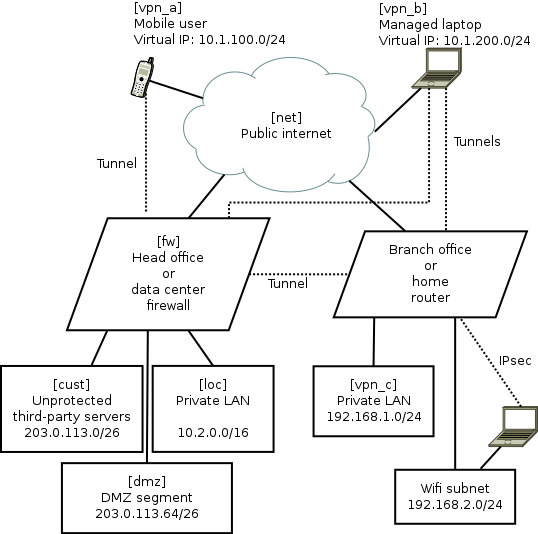
  • The names in square brackets are the zones for Shorewall, they are explained later.
  • The dotted lines are IPsec tunnels over the untrusted Internet.
  • The road-warrior users (mobiles and laptops) get virtual IP addresses from the VPN gateway. The branch offices/home routers do not use virtual IPs.
  • The mobile phones are largely untrusted: easily lost or stolen, many apps have malware, they can only tunnel to the central VPN and only access a very limited range of services.
  • The laptops are managed devices so they are trusted with access to more services. For efficiency they can connect directly to branch office/home VPNs as well as the central server.
  • Smart-phone user browsing habits are systematically monitored by mobile companies with insidious links into mass-media and advertising. Road-warriors sometimes plug-in at client sites or hotels where IT staff may monitor their browsing. Therefore, all these users want to tunnel all their browsing through the VPN.
  • The central VPN gateway/firewall is running strongSwan VPN and Shorewall firewall on Linux. It could be Debian, Fedora or Ubuntu. Other open source platforms such as OpenBSD are also very well respected for building firewall and VPN solutions, but Shorewall, which is one of the key ingredients in this recipe, only works on Linux at present.
  • The branch office/home network could be another strongSwan/Shorewall server or it could also be an OpenWRT router
  • The default configuration for most wifi routers creates a bridge joining wifi users with wired LAN users. Not here, it has been deliberately configured as an independent network. Road-warriors who attach to the wifi must use VPN tunnelling to access the local wired network. In OpenWRT, it is relatively easy to make the Wifi network an independent subnet. This is an essential security precaution because wifi passwords should not be considered secure: they are often transmitted to third parties, for example, by the cloud backup service in many newer smart phones.
Package mayhem The major components are packaged on all the major Linux distributions. Nonetheless, in every case, I found that it is necessary to re-compile fresh strongSwan packages from sources. It is not so hard to do but it is necessary and worth the effort. Here are related blog entries where I provide the details about how to re-build fresh versions of the official packages with all necessary features enabled: Using X.509 certificates as a standard feature of the VPN For convenience, many people building a point-to-point VPN start with passwords (sometimes referred to as pre-shared keys (PSK)) as a security mechanism. As the VPN grows, passwords become unmanageable. In this solution, we only look at how to build a VPN secured by X.509 certificates. The certificate concept is not hard. In this scenario, there are a few things that make it particularly easy to work with certificates:
  • strongSwan comes with a convenient command line tool, ipsec pki. Many of it's functions are equivalent to things you can do with OpenSSL or GnuTLS. However, the ipsec pki syntax is much more lightweight and simply provides a convenient way to do the things you need to do when maintaining a VPN.
  • Many of the routine activities involved in certificate maintainence can be scripted. My recent blog about using Android clients with strongSwan gives a sample script demonstrating how ipsec pki commands can be used to prepare a PKCS#12 (.p12) file that can be easily loaded into an Android device using the SD-card.
  • For building a VPN, there is no need to use a public certificate authority such as Verisign. Consequently, there is no need to fill in all their forms or make any payments for each device/certificate. Some larger organisations do choose to outsource their certificate management to such firms. For smaller organisations, an effective and sometimes better solution can be achieved by maintaining the process in-house with a private root CA.
UDP fragmentation during IPsec IKEv2 key exchange and ECDSA A common problem for IPsec VPNs using X.509 certificates is the fragmentation of key exchange datagrams during session setup. Sometimes it works, sometimes it doesn't. Various workarounds exist, such as keeping copies of all certificates from potential peers on every host. As the network grows, this becomes inconvenient to maintain and to some extent it eliminates the benefits of using PKI. Fortunately, there is a solution: Elliptic Curve Cryptography (ECC). Many people currently use RSA key-pairs. Best practice suggests using RSA keys of at least 2048 bits and often 4096 bits. Using ECC with a smaller 384-bit key is considered to be equivalent to a 7680 bit RSA key pair. Consequently, ECDSA certificates are much smaller than RSA certificates. Furthermore, at these key sizes, the key exchange packets are almost always smaller than the typical 1500 byte MTU. A further demand for ECDSA is arising due to the use of ECC within smart cards. Many smartcards don't support any RSA key larger than 2048 bits. The highly secure 384-bit ECC key is implemented in quite a few common smart cards. Smart card vendors have shown a preference for the ECC keys due to the US Government's preference for ECC and the lower computational overheads make them more suitable for constrained execution environments. Anyone who wants to use smart cards as part of their VPN or general IT security now, or in the future, needs to consider ECC/ECDSA. Making the network simple with Shorewall zones For this example, we are not just taking some easy point-to-point example. We have a real-world, multi-site, multi-device network with road warriors. Simplifying this architecture is important to help us understand and secure it. The solution? Each of these is abstracted to a "zone" in Shorewall. In the diagram above, the zone names are in square brackets. The purpose of each zone is described below:
Zone name Description
loc This is the private LAN and contains servers like databases, private source code respositories and NFS file servers
dmz This is the DMZ and contains web servers that are accessible from the public internet. Some of these servers talk to databases or message queues in the LAN network loc
vpn_a These are road warriors that are not very trustworthy, such as mobile devices. They are occasionally stolen and usually full of spyware (referred to by users as "apps"). They have limited access to ports on some DMZ servers, e.g. for sending and receiving mail using SMTP and IMAP (those ports are not exposed to the public Internet at large). They use the VPN tunnel for general internet access/browsing, to avoid surveillance by their mobile carrier.
vpn_b These are managed laptops that have a low probability of malware infection. They may well be using smart cards for access control. Consequently, they are more trusted than the vpn_a users and have access to some extra intranet pages and file servers. Like the smart-phone users, they use the VPN tunnel for general internet access/browsing, to avoid surveillance by third-party wifi hotspot operators.
vpn_c This firewall zone represents remote sites with managed hardware, such as branch offices or home networks with IPsec routers running OpenWRT.
cust These are servers hosted for third-parties or collaborative testing/development purposes. They have their own firewall arrangements if necessary.
net This zone represents traffic from the public Internet.
A practical Shorewall configuration Shorewall is chosen to manage the iptables and ip6tables firewall rules. Shorewall provides a level of abstraction that makes netfilter much more manageable than manual iptables scripting. The Shorewall concept of zones is very similar to the zones implemented in OpenWRT and this is an extremely useful paradigm for firewall management. Practical configuration of Shorewall is very well explained in the Shorewall quick start. The one thing that is not immediately obvious is a strategy for planning the contents of the /etc/shorewall/policy and /etc/shorewall/rules files. The exact details for making it work effectively with a modern IPsec VPN are not explained in a single document, so I've gathered those details below as well. An effective way to plan the Shorewall zone configuration is with a table like this:
Destination zone
loc dmz vpn_a vpn_b vpn_c cust net
Source zone loc \
dmz ? \ X X X
vpn_a ? ? \ X X
vpn_b ? ? X \ X
vpn_c X \
cust X ? X X X \
net X ? X X X \
The symbols in the table are defined:
Symbol Meaning
ACCEPT in policy file
X REJECT or DROP in policy file
? REJECT or DROP in policy file, but ACCEPT some specific ports in the rules file
Naturally, this modelling technique is valid for both IPv4 and IPv6 firewalling (with Shorewall6) Looking at the diagram in two dimensions, it is easy to spot patterns. Each pattern can be condensed into a single entry in the rules file. For example, it is clear from the first row that the loc zone can access all other zones. That can be expressed very concisely with a single line in the policy file:
loc all ACCEPT
Specific Shorewall tips for use with IPsec VPNs and strongSwan Shorewall has several web pages dedicated to VPNs, including the IPsec specific documentation.. Personally, I found that I had to gather a few details from several of these pages to make an optimal solution. Here are those tips:
  • Ignore everything about the /etc/shorewall/tunnels file. It is not needed and not used any more
  • Name the VPN zones (we call them vpn_a, vpn_b and vpn_c) in the zones file but there is no need to put them in the /etc/shorewall/interfaces file.
  • The /etc/shorewall/hosts file is not just for hosts and can be used to specify network ranges, such as those associated with the VPN virtual IP addresses. The ranges you put in this file should match the rightsourceip pool assignments in strongSwan's /etc/ipsec.conf
  • One of the examples suggests using mss=1400 in the /etc/shorewall/zones file. I found that is too big and leads to packets being dropped in some situations. To start with, try a small value such as 1024 and then try larger values later after you prove everything works. Setting mss for IPsec appears to be essential.
  • Do not use the routefilter feature in the /etc/shorewall/interfaces file as it is not compatible with IPsec
Otherwise, just follow the typical examples from the Shorewall quick start guide and configure it to work the way you want. Here is an example /etc/shorewall/zones file:
fw firewall
net ipv4
dmz ipv4
loc ipv4
cust ipv4
vpn_a ipsec mode=tunnel mss=1024
vpn_b ipsec mode=tunnel mss=1024
vpn_c ipsec mode=tunnel mss=1024
Here is an example /etc/shorewall/hosts file describing the VPN ranges from the diagram:
vpn_a eth0:10.1.100.0/24 ipsec
vpn_b eth0:10.1.200.0/24 ipsec
vpn_c eth0:192.168.1.0/24 ipsec
Here is an example /etc/shorewall/policy file based on the table above:
loc all ACCEPT
vpn_c all ACCEPT
cust net ACCEPT
net cust ACCEPT
all all REJECT
Here is an example /etc/shorewall/rules file based on the network:
SECTION ALL
# allow connections to the firewall itself to start VPNs:
# Rule  source    dest    protocol/port details
ACCEPT   all       fw                ah
ACCEPT   all       fw                esp
ACCEPT   all       fw                udp 500
ACCEPT   all       fw                udp 4500
# allow access to HTTP servers in DMZ:
ACCEPT   all       dmz               tcp 80
# allow connections from HTTP servers to MySQL database in private LAN:
ACCEPT   dmz       loc:10.2.0.43     tcp 3306
# allow connections from all VPN users to IMAPS server in private LAN:
ACCEPT vpn_a,vpn_b,vpn_c loc:10.2.0.58 tcp 993
# allow VPN users (but not the smartphones in vpn_a) to the
# PostgresQL database for PostBooks accounting system:
ACCEPT vpn_b,vpn_c loc:10.2.0.48      tcp 5432
SECTION ESTABLISHED
ACCEPT   all       all
SECTION RELATED
ACCEPT   all       all
Once the files are created, Shorewall can be easily activated with:
# shorewall compile && shorewall restart
strongSwan IPsec VPN setup Like Shorewall, strongSwan is also very well documented and I'm just going to focus on those specific areas that are relevant to this type of VPN project.
  • Allow the road-warriors to send all browsing traffic over the VPN means including leftsubnet=0.0.0.0/0 in the VPN server's /etc/ipsec.conf file. Be wary though: sometimes the road-warriors start sending the DHCP renewal over the tunnel instead of to their local DHCP server.
  • As we are using Shorewall zones for firewalling, you must set the options leftfirewall=no and lefthostaccess=no in ipsec.conf. Shorewall already knows about the remote networks as they are defined in the /etc/shorewall/hosts file and so firewall rules don't need to be manipulated each time a tunnel goes up or down.
  • As discussed above, X.509 certificates are used for peer authentication. In the certificate Distinguished Name (DN), store the zone name in the Organizational Unit (OU) component, for example, OU=vpn_c, CN=gw.branch1.example.org
  • In the ipsec.conf file, match the users to connections using wildcard specifications such as rightid="OU=vpn_a, CN=*"
  • Put a subjectAltName with hostname in every certificate. The --san option to the ipsec pki commands adds the subjectAltName.
  • Keep the certificate distinguished names (DN) short, this makes the certificate smaller and reduces the risk of fragmented authentication packets. Many examples show a long and verbose DN such as C=GB, O=Acme World Wide Widget Corporation, OU=Engineering, CN=laptop1.eng.acme.example.org. On a private VPN, it is rarely necessary to have all that in the DN, just include OU for the zone name and CN for the host name.
  • As discussed above, use the ECDSA scheme for keypairs (not RSA) to ensure that the key exchange datagrams don't suffer from fragmentation problems. For example, generate a keypair with the command ipsec pki --gen --type ecdsa --size 384 > user1Key.der
  • Road warriors should have leftid=%fromcert in their ipsec.conf file. This forces them to use the Distinguished Name and not the subjectAltName (SAN) to identify themselves.
  • For road warriors who require virtual tunnel IPs, configure them to request both IPv4 and IPv6 addresses (dual stack) with leftsourceip=%config4,%config6 and on the VPN gateway, configure the ranges as arguments to rightsourceip
  • To ensure that roadwarriors query the LAN DNS, add the DNS settings to strongswan.conf and make sure road warriors are using a more recent strongSwan version that can dynamically update /etc/resolv.conf. Protecting DNS traffic is important for privacy reasons. It also makes sure that the road-warriors can discover servers that are not advertised in public DNS records.
Central firewall/VPN gateway configuration Although they are not present in the diagram, IPv6 networks are also configured in these strongSwan examples. It is very easy to combine IPv4 and IPv6 into a single /etc/ipsec.conf file. As long as the road-warriors have leftsourceip=%config4,%config6 in their own configurations, they will operate dual-stack IPv4/IPv6 whenver they connect to the VPN. Here is an example /etc/ipsec.conf for the central VPN gateway:
config setup
        charonstart=yes
        charondebug=all
        plutostart=no
conn %default
        ikelifetime=60m
        keylife=20m
        rekeymargin=3m
        keyingtries=1
        keyexchange=ikev2
conn branch1
        left=198.51.100.1
        leftsubnet=203.0.113.0/24,10.0.0.0/8,2001:DB8:12:80:/64
        leftcert=fw1Cert.der
        leftid=@fw1.example.org
        leftfirewall=no
        lefthostaccess=no
        right=%any
        rightid=@branch1-fw.example.org
        rightsubnet=192.168.1.0/24
        auto=add
conn rw_vpn_a
        left=198.51.100.1
        leftsubnet=0.0.0.0/0,::0/0
        leftcert=fw1Cert.der
        leftid=@fw1.example.org
        leftfirewall=no
        lefthostaccess=no
        right=%any
        rightid="OU=vpn_a, CN=*"
        rightsourceip=10.1.100.0/24,2001:DB8:1000:100::/64
        auto=add
conn rw_vpn_b
        left=198.51.100.1
        leftsubnet=0.0.0.0/0,::0/0
        leftcert=fw1Cert.der
        leftid=@fw1.example.org
        leftfirewall=no
        lefthostaccess=no
        right=%any
        rightid="OU=vpn_b, CN=*"
        rightsourceip=10.1.200.0/24,2001:DB8:1000:200::/64
        auto=add
Sample branch office or home router VPN configuration Here is an example /etc/ipsec.conf for the Linux server or OpenWRT VPN at the branch office or home:
conn head_office
        left=%defaultroute
        leftid=@branch1-fw.example.org
        leftcert=branch1-fwCert.der
        leftsubnet=192.168.1.0/24,2001:DB8:12:80:/64
        leftfirewall=no
        lefthostaccess=no
        right=fw1.example.org
        rightid=@fw1.example.org
        rightsubnet=203.0.113.0/24,10.0.0.0/8,2001:DB8:1000::/52
        auto=start
# notice we only allow vpn_b users, not vpn_a
# these users are given virtual IPs from our own
# 192.168.1.0 subnet
conn rw_vpn_b
        left=branch1-fw.example.org
        leftsubnet=192.168.1.0/24,2001:DB8:12:80:/64
        leftcert=branch1-fwCert.der
        leftid=@branch1-fw.example.org
        leftfirewall=no
        lefthostaccess=no
        right=%any
        rightid="OU=vpn_b, CN=*"
        rightsourceip=192.168.1.160/27,2001:DB8:12:80::8000/116
        auto=add
Further topics Shorewall and Shorewall6 don't currently support a unified configuration. This can make it slightly tedious to duplicate rules between the two IP variations. However, the syntax for IPv4 and IPv6 configuration is virtually identical. Shorewall only currently supports Linux netfilter rules. In theory it could be extended to support other types of firewall API, such as pf used by OpenBSD and the related BSD family of systems. A more advanced architecture would split the single firewall into multiple firewall hosts, like the inner and outer walls of a large castle. The VPN gateway would also become a standalone host in the DMZ. This would require more complex routing table entries. Smart cards with PIN numbers provide an effective form of two-factor authentication that can protect certificates for remote users. Smart cards are documented well by strongSwan already so I haven't repeated any of that material in this article. Managing a private X.509 certificate authority in practice may require slightly more effort than I've described, especially when an organisation grows. Small networks and home users don't need to worry about these details too much, but for most deployments it is necessary to consider things like certificate revocation lists and special schemes to protect the root certificate's private key. EJBCA is one open source project that might help. Some users may want to consider ways to prevent the road-warriors from accidentally browsing the Internet when the IPsec tunnel is not active. Such policies could be implemented with some basic iptables firewalls rules in the road-warrior devices. Summary Using these strategies and configuration tips, planning and building a VPN will hopefully be much simpler. Please feel free to ask questions on the mailing lists for any of the projects discussed in this blog.

11 July 2013

Daniel Pocock: Using debcheckout to build strongSwan 5.0 on Debian wheezy

Normally most people try to use packages from a stable Linux distribution because of their convenience and security support. Sometimes it's necessary to use a newer version, I recently had to do this with strongSwan and I'm sharing the procedure for other people to try. These days, it is actually very very easy to build a new version of a package from source and this procedure will work for many Debian packages. Debian wheezy ships with strongSwan version 4.5 packages. These are lacking support for a couple of features I needed, including dual-stack IPv4/IPv6 virtual IPs on a single user connection and maintaining the DNS server list on road-warriors Oddly enough, for a variety of reasons, I had to rebuild strongSwan on all the platforms where I wanted to use it (not just on Debian). I recently described how to build it with ECDSA support on Fedora and also how to build it with ECDSA support on OpenWRT. Following all of these procedures you will end up with strongSwan packages on all systems that can interoperate using dual stack IPv4, IPv6 and establish connections quickly, securely and reliably using ECC certificates. Get the build dependencies Many packages require extra tools and header files when building. These are packages that are not usually installed or required when running the package. However, they are very easy to get. For strongSwan:
sudo apt-get update
sudo apt-get install devscripts fakeroot
sudo apt-get build-dep strongswan
This should download and install the necessary dependencies. Notice we also installed the devscripts package, it provides the very handy debcheckout utility. Obtain and build the package Now for the real work. Fortunately this is not too hard either:
mkdir ~/ws
cd ~/ws
debcheckout strongswan
cd strongswan
dpkg-buildpackage -rfakeroot -uc -b
Look in the directory ~/ws and you will find the .deb package files. Problems? On my own system, I observed that I could upgrade from the existing packages to the v5.0.4-6 package without any change to the configuration files. It just worked. Hopefully, these packages will eventually end up in Debian's backports catalog where you can install them without compiling. Nonetheless, problems for these packages can still be submitted through Debian's bug tracker - just make sure you clearly indicate that you built the package from source and give the git commit number (output of the command cd ~/ws/strongswan && git show head -1) Before trying the package and definitely before reporting any problem, it is worth checking the bug tracker and the Package Tracking System for known issues

9 July 2013

Daniel Pocock: Enabling Elliptic Curve Cryptography in OpenWRT and strongSwan VPNs

OpenWRT currently ships an OpenSSL package with Elliptic Curve Cryptography (ECC) disabled. This is very inconvenient as ECC is now standard in other distributions like Debian and Ubuntu and it is necessary to solve certain problems such as making IPsec VPNs work reliably It is relatively easy to enable it, this also provides a useful opportunity to see how the OpenWRT build system works. Preparing the build environment The build was done on a Debian 7 (wheezy) workstation. It is necessary to install some packages that provide tools needed for the build:
apt-get install gcc binutils flex make unzip gawk libz-dev linux-libc-dev
Rebuild the OpenSSL and StrongSwan packages This was tested with an ar71xx CPU-based router. You can easily change the config (run make menuconfig just before make defconfig) for other variations of router.
Running strongSwan IPsec on a router requires a router with plenty of flash, RAM and CPU power. Cheap routers with limited flash will not be able to install the packages at all. I tested on the Buffalo WZR-HP-AG300H-EU which has 32MB flash and 128MB RAM Here are the commands executed on the Debian build workstation:
mkdir ~/ws
cd ~/ws
svn checkout svn://svn.openwrt.org/openwrt/trunk openwrt-trunk
cd openwrt-trunk
./scripts/feeds update -a
./scripts/feeds install -a
wget -O .config \
  http://danielpocock.com/sites/danielpocock.com/files/openwrt.config.txt
sed -i -e 's/no-ec//' package/libs/openssl/Makefile 
make defconfig
make -j 13
The "make" command will build all the packages. It takes some time. Copy the packages to a router The actual location of the packages in your source tree depends on the CPU architecture you chose to build for. You can find them with a command such as:
find . -name '*.ipk'
Here we look at how to copy the packages for the ar71xx based router into the /tmp directory on the router. The router IP is 192.168.1.1 below:
cd ./bin/ar71xx/packages/
scp libopenssl_1.0.1e-1_ar71xx.ipk strongswan*.ipk root@192.168.1.1:/tmp
Installing the packages It is relatively easy to install the packages using the opkg utility on OpenWRT. When using self-compiled packages, you are likely to get errors about the checksums. OpenWRT compares the checksum of the package to the checksum from the package catalog file. You can delete the catalog file (e.g. rm /var/opkg-lists/attitude_adjustment) and then opkg will install the package without complaining. The file is automatically placed there each time you run opkg update so there is no harm in deleting it. In my earlier blog, I looked at how to link Android clients to the strongSwan VPN. Unfortunately Android has a bug in ECC support too and must still be used with RSA certificates. Nonetheless, the OpenWRT VPN will be quite happy talking to Linux laptops and servers - you may need to rebuild OpenSSL and StrongSwan on any Fedora, Red Hat or CentOS systems that require ECC support too. As you migrate from RSA to ECC certificates it is quite feasible to have both types of certificates in use at the same time. strongSwan supports this type of hybrid environment. To make the migration to ECC go smoothly it is desirable to ensure all boxes have ECC support at the earliest opportunity.

7 July 2013

Gregor Herrmann: RC bugs 2013/26-27

not that we have a lack of RC bugs; still, I was a bit lazy in the last two weeks. here's what I've worked on:

Daniel Pocock: Melbourne and Detroit emergency call centers simultaneously fail

A co-incidence that caught my eye this week was the failure of emergency call centers in Melbourne, Australia and Detroit, USA. Melbourne's system failed at 19:00 local time on Friday, 5 July. Detroit's communications meltdown started at 05:00 local time on the same day. 19:00 - 05:00 = 14:00 hours, which is, co-incidentally, the difference in timezones between the two cities Detroit's failure was slashdotted, Melbourne's was not. Were there other cities that experienced this same outage on Friday? Just what could be going on then? Are they running their systems on a common cloud infrastructure that is not completely under the control of local technical staff? Was there an expired SSL certificate embedded in the application software, much like the certificate expiry that recently caused failure in Microsoft Azure? Using free and open source software is a life or death issue Are these systems based on free and open source software? Can the local authorities, their technical experts and auditors inspect the software to detect such issues ahead of time? Closed, proprietary outsourced solutions often take significant control away from the users of technology.

5 July 2013

Daniel Leidert: Dear Lazyweb ... why does lshw (still) identify my Linux raid autodetect partition(s) as NTFS volumes?

In a very first attempt, my disk:2 was partitioned and initialized as follows:
/dev/sdc1     1,5TB     NTFS
/dev/sdc2 0,5TB EXT4
This was later changed to what you can see below and what fdisk correctly reports. These partitions all use the EXT4 file system.
[..]
Device Boot Start End Blocks Id System
/dev/sdb1 2048 524290047 262144000 fd Linux raid autodetect
/dev/sdb2 524290048 3907029167 1691369560 fd Linux raid autodetect
[..]
Device Boot Start End Blocks Id System
/dev/sdc1 2048 524290047 262144000 fd Linux raid autodetect
/dev/sdc2 524290048 3907029167 1691369560 fd Linux raid autodetect
[..]
I'm wondering why lshw and parted shows some of the partitions still being NTFS volumes? Checkout the output below. How can this be fixed? What is missing? Erase some header data?

Model: ATA WDC WD20EFRX-68A (scsi)
Disk /dev/sdb: 2000GB
Sector size (logical/physical): 512B/4096B
Partition Table: msdos

Number Start End Size Type File system Flags
1 1049kB 268GB 268GB primary raid
2 268GB 2000GB 1732GB primary raid


Model: ATA WDC WD20EFRX-68A (scsi)
Disk /dev/sdc: 2000GB
Sector size (logical/physical): 512B/4096B
Partition Table: msdos

Number Start End Size Type File system Flags
1 1049kB 268GB 268GB primary ntfs raid
2 268GB 2000GB 1732GB primary raid
[..]
*-disk:1
description: ATA Disk
product: WDC WD20EFRX-68A
vendor: Western Digital
physical id: 1
bus info: scsi@3:0.0.0
logical name: /dev/sdb
version: 80.0
serial: WD-WCC300354221
size: 1863GiB (2TB)
capabilities: partitioned partitioned:dos
configuration: ansiversion=5 sectorsize=4096
*-volume:0
description: Linux raid autodetect partition
physical id: 1
bus info: scsi@3:0.0.0,1
logical name: /dev/sdb1
capacity: 250GiB
capabilities: primary multi
*-volume:1
description: Linux raid autodetect partition
physical id: 2
bus info: scsi@3:0.0.0,2
logical name: /dev/sdb2
capacity: 1613GiB
capabilities: primary multi
*-disk:2
description: ATA Disk
product: WDC WD20EFRX-68A
vendor: Western Digital
physical id: 2
bus info: scsi@4:0.0.0
logical name: /dev/sdc
version: 80.0
serial: WD-WCC1T0567095
size: 1863GiB (2TB)
capabilities: partitioned partitioned:dos
configuration: ansiversion=5 sectorsize=4096 signature=000a4d07
*-volume:0
description: Windows NTFS volume
physical id: 1
bus info: scsi@4:0.0.0,1
logical name: /dev/sdc1
version: 3.1
serial: 013e-8473
size: 1396GiB
capabilities: primary multi ntfs initialized
configuration: clustersize=4096 created=2013-06-18 06:24:11 filesystem=ntfs label=MEDIA state=clean
*-volume:1
description: Linux raid autodetect partition
physical id: 2
bus info: scsi@4:0.0.0,2
logical name: /dev/sdc2
capacity: 1613GiB
capabilities: primary multi
[..]

4 July 2013

Daniel Pocock: My Linux server IPv6 deployment approach

I previously discussed the ease of deploying IPv6 for Linux servers. Whether it is Debian, Fedora or another distribution the IPv6 stack should "just work" these days. However, for maintaining a production network with minimum risk of interruption, there are a few extra things to be aware of during IPv6 deployment. Here I present a rough set of steps that can be followed, usually with minimal or no downtime, to deploy IPv6. The steps are in the order that they should be used in practice Plenty of other web sites already explain the theory of IPv6 networks or practical configuration detail (like how to set a static IPv6 address in Debian). This page ignores all of that detail and looks at the overall project strategy. Borrow the last decimal octet (or host bits) of IPv4 addresses As mentioned in my earlier blog:
  • Of the 128 bits in IPv6 addresses, most sites now use a fixed 64 bit netmask for all their subnets. This is the practice encouraged by RFC 4291.
  • Therefore, there are always more bits in the 64-bit "host" portion of the address than in the host portion of any 32-bit IPv4 address.
  • Consequently, it is possible to just borrow the host portion (typically the last octet for a class-C network) and use it as the host portion of an IPv6 address
IPv4 address Host portion of address IPv6 address
192.168.1.5/24 5 2001:1234:567::5
Gotcha: remember that the IPv4 addresses are usually written in decimal while IPv6 addresses, including the example above, are hex. This doesn't really matter in practice unless the addresses are being manipulated by code that is sensitive to the host bits. For all other intents and purposes, it just makes it easy to read the addresses and associate them with IPv4. A completely valid alternative is to use the full IPv4 address as the host portion of the IPv6 address. For example, if the IPv4 address = 192.168.1.5, the IPv6 address may be 2001:1234:567::192.168.1.5. This approach is slighly more verbose and is completely valid. Which approach you use is at your discretion. Create reverse mappings (PTR records) in DNS Just as IPv4 has the in-addr.arpa zone and telephone numbers have the e164.arpa zone (for ENUM), IPv6 addresses have a reverse mapping zone too: ip6.arpa The recommended way to proceed is to create reverse mappings for all hosts that have IPv4 reverse mappings. Some services may be using reverse lookups for authentication (e.g. MySQL will check this for any user who has a "Host" restriction defined). This is why it is recommended to create all the reverse mappings very early in the IPv6 program, before any hosts start making connections over IPv6. Create extra A records in DNS It's possible that some applications will be more stubborn about IPv6 adoption than others. For example, if you have a host called wolf.example.org and it hosts a mail server, web server, DNS server and XMPP server all using the name wolf then all those server processes will have to support IPv6 connectivity from the moment you add an AAAA record. A good practice is to create independent DNS A records (such as ns1.example.org and mail.example.org) for each application (not just CNAME records). Existing CNAME records can be converted to A records and converted back to CNAME records after the IPv6 deployment is 100% complete. Duplicate firewall entries Duplicate all IPv4 firewall entries to create an IPv6 firewall For many types of network, this is a trivial (although possibly tedious) task. There are some small gotchas:
  • There is no NAT. Any firewall entries for NAT need to be reviewed: for source NAT, it is necessary to use a mechanism like connection tracking to protect workstations that previously had asymmetrical access to the public Internet. For destination NAT, see the TPROXY feature in ip6tables
  • IPsec works slightly differently. Rules for AH and ESP packets can't simply be duplicated for IPv6, they need further tweaks or warnings will be generated.
  • IPv6 makes some ICMP packages mandatory. If IPv4 ICMP is completely blocked, you still need to enable the IPv6 ICMP (or at least the subset of ICMP packets that are mandatory).
For more comments about firewalling IPv6, please see my earlier blog on the subject Put the IPv6 addresses on the hosts Add the necessary records to the appropriate place, for example, the /etc/network/interfaces files on Debian/Ubuntu style systems. For hosts that have multiple addresses on a single interface, it is often desirable to ensure that outbound connections always appear to come from just one of the addresses. This can be achieved using the preferred_lft option when configuring the non-default addresses. For example, if configuring three addresses on eth0:
ip addr add dev eth0 preferred_lft 0 2001:1234:567::10/64
ip addr add dev eth0  2001:1234:567::11/64
ip addr add dev eth0 preferred_lft 0 2001:1234:567::12/64
In the example above, all outgoing IPv6 connections will appear to come from 2001:1234:567::11/64 Important: this is only a very shallow discussion of the issues around source addresses. If it doesn't provide a valid solution for you, there are many dedicated articles about this specific topic, madduck's blog looks at it for firewalls and tunnels but the concepts are valid for any type of multi-homed host Review listening processes with netstat Now that hosts have IPv6 addresses, it is worthwhile looking through the output of
netstat -nlp
to see which processes have bound to both IPv4 and IPv6 addresses and which processes remain stuck on IPv4 only. For processes that are only listening on IPv4 or only bound to a specific address (rather than 0.0.0.0), it is a good idea to investigate the way they are configured and find out if they will support IPv6. Review the monitoring infrastructure (Nagios, Ganglia, etc) Now is a good time to review the monitoring infrastructure. Make sure that tools like Nagios are testing the services using their dedicated DNS names and not the host names. For example, if the host wolf.example.org runs an LDAP server accessible as ldap1.example.org, make sure Nagios is configured to poll ldap1.example.org. Look at the check_v46 wrapper for Nagios and similar solutions to make sure that Nagios is testing both the IPv4 and IPv6 version of each service. Just as developers use unit testing as part of test-driven development workflows, administrators deploying IPv6 can use the monitoring framework to validate the progress of their IPv6 program. Check for ACLs Do any server processes use IP-based ACLs to control access? For example, an Apache web server may be using an IP ACL to restrict access to some pages. MySQL or Postgres databases may have IP ACLs defined for some users or databases. When hosts start using IPv6 to connect to services, their IPv6 source addresses won't pass the ACL and services may be inaccessible. Therefore, it is worthwhile checking for such ACLs early on. Prepare DNS servers first Preparing the DNS servers first is a good step. The DNS servers should be configured to accept queries over IPv6. Once the DNS servers are listening on IPv6 addresses, go ahead and do some of the following:
  • Insert IPv6 AAAA records for the name servers in their own zone files. As mentioned in the previous tip, the name server records should have their own independent A records already with names such as ns1.example.org. Consequently, no other application should notice when the AAAA record is created.
  • Create IPv6 glue records for any name servers that have IPv4 glue records
Configure secondary name servers to poll over IPv6 Configure the secondary nameservers to poll the primary nameserver using it's new IPv6 address. Update resolv.conf on all hosts Now that DNS servers are listening on IPv6, it is possible to put IPv6 nameserver addresses in /etc/resolv.conf on all the other hosts. Configure and test other low-level services Although services such as LDAP and MySQL may not be exposed to public Internet users, they are an essential foundation for many other applications to run. Make sure all these low level services are accessible over IPv6. Test them. After testing each of these services, it is OK to go ahead and create the AAAA records for the service. Configure and test other services Continue testing each service is accessible over it's IPv6 address and then add the necessary AAAA record. This includes all the high level services now, such as mail and web servers. Configure and test hostnames Finally, start adding AAAA records associated with hostnames to the DNS zone. Now it should be possible to ssh or ping6 the hostnames using IPv6. You may also want to add the IPv6 address of each host into it's own /etc/hosts file at this stage.

Next.

Previous.