Search Results: "agi"

19 July 2023

Shirish Agarwal: RISC-V, Chips Act, Burning of Books, Manipur

RISC -V Motherboard, SBC While I didn t want to, a part of me is hyped about this motherboard. This would probably be launched somewhere in November. There are obvious issues in this, the first being unlike regular motherboards you wouldn t be upgrade as you would do.You can t upgrade your memory, can t upgrade the CPU (although new versions of instructions could be uploaded, similar to BIOS updates) but as the hardware is integrated (the quad-core SiFive Performance P550 core complex) it would really depend. If the final pricing is around INR 4-5k then it may be able to sell handsomely provided there are people to push and provide support around it. A 500 GB or 1 TB SSD coupled with it and a cheap display unit and you could use it anywhere although as the name says it s more for tinkering as the name suggests. Another board that could perhaps be of more immediate use would be the beagleboard. They launched the same couple of days back and called it Beagle V-Ahead. Again, costs are going to be a concern. Just a year before the pandemic the Beagleboard Black (BB) used to cost in the sub 4k range, today it costs 8k+ for the end user, more than twice the price. How much Brexit is to be blamed for this and how much the Indian customs we would never know. The RS Group that is behind that shop is head-quartered in the UK. As said before, we do not know the price of either board as it probably will take few months for v-ahead to worm its way in the Indian market, maybe another 6 months or so. Even so, with the limited info. on both the boards, I am tilting more towards the other HiFive one. We should come to know about the boards say in 3-5 months of time.

CHIPS Act I had shared about the Chips Act a few times here as well as on SM. Two articles do tell how the CHIPS Act 2023 is more of a political tool, an industrial defence policy rather than just business as most people tend to think.

Cancelation of Books, Books Burning etc. Almost 2400 years ago, Plato released his work called Plato s Republic and one of the seminal works within it is perhaps one of the most famous works was the Allegory of the Cave. That is used again and again in a myriad ways, mostly in science-fiction though and mostly to do with utopian, dystopian movies, webseries etc. I did share how books are being canceled in the States, also a bit here. But the most damning thing has happened throughout history, huge quantities of books burned almost all for politics  But part of it has been neglect as well as this time article shares. What we have lost and continue to lose is just priceless. Every book has a grain of truth in it, some more, some less but equally enjoyable. Most harmful is the neglect towards books and is more true today than any other time in history. Kids today have a wide variety of tools to keep themselves happy or occupied, from anime, VR, gaming the list goes on and on. In that scenario, how the humble books can compete. People think of Kindle but most e-readers like Kindle are nothing but obsolescence by design. I have tried out Kindle a few times but find it a bit on the flimsy side. Books are much better IMHO or call me old-school. While there are many advantages, one of the things that I like about books is that you can easily put yourself in either the protagonist or the antagonist or somewhere in the middle and think of the possible scenarios wherever you are in a particular book. I could go on but it will be a blog post or two in itself. Till later. Happy Reading.

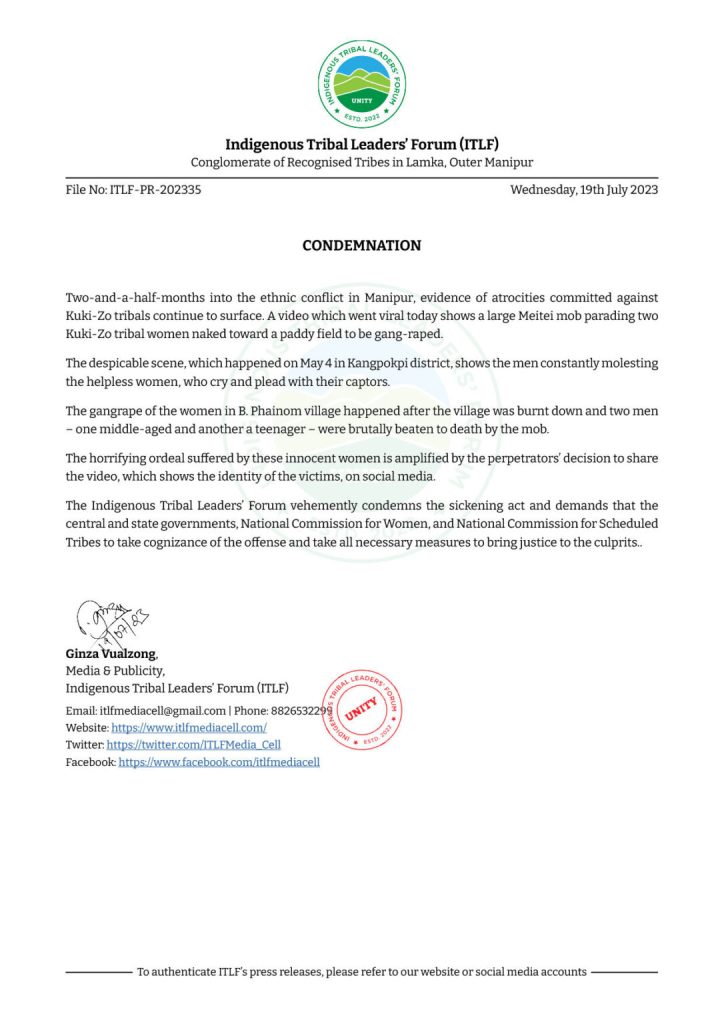
Update:Manipur Extremely horrifying visuals, articles and statements continue to emanate from Manipur. Today, 19th July 2023, just couple of hours back, a video surfaced showing two Kuki women were shown as stripped, naked and Meitei men touching their private parts. Later on, we came to know that this was in response of a disinformation news spread by the Meitis of few women being raped although no documentary evidence of the same surfaced, no names nothing. While I don t want to share the video I will however share the statement shared by the Kuki-Zo tribal community on that. The print gives a bit more context to what has been going on.
Update, Few hours later : The Print also shared more of a context about six days ago. The reason we saw the video now was that for the last 2.5 months Manipur was in Internet shutdown so those videos got uploaded now. There was huge backlash from the Twitter community and GOI ordered the Manipur Police to issue this Press Release yesterday night or just few hours before with yesterday s time-stamp.
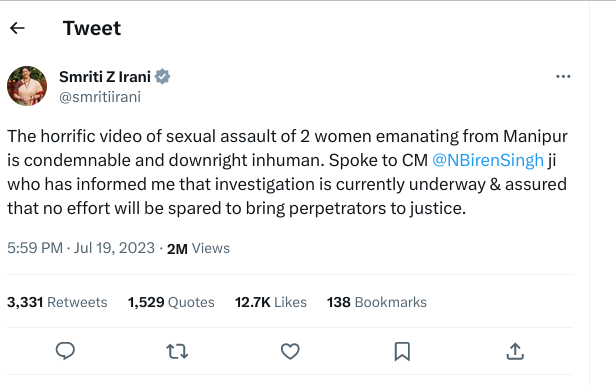
IndianExpress shared an article that does state that while an FIR had been registered immediately no arrests so far and this is when you can see the faces of all the accused. Not one of them tried to hide their face behind a mask or something. So, if the police wanted, they could have easily identified who they are. They know which community the accused belong to, they even know from where they came. If they wanted to, they could have easily used mobile data and triangulation to find the accused and their helpers. So, it does seem to be attempt to whitewash and protect a certain community while letting it prey on the other. Another news that did come in, is because of the furious reaction on Twitter, Youtube has constantly been taking down the video as some people are getting a sort of high more so from the majoritarian community and making lewd remarks. Twitter has been somewhat quick when people are making lewd remarks against the two girl/women. Quite a bit of the above seems like a cover-up. Lastly, apparently GOI has agreed to having a conversation about it in Lok Sabha but without any voting or passing any resolutions as of right now. Would update as an when things change. Update: Smriti Irani, the Child and Development Minister gave the weakest statement possible
As can be noticed, she said sexual assault rather than rape. The women were under police custody for safety when they were whisked away by the mob. No mention of that. She spoke to the Chief Minister who has been publicly known as one of the provocateurs or instigators for the whole thing. The CM had publicly called the Kukus and Nagas as foreigners although both of them claim to be residing for thousands of years and they apparently have documentary evidence of the same  . Also not clear who is doing the condemning here. No word of support for the women, no offer of intervention, why is she the Minister of Child and Women Development (CDW) if she can t use harsh words or give support to the women who have gone and going through horrific things  Update : CM Biren Singh s Statement after the video surfaced
This tweet is contradictory to the statements made by Mr. Singh couple of months ago. At that point in time, Mr. Singh had said that NIA, State Intelligence Departments etc. were giving him minute to minute report on the ground station. The Police itself has suo-moto (on its own) powers to investigate and apprehend criminals for any crime. In fact, the Police can call for questioning of anybody in any relation to any crime and question them for upto 48 hours before charging them. In fact, many cases have been lodged where innocent persons have been framed or they have served much more in the jail than the crime they are alleged to have been committed. For e.g. just a few days before there was a media report of a boy who has been in jail for 3 years. His alleged crime, stealing mere INR 200/- to feed himself. Court doesn t have time to listen to him yet. And there are millions like him. The quint eloquently shares the tale where it tells how both the State and the Centre have been explicitly complicit in the incidents ravaging Manipur. In fact, what has been shared in the article has been very true as far as greed for land is concerned. Just couple of weeks back there have been a ton of floods emanating from Uttarakhand and others. Just before the flooding began, what was the CM doing can be seen here. Apart from the newspapers I have shared and the online resources, most of the mainstream media has been silent on the above. In fact, they have been silent on the Manipur issue until the said video didn t come into limelight. Just now, in Lok Sabha everybody is present except the Prime Minister and the Home Minister. The PM did say that the law will take its own course, but that s about it. Again no support for the women concerned.  Update: CJI (Chief Justice of India) has taken suo-moto cognizance and has warned both the State and Centre to move quickly otherwise they will take the matter in their own hand.
Update: Within 2 hours of the CJI taking suo-moto cognizance, they have arrested one of the main accused Heera Das
The above tells you why the ban on Internet was put in the first place. They wanted to cover it all up. Of all the celebs, only one could find a bit of spine, a bit of backbone to speak about it, all the rest mum
Just imagine, one of the women is around my age while the young one could have been a daughter if I had married on time or a younger sister for sure. If ever I came face to face with them, I just wouldn t be able to look them in the eye. Even their whole whataboutery is built on sham. From their view Kukis are from Burma or Burmese descent. All of which could be easily proved by DNA of all. But let s leave that for a sec. Let s take their own argument that they are Burmese. Their idea of Akhand Bharat stretches all the way to Burma (now called Myanmar). They want all the land but no idea with what to do with the citizens living on it. Even after the video, the whataboutery isn t stopping, that shows how much hatred is there. And not knowing that they too will be victim of the same venom one or the other day  Update: Opposition was told there would be a debate on Manipur. The whole day went by, no debate. That s the shamelessness of this Govt.  Update 20th July 19:25 Center may act or not act against the perpetrators but they will act against Twitter who showed the crime. Talk about shooting the messenger
We are now in the last stage. In 2014, we were at 6

18 July 2023

Jamie McClelland: What am I missing about AI?

Last month I blogged about how the mainstream media is focusing on the wrong parts of the Artificial Intelligence/ChatGPT story. One of the comments left on the post was:
I encourage you to dig a little deeper. If LLM s were just probability
machines, no one would be raising any flags.
Hinton, Bengio, Tegmark and many others are not simpletons. It is the fact that
the architecture and specific training (deep NN, back prop / gradient descend)
produces a system with emergent properties, beyond just a probability machine,
when the system size reaches some thresholds, that has them spooked.
They do understand mathematics and stats and probabilities, i assure you. It is
just that you may have only read the layman s articles and not the scientific
ones
I confess: I haven t made much progress in this regard. I gave Vicky Boykis' Embeddings a go, and started to get a handle on the math, but honestly had a hard time following it. I m open to suggestions from anyone with a few good recommendations for scientific papers accessible to non-math professionals, particularly ones that explain the emergent properties and what that means. Meanwhile, regardless of the scientific truths or falsehoods around chat GPT, the mainstream media continues to miserably fail in helping the rest of us understand the implications of this technology. Most recently, I listend to This American Life s First Contact (part of their Greetings People of Earth show). They interviewed several Microsft AI researchers who first experimented with ChatGPT 4 prior to it s big release. The focus of the researchers was: can we demonstrate chat GPT s general intelligence ability by presenting it with logic problems it could not possibly have encountered before? And the answer: YES! The two examples were:
  1. Stacking: the researcher asked chat GPT how to stack a number of odd objects in a stable way (a book, a dozen eggs, a nail, etc) and chat GPT gave both the correct answer and a reasonable explanation of why.
  2. Hidden state: the researcher described two people in a room with a cat. One person put the cat in a basket and left. The other moved the cat to a box ad left. And, remarkably, chat GPT could explain that when they returned, the first person would think the cat is in the basket and the second person would know it s in the box.
I thought this was pretty cool. So I fired up chat GPT (and even ponied up for chat GPT version 4). I asked it my own stacking question and, hm, chat GPT thought a plate should be placed on top of a can of soda instead of beneath it. So, well, mostly right but I m pretty sure any reasonable human would put the can of soda on the plate not the other way around (chat GPT 3.5 wanted the can of soda to be balanced on the tip of the nail). I then asked it my own simple version of the cat problem and it got it right. Very good. But when I asked it a much more complicated and weird version of the cat problem (involving beetles in a mansion with a movie theater and changing movies and a butler with a big mustache) it got the answer flat out wrong. Did anyone at This American Life try this? Really? It seems like a basic responsibility of journalism to fact check the experts. Maybe the scientists would have had a convincing response? Or maybe scientists are just like everyone else and can get caught up in the excitement and make mistakes? I am amazed and awed by what chat GPT can do - it truly is remarkable. And, I think that a lot of human intelligence is synthesizing what we ve seen and simply regurgitating it in a different context - a task that chat GPT is way better at doing than we are. But the overriding message of most mainstream media stories is that chat GPT is somehow going beyond word synthesis and probability and magically tapping into a form of logic. If the scientific papers are demonstrating this remarkable feat, I think the media needs to do a way better job reporting it.

Lukas M rdian: A declarative approach to Linux networking with Netplan

Photo by Taylor Vick (Unsplash)
Linux networking can be confusing due to the wide range of technology stacks and tools in use, in addition to the complexity of the surrounding network environment. The configuration of bridges, bonds, VRFs or routes can be done programmatically, declaratively, manually or with automated with tools like ifupdown, ifupdown2, ifupdown-ng, iproute2, NetworkManager, systemd-networkd and others. Each of these tools use different formats and locations to store their configuration files. Netplan, a utility for easily configuring networking on a Linux system, is designed to unify and standardise how administrators interact with these underlying technologies. Starting from a YAML description of the required network interfaces and what each should be configured to do, Netplan will generate all the necessary configuration for your chosen tool. In this article, we will provide an overview of how Ubuntu uses Netplan to manage Linux networking in a unified way. By creating a common interface across two disparate technology stacks, IT administrators benefit from a unified experience across both desktops and servers whilst retaining the unique advantages of the underlying tech. But first, let s start with a bit of history and show where we are today.

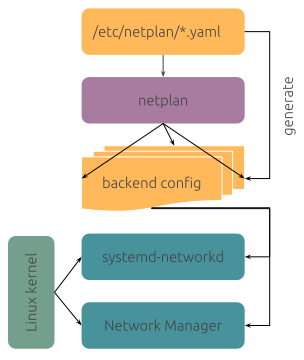
The history of Netplan in Ubuntu Starting with Ubuntu 16.10 and driven by the need to express network configuration in a common way across cloud metadata and other installer systems, we had the opportunity to switch to a network stack that integrates better with our dependency-based boot model. We chose systemd-networkd on server installations for its active upstream community and because it was already part of Systemd and therefore included in any Ubuntu base installation. It has a much better outlook for the future, using modern development techniques, good test coverage and CI integration, compared to the ifupdown tool we used previously. On desktop installations, we kept using NetworkManager due to its very good integration with the user interface. Having to manage and configure two separate network stacks, depending on the Ubuntu variant in use, can be confusing, and we wanted to provide a streamlined user experience across any flavour of Ubuntu. Therefore, we introduced Netplan.io as a control layer above systemd-networkd and NetworkManager. Netplan takes declarative YAML files from /etc/netplan/ as an input and generates corresponding network configuration for the relevant network stack backend in /run/systemd/network/ or /run/NetworkManager/ depending on the system configuration. All while keeping full flexibility to control the underlying network stack in its native way if need be.
Design overview (netplan.io)

Who is using Netplan? Recent versions of Netplan are available and ready to be installed on many distributions, such as Ubuntu, Fedora, RedHat Enterprise Linux, Debian and Arch Linux.

Ubuntu As stated above, Netplan has been installed by default on Ubuntu systems since 2016 and is therefore being used by millions of users across multiple long-term support versions of Ubuntu (18.04, 20.04, 22.04) on a day-to-day basis. This covers Ubuntu server scenarios primarily, such as bridges, bonding, VLANs, VXLANs, VRFs, IP tunnels or WireGuard tunnels, using systemd-networkd as the backend renderer. On Ubuntu desktop systems, Netplan can be used manually through its declarative YAML configuration files, and it will handle those to configure the NetworkManager stack. Keep reading to get a glimpse of how this will be improved through automation and integration with the desktop stack in the future.

Cloud It might not be as obvious, but many people have been using Netplan without knowing about it when configuring a public cloud instance on AWS, Google Cloud or elsewhere through cloud-init. This is because cloud-init s Networking Config Version 2 is a passthrough configuration to Netplan, which will then set up the underlying network stack on the given cloud instance. This is why Netplan is also a key package on the Debian distribution, for example, as it s being used by default on Debian cloud images, too.

Our vision for Linux networking We know that Linux networking can be a beast, and we want to keep simple things simple. But also allow for custom setups of any complexity. With Netplan, the day-to-day networking needs are covered through easily comprehensible and nicely documented YAML files, that describe the desired state of the local network interfaces, which will be rendered into corresponding configuration files for the relevant network stack and applied at (re-)boot or at runtime, using the netplan apply CLI. For example /etc/netplan/lan.yaml:
network:
  version: 2
  renderer: networkd
  ethernets:
    enp3s0:
      dhcp4: true
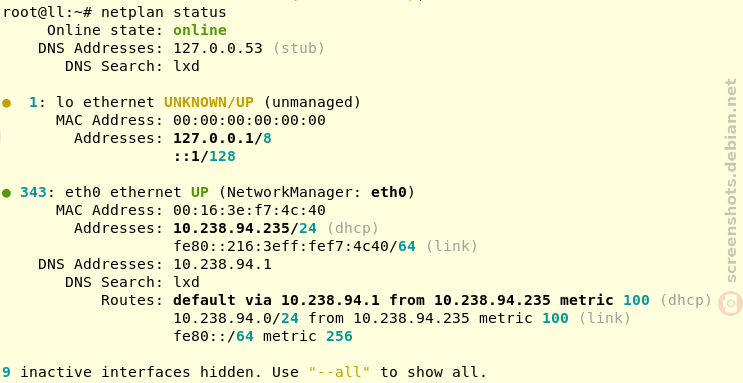
Having a single source of truth for network configuration is also important for administrators, so they do not need to understand multiple network stacks, but can rely on the declarative data given in /etc/netplan/ to configure a system, independent of the underlying network configuration backend. This is also very helpful to seed the initial network configuration for new Linux installations, for example through installation systems such as Subiquity, Ubuntu s desktop installer or cloud-init across the public and private clouds. In addition to describing and applying network configuration, the netplan status CLI can be used to query relevant data from the underlying network stack(s), such as systemd-networkd, NetworkManager or iproute2, and present them in a unified way.
Netplan status (Debian)
At the Netplan project we strive for very high test automation and coverage with plenty of unit tests, integration tests and linting steps, across multiple Linux distros, which gives high confidence in also supporting more advanced networking use cases, such as Open vSwitch or SR-IOV network virtualization, in addition to normal wired (static IP, DHCP, routing), wireless (e.g. wwan modems, WPA2/3 connections, WiFi hotspot, controlling the regulatory domain, ) and common server scenarios. Should there ever be a scenario that is not covered by Netplan natively, it allows for full flexibility to control the underlying network stack directly through systemd override configurations or NetworkManager passthrough settings in addition to having manual configuration side-by-side with interfaces controlled through Netplan.

The future of Netplan desktop integration On workstations, the most common scenario is for end users to configure NetworkManager through its user interface tools, instead of driving it through Netplan s declarative YAML files, which makes use of NetworkManager s native configuration files. To avoid Netplan just handing over control to NetworkManager on such systems, we re working on a bidirectional integration between NetworkManager and Netplan to further improve the single source of truth use case on Ubuntu desktop installations. Netplan is shipping a libnetplan library that provides an API to access Netplan s parser and validation internals, that can be used by NetworkManager to write back a network interface configuration. For instance, configuration given through NetworkManager s UI tools or D-Bus API can be exported to Netplan s native YAML format in the common location at /etc/netplan/. This way, administrators just need to care about Netplan when managing a fleet of Desktop installations. This solution is currently being used in more confined environments, like Ubuntu Core, when using the NetworkManager snap, and we will deliver it to generic Ubuntu desktop systems in 24.04 LTS. In addition to NetworkManager, libnetplan can also be used to integrate with other tools in the networking space, such as cloud-init for improved validation of user data or installation systems when seeding new Linux images.

Conclusion Overall, Netplan can be considered to be a good citizen within a network environment that plays hand-in-hand with other networking tools and makes it easy to control modern network stacks, such as systemd-networkd or NetworkManager in a common, streamlined and declarative way. It provides a single source of truth to network administrators about the network state, while keeping simple things simple, but allowing for arbitrarily complex custom setups.
If you want to learn more, feel free to follow our activities on Netplan.io, GitHub, Launchpad, IRC or our Netplan Developer Diaries blog on discourse.

17 July 2023

Ben Hutchings: FOSS activity in June 2023

15 July 2023

Freexian Collaborators: Monthly report about Debian Long Term Support, June 2023 (by Roberto C. S nchez)

Like each month, have a look at the work funded by Freexian s Debian LTS offering.

Debian LTS contributors In June, 17 contributors have been paid to work on Debian LTS, their reports are available:
  • Abhijith PA did 12.0h (out of 6.0h assigned and 8.0h from previous period), thus carrying over 2.0h to the next month.
  • Adrian Bunk did 28.0h (out of 0h assigned and 34.5h from previous period), thus carrying over 6.5h to the next month.
  • Anton Gladky did 5.0h (out of 6.0h assigned and 9.0h from previous period), thus carrying over 10.0h to the next month.
  • Bastien Roucari s did 17.0h (out of 17.0h assigned and 3.0h from previous period), thus carrying over 3.0h to the next month.
  • Ben Hutchings did 24.0h (out of 16.5h assigned and 7.0h from previous period).
  • Chris Lamb did 18.0h (out of 18.0h assigned).
  • Emilio Pozuelo Monfort did 24.0h (out of 21.0h assigned and 2.5h from previous period).
  • Guilhem Moulin did 20.0h (out of 20.0h assigned).
  • Lee Garrett did 25.0h (out of 0h assigned and 40.5h from previous period), thus carrying over 15.5h to the next month.
  • Markus Koschany did 23.5h (out of 23.5h assigned).
  • Ola Lundqvist did 13.0h (out of 0h assigned and 24.0h from previous period), thus carrying over 11.0h to the next month.
  • Roberto C. S nchez did 13.5h (out of 9.75h assigned and 13.75h from previous period), thus carrying over 10.0h to the next month.
  • Santiago Ruano Rinc n did 8.25h (out of 23.5h assigned), thus carrying over 15.25h to the next month.
  • Sylvain Beucler did 20.0h (out of 23.5h assigned), thus carrying over 3.5h to the next month.
  • Thorsten Alteholz did 14.0h (out of 14.0h assigned).
  • Tobias Frost did 16.0h (out of 16.0h assigned).
  • Utkarsh Gupta did 0.0h (out of 0h assigned and 25.5h from previous period), thus carrying over 25.5h to the next month.

Evolution of the situation In June, we have released 40 DLAs. Notable security updates in June included mariadb-10.3, openssl, and golang-go.crypto. The mariadb-10.3 package was synchronized with the latest upstream maintenance release, version 10.3.39. The openssl package was patched to correct several flaws with certificate validation and with object identifier parsing. Finally, the golang-go.crypto package was updated to address several vulnerabilities, and several associated Go packages were rebuilt in order to properly incorporate the update. LTS contributor Sylvain has been hard at work with some behind-the-scenes improvements to internal tooling and documentation. His efforts are helping to improve the efficiency of all LTS contributors and also helping to improve the quality of their work, making our LTS updates more timely and of higher quality. LTS contributor Lee Garrett began working on a testing framework specifically for Samba. Given the critical role which Samba plays in many deployments, the tremendous impact which regressions can have in those cases, and the unique testing requirements of Samba, this work will certainly result in increased confidence around our Samba updates for LTS. LTS contributor Emilio Pozuelo Monfort has begun preparatory work for the upcoming Firefox ESR version 115 release. Firefox ESR (and the related Thunderbird ESR) requires special work to maintain up to date in LTS. Mozilla do not release individual patches for CVEs, and our policy is to incorporate new ESR releases from Mozilla into LTS. Most updates are minor updates, but once a year Mozilla will release a major update as they move to a new major version for ESR. The update to a new major ESR version entails many related updates to toolchain and other packages. The preparations that Emilio has begun will ensure that once the 115 ESR release is made, updated packages will be available in LTS with minimal delay. Another highlight of behind-the-scenes work is our Front Desk personnel. While we often focus on the work which results in published package updates, much work is also involved in reviewing new vulnerabilities and triaging them (i.e., determining if they affect one or more packages in LTS and then determining the severity of those which are applicable). These intrepid contributors (Emilio Pozuelo Monfort, Markus Koschany, Ola Lundqvist, Sylvain Beucler, and Thorsten Alteholz for the month of June) reviewed dozens of vulnerabilities and made decisions about how those vulnerabilities should be dealt with.

Thanks to our sponsors

12 July 2023

Reproducible Builds: Reproducible Builds in June 2023

Welcome to the June 2023 report from the Reproducible Builds project In our reports, we outline the most important things that we have been up to over the past month. As always, if you are interested in contributing to the project, please visit our Contribute page on our website.


We are very happy to announce the upcoming Reproducible Builds Summit which set to take place from October 31st November 2nd 2023, in the vibrant city of Hamburg, Germany. Our summits are a unique gathering that brings together attendees from diverse projects, united by a shared vision of advancing the Reproducible Builds effort. During this enriching event, participants will have the opportunity to engage in discussions, establish connections and exchange ideas to drive progress in this vital field. Our aim is to create an inclusive space that fosters collaboration, innovation and problem-solving. We are thrilled to host the seventh edition of this exciting event, following the success of previous summits in various iconic locations around the world, including Venice, Marrakesh, Paris, Berlin and Athens. If you re interesting in joining us this year, please make sure to read the event page] which has more details about the event and location. (You may also be interested in attending PackagingCon 2023 held a few days before in Berlin.)
This month, Vagrant Cascadian will present at FOSSY 2023 on the topic of Breaking the Chains of Trusting Trust:
Corrupted build environments can deliver compromised cryptographically signed binaries. Several exploits in critical supply chains have been demonstrated in recent years, proving that this is not just theoretical. The most well secured build environments are still single points of failure when they fail. [ ] This talk will focus on the state of the art from several angles in related Free and Open Source Software projects, what works, current challenges and future plans for building trustworthy toolchains you do not need to trust.
Hosted by the Software Freedom Conservancy and taking place in Portland, Oregon, FOSSY aims to be a community-focused event: Whether you are a long time contributing member of a free software project, a recent graduate of a coding bootcamp or university, or just have an interest in the possibilities that free and open source software bring, FOSSY will have something for you . More information on the event is available on the FOSSY 2023 website, including the full programme schedule.
Marcel Fourn , Dominik Wermke, William Enck, Sascha Fahl and Yasemin Acar recently published an academic paper in the 44th IEEE Symposium on Security and Privacy titled It s like flossing your teeth: On the Importance and Challenges of Reproducible Builds for Software Supply Chain Security . The abstract reads as follows:
The 2020 Solarwinds attack was a tipping point that caused a heightened awareness about the security of the software supply chain and in particular the large amount of trust placed in build systems. Reproducible Builds (R-Bs) provide a strong foundation to build defenses for arbitrary attacks against build systems by ensuring that given the same source code, build environment, and build instructions, bitwise-identical artifacts are created.
However, in contrast to other papers that touch on some theoretical aspect of reproducible builds, the authors paper takes a different approach. Starting with the observation that much of the software industry believes R-Bs are too far out of reach for most projects and conjoining that with a goal of to help identify a path for R-Bs to become a commonplace property , the paper has a different methodology:
We conducted a series of 24 semi-structured expert interviews with participants from the Reproducible-Builds.org project, and iterated on our questions with the reproducible builds community. We identified a range of motivations that can encourage open source developers to strive for R-Bs, including indicators of quality, security benefits, and more efficient caching of artifacts. We identify experiences that help and hinder adoption, which heavily include communication with upstream projects. We conclude with recommendations on how to better integrate R-Bs with the efforts of the open source and free software community.
A PDF of the paper is now available, as is an entry on the CISPA Helmholtz Center for Information Security website and an entry under the TeamUSEC Human-Centered Security research group.
On our mailing list this month:
The antagonist is David Schwartz, who correctly says There are dozens of complex reasons why what seems to be the same sequence of operations might produce different end results, but goes on to say I totally disagree with your general viewpoint that compilers must provide for reproducability [sic]. Dwight Tovey and I (Larry Doolittle) argue for reproducible builds. I assert Any program especially a mission-critical program like a compiler that cannot reproduce a result at will is broken. Also it s commonplace to take a binary from the net, and check to see if it was trojaned by attempting to recreate it from source.

Lastly, there were a few changes to our website this month too, including Bernhard M. Wiedemann adding a simplified Rust example to our documentation about the SOURCE_DATE_EPOCH environment variable [ ], Chris Lamb made it easier to parse our summit announcement at a glance [ ], Mattia Rizzolo added the summit announcement at a glance [ ] itself [ ][ ][ ] and Rahul Bajaj added a taxonomy of variations in build environments [ ].

Distribution work 27 reviews of Debian packages were added, 40 were updated and 8 were removed this month adding to our knowledge about identified issues. A new randomness_in_documentation_generated_by_mkdocs toolchain issue was added by Chris Lamb [ ], and the deterministic flag on the paths_vary_due_to_usrmerge issue as we are not currently testing usrmerge issues [ ] issues.
Roland Clobus posted his 18th update of the status of reproducible Debian ISO images on our mailing list. Roland reported that all major desktops build reproducibly with bullseye, bookworm, trixie and sid , but he also mentioned amongst many changes that not only are the non-free images being built (and are reproducible) but that the live images are generated officially by Debian itself. [ ]
Jan-Benedict Glaw noticed a problem when building NetBSD for the VAX architecture. Noting that Reproducible builds [are] probably not as reproducible as we thought , Jan-Benedict goes on to describe that when two builds from different source directories won t produce the same result and adds various notes about sub-optimal handling of the CFLAGS environment variable. [ ]
F-Droid added 21 new reproducible apps in June, resulting in a new record of 145 reproducible apps in total. [ ]. (This page now sports missing data for March May 2023.) F-Droid contributors also reported an issue with broken resources in APKs making some builds unreproducible. [ ]
Bernhard M. Wiedemann published another monthly report about reproducibility within openSUSE

Upstream patches

Testing framework The Reproducible Builds project operates a comprehensive testing framework (available at tests.reproducible-builds.org) in order to check packages and other artifacts for reproducibility. In June, a number of changes were made by Holger Levsen, including:
  • Additions to a (relatively) new Documented Jenkins Maintenance (djm) script to automatically shrink a cache & save a backup of old data [ ], automatically split out previous months data from logfiles into specially-named files [ ], prevent concurrent remote logfile fetches by using a lock file [ ] and to add/remove various debugging statements [ ].
  • Updates to the automated system health checks to, for example, to correctly detect new kernel warnings due to a wording change [ ] and to explicitly observe which old/unused kernels should be removed [ ]. This was related to an improvement so that various kernel issues on Ubuntu-based nodes are automatically fixed. [ ]
Holger and Vagrant Cascadian updated all thirty-five hosts running Debian on the amd64, armhf, and i386 architectures to Debian bookworm, with the exception of the Jenkins host itself which will be upgraded after the release of Debian 12.1. In addition, Mattia Rizzolo updated the email configuration for the @reproducible-builds.org domain to correctly accept incoming mails from jenkins.debian.net [ ] as well as to set up DomainKeys Identified Mail (DKIM) signing [ ]. And working together with Holger, Mattia also updated the Jenkins configuration to start testing Debian trixie which resulted in stopped testing Debian buster. And, finally, Jan-Benedict Glaw contributed patches for improved NetBSD testing.

If you are interested in contributing to the Reproducible Builds project, please visit our Contribute page on our website. However, you can get in touch with us via:

11 July 2023

Simon Josefsson: Coping with non-free software in Debian

A personal reflection on how I moved from my Debian home to find two new homes with Trisquel and Guix for my own ethical computing, and while doing so settled my dilemma about further Debian contributions. Debian s contributions to the free software community has been tremendous. Debian was one of the early distributions in the 1990 s that combined the GNU tools (compiler, linker, shell, editor, and a set of Unix tools) with the Linux kernel and published a free software operating system. Back then there were little guidance on how to publish free software binaries, let alone entire operating systems. There was a lack of established community processes and conflict resolution mechanisms, and lack of guiding principles to motivate the work. The community building efforts that came about in parallel with the technical work has resulted in a steady flow of releases over the years. From the work of Richard Stallman and the Free Software Foundation (FSF) during the 1980 s and early 1990 s, there was at the time already an established definition of free software. Inspired by free software definition, and a belief that a social contract helps to build a community and resolve conflicts, Debian s social contract (DSC) with the free software community was published in 1997. The DSC included the Debian Free Software Guidelines (DFSG), which directly led to the Open Source Definition.

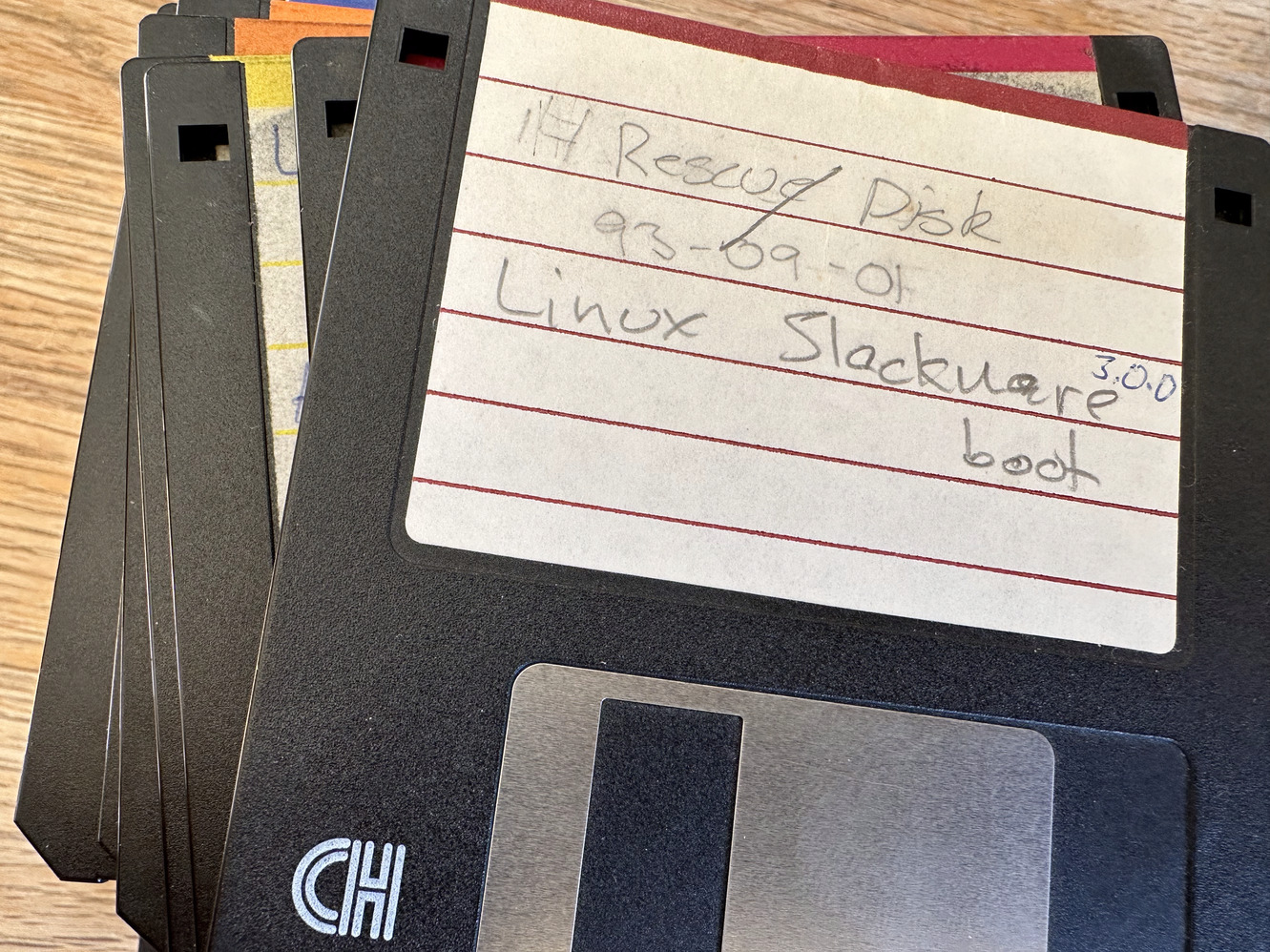
Slackware 3.5" disksOne of my earlier Slackware install disk sets, kept for nostalgic reasons.
I was introduced to GNU/Linux through Slackware in the early 1990 s (oh boy those nights calculating XFree86 modeline s and debugging sendmail.cf) and primarily used RedHat Linux during ca 1995-2003. I switched to Debian during the Woody release cycles, when the original RedHat Linux was abandoned and Fedora launched. It was Debian s explicit community processes and infrastructure that attracted me. The slow nature of community processes also kept me using RedHat for so long: centralized and dogmatic decision processes often produce quick and effective outcomes, and in my opinion RedHat Linux was technically better than Debian ca 1995-2003. However the RedHat model was not sustainable, and resulted in the RedHat vs Fedora split. Debian catched up, and reached technical stability once its community processes had been grounded. I started participating in the Debian community around late 2006. My interpretation of Debian s social contract is that Debian should be a distribution of works licensed 100% under a free license. The Debian community has always been inclusive towards non-free software, creating the contrib/non-free section and permitting use of the bug tracker to help resolve issues with non-free works. This is all explained in the social contract. There has always been a clear boundary between free and non-free work, and there has been a commitment that the Debian system itself would be 100% free. The concern that RedHat Linux was not 100% free software was not critical to me at the time: I primarily (and happily) ran GNU tools on Solaris, IRIX, AIX, OS/2, Windows etc. Running GNU tools on RedHat Linux was an improvement, and I hadn t realized it was possible to get rid of all non-free software on my own primary machine. Debian realized that goal for me. I ve been a believer in that model ever since. I can use Solaris, macOS, Android etc knowing that I have the option of using a 100% free Debian. While the inclusive approach towards non-free software invite and deserve criticism (some argue that being inclusive to non-inclusive behavior is a bad idea), I believe that Debian s approach was a successful survival technique: by being inclusive to and a compromise between free and non-free communities, Debian has been able to stay relevant and contribute to both environments. If Debian had not served and contributed to the free community, I believe free software people would have stopped contributing. If Debian had rejected non-free works completely, I don t think the successful Ubuntu distribution would have been based on Debian. I wrote the majority of the text above back in September 2022, intending to post it as a way to argue for my proposal to maintain the status quo within Debian. I didn t post it because I felt I was saying the obvious, and that the obvious do not need to be repeated, and the rest of the post was just me going down memory lane. The Debian project has been a sustainable producer of a 100% free OS up until Debian 11 bullseye. In the resolution on non-free firmware the community decided to leave the model that had resulted in a 100% free Debian for so long. The goal of Debian is no longer to publish a 100% free operating system, instead this was added: The Debian official media may include firmware . Indeed the Debian 12 bookworm release has confirmed that this would not only be an optional possibility. The Debian community could have published a 100% free Debian, in parallel with the non-free Debian, and still be consistent with their newly adopted policy, but chose not to. The result is that Debian s policies are not consistent with their actions. It doesn t make sense to claim that Debian is 100% free when the Debian installer contains non-free software. Actions speaks louder than words, so I m left reading the policies as well-intended prose that is no longer used for guidance, but for the peace of mind for people living in ivory towers. And to attract funding, I suppose. So how to deal with this, on a personal level? I did not have an answer to that back in October 2022 after the vote. It wasn t clear to me that I would ever want to contribute to Debian under the new social contract that promoted non-free software. I went on vacation from any Debian work. Meanwhile Debian 12 bookworm was released, confirming my fears. I kept coming back to this text, and my only take-away was that it would be unethical for me to use Debian on my machines. Letting actions speak for themselves, I switched to PureOS on my main laptop during October, barely noticing any difference since it is based on Debian 11 bullseye. Back in December, I bought a new laptop and tried Trisquel and Guix on it, as they promise a migration path towards ppc64el that PureOS do not. While I pondered how to approach my modest Debian contributions, I set out to learn Trisquel and gained trust in it. I migrated one Debian machine after another to Trisquel, and started to use Guix on others. Migration was easy because Trisquel is based on Ubuntu which is based on Debian. Using Guix has its challenges, but I enjoy its coherant documented environment. All of my essential self-hosted servers (VM hosts, DNS, e-mail, WWW, Nextcloud, CI/CD builders, backup etc) uses Trisquel or Guix now. I ve migrated many GitLab CI/CD rules to use Trisquel instead of Debian, to have a more ethical computing base for software development and deployment. I wish there were official Guix docker images around. Time has passed, and when I now think about any Debian contributions, I m a little less muddled by my disappointment of the exclusion of a 100% free Debian. I realize that today I can use Debian in the same way that I use macOS, Android, RHEL or Ubuntu. And what prevents me from contributing to free software on those platforms? So I will make the occasional Debian contribution again, knowing that it will also indirectly improve Trisquel. To avoid having to install Debian, I need a development environment in Trisquel that allows me to build Debian packages. I have found a recipe for doing this: # System commands:
sudo apt-get install debhelper git-buildpackage debian-archive-keyring
sudo wget -O /usr/share/debootstrap/scripts/debian-common https://sources.debian.org/data/main/d/debootstrap/1.0.128%2Bnmu2/scripts/debian-common
sudo wget -O /usr/share/debootstrap/scripts/sid https://sources.debian.org/data/main/d/debootstrap/1.0.128%2Bnmu2/scripts/sid
# Run once to create build image:
DIST=sid git-pbuilder create --mirror http://deb.debian.org/debian/ --debootstrapopts "--exclude=usr-is-merged" --basepath /var/cache/pbuilder/base-sid.cow
# Run in a directory with debian/ to build a package:
gbp buildpackage --git-pbuilder --git-dist=sid
How to sustainably deliver a 100% free software binary distributions seems like an open question, and the challenges are not all that different compared to the 1990 s or early 2000 s. I m hoping Debian will come back to provide a 100% free platform, but my fear is that Debian will compromise even further on the free software ideals rather than the opposite. With similar arguments that were used to add the non-free firmware, Debian could compromise the free software spirit of the Linux boot process (e.g., non-free boot images signed by Debian) and media handling (e.g., web browsers and DRM), as Debian have already done with appstore-like functionality for non-free software (Python pip). To learn about other freedom issues in Debian packaging, browsing Trisquel s helper scripts may enlight you. Debian s setback and the recent setback for RHEL-derived distributions are sad, and it will be a challenge for these communities to find internally consistent coherency going forward. I wish them the best of luck, as Debian and RHEL are important for the wider free software eco-system. Let s see how the community around Trisquel, Guix and the other FSDG-distributions evolve in the future. The situation for free software today appears better than it was years ago regardless of Debian and RHEL s setbacks though, which is important to remember! I don t recall being able install a 100% free OS on a modern laptop and modern server as easily as I am able to do today. Happy Hacking! Addendum 22 July 2023: The original title of this post was Coping with non-free Debian, and there was a thread about it that included feedback on the title. I do agree that my initial title was confrontational, and I ve changed it to the more specific Coping with non-free software in Debian. I do appreciate all the fine free software that goes into Debian, and hope that this will continue and improve, although I have doubts given the opinions expressed by the majority of developers. For the philosophically inclined, it is interesting to think about what it means to say that a compilation of software is freely licensed. At what point does a compilation of software deserve the labels free vs non-free? Windows probably contains some software that is published as free software, let s say Windows is 1% free. Apple authors a lot of free software (as a tangent, Apple probably produce more free software than what Debian as an organization produces), and let s say macOS contains 20% free software. Solaris (or some still maintained derivative like OpenIndiana) is mostly freely licensed these days, isn t it? Let s say it is 80% free. Ubuntu and RHEL pushes that closer to let s say 95% free software. Debian used to be 100% but is now slightly less at maybe 99%. Trisquel and Guix are at 100%. At what point is it reasonable to call a compilation free? Does Debian deserve to be called freely licensed? Does macOS? Is it even possible to use these labels for compilations in any meaningful way? All numbers just taken from thin air. It isn t even clear how this can be measured (binary bytes? lines of code? CPU cycles? etc). The caveat about license review mistakes applies. I ignore Debian s own claims that Debian is 100% free software, which I believe is inconsistent and no longer true under any reasonable objective analysis. It was not true before the firmware vote since Debian ships with non-free blobs in the Linux kernel for example.

9 July 2023

Russell Coker: Matrix

Introduction In 2020 I first setup a Matrix [1] server. Matrix is a full featured instant messaging protocol which requires a less stringent definition of instant , messages being delayed for minutes aren t that uncommon in my experience. Matrix is a federated service where the servers all store copies of the room data, so when you connect your client to it s home server it gets all the messages that were published while you were offline, it is widely regarded as being IRC but without a need to be connected all the time. One of it s noteworthy features is support for end to end encryption (so the server can t access cleartext messages from users) as a core feature. Matrix was designed for bridging with other protocols, the most well known of which is IRC. The most common Matrix server software is Synapse which is written in Python and uses a PostgreSQL database as it s backend [2]. My tests have shown that a lightly loaded Synapse server with less than a dozen users and only one or two active users will have noticeable performance problems if the PostgreSQL database is stored on SATA hard drives. This seems like the type of software that wouldn t have been developed before SSDs became commonly affordable. The matrix-synapse is in Debian/Unstable and the backports repositories for Bullseye and Buster. As Matrix is still being very actively developed you want to have a recent version of all related software so Debian/Buster isn t a good platform for running it, Bullseye or Bookworm are the preferred platforms. Configuring Synapse isn t really hard, but there are some postential problems. The first thing to do is to choose the DNS name, you can never change it without dropping the database (fresh install of all software and no documented way of keeping user configuration) so you don t want to get it wrong. Generally you will want the Matrix addresses at the top level of the domain you choose. When setting up a Matrix server for my local LUG I chose the top level of their domain luv.asn.au as the DNS name for the server. If you don t want to run a server then there are many open servers offering free account. Server Configuration Part of doing this configuration required creating the URL https://luv.asn.au/.well-known/matrix/client with the following contents so clients know where to connect. Note that you should not setup Jitsi sections without first discussing it with the people who run the Jitsi server in question.
 
  "m.homeserver":  
    "base_url": "https://luv.asn.au"
   
  "jitsi":  
    "preferredDomain": "jitsi.perthchat.org"
   
  "im.vector.riot.jitsi":  
    "preferredDomain": "jitsi.perthchat.org"
   
 
Also the URL https://luv.asn.au/.well-known/matrix/server for other servers to know where to connect:
 
  "m.server": "luv.asn.au:8448"
 
If the base_url or the m.server points to a name that isn t configured then you need to add it to the web server configuration. See section 3.1 of the documentation about well known Matrix client fields [3]. The SE Linux specific parts of the configuration are to run the following commands as Bookworm and Bullseye SE Linux policy have support for Synapse:
setsebool -P httpd_setrlimit 1
setsebool -P httpd_can_network_relay 1
setsebool -P matrix_postgresql_connect 1
To configure apache you have to enable proxy mode and SSL with the command a2enmod proxy ssl proxy_http and add the line Listen 8443 to /etc/apache2/ports.conf and restart Apache. The command chmod 700 /etc/matrix-synapse should probably be run to improve security, there s no reason for less restrictive permissions on that directory. In the /etc/matrix-synapse/homeserver.yaml file the macaroon_secret_key is a random key for generating tokens. To use the matrix.org server as a trusted key server and not receive warnings put the following line in the config file:
suppress_key_server_warning: true
A line like the following is needed to configure the baseurl:
public_baseurl: https://luv.asn.au:8448/
To have Synapse directly accept port 8448 connections you have to change bind_addresses in the first section of listeners to the global listen IPv6 and IPv4 addresses. The registration_shared_secret is a password for adding users. When you have set that you can write a shell script to add new users such as:
#!/bin/bash
# usage: matrix_new_user USER PASS
synapse_register_new_matrix_user -u $1 -p $2 -a -k THEPASSWORD
You need to set tls_certificate_path and tls_private_key_path to appropriate values, usually something like the following:
tls_certificate_path: "/etc/letsencrypt/live/www.luv.asn.au-0001/fullchain.pem"
tls_private_key_path: "/etc/letsencrypt/live/www.luv.asn.au-0001/privkey.pem"
For the database section you need something like the following which matches your PostgreSQL setup:
  name: "psycopg2"
  args:
    user: WWWWWW
    password: XXXXXXX
    database: YYYYYYY
    host: ZZZZZZ
    cp_min: 5
    cp_max: 10
You need to run psql commands like the following to set it up:
create role WWWWWW login password 'XXXXXXX';
create database YYYYYYY with owner WWWWWW ENCODING 'UTF8' LOCALE 'C' TEMPLATE 'template0';
For the Apache configuration you need something like the following for the port 8448 web server:
<VirtualHost *:8448>
  SSLEngine on
...
  ServerName luv.asn.au;
  AllowEncodedSlashes NoDecode
  ProxyPass /_matrix http://127.0.0.1:8008/_matrix nocanon
  ProxyPassReverse /_matrix http://127.0.0.1:8008/_matrix
  AllowEncodedSlashes NoDecode
  ProxyPass /_matrix http://127.0.0.1:8008/_matrix nocanon
  ProxyPassReverse /_matrix http://127.0.0.1:8008/_matrix
</VirtualHost>
Also you must add the ProxyPass section to the port 443 configuration (the server that is probably doing other more directly user visible things) for most (all?) end-user clients:
  ProxyPass /_matrix http://127.0.0.1:8008/_matrix nocanon
This web page can be used to test listing rooms via federation without logging in [4]. If it gives the error Can t find this server or its room list then you must set allow_public_rooms_without_auth and allow_public_rooms_over_federation to true in /etc/matrix-synapse/homeserver.yaml. The Matrix Federation Tester site [5] is good for testing new servers and for tests after network changes. Clients The Element (formerly known as Riot) client is the most common [6]. The following APT repository will allow you to install Element via apt install element-desktop on Debian/Buster.
deb https://packages.riot.im/debian/ default main
The Debian backports repository for Buster has the latest version of Quaternion, apt install quaternion should install that for you. Quaternion doesn t support end to end encryption (E2EE) and also doesn t seem to have good support for some other features like being invited to a room. My current favourite client is Schildi Chat on Android [7], which has a notification message 24*7 to reduce the incidence of Android killing it. Eventually I want to go to PinePhone or Librem 5 for all my phone use so I need to find a full featured Linux client that works on a small screen. Comparing to Jabber I plan to keep using Jabber for alerts because it really does instant messaging, it can reliably get the message to me within a matter of seconds. Also there are a selection of command-line clients for Jabber to allow sending messages from servers. When I first investigated Matrix there was no program suitable for sending messages from a script and the libraries for the protocol made it unreasonably difficult to write one. Now there is a Matrix client written in shell script [8] which might do that. But the delay in receiving messages is still a problem. Also the Matrix clients I ve tried so far have UIs that are more suited to serious chat than to quickly reading a notification message. Bridges Here is a list of bridges between Matrix and other protocols [9]. You can run bridges yourself for many different messaging protocols including Slack, Discord, and Messenger. There are also bridges run for public use for most IRC channels. Here is a list of integrations with other services [10], this is for interacting with things other than IM systems such as RSS feeds, polls, and other things. This also has some frameworks for writing bots. More Information The Debian wiki page about Matrix is good [11]. The view.matrix.org site allows searching for public rooms [12].

8 July 2023

Dirk Eddelbuettel: #40: Another r2u Example Making Colab Easier

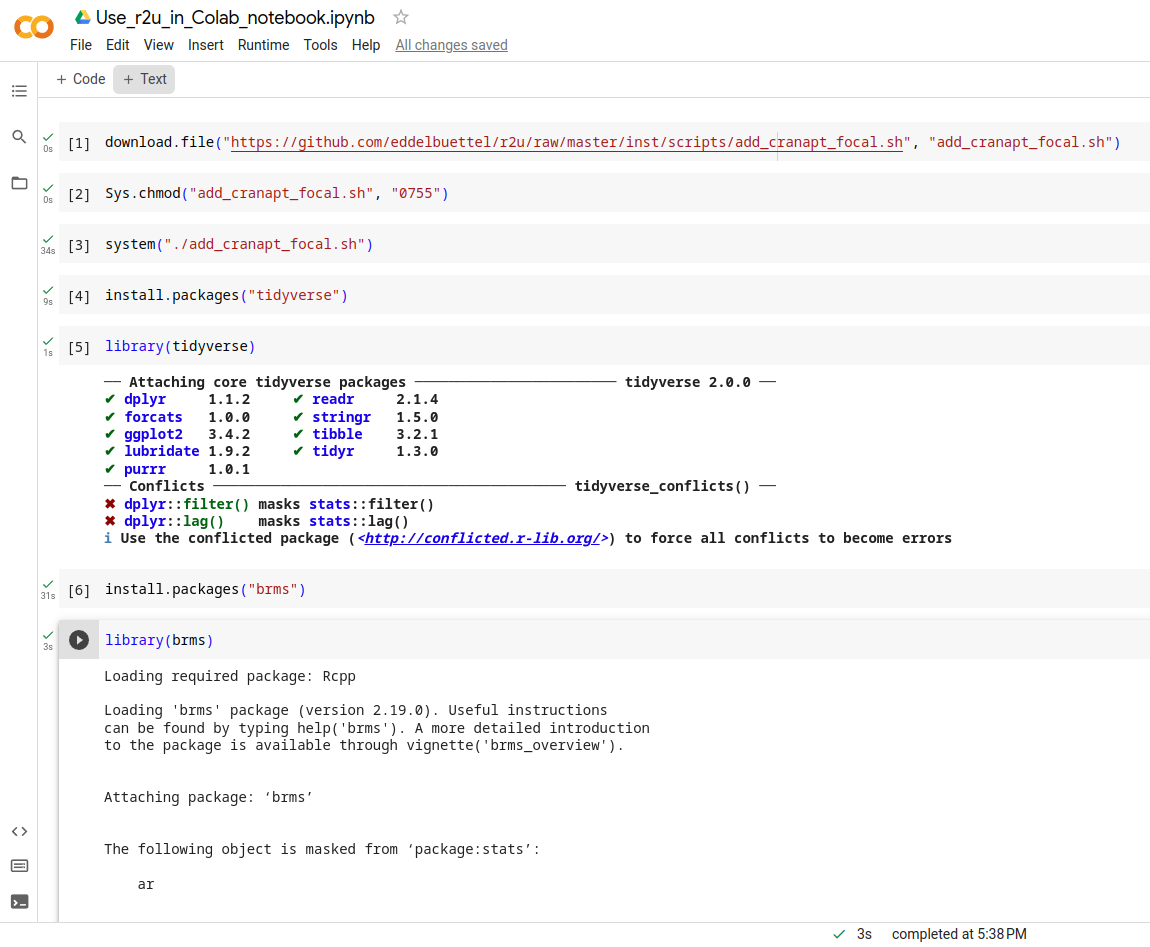
Welcome to the 40th post in the $R^4 series. This one will just be a very brief illustration of r2u use in what might be an unexpected place: Google Colab. Colab has a strong bent towards Jupyter and Python but has been supporting R compute kernels for some time (by changing what they call the runtime ). And with a little exploration one can identify these are (currently, as of July 2023) running Ubuntu 20.04 aka focal . Which is of course one of two system supported by our lovely r2u project (with the other being the newer 22.04 aka jammy ). And I mostly tweeted / tooted about r2u since the its introduction in #37. And gave basically just a mention in passing in faster feedback post #38 as well as the faster feedback in ci post #39). So a brief recap may be in order. In essence, r2u makes all of CRAN available as full-fledged Ubuntu binaries with complete and full dependencies which are then installed directly and quickly via apt. Which, to top it of, are accessed directly from R via install.packages() so no special knowledge or sauce needed. We often summarize it as fast, easy, reliable: what is not to like . And, as we established in a few minutes of probing, it also works in the focal -based Colab session. The screen shot shows the basic step of fetching the setup script (for plain Ubuntu focal system) from r2u, making it executable and running it. Total time: 34 seconds. And after that we see the pure magic of install.packages("tidyverse") installing all of it in nine seconds. Additionally, we add the brms package in thirty-one seconds cia install.packages("brms"). Both load just fine and echo their current values.
r2u on colab focal r2u on colab focal
The commands that are executed in that R session are just
download.file("https://github.com/eddelbuettel/r2u/raw/master/inst/scripts/add_cranapt_focal.sh",
              "add_cranapt_focal.sh")
Sys.chmod("add_cranapt_focal.sh", "0755")
system("./add_cranapt_focal.sh")
install.packages("tidyverse")
library(tidyverse)
install.packages("brms")
library(brms)
The timings are the Colab notebook are visible in the left margin. The lack of output makes debugging a little trickier so I still recommend to use r2u for first expploration via a Docker container as e.g. rocker/r2u:jammy. More information about r2u is at its site, and we answered some question in issues, and at stackoverflow. More questions are always welcome! If you like this or other open-source work I do, you can now sponsor me at GitHub.

This post by Dirk Eddelbuettel originated on his Thinking inside the box blog. Please report excessive re-aggregation in third-party for-profit settings.

Russell Coker: Sandboxing Phone Apps

As a follow up to Wayland [1]: A difficult problem with Linux desktop systems (which includes phones and tablets) is restricting application access so that applications can t mess with each other s data or configuration but also allowing them to share data as needed. This has been mostly solved for Android but that involved giving up all legacy Linux apps. I think that we need to get phones capable of running a full desktop environment and having Android level security on phone apps and regular desktop apps. My interest in this is phones running Debian and derivatives such as PureOS. But everything I describe in this post should work equally well for all full featured Linux distributions for phones such as Arch, Gentoo, etc and phone based derivatives of those such as Manjaro. It may be slightly less applicable to distributions such as Alpine Linux and it s phone derivative PostmarketOS, I would appreciate comments from contributors to PostmarketOS or Alpine Linux about this. I ve investigated some of the ways of solving these problems. Many of the ways of doing this involves namespaces. The LWN articles about namespaces are a good background to some of these technologies [2]. The LCA keynote lecture Containers aka crazy user space fun by Jess Frazelle has a good summary of some of the technology [3]. One part that I found particularly interesting was the bit about recognising the container access needed at compile time. This can also be part of recognising bad application design at compile time, it s quite common for security systems to flag bad security design in programs. Firejail To sandbox applications you need to have some method of restricting what they do, this means some combination of namespaces and similar features. Here s an article on sandboxing with firejail [4]. Firejail uses namespaces, seccomp-bpf, and capabilities to restrict programs. It allows bind mounts if run as root and if not run as root it can restrict file access by name and access to networking, system calls, and other features. It has a convenient learning mode that generates policy for you, so if you have a certain restricted set of tasks that an application is to perform you can run it once and then force it to do only the same operations in future. I recommend that everyone who is still reading at this point try out firejail. Here s an example of what you can do:
# create a profile
firejail --build=xterm.profile xterm
# now this run can only do what the previous run did
firejail --profile=xterm.profile xterm
Note that firejail is SETUID root so can potentially reduce system security and it has had security issues in the past. In spite of that it can be good for allowing a trusted user to run programs with less access to the system. Also it is a good way to start learning about such things. I don t think it s a good solution for what I want to do. But I won t rule out the possibility of using it at some future time for special situations. Bubblewrap I tried out firejail with the browser Epiphany (Debian package epiphany-browser) on my Librem5, but that didn t work as Epiphany uses /usr/bin/bwrap (bubblewrap) for it s internal sandboxing (here is an informative blog post about the history of bubblewrap AKA xdg-app-helper which was developed as part of flatpak [5]). The Epiphany bubblewrap sandbox is similar to the situation with Chrome/Chromium which have internal sandboxing that s incompatible with firejail. The firejail man page notes that it s not compatible with Snap, Flatpack, and similar technologies. One issue this raises is that we can t have a namespace based sandboxing system applied to all desktop apps with no extra configuration as some desktop apps won t work with it. Bubblewrap requires setting kernel.unprivileged_userns_clone=1 to run as non-root (IE provide the normal and expected functionality) which potentially reduces system security. Here is an example of a past kernel bug that was exploitable by creating a user namespace with CAP_SYS_ADMIN [6]. But it s the default in recent Debian kernels which means that the issues have been reviewed and determined to be a reasonable trade-off and also means that many programs will use the feature and break if it s disabled. Here is an example of how to use Bubblewrap on Debian, after installing the bubblewrap run the following command. Note that the new-session option (to prevent injecting characters in the keyboard buffer with TIOCSTI) makes the session mostly unusable for a shell.
bwrap --ro-bind /usr /usr --symlink usr/lib64 /lib64 --symlink usr/lib /lib --proc /proc --dev /dev --unshare-pid --die-with-parent bash
Here is an example of using Bubblewrap to sandbox the game Warzone2100 running with Wayland/Vulkan graphics and Pulseaudio sound.
bwrap --bind $HOME/.local/share/warzone2100 $HOME/.local/share/warzone2100 --bind /run/user/$UID/pulse /run/user/$UID/pulse --bind /run/user/$UID/wayland-0 /run/user/$UID/wayland-0 --bind /run/user/$UID/wayland-0.lock /run/user/$UID/wayland-0.lock --ro-bind /usr /usr --symlink usr/bin /bin --symlink usr/lib64 /lib64 --symlink usr/lib /lib --proc /proc --dev /dev --unshare-pid --dev-bind /dev/dri /dev/dri --ro-bind $HOME/.pulse $HOME/.pulse --ro-bind $XAUTHORITY $XAUTHORITY --ro-bind /sys /sys --new-session --die-with-parent warzone2100
Here is an example of using Bubblewrap to sandbox the Debian bug reporting tool reportbug
bwrap --bind /tmp /tmp --ro-bind /etc /etc --ro-bind /usr /usr --ro-bind /var/lib/dpkg /var/lib/dpkg --symlink usr/sbin /sbin --symlink usr/bin /bin --symlink usr/lib64 /lib64 --symlink usr/lib /lib --symlink /usr/lib32 /lib32 --symlink /usr/libx32 /libx32 --proc /proc --dev /dev --die-with-parent --unshare-ipc --unshare-pid reportbug
Here is an example shell script to wrap the build process for Debian packages. This needs to run with unshare-user and specifying the UID as 0 because fakeroot doesn t work in the container, I haven t worked out why but doing it through the container is a better method anyway. This script shares read-write the parent of the current directory as the Debian build process creates packages and metadata files in the parent directory. This will prevent the automatic signing scripts which is a feature not a bug, so after building packages you have to sign the .changes file with debsign. One thing I just learned is that the Debian build system Sbuild can use chroots for building packages for similar benefits [7]. Some people believe that sbuild is the correct way of doing it regardless of the chroot issue. I think it s too heavy-weight for most of my Debian package building, but even if I had been convinced I d still share the information about how to use bwrap as Debian is about giving users choice.
#!/bin/bash
set -e
BUILDDIR=$(realpath $(pwd)/..)
exec bwrap --bind /tmp /tmp --bind $BUILDDIR $BUILDDIR --ro-bind /etc /etc --ro-bind /usr /usr --ro-bind /var/lib/dpkg /var/lib/dpkg --symlink usr/bin /bin --symlink usr/lib64 /lib64 --symlink usr/lib /lib --proc /proc --dev /dev --die-with-parent --unshare-user --unshare-ipc --unshare-net --unshare-pid --new-session --uid 0 --gid 0 $@
Here is an informative blog post about using Bubblewrap with Seccomp (BPF) [8]. In a future post I ll write about how to get this sort of thing going but I ll just leave the URL here for people who want to do it on their own. The source for the flatpak-run program is the only example I could find of using Seccomp with Bubblewrap [9]. A lot of that code is worth copying for application sandboxing, maybe the entire program. Unshare The unshare command from the util-linux package has a large portion of the Bubblewrap functionality. The things that it doesn t do like creating a new session can be done by other utilities. Here is an example of creating a container with unshare and then using cgroups with it [10]. systemd --user Recent distributions have systemd support for running a user session, the Arch Linux Wiki has a good description of how this works [11]. The units for a user are .service files stored in /usr/lib/systemd/user/ (distribution provided), ~/.local/share/systemd/user/ (user installed applications in debian a link to ~/.config/systemd/user/), ~/.config/systemd/user/ (for manual user config), and /etc/systemd/user/ (local sysadmin provided) Here are some example commands for manipulating this:
# show units running for the current user
systemctl --user
# show status of one unit
systemctl --user status kmail.service
# add an environment variable to the list for all user units
systemctl --user import-environment XAUTHORITY
# start a user unit
systemctl --user start kmail.service
# analyse security for all units for the current user
systemd-analyze --user security
# analyse security for one unit
systemd-analyze --user security kmail.service
Here is a test kmail.service file I wrote to see what could be done for kmail, I don t think that kmail is the app most needing to be restricted it is in more need of being protected from other apps but it still makes a good test case. This service file took it from the default risk score of 9.8 (UNSAFE) to 6.3 (MEDIUM) even though I was getting the error code=exited, status=218/CAPABILITIES when I tried anything that used capabilities (apparently due to systemd having some issue talking to the kernel).
[Unit]
Description=kmail
[Service]
ExecStart=/usr/bin/kmail
# can not limit capabilities (code=exited, status=218/CAPABILITIES)
#CapabilityBoundingSet=~CAP_SYS_TIME CAP_SYS_PACCT CAP_KILL CAP_WAKE_ALARM CAP_DAC_OVERRIDE CAP_DAC_READ_SEARCH CAP_FOWNER CAP_IPC_OWNER CAP_LINUX_IMMUTABLE CAP_IPC_LOCK CAP_SYS_MODULE CAP_SYS_TTY_CONFIG CAP_SYS_BOOT CAP_SYS_CHROOT CAP_BLOCK_SUSPEND CAP_LEASE CAP_MKNOD CAP_CHOWN CAP_FSETID CAP_SETFCAP CAP_SETGID CAP_SETUID CAP_SETPCAP CAP_SYS_RAWIO CAP_SYS_PTRACE CAP_SYS_NICE CAP_SYS_RESOURCE CAP_NET_ADMIN CAP_NET_BIND_SERVICE CAP_NET_BROADCAST CAP_NET_RAW CAP_SYS_ADMIN CAP_SYSLOG
# also 218 for ProtectKernelModules PrivateDevices ProtectKernelLogs ProtectClock
# MemoryDenyWriteExecute stops it displaying message content (bad)
# needs @resources and @mount to startup
# needs @privileged to display message content
SystemCallFilter=~@cpu-emulation @debug @raw-io @reboot @swap @obsolete
SystemCallArchitectures=native
UMask=077
NoNewPrivileges=true
ProtectControlGroups=true
PrivateMounts=false
RestrictNamespaces=~user pid net uts mnt cgroup ipc
RestrictSUIDSGID=true
ProtectHostname=true
LockPersonality=true
ProtectKernelTunables=true
RestrictAddressFamilies=~AF_PACKET
RestrictRealtime=true
ProtectSystem=strict
ProtectProc=invisible
PrivateUsers=true
[Install]
When I tried to use the TemporaryFileSystem=%h directive (to make the home directory a tmpfs the most basic step in restricting what a regular user application can do) I got the error (code=exited, status=226/NAMESPACE) . So I don t think the systemd user setup competes with bubblewrap for restricting user processes. But if anyone else can start where I left off and go further then that will be interesting. Systemd-run The following shell script runs firefox as a dynamic user via systemd-run, running this asks for the root password and any mechanism for allowing that sort of thing opens potential security holes. So at this time while it s an interesting feature I don t think it is suitable for running regular applications on a phone or Linux desktop.
#!/bin/bash
# systemd-run Firefox with DynamicUser and home directory.
#
# Run as a non-root user.
# Or, run as root and change $USER below.
SANDBOX_MINIMAL=(
    --property=DynamicUser=1
    --property=StateDirectory=openstreetmap
    # --property=RootDirectory=/debian_sid
)
SANDBOX_X11=(
    # Sharing Xorg always defeats security, regardless of any sandboxing tech,
    # but the config is almost ready for Wayland, and there's Xephyr.
#    --property=LoadCredential=.ICEauthority:/home/$USER/.ICEauthority
    --property=LoadCredential=.Xauthority:/home/$USER/.Xauthority
    --property=Environment=DISPLAY=:0
)
SANDBOX_FIREFOX=(
    # hardware-accelerated rendering
    --property=BindPaths=/dev/dri
    # webcam
    # --property=SupplementaryGroups=video
)
systemd-run  \
    "$ SANDBOX_MINIMAL[@] "  "$ SANDBOX_X11[@] " "$ SANDBOX_FIREFOX[@] " \
    bash -c '
        export XAUTHORITY="$CREDENTIALS_DIRECTORY"/.Xauthority
        export ICEAUTHORITY="$CREDENTIALS_DIRECTORY"/.ICEauthority
        export HOME="$STATE_DIRECTORY"/home
        firefox --no-remote about:blank
    '
Qubes OS Here is an interesting demo video of QubesOS [12] which shows how it uses multiple VMs to separate different uses. Here is an informative LCA presentation about Qubes which shows how it asks the user about communication between VMs and access to hardware [13]. I recommend that everyone who hasn t seen Qubes in operation watch the first video and everyone who isn t familiar with the computer science behind it watch the second video. Qubes appears to be a free software equivalent to NetTop as far as I can tell without ever being able to use NetTop. I don t think Qubes is a good match for my needs in general use and it definitely isn t a good option for phones (VMs use excessive CPU on phones). But it s methods for controlling access have some ideas that are worth copying. File Access XDG Desktop Portal One core issue for running sandboxed applications is to allow them to access files permitted by the user but no other files. There are two main parts to this problem, the easier one is to have each application have it s own private configuration directory which can be addressed by bind mounts, MAC systems, running each application under a different UID or GID, and many other ways. The hard part of file access is to allow the application to access random files that the user wishes. For example I want my email program, IM program, and web browser to be able to save files and also to be able to send arbitrary files via email, IM, and upload to web sites. But I don t want one of those programs to be able to access all the files from the others if it s compromised. So only giving programs access to arbitrary files when the user chooses such a file makes sense. There is a package xdg-desktop-portal which provides a dbus interface for opening files etc for a sandboxed application [14]. This portal has backends for KDE, GNOME, and Wayland among others which allow the user to choose which file or files the application may access. Chrome/Chromium is one well known program that uses the xdg-desktop-portal and does it s own sandboxing. To use xdg-desktop-portal an application must be modified to use that interface instead of opening files directly, so getting this going with all Internet facing applications will take some work. But the documentation notes that the portal API gives a consistent user interface for operations such as opening files so it can provide benefits even without a sandboxed environment. This technology was developed for Flatpak and is now also used for Snap. It also has a range of APIs for accessing other services [15]. Flatpak Flatpack is a system for distributing containerised versions of applications with some effort made to improve security. Their development of bubblewrap and xdg-desktop-portal is really good work. However the idea of having software packaged with all libraries it needs isn t a good one, here s a blog post covering some of the issues [16]. The web site flatkill.org has been registered to complain about some Flatpak problems [17]. They have some good points about the approach that Flatpak project developers have taken towards some issues. They also make some points about the people who package software not keeping up to date with security fixes and not determining a good security policy for their pak. But this doesn t preclude usefully using parts of the technology for real security benefits. If parts of Flatpak like Bubblewrap and xdg-portal are used with good security policies on programs that are well packaged for a distribution then these issues would be solved. The Flatpak app author s documentation about package requirements [18] has an overview of security features that is quite reasonable. If most paks follow that then it probably isn t too bad. I reviewed the manifests of a few of the recent paks and they seemed to have good settings. In the amount of time I was prepared to spend investigating this I couldn t find evidence to support the Flatkill claim about Flatpaks granting obviously inappropriate permissions. But the fact that the people who run Flathub decided to put a graph of installs over time on the main page for each pak while making the security settings only available by clicking the Manifest github link, clicking on a JSON or YAML file, and then searching for the right section in that shows where their priorities lie. The finish-args section of the Flatpak manifest (the section that describes the access to the system) seems reasonably capable and not difficult for users to specify as well as being in common use. It seems like it will be easy enough to take some code from Flatpak for converting the finish-args into Bubblewrap parameters and then use the manifest files from Flathub as a starting point for writing application security policy for Debian packages. Snap Snap is developed by Canonical and seems like their version of Flatpak with some Docker features for managing versions, the Getting Started document is worth reading [19]. They have Connections between different snaps and the system where a snap registers a plug that connects to a socket which can be exposed by the system (EG the camera socket) or another snap. The local admin can connect and disconnect them. The connections design reminds me of the Android security model with permitting access to various devices. The KDE Neon extension [20] has been written to add Snap support to KDE. Snap seems quite usable if you have an ecosystem of programs using it which Canonical has developed. But it has all the overheads of loopback mounts etc that you don t want on a mobile device and has the security issues of libraries included in snaps not being updated. A quick inspection of an Ubuntu 22.04 system I run (latest stable release) has Firefox 114.0.2-1 installed which includes libgcrypt.so.20.2.5 which is apparently libgcrypt 1.8.5 and there are CVEs relating to libgcrypt versions before 1.9.4 and 1.8.x versions before 1.8.8 which were published in 2021 and updated in 2022. Further investigation showed that libgcrypt came from the gnome-3-38-2004 snap (good that it doesn t require all shared objects to be in the same snap, but that it has old versions in dependencies). The gnome-3-38-2004 snap is the latest version so anyone using the Snap of Firefox seems to have no choice but to have what appears to be insecure libraries. The strict mode means that the Snap in question has no system access other than through interfaces [21]. SE Linux and Apparmor The Librem5 has Apparmor running by default. I looked into writing Apparmor policy to prevent Epiphany from accessing all files under the home directory, but that would be a lot of work. Also at least one person has given up on maintaining an Epiphany profile for Apparmor because it changes often and it s sandbox doesn t work well with Apparmor [22]. This was not a surprise to me at all, SE Linux policy has the same issues as Apparmor in this regard. The Ubuntu Security Team Application Confinement document [23] is worth reading. They have some good plans for using AppArmor as part of solving some of these problems. I plan to use SE Linux for that. Slightly Related Things One thing for the future is some sort of secure boot technology, the LCA lecture Becoming a tyrant: Implementing secure boot in embedded devices [24] has some ideas for the future. The Betrusted project seems really interesting, see Bunnie s lecture about how to create a phone size security device with custom OS [25]. The Betrusted project web page is worth reading too [26]. It would be ironic to have a phone as your main PC that is the same size as your security device, but that seems to be the logical solution to several computing problems. Whonix is a Linux distribution that has one VM for doing Tor stuff and another VM for all other programs which is only allowed to have network access via the Tor VM [27]. Xpra does for X programs what screen/tmux do for text mode programs [28]. It allows isolating X programs from each other in ways that are difficult to impossible with a regular X session. In an ideal situation we could probably get the benefits we need with just using Wayland, but if there are legacy apps that only have X support this could help. Conclusion I think that currently the best option for confining desktop apps is Bubblewrap on Wayland. Maybe with a modified version of Flatpak-run to run it and with app modifications to use the xdg-portal interfaces as much as possible. That should be efficient enough in storage space, storage IO performance, memory use, and CPU use to run on phones while giving some significant benefits. Things to investigate are how much code from Flatpak to use, how to most efficiently do the configuration (maybe the Flatpak way because it s known and seems effective), how to test this (and have regression tests), and what default settings to use. Also BPF is a big thing to investigate.

6 July 2023

Thorsten Alteholz: My Debian Activities in June 2023

FTP master This month I accepted 221 and rejected 33 packages. The overall number of packages that got accepted was 221. Yeah, Bookworm was released this month. Thanks a lot to everybody who was involved in doing this. Debian LTS This was my hundred-eighth month that I did some work for the Debian LTS initiative, started by Raphael Hertzog at Freexian. This month my all in all workload has been 14h. During that time I uploaded: I also did some work on security-master to inject missing dependencies for some packages and processed NEW. Last but not least I did some days on frontdesk duties and took part in the LTS meeting. Debian ELTS This month was the fifty ninth ELTS month. I also made some progress with the openssl1.0 update. Last but not least I did some days on frontdesk duties. Debian Astro This month I uploaded some packages to fix one or the other issue: This month I even uploaded a new package c-munipack, which is more or less the successor of munipack, and can be used for example to analyse light curves of variable stars.
Another new package is virtualgps, where the name says it all. Debian Printing This month I did a security upload of cpdb-libs to fix a CVE in Unstable, Bookworm and Bullseye.
This work is generously funded by Freexian! Debian Mobcom This month I could upload a new version of: Other stuff This month I restarted DOPOM (Debian Orphaned Package Of the Month) and adopted: Hopefully this will result in a new upload of vdr-plugin-live. I would like to have this package for my personal VDR. I also did an upload of:

1 July 2023

Dirk Eddelbuettel: New Achievement Unlocked: Bugfix Patch into Stable Release Update

Last weekend was the bi-annual time to roll the main machine and server to the current Ubuntu release, now at 23.04. It must now have been fifteen or so years that I have used Ubuntu for my desktop / server (for reasons I may write about another time). And of course it all passed swimmingly as usual. [ And a small aside, if I may. Among all these upgrades, one of my favourite piece of tech trivia that may well be too little known remains the dedication of the PostgreSQL maintainers installing the new version, now PostgreSQL 15, seamlessly in parallel with the existing one, in my case PostgreSQL 14, keeping both running (!!) on two neighbouring ports (!!) so that there is no service disruption. So at some point, maybe this weekend, I will run the provided script to dump-and-restore to trigger the database migration at my convenience. Happy PostgreSQL on Debian/Ubuntu user since the late 1990s. It. Just. Works. ] [ Similarly, it is plainly amazeballs how apt orders and runs package updates to service to keep running for a maximum amount of time. This machine acts as e.g. a web server and it was up and running (as were other services) while thousands of package got updated/replaced. It is pretty amazing. Whereas on other platforms people still maintain the do not ever update anything we demonstrably offer the opposite here. Really not too shabby. ] This time, I had one small hickup. Emacs, now at version 28 bringing loads of niceties along, would not load. And the error soon lead to a post on the magit list where its indefatigable author Jonas Bernoulli suggested a rebuild (and hence re-compilation of the elisp files). Which I did, and which allowed a start of VM inside Emacs. So I was happy. But it allowed it only once for each VM package reinstall. Not good, and I remained curious. Some more digging lead to a breakthrough. A post and commit at the Fedora Project indicated that for just VM within Emacs, byte-compilation throws a spanner. Which one can work around by telling Emacs not to compile the files in the VM folder. So I applied that patch to the VM package in a local build et voil we have working VM. The world is clearly better when your email client of 25+ years just works. And feels snappier because everything under Emacs28 feels snappier! So I set this up properly and filed Debian Bug Report #1039105. To which Ian Jackson, the maintainer, replied a few days later nodding that he could reproduce. And that he concurred with the bug report, and was planning to update throughout. And lo and behold this morning s update reveals that this made into an update for the just-released Debian Bookworm. So yay. In all these years of Debian maintainership (somewhere between twentyfive and thirty) this may be my first bug report with patch going straight into a stable release. But of course, true and full credit goes of course to G ran Uddeborg for putting it up first for Fedora. Lovely how Open Source can work together. We really should do more, not less, of that. But I digress Anyway, in sum: If you try to use VM under the lovely Emacs 28, there is a fix, and if you use it with Debian Bookworm the fix should hit your mirrors soons. Ditto, methinks, for the next Ubuntu release. If you use it under Ubuntu now, the package is (elisp) text-only and can be safely installed on a derivative (which we do not enjoy in general but which is fine here). So enjoy! If you like this or other open-source work I do, you can now sponsor me at GitHub.

This post by Dirk Eddelbuettel originated on his Thinking inside the box blog. Please report excessive re-aggregation in third-party for-profit settings.

Debian Brasil: MiniDebConf Bras lia 2023 - a brief report

Minidebconf2033 palco From May 25th to 27th, Bras lia hosted the MiniDebConf 2023. This gathering, composed of various activities such as talks, workshops, sprints, BSP (Bug Squashing Party), key signing, social events, and hacking, aimed to bring the community together and celebrate the world's largest Free Software project: Debian. The MiniDebConf Bras lia 2023 was a success thanks to the participation of everyone, regardless of their level of knowledge about Debian. We valued the presence of both beginners who are getting familiar with the system and official project developers. The spirit of inclusion and collaboration was present throughout the event. MiniDebConfs are local meetings organized by members of the Debian Project, aiming to achieve similar goals as DebConf but on a regional scale. Throughout the year, events like this occur in different parts of the world, strengthening the Debian community. Minidebconf2023 placa Activities The MiniDebConf program was intense and diverse. On May 25th and 26th (Thursday and Friday), we had talks, discussions, workshops, and many hands-on activities. On the 27th (Saturday), the Hacking Day took place, which was a special moment for Debian contributors to come together and work collaboratively on various aspects of the project. This was the Brazilian version of Debcamp, a tradition preceding DebConf. On this day, we prioritized practical activities such as software packaging, translations, key signing, install fest, and the Bug Squashing Party. Minidebconf2023 auditorio
Minidebconf2023 oficina Edition numbers The event numbers are impressive and demonstrate the community's involvement with Debian. We had 236 registered participants, 20 submitted talks, 14 volunteers, and 125 check-ins. Furthermore, in the hands-on activities, we achieved significant results, including 7 new installations of Debian GNU/Linux, the update of 18 packages in the official Debian project repository by participants, and the inclusion of 7 new contributors to the translation team. We also highlight the remote participation of the community through live streams. The analytics data reveals that our website received a total of 7,058 views, with 2,079 views on the homepage (which featured our sponsors' logos), 3,042 views on the program page, and 104 views on the sponsors' page. We recorded 922 unique users during the event. On YouTube, the live stream reached 311 views, with 56 likes and a peak of 20 concurrent views. There were an incredible 85.1 hours of watch time, and our channel gained 30 new subscribers. All this engagement and interest from the community further strengthen MiniDebConf. Minidebconf2023 palestrantes Photos and videos To relive the best moments of the event, we have photos and recordings available. Photos can be accessed at: https://deb.li/pbsb2023. Video recordings of the talks are available at the following link: https://deb.li/vbsb2023. To stay updated and connect with the Debian Bras lia community, follow us on our social media channels: Thanks We would like to express our deep gratitude to all the participants, organizers, sponsors, and supporters who contributed to the success of MiniDebConf Bras lia 2023. In particular, we extend our thanks to our Gold sponsors: 2024. Pencillabs, Globo, Policorp, and Toradex Brasil, and our Silver sponsor, 4-Linux. We also thank Finatec and the Instituto para Conserva o de Tecnologias Livres (ICTL) for their support. Minidebconf2023 coffee MiniDebConf Bras lia 2023 was a milestone for the Debian community, demonstrating the power of collaboration and Free Software. We hope that everyone enjoyed this enriching gathering and will continue to actively participate in future Debian Project initiatives. Together, we can make a difference! Minidebconf2023 fotos oficial
30 June 2023

Shirish Agarwal: Motherboard battery, Framework, VR headsets, Steam

Motherboard Battery You know you have become too old when you get stumped and the solution is simple and fixed by the vendor. About a week back, I was getting CPU Fan Error. It s a 6 year old desktop so I figured that the fan or the ball bearings on the fan must have worn out. I opened up the cabinet and I could see both the on cpu fan was working coolly as well as the side fan was working without an issue. So I couldn t figure out what was the issue. I had updated the BIOS/UEFI number of years ago so that couldn t be an issue. I fiddled with the boot menu and was able to boot into Linux but it was a pain that I had to do every damn time. As it is, it takes almost 2-3 minutes for the whole desktop to be ready and this extra step was annoying. I had bought a Mid-tower cabinet while the motherboard so there were alternate connectors I could try but still the issue persisted. And this workaround was heart-breaking as you boot the BIOS/UEFI and fix the boot menu each time even though it had Debian Boot Launcher and couple of virtual ones provided by the vendor (Asus) and they were hardwired. So failing all, went to my vendor/support and asked if he could find out what the issue is. It costed me $10, he did all the same things I did but one thing more, he changed the battery (cost less than 1USD) and presto all was right with the world again. I felt like a fool but a deal is a deal so paid the gentleman for his services. Now can again use the desktop and at least know about what s happening in the outside world.

Framework Laptops I have been seeing quite a few teardowns of Framework Laptops on Youtube and love it. More so, now that they have AMD in their arsenal. I do hope they work on their pricing and logistics and soon we have it here competing with others. If the pricing isn t substantial then definitely would be one of the first ones to order. India is and remains a very cost-conscious market and more so with the runaway prices that we have been seeing. In fact, the last 3 years have been pretty bad for the overall PC market declining 30% YoY for the last 3 years while prices have gone through the roof. Apart from the pricing from the vendors, taxation has been another hit as the current Govt. has been taxing anywhere from 30-100% taxes on various PC, desktop and laptop components. Think have shared Graphic cards for instance have 100% Duty apart from other taxes. I don t see the market picking up at least in the 24 to 36 months. Most of this year and next year, both AMD and Intel are doing refreshes so while there would be some improvements (probably 10-15%) not earth-shattering for the wider market to sit up and take notice. Intel has proposed a 64-bit architecture (only) about couple of months back, more on that later. As far as the Indian market is concerned, if you want the masses, then have lappies at around 40-50k ($600 USD) and there would be a mass takeup, if you want to be a Lenovo or something like that, then around a lakh or INR 100k ($1200 USD) or be an Apple which is around 150k INR or around 2000 USD. There are some clues as to what their plans but for that you have to trawl their forums and the knowledgebase. Seems some people are using freight forwarders to get around the hurdles but Framework doesn t want to do any shortcuts for the same. Everybody seems to be working on Vertical stacking of chips, whether it is the Chinese, or Belgian s or even AMD and Intel who have their own spins to it, but most of these technologies are at least 3-4 years out in the future (or more). India is a big laggard in this space with having knowledge of 45nm which in Aviation speak one could say India knows how to build 707 (one of the first Boeing commercial passenger carrying aircraft) while today it is Boeing 777x or Airbus 350. I have shared in the past how the Tata s have been trying to collaborate with the Japanese and get at least their 25nm chip technology but nothing has come of it to date. The only somewhat o.k. news has been the chip testing and packaging plant by Micron to be made in Gujarat. It doesn t do anything for us although we would be footing almost 70% of the plant s capital expenditure and the maximum India will get 4k jobs. Most of these plants are highly automated as dust is their mortal enemy so even the 4k jobs announced seem far-fetched. It would probably be less than half once production starts if it happens  but that is probably a story for another time. Just as a parting shot, even memory vendors are going highly automated factory lines.

VR Headsets I was stuck by how similar or where VR is when I was watching Made in Finland. I don t want to delve much into the series but it is a fascinating one. I was very much taken by the character of Kari Kairamo or the actor who played the character of him and was very much disappointed with the sad ending the gentleman got. It is implicated in the series that the banks implicitly forced him to commit suicide. There is also a lot of chaos as is normal in a big company having many divisions. It s only when Jorma Olila takes over, the company sheds a lot of dead weight was cut off with mobiles having the most funding which they didn t have before. I was also fascinated when I experienced pride when Nokia shows off its 1011 mobile phone when at that time phones were actually like bricks. My first Nokia was number of years later, Nokia 1800 and have to say those phones outlasted a long time than today s Samsung s. If only Nokia had read the tea leaves right  Back to the topic though, I have been wearing glasses since the age of 5 year old. They weigh less than 10 grams and you still get a nose dent. And I know enough people, times etc. when people have got headaches and whatnot from glasses. Unless the VR headsets become that size and don t cost an arm and leg (or a kidney or a liver) it would have niche use. While 5G and 6G would certainly push more ppl to get it it probably would take a few more years before we have something that is simple and doesn t need too much to get it rolling. The series I mentioned above is already over it s first season but would highly recommend it. I do hope the second season happens quickly and we do come to know why and how Nokia missed the Android train and their curious turn to get to Microsoft which sorta sealed their fate

Steam I have been following Steam, Luthris and plenty of other launchers on Debian. There also seems to some sort of an idea that once MESA 23.1.x or later comes into Debian at some point we may get Steam 64-bit and some people are hopeful that we may get it by year-end. There are a plethora of statistics that can be used to find status of Gaming on Linux. This is perhaps the best one I got so far. Valve also has its own share of stats that it shows here. I am not going to go into much detail except the fact that lutris has been there on Debian sometime now. And as and when Steam does go fully 64-bit, whole lot of multilib issues could be finally put to rest. Interestingly, Intel has quietly also shared details of only a 64-bit architecture PC. From what I could tell, it simply boots into 16-bit and then goes into 64-bit bypassing the 32-bit. In theory, it should remove whole lot code, make it safer as well as faster. If rival AMD was to play along things could move much faster. Now don t get me wrong, 32-bit was good, but for it s time. I m sure at some point in time even 64-bit would have its demise, and we would jump to 128-bit. Of course, in reality we aren t anywhere close to even 48-bit, leave alone 64-bit. Superuser gives a good answer on that. We may be a decade or more before we exhaust that but for sure there will be need for better, faster hardware especially as we use more and more of AI for good and bad things. I am curious to see how it pans out and how it will affect (or not) FOSS gaming. FWIW, I used to peruse freegamer.blogspot.com which kinda ended in 2021 and now use Lee Reilly blog posts to know what is happening in github as far as FOSS games are concerned. There is also a whole thing about handhelds and gaming but that probably would require its own blog post or two. There are just too many while at the same time too few (legally purchasable in India) to have its own blog post, maybe sometime in Future. Best way to escape the world. Till later.

29 June 2023

Antoine Beaupr : Using signal-cli to cancel your Signal account

For obscure reasons, I have found myself with a phone number registered with Signal but without any device associated with it. This is the I lost my phone section in Signal support, which rather unhelpfully tell you that, literally:
Until you have access to your phone number, there is nothing that can be done with Signal.
To be fair, I guess that sort of makes sense: Signal relies heavily on phone numbers for identity. It's how you register to the service and how you recover after losing your phone number. If you have your PIN ready, you don't even change safety numbers! But my case is different: this phone number was a test number, associated with my tablet, because you can't link multiple Android device to the same phone number. And now that I brilliantly bricked that tablet, I just need to tell people to stop trying to contact me over that thing (which wasn't really working in the first place anyway because I wasn't using the tablet that much, but I digress). So. What do you do? You could follow the above "lost my phone" guide and get a new Android or iOS phone to register on Signal again, but that's pretty dumb: I don't want another phone, I already have one. Lo and behold, signal-cli to the rescue!

Disclaimer: no warranty or liability Before following this guide, make sure you remember the license of this website, which specifically has a Section 5 Disclaimer of Warranties and Limitation of Liability. If you follow this guide literally, you might actually get into trouble. You have been warned. All Cats Are Beautiful.

Installing in Docker Because signal-cli is not packaged in Debian (but really should be), I need to bend over backwards to install it. The installation instructions suggest building from source (what is this, GentooBSD?) or installing binary files (what is this, Debiandows?), that's all so last millennium. I want something fresh and fancy, so I went with the extremely legit Docker registry ran by the not-shady-at-all gitlab.com/packaging group which is suspiciously not owned by any GitLab.com person I know of. This is surely perfectly safe.
(Insert long digression on supply chain security here and how Podman is so much superior to Docker. Feel free to dive deep into how RedHat sold out to the nazis or how this is just me ranting about something I don't understand, again. I'm not going to do all the work for you.)
Anyway. The magic command is:
mkdir .config/signal-cli
podman pull registry.gitlab.com/packaging/signal-cli/signal-cli-jre:latest
# lightly hit computer with magic supply chain verification wand
alias signal-cli="podman run --rm --publish 7583:7583 --volume .config/signal-cli:/var/lib/signal-cli --tmpfs /tmp:exec   registry.gitlab.com/packaging/signal-cli/signal-cli-jre:latest --config /var/lib/signal-cli"
At this point, you have a signal-cli alias that should more or less behave as per upstream documentation. Note that it sets up a network service on port 7583 which is unnecessary because you likely won't be using signal-cli's "daemon mode" here, this is a one-shot thing. But I'll probably be reusing those instructions later on, so I figured it might be a safe addition. Besides, it's what the instructions told me to do so I'm blindly slamming my head in the bash pipe, as trained. Also, you're going to have the signal-cli configuration persist in ~/.config/signal-cli there. Again, totally unnecessary.

Re-registering the number Back to our original plan of canceling our Signal account. The next step is, of course, to register with Signal.
Yes, this is a little counter-intuitive and you'd think there would be a "I want off this boat" button on https://signal.org that would do this for you, but hey, I guess that's only reserved for elite hackers who want to screw people over, I mean close their accounts. Mere mortals don't get access to such beauties. Update: a friend reminded me there used to be such a page at https://signal.org/signal/unregister/ but it's mysteriously gone from the web, but still available on the wayback machine although surely that doesn't work anymore. Untested.
To register an account with signal-cli, you first need to pass a CAPTCHA. Those are the funky images generated by deep neural networks that try to fool humans into thinking other neural networks can't break them, and generally annoy the hell out of people. This will generate a URL that looks like:
signalcaptcha://signal-hcaptcha.$UUID.registration.$THIRTYTWOKILOBYTESOFGARBAGE
Yes, it's a very long URL. Yes, you need the entire thing. The URL is hidden behind the Open Signal link, you can right-click on the link to copy it or, if you want to feel like it's 1988 again, use view-source: or butterflies or something. You will also need the phone number you want to unregister here, obviously. We're going to take a not quite random phone number as an example, +18002677468.
Don't do this at home kids! Use the actual number and don't copy-paste examples from random websites!
So the actual command you need to run now is:
signal-cli -a +18002677468 register --captcha signalcaptcha://signal-hcaptcha.$UUID.registration.$THIRTYTWOKILOBYTESOFGARBAGE
To confirm the registration, Signal will send a text message (SMS) to that phone number with a verification code. (Fun fact: it's actually Twilio relaying that message for Signal and that is... not great.) If you don't have access to SMS on that number, you can try again with the --voice option, which will do the same thing with a actual phone call. I wish it would say "Ok boomer" when it calls, but it doesn't. If you don't have access to either, you're screwed. You may be able to port your phone number to another provider to gain control of the phone number again that said, but at that point it's a whole different ball game. With any luck now you've received the verification code. You use it with:
signal-cli -a +18002677468 verify 131213
If you want to make sure this worked, you can try writing to another not random number at all, it should Just Work:
signal-cli -a +18002677468 send -mtest +18005778477
This is almost without any warning on the other end too, which says something amazing about Signal's usability and something horrible about its security.

Unregistering the number Now we get to the final conclusion, the climax. Can you feel it? I'll try to refrain from further rants, I promise. It's pretty simple and fast, just call:
signal-cli -a +18002677468 unregister
That's it! Your peers will now see an "Invite to Signal" button instead of a text field to send a text message.

Cleanup Optionally, cleanup the mess you left on this computer:
rm -r ~/.config/signal-cli
podman image rm registry.gitlab.com/packaging/signal-cli/signal-cli-jre

Russ Allbery: Review: Semiosis

Review: Semiosis, by Sue Burke
Series: Semiosis #1
Publisher: Tor
Copyright: February 2018
ISBN: 0-7653-9137-6
Format: Kindle
Pages: 333
Semiosis is a first-contact science fiction novel and the first half of a duology. It was Sue Burke's first novel. In the 2060s, with the Earth plagued by environmental issues, a group of utopians decided to found a colony on another planet. Their goal is to live in harmony with an unspoiled nature. They wrote a suitably high-minded founding document, the Constitution of the Commonwealth of Pax, and set out in cold sleep on an interstellar voyage. 158 years later, they awoke in orbit around a planet with a highly-developed ecology, which they named Pax. Two pods and several colonists were lost on landing, but the rest remained determined to follow through with their plan. Not that they had many alternatives. Pax does not have cities or technological mammalian life, just as they hoped. It does, however, have intelligent life. This novel struggled to win me over for reasons that aren't the fault of Burke's writing. The first is that it is divided into seven parts, each telling the story of a different generation. Intellectually, I like this technique for telling an anthropological story that follows a human society over time. But emotionally, I am a character reader first and foremost, and I struggle with books where I can't follow the same character throughout. It makes the novel feel more like a fix-up of short stories, and I'm not much of a short story reader. Second, this is one of those stories where a human colony loses access to its technology and falls back to a primitive lifestyle. This is a concept I find viscerally unpleasant and very difficult to read about. I don't mind reading stories that start at the lower technological level and rediscover lost technology, but the process of going backwards, losing knowledge, surrounded by breaking technology that can never be repaired, is disturbing at a level that throws me out of the story. It doesn't help that the original colonists chose to embrace that reversion. Some of this wasn't intentional some vital equipment was destroyed when they landed but a lot of it was the plan from the start. They are the type of fanatics who embrace a one-way trip and cannibalizing the equipment used to make it in order to show their devotion to the cause. I spent the first part of the book thinking the founding colonists were unbelievably foolish, but then they started enforcing an even more restrictive way of life on their children and that tipped me over into considering them immoral. This was the sort of political movement that purged all religion and political philosophy other than their one true way so that they could raise "uncorrupted" children. Burke does recognize how deeply abusive this is. The second part of the book, which focuses on the children of the initial colonists, was both my favorite section and had my favorite protagonist, precisely because someone put words to the criticisms that I'd been thinking since the start of the book. The book started off on a bad foot with me, but if it had kept up the momentum of political revolution and rethinking provided by the second part, it might have won me over. That leads to the third problem, though, which is the first contact part of the story. (If you've heard anything about this series, you probably know what the alien intelligence is, and even if not you can probably guess, but I'll avoid spoilers anyway.) This is another case where the idea is great, but I often don't get along with it as a reader. I'm a starships and AIs and space habitats sort of SF reader by preference and tend to struggle with biological SF, even though I think it's great more of it is being written. In this case, mind-altering chemicals enter the picture early in the story, and while this makes perfect sense given the world-building, this is another one of my visceral dislikes. A closely related problem is that the primary alien character is, by human standards, a narcissistic asshole. This is for very good story and world-building reasons. I bought the explanation that Burke offers, I like the way this shows how there's no reason to believe humans have a superior form of intelligence, and I think Burke's speculations on the nature of that alien intelligence are fascinating. There are a lot of good reasons to think that alien morality would be wildly different from human morality. But, well, I'm still a human reading this book and I detested the alien, which is kind of a problem given how significant of a character it is. That's a lot baggage for a story to overcome. It says something about how well-thought-out the world-building is that it kept my attention anyway. Burke uses the generational structure very effectively. Events, preferences, or even whims early in the novel turn into rituals or traditions. Early characters take on outsized roles in history. The humans stick with the rather absurd constitution of Pax, but do so in a way that feels true to how humans reinterpret and stretch and layer meaning on top of wholly inadequate documents written in complete ignorance of the challenges that later generations will encounter. I would have been happier without the misery and sickness and messy physicality of this abusive colonization project, but watching generations of humans patch together a mostly functioning society was intellectually satisfying. The alien interactions were also solid, with the caveat that it's probably impossible to avoid a lot of anthropomorphizing. If I were going to sum up the theme of the novel in a sentence, it's that even humans who think they want to live in harmony with nature are carrying more arrogance about what that harmony would look like than they realize. In most respects the human colonists stumbled across the best-case scenario for them on this world, and it was still harder than anything they had imagined. Unfortunately, I thought the tail end of the book had the weakest plot. It fell back on a story that could have happened in a lot of first-contact novels, rather than the highly original negotiation over ecological niches that happened in the first half of the book. Out of eight viewpoint characters in this book, I only liked one of them (Sylvia). Tatiana and Lucille were okay, and I might have warmed to them if they'd had more time in the spotlight, but I felt like they kept making bad decisions. That's the main reason why I can't really recommend it; I read for characters, I didn't really like the characters, and it's hard for a book to recover from that. It made the story feel chilly and distant, more of an intellectual exercise than the sort of engrossing emotional experience I prefer. But, that said, this is solid SF speculation. If your preferred balance of ideas and characters is tilted more towards ideas than mine, and particularly if you like interesting aliens and don't mind the loss of technology setting, this may well be to your liking. Even with all of my complaints, I'm curious enough about the world that I am tempted to read the sequel, since its plot appears to involve more of the kind of SF elements I like. Followed by Interference. Content warning: Rape, and a whole lot of illness and death. Rating: 6 out of 10

27 June 2023

Matt Brown: Designing a PCBA friendly CO2 monitor

co2mon.nz currently uses monitors based on Oliver Seiler s open source design which I am personally building. This post describes my exploration of how to achieve production of a CO2 monitor that could enable the growth of co2mon.nz.

Goals Primarily I want to design a CO2 monitor which allows the majority of the production process to be outsourced. In particular, the PCB should be able to be assembled in an automated fashion (PCBA). As a secondary goal, I d like to improve the aesthetics of the monitor while retaining the unique feature of displaying clear visual indication of the current ventilation level through coloured lights. Overall, I ll consider the project successfull if I can achieve a visually attractive CO2 monitor which takes me less than 10 minutes per monitor to assemble/box/ship and whose production cost has the potential to be lower than the current model.

PCB

Schematic The existing CO2 monitor design provides a solid foundation but relies upon the ESP32 Devkit board, which is intended for evaluation purposes and is not well suited to automated assembly. Replacing this devkit board with the underlying ESP32 module is the major change needed to enable PCBA production, which then also requires moving the supporting electronics from the devkit board directly onto the primary PCB. The basic ESP32 chipset used in the devkit boards is no longer available as a discrete module suitable for placement directly onto a PCB which means the board will also have to be updated to use a more modern variant of the ESP32 chipset which is in active production such as the ESP32-S3. The ESP32-S3-WROOM1-N4 module is a very close match to the original devkit and will be suitable for this project. In addition to the change of ESP module, I made the following other changes to the components in use:
  • Added an additional temperature/humidity sensor (SHT30). The current monitors take temperature/humidity measurements from the SCD40 chipset. These are primarily intended to help in the calculation of CO2 levels and rely on an offset being subtracted to account for the heat generated by the electronic components themselves. I ve found their accuracy to OK, but not perfect. SHT30 is a cheap part, so its addition to hopefully provide improved temperature/humidity measurement is an easy choice.
  • Swapped to USB-C instead of USB-B for the power connector. USB-C is much more common than USB-B and is also smaller and not as tall off the board which provides more flexibility in the case design.
With major components selected the key task is to draw the schematic diagram describing how they electrically connect to each other, which includes all the supporting electronics (e.g. resistors, capacitors, etc) needed. Schematic I started out trying to use the EasyEDA/OSHWLab ecosystem thinking the tight integration with JLCPCB s assembly services would be a benefit, but the web interface was too clunky and limiting and I quickly got frustrated. KiCad proved to be a much more pleasant and capable tool for the job. The reference design in the ESP32 datasheet (p28) and USB-C power supply examples from blnlabs were particularly helpful alongside the KiCad documentation and the example of the existing monitor in completing this step (click the image to enlarge).

Layout The next step is to physically lay out where each component from the schematic will sit on the PCB itself. Obviously this requires first determining the overall size, shape and outline of the board and needs to occur in iteration with the intended design of the overall monitor, including the case, to ensure components like switches and USB sockets line up correctly. In addition to the requirements around the look and function of the case, the components themselves also have considerations that must be taken into account, including:
  • For best WiFi reception, the ESP32 antenna should be at the top of the monitor and should not have PCB underneath it, or for a specified distance either side of it.
  • The SHT30 temperature sensor should be as far from any heat generating components (e.g. the ESP32, BME680 and SCD40 modules) as possible and also considering that any generated heat will rise, as low on the monitor as possible.
  • The sensors measuring the air (SCD40, BME680 and SHT30) must have good exposure to the air outside the case.
PCB Taking all of these factors into account I ended up with a square PCB containing a cutout in the top right so that the ESP32 antenna can sit within the overall square outline while still meeting its design requirements. The SCD40 and BME680 sit in the top left corner, near the edges for good airflow and far away from the SHT30 temperature sensor in the bottom left corner. The LEDs I placed in a horizontal row across the center of the board, the LCD in the bottom right, a push button on the right-hand side and the USB-C socket in the center at the bottom. Once the components are placed, the next big task is to route the traces (aka wires) between the components on the board such that all the required electrical connections are made without any unintended connections (aka shorts) being created. This is a fun constraint solving/optimisation challenge and takes on an almost artistic aspect with other PCB designers often having strong opinions on which layout is best. The majority of the traces and routing for this board were able to be placed on the top layer of the PCB, but I also made use of the back layer for a few traces to help avoid conflicts and deal with places where different traces needed to cross each other. It s easy to see how this step would be much more challenging and time consuming on a larger and more complex PCB design. The final touches were to add some debugging breakouts for the serial and JTAG ports on the ESP32-S3 and a logo and various other helpful text on the silkscreen layer that will be printed on the PCB so it looks nice.

Production For assembly of the PCB, I went with JLCPCB based out of China. The trickiest part of the process was component selection and ensuring that the parts I had planned in the schematic were available. JLCPCB in conjunction with lcsc.com provides a basic and extended part library. If you use only basic parts you get quicker and cheaper assembly, while using extended parts bumps your order into a longer process with a small fee charged for each component on the board. Initially I spent a lot of time selecting components (particularly LEDs and switches) that were in the basic library before realising that the ESP32 modules are only available in the extended library! I think the lesson is that unless you re building the most trivial PCB with only passive components you will almost certainly end up in the advanced assembly process anyway, so trying to stay within the basic parts library is not worth the time. Unfortunately the SCD40 sensor, the most crucial part of the monitor, is not stocked at all by JLCPCB/LCSC! To work around this JLCPCB will maintain a personal component library for you when you ship components to them to for use in future orders. Given the extra logistical time and hassle of having to do this, combined with having a number of SCD40 components already on hand I decided to have the boards assembled without this component populated for the initial prototype run. This also had the benefit of lowering the risk if something went wrong as the cost of the SCD40 is greater than the cost of the PCB and all the other components combined! I found the kicad-jlcpcb-tools plugin for KiCad invaluable for keeping track of what part from lcsc.com I was planning to use for each component and generating the necessary output files for JLCPCB. The plugin allows you to store these mappings in your actual schematic which is very handy. The search interface it provides is fairly clunky and I found it was often easier to search for the part I needed on lcsc.com and then just copy the part number across into the plugin s search box rather than trying to search by name or component type. The LCD screen is the remaining component which is not easily assembled onto the PCB directly, but as you ll see next, this actually turned out to be OK as integrating the screen directly into the case makes the final assembly process smoother. fabricated PCBs The final surprise in the assembly process was the concept of edge rails, additional PCB material that is needed on either side of the board to help with feeding it through the assembly machine in the correct position. These can be added automatically by JLCPCB and have to be snapped off after the completed boards are received. I hadn t heard about these before and I was a little worried that they d interfere or get in the way of either the antenna cut-out at the top of the board, or the switch on the right hand side as it overhangs the edge so it can sit flush with the case. In the end there was no issue with the edge rails. The switch was placed hanging over them without issue and snapping them off once the boards arrived was a trivial 30s job using a vice to hold the edge rail and then gently tipping the board over until it snapped off - the interface between the board and the rails while solid looking has obviously been scored or perforated in some way during the production process so the edge breaks cleanly and smoothly. Magic! The process was amazingly quick with the completed PCBs (picture above) arriving within 7 days of the order being placed and looking amazing.

Case

Design I mocked up a very simple prototype of the case in FreeCAD during the PCB design process to help position and align the placement of the screen, switch and USB socket on the PCB as all three of these components interface directly with the edges of the case. Initially this design was similar to the current monitor design where the PCB (with lights and screen attached) sits in the bottom of the case, which has walls containing grilles for airflow and then a separate transparent perspex is screwed onto the top to complete the enclosure. As part of the aesthetic improvements for the new monitor I wanted to move away from a transparent front panel to something opaque but still translucent enough to allow the colour of the lights to show through. Without a transparent front panel the LCD also needs to be mounted directly into the case itself. The first few prototype iterations followed the design of the original CO2 monitor with a flat front panel that attaches to the rest of the case containing the PCB, but the new requirement to also attach the LCD to the front panel proved to make this unworkable. To stay in place the LCD has to be pushed onto mounting poles containing a catch mechanism which requires a moderate amount of force and applying that force to the LCD board when it is already connected to the PCB is essentially impossible. case with lcd attached As a result I ended up completely flipping the design such that the front panel is a single piece of plastic that also encompasses the walls of the case and contains appropriate mounting stakes for both the screen and the main PCB. Getting to this design hugely simplified the assembly process. Starting with an empty case lying face down on a bench, the LCD screen is pushed onto the mounting poles and sits flush with the cover of the case - easily achieved without the main PCB yet in place. case with pcb in place Next, the main PCB is gently lowered into the case facing downwards and sits on the mounting pole in each corner with the pins for the LCD just protruding through the appropriate holes in the PCB ready to be quickly soldered into place (this took significant iteration and tuning of dimensions/positioning to achieve!). Finally, a back panel can be attached which holds the PCB in place and uses cantilever snap joints to click on to the rest of the case. Overall the design is a huge improvement over the previous case which required screws and spacers to position the PCB and cover relative to the rest of the case, with the spacers and screws being particularly fiddly to work with. The major concern I had with the new design was that the mount to attach the monitor to the wall has moved from being attached to the main case and components directly to needing to be on the removable back panel - if the clips holding this panel to the case fail the core part of the monitor will fall off the wall which would not be good. To guard against this I ve doubled the size and number of clips at the top of the case (which bears the weight) and the result seems very robust in my testing. To completely assemble a monitor, including the soldering step takes me about 2-3 minutes individually, and would be even quicker if working in batches.

Production Given the number of design/testing iterations required to fine tune the case I chose not to outsource case production for now and used my 3D printer to produce them. I ve successfully used JLCPCB s 3D printing service for the previous case design, so I m confident that getting sufficient cases printed from JLCPCB or another supplier will not be an issue now that the design is finalised. completed monitor I tried a variety of filament colours, but settled on a transparent filament which once combined in the necessary layers to form the case is not actually transparent like perspex is, but provides a nice translucent medium which achieves the goal of having the light colour visible without exposing all of the circuit board detail. There s room for future improvement in the positioning of the LEDs on the circuit board to provide a more even distribution of light across the case but overall I really like the way the completed monitor ends up looking.

Evaluation Building this monitor has been a really fun project, both in seeing something progress from an idea, to plans on a screen to a nice physical thing on my wall, but also in learning and developing a bunch of new skills in PCB design, assembly and 3D design. completed monitor The goal of having a CO2 monitor which I can outsource the vast majority of production of is as close to being met as I think is possible without undertaking the final proof of placing a large order. I ve satisfied myself that each step is feasible and that the final assembly process is quick, easy and well below the level of effort and time it was taking me to produce the original monitors. Cost wise it s also a huge win, primarily in terms of the time taken, but also in the raw components - currently the five prototypes I ordered and built are on par with the component cost of the original CO2 monitor, but this will drop further with larger orders due to price breaks and amortisation of the setup and shipping expenses across more monitors. This project has also given me a much better appreciation for how much I m only just scratching the surface of the potential complexities and challenges in producing a hardware product of this type. I m reasonably confident I could successfully produce a few hundred and maybe even a few thousand monitors using this approach, but it s also clear that getting beyond that point is and would be a whole further level of effort and learning. Hardware is hard work. That s not news to anyone, including me, but there is something to be said for experiencing the process first hand to make the reality of what s required real. The PCB and case designs are both shared and can be found at https://github.com/co2monnz/co2monitor-pcb and https://github.com/co2monnz/cad, feedback and suggestions welcome!

25 June 2023

Russ Allbery: Review: The Wee Free Men

Review: The Wee Free Men, by Terry Pratchett
Series: Discworld #30
Publisher: HarperTempest
Copyright: 2003
Printing: 2006
ISBN: 0-06-001238-2
Format: Mass market
Pages: 375
The Wee Free Men is the 30th Discworld novel but the first Tiffany Aching book and doesn't rely on prior knowledge of Discworld, although the witches from previous books do appear. You could start here, although I think the tail end of the book has more impact if you already know who Granny Weatherwax and Nanny Ogg are. The Amazing Maurice and His Educated Rodents was the first Discworld novel written to be young adult, and although I could see that if I squinted, it didn't feel that obviously YA to me. The Wee Free Men is clearly young adult (or perhaps middle grade), right down to the quintessential protagonist: a nine-year-old girl who is practical and determined and a bit of a misfit and does a lot of growing up over the course of the story. Tiffany Aching is the youngest daughter in a large Aching family that comes from a long history of Aching families living in the Chalk. She has a pile of older relatives and one younger brother named Wentworth who is an annoying toddler obsessed with sweets. Her family work a farm that is theoretically the property of the local baron but has been in their family for years. There is always lots to do and Tiffany is an excellent dairymaid, so people mostly leave her alone with her thoughts and her tiny collection of books from her grandmother. Her now-deceased Grandma Aching was a witch. Tiffany, as it turns out, is also a witch, not that she knows that. As the book opens, certain... things are trying to get into her world from elsewhere. The first is a green monster that pops up out of the river and attempts to snatch Wentworth, much to Tiffany's annoyance. She identifies it as Jenny Green-Teeth via a book of fairy tales and dispatches it with a frying pan, somewhat to her surprise, but worse are coming. Even more surprised by her frying pan offensive are the Nac Mac Feegle, last seen in Carpe Jugulum, who know something about where this intrusion is coming from. In short order, the Aching farm has a Nac Mac Feegle infestation. This is, unfortunately, another book about Discworld's version of fairy (or elves, as they were called in Lords and Ladies). I find stories about the fae somewhat hit and miss, and Pratchett's version is one of my least favorites. The Discworld Queen of Fairy is mostly a one-dimensional evil monster and not a very interesting one. A big chunk of the plot is an extended sequence of dreams that annoyed me and went on for about twice as long as it needed to. That's the downside of this book. The upside is that Tiffany Aching is exactly the type of protagonist I loved reading about as a kid, and still love reading about as an adult. She's thoughtful, curious, observant, determined, and uninterested in taking any nonsense from anyone. She has a lot to learn, both about the world and about herself, but she doesn't have to be taught lessons twice and she has a powerful innate sense of justice. She also has a delightfully sarcastic sense of humor.
"Zoology, eh? That's a big word, isn't it." "No, actually it isn't," said Tiffany. "Patronizing is a big word. Zoology is really quite short."
One of the best things that Pratchett does with this book is let Tiffany dislike her little brother. Wentworth eventually ends up in trouble and Tiffany has to go rescue him, which of course she does because he's her baby brother. But she doesn't like him; he's annoying and sticky and constantly going on about sweets and never says anything interesting. Tiffany is aware that she's supposed to love him because he's her little brother, but of course this is not how love actually works, and she doesn't. But she goes and rescues him anyway, because that's the right thing to do, and because he's hers. There are a lot of adult novels that show the nuanced and sometimes uncomfortable emotions we have about family members, but this sort of thing is a bit rarer in novels pitched at pre-teens, and I loved it. One valid way to read it is that Tiffany is neurodivergent, but I think she simply has a reasonable reaction to a brother who is endlessly annoying and too young to have many redeeming qualities in her eyes, and no one forces her to have a more socially expected one. It doesn't matter what you feel about things; it matters what you do, and as long as you do the right thing, you can have whatever feelings about it you want. This is a great lesson for this type of book. The other part of this book that I adored was the stories of Grandma Aching. Tiffany is fairly matter-of-fact about her dead grandmother at the start of the book, but it becomes clear over the course of the story that she's grieving in her own way. Grandma Aching was a taciturn shepherd who rarely put more than two words together and was much better with sheep than people, but she was the local witch in the way that Granny Weatherwax was a witch, and Tiffany was paying close attention. They never managed to communicate as much as either of them wanted, but the love shines through Tiffany's memories. Grandma Aching was teaching her how to be a witch: not the magical parts, but the far more important parts about justice and fairness and respect for other people. This was a great introduction of a new character and a solid middle-grade or young YA novel. I was not a fan of the villain and I can take or leave the Nac Mac Feegle (who are basically Scottish Smurfs crossed with ants and are a little too obviously the comic relief, for all that they're also effective warriors). But Tiffany is great and the stories of Grandma Aching are even better. This was not as good as Night Watch (very few things are), but it was well worth reading. Followed in publication order by Monstrous Regiment. The next Tiffany Aching novel is A Hat Full of Sky. Rating: 8 out of 10

18 June 2023

Louis-Philippe V ronneau: Solo V2: nice but flawed

EDIT: One of my 2 keys has died. There are what seems like golden bubbles under the epoxy, over one of the chips and those were not there before. I've emailed SoloKeys and I'm waiting for a reply, but for now, I've stopped using the Solo V2 altogether :( I recently received the two Solo V2 hardware tokens I ordered as part of their crowdfunding campaign, back in March 2022. It did take them longer than advertised to ship me the tokens, but that's hardly unexpected from such small-scale, crowdfunded undertaking. I'm mostly happy about my purchase and I'm glad to get rid of the aging Tomu boards I was using as U2F tokens1. Still, beware: I am not sure it's a product I would recommend if what you want is simply something that works. If you do not care about open-source hardware, the Solo V2 is not for you. The Good A side-by-side view of the Solo V2's top and back sides I first want to mention I find the Solo V2 gorgeous. I really like the black and gold color scheme of the USB-A model (which is reversible!) and it seems like a well built and solid device. I'm not afraid to have it on my keyring and I fully expect it to last a long time. An animation of the build process, showing how the PCB is assembled and then slotted into the shell I'm also very impressed by the modular design: the PCB sits inside a shell, which decouples the logic from the USB interface and lets them manufacture a single board for both the USB-C and USB-A models. The clear epoxy layer on top of the PCB module also looks very nice in my opinion. A picture of the Solo V2 with its silicone case on my keyring, showing the 3 capacitive buttons I'm also very happy the Solo V2 has capacitive touch buttons instead of physical "clicky" buttons, as it means the device has no moving parts. The token has three buttons (the gold metal strips): one on each side of the device and a third one near the keyhole. As far as I've seen, the FIDO2 functions seem to work well via the USB interface and do not require any configuration on a Debian 12 machine. I've already migrated to the Solo V2 for web-based 2FA and I am in the process of migrating to an SSH ed25519-sk key. Here is a guide I recommend if you plan on setting those up with a Solo V2. The Bad and the Ugly Sadly, the Solo V2 is far from being a perfect project. First of all, since the crowdfunding campaign is still being fulfilled, it is not currently commercially available. Chances are you won't be able to buy one directly before at least Q4 2023. I've also hit what seems to be a pretty big firmware bug, or at least, one that affects my use case quite a bit. Invoking gpg crashes the Solo V2 completely if you also have scdaemon installed. Since scdaemon is necessary to use gpg with an OpenPGP smartcard, this means you cannot issue any gpg commands (like signing a git commit...) while the Solo V2 is plugged in. Any gpg commands that queries scdaemon, such as gpg --edit-card or gpg --sign foo.txt times out after about 20 seconds and leaves the token unresponsive to both touch and CLI commands. The way to "fix" this issue is to make sure scdaemon does not interact with the Solo V2 anymore, using the reader-port argument:
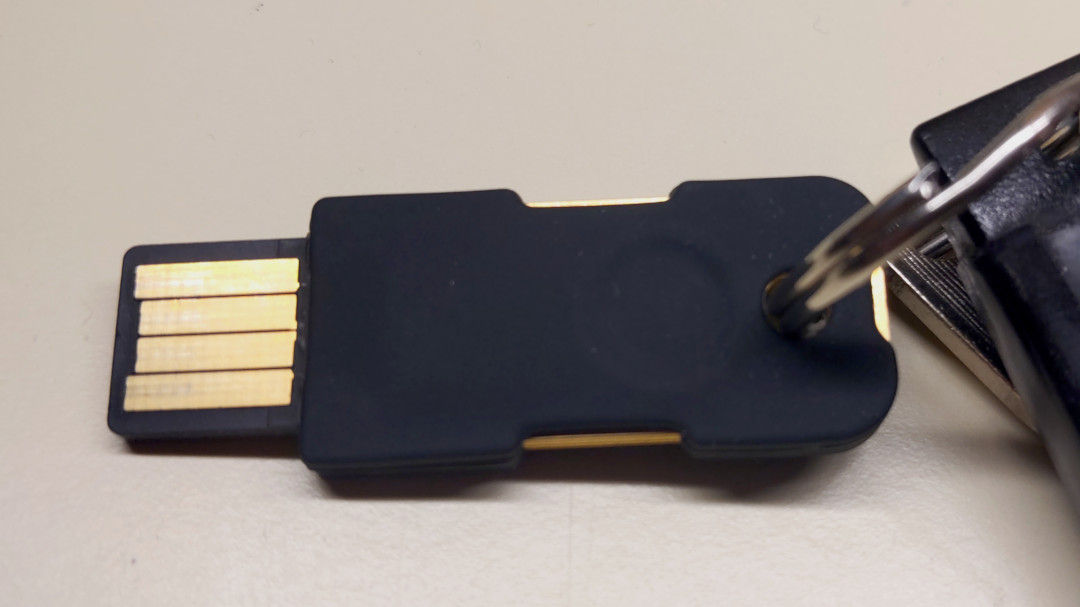

  1. Plug both your Solo V2 and your OpenPGP smartcard
  2. To get a list of the tokens scdaemon sees, run the following command: $ echo scd getinfo reader_list gpg-connect-agent --decode awk '/^D/ print $2 '
  3. Identify your OpenPGP smartcard. For example, my Nitrokey Start is listed as 20A0:4211:FSIJ-1.2.15-43211613:0
  4. Create a file in ~/.gnupg/scdaemon.conf with the following line reader-port $YOUR_TOKEN_ID. For example, in my case I have: reader-port 20A0:4211:FSIJ-1.2.15-43211613:0
  5. Reload scdaemon: $ gpgconf --reload scdaemon
Although this is clearly a firmware bug2, I do believe GnuPG is also partly to blame here. Let's just say I was not very surprised to have to battle scdaemon again, as I've had previous issues with it. Which leads me to my biggest gripe so far: it seems SoloKeys (the company) isn't really fixing firmware issues anymore and doesn't seems to care. The last firmware release is about a year old. Although people are experiencing serious bugs, there is no official way to report them, which leads to issues being seemingly ignored. For example, the NFC feature is apparently killing keys (!!!), but no one from the company seems to have acknowledged the issue. The same goes for my GnuPG bug, which was flagged in September 2022. For a project that mainly differentiates itself from its (superior) competition by being "Open", it's not a very good look... Although SoloKeys is still an unprofitable open source side business of its creators 3, this kind of attitude certainly doesn't help foster trust. Conclusion If you want to have a nice, durable FIDO2 token, I would suggest you get one of the many models Yubico offers. They are similarly priced, are readily commercially available, are part of a nice and maintained software ecosystem and have more features than the Solo V2 (OpenPGP support being the one I miss the most). Yubikeys are the practical option. What they are not is open-source hardware, whereas the Solo V2 is. As bunnie very well explained on his blog in 2019, it does not mean the later is inherently more trustable than the former, but it does make the Solo V2 the ideological option. Knowledge is power and it should be free. As such, tread carefully with SoloKeys, but don't dismiss them altogether: the Solo V2 is certainly functioning well enough for me.

  1. Although U2F is still part of the FIDO2 specification, the Tomus predate this standard and were thus not fully compliant with FIDO2. So long and thanks for all the fish little boards, you've served me well!
  2. It appears the Solo V2 shares its firmware with the Nitrokey 3, which had a similar issue a while back.
  3. This is a direct quote from one of the Solo V2 firmware maintainers.

17 June 2023

Bastian Venthur: Blag 2.0 released

A few days ago, I released a major update on blag, my blog-aware static-site generator, which introduces a few backwards-incompatible changes and many improvements over the old version. Good-looking default theme The old bare-bones default theme has been replaced with a good-looking one, based on the one used on this blog: Blag Screenshot It comes with a light- and dark theme that switches automatically based on the browser setting, as well as fitting light- and dark syntax highlighting themes for code blocks. Improved quickstart The blag quickstart command has been improved. Additionally to generating the configuration, it now also populates the working directory with the templates-, static- and content directories, containing the updated default theme and a few content pages to get you started. No internal fallback templates anymore Related to the changes in quickstart, the internal fallback template has been removed, and blag now completely relies on the templates in the local templates directory. This makes it more transparent for the user what is happening while simplifying blag s internal logic. However, this is a backwards incompatible change! In the case of a missing template, the user will be warned with a hint on how to obtain the missing template. Index and archive are now separate Previously, the front-page would always show the archive of all articles. This is not very useful when your blog contains more than a few dozen articles. With blag 2.0, the previous archive has been split into index and archive, where index is the front-page showing only the most recent 15 articles by default and linking to the archive which shows all articles. There s also two corresponding templates in the templates directory. Miscellaneous Blag 2.0 is available on pypi, debian/unstable and github
Next.

Previous.