Francois Marier: Troubleshooting Postgres Performance Problems
There are great resources to help tune PostgresQL for performance, but say you've got a Postgres database which suddenly becomes very slow. How can you figure out what's going on?
General system stateA slow database server will typically be running out of:
On the database side, start by determining whether:
If you can't get anything useful out of pg_stat_activity, you may want to enable slow query logging by adding this to your postgresql.conf:
Examining a particular queryOnce you have identified a slow query, you can time it by running this command before executing the query manually:
Troubleshooting database performance is a bit of a black art, many thanks to Mark Kirkwood for sharing his Postgres wisdom with me.
If there's anything else you have successfully used to find the cause of your performance woes, please feel free to leave a comment.
General system stateA slow database server will typically be running out of:
- cpu,
- memory or
- disk.
- top (press c to see the full command line): look at CPU and memory usage
- iostat -x -m 5: look at i/o wait and service time
If you see a lot of I/O, then try adjusting these settings:shared_buffers
work_mem
effective_cache_size
Finding slow queriescheckpoint_segments
autovacuum_naptime
wal_buffers
On the database side, start by determining whether:
- there is one large query holding up all of the resources or
- the number of queries is the main problem.
Then fire up psql dbname and look at the currently executing queries:stats_command_string = on
(You can also add the procid column to the query if you want to map a query to the process ID you see in top.)SELECT usename, current_query, query_start
FROM pg_stat_activity;
If you can't get anything useful out of pg_stat_activity, you may want to enable slow query logging by adding this to your postgresql.conf:
(All queries which take more than 100 ms to execute will be printed to the main Postgres log file.)log_min_duration_statement = 100
Examining a particular queryOnce you have identified a slow query, you can time it by running this command before executing the query manually:
To get an idea of where Postgres spends its time when executing that query, look at the query plan:\timing
The numbers you see there are estimates. To run the query and get actual numbers, use this instead:EXPLAIN your_query;
If you still can't figure out why a certain query takes so long, have a look at the ratio between live and dead rows in the relevant tables:EXPLAIN ANALYZE your_query;
Having too many dead rows is often a sign of insufficient vacuuming. You might want to turn autovacuum on if it isn't already, or to make it a bit more aggressive by tweaking these settings:ANALYZE VERBOSE tablename;
autovacuum_vacuum_scale_factor
autovacuum_analyze_scale_factor
Troubleshooting database performance is a bit of a black art, many thanks to Mark Kirkwood for sharing his Postgres wisdom with me.
If there's anything else you have successfully used to find the cause of your performance woes, please feel free to leave a comment.


 It has been more than a month since I last wrote about my work on update-manager during this year s Google Summer Of Code and I am somewhat ashamed I wasn t able to provide you with updates more regularly.
So first of all, yes, I did do some work and yes, there has been quite some progress. Basically both private and university stuff have kept me from writing and that s why I d like to start with this series of weekly updates today.
 I wonder what
 Guess its my time to post something about my feelings on Jaunty.

 If I say I got the third place in a scholarship application , it doesn t look bad.

 I've successfully upgraded my primary web/mail/misc host from Debian Etch to Debian Lenny. There were a few minor problems, but on the whole the upgrade was as painless as I've come to expect.
In the past I'd edited my Exim4 configuration to add quite a few ACL checks, for example rejecting mails based upon spoofed/bogus HELO identifiers, and rejecting messages that didn't contain "Subject" or "Date" headers.
The Debian Exim4 configuration may be split into multiple files (which is how I prefer it on the whole). The idea that you just add new files into the existing hierarchy and they'll magically appear in the correct location when a real configuration file is generated. On the whole this works well, but sometimes editing files in-place is required, and it was these local edits that caused me pain.
Fixing things up was mostly not a challenge, primarily it was a matter of removing ACLs until exim4 started without errors - all my spam checking is handled ahead of exim4 these days, except for the last-ditch spam filtering with a combination of procmail-fu and the
 So, I'm considering a backup system that has as its goal to let you
backup
 Ever since I bought

 In

 In close to 11 years of living in Europe, I've accomplished plenty beyond working in the high-tech sector: I've also been fairly active in Immigration Policy, especially on aspects that affect migrant labor. Because of this, I keep on getting more and more requests to produce statements or to appear on panels to discuss issues pertaining to migrant labor and to immigrants' integration.
The hot topic of last week was Swedish language for immigrants, the crux of the issue being that even though Swedish has an official language status in Finland, in practice, it is pretty much impossibly for immigrants to register their kids at the Swedish language school, to claim public services in Swedish or, even more so, to request labor training in the Swedish language at the Employment Office.
The weekly newspaper


 You might have noticed that during last week the Mexican Debian mirror, nisamox.fciencias.unam.mx (a.k.a. ftp.mx.debian.org, a.k.a. debian.unam.mx), went offline. The motherboard died on us, and
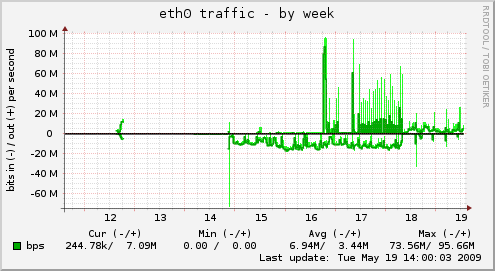
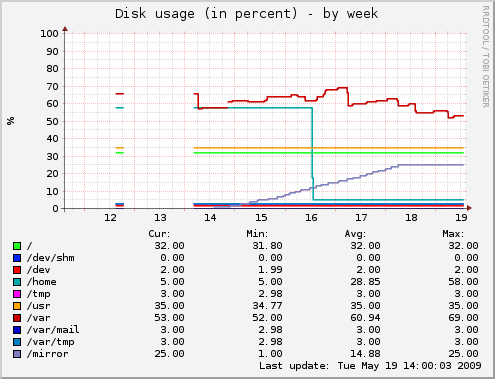 So, if you switched away from ftp.mx.debian.org due to our downtime, readjust your mirror settings. Nisamox is back!