Ingo Juergensmann: Automatically update TLSA records on new Letsencrypt Certs
I've been using DNSSEC for some quite time now and it is working quite well. When LetsEncrypt went public beta I jumped on the train and migrated many services to LE-based TLS. However there was still one small problem with LE certs:
When there is a new cert, all of the old TLSA resource records are not valid anymore and might give problems to strict DNSSEC checking clients. It took some while until my pain was big enough to finally fix it by some scripts.
There are at least two scripts involved:
1) dnssec.sh
This script does all of my DNSSEC handling. You can just do a "dnssec.sh enable-dnssec domain.tld" and everything is configured so that you only need to copy the appropriate keys into the webinterface of your DNS registry.
This is a quite simple Bash script that parses the domains.txt from letsencrypt.sh script, looking up the old TLSA hash in the zone files (structured in TLD/domain.tld directories), compare the old with the new hash (by invoking tlsagen.sh) and if there is a difference in hashes, call dnssec.sh with the proper parameters:
Please find the files attached to this page (remove the .txt extension after saving, of course).
This script does all of my DNSSEC handling. You can just do a "dnssec.sh enable-dnssec domain.tld" and everything is configured so that you only need to copy the appropriate keys into the webinterface of your DNS registry.
For updating zone-files just do a "dnssech.sh edit-zone domain.tld" to add new records and such and the script will take care e.g. of increasing the serial of the zone file. I find this very convenient, so I often use this script for non-DNSSEC-enabled domains as well. However you can spot the command line option "update-tlsa". This option needs the old and the new TLSA hashes beside the domain.tld parameter. However, this option is used from the second script: 2) check_tlsa.shhost:~/bin# dnssec.sh No parameter given. Usage: dnsec.sh MODE DOMAIN MODE can be one of the following: enable-dnssec : perform all steps to enable DNSSEC for your domain edit-zone : safely edit your zone after enabling DNSSEC create-dnskey : create new dnskey only load-dnskey : loads new dnskeys and signs the zone with them show-ds : shows DS records of zone zoneadd-ds : adds DS records to the zone file show-dnskey : extract DNSKEY record that needs to uploaded to your registrar update-tlsa : update TLSA records with new TLSA hash, needs old and new TLSA hashes as additional parameters
This is a quite simple Bash script that parses the domains.txt from letsencrypt.sh script, looking up the old TLSA hash in the zone files (structured in TLD/domain.tld directories), compare the old with the new hash (by invoking tlsagen.sh) and if there is a difference in hashes, call dnssec.sh with the proper parameters:
So, quite simple and obviously a quick hack. For sure someone else can write a cleaner and more sophisticated implementation to do the same stuff, but at least it works for meTM. Use it on your own risk and do whatever you want with these scripts (licensed under public domain). You can invoke check_tlsa.sh right after your crontab call for letsencrypt.sh. In a more sophisticated way it should be fairly easy to invoke these scripts from letsencrypt.sh post hooks as well.#!/bin/bash set -e LEPATH="/etc/letsencrypt.sh" for i in cat /etc/letsencrypt.sh/domains.txt awk ' print $1 ' ; do domain= echo $i awk 'BEGIN FS="." ; print $(NF-1)"."$NF ' #echo -n "Domain: $domain" TLD= echo $i awk 'BEGIN FS="." ; print $NF ' #echo ", TLD: $TLD" OLDTLSA= grep -i "in.*tlsa" /etc/bind/$ TLD /$ domain grep $ i head -n 1 awk ' print $NF ' if [ -n "$ OLDTLSA " ] ; then #echo "--> $ OLDTLSA " # Usage: tlsagen.sh cert.pem host[:port] usage selector mtype NEWTLSA= /path/to/tlsagen.sh $LEPATH/certs/$ i /fullchain.pem $ i 3 1 1 awk ' print $NF ' #echo "==> $NEWTLSA" if [ "$ OLDTLSA " != "$ NEWTLSA " ] ; then /path/to/dnssec.sh update-tlsa $ domain $ OLDTLSA $ NEWTLSA > /dev/null echo "TLSA RR update for $ i " fi fi done
Please find the files attached to this page (remove the .txt extension after saving, of course).
| Attachment | Size |
|---|---|
 check_tlsa.sh.txt | 812 bytes |
| dnssec.sh.txt | 3.88 KB |
Kategorie:
 As I

 A few days ago,
 Back in August, I was looking for a
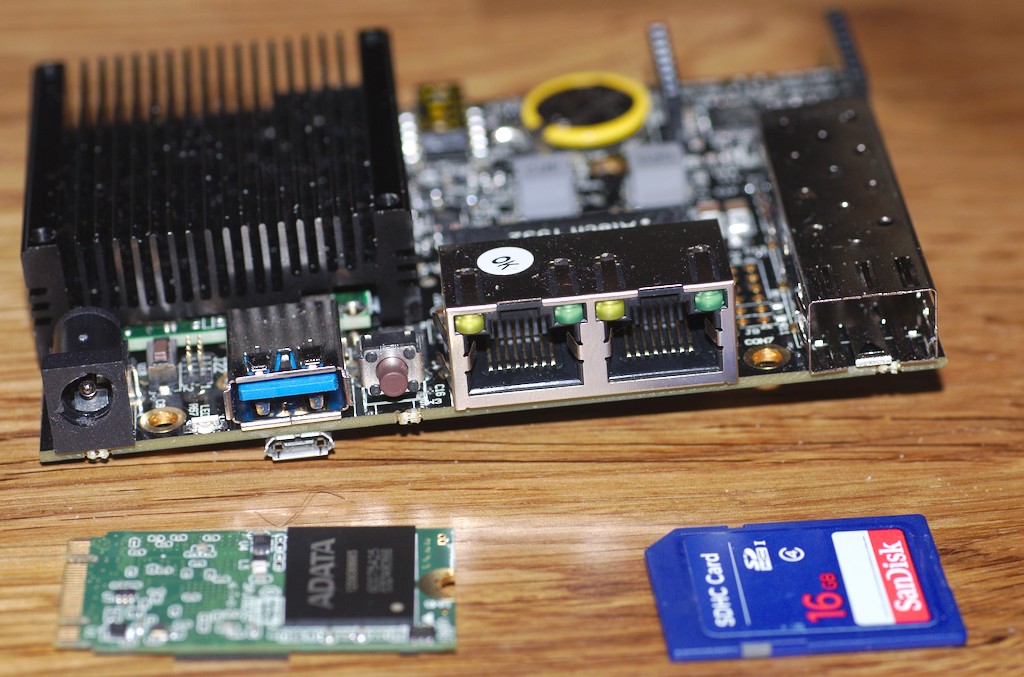 When installing the machine, the obvious goal was to use mainline FOSS
components only if possible. Fortunately there's mainline kernel
support for the device as well as mainline
 A large part of the internet became inaccessible today after a botnet

 Choice of smart card
For standard PGP use, the
 Choice of computer to run the clean room environment
There are a wide array of devices to choose from. Here are some principles that come to mind:
 although the software experience will be much the same if lots of individual card readers or USB flash drives are used.
Other devices
One additional idea that comes to mind is a hardware random number generator (TRNG), such as the


 Like
 In several of my
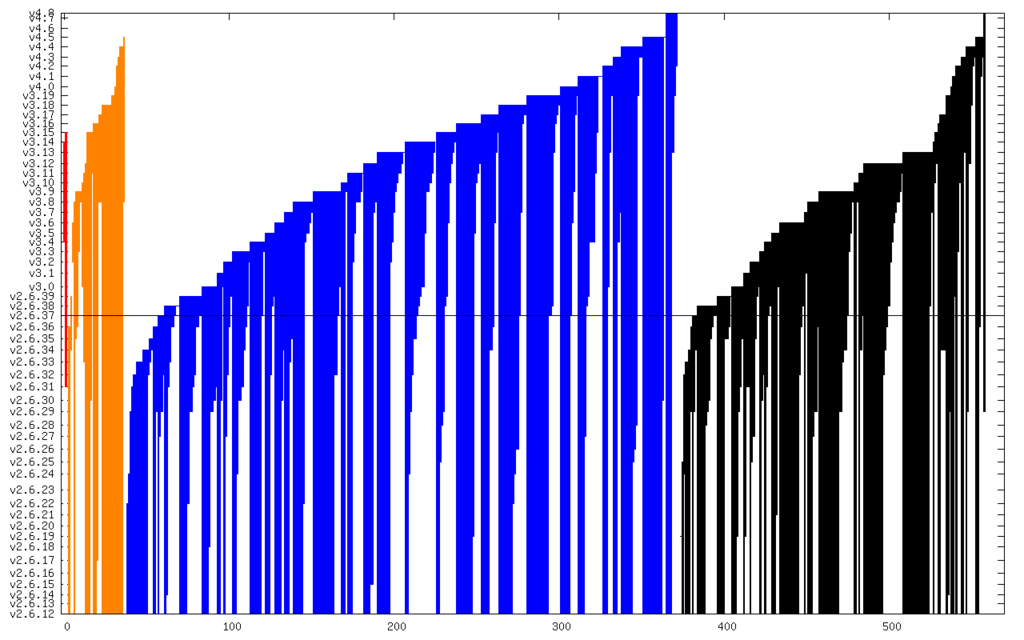 And here it is zoomed in to just Critical and High:
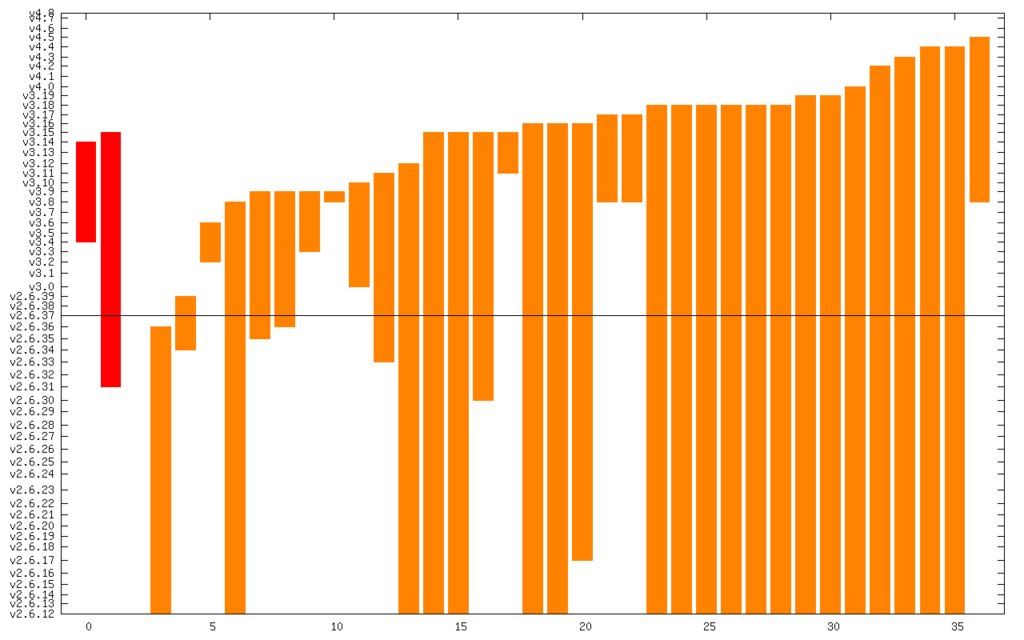 The line in the middle is the date from which I started the CVE search (2011). The vertical axis is actually linear time, but it s labeled with kernel releases (which are pretty regular). The numerical summary is:

 Yesterday
 Forgive me, reader, for I have sinned. It has been over a year since my last blog post. Life got busy. Paid work.