Search Results: "will"

8 April 2013

Soeren Sonnenburg: Shogun got accepted at Google Summer of Code 2013

We are happy to announce that the shogun machine learning toolbox will participate in this years google summer of code :-) SHOGUN is designed for unified large-scale learning for a broad range of feature types and learning settings, like classification, regression, or exploratory data analysis. In case you are a talented student interested in implementing and learning about machine learning algorithms - we are looking for you! We have collected a number of ideas [1] that we consider worthwhile implementing. And don't forget to apply [2]!

[1] http://shogun-toolbox.org/page/Events/gsoc2013_ideas

[2] http://google-melange.appspot.com/gsoc/org/google/gsoc2013/shogun

Daniel Pocock: Google Summer of Code, tips for students

I've had quite a few queries about the project ideas for Google Summer of Code on the Lumicall and Debian project pages and I'm publishing some notes here to help people get the best chance of participating, while also helping people's expectations. Firstly, Google is responsible for administering the program and payments, they have the last word on which projects and students participate and free software developers like myself have no direct control over this. In other words, while I would encourage students to make contributions to free software projects to familiarize themselves with the way we work, I can not promise that this will automatically lead to selection. If you are a student, do go ahead and feel free to comment on or make contributions to projects, this helps mentors to see your capabilities very quickly, but don't do any more than you would have done if the GSoC program didn't exist. In any case, building up a portfolio of work that is visible on sites like github does help your employment prospects in the long run. If a development manager is looking at 100 CVs for a job vacancy, and one of them has a strong portfolio on github or Debian, there is a good chance that one person will get an interview - although it doesn't guarantee they get the job. Where to start? If you are a student and you are already heavily involved in some free software project then you probably don't need to read the rest of this. The reality is that GSoC is meant to help bring more people into the free software community and this means we need to help people get their foot in the door. That is what I am addressing here, with examples from my own possible projects. When I went through university in the 90s, there was a very strong UNIX culture in our computer science department and the wider engineering faculty. There were also winds of change, for example, a new dean who wanted to change everything to Windows and a central IT management agenda to abolish campus computers and force students to carry and maintain their own laptops. Around the world, every campus has a different approach. I was fortunate to have UNIX topics like the vi text editor, shell programming and even LaTeX taught as a formal part of the course, students coming after me may have missed those opportunities. I understand that some students have not encountered these concepts at all today. That said, most mentors have a fairly wide tolerance for these things: it is not expected that students know these things, rather, it is an opportunity for you to start learning them whether it is part of your course or not. The key concept here is to be a self-starter: it is not what you know, but your enthusiasm to go and try the things you don't know. That is the very thing you can start doing now, even before the program commences. Doing this will definitely help you identity the areas of free software and Debian that you are most likely to get excited about, and that will lead to a successful project. Some general ideas to get started
  • If your campus hasn't taught UNIX in a formal sense, please familiarise yourself with the basics. While some companies do have more jobs working with other platforms, and some campuses have sadly tried to adapt their courses to prepare students for that limited subset of companies, all the best jobs I've had involve UNIX or Linux. I've never worked for a hedge fund that didn't use Linux. Hollywood uses Linux, NASA does too, but learning Linux is not rocket science. Basic things to understand include the vi text editor, shell scripts and using a command line tool for version control, preferably git. As you will be the system administrator of your own desktop or laptop, it's essential to understand some basic concepts like volume management too.
  • If you need to run some Windows software (some courses do require that), use VirtualBox or a similar solution to run both Windows and Linux on your computer or laptop. The VirtualBox documentation is very good and will help you start quickly. My own laptop runs Debian 7 (wheezy) as the main operating system, and I have Windows and Solaris in VirtualBox for some business applications.
  • My own course included a project that involved downloading the open source GNU make program, writing a patch and testing it. If you've never done something like that, please try. Instead of downloading a project tarball, these days you will typically clone the project's git repository. Even if you only make some trivial change that you will never share, it is good to prove that you can compile and successfully execute something like this.
Some specific ideas for my own projects
  • For Lumicall or Android development, just work your way through the build instructions that are published for all contributors. Trying the f-droid build instructions is also a good way to start.
  • For any of the Debian projects, please make sure you have installed Debian 7 (wheezy) on a desktop, laptop or virtual machine. Just follow the installation guide
  • Once you have installed Debian, try installing whichever one of my packages interests you. Try to configure and use it. Prove that the package works in a normal installation. Look at the log files. Run the test cases.
  • Next, try obtaining the source code and building the package. Debian makes it very easy. Here is an example for reSIProcate, the same works for any other package. As root:
    # apt-get update
    # apt-get build-dep resiprocate
    
    will obtain all the necessary build tools. Then, as a normal user:
    $ mkdir ~/src/resiprocate
    $ cd ~/src/resiprocate
    $ apt-get source resiprocate
    $ cd resiprocate
    $ dpkg-buildpackage -rfakeroot -j12
    
    In a few minutes, you should find the packages (*.deb files) are created.
  • Now, you could try making some small change to the package and compiling it again. Verify that your change works.
If you've successfully got to this point, then there is every chance you will be able to successfully complete a GSoC project. If you struggled along the way, that is OK too, the important thing to do is to engage with the community and learn how to ask for help. The Debian GSoC wiki provides some excellent ideas about engaging with the project using IRC chat and mailing lists. It is also very worthwhile trying to find a local group or a free software event that Debian is attending near you and spending a few hours with people who can look at any problems you have and give you quick solutions.

Matthias Klumpp: Tanglu status report

Hello everyone! I am very excited to report about the awesome progress we made with Tanglu, the new Debian-based Linux-Distribution. :) First of all, some off-topic info: I don t feel comfortable with posting too much Tanglu stuff to Planet-KDE, as this is often not KDE-related. So, in future Planet-KDE won t get Tanglu information, unless it is KDE-related ;-) You might want to take a look at Planet-Tanglu for (much) more information. So, what happened during the last weeks? Because I haven t had lectures, I nearly worked full-time on Tanglu, setting up most of the infrastructure we need. (this will change with the next week, where I have lectures again, and I also have work to do on other projects, not just Tanglu ^^) Also, we already have an awesome community of translators, designers and developers. Thanks to them, the Tanglu-Website is now translated to 6 languages, more are in the pipeline and will be merged later. Also, a new website based on the Django framework is in progress. The Logo-Contest We ve run a logo-contest, to find a new and official Tanglu logo, as the previous logo draft was too close to the Debian logo (I asked the trademark people at Debian). More than 30 valid votes (you had to be subscribed to a Tanglu Mailinglist) were received for 7 logo proposals, and we now have a final logo: Tanglu Logo (Text) I like it very much :) Fun with dak I decided to use dak, the Debian Archive Kit, to handle the Tanglu archive. Choosing dak over smaller and easy-to-use solutions had multiple reasons, the main reason is that dak is way more flexible than the smaller solution (like reprepro or min-dak) and able to handle the large archive of Tanglu. Also, dak is lightning fast. And I would have been involved with dak sooner or later anyway, because I will implement the DEP-11 extension to the Debian Archive later (making the archive application-friendly). duckWorking with dak is not exactly fun. The documentation is not that awesome, and dak contains many hardcoded stuff for Debian, e.g. it often expects the unstable suite to be present. Also, running dak on Debian Wheezy turned out to be a problem, as the Python module apt_pkg changed the API and dak naturally had problems with that. But with the great help of some Debian ftpmasters (many thanks to that!), dak is now working for Tanglu, managing the whole archive. There are still some quirks which need to be fixed, but the archive is in an usable state, accepting and integrating packages. The work on dak is also great for Debian: I resolved many issues with non-Debian dak installations, and made many parts of dak Wheezy-proof. Also, I added a few functions which might also be useful for Debian itself. All patches have of course been submitted to upstream-dak. ;-) Wanna-build and buildds GearThis is also nearly finished :) Wanna-build, the software which manages all buildds for an archive, is a bit complicated to use. I still have some issues with it, but it does it s job so far. (need to talk to the Debian wanna-build admins for help, e.g. wanna-build seems to be unable to handle arch:all-only packages, also, build logs are only submitted in parts) The status of Tanglu builds can be viewed at the provisoric Buildd-Status pages. Setting up a working buildd is also a tricky thing, it involves patching sbuild to escape bug #696841 and applying various workarounds to make the buildd work and upload packages correctly. I will write instructions how to set-up and maintain a buildd soon. At time, we have only one i386 buildd up and running, but more servers (in numbers: 3) are prepared and need to be turned into buildds. After working on Wanna-build and dak, I fully understand why Canonical developed Launchpad and it s Soyuz module for Ubuntu. But I think we might be able to achieve something similar, using just the tools Debian already uses (maybe a little less confortable than LP, but setting up an own LP instance would have been much more trouble). Debian archive import The import of packages from the Debian archive has finished. Importing the archive resulted in many issues and some odd findings (I didn t know that there are packages in the archive which didn t receive an upload since 2004!), but it has finally finished, and the archive is in a consistent state at time. To have a continuous package import from Debian while a distribution is in development, we need some changes to wanna-build, which will hopefully be possible. Online package search The Online-Package-Search is (after resolving many issues, who expected that? :P ) up and running. You can search for any package there. Some issues are remaining, e.g. the file-contents-listing doesn t work, and changelog support is broken, but the basic functionality is there. Tanglu Bugtracker We now also have a bugtracker which is based on the Trac software. The Tanglu-Bugtracker is automatically synced with the Tanglu archive, meaning that you find all packages in Trac to report bugs against them. The dak will automatically update new packages every day. Trac still needs a few confort-adjustments, e.g. submitting replies via email or tracking package versions. Tanglu base system tanglu-platform-smallThe Tanglu metapackages have been published in a first alpha version. We will support GNOME-3 and KDE4, as long as this is possible (= enough people working on the packaging). The Tanglu packages will also depend on systemd, which we will need in GNOME anyway, and which also allows some great new features in KDE. Side-effect of using systemd is at least for the start that Tanglu boots a bit slow, because we haven t done any systemd adjustments, and because systemd is very old. We will have to wait for the systemd and udev maintainers to merge the packages and release a new version first, before this will improve. (I don t want to do this downstream in Tanglu, because I don t know the plans for that at Debian (I only know the information Tollef Fog Heen & Co. provided at FOSDEM)) The community The community really surprised me! We got an incredible amount of great feedback on Tanglu, and most of the people liked the idea of Tanglu. I think we are one of the less-flamed new distributions ever started ;-) . Also, without the very active community, kickstarting Tanglu would not have been possible. My guess was that we might be able to have something running next year. Now, with the community help, I see a chance for a release in October :) The only thing people complained about was the name of the distribution. And to be really honest, I am not too happy with the name. But finding a name was an incredibe difficult process (finding something all parties liked), and Tanglu was a good compromise. Tanglu has absolutely no meaning, it was taken because it sounded interesting. The name was created by combining the Brazilian Tangerine (Clementine) and the German Iglu (igloo). I also dont think the name matters that much, and I am more interested in the system itself than the name of it. Also, companies produce a lot of incredibly weird names, Tanglu is relatively harmless compared to that ;-) . In general, thanks to everyone participating in Tanglu! You are driving the project forward! The first (planned) release I hereby announce the name of the first Tanglu release, 1.1 Aequorea Victoria . It is Daniel s fault that Tanglu releases will be named after jellyfishes, you can ask him why if you want ;-) I picked Aequorea, because this kind of jellyfish was particularly important for research in molecular biology. The GFP protein, a green fluorescent protein (=GFP), caused a small revolution in science and resulted in a Nobel Prize in 2008 for the researchers involved in GFP research (for the interested people: You can tag proteins with GFP and determine their position using light microscopy. GFP also made many other fancy new lab methods possible). Because Tanglu itself is more or less experimental at time, I found the connection to research just right for the very first release. We don t have a time yet when this version will be officially released, but I expect it to be in October, if the development speed increases a little and more developers get interested and work on it. Project Policy We will need to formalize the Tanglu project policy soon, both the technical and the social policies. In general, regarding free software and technical aspects, we strictly adhere to the Dbian Free Software Guidelines, the Debian Social Contract and the Debian Policy. Some extra stuff will be written later, please be patient! Tanglu OIN membership I was approached by the Open Invention Network, to join it as member. In general, I don t have objections to do that, because it will benefit Tanglu. However, the OIN has a very tolerant public stance on software patents, which I don t like that much. Debian did not join the OIN for this reason. For Tanglu, I think we could still join the OIN without someone thinking that we support the stance on software patents. Joining would simply be pragmatic: We support the OIN as a way to protect the Linux ecosystem from software patents, even if we don t like the stance on software patents and see it differently. Because this affects the whole Tanglu project, I don t want to decide this alone, but get some feedback from the Tanglu community before making a decision. Can I install Tanglu now? Yes and no. We don t provide installation images yet, so trying Tanglu is a difficult task (you need to install Debian and then upgrade it to Tanglu) if you want to experiment with it, I recomment trying Tanglu in a VM. I want to help! Great, then please catch one of us on IRC or subscribe to the mailinglists. The best thing is not to ask for work, but suggest something you want to do, others will then tell you if that is possible and maybe help with the task. Packages can for now only be uploaded by Debian Developers, Ubuntu Developers or Debian Maintainers who contacted me directly and whose keys have been verified. This will be changed later, but at the current state of the Tanglu archive (= less safety checks for packages), I only want people to upload stuff who definitely have the knowledge to create sane packages (you can also proove that otherwise, of course). We will later establish a new-member process. If you want to provide a Tanglu archive mirror, we would be very happy, so that the main server doesn t have to carry all the load. If you have experience in creating Linux Live-CDs or have worked with the Ubiquity installer, helping with these parts would be awesome! Unfortunately, we cannot reuse parts of Linux Mint Debian, because many of their packages don t build from source and are repackaged binaries, which is a no-go for the Tanglu main archive. Sneak peek And here is a screenshot of the very first Tanglu installation (currently more Debian than Tanglu):



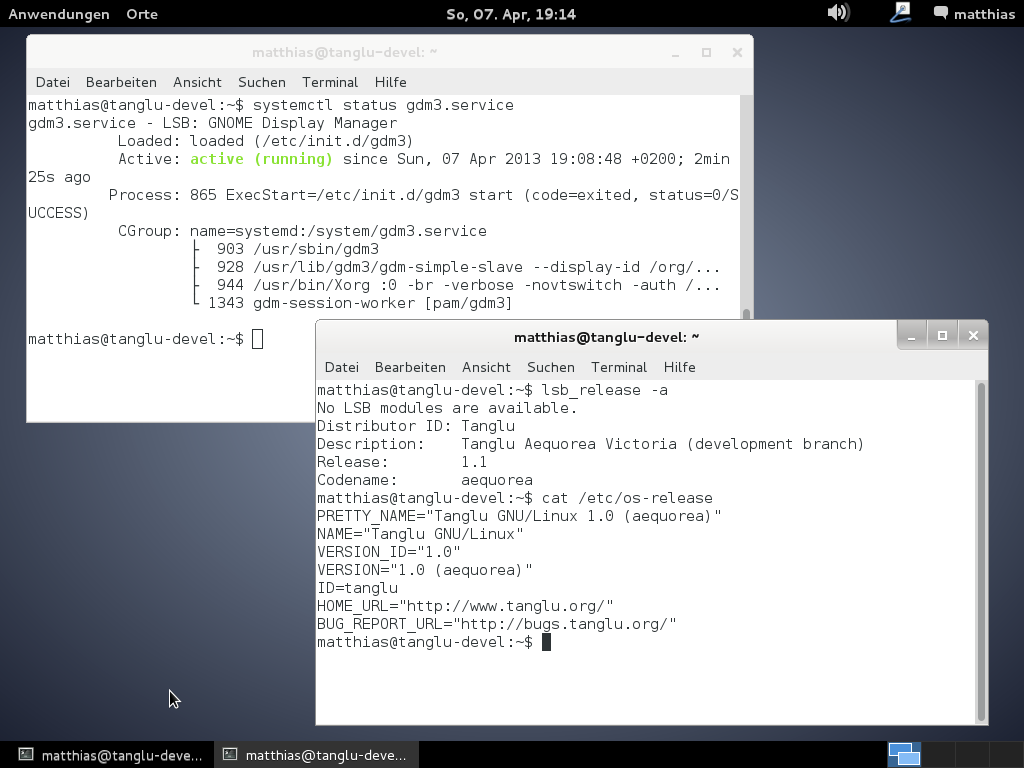
tanglu_sneak-peek_screenshot Something else I am involved in Debian for a very long time now, first as Debian Maintainer and then as Debian Developer and I never thought much about the work the Debian system administrators do. I didn t know how dak worked or how Wanna-build handles the buildds and what exactly the ftpmasters have to do. By not knowing, I mean I knew the very basic theory and what these people do. But this is something different than experiencing how much work setting up and maintaining the infrastructure is and what an awesome job the people do for Debian, keeping it all up and running and secure! Kudos for that, to all people maintaining Debian infrastructure! You rock! (And I will never ever complain about slow buildds or packages which stay in NEW for too long ;-) )

Bits from Debian: Debian joins Free & Open Source Software Outreach Program for Women

The GNOME Foundation started the Free & Open Source Software Outreach Program for Women, OPW, in 2010. In the January-April 2013 round, many other FOSS organizations joined the program. We are happy to announce that Debian will also join in the next round from June-September and we'll offer one internship. You can find more details about Debian's participation in the program at Debian OPW page. Call for mentors and projects OPW allows applicants to work on any kind of project, including coding, design, marketing, web development... The Debian Google Summer of Code projects will be offered also as possible projects for OPW, but GSoC only allows coding projects. If you have any idea of a non-coding project and you want to mentor it, please contact us in the soc-coordination mailing list adding [OPW] in subject. OPW works in the same way as GSoC except Google doesn't play a part here. The same advice that is provided for GSoC mentors works for OPW mentors. Call for participants The main goal of this program is to increase the number of women in FOSS, so all women who are not yet a Debian Developer or a Debian Maintainer are encouraged to apply. There are no age restrictions and applicants don't need to be a student. If you want to apply, you must follow three steps:
  1. Choose a project from this list. There are two lists, one for GSoC and another with non-coding tasks that can be only offered by the OPW. Those lists may change and add or remove more projects in the next few weeks.
  2. Make a small contribution to Debian. Projects will add a task the applicant must complete as part of the pre-selection process. If no task is provided, you are welcome to ask the mentors of the project. You can also make a different extra task of the one listed to show your skills and interest.
  3. Create a page in the Debian wiki with your application. You can do so under pseudonym, but in that case, please give us information about yourself privately by email to the coordinators listed in the Debian OPW page!

7 April 2013

Olivier Berger: Migrating picture tags from KPhotoAlbum to digiKam (or others) through IPTC

I've occasionally used KPhotoAlbum for a few years and eventually added many tags to the pictures. But I've decided I wanted to try other tools, and digiKam seems to be the best option from the many reviews I've read. Still, there's apparently no automatic feature to import into digiKam the tags set in KPhotoAlbum. Fortunately, some smart people have implemented Perl tools allowing to overcome this issue. The process involves modifying the pictures to save the tags inside the files, using the IPTC standard. Then, digiKam will be able to load the tags from the modified files. Here's a copy of the (translated) kphotoalbum2iptc.pl script (the original as in french) I copied from this blog post (in french too). I've been able to generate .deb packages for the required 2 perl libs dependencies using the method described in the referenced post , with : dh-make-perl --build --cpan Image::Kimdaba and dh-make-perl --build --cpan Image::IPTCInfo

Thanks to Pierre Doucet and Bruno Adele for sharing this. Hope this helps.

6 April 2013

Daniel Pocock: Switzerland Rigi-Bahn railway, Swiss rail travel

With DebConf13 registrations opening very soon, it's about time to share some more about Swiss travel. For all those who enjoyed the Glacier Express video, now there is another. This is the Rigi Bahn rack railway which goes from Vitznau up to the top of Mount Rigi (often just referred to as Rigi). At the top, it meets another train which goes to the junction of main railway lines at Arth-Goldau, and a cable car to Weggis The video starts at the station in Vitznau (beside the ferry terminal) and rises up rapidly in a breathtaking ride to the snowy peak at approximately 2,000 meters. There are spectacular views of mountains to the south across the lake, and look out for the wild animals on the way. You need at least a 2Mbit connection to stream this video: <video controls="" height="340" poster="http://danielpocock.com/sites/danielpocock.com/files/rigi-poster.jpg" width="560">
<source src="http://video.danielpocock.com/DSC_1789.mp4" type="video/mp4"></source>
<source src="http://video.danielpocock.com/DSC_1789.webm" type="video/webm"></source>
</video> and here are download links for those who prefer to download now and watch later (about 250MB): Swiss railway tickets When looking at the price of rail passes, keep in mind the maximum price paid by a Swiss resident is never more than 8 CHF per day, because that is the cost of the unlimited annual ticket that many people have. People who don't have the unlimited pass have what is called a half price card' which costs 150 CHF per year and allows them to buy any ticket at half the advertised price. This means that only the tourists pay the full advertised price, which is usually quite exorbitant. It is an extremely effective system of discrimination. A touist pays 8 CHF just for a 1 day pass for the center of a city like Zurich. Switzerland does offer some short term unlimited passes that provide some discounts to visitors, it is necessary to think carefully about how many days you want to use to get the optimal package:
  • Swiss Travel System web site offers the passes for all of Switzerland. Visitors can buy a multi-day unlimited pass, and also get several days of half-price travel as well. For 5 days unlimited travel within 1 month, the cost is 364 CHF, includes half price travel for all other days in the month. Shorter and longer periods available.
  • The Tell Pass, named after William Tell is significantly cheaper, offering unlimited travel just within the central mountain area. The Tell Pass includes use of the Rigi Bahn train shown in this blog, and is valid for travel to Andrematt, where you have to buy an extra ticket to ride on the Glacier Express train from the other blog. That is not so bad though, because you can buy a one-way ticket from Andermatt up to Natschen and then walk back down. The region covered by the Tell Pass is really quite big, centered around Luzern, it goes all the way west to Interlaken and south-east to Andermatt in the high mountains. Tell Pass costs 246 CHF for 15 days half-price travel including 5 days unlimited travel. Shorter periods available too.
  • More regional passes like the Tell Pass are available for people who want to spend less money by just visiting one area of Switzerland.
  • The SBB.ch web site has all the timetables for the trains, ferries, Postbuses and other services.

Steve Kemp: So I have a wheezy desktop

I look after a bunch of servers, working for Bytemark that is not a surprise, but I only touch a very small number of desktop systems.

precious - My desktop
This is the machine upon which I develop, check my personal mail, play my music & etc.
steve - My work machine
To keep the working from home separation going I have a machine I only use for work purposes.
travel/travel2 - EEPC box
I have two EEPC machines, a personal 701 and a work-provided 901. Honestly these rarely get used. One is for when I'm on holiday or traveling, the second for when I'm on-call.
Yesterday I got round to upgrading both the toy EEPC machines to wheezy. The good news? Both of them upgraded/reinstalled easily. Hardware was all detected, sleeping, hibernation, wifi, etc all "just worked". Unfortunately I am now running GNOME 3.x and the experience is unpleasant. This is a shame, because I've enjoyed GNOME 2.x & bluetile for the past few years. The only other concern is that pwsafe appears to be scheduled for removal from Debian GNU/Linux - the list of open bugs shows some cause, but there are bugs there that are trivial to fix. For the moment I've rebuilt the package and if I cannot find a suitable alternative - available for squeeze and wheezy - then I will host the package on my package repository. In conclusion: Debian, you did good. GNOME, I've loved and appreciated you for years, but you might not be the desktop I want these days. It's not you, it's me.

Andrew Pollock: [life/repatexpat] Day #6 of repatriation -- the crash continues

I was really not doing well by yesterday, I had developed quite the runny nose. I've discovered that it's neigh on impossible (from my sample set of two pharmacies) to get pseudoephedrine over the counter in this country. In the US, you have to provide ID and they report all purchases to the government and if you start buying too much, they come and kick down the door of your meth lab. Here, you seem to need a prescription. One pharmacy told me that 1 in 10 pharmacies will sell it over the counter. I ended up with the Australian equivalent of Afrin, which I don't particularly like, but it at least dried up my nose. Discussions on Facebook suggest that I may have been dealing with second-rate pharmacies, and the "big ones" would be more useful. I was also advised to try begging and pleading for Claritin-D. The damn meth labs have ruined it for everybody. It's too bad they can't come up with an additive that is safe to ingest, but would fuck up the meth cooking process. Not content with only two marathon shopping days, Kristy came back for a third day of driving me all around town, as my quest for a sofa bed and a dining table continued. It turns out that one does not simply walk into a furniture store and walk out with a sofa bed (or a dining table, for that matter). These things all seem to be on boats from China, or at best interstate warehouses, and most places can sell you something they know is in transit at best, but they're loathe to sell floor stock (for obvious reasons), and they seem to not have anything in a Brisbane warehouse (plenty of stuff was in Sydney or Melbourne and they'd ship it up). Plushhad a chaise sofa bed that had a nice sprung mattress, and was due in late this month or early next, and they would lend me something in the meantime, so they got my business. I look forward to having something to sit on. We then had an epic time at Bunnings getting all sorts of random household stuff, with the obligatory sausage sizzle before and after. Oh, how I have missed proper sausages! It turns out I'm looking for something that doesn't seem to exist over here, Rubbermaid don't seem to make the plastic "shed" cupboards in Australia, so I'll have to look elsewhere (Clark Rubber seems to make something approximately like what I'm looking for). Then I picked up some towels from Westfield Chermside and resumed the search for a dining table. I was really liking the idea of at least one bench seat, and we finally found a matching table, a bench seat, some shelving and a coffee table that would work as an entertainment unit, at OZ Design Furniture. They had a 20% off sale that made it all fairly reasonable. The entertainment unit was available immediately, and the rest of the stuff should be delivered in a couple of weeks. That just leaves finding some dining chairs that will go with it. OZ Design Furniture had the most unusual delivery charging system. They charge by the flight of stairs. Living on the 2nd floor does have its disadvantages. At least I won't be moving out of here any time soon. By the end of the day, I was totally done, but very happy to have finally sorted out the elusive remaining bits of furniture. I had my first night sleeping in my new home.

5 April 2013

Matthew Garrett: Update on leaked UEFI signing keys - probably no significant risk

According to the update here, the signing keys are supposed to be replaced by the hardware vendor. If vendors do that, this ends up being uninteresting from a security perspective - you could generate a signed image, but nothing would trust it. It should be easy enough to verify, though. Just download a firmware image from someone using AMI firmware, pull apart the capsule file, decompress everything and check whether the leaked public key is present in the binaries.

The real risk here is that even if most vendors have replaced that key, some may not have done. There's certainly an argument that shipping test keys at all increases the probability that a vendor will accidentally end up using those rather than generating their own, and it's difficult to rule out the possibility that that's happened.

comment count unavailable comments

Benjamin Mako Hill: Students for Free Culture Conference FCX2013

FCX2013 Logo On the weekend of April 20-21, Students for Free Culture is going to be holding its annual conference, FCX2013, at New York Law School in New York City. As a long-time SFC supporter and member, I am enormously proud to be giving the opening keynote address. Although the program for Sunday is still shaping up, the published Saturday schedule looks great. If previous years are any indication, the conference can serve as an incredible introduction to free culture, free software, wikis, remixing, copyright, patent and trademark reform, and participatory culture. For folks that are already deeply involved, FCX is among the best places I know to connect with other passionate, creative, people working on free culture issues. I ve been closely following and involved with SFC for years and I am particularly excited about the group that is driving the organization forward this year. If you will be in or near New York that weekend or if you can make the trip you should definitely try to attend. FCX2013 is pay what you can with a $15 suggested donation. You can register online now. Travel assistance especially for members of active SFC chapters may still be available. I hope to see you there!

Clint Adams: And the men who hold high places

Antonia came into the room. Where's Alieta? she asked. We don't know, replied Luda. It was true; we hadn't seen Alieta in quite some time, and we had no idea where she was. Antonia left. Varvara eyed me mischievously and said, You could call her. How? I asked. Touch the grandmother clock and you will figure it out. I touched the clock trepidly. Nothing happened. I opened my mouth to speak, but the word I had been about to say resonated in my mind as if spoken through a comb filter. I concentrated. Alieta, dozens of human-like voices sang over and over in different harmonies. I let go. What was that? I demanded. Clock, Varvara said dismissively. Come on, let's do laundry, Luda grunted. We carried our laundry out to the garage, which is where the washer and dryer lived. Alieta slipped in through one of the open garage doors, and surreptitiously pulled Varvara over for a whispered conversation. Antonia wandered in and squinted in Alieta's general direction. Luda quickly pulled Varvara in front of her. It's just Varvara, she announced. Antonia's eyes glazed over and she went back into the house. Alieta pursed her lips and studied the wall as if there might be some reflective object that had alerted her mother to her presence. Then she grabbed Varvara by the hand, pulled her over to push the buttons that closed the garage doors, and dragged her into the house. I watched the garage doors close. Then I watched the one on the left reverse direction. I opened my mouth to notify someone of this, but the doors reversed direction again, and proceeded to partially open and close as if possessed. I tried to hide behind Luda, without success. Now she was watching as well, as reality seemed to to shimmer and bend. The roof became arched, and there were loud mechanical noises as our environs transformed. When it finished, the place where the garage doors had been was now a wall of screens displaying video as you might encounter in a television store. More disconcertingly, we were in front of a railing which overlooked what appeared to be a car dealership showroom. Luda sucked in her breath. Benjamin Snow, you were into some serious shit, she muttered.

Michal &#268;iha&#345;: Unknown phpMyAdmin features - server monitoring

phpMyAdmin has in last year received various useful features, which are not that well known. I've decided to give them some promotion before releasing phpMyAdmin 4.0. The server monitoring part is already present since phpMyAdmin 3.5, but some of the parts were further improved in 4.0. Server monitor Server monitor (as you can see on picture above or on demo server) allows you to follow server status in real time. Besides predefined charts, you can choose to follow any of MySQL server status variables or some system parameters. If you see something weird in the charts, you can select interval and inspect slow or general query log (if you have enabled it). This can help you finding most problematic queries for your server. Server configuration advisor Advisor (on picture above or on demo server) is another way to improve server performance - it comes with extensive set of rules, which can help you tuning performance for your workload. Your server has to be running for significant time to give some reasonable recommendations (so don't expect these on the demo server, which is restarted quite often). However it is still recommended to read server documentation before doing any adjustments, as the setting might have some side effects, which will affect your workload as well. Of course these are not magic pill to cure your unresponsive server, but can help you a lot in finding possible bottlenecks.

Filed under: English Phpmyadmin 0 comments Flattr this!

Daniel Pocock: Quickstart: Integrating SIP support into any application with reSIProcate

Today's applications are more dynamic and interactive than ever before, typically offering the user many ways to collaborate or get live data about their community or environment as they need it. Two open standards exist with a broad focus on real-time messaging and session control, SIP and XMPP (Jabber). Both of them have been supercharged by the development of technologies like WebRTC that makes every browser into a communications endpoint. Here, we look at integrating SIP into any C++ application (either client or server). We use the industry standard SIP stack reSIProcate. The quickest way to get started is with a Debian, Ubuntu or Fedora development environment. reSIProcate is conveniently packaged on all those platforms (for Fedora, it is not yet in yum and must be built from the tarball using rpmbuild). Getting the environment set up Once you have Debian or Ubuntu installed, just do:
# apt-get build-dep resiprocate
# apt-get install libresiprocate-1.8-dev
This will install all the necessary tools, libraries and header files. Headers are under /usr/include/resip Writing some code The object orientated nature of C++ is heavily leveraged by reSIProcate, and this makes it easy to code. The stack is based on a callback paradigm: you create some objects based on well-defined interfaces, give your objects to the stack, and put the stack into a loop. The stack will call your object when some event occurs (e.g. new incoming call, new text message) The easiest way to see this in practice is to browse the test cases. The test cases under the resip/dum(mirrored on github) section of the source tree provide good high-level examples of the type of code an application writes when using reSIProcate in an existing application. Sending a SIP text message Based on the basicMessage test case, I've created a trivial piece of code below to send a text message over SIP. The whole demo project is uploaded into github, see the README for instructions on how to build and run. Here, we have a quick look at the one object in the demo, it is notified on the progress of the SIP text message:
class ClientMessageHandler : public ClientPagerMessageHandler  
public:
   ClientMessageHandler()
      : finished(false),
        successful(false)
    
    ;
   virtual void onSuccess(ClientPagerMessageHandle, const SipMessage& status)
    
      InfoLog(<<"ClientMessageHandler::onSuccess\n");
      successful = true;
      finished = true;
    
   virtual void onFailure(ClientPagerMessageHandle, const SipMessage& status, std::auto_ptr<contents> contents)
    
      ErrLog(<<"ClientMessageHandler::onFailure\n");
      successful = false;
      finished = true;
    
   bool isFinished()   return finished;  ;
   bool isSuccessful()   return successful;  ;
private:
   bool finished;
   bool successful;
 ;
int main(int argc, char *argv[])
 
   // boilerplate initialisation code...
...
   NameAddr naTo(to.c_str());
   ClientPagerMessageHandle cpmh = clientDum.makePagerMessage(naTo);
   Data messageBody("Hello world!");
   auto_ptr<contents> content(new PlainContents(messageBody));
   cpmh.get()->page(content);
...
 
</contents></contents>
Going further with reSIProcate

4 April 2013

Bernhard R. Link: Git package workflows

Given the recent discussions on planet.debian.org I use the opportunity to describe how you can handle upstream history in a git-dpm workflow. One of the primary points of git-dpm is that you should be able to just check out the Debian branch, get the .orig.tar file(s) (for example using pristine-tar, by git-dpm prepare or by just downloading them) and then calling dpkg-buildpackage. Thus the contents of the Debian branch need to be clean from dpkg-source's point of view, that is do not contain any files the .orig.tar file(s) contains not nor any modified files. The easy way The easiest way to get there is by importing the upstream tarball(s) as a git commit, which one will usually do with git-dpm import-new-upstream as that also does some of the bookkeeping. This new git commit will have (by default) the previous upstream commit and any parent you give with -p as parents. (i.e. with -p it will be a merge commit) and its content will be the contents of the tarball (with multiple orig files, it gets more complicated). The idea is of course that you give the upstream tag/commit belonging to this release tarball with -p so that it becomes part of your history and so git blame can find those commits. Thus you get a commit with the exact orig contents (so pristine-tar can more easily create small deltas) and the history combined.. Sometimes there are files in the upstream tarball that you do not want to have in your Debian branch (as you remove them in debian/rules clean), then when using this method you will have those files in the upstream branch but you delete them in the Debian branch. (This is why git-dpm merge-patched (the operation to merge a new branch with upstream + patches with your previous debian/ directory) will look which files relative to the previous upstream branch are deleted and delete them also in the newly merged branch by default). The complicated way There is only a way without importing the .orig.tar file(s), though that is a bit more complicated: The idea is that if your upstream's git repository contains all the files needed for building your Debian package (for example if you call autoreconf in your Debian package and clean all the generated files in the clean target, or if upstream has a less sophisticated release process and their .tar contains only stuff from the git repository), you can just use the upstream git commit as base for your Debian branch. Thus you can make upstream's commit/tag your upstream branch, by recording it with git-dpm new-upstream together with the .orig.tar it belongs to (Be careful, git-dpm does not check if that branch contains any files different than your .orig.tar and could not decide if it misses any files you need to build even if it tried to tell). Once that is merged with the debian/ directory to create the Debian branch, you run dpkg-buildpackage, which will call dpkg-source which compares your working directory with the contents of the .orig.tar with the patches applied. As it will only see files not there but no files modified or added (if everything was done correctly), one can work directly in the git checkout without needing to import the .orig.tar files at all (altough the pristine-tar deltas might get a bit bigger).

Martin Pitt: Urgent PostgreSQL security updates for Debian/Ubuntu

PostgreSQL just released security updates. 9.1 (as found in Debian testing and unstable and Ubuntu 11.10 and later) is affected by a critical remote vulnerability which potentially allows anyone who can access the TCP port (without credentials) to corrupt local files. If your PostgreSQL database exposes the TCP port to any potentially untrusted location, please shut down your servers and update now! PostgreSQL 8.4 for Debian stable (squeeze) and Ubuntu 8.04 LTS and 10.04 LTS also got an update, but these are much less urgent. Debian and Ubuntu advisories for all stable releases, as well as Debian testing are going out as we speak. The updates are already on security.debian.org and security.ubuntu.com. I also uploaded updates for Debian unstable (8.4, 9.1, and 9.2 in experimental) and the Ubuntu backports PPA, but it will take a bit for these to build as we don t have embargoed staging builds for those. Christoph updated the apt.postgresql.org repository as well. Warning: If you use the current Ubuntu raring Beta-2 candidate images, you will still have the old version. So if you do anything serious with those installations, please make sure to upgrade immediately. Update: Debian and Ubuntu security announcements have been sent out, and all packages in the backports PPA are built. Please see the official FAQ if you want to know some more details about the nature of the vulnerabilities.

Thomas Goirand: Git packaging workflow

Seeing what has been posted recently in planet.d.o, I would like to share as well my thoughts and work-flow, and tell that I do agree with Joey Hess on many of his arguments. Especially when he tells that Debian fetishises upstream tarballs. We re in 2013, at the age of Internet, and more and more upstream authors are using Git, and more and more they don t care about releasing tarballs. I ve seen some upstream authors who simply stopped doing so completely, as a Git tag is really enough. I also fully agree than disk space and network speed isn t much of a problem these days. When there are tags available, I use the following debian/gbp.conf:
[DEFAULT]
upstream-branch = master
debian-branch = debian
upstream-tag = %(version)s
compression = xz
[git-buildpackage]
export-dir = ../build-area/
On many of my packages, I now just use Git tags from upstream if they are available. To make it more easy, I now nearly always use the following piece of code in my debian/rules files:
DEBVERS         ?= $(shell dpkg-parsechangelog   sed -n -e 's/^Version: //p')
VERSION         ?= $(shell echo '$(DEBVERS)'   sed -e 's/^[[:digit:]]*://' -e 's/[-].*//')
DEBFLAVOR       ?= $(shell dpkg-parsechangelog   grep -E ^Distribution:   cut -d" " -f2)
DEBPKGNAME      ?= $(shell dpkg-parsechangelog   grep -E ^Source:   cut -d" " -f2)
DEBIAN_BRANCH   ?= $(shell cat debian/gbp.conf   grep debian-branch   cut -d'=' -f2   awk ' print $1 ')
GIT_TAG         ?= $(shell echo '$(VERSION)'   sed -e 's/~/_/')
get-upstream-sources:
        git remote add upstream git://git.example.org/proj/foo.git   true
        git fetch upstream
        if ! git checkout master ; then \
                echo "No upstream branch: checking out" ; \
                git checkout -b master upstream/master ; \
        fi
        git checkout $(DEBIAN_BRANCH)
make-orig-file:
        if [ ! -f ../$(DEBPKGNAME)_$(VERSION).orig.tar.xz ] ; then \
                git archive --prefix=$(DEBPKGNAME)-$(GIT_TAG)/ $(GIT_TAG)   xz >../$(DEBPKGNAME)_$(VERSION).orig.tar.xz ; \
        fi
        [ ! -e ../build-area ] && mkdir ../build-area   true
        [ ! -e ../build-area/$(DEBPKGNAME)_$(VERSION).orig.tar.xz ] && cp ../$(DEBPKGNAME)_$(VERSION).orig.tar.xz ../build-area   true
Packaging a new upstream VERSION now means that I only have to edit the debian/changelog, do ./debian/rules get-upstream-source so that I get new commits and tags, then git merge -X theirs VERSION to import the changes, then finally invoke ./debian/rules make-orig-file to create the orig.tar.xz. My debian branch is now ready for git-buildpackage. Note that the sed with the GIT_TAG thing is there because unfortunately, Git doesn t support the ~ char in tags, and that most of the time, upstream do not use _ in version numbers. Let s say upstream is releasing version 1.2.3rc1, then I simply do git tag 1.2.3_rc1 1.2.3rc1 so that I have a new tag which points to the same commit as 1.2.3rc1, but that can be used for the Debian 1.2.3~rc1-1 release and the make-orig-file. All this might looks overkill at first, but in fact it is really convenient and efficient. Also, even though there is a master branch above, it isn t needed to build the package. Git is smarter than this, so even if you haven t checked out upstream master branch from the upstream remote, make-orig-file and git-buildpackage will simply continue to work. Which is cool, because this means you can store a single branch on Alioth (which is what I do).

Bits from Debian: Improvements in Debian's core infrastructure

Thanks to a generous donation by Bytemark Hosting, Debian started deploying machines for its core infrastructure services in a new data center in York, UK. This hardware and hosting donation will allow the Debian Systems Administration (DSA) team to distribute Debian's core services across a greater number of geographically diverse locations, and improve, in particular, the fault-tolerance and availability of end-user facing services. Additionally, the storage component of this donation will dramatically reduce the storage challenges that Debian currently faces. The hardware provided by Bytemark Hosting consists of a fully-populated HP C7000 BladeSystem chassis containing 16 server blades: and several HP Modular Storage Arrays: with 108 drive bays in total, mostly 500GB SATA drives, some 2TB, some 600GB 15kRPM SAS, providing a total of 57 TB. 57 TB today could host roughly 80 times the current Debian archive or 3 times the Debian Snapshot archive. But remember both archives are constantly growing!

Russ Allbery: Debian packaging of Git upstreams

Since there's a discussion of packaging software for Debian that uses Git upstream on Planet Debian right now, I wanted to weigh in and advocate for my current workflow for this situation, which I'm quite fond of. It's worth noting that I'm also upstream for quite a few of the packages I maintain, all in Git, and I use (almost) exactly the same structure for packaging my own software as for packaging anyone else's. So I have some experience with both sides of this. First off, I completely agree with Joey: if upstream is already using Git, there's no reason not to base the Debian packaging on the upstream repository, and many, many reasons to do so. One of the biggest advantages is that when repositories share a common basis and have been regularly merged, you can easily cherry-pick commits, which is wonderful for security releases and situations where you need a quick bug fix from an unreleased upstream branch. I make very heavy use of this when packaging OpenAFS. I do, however, like to base the Debian packaging on the released tarball, if for no other reason than that's the artifact that other people can more easily confirm. Yes, you can do the same thing with a Git tag, but the tarball is what upstream considers a release, so if one is available, I think it makes the most sense to base the packaging on it. I do this even for my own software. Thankfully, it's not that difficult to do both. Sam Hartman was the one who showed me this technique, and (after I used a manual script for some time for a couple of packages) Guido G nther incorporated the support into git-import-orig. The key idea is to still import the tarball into the upstream branch, but instead of making that import a simple commit, you make it a merge commit referencing the upstream release tag or commit from their Git repository. This means that you still get the exact contents of the release tarball on the upstream branch (and pristine-tar works as normal), but that branch is also based on the full upstream line of development. Therefore, so is your packaging branch (master or what have you) since you merge upstream into it. You can then charry-pick and take advantage of all of the normal Git features when following upstream development. This is dead simple to do with git-import-orig. Just add the upstream repository as a remote for your Git repository, make sure it's up to date with git fetch and you have the upstream tags, and then pass the flag --upstream-vcs-tag <tag> to git-import-orig whenever importing the upstream release tarball. git-import-orig will handle the construction of the merge commit for you and everything will just work, exactly like it normally does with git-buildpackage except with a more complete history. This support was added in git-buildpackage 0.6.0~git20120324, so it's available in unstable and testing. (I was going to update my notes on Debian packaging with Git to include this information before posting this, but I see that it will require some restructuring and quite a few changes to that document and I don't have time tonight. Hopefully soon.)

3 April 2013

Sylvain Le Gall: Sekred a password helper for puppet.

Puppet is a nice tool but it has a significant problem with passwords: This lead to complex situation and various workaround that more or less work: Most of these workarounds are complex, don't allow you to share the password you have set easily and most of the time are stored in another place than the target node. So I have decided to create my own solution: sekred (LGPL-2.1). The idea of sekred is to generate the password on the target node and made it available to the user that needs it. Then the user just have to ssh into the host and get the password. Pro: Cons: Let see some concrete examples. Setting mysql root password This is a very simple problem. When you first install mysql on Debian Squeeze, the root password is not set. That's bad. Let set it using sekred and puppet.
node "mysqlserver"  
  package  
    ["mysql-server",
     "mysql-client",
     "sekred"]:
      ensure => installed;
   
  service  
    "mysqld":
      name => "mysql",
      ensure => running,
      hasrestart => true,
      hasstatus => true;
   
  exec  
    "mysql-set-root-password":
      command => "mysqladmin -u root password $(sekred get root@mysql)",
      onlyif => "mysql -u root",  # Trigger only if password-less root account.
      require => [Service["mysqld"], Package["mysql-client", "sekred"]];
   
 
And to get the root password for mysql, just login into the node "mysqlserver":
$> sekred get root@mysql
Cie8ieza
Setting password for SSH-only user This example is quite typical of the broken fully automated scenario with passwords: - you setup a remote host only accessible through SSH - you create a user and set its SSH public key to authorize access - your user cannot access its account because SSH prevent password-less account login! In other word, you need to login into the node, set a password for the user and mail him back.... That defeats a little bit the "automation" provided by puppet. Here is what I do with sekred:
define user::template ()  
  user  
    $name:
      ensure => present,
      membership => minimum,
      shell => "/bin/bash",
      ....
   
  include "ssh_keys::$name"
  # Check password less account and set one, if required.
  $user_passwd="$(sekred get --uid $name $name@login)"
  exec  
    "user-set-default-password-$name":
      command => "echo $name:$user_passwd   chpasswd",
      onlyif => "test \"$(getent shadow $name   cut -f2 -d:)\" = \"!\"",
      require => [User[$name], Package["sekred"]];
   
 
So the command "test \"$(getent shadow $name cut -f2 -d:)\" = \"!\"" test for a password-less account. If this is the case, it creates a password using sekred get --uid $name $name@login and set it through chpasswd. Note that $user_passwd use a shell expansion that will be evaluated when running the command only, on the host. The --uid flag of sekred assign the ownership of the password to the given user id. So now the user (foo) can login into the node and retrieve its password using sekred get foo@login. Try it! Sekred was a very short project but I am pretty happy with it. It solves a long standing problem and helps to cover an extra mile of automation when setting up new nodes. The homepage is here and you can download it here. Feel free to send patches, bugs and feature requests (here, login required).

Luke Faraone: Teaching free/open source to high school students

A few weeks ago I taught a class on Open Source: Contributing to free culture (catalog entry) for Spark, a one-day program put on by the student-run MIT Educational Studies Program. I was fortunate to have two helpful co-teachers, Tyler Hallada and Jacob Hurwitz, who assisted with the lesson plan and the in class lecture.

We ended up teaching 3 sessions of the 1hr 50min class that Saturday, with about 10 students in each session.

I was pretty impressed by the quality of the students; a number of them had used GNU/Linux before, but even those who hadn't were able to gain something from the experience. The class was broken up into three segments:

  1. Lecture on a brief history of open source and the free software movement
  2. Small research project on an open source project
  3. Lab where students could work through OpenHatch's training missions
The point was to mix up what could otherwise be a very boring lecture.

I think we might have missed the mark on the last bit, as I get the feeling that we didn't end up giving the students good actionables. While the quality of OpenHatch is high and the organization's campus outreach programs are amazing, skills practice only goes so far without clear direction to apply said skills. I'll be following up with the class participants to see how they're progressing on their own open source contributor journey, and will post updates if I have any.

While not an OpenHatch event, if this sort of thing interests you, OpenHatch runs a series of events like this one and has a mailing list for discussing planning and sharing best practices. Subscribe and say hi!

The presentation is enclosed below, and of course is licensed under CreativeCommons Attribution-ShareAlike 3.0. [PDF]

<iframe allowfullscreen="true" frameborder="0" height="389" mozallowfullscreen="true" src="https://docs.google.com/presentation/d/14R1o_5rOfjCw19mFtxZj29HQOhlJWK0F53MNj5tL8iU/embed?start=false&amp;loop=false&amp;delayms=3000" webkitallowfullscreen="true" width="480"></iframe>

Next.

Previous.