Search Results: "ron"

5 June 2010

Russell Coker: Bugs in Google Chrome

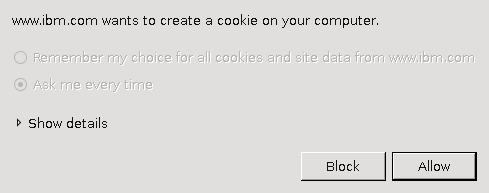
I m currently running google-chrome-beta version 5.0.375.55-r47796 on Debian/Unstable. It s the fastest web browser I ve used in recent times it s the first time that I ve run a browser that feels faster than my recollection of running IBM WebExplorer for OS/2 on a 486-66 system! It has a good feature set, and it s the only browser I ve used that in a typical configuration will make proper use of the screen space by not having a permanent status bar at the bottom of the sceen and by having tabs in the title-bar. But it s not perfect, here is a list of some bugs: Chrome Titlebar when maximisedChrome Titlebar when not maximisedRight of Chrome Titlebar when not maximised Above are three partial screen captures of Chrome, the first is when maximised and the second is when the window isn t maximised. Notice the extra vertical space above the tab in the title bar in the second picture. The third picture shows the right side of the titlebar and you can see a space below the three buttons where you can drag the window around no matter how many tabs you open that space below the three buttons is reserved. If the Chrome developers had removed the extra vertical space in the titlebar and reserved slightly more horizontal space then you would be able to drag the window around. While an anonymous commentator made a good point that the extra vertical space can be used to drag the window around when the maximum number of tabs are open, it seems that there are other ways of achieving that goal without wasting ~18 vertical pixels. Doing so would be a lot less ugly than what they did with finding text in the page. When I visit a web site that uses cookies from an Incognito Window (which means that cookies etc aren t stored) there is no option to say allow all cookies . This is really annoying when you get to a web site such as the IBM one which stores 5 cookies when you first load the page and then at least one new cookie write for every page you visit. Given that cookie data will be discarded as soon as the window is closed it seems like a good idea to have an option to allow all cookies for Incognito Windows even if all cookies aren t allowed for regular windows. Blocking all cookies would be OK too, anything but having to click on Block or Allow multiple times for each page load. The J and K keys don t work in a view of Venus version 0~bzr95-2+lenny1 (the latest version in Debian/Lenny). I once had a situation where I entered a . at the end of a domain name (which is quite legal there is always an implied dot) and Chrome then wouldn t take note of my request to accept all cookies from the domain. I haven t been able to reproduce that bug, but I have noticed that it stores the settings for whether cookies should be stored separately for domains that end in . , so www.cnn.com. is different from www.cnn.com . Iceweasel seems to just quietly strip the trailing dot. Of course this is better than Konqueror which won t even load a URL with a dot at the end. Chrome can be relied on to restore all windows rapidly after a crash, unlike Iceweasel which restores them at it s normal load speed (slow) and Konqueror which doesn t tend to restore windows. This is good as it does seem to crash regularly. In a response to my post about Chrome and SE Linux [1] Ben Hutchings pointed out that the --no-sandbox option to chrome disables the creation of a PID namespace and therefore makes debugging a lot easier, if I get a lot of spare time I ll try and track down some of the Chrome SEGVs. The JavaScript compiler is either buggy or it s not buggy in situations where people expect IE bugs. When using the Dell Australia web site I can t always order all options. When trying to order a Dell R300 1RU server with hot-plug disks in a hardware RAID array it seems impossible to get all the necessary jumpers which is a precondition to completing the order fortunately I only wanted to blog about how cheap Dell servers are so I don t actually need to complete an order. Dell s web site is also difficult in Iceweasel on occasion, so it s obviously more demanding than most sites. It might be a good test site for people who work on browsers as it s both demanding and important. When I select a URL to be opened in a new window (or when JavaScript does this) then the new tab is opened with about:blank listed as the URL. If the URL is for a PDF file (or something else that is to be downloaded) then the URL entry field is never updated to give the real URL. I believe that this is wrong, either the new tab shouldn t be opened or it should have the correct URL on display there is no benefit with a tab open to show nothing but about:blank in the URL entry field. Also if a URL takes some time to load then it may keep about:blank in the URL entry field for some time. This means that if you use the middle mouse button to rapidly open a few new tabs you won t be able to see what is to be loaded in each one. Sometimes I have several tabs loading and I m happy to close some unimportant ones if they are slow but some are worth waiting for. Overall that s not too bad. I can use Dell s site in Iceweasel, so the only critical bug is the cookies issue in Incognito Windows which makes the Incognito feature almost unusable for some sites.

4 June 2010

Colin Watson: Hacking on grub2

Various people observed in a long thread on debian-devel that the grub2 package was in a bit of a mess in terms of its release-critical bug count, and Jordi and Stefano both got in touch with me directly to gently point out that I probably ought to be doing something about it as one of the co-maintainers. Actually, I don't think grub2 was in quite as bad a state as its 18 RC bugs suggested. Of course every boot loader failure is critical to the person affected by it, not to mention that GRUB 2 offers more complex functionality than any other boot loader (e.g. LVM and RAID), and so it tends to accumulate RC bugs at rather a high rate. That said, we'd been neglecting its bug list for some time; Robert and Felix have both been taking some time off, Jordi mostly only cared about PowerPC and can't do that any more due to hardware failure, and I hadn't been able to pick up the slack. Most of my projects at work for the next while involve GRUB in one way or another, so I decided it was a perfectly reasonable use of work time to do something about this; I was going to need fully up-to-date snapshots anyway, and practically all the Debian grub2 bugs affect Ubuntu too. Thus, with the exception of some other little things like releasing the first Maverick alpha, I've spent pretty much the last week and a half solidly trying to get the grub2 package back into shape, with four uploads so far. The RC issues that remain are: If we can fix that lot, or even just the ones that are reasonably well-understood, I think we'll be in reasonable shape. I'd also like to make grub-mkconfig a bit more robust in the event that the root filesystem isn't one that GRUB understands (#561855, #562672), and I'd quite like to write some more documentation. On the upside, progress has been good. We have multiple terminal support thanks to a new upstream snapshot (#506707), update-grub runs much faster (#508834, #574088), we have DM-RAID support with a following wind (#579919), the new scheme with symlinks under /dev/mapper/ works (#550704), we have basic support for btrfs / as long as you have something GRUB understands properly on /boot (#540786), we have full info documentation covering all the user-adjustable settings in /etc/default/grub, and a host of other smaller fixes. I'm hoping we can keep this up. If you'd like to help, contact me, especially if there's something particular that isn't being handled that you think you could work on. GRUB 2 is actually quite a pleasant codebase to work on once you get used to its layout; it's certainly much easier to fix bugs in than GRUB Legacy ever was, as far as I'm concerned. Thanks to tools like grub-probe and grub-fstest, it's very often possible to fix problems without needing to reboot for anything other than a final sanity check (although KVM certainly helps), and you can often debug very substantial bits of the boot loader - the bits that actually go wrong - using standard tools such as strace and gdb. Upstream is helpful and I've been able to get many of the problems above fixed directly there. If you have a sound knowledge of C and a decent level of understanding of the environment a boot loader needs to operate in - or for that matter specialist knowledge of interesting device types - then you should be able to find something to do.

Adrian von Bidder: Filesystems Quo Vadis: Clients

Probably it's just a question of me not paying enough attention to the news... So: pointers welcome. There are quie a few shiny new filesystems for local storage, like btrfs or HAMMER (and nilfs, Tux3, ext4, Reiser4...) It seems the distributed storage side is covered as well, with ceph being merged recently. There are other systems (like, for example, Lustre), but they haven't appeared much in the news channels I tend to read. What I'd be curious is if any of these support hierarchical storage architectures like pushing out rarely used data to tape libraries. (But this is just idle speculation, I don't need this anywhere.) But what I would really need is a replacement for NFS (v3): a classical client-server filesystem. I'm not sure NFSv4 is the right solution (where I'd use it, I currently can't because we rely too much on POSIX ACLs there, making the transition to NFSv4 quite a chore.) I think POHMELFS might be a solution in the long term, or CRFS, but I'm not sure how much progress there is on these; apt-cache search is silent, not a good sign. There's Samba 4 I guess I'll have to look at it, since it's supposed to be much cleaner and nicer to use than its predecessors and might be a good solution even if no Microsoft systems are involved. Is this what small environments (a fileserver and 100 clients or so) will want to use? Comments are very welcome.

Wouter Verhelst: Re: beid

Sometimes help is just around the corner, and all you have to do is ask. Not so long ago, I asked for help on the support software for the Belgian electronic ID card. I'd been packaging that since it came out back in 2004, but recently I've had some issues with getting the most recent version of this software to work properly. Since Debian 6.0 "squeeze" is fairly near, and since I don't want a horribly outdated version of beid to be part of that release, I realized that something needed to happen, and rather soon. My request got quite some response; much more than I'd expected. There have been answers from people with various amounts of experience in Debian packaging; one of the people to reply to my request was Laurent Bigonville, who's also a Debian Developer. So we've now set up a mailinglist, a git repository, and work seems to be proceeding nicely. I've also asked for the removal of the old belpic source package. However, due to a mistake on my end, the beid source package rather than the belpic one was removed, which means that it'll have to be re-added to the archive now. That should happen sometime during the next few days, after the worst problems have been fixed. However, since I now asked for belpic to be removed, too, this means that for the time being, there is no eID software in unstable. We'll fix that in due time; stay tuned.

3 June 2010

Steve Kemp: Everybody loves me, and I intend to keep it that way.

Would it be wrong to make a new blog entry just to test the blogging platform? If so I'm wrong. To pretend that isn't the case I'll briefly document some recent events:

Coding
I've been making changes to the blogging software, chronicle, to support RSS feeds on comments, and to allow outgoing Pings on new entries. I've also been flirting with an OpenID-backed image upload and sharing site, provisionally named picshare. Why? Partly for fun, partly because I like comments, and partly to flirt with RESTful design and API construction.
Photography
I've provisionally agreed to be the photographer for a special event at a local hair-dressers. This will either be fun, or all end badly. No money, but free food and the chance to experiment more. So all good.
There. Almost like a real entry, right? ObSubject: Cruel Intentions

Matthew Garrett: Poulsbo still makes me sad

Meego 1.0 was released last month. Predictably enough, it lacks any form of support for the GMA500 graphics chipset[1], which is reasonably in line with Intel's placing of US15W as an embedded product for MID-type devices rather than having anything to do with netbooks. Of course, the market pretty much ignored that detail, so we're left with the release of a netbook experience that's incompatible with a large number of netbooks.

There's been hints that there might be some sort of new driver coming, though, and Intel's rapidly heading towards the release of Moorestown - their new MID platform that's x86 but not a PC, that replaces Poulsbo (unless you want to run Windows) and which has the same SGX 3D core[2] as Poulsbo. Moorestown support has started landing in the mainline Linux kernel and Intel are talking about devices shipping with it this year, so we ought to see the graphics driver soon, right?

Well, kind of. Digging through the Meego kernel git tree reveals an updated driver with Moorestown support. The blob is too big for gitorious to display, so I've put up a copy here. Things to note - this isn't a new driver (it's clearly derived from the PSB one), it includes a huge blob of Imagination's platform-independent code, the front end of the driver is still pretty much the i915 driver with a small number of PSB-specfic changes and despite the cheerily optimistic "Patch-mainline: 2.6.35?" at the top it stands pretty much no chance whatsoever of going mainline given that it's even more offensive than the previous version and that one got rejected out of hand.

So it's not clear what Intel's doing here. If this is the driver that Intel are developing for upstream then there's been a pretty serious breakdown in communication over what their driver has to look like. If it's not, Intel have another and presumably better driver somewhere that they're developing entirely behind closed doors despite having shipped millions of units of hardware that people would dearly love to be able to run mainline kernels on. Neither case looks especially good, so the continuing perception would seem to be that only a subset of the company understands the Linux development model - we'll see how this ends up interacting with Meego as a whole.

(Huh. I was about to hit "Post" on this, and then found that another and entirely different driver was submitted for the Meego kernel last week. A copy of it's here. "IVI" in this context appears to stand for "In-vehicle interface" and is aimed at those contexts rather than generic ones. It includes much the same Imagination glue code as the Moorestown driver, appears to be derived from a driver that has support for other Intel chipsets, was written to be at least partially OS-independent given that it abstracts things like PCI and stands even less chance of going upstream than the other driver - as acknowledged by "Patch-mainline: Never". Hilariously, if we include IEGD, that makes three different drivers for the same hardware from the same company, each having no chance to go upstream. Thintel.)

[1] Weirdly, it includes the kernel DRM for Matrox cards. No X driver though.
[2] It's clocked higher, though

1 June 2010

Chris Lamb: Appending the request URL to SQL statements in Django

import sys
from django.http import HttpRequest
from django.db.backends import BaseDatabaseWrapper, util
class URLCursor(util.CursorDebugWrapper):
    def execute(self, sql, *args):
        f = sys._getframe()
        while f:
            request = f.f_locals.get('request')
            if isinstance(request, HttpRequest):
                sql += ' -- %s' % repr(request.path)[2:-1].replace('%', '%%')
                break
            f = f.f_back
        return self.cursor.execute(sql, *args)
fn = BaseDatabaseWrapper.cursor
BaseDatabaseWrapper.cursor = lambda self: URLCursor(fn(self), self)
Now your SQL statements look like:
SELECT "auth_user"."id", [..] WHERE "auth_user"."id" = 1 -- /login
This allows you to quickly go from a misbehaving query in your production environment to the view that is executing it.

Russell Coker: Can SE Linux Implement Traditional Unix Users and Groups?

I was asked by email whether SE Linux could implement traditional Unix users and groups. The Strictly Literal Answer to that Question The core of the SE Linux access control is the domain-type model where every process has a domain and every object that a process can access (including other processes) has a type. Domains are not strongly differentiated from types. It would be possible to create a SE Linux policy that created a domain for every combination of UID and GID that is valid for a user shell given that such combinations are chosen by the sysadmin who could limit them to some degree. There are about 2^32 possible UIDs and about 2^32 possible GIDs, as every domain is listed in kernel memory we obviously can t have 2^64 domains, but we could have enough to map a typical system that s in use. Of course the possible combinations of supplemental groups probably makes this impossible for even relatively small systems, but we can use a simpler model that doesn t emulate supplemental groups. For files there are more possible combinations because anyone who is a member of a group can create a SETGID directory and let other users create files in it. But in a typical system the number of groups is not much greater than the number of users the maximum number of groups is typically the number of users plus about 60. So if we had 100 users then the number of combinations of UID and GID would be something like 100*(100+60)=16,000 it should be possible to have that many domains in a SE Linux policy (but not desirable). Then all that would be needed is rules specifying that each domain (which is based on a combination of UID and GID) can have certain types of access to certain other types based on them having either the same UID or the same GID. Such a policy would be large, it would waste a lot of kernel memory, it would need to be regenerated whenever a user is added, and it s generally something you don t want to use. No-one has considered implementing such a policy, I merely describe it to illustrate why certain configuration options are not desirable. The rest of this post is about realistic things that you can do with SE Linux policy and how it will be implemented in Debian/Squeeze. My previous post titled Is SE Linux Unixish? addresses this issue at a more conceptual level and also considers MAC vs DAC [1]. The History of mapping Unix Accounts to SE Linux Access Control In the early releases of SE Linux (long before it was included in Fedora) every user who could login to a system needed to have their user-name compiled into the policy. The policy specified which roles the user could access, the roles specified which domains could be accessed, and therefore what the user could do. The identity of files on disk was used for two purposes, one was logging (you could see who created a file) and the other was a permission check for the SE Linux patched version of Vixie cron which would not execute any command on behalf of a user unless the identity on the crontab file in the cron spool matched the identity used to run it this is an analogy of the checks that Vixie cron makes on the Unix UID of the crontab file (some other cron daemons do fewer checks). Having to recompile policy source every time you added a user was annoying. So a later development was to allow arbitrary mappings between Unix account names and SE Linux Identities (which included a default identity) and another later development was to have a utility program semanage to map particular Unix account and group names to SE Linux identities. This was all done years ago. Fedora Core 5 which was released in 2006 had the modular policy which included these features (apart from mapping Unix groups to SE Linux identities which was more recent). Fedora Core 5 also introduced MCS which was comprised of a set of categories that a security context may have. The sysadmin would configure the set of categories that each account would have. A recent development has been a concept named UBAC (User Based Access Control) which basically means that a process running directly on behalf of a regular user (IE with a SE Linux identity that s not system_u) can only access files that have an identity of system_u or which have the same identity as the process. This means that you can only access your own files or system files not files of other users which may have inappropriate Unix permissions. So for example if a user with a SE Linux identity of john gives their home directory the Unix permission mode of 0777 then a user with a SE Linux identity of jane can t access their files. Of course this means that if you have a group of people working together on a project then they probably need to all have the same Identity and in practice you would probably end up with everyone having the same identity. I ve given up on the idea of using UBAC in Debian. The Current Plan for Users and SE Linux Access Control in Debian My plan is to have things work in Squeeze in much the same way as in Lenny. You have a SE Linux identity assigned to a login session and everything related to it (including cron jobs) based on the Unix account name or possibly the Unix group name (if there are login entries for both the user-name and the group-name then the user-name entry has precedence). The mapping between Unix accounts and SE Linux identities is configured by the sysadmin and SE Linux identities don t matter much for the Targeted configuration (which is what most people use). The identity determines which roles may be used and also has a limit on the MCS categories. The MCS categories are also specified in the login configuration which has to be a sub-set of the categories used by the identity record. So for example the following is the output of a couple of commands run on a Debian/Unstable system. They show that the test Unix account is assigned a SE Linux identity of staff_u and an MCS range of s0-s0:c1 (this means it creates files by default at level s0 and can also write to other files at that level, but can also have read/write access to files at the level s0:c1 ). The staff_u identity (as shown in the output of semanage user -l can be used with all categories in the set s0:c0.c1023 where the dot means the set of categories from c0 to c1023 inclusive) but in the case of the test user only one category will be used. The test group however (as expressed with %test ) is given the identity user_u and is not permitted to use any categories.
# semanage login -l
Login Name    SELinux User    MLS/MCS Range           
%test         user_u          s0                     
__default__   unconfined_u    s0-s0:c0.c1023         
root          unconfined_u    s0-s0:c0.c1023         
system_u      system_u        s0-s0:c0.c1023         
test          staff_u         s0-s0:c1               
# semanage user -l
             Labeling   MLS/       MLS/                         
SELinux User Prefix     MCS Level  MCS Range         SELinux Roles
root         sysadm     s0         s0-s0:c0.c1023    staff_r sysadm_r system_r
staff_u      staff      s0         s0-s0:c0.c1023    staff_r sysadm_r
sysadm_u     sysadm     s0         s0-s0:c0.c1023    sysadm_r
system_u     user       s0         s0-s0:c0.c1023    system_r
unconfined_u unconfined s0         s0-s0:c0.c1023    system_r unconfined_r
user_u       user       s0         s0                user_r
I hope to get the policy written to support multiple user roles in time for the release of Squeeze. If I don t make it then I will put such a policy on my own web site and try to get it included in an update. The policy currently basically works for a Targeted configuration where the users are not confined (apart from MCS). How MMCS Basically Works The vast majority of SE Linux users run with the MCS policy rather than the MLS policy. For Debian I have written a modified version of MCS that I call MMCS. MMCS is mandatory (you can t relabel files to escape it) and it prevents write-down. If a process has the range s0-s0:c1,c3 then it has full access to files labelled as s0, s0:c1, s0:c3, and s0:c1,c3 and any files it creates will be labeled as s0. If a process has the range s0:c1-s0:c1,c3 then it has read-only access to files labelled as s0 and s0:c3 and read-write access to files labelled as s0:c1 and s0:c1,c3. This means that any secret data it accesses that was labelled with category c1 can t be leaked down to a file that is not labelled with that category. Now MCS currently has no network access controls, so there s nothing stopping a user from using scp or other network utilities to transfer files. But that s the way with most usable systems. I don t think that this is necessarily a problem, the almost total lack of network access controls in a traditional Unix model doesn t seem to concern most people. Now to REALLY Answer that Question SE Linux is a Mandatory Access Control (MAC) system, this makes it inherently different to a Discretionary Access Control (DAC) system such as traditional Unix access controls. Unix permissions are based on each file having a UID, a GID, and a set of permissions and each process having a UID, a GID, and a set of supplementary GIDs. If a user runs a setuid or setgid program then the process will have extra privileges. It also has a lot of stuff that most people aren t aware of such as real vs effective UIDs, the tag bit, setgid directories, and lots more including some quite arbitrary things like making ports <1024 special. SE Linux is based on every object (process, file, socket, etc) having a single security label which includes an identity, a role, a type, and a sensitivity label (MCS categories or an MLS range). There is no support for an object to have more than one label. The SE Linux equivalent to setuid/setgid files is a label for a file which triggers a domain transition when it s executed. This differs from setuid files in that the domain transition is complete (the old privileges can t be restored) and the transition is generally not to a strict super-set of the access (usually a different sub-set of possible access and sometimes to lesser access). These differences are quite fundamental. So really SE Linux can t implement traditional Unix access control. What SE Linux is designed to do is to provide a second layer of defense and to also provide access controls that have different aims than that of Unix permissions such as being mandatory and implementing features such as MLS.

MJ Ray: Hello Oslo, This is Emacs Calling

The Eurovision Song Contest has been and gone with a better-than-usual winner and much of the snarkiness was on microblog sites like identi.ca this year. Search for #ESC, #eurovision or incomprehensibly-to-me #eurovison (no second i is it spelt like that in some language, or can thousands not spell?). Anyway, enough of the title, on with the message I ve been irritated by my linphone SIP internet phone (Skype without lock-in, with standards) taking up my screen space for a while. I ve been meaning to upgrade to one of the recent versions that includes the linphonecsh shell and write some client that only displays windows when it s needed, but I ve been writing programs for work so much that I ve not even found time to write blog posts recently, much less fun code, so that s not happened. So I m quite happy to find linphone.el for my GNU Emacs text editor and find it mostly works. I changed one line at the end to (define-key global-map [menu-bar tools linphone] '("Linphone" . linphone)) to put it on the tools menu, but other than that, it just worked. Well, the Mute doesn t, but that s probably my phone headset being a different ALSA device. I don t care: I use the hardware mute button. In previous times, I would have added the link to the venerable EmacsWiki too, but it has the evil bad wrong Google reCaptcha on the edit page to stop disabled users, so screw it. Google s reCaptcha seems to be spreading again, obstructing more people when accessing more websites. Is there a reason for that? The re in reCaptcha stands for replace with real anti-spam, please! Anyway, now I m controlling phone calls from Emacs. Whatever next? Voice recognition, M-x doctor and a speech synth?

Joey Hess: making the bed

This should solve the yurt's bed problem. Over the past two years I've learned there are really two: It's not a fully dry environment so anything left on the floor will mildew; and the yurt makes no pretense of having a level floor. Thus this custom bed with independently levelable legs, custom sized to hold together a multipart matress. In keeping with the yurt thing, it's disassemblable and portable, but not too easily. :) Couldn't have been done without Mark's skilled ripping of the plywood. Anna cut the smaller boards and assisted, and we were very happy with what we managed to accomplish in a few hours. It's sturdy, and even level.

Julien Danjou: Thoughts and rambling on the X protocol

Two years ago, while working on awesome, I joined the Freedesktop initiative to work on XCB. I had to learn the arcane of the X11 protocol and all the mysterious and old world that goes with it. Now that I've swum all this months in this mud, I just feel like I need to share my thoughts about what become a mess over the decades. When I was unborn

the Toto band were releasing their song "Africa" and some smart guys were working on a windowing system: the X Window System (this is its full name) which therefore has a (too) long history. The latest version of its protocol, the 11th one, has been designed in the 80's. You can learn more about the history in the Wikipedia article about X. In 2010, we still listen disco music and we still use various protocols designed in the 80's and even before X. Music have evolved, protocols have evolved, and so did X11. The problem is that X11 did not evolve that well. The guys at MIT-and-some other-places-with-very-smart-people-in-it created X version 1 in 1984, and updated it until X version 11 (the one we're still using) in 1987. Eleven version in 3 years, that was following the "release early, release often" model. But I don't know why, it just stopped to happen for the last 23 years1. I don't know what changes have been made in the first 11 major versions of the X protocol, but I'm rather sure we should have deserve a couple of major version updates this last 2 decades. In my humble opinion, X11 was not designed to live 23 years. But hey, I'm not blaming anyone here: I was 4 years old and playing Lego when they released this latest version of the X protocol, so there is little chance I'd have done something better.

1. That's not totally true: they added (and then deprecated) many extensions. We won't fix. We'll work-around.

That is probably one of the guideline of the X protocol for the last years. And don't misread me: I'm not bashing anyone thereafter. Since the X11 protocol was aging, the X guys started to add extensions. They added tons of them over the years. This, in application of one of the early principles of X:

It is as important to decide what a system is not as to decide what it is. Do not serve all the world's needs; rather, make the system extensible so that additional needs can be met in an upwardly compatible fashion.

All of them with no exception were added because, bad luck, the X11 protocol did not anticipated the things that happened in the last 23 years, like video, OpenGL, multiple monitors, or the pleasure to draw oval windows. Some of this extensions are still in use, while some of them have been dropped. While this is not a bad thing to extends the protocol, it seems like a bad thing to try to fix the protocol with for example the XFixes extension, even with all the good intentions Keith Packard might have in his greatness. Actually it's even worst than you think

The X11 protocol (without extensions) defines about 120 types of requests: create a window, move a window, etc. Nowadays, there's at least 25 % of them which are useless: usage of server-side font, or the drawing of squares and polygon, are unused by any modern application or toolkit. All of this is superseded by requests from extensions, like the XRender one. The handling of multiple monitors displays has totally been screwed up. X11 has been designed to work in Zaphod mode (independent monitors). But Xinerama, and nowadays XRandR have replaced it up: recent X servers (released after ~2007) does not support Zaphod mode anymore, even if it's a core piece of the X11 protocol. Worst: on many requests, there's limitation or design flaws, like described in this document: Why X Is Not Our Ideal Window System by DEC researchers. We'll add more broken standard on top of that

Following its early principle, X does not define policies but only mechanisms, which seems like a good thing, Consequently, people started writing specifications to determine a number of stuff and dogmas: ICCCM. That was 22 years ago in 1988. It's useless to add that many things in this specification are now obsolete, useless, or that it misses many modern stuff. I was not the only one to think that. The people from what will be the major desktop environments, KDE and GNOME, saw that too in the 90's while I was learning to count. So they wrote EWMH, another standard that comes on top of ICCCM and extends it with nifty features like maximization, full screen mode, etc. The problem is that this standard has also been written by narrow-minded people who at that time, were working on GNOME or KDE (and maybe others). This desktop environments were having and still have some strong concepts of how should work a desktop: "it should have work-spaces", "a window is only on one workspace", "we only see a workspace at a time", "you do not have multiple screens", etc. Dude, we don't care: we have toolkits!

This vision of how the desktop should work have now been written in marble in all applications and libraries implementing EWMH, like GTK+ or Qt. Nowadays, everybody forgot about all of this standards. Toolkits have implemented this, circumvented the X11 protocol limitation and flaws, and nobody wants to look back. Like all standards, obviously some people implemented them badly. This had some side effects, like OpenOffice acting like a pager. We don't look back? Worst, we forgot where we came from!

With all these layers of bad designed standards, the desktop continued to evolve for more than a decade. They continued to add more standard, the more recent ones being based on D-Bus like the Desktop Notification Specification or the latest Status Notifier Specification developed by KDE. The Status Notifier is a new implementation of the good old system tray based on XEmbed, using D-Bus instead of the X11 mechanisms, and adding the possibility to show the system tray with something else than icons. This specification draft saw an important issue and design flaw raised by Wolfgang Draxinger in this thread on the XDG mailing-list. What Wolfgang points out, is that X is network-oriented, and D-Bus is not. Therefore, making the Status Notifier specification to use D-Bus to pass system tray messages around is a bad idea, since running a X application from host A on host B will draw the system tray on the wrong host! Apparently, reading the thread, this does not fear some of the KDE people:

of course this is a bizarre corner case not worth much thought. at least that's what you'll think until you actually run into it yourself (be it because you are testing something or because you are setting up some weird kiosk environment).

What Oswald describes as a corner case is an actual common use case for many of us. Of course, YMMV. From my point of view, this is a step back in the wrong direction. But we can conclude that the network part of X is now worthless, to at least KDE. I used to believe in XCB

When I joined Freedesktop, it was to work on XCB, the X C Binding. XCB is a nice, clean, 21st century technology based API to play with the X11 protocol. Its code is auto generated based on XML file describing the protocol. In comparison, Xlib is 80's obfuscated code with almost no comments and hard-coded things. Only a few people can understand some of its corner like its i18n or XKB implementations. And all its code is synchronous. For people not knowing it yet, X is a network protocol where you send request (like a GET in HTTP) and then get a response. Xlib forces the application to wait for the reply to its request, so the application is blocked until the X server sends the reply to the request. XCB on the other hand does not block and allows the application to send a batch of requests, do some other stuff in the mean time, and then gets the replies. It's like your Web browser would send one request at a time to a Web server, and would wait until you downloaded all the images one by one to display the page. In cases where X and all its clients are on the same host, the latency is small and not really visible, therefore the gain for XCB to be asynchronous is small. On slow network however, the gain can be huge, as proved in the rewrite of xlsclients with XCB by Peter Harris. One of the long standing goal of the XCB folks is to kick-out Xlib, to increase speed and hides latency in X11 applications. That requires to port many libraries, because almost none of them (Cairo being an exception) supports XCB. From where I stand, I don't really see if the work is worth it now. The desktop world is trusted by GNOME and KDE, meaning GTK+ and Qt. It seems none of this toolkits are interested to work on XCB, neither on the X protocol. They probably put hard effort in bypassing X limitation and flaws, and they now sit on top of crap of workarounds and broken-by-design-standard implementation. It seems to me they don't want to go back in the layers and improves things. They're too high to go back down and they don't see what the gain would be. Enlightenment with its EFL was the first toolkit to have an XCB back-end with the work of Vincent Torri. Unfortunately, the back-end is not maintained and nobody cares about it. Last time I tried it, it did not compile at all. X12 ?

There's a page called X12 on the Freedesktop wiki, listing all the things that should be fixed some days. Unfortunately, the list continues to grow up an no one talks about working on X12. On the other hand, there's a handset of people trying to work when they will have time on XKB2, the second version of the "let's-try-to-fix-up-the keyboard-part-of-the-protocol-we-wrote-23-years-ago-a-second-time" extension. To me, it does not seem X12 will happen in the next decade neither. Alternative ?

Do we got alternative to X ? There's Wayland, but it's far from being usable. There's DirectFB, but that's not very portable. None seems candidate to replace X some days to me. Anyhow, none of the main toolkits around support this alternative. GTK+ once supported DirectFB, but as far as I know, it is not supported nor works nowadays, as stated by Josselin Mouette. This is why recent versions of the Debian installer have migrated to X for the graphic part, thanks to Cyril Brulebois work. Conclusion

XCB has been around for more than half-a-decade, and very few people showed interested in it. As far as I can see, nobody is interested to use the X protocol and everybody tries to encapsulate it in some higher-level API as soon as possible to stop seeing it. This leads to poorly written application and toolkits, with a lot of ugly hack. All of that also means that starting to write applications and graphical toolkits based on XCB would be a very interesting project, but that would lead to spend too much time learning to circumvent the X protocol flaws, things that have been done in years by predecessors like Qt and GTK+. Major toolkits implementations have almost nothing to win in going back in the dark water of X. I guess most of their folks prefer to work on shiny 3D effects based on your GPS location, rather than redefining better basis for everyone. The manpower available in the X world is very small. Debian lacking of X maintainers is just the summit of that. There is very smart and very competent and skilled guys in the X world, as you can see by simply reading blog posts on Planet Freedesktop for example (me excluded). Unfortunately, there's not enough of them to cover all the things involved in X: input devices, graphics devices, new protocol extension specification and so on. The X server is really late, and it seems most of the developers prefers to work on the server itself than on the protocol behalf. Which is understandable. I'm curious to see where all of that will lead in the upcoming years. I've been walking in the X world hallways for about 3 years now, and I feel desktop alternatives to KDE and GNOME will all die sooner or later. The time were you could choose between a dozen "modern" window managers has passed away. After all, maybe that is simply Darwinism applied to computer software.

31 May 2010

Clint Adams: Tradefair

If you find yourself trying to pre-empt accusations of unfairness by coming up with plausible explanations, this should be a clear and obvious indication that you are about to do something unfair and wrong. If you are being accused of unfairness and are trying to think of ways to defend against this criticism, it means you probably already have done something unfair and wrong. It also means that you probably have too much power.

Piotr Galiszewski: Short project update

Hello all.

Last week I was very busy, due to my university duties. On Tuesday I had my first exam in this semester (in Numerical Analysis), which took me more time than I had thought it would be.
From this reason my project is slightly behind schedule, but now I will do my best to catch the plan.

On the other hand, there are also some good news for me. Some time ago, Daniel Burrows migrated aptitude repository from mercurial to GIT. I am git user for nearly year, so I strongly support this move ;) .

Here are some basic thoughts which functionalities good package manager must have (and which approach (from aptitude-gtk, synaptic and adept) I like the most):
All of this will be elaborated in mockups. Am I forgetting something important?

The most important questions is: "What is the most common use case for package manager? Installing packages or upgrading packages?". I am not sure if this two actions require different views, or there should be only new category in install package view.

This is all now. More updates (and mockups) will be available today's midnight (or tomorrow morning). So please stay tuned :)

Piotr Galiszewski: Hello Word

Hello Planet Debian readers!

I've never thought that such a thing can ever happen, but I've started blogging ;) So now it is time to introduce myself.

My name is Piotr Galiszewski and I am second year student of computer science at AGH - University of Science and Technology in Krakow (Poland). I have been GNU/Linux user for about 5 years (mostly Debian based distributions).

Thanks for Debian and Google, this summer I will be working on creating Qt-based user interface for aptitude as my Google Summer of Code project. I hope that my mentors Sune Vuorela and Daniel Barrows will be patient with me ;) I am sure I will learn a lot from them. Please look at abstract of my project made by Debian GSoC administrator Obey Arthur Liu:
Qt GUI for aptitude. Currently, KDE users need to use Aptitude via the console interface, or install the newly developed GTK frontend, which does not fit well into KDE desktop. Making Qt frontend to Aptitude would solve this problem and bring an advanced and fully Debian-compliant graphical package manager to KDE.
As I wrote in my proposal I will split my work into three main parts:
  1. writing low level classes which will abstract aptitude signals and slots (which uses sigc++) into Qt slots and signals.
  2. creating and evaluating GUI mockups
  3. implementing GUI on top of classes from the first point
Point 1 and 2 will be made simultaneously and will take all May and half of June. Low level classes should implement all necessary functions for further use in GUI. This classes allow me to avoid direct usage of none Qt code in GUI classes and also give much more time to prepare completed and usability-wise mockups. Every mockups version will be presented and discussed on this blog. First version should be ready in next few days and updates will appear each week (or to weeks).
After finishing this two steps I will start coding GUI. With mockups and finished low level classes this should not be complicated (Yeah, I know that this is only my dream).

Full text of my proposal (including more precise time-line) can be found at Debian wiki.

Currently, project is slightly behind the schedule . It is caused by changes in my studies plan. The Juwanalia students' festival took place earlier, and yesterday it finished. But my first exam will take place one week later on 18 May, so I will have more time to catch up with time-line.

This project is my first direct contribution to Debian, but not first involvement in free software movement. I've been Kadu Instant Messenger developer for more then two year. In last two years I have been second most active developer with more than 700 commits in master branch. During GSoC period my Kadu activities will be limited. If time allows me to do this, I will be still contributing to Kadu. I still can be found at Kadu forum or #kadu channel on irc.freenode.net. I will also continue reviewing patches and fixing low time-consuming bugs.

My plans for the next few days:
If you have any thoughts about this project, please add comment to this post or contact me directly. I will be glad to read all yours opinions

Cheers

PS. As you can see English is not my mother tongue, so please forgive me my mistakes

30 May 2010

Erich Schubert: Wikipedia contributors are one of a kind

The last weeks, I've occasionally been contributing to Wikipedia. I must say, Wikipedia is a really odd world of its own. Another thing I found quite surprising is the difference between the English and the German Wikipedia.Some things I noticed: So on overall: keep away from Wikipedia contributors, they're all maniacs. And often, don't bother to read a Wikipedia article if you can get an appropriate textbook. The Wikipedia article will just try to sell you a dozen textbooks anyway; you'll also have to read them to check the validity.It is a pity, that despite its size and "eyeballs", Wikipedia so far seems to have not attracted much attention by actual "domain experts", but it seems that it is largely filled by bureocrats, zealots and promoters. (That don't have any real work to do?)There are many things wrong here, that have been pointed out by many others, too. I'm not going to rescue the Wikipedia world, either. And yes, I am aware that you can discuss in Wikipedia, too. I fear that Wikipedia will go the DMOZ road. There was a time that DMOZ was doing quite well. Nowadays, large parts of DMOZ are dead. For two main reasons: it's hard to get in, and the backlog is way too large. If you get into DMOZ for a larger category, you'll be faced with thousands of pending link submissions, where for a large part you don't feel qualified to judge on appropriateness or rewrite their description in a neural manner. I have the impression that the same is happening for Wikipedia: on one hand, users that join are often kicked badly for many of their first contributions and will just leave again. At the same time, many of the old articles are in desparate need for attention, but nobody of the established users is willing to spend the days of cleanup/rewriting needed to get the article into a useful shape again. And a new user will never dare to discard most of the existing article; they usually just add or modify single paragraphs to see what happens. So Wikipedia might be hitting some kind of barrier.Still, I have to admit that I frequently use Wikipedia to look up things. Usually because it just comes up first in Google. I then often follow links to better resources, such as MathWorld. And I wish, Google would have taken me there right away ...And don't assume I'd know how to run things better. I'd sure propose to spend more time at fixing existing articles instead of attacking new contributions that much (you'll lose contributors this way). But I also see the need for fighting spam (although you should also remove old spam ...). But I don't know if there is a solution that will actually attract domain experts to re-write all the badly written and inaccurate articles that don't have their personal zealot to patrol them.P.S. Sorry, no comments on my blog. This isn't Facebook. Instead of commenting on my blog, how about working on Wikipedias backlog instead?P.S. Another example is the German Wikipedia story surrounding Fefe's blog. Many here at the open source communities will know fefe for his work on Dietlibc, libowfat and similar highly respected open source projects. His blog has been famous for being high-quality in security, privacy topics, politics and media critics. Some of his fans (likely) started a Wikipedia page on his blog. There have been at least two huge discussions about deleting the Wikipedia page. "sock puppets" and all such things have been brought up, while Fefe himself was amused. The discussions around deleting the blogs page on Wikipedia made it all the way to the print newspapers. As I said, I'm not actually bringing up new critique on Wikipedia. It's an ongoing problem for years now.[Insert random Deletionism rant against Wikipedia]

29 May 2010

Bernd Zeimetz: installing debian on the guruplug server plus

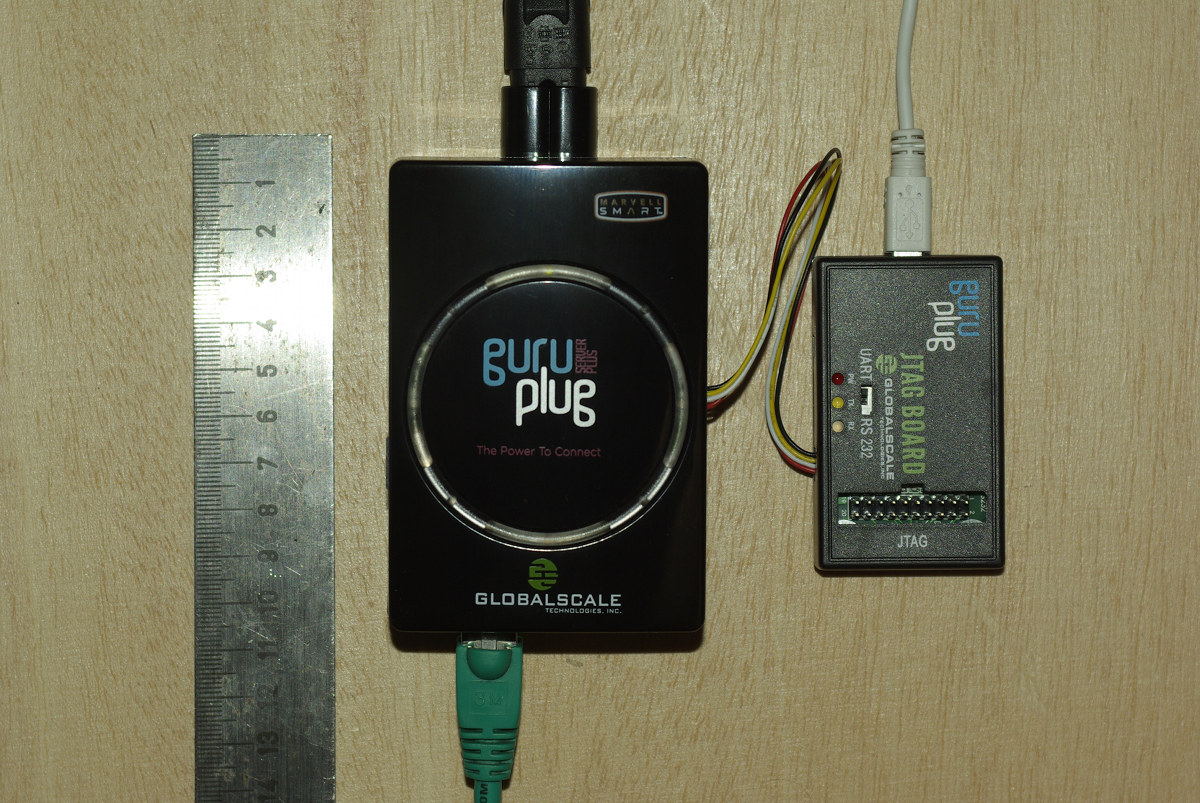
Yesterday finally my GuruPlug Server Plus arrived. Took longer than expected, but as it seems Globalscale had some issues with the power supplies and they were replaced before shipping the GuruPlugs. GuruPlug Server Plus and JTAG Board

The GuruPlug Basically the GuruPlugs are an enhanced version of the well known SheevaPlugs, the biggest difference is probably the need for an external JTAG/UART<>RS232 board to access the serial console. Good thing is that the board comes with a normal JTAG connector and an additional RS232 connector and 2.5V DC power outlet, so it will be useful for other devices, too. Globalscale could have chosen different connectors with less wiggly cables, though. As I was not able to find a useful howto about installing Debian on the Guruplug, I've written down what I did to install Debian unstable on a micro SD card using the Debian installer for the GuruPlug. I did not have a look who modified the Debian installer to work on the plug, but thanks for that! The instructions below are based on Martin Michlmayer's awesome SheevaPlug documentation, the hints from oinkzwurgl.org/guruplug and various forum posts in the plugforum.

Preparations Please note that I'm not resposible for whatever you're doing with your plug. If you follow this tutorial and end up with a brick, it is your fault, not mine. To install the GuruPlug you need the JTAG Board. Connect the UART port to the GuruPlug and the JTAG board to your computer, it should show up as FTDI (thanks for using good chips!) USB<>Serial converter. Serial port settings are 115200, 8-N-1, no hw/sw flow control. The other thing you should prepare is a working tftpd, I'm using aftpd.
apt-get install aftpd
Recent versions share files from /srv/tftp/, in case you're running Lenny /var/lib/tftpboot/ should be the place to drop your files. When everything is connected properly the boot process should show up in minicom, make sure to press some key to enter uBoot. The first thing you should do is to save the original uBoot environment in case you want to restore the factory settings later. Run
printenv
and save the output somewhere.

Upgrading uBoot Unfortunately the uBoot version on the GuruPlug is pretty old and seems to have some issues in booting from USB devices, so the first thing you should do is to upgrade it. You might want to investigate if there is even a better, more recent uBoot version available somewhere, or build one on your own, but I didn't bother and took the uBoot.guruplug.bin from here. The main issue with that is that booting from USB still seems to be buggy (even for FAT partitions) and that ext2load is still not supported. Otherwise it works well :-). I'm mainly following Martin Michlmayer's tutorial again. Download the uBoot.guruplug.bin and drop it into the tftpd directory. Make sure you always set the plug's IP address (ipaddr) and your server's IP address (serverip) properly. I'll use 192.168.121.253 for the plug and 192.168.121.2 for the server in all examples, make sure to change that for your own needs. Stop if something goes wrong, especially when the tftp download failed.
setenv ipaddr 192.168.121.253
setenv serverip 192.168.121.2
tftp 0x6400000 uBoot.guruplug.bin
nand erase 0x00000000 0x0100000
nand write 0x6400000 0x0000000 0x80000
reset
Enter uBoot again after the reset.

Preparing the installer Download uImage and uInitrd to your tftpd directory. Although I've heard that setting mainlineLinux/arcNumber in the uBoot environment is not necessary anymore for very recent kernel, lets set them to make sure the Debian kernel works:
setenv mainlineLinux yes
setenv arcNumber 2097
saveenv
reset
Again, enter uBoot after the reset.

Running the installer Run the following in the uBoot console:
setenv ipaddr 192.168.121.253
setenv serverip 192.168.121.2
tftpboot 0x01100000 uInitrd
tftpboot 0x00800000 uImage
setenv bootargs console=ttyS0,115200n8 base-installer/initramfs-tools/driver-policy=most
bootm 0x00800000 0x01100000
You should see the installer starting now. You might want to follow the following hints:
  • Before configuring the network, go back and set the debconf priority to low, Then continue. While chosing the Debian mirror, chose sid as the Debian version to install. If you don't have sid as choice, use a different mirror. The kernel in testing does not boot on the GuruPlug, you need 2.6.32-13 from sid.
  • You might want to load the 'network console' installer component and continue via ssh. Makes things fater and colourful.
  • Suggested partitioning: I've installed Debian to an 8GB micro SDcard. The SDcard reader is connected via USB and shows up as /dev/sdb (/dev/sda should be the internal NAND and not shown by the installer). I've used 150MB ext2 for /boot and the rest of the space for /, using ext4. You might want to use the noatime option on both filesystems to avoid unnecessary write access to the SDcard. You might choose to add a swap partition, but SDcards are so slow, so I've skipped that.
When you continue the installation, you will hit the following problem:
  • The installer might fail on 'Make the system bootable' (not sure if it does for you, it did so with the kernel from testing).
  • The uBoot is not able to boot from your /boot anyway. USB support is buggy and ext2load missing.
We'll work around these issues by writing the kernel and initrd into the plug's NAND. To do so, enter a shell in the installer and chroot into the install target. We'll then create the necessary uImage.bin and uInitrd and scp them to our tftpd directory:
chroot /target /bin/bash
cd /boot
mkimage -n vmlinuz -A arm -O linux -T kernel -C none -a 0x00008000 -e 0x00008000 -d /boot/vmlinuz uImage.bin
mkimage -n 'vmlinuz initrd' -A arm -O linux -T ramdisk -C gzip -d /boot/initrd.img uInitrd
scp uI* root@192.168.121.2:/srv/tftp
Now leave the shell, finish the installation and reboot, enter uBoot again.

Make the plug bootable To write kernel and initrd to the NAND memory, we have to transfer it via tftp first, then erase the NAND area we want to write to and then write it to the NAND. The values I've chosen here should be fine for the current Debian kernel, but you might need to change the necessary size for the initrd. To do so have a look at the output while transferring the initrd - the transferred bytes are displayed. They have to fit into the amount of bytes you write (the last option to nand write.e).
setenv ipaddr 192.168.121.253
setenv serverip 192.168.121.2
tftp 0x6400000 uImage.bin
nand erase 0x100000 0x400000
nand write.e 0x6400000 0x100000 0x400000
tftp 0x6400000 uInitrd
nand erase 0x500000 0x1fb00000
nand write.e 0x6400000 0x500000 0x600000
Now we need to set the necessary boot options. Make sure to change the root device if you've chosen a different layout from that I've suggested above, or if you're not using a SDcard.
setenv bootargs_debian 'console=ttyS0,115200 root=/dev/sdb2'
setenv bootcmd_nand 'nand start; nand read.e 0x00800000 0x100000 0x400000; nand read.e 0x01100000 0x500000 0x600000'
setenv bootcmd 'setenv bootargs $(bootargs_debian); run bootcmd_nand; bootm 0x00800000 0x01100000'
saveenv
run bootcmd

Finish Your GuruPlug should boot your new Debian installation now. Have fun! I'll try to keep the howto updated for changes in uBoot and the installer, but I might not have the time to so quickly. Patches and comments are welcome!.
root@guruplug:~# uname -a
Linux guruplug 2.6.32-5-kirkwood #1 Fri May 21 05:44:29 UTC 2010 armv5tel GNU/Linux
root@guruplug:~# cat /proc/cpuinfo 
Processor   : Feroceon 88FR131 rev 1 (v5l)
BogoMIPS    : 1192.75
Features    : swp half thumb fastmult edsp 
CPU implementer : 0x56
CPU architecture: 5TE
CPU variant : 0x2
CPU part    : 0x131
CPU revision    : 1
Hardware    : Marvell GuruPlug Reference Board
Revision    : 0000
Serial      : 0000000000000000
root@guruplug:~# 

Russell Coker: Logging in as Root

Martin Meredith wrote a blog post about logging in as root and the people who so strongly advocate against it [1]. The question is whether you should ssh directly to the root account on a remote server or whether you should ssh to a non-root account and use sudo or su to gain administrative privileges. Does sudo/su make your system more secure? Some years ago the administrator of a SE Linux Play Machine used the same home directory for play users to login as for administrative logins as for his own logins he used newrole to gain administrative access (like su or sudo but for SE Linux). His machine was owned by one of his friends who created a shell function named newrole in one of his login scripts that used netcat to send the administrative password out over the net. He didn t immediately realise that this was a problem until his friend changed the password and locked him out! This is one example of a system being 0wned due to having the double-authentication of course if he had logged in directly with administrative privs while using the same home directory that the attacker could write to then he would still have lost but the attacker would have had to do a little more work. When you login you have lots of shell scripts run on your behalf which have the ability to totally control your environment, if someone has taken over those scripts then they can control everything you see, when you think you run sudo or something they can get the password. When you ssh in to a server your security relies on the security of the client end-point, the encryption of the ssh protocol (including keeping all keys secure to prevent MITM attacks), and the integrity of all the programs that are executed before you have control of the remote system. One benefit for using sshd to spawn a session without full privileges is in the case where you fear an exploit against sshd and are running SE Linux or some other security system that goes way beyond Unix permissions. It is possible to configure SE Linux in the strict configuration to deny administrative rights to any shell that is launched directly by the sshd. Therefore someone who cracks sshd could only wait until an administrator logs in and runs newrole and they wouldn t be able to immediately take over the system. If the sysadmin suspected that a sshd compromise is possible then a sysadmin could login through some other method (maybe visit the server and login at the console) to upgrade the sshd. This is however a very unusual scenario and I suspect that most people who advocate using sudo exclusively don t use a SE Linux strict configuration. Does su/sudo improve auditing? If you have multiple people with root access to one system it can be difficult to determine who did what. If you force everyone to use su or sudo then you will have a record of which Unix account was used to start the root session. Of course if multiple people start root shells via su and leave them running then it can be difficult to determine which of the people who had such shells running made the mistake but at least that reduces the list of suspects. If you put PermitUserEnvironment yes in /etc/ssh/sshd_config then you have the option of setting environment variables by ssh authorized_keys entries, so you could have an entry such as the following: environment= ORIG_USER=john@example.com ssh-rsa AAAAB3Nz[...]/w== john@example.com Then you could have the .bashrc file (or a similar file for your favorite shell) have code such as the following to log the relevant data to syslogd:
if [ "$SSH_TTY" = "" ]; then
logger -p auth.info "user $ORIG_USER ran command \"$BASH_EXECUTION_STRING\" as root"
else
logger -p auth.info "user $ORIG_USER logged in as root on tty $(tty)"
fi I think that forcing the use of su or sudo might improve the ability to track other sysadmins if the system is not well configured. But it seems obvious that the same level of tracking can be implemented in other ways with a small amount of effort. It took me about 30 minutes to devise the above shell code and configuration options, it should take people who read this blog post about 5 minutes to implement it (or maybe 10 minutes if they use a different shell or have some other combination of Bash configuration that results in non-obvious use of initialisation scripts (EG if you have a .bash_profile file then .bashrc may not be executed). Once you have the above infrastructure for logging root login sessions it wouldn t be difficult to run a little script that asks the sysadmin what is the purpose for your root login and logs what they type. If several sysadmins are logged in at the same time and one of them describes the purpose of their login as to reconfigure LDAP then you know who to talk to if your LDAP server stops working! Should you run commands with minimum privilege? It s generally regarded that running each command with the minimum privilege is a good idea. But if the only reason you login to a server is to do root tasks (restarting daemons, writing to files that are owned by root, etc) then there really isn t a lot of potential for achieving anything by doing so. If you need to use a client for a particular service (EG a web browser to test the functionality of a web server or proxy server) then you can login to a different account for that purpose the typical sysadmin desktop has a dozen xterms open at once, using one for root access to do the work and another for non-root access to do the testing is probably a good option. Can root be used for local access? Linux Journal has an article about the distribution that used to be known as Lindows (later Linspire) which used root as the default login for desktop use [2]. It suggests using a non-root account because If someone can trick you into running a program or if a virus somehow runs while you are logged in, that program then has the ability to do anything at all of course someone could trick you into running a program or virus that attempts to run sudo (to see if you enabled it without password checks) and if that doesn t work waits until you run sudo and sniffs the password (using pty interception or X event sniffing). The article does correctly note that you can easily accidentally damage your system as root. Given that the skills of typical Linux desktop users are significantly less than those of typical system administrators it seems reasonable to assume that certain risks of mistake which are significant for desktop users aren t a big deal with skilled sysadmins. I think that it was a bad decision by the Lindows people to use root for everything due to the risk of errors. If you make a mistake on a desktop system as non-root then if your home directory was backed up recently and you use IMAP or caching IMAP for email access then you probably won t lose much of note. But if you make a serious mistake as root then the minimum damage is being forced to do a complete reinstall, which is time consuming and annoying even if you have the installation media handy and your Internet connection has enough quota for the month to complete the process. Finally there are some services that seek out people who use the root account for desktop use. Debian has some support channels on IRC [3] and I decided to use the root account from my SE Linux Play Machine [4] to see how they go. #debian has banned strings matching root. #linpeople didn t like me because Deopped you on channel #linpeople because it is registered with channel services . #linuxhelp and #help let me in, but nothing seemed to be happening in those channels. Last time I tried this experiment I had a minor debate with someone who repeated a mantra about not using root and didn t show any interest in reading my explanation of why root:user_r:user_t is safe for IRC. I can t imagine that good the #debian people expect to gain from denying people the ability to access that channel with an IRC client that reports itself to be running as root. Doing so precludes the possibility of educating them if you think that they are doing something wrong (such as running a distribution like Lindows/Linspire). Conclusion I routinely ssh directly to servers as root. I ve been doing so for as long as ssh has been around and I used to telnet to systems as root before that. Logging in to a server as root without encryption is in most cases a really bad idea, but before ssh was invented it was the only option that was available. For the vast majority of server deployments I think that there is no good reason to avoid sshing directly as root.

28 May 2010

Kees Cook: too lazy to recompile

I have a camera that takes .MP4 files. MythTV s Gallery plugin has a static list of extensions it recognizes. MP4 is not one of them. I can rename all my files (which is wrong they re MP4s not something else), or I can edit the source and recompile. Or, since I want to watch them RIGHT NOW, I can binary-edit the shared library and replace something I ll not have any of (WMV) with MP4.
# strings -a /usr/lib/mythtv/plugins/libmythgallery.so   grep WMV
*.WMV
# sed -i -e 's/\.WMV/.MP4/' /usr/lib/mythtv/plugins/libmythgallery.so
Ta-da. Just need to make sure I don t change the size of the binary. :) (Oddly, I m not too lazy to open a bug and propose a patch.)

27 May 2010

Adrian von Bidder: Far from the real world

I guess having only the Japanese version of Tetsuo and not understanding anything might not have helped, but on the other hand there isn't all that much dialogue. Tetsuo is one of those movies I find difficult to judge; while it has some great moments, I also found it to be a bit long in some parts. Very good sound track, though. YMMV, I guess. If you like the Discworld novels by Terry Pratchett, you may want to have a peak at Terry Pratchett's The Colour of Magic, which I found quite well made (... and where I once again found that I don't have a good memory for faces, although in the end I remembered where I saw Twoflower's face just before reading the name in the closing credits ...) A bit disappointing, in contrast, was Terry Pratchett's Hogfather: to me, it proves that a movie should have some distance to the book, since what works when written down doesn't necessarily work on the screen. I quite liked Michelle Dockery as Susan, though.

Matt Zimmerman: Rethinking the Ubuntu Developer Summit

This is a repost from the ubuntu-devel mailing list, where there is probably some discussion happening by now. After each UDS, the organizers evaluate the event and consider how it could be further improved in the future. As a result of this process, the format of UDS has evolved considerably, as it has grown from a smallish informal gathering to a highly structured matrix of hundreds of 45-to-60-minute sessions with sophisticated audiovisual facilities. If you participated in UDS 10.10 (locally or online), you have hopefully already completed the online survey, which is an important part of this evaluation process. A survey can t tell the whole story, though, so I would also like to start a more free-form discussion here among Ubuntu developers as well. I have some thoughts I d like to share, and I m interested in your perspectives as well. Purpose The core purpose of UDS has always been to help Ubuntu developers to explore, refine and share their plans for the subsequent release. It has expanded over the years to include all kinds of contributors, not only developers, but the principle remains the same. We arrive at UDS with goals, desires and ideas, and leave with a plan of action which guides our work for the rest of the cycle. The status quo UDS looks like this: This screenshot is only 1600 1200, so there are another 5 columns off the right edge of the screen for a total of 18 rooms. With 7 time slots per day over 5 days, there are over 500 blocks in the schedule grid. 9 tracks are scattered over the grid. We produce hundreds of blueprints representing projects we would like to work on. It is an impressive achievement to pull this event together every six months, and the organizers work very hard at it. We accomplish a great deal at every UDS, and should feel good about that. We must also constantly evaluate how well it is working, and make adjustments to accommodate growth and change in the project. How did we get here? (this is all from memory, but it should be sufficiently accurate to have this discussion) In the beginning, before it was even called UDS, we worked from a rough agenda, adding items as they came up, and ticking them off as we finished talking about them. Ad hoc methods worked pretty well at this scale. As the event grew, and we held more and more discussions in parallel, it was hard to keep track of who was where, and we started to run into contention. Ubuntu and Launchpad were planning their upcoming work together at the same time. One group would be discussing topic A, and find that they needed the participation of person X, who was already involved in another discussion on topic B. The A group would either block, or go ahead without the benefit of person X, neither of which was seen to be very effective. By the end of the week, everyone was mentally and physically exhausted, and many were ill. As a result, we decided to adopt a schedule grid, and ensure that nobody was expected to be in two places at once. Our productivity depended on getting precisely the right people face to face to tackle the technical challenges we faced. This meant deciding in advance who should be present in each session, and laying out the schedule to satisfy these constraints. New sessions were being added all the time, so the UDS organizers would stay up late at night during the event, creating the schedule grid for the next day. In the morning, over breakfast, everyone would tell them about errors, and request revisions to the schedule. Revisions to the schedule were painful, because we had to re-check all of the constraints by hand. So, in the geek spirit, we developed a program which would read in the constraints and generate an error-free schedule. The UDS organizers ran this at the end of each day during the event, checked it over, and posted it. In the morning, over breakfast, everyone would tell them about constraints they hadn t been aware of, and request revisions to the schedule. Revisions to the schedule were painful, because a single changed constraint would completely rearrange the schedule. People found themselves running all over the place to different rooms throughout the day, as they were scheduled into many different meetings back-to-back. At around this point, UDS had become too big, and had too many constraints, to plan on the fly (unconference style). We resolved to plan more in advance, and agree on the scheduling constraints ahead of time. We divided the event into tracks, and placed each track in its own room. Most participants could stay in one place throughout the day, taking part in a series of related meetings except where they were specifically needed in an adjacent track. We created the schedule through a combination of manual and automatic methods, so that scheduling constraints could be checked quickly, but a human could decide how to resolve conflicts. There was time to review the schedule before the start of the event, to identify and fix problems. Revisions to the schedule during the event were fewer and less painful. We added keynote presentations, to provide opportunities to communicate important information to everyone, and ease back into meetings after lunch. Everyone was still exhausted and/or ill, and tiredness took its toll on the quality of discussion, particularly toward the end of the week. Concerns were raised that people weren t participating enough, and might stay on in the same room passively when they might be better able to contribute to a different session happening elsewhere. As a result, the schedule was randomly rearranged so that related sessions would not be held in the same room, and everyone would get up and move at the end of each hour. This brings us roughly to where things stand today. Problems with the status quo
  1. UDS is big and complex. Creating and maintaining the schedule is a lot of work in itself, and this large format requires a large venue, which in turn requires more planning and logistical work (not to mention cost). This is only worthwhile if we get proportionally more benefit out of the event itself.
  2. UDS produces many more blueprints than we need for a cycle. While some of these represent an explicit decision not to pursue a project, most of them are set aside simply because we can t fit them in. We have the capacity to implement over 100 blueprints per cycle, but we have *thousands* of blueprints registered today. We finished less than half of the blueprints we registered for 10.04. This means that we re spending a lot of time at UDS talking about things which can t get done that cycle (and may never get done).
  3. UDS is (still) exhausting. While we should work hard, and a level of intensity helps to energize us, I think it s a bit too much. Sessions later in the week are substantially more sluggish than early on, and don t get the full benefit of the minds we ve brought together. I believe that such an intense format does not suit the type of work being done at the event, which should be more creative and energetic.
  4. The format of UDS is optimized for short discussions (as many as we can fit into the grid). This is good for many technical decisions, but does not lend itself as well to generating new ideas, deeply exploring a topic, building broad consensus or tackling big picture issues facing the project. These deeper problems sometimes require more time. They also benefit tremendously from face-to-face interaction, so UDS is our best opportunity to work on them, and we should take advantage of it.
  5. UDS sessions aim for the minimum level of participation necessary, so that we can carry on many sessions in parallel: we ask, who do we need in order to discuss this topic? This is appropriate for many meetings. However, some would benefit greatly from broader participation, especially from multiple teams. We don t always know in advance where a transformative idea will come from, and having more points of view represented would be valuable for many UDS topics.
  6. UDS only happens once per cycle, but design and planning need to continue throughout the cycle. We can t design everything up front, and there is a lot of information we don t have at the beginning. We should aim to use our time at UDS to greatest effect, but also make time to continue this work during the development cycle. design a little, build a little, test a little, fly a little
Proposals
  1. Concentrate on the projects we can complete in the upcoming cycle. If we aren t going to have time to implement something until the next cycle, the blueprint can usually be deferred to the next cycle as well. By producing only moderately more blueprints than we need, we can reduce the complexity of the event, avoid waste, prepare better, and put most of our energy into the blueprints we intend to use in the near future.
  2. Group related sessions into clusters, and work on them together, with a similar group of people. By switching context less often, we can more easily stay engaged, get less fatigued, and make meaningful connections between related topics.
  3. Organize for cross-team participation, rather than dividing teams into tracks. A given session may relate to a Desktop Edition feature, but depends on contributions from more than just the Desktop Team. There is a lot of design going on at UDS outside of the Design track. By working together to achieve common goals, we can more easily anticipate problems, benefit from diverse points of view, and help each other more throughout the cycle.
  4. Build in opportunities to work on deeper problems, during longer blocks of time. As a platform, Ubuntu exists within a complex ecosystem, and we need to spend time together understanding where we are and where we are going. As a project, we have grown rapidly, and need to regularly evaluate how we are working and how we can improve. This means considering more than just blueprints, and sometimes taking more than an hour to cover a topic.

Next.

Previous.