Search Results: "reg"

25 June 2008

Russell Coker: Safety of Child Seats

I have just watched an interesting lecture by Steven Levitt about car safety for children in the 2-6 age range [1]. The evidence he presents shows that the benefits for children in that age range are at best insignificant and that in some corner cases (EG rear impacts) the child seat may give a worse result than an adult seat belt! He advocates a 5-point harness [2] for children in the 2-6 age range that is based on a standard adult seat and seems to be advocating a child “booster seat” integrated into the adult seat (which approximates the booster seats offered by some recent cars such as the VW Passat). He has a picture of a child in a child-sized 5-point harness to illustrate his point. But one thing that should be considered is the benefit of a 5 point harness for adults. Race car drivers use 5 point harnesses, I wonder how the probability of a race car dying during the course of their employment compares with the probability of an average adult dying while doing regular driving. I also wonder how a 5 point harness compares to a three point harness with a pre-tensioner, it seems quite possible that a 5 point harness would be cheaper and safer than the 3 point harness with pre-tensioner that is found in all the most expensive cars manufactured in the last few years. He believes (based on tests with crash-test dummies) that part of the problem is that the child seat will move in an accident (it’s attached to a soft seat). It seems that one potential solution to this is to have child seats that firmly attach to some solid part of a vehicle. I had previously suggested that child seats which replace existing seats as an option from the manufacturer would be a good idea [3]. But there is a good option for making better child seats for existing vehicles. It is becoming common in the “people mover” market segment to design vehicles with removable seats. For example the Kia Carnival has three seats in the middle row which are removable and which attach to four steel bars in the floor. It should not be difficult to design a child seat which attaches to those bars and could therefore be plugged in to a Carnival in a matter of minutes. The Carnival is designed to have the mid row seats installed or removed easily and safely by someone who is untrained, while for comparison it is recommended that a regular child seat should only be installed by a trained professional (IE your regular mechanic can’t do it).

David Moreno Garza: YAPC::NA 2008

So I attended the conference last week in Chicago, IL. I was just been procrastinating to write about this.

As a (almost) complete outsider of the Perl community, I have countered thoughts about the whole event:

After all, it was quite a nice and new experience. I'm not totally sure I'll attend YAPC::NA 2009 in Pittsburgh, PA, we'll see.

Decklin Foster: Arrogance

Today, like any other day, I started Firefo^WIceweasel. I mapped it at the bottom of my window stack. It promptly raised itself. I closed everything and tried opening a new homepage. Nope, that's fine. I tried again with two tabs saved. It raised itself again. I have been watching variations of this bug regress for eight years now and I am tired of it. So I installed Conkeror. After a good three-year run of being able to sit down at someone else's random PC and say, "hey, a web browser that nearly works as well as mine" (since it is, you know, the same one), I look forward to being utterly fed up with how primitive the rest of the world is again. And what are we in this for, if not that?

Gunnar Wolf: Firefox suckyness

I have to agree with Wouter regarding Firefox Iceweasel 3's suckyness. It might be a superior product in many fronts (I prefer it overall to its predecesor), but were it not for the usefulness of its many available extensions (most notably Web Developer, which has become an integral part of my everyday life), I'd have jumped ship for basically any other browser.
I'm just... adding an <AOL>ME TOO!</AOL> on Wouter's comments... WTF, just go to about:config...

So... Are you telling me that Firefox (even if it were the original, Mozilla-blessed version) has a warranty? No? Didn't think so... Go to about:license. You will see the very familiar and expected:
7. Disclaimer of warranty
Covered code is provided under this license on an "as is" basis, without warranty of any kind, either expressed or implied, including, without limitation, warranties that the covered code is free of defects (...)
Other than this downright stupid issue (which by and large goes against the regular Free Software culture), my main gripe is the number of active regions in the location-entry boxes - Yes, I can jump straight to the search box with Ctrl-K and to the location bar with Ctrl-L, but if I happen to try to move between them with good ol' Tab, why must it be inconsistent?
What do I mean? Go to the search field, press Tab. As expected, you are in the Location entry. Now, press Shift-Tab. For 5 points, where are you now? Bzzzt, no, you are not back where you began - You are in a stupid button which looks like your favicon giving you the identity information about the page you are looking at.
Having this button is a great idea - but why does it have to sit in the way of my tabulation? Were it because, in an inspired moment, the Firefox interface designers decided that buttons should be keyboard-accessible, I'd be most happy (it is by far my most mouse-intensive application, and I hate that... But it's just a button embedded in what should be a clean text-entry box.
And for that matter, it is not even a consistent button - Shift-tabbing from the search field will not get you to the search engine selector. And no key combination will lead you to the noisy (and also, mutually inconsistent) iconic buttons at the far right of both fields... Which, again, have no reason to be inside a text entry field!
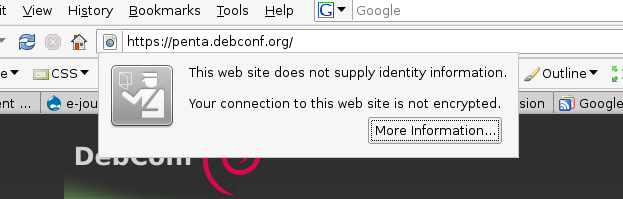
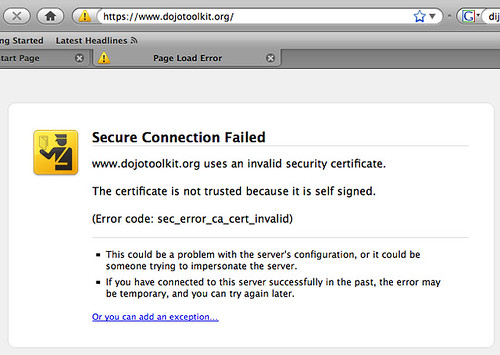
Oh, and I found another pretty little jewel: Go to any site which has a self-signed SSL certificate. Of course, Firefox will go to great lengths to make sure you understand how unsafe is it for you to trust anybody who didn't pay big bucks to Verisign... But this is enough reason for me to send a bug report:

I am connecting through a crypted HTTPS connection. The site is providing identity information - not certified, right, but it does provide something. And the connection is crypted. Firefox/Iceweasel 2 showed me the URL in a light-yellow background showing the connection was secure - Now it just denies penta.debconf.org the right to call itself secure.
(Yes, I am not an interface designer... But it seems neither are they)
[update]Bug filed. Any comments will be welcome in Bugzilla. The bug with the Debconf site (and I do regard it as a bug) is that Iceweasel displays that Your connection to this web site is not encrypted because some of the elements (i.e. the CSS, images..) are sent in the clear - Even though the real information is crypted. Ever heard of data/visualization decoupling?

Russell Coker: Car vs Public Transport to Save Money

I’ve just been considering when it’s best to drive and when it’s best to take public transport to save money. My old car (1999 VW Passat) uses 12.8L/100km which at $1.65 per liter means 21.1 cents per km on fuel. A new set of tires costs $900 and assuming that they last 20,000km will cost 4.5 cents per km. A routine service every 10,000Km will cost about $300 so that’s another 3 cents per km. While it’s difficult to estimate the cost per kilometer of replacing parts that wear out, it seems reasonable to assume that over 100,000Km of driving at least $20,000 will be spent on parts and the labor required to install them, this adds another 20 cents per km. The total then would be 48.6 cents per km. The tax deduction for my car is 70 cents per km of business use, so if my estimates are correct then the tax deductions exceed the marginal costs of running a vehicle (the costs of registration, insurance, and asset depreciation however make the car significantly more expensive than that - see my previous post about the costs of owning a small car for more details [1]). So for business use the marginal cost after tax deductions are counted is probably about 14 cents per km. Now a 2 hour ride on Melbourne’s public transport costs $2.76 (if you buy a 10 trip ticket). For business use that’s probably the equivalent cost to 20Km of driving. The route I take when driving to the city center is about 8Km, that gets me to the nearest edge of the CBD (Central Business District) and doesn’t count the amount of driving needed to find a place to park. This means the absolute minimum distance I would drive when going to the CBD would be 16Km. The distance I would drive on a return trip to the furthest part of the CBD would be almost exactly 20km. So on a short visit to the central city area I might save money by using my car if it’s a business trip and I tax-deduct the distance driven. A daily ticket for the public transport is equivalent to two 2 hour tickets (if you have a 10 trip ticket then if you use it outside the two hour period it becomes a daily ticket and uses a second credit). If I could park my car for an out of pocket expense of less than $2.76 (while I can tax-deduct private parking it’s so horribly expensive that it would cost at least $5 after deductions are counted) then I could possibly save money by driving. There were some 4 hour public parking spots that cost $2. So it seems that for a basic trip to the CBD it’s more expensive to use a car than to take a tram when car expenses are tax deductible. For personal use a 5.7km journey would cost as much as a 2 hour ticket for public transport and a 11.4km journey would cost as much as a daily ticket. The fact that public transport is the economical way to travel for such short distances is quite surprising. In the past I had thought of using a tram ticket as an immediate cost while considering a short car drive as costing almost nothing (probably because the expense comes days later for petrol and years later for servicing the car). Also while there is a lot of media attention recently about petrol prices, it seems that for me at least petrol is still less than half the marginal cost of running a car. Cars are being advertised on the basis of how little fuel they use to save money, but cars that require less service might actually save more money. There are many cars that use less fuel than a VW Passat, and also many cars that are less expensive to repair. It seems that perhaps the imported turbo-Diesel cars which are becoming popular due to their fuel use may actually be more expensive than locally manufactured small cars which have cheap parts. Update: Changed “Km” to “km” as suggested by Lars Wirzenius.

24 June 2008

Lucas Nussbaum: question to Git (power)users

I’m slowly switching to Git for my personal projects, and I like it more and more. And it seems that I can only find nice things to read about it. So, I’m wondering: what are the things that you dislike with Git? That make you regret/prefer another VCS? If Git was redesigned from scratch, what should be changed?

Russell Coker: Links June 2008

Paul Graham has recently published an essay titled How To Disagree [1]. One form that he didn’t mention is to claim that a disagreement is a matter of opinion. Describing a disagreement about an issue which can be proved as a matter of opinion is a commonly used method of avoiding the need to offer any facts or analysis. Sam Varghese published an article about the Debian OpenSSL issue and quoted me [2]. The Basic AI Drives [3] is an interesting papar about what might motivate an AI and how AIs might modify themselves to better achieve their goals. It also has some insights into addiction and other vulnerabilities in human motivation. It seems that BeOS [4] is not entirely dead. The Haiku OS project aims to develop an open source OS for desktop computing based on BeOS [5]. It’s not nearly usable for end-users yet, but they have vmware snapshots that can be used for development. On my Document Blog I have described how to debug POP problems with the telnet command [6]. Some users might read this and help me fix their email problems faster. I know that most users won’t be able to read this, but the number of people who can use it will surely be a lot greater than the number of people who can read the RFCs… Singularity tales is an amusing collection of short stories [7] about the Technological Singularity [8]. A summary of the banana situation [9]. Briefly describes how “banana republics” work and the fact that a new variety of the Panama disease is spreading through banana producing countries. Given the links between despotic regimes and banana production it’s surprising that no-one is trying to spread the disease faster. Maybe Panama disease could do for South America what the Boll weevil did for the south of the US [10]. Jeff Dean gives an interesting talk about the Google server architecture [11]. One thing I wonder about is whether they have experimented with increasing the chunk size over the years. It seems that the contiguous IO performance of disks has been steadily increasing while the seek performance has stayed much the same, and the dramatic increases in the amount of RAM you can get for any given amount of money over the last few years have been amazing. So it seems that now it’s possible to read larger chunks of data in the same amount of time and more easily store such large chunks in memory.

Uwe Hermann: DIY secure pseudo-DDNS setup using ssh

Here's a quick HOWTO for setting up your own secure pseudo-dynamic DNS (DDNS) server. It's not a "real" DDNS service, i.e. you won't be able to use standard DNS tools or protocols to talk to the server, but it covers 98% of all functionality I expect from a service such as DynDNS or similar ones: It tells me the IP address of a certain box which doesn't have a static IP address (e.g. my home-server). Requirements You'll need: Setup On the homeserver: On the publicserver: The script Finally, here's the content of the updateip script:
  #!/bin/sh
  # Update IP address.
  echo $SSH_CLIENT   cut -d " " -f 1 > /home/user/homeserverip.txt
So to summarize: the homeserver's user simply executes the updateip script on the remote publicserver, which in turn abuses the $SSH_CLIENT environment variable which contains the public IP the ssh connection was coming from (which is exactly what we're looking for). We store that IP in the homeserverip.txt file, which will always contain the latest-known IP address of the homeserver (because of the cronjob). Getting the current homeserver IP address You can now retrieve the current IP address of your homeserver easily from anywhere (i.e. from your laptop when you're in another, possibly hostile network) in order to connect to your homeserver:
  $ ssh -x user@publicserver cat /home/user/homeserverip.txt
To make this a bit more convenient you can add a shell alias (e.g. into ~/.bashrc):
  alias homeserverip='ssh -x user@publicserver cat /home/user/homeserverip.txt'
Or, to conveniently login to your homeserver as user:
  alias homeserverlogin='ssh -x user@ ssh -x user@publicserver cat /home/user/homeserverip.txt '
Conclusion, advantages This may not be the most elegant solution, and it has a number of drawbacks when compared to services such as DynDNS, but it's sufficient for me and it also has some advantages: Personally I'm currently using this mechanism for two things, more might follow: So far it works pretty nicely. Update 2008-06-24: Various fixes and simplifications. SSH key must be password-less. Don't run cronjob once per minute, that's overkill.

23 June 2008

Obey Arthur Liu: Daniel Burrows on cwidget-gtk

Sometimes people propose other solutions to have the Aptitude-gtk project done, like :
I d have thought that the most interesting way of doing aptitude-gtk would be to write a gtk backend for libcwidget. -Karellen
As this might be of interest to more people, I’ll repost Daniel Burrows‘ response :
Although I can see where you re coming from, a GTK+ backend to cwidget would have no significant upsides and significant downsides. The main upside to doing that from a practical point of view is that you would have only one piece of driver code for the GTK+ and curses interfaces. You wouldn t have to rewrite the entire interface from scratch to create a GUI frontend. But this is just an illusory benefit. cwidget is a terminal interface library and aptitude s curses frontend is a terminal-based UI. From a practical point of view, this means that aptitude regularly assumes that, for instance, to clear out a line it s sufficient to output $WIDTH space characters (ASCII 32) with the desired background style. A port of cwidget to GTK+ would have to introduce new, interface-independent abstractions for all operations like this and eliminate all direct use of terminal-based assumptions, at a significant cost in complexity for both cwidget and the aptitude frontend. In order to transition to these new conventions, I believe you would have to rewrite large portions of both cwidget *and* aptitude in order to make the interface abstraction layer work. (remember: the justification for doing this is to avoid having to rewrite aptitude!) Furthermore, while this approach avoids reimplementing aptitude s curses interface (sort of, except where it doesn t see above), it does so at the cost of requiring you to reimplement all of cwidget, for GTK+. I just did a quick line count (with wc -l ): in all of cwidget there are 23,390 lines of code, while aptitude s curses frontend has around 23,359 lines of code (some of which are actually shared with the other frontends but are in the curses directory due to the historical organization of the code tree). Not only is a rewrite of cwidget more involved, but the amount of code you d have to replace is comparable to the amount implicated in a rewrite of aptitude itself! Finally, even if these costs weren t enough to eliminate the idea, it s not at all clear to me that a GTK+ backend for cwidget is even desirable. Although aptitude has some superficial similarities to a GUI program, the process of designing an interface to run in a terminal (where the available input mechanisms are relatively restricted and all output is to a character-cell grid) is rather different from the process of designing a GUI. GUI programs can t rely on some simplifying assumptions that terminal programs can, and at the same time they have a lot more options available to them (just to name a few: graphics, multiple windows, differing text sizes and rotated text). Trying to force everything through an abstraction designed for terminal output would require you to either
  1. eschew those options,
  2. provide abstract GUI components that somehow fell back to terminal rendering in a terminal, or
  3. add ways for the frontend to extend the abstract widgets with custom functionality.
1. is not an option because I (and, I think, Arthur) want to design a good GTK+ package manager, not a good GTK+ imitation of a console package manager. 2. and 3. amount, in my strong opinion, to writing two separate interfaces but intertwining their implementations in a mass of maintenance-resistant and extension-resistant spaghetti code. At the end of the day, I think that having two separate frontends (sharing backend logic where appropriate, of course) is a far cleaner and more maintainable design, and also easier to create.
As I said earlier, I intend to go a little farther than just making a GTK+ “skin” over the curses interface. Think less like gvim and emacs and more like maybe ddd. I should also add that the cwidget library is used by no major programs except Aptitude so few others would benefit from a GTK+ backend. As the cwidget library homepage says:
cwidget was originally an internal user interface library for the aptitude package manager. This means, on the one hand, that cwidget is known to work in the real world for a real application; on the other hand, it means that the feature set of cwidget is coextensive with the requirements of aptitude.

Russell Coker: TED - Defining Words

I recently joined the community based around the TED conference [1]. The TED conference is expensive ($6000US) and has a long waiting list (the 2009 conference is sold out) so it seems quite unlikely that I will ever attend one. But signing up to the web site is easy and might offer some benefit. One thing that interested me was that part of the sign-up process requests that you select up to 10 words from the list above to describe yourself. Some of the words seem almost mandatory for anyone who is interested in what TED has to offer (I find it difficult to imagine someone declaring that they are not an “activist” or a “change agent” while wanting to be involved with TED in any way). The range of words also seems quite strange, there are some professions mixed with educational status, marital status, and religion. The way it is laid out would tend to encourage people to make a decision as to which aspects of their life are more important, is career, marital status, or religion more important? Given the nature of TED I’m wondering whether the intentionally did a bad job of that part of the site design to encourage people to think about these issues. It seems to me that a better way of doing this would be to provide a few suggestions and allow people to fill in text fields with their own values. Even defining marital status can require many choices and there is no limit to the number of religions and careers. If you try to make a comprehensive list then you will end up doing what British Airways did with their frequent flyer membership application page [2]. Even disregarding the choices of spelling (EG Admiral vs Admiraal and Brig Gen vs Brig General vs Brigadier General) the British Airways list is unreasonably long, and I doubt that anyone who deserves the title “Her Magesty” or “His Holyness” is going to be interested in frequent flyer points. Also I wonder which of the entries in the TED list would be most commonly accepted by the free software community. It seems that activist and technologist would be quite popular. Here is the list in text form for those who can’t get the picture above:

Activist, Agnostic, Architect, Artist, Atheist, Athlete, Blogger, Brainstormer, Buddhist, Business adviser, Business leader, Business mentor, Care taker, Change Agent, Christian, Clergy, Concerned citizen, Connector, Consultant, Designer, Doctor, Educator/Teacher, Engineer, Entrepreneur, Environmentalist, Event planner, Explorer, Filmmaker, Finance professional, Foodie, Gay, Global soul, Hindu, Idea generator, Industrialist, Inventor, Investor, Jewish, Job-seeker, Journalist, Lawyer, Life mentor, Marketer, Musician, Muslim, Parent, Performer, Philanthropist, Photographer, Policy maker, Potential employer, Producer, Project manager, Promoter, Public servant, Real Estate professional, Sales specialist, Scientist, Single, Social entrepreneur, Startup, Student, Technologist, Web guru, World traveler, and Writer/Editor.

21 June 2008

Christian Perrier: On battery monitoring in KDE

After last 2.6.25 kernel again dropped support for /proc/acpi, I decided to move forward and try removing things which depend on it on my laptop. That actually involved switching from klaptopdaemon to kpowersave. This is really a must do. I don't know if this happened in KDE tasks but if it is not, we should think about it. Not only is kpowersave properly using /sys/class/power_supply instead of /proc/acpi/battery, but it seems much more powerful and providing reliable information. PS: that /sys interface seems nice but finding where the hell information is stored is really a nightmare: "/sys/class/power_supply" is damn anti-natural to me... And, well, this is probably the 4th or 5th change for system information in Linux. Sometimes, I regret the stability of Windows when it comes at this (/me runs away).

20 June 2008

Edd Dumbill: Secure LDAP replication

Ever the sucker for punishment, I decided to pick three difficult things and stick them all together: LDAP, SSL and replication. Here's how to make it go on Debian and Ubuntu. The problem You want LDAP replication to happen over the internet, and you want it to happen securely. The caveat I'm not going to tell you how to set up your LDAP from scratch here: I'm assuming you've reached a solution you're happy with and want to replicate it. The solution We're going to set up a replicating slave LDAP server, which communicates with the master over the internet via an SSL-protected connection. Enabling replication First up, the master LDAP server needs to be configured to permit replication.  The key lines to add to your slapd.conf include:
moduleload syncprov
index entryCSN,entryUUID eq
overlay syncprov
syncprov-checkpoint 100 10
syncprov-sessionlog 200
These load up the synchronization module, add indices which make sync go faster, and enable sync. For more detail see the OpenLDAP site. Next you need to add a replicator user to your LDAP database, give your replicator user access to passwords as well as general read access. To create the replicator user, I made this simple LDIF file and fed it to ldapadd.
dn: cn=replicator,dc=mydomain,dc=com
objectClass: simpleSecurityObject
objectClass: organizationalRole
cn: replicator
description: LDAP replicator
userPassword: TOPSEKRIT
Once this user is in your LDAP database, you should give it read access to passwords (I assume you've already given read access to authenticated users.) I have this in my slapd.conf:
access to attrs=userPassword,sambaNTPassword,sambaLMPassword
...
   by dn="cn=replicator,dc=mydomain,dc=com" read
To check that this works, try using ldapsearch to check that the passwords are returned:
ldapsearch -x -D cn=replicator,dc=mydomain,dc=com \
  -W   grep -i password
Enter the replicator password when prompted, and you should see the encrypted passwords from your LDAP database. Securing access Now you've got replication enabled on the master, you will want to ensure it is available on the internet only via TLS or SSL. Here's what I added to slapd.conf to enable this:
TLSCertificateFile      /etc/ssl/certs/ldapserver_crt.pem
TLSCertificateKeyFile   /etc/ssl/private/ldapserver_key.pem
TLSCACertificateFile    /etc/ssl/certs/myCA.pem
TLSVerifyClient         demand
As you will guess from the configuration, the first two lines set the SSL key and certificate the master uses (see "A little twist" below for an important note on key permissions.) The third line tells slapd where to find my site-local certificate authority (CA), and the fourth line says slapd must require any connecting client to have a valid SSL certificate signed by the site-local CA. This is important, as it provides a second layer of access control: a replicating client must connect using a certificate you signed, plus the replicator password. Before this enables TLS access, we must tell slapd which network interfaces to listen on. To do this, edit the SLAPD_SERVICES variable in /etc/default/slapd. Here's my configuration:
SLAPD_SERVICES="ldap://127.0.0.1/ ldap://192.168.0.1/ ldaps:///"
This enables regular LDAP on the loopback and intranet network interfaces, and LDAP/SSL on all interfaces, including the public internet. So, with slapd restarted we are at this situation: connections are now possible from the internet, as long as they are made over SSL with a certificate signed by our site-local CA. (In fact, you can make much finer-grained access restrictions in your configuration than I have done. Using LDAPS rather than TLS over regular LDAP is a rather broad precaution. As explained on the OpenLDAP site, the ssf= parameter can be used to require a certain level of secure connectivity on a per-user or client basis.) Setting up the replicating server
Your slave server should have the same configuration as the master, except you can leave out the bits enabling replication. Firstly, you'll need add to slapd.conf the replication configuration:
syncrepl rid=123
        provider=ldaps://ldapmaster.mydomain.com/
        type=refreshAndPersist
        searchbase="dc=mydomain,dc=com"
        filter="(objectClass=*)"
        scope=sub
        attrs="*"
        schemachecking=off
        bindmethod=simple
        binddn="cn=replicator,dc=mydomain,dc=com"
        credentials=TOPSEKRIT
Most of this I took as boilerplate from the OpenLDAP documentation. Items to note include: And here's the /etc/default/slapd configuration:
SLAPD_SERVICES="ldap://127.0.0.1/"
The slave slapd exists only in this case to serve the local machine. Finally, there's the tricky bit! You need to configure slapd to connect to the master server using a certificate. I'll assume you've created and signed a key and certificate pair for your slave server (see my post Low-tech SSL certificate maintenance for more on this.) Awkwardly, the TLS configuration in slapd.conf is for the server only. Replication works as a client, and thus needs separate configuration. Furthermore, you cannot configure this globally on your machine, as the SSL certificate is a per-user only parameter (see man ldap.conf for more information on this.) Instead, we must set it in slapd's environment. Add these two lines to the end of /etc/default/slapd:
export LDAPTLS_CERT=/etc/ssl/certs/slapd.crt
export LDAPTLS_KEY=/etc/ssl/private/slapd.key
This file is sourced as a shell script by slapd's init script. Amend the path to your certificate and keys as required. Use /etc/init.d/slapd restart and you should be good to go. Finally, we want the slave server to be certain it's talking to the real master. So we also configure client connections to verify the SSL certificate of the peer, in ldap.conf again:
TLS_CACERT      /etc/ssl/certs/myCA.crt
TLS_REQCERT     demand
A little twist One gotcha to notice with both client and server is that slapd runs as the openldap user by default on Debian. Also by default SSL keys are readable only by the ssl-cert group. You'll need add the openldap user to this group, otherwise it won't be able to access /etc/ssl/private. Related articles on this site: Join the conversation about this post

19 June 2008

Martin F. Krafft: IPv6 with Debian

Even though I ve dealt with IPv6 for almost a decade, have delivered presentations, and given multi-day courses on IPv6 security aspects, I ve never actually added IPv6 to my own server/home network infrastructure because it seemed that Linux and/or Debian just weren t ready for it. This seems to have changed (although there are still a number of problems) and in less than a day, I put a few of my machines online. In the following, I d like to share with you how I did it.

Kernel versions and stateful connection tracking Unfortunately, I have to start off with some bad news: even though Debian etch, our current stable release, which uses a Linux kernel version 2.6.18, speaks IPv6, I cannot recommend it for deployment, as the 2.6.18 kernel does not support proper stateful connection tracking for IPv6, and thus makes it impossible to firewall hosts in a sensible manner (I always add local packet filters to all my hosts, and if only to guard against the situation when a user installs a malicious programme to listen on a high port). Of course, it is possible to configure a packet filter statelessly in an acceptable manner once you know the use case, so do with this information what you wish; I prefer to stay general for now. For me, a remedy is almost around the corner: the 2.6.24 kernel seems to support stateful connection tracking for IPv6, and it s even available for etch as it will be included in the upcoming etch-and-a-half release. I simply ended up using the kernel packages pre-release, and so far have not had a problem with it. To do so, add the following line to your /etc/apt/sources.list, making sure to use a close archive mirror:
deb http://ftp.xx.debian.org/debian etch-proposed-updates main

I then just upgraded the system and pulled in all proposed updates. As that may have let in software that won t be part of etch-and-a-half, or even lenny, you may want to pin the archive and only upgrade the kernel packages, by adding to /etc/apt/preferences (replacing amd64 with your architecture):
Package: *
Pin: release a=proposed-updates
Pin-Priority: -1
Package: linux-image-2.6.24-etchnhalf.1-amd64
Pin: release a=proposed-updates
Pin-Priority: 600

Alternatively, you could use the 2.6.24 linux kernel packages on backports.org.

Xen and IPv6 One drawback of switching to 2.6.24 is that you cannot run a dom0 on that machine any longer, so by practical extension, you cannot connect it to the IPv6 network with a packet filter in place. Supposedly, running 2.6.24 instances on a 2.6.18 dom0 is reported to work, however.

Configuring the packet filter The first thing I did was to configure the packet filter on each host appropriately. Unfortunately, this is harder than it should be, because to quote one of the netfilter developers when ip6tables was conceived, someone had a big bad brainfart : rather than adding IPv6 rules to your existing iptables ruleset, you have to create a new ruleset, duplicate all chains, networks, hosts, and individual rules, and maintain the two in parallel. Even though there are efforts of unification on the way, I speculate it ll take another couple of years until PF_INET6 will be fused into PF_INET and one will be able to do sensible cross-address-family packet filtering with Linux. Since I ve recently started to look (again) at pyroman, maybe the most logical way forward would be to extend it to write both, IPv4 and IPv6 rulesets from its knowledge about the hosts and networks you configured. Anyway, we want to get stuff working now! Thus, let s configure ourselves a packet filter. (Almost) all IPv6-related filtering must be configured via ip6tables (read on further down about IPv6 in IPv4 tunneling, the reason I said almost ). The following is a simple default ruleset to start with, which I put into /etc/network/ip6tables to load with ip6tables-restore:
*filter
:INPUT REJECT [0:0]
:FORWARD REJECT [0:0]
:OUTPUT ACCEPT [0:0]
:in-new - [0:0]
### INPUT chain
# allow all loopback traffic
-A INPUT -i lo -j ACCEPT
# RT0 processing is disabled since 2.6.20.9
#-A INPUT -m rt --rt-type 0 -j REJECT
# allow all ICMP traffic
-A INPUT -p icmpv6 -j ACCEPT
# packets belonging to an establish connection or related to one can pass
-A INPUT -m state --state RELATED,ESTABLISHED -j ACCEPT
# packets that are out-of-sequence are silently dropped
-A INPUT -m state --state INVALID -j DROP
# new connections unknown to the kernel are handled in a separate chain
-A INPUT -m state --state NEW -j in-new
# pass SYN packets for SSH
-A in-new -p tcp -m tcp --dport 22 --syn -j ACCEPT
# log everything else
-A INPUT -m limit --limit 3/min --limit-burst 10 -j LOG --log-prefix "[INPUT6]: "
### OUTPUT chain
# RT0 processing is disabled since 2.6.20.9
#-A OUTPUT -m rt --rt-type 0 -j REJECT
# allow outgoing traffic, explicitly (despite chain policy)
-A OUTPUT -j ACCEPT
### FORWARD chain
# RT0 processing is disabled since 2.6.20.9
#-A FORWARD -m rt --rt-type 0 -j REJECT
# disallow forwarded traffic, explicitly (despite chain policy)
-A FORWARD -j REJECT
COMMIT

Note that this recipe is pretty much unusable on pre-2.6.20 kernels due to their broken implementation of stateful connection tracking. The ruleset should be fairly obvious, but you might wonder about my use of REJECT and allowing all ICMP after all, you ve heard for the past 30 years that ICMP is a bad hacker protocol , and Internet security is no domain for being nice to people, so to prevent any information disclosure, you should DROP connections, not let people know that they re simply not allowed. Well, to hell with all that! I don t see a single reason or attack vector that is foiled by DROP or disallowing ICMP. In fact, it s just security by obscurity, and might inconvenient at the same time. ICMP is also much more important with IPv6 than with IPv4 (it replaces ARP, for instance), and it s actually useful to be able to ping hosts, or get back informational messages on why something failed. Finally, rejecting traffic rather than dropping it doesn t suggest to a hacker that something s hidden here. Then there is RFC 4890, which almost made me puke. This document is part of the reason why I say: let s fix problems in the kernel, rather than shielding them with unreadable and unmanageable rulesets!

Getting connected If you already have an IPv6 address, you re basically ready to go, but may want to read further down on how to connect your local network to the IPv6 Internet as well. If you are searching for a provider, have a look at the list of providers with native IPv6 connectivity over at sixxs.net. If you are reading up to here, I assume you are connected to the Net with IPv4. There are two ways for you to move towards IPv6: 6to4 or by way of a tunnel provider. A Kiwi website explains how to setting up 6to4 connectivity, and thus I will concentrate only on the tunnel approach. Even though everyone can set up 6to4 in a breeze without any accounts or waiting, there are a number of security considerations, it s pretty ugly to debug (due in part to asymmetric routing), and makes your life unnecessarily difficult when all you have is a dynamic IP that changes from time to time. If you are stuck behind a NAT gateway, you cannot use 6to4 either. Thus, I prefer the tunnel approach. With the tunnel approach, IPv6 packets are wrapped up in IPv4 packets on your host, and sent to the IPv4 address of your tunnel provider, who has native IPv6 connectivity. The tunnel provider unwraps your packet and shoves the contained IPv6 packet onto the backbone. The IPv6 address you used as source address is routed to the tunnel provider, so any replies arrive at their machines, where they re again wrapped into IPv4 packets and sent to your (publicly-accessible) IPv4 address. Those IPv4 packets specify payload type 41 ( ipv6 ), which is why we need those -p ipv6 -j ACCEPT rules in the iptables ruleset. There are a few tunnel providers out there. I chose SixXS and have not regretted my choice. I shall thus assume that you do the same: sign up for an account right now, so that you have it by the time you finished reading this document! SixXS works on a credit system: tunnels and subnets cost credits, which you can accumulate by maintaining your tunnels properly. This ensures that everyone can play around, but to do more advanced stuff, you need to first display competence with the basic concepts. Your first step with SixXS will be to request a tunnel. SixXS offers three types of tunnels:
  • static tunnels, for those with static IPs,
  • heartbeat tunnels, for those with dynamic IPs, and
  • AYIYA tunnels, for those behind NAT gateways.
Each of these tunnels have advantages and disadvantages, as everything does: the first two types of tunnels use IP protocol 41 packets to encapsulate the IPv6 packets. As such, there are security considerations involving the impersonation by spoofing, and all upstream firewalls must let protocol 41 pass. AYIYA addresses these problems by using signed packets, but that solution comes with extra computation overhead and smaller MTUs. I suggest to use the first type of tunnel that fits your situation. Debian s aiccu package can take care of heartbeat and AYIYA tunnels for you, and it can even set up static ones. During registration, you will also need to choose a PoP , which stands for Point of Presence . If your country only has a single PoP, that s the one you will end up using (unless you have a good reason for another one), but if there are more options, I strongly suggest that you go through the list of PoPs and select the one with the best roundtrip time and lowest latency from your location! Note that you must answer ping requests (ICMP echo-request) from the PoP you chose, or else the tunnel will not be created. Once your tunnel request gets approved, you ll get a /64 prefix, in which you only use two addresses: the PoP will configure the :1 address and you need to configure your host to use the :2 address on the tunnel interface. You ll also be told the IPv4 address of your PoP endpoint . Joey Hess taught me that aiccu can set up the interface for you, using the data it queries from the SixXS registration (TIC) server. I tried it, and it works. However, I prefer the pure ifupdown approach, as it makes things explicit and allows me to use the hooks for stuff like loading the packet filter. So in my /etc/network/interfaces, you can find:
auto sixxs
iface sixxs inet6 v4tunnel
  endpoint 194.1.163.40
  address 2001:41e0:ff00:3b::2
  netmask 64
  gateway 2001:41e0:ff00:3b::1
  ttl 64
  pre-up ip6tables-restore < /etc/network/ip6tables
  up ip link set mtu 1480 dev $IFACE
  up invoke-rc.d aiccu start
  down invoke-rc.d aiccu stop

Make sure to read about MTU values of the tunnel and adjust the 1480 value in the above to your tunnel settings and ISP connectivity. Also set ipv6_interface sixxs in /etc/aiccu.conf, if you are using aiccu, or else aiccu will bring up a duplicate/additional interface. If you tell it to use the same interface, it will actually execute all the same commands (which will fail), but won t report any errors. A future version will have a switch to prevent it from configuring the interface. Unfortunately, this will probably not work. The reason is that your regular IP packet filter (iptables, without the 6) doesn t let those encapsulating IPv4 packets pass, unless we tell it to; we probably want to do this early on in the chain, and also limit it to our tunnel peer, so:
iptables -I INPUT -p ipv6 -s 194.1.163.40/32 -j ACCEPT

For AYIYA, you need to open port 5072, either for UDP, TCP, or SCTP, depending on how you configured it. Also have a look at this FAQ entry on what a firewall needs to pass. If it still doesn t work, you have an upstream packet filter that needs some of those holes poked. Good luck. In most situations, the FORWARD chain does not get such a rule, since the tunnel terminates at the gateway, which routes to a native IPv6 network, or another tunnel. Allowing tunnels through a gateway is almost always a bad thing, as it would allow undetected and untraceable traffic from compromised boxes in the local network. The OUTPUT chain also does not need such a rule, if you have configured stateful filtering properly. Now bring up the interface and verify the connection:
# ifup sixxs
# ping6 -nc1 2001:41e0:ff00:3b::1
PING 2001:41e0:ff00:3b::1(2001:41e0:ff00:3b::1) 56 data bytes
64 bytes from 2001:41e0:ff00:3b::1: icmp_seq=1 ttl=64 time=74.0 ms
[...]
# ping6 -nc1 ipv6.aerasec.de
PING ipv6.aerasec.de(2001:a60:9002:1::184:1) 56 data bytes
64 bytes from 2001:a60:9002:1::184:1: icmp_seq=1 ttl=55 time=91.5 ms
[...]

Welcome to the Internet of the future!

Setting up an IPv6-capable gateway Your IPv6 connection works, but it s limited to a single address, and you do not get to specify the reverse DNS PTR record for it. Since the concept of NAT is mostly absent from IPv6 (thanks! thanks! thanks!), you will not be able to connect any other hosts to the IPv6 network. If your local network has a few hosts behind a gateway, you will need to request a subnet from SixXS and configure your gateway (which has the tunnel connection) appropriately. Don t worry, this is not really very difficult. First, request a subnet for your tunnel from your PoP via your SixXS homepage. Once approved, you will get a /48 prefix for your own use: 2^80 1.2 heptillion addresses which are yours to assign to every dust particle in your office or home, if you so desire. The way I set it up is to add the first of these addresses to your internal interface on the gateway, by adding the following two lines to the interface s stanza in /etc/network/interfaces; you will need the iproute package installed (which you should be using for everything network-related anyway):
up ip -6 addr add 2001:41e0:ff12::1/64 dev $IFACE
down ip -6 addr del 2001:41e0:ff12::1/64 dev $IFACE

Instead of bringing the interface down and up, just run ip -6 addr add 2001:41e0:ff12::1/64 dev eth0. Note the use of the /64 prefix instead of the /48 that got assigned, leaving only 20 pentillion addresses. Oh no! The reason for this is buried in the specs: basically, /48 is a site prefix, but individual networks should not be larger than /64, which is the prefix length of links in the IPv6 domain. Now is also a good time to enable IPv6 forwarding, e.g. like so:
# echo net.ipv6.conf.all.forwarding = 1 >> /etc/sysctl.conf
# sysctl -p /etc/sysctl.conf

Obviously, you will also need to change the policy on the ip6tables FORWARD chain. For now, let s just set it to accept. You should later create a proper ruleset, though!
# ip6tables -I FORWARD -j ACCEPT

Bringing IPv6 to your local network The final step is to spread the love to your local network. Refrain from selecting addresses from your subnet and assigning them to the local hosts, or wondering how to configure the DHCP server, because IPv6 does it differently: your gateway will advertise its routes (which includes a default route) to your network, and each host will pick an address based on its MAC address (unless it already has an EUI-64 address assigned. This all happens automagically, at least with current Debian and Windows machines. On the gateway, you need to install radvd and simply tell it which prefix to use on which interface. My /etc/radvd looks like this, and I won t explain it:
interface eth0
 
  AdvSendAdvert on;
  prefix 2001:41e0:ff12::/64
   
   ;
 ;

Note again how we advertise a /64 network rather than the /48 we own . You cannot advertise smaller networks if you want automatic configuration to work, and you should not use networks larger than /64 in any case. If 2^64 addresses are not enough for you, I trust you ll be able to figure out how to advertise another of your 65536 /64 prefixes in the /48 subnet to appropriate hosts. Restart radvd and run over to another host to witness how it automagically gets connected to the IPv6 network by scanning /var/log/kern.log and watching the output of ip -6 addr and ip -6 route. Try ping6ing from there! Find the dancing turtle! It should all work. If you don t like the automagic aspect of this, look into stateful configuration, using DHCPv6, as provided by dibbler-server and ?wide-dhcpv6-server.

Resolving names Take note of the IPv6 address of each host. There s a way to determine it given the host s MAC address, but this is easier (ipv6calc is also useful). You might want to let your local DNS server know by adding AAAA records in parallel to the existing A records, and possibly even adding PTR entries. If you re serious about IPv6, you can tell SixXS to delegate reverse lookups for the IPv6 addresses to your DNS servers, but you ought to refrain from polluting the DNS namespace. Note that bind9-host provides an improved host tool, which fetches all kinds of information about names, not just the one single information configured as default:
% host pulse.madduck.net
pulse.madduck.net has address 130.60.75.74
pulse.madduck.net has IPv6 address 2001:41e0:ff1a::1
pulse.madduck.net mail is handled by 99 b.mx.madduck.net.
pulse.madduck.net mail is handled by 10 a.mx.madduck.net.
% host 2001:41e0:ff1a::1
1.0.0.0.0.0.0.0.0.0.0.0.0.0.0.0.0.0.0.0.a.1.f.f.0.e.1.4.1.0.0.2.ip6.arpa
domain name pointer pulse.madduck.net.

Oh, and if you re really that curious about how IPv6 addresses are computed from MAC addresses, read RFC 2464. Basically, given a prefix 2001:41e0:ff1a:: and a MAC address aa:bb:cc:dd:ee:ff, the resulting IPv6 address is obtained by:
  1. inserting ff:fe into the middle of the MAC address to yield aa:bb:cc:ff:fe:dd:ee:ff;
  2. flipping the second lowest bit of the first octet to yield a8:bb:cc:ff:fe:dd:ee:ff;
  3. removing the odd colons to yield a8bb:ccff:fedd:eeff, the EUI-64;
  4. concatenating the prefix and this result to get 2001:41e0:ff1a::a8bb:ccff:fedd:eeff.
If you find your (Windows) IPv6 addresses changing all the time, you might be faced by privacy features .

Remaining issues Even though my IPv6 connectivity works, I have two remaining issues.

Sending larger amounts of data to the network I am experiencing a curious issue where outgoing ssh IPv6 connections time out and outgoing data transfers hiccup. I have yet to find out what s going on.

Mapping names to laptops Laptops generally have two interfaces, one with a cable, and the other wireless. Both of these interfaces will have separate MAC addresses, and by extension, the laptop will have different IPv6 addresses depending on how it is connected to the local network. I want to be able to connect to laptops without knowing the medium they use to connect to the network. Unfortunately, there seems to be no feasible way. The solutions I see are:
  • override the MAC address of one interface with that of the other, which is going to cause bgi problems in the case when the laptop (accidentally) gets connected to the same network twice;
  • add both IPv6 addresses as AAAA records to the laptop s DNS name, which will cause random delays when connecting as the resolver may return the currently inactive address first;
  • set up mobile IPv6, e.g. by following this Mobile IPv6 how-to, which would allow accessing the laptop uniformly, no matter where in the world it is. Unfortunately, Debian s support for Mobile IPv6 is severly lacking at time of writing. Also, Yves-Alexis Perez notes that this how-to is horribly outdated and promised to tend to it Real Soon Now .
The second solution works for me for now, but I am interested in the third. In response to this document, Andreas Henriksson has suggested the replace the stateless configuration (radvd) with stateful configuration, using DHCPv6. I have yet to investigate this option. Jeroen Massar suggests to unite cable and wireless into a bridged interface, which seems like a very good idea.

Credits Thanks to Bernhard Schmidt, William Boughton, and Jeroen Massar, and everyone on #ipv6/irc.freenode.org for their help over the past few weeks, and all those who fed back comments in response to this document!

18 June 2008

Matthew Garrett

The Linux Plumbers Conference[1] now has a call for papers, with registration also being open. Why is this important? Because it's the first conference aimed at getting together developers from all walks of the Linux world and fixing the core infrastructural problems. Ever looked at a kernel interface and wondered how the christ any userspace programmer was supposed to use it? Ever looked at a desktop application and wondered what kind of $2 crack they were on when they wrote it? Here's your chance to find out or get it fixed.

I'm running the power management microconf. We're looking at discussing what sort of interfaces the kernel needs to export to userspace and how userspace needs to make use of them. Want to be part of engineering the first OS to have high quality power management all the way from embedded to servers? Be in Portland in September. Ideally at the conference rather than a bar, though there'll be plenty of time for that as well.

So, if you have opinions on power management (or any of the other topics), sign up now. Otherwise we'll ignore them and you'll be unhappy.

[1] Plumbers? Plumbers'? Plumbers's? Almost certainly not Plumber's.

Steve Kemp: Manni - you're not dead yet.

Well I'm back and ready to do some fun work. In the meantime it seems that at least one of my crash-fixes, from the prior public bugfixing, has been uploaded: I'm still a little bit frustrated that some of the other patches I made (to different packages) were ignored, but I guess I shouldn't be too worried. They'll get fixed sooner or later regardless of whether it was "my" fix. In other news I've been stalling a little on the Debian Administration website. There are a couple of reasonable articles in the submissions queue - but nothing really special. I can't help thinking that the next article being a nice round number of 600 deserves something good/special/unique? hard to quantify, but definitely something I'm thinking. I guess I leave it while the weekend and if nothing presents itself I'll just go dequeue the pending pieces. In other news I've managed to migrate the mail scanning service into a nicely split architecture - with minimal downtime. I'm pleased that: Probably more changes to come once I've had a rest (but I guess I write about that elsewhere; because otherwise people get bored!). The most obvious change to consider is to allow almost "instant-activation". I dislike having to manually approve and setup new domains, even if it does boil down to clicking a button on a webpage - so I'm thinking I should have a system in place such that you can sign up, add your domain, and be good to go without manual involvement. (Once DNS has propogated, obviously!) Anyway enough writing. Ice-cream calls, and then I must see if more bugs have been reported against my packages... ObQuote: Run Lola Run.

Martin F. Krafft: Tips for those trying to blow up planes

If you re trying to blow up an airplane, and you re hip and plan to use liquids to take down the silver bird, the following tips may be useful to you: Of course, if you re serious about blowing up an aircraft, you re probably not going to need any of the above, as you ll already have a more convenient way to get your substances on the plane. At the checkpoint, you ll behave like the perfect citizen abiding by all rules; you wouldn t want to arouse suspicion, now would you? PS: this post purposely avoids the use of the word terrorist . PPS: of all the great experiences in airports this week, I especially loved how passengers, who checked in at the counters (and had to present their passports there), were again checked after border control in D sseldorf, while passengers like myself, who used the quick check-in terminals, were just waved through. NP: Disturbed: The Sickness

17 June 2008

Decklin Foster: Dealing with it

I had this crazy idea a few months ago which Joey's post about muscle memory reminded me of. For those not in the US, our keyboards have and ~ on the key to the left of 1. I prefer this key to be Esc. Long ago I simply swapped the two keys, but the original "Esc" key is always in some weird and inconsistent place and reaching for ~ became as annoying as reaching for Esc. (I suppose I might not care if I didn't use a unix shell or regular expressions or bit masks or...) So, noting that I mostly only wanted that key for ~, and not , I came up with the following (in xmodmap form):
keycode 49 = Escape asciitilde grave Escape
This means: if you just hit the key, it does the Right Thing (Esc, as if I were on a real unixy keyboard). If you hold Shift and press the key, it also does the Right Thing (~, as if I were on a PC). But what to do about , or Shift-Esc, which are no longer possible? We make them the alternate graphs (just old down AltGr. I think the xkb option to put this on right Alt is "grp:switch"). I honestly use those two infrequently enough that I don't care about having to remember the extra bucky. (I tend to type $(cmd) in the shell, and not cmd , because I use the former in scripts and I always found the latter harder to read. I suppose I would care more if I used Lisp or Haskell or...) What I like most about this solution is that it lets me use the same muscle memory on all my hardware. Never mind weird Esc positions; laptop vendors still can't agree on the correct order of Fn and Control. But you don't have to care if you put Control on Caps Lock. Same idea. It does feel a bit like cheating, but it has made my wrists far more comfortable. Oh, and to wean myself off the key way out in the corner:
keycode 9 = NoSymbol
Now the question, of course (getting back to Joey), is what would happen if my "new" Escape key broke. I guess I'd have to keep the laptop at home and plug in my Happy Hacking Keyboard :-)

Josselin Mouette: No world record today

Instead of trying to set a world record in the most stupid world record ever category, finally bringing software development to the same level as sausages, you can do something useful for your computer: download the latest epiphany package in unstable. Thanks to glandium s work, it fixes two notable regressions introduced by gecko 1.9, including the removal of the incredibly unusable certificate error page, also known as I want to be as cryptic as IE. As a side note, after spending a whole sunday trying to fix #393837, without anything remotely looking like success, I m very happy that the Epiphany developers decided to abandon Gecko. Maybe we will finally have a browser that is usable without needing a herd of maniac cultists to fix a bug. Something they won t do anyway they re too busy downloading the longest sausage in the world.

Christian Perrier: Nut drives me nuts

And the winner of the day is "nut". The debconf templates that were sucking for months were just "fixed" (guess what? They still suck). So, we all move a little bit back away from our Grail, reaching 100%. Too bad, I wasn't in a goo dmood today and my bug report with the fixed French translation (as usual, when maintainers "fix" templates, I just changed nothing) was not nice and gentle. I know I'll regret that tomorrow.

16 June 2008

Clint Adams: Garoupa troupa

This is dedicated to the little girl who just said that all tea tastes the same, but only because I bet she can't use an RSS aggregator. I had had enough tea to kill a horse. Okay, that's an understatement. I had had enough sweet corn to kill a horse, but I had had enough tea to kill a whole village of horses. The horses constructed a village, then they had a big schism because some of them wanted to become centaurs, then there was a war, then they had to rebuild the village, and now they're living in constant fear of being wiped out by tea. I had some cold, leftover tea for breakfast. I had milk tea for zweites Fr hst ck. I had milk tea for drittes Fr hst ck. Okay, drittes Fr hst ck was nothing more than a mug of milk tea and a glass of water. Then at dim sum, I was doubly foiled by a lack of . Doubly. I won't get into the details, but we ended up settling on some jasmine. I have a very shaky relationship with jasmine tea, but I didn't want to be difficult. I won't get into the details. A couple hours later, my heart was doing handstands. It stopped. It started. It did a jig. It projected itself into the future, fondled the Shrike inappropriately, and returned, only skipping four beats. Disco. It shifted itself into the eighth dimension, did a pirouette, and installed a gopher server. My other organs eyed it with disgust and contempt. It is no wonder then that I concluded I should have no more tea, then made the ridiculous decision to walk into a Cantonese restaurant for dinner. If this is not a clear case of Thanatos mixed with some idiocy and veal stock, then swirled around in a cocktail shaker until I get tired of this metaphor, then I get tired of this metaphor. I have some beer to help lower my pulse to 180, though I know it will elevate my blood pressure even more, and my blood pressure is already at about 3500 volts. So when I finish the bottle, the waiter asks if I want some tea. How can I refuse? He wanders off, and a second waiter appears out of the shadows, and asks me if I want some tea. Again I agree. Reinforcing it makes it better. Then he drops the question. This guy is my homeboy: he asks if jasmine is okay. I casually inquire what choices I might have that don't suck. He is about to respond when waiter #1 drops a teapot on my table. Surprise, it's jasmine. I surrender. Homeslice ain't having it though: he offers to trade me for something else. He gives me some options and I opt for the . He mumbles something informative and largely irrelevant, not suspecting that I just want to play tic-tac-toe in the . Surprisingly, I don't. Then I had mango pudding even though I had it at lunch too.

Next.

Previous.