Search Results: "rra"

2 June 2017

Evgeni Golov: Breaking glass, OnePlus service and Android backups

While visiting our Raleigh office, I managed to crack the glass on the screen of my OnePlus 3. Luckily it was a clean crack from the left upper corner, to the right lower one. The crack was not really interfering with neither touch nor display, so I had not much pressure in fixing it. eBay lists new LCD sets for 110-130 , and those still require manual work of getting the LCD assembly out of the case, replacing it, etc. There are also glass-only sets for ~20 , but these require the complete removal of the glued glass part from the screen, and reattaching it, nothing you want to do at home. But there is also still the vendor, who can fix it, right? Internet suggested they would do it for about 100 , which seemed fair. As people have been asking about the support experience, here is a quick write up what happened:
  • Opened the RMA request online on Sunday, providing a brief description of the issue and some photos
  • Monday morning answer from the support team, confirming this is way out of warranty, but I can get the device fixed for about 93
  • After confirming that the extra cost is expected, I had an UPS sticker to ship the device to CTDI in Poland
  • UPS even tried a pick-up on Tuesday, but I was not properly prepared, so I dropped the device later at a local UPS point
  • It arrived in Poland on Wednesday
  • On Thursday the device was inspected, pictures made etc
  • Friday morning I had a quote in my inbox, asking me to pay 105 - the service partner decided to replace the front camera too, which was not part of the original 93 approximation.
  • Paid the money with my credit card and started waiting.
  • The actual repair happened on Monday.
  • Quality controlled on Tuesday.
  • Shipped to me on Wednesday.
  • Arrived at my door on Thursday.
All in all 9 working days, which is not great, but good enough IMHO. And the repair is good, and it was not (too) expensive. So I am a happy user of an OnePlus 3 again. Well, almost. Before sending the device for repairs, had to take a backup and wipe it. I would not send it with my, even encrypted, data on it. And backups and Android is something special. Android will backup certain data to Google, if you allow it to. Apps can forbid that. Sadly this also blocks non-cloud backups with adb backup. So to properly backup your system, you either need root or you create a full backup of the system in the recovery and restore that. I did the backup using TWRP, transferred it to my laptop, wiped the device, sent it in, got it back, copied the backup to the phone, restored it and... Was locked out of the device, it would not take my password anymore. Well, it seems that happens, just delete some files and it will be fine. It's 2017, are backups of mobile devices really supposed to be that hard?!

1 June 2017

Steve Kemp: So I accidentally wrote a linux security module

Tonight I read this weeks LWN quotes-page a little later than usual because I was busy at work for most of the day. Anyway as always LWNs content was awesome, and this particular list lead to an interesting discussion about a new Linux-Security-Module (LSM).
That read weirdly, what I was trying to say was that every Thursday morning I like to read LWN at work. Tonight is the first chance I had to get round to it.
One of the later replies in the thread was particularly interesting as it said:
Suggestion:
Create an security module that looks for the attribute
    security.WHITELISTED
on things being executed/mmapped and denys it if the attribute
isn't present. Create a program (whitelistd) that reads
/etc/whitelist.conf and scans the system to ensure that only
things on the list have the attribute.
So I figured that was a simple idea, and it didn't seem too hard even for myself as a non-kernel non-developer. There are several linux security modules included in the kernel-releases, beneath the top-level security/ directory, so I assumed I could copy & paste code around them to get something working. During the course of all this work, which took about 90 minutes from start to Finnish (that pun never gets old), this online documentation was enormously useful: Brief attr primer If you're not familiar with the attr tool it's pretty simple. You can assign values to arbitrary labels on files. The only annoying thing is you have to use extra-flags to commands like rsync, tar, cp, etc, to preserve the damn things. Set three attributes on the file named moi:
$ touch moi
$ attr -s forename -V "Steve"      moi
$ attr -s surname  -V "Kemp"       moi
$ attr -s name     -V "Steve Kemp" moi
Now list the attributes present:
$ attr -l moi
Attribute "name" has a 10 byte value for moi
Attribute "forename" has a 5 byte value for moi
Attribute "surname" has a 4 byte value for moi
And retrieve one?
$ attr -q -g name moi
Steve Kemp
LSM Skeleton My initial starting point was to create "steve_lsm.c", with the following contents:
 #include <linux/lsm_hooks.h>
 /*
  * Log things for the moment.
  */
 static int steve_bprm_check_security(struct linux_binprm *bprm)
  
     printk(KERN_INFO "STEVE LSM check of %s\n", bprm->filename);
     return 0;
  
 /*
  * Only check exec().
  */
 static struct security_hook_list steve_hooks[] =  
     LSM_HOOK_INIT(bprm_check_security, steve_bprm_check_security),
  ;
 /*
  * Somebody set us up the bomb.
  */
 static void __init steve_init(void)
  
     security_add_hooks(steve_hooks, ARRAY_SIZE(steve_hooks), "steve");
     printk(KERN_INFO "STEVE LSM initialized\n");
  
With that in place I had to modify the various KBuild files beneath security/ to make sure this could be selected as an LSM, and add in a Makefile to the new directory security/steve/. With the boiler-plate done though, and the host machine rebooted into my new kernel it was simple to test things out. Obviously the first step, post-boot, is to make sure that the module is active, which can be done in two ways, looking at the output of dmesg, and explicitly listing the modules available:
 ~# dmesg   grep STEVE   head -n2
 STEVE LSM initialized
 STEVE LSM check of /init
 $ echo $(cat /sys/kernel/security/lsm)
 capability,steve
Making the LSM functional The next step was to make the module do more than mere logging. In short this is what we want: NOTE we don't care what the content of the extended attribute is, we just care whether it exists or not. Reading the extended attribute is pretty simple, using the __vfs_getxattr function. All in all our module becomes this:
  #include <linux/xattr.h>
  #include <linux/binfmts.h>
  #include <linux/lsm_hooks.h>
  #include <linux/sysctl.h>
  #include <linux/ptrace.h>
  #include <linux/prctl.h>
  #include <linux/ratelimit.h>
  #include <linux/workqueue.h>
  #include <linux/string_helpers.h>
  #include <linux/task_work.h>
  #include <linux/sched.h>
  #include <linux/spinlock.h>
  #include <linux/lsm_hooks.h>
  /*
   * Perform a check of a program execution/map.
   *
   * Return 0 if it should be allowed, -EPERM on block.
   */
  static int steve_bprm_check_security(struct linux_binprm *bprm)
   
         // The current task & the UID it is running as.
         const struct task_struct *task = current;
         kuid_t uid = task->cred->uid;
         // The target we're checking
         struct dentry *dentry = bprm->file->f_path.dentry;
         struct inode *inode = d_backing_inode(dentry);
         // The size of the label-value (if any).
         int size = 0;
         // Root can access everything.
         if ( uid.val == 0 )
            return 0;
         size = __vfs_getxattr(dentry, inode, "user.whitelisted", NULL, 0);
         if ( size >= 0 )
          
             printk(KERN_INFO "STEVE LSM check of %s resulted in %d bytes from 'user.whitelisted' - permitting access for UID %d\n", bprm->filename, size, uid.val );
             return 0;
          
         printk(KERN_INFO "STEVE LSM check of %s denying access for UID %d [ERRO:%d] \n", bprm->filename, uid.val, size );
         return -EPERM;
   
  /*
   * The hooks we wish to be installed.
   */
  static struct security_hook_list steve_hooks[] =  
       LSM_HOOK_INIT(bprm_check_security, steve_bprm_check_security),
   ;
  /*
   * Initialize our module.
   */
  void __init steve_add_hooks(void)
   
       /* register ourselves with the security framework */
       security_add_hooks(steve_hooks, ARRAY_SIZE(steve_hooks), "steve");
       printk(KERN_INFO "STEVE LSM initialized\n");
   
Once again we reboot with this new kernel, and we test that the LSM is active. After the basic testing, as before, we can now test real functionality. By default no binaries will have the attribute we look for present - so we'd expect ALL commands to fail, unless executed by root. Let us test that:
~# su - nobody -s /bin/sh
No directory, logging in with HOME=/
Cannot execute /bin/sh: Operation not permitted
That looks like it worked. Let us allow users to run /bin/sh:
 ~# attr -s whitelisted -V 1 /bin/sh
Unfortunately that fails, because symlinks are weird, but repeating the test with /bin/dash works as expected:
 ~# su - nobody -s /bin/dash
 No directory, logging in with HOME=/
 Cannot execute /bin/dash: Operation not permitted
 ~# attr -s whitelisted -V 1 /bin/dash
 ~# attr -s whitelisted -V 1 /usr/bin/id
 ~# su - nobody -s /bin/dash
 No directory, logging in with HOME=/
 $ id
 uid=65534(nobody) gid=65534(nogroup) groups=65534(nogroup)
 $ uptime
 -su: 2: uptime: Operation not permitted
And our logging shows the useful results as we'd expect:
  STEVE LSM check of /usr/bin/id resulted in 1 bytes from 'user.WHITELISTED' - permitting access for UID 65534
  STEVE LSM check of /usr/bin/uptime denying access for UID 65534 [ERRO:-95]
Surprises If you were paying careful attention you'll see that we changed what we did part-way through this guide. Not sure what is going on there, but it was very confusing. It appears to be the case that when you set an attribute a secret user. prefix is added to the name. Could be worth some research by somebody with more time on their hands than I have. Anyway I don't expect this is a terribly useful module, but it was my first, and I think it should be pretty stable. Feedback on my code certainly welcome!

31 May 2017

Chris Lamb: Free software activities in May 2017

Here is my monthly update covering what I have been doing in the free software world (previous month):
Reproducible builds

Whilst anyone can inspect the source code of free software for malicious flaws, most software is distributed pre-compiled to end users. The motivation behind the Reproducible Builds effort is to permit verification that no flaws have been introduced either maliciously or accidentally during this compilation process by promising identical results are always generated from a given source, thus allowing multiple third-parties to come to a consensus on whether a build was compromised. (I have generously been awarded a grant from the Core Infrastructure Initiative to fund my work in this area.) This month I:
I also made the following changes to our tooling:
diffoscope

diffoscope is our in-depth and content-aware diff utility that can locate and diagnose reproducibility issues.

  • Don't fail when run under perversely-recursive input files. (#780761).

strip-nondeterminism

strip-nondeterminism is our tool to remove specific non-deterministic results from a completed build.

  • Move from verbose_print to nonquiet_print so we print when normalising a file. This is so we can start to target the removal of strip-nondeterminism itself.
  • Only print log messages by default if the file was actually modified. (#863033)
  • Update package long descriptions to clarify that the tool itself is a temporary workaround. (#862029)


Debian My activities as the current Debian Project Leader are covered in my "Bits from the DPL" email to the debian-devel-announce list. However, I:
  • Represented Debian at the OSCAL 2017 in Tirana, Albania.
  • Attended the Reproducible Builds hackathon in Hamburg, Germany. (Report)
  • Finally, I attended Debian SunCamp 2017 in Lloret de Mar in Catalonia, Spain.

Patches contributed
  • xarchiver: Adding files to .tar.xz deletes existing content. (#862593)
  • screen-message: Please invert the default colours. (#862056)
  • fontconfig: fc-cache returns with exit code 0 on 256 errors. (#863427)
  • quadrapassel: Segfaults when unpausing a paused finished game. (#863106)
  • camping: Broken symlink. (#861040)
  • dns-root-data: Does not build if /bin/sh is Bash. (#862252)
  • dh-python: bit.ly link doesn't work anymore. (#863074)

Debian LTS

This month I have been paid to work 18 hours on Debian Long Term Support (LTS). In that time I did the following:
  • "Frontdesk" duties, triaging CVEs, adding links to upstream patches, etc.
  • Issued DLA 930-1 fixing a remote application crash vulnerability in libxstream-java, a Java library to serialize objects to XML and back again
  • Issued DLA 935-1 correcting a local denial of service vulnerability in lxterminal, the terminal emulator for the LXDE desktop environment.
  • Issued DLA 940-1 to remedy an issue in sane-backends which allowed remote attackers to obtain sensitive memory information via a crafted SANE_NET_CONTROL_OPTION packet.
  • Issued DLA 943-1 for the deluge bittorrent client to fix a directory traversal attack vulnerability in the web user interface.
  • Issued DLA 949-1 fixing an integer signedness error in the miniupnpc UPnP client that could allow remote attackers to cause a denial of service attack.
  • Issued DLA 959-1 for the libical calendaring library. A use-after-free vulnerability could allow remote attackers could cause a denial of service and possibly read heap memory via a specially crafted .ICS file.

Uploads
  • redis (3:3.2.9-1) New upstream release.
  • python-django:
    • 1:1.11.1-1 New upstream minor release.
    • 1:1.11.1-2 & 1:1.11.1-3 Add missing Build-Depends on libgdal-dev due to new GIS tests.
  • docbook-to-man:
    • 1:2.0.0-36 Adopt package. Apply a patch to prevent undefined behaviour caused by a memcpy(3) parameter overlap. (#842635, #858389)
    • 1:2.0.0-37 Install manpages using debian/docbook-to-man.manpages over manual calls.
  • installation-birthday Initial upload and misc. subsequent fixes.
  • bfs:
    • 1.0-3 Fix FTBFS on hurd-i386. (#861569)
    • 1.0.1-1 New upstream release & correct debian/watch file.

I also made the following non-maintainer uploads (NMUs):
  • ca-certificates (20161130+nmu1) Remove StartCom and WoSign certificates as they are now untrusted by the major browser vendors. (#858539)
  • sane-backends (1.0.25-4.1) Correct missing error handler in (generated) prerm script. (#862334)
  • seqan2 (2.3.1+dfsg-3.1) Fix broken /usr/bin/splazers symlink on 32-bit architectures. (#863669)
  • jackeq (0.5.9-2.1) Fix a segmentation fault caused by passing a truncated pointer instead of a GtkType. (#863416)
  • kluppe (0.6.20-1.1) Fix segmentation fault at startup. (#863421)
  • coyim (0.3.7-2.1) Skip tests that require internet access to avoid FTBFS. (#863414)
  • pavuk (0.9.35-6.1) Fix segmentation fault when opening "Limitations" window. (#863492)
  • porg (2:0.10-1.1) Fix broken LD_PRELOAD path. (#863495)
  • timemachine (0.3.3-2.1) Fix two segmentation faults caused by truncated pointers. (#863420)

Debian bugs filed
  • acct: Docs incorrectly installed to "accounting.html" directory. (#862180)
  • git-hub: Does not work with 2FA-enabled accounts. (#863265)
  • libwibble: Homepage and Vcs-Darcs fields are outdated. (#861673)


I additionally filed 2 bugs for packages that access the internet during build against flower and r-bioc-gviz.


I also filed 6 FTBFS bugs against cronutils, isoquery, libgnupg-interface-perl, maven-plugin-tools, node-dateformat, password-store & simple-tpm-pk11.

FTP Team

As a Debian FTP assistant I ACCEPTed 105 packages: boinc-app-eah-brp, debug-me, e-mem, etcd, fdroidcl, firejail, gcc-6-cross-ports, gcc-7-cross-ports, gcc-defaults, gl2ps, gnome-software, gnupg2, golang-github-dlclark-regexp2, golang-github-dop251-goja, golang-github-nebulouslabs-fastrand, golang-github-pkg-profile, haskell-call-stack, haskell-foundation, haskell-nanospec, haskell-parallel-tree-search, haskell-posix-pty, haskell-protobuf, htmlmin, iannix, libarchive-cpio-perl, libexternalsortinginjava-java, libgetdata, libpll, libtgvoip, mariadb-10.3, maven-resolver, mysql-transitional, network-manager, node-async-each, node-aws-sign2, node-bcrypt-pbkdf, node-browserify-rsa, node-builtin-status-codes, node-caseless, node-chokidar, node-concat-with-sourcemaps, node-console-control-strings, node-create-ecdh, node-create-hash, node-create-hmac, node-cryptiles, node-dot, node-ecc-jsbn, node-elliptic, node-evp-bytestokey, node-extsprintf, node-getpass, node-gulp-coffee, node-har-schema, node-har-validator, node-hawk, node-jsprim, node-memory-fs, node-pbkdf2, node-performance-now, node-set-immediate-shim, node-sinon-chai, node-source-list-map, node-stream-array, node-string-decoder, node-stringstream, node-verror, node-vinyl-sourcemaps-apply, node-vm-browserify, node-webpack-sources, node-wide-align, odil, onionshare, opensvc, otb, perl, petsc4py, pglogical, postgresql-10, psortb, purl, pymodbus, pymssql, python-decouple, python-django-rules, python-glob2, python-ncclient, python-parse-type, python-prctl, python-sparse, quoin-clojure, quorum, r-bioc-genomeinfodbdata, radlib, reprounzip, rustc, sbt-test-interface, slepc4py, slick-greeter, sparse, te923con, trabucco, traildb, typescript-types & writegood-mode. I additionally filed 6 RC bugs against packages that had incomplete debian/copyright files against: libgetdata, odil, opensvc, python-ncclient, radlib and reprounzip.

Lars Wirzenius: Using a Yubikey 4 for ensafening one's encryption

Introduction I've written before about using a U2F key with PAM. This post continues the theme and explains how to use a smartcard with GnuPG for storing OpenPGP private keys. Specifically, a Yubikey 4 card, because that's what I have, but any good GnuPG compatible card should work. The Yubikey is both a GnuPG compatible smart card, and a U2F card. The Yubikey 4 can handle keys up to 4096 bits. Older Yubikeys can only handle keys up to 2095 bits. The reason to do this is to make it harder for an attacker to steal your encryption keys. I will assume you don't already have an OpenPGP key, or are willing to generate a new one. I will also assume you run Debian stretch; some of the desktop environment setup details may differ between Debian versions or between Linux distributions. You will need: Terminology Some terminology: Outline The process outline is:
  1. Create a new, signing-only master key with GnuPG.
  2. Create three "subkeys", one each for encryption, signing, and authentication. These subkeys are what everyone else uses.
  3. Export copies of the master key pair and the subkey pairs and put them in a safe place.
  4. Put the subkeys on the Yubikey.
  5. GnuPG will automatically use the keys from the card. You have to have the card plugged into a USB port for things to work. If someone steals your laptop, they won't get the private subkeys. Even if they steal your Yubikey, they won't get them (the smartcard is physically designed to prevent that), and can't even use them (because there's PIN codes or passphrases and getting them wrong several times locks up the smartcard).
  6. Use gpg-agent as your SSH agent, and the authentication-only subkey on the Yubikey is used as your ssh key.
Configure GnuPG The process in more detail: Create new keys
$ gpg --full-generate-key
gpg (GnuPG) 2.1.18; Copyright (C) 2017 Free Software Foundation, Inc.
This is free software: you are free to change and redistribute it.
There is NO WARRANTY, to the extent permitted by law.

Please select what kind of key you want:
(1) RSA and RSA (default)
(2) DSA and Elgamal
(3) DSA (sign only)
(4) RSA (sign only)
Your selection? 4
RSA keys may be between 1024 and 4096 bits long.
What keysize do you want? (2048) 4096
Requested keysize is 4096 bits
Please specify how long the key should be valid.
0 = key does not expire
= key expires in n days
w = key expires in n weeks
m = key expires in n months
y = key expires in n years
Key is valid for? (0) 1y
Key expires at Tue 29 May 2018 06:43:54 PM EEST
Is this correct? (y/N) y

GnuPG needs to construct a user ID to identify your key.

Real name: Lars Wirzenius
Email address: liw@liw.fi
Comment: test key
You selected this USER-ID:
"Lars Wirzenius (test key) <liw@liw.fi>>"

Change (N)ame, (C)omment, (E)mail or (O)kay/(Q)uit? o
We need to generate a lot of random bytes. It is a good idea to perform
some other action (type on the keyboard, move the mouse, utilize the
disks) during the prime generation; this gives the random number
generator a better chance to gain enough entropy.
gpg: key 25FB738D6EE435F7 marked as ultimately trusted
gpg: directory '/home/liw/.gnupg/openpgp-revocs.d' created
gpg: revocation certificate stored as '/home/liw/.gnupg/openpgp-revocs.d/A734C10BF2DF39D19DC0F6C025FB738D6EE435F7.rev'
public and secret key created and signed.

Note that this key cannot be used for encryption. You may want to use
the command "--edit-key" to generate a subkey for this purpose.
pub rsa4096 2017-05-29 [SC] [expires: 2018-05-29]
A734C10BF2DF39D19DC0F6C025FB738D6EE435F7
uid Lars Wirzenius (test key) <liw@liw.fi>
  • Note that I set a 1-year expiration for they key. The expiration can be extended at any time (if you have the master secret key), but unless you do, the key won't accidentally live longer than the chosen time.
  • Review the key:
$ gpg --list-secret-keys
/home/liw/.gnupg/pubring.kbx
----------------------------
sec rsa4096 2017-05-29 [SC] [expires: 2018-05-29]
A734C10BF2DF39D19DC0F6C025FB738D6EE435F7
uid [ultimate] Lars Wirzenius (test key) <liw@liw.fi>
  • You now have the signing-only master key. You should now create three subkeys (keyid is the key identifier shown in the key listing, A734C10BF2DF39D19DC0F6C025FB738D6EE435F7 above). Use the --expert option to be able to add an authentication-only subkey.
$ gpg --edit-key --expert A734C10BF2DF39D19DC0F6C025FB738D6EE435F7z
gpg (GnuPG) 2.1.18; Copyright (C) 2017 Free Software Foundation, Inc.
This is free software: you are free to change and redistribute it.
There is NO WARRANTY, to the extent permitted by law.

Secret key is available.

sec rsa4096/25FB738D6EE435F7
created: 2017-05-29 expires: 2018-05-29 usage: SC
trust: ultimate validity: ultimate
[ultimate] (1). Lars Wirzenius (test key) <liw@liw.fi>

gpg> addkey
Please select what kind of key you want:
(3) DSA (sign only)
(4) RSA (sign only)
(5) Elgamal (encrypt only)
(6) RSA (encrypt only)
(7) DSA (set your own capabilities)
(8) RSA (set your own capabilities)
(10) ECC (sign only)
(11) ECC (set your own capabilities)
(12) ECC (encrypt only)
(13) Existing key
Your selection? 4
RSA keys may be between 1024 and 4096 bits long.
What keysize do you want? (2048) 4096
Requested keysize is 4096 bits
Please specify how long the key should be valid.
0 = key does not expire
= key expires in n days
w = key expires in n weeks
m = key expires in n months
y = key expires in n years
Key is valid for? (0) 1y
Key expires at Tue 29 May 2018 06:44:52 PM EEST
Is this correct? (y/N) y
Really create? (y/N) y
We need to generate a lot of random bytes. It is a good idea to perform
some other action (type on the keyboard, move the mouse, utilize the
disks) during the prime generation; this gives the random number
generator a better chance to gain enough entropy.

sec rsa4096/25FB738D6EE435F7
created: 2017-05-29 expires: 2018-05-29 usage: SC
trust: ultimate validity: ultimate
ssb rsa4096/05F88308DFB71774
created: 2017-05-29 expires: 2018-05-29 usage: S
[ultimate] (1). Lars Wirzenius (test key) <liw@liw.fi>

gpg> addkey
Please select what kind of key you want:
(3) DSA (sign only)
(4) RSA (sign only
(5) Elgamal (encrypt only)
(6) RSA (encrypt only)
(7) DSA (set your own capabilities)
(8) RSA (set your own capabilities)
(10) ECC (sign only)
(11) ECC (set your own capabilities)
(12) ECC (encrypt only)
(13) Existing key
Your selection? 6
RSA keys may be between 1024 and 4096 bits long.
What keysize do you want? (2048) 4096
Requested keysize is 4096 bits
Please specify how long the key should be valid
0 = key does not expire
= key expires in n days
w = key expires in n weeks
m = key expires in n months
y = key expires in n years
Key is valid for? (0) 1y
Key expires at Tue 29 May 2018 06:45:22 PM EEST
Is this correct? (y/N) y
Really create? (y/N) y
We need to generate a lot of random bytes. It is a good idea to perform
some other action (type on the keyboard, move the mouse, utilize the
disks) during the prime generation; this gives the random number
generator a better chance to gain enough entropy.

sec rsa4096/25FB738D6EE435F7
created: 2017-05-29 expires: 2018-05-29 usage: SC
trust: ultimate validity: ultimate
ssb rsa4096/05F88308DFB71774
created: 2017-05-29 expires: 2018-05-29 usage: S
ssb rsa4096/2929E8A96CBA57C7
created: 2017-05-29 expires: 2018-05-29 usage: E
[ultimate] (1). Lars Wirzenius (test key) <liw@liw.fi>

gpg> addkey
Please select what kind of key you want:
(3) DSA (sign only)
(4) RSA (sign only)
(5) Elgamal (encrypt only)
(6) RSA (encrypt only)
(7) DSA (set your own capabilities)
(8) RSA (set your own capabilities)
(10) ECC (sign only)
(11) ECC (set your own capabilities)
(12) ECC (encrypt only)
(13) Existing key
Your selection? 8

Possible actions for a RSA key: Sign Encrypt Authenticate
Current allowed actions: Sign Encrypt

(S) Toggle the sign capability
(E) Toggle the encrypt capability
(A) Toggle the authenticate capability
(Q) Finished

Your selection? a

Possible actions for a RSA key: Sign Encrypt Authenticate
Current allowed actions: Sign Encrypt Authenticate

(S) Toggle the sign capability
(E) Toggle the encrypt capability
(A) Toggle the authenticate capability
(Q) Finished

Your selection? s

Possible actions for a RSA key: Sign Encrypt Authenticate
Current allowed actions: Encrypt Authenticate

(S) Toggle the sign capability
(E) Toggle the encrypt capability
(A) Toggle the authenticate capability
(Q) Finished

Your selection? e

Possible actions for a RSA key: Sign Encrypt Authenticate
Current allowed actions: Authenticate

(S) Toggle the sign capability
(E) Toggle the encrypt capability
(A) Toggle the authenticate capability
(Q) Finished

Your selection? q
RSA keys may be btween 1024 and 4096 bits long.
What keysize do you want? (2048) 4096
Requested keysize is 4096 bits
Please specify how long the key should be valid.
0 = key does not expire
= key expires in n days
w = key expires in n weeks
m = key expires in n months
y = key expires in n years
Key is valid for? (0) 1y
Key expires at Tue 29 May 2018 06:45:56 PM EEST
Is this correct? (y/N) y
Really create? (y/N) y
We need to generate a lot of random bytes. It is a good idea to perform
some other action (type on the keyboard, move the mouse, utilize the
disks) during the prime generation; this gives the random number
generator a better chance to gain enough entropy.

sec rsa4096/25FB738D6EE435F7
created: 2017-05-29 expires: 2018-05-29 usage: SC
trust: ultimate validity: ultimate
ssb rsa4096/05F88308DFB71774
created: 2017-05-29 expires: 2018-05-29 usage: S
ssb rsa4096/2929E8A96CBA57C7
created: 2017-05-29 expires: 2018-05-29 usage: E
ssb rsa4096/4477EB0AEF1C440A
created: 2017-05-29 expires: 2018-05-29 usage: A
[ultimate] (1). Lars Wirzenius (test key) <liw@liw.fi>

gpg> save
Export secret keys to files, make a backup
  • You now have a master key and three subkeys. They are hidden in the ~/.gnupg directory. It is time to "export" the secret keys out from there.
$ gpg --export-secret-key --armor keyid > master.key
$ gpg --export-secret-subkeys --armor keyid > subkeys.key
  • You should keep these files safe. You don't want to lose them, and you don't want anyone else to get access to them. I recommend you format two USB memory sticks, format them using full-disk encryption, and copy the exported files to both of them. Then keep them somewhere safe. There's ways of making this part more sophisticated, but that's for another time.
  • The next step involves some hoop-jumping. What we want is to have the master secret key NOT on you machine, so we tell GnuPG to remove it. We exported it above, so we won't lose it. However, deleting the master secret key also removes the secret subkeys. But we can import those without importing the master secret key.
$ gpg --delete-secret-key keyid
$ gpg --import subkeys.key
  • Now verify that you have the secret subkeys, but not the master key. There should be one line starting with sec# (note the hash mark, which indicates the key isn't available), and three lines starting with ssb (no hash mark).
$ gpg -K
/home/liw/.gnupg/pubring.kbx
----------------------------
sec# rsa4096 2017-05-29 [SC] [expires: 2018-05-29]
A734C10BF2DF39D19DC0F6C025FB738D6EE435F7
uid [ultimate] Lars Wirzenius (test key) <liw@liw.fi>
ssb rsa4096 2017-05-29 [S] [expires: 2018-05-29]
ssb rsa4096 2017-05-29 [E] [expires: 2018-05-29]
ssb rsa4096 2017-05-29 [A] [expires: 2018-05-29]
Install subkeys on a Yubikey
  • Now insert the Yubikey in a USB slot. We can start transferring the secret subkeys to the Yubikey. If you want, you can set your name and other information, and change PIN codes. There's several types of PIN codes: normal use, unblocking a locked card, and a third PIN code for admin operations. Changing the PIN codes is a good idea, otherwise everyone will just try the default of 123456 (admin 12345678). However, I'm skipping that in the interest of brevity.
$ gpg -card-edit
...
  • Actually move the subkeys to the card. Note that this does a move, not a copy, and the subkeys will be removed from your ~/.gnupg (check with gpg -K).
$ gpg --edit-key liw
gpg (GnuPG) 2.1.18; Copyright (C) 2017 Free Software Foundation, Inc.
This is free software: you are free to change and redistribute it.
There is NO WARRANTY, to the extent permitted by law.

Secret key is available.

pub rsa4096/25FB738D6EE435F7
created: 2017-05-29 expires: 2018-05-29 usage: SC
trust: ultimate validity: ultimate
ssb rsa4096/05F88308DFB71774
created: 2017-05-29 expires: 2018-05-29 usage: S
ssb rsa4096/2929E8A96CBA57C7
created: 2017-05-29 expires: 2018-05-29 usage: E
ssb rsa4096/4477EB0AEF1C440A
created: 2017-05-29 expires: 2018-05-29 usage: A
[ultimate] (1). Lars Wirzenius (test key) <liw@liw.fi>

gpg> key 1

pub rsa4096/25FB738D6EE435F7
created: 2017-05-29 expires: 2018-05-29 usage: SC
trust: ultimate validity: ultimate
ssb* rsa4096/05F88308DFB71774
created: 2017-05-29 expires: 2018-05-29 usage: S
ssb rsa4096/2929E8A96CBA57C7
created: 2017-05-29 expires: 2018-05-29 usage: E
ssb rsa4096/4477EB0AEF1C440A
created: 2017-05-29 expires: 2018-05-29 usage: A
[ultimate] (1). Lars Wirzenius (test key) <liw@liw.fi>

gpg> keytocard
Please select where to store the key:
(1) Signature key
(3) Authentication key
Your selection? 1

pub rsa4096/25FB738D6EE435F7
created: 2017-05-29 expires: 2018-05-29 usage: SC
trust: ultimate validity: ultimate
ssb* rsa4096/05F88308DFB71774
created: 2017-05-29 expires: 2018-05-29 usage: S
ssb rsa4096/2929E8A96CBA57C7
created: 2017-05-29 expires: 2018-05-29 usage: E
ssb rsa4096/4477EB0AEF1C440A
created: 2017-05-29 expires: 2018-05-29 usage: A
[ultimate] (1). Lars Wirzenius (test key) <liw@liw.fi>

gpg> key 1

pub rsa4096/25FB738D6EE435F7
created: 2017-05-29 expires: 2018-05-29 usage: SC
trust: ultimate validity: ultimate
ssb rsa4096/05F88308DFB71774
created: 2017-05-29 expires: 2018-05-29 usage: S
ssb rsa4096/2929E8A96CBA57C7
created: 2017-05-29 expires: 2018-05-29 usage: E
ssb rsa4096/4477EB0AEF1C440A
created: 2017-05-29 expires: 2018-05-29 usage: A
[ultimate] (1). Lars Wirzenius (test key) <liw@liw.fi>

gpg> key 2

pub rsa4096/25FB738D6EE435F7
created: 2017-05-29 expires: 2018-05-29 usage: SC
trust: ultimate validity: ultimate
ssb rsa4096/05F88308DFB71774
created: 2017-05-29 expires: 2018-05-29 usage: S
ssb* rsa4096/2929E8A96CBA57C7
created: 2017-05-29 expires: 2018-05-29 usage: E
ssb rsa4096/4477EB0AEF1C440A
created: 2017-05-29 expires: 2018-05-29 usage: A
[ultimate] (1). Lars Wirzenius (test key) <liw@liw.fi>

gpg> keytocard
Please select where to store the key:
(2) Encryption key
Your selection? 2

pub rsa4096/25FB738D6EE435F7
created: 2017-05-29 expires: 2018-05-29 usage: SC
trust: ultimate validity: ultimate
ssb rsa4096/05F88308DFB71774
created: 2017-05-29 expires: 2018-05-29 usage: S
ssb* rsa4096/2929E8A96CBA57C7
created: 2017-05-29 expires: 2018-05-29 usage: E
ssb rsa4096/4477EB0AEF1C440A
created: 2017-05-29 expires: 2018-05-29 usage: A
[ultimate] (1). Lars Wirzenius (test key) <liw@liw.fi>

gpg> key 2

pub rsa4096/25FB738D6EE435F7
created: 2017-05-29 expires: 2018-05-29 usage: SC
trust: ultimate validity: ultimate
ssb rsa4096/05F88308DFB71774
created: 2017-05-29 expires: 2018-05-29 usage: S
ssb rsa4096/2929E8A96CBA57C7
created: 2017-05-29 expires: 2018-05-29 usage: E
ssb rsa4096/4477EB0AEF1C440A
created: 2017-05-29 expires: 2018-05-29 usage: A
[ultimate] (1). Lars Wirzenius (test key) <liw@liw.fi>

gpg> key 3

pub rsa4096/25FB738D6EE435F7
created: 2017-05-29 expires: 2018-05-29 usage: SC
trust: ultimate validity: ultimate
ssb rsa4096/05F88308DFB71774
created: 2017-05-29 expires: 2018-05-29 usage: S
ssb rsa4096/2929E8A96CBA57C7
created: 2017-05-29 expires: 2018-05-29 usage: E
ssb* rsa4096/4477EB0AEF1C440A
created: 2017-05-29 expires: 2018-05-29 usage: A
[ultimate] (1). Lars Wirzenius (test key) <liw@liw.fi>

gpg> keytocard
Please select where to store the key:
(3) Authentication key
Your selection? 3

pub rsa4096/25FB738D6EE435F7
created: 2017-05-29 expires: 2018-05-29 usage: SC
trust: ultimate validity: ultimate
ssb rsa4096/05F88308DFB71774
created: 2017-05-29 expires: 2018-05-29 usage: S
ssb rsa4096/2929E8A96CBA57C7
created: 2017-05-29 expires: 2018-05-29 usage: E
ssb* rsa4096/4477EB0AEF1C440A
created: 2017-05-29 expires: 2018-05-29 usage: A
[ultimate] (1). Lars Wirzenius (test key) <liw@liw.fi>

gpg> save
  • If you want to use several Yubikeys, or have a spare one just in case, repeat the previous four steps (starting from importing subkeys back into ~/.gnupg).
  • You're now done, as far GnuPG use is concerned. Any time you need to sign, encrypt, or decrypt something, GnuPG will look for your subkeys on the Yubikey, and will tell you to insert it in a USB port if it can't find the key.
Use subkey on Yubikey as your SSH key
  • To actually use the authentication-only subkey on the Yubikey for ssh, you need to configure your system to use gpg-agent as the SSH agent. Add the following line to .gnupg/gpg-agent.conf:
     enable-ssh-support
    
  • On a Debian stretch system with GNOME, edit /etc/xdg/autostart/gnome-keyring-ssh.desktop to have the following line, to prevent the GNOME ssh agent from starting up:
     Hidden=true
    
  • Edit /etc/X11/Xsession.options and remove or comment out the line that says use-ssh-agent. This stops a system-started ssh-agent from being started when the desktop start.
  • Create the file ~/.config/autostart/gpg-agent.desktop with the following content:
     [Desktop Entry]
     Type=Application
     Name=gpg-agent
     Comment=gpg-agent
     Exec=/usr/bin/gpg-agent --daemon
     OnlyShowIn=GNOME;Unity;MATE;
     X-GNOME-Autostart-Phase=PreDisplayServer
     X-GNOME-AutoRestart=false
     X-GNOME-Autostart-Notify=true
     X-GNOME-Bugzilla-Bugzilla=GNOME
     X-GNOME-Bugzilla-Product=gnome-keyring
     X-GNOME-Bugzilla-Component=general
     X-GNOME-Bugzilla-Version=3.20.0
    
  • To test, log out, and back in again, run the following in a terminal:
$ ssh-add -l
The output should contain a line that looks like this:
    4096 SHA256:PDCzyQPpd9tiWsELM8LwaLBsMDMm42J8/eEfezNgnVc cardno:000604626953 (RSA)
  • You need to export the authentication-only subkey in the SSH key format. You need this for adding to .ssh/authorized_keys, if nothing else.
$ gpg --export-ssh-key keyid > ssh.pub
  • Happy hacking.
See also See also the following links. I've used them to learn enough to write the above. Edited to fix:
  • Output of gpg -K after removing secret master key.

27 May 2017

Lars Wirzenius: Distix movement

Distix is my distributed ticketing system. I initially wrote the core of it as a bit of programming performance art, to celebrate my 30 years as a programmer. Distix is built on top of git and emails in Maildirs. It is a silent listener to your issue and bug discussions: as long as you ensure it gets a copy of each mail, it takes care of automatically arranging things into separate tickets based on email threading. Users and customers do not need to even know Distix is being used. Only the "support staff" need ever interact with Distix, and they mostly only need to close tickets that have been dealt with. I've been using Distix for my own stuff for some time now, and recently we've started using it at work. I slowly improve it as we find problems. It's not a sleek, smooth, finished tool. It's clunky, weird, and probably not what you want. But it's what I want. Changes in recent months:
  • There is a new website: http://distix.eu/. No particular good reason for a new website, but I won the domain for free a couple of years ago, so I might as well use it.
  • In addition, a ticketing system for Distix itself: http://tickets.distix.eu/. Possibly I should've called the subdomain dogfood, but I'm a serious person, not prone to trying to be funny.
  • Mails can now be imported using IMAP.
  • Importing has been optimized for speed and memory use, making my own production use more practical.
I've discussed with a friend the possibility of writing a web UI, and some day maybe that will happen. For now, distix is a command line applicaton that can generate a static HTML site.

21 May 2017

Ritesh Raj Sarraf: apt-offline 1.8.0 released

I am pleased to announce the release of apt-offline, version 1.8.0. This release is mainly a forward port of apt-offline to Python 3 and PyQt5. There are some glitches related to Python 3 and PyQt5, but overall the CLI interface works fine. Other than the porting, there's also an important bug fixed, related to memory leak when using the MIME library. And then there's some updates to the documentation (user examples) based on feedback from users. Release is availabe from Github and Alioth

What is apt-offline ?

Description: offline APT package manager
apt-offline is an Offline APT Package Manager.
.
apt-offline can fully update and upgrade an APT based distribution without
connecting to the network, all of it transparent to APT.
.
apt-offline can be used to generate a signature on a machine (with no network).
This signature contains all download information required for the APT database
system. This signature file can be used on another machine connected to the
internet (which need not be a Debian box and can even be running windows) to
download the updates.
The downloaded data will contain all updates in a format understood by APT and
this data can be used by apt-offline to update the non-networked machine.
.
apt-offline can also fetch bug reports and make them available offline.

Categories:

Keywords:

Like:

20 May 2017

Ritesh Raj Sarraf: Patanjali Research Foundation

PSA: Research in the domain of Ayurveda

http://www.patanjaliresearchfoundation.com/patanjali/
I am so glad to see this initiative taken by the Patanjali group. This is a great stepping stone in the health and wellness domain. So far, Allopathy has been blunt in discarding alternate medicine practices, without much solid justification. The only, repetitive, response I've heard is "lack of research". This initiative definitely is a great step in that regard. Ayurveda (Ancient Hindu art of healing) has a huge potential to touch lives. For the Indian sub-continent, this has the potential of a blessing. The Prime Minister of India himself inaugurated the research centre.

Categories:

Keywords:

Like:

15 May 2017

Gunnar Wolf: Starting a project on private and anonymous network usage

I am starting a work with the students of LIDSOL (Laboratorio de Investigaci n y Desarrollo de Software Libre, Free Software Research and Development Laboratory) of the Engineering Faculty of UNAM:

We want to dig into the technical and social implications of mechanisms that provide for anonymous, private usage of the network. We will have our first formal work session this Wednesday, for which we have invited several interesting people to join the discussion and help provide a path for our oncoming work. Our invited and confirmed guests are, in alphabetical order:
  • Salvador Alc ntar (Wikimedia M xico)
  • Sandino Araico (1101)
  • Gina Gallegos (ESIME Culhuac n)
  • Juliana Guerra (Derechos Digitales)
  • Jacobo N jera (Enjambre Digital)
  • Ra l Ornelas (Instituto de Investigaciones Econ micas)

  • As well as LIDSOL's own teachers and students.
    This first session is mostly exploratory, we should keep notes and decide which directions to pursue to begin with. Do note that by "research" we are starting from the undergraduate student level Not that we want to start by changing the world. But we do want to empower the students who have joined our laboratory to change themselves and change the world. Of course, helping such goals via the knowledge and involvement of projects (not just the tools!) such as Tor.

intrigeri: GNOME and Debian usability testing, May 2017

During the Contribute your skills to Debian event that took place in Paris last week-end, we conducted a usability testing session. Six people were tasked with testing a few aspects of the GNOME 3.22 desktop environment and of the Debian 9 (Stretch) operating system. A number of other people observed them and took notes. Then, two observers and three testers analyzed the results, that we are hereby presenting: we created a heat map visualization, summed up the challenges met during the tests, and wrote this blog post together. We will point the relevant upstream projects to our results. A couple of other people also did some usability testing but went in much more depth: their feedback is much more detailed and comes with a number of improvement ideas. I will process and publish their results as soon as possible. Missions Testers were provided a laptop running GNOME on a a Debian 9 (Stretch) Live system. A quick introduction (mostly copied from the one we found in some GNOME usability testing reports) was read. Then they were asked to complete the following tasks. A. Nautilus Mission A.1 Download and rename file in Nautilus
  1. Download a file from the web, a PDF document for example.
  2. Open the folder in which the file has been downloaded.
  3. Rename the dowloaded file to SUCCESS.pdf.
  4. Toggle the browser window to full screen.
  5. Open the file SUCCESS.pdf.
  6. Go back to the File manager.
  7. Close the file SUCCESS.pdf.
Mission A.2 Manipulate folders in Nautilus
  1. Create a new folder named cats in your user directory.
  2. Create a new folder named to do in your user directory.
  3. Move the cats folder to the to do folder.
  4. Delete the cats folder.
Mission A.3 Create a bookmark in Nautilus
  1. Create a folder named unicorns in your personal directory.
  2. This folder is important. Add a bookmark for unicorns in order to find it again in a few weeks.
Mission A.4 Nautilus display settings Folders and files are usually listed as icons, but they can also be displayed differently.
  1. Configure the File manager to make it show items as a list, with one file per line.
  2. You forgot your glasses and the font size is too small for you to see the text: increase the size of the text.
B. Package management Introduction On Debian, each application is available as a "package" which contains every file needed for the software to work. Unlike in other operating systems, it is rarely necessary and almost never a good idea, to download and install software from the authors website. We can rather install it from an online library managed by Debian (like an appstore). This alternative offers several advantages, such as being able to update all the software installed in one single action. Specific tools are available to install and update Debian packages. Mission B.1 Install and remove packages
  1. Install the vlc package.
  2. Start VLC.
  3. Remove the vlc package.
Mission B.2 Search and install a package
  1. Find a piece of software which can download files with BitTorrent in a graphical interface.
  2. Install the corresponding package.
  3. Launch that BitTorrent software.
Mission B.3 Upgrade the system Make sure the whole system (meaning all installed packages) is up to date. C. Settings Mission C.1 Change the desktop background
  1. Download an image you like from the web.
  2. Set the downloaded image as the desktop wallpaper.
Mission C.2 Tweak temporary files management Configure the system so that temporary files older than three days are deleted automatically. Mission C.3 Change the default video player
  1. Install VLC (ask for help if you could not do it during the previous mission).
  2. Make VLC the default video player.
  3. Download a video file from the web.
  4. Open the downloaded video, then check if it opens with VLC.
Mission C.4 Add and remove world clocks When you click the time and date in the top bar, a menu pops-up. There, you can display clocks in several time-zones.
  1. Add a clock with Rio de Janeiro timezone, then another showing the current time in Boston.
  2. Check that the time and date menu now displays these two additional clocks.
  3. Remove the Boston clock.
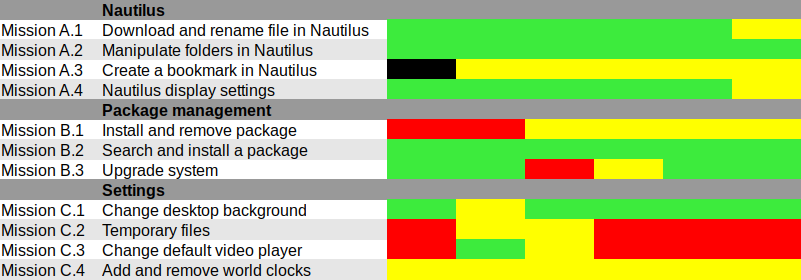
Results and analysis Heat map We used Jim Hall's heat map technique to summarize our usability test results. As Renata puts it, it is "a great way to see how the users performed on each task. The heat map clarifies how easy or difficult it was for the participant to accomplish a certain task.
  1. Scenario tasks (from the usability test) are arranged in rows.
  2. Test participants (for each tester) are arranged in columns.
  3. The colored blocks represent each tester s difficulty with each scenario task.
Green blocks represent the ability of the participant to accomplish the tasks with little or no difficulty. Yellow blocks indicate the tasks that the tester had significant difficulties accomplishing. Red blocks indicate that testers experienced extreme difficulty or where testers completed the tasks incorrectly. Black blocks indicate tasks the tester was unable to complete." Alternatively, here is the spreadsheet that was used to create this picture, with added text to avoid relying on colors only. Most tasks were accomplished with little or no difficulty so we will now focus on the problematic parts. What were the challenges? The heat map shows several "hot" rows, that we will now be looking at in more details. Mission A.3 Create a bookmark in Nautilus Most testers right-clicked the folder first, and eventually found they could simply drag'n'drop to the bookmarks location in the sidebar. One tester thought that he could select a folder, click the hamburger icon, and from there use the "Bookmark this folder" menu item. However, this menu action only works on the folder one has entered, not on the selected one. Mission B.1 Install and remove a package Here we faced a number of issues caused by the fact that Debian Live images don't include package indices (with good reason), so no package manager can list available software. Everyone managed to start a graphical package manager via the Overview (or via the CLI or Alt-F2 for a couple power users). Some testers tried to use GNOME Software, which listed only already installed packages (Debian bug #862560) and provided no way we could find to refresh the package indices. That's arguably a bug in Debian Live, but still: GNOME Software might display some useful information when it detects this unusual situation. We won't list here all the obstacles that were met in Synaptic: it's no news its usability is rather sub-optimal and better alternatives (such as GNOME Software) are in the works. Mission C.2 Tweak temporary files management The mission was poorly phrased: some observers had to clarify that it was specifically about GNOME, and not generic Linux system administration: some power-users were already searching the web for command-line tools to address the task at hand. Even with this clarification, no tester would have succeeded without being told they were allowed to use the web with a search query including the word "GNOME", or use the GNOME help or the Overview. Yet eventually all testers succeeded. It's interesting to note that regular GNOME users had the same problem as others: they did not try searching "temporary" in the Overview and did not look-up the GNOME Help until they were suggested to do so. Mission C.3 Change the default video player One tester configured one single video file format to be opened by default with VLC, via right-click in Nautilus Open with etc. He believed this would be enough to make VLC the default video player, missing the subtle difference between "default video player" and "default player for one single video format". One tester tried to complete this task inside VLC itself and then needed some help to succeed. It might be that the way web browsers ask "Do you want ThisBrowser to become the default web browser?" gave a hint an application GUI is the right place to do it. Two testers searched "default" in the Overview (perhaps the previous mission dealing with temporary files was enough to put them in this direction). At least one tester was confused since the only search result (Details View information about your system), which is the correct one to get there, includes the word View, which suggests that one cannot modify settings there, but only view them. One long-term GNOME user looked in Tweak Tool first, and then used the Overview. Here again, GNOME users experienced essentially the same issues as others. Mission C.4 Add and remove world clocks One tester tried to look for the clock on the top right corner of the screen, then realized it was in the middle. Other than this, all testers easily found a way to add world clocks. However, removing a world clock was rather difficult; although most testers managed to do it, it took them a number of attempts to succeed:
  1. Several testers left-clicked or right-clicked the clock they wanted to remove, expecting this would provide them with a way to remove it (which is not the case).
  2. After a while, all testers noticed the Select button (that has no text label nor tooltip info), which allowed them to select the clock they wanted to remove; then, most testers clicked the 1 selected button, hoping it would provide a contextual menu or some other way to act on the selected clocks (it doesn't).
  3. Eventually, everyone managed to locate the Delete button on the bottom right corner of the window; some testers mentioned that it is less visible and flashy than the blue bar that appears on the top of the screen once they had entered "Selection" mode.
General notes and observations
  • None of the participants sollicited the GNOME Help, which is unfortunate knowing its:
    • great quality;
    • translations in several languages;
    • availability and adaptability to regional specifications;
    • adequacy to the currently running version of GNOME.
    Some users found the relevant help page online via web searches; others initially ignored it among search results, then looked for it later after being told that the mission was more about GNOME.
  • Whether testers were already GNOME users or not seldom impacted their chances of success.
  • Unfortunately, we haven't compiled enough information about the testers to provide useful data about who they are and what their background is. Still, we had an interesting mix in terms of genders, age (between 17 and 52 years old), skin color and computer experience.

12 May 2017

Mart n Ferrari: 6 days to SunCamp

Only six more days to go before SunCamp! If you are still considering it, hurry up, you might still find cheap tickets for the low season. It will be a small event (about 20-25 people), with a more intimate atmosphere than DebConf. There will be people fixing RC bugs, preparing stuff for after the release, or just discussing with other Debian folks. There will be at least one presentation from a local project, and surely some members of nearby communities will join us for the day like they did last year. See you all in Lloret! Comment

8 May 2017

Bits from Debian: Bursary applications for DebConf17 are closing in 48 hours!

This is a final reminder: if you intend to apply for a DebConf17 bursary and have not yet done so, please proceed as soon as possible. Bursary applications for DebConf17 will be accepted until May 10th at 23:59 UTC. Applications submitted after this deadline will not be considered. You can apply for a bursary when you register for the conference. Remember that giving a talk is considered towards your bursary; if you have a submission to make, submit it even if it is only sketched-out. You will be able to detail it later. Please make sure to double-check your accommodation choices (dates and venue). Details about accommodation arrangements can be found on the wiki. Note: For DebCamp we only have on-site accommodation available. The option chosen in the registration system will only be for the DebConf period (August 5 to 12). See you in Montr al! DebConf17 logo

5 May 2017

Arturo Borrero Gonz lez: New in Debian stable Stretch: nftables

Debian Openvpn Debian Stretch stable includes the nftables framework, ready to use. Created by the Netfilter project itself, nftables is the firewalling tool that replaces the old iptables, giving the users a powerful tool. Back in October 2016, I wrote a small post about the status of ntables in Debian Stretch. Since then, several things have improved even further, so this clearly deserves a new small post :-) Yes, nftables replaces iptables. You are highly encouraged to migrate from iptables to nftables. The version of nftables in Debian stable Stretch is v0.7, and the kernel couterpart is v4.9. This is clearly a very recent release of both components. In the case of nftables, is the last released version by the time of this writting. Also, after the Debian stable release, both kernel and nftables will likely get backports of future releases. Yes, you will be able to easily run a newer release of the framework after the stable release. In case you are migrating from iptables, you should know that there are some tools in place to help you in this task. Please read the official netfilter docs: Moving from iptables to nftables. By the way, the nftables docs are extensive, check the whole wiki. In case you don t know about nftables yet, here is a quick reference:
  • it s the tool/framework that replaces iptables (also ip6tables, arptables and ebtables)
  • it integrates advanced structures which allow to arrange your ruleset for optimal performance
  • all the system is more configurable than in iptables
  • the syntax is much better than in iptables
  • several actions in a single rule
  • simplified IPv4/IPv6 dual stack
  • less kernel updates required
  • great support for incremental, dynamic and atomic ruleset updates
To run nftables in Debian Stretch you need several components:
  1. nft: the command line interface
  2. libnftnl: the nftables-netlink library
  3. linux kernel: a least 4.9 is recommended
A simple aptitude run will put your system ready to go, out of the box, with nftables:
root@debian:~# aptitude install nftables
Once installed, you can start using the nft command:
root@debian:~# nft list ruleset
A good starting point is to copy a simple workstation firewall configuration:
root@debian:~# cp /usr/share/doc/nftables/examples/syntax/workstation /etc/nftables.conf
And load it:
root@debian:~# nft -f /etc/nftables.conf
Your nftables ruleset is now firewalling your network:
root@debian:~# nft list ruleset
table inet filter  
        chain input  
                type filter hook input priority 0;
                iif lo accept
                ct state established,related accept
                ip6 nexthdr icmpv6 icmpv6 type   nd-neighbor-solicit,  nd-router-advert, nd-neighbor-advert   accept
                counter drop
         
 
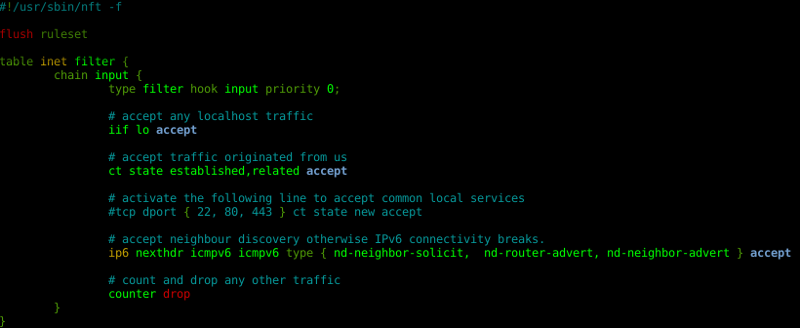
Several examples can be found at /usr/share/doc/nftables/examples/. A simple systemd service is included to load your ruleset at boot time, which is disabled by default. nft Did you know that the nano editor includes nft syntax highlighting? Starting with Debian stable Stretch and nftables, packet filtering and network policing will never be the same.

3 May 2017

Reproducible builds folks: Reproducing R packages

In the past couple of weeks, Ximin Luo worked on making R generate reproducible output. This is now mostly complete, and we're waiting on feedback from upstream about our patch. In the meantime, there are a few packages that remain unreproducible, but the issue probably lies in those specific packages rather than the R toolchain. Perhaps you can help out with them, after reading this!
R packages compile into a .rdb database format that contains the package's definitions, plus a .rdx index file for easy lookup in the .rdb file. Usually, there is a main rdb with the package contents, plus another rdb that stores the help data. There is also a paths.rds (same format as .rdx) that contains some more stuff. One can actually read these files by hand using Rscript, see the diffoscope code in rdata.py. If you run that, you can see that path.rds contains some obvious paths, but the other files contain less obvious stuff, and in fact these scripts give identical output for the .rdb files, even though they are bitwise different. To get to the bottom of this, we'll have to use the R debugger. Attached to this post is a script that smooths this process. I ran this against Debian's R packages, but it probably also works with other distros' R packages - try it and see. You run it like ./r-mini-repro-test.sh $pkgdir $builddir and it will output some hashes for you; make sure to install the build dependencies first. You should manually vary both $pkgdir and $builddir to introduce the build-path variations; $builddir can be an arbitrary string but $pkgdir should point to the actual R package's source directory, so I just copy that to two locations and point the script at each of them in turn. Now, we can begin debugging. Before I did this, we had 478 unreproducible R packages so the biggest problem was likely with R itself. I downloaded the source code of both R and a small example package (r-cran-tensor), then figured out how the R packages were actually being built. This resulted in me writing the script above, to speed up debugging. You can read about R's debugger here (no HTTPS), it's a bit primitive but it supports the basic stuff (step, continue, where, print/eval) and that was adequate for me. Debugging R core So let's take a small example with Debian R 3.4.0-1:
$ ../r-mini-repro-test.sh r-cran-tensor-1.5 123
[..]
* installing *source* package  tensor  ...
** package  tensor  successfully unpacked and MD5 sums checked
** R
** preparing package for lazy loading
** help
*** installing help indices
** building package indices
** testing if installed package can be loaded
* DONE (tensor)
[..]
c71a766429151a13e46039f3c37a14edc704004f410c34f8f37a2f098506421d  ./debian/123/usr/lib/R/site-library/tensor/R/tensor.rdx
736b5b4a885db71fb3fe2a538faeefe43c500c4080dbf2c75b97135b98401acd  ./debian/123/usr/lib/R/site-library/tensor/R/tensor.rdb
8a3f9616de7ee78a83b07395dd6ec43c5259d3f1b1b653d397808fc9fc5d96c2  ./debian/123/usr/lib/R/site-library/tensor/help/tensor.rdx
d1ac634987b24606a5da627ec073f45edce2bddf071391dd17c246a0a01eba63  ./debian/123/usr/lib/R/site-library/tensor/help/tensor.rdb
80796cc1a2cfcac40c394153f67617d575e103a405430b8483c2261a903db046  ./debian/123/usr/lib/R/site-library/tensor/help/paths.rds
$ ../r-mini-repro-test.sh r-cran-tensor-1.5 1234
[..]
5f081f4d6f9da1fbe06e374067e6636d926de4cdf09886058b15c5928c636c0d  ./debian/1234/usr/lib/R/site-library/tensor/R/tensor.rdx
7145669891e1b766ca0d8d89fa9c317af716e61a62650abe3a11a848240f1d57  ./debian/1234/usr/lib/R/site-library/tensor/R/tensor.rdb
8a3f9616de7ee78a83b07395dd6ec43c5259d3f1b1b653d397808fc9fc5d96c2  ./debian/1234/usr/lib/R/site-library/tensor/help/tensor.rdx
d1ac634987b24606a5da627ec073f45edce2bddf071391dd17c246a0a01eba63  ./debian/1234/usr/lib/R/site-library/tensor/help/tensor.rdb
80796cc1a2cfcac40c394153f67617d575e103a405430b8483c2261a903db046  ./debian/1234/usr/lib/R/site-library/tensor/help/paths.rds
The files are created by the ** preparing package for lazy loading and ** help steps. In retrospect this seems somewhat obvious from the output, but I had never done R before so I spent a while using strace to be sure; one can see that those files are indeed written to after those strings are printed. Then we can grep the R source code for these strings.
r-base-3.4.0$ grep -Ri "preparing package for lazy loading" src
src/library/tools/R/install.R:                starsmsg(stars, "preparing package for lazy loading")
Reading the file, we see that this happens in the tools:::.install_packages function, and reading it further we see that it calls makeLazyLoading then code2LazyLoadDB then makeLazyLoadDB. Seems promising, let's confirm it before chasing potential wild geese. Important: In the rest of these command-line outputs I'll prepend what I input with >>> but this doesn't actually get printed by Rscript. So don't be surprised that you don't see these, when you're trying to recreate my steps. Also I am a total R noob so possibly there are more elegant ways to do what I'm about to show you; this is what I came up with after 2-3 hours of research.
$ DEBUG=1 ../r-mini-repro-test.sh r-cran-tensor-1.5 123
enter (some or all of) the following into R:
[.. helpful commands ..]
+ R_DEFAULT_PACKAGES= LC_COLLATE=C /usr/lib/R/bin/R --no-restore --slave --args nextArg-lnextArgdebian/123/usr/lib/R/site-librarynextArg-dnextArg.nextArg--built-timestamp="Thu, 01 Jan 1970 00:00:00 +0000"
>>> debug(tools:::makeLazyLoadDB)
>>> tools:::.install_packages()
processing  . 
[..]
** preparing package for lazy loading
debugging in: makeLazyLoadDB(ns, dbbase, compress = compress)
debug:  
[.. source code of makeLazyLoadDB, not yet run ..]
 
OK so we just entered the function and it's paused, in a separate shell let's check what it's doing:
$ find r-cran-tensor-1.5 -name '*.rdb'
[ no output ]
So, no files have been written yet, which means none of the parent functions did anything, we are in the right function (or it's in a child). If we continue the function, we get:
>>> c
exiting from: makeLazyLoadDB(ns, dbbase, compress = compress)
** help
debugging in: makeLazyLoadDB(db, file.path(manOutDir, basename(outDir)))
debug:  
[.. source code of makeLazyLoadDB, not yet run ..]
 
$ find r-cran-tensor-1.5 -name '*.rdb'
r-cran-tensor-1.5/debian/123/usr/lib/R/site-library/tensor/R/tensor.rdb
Then continuing again:
>>> c
exiting from: makeLazyLoadDB(db, file.path(manOutDir, basename(outDir)))
*** installing help indices
** building package indices
** testing if installed package can be loaded
* DONE (tensor)
$ find r-cran-tensor-1.5 -name '*.rdb'
r-cran-tensor-1.5/debian/123/usr/lib/R/site-library/tensor/help/tensor.rdb
r-cran-tensor-1.5/debian/123/usr/lib/R/site-library/tensor/R/tensor.rdb
So it seems likely this function is the correct one. After reading the source code of makeLazyLoadDB, even though I don't understand the whole thing, it looks like possibly this part is the one that does the actual writing:
    for (i in seq_along(vars))  
        key <- if (is.null(from)   is.environment(from))
            lazyLoadDBinsertVariable(vars[i], from, datafile,
                                     ascii, compress,  envhook)
        else lazyLoadDBinsertListElement(from, i, datafile, ascii,
                                         compress, envhook)
        assign(vars[i], key, envir = varenv)
     
So let's step through it and see if the data contains any paths.
$ DEBUG=1 ../r-mini-repro-test.sh r-cran-tensor-1.5 123
[..]
>>> debug(tools:::makeLazyLoadDB)
>>> tools:::.install_packages()
processing  . 
[..]
** preparing package for lazy loading
debugging in: makeLazyLoadDB(ns, dbbase, compress = compress)
debug:  
[.. source code of makeLazyLoadDB, not yet run ..]
 
>>>                                                                             # pressing <Enter> just means "step"
debug: ascii <- as.logical(ascii)                                               # this is the first line of the function
>>>                                                                             # keep stepping
[..]
>>>
debug: for (i in seq_along(vars))  
[.. source code of the inside of the block, not yet run ..]
 
>>>
debug: key <- if (is.null(from)   is.environment(from)) lazyLoadDBinsertVariable(vars[i],
    from, datafile, ascii, compress, envhook) else lazyLoadDBinsertListElement(from,
    i, datafile, ascii, compress, envhook)
>>>
debug: lazyLoadDBinsertVariable(vars[i], from, datafile, ascii, compress,
    envhook)                                                                    # not yet run
If we look at the source code we see that it will try to insert the value of .Internal(getVarsFromFrame(vars[i], from, FALSE))[[1L]] into the file, so let's evaluate it:
>>> .Internal(getVarsFromFrame(vars[i], from, FALSE))[[1L]]
function (x, y)
tensor(x, y, 2, 2)
<environment: namespace:tensor>
>>> typeof(.Internal(getVarsFromFrame(vars[i], from, FALSE))[[1L]])
[1] "closure"
>>> environment(.Internal(getVarsFromFrame(vars[i], from, FALSE))[[1L]])        # get the environment of a closure
<environment: namespace:tensor>
>>> envlist(environment(.Internal(getVarsFromFrame(vars[i], from, FALSE))[[1L]])) # environment as an envlist, more detailed output
$ %*t% 
function (x, y)
tensor(x, y, 2, 2)
<environment: namespace:tensor>
$ %t*% 
function (x, y)
tensor(x, y, 1, 1)
<environment: namespace:tensor>
$ %t*t% 
function (x, y)
tensor(x, y, 1, 2)
<environment: namespace:tensor>
$.__NAMESPACE__.
<environment: 0x55eb55d00be0>
$.__S3MethodsTable__.
<environment: 0x55eb55d166e8>
$.packageName
[1] "tensor"
$tensor
function (A, B, alongA = integer(0), alongB = integer(0))
 
[.. function definition ..]
 
<environment: namespace:tensor>
Nothing obviously containing paths so far, let's keep stepping and dumping the objects
>>>
debug: assign(vars[i], key, envir = varenv)
>>>                                                                             # next iteration now
debug: key <- if (is.null(from)   is.environment(from)) lazyLoadDBinsertVariable(vars[i],
    from, datafile, ascii, compress, envhook) else lazyLoadDBinsertListElement(from,
    i, datafile, ascii, compress, envhook)
>>>
debug: lazyLoadDBinsertVariable(vars[i], from, datafile, ascii, compress,
    envhook)
>>> .Internal(getVarsFromFrame(vars[i], from, FALSE))[[1L]]
function (x, y)
tensor(x, y, 1, 1)
<environment: namespace:tensor>
>>>
[.. more stepping ..]
debug: lazyLoadDBinsertVariable(vars[i], from, datafile, ascii, compress,
    envhook)
>>> .Internal(getVarsFromFrame(vars[i], from, FALSE))[[1L]]
<environment: 0x55eb55d00be0>
>>> envlist(.Internal(getVarsFromFrame(vars[i], from, FALSE))[[1L]])
$S3methods
     [,1] [,2] [,3]
$dynlibs
NULL
$exports
<environment: 0x55eb55d0a4f8>
$imports
$imports$base
[1] TRUE
$lazydata
<environment: 0x55eb55d0a178>
attr(,"name")
[1] "lazydata:tensor"
$path
[1] "/mystupidbuildpath/r-tests/r-cran-tensor-1.5/debian/123/usr/lib/R/site-library/tensor"
$spec
    name  version
"tensor"    "1.5"
Oh, here we go. (In fact we could have got this earlier, it was part of the .__NAMESPACE__. key of the first environment that we examined.) Naturally, you'll sometimes miss stuff, and sometimes go down dead ends when doing something like this, perseverence is important. The names are also a hint, after grepping the R source code for names like "S3methods" and "lazydata" we see that src/library/base/R/namespace.R is the only one that contains all of them, then reading that code in more depth reveals this. After patching it, rebuilding r-base, installing this patched version, then running our tests again, we see that we've eliminated differences in the main rdb file but not the help rdb file. :( In fact, after some more time stepping through the loop repeatedly and printing out all the objects, nothing obvious shows up. Time to re-read the source code of makeLazyLoadDB. We notice that all the lazyLoadDBinsert* functions have a hook parameter that we haven't been stepping through because it's in a separate function. So let's do that. Since it's an inner function, one has to call debug() inside makeLazyLoadDB:
$ DEBUG=1 ../r-mini-repro-test.sh r-cran-tensor-1.5 123
[..]
>>> debug(tools:::makeLazyLoadDB)
>>> tools:::.install_packages()
processing  . 
[..]
** preparing package for lazy loading
debugging in: makeLazyLoadDB(ns, dbbase, compress = compress)
debug:  
[.. source code of makeLazyLoadDB, not yet run ..]
 
>>> c
exiting from: makeLazyLoadDB(ns, dbbase, compress = compress)
** help
debugging in: makeLazyLoadDB(db, file.path(manOutDir, basename(outDir)))
debug:  
[.. source code of makeLazyLoadDB, not yet run ..]
 
[.. stepping through the function ..]
debug: envhook <- function(e)  
[.. function definition ..]
 
>>>                                                                             # step next, to define that function
[.. next statement, we don't care about it ..]
>>> debug(envhook)
[.. then keep stepping through makeLazyLoadDB ..]
>>>
debug: lazyLoadDBinsertVariable(vars[i], from, datafile, ascii, compress,
    envhook)
[.. then keep stepping through makeLazyLoadDB ..]
debug: lazyLoadDBinsertVariable(vars[i], from, datafile, ascii, compress,
    envhook)
[.. hook wasn't run for these previous iterations for some reason, but keep stepping ..]
[.. eventually we get ..]
debugging in: (function (e)
 
[.. function definition ..]
 )(<environment>)                                                               # "(..)(<environment>)" is R's name for that function (actually a closure)
debug:  
[.. source code, not yet run ..]
 
>>> e
/mystupidbuildpath/r-tests/r-cran-tensor-1.5/man/tensor.Rd
>>> typeof(e)
[1] "environment"
>>> envlist(e)
$Enc
[1] "UTF-8"
$encoding
[1] ""
$filename
[1] "/mystupidbuildpath/r-tests/r-cran-tensor-1.5/man/tensor.Rd"
$timestamp
[1] "2002-01-16 11:51:14 CET"
$wd
[1] "/mystupidbuildpath/r-tests/r-cran-tensor-1.5"
After doing the same thing as before, i.e. grepping the R source code for "Enc" "timestamp" etc, we spot a few different places that are setting the wd field. Then after some experimenting, we find that overwriting this in a different file (src/library/tools/R/parseRd.R) seems to work to get rid of this irreproducibility. (This may not be the best; our exact strategy is still being discussed with upstream, but at least we know which areas of the code are responsible.) Exercise for the reader to figure out how to get rid of the paths.rds difference. After doing the previous two, this one is fairly easy. These three issues allowed us to write a preliminary patch that enabled us to reproduce r-cran-tensor.
$ ./r-mini-repro-test.sh r-cran-tensor-1.5 123
[..]
bca9de1351ab265475cf6f1af3f6aff49bde1d209e8fafb33954caa8d90f3462  ./debian/123/usr/lib/R/site-library/tensor/R/tensor.rdx
ac7fffeb751ffc2d13c5317704b19787a7078446d97d1c6f259c93f282e04cef  ./debian/123/usr/lib/R/site-library/tensor/R/tensor.rdb
d989603340d1e8f14c35551ef379956653bf3b6e7b1868b4bf9a66d85820998e  ./debian/123/usr/lib/R/site-library/tensor/help/tensor.rdx
30e543cda9f97c202dc9c0291933940dfe71b94d352f66d8ed6c035c1a722b41  ./debian/123/usr/lib/R/site-library/tensor/help/tensor.rdb
e9f78ba2cca39a6face1ed88fce4bb718d911d567d01db49bc00a3011720ac50  ./debian/123/usr/lib/R/site-library/tensor/help/paths.rds
$ ./r-mini-repro-test.sh r-cran-tensor-1.5 1234
[..]
bca9de1351ab265475cf6f1af3f6aff49bde1d209e8fafb33954caa8d90f3462  ./debian/1234/usr/lib/R/site-library/tensor/R/tensor.rdx
ac7fffeb751ffc2d13c5317704b19787a7078446d97d1c6f259c93f282e04cef  ./debian/1234/usr/lib/R/site-library/tensor/R/tensor.rdb
d989603340d1e8f14c35551ef379956653bf3b6e7b1868b4bf9a66d85820998e  ./debian/1234/usr/lib/R/site-library/tensor/help/tensor.rdx
30e543cda9f97c202dc9c0291933940dfe71b94d352f66d8ed6c035c1a722b41  ./debian/1234/usr/lib/R/site-library/tensor/help/tensor.rdb
e9f78ba2cca39a6face1ed88fce4bb718d911d567d01db49bc00a3011720ac50  ./debian/1234/usr/lib/R/site-library/tensor/help/paths.rds
$ ./r-mini-repro-test.sh r-cran-tensor 1234
[..]
bca9de1351ab265475cf6f1af3f6aff49bde1d209e8fafb33954caa8d90f3462  ./debian/1234/usr/lib/R/site-library/tensor/R/tensor.rdx
ac7fffeb751ffc2d13c5317704b19787a7078446d97d1c6f259c93f282e04cef  ./debian/1234/usr/lib/R/site-library/tensor/R/tensor.rdb
d989603340d1e8f14c35551ef379956653bf3b6e7b1868b4bf9a66d85820998e  ./debian/1234/usr/lib/R/site-library/tensor/help/tensor.rdx
30e543cda9f97c202dc9c0291933940dfe71b94d352f66d8ed6c035c1a722b41  ./debian/1234/usr/lib/R/site-library/tensor/help/tensor.rdb
e9f78ba2cca39a6face1ed88fce4bb718d911d567d01db49bc00a3011720ac50  ./debian/1234/usr/lib/R/site-library/tensor/help/paths.rds
Testing the patch Of course r-cran-tensor is just 1 package, so then we tested this patch on all 478 tagged R packages. Before the patch, all of these were unreproducible. Now 463/478 are reproducible, hurray! The first version of the patch made 2 packages FTBFS ("fail to build from source"), r-bioc-biobase and r-cran-shinybs; this was fixed in a subsequent version of the patch. (Some other packages, r-cran-randomfields r-cran-randomfieldsutils, FTBFS even with an unpatched r-base, due to differences between 3.3.3 and 3.4.0 (#861333), and not because of our patch.) Given the overwhelming proportion of packages that did reproduce, the other 14 packages that are still unreproducible, are quite probably due to issues in those specific packages. Only 2 of these are certainly due to build-path differences: r-cran-runit r-cran-rinside. This is because, we currently see they are reproducible in Debian testing but not Debian unstable. This is slightly misleading, the real reason is not testing vs unstable directly; rather the fact that we (at the time of writing) use the same build path when trying to reproduce Debian testing packages, and different paths for unstable. The other 12 are unreproducible in both testing and unstable, so it either suffers from a non-build-path issue as well as a build-path issue, or only a non-build-path issue. So, further investigation of each package is needed. This is where you can help. :) Debugging R packages To investigate why (for example) r-cran-runit doesn't reproduce despite our patches, we just do the above process again:
$ DEBUG=1 ../r-mini-repro-test.sh r-cran-runit
[..]
>>> debug(tools:::makeLazyLoadDB)
>>> tools:::.install_packages()
processing  . 
a directory
* build_help_types=
* DBG: 'R CMD INSTALL' now doing do_install()
* created lock directory  /mystupidbuildpath/r-tests/r-cran-runit/debian/r-cran-runit/usr/lib/R/site-library/00LOCK-r-cran-runit 
* installing *source* package  RUnit  ...
** package  RUnit  successfully unpacked and MD5 sums checked
** backing up earlier installation
** R
** inst
** preparing package for lazy loading
debugging in: makeLazyLoadDB(ns, dbbase, compress = compress)
debug:  
[.. source code of makeLazyLoadDB ..]
 
We know our irreproducibility is with the help files and not the main package, so c to skip this part:
>>> c
exiting from: makeLazyLoadDB(ns, dbbase, compress = compress)
** help
debugging in: makeLazyLoadDB(db, file.path(manOutDir, basename(outDir)))
debug:  
[.. source code of makeLazyLoadDB ..]
 
Examine the "from" object, grep the output for our builddir
>>> from
$ RUnit-internal 
[..]
$ RUnit-intro 
[..]
[.. etc ..]
[..]
$checkFuncs
\title RUnit check [..]
[..]
  For a simple example see the provided test cases in
  /mystupidbuildpath/r-tests/r-cran-runit/debian/r-cran-runit/usr/lib/R/site-library/RUnit/examples/runitVirtualClassTest.r.
[..]
Found it, now we quit, patch the source code, and try again.
>>> Q
[..]
exit code 1
[.. hack hack hack ..]
$ ../r-mini-repro-test.sh r-cran-runit-0.4.31/ 123
[..]
01347305351a45bb88dab909c56942498e97f5edbe583cf6ab1327138914e315  ./debian/123/usr/lib/R/site-library/RUnit/R/RUnit.rdx
ecde40bdfac5b070acc30a0d5889d9d7f65418844d14312aceff6af5b9d0bf7a  ./debian/123/usr/lib/R/site-library/RUnit/R/RUnit.rdb
182d38ac5adc160eb9edd40d5bd7e27b95b756b8f14cee7d912ba4745ae81bdc  ./debian/123/usr/lib/R/site-library/RUnit/help/RUnit.rdx
f8a9f22acc9f937cb47a92f3979d619e83a791ad734796c2fcd9d0a34e1f11ca  ./debian/123/usr/lib/R/site-library/RUnit/help/RUnit.rdb
5c37672fdc1f325b8a3846f4eafd2624b246ec70ce01d197134fa1b97a9ee849  ./debian/123/usr/lib/R/site-library/RUnit/help/paths.rds
$ ../r-mini-repro-test.sh r-cran-runit-0.4.31/ 1234
[..]
01347305351a45bb88dab909c56942498e97f5edbe583cf6ab1327138914e315  ./debian/1234/usr/lib/R/site-library/RUnit/R/RUnit.rdx
ecde40bdfac5b070acc30a0d5889d9d7f65418844d14312aceff6af5b9d0bf7a  ./debian/1234/usr/lib/R/site-library/RUnit/R/RUnit.rdb
182d38ac5adc160eb9edd40d5bd7e27b95b756b8f14cee7d912ba4745ae81bdc  ./debian/1234/usr/lib/R/site-library/RUnit/help/RUnit.rdx
f8a9f22acc9f937cb47a92f3979d619e83a791ad734796c2fcd9d0a34e1f11ca  ./debian/1234/usr/lib/R/site-library/RUnit/help/RUnit.rdb
5c37672fdc1f325b8a3846f4eafd2624b246ec70ce01d197134fa1b97a9ee849  ./debian/1234/usr/lib/R/site-library/RUnit/help/paths.rds
Works! All finished. :) If yours doesn't, just repeat the above loop; hopefully eventually you'll get there.

2 May 2017

Russ Allbery: Review: Ninefox Gambit

Review: Ninefox Gambit, by Yoon Ha Lee
Series: The Machineries of Empire #1
Publisher: Solaris
Copyright: 2016
ISBN: 1-84997-992-8
Format: Kindle
Pages: 384
Charis is a Kel, which means that she's a soldier of the Hexarchate. A captain, to be precise: Captain Kel Charis of Heron Company, commanding infantry forces to stamp out heresy. The heresy she's stamping out at the start of the book are the Eels, or the Society of the Flourish as they call themselves, and they're strong enough that they can also command heretical technology. Charis manages to win through, but only because she has enough flexibility and quick thinking to adjust to the presence of a heresy and reach beyond the Lexicon Primary, improvising formations on the spot to adjust for the affects of the rebel calendar. Military victory is prized among the Kel, but stepping outside the bounds of Doctrine to achieve it is not. Charis is not particularly surprised when her company is disbanded for re-education after the battle. She is very surprised when she personally is tapped to offer a solution to a far greater attack on the Hexarchate. I first encountered Yoon Ha Lee's fiction in the short story "The Unstrung Zither", was blown away by the creativity and delightfully weird twist on science fiction war, and have been following his writing ever since. Most of it is short fiction, though, and I'm not much of a short fiction reader, so there haven't been many reviews. Ninefox Gambit is his first, and much-anticipated, full-length novel. It's probably not too surprising for someone from the generation that grew up with Star Wars, but I have a soft spot in my heart for magitech. Hard science fiction has its merits, as does the softer sort that takes standard, if impossible, genre tropes for granted. But something about a far-future, space-faring society based on magic that straddles the rules of technology, physics, affinities, and beliefs calls to that part of me that spent hours thinking about the nature of the Force. It has to be good magitech, though: something odd and different but well-thought-out, full of implications and twisty consequences that reshape society and that inspire a whole new type of engineering and science. Magic that's not physics as we know it, but that's knowable, researchable, and something that a society can reshape itself around. This is the good magitech. In the world of the Hexarchate, calendrical systems are more than just a mutual agreement for conveying time. They order and structure the laws of the universe as much as they structure society. What technological devices, and what weapons, are possible is influenced by the calendar in observance, which in turn is based on what calendar people believe in and follow. Close adherence to a calendrical regime enables exotics: weapons with incredibly powerful and often horrific effects, such as the threshold winnower that plays a repeated, nightmarish role in this story. Invariant weapons, ones that will work in any calendar system, are much weaker. The Hexarchate is called that because it is a society formed by six factions, who divide the work of ruling its scattered planets according to the expertise and tendencies of each faction. Together, they impose the high calendar, and maintain it against heresies with an iron fist lest their power be undermined or transformed and their exotics fail to function. The Kel is their military faction, a key component of that fist, and their specialty is formations: specific arrangements of humans or ships that channel the power of the calendar to defend against or attack with exotics. Formations have to be held exactly to hold their power and yet have to be flexible enough to change based on fast-changing battlefield conditions. To assist in this, Kel are programmed with formation instinct: psychological conditioning that helps them obediently take and hold formations. And, not coincidentally, offer nearly absolute obedience to their chain of command. I just finished reading another book that attempted to use math as a key component of its world-building. I think Lee was far more successful. The math here is realistic for its purpose, obviously necessary given the formation structures built into the world's physics, and a lovely nod to the importance of calendars. A single calendar might involve only simple arithmetic, but the formation and technological implications of a calendar, let alone the fuzzy boundaries between two calendars each partially in force, would naturally require tricky advanced mathematics to work out. For someone in Charis's position, mathematical training is a rare but vitally important tactical advantage. As you might have guessed from the amount that I'm talking about combat, Ninefox Gambit is military SF. Charis is a military officer, and a comfortable majority of this book is combat of one kind or another. That's not normally my thing, and I did wish there was a bit more non-military social development. But my normal problem with military SF is that I lack the interest in battlefield tactics and strategy to stay fully engaged by description of battle after battle. Ninefox Gambit is the story of Charis attempting to retake a stronghold of the Hexarchate that's fallen to heretical forces, but Lee adds an important twist that does keep me engaged: Jedao. General Shuos Jedao was the greatest general the Hexarchate had ever seen. He never lost a battle. The only catch is that, in the middle of a highly successful campaign against heretics, he went mad, slaughtering both the heretics and his own troops with a horrific weapon while simultaneously murdering all of his command staff. He's much too dangerous and insane to leave alive, but he was also much too valuable and skillful to lose as a weapon, so for the subsequent centuries he's been kept in a threshold state, an undead ghost. A ghost that the Hexarchate can put into Charis's head, a constant advisor as she's placed in charge of the swarm sent to retake the Fortress of Scattered Needles. A brilliant tactician, sociopath, and mass murderer whose advice can never be trusted. The heart of Ninefox Gambit isn't the combat. It's the interplay of power, analysis, and guesswork under the combat, as Charis attempts to use Jedao's brilliance while not losing her own sense of identity or letting him mess too badly with her head. At the start, she's way out of her depth. But she's thoughtful, careful, has a strong internal sense of identity, and learns fast. And the story of Jedao's past is accurate, but incomplete. For those who are familiar with the often-ornate language and prose style of Yoon Ha Lee's short fiction and who are worried it wouldn't hold up at longer length, note that his style here is much different. There are a few touches of ornate description, but most of the book is written in a straightforward and easily-understandable narrative style. Thankfully, because the layers of tactical thrust and counter-thrust are complicated enough that I would have lost them entirely beneath too-complex prose. There's a lot of brutal death in this book. I got a bit tired of both that and the tactical maneuvering, although that's less the fault of the book and more my own mild antipathy towards military SF. But the unique universe background held my interest long enough to become intrigued by Charis's slow but determined probing at Jedao's secrets and the politics of the Hexarchate. I still would have preferred the story to have a somewhat lower body count, but as long as one can read past some gore, there's plenty here to appeal to someone who normally gives military SF a pass. I think its biggest drawback is that, although it has a narrative arc that comes to a clear conclusion, Ninefox Gambit raises a lot of important questions about its world and mostly doesn't answer them. There are more books coming, and I hope they contain more definitive answers. Followed by Raven Stratagem. Rating: 7 out of 10

1 May 2017

Russ Allbery: Review: Survival

Review: Survival, by Julie E. Czerneda
Series: Species Imperative #1
Publisher: DAW
Copyright: May 2004
ISBN: 0-7564-0180-1
Format: Hardcover
Pages: 401
Dr. Mackenzie Connor, Mac to everyone she works with, is a biodiversity researcher specializing in salmon. In her future United States, humanity seems to have caught on to the importance of preserving wild places and learning about them, and is willing to invest in good equipment and a semi-permanent research installation. This comes with some occasional drawbacks, since she has to fight to get access to the salmon runs inside a nature preserve, but she wouldn't have it any other way. She wins enough of those fights, won the latest, and is now in position to monitor a run in a way that she's never been able to before. She was not expecting an alien to go diving in the middle of her salmon run. She was certainly not expecting that alien to be accompanied by a bureaucrat insisting that this alien's curiosity is more important than her research (hah). But the accompanying letter she receives is scarily persuasive, if maddeningly unhelpful. Much like the apparently jovial, earnest, eager, and very odd alien. Mac's continued hopes that she can quickly put this bizarre intrusion to rest and go back to her salmon are dashed by an impossible power outage, an alien visitor, and a violent kidnapping. Now her best friend and colleague is missing, the bureaucrat is not who he appears to be, and Mac is getting caught up in something that feels way over her head. SF novels feature a lot of science, but not a lot of scientific research. The research that does appear is often impulsive, wildly compressed, or far too focused on the breakthroughs of single people. The SF novel that everyone points to for accurate portrayal of real scientific research is Benford's Timescape, which I found deeply unexciting. Now I have a new novel to point to for a better treatment, although (somewhat disappointingly) Mac's research gets sidelined relatively early in the story and left behind for the conclusion. Czerneda gives us not just a few scientists and an imaginary research project, but an entire operational field station with a history. The Norcoast Salmon Research Facility is located just off-shore in carefully-designed domes to provide easy access to the sea with minimal intrusion into the local ecology. It's a bustling mix of research scientists, engineers, and the ever-present seasonal grad students, who come and go in all their immature enthusiasm and are viewed with a motherly bemusement that I immediately recognized from years of working at a university. Mac splits administrative duties with another scientist in an arrangement that will be familiar to academics everywhere, and the book opens with a mutually suspicious but mostly scripted turf fight with the guardian of the neighboring wildlife trust, the same fight they've been having every six months for years. I know Czerneda is herself a biologist by training; I'm not sure what her other academic background is, but if she hasn't spent years around academics and field studies, she's at least done some excellent research. A lot of novels have a quotidian background that's interrupted by the arrival of the plot. At the start of the story, the characters often care more about their day-to-day lives than the plot, and are dragged into it reluctantly. But one sign of an excellent writer is their ability to get the reader to care about that quotidian background alongside the character, and to sympathize with the character's reluctance to get pulled into the promised (and generally more exciting) novel plot. Czerneda succeeds in this about as well as any writer I've read since Robin McKinley's Sunshine, and that's high praise. I cared about Mac's salmon, I was nearly as irritated as she was when her research was interrupted, and I still want to go back and see more of the experiments and studies she was hoping to run. Interstellar drama and threats to multiple species are all well and good, but the salmon are running! The actual plot is a mysterious threat that turns into a combination of a biological and cultural puzzle and a sort of first-contact story. Mac is not truly the first human to encounter the Dhryn, but she's certainly the first person they've explained anything to, and the first human to go where she goes. Sadly, it also shares some of the characteristics that sour me a bit on biological SF for personal reasons: a bit too much description of food, eating habits, squishy body parts, digestive processes, and biological discomfort. This is mostly a personal gripe, and won't bother other people as much as it does me, but I could have done without bits like the descriptions of Mac's attempts to figure out how to survive on alien cuisine. I'm also dubious of some of the biology of the Dhryn; given the startling bizarreness of Earth biology, maybe I shouldn't be, but I still think there are a few problems with the square-cube law here. But Mac's irrepressible grumpy curiosity makes this story, even in the bits that made me squeamish. I think I'd read any book in which she's the main character. I will warn that the ending is surprisingly dark and wasn't what I was expecting, and Survival doesn't resolve its central mysteries. This is clearly the first book of a trilogy and should be read with that expectation. But I thoroughly enjoyed it, and hopefully the next book will have more salmon. Followed by Migration. Rating: 8 out of 10

30 April 2017

Paul Wise: FLOSS Activities April 2017

Changes

Issues

Review

Administration
  • Debian systems: quiet a logrotate warning, investigate issue with DNSSEC and alioth, deploy fix on our first stretch buildd, restore alioth git repo after history rewrite, investigate iptables segfaults on buildd and investigate time issues on a NAS
  • Debian derivatives census: delete patches over 5 MiB, re-enable the service
  • Debian wiki: investigate some 403 errors, fix alioth KGB config, deploy theme changes, close a bogus bug report, ping 1 user with bouncing email, whitelist 9 email addresses and whitelist 2 domains
  • Debian QA: deploy my changes
  • Debian mentors: security upgrades and service restarts
  • Openmoko: debug mailing list issue, security upgrades and reboots

Communication
  • Invite Wazo to the Debian derivatives census
  • Welcome ubilinux, Wazo and Roopa Prabhu (of Cumulus Linux) to the Debian derivatives census
  • Discuss HP/ProLiant wiki page with HPE folks
  • Inform git history rewriter about the git mailmap feature

Sponsors The libconfig-crontab-perl backports and pyvmomi issue were sponsored by my employer. All other work was done on a volunteer basis.

Chris Lamb: Free software activities in April 2017

Here is my monthly update covering what I have been doing in the free software world (previous month):
  • I was elected Debian Project Leader for 2017. I'd like to sincerely thank everyone who voted for me as well as everyone who took part in the election in general especially Mehdi Dogguy for being a worthy opponent. The result was covered on LWN, Phoronix, DistroWatch, iTWire, etc.
  • Added support for the Monzo banking API in social-core, a Python library to allow web applications to authenticate using third-parties. (#68)
  • Fixed a HTML injection attack in a demo of Russell Keith-Magee's BeeWare presentation library. (#3)
  • Updated systemd's documentation to explain why we suggest explicitly calling make all despite the Makefile's "check" target calling it. (#5830)
  • Updated the documentation of a breadth-first version of find(1) called bfs to refer to the newly-uploaded Debian package. (#23)
  • Updated the configuration for the ticketbot IRC bot (zwiebelbot on OFTC) to identify #reproducible-builds as a Debian-related channel. This is so that bug Debian bug numbers are automatically expanded by the bot. (#7)

Reproducible builds

Whilst anyone can inspect the source code of free software for malicious flaws, most software is distributed pre-compiled to end users. The motivation behind the Reproducible Builds effort is to permit verification that no flaws have been introduced either maliciously or accidentally during this compilation process by promising identical results are always generated from a given source, thus allowing multiple third-parties to come to a consensus on whether a build was compromised. I have generously been awarded a grant from the Core Infrastructure Initiative to fund my work in this area. This month I:
I also made the following changes to diffoscope, our recursive and content-aware diff utility used to locate and diagnose reproducibility issues:
  • New features:
    • Add support for comparing Ogg Vorbis files. (0436f9b)
  • Bug fixes:
    • Prevent a traceback when using --new-file with containers. (#861286)
    • Don't crash on invalid archives; print a useful error instead. (#833697).
    • Don't print error output from bzip2 call. (21180c4)
  • Cleanups:
    • Prevent abstraction-level violations by defining visual diff support on Presenter classes. (7b68309)
    • Show Debian packages installed in test output. (c86a9e1)


Debian
Debian LTS

This month I have been paid to work 18 hours on Debian Long Term Support (LTS). In that time I did the following:
  • "Frontdesk" duties, triaging CVEs, etc.
  • Issued DLA 882-1 for the tryton-server general application platform to fix a path suffix injection attack.
  • Issued DLA 883-1 for curl preventing a buffer read overrun vulnerability.
  • Issued DLA 884-1 for collectd (a statistics collection daemon) to close a potential infinite loop vulnerability.
  • Issued DLA 885-1 for the python-django web development framework patching two open redirect & XSS attack issues.
  • Issued DLA 890-1 for ming, a library to create Flash files, closing multiple heap-based buffer overflows.
  • Issued DLA 892-1 and DLA 891-1 for the libnl3/libnl Netlink protocol libraries, fixing integer overflow issues which could have allowed arbitrary code execution.

Uploads
  • redis (4:4.0-rc3-1) New upstream RC release.
  • adminer:
    • 4.3.0-2 Fix debian/watch file.
    • 4.3.1-1 New upstream release.
  • bfs:
    • 1.0-1 Initial release.
    • 1.0-2 Drop fstype tests as they rely on /etc/mtab being available. (#861471)
  • python-django:
    • 1:1.10.7-1 New upstream security release.
    • 1:1.11-1 New upstream stable release to experimental.

I sponsored the following uploads: I also performed the following QA uploads:
  • gtkglext (1.2.0-7) Correct installation location of gdkglext-config.h after "Multi-Archification" in 1.2.0-5. (#860007)
Finally, I made the following non-maintainer uploads (NMUs):
  • python-formencode (1.3.0-2) Don't ship files in /usr/lib/python 2.7,3 /dist-packages/docs. (#860146)
  • django-assets (0.12-2) Patch pytest plugin to check whether we are running in a Django context, otherwise we can break unrelated testsuites. (#859916)


FTP Team

As a Debian FTP assistant I ACCEPTed 155 packages: aiohttp-cors, bear, colorize, erlang-p1-xmpp, fenrir, firejail, fizmo-console, flask-ldapconn, flask-socketio, fontmanager.app, fonts-blankenburg, fortune-zh, fw4spl, fzy, gajim-antispam, gdal, getdns, gfal2, gmime, golang-github-go-macaron-captcha, golang-github-go-macaron-i18n, golang-github-gogits-chardet, golang-github-gopherjs-gopherjs, golang-github-jroimartin-gocui, golang-github-lunny-nodb, golang-github-markbates-goth, golang-github-neowaylabs-wabbit, golang-github-pkg-xattr, golang-github-siddontang-goredis, golang-github-unknwon-cae, golang-github-unknwon-i18n, golang-github-unknwon-paginater, grpc, grr-client-templates, gst-omx, hddemux, highwayhash, icedove, indexed-gzip, jawn, khal, kytos-utils, libbloom, libdrilbo, libhtml-gumbo-perl, libmonospaceif, libpsortb, libundead, llvm-toolchain-4.0, minetest-mod-homedecor, mini-buildd, mrboom, mumps, nnn, node-anymatch, node-asn1.js, node-assert-plus, node-binary-extensions, node-bn.js, node-boom, node-brfs, node-browser-resolve, node-browserify-des, node-browserify-zlib, node-cipher-base, node-console-browserify, node-constants-browserify, node-delegates, node-diffie-hellman, node-errno, node-falafel, node-hash-base, node-hash-test-vectors, node-hash.js, node-hmac-drbg, node-https-browserify, node-jsbn, node-json-loader, node-json-schema, node-loader-runner, node-miller-rabin, node-minimalistic-crypto-utils, node-p-limit, node-prr, node-sha.js, node-sntp, node-static-module, node-tapable, node-tough-cookie, node-tunein, node-umd, open-infrastructure-storage-tools, opensvc, openvas, pgaudit, php-cassandra, protracker, pygame, pypng, python-ase, python-bip32utils, python-ltfatpy, python-pyqrcode, python-rpaths, python-statistics, python-xarray, qtcharts-opensource-src, r-cran-cellranger, r-cran-lexrankr, r-cran-pwt9, r-cran-rematch, r-cran-shinyjs, r-cran-snowballc, ruby-ddplugin, ruby-google-protobuf, ruby-rack-proxy, ruby-rails-assets-underscore, rustc, sbt, sbt-launcher-interface, sbt-serialization, sbt-template-resolver, scopt, seqsero, shim-signed, sniproxy, sortedcollections, starjava-array, starjava-connect, starjava-datanode, starjava-fits, starjava-registry, starjava-table, starjava-task, starjava-topcat, starjava-ttools, starjava-util, starjava-vo, starjava-votable, switcheroo-control, systemd, tilix, tslib, tt-rss-notifier-chrome, u-boot, unittest++, vc, vim-ledger, vis, wesnoth-1.13, wolfssl, wuzz, xandikos, xtensor-python & xwallpaper. I additionally filed 14 RC bugs against packages that had incomplete debian/copyright files against getdns, gfal2, grpc, mrboom, mumps, opensvc, python-ase, sniproxy, starjava-topcat, starjava-ttools, unittest++, wolfssl, xandikos & xtensor-python.

28 April 2017

Joachim Breitner: ghc-proofs rules more now

A few weeks ago I blogged about an experiment of mine, where I proved equalities of Haskell programs by (ab)using the GHC simplifier. For more details, please see that post, or the video of my talk at the Z rich Haskell User Group, but one reason why this approach has any chance of being useful is the compiler s support for rewrite rules. Rewrite rules are program equations that the programmer specifies in the source file, and which the compiler then applies, from left to right, whenever some intermediate code matches the left-hand side of the equation. One such rule, for example, is
 -# RULES "foldr/nil" forall k z. foldr k z [] = z #- 
taken right out of the standard library. In my blog post I went through the algebraic laws that a small library of mine, successors, should fulfill, and sure enough, once I got to more interesting proofs, they would not go through just like that. At that point I had to add additional rules to the file I was editing, which helped the compiler to finish the proofs. Some of these rules were simple like
 -# RULES "mapFB/id" forall c. mapFB c (\x -> x) = c #- 
 -# RULES "foldr/nil" forall k n. GHC.Base.foldr k n [] = n #- 
 -# RULES "foldr/undo" forall xs. GHC.Base.foldr (:) [] xs = xs #- 
and some are more intricate like
 -# RULES "foldr/mapFB" forall c f g n1 n2 xs.
    GHC.Base.foldr (mapFB c f) n1 (GHC.Base.foldr (mapFB (:) g) n2 xs)
    = GHC.Base.foldr (mapFB c (f.g)) (GHC.Base.foldr (mapFB c f) n1 n2) xs
    #- 
But there is something fishy going on here: The foldr/nil rule is identical to a rule in the standard library! I should not have to add to my file that as I am proving things. So I knew that the GHC plugin, which I wrote to do these proofs, was doing something wrong, but I did not investigate for a while. I returned to this problem recetly, and with the efficient and quick help of Simon Peyton Jones, I learned what I was doing wrong.1 After fixing it, I could remove all the simple rules from the files with my proofs. And to my surprise, I could remove the intricate rule as well! So with this bug fixed, ghc-proofs is able to prove all the Functor, Applicative and Monad rules of the Succs functor without any additional rewrite rules, as you can see in the example file! (I still have to strategically place seqs in a few places.) That s great, isn t it! Yeah, sure. But having to introduce the rules at that point provided a very good narrative in my talk, so when I will give a similar talk next week in Pairs (actually, twice, first at the university and then at the Paris Haskell meetup, I will have to come up with a different example that calls for additional rewrite rules. In related news: Since the last blog post, ghc-proofs learned to interpret proof specifications like
applicative_law4 :: Succs (a -> b) -> a -> Proof
applicative_law4 u y = u <*> pure y
                   === pure ($ y) <*> u
where it previously only understood
applicative_law4 = (\ u (y::a) -> u <*> (pure y :: Succs a))
               === (\ u (y::a) -> pure ($ y) <*> u)
I am not sur if this should be uploaded to Hackage, but I invite you to play around with the GitHub version of ghc-proofs.

  1. In short: I did not initialize the simplifier with the right InScopeSet, so RULES about functions defined in the current module were not always applied, and I did not feed the eps_rules to the simplifier, which contains all the rules found in imported packages, such as base.

26 April 2017

Russ Allbery: Review: Zero Bugs and Program Faster

Review: Zero Bugs and Program Faster, by Kate Thompson
Publisher: Kate Thompson
Copyright: 2015
Printing: December 2016
ISBN: 0-9961933-0-8
Format: Trade paperback
Pages: 169
Zero Bugs and Program Faster is another book I read for the engineering book club at work. Unlike a lot of the previous entries, I'd never heard about it before getting it for the book club and had no idea what to expect. What I got was a lavishly-illustrated book full of quirky stories and unusual turns of presentation on the general subject of avoiding bugs in code. Unfortunately, it's not a very deep examination of the topic. All that an experienced programmer is likely to get out of this book is the creative storytelling and the occasionally memorable illustration. I knew that this may not be a book aimed at me when I read the first paragraph:
If two books in a bookstore teach the same thing, I take the shorter one. Why waste time reading a 500-page book if I can learn the same in 100 pages? In this book, I kept things clear and brief, so you can ingest the information quickly.
It's a nice thought, but there are usually reasons why the 500-page book has 400 more pages, and those are the things I was missing here. Thompson skims over the top of every topic. There's a bit here on compiler warnings, a bit on testing, a bit on pair programming, and a bit on code review, but they're all in extremely short chapters, usually with some space taken up with an unusual twist of framing. This doesn't leave time to dive deep into any topic. You won't be bored by this book, but most of what you'll earn is "this concept exists." And if you've been programming for a while, you probably know that already. I learned during the work discussion that this was originally a blog and the chapters are repurposed from blog posts. I probably should have guessed at that, since that's exactly what the book feels like. It's a rare chapter that's longer than a couple of pages, including the room for the illustrations. The illustrations, I must say, are the best part of the book. There are a ton of them, sometimes just serving the purpose of stock photography to illustrate a point (usually with a slightly witty caption), sometimes a line drawing to illustrate some point about code, sometimes an illustrated mnemonic for the point of that chapter. The book isn't available in a Kindle edition precisely because including the illustrations properly is difficult to do (per its Amazon page). As short as this book is, only about two-thirds of it is chapters about programming. The rest is code examples (not that the chapters themselves were light on code examples). Thompson introduces these with:
One of the best ways to improve your programming is to look at examples of code written by others. On the next pages you will find some code I like. You don't need to read all of it: take the parts you like, and skip the parts you don't. I like it all.
I agree with this sentiment: reading other people's code is quite valuable. But it's also very easy to do, given a world full of free software and GitHub repositories. When reading a book, I'm looking for additional insight from the author. If the code examples are beautiful enough to warrant printing here, there presumably is some reason why. But Thompson rarely does more than hint at the reason for inclusion. There is some commentary on the code examples, but it's mostly just a discussion of their origin. I wanted to know why Thompson found each piece of code beautiful, as difficult as that may be to describe. Without that commentary, it's just an eclectic collection of code fragments, some from real systems and some from various bits of stunt programming (obfuscation contests, joke languages, and the like). The work book club discussion showed that I wasn't the only person disappointed by this book, but some people did like it for its unique voice. I don't recommend it, but if it sounds at all interesting, you may want to look over the corresponding web site to get a feel for the style and see if this is something you might enjoy more than I did. Rating: 5 out of 10

Dirk Eddelbuettel: RcppTOML 0.1.3

A bug fix release of RcppTOML arrived on CRAN today. Table arrays were (wrongly) not allowing for nesting; a simply recursion fix addresses this. RcppTOML brings TOML to R. TOML is a file format that is most suitable for configurations, as it is meant to be edited by humans but read by computers. It emphasizes strong readability for humans while at the same time supporting strong typing as well as immediate and clear error reports. On small typos you get parse errors, rather than silently corrupted garbage. Much preferable to any and all of XML, JSON or YAML -- though sadly these may be too ubiquitous now. TOML is making good inroads with newer and more flexible projects such as the Hugo static blog compiler, or the Cargo system of Crates (aka "packages") for the Rust language.

Changes in version 0.1.3 (2017-04-25)
  • Nested TableArray types are now correctly handled (#16)

Courtesy of CRANberries, there is a diffstat report for this release. More information is on the RcppTOML page page. Issues and bugreports should go to the GitHub issue tracker.

This post by Dirk Eddelbuettel originated on his Thinking inside the box blog. Please report excessive re-aggregation in third-party for-profit settings.

Next.

Previous.