Search Results: "mt"

17 May 2017

Jamie McClelland: Late to the Raspberry Pi party

I finally bought my first raspberry pi to setup as a router and wifi access point. It wasn't easy. I first had to figure out what to buy. I think that was the hardest part. I ended up with: I already have a cable matters USB to ethernet device, which will provide the second ethernet connection so this device can actually work as a router. I studiously followed the directions to download the raspbian image and copy it to my micro sd card. I also touched a file on the boot partition called ssh so ssh would start automatically. Note: I first touched the ssh file on the root partition (sdb2) before realizing it belonged on the boot partition (sdb1). And, despite ambiguous directions found on the Internet, lowercase 'ssh' for the filename seems to do the trick. Then, I found the IP address with the help of NMAP (sudo nmap -sn 192.168.69.*) and tried to ssh in but alas...
Connection reset by 192.168.69.116 port 22
No dice. So, I re-mounted the sdb2 partition of the micro sd card and looked in var/log/auth.log and found:
May  5 19:23:00 raspberrypi sshd[760]: error: Could not load host key: /etc/ssh/ssh_host_ed25519_key
May  5 19:23:00 raspberrypi sshd[760]: fatal: No supported key exchange algorithms [preauth]
May  5 19:23:07 raspberrypi sshd[762]: error: key_load_public: invalid format
May  5 19:23:07 raspberrypi sshd[762]: error: Could not load host key: /etc/ssh/ssh_host_rsa_key
May  5 19:23:07 raspberrypi sshd[762]: error: key_load_public: invalid format
May  5 19:23:07 raspberrypi sshd[762]: error: Could not load host key: /etc/ssh/ssh_host_dsa_key
May  5 19:23:07 raspberrypi sshd[762]: error: key_load_public: invalid format
May  5 19:23:07 raspberrypi sshd[762]: error: Could not load host key: /etc/ssh/ssh_host_ecdsa_key
May  5 19:23:07 raspberrypi sshd[762]: error: key_load_public: invalid format
How did that happen? And wait a minute...
0 jamie@turkey:~$ ls -l /mnt/etc/ssh/ssh_host_ecdsa_key
-rw------- 1 root root 0 Apr 10 05:58 /mnt/etc/ssh/ssh_host_ecdsa_key
0 jamie@turkey:~$ date
Fri May  5 15:44:15 EDT 2017
0 jamie@turkey:~$
Are the keys embedded in the image? Isn't that wrong? I fixed with:
0 jamie@turkey:mnt$ sudo rm /mnt/etc/ssh/ssh_host_*
0 jamie@turkey:mnt$ sudo ssh-keygen -q -f /mnt/etc/ssh/ssh_host_rsa_key -N '' -t rsa
0 jamie@turkey:mnt$ sudo ssh-keygen -q -f /mnt/etc/ssh/ssh_host_dsa_key -N '' -t dsa
0 jamie@turkey:mnt$ sudo ssh-keygen -q -f /mnt/etc/ssh/ssh_host_ecdsa_key -N '' -t ecdsa
0 jamie@turkey:mnt$ sudo ssh-keygen -q -f /mnt/etc/ssh/ssh_host_ed25519_key -N '' -t ed25519
0 jamie@turkey:mnt$
NOTE: I just did a second installation and this didn't happen. Maybe something went wrong as I experiment with SSH vs ssh on the boot partition? Then I could ssh in. I removed the pi user account and added my ssh key to /root/.ssh/authorized_keys and put a new name "mondragon" in the /etc/hostname file. And... I upgraded to Debian stretch and rebooted. Then, I followed these instructions for fixing the wifi (replacing the firmware does still work for me). I plugged my cable matters USB/Ethernet adapter into the device so it would be recognized, but left it dis-connected. Next I started to configure the device to be a wifi access point using this excellend tutorial, but decided I wanted to setup my networks using systemd-networkd instead. Since /etc/network/interaces already had eth0 set to manual (because apparently it is controlled by dhcpcd instead), I didn't need any modifications there. However, I wanted to use the dhcp client built-in to systemd-networkd, so to prevent dhcpcd from obtaining an IP address, I purged dhcpcd:
apt-get purge dhcpcd5
I was planning to also use systemd-networkd to name the devices (using *.link files) but nothing I could do could convince systemd to rename them, so I gave up and added /etc/udev/rules.d/70-persistent-net.rules:
    SUBSYSTEM=="net", ACTION=="add", DRIVERS=="?*", ATTR address =="b8:27:eb:ce:b5:c3", ATTR dev_id =="0x0", ATTR type =="1", NAME:="wan"
    SUBSYSTEM=="net", ACTION=="add", DRIVERS=="?*", ATTR address =="a0:ce:c8:01:20:7d", ATTR dev_id =="0x0", ATTR type =="1", NAME:="lan"
    SUBSYSTEM=="net", ACTION=="add", DRIVERS=="?*", ATTR address =="b8:27:eb:9b:e0:96", ATTR dev_id =="0x0", ATTR type =="1", NAME:="wlan"
(If you are copying and pasting the mac addresses will have to change.) Then I added the following files:
root@mondragon:~# head /etc/systemd/network/*
==> /etc/systemd/network/50-lan.network <==
[Match]
Name=lan
[Network]
Address=192.168.69.1/24
==> /etc/systemd/network/55-wlan.network <==
[Match]
Name=wlan
[Network]
Address=10.0.69.1/24
==> /etc/systemd/network/60-wan.network <==
[Match]
Name=wan
[Network]
DHCP=v4
IPForward=yes
IPMasquerade=yes
root@mondragon:~#
Sadly, IPMasquerade doesn't seem to work either for some reason, so...
root@mondragon:~# cat /etc/systemd/system/masquerade.service 
[Unit]
Description=Start masquerading because Masquerade=yes not working in wan.network.
[Service]
Type=oneshot
ExecStart=/sbin/iptables -t nat -A POSTROUTING -o wan -j MASQUERADE
[Install]
WantedBy=network.target
root@mondragon:~#
And, systemd DHCPServer worked, but then it didn't and I couldn't figure out how to debug, so...
apt-get install dnsmasq
Followed by:
root@mondragon:~# cat /etc/dnsmasq.d/mondragon.conf 
# Don't provide DNS services (unbound does that).
port=0
interface=lan
interface=wlan
# Only provide dhcp services since systemd-networkd dhcpserver seems
# flakey.
dhcp-range=set:cable,192.168.69.100,192.168.69.150,255.255.255.0,4h
dhcp-option=tag:cable,option:dns-server,192.168.69.1
dhcp-option=tag:cable,option:router,192.168.69.1
dhcp-range=set:wifi,10.0.69.100,10.0.69.150,255.255.255.0,4h
dhcp-option=tag:wifi,option:dns-server,10.0.69.1
dhcp-option=tag:wifi,option:router,10.0.69.1
root@mondragon:~#
It would probably be simpler to have dnsmasq provide DNS service also, but I happen to like unbound:
apt-get install unbound
And...
root@mondragon:~# cat /etc/unbound/unbound.conf.d/server.conf 
server:
    interface: 127.0.0.1
    interface: 192.168.69.1
    interface: 10.0.69.1
    access-control: 192.168.69.0/24 allow
    access-control: 10.0.69.0/24 allow
    # We do query localhost for our stub zone: loc.cx
    do-not-query-localhost: no
    # Up this level when debugging.
    log-queries: no
    logfile: ""
    #verbosity: 1
    # Settings to work better with systemcd
    do-daemonize: no
    pidfile: ""
root@mondragon:~# 
Now on to the wifi access point.
apt-get install hostapd
And the configuration file:
root@mondragon:~# cat /etc/hostapd/hostapd.conf
# This is the name of the WiFi interface we configured above
interface=wlan
# Use the nl80211 driver with the brcmfmac driver
driver=nl80211
# This is the name of the network
ssid=peacock
# Use the 2.4GHz band
hw_mode=g
# Use channel 6
channel=6
# Enable 802.11n
ieee80211n=1
# Enable WMM
wmm_enabled=1
# Enable 40MHz channels with 20ns guard interval
ht_capab=[HT40][SHORT-GI-20][DSSS_CCK-40]
# Accept all MAC addresses
macaddr_acl=0
# Use WPA authentication
auth_algs=1
# Require clients to know the network name
ignore_broadcast_ssid=0
# Use WPA2
wpa=2
# Use a pre-shared key
wpa_key_mgmt=WPA-PSK
# The network passphrase
wpa_passphrase=xxxxxxxxxxxx
# Use AES, instead of TKIP
rsn_pairwise=CCMP
root@mondragon:~#
The hostapd package doesn't have a systemd start up file so I added one:
root@mondragon:~# cat /etc/systemd/system/hostapd.service 
[Unit]
Description=Hostapd IEEE 802.11 AP, IEEE 802.1X/WPA/WPA2/EAP/RADIUS Authenticator
Wants=network.target
Before=network.target
Before=network.service
[Service]
ExecStart=/usr/sbin/hostapd /etc/hostapd/hostapd.conf
[Install]
WantedBy=multi-user.target
root@mondragon:~#
My last step was to modify /etc/ssh/sshd_config so it only listens on the lan and wlan interfaces (listening on wlan is a bit of a risk, but also useful when mucking with the lan network settings to ensure I don't get locked out).

15 May 2017

Michal &#268;iha&#345;: New projects on Hosted Weblate

Hosted Weblate provides also free hosting for free software projects. The hosting requests queue was over one month long, so it's time to process it and include new project. This time, the newly hosted projects include: We now also host few new Minetest mods: If you want to support this effort, please donate to Weblate, especially recurring donations are welcome to make this service alive. You can do them on Liberapay or Bountysource.

Filed under: Debian English SUSE Weblate

11 May 2017

Jonathan Dowland: Residential IPv6 stability

I run some Internet services on my home Internet connection, mostly for myself but also for friends and family. The IPv4 address assigned to my home by my ISP (currently: BT Internet) is dynamic and changes from time to time. To get around this, I make use of a "dynamic dns" service: essentially, a web service that updates a hostname whenever my IP changes. Since sometime last year I have also had an IPv6 address for my home connection: In fact, lots of them. There are more IPv6 addresses assigned to my home than there are IPv4 addresses on the entire Internet: 4,722,366,482,869,645,213,696 compared to 4,294,967,296 IPv4 addresses for the entire world (of which 3,706,452,992 are usable). I am relatively new to IPv6 (despite having played with it on and off since around the year 2000). I was curious to find out how stable the IPv6 addresses are, compared to the IPv4 one. It turns out that it's very stable: I've had four IPv4 addresses since February this year, but my IPv6 allocation has not changed.

Norbert Preining: BachoTeX 2017

A week of typesetting, typography, bookbinding, bibliophily, not to forget long chats with good friends and loads of beer. That is BachoTeX, the best series of conferences I have ever been. This year BachoTeX was held for the 25th time, and was merged with the TUG Meeting for a firework of excellent presentations and long hours of brain storming, hacking, music making, dancing, and simply enjoying life!

Symphony of Green
And while it was a bit less relaxing for me than in the last years, mostly due to the presence of my little daughter who requested presence quite often, it is still the place to be during the Golden Week! Of course I also gave a talk at BachoTeX about our latest changes in the upcoming TeX Live 2017 release: fmtutil and updmap past & future changes (or: cleaning up the mess). Big thanks to my company Accelia Inc. for allowing me to attend the conference. We arrived after a long trip, first via train and plane to Vienna, then two days break (including research with a colleague), followed by a night train ride to Warsaw and another train ride to Torun and a taxi ride to Bachotek. All in all far too long to be done with a 14 month old girl. Finally arrived we went directly to our hut and found it freezing. Fortunately we could organize a heater so that the rest of the week we didn t have to live in 5-10 degrees
Our log house in Bachotek
The second day brought already the traditional bonfire. After a small (for Polish standard) dinner we ignored the rain and met at the fireplace for BBQ, beer, and lots of live music.
Bonfire on the second evening
The rain stopped during the bonfire, probably due to my horrible singing, and the following days we were blessed with sunshine and warmer temperatures. The forest sparked in all kinds of greens.
Sunny days in Bachotek
For our daughter the trip was a great experience lots of wild play grounds, many other kids, and a lake she really wanted to go swimming in. Normally I go swimming there, but this year I had a bad cold so I refrained from it, and with me also our daughter, to her great disappointment.
Ready to go swimming
Another day has passed, and the sunset lights up the beautiful lake Bachotek. I cannot imagine a better place for concentrated work paired with great relaxation!
Sunset along the lake
During the days the temperatures were really nice, but the mornings were cold, and our morning walk to the breakfast place was quite chilly.
Enjoying a fresh morning on the lake
Ample coffee breaks and lunch breaks left us enough time to discuss new developments. But the single most important thing that brought people to talk a lot was the horrible internet connection, a big plus in BachoTeX (but as far as rumors go it might have been the last time with that advantage!).
Beautiful and peaceful lake Bachotek
The last evening we had a banquet honoring 25 years of BachoTeX, one of the oldest TeX conference. Live music and dancing, lots of good food and drinks, and outside the perfect evening atmosphere.
Sunset around the lake
Too fast the time has passed and we had to return to Vienna, retracing the long trip. How far it may be, taking the burden to come from Japan is worth every drop of sweat, the time at BachoTeX is probably one of the most productive, and at the same time most relaxing for me. Big thanks to all our Polish friends for organizing the event.
BachoTeX conference photo

(photo by Frans Goddijn)


Jonathan Dowland: Hof2.java

Jonathan Dowland: Hof.java

Jonathan Dowland: Hof3.java

10 May 2017

Jonathan Dowland: Three things I didn't know about Haskell

I've been trying to refresh my Haskell skills and Paul Callaghan recommended I read the paper "A History of Haskell: Being Lazy With Class", which I found (surprisingly?) fascinating. Three facts about Haskell that I didn't know jumped out at me:

9 May 2017

Matthew Garrett: Intel AMT on wireless networks

More details about Intel's AMT vulnerablity have been released - it's about the worst case scenario, in that it's a total authentication bypass that appears to exist independent of whether the AMT is being used in Small Business or Enterprise modes (more background in my previous post here). One thing I claimed was that even though this was pretty bad it probably wasn't super bad, since Shodan indicated that there were only a small number of thousand machines on the public internet and accessible via AMT. Most deployments were probably behind corporate firewalls, which meant that it was plausibly a vector for spreading within a company but probably wasn't a likely initial vector.

I've since done some more playing and come to the conclusion that it's rather worse than that. AMT actually supports being accessed over wireless networks. Enabling this is a separate option - if you simply provision AMT it won't be accessible over wireless by default, you need to perform additional configuration (although this is as simple as logging into the web UI and turning on the option). Once enabled, there are two cases:
  1. The system is not running an operating system, or the operating system has not taken control of the wireless hardware. In this case AMT will attempt to join any network that it's been explicitly told about. Note that in default configuration, joining a wireless network from the OS is not sufficient for AMT to know about it - there needs to be explicit synchronisation of the network credentials to AMT. Intel provide a wireless manager that does this, but the stock behaviour in Windows (even after you've installed the AMT support drivers) is not to do this.
  2. The system is running an operating system that has taken control of the wireless hardware. In this state, AMT is no longer able to drive the wireless hardware directly and counts on OS support to pass packets on. Under Linux, Intel's wireless drivers do not appear to implement this feature. Under Windows, they do. This does not require any application level support, and uninstalling LMS will not disable this functionality. This also appears to happen at the driver level, which means it bypasses the Windows firewall.
Case 2 is the scary one. If you have a laptop that supports AMT, and if AMT has been provisioned, and if AMT has had wireless support turned on, and if you're running Windows, then connecting your laptop to a public wireless network means that AMT is accessible to anyone else on that network[1]. If it hasn't received a firmware update, they'll be able to do so without needing any valid credentials.

If you're a corporate IT department, and if you have AMT enabled over wifi, turn it off. Now.

[1] Assuming that the network doesn't block client to client traffic, of course

comment count unavailable comments

Jonathan Dowland: The Cursed Hangar, a Doom map

I made a Doom map! Well, I actually made it over 10 years ago for Freedoom. A few months ago it was finally replaced, and so I thought I'd release it standalone. I took the opportunity to clean it up a little bit. You could consider it like a "director's cut". It's been a long time since I've done anything like this, and it was fun in some ways to revisit it, but it's not something I want to do again any time soon.
It requires a Boom-compatible Doom engine to play: Eternity, ZDoom, PrBoom+ are known to work.

5 May 2017

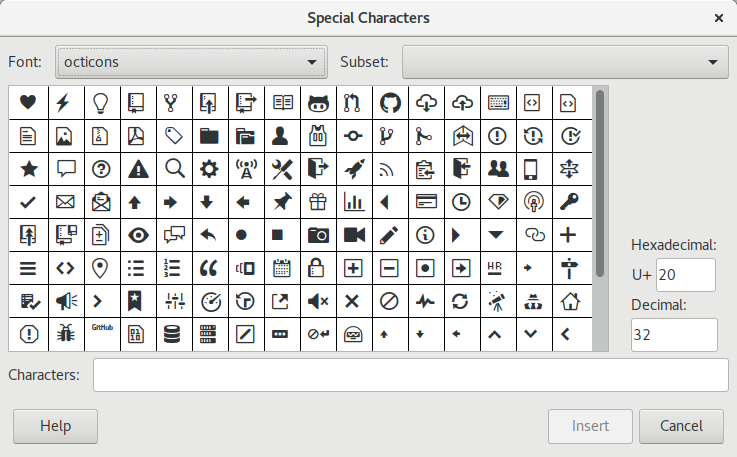
Hideki Yamane: New in Debian stable Stretch: GitHub's Icon font, fonts-octicons


As a member of Debian pkg-fonts-devel team, I added some new packages to Debian. Today I'll introduce "fonts-octicons" in Debian9 "Stretch".

Octicons is GitHub's Icon font. If you want to use it with LibreOffice Impress:
  1. Install fonts-octicons package
  2. Start LibreOffice Impress
  3. Select "Insert" from menu
  4. Select "Special Characters"
  5. Select "octicons" from Fonts
  6. Select and insert it


Enjoy!


3 May 2017

Vincent Bernat: VXLAN: BGP EVPN with Cumulus Quagga

VXLAN is an overlay network to encapsulate Ethernet traffic over an existing (highly available and scalable, possibly the Internet) IP network while accomodating a very large number of tenants. It is defined in RFC 7348. For an uncut introduction on its use with Linux, have a look at my VXLAN & Linux post. VXLAN deployment In the above example, we have hypervisors hosting a virtual machines from different tenants. Each virtual machine is given access to a tenant-specific virtual Ethernet segment. Users are expecting classic Ethernet segments: no MAC restrictions1, total control over the IP addressing scheme they use and availability of multicast. In a large VXLAN deployment, two aspects need attention:
  1. discovery of other endpoints (VTEPs) sharing the same VXLAN segments, and
  2. avoidance of BUM frames (broadcast, unknown unicast and multicast) as they have to be forwarded to all VTEPs.
A typical solution for the first point is using multicast. For the second point, this is source-address learning.

Introduction to BGP EVPN BGP EVPN (RFC 7432 and draft-ietf-bess-evpn-overlay for its application to VXLAN) is a standard control protocol to efficiently solves those two aspects without relying on multicast nor source-address learning. BGP EVPN relies on BGP (RFC 4271) and its MP-BGP extensions (RFC 4760). BGP is the routing protocol powering the Internet. It is highly scalable and interoperable. It is also extensible and one of its extension is MP-BGP. This extension can carry reachability information (NLRI) for multiple protocols (IPv4, IPv6, L3VPN and in our case EVPN). EVPN is a special family to advertise MAC addresses and the remote equipments they are attached to. There are basically two kinds of reachability information a VTEP sends through BGP EVPN:
  1. the VNIs they have interest in (type 3 routes), and
  2. for each VNI, the local MAC addresses (type 2 routes).
The protocol also covers other aspects of virtual Ethernet segments (L3 reachability information from ARP/ND caches, MAC mobility and multi-homing2) but we won t describe them here. To deploy BGP EVPN, a typical solution is to use several route reflectors (both for redundancy and scalability), like in the picture below. Each VTEP opens a BGP session to at least two route reflectors, sends its information (MACs and VNIs) and receives others . This reduces the number of BGP sessions to configure. VXLAN deployment with route reflectors Compared to other solutions to deploy VXLAN, BGP EVPN has three main advantages:
  • interoperability with other vendors (notably Juniper and Cisco),
  • proven scalability (a typical BGP routers handle several millions of routes), and
  • possibility to enforce fine-grained policies.
On Linux, Cumulus Quagga is a fairly complete implementation of BGP EVPN (type 3 routes for VTEP discovery, type 2 routes with MAC or IP addresses, MAC mobility when a host changes from one VTEP to another one) which requires very little configuration. This is a fork of Quagga and currently used in Cumulus Linux, a network operating system based on Debian powering switches from various brands. At some point, BGP EVPN support will be contributed back to FRR, a community-maintained fork of Quagga3. It should be noted the BGP EVPN implementation of Cumulus Quagga currently only supports IPv4.

Route reflector setup Before configuring each VTEP, we need to configure two or more route reflectors. There are many solutions. I will present three of them:
  • using Cumulus Quagga,
  • using GoBGP, an implementation of BGP in Go,
  • using Juniper JunOS.
For reliability purpose, it s possible (and easy) to use one implementation for some route reflectors and another implementation for the other ones. The proposed configurations are quite minimal. However, it is possible to centralize policies on the route reflectors (e.g. routes tagged with some community can only be readvertised to some group of VTEPs).

Using Quagga The configuration is pretty simple. We suppose the configured route reflector has 203.0.113.254 configured as a loopback IP.
router bgp 65000
  bgp router-id 203.0.113.254
  bgp cluster-id 203.0.113.254
  bgp log-neighbor-changes
  no bgp default ipv4-unicast
  neighbor fabric peer-group
  neighbor fabric remote-as 65000
  neighbor fabric capability extended-nexthop
  neighbor fabric update-source 203.0.113.254
  bgp listen range 203.0.113.0/24 peer-group fabric
  !
  address-family evpn
   neighbor fabric activate
   neighbor fabric route-reflector-client
  exit-address-family
  !
  exit
!
A peer group fabric is defined and we leverage the dynamic neighbor feature of Cumulus Quagga: we don t have to explicitely define each neighbor. Any client from 203.0.113.0/24 and presenting itself as part of AS 65000 can connect. All sent EVPN routes will be accepted and reflected to the other clients. You don t need to run Zebra, the route engine talking with the kernel. Instead, start bgpd with the --no_kernel flag.

Using GoBGP GoBGP is a clean implementation of BGP in Go4. It exposes an RPC API for configuration (but accepts a configuration file and comes with a command-line client). It doesn t support dynamic neighbors, so you ll have to use the API, the command-line client or some templating language to automate their declaration. A configuration with only one neighbor is like this:
global:
  config:
    as: 65000
    router-id: 203.0.113.254
    local-address-list:
      - 203.0.113.254
neighbors:
  - config:
      neighbor-address: 203.0.113.1
      peer-as: 65000
    afi-safis:
      - config:
          afi-safi-name: l2vpn-evpn
    route-reflector:
      config:
        route-reflector-client: true
        route-reflector-cluster-id: 203.0.113.254
More neighbors can be added from the command line:
$ gobgp neighbor add 203.0.113.2 as 65000 \
>         route-reflector-client 203.0.113.254 \
>         --address-family evpn
GoBGP won t try to interact with the kernel which is fine as a route reflector.

Using Juniper JunOS A variety of Juniper products can be a BGP route reflector, notably: The main factor is the CPU and the memory. The QFX5100 is low on memory and won t support large deployments without some additional policing. Here is a configuration similar to the Quagga one:
interfaces  
    lo0  
        unit 0  
            family inet  
                address 203.0.113.254/32;


protocols  
    bgp  
        group fabric  
            family evpn  
                signaling  
                    /* Do not try to install EVPN routes */
                    no-install;
                 
             
            type internal;
            cluster 203.0.113.254;
            local-address 203.0.113.254;
            allow 203.0.113.0/24;


routing-options  
    router-id 203.0.113.254;
    autonomous-system 65000;
 

VTEP setup The next step is to configure each VTEP/hypervisor. Each VXLAN is locally configured using a bridge for local virtual interfaces, like illustrated in the below schema. The bridge is taking care of the local MAC addresses (notably, using source-address learning) and the VXLAN interface takes care of the remote MAC addresses (received with BGP EVPN). Bridged VXLAN device VXLANs can be provisioned with the following script. Source-address learning is disabled as we will rely solely on BGP EVPN to synchronize FDBs between the hypervisors.
for vni in 100 200; do
    # Create VXLAN interface
    ip link add vxlan$ vni  type vxlan
        id $ vni  \
        dstport 4789 \
        local 203.0.113.2 \
        nolearning
    # Create companion bridge
    brctl addbr br$ vni 
    brctl addif br$ vni  vxlan$ vni 
    brctl stp br$ vni  off
    ip link set up dev br$ vni 
    ip link set up dev vxlan$ vni 
done
# Attach each VM to the appropriate segment
brctl addif br100 vnet10
brctl addif br100 vnet11
brctl addif br200 vnet12
The configuration of Cumulus Quagga is similar to the one used for a route reflector, except we use the advertise-all-vni directive to publish all local VNIs.
router bgp 65000
  bgp router-id 203.0.113.2
  no bgp default ipv4-unicast
  neighbor fabric peer-group
  neighbor fabric remote-as 65000
  neighbor fabric capability extended-nexthop
  neighbor fabric update-source dummy0
  ! BGP sessions with route reflectors
  neighbor 203.0.113.253 peer-group fabric
  neighbor 203.0.113.254 peer-group fabric
  !
  address-family evpn
   neighbor fabric activate
   advertise-all-vni
  exit-address-family
  !
  exit
!
If everything works as expected, the instances sharing the same VNI should be able to ping each other. If IPv6 is enabled on the VMs, the ping command shows if everything is in order:
$ ping -c10 -w1 -t1 ff02::1%eth0
PING ff02::1%eth0(ff02::1%eth0) 56 data bytes
64 bytes from fe80::5254:33ff:fe00:8%eth0: icmp_seq=1 ttl=64 time=0.016 ms
64 bytes from fe80::5254:33ff:fe00:b%eth0: icmp_seq=1 ttl=64 time=4.98 ms (DUP!)
64 bytes from fe80::5254:33ff:fe00:9%eth0: icmp_seq=1 ttl=64 time=4.99 ms (DUP!)
64 bytes from fe80::5254:33ff:fe00:a%eth0: icmp_seq=1 ttl=64 time=4.99 ms (DUP!)
--- ff02::1%eth0 ping statistics ---
1 packets transmitted, 1 received, +3 duplicates, 0% packet loss, time 0ms
rtt min/avg/max/mdev = 0.016/3.745/4.991/2.152 ms

Verification Step by step, let s check how everything comes together.

Getting VXLAN information from the kernel On each VTEP, Quagga should be able to retrieve the information about configured VXLANs. This can be checked with vtysh:
# show interface vxlan100
Interface vxlan100 is up, line protocol is up
  Link ups:       1    last: 2017/04/29 20:01:33.43
  Link downs:     0    last: (never)
  PTM status: disabled
  vrf: Default-IP-Routing-Table
  index 11 metric 0 mtu 1500
  flags: <UP,BROADCAST,RUNNING,MULTICAST>
  Type: Ethernet
  HWaddr: 62:42:7a:86:44:01
  inet6 fe80::6042:7aff:fe86:4401/64
  Interface Type Vxlan
  VxLAN Id 100
  Access VLAN Id 1
  Master (bridge) ifindex 9 ifp 0x56536e3f3470
The important points are:
  • the VNI is 100, and
  • the bridge device was correctly detected.
Quagga should also be able to retrieve information about the local MAC addresses :
# show evpn mac vni 100
Number of MACs (local and remote) known for this VNI: 2
MAC               Type   Intf/Remote VTEP      VLAN
50:54:33:00:00:0a local  eth1.100
50:54:33:00:00:0b local  eth2.100

BGP sessions Each VTEP has to establish a BGP session to the route reflectors. On the VTEP, this can be checked by running vtysh:
# show bgp neighbors 203.0.113.254
BGP neighbor is 203.0.113.254, remote AS 65000, local AS 65000, internal link
 Member of peer-group fabric for session parameters
  BGP version 4, remote router ID 203.0.113.254
  BGP state = Established, up for 00:00:45
  Neighbor capabilities:
    4 Byte AS: advertised and received
    AddPath:
      L2VPN EVPN: RX advertised L2VPN EVPN
    Route refresh: advertised and received(new)
    Address family L2VPN EVPN: advertised and received
    Hostname Capability: advertised
    Graceful Restart Capabilty: advertised
[...]
 For address family: L2VPN EVPN
  fabric peer-group member
  Update group 1, subgroup 1
  Packet Queue length 0
  Community attribute sent to this neighbor(both)
  8 accepted prefixes

  Connections established 1; dropped 0
  Last reset never
Local host: 203.0.113.2, Local port: 37603
Foreign host: 203.0.113.254, Foreign port: 179
The output includes the following information:
  • the BGP state is Established,
  • the address family L2VPN EVPN is correctly advertised, and
  • 8 routes are received from this route reflector.
The state of the BGP sessions can also be checked from the route reflectors. With GoBGP, use the following command:
# gobgp neighbor 203.0.113.2
BGP neighbor is 203.0.113.2, remote AS 65000, route-reflector-client
  BGP version 4, remote router ID 203.0.113.2
  BGP state = established, up for 00:04:30
  BGP OutQ = 0, Flops = 0
  Hold time is 9, keepalive interval is 3 seconds
  Configured hold time is 90, keepalive interval is 30 seconds
  Neighbor capabilities:
    multiprotocol:
        l2vpn-evpn:     advertised and received
    route-refresh:      advertised and received
    graceful-restart:   received
    4-octet-as: advertised and received
    add-path:   received
    UnknownCapability(73):      received
    cisco-route-refresh:        received
[...]
  Route statistics:
    Advertised:             8
    Received:               5
    Accepted:               5
With JunOS, use the below command:
> show bgp neighbor 203.0.113.2
Peer: 203.0.113.2+38089 AS 65000 Local: 203.0.113.254+179 AS 65000
  Group: fabric                Routing-Instance: master
  Forwarding routing-instance: master
  Type: Internal    State: Established
  Last State: OpenConfirm   Last Event: RecvKeepAlive
  Last Error: None
  Options: <Preference LocalAddress Cluster AddressFamily Rib-group Refresh>
  Address families configured: evpn
  Local Address: 203.0.113.254 Holdtime: 90 Preference: 170
  NLRI evpn: NoInstallForwarding
  Number of flaps: 0
  Peer ID: 203.0.113.2     Local ID: 203.0.113.254     Active Holdtime: 9
  Keepalive Interval: 3          Group index: 0    Peer index: 2
  I/O Session Thread: bgpio-0 State: Enabled
  BFD: disabled, down
  NLRI for restart configured on peer: evpn
  NLRI advertised by peer: evpn
  NLRI for this session: evpn
  Peer supports Refresh capability (2)
  Stale routes from peer are kept for: 300
  Peer does not support Restarter functionality
  NLRI that restart is negotiated for: evpn
  NLRI of received end-of-rib markers: evpn
  NLRI of all end-of-rib markers sent: evpn
  Peer does not support LLGR Restarter or Receiver functionality
  Peer supports 4 byte AS extension (peer-as 65000)
  NLRI's for which peer can receive multiple paths: evpn
  Table bgp.evpn.0 Bit: 20000
    RIB State: BGP restart is complete
    RIB State: VPN restart is complete
    Send state: in sync
    Active prefixes:              5
    Received prefixes:            5
    Accepted prefixes:            5
    Suppressed due to damping:    0
    Advertised prefixes:          8
  Last traffic (seconds): Received 276  Sent 170  Checked 276
  Input messages:  Total 61     Updates 3       Refreshes 0     Octets 1470
  Output messages: Total 62     Updates 4       Refreshes 0     Octets 1775
  Output Queue[1]: 0            (bgp.evpn.0, evpn)
If a BGP session cannot be established, the logs of each BGP daemon should mention the cause.

Sent routes From each VTEP, Quagga needs to send:
  • one type 3 route for each local VNI, and
  • one type 2 route for each local MAC address.
The best place to check the received routes is on one of the route reflectors. If you are using JunOS, the following command will display the received routes from the provided VTEP:
> show route table bgp.evpn.0 receive-protocol bgp 203.0.113.2
bgp.evpn.0: 10 destinations, 10 routes (10 active, 0 holddown, 0 hidden)
  Prefix                  Nexthop              MED     Lclpref    AS path
  2:203.0.113.2:100::0::50:54:33:00:00:0a/304 MAC/IP
*                         203.0.113.2                  100        I
  2:203.0.113.2:100::0::50:54:33:00:00:0b/304 MAC/IP
*                         203.0.113.2                  100        I
  3:203.0.113.2:100::0::203.0.113.2/304 IM
*                         203.0.113.2                  100        I
  3:203.0.113.2:200::0::203.0.113.2/304 IM
*                         203.0.113.2                  100        I
There is one type 3 route for VNI 100 and another one for VNI 200. There are also two type 2 routes for two MAC addresses on VNI 100. To get more information, you can add the keyword extensive. Here is a type 3 route advertising 203.0.113.2 as a VTEP for VNI 1008:
> show route table bgp.evpn.0 receive-protocol bgp 203.0.113.2 extensive
bgp.evpn.0: 11 destinations, 11 routes (11 active, 0 holddown, 0 hidden)
* 3:203.0.113.2:100::0::203.0.113.2/304 IM (1 entry, 1 announced)
     Accepted
     Route Distinguisher: 203.0.113.2:100
     Nexthop: 203.0.113.2
     Localpref: 100
     AS path: I
     Communities: target:65000:268435556 encapsulation:vxlan(0x8)
[...]
Here is a type 2 route announcing the location of the 50:54:33:00:00:0a MAC address for VNI 100:
> show route table bgp.evpn.0 receive-protocol bgp 203.0.113.2 extensive
bgp.evpn.0: 11 destinations, 11 routes (11 active, 0 holddown, 0 hidden)
* 2:203.0.113.2:100::0::50:54:33:00:00:0a/304 MAC/IP (1 entry, 1 announced)
     Accepted
     Route Distinguisher: 203.0.113.2:100
     Route Label: 100
     ESI: 00:00:00:00:00:00:00:00:00:00
     Nexthop: 203.0.113.2
     Localpref: 100
     AS path: I
     Communities: target:65000:268435556 encapsulation:vxlan(0x8)
[...]
With Quagga, you can get a similar output with vtysh:
# show bgp evpn route
BGP table version is 0, local router ID is 203.0.113.1
Status codes: s suppressed, d damped, h history, * valid, > best, i - internal
Origin codes: i - IGP, e - EGP, ? - incomplete
EVPN type-2 prefix: [2]:[ESI]:[EthTag]:[MAClen]:[MAC]
EVPN type-3 prefix: [3]:[EthTag]:[IPlen]:[OrigIP]
   Network          Next Hop            Metric LocPrf Weight Path
Route Distinguisher: 203.0.113.2:100
*>i[2]:[0]:[0]:[48]:[50:54:33:00:00:0a]
                    203.0.113.2                   100      0 i
*>i[2]:[0]:[0]:[48]:[50:54:33:00:00:0b]
                    203.0.113.2                   100      0 i
*>i[3]:[0]:[32]:[203.0.113.2]
                    203.0.113.2                   100      0 i
Route Distinguisher: 203.0.113.2:200
*>i[3]:[0]:[32]:[203.0.113.2]
                    203.0.113.2                   100      0 i
[...]
With GoBGP, use the following command:
# gobgp global rib -a evpn   grep rd:203.0.113.2:200
    Network  Next Hop             AS_PATH              Age        Attrs
*>  [type:macadv][rd:203.0.113.2:100][esi:single-homed][etag:0][mac:50:54:33:00:00:0a][ip:<nil>][labels:[100]]203.0.113.2                               00:00:17   [ Origin: i   LocalPref: 100   Extcomms: [VXLAN], [65000:268435556] ]
*>  [type:macadv][rd:203.0.113.2:100][esi:single-homed][etag:0][mac:50:54:33:00:00:0b][ip:<nil>][labels:[100]]203.0.113.2                               00:00:17   [ Origin: i   LocalPref: 100   Extcomms: [VXLAN], [65000:268435556] ]
*>  [type:macadv][rd:203.0.113.2:200][esi:single-homed][etag:0][mac:50:54:33:00:00:0a][ip:<nil>][labels:[200]]203.0.113.2                               00:00:17   [ Origin: i   LocalPref: 100   Extcomms: [VXLAN], [65000:268435656] ]
*>  [type:multicast][rd:203.0.113.2:100][etag:0][ip:203.0.113.2]203.0.113.2                               00:00:17   [ Origin: i   LocalPref: 100   Extcomms: [VXLAN], [65000:268435556] ]
*>  [type:multicast][rd:203.0.113.2:200][etag:0][ip:203.0.113.2]203.0.113.2                               00:00:17   [ Origin: i   LocalPref: 100   Extcomms: [VXLAN], [65000:268435656] ]

Received routes Each VTEP should have received the type 2 and type 3 routes from its fellow VTEPs, through the route reflectors. You can check with the show bgp evpn route command of vtysh. Does Quagga correctly understand the received routes? The type 3 routes are translated to an assocation between the remote VTEPs and the VNIs:
# show evpn vni
Number of VNIs: 2
VNI        VxLAN IF              VTEP IP         # MACs   # ARPs   Remote VTEPs
100        vxlan100              203.0.113.2     4        0        203.0.113.3
                                                                   203.0.113.1
200        vxlan200              203.0.113.2     3        0        203.0.113.3
                                                                   203.0.113.1
The type 2 routes are translated to an association between the remote MACs and the remote VTEPs:
# show evpn mac vni 100
Number of MACs (local and remote) known for this VNI: 4
MAC               Type   Intf/Remote VTEP      VLAN
50:54:33:00:00:09 remote 203.0.113.1
50:54:33:00:00:0a local  eth1.100
50:54:33:00:00:0b local  eth2.100
50:54:33:00:00:0c remote 203.0.113.3

FDB configuration The last step is to ensure Quagga has correctly provided the received information to the kernel. This can be checked with the bridge command:
# bridge fdb show dev vxlan100   grep dst
00:00:00:00:00:00 dst 203.0.113.1 self permanent
00:00:00:00:00:00 dst 203.0.113.3 self permanent
50:54:33:00:00:0c dst 203.0.113.3 self
50:54:33:00:00:09 dst 203.0.113.1 self
All good! The two first lines are the translation of the type 3 routes (any BUM frame will be sent to both 203.0.113.1 and 203.0.113.3) and the two last ones are the translation of the type 2 routes.

Interoperability One of the strength of BGP EVPN is the interoperability with other network vendors. To demonstrate it works as expected, we will configure a Juniper vMX to act as a VTEP. First, we need to configure the physical bridge9. This is similar to the use of ip link and brctl with Linux. We only configure one physical interface with two old-school VLANs paired with matching VNIs.
interfaces  
    ge-0/0/1  
        unit 0  
            family bridge  
                interface-mode trunk;
                vlan-id-list [ 100 200 ];


routing-instances  
    switch  
        instance-type virtual-switch;
        interface ge-0/0/1.0;
        bridge-domains  
            vlan100  
                domain-type bridge;
                vlan-id 100;
                vxlan  
                    vni 100;
                    ingress-node-replication;
                 
             
            vlan200  
                domain-type bridge;
                vlan-id 200;
                vxlan  
                    vni 200;
                    ingress-node-replication;


Then, we configure BGP EVPN to advertise all known VNIs. The configuration is quite similar to the one we did with Quagga:
protocols  
    bgp  
        group fabric  
            type internal;
            multihop;
            family evpn signaling;
            local-address 203.0.113.3;
            neighbor 203.0.113.253;
            neighbor 203.0.113.254;


routing-instances  
    switch  
        vtep-source-interface lo0.0;
        route-distinguisher 203.0.113.3:1; #  
        vrf-import EVPN-VRF-VXLAN;
        vrf-target  
            target:65000:1;
            auto;
         
        protocols  
            evpn  
                encapsulation vxlan;
                extended-vni-list all;
                multicast-mode ingress-replication;


routing-options  
    router-id 203.0.113.3;
    autonomous-system 65000;
 
policy-options  
    policy-statement EVPN-VRF-VXLAN  
        then accept;
     
 
We also need a small compatibility patch for Cumulus Quagga10. The routes sent by this configuration are very similar to the routes sent by Quagga. The main differences are:
  • on JunOS, the route distinguisher is configured statically (in ), and
  • on JunOS, the VNI is also encoded as an Ethernet tag ID.
Here is a type 3 route, as sent by JunOS:
> show route table bgp.evpn.0 receive-protocol bgp 203.0.113.3 extensive
bgp.evpn.0: 13 destinations, 13 routes (13 active, 0 holddown, 0 hidden)
* 3:203.0.113.3:1::100::203.0.113.3/304 IM (1 entry, 1 announced)
     Accepted
     Route Distinguisher: 203.0.113.3:1
     Nexthop: 203.0.113.3
     Localpref: 100
     AS path: I
     Communities: target:65000:268435556 encapsulation:vxlan(0x8)
     PMSI: Flags 0x0: Label 6: Type INGRESS-REPLICATION 203.0.113.3
[...]
Here is a type 2 route:
> show route table bgp.evpn.0 receive-protocol bgp 203.0.113.3 extensive
bgp.evpn.0: 13 destinations, 13 routes (13 active, 0 holddown, 0 hidden)
* 2:203.0.113.3:1::200::50:54:33:00:00:0f/304 MAC/IP (1 entry, 1 announced)
     Accepted
     Route Distinguisher: 203.0.113.3:1
     Route Label: 200
     ESI: 00:00:00:00:00:00:00:00:00:00
     Nexthop: 203.0.113.3
     Localpref: 100
     AS path: I
     Communities: target:65000:268435656 encapsulation:vxlan(0x8)
[...]
We can check that the vMX is able to make sense of the routes it receives from its peers running Quagga:
> show evpn database l2-domain-id 100
Instance: switch
VLAN  DomainId  MAC address        Active source                  Timestamp        IP address
     100        50:54:33:00:00:0c  203.0.113.1                    Apr 30 12:46:20
     100        50:54:33:00:00:0d  203.0.113.2                    Apr 30 12:32:42
     100        50:54:33:00:00:0e  203.0.113.2                    Apr 30 12:46:20
     100        50:54:33:00:00:0f  ge-0/0/1.0                     Apr 30 12:45:55
On the other end, if we look at one of the Quagga-based VTEP, we can check the received routes are correctly understood:
# show evpn vni 100
VNI: 100
 VxLAN interface: vxlan100 ifIndex: 9 VTEP IP: 203.0.113.1
 Remote VTEPs for this VNI:
  203.0.113.3
  203.0.113.2
 Number of MACs (local and remote) known for this VNI: 4
 Number of ARPs (IPv4 and IPv6, local and remote) known for this VNI: 0
# show evpn mac vni 100
Number of MACs (local and remote) known for this VNI: 4
MAC               Type   Intf/Remote VTEP      VLAN
50:54:33:00:00:0c local  eth1.100
50:54:33:00:00:0d remote 203.0.113.2
50:54:33:00:00:0e remote 203.0.113.2
50:54:33:00:00:0f remote 203.0.113.3
Get in touch if you have some success with other vendors!

  1. For example, they may use bridges to connect containers together.
  2. Such a feature can replace proprietary implementations of MC-LAG allowing several VTEPs to act as a endpoint for a single link aggregation group. This is not needed on our scenario where hypervisors act as VTEPs.
  3. The development of Quagga is slow and closed . New features are often stalled. FRR is placed under the umbrella of the Linux Foundation, has a GitHub-centered development model and an election process. It already has several interesting enhancements (notably, BGP add-path, BGP unnumbered, MPLS and LDP).
  4. I am unenthusiastic about projects whose the sole purpose is to rewrite something in Go. However, while being quite young, GoBGP is quite valuable on its own (good architecture, good performance).
  5. The 48-port version is around $10,000 with the BGP license.
  6. An empty chassis with a dual routing engine (RE-S-1800X4-16G) is around $30,000.
  7. I don t know how pricey the vRR is. For evaluation purposes, it can be downloaded for free if you are a customer.
  8. The value 100 used in the route distinguishier (203.0.113.2:100) is not the one used to encode the VNI. The VNI is encoded in the route target (65000:268435556), in the 24 least signifiant bits (268435556 & 0xffffff equals 100). As long as VNIs are unique, we don t have to understand those details.
  9. For some reason, the use of a virtual switch is mandatory. This is specific to this platform: a QFX doesn t require this.
  10. The encoding of the VNI into the route target is being standardized in draft-ietf-bess-evpn-overlay. Juniper already implements this draft.

Vincent Bernat: VXLAN & Linux

VXLAN is an overlay network to carry Ethernet traffic over an existing (highly available and scalable) IP network while accommodating a very large number of tenants. It is defined in RFC 7348. Starting from Linux 3.12, the VXLAN implementation is quite complete as both multicast and unicast are supported as well as IPv6 and IPv4. Let s explore the various methods to configure it. VXLAN setup To illustrate our examples, we use the following setup: A VXLAN tunnel extends the individual Ethernet segments accross the three bridges, providing a unique (virtual) Ethernet segment. From one host (e.g. H1), we can reach directly all the other hosts in the virtual segment:
$ ping -c10 -w1 -t1 ff02::1%eth0
PING ff02::1%eth0(ff02::1%eth0) 56 data bytes
64 bytes from fe80::5254:33ff:fe00:8%eth0: icmp_seq=1 ttl=64 time=0.016 ms
64 bytes from fe80::5254:33ff:fe00:b%eth0: icmp_seq=1 ttl=64 time=4.98 ms (DUP!)
64 bytes from fe80::5254:33ff:fe00:9%eth0: icmp_seq=1 ttl=64 time=4.99 ms (DUP!)
64 bytes from fe80::5254:33ff:fe00:a%eth0: icmp_seq=1 ttl=64 time=4.99 ms (DUP!)
--- ff02::1%eth0 ping statistics ---
1 packets transmitted, 1 received, +3 duplicates, 0% packet loss, time 0ms
rtt min/avg/max/mdev = 0.016/3.745/4.991/2.152 ms

Basic usage The reference deployment for VXLAN is to use an IP multicast group to join the other VTEPs:
# ip -6 link add vxlan100 type vxlan \
>   id 100 \
>   dstport 4789 \
>   local 2001:db8:1::1 \
>   group ff05::100 \
>   dev eth0 \
>   ttl 5
# brctl addbr br100
# brctl addif br100 vxlan100
# brctl addif br100 vnet22
# brctl addif br100 vnet25
# brctl stp br100 off
# ip link set up dev br100
# ip link set up dev vxlan100
The above commands create a new interface acting as a VXLAN tunnel endpoint, named vxlan100 and put it in a bridge with some regular interfaces1. Each VXLAN segment is associated to a 24-bit segment ID, the VXLAN Network Identifier (VNI). In our example, the default VNI is specified with id 100. When VXLAN was first implemented in Linux 3.7, the UDP port to use was not defined. Several vendors were using 8472 and Linux took the same value. To avoid breaking existing deployments, this is still the default value. Therefore, if you want to use the IANA-assigned port, you need to explicitely set it with dstport 4789. As we want to use multicast, we have to specify a multicast group to join (group ff05::100), as well as a physical device (dev eth0). With multicast, the default TTL is 1. If your multicast network leverages some routing, you ll have to increase the value a bit, like here with ttl 5. The vxlan100 device acts as a bridge device with remote VTEPs as virtual ports:
  • it sends broadcast, unknown unicast and multicast (BUM) frames to all VTEPs using the multicast group, and
  • it discovers the association from Ethernet MAC addresses to VTEP IP addresses using source-address learning.
The following figure summarizes the configuration, with the FDB of the Linux bridge (learning local MAC addresses) and the FDB of the VXLAN device (learning distant MAC addresses): Bridged VXLAN device The FDB of the VXLAN device can be observed with the bridge command. If the destination MAC is present, the frame is sent to the associated VTEP (unicast). The all-zero address is only used when a lookup for the destination MAC fails.
# bridge fdb show dev vxlan100   grep dst
00:00:00:00:00:00 dst ff05::100 via eth0 self permanent
50:54:33:00:00:0b dst 2001:db8:3::1 self
50:54:33:00:00:08 dst 2001:db8:1::1 self
If you are interested to get more details on how to setup a multicast network and build VXLAN segments on top of it, see my Network virtualization with VXLAN article.

Without multicast Using VXLAN over a multicast IP network has several benefits:
  • automatic discovery of other VTEPs sharing the same multicast group,
  • good bandwidth usage (packets are replicated as late as possible),
  • decentralized and controller-less design2.
However, multicast is not available everywhere and managing it at scale can be difficult. In Linux 3.8, the DOVE extensions have been added to the VXLAN implementation, removing the dependency on multicast.

Unicast with static flooding We can replace multicast by head-end replication of BUM frames to a statically configured lists of remote VTEPs3:
# ip -6 link add vxlan100 type vxlan \
>   id 100 \
>   dstport 4789 \
>   local 2001:db8:1::1
# bridge fdb append 00:00:00:00:00:00 dev vxlan100 dst 2001:db8:2::1
# bridge fdb append 00:00:00:00:00:00 dev vxlan100 dst 2001:db8:3::1
The VXLAN is defined without a remote multicast group. Instead, all the remote VTEPs are associated with the all-zero address: a BUM frame will be duplicated to all those destinations. The VXLAN device will still learn remote addresses automatically using source-address learning. It is a very simple solution. With a bit of automation, you can keep the default FDB entries up-to-date easily. However, the host will have to duplicate each BUM frame (head-end replication) as many times as there are remote VTEPs. This is quite reasonable if you have a dozen of them. This may become out-of-hand if you have thousands of them. Cumulus vxfld daemon is an example of use of this strategy (in the head-end replication mode).

Unicast with static L2 entries When the associations of MAC addresses and VTEPs are known, it is possible to pre-populate the FDB and disable learning:
# ip -6 link add vxlan100 type vxlan \
>   id 100 \
>   dstport 4789 \
>   local 2001:db8:1::1 \
>   nolearning
# bridge fdb append 00:00:00:00:00:00 dev vxlan100 dst 2001:db8:2::1
# bridge fdb append 00:00:00:00:00:00 dev vxlan100 dst 2001:db8:3::1
# bridge fdb append 50:54:33:00:00:09 dev vxlan100 dst 2001:db8:2::1
# bridge fdb append 50:54:33:00:00:0a dev vxlan100 dst 2001:db8:2::1
# bridge fdb append 50:54:33:00:00:0b dev vxlan100 dst 2001:db8:3::1
Thanks to the nolearning flag, source-address learning is disabled. Therefore, if a MAC is missing, the frame will always be sent using the all-zero entries. The all-zero entries are still needed for broadcast and multicast traffic (e.g. ARP and IPv6 neighbor discovery). This kind of setup works well to provide virtual L2 networks to virtual machines (no L3 information available). You need some glue to update the FDB entries. BGP EVPN with Cumulus Quagga is an example of use of this strategy (see VXLAN: BGP EVPN with Cumulus Quagga for additional information).

Unicast with static L3 entries In the previous example, we had to keep the all-zero entries for ARP and IPv6 neighbor discovery to work correctly. However, Linux can answer to neighbor requests on behalf of the remote nodes4. When this feature is enabled, the default entries are not needed anymore (but you could keep them):
# ip -6 link add vxlan100 type vxlan \
>   id 100 \
>   dstport 4789 \
>   local 2001:db8:1::1 \
>   nolearning \
>   proxy
# ip -6 neigh add 2001:db8:ff::11 lladdr 50:54:33:00:00:09 dev vxlan100
# ip -6 neigh add 2001:db8:ff::12 lladdr 50:54:33:00:00:0a dev vxlan100
# ip -6 neigh add 2001:db8:ff::13 lladdr 50:54:33:00:00:0b dev vxlan100
# bridge fdb append 50:54:33:00:00:09 dev vxlan100 dst 2001:db8:2::1
# bridge fdb append 50:54:33:00:00:0a dev vxlan100 dst 2001:db8:2::1
# bridge fdb append 50:54:33:00:00:0b dev vxlan100 dst 2001:db8:3::1
This setup totally eliminates head-end replication. However, protocols relying on multicast won t work either. With some automation, this is a setup that should work well with containers: if there is a registry keeping a list of all IP and MAC addresses in use, a program could listen to it and adjust the FDB and the neighbor tables. The VXLAN backend of Docker s libnetwork is an example of use of this strategy (but it also uses the next method).

Unicast with dynamic L3 entries Linux can also notify a program an (L2 or L3) entry is missing. The program queries some central registry and dynamically adds the requested entry. However, for L2 entries, notifications are issued only if:
  • the destination MAC address is not known,
  • there is no all-zero entry in the FDB, and
  • the destination MAC address is not a multicast or broadcast one.
Those limitations prevent us to do a unicast with dynamic L2 entries scenario. First, let s create the VXLAN device with the l2miss and l3miss options5:
ip -6 link add vxlan100 type vxlan \
   id 100 \
   dstport 4789 \
   local 2001:db8:1::1 \
   nolearning \
   l2miss \
   l3miss \
   proxy
Notifications are sent to programs listening to an AF_NETLINK socket using the NETLINK_ROUTE protocol. This socket needs to be bound to the RTNLGRP_NEIGH group. The following is doing exactly that and decodes the received notifications:
# ip monitor neigh dev vxlan100
miss 2001:db8:ff::12 STALE
miss lladdr 50:54:33:00:00:0a STALE
The first notification is about a missing neighbor entry for the requested IP address. We can add it with the following command:
ip -6 neigh replace 2001:db8:ff::12 \
    lladdr 50:54:33:00:00:0a \
    dev vxlan100 \
    nud reachable
The entry is not permanent so that we don t need to delete it when it expires. If the address becomes stale, we will get another notification to refresh it. Once the host receives our proxy answer for the neighbor discovery request, it can send a frame with the MAC we gave as destination. The second notification is about the missing FDB entry for this MAC address. We add the appropriate entry with the following command6:
bridge fdb replace 50:54:33:00:00:0a \
    dst 2001:db8:2::1 \
    dev vxlan100 dynamic
The entry is not permanent either as it would prevent the MAC to migrate to the local VTEP (a dynamic entry cannot override a permanent entry). This setup works well with containers and a global registry. However, there is small latency penalty for the first connections. Moreover, multicast and broadcast won t be available in the underlay network. The VXLAN backend for flannel, a network fabric for Kubernetes, is an example of this strategy.

Decision There is no one-size-fits-all solution. You should consider the multicast solution if:
  • you are in an environment where multicast is available,
  • you are ready to operate (and scale) a multicast network,
  • you need multicast and broadcast inside the virtual segments,
  • you don t have L2/L3 addresses available beforehand.
The scalability of such a solution is pretty good if you take care of not putting all VXLAN interfaces into the same multicast group (e.g. use the last byte of the VNI as the last byte of the multicast group). When multicast is not available, another generic solution is BGP EVPN: BGP is used as a controller to ensure distribution of the list of VTEPs and their respective FDBs. As mentioned earlier, an implementation of this solution is Cumulus Quagga. I explore this option in a separate post: VXLAN: BGP EVPN with Cumulus Quagga. If you operate in a container-like environment where L2/L3 addresses are known beforehand, a solution using static and/or dynamic L2 and L3 entries based on a central registry and no source-address learning would also fit the bill. This provides a more security-tight solution (bound resources, MiTM attacks dampened down, inability to amplify bandwidth usage through excessive broadcast). Various environment-specific solutions are available7 or you can build your own.

Other considerations Independently of the chosen strategy, here are a few important points to keep in mind when implementing a VXLAN overlay.

Isolation While you may expect VXLAN interfaces to only carry L2 traffic, Linux doesn t disable IP processing. If the destination MAC is a local one, Linux will route or deliver the encapsulated IP packet. Check my post about the proper isolation of a Linux bridge.

Encryption VXLAN enforces isolation between tenants, but the traffic is totally unencrypted. The most direct solution to provide encryption is to use IPsec. Some container-based solutions may come with IPsec support out-of-the box (notably Docker s libnetwork, but flannel has plan for it too). This is quite important for a deployment over a public cloud.

Overhead The format of a VXLAN-encapsulated frame is the following: VXLAN encapsulation VXLAN adds a fixed overhead of 50 bytes. If you also use IPsec, the overhead depends on many factors. In transport mode, with AES and SHA256, the overhead is 56 bytes. With NAT traversal, this is 64 bytes (additional UDP header). In tunnel mode, this is 72 bytes. See Cisco IPsec Overhead Calculator Tool. Some users will expect to be able to use an Ethernet MTU of 1500 for the overlay network. Therefore, the underlay MTU should be increased. If it is not possible, ensure the inner MTU (inside the containers or the virtual machines) is correctly decreased8.

IPv6 While all the examples above are using IPv6, the ecosystem is not quite ready yet. The multicast L2-only strategy works fine with IPv6 but every other scenario currently needs some patches (1, 2, 3). On top of that, IPv6 may not have been implemented in VXLAN-related tools:

Multicast Linux VXLAN implementation doesn t support IGMP snooping. Multicast traffic will be broadcasted to all VTEPs unless multicast MAC addresses are inserted into the FDB.

  1. This is one possible implementation. The bridge is only needed if you require some form of source-address learning for local interfaces. Another strategy is to use MACVLAN interfaces.
  2. The underlay multicast network may still need some central components, like rendez-vous points for PIM-SM protocol. Fortunately, it s possible to make them highly available and scalable (e.g. with Anycast-RP, RFC 4610).
  3. For this example and the following ones, a patch is needed for the ip command (to be included in 4.11) to use IPv6 for transport. In the meantime, here is a quick workaround:
    # ip -6 link add vxlan100 type vxlan \
    >   id 100 \
    >   dstport 4789 \
    >   local 2001:db8:1::1 \
    >   remote 2001:db8:2::1
    # bridge fdb append 00:00:00:00:00:00 \
    >   dev vxlan100 dst 2001:db8:3::1
    
  4. You may have to apply an IPv6-related patch to the kernel (to be included in 4.12).
  5. You have to apply an IPv6-related patch to the kernel (to be included in 4.12) to get appropriate notifications for missing IPv6 addresses.
  6. Directly adding the entry after the first notification would have been smarter to avoid unnecessary retransmissions.
  7. flannel and Docker s libnetwork were already mentioned as they both feature a VXLAN backend. There are also some interesting experiments like BaGPipe BGP for Kubernetes which leverages BGP EVPN and is therefore interoperable with other vendors.
  8. There is no such thing as MTU discovery on an Ethernet segment.

1 May 2017

Matthew Garrett: Intel's remote AMT vulnerablity

Intel just announced a vulnerability in their Active Management Technology stack. Here's what we know so far.
Background Intel chipsets for some years have included a Management Engine, a small microprocessor that runs independently of the main CPU and operating system. Various pieces of software run on the ME, ranging from code to handle media DRM to an implementation of a TPM. AMT is another piece of software running on the ME, albeit one that takes advantage of a wide range of ME features.
Active Management TechnologyAMT is intended to provide IT departments with a means to manage client systems. When AMT is enabled, any packets sent to the machine's wired network port on port 16992 or 16993 will be redirected to the ME and passed on to AMT - the OS never sees these packets. AMT provides a web UI that allows you to do things like reboot a machine, provide remote install media or even (if the OS is configured appropriately) get a remote console. Access to AMT requires a password - the implication of this vulnerability is that that password can be bypassed.
Remote managementAMT has two types of remote console: emulated serial and full graphical. The emulated serial console requires only that the operating system run a console on that serial port, while the graphical environment requires drivers on the OS side requires that the OS set a compatible video mode but is also otherwise OS-independent[2]. However, an attacker who enables emulated serial support may be able to use that to configure grub to enable serial console. Remote graphical console seems to be problematic under Linux but some people claim to have it working, so an attacker would be able to interact with your graphical console as if you were physically present. Yes, this is terrifying.
Remote mediaAMT supports providing an ISO remotely. In older versions of AMT (before 11.0) this was in the form of an emulated IDE controller. In 11.0 and later, this takes the form of an emulated USB device. The nice thing about the latter is that any image provided that way will probably be automounted if there's a logged in user, which probably means it's possible to use a malformed filesystem to get arbitrary code execution in the kernel. Fun!

The other part of the remote media is that systems will happily boot off it. An attacker can reboot a system into their own OS and examine drive contents at their leisure. This doesn't let them bypass disk encryption in a straightforward way[1], so you should probably enable that.
How bad is thisThat depends. Unless you've explicitly enabled AMT at any point, you're probably fine. The drivers that allow local users to provision the system would require administrative rights to install, so as long as you don't have them installed then the only local users who can do anything are the ones who are admins anyway. If you do have it enabled, though
How do I know if I have it enabled?Yeah this is way more annoying than it should be. First of all, does your system even support AMT? AMT requires a few things:

1) A supported CPU
2) A supported chipset
3) Supported network hardware
4) The ME firmware to contain the AMT firmware

Merely having a "vPRO" CPU and chipset isn't sufficient - your system vendor also needs to have licensed the AMT code. Under Linux, if lspci doesn't show a communication controller with "MEI" or "HECI" in the description, AMT isn't running and you're safe. If it does show an MEI controller, that still doesn't mean you're vulnerable - AMT may still not be provisioned. If you reboot you should see a brief firmware splash mentioning the ME. Hitting ctrl+p at this point should get you into a menu which should let you disable AMT.
How about over Wifi?Turning on AMT doesn't automatically turn it on for wifi. AMT will also only connect itself to networks it's been explicitly told about. Where things get more confusing is that once the OS is running, responsibility for wifi is switched from the ME to the OS and it forwards packets to AMT. I haven't been able to find good documentation on whether having AMT enabled for wifi results in the OS forwarding packets to AMT on all wifi networks or only ones that are explicitly configured.
What do we not know?We have zero information about the vulnerability, other than that it allows unauthenticated access to AMT. One big thing that's not clear at the moment is whether this affects all AMT setups, setups that are in Small Business Mode, or setups that are in Enterprise Mode. If the latter, the impact on individual end-users will be basically zero - Enterprise Mode involves a bunch of effort to configure and nobody's doing that for their home systems. If it affects all systems, or just systems in Small Business Mode, things are likely to be worse.
We now know that the vulnerability exists in all configurations.
What should I do?Make sure AMT is disabled. If it's your own computer, you should then have nothing else to worry about. If you're a Windows admin with untrusted users, you should also disable or uninstall LMS by following these instructions.
Does this mean every Intel system built since 2008 can be taken over by hackers?No. Most Intel systems don't ship with AMT. Most Intel systems with AMT don't have it turned on.
Does this allow persistent compromise of the system?Not in any novel way. An attacker could disable Secure Boot and install a backdoored bootloader, just as they could with physical access.
But isn't the ME a giant backdoor with arbitrary access to RAM?Yes, but there's no indication that this vulnerability allows execution of arbitrary code on the ME - it looks like it's just (ha ha) an authentication bypass for AMT.
Is this a big deal anyway?Yes. Fixing this requires a system firmware update in order to provide new ME firmware (including an updated copy of the AMT code). Many of the affected machines are no longer receiving firmware updates from their manufacturers, and so will probably never get a fix. Anyone who ever enables AMT on one of these devices will be vulnerable. That's ignoring the fact that firmware updates are rarely flagged as security critical (they don't generally come via Windows update), so even when updates are made available, users probably won't know about them or install them.
Avoiding this kind of thing in futureUsers ought to have full control over what's running on their systems, including the ME. If a vendor is no longer providing updates then it should at least be possible for a sufficiently desperate user to pay someone else to do a firmware build with the appropriate fixes. Leaving firmware updates at the whims of hardware manufacturers who will only support systems for a fraction of their useful lifespan is inevitably going to end badly.
How certain are you about any of this?Not hugely - the quality of public documentation on AMT isn't wonderful, and while I've spent some time playing with it (and related technologies) I'm not an expert. If anything above seems inaccurate, let me know and I'll fix it.

[1] Eh well. They could reboot into their own OS, modify your initramfs (because that's not signed even if you're using UEFI Secure Boot) such that it writes a copy of your disk passphrase to /boot before unlocking it, wait for you to type in your passphrase, reboot again and gain access. Sealing the encryption key to the TPM would avoid this.

[2] Updated after this comment - I thought I'd fixed this before publishing but left that claim in by accident.

(Updated to add the section on wifi)

(Updated to typo replace LSM with LMS)

(Updated to indicate that the vulnerability affects all configurations)

comment count unavailable comments

30 April 2017

Chris Lamb: Free software activities in April 2017

Here is my monthly update covering what I have been doing in the free software world (previous month):
Reproducible builds

Whilst anyone can inspect the source code of free software for malicious flaws, most software is distributed pre-compiled to end users. The motivation behind the Reproducible Builds effort is to permit verification that no flaws have been introduced either maliciously or accidentally during this compilation process by promising identical results are always generated from a given source, thus allowing multiple third-parties to come to a consensus on whether a build was compromised. I have generously been awarded a grant from the Core Infrastructure Initiative to fund my work in this area. This month I:
I also made the following changes to diffoscope, our recursive and content-aware diff utility used to locate and diagnose reproducibility issues:
  • New features:
    • Add support for comparing Ogg Vorbis files. (0436f9b)
  • Bug fixes:
    • Prevent a traceback when using --new-file with containers. (#861286)
    • Don't crash on invalid archives; print a useful error instead. (#833697).
    • Don't print error output from bzip2 call. (21180c4)
  • Cleanups:
    • Prevent abstraction-level violations by defining visual diff support on Presenter classes. (7b68309)
    • Show Debian packages installed in test output. (c86a9e1)


Debian
Debian LTS

This month I have been paid to work 18 hours on Debian Long Term Support (LTS). In that time I did the following:
  • "Frontdesk" duties, triaging CVEs, etc.
  • Issued DLA 882-1 for the tryton-server general application platform to fix a path suffix injection attack.
  • Issued DLA 883-1 for curl preventing a buffer read overrun vulnerability.
  • Issued DLA 884-1 for collectd (a statistics collection daemon) to close a potential infinite loop vulnerability.
  • Issued DLA 885-1 for the python-django web development framework patching two open redirect & XSS attack issues.
  • Issued DLA 890-1 for ming, a library to create Flash files, closing multiple heap-based buffer overflows.
  • Issued DLA 892-1 and DLA 891-1 for the libnl3/libnl Netlink protocol libraries, fixing integer overflow issues which could have allowed arbitrary code execution.

Uploads
  • redis (4:4.0-rc3-1) New upstream RC release.
  • adminer:
    • 4.3.0-2 Fix debian/watch file.
    • 4.3.1-1 New upstream release.
  • bfs:
    • 1.0-1 Initial release.
    • 1.0-2 Drop fstype tests as they rely on /etc/mtab being available. (#861471)
  • python-django:
    • 1:1.10.7-1 New upstream security release.
    • 1:1.11-1 New upstream stable release to experimental.

I sponsored the following uploads: I also performed the following QA uploads:
  • gtkglext (1.2.0-7) Correct installation location of gdkglext-config.h after "Multi-Archification" in 1.2.0-5. (#860007)
Finally, I made the following non-maintainer uploads (NMUs):
  • python-formencode (1.3.0-2) Don't ship files in /usr/lib/python 2.7,3 /dist-packages/docs. (#860146)
  • django-assets (0.12-2) Patch pytest plugin to check whether we are running in a Django context, otherwise we can break unrelated testsuites. (#859916)


FTP Team

As a Debian FTP assistant I ACCEPTed 155 packages: aiohttp-cors, bear, colorize, erlang-p1-xmpp, fenrir, firejail, fizmo-console, flask-ldapconn, flask-socketio, fontmanager.app, fonts-blankenburg, fortune-zh, fw4spl, fzy, gajim-antispam, gdal, getdns, gfal2, gmime, golang-github-go-macaron-captcha, golang-github-go-macaron-i18n, golang-github-gogits-chardet, golang-github-gopherjs-gopherjs, golang-github-jroimartin-gocui, golang-github-lunny-nodb, golang-github-markbates-goth, golang-github-neowaylabs-wabbit, golang-github-pkg-xattr, golang-github-siddontang-goredis, golang-github-unknwon-cae, golang-github-unknwon-i18n, golang-github-unknwon-paginater, grpc, grr-client-templates, gst-omx, hddemux, highwayhash, icedove, indexed-gzip, jawn, khal, kytos-utils, libbloom, libdrilbo, libhtml-gumbo-perl, libmonospaceif, libpsortb, libundead, llvm-toolchain-4.0, minetest-mod-homedecor, mini-buildd, mrboom, mumps, nnn, node-anymatch, node-asn1.js, node-assert-plus, node-binary-extensions, node-bn.js, node-boom, node-brfs, node-browser-resolve, node-browserify-des, node-browserify-zlib, node-cipher-base, node-console-browserify, node-constants-browserify, node-delegates, node-diffie-hellman, node-errno, node-falafel, node-hash-base, node-hash-test-vectors, node-hash.js, node-hmac-drbg, node-https-browserify, node-jsbn, node-json-loader, node-json-schema, node-loader-runner, node-miller-rabin, node-minimalistic-crypto-utils, node-p-limit, node-prr, node-sha.js, node-sntp, node-static-module, node-tapable, node-tough-cookie, node-tunein, node-umd, open-infrastructure-storage-tools, opensvc, openvas, pgaudit, php-cassandra, protracker, pygame, pypng, python-ase, python-bip32utils, python-ltfatpy, python-pyqrcode, python-rpaths, python-statistics, python-xarray, qtcharts-opensource-src, r-cran-cellranger, r-cran-lexrankr, r-cran-pwt9, r-cran-rematch, r-cran-shinyjs, r-cran-snowballc, ruby-ddplugin, ruby-google-protobuf, ruby-rack-proxy, ruby-rails-assets-underscore, rustc, sbt, sbt-launcher-interface, sbt-serialization, sbt-template-resolver, scopt, seqsero, shim-signed, sniproxy, sortedcollections, starjava-array, starjava-connect, starjava-datanode, starjava-fits, starjava-registry, starjava-table, starjava-task, starjava-topcat, starjava-ttools, starjava-util, starjava-vo, starjava-votable, switcheroo-control, systemd, tilix, tslib, tt-rss-notifier-chrome, u-boot, unittest++, vc, vim-ledger, vis, wesnoth-1.13, wolfssl, wuzz, xandikos, xtensor-python & xwallpaper. I additionally filed 14 RC bugs against packages that had incomplete debian/copyright files against getdns, gfal2, grpc, mrboom, mumps, opensvc, python-ase, sniproxy, starjava-topcat, starjava-ttools, unittest++, wolfssl, xandikos & xtensor-python.

29 April 2017

Antoine Beaupr : My free software activities, April 2017

Debian Long Term Support (LTS) This is my monthly Debian LTS report. My time this month was spent working on various hairy security issues, most notably XBMC (now known as Kodi) and yaml-cpp.

Kodi directory transversal I started by looking in CVE-2017-5982, a "directory traversal" vulnerability in XBMC (now known as Kodi) which is a technical term for "allow attackers to read any world-readable file on your computer from the network". It's a serious vulnerability which has no known fix. When you enable the "remote control" interface in Kodi, it allows anyone with the password (which is disabled by default) to download any files Kodi has read access to on the machine it's running. Considering Kodi is often connected to multiple services, this may mean elevated compromise and more nasty stuff. I furthered the investigation done with my own analysis which showed the problem is difficult to solve: Kodi internally uses the facility to show thumbnails and media to the user, and there are no clear way of restricting which paths Kodi should have access to. Indeed, Kodi is designed to access mounted file systems and paths in arbitrary locations. In Debian bug #855225, I further confirmed confirmed wheezy and jessie-backports as vulnerable and therefore showed with good certainty that stretch and sid are vulnerable as well. I also suggested possible workaround, but at this point, it's in upstream's hands, as the changes will be intrusive. The file transfer mechanism need to be revamped all over Kodi, or authentication (with a proper password policy), need to be enforced.

Squirrelmail Next I looked at that old webmail software, Squirrelmail, which suffers from a remote code execution vulnerability (CVE-2017-7692) when sending mails with sendmail on the commandline. This is arguably an edge case, but considering the patch was simple, I figured I would provide an update to the LTS community. I tried to get a coordinated release for jessie, since the code is the same, but this wasn't completed at the time of writing. A patch is available and will hopefully be picked up by another LTS worker soon.

Fop and Batik Those issues (CVE-2017-5661 and CVE-2017-5662) were more difficult. The patches weren't clearly documented and there were no upstream references other than security advisories for the first release in years (in the case of batik) or months (in the case of fop), which made it hard to track down the issues. Fortunately, I was able to track down the upstream issues (FOP-2668 and BATIK-1139) where I got confirmation on what the proper fixes were. I could then release DLA-927-1 and DLA-926-1 with the backported patches. I do not use fop or batik. In fact, even after reading the homepage of both products, I couldn't quite figure out what use people could possibly have for that thing. Before uploading the packages, I therefore made packages available for testing for fop and batik.

libsndfile Next up was libsndfile which a bunch of overflows when parsing various audio files. I backported a patch for CVE-2017-7585 CVE-2017-7586 and CVE-2017-7741 which all seemed to be fixed by a single patch usptream. CVE-2017-7742 was also fixed, although with a separate patch. In all of those, i could only test CVE-2017-7741 and CVE-2017-7742, as the others were missing test cases. I provided a test package for a few days then I also figured it would be best to incorporate the security fixes done in stable, which brought in fixes for CVE-2015-7805, CVE-2014-9756 and CVE-2014-9496. So in the end, I ported patches from wheezy to jessie and uploaded the jessie version (reverting certain build changes) into wheezy and uploaded DLA-928-1 with the results.

yaml-cpp I then turned to yaml-cpp, a C++ parser for YAML. This one didn't have a known upstream fix, but I figured I would give it a shot anyways. I ended up writing my first C++ code in years which is still pending review and merge upstream. It's not an easy problem to fix: this is basically an excessive recursion problem that can be used to smash the stack. I figured I could introduce a recursion limit, but as the discussion showed, this is a limited approach: stack size varies on different platforms and it's not easy to find the right limit. The real solution is to rewrite the code to avoid recursion but that's a major code refactoring I didn't feel belong in a LTS update. Besides, this could be better handled by upstream, so I will leave things at that for now. It does make you wonder how much code out there is recursing on untrusted data structures...

kedpm Finally, a friend over at Koumbit.org reported Debian bug #860817, as information leak in kedpm, a password manager I previously maintained. I requested and got assigned CVE-2017-8296 and provided a fix for wheezy and jessie. For unstable and the coming stretch release, I have requested kedpm to be completely removed from Debian (Debian bug #860817) which involved a release notes update (Debian bug #861277). It's unfortunate to see software go, but kedpm wasn't maintained. I wasn't the original author: I just gave a few patches and ended up maintaining that software and not using it. It's a bad situation to be in, as you don't really know what's working and not with the tools you are supposed to be responsible for. There are more modern alternatives available now and I encourage everyone to switch.

Triage Looking for more work, I peeked a bit in the secretary tasks to triage some pending issues. I found that trafficserver could be crashed with simple requests (CVE-2017-5659) so I looked into that issue. My analysis showed that the patch is long and complex and could be difficult to backport to the old version available in wheezy. I also couldn't reproduce the issue in wheezy, so it may be a bug introduced only later, although I couldn't confirm that directly. I also triaged wireshark, where I just noted the maintainer expressed concern that we were taking up issues too fast and will probably take care of this one. I also postponed various issues in GnuTLS (marked "no-dsa") as they affect only a (unfortunately) rarely used part of GnuTLS that has been removed in later version: OpenPGP support.

Other free software work

Debiman I finally got around contributing to the debiman project. I worked on ensuring that there is a dman compatibility in debiman, by shipping dman in the debian-goodies package (Debian bug #860920). I also submitted a pull request to fix the fix about page title, document the custom assets repository, fix a stray bracket and link to the link to venerable man7.org project After a discussion on IRC, I also filed a few more issues: I'm happy to be able to contribute to this important service and I hope the new FAQ I created will be online soon!

XMonad and Emacs I started using writeroom-mode again as part of my work on LWN. As it turns out, my setup was not exactly working: I had to port my config to the new version and windows weren't "sticky" as they should be, a known issue with Xmonad. Indeed, Xmonad doesn't obey the "static" or "all desktops" standard directives. Writeroom is a "distraction-free writing" mode for Emacs, so the irony of working on such a deep distraction in establishing a distraction free environment is not lost on me. Needing to scratch that particular itch, and with the help of clever people from the IRC channel, I was able to make Emacs tell Xmonad to show its window (or "frame" as Emacs likes to call it) on all desktops. This involved creating a new function which I think could be useful in the CopyWindow library:
--   Toggle between "copyToAll" or "killAllOtherCopies". Copies to all
-- workspaces, or remove from all other workspaces, depending on
-- previous state (checked with "wsContainingCopies").
copyToAllToggle :: X ()
copyToAllToggle = do
    -- check which workspaces have copies
    copies <- wsContainingCopies
    if null copies
      then windows copyToAll -- no workspaces, make sticky
      else killAllOtherCopies -- already other workspaces, unstick
There are probably better ways of implementing this directly in the CopyWindow code - wsContainingCopies, in particular, is probably overkill. But it's all I can use directly from my xmonad.hs, so that's what I did. The other bit I needed was something to trigger that function from the outside. I rejected the ServerMode hook because it looked a bit too complicated and there is a built-in facility within X that works without this, which, from Emacs' point of view, is the x-send-client-message function. So I made up a new message identifier and wrote a event hook handler to process it:
--   handle X client messages that tell Xmonad to make a window appear
-- on all workspaces
--
-- this should really be using _NET_WM_STATE and
-- _NET_WM_STATE_STICKY. but that's more complicated: then we'd need
-- to inspect a window and figure out the current state and act
-- accordingly. I am not good enough with Xmonad to figure out that
-- part yet.
--
-- Instead, just check for the relevant message and check if the
-- focused window is already on all workspaces and toggle based on
-- that.
--
-- this is designed to interoperate with Emacs's writeroom-mode module
-- and called be called from elisp with:
--
-- (x-send-client-message nil 0 nil "XMONAD_COPY_ALL_SELF" 8 '(0))
myClientMessageEventHook :: Event -> X All
myClientMessageEventHook (ClientMessageEvent  ev_message_type = mt, ev_data = dt ) = do
  dpy <- asks display
  -- the client message we're expecting
  copyAllMsg <- io $ internAtom dpy "XMONAD_COPY_ALL_SELF" False
  -- if the event matches the message we expect, toggle sticky state
  when (mt == copyAllMsg && dt /= []) $ do
    copyToAllToggle
  -- we processed the event completely
  return $ All True
All that was left was to hook that into Emacs, and I was done! Whoohoo! Full screen total domination, distraction free work! :) I would love to hear from others what they think of that approach, if they have improvements or if the above copyToAllToggle function could be merged in. Ideally, Xmonad would just parse the STICKY client messages and do the right thing - maybe even directly in CopyWindow - but I have found this enough Haskell for one day. You can see the diff on my home directory to see exactly the changes involved to make this configuration work.

Emacs packaging Speaking of Emacs, after complaining in the noisy #emacs IRC channel about the poor TLS configuration of marmelade.org -- and filing a bug (Debian bug #861106) regarding the use of SHA-1 in certificate pinning -- I was told we shouldn't expect trust from third-party ELPA repositories. Marmelade seems to be dead, as the maintainer is "behind the great firewall of China" and MELPA still hasn't figured out how to sign packages. In the end, it seems like there are tons of elpa packages in Debian and that if your favorite one is missing, that's a bug that can be filed and fixed. I first discovered that 6 of the packages I used were already packaged: And so I went ahead and filed a ton more bugs for the packages I am using but that aren't in Debian just yet: Of those, I can't recommend multiple-cursors (MC) enough: I used it at least 4 times just writing this text. It's just awesome. The other ones are also all great in their own right of course, but I feel they are more specific to my workflow whereas MC is just amazing.

ikiwiki I did some more work on ikiwiki the software driving this blog. I created a new plugin to, at least, fix anchors in the table of contents to be human readable. This is something I had done on the MoinMoin wiki almost a decade ago -- which I called then NicerHeadingIds and that I have always found frustrating with Ikiwiki. It turns out the problem was both easier and hairier than I thought. Right from the start, something weird was happening: something was already adding nice headings, but they were somewhat broken. It turns out that multimarkdown already inserts those headers, but I wasn't satisfied with the way they were generated. But even worse, I had the headinganchors plugin enabled, but that plugin wasn't taking effect, because of multimarkdown. And even if it would take effect, it doesn't behave well with non-ASCII characters, which gets turned in their numeric presentation. So I also wrote the i18nheadinganchors plugin that creates better headings and patched the toc plugin so that it can reuse existing anchors if they exist, while keeping backwards compatibility. I hope this gets merged in a future ikiwiki release so I do not have to carry this patch locally too long... In other news, I have upgraded the ikiwiki-hosting package to the latest version and sent a patch upstream to provide HSTS support.

Other stuff I have migrated all my public repos hosted on my home server to either Gitlab.com or Github. I also have repositories on 0xacab and it seemed ludicrous to have 4 different, canonical, places where my code was hosted. I have now about 40 different projects on Gitlab and about 60 on Github, although most of the latter are forks of existing projects. I also made a manpage for stressant and moved the documentation to RTFD which makes it neatly accessible. I also made small incremental improvements (like --directory support). I installed Rainloop on this server to give a nice, mobile-friendly webmail. Instructions to replicate this setup are in mail. In the constant git-annex documentation effort, I tried to draft a user guide that could be a basis for restructuring the documentation to be more easily accessible. I also helped a friend put his documentation on the wiki in splitting a repository. Finally, I also looked into Android stuff a little more. I wrote a usability review of the F-Droid privileged extension that will bring good changes, I hope. I also opened the discussion regarding reproducible builds to try and clarify exactly how those worked to help the Wallabag people ship consistently signed alphas. So far, it seems that it will remain a standard practice on F-Droid to ship packages that are not signed by the official upstream signature, unfortunately, unless upstream provides a reproducible build that is publicly available... Switching to such build is also a hairy issue, as, obviously, the signature changes, which raises the alarm we are trying to avoid in the first place.

21 April 2017

Noah Meyerhans: Stretch images for Amazon EC2, round 2

Following up on a previous post announcing the availability of a first round of AWS AMIs for stretch, I'm happy to announce the availability of a second round of images. These images address all the feedback we've received about the first round. The notable changes include: AMI details are listed on the wiki. As usual, you're encouraged to submit feedback to the cloud team via the cloud.debian.org BTS pseudopackage, the debian-cloud mailing list, or #debian-cloud on irc.

20 April 2017

Norbert Preining: TeX Live 2017 pretest started

Preparations for the release of TeX Live 2017 have started a few days ago with the freeze of updates in TeX Live 2016 and the announcement of the official start of the pretest period. That means that we invite people to test the new release and help fixing bugs. Notable changes are listed on the pretest page, I only want to report about the changes in the core infrastructure: changes in the user/sys mode of fmtutil and updmap, and introduction of the tlmgr shell. User/sys mode of fmtutil and updmap We (both at TeX Live and Debian) regularly got error reports about fonts not being found or formats not updated etc. The reason for all this was unmistakably the same: The user has called updmap or fmtutil without the -sys option, thus creating a copy of set of configuration files under his home directory, shadowing all later updates on the system side. Reason for this behavior is the wide-spread misinformation (outdated information) on the internet suggesting to call updmap. To counteract this, we have changed the behavior so that both updmap and fmtutil now accept a new argument -user (in addition to the already present -sys), and rejects to run when called without either of it given, giving a warning and linking to an explanation page. This page provides more detailed documentation, and best practice examples. tlmgr shell The TeX Live Manager got a new shell mode, invoked by tlmgr shell. Details need to be flashed out, but in principle it is possible to use get and set to query and set some of the options normally passed via command lines, and use all the actions as defined in the documentation. The advantage of this is that it is not necessary to load the tlpdb for each invocation. Here a short example:
[~] tlmgr shell
protocol 1
tlmgr> load local
OK
tlmgr> load remote
tlmgr: package repository /home/norbert/public_html/tlpretest (verified)
OK
tlmgr> update --list
tlmgr: saving backups to /home/norbert/tl/2017/tlpkg/backups
update:   bchart             [147k]: local:    27496, source:    43928
...
update:   xindy              [535k]: local:    43873, source:    43934
OK
tlmgr> update --all
tlmgr: saving backups to /home/norbert/tl/2017/tlpkg/backups
[ 1/22, ??:??/??:??] update: bchart [147k] (27496 -> 43928) ... done
[ 2/22, 00:00/00:00] update: biber [1041k] (43873 -> 43910) ... done
...
[22/22, 00:50/00:50] update: xindy [535k] (43873 -> 43934) ... done
running mktexlsr ...
done running mktexlsr.
...
OK
tlmgr> quit
tlmgr: package log updated: /home/norbert/tl/2017/texmf-var/web2c/tlmgr.log 
[~] 
Please test and report bugs to our mailing list. Thanks

17 April 2017

Sylvain Beucler: Practical basics of reproducible builds 3

On my quest to generate reproducible standalone binaries for GNU FreeDink, I met new friends but currently lie defeated by an unexpected enemy... Episode 1: Episode 2:
First, the random build differences when using -Wl,--no-insert-timestamp were explained.
peanalysis shows random build dates:
$ reprotest 'i686-w64-mingw32.static-gcc hello.c -I /opt/mxe/usr/i686-w64-mingw32.static/include -I/opt/mxe/usr/i686-w64-mingw32.static/include/SDL2 -L/opt/mxe/usr/i686-w64-mingw32.static/lib -lmingw32 -Dmain=SDL_main -lSDL2main -lSDL2 -lSDL2main -Wl,--no-insert-timestamp -luser32 -lgdi32 -lwinmm -limm32 -lole32 -loleaut32 -lshell32 -lversion -o hello && chmod 700 hello && analysePE.py hello   tee /tmp/hello.log-$(date +%s); sleep 1' 'hello'
$ diff -au /tmp/hello.log-1*
--- /tmp/hello.log-1490950327   2017-03-31 10:52:07.788616930 +0200
+++ /tmp/hello.log-1523203509   2017-03-31 10:52:09.064633539 +0200
@@ -18,7 +18,7 @@
 found PE header (size: 20)
     machine: i386
     number of sections: 17
-    timedatestamp: -1198218512 (Tue Jan 12 05:31:28 1932)
+    timedatestamp: 632430928 (Tue Jan 16 09:15:28 1990)
     pointer to symbol table: 4593152 (0x461600)
     number of symbols: 11581 (0x2d3d)
     size of optional header: 224
@@ -47,7 +47,7 @@
     Win32VersionValue: 0
     size of image (memory): 4640768
     size of headers (offset to first section raw data): 1536
-    checksum (for drivers): 4927867
+    checksum (for drivers): 4922616
     subsystem: 3
         win32 console binary
     DllCharacteristics: 0
Stephen Kitt mentioned 2 simple patches (1 2) fixing uninitialized memory in binutils. These patches fix the variation and were submitted to MXE (pull request).
Next was playing with compiler support for SOURCE_DATE_EPOCH (which e.g. sets __DATE__ macros).
The FreeDink DFArc frontend historically displays a build date in the About box:
    "Build Date: %s\n", ..., __TDATE__
sadly support is only landing upstream in GCC 7 :/
I had to remove that date.
Now comes the challenging parts. All my tests with reprotest checked. I started writing a reproducible build environment based on Docker (git browse).
At first I could not run reprotest in the container, so I reworked it with SSH support, and reprotest validated determinism.
(I also generate a reproducible .zip archive, more on that later.) So far so good, but were the release identical when running reprotest successively on the different environments?
(reminder: this is a .exe build that is insensitive to varying path, hence consistent in a full reprotest)
$ sha256sum *.zip
189d0ca5240374896c6ecc6dfcca00905ae60797ab48abce2162fa36568e7cf1  freedink-109.0-bin-buildsh.zip
e182406b4f4d7c3a4d239eee126134ba5c0304bbaa4af3de15fd4f8bda5634a9  freedink-109.0-bin-docker.zip
e182406b4f4d7c3a4d239eee126134ba5c0304bbaa4af3de15fd4f8bda5634a9  freedink-109.0-bin-reprotest-docker.zip
37007f6ee043d9479d8c48ea0a861ae1d79fb234cd05920a25bb3db704828ece  freedink-109.0-bin-reprotest-null.zip
Ouch! Even though both the Docker and my host are running Stretch, there are differences.
For the two host builds (direct and reprotest), there is a subtle but simple difference: HOME.
HOME is invariably non-existant in reprotest, while my normal compilation environment has an existing home (duh!). This caused a subtle bug when cross-compiling with mingw and wine-binfmt:
  checking whether we are cross compiling... no
  checking whether we are cross compiling... yes
The respective binaries were very different notably due to a different config.h.
This can be fixed by specifying --build in addition to --host when calling ./configure. I suggested reprotest have one of the tests with a valid HOME (#860428).
Now comes the big one, after the fix I still got:
$ sha256sum *.zip
3545270ef6eaa997640cb62d66dc610a328ce0e7d412f24c8f18fdc7445907fd  freedink-109.0-bin-buildsh.zip
cc50ec1a38598d143650bdff66904438f0f5c1d3e2bea0219b749be2dcd2c3eb  freedink-109.0-bin-docker.zip
3545270ef6eaa997640cb62d66dc610a328ce0e7d412f24c8f18fdc7445907fd  freedink-109.0-bin-reprotest-chroot.zip
cc50ec1a38598d143650bdff66904438f0f5c1d3e2bea0219b749be2dcd2c3eb  freedink-109.0-bin-reprotest-docker.zip
3545270ef6eaa997640cb62d66dc610a328ce0e7d412f24c8f18fdc7445907fd  freedink-109.0-bin-reprotest-null.zip
There is consistency on my host, and consistency within docker, but both are different.
Moreover, all the .o files were identical, so something must have gone wrong when compiling the libs, that is MXE. After many checks it appears that libstdc++.a is different.
Just overwriting it gets me a consistent FreeDink release on all environments.
Still, when rebuilding it (make gcc), libstdc++.a always has the same environment-dependent checksum.
45f8c5d50a68aa9919ee3602a4e3f5b2bd0333bc8d781d7852b2b6121c8ba27b  /opt/mxe/usr/lib/gcc/i686-w64-mingw32.static/5.4.0/libstdc++.a  # host
6870b84f8e17aec4b5cf23cfe9c2e87e40d9cf59772a92707152361b6ebc1eb4  /opt/mxe/usr/lib/gcc/i686-w64-mingw32.static/5.4.0/libstdc++.a  # docker
The 2 libraries are much different, there's barely any blue in hexcompare. At that time, I realized that the Docker "official" Debian are not really official, as Joey explains.
Could it be that Docker maliciously tampered with the compiler as Ken Thompson warned in 1984?? Well before jumping to conclusion let's mix & match.
$ sudo env -i /usr/sbin/chroot chroot-docker/
$ exec bash -l
$ cd /opt/mxe
$ touch src/gcc.mk
$ sha256sum /opt/mxe/usr/lib/gcc/i686-w64-mingw32.static/5.4.0/libstdc++.a 
6870b84f8e17aec4b5cf23cfe9c2e87e40d9cf59772a92707152361b6ebc1eb4  /opt/mxe/usr/lib/gcc/i686-w64-mingw32.static/5.4.0/libstdc++.a
$ make gcc
[build]     gcc                    i686-w64-mingw32.static
[done]      gcc                    i686-w64-mingw32.static                                 2709464 KiB    7m2.039s
$ sha256sum /opt/mxe/usr/lib/gcc/i686-w64-mingw32.static/5.4.0/libstdc++.a 
45f8c5d50a68aa9919ee3602a4e3f5b2bd0333bc8d781d7852b2b6121c8ba27b  /opt/mxe/usr/lib/gcc/i686-w64-mingw32.static/5.4.0/libstdc++.a
# consistent with host builds
$ sudo tar -C chroot -c .   docker import - chroot-debootstrap
$ docker run -ti chroot-debootstrap /bin/bash
$ sha256sum /opt/mxe/usr/lib/gcc/i686-w64-mingw32.static/5.4.0/libstdc++.a
45f8c5d50a68aa9919ee3602a4e3f5b2bd0333bc8d781d7852b2b6121c8ba27b  /opt/mxe/usr/lib/gcc/i686-w64-mingw32.static/5.4.0/libstdc++.a
$ touch src/gcc.mk
$ make gcc
[build]     gcc                    i686-w64-mingw32.static
[done]      gcc                    i686-w64-mingw32.static                                 2709412 KiB    7m6.608s
$ sha256sum /opt/mxe/usr/lib/gcc/i686-w64-mingw32.static/5.4.0/libstdc++.a
6870b84f8e17aec4b5cf23cfe9c2e87e40d9cf59772a92707152361b6ebc1eb4  /opt/mxe/usr/lib/gcc/i686-w64-mingw32.static/5.4.0/libstdc++.a
# consistent with docker builds
So, AFAICS when building with: then depending on whether running in a container or not we get a consistent but different libstdc++.a. This kind of issue is not detected with a simple reprotest build, as it only tests variations within a fixed build environment.
This is quite worrisome, I intend to use a container to control my build environment, but I can't guarantee that the container technology will be exactly the same 5 years from now. All my setup is simple and available for inspection at https://git.savannah.gnu.org/cgit/freedink.git/tree/autobuild/freedink-w32-snapshot/. I'd very much welcome enlightenment :)

14 April 2017

Laura Arjona Reina: Underestimating Debian

I had two issues in the last days that lead me a bit into panic until they got solved. In both cases the issue was external to Debian but I first thought that the problem was in Debian. I m not sure why I had those thoughts, I should be more confident in myself, this awesome operating system, and the community around it! The good thing is that I ll be more confident from now on, and I ve learned that hurry is not a good friend, and I should face my computer problems (and everything in life, probably) with a bit more patience (and backups). Issue 1: Corrupt ext partition in a laptop I have a laptop at home with dual boot Windows 7 + Debian 9 (Stretch). I rarely boot the Windows partition. When I do, I do whatever I need to do/test there, then install updates, and then shutdown the laptop or reboot in Debian to feel happy again when using computers. Some months ago I noticed that booting in Debian was not possible and I was left in an initramfs console that was suggesting to e2fsck /dev/sda6 (my Debian partition). Then I ran e2fsck, say a to fix all the issues found, and the system was booting properly. This issue was a bit scary-looking because of the e2fsck output making screen show random numbers and scrolling quickly for 1 or 2 minutes, until all the inodes or blocks or whatever were fixed. I thought about the disk being faulty, and ran badblocks, but faced the former boot issue again some time after, and then decided to change the disk (then I took the opportunity to make backups, and install a fresh Debian 9 Stretch in the laptop, instead of the Debian 8 stable that was running). The experience with Stretch has been great since then, but some days ago I faced the boot issue again. Then I realised that maybe the issue was appearing when I booted Debian right after using Windows (and this was why it was appearing not very often in my timeline  ). Then I payed more attention to the message that I was receiving in the console
Superblock checksum does not match superblock while trying to open /dev/sda6
 /dev/sda6:
 The superblock could not be read or does not describe a valid ext2/ext3/ext4
 filesystem. If the device is valid and it really contains an ext2/ext3/ext4
 filesystem (and not swap or ufs or something else), then the superblock
 is corrupt, and you might try running e2fsck with an alternate superblock:
 e2fsck -b 8193
 or
 e2fsck -b 32768
and searched about it, and also asked about it to my friends in the redeslibres XMPP chat room  I found this question in the AskUbuntu forum that was exactly my issue (I had ext2fsd installed in Windows). My friends in the XMPP room friendly yelled booo! at me for letting Windows touch my ext partitions (I apologised, it will never happen again!). I now consistently could reproduce the issue (boot Windows, then boot Debian, bang!: initramfs console, e2fsck, reboot Debian, no problem, boot Windows, boot Debian, again the problem, etc). I uninstalled the ext2fsd program and tried to reproduce the issue, and I couldn t reproduce it. So happy end. Issue 2: Accessing Android internal memory to backup files The other issue was with my tablet running Android 4.0.4. It was facing a charge issue, and I wanted to backup the files there before sending it to repair. I connected the tablet with USB to my laptop, and enabled USB debugging. The laptop recognized a MZ604 camera connected, but Dolphin (the file browser of my KDE Plasma desktop) could not show the files. I looked at the settings in the tablet to try to find the setting that allowed me to switch between camera/MTP when connecting with USB, but couldn t find it. I guessed that the tablet was correctly configured because I recall having made a backup some months ago, with no hassle (in Debian 8). I checked that my Debian (9) had installed the needed packages:
 ii kio-mtp 0.75+git20140304-2 amd64 access to MTP devices for applications using the KDE Platform
 ii libmtp-common 1.1.12-1 all Media Transfer Protocol (MTP) common files
 ii libmtp-runtime 1.1.12-1+b1 amd64 Media Transfer Protocol (MTP) runtime tools
 ii libmtp9:amd64 1.1.12-1+b1 amd64 Media Transfer Protocol (MTP) library
So I had no idea about what was going on. Then I suspected some problem in my Debian (maybe I was needing some driver for the Motorola tablet?) and booted Windows 7 to see what happened there. Windows detected a MZ604 device too, but couldn t access the files either (when clicking in the device, no folders were shown). I began to search the internet to see if there were some Motorola drivers out there, and then found the clue to enable the correct settings in the Android device: you need to go to Settings > Storage, and then press the 3-dots button that makes the Menu function, and then appears USB computer connection and there, you can enable Camera or MTP. Very hidden setting! I enabled MTP, and then I could see the folders and files in my Windows system (without need of installing any additional driver), and make my backup. And of course after rebooting and trying in Debian, it worked too. Some outcomes/conclusions Comments? You can comment on this post using this pump.io thread.
Filed under: My experiences and opinion Tagged: Android, Debian, English, KDE, Libre software for Windows

Next.

Previous.