Search Results: "tar"

18 August 2013

Ben Armstrong: Taskwarrior new blog, getting involved

The Taskwarrior Team has just started a blog, kicking it off with a series of articles about development of Taskwarrior itself. Go, team! Almost from the moment I started using Taskwarrior (thanks to Jakub WIlk for an excellent job maintaining this) I knew I had finally found the todo system that I could love. Right away, I started hanging out with the Taskwarrior community at #taskwarrior @ irc.freenode.net and found out what an awesome bunch of people they are, both developers and users alike. I have plunged in with bug reports and feature requests, and am helping get more Taskwarrior-related things into Debian. In NEW right now I have uploaded several of the dependencies needed by my ITP of taskwarrior-web. It s looking like I ll have that finished later this month or early next month. Also, I have uploaded a wheezy backport of Taskwarrior itself (aka task ) which, if all goes well, enters the archive next week.

17 August 2013

Daniel Leidert: Create a KNOPPIX USB (boot-)stick from a running Linux system

I was recently examining, how to boot a (live) KNOPPIX from an USB stick. It turns out I did not find a manual about how to create a bootable USB stick containing KNOPPIX without burning KNOPPIX to a CD/DVD first?! So this is a short howto without burning anything. I'm showing how to put a KNOPPIX ISO image to an USB stick. I need an ISO image of KNOPPIX, an USB stick and syslinux installed. I've chosen to put the 4GB DVD image KNOPPIX_V7.2.0DVD-2013-06-16-EN.iso onto a 16GB USB stick. The place left on the USB device should be available to the user as NTFS partition. I'll use the term /dev/sdX to refer to the stick (where X is a lowercase character, e.g. /dev/sdb) and completely empty it first (THIS WILL DELETE ALL DATA INCLUDING THE PARTITION TABLE!):
shred -z /dev/sdX
Now after the ISO image has been downloaded, we need to alter it a bit. For this some information about the USB stick is required. The relevant bits heads and sectors/track are highlighted below:

fdisk -l /dev/sdX

Disk /dev/sdX: 16.0 GB, 16008609792 bytes
64 heads, 32 sectors/track, 15267 cylinders, total 31266816 sectors
Units = sectors of 1 * 512 = 512 bytes
Sector size (logical/physical): 512 bytes / 512 bytes
I/O size (minimum/optimal): 512 bytes / 512 bytes
Disk identifier: 0x0000

Device Boot Start End Blocks Id System
Now we change the ISO image for hybrid mode:
isohybrid -o 1 -h 64 -s 32 -e 1 KNOPPIX_V7.2.0DVD-2013-06-16-EN.iso
and copy the ISO image to the USB stick:
cat KNOPPIX_V7.2.0DVD-2013-06-16-EN.iso > /dev/sdX
After the command has succeeded, the partition table will show a bootable "Hidden HPFS/NTFS" partition. Note that you can adjust the partition type by using the -t, --type switch of isohybrid.

fdisk -l /dev/sdX

Disk /dev/sdX: 16.0 GB, 16008609792 bytes
64 heads, 32 sectors/track, 15267 cylinders, total 31266816 sectors
Units = sectors of 1 * 512 = 512 bytes
Sector size (logical/physical): 512 bytes / 512 bytes
I/O size (minimum/optimal): 512 bytes / 512 bytes
Disk identifier: 0x0000

Device Boot Start End Blocks Id System
/dev/sdX * 1 8032255 4016127+ 17 Hidden HPFS/NTFS
Now we can create one or more partitions on the stick for shipping data or $whatever by using fdisk, e.g. create a new primary partition and set the type to HPFS/NTFS/exFAT:

fdisk /dev/sdX

Command (m for help): p

Disk /dev/sdX: 16.0 GB, 16008609792 bytes
64 heads, 32 sectors/track, 15267 cylinders, total 31266816 sectors
Units = sectors of 1 * 512 = 512 bytes
Sector size (logical/physical): 512 bytes / 512 bytes
I/O size (minimum/optimal): 512 bytes / 512 bytes
Disk identifier: 0x12345678

Device Boot Start End Blocks Id System
/dev/sdX * 1 8032255 4016127+ 17 Hidden HPFS/NTFS

Command (m for help): n
Partition type:
p primary (1 primary, 0 extended, 3 free)
e extended
Select (default p): p
Partition number (1-4, default 2): 2
First sector (8032256-31266815, default 8032256):
Using default value 8032256
Last sector, +sectors or +size K,M,G (8032256-31266815, default 31266815):
Using default value 31266815

Command (m for help): t
Partition number (1-4): 2
Hex code (type L to list codes): 7
Changed system type of partition 2 to 7 (HPFS/NTFS/exFAT)

Command (m for help): p

Disk /dev/sdX: 16.0 GB, 16008609792 bytes
64 heads, 32 sectors/track, 15267 cylinders, total 31266816 sectors
Units = sectors of 1 * 512 = 512 bytes
Sector size (logical/physical): 512 bytes / 512 bytes
I/O size (minimum/optimal): 512 bytes / 512 bytes
Disk identifier: 0x12345678

Device Boot Start End Blocks Id System
/dev/sdX1 * 1 8032255 4016127+ 17 Hidden HPFS/NTFS
/dev/sdX2 8032256 31266815 11617280 7 HPFS/NTFS/exFAT

Command (m for help): w

[..]
Run mkfs.ntfs on /dev/sdX2 to create the NTFS file system there. The USB stick is ready now. Connected to the system where one wants to start a live KNOPPIX and chosen to boot this system from USB will result in a running KNOPPIX system.The same should also work for creating a Debian live system USB stick. Thanks to the author of this article.

Christian Perrier: Bug #720000

Laurent Bigonville reported Debian bug #720000 on Saturday August 17th 2013, against the drizzle package. This bug is already marked pending by Tobias Frost, the package maintainer. Bug #710000 was reported as of May 27th: 2 months and 21 days for 10,000 bugs. For once, this is a rate acceleration which we can probably explain by the release of wheezy and the work strongly resumed by many maintainers for the release of jessie. It is indeed interesting to see that this 720000th bug report happened nearly on Debian's 20th birthday. To make it short, we could then say that Debian had 36,000 bug reports every year in average (which is not exactly true as the BTS records start in 1996). Funnily also, this is the first time since I'm doing this recurrent post every 10,000 bugs that one happens *during* a DebConf, a few hours before DebConf 13 officially ends up.

Lars Wirzenius: Yarn, a scenario testing tool

I write a fair number of Unix command line programs, and I want to have test suites for them. A year and a half ago I wrote a tool to make that easier: cmdtest. However, it turned out to not be a particularly good one, primarily because it doesn't make it easy to write good test code. Tests and test code should be obviously correct, so you don't need a test suite for your test suite. Earlier this year, Daniel and I started a slow, but long discussion about this. We'd talk it over during many a lunch, figuring out what we actually want. We eventually converged on an approach based on for Unix command line programs, and based on Markdown documents. We then wrote that up as a README, and then took another month refining the README before writing any code. The naming discussion only took a week. As a concrete example, here is a real test scenario, from Obnam, for testing its new FUSE plugin:
SCENARIO Browsing backups with FUSE plugin
ASSUMING user is in group fuse
GIVEN a live data directory
AND a 0 byte file called empty
AND a 1 byte file called one
AND a 4096 byte file called 4k
AND a 10485760 byte file called 10meg
AND a hardlink to 4k called 4k-hardlink
AND a symlink to 4k called 4k-symlink
AND a directory called some-dir
AND a symlink to ../4k called some-dir/other-symlink
WHEN live data is backed up
AND repository is fuse mounted
THEN latest generation can be copied correctly from fuse mount
FINALLY unmount repository
Some explanations: Test scenarios like this are obviously not directly executable. We need to provide the code that actually executs each step. For this, yarn provides an IMPLEMENTS section, of which I will show one example: the creation of the files.
IMPLEMENTS GIVEN a (\d+) byte file called (\S+)
dd if=/dev/zero of="$DATADIR/live/$MATCH_2" bs=1 count="$MATCH_1"
(The other IMPLEMENTS sections for that Obnam test scenario are also only about a line of shell. The longest one is four lines, because it has an if statement that I like to format in a fairly verbose way. I'm skipping the others to avoid needless repetition.) The text after the keyword (GIVEN, WHEN, THEN, etc) in the test scenario is a single line of free-form text, which is matched by a regular expression in the IMPLEMENTS section. There must be exactly one matching IMPLEMENTS for each line in a test scenario. The body of IMPLEMENTS is a shell script snippet. Yarn provides a temporary directory for each scenario, and the path to that is given in the DATADIR environment variable. Yarn also cleans up the directory afterwards, unless the user running yarn requests otherwise, so tests that only change things in the temporary directory don't need any FINALLY steps. The above example uses FINALLY to unmount the FUSE filesystem at the end. The regular expressions can capture parts of the text in the scenario step, and these are provided to the shell script using environment variables: MATCH_1 etc. This is a simple, but powerful mechanism for implementing very flexible steps, which also means the number of steps can be kept down. The IMPLEMENTS sections are shared between all test scenarios. This makes it very easy to write new scenarios using already-existing steps, by choosing which ones to use, in which order, and making use of any variability in the steps that their implementations provide. Yarn is a new tool, and I expect it to mature in the coming months. It's included in the cmdtest Debian package, and is already in Debian jessie and unstable, for those who want to try it. (My personal apt repository has a .deb for wheezy as well; backports are welcome). The yarn scenario testing language itself is not set in stone, but Daniel and I both want to be careful about making changes to it. It's all meant to be very simple: an obviously correct testing tool is better than an intricate one. I've used yarn in several of my own little programs now, as has Daniel, and we've used it at work as well. Undoubtedly we'll find bugs in the implementation, and we're still feeling our way to figuring out how to write really excellent scenarios, and how to structure steps with the best possible taste. We'll also start designing a shell library that yarn provides to the IMPLEMENTS sections, for doing things that we find ourselves doing in many projects. It is already clear to me, however, that yarn is oh so much better than cmdtest could ever be. I'm even starting to express ideas for new tools as yarn test documents, so I'm clear what they should do. If and when I ever get to actually implementing the tools, I'll have a test suite for them already. See, for example, first attempts at specifying how a fast file transfer tool, fling, which is to use Linux-only system calls to reach wire speeds over wired LAN, and a tool to recompress compressed files with another compression tool. We hope yarn will prove to be useful for others as well. If you try it, and have suggestions or comments, please e-mail us.

Paul Tagliamonte: debile (formerly debuild.me)

Due to the extremely righteous contributions of Leo and Sylvestre, we ve opted to make the name more generic (and hilarious), to make sure people understand that this will be a more general purpose tool. Cutting edge code is currently living at debile.debian.net - my debuild.me instance will soon follow when I ve got a chance to sit down with it :) Wish I was at DebConf, have a great DC, everyone!

16 August 2013

Sylvain Le Gall: OASIS website updated

Logo OASIS small The OASIS website has not been updated since a while. So I decide to take a shot at making more up to date. This blog post is about the pipeline I have but in place to automatically update the website. It is the first end to end 'continuous deployment' project I have achieved. Among the user visible changes: The OASIS website repository is also on Github. Feel free to fork it and send me pull request if you see any mistake. The website is still using a lot of markdown processed by pandoc. But there are some new technical features: Since I start using quite quite a lot Python, I have decided to use it for this project. It has a lot of nice libraries and it helps me to quickly do something about the website (and provides plenty of idea to create equivalent tools in OCaml). The daily generation: Jenkins I have a Jenkins instance running, so I decided to use it to compile once a day the new website with updated documentation and links. This Jenkins instance also monitor changes of the OASIS source code. So I can do something even more precise: regenerate the website after every OASIS changes. I use the Jenkins instance to also generate a documentation tarball for OASIS manual and API. This helps a lot to be able to display the latest manual and API documentation. This way I can quickly browse the documentation and spot errors early. Another good point about Jenkins, is that it allows to store SSH credential. So I created a build user, with its own SSH key, in the OCaml Forge and I use it to publish the website at the end of the build. Right now Jenkins do the following: Data gathering To build the website I need some data: The OCaml Forge has a nice SOAP API. But one need to be logged in to access it. This is unfortunate, because I just want to access public data. The only way I found to gather my data was to scrape the OCaml Forge. Python has a very nice scraping library for that: beautifulsoup. I use beautifulsoup to parse the HTML downloaded from the Files tab of the OASIS project and extract all the relevant information. I use curl to download the documentation tarball (for released versions) and for the latest development version. Code Template Python has also a very nice library to process template: mako. Using the data I have gathered, I feed them to mako and I process all the .tmpl files in the repository to create matching files. Among the thing that I have transformed into template: Fix documentation and indexing One of the problem of providing access to all versions of the documentation, is that people can end up reading an old version of the documentation. In order to prevent that, I use two different techniques: To prevent search engine to index the file, I have created a robots.txt that list all URL of old documentation. This should be enough to prevent search engine to index the wrong page. To warn the user that he is reading the wrong version, I have added a box "you are not viewing the latest version". This part was tricky but beautifulsoup v4 provide a nice API to edit HTML in place. I just have to find the right CSS selector to define the position where I want to insert my warning box. Code Publish The ultimate goal of the project is the 'continuous deployment'. Rather than picking what version to deploy and do the process by hand, I let Jenkins deploy every version of it. Deploying the website used to be a simple rsync. But for this project I decided to use a fancier method. I spend a few hours deciding what was the best framework to do the automatic deployment. There are two main frameworks around: capistrano (Ruby) and fabric (Python). Fabric is written in Python, so I pick this one because it was a good fit for the project. Fabric biggest feature is to be a SSH wrapper. The fabric script is quite simple and to understand it, you just have to know that local run a local command and run run a command on the target host. The fabfile.py script do the following: Given this new process, the website is updated in 3 minutes automatically after a successful build of OASIS.

Sylvain Le Gall: Augeas tips and tricks for Puppet user: edit a complex node.

I have a recurring problem when trying to use augeas on a complex node: trying to edit a specific entry in a list which is uniquely defined by many attributes. You probably don't know that you have this problem, but it is easy to spot it into your augeas/puppet resource. Here are some symptoms of this problem:
 
 augeas  
   "setup-shorewall":
     changes =>
       [
         "set entry[last() + 1]/source 'all'",
         "set entry[last()]/dest 'all'",
         "set entry[last()]/policy 'REJECT'",
         "set entry[last()]/log_level 'info'",
       ],
     onlyif => "match entry[source = 'all'][dest = 'all'][policy = 'REJECT'] size == 0";
For a long time, I thought it was the only solution. But last week, I read again the documentation and found another solution. My main concerns are the onlyif and last() parts, it doesn't look clean to me. The problem is that I cannot define the entry all at once and if I use a value that will be set late, the node cannot be targeted in between. The clean way to do this was to define first the target attribute. Typically, in augeas changes:
 set spec[user = '$name']/user '$name'
This way if the node doesn't exist it is created and you can then use it directly:
 set spec[user = '$name']/host_group/host 'ALL'
 set spec[user = '$name']/host_group/command1 'ALL'
 set spec[user = '$name']/host_group/command1/tag 'PASSWD'
But sometimes it is not possible to set the attribute directly -- typically when you need to use multiple attribute. The solution in this case is to use defnode:
 defnode target entry[#comment = 'puppet: <%= name %>']/ "<%= name %>"
 set $target/action '<%= action %>'
 set $target/source '<%= source %>'
 set $target/#comment 'puppet: <%= name %>'
 clear $target
The big trick here is that defnode needs a value, but most of the time you cannot set a value for the node -- because it has none. To solve this, you set a value with defnode, process with your change and you clear the node at the end. This recent discovery has simplify a lot some augeas changes I use. Feel free to leave comment on your personal technique to deal with augeas and puppet.

Gerfried Fuchs: Twenty Years

Happy twentieth birthday, Debian! For the celebration at this year's debconf I wrote this litte haiku. I hope you like it!
Debian OS
Twenty years, still relevant
This is what we are The base of many
But without our great work
They could not exist It is an honor
To be reused in that way
Be proud of your work Enjoy the evening
Celebrate with us all night
There be poetry
Hope you had a nice celebration, I truly enjoyed this year's Poetry Night.
Enjoy!

/debian permanent link Comments: 0 Flattr this

Joey Hess: Debian at 20

RichiH used flint and steel to light the bonfire. We carefully fed it up from those sparks to a blaze. Put on the biggest logs we could find to make it last. Now I'm sitting on the hill above it watching folks gathered around. A poem is being read, in Hindi, then translated for us to English. Others have shared songs and poems in a dozen languages, both classics and their own. Out below the darkness of the lake. This is Debian at 20. At the start of this DebConf, I gave a talk on "Debian Cosmology. In that (and a later "dh_busfactor" talk) I shared my hopes and my fears. I was conflicted about giving the this talk, worked on it for weeks, felt it might not work, or be depressing. I've had nothing but good comments about it. 20 years is ages in internet time and technical projects ossify over time. The last session I was in this afternoon was a presentation of a new tool, which I hope & feel has the potential to fundamentally change an important and suboptimal part of Debian. Then I walked outside to a rainbow over crystal clear Swiss alps on the horizon. How encouraging, and what a nice story that will be around some future campfire.

Daniel Leidert: N54L LCD-Mod with U204FR-A3 (LCDModkit) and lcdproc (II)

Here it goes. I was looking for an LCD display for my microservers 5,25'' bay and found this neat post. The manufacturer of the LCD display used there provides different displays for this purpose. I've decided for an U204FR-A2 in black with a red backlight. It left Hongkong around five days later and arrived here another 6 days later. All in all: I got it after 11 days. I unpacked the LCD device. It comes with an internal USB connector and is driven by an Hitachi HD44780 LCD controller. The connection wasn't a problem at all. I've already put a Silverstone SST-EC04-P PCIe card with two USB 3.0 external ports and an internal 19pin dual port connector into the systems PCIe 1x slot. Now to connect the LCD with this card I've bought an Inline 19pin USB 3.0 header to 8pin double USB 2.0 header adapter and connected the card with the LCD display. Easy, right?
To make the display "attached" to the case - it comes with two steel sheets and two screw holes each, that cannot be attached to anything in the microserver case - I've used a small workaround: double-faced adhesive tape and two halfs of a matchbox - one can also use small scantlings - and created a bonding between the steel sheets and the case.
That's it. I put the cover plate carefully back - the steels sheets of the LCD display and the LED of the server will bump to each other!
There are two programs to output information to the LCD display. These are lcdproc and lcd4linux. I started with the first one which only provides pre-defined screens. Seems with the latter one can create own screens. This is an option for the future. lcdproc consists of two programs. First there is a daemon called LCDd. It controls the driver, contrast etc.pp. The relevant parts of its configuration file /etc/LCDd.conf look like as shown below. Note that I did not change the default values for contrast or brightness.

[server]
Driver=hd44780
WaitTime=25

[hd44780]
ConnectionType=lcd2usb
Size=20x4
To print something to the screen one can use the lcdproc command, which is configured via /etc/lcdproc.conf. I've enabled the Iface, TimeDate, SMP-CPU, and MiniClock screens. The program is started during startup via cron. The file /etc/cron.d/lcdproc simply contains this:

@reboot root lcdproc
The following pictures show the resulting screens, which change every 25 seconds. That's it.

Justus Winter: All the important bits are there - please test and review :)

Finally, more bootlog-pr0n:
start ext2fs: Hurd server bootstrap: ext2fs[device:hd0s1] exec init proc auth
INIT: version 2.88 booting
Using makefile-style concurrent boot in runlevel S.
Activating swap...done.
Checking root file system...fsck from util-linux 2.20.1
hd2 : tray open or drive not ready
end_request: I/O error, dev 02:00, sector 0
/dev/hd0s1: clean, 44680/181056 files, 292234/723200 blocks
done.
Activating lvm and md swap...(default pager): Already paging to partition hd0s5!
done.
Checking file systems...fsck from util-linux 2.20.1
hd2 : tray open or drive not ready
end_request: I/O error, dev 02:00, sector 0
done.
Cleaning up temporary files... /tmp.
Mounting local filesystems...done.
Activating swapfile swap...(default pager): Already paging to partition hd0s5!
done.
df: Warning: cannot read table of mounted file systems: No such file or directory
Cleaning up temporary files....
Configuring network interfaces...inetutils-ifconfig: invalid arguments
ifup: failed to open pid file /run/network/ifup-/dev/eth0.pid: No such file or directory
Internet Systems Consortium DHCP Client 4.2.2
Copyright 2004-2011 Internet Systems Consortium.
All rights reserved.
For info, please visit https://www.isc.org/software/dhcp/
can't create /var/lib/dhcp/dhclient./dev/eth0.leases: No such file or directory
Listening on Socket//dev/eth0
Sending on   Socket//dev/eth0
DHCPDISCOVER on /dev/eth0 to 255.255.255.255 port 67 interval 8
DHCPREQUEST on /dev/eth0 to 255.255.255.255 port 67
DHCPOFFER from 10.0.2.2
DHCPACK from 10.0.2.2
can't create /var/lib/dhcp/dhclient./dev/eth0.leases: No such file or directory
bound to 10.0.2.15 -- renewal in 34744 seconds.
done.
Cleaning up temporary files....
Setting up X socket directories... /tmp/.X11-unix /tmp/.ICE-unix.
INIT: Entering runlevel: 2
Using makefile-style concurrent boot in runlevel 2.
Starting enhanced syslogd: rsyslogd.
Starting deferred execution scheduler: atd.
Starting periodic command scheduler: cron.
Starting system message bus: dbusFailed to set socket option"/var/run/dbus/system_bus_socket": Protocol not available.
Starting OpenBSD Secure Shell server: sshd.
unexpected ACK from keyboard
GNU 0.3 (debian) (console)
login: root
root@debian:~# shutdown -h now
Broadcast message from root@debian (console) (Fri Aug 16 20:02:47 2013):
The system is going down for system halt NOW!
INIT: Switching to runlevel: 0root@debian:~#
INIT: Sending processes the TERM signal
INIT: Sending processes the KILL signal
Using makefile-style concurrent boot in runlevel 0.
Stopping deferred execution scheduler: atd.
task c10f72a8 deallocating an invalid port 2098928, most probably a bug.
Asking all remaining processes to terminate...done.
All processes ended within 1 seconds...done.
Stopping enhanced syslogd: rsyslogd.
Deconfiguring network interfaces...ifdown: failed to open pid file /run/network/ifdown-/dev/eth0.pid: No such file or directory
Internet Systems Consortium DHCP Client 4.2.2
Copyright 2004-2011 Internet Systems Consortium.
All rights reserved.
For info, please visit https://www.isc.org/software/dhcp/
can't create /var/lib/dhcp/dhclient./dev/eth0.leases: No such file or directory
Listening on Socket//dev/eth0
Sending on   Socket//dev/eth0
/bin/sh: 1: ifconfig: not found
done.
Deactivating swap...swapoff: /dev/hd0s5: 177152k swap space
done.
Unmounting weak filesystems...umount: /etc/mtab: Warning: duplicate entry for device /dev/hd0s1 (/dev/cons)
umount: could not find entry for: /dev/cons
done.
Unmounting local filesystems...done.
mount: cannot remount /: Device or resource busy
Will now halt.
init: notifying pfinet of shutdown...init: notifying tmpfs swap of shutdown...init: notifying tmpfs swap of shutdown...init: notifying tmpfs swap of shutdown...init: notifying ext2fs device:hd0s1 of shutdown...init: halting Mach (flags 0x8)...
In tight loop: hit ctl-alt-del to reboot
(You might note that df complains about not being able to read the mtab file. That is because it has been built with _PATH_MOUNTED being /var/run/mtab. This will correct itself when the coreutils package is being rebuilt against a patched libc.) I spent my last two weeks with polishing my patch series, that meant a lot of package rebuilds and that means a lot of waiting (even more so on the Hurd, short version: fakeroot-hurd could be fast but is not yet working properly, fakeroot-tcp is slow) and thus some frustration ;) Also I had to pay special attention so that the upgraded packages could be installed without accidentally breaking anything in the process. Making sysvinit pid 1 is surprisingly tricky in this regard since it breaks the ABI and requires a libc fix that also worked with the current Hurd servers. Here are the patches: So I had some spare time on my hand while waiting for numerous package rebuilds and I took this as an opportunity to read papers about Mach and to familiarize myself with mig, the Mach Interface Generator. While I have used it in the past, I had not yet looked at its implementation. And I had to patch the exec server, and there was both code implementing a questionable feature (on-demand unzipping of binaries) and code that was not even compiled (courtesy of the preprocessor) and had probably bit-rot by now. So I figured I could spend my time doing some cleanups: I have rebuild all the necessary packages and uploaded them into an apt repository:
deb http://teythoon.cryptobitch.de/gsoc/heap/debian unstable main
Please use unstable for now. Also make sure that you have a recovery plan for your Debian/Hurd installation if anything goes wrong. For your convenience there's a seed tarball containing packages with the appropriate sources.list.d snippets and the repository key: https://teythoon.cryptobitch.de/gsoc/heap/debian/seed.tar If you want to switch to the new runsystem.sysv, do:
# update-alternatives --config runsystem
Whenever you switch runsystems, please use reboot-hurd to reboot the system. This is the most robust way. Known issues: Next week I will address the network related issues. By now they are the source of most of the error messages in the bootlog.

15 August 2013

Daniel Leidert: HP N54L Microserver - energy efficiency and power management

I recently worked on activating power management functions, reduce energy consumption and noise of my little HP N54L "toy". During this process I tried to avoid the usage of /etc/rc.local and set things by udev, hdparm and friends. Below are my results. Actual resultsWith the following steps my system (N54L + 3xWD20EFRX HDD +1xWD5003AZEX HDD + LCD-mod + case fan mod + Debian Wheezy) uses 27W in idle mode. The USB W-LAN card uses another 10W. In active mode, e.g. compiling source code, the system runs (and boots) with around 57W. The highest power consumption observed is during startup phase with 88W. First things firstFor the following steps it might be necessary to have some packages installed, that maybe do not occur in this post. If I missed something, I appreciate a hint. Further the following steps might produce even better results with a custom kernel. I'm using the stock linux-image-3.2.0-4-amd64 kernel image as the time of writing and I have these packages installed: amd64-microcode, firmware-linux, firmware-linux-free, firmware-linux-nonfree and firmware-atheros (the latter for my WLAN card). ASPM and ACPIFirst I enabled PCIE ASPM in my (non-modded) BIOS and forced it together with ACPI via grub by changing GRUB_CMDLINE_LINUX_DEFAULT in /etc/default/grub so it looks like this:

GRUB_CMDLINE_LINUX_DEFAULT="quiet splash acpi=force pcie_aspm=force nmi_watchdog=0"
ASPM has now been enabled as lspci prooves:

00:04.0 PCI bridge: Advanced Micro Devices, Inc. [AMD] RS780/RS880 PCI to PCI bridge (PCIE port 0) (prog-if 00 [Normal decode])
[..]
LnkCap: Port #1, Speed 5GT/s, Width x1, ASPM L0s L1, Latency L0 <64ns, L1 <1us
ClockPM- Surprise- LLActRep+ BwNot+
LnkCtl: ASPM L0s L1 Enabled; RCB 64 bytes Disabled- Retrain- CommClk+
ExtSynch- ClockPM- AutWidDis- BWInt- AutBWInt-
[..]
00:06.0 PCI bridge: Advanced Micro Devices, Inc. [AMD] RS780 PCI to PCI bridge (PCIE port 2) (prog-if 00 [Normal decode])
[..]
LnkCap: Port #3, Speed 5GT/s, Width x1, ASPM L0s L1, Latency L0 <64ns, L1 <1us
ClockPM- Surprise- LLActRep+ BwNot+
LnkCtl: ASPM L0s L1 Enabled; RCB 64 bytes Disabled- Retrain- CommClk+
ExtSynch- ClockPM- AutWidDis- BWInt- AutBWInt-
02:00.0 USB controller: Renesas Technology Corp. uPD720201 USB 3.0 Host Controller (rev 03) (prog-if 30 [XHCI])
[..]
LnkCap: Port #0, Speed 5GT/s, Width x1, ASPM L0s L1, Latency L0 <4us, L1 unlimited
ClockPM+ Surprise- LLActRep- BwNot-
LnkCtl: ASPM L0s L1 Enabled; RCB 64 bytes Disabled- Retrain- CommClk+
ExtSynch- ClockPM- AutWidDis- BWInt- AutBWInt-
[..]
03:00.0 Ethernet controller: Broadcom Corporation NetXtreme BCM5723 Gigabit Ethernet PCIe (rev 10)
[..]
LnkCap: Port #0, Speed 2.5GT/s, Width x1, ASPM L0s L1, Latency L0 <1us, L1 <64us
ClockPM+ Surprise- LLActRep- BwNot-
LnkCtl: ASPM L0s L1 Enabled; RCB 64 bytes Disabled- Retrain- CommClk+
ExtSynch- ClockPM- AutWidDis- BWInt- AutBWInt-
[..]
Even so /sys/module/pcie_aspm/parameters/policy will still show as below:

[default] performance powersave
I'll show how to set the powersave value in /sys/module/pcie_aspm/parameters/policy in the next section.JFTR: These are my ACPI related packages installed: acpi, acpid, acpi-support and acpi-support-base. Enable powersaving via UDEVThe following rules file /etc/udev/rules.d/90-local-n54l.rules has been inspired by a blog post. It enables powersaving modes for all PCI, SCSI and USB devices and ASPM. Further the internal RADEON cards power profile is set to the low value. There is no monitor connected usually. The file contains these rules:

SUBSYSTEM=="module", KERNEL=="pcie_aspm", ACTION=="add", TEST=="parameters/policy", ATTR parameters/policy ="powersave"

SUBSYSTEM=="i2c", ACTION=="add", TEST=="power/control", ATTR power/control ="auto"
SUBSYSTEM=="pci", ACTION=="add", TEST=="power/control", ATTR power/control ="auto"
SUBSYSTEM=="usb", ACTION=="add", TEST=="power/control", ATTR power/control ="auto"
SUBSYSTEM=="usb", ACTION=="add", TEST=="power/autosuspend", ATTR power/autosuspend ="2"
SUBSYSTEM=="scsi", ACTION=="add", TEST=="power/control", ATTR power/control ="auto"
SUBSYSTEM=="spi", ACTION=="add", TEST=="power/control", ATTR power/control ="auto"

SUBSYSTEM=="drm", KERNEL=="card*", ACTION=="add", DRIVERS=="radeon", TEST=="power/control", TEST=="device/power_method", ATTR device/power_method ="profile", ATTR device/power_profile ="low"

SUBSYSTEM=="scsi_host", KERNEL=="host*", ACTION=="add", TEST=="link_power_management_policy", ATTR link_power_management_policy ="min_power"
Set harddrives spindown timeoutI decided to sent my system drive to standby after 20 minutes and the RAID drives after 15 minutes. This is usually ok, because the RAID isn't always used. hdparm is the right tool to realize this. Many people use the /dev/disk/by-uuid/... syntax here, to avoid having to touch the configuration file if some system configuration changes. Because I'm running a RAID, I couldn't use this syntax, although it might be possible to use /dev/disk/by-id/... instead. Well for the moment I stay with the configuration below. The relevant part of /etc/hdparm.conf is:

[..]

# system harddrive
/dev/sda
spindown_time = 240


# below are the WD20EFRX drives
/dev/sdb
spindown_time = 180


/dev/sdc
spindown_time = 180


/dev/sdd
spindown_time = 180

Idle modeWhen there is nothing to do for the system, all I hear is the (still a bit noisy) fan of the power supply, which I might replace in the future too. Either by testing a different fan or by replacing the whole power supply unit by the fanless FORTRON FSP150-50TNF or (even better) a picoPSU.The system currently shows a power consumption of around 37W in idle mode whereas the USB W-LAN card itself needs around 10W. There is a possibility to enable power savings mode for this card too. I could add this entry to /etc/udev/rules.d/90-local-n54l.rules:

SUBSYSTEM=="net", ACTION=="add", KERNEL=="wlan*" RUN+="/usr/bin/iw dev %k set power_save on"
But it turned out that the connection became a bit unstable after it. So I don't use this rule. More on the roadThere are a lot more options one can easily find via $search_engine. The N54L system could be brought to sleep and woken up by LAN via Wake-on-LAN (WOL). This is a feature I don't use. I've also read rumors about enabling different sleep/suspend states of the system, which seems to require to install a modded BIOS. Well, I'll post news and changes if they happen to come;)

Bits from Debian: Happy 20th birthday Debian!

Today is Debian's 20 anniversary. This anniversary would have been impossible without a strong community of users and developers. That's why for its commemoration, we asked the Debian community what Debian meant to them. Below you have a selection of the answers we got.
Since I run Debian on my computers, I do not play anymore to 3D shooting games, not because of the lack of Free 3D drivers, but because developing Debian is more fun and addictive. Debian is a truly community based distro which is devoted to FOSS ideas and standards. It perfectly works on high variety of hardware. Users from all over the world have been using Debian and contributing to it during 20 years. And I am proud to be one of them. Happy Birthday, Debian! When I considered switching to Linux I asked friends which distribution to choose. I was told skip other distributions that were considered more newbie-friendly at the time and go straight to Debian instead. It might be more work initially, they said, but it would save me the hassle of switching to Debian later on, which I would inevitably do. Turns out they were right. I started my Linux experience more than ten years ago with Debian and have yet to see a better Linux distribution. [...] You are a worldwide community of volunteers working together for 20 years now. To me this is an encouraging example and, given the sorry state of the world we live in, more important than the technical quality of the operating system. I wish you another successful twenty years and to stay as independent as you are. I initially started in Debian as it was an interesting technical challenge. Over the years the community and having good standards around what Free Software is has become more important. As a user of Debian for 14 years, and a former Debian Developer for 10, I would like to wish a happy birthday to the best project on the internet, and the best Linux distribution ever. Thanks for all of your support over the years! "Rock Solid Stability and Absolute Freedom" Thats what Debian means to me. Debian gives me a feeling that I am using the best linux has to offer. You know your machine is in safe hands. As a long time Debian user and sometimes supporter [...] I wish Debian all the best for next 20 years and beyond! Debian is the universal operating system. And it's free (and not just as in beer ;-) Debian is an awesome combination of obsessive high quality software and software freedom. It's a pleasure to be able to use and contribute to this project. Thanks to all for their excellent work! Cheers to 2**20 years more! [...] I am so very thankful to all of the people who have contributed to and continue to contribute to such a wonderful ecosystem of tools. I love the commitment to the long term goals of security, freedom and transparency with respect to the computer systems that we all use and rely upon and the information that we store on them. Debian is the operating system that makes me free. Debian is a family gathered around great idea. Its pure love.

Richard Hartmann: DebConf13 group photo

Group photo and historic T-shirts for general consumption. Click through for full resolution. If you want to have all the JPGs and NEFs (raw files), feel free to grab them from this DebConf-local mirror. Those files still have the EXIF information intact to easen any post-processing done by people who can actually do this stuff. It would probably make sense to agree on a canonical version, crop, clean, and then put on numbers with names, etc. Group photo Historic T-shirts, in order

Daniel Pocock: Free software for free markets

Co-inciding with the first DebConf in Switzerland, one of the world's leading financial centers, the first official packaging of open messaging and market data distribution framework OpenMAMA for a Linux distribution has just been uploaded. The packages, along with the Avis low-latency event-router middleware/transport were uploaded to the Debian unstable catalog this week and will soon be available conveniently to install with apt-get. OpenMAMA was developed by NYSE Technologies and includes code originally developed under their previous brand Wombat Financial Software. The project was recently placed under the strategic umbrella of the Linux Foundation. Packages for Fedora and EPEL The initial packaging effort has identified a number of build system bugs, patches have been contributed upstream. The resolution of these issues and the experience gained with the Debian package will make it relatively easy to package for RPM-based platforms in the near future. Not just for finance While it is clear that OpenMAMA's designers had financial services in mind (and the low-latency, high throughput transport of market price data in particular), the solution is generalised and likely to be useful in other domains where asynchronous messaging and inter-process communication is required. In fact, this distinction is made particularly clear by the division of OpenMAMA into two subprojects:
  • OpenMAMA itself is a general-purpose programming API for asynchronous messaging. It hides the details of various low-level transports, including the open source Avis event router and popular proprietary solutions like Tibco Rendezvous. Java programmers have had such a generalised API for many years (JMS), whereas OpenMAMA brings a similar paradigm to the C/C++ developer.
  • OpenMAMDA is a further layer on top of OpenMAMA designed to encapsulate market data. It competes directly with proprietary solutions such as those from Reuters and Bloomberg. OpenMAMDA comes with specific APIs for news, order books and options and could be extended for other markets.
Commercial background Reuters and Bloomberg are well known as two of the main vendors in the market data industry. Both of them (and other competitors) provide a range of data services and related software. Buying a data feed doesn't automatically give access to the software from the same franchise: the software and APIs are promoted as a valuable product in their own right. It is actually quite possible (and not unheard of) for an institution to run a Reuters Market Data System (RMDS) software stack fed by a data feed from Bloomberg or vice-versa. When an IT department or third-party vendor of trading systems wants to transport data between applications (or between multiple users of a single application) they will not typically do it themselves and one of these APIs is usually chosen. OpenMAMA appears to be a strong contender for such use cases. Bloomberg has recently made their API public, although OpenMAMA goes much further by making their source code public too. Development samples with the OpenMAMA API Programming the OpenMAMA API appears to be relatively consistent with the event-loop model that many developers are already comfortable with. For a very fast start, two compelling examples are the basic publisher and basic subscriber. Here is a sample of the code from the basic subscriber, demonstrating how to start the event loop and receive event notifications in a callback class:
static void createSubscriber (void)
 
    try
     
        gSubscription = new MamaBasicSubscription;
        gSubscription->createBasic (gTransport,
                                    gDefaultQueue,
                                    new SubscriptionCallback (),
                                    gTopic);
        gSubscription->setDebugLevel (gSubscLogLevel);
     
    catch (MamaStatus &status)
     
        cerr << "Error creating subscription: " 
             << status.toString () << endl;
        exit (1);
     
 
and here is some basic code that processes messages asynchronously:
class SubscriptionCallback : public MamaBasicSubscriptionCallback
 
public:
    virtual ~SubscriptionCallback ()  
    virtual void onCreate (MamaBasicSubscription*  subscription)
     
        if (gQuietLevel < 2)
         
            printf ("Created inbound subscription.\n");
         
     
    virtual void onError (MamaBasicSubscription*  subscription,
                          const MamaStatus&       status,
                          const char*             subject) 
     
        printf ("Error creating subscription: %s\n", 
                status.toString ());
        exit (1);
     
    virtual void onMsg (MamaBasicSubscription* subscription, 
                        MamaMsg&               msg)
     
        if (gQuietLevel < 2)
         
            printf ("Recieved msg.\n");
         
        DisplayIterator it;
        msg.iterateFields (it, NULL, NULL);
     
    //JG: need to add in onDestroy as this is abstract and must be implemented
    virtual void onDestroy (MamaBasicSubscription*  subscription, void * closure)
     
        if (gQuietLevel < 2)
         
            printf ("Destroyed subscription.\n");
         
     
 ;
Practical uses outside financial services Some people may feel that having a low-latency market-data system is overkill for anybody not running a trading desk. Not so. OpenMAMA may well prove useful and convenient as a one-stop-shop API for multi-currency accounting software (Postbooks, GnuCash, etc), for multi-currency web sites (e.g. UberCart) and many other applications.

Russ Allbery: remctl 3.6

remctl is the network protocol that we use for nearly all of our middleware at Stanford. It's a flexible combination of GSS-API network authentication, ACLs, and mappings of commands to arbitrary local programs. The primary goal of this release is to fix a problem that I ran into with WebAuth: if a user of the remctl client library catches a signal during a connect with a timeout, the non-blocking connect support in the client library returned an error. Now, it returns to waiting for the connect if the select failed with EINTR. Also in this release, the Net::Remctl::Backend help formatting does something more reasonable with commands that have a very long syntax. Rather than push all of the command summaries into a tiny right-hand column, syntax lines that are too long will not affect the start column of the summary, just force the summary down one line. This release also fixes multiple compilation errors on Mac OS X and older Red Hat from a missing include, missing portability probes, and a workaround for Mac OS X's broken PCRE library installation. (The library exists, but without any header files.) You can get the latest release from the remctl distribution page.

Russ Allbery: rra-c-util 4.9

This is another rollup of various pending changes in my collection of supporting software. The libkafs portability layer now supports k_pioctl somewhat more completely by providing a fallback to lpioctl when using the AFS libraries and a system call failure when no library was found. The libkafs functions are also now properly prototyped if the library was found but no header files were available. The network_connection function, when given a timeout, restarts waiting for a non-blocking connect if interrupted by a signal. That means the timeout could in theory be much longer than intended if it's interrupted by a signal repeatedly, but hopefully that situation will be rare enough to not pose any problems. There are also a few fixes to the networking test suite. The standard Perl tests now check for POD in more places, don't check the Perl syntax of SYNOPSIS for scripts, work with packages without Build.PL or a t directory, and also check style for files under a usr directory. The PCRE Autoconf probe now copes with Mac OS X, which has the library but no headers. Finally, this release incorporates a combination test suite and utility script that checks that the versions of embedded Perl modules stay in sync with the overall package version. You can get the latest release from the rra-c-util distribution page.

13 August 2013

Kees Cook: TPM providing /dev/hwrng

A while ago, I added support for the TPM s pRNG to the rng-tools package in Ubuntu. Since then, Kent Yoder added TPM support directly into the kernel s /dev/hwrng device. This means there s no need to carry the patch in rng-tools any more, since I can use /dev/hwrng directly now:
# modprobe tpm-rng
# echo tpm-rng >> /etc/modules
# grep -v ^# /etc/default/rng-tools
RNGDOPTIONS="--fill-watermark=90%"
# service rng-tools restart
And as before, once it s been running a while (or you send SIGUSR1 to rngd), you can see reporting in syslog:
# pkill -USR1 rngd
# tail -n 15 /var/log/syslog
Aug 13 09:51:01 linux rngd[39114]: stats: bits received from HRNG source: 260064
Aug 13 09:51:01 linux rngd[39114]: stats: bits sent to kernel pool: 216384
Aug 13 09:51:01 linux rngd[39114]: stats: entropy added to kernel pool: 216384
Aug 13 09:51:01 linux rngd[39114]: stats: FIPS 140-2 successes: 13
Aug 13 09:51:01 linux rngd[39114]: stats: FIPS 140-2 failures: 0
Aug 13 09:51:01 linux rngd[39114]: stats: FIPS 140-2(2001-10-10) Monobit: 0
Aug 13 09:51:01 linux rngd[39114]: stats: FIPS 140-2(2001-10-10) Poker: 0
Aug 13 09:51:01 linux rngd[39114]: stats: FIPS 140-2(2001-10-10) Runs: 0
Aug 13 09:51:01 linux rngd[39114]: stats: FIPS 140-2(2001-10-10) Long run: 0
Aug 13 09:51:01 linux rngd[39114]: stats: FIPS 140-2(2001-10-10) Continuous run: 0
Aug 13 09:51:01 linux rngd[39114]: stats: HRNG source speed: (min=10.433; avg=10.442; max=10.454)Kibits/s
Aug 13 09:51:01 linux rngd[39114]: stats: FIPS tests speed: (min=73.360; avg=75.504; max=86.305)Mibits/s
Aug 13 09:51:01 linux rngd[39114]: stats: Lowest ready-buffers level: 2
Aug 13 09:51:01 linux rngd[39114]: stats: Entropy starvations: 0
Aug 13 09:51:01 linux rngd[39114]: stats: Time spent starving for entropy: (min=0; avg=0.000; max=0)us
I m pondering getting this running in Chrome OS too, but I want to make sure it doesn t suck too much battery.

2013, Kees Cook. This work is licensed under a Creative Commons Attribution-ShareAlike 3.0 License.
Creative Commons License

12 August 2013

Sylvain Le Gall: Migrating a puppet maintained computer from Squeeze to Wheezy

This blog post is a little recipe to do a Debian migration for a node using Puppet and some other good practices. We do all the following commands as root, which on of the exceptional situation where you should have a real root session (login through console, or su -). I tend to avoid using the X server while doing an upgrade, so my 'best' setup is to have a laptop to take note and check things on the internet and a session to the computer to upgrade (ssh + su - or login as root into console). In both case, I use screen during the upgrade so that I can handle disconnection. Create or update your admin-syscheck script First of all, a good practice is to have a script that runs various test on the system that checks everything is ok. This is not only for upgrade but in general. But in the case of upgrade, it can be particularly useful. I call this script admin-syscheck. This is a simple bash script. This script check various aspect of the system and serve me as my external worker to check the most advanced knowledge I have gathered about setting up a service. For example, I know that having *.bak or *.dpkg-dist in /etc/ means that something needs to be merged and a file should be deleted. Another example is about setting up the right alias for 127.0.0.1 and ::1 (which you can differentiate using getent ahostsv4 and getent ahostsv6). I have packaged this script and distributed it using a specific apt-get repository. You can just distribute it using puppet. I recommend to run it daily to track changes (e.g. after an apt-get dist-upgrade) and to check that my setup is aligned with my most up-to-date knowledge about setting up a service (i.e. this is my external worker). In our case we are interested in checking presence of old and new configuration files, before and after upgrading. Here is this specific section of my script:
if ! $IS_ROOT; then
  warning "Not trying to detect dpkg leftover file in /etc/."
else
  LEFTOVER_FILES=( $(find /etc/ \
      -name "*.dpkg-dist" -o \
      -name "*.dpkg-old" -o \
      -name "*.ucf-old" -o \
      -name "*.ucf-dist" -o \
      -name "*.bak") )
  for i in "$ LEFTOVER_FILES[@] "; do
    if [ "$i" = "/etc/hosts.deny.purge.bak" ]; then
      continue
    fi
    if $fix; then
      BASE=$ i%.* 
      cond_exec vim -d $BASE $i
      read -p "Delete $i (y/N)? " ans
      if [ "$ans" = "y" ]; then
        cond_exec rm $i
      fi
    else
       report_error "dpkg leftover file: '$i'."
    fi
  done
fi
(cond_exec allows to do a dry run, you can just remove it). Setting $fix to true will spawn a vim -d old new command where you can edit and then delete the leftover file. This is extremly handy. Upgrading to Wheezy I strongly recommend to read first the upgrade chapter of the release notes. This gives you a more complete overview of the upgrade procedure. I just go through the basic step here. 1. Update everything on the system:
$> apt-get update 
$> apt-get dist-upgrade
2. Check that the current configuration apply cleanly:
$> puppet agent --test
3. Run admin-syscheck:
$> admin-syscheck
And fix all the problems. 4. Disable puppet: I use a cronjob to run puppet, so I just comment the line for the job (/etc/cron.d/puppet-custom). You should disable puppet by stopping the daemon and preventing it to run by editing /etc/default/puppet and set START=no. 4. Fix your sources and pinning: Change squeeze to wheezy in /etc/apt/sources.list and remove useless files in /etc/apt/sources.lists.d/. (You may keep certain sources that refers to stable, like google-chrome.list).
$> rm /etc/apt/sources.list.d/* # Check if this ok to do this with your system.
Although, I tend to fully purge /etc/apt/sources.list expect for the main line (removing backports and security is fine for a short time). The first run of puppet after upgrade will anyway reset this file.
$> rm /etc/apt/preferences.d/* # (at least the ones that do pin some version)
You can although remove all pinning from /etc/apt/preferences. 5. Now you start the real upgrade:
$> apt-get update 
$> apt-get dist-upgrade
6. During the upgrade you will be asked if you want to keep old configuration files or install the newer one from the maintainer. I have always wondered what to answer to this. But here is the answer after a few major upgrade: always install configuration files from maintainer if the service has no ultra-specific settings that could break during the upgrade. The only file, that I should not upgrade on my system, is /etc/sudoers. In this very specific case, you need to make sure before the upgrade that the old and new configuration can coexist. In the squeeze to wheezy case, I have just setup a few extra augeas rules to set the secure_path before the upgrade and it was fine. This is typically the kind of situation where you are thankful to have a real root session. 7. The upgrade can be long and require various fixing to remove/re-add packages to circumvent problems. At the end you will have a set of file *.dpkg-old and *.ucf-old (and some *.dpkg-dist and *.ucf-dist). The *-old files are your old version of the file, while the corresponding files match the maintainer version of it. The *-dist files are the maintainer version of the file and the corresponding files match your old version of it. Starting from here you have 2 options: First upgrade This is the tricky part, you'll have to spend a little time on it: 1. Go over all *. ucf,dpkg - old,dist and merge them with the corresponding configuration file. Use admin-syscheck with fix=true 2. Make a copy of your /etc directory into /etc.new:
$> cp -rp /etc /etc.new
3. Run puppet again:
$> puppet agent --test
4. Disable again the automatic run of puppet, if the previous command has re-enabled it. 5. Make a diff between /etc and /etc.new. Since you have a run of puppet, you know what has changed and should not have changed.
$> diff -Nurd /etc.new /etc
Everytime you find some files that doesn't match your expectation for the upgrade with puppet, change the corresponding puppet manifest to have what you expect. For example, if this is a file:
if ($lsbdistcodename == 'wheezy')  
  file  
    "/etc/foo":
        source => "puppet:///files/foo.wheezy"
    
  else  
  file  
    "/etc/foo":
        source => "puppet:///files/foo.squeeze"
    
 
People working with augeas and puppet, will appreciate the fact that they probably have 0 changes to make for this to work (since it only does a few replacement in configuration files). 6. Once you are happy with the changes, copy back /etc.new to /etc and go to step 3 until the difference is almost 0. 7. Re-enable automatic run of puppet. Do this procedure for a least each computer category you have (e.g. Desktop and Server nodes). Once you are fully confident your new puppet setup works, you will be able to use 'further upgrade' for the other nodes. Further upgrade. This one is super easy compare to a first upgrade: 1. Re-enable puppet and have it run at least once:
$> puppet agent --test
2. Merge *. dpkg,ucf - dist,old with corresponding files (you can run admin-syscheck with fix=true). This is mostly a sanity check since you should have already solved most problem with the 'first upgrade' procedure. That's it. Enjoy your upgrade to Wheezy with puppet.

Chris Lamb: Cotswold Classic Middle Distance triathlon

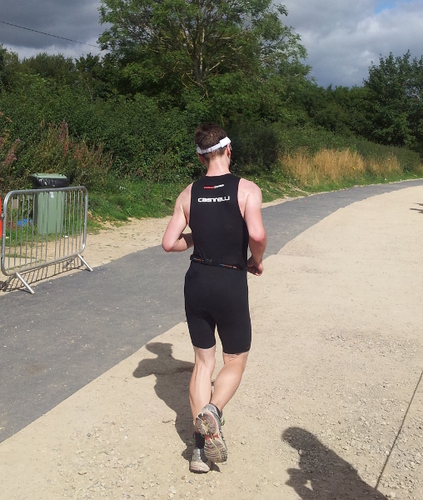
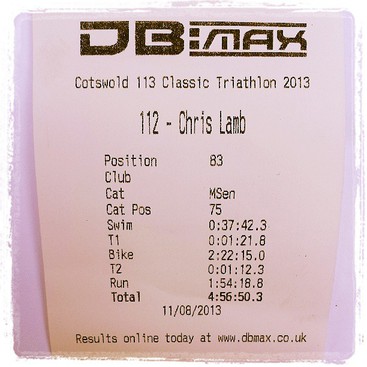
https://chris-lamb.co.uk/wp-content/2013/cotswold_course.jpg Since becoming interested in triathlon in October of last year, my goal in 2013 was not to just finish a "70.3" (or "Half-Ironman"), but to complete one in under 5 hours. At the time, each discipline was woefully inadequate; I had not swum in over a decade, my cycling was average and I had only begun running again after years away from exercise. The somewhat arbitrary target time would dictate my training. For example, the high proportion of time spent on the bike combined with the injury-sensitive nature of running meant that cycling would have a highest return on investment of the three disciplines. Despite that, I would need to take the run seriously but carefully - I decided to enter a series of monthly 10K races where I could steadily reduce my times over the year. Races themselves formed a crucial part of my preparation and a carefully balanced race calendar was surprisingly important, balancing upcoming milestones that would provide an achievable goal as well as uncovering weaknesses in enough time so they could be worked on. Whilst I did post about my first triathlon, I felt no compulsion with the interleaving five or six races as I was evaluating them in the context of the 70.3 rather than as races in their own right.

Swim
Distance
1900m
Time
37:42
Whilst this wasn't my worst open water swim, it was certainly not my best. The first 500m was straightforward, but I lost my form over the next 500m and I overcompensated with excessive kick. My calves responded by cramping badly two or three times after that, losing both momentum and time. Curiously, whenever I could identify my speed relative to my effort (for example, by some underwater reeds) I could use that as feedback and my rotation (etc.) would temporarily return. Pool swimming always has markers of this kind, whilst a murky lake does not. In conclusion, my lack of open water training outside of races held me back more than I expected.
Bike https://chris-lamb.co.uk/wp-content/2013/cotswold_bike.jpg
Distance
52 miles
Time
2:22 (21.9 mph average)
I had thoroughly absorbed the advice that you should prepare for your primary race so that it feels like another day at the office. On this criterion, the bike leg was almost perfect. My nutrition strategy energy drink every 5 minutes, gel every 30 minutes worked fine until mile 35 where I felt like I had taken on too much fluid (and no time to take a bathroom break). I had a temporary hiccup with my rear derailleur but my "tame" 52/34 12x28 gearing was vindicated on the climbs, although in retrospect that might mostly be schadenfreude. Tens of hours acclimatising to a time trial bike was rewarded by being able to spend the entire leg in "aero" position (ignoring 90-degree turns or serious gradients), improving efficiency.
Run https://chris-lamb.co.uk/wp-content/2013/cotswold_run.jpg
Distance
13.1 miles (21km)
Time
1:54:18 (5:25/km)
I had prepared a chart which provided the pace I required based on the race time at the start of the run. I would then only need to monitor my run pace instead of repeatedly extrapolating a finish time as even basic arithmetic can become impossible when fatigued. This strategy was chosen as I was too risk-adverse to aim for a faster time than strictly required; the downside of missing the target from aiming too high and "blowing up" outweighed going a few minutes faster overall. Despite that, I ran half-marathon personal best. Unfortunately, due to pressing the wrong watch button after the swim, the chart was worthless unless I could assume the race started exactly at 6:30AM. With no other option I decided to trust that with some padding, but the uncertainly it added was unsettling. Adding to that feeling, my left hip started to twinge at 7K, something it has never done before. My plan was to get to 16K, take a caffeine gel and then keep ratcheting up the pace until the finish. In my long run training I could speed up to a 4:10/km pace but after 5 hours of racing and being reasonably sure I was going to reach my goal, the best I could summon was 4:45/km. My form completely shot, I crossed the finish line and got into a fetal position in the shade behind a tent, scaring the race organisers for a few minutes.
Overall
Total time
4:56:50
Writing this the day after the race, I am still a little unsure of how I feel. I am obviously extremely content that I reached my goal but given the volume and detail of preparation it was not a huge surprise to me on race day that I did so. This combined with the "real" work and progress being achieved throughout the training seems to have robbed the event of some element of triumph it could have had, but that in itself was somewhat expected. Where next? I had always dismissed the consensus view of needing to take a decent break after the season has ended but now I am looking forward to putting triathlon-specific training on hold for a while and explore other things. I highly doubt this will be my last triathlon though. https://chris-lamb.co.uk/wp-content/2013/cotswold_result.jpg (Full results)

Next.

Previous.