Search Results: "will"

12 July 2013

Niels Thykier: Britney excuses age

Every package maintainer has probably looked at the Testing migration section of their package s PTS page and wondered: Okay? What the hell does that mean? . Or perhaps Is that something I should do something about? . Lets have a look at an example excuse (from the PTS)[1]:
excuses:
*  Maintainer: Debian Python Modules Team
*  Too young, only 8 of 10 days old
*  Updating python-scipy fixes old bugs: #691254, #707315
*  Not considered
The first thing to look for is the phrase Valid candidate . If that appears, Britney will attempt to migrate your package to testing. Note the migration may fail, but we can come back to that (in a) later (post). On the other hand, if Not considered appears, then Britney believes your package is not ready to migrate yet. At this point, the excuse will contain 1 or more reasons explaining why Britney thinks your package should not migrate. The most common problem is probably age . In the example above, that is indeed the problem denoted by the Too young, only 8 of 10 days old . Age is incremented on the evening run (i.e. the 10 pm UTC run). The excuse of that run will include the up to date age. So when you see:
  Too young, only 9 of 10 days old
It means that the age criteria will be satisfied in the next evening run . If the age requirement is satisfied, the entry will look like:
    11 days old (needed 10 days)
If there is a Not considered , it means there is something else you need to fix to make your package migrate. Note that the age is based on the day the package was uploaded to sid. If the package migrates to testing and is later removed from testing again, the age will usually be ridiculously high. This is because all the days spent the package spent in testing is also included in the age. [1] It looks similar on the real excuses page, except the excuses: header is actually the name of the source. Is also includes information about the versions involved (i.e. [from-version] to [to-version] ).

Daniel Pocock: Practical VPNs with strongSwan, Shorewall, Linux firewalls and OpenWRT routers

There is intense interest in communications privacy at the moment thanks to the Snowden scandal. Open source software has offered credible solutions for privacy and encryption for many years. Sadly, making these solutions work together is not always plug-and-play. In fact, secure networking, like VoIP, has been plagued by problems with interoperability and firewall/filtering issues although now the solutions are starting to become apparent. Here I will look at some of them, such as the use of firewall zones to simplify management or the use of ECDSA certificates to avoid UDP fragmentation problems. I've drawn together a lot of essential tips from different documents and mailing list discussions to demonstrate how to solve a real-world networking problem. A typical network scenario and requirements Here is a diagram of the network that will be used to help us examine the capabilities of these open source solutions. Some comments about the diagram:
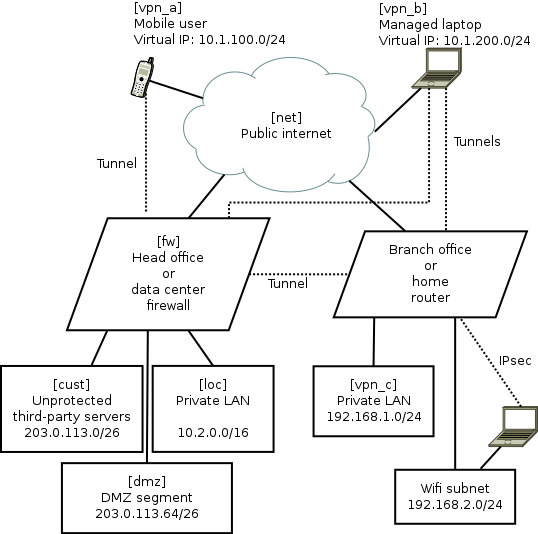
  • The names in square brackets are the zones for Shorewall, they are explained later.
  • The dotted lines are IPsec tunnels over the untrusted Internet.
  • The road-warrior users (mobiles and laptops) get virtual IP addresses from the VPN gateway. The branch offices/home routers do not use virtual IPs.
  • The mobile phones are largely untrusted: easily lost or stolen, many apps have malware, they can only tunnel to the central VPN and only access a very limited range of services.
  • The laptops are managed devices so they are trusted with access to more services. For efficiency they can connect directly to branch office/home VPNs as well as the central server.
  • Smart-phone user browsing habits are systematically monitored by mobile companies with insidious links into mass-media and advertising. Road-warriors sometimes plug-in at client sites or hotels where IT staff may monitor their browsing. Therefore, all these users want to tunnel all their browsing through the VPN.
  • The central VPN gateway/firewall is running strongSwan VPN and Shorewall firewall on Linux. It could be Debian, Fedora or Ubuntu. Other open source platforms such as OpenBSD are also very well respected for building firewall and VPN solutions, but Shorewall, which is one of the key ingredients in this recipe, only works on Linux at present.
  • The branch office/home network could be another strongSwan/Shorewall server or it could also be an OpenWRT router
  • The default configuration for most wifi routers creates a bridge joining wifi users with wired LAN users. Not here, it has been deliberately configured as an independent network. Road-warriors who attach to the wifi must use VPN tunnelling to access the local wired network. In OpenWRT, it is relatively easy to make the Wifi network an independent subnet. This is an essential security precaution because wifi passwords should not be considered secure: they are often transmitted to third parties, for example, by the cloud backup service in many newer smart phones.
Package mayhem The major components are packaged on all the major Linux distributions. Nonetheless, in every case, I found that it is necessary to re-compile fresh strongSwan packages from sources. It is not so hard to do but it is necessary and worth the effort. Here are related blog entries where I provide the details about how to re-build fresh versions of the official packages with all necessary features enabled: Using X.509 certificates as a standard feature of the VPN For convenience, many people building a point-to-point VPN start with passwords (sometimes referred to as pre-shared keys (PSK)) as a security mechanism. As the VPN grows, passwords become unmanageable. In this solution, we only look at how to build a VPN secured by X.509 certificates. The certificate concept is not hard. In this scenario, there are a few things that make it particularly easy to work with certificates:
  • strongSwan comes with a convenient command line tool, ipsec pki. Many of it's functions are equivalent to things you can do with OpenSSL or GnuTLS. However, the ipsec pki syntax is much more lightweight and simply provides a convenient way to do the things you need to do when maintaining a VPN.
  • Many of the routine activities involved in certificate maintainence can be scripted. My recent blog about using Android clients with strongSwan gives a sample script demonstrating how ipsec pki commands can be used to prepare a PKCS#12 (.p12) file that can be easily loaded into an Android device using the SD-card.
  • For building a VPN, there is no need to use a public certificate authority such as Verisign. Consequently, there is no need to fill in all their forms or make any payments for each device/certificate. Some larger organisations do choose to outsource their certificate management to such firms. For smaller organisations, an effective and sometimes better solution can be achieved by maintaining the process in-house with a private root CA.
UDP fragmentation during IPsec IKEv2 key exchange and ECDSA A common problem for IPsec VPNs using X.509 certificates is the fragmentation of key exchange datagrams during session setup. Sometimes it works, sometimes it doesn't. Various workarounds exist, such as keeping copies of all certificates from potential peers on every host. As the network grows, this becomes inconvenient to maintain and to some extent it eliminates the benefits of using PKI. Fortunately, there is a solution: Elliptic Curve Cryptography (ECC). Many people currently use RSA key-pairs. Best practice suggests using RSA keys of at least 2048 bits and often 4096 bits. Using ECC with a smaller 384-bit key is considered to be equivalent to a 7680 bit RSA key pair. Consequently, ECDSA certificates are much smaller than RSA certificates. Furthermore, at these key sizes, the key exchange packets are almost always smaller than the typical 1500 byte MTU. A further demand for ECDSA is arising due to the use of ECC within smart cards. Many smartcards don't support any RSA key larger than 2048 bits. The highly secure 384-bit ECC key is implemented in quite a few common smart cards. Smart card vendors have shown a preference for the ECC keys due to the US Government's preference for ECC and the lower computational overheads make them more suitable for constrained execution environments. Anyone who wants to use smart cards as part of their VPN or general IT security now, or in the future, needs to consider ECC/ECDSA. Making the network simple with Shorewall zones For this example, we are not just taking some easy point-to-point example. We have a real-world, multi-site, multi-device network with road warriors. Simplifying this architecture is important to help us understand and secure it. The solution? Each of these is abstracted to a "zone" in Shorewall. In the diagram above, the zone names are in square brackets. The purpose of each zone is described below:
Zone name Description
loc This is the private LAN and contains servers like databases, private source code respositories and NFS file servers
dmz This is the DMZ and contains web servers that are accessible from the public internet. Some of these servers talk to databases or message queues in the LAN network loc
vpn_a These are road warriors that are not very trustworthy, such as mobile devices. They are occasionally stolen and usually full of spyware (referred to by users as "apps"). They have limited access to ports on some DMZ servers, e.g. for sending and receiving mail using SMTP and IMAP (those ports are not exposed to the public Internet at large). They use the VPN tunnel for general internet access/browsing, to avoid surveillance by their mobile carrier.
vpn_b These are managed laptops that have a low probability of malware infection. They may well be using smart cards for access control. Consequently, they are more trusted than the vpn_a users and have access to some extra intranet pages and file servers. Like the smart-phone users, they use the VPN tunnel for general internet access/browsing, to avoid surveillance by third-party wifi hotspot operators.
vpn_c This firewall zone represents remote sites with managed hardware, such as branch offices or home networks with IPsec routers running OpenWRT.
cust These are servers hosted for third-parties or collaborative testing/development purposes. They have their own firewall arrangements if necessary.
net This zone represents traffic from the public Internet.
A practical Shorewall configuration Shorewall is chosen to manage the iptables and ip6tables firewall rules. Shorewall provides a level of abstraction that makes netfilter much more manageable than manual iptables scripting. The Shorewall concept of zones is very similar to the zones implemented in OpenWRT and this is an extremely useful paradigm for firewall management. Practical configuration of Shorewall is very well explained in the Shorewall quick start. The one thing that is not immediately obvious is a strategy for planning the contents of the /etc/shorewall/policy and /etc/shorewall/rules files. The exact details for making it work effectively with a modern IPsec VPN are not explained in a single document, so I've gathered those details below as well. An effective way to plan the Shorewall zone configuration is with a table like this:
Destination zone
loc dmz vpn_a vpn_b vpn_c cust net
Source zone loc \
dmz ? \ X X X
vpn_a ? ? \ X X
vpn_b ? ? X \ X
vpn_c X \
cust X ? X X X \
net X ? X X X \
The symbols in the table are defined:
Symbol Meaning
ACCEPT in policy file
X REJECT or DROP in policy file
? REJECT or DROP in policy file, but ACCEPT some specific ports in the rules file
Naturally, this modelling technique is valid for both IPv4 and IPv6 firewalling (with Shorewall6) Looking at the diagram in two dimensions, it is easy to spot patterns. Each pattern can be condensed into a single entry in the rules file. For example, it is clear from the first row that the loc zone can access all other zones. That can be expressed very concisely with a single line in the policy file:
loc all ACCEPT
Specific Shorewall tips for use with IPsec VPNs and strongSwan Shorewall has several web pages dedicated to VPNs, including the IPsec specific documentation.. Personally, I found that I had to gather a few details from several of these pages to make an optimal solution. Here are those tips:
  • Ignore everything about the /etc/shorewall/tunnels file. It is not needed and not used any more
  • Name the VPN zones (we call them vpn_a, vpn_b and vpn_c) in the zones file but there is no need to put them in the /etc/shorewall/interfaces file.
  • The /etc/shorewall/hosts file is not just for hosts and can be used to specify network ranges, such as those associated with the VPN virtual IP addresses. The ranges you put in this file should match the rightsourceip pool assignments in strongSwan's /etc/ipsec.conf
  • One of the examples suggests using mss=1400 in the /etc/shorewall/zones file. I found that is too big and leads to packets being dropped in some situations. To start with, try a small value such as 1024 and then try larger values later after you prove everything works. Setting mss for IPsec appears to be essential.
  • Do not use the routefilter feature in the /etc/shorewall/interfaces file as it is not compatible with IPsec
Otherwise, just follow the typical examples from the Shorewall quick start guide and configure it to work the way you want. Here is an example /etc/shorewall/zones file:
fw firewall
net ipv4
dmz ipv4
loc ipv4
cust ipv4
vpn_a ipsec mode=tunnel mss=1024
vpn_b ipsec mode=tunnel mss=1024
vpn_c ipsec mode=tunnel mss=1024
Here is an example /etc/shorewall/hosts file describing the VPN ranges from the diagram:
vpn_a eth0:10.1.100.0/24 ipsec
vpn_b eth0:10.1.200.0/24 ipsec
vpn_c eth0:192.168.1.0/24 ipsec
Here is an example /etc/shorewall/policy file based on the table above:
loc all ACCEPT
vpn_c all ACCEPT
cust net ACCEPT
net cust ACCEPT
all all REJECT
Here is an example /etc/shorewall/rules file based on the network:
SECTION ALL
# allow connections to the firewall itself to start VPNs:
# Rule  source    dest    protocol/port details
ACCEPT   all       fw                ah
ACCEPT   all       fw                esp
ACCEPT   all       fw                udp 500
ACCEPT   all       fw                udp 4500
# allow access to HTTP servers in DMZ:
ACCEPT   all       dmz               tcp 80
# allow connections from HTTP servers to MySQL database in private LAN:
ACCEPT   dmz       loc:10.2.0.43     tcp 3306
# allow connections from all VPN users to IMAPS server in private LAN:
ACCEPT vpn_a,vpn_b,vpn_c loc:10.2.0.58 tcp 993
# allow VPN users (but not the smartphones in vpn_a) to the
# PostgresQL database for PostBooks accounting system:
ACCEPT vpn_b,vpn_c loc:10.2.0.48      tcp 5432
SECTION ESTABLISHED
ACCEPT   all       all
SECTION RELATED
ACCEPT   all       all
Once the files are created, Shorewall can be easily activated with:
# shorewall compile && shorewall restart
strongSwan IPsec VPN setup Like Shorewall, strongSwan is also very well documented and I'm just going to focus on those specific areas that are relevant to this type of VPN project.
  • Allow the road-warriors to send all browsing traffic over the VPN means including leftsubnet=0.0.0.0/0 in the VPN server's /etc/ipsec.conf file. Be wary though: sometimes the road-warriors start sending the DHCP renewal over the tunnel instead of to their local DHCP server.
  • As we are using Shorewall zones for firewalling, you must set the options leftfirewall=no and lefthostaccess=no in ipsec.conf. Shorewall already knows about the remote networks as they are defined in the /etc/shorewall/hosts file and so firewall rules don't need to be manipulated each time a tunnel goes up or down.
  • As discussed above, X.509 certificates are used for peer authentication. In the certificate Distinguished Name (DN), store the zone name in the Organizational Unit (OU) component, for example, OU=vpn_c, CN=gw.branch1.example.org
  • In the ipsec.conf file, match the users to connections using wildcard specifications such as rightid="OU=vpn_a, CN=*"
  • Put a subjectAltName with hostname in every certificate. The --san option to the ipsec pki commands adds the subjectAltName.
  • Keep the certificate distinguished names (DN) short, this makes the certificate smaller and reduces the risk of fragmented authentication packets. Many examples show a long and verbose DN such as C=GB, O=Acme World Wide Widget Corporation, OU=Engineering, CN=laptop1.eng.acme.example.org. On a private VPN, it is rarely necessary to have all that in the DN, just include OU for the zone name and CN for the host name.
  • As discussed above, use the ECDSA scheme for keypairs (not RSA) to ensure that the key exchange datagrams don't suffer from fragmentation problems. For example, generate a keypair with the command ipsec pki --gen --type ecdsa --size 384 > user1Key.der
  • Road warriors should have leftid=%fromcert in their ipsec.conf file. This forces them to use the Distinguished Name and not the subjectAltName (SAN) to identify themselves.
  • For road warriors who require virtual tunnel IPs, configure them to request both IPv4 and IPv6 addresses (dual stack) with leftsourceip=%config4,%config6 and on the VPN gateway, configure the ranges as arguments to rightsourceip
  • To ensure that roadwarriors query the LAN DNS, add the DNS settings to strongswan.conf and make sure road warriors are using a more recent strongSwan version that can dynamically update /etc/resolv.conf. Protecting DNS traffic is important for privacy reasons. It also makes sure that the road-warriors can discover servers that are not advertised in public DNS records.
Central firewall/VPN gateway configuration Although they are not present in the diagram, IPv6 networks are also configured in these strongSwan examples. It is very easy to combine IPv4 and IPv6 into a single /etc/ipsec.conf file. As long as the road-warriors have leftsourceip=%config4,%config6 in their own configurations, they will operate dual-stack IPv4/IPv6 whenver they connect to the VPN. Here is an example /etc/ipsec.conf for the central VPN gateway:
config setup
        charonstart=yes
        charondebug=all
        plutostart=no
conn %default
        ikelifetime=60m
        keylife=20m
        rekeymargin=3m
        keyingtries=1
        keyexchange=ikev2
conn branch1
        left=198.51.100.1
        leftsubnet=203.0.113.0/24,10.0.0.0/8,2001:DB8:12:80:/64
        leftcert=fw1Cert.der
        leftid=@fw1.example.org
        leftfirewall=no
        lefthostaccess=no
        right=%any
        rightid=@branch1-fw.example.org
        rightsubnet=192.168.1.0/24
        auto=add
conn rw_vpn_a
        left=198.51.100.1
        leftsubnet=0.0.0.0/0,::0/0
        leftcert=fw1Cert.der
        leftid=@fw1.example.org
        leftfirewall=no
        lefthostaccess=no
        right=%any
        rightid="OU=vpn_a, CN=*"
        rightsourceip=10.1.100.0/24,2001:DB8:1000:100::/64
        auto=add
conn rw_vpn_b
        left=198.51.100.1
        leftsubnet=0.0.0.0/0,::0/0
        leftcert=fw1Cert.der
        leftid=@fw1.example.org
        leftfirewall=no
        lefthostaccess=no
        right=%any
        rightid="OU=vpn_b, CN=*"
        rightsourceip=10.1.200.0/24,2001:DB8:1000:200::/64
        auto=add
Sample branch office or home router VPN configuration Here is an example /etc/ipsec.conf for the Linux server or OpenWRT VPN at the branch office or home:
conn head_office
        left=%defaultroute
        leftid=@branch1-fw.example.org
        leftcert=branch1-fwCert.der
        leftsubnet=192.168.1.0/24,2001:DB8:12:80:/64
        leftfirewall=no
        lefthostaccess=no
        right=fw1.example.org
        rightid=@fw1.example.org
        rightsubnet=203.0.113.0/24,10.0.0.0/8,2001:DB8:1000::/52
        auto=start
# notice we only allow vpn_b users, not vpn_a
# these users are given virtual IPs from our own
# 192.168.1.0 subnet
conn rw_vpn_b
        left=branch1-fw.example.org
        leftsubnet=192.168.1.0/24,2001:DB8:12:80:/64
        leftcert=branch1-fwCert.der
        leftid=@branch1-fw.example.org
        leftfirewall=no
        lefthostaccess=no
        right=%any
        rightid="OU=vpn_b, CN=*"
        rightsourceip=192.168.1.160/27,2001:DB8:12:80::8000/116
        auto=add
Further topics Shorewall and Shorewall6 don't currently support a unified configuration. This can make it slightly tedious to duplicate rules between the two IP variations. However, the syntax for IPv4 and IPv6 configuration is virtually identical. Shorewall only currently supports Linux netfilter rules. In theory it could be extended to support other types of firewall API, such as pf used by OpenBSD and the related BSD family of systems. A more advanced architecture would split the single firewall into multiple firewall hosts, like the inner and outer walls of a large castle. The VPN gateway would also become a standalone host in the DMZ. This would require more complex routing table entries. Smart cards with PIN numbers provide an effective form of two-factor authentication that can protect certificates for remote users. Smart cards are documented well by strongSwan already so I haven't repeated any of that material in this article. Managing a private X.509 certificate authority in practice may require slightly more effort than I've described, especially when an organisation grows. Small networks and home users don't need to worry about these details too much, but for most deployments it is necessary to consider things like certificate revocation lists and special schemes to protect the root certificate's private key. EJBCA is one open source project that might help. Some users may want to consider ways to prevent the road-warriors from accidentally browsing the Internet when the IPsec tunnel is not active. Such policies could be implemented with some basic iptables firewalls rules in the road-warrior devices. Summary Using these strategies and configuration tips, planning and building a VPN will hopefully be much simpler. Please feel free to ask questions on the mailing lists for any of the projects discussed in this blog.

Keith Packard: Present

The Present Extension I ve finally gotten an initial implementation of the Present extension written and running and thought I should write up the current design and status. Present Design The current Present extension consists of two requests:

  1. PresentRegion. Puts new bits from a pixmap in a window.
  2. PresentSelectInput. Asks for Present events to be delivered.
PresentRegion This request takes a pile of arguments:
 
    PresentRegion
    window: WINDOW
    pixmap: PIXMAP
    valid-area: REGION or None
    update-area: REGION or None
    x-off, y-off: INT16
    target-msc: CARD64
    divisor: CARD64
    remainder: CARD64
    idle-fence: FENCE
 
Errors: Drawable, Pixmap, Match
Provides new content for the specified window, to be made visible at the specified time (defined by target-msc , divisor and remainder ). update-area defines the subset of the window to be updated, or None if the whole window is to be updated. valid-area defines the portion of pixmap which contains valid window contents, or None if the pixmap contains valid contents for the whole window. PresentRegion may use any region of pixmap which contains update-area and which is contained by valid-area . In other words, areas inside update-area will be presented from pixmap , areas outside valid-area will not be presented from pixmap and areas inside valid-area but outside update-area may or may not be presented at the discretion of the X server. x-off and y-off define the location in the window where the 0,0 location of the pixmap will be presented. valid-area and update-area are relative to the pixmap. If target-msc is greater than the current msc for window , the presentation will occur at (or after) the target-msc field. Otherwise, the presentation will occur after the next field where msc % divisor == remainder . If divisor is zero, then the presentation will occur after the current field. idle-fence is triggered when pixmap is no longer in use. This may be at any time following the PresentRegion request, the contents may be immediately copied to another buffer, copied just in time for the vblank interrupt or the pixmap may be used directly for display, in which case it will be busy until some future PresentRegion operation. If window is destroyed before the presentation occurs, then the presentation action will not be completed. PresentRegion holds a reference to pixmap until the presentation occurs, so pixmap may be immediately freed after the request executes, even if that is before the presentation occurs. If idle-fence is destroyed before the presentation occurs, then idle-fence will not be signaled but the presentation will occur normally. PresentSelectInput
 
    PresentSelectInput
    event-id: PRESENTEVENTID
    window: WINDOW
    eventMask: SETofPRESENTEVENT
 
Errors: Window, Value, Match, IDchoice, Access
Selects the set of Present events to be delivered for the specified window and event context. PresentSelectInput can create, modify or delete event contexts. An event context is associated with a specific window; using an existing event context with a different window generates a Match error. If eventContext specifies an existing event context, then if eventMask is empty, PresentSelectInput deletes the specified context, otherwise the specified event context is changed to select a different set of events. If eventContext is an unused XID, then if eventMask is empty no operation is performed. Otherwise, a new event context is created selecting the specified events. Present Extension Events There are three different events for the Present extension:
  1. PresentConfigureNotify
  2. PresentCompleteNotify
  3. PresentRedirectNotify
PresentConfigureNotify This event is moving from the DRI3 extension where it doesn t belong.
 
    PresentConfigureNotify
    type: CARD8         XGE event type (35)
    extension: CARD8        Present extension request number
    length: CARD16          2
    evtype: CARD16          Present_ConfigureNotify
    eventID: PRESENTEVENTID
    window: WINDOW
    x: INT16
    y: INT16
    width: CARD16
    height: CARD16
    off_x: INT16
    off_y: INT16
    pixmap_width: CARD16
    pixmap_height: CARD16
    pixmap_flags: CARD32
 
PresentConfigureNotify events are sent when the window configuration changes if PresentSelectInput has requested it. PresentConfigureNotify events are XGE events and so do not have a unique event type. x and y are the parent-relative location of window . PresentCompleteNotify
 
    PresentCompleteNotify
    type: CARD8         XGE event type (35)
    extension: CARD8        Present extension request number
    length: CARD16          2
    evtype: CARD16          Present_CompleteNotify
    eventID: PRESENTEVENTID
    window: WINDOW
    ust: CARD64
    msc: CARD64
    sbc: CARD64
 
Notify events are delivered when a PresentRegion operation has completed and the specified contents are being displayed. sbc, msc and ust indicate the swap count, frame count and system time of the related PresentRegion request. PresentRedirectNotify This one is not specified yet, but the intent is for it to contain sufficient information for the compositing manager to be able to construct a suitable screen update that includes an application window update. Finishing GLXOMLsync_control At this point, Mesa only exposes the old swapinterval configuration value, it doesn t provide any of the GLXOMLsynccontrol APIs. However, the Present protocol does have the bits necessary to support glXSwapBuffersMscOML in the PresentRegion request. Let s see how the remaining APIs in this GL extension will be supported. glXGetSyncValuesOML This one is easy; it only needs to return the UST/MSC/SBC values from the most recent SwapBuffers request. Those are returned in the PresentCompleteNotify event, so Mesa just needs to capture that event and save the values away for return to the application. We don t need any new Present protocol for this. glXGetMscRateOML This returns the refresh rate of the monitor associated with the specified drawable. RandR exposes all of the necessary data for each monitor, but the monitor each window is going to be synchronized against isn t exposed anywhere, and is effectively implementation-dependent. So, I think the easy thing to do here is to have a Present request which reports which RandR output a window will be synchronized with. glXSwapBuffersMscOML This is the one API which is already directly supported by the Present extension. glXWaitForMscOML This is effectively the same as glXSwapBuffersMscOML, except that it doesn t actually perform a swap. For this, I think we want a new request that generates an X event when the target values are reached, and then have the client block until that event is received. This will avoid blocking other threads using the same X connection. glXWaitForSbcOML Like glXWaitForMscOML, this just needs to trigger an event to be delivered at the right time. Presentation Redirection I m focusing on finishing the above stuff before I start writing the redirection spec and code, but I ve been thinking a bit about it. What we want is for applications that are presenting a new frame within a redirected window to have that presentation delivered directly to the compositing manager instead of having the bits copied to the redirected buffer and have the compositing manager only learn about this when the damage event is received from copying the bits. Once the compositing manager receives notification that there are new bits available for a portion of a window, it can then get those bits onto the screen in one of two ways:
  1. Copy them to the back buffer for the whole screen and then present that back buffer to the screen.
  2. Present them directly to the screen, bypassing the compositing manager s back buffer entirely.
The first option is what you d do if there were more updates than just a single window; it would update the whole screen at the same time. The second option is what you d do if there was only the one window update to act on, and this would automatically take advantage of page flipping to avoid copying data at all. No need to un-redirect windows for the page flip to work. In both cases, we need to inform the original application both when its pixmap is idle and when the swap actually hits the screen. And we need to make sure the final swap happens when the application requested. For the pixmap idle notification, the current PresentRegion idlefence argument should suffice; we just need to pass the idlefence XID along in the redirection event. Simple. For completion notification, we need to make sure the SBC value for the original window gets incremented and that a PresentCompleteNotify event is delivered. I think that means we want to append a chunk of data to the PresentRegion request so that suitable events can be delivered when the compositing manager PresentRegion occur. I think that just needs to be the window of that original window. To make sure the swap happens at the right time, we just need to have the targetmsc value provided to the compositing manager. I m hoping that having this all event driven is that when a later PresentRegion is redirected that has an *earlier* targetmsc, we can simply queue that as well and things should just work . Current Status I ve got the protocol definitions (both X server and XCB) done, and libxcb supporting the extension. I ve got the X server bits working, but the actual updates are not synchronized to the monitor; they re using OS timers and CopyArea for now, mostly so I can test things without also hacking drivers. Mesa is using the extension, but it only provides the swapinterval value and is not yet supporting the full GLXOMLsynccontrol extension. I ve also got a simple 2D core X application using the extension which is in the shmfd repository in my home directory on freedesktop.org. Availability As always, these bits are already published in my home directory on freedesktop.org in various git repositories.

11 July 2013

Daniel Pocock: Using debcheckout to build strongSwan 5.0 on Debian wheezy

Normally most people try to use packages from a stable Linux distribution because of their convenience and security support. Sometimes it's necessary to use a newer version, I recently had to do this with strongSwan and I'm sharing the procedure for other people to try. These days, it is actually very very easy to build a new version of a package from source and this procedure will work for many Debian packages. Debian wheezy ships with strongSwan version 4.5 packages. These are lacking support for a couple of features I needed, including dual-stack IPv4/IPv6 virtual IPs on a single user connection and maintaining the DNS server list on road-warriors Oddly enough, for a variety of reasons, I had to rebuild strongSwan on all the platforms where I wanted to use it (not just on Debian). I recently described how to build it with ECDSA support on Fedora and also how to build it with ECDSA support on OpenWRT. Following all of these procedures you will end up with strongSwan packages on all systems that can interoperate using dual stack IPv4, IPv6 and establish connections quickly, securely and reliably using ECC certificates. Get the build dependencies Many packages require extra tools and header files when building. These are packages that are not usually installed or required when running the package. However, they are very easy to get. For strongSwan:
sudo apt-get update
sudo apt-get install devscripts fakeroot
sudo apt-get build-dep strongswan
This should download and install the necessary dependencies. Notice we also installed the devscripts package, it provides the very handy debcheckout utility. Obtain and build the package Now for the real work. Fortunately this is not too hard either:
mkdir ~/ws
cd ~/ws
debcheckout strongswan
cd strongswan
dpkg-buildpackage -rfakeroot -uc -b
Look in the directory ~/ws and you will find the .deb package files. Problems? On my own system, I observed that I could upgrade from the existing packages to the v5.0.4-6 package without any change to the configuration files. It just worked. Hopefully, these packages will eventually end up in Debian's backports catalog where you can install them without compiling. Nonetheless, problems for these packages can still be submitted through Debian's bug tracker - just make sure you clearly indicate that you built the package from source and give the git commit number (output of the command cd ~/ws/strongswan && git show head -1) Before trying the package and definitely before reporting any problem, it is worth checking the bug tracker and the Package Tracking System for known issues

Matt Zimmerman: Scaling Human Systems: From individual achievement to teamwork

This is part 4 in a series on organizational design and growth. What it means

Getting things done together, as a team, achieving more than the sum of our individual efforts. Why it s important

Once a company reaches a certain size, perhaps with a substantial customer base and ambitious goals for the future, it takes a lot more momentum to move it forward. No one person can do it alone. From product delivery, to strategic decision making, to customer service, no single individual has all of the knowledge, skills or time necessary to perform these functions at the scale and velocity necessary to make real progress. Cooperation is not just a good idea: it s essential to success.

The most important system we re building is the company itself: a system of people working together to achieve common goals. Old status quo

In a startup, everyone embodies the spirit of the pioneer: passion, fortitude, individualism, daring, and the willingness to do whatever it takes to reach the goal. Individuals wear many hats: engineering, product management, marketing, customer support. We often don t even think of them as distinct disciplines. Projects often depend on the resoluteness of a single Jill-of-all-trades to drive them to completion, and the culture may reward this kind of heroism. Thanks to the relatively small scale of the company and its customer base, one person working independently can effect significant change without much risk. If what was delivered wasn t good enough, it could be discarded with no great loss. New status quo

In a growing company, we still need a variety of different disciplines in order to reach our goals, in fact more than ever. A successful product needs to be conceived, validated, designed, built, documented, adopted, supported, and we need to confirm that it satisfies customers over time. These elements are all essential, and each requires deep knowledge, expertise and practice. Good engineering + mediocre product management + inept marketing = total failure. It s not realistic to expect one person to do all of these things and deliver consistently good results, but consistently good results are exactly what we need. The solution is to organize for individuals to do what they do best, and cooperate effectively together. We also need to manage risk more carefully: our customers are depending on us. We have a lot more to lose now, and need to learn how to maintain forward progress while continuing to meet our customers expectations. Delivering sub-par products would damage our reputation and erode their trust. Most of all, we need to be getting better at all of this over time, faster than our competition. Behaviors that help

Obstacles that get in the way

10 July 2013

Russell Coker: Samsung Galaxy Note 2

A few weeks ago I bought a new Samsung Galaxy Note 2 Android phone. As I predicted in my post about Phone and Tablet Sizes [1] the Note 2 with a 5.55 display is a bit too big for me to have an ideal single handed side grasp (I estimate that about 5.2 would be ideal). But I can stretch a bit and move it around in my hand to touch all parts of the screen with my thumb. Although when doing that I don t have a tight grip, with my previous phone the Samsung Galaxy S3 [2] I could properly wrap my hand around it to grip it tightly while using it with one hand. The Note 2 will be easier for me to drop or for a thief to snatch it from me. While the big screen makes the phone difficult to use with one hand it does allow viewing more data. The ConnectBot SSH client (Play Store link) [3] (F-Droid repository link) [4] works a lot better on a larger screen I ve also discovered that the volume control buttons can be used to change the font size in ConnectBot which is handy as the default is really tiny. Also Klaus Weidner s Hacker s Keyboard (Play Store link) [5] (F-Droid repository link) [6] works a lot better with a larger screen. When I tested the Hacker s keyboard on a smaller phone I found the 5 row layout too difficult to use, but on the Note 2 it works well. As an aside I wish I could quickly and easily toggle between 4 row mode (good for SMS) and 5 row mode (good for sysadmin work) in the Hackers Keyboard. For less serious use the large screen on the Note 2 is good for watching TV. I ve got a collection of mp4s of TV shows that I ve been meaning to watch, now I watch them in bed on my phone. Another advantage of the Note 2 is the battery life. When playing Ingress and doing all the usual email checks etc my Note 2 will last about as long as my wife s Galaxy S3 with it s power case. So without any extra batteries a Note 2 will probably last about twice as long as a Galaxy S3. The Note 2 has more RAM than the S3 I used to use (I had the S3 with 1G of RAM) and it also apparently has a faster CPU. The CPU speed hasn t been an issue for me but the extra RAM is a real benefit, it means that I can usually switch between Ingress and other programs without having to restart Ingress each time. As an aside I think that Google and LG should release a Nexus Ingress 4 phone or some other device that s optimised for Ingress, I m sure it would sell well. Some people make a big deal about the stylus that comes with the Note 2. It is a neat feature to have the device know when the stylus tip is hovering over the screen but it s not very useful for me. If I was going to create art work on a phone (as some people do) then it would interest me, but I m more interested in email and ssh for fine input and my fingers are generally good enough for those tasks. I have got thin fingers, so I think that people with thicker fingers could really benefit from the stylus. I recently bought a batch of stylus pens from Kogan which have a pen at one end and a rubber stylus tip at the other for fat fingered people I know who need to use an Android phone but can t afford a Note or Note 2. I also like the software build on it which is almost the same as that on the Galaxy S3. It seems that many people prefer the apparently stock features on the Nexus 4 but I like the way Samsung does things. Conclusion I m very happy with my new phone. The bigger screen allows me to see things more clearly, this is good for web browsing, reading email, and now that I can use the Hackers Keyboard I can type more effectively. The longer battery life is really good too, although I think that Samsung could have done better if the phone was 3mm thicker then it could have a much bigger battery and have a larger CCD for the camera. I don t think that the phone is really different, at least not for my use. Samsung has promoted it for artistic use and I ve seen evidence to support their claims. But for most people it ll just be a phone with a larger screen and a bigger battery. Some people criticise it for being too big, but it s still smaller than the handsets on most desk phones so it s not big by the standards of old fashioned phones. The increased size has not only allowed me to do the same things more effectively but also allowed me to do things I hadn t tried doing on a phone before such as watching TV. This isn t because of the phone being particularly special in any way, it s just that the change in size gives more possibilities for ways of using it. The Samsung Galaxy Mega is the largest smart phone. The 5.8 version of the Mega has a resolution of only 960*540 (less than the Note and Note 2 not good enough IMHO) and the 6.3 version has the same resolution as the Note 2 of 1280*720. I think that both Mega variants are too big for me, I need to be able to use a phone with one hand. So it seems that the Note 2 is probably the best phone for me right now.

9 July 2013

Soeren Sonnenburg: Shogun Toolbox Days 2013 Program and Updates

Dear all, we are excited that the first Shogun workshop, July 12-14 in Berlin, is getting closer. Thanks to all the people that signed up -- we are sure it will be a packed and inspiring weekend! We have finalized the schedule for Friday, July 12, taking place at the C-Base (see description below [1]). After an intro where everyone gets to know each other and where we introduce ourselves, Shogun, and Machine Learning in general, there will be some tutorials by Shogun developers. In addition, we will have discussions about various topics and various coffee breaks and lunch. Finally, we will enjoy a summer's evening in Berlin. On Saturday and Sunday, July 13-14 there will be hands on sessions at the Technical University Berlin [2], where developers are around for more close up discussions and practical guidance. Bring your Laptop if you want to try things. See the final schedule for more details [1]. We plan to do video recordings of all lectures and will have a live stream [3]. See you there! The Shogun-Team

Wouter Verhelst: Mark groet 's morgens de dingen

Or, Mark greeting the things in the morning
Dag ventje met de fiets op de vaas met de bloem Hi little guy with the bike on the vase with the flower
ploem ploem ploum ploum
Dag stoel naast de tafel Hi chair besides the table
Dag brood op de tafel Hi bread on the table
Dag visserke-vis met de pijp Hi fishery-man with the pipe
en and
Dag visserke-vis met de pet Hi fishery-man with the hat
goeiendag good day
Daa-ag vis Bye-ee fish
Dag lieve vis Bye dear fish
Dag klein visselijn mijn Bye my little fishery-fish
The above is one of Paul van Ostaijen's poems, and is, in my opinion, one of his finest. I tried translating it to English so that my non-Dutch-speaking readers could appreciate it (Dutch-speaking readers will most likely already know it anyway), but it's almost impossible to properly translate it. In this poem, van Ostaijen invents a few words that aren't part of the Dutch language proper. A good example is 'visserke-vis'. The first part, 'visserke', is (now) a dialect diminutive of 'visser', which translates to "fisherman" (though it is likely that in Van Ostaijen's days, 'visserke' wasn't considered to be a dialect word). The second part, 'vis', is just Dutch for 'fish'. A literal translation would thus be 'fishereman-fish' On the other hand, given the relative similarity of both words, it is conceivable that Van Ostaijen is just playing with the sound of those words here (he does that later in the poem, anyway), and as such, it's not entirely clear whether he's talking about a fish with a pipe and a had, or about a fisherman with a pipe and a hat. It could be both. His use of the word 'Dag' adds to confusion. In Dutch, the word 'Dag' can be used as a greeting when seeing people for the first time in the morning, but it can also be used as a greeting when leaving people in the evening. Since this is used near the end of the poem, I translated it by using its second meaning; but it's also possible that Van Ostaijen is just playing with us. Of that final line, I should add that the size of the letters is not my doing; Van Ostaijen's original version contained this. In fact, he is known for his expressionistic way of using letters, and some of his other poems go into extremes with that; his wikipedia entry has a nice example. The final verse of the poem sounds pretty well, but defies all grammar. In proper grammar, the verse would read "Dag mijn klein visje". Van Ostaijen turns 'visje' into 'visselijn' so that it rhymes on 'mijn', and puts 'mijn' at the end. Whereas it's still possible to figure out a meaning of the first part of 'visserke-vis', this certainly isn't possible with 'visselijn'. It just isn't a word; all you can make of it is that he's talking about a fish. This certainly contradicts the idea that he was talking about a fisherman earlier. All in all, "Mark groet 's morgens de dingen" is a very funny poem; it describes a man or a boy who does nothing else than say hello to objects when he gets up in the morning; and though it's necessary to explain the language if you don't speak Dutch to fully appreciate it, the idea that there's much more to be found behind the words is most likely wrong. This is just silly amusement.

Daniel Pocock: Enabling Elliptic Curve Cryptography in OpenWRT and strongSwan VPNs

OpenWRT currently ships an OpenSSL package with Elliptic Curve Cryptography (ECC) disabled. This is very inconvenient as ECC is now standard in other distributions like Debian and Ubuntu and it is necessary to solve certain problems such as making IPsec VPNs work reliably It is relatively easy to enable it, this also provides a useful opportunity to see how the OpenWRT build system works. Preparing the build environment The build was done on a Debian 7 (wheezy) workstation. It is necessary to install some packages that provide tools needed for the build:
apt-get install gcc binutils flex make unzip gawk libz-dev linux-libc-dev
Rebuild the OpenSSL and StrongSwan packages This was tested with an ar71xx CPU-based router. You can easily change the config (run make menuconfig just before make defconfig) for other variations of router.
Running strongSwan IPsec on a router requires a router with plenty of flash, RAM and CPU power. Cheap routers with limited flash will not be able to install the packages at all. I tested on the Buffalo WZR-HP-AG300H-EU which has 32MB flash and 128MB RAM Here are the commands executed on the Debian build workstation:
mkdir ~/ws
cd ~/ws
svn checkout svn://svn.openwrt.org/openwrt/trunk openwrt-trunk
cd openwrt-trunk
./scripts/feeds update -a
./scripts/feeds install -a
wget -O .config \
  http://danielpocock.com/sites/danielpocock.com/files/openwrt.config.txt
sed -i -e 's/no-ec//' package/libs/openssl/Makefile 
make defconfig
make -j 13
The "make" command will build all the packages. It takes some time. Copy the packages to a router The actual location of the packages in your source tree depends on the CPU architecture you chose to build for. You can find them with a command such as:
find . -name '*.ipk'
Here we look at how to copy the packages for the ar71xx based router into the /tmp directory on the router. The router IP is 192.168.1.1 below:
cd ./bin/ar71xx/packages/
scp libopenssl_1.0.1e-1_ar71xx.ipk strongswan*.ipk root@192.168.1.1:/tmp
Installing the packages It is relatively easy to install the packages using the opkg utility on OpenWRT. When using self-compiled packages, you are likely to get errors about the checksums. OpenWRT compares the checksum of the package to the checksum from the package catalog file. You can delete the catalog file (e.g. rm /var/opkg-lists/attitude_adjustment) and then opkg will install the package without complaining. The file is automatically placed there each time you run opkg update so there is no harm in deleting it. In my earlier blog, I looked at how to link Android clients to the strongSwan VPN. Unfortunately Android has a bug in ECC support too and must still be used with RSA certificates. Nonetheless, the OpenWRT VPN will be quite happy talking to Linux laptops and servers - you may need to rebuild OpenSSL and StrongSwan on any Fedora, Red Hat or CentOS systems that require ECC support too. As you migrate from RSA to ECC certificates it is quite feasible to have both types of certificates in use at the same time. strongSwan supports this type of hybrid environment. To make the migration to ECC go smoothly it is desirable to ensure all boxes have ECC support at the earliest opportunity.

7 July 2013

Sylvestre Ledru: LLVM toolchain packages

In parallel of my work on the LLVM Debian/Ubuntu nightly packages, I uploaded a couple months ago the same packages for the stable releases of the LLVM toolchain. By toolchain, this means LLVM + Clang + Clang extra tools + compiler-rt + polly + LLDB.
Previously, they were packaged as separate source packages. Making the maintenance harder and, especially, limiting the packaging of LLDB and polly. Currently, we have in the archive: For the 3.2 release, I am planning to focus on RC bug fixes.
The 3.3 and snapshot releases will get the feature improvements.
llvm-default will point to the 3.3 release once it builds on all architectures and it reached testing aka Jessie (probably during summer).

6 July 2013

Sylvestre Ledru: Automatic scan-build on the LLVM toolchain

After setting an automatic code coverage tool, I just plugged an automatic scan-build on the LLVM toolchain trunk: http://buildd-clang.debian.net/scan-build/ Note that: This work is done through the Debian/LLVM jenkins instance.
The report is updated twice a day.
The scan-build/clang used to produce the report is the one published on http://llvm.org/apt/. That means that a new feature/fix done on scan-build will appear only about a day after on report. As a side effect, it tests automatically the packages distributed on llvm.org/apt/. For a project of this size, the number of reported errors / warnings is pretty low. At time of writing, only 329 errors are reported and many of them are in generated code (AttrDump.inc and LLDBWrapPython.cpp for example) or in unit tests. [1]
/tmp/buildd/llvm-toolchain-snapshot-3.4~svn185728/build-llvm/Release/bin/clang -fno-exceptions -fPIC -funwind-tables -I/tmp/buildd/llvm-toolchain-snapshot-3.4~svn185728/projects/compiler-rt/lib -I/tmp/buildd/llvm-toolchain-snapshot-3.4~svn185728/projects/compiler-rt/include -Wall -Werror -O3 -fomit-frame-pointer -m64 -fPIE -fno-builtin -gline-tables-only -fno-rtti -DASAN_FLEXIBLE_MAPPING_AND_OFFSET=1 -c -o /tmp/buildd/llvm-toolchain-snapshot-3.4~svn185728/build-llvm/tools/clang/runtime/compiler-rt/clang_linux/asan-x86_64/x86_64/SubDir.lib__sanitizer_common/sanitizer_symbolizer_itanium.o /tmp/buildd/llvm-toolchain-snapshot-3.4~svn185728/projects/compiler-rt/lib/sanitizer_common/sanitizer_symbolizer_itanium.cc

Steve Kemp: This weekend I will be mostly upgrading to wheezy

Having migrated my websites away from my ssh/mail box I'm going to upgrade that this weekend. I've got my new mail client, lumail, working well enough to use exclusively, so the upgrade should be nice and simple. I spent a few hours last night removing packages from my ssh/mail box to trim it down. Removing a bunch of Perl modules I used in my CGI coding, removing services such as nfs-common, portmapper, etc. Today I'll have a stab at the upgrade. The only thing I have to be careful of is my backported/tweaked qpsmptd packages. I'll try the native wheezy version now it has caught up. (I don't use any of the standard qpsmtpd plugins at all. Instead I have a separate tree of my own custom anti-spam and virtual-hosting aware plugins. They all work in a unified fashion. Using these plugins against a new version of qpsmtpd should be just fine. But obviously I need to test that.) Work on Lumail is probably going to slow down now it is genuinely in use, but I'll keep an eye out for feature requests and missing primitives. Annoyingly I wasted 30 minutes just now implementing a plugin I'd already written: lumail issue #51. I also need to step-back this weekend and reassess my hosting. When I was tweaking my slaughter setup I recently realized I have more hosts than I thought: Total: 13 virtual machines. (+ one kvm-host)

5 July 2013

Niels Thykier: Dealing with a bottleneck, wasted inodes and reducing memory usage

We finally managed to deal with one of the major runtime bottlenecks in Lintian. Previously, our usage of file(1) would sometimes spend a long time classifying various text files. In Lintian 2.5.14, we applied a series of patches that allowed us to disable file(1) s ascii test. This means that Lintian will now see all text files as data , which is somewhat uninformative. However, it turns
N: [...] file-info for source:linux/3.2.20-1 done (120.350s)
into
N: [...] file-info for source:linux/3.2.20-1 done (20.984s)
In the same version, we also had Lintian create fewer empty files and directories in its laboratory. For the normal user, this change has hardly any practical effect. But for lintian.d.o, this reduces the minimum inodes consumed for binary entries with 8 or so. For Lintian 2.5.15, we have may end up reducing the memory requirements of Lintian a bit. So far, we got two changes applied that is taking out at least 12MB of RAM usage on the linux source package and 21 of its binaries. Furthermore, Lintian will (if Devel::Size is available) be able to tell how much memory it is using for its caches when run with -dddd .

Francesca Ciceri: #debcraft: DIY projects to show your Debian love

The next August 16th, Debian will turn 20.
What are you planning to do to to celebrate?
Being a DIY geek, I decided to create some craft projects dedicated to the Universal Operating System. I'll publish them, one per week, on this blog with a detailed tutorial, released under a CC:BY-SA 3.0 license. If you have an original project dedicated to Debian (from cookies and cakes to knitted socks, from beaded earrings to handpainted mugs, from plushies to pottery, from glass arts to lettering and so on) join me!
Post a tutorial about your project on your blog (or if you don't have one, send me a mail and you'll publish it here as guest post) with the hashtag #debcraft and a free (as in freedom) license. Bonus points for project using recycled material :). Ready to start? Below my first one: swirl charms from plastic bottles.
please, do try this at home a couple of finished swirl This is a little tutorial on how to create swirl charms for keyrings from plastic bottles.
The project is really easy and quick to realize, the materials very common and the result quite pretty.
I found out that there are tons of tutorial in the Internet about how to make jewelry from PET bottles, and I'll surely give them a try (earrings, in particular, seem a good idea).
If you want some inspiration, I suggest you to check out the amazing work of Turkish artist Gulnur Ozdaglar who creates ethereal jewelry and everyday objects from plastic bottles.
"What is PET bottle?
A domesticated bottle kept for companionship or amusement."
Gulnur Ozdaglar
What you will need tools and materials needed In the pic there's also a soda can, because I thought it could be a good material too.
After some tests, I decided that soda cans would probably need some resin to make the edges less sharp and avoid cuts, so I think I'll experiment a bit more with them. Step 1 step 1: cut the swirl from plastic First of all, you'll need to cut out the swirl from the bottle.
I cut it in the upper part of the bottle, using a paper swirl as guide to cut the swirl shape as regular as I could. Step 2 step 2: melt the edges As the edges of the cut are a bit raw, I decided to lightly melt them with the lighter: be careful as if the plastic melt too much it will ruin our nice swirl. Also, remember to open a window while doing it: it's not a lot of melting but better safe than sorry. Step 3 step 3: punch a hole for the jumpring With a pin or a needle punch a hole in the upper part of the swirl, where the jumpring will be set to connect the swirl with the keychain ring. Now you need to decide which type of swirl do: for the painted one, follow step 4a; for the transparent one with the red embroidery, follow step 4b. Step 4a step 4a: paint the swirl Paint your swirl red, or of your favourite colour (I experimented a bit here, having lots of nail polish, and made also a purple one). Step 4b step 4b: punch more holes and sew with red thread With a pin or a needle, punch a series of holes, in the middle of the swirl, following the swirl shape.
Then embroider it using backstitch. Step 5 step 5: add the jumpring Add the jumpring, if you have a ready made one.
If not, use a pair of cutters to cut a little bit of metal wire and the pliers to create a ring with it, insert in the hole and close it. Step 6 step 6: add the metal keyring Connect the jumpring and the metal keyring. Congratulations: you now have a swirl shaped keycharm!

Justus Winter: mount, umount and mtab

This week was all about getting mount into shape, addind umount and hacking up a prototype for the mtab issue. With all my patches to mount the boot log looks like this:
INIT: version 2.88 booting
Using makefile-style concurrent boot in runlevel S.
Activating swap...done.
Checking root file system...fsck from util-linux 2.20.1
hd2 : tray open or drive not ready
end_request: I/O error, dev 02:00, sector 0
ext2fs_check_if_mount: Can't check if filesystem is mounted due to missing mtab file while determining whether /dev/hd0s1 is mounted.
/dev/hd0s1: clean, 44101/181056 files, 283413/723200 blocks
done.
Cleaning up temporary files... /tmp.
/etc/rcS.d/S06mtab.sh: 48: /etc/rcS.d/S06mtab.sh: cannot open /proc/mounts: No such file
Activating lvm and md swap...(default pager): Already paging to partition hd0s5!
done.
Checking file systems...fsck from util-linux 2.20.1
hd2 : tray open or drive not ready
end_request: I/O error, dev 02:00, sector 0
done.
Mounting local filesystems...done.
Activating swapfile swap...(default pager): Already paging to partition hd0s5!
done.
df: Warning: cannot read table of mounted file systems: No such file or directory
Cleaning up temporary files....
Configuring network interfaces...inetutils-ifconfig: invalid arguments
ifup: failed to open pid file /run/network/ifup-/dev/eth0.pid: No such file or directory
Internet Systems Consortium DHCP Client 4.2.2
Copyright 2004-2011 Internet Systems Consortium.
All rights reserved.
For info, please visit https://www.isc.org/software/dhcp/
can't create /var/lib/dhcp/dhclient./dev/eth0.leases: No such file or directory
Listening on Socket//dev/eth0
Sending on   Socket//dev/eth0
DHCPDISCOVER on /dev/eth0 to 255.255.255.255 port 67 interval 7
DHCPREQUEST on /dev/eth0 to 255.255.255.255 port 67
DHCPOFFER from 10.0.2.2
DHCPACK from 10.0.2.2
can't create /var/lib/dhcp/dhclient./dev/eth0.leases: No such file or directory
bound to 10.0.2.15 -- renewal in 42107 seconds.
done.
Cleaning up temporary files....
Setting up X socket directories... /tmp/.X11-unix /tmp/.ICE-unix.
INIT: Entering runlevel: 2
Using makefile-style concurrent boot in runlevel 2.
Starting enhanced syslogd: rsyslogd.
Starting deferred execution scheduler: atd.
Starting periodic command scheduler: cron.
Starting system message bus: dbusFailed to set socket option"/var/run/dbus/system_bus_socket": Protocol not available.
Starting OpenBSD Secure Shell server: sshd.
GNU 0.3 (debian) (console)
login:
As you can see, mountall.sh works fine now (it's the line about mounting local filesystems). This is a list of issues I tackled this week: Note that even though I've implemented umount, it doesn't actually work yet. That is because umount needs a mtab file or /proc/mounts to do anything, because you can either invoke umount with the mount point or the device and umount needs an mtab style file to figure out whether the argument is referring to the former or the latter. So the next big issue is the mtab issue. There is some information about that in the Hurd wiki, it even is a gsoc project idea of its own: http://www.gnu.org/software/hurd/community/gsoc/project_ideas/mtab.html But I need this now, this cannot wait for another gsoc. The implementation outlined by that page consists roughly of: If this hypothetical mtab translator is bound to say /proc/mounts this would solve all our problems:
% settrans -ca /proc/mounts /hurd/mtab /
As this involves adding a RPC procedure and keeping a list of passive and active translators, this involves some design decisions. As discussed in #hurd I hacked up a prototype and post it for review: http://lists.gnu.org/archive/html/bug-hurd/2013-07/msg00022.html As soon as I get the necessary feedback on this issue, I will get the implementation up to speed. Until then, I will pick another item from my status list, most probably the ifupdown issue. Speaking of feedback, all of my patches I sent last week were merged at the appropriate locations. That was really quick, many thanks for that :) While working on the mount issues, I frequently looked at the implementation of Linux' and FreeBSD's mount to see how --types is handled there. I must admit that I was not to keen about the idea of writing c again, but I was positively surprised by the code I've seen from Hurd so far. As Hurd is the operating system of the GNU system, its code is free to use any GNU extension to libc and gcc including nice stuff like nested functions. If you look at the different mount implementations, you'll find the Hurd version to be the most modern and clean one imho:
Linux
http://sources.debian.net/src/util-linux/2.20.1-5.4/mount/mount.c
FreeBSD
http://sources.debian.net/src/freebsd-utils/9.0%2Bds1-11/sbin/mount/mount.c
Hurd
http://sources.debian.net/src/hurd/20130620-1/utils/mount.c
See you next week :)

Petter Reinholdtsen: The Thinkpad is dead, long live the Thinkpad X230?

Half a year ago, I reported that I had to find a replacement for my trusty old Thinkpad X41. Unfortunately I did not have much time to spend on it, and it took a while to find a model I believe will do the job, but two days ago the replacement finally arrived. I ended up picking a Thinkpad X230 with SSD disk (NZDAJMN). I first test installed Debian Edu Wheezy as a roaming workstation, and it seemed to work flawlessly. But my second installation with encrypted disk was not as successful. More on that below. I had a hard time trying to track down a good laptop, as my most important requirements (robust and with a good keyboard) are never listed in the feature list. But I did get good help from the search feature at Prisjakt, which allowed me to limit the list of interesting laptops based on my other requirements. A bit surprising that SSD disk are not disks according to that search interface, so I had to drop specifying the number of disks from my search parameters. I also asked around among friends to get their impression on keyboards and robustness. So the new laptop arrived, and it is quite a lot wider than the X41. I am not quite convinced about the keyboard, as it is significantly wider than my old keyboard, and I have to stretch my hand a lot more to reach the edges. But the key response is fairly good and the individual key shape is fairly easy to handle, so I hope I will get used to it. My old X40 was starting to fail, and I really needed a new laptop now. :) Turning off the touch pad was simple. All it took was a quick visit to the BIOS during boot it disable it. But there is a fatal problem with the laptop. The 180 GB SSD disk lock up during load. And this happen when installing Debian Wheezy with encrypted disk, while the disk is being filled with random data. I also tested to install Ubuntu Raring, and it happen there too if I reenable the code to fill the disk with random data (it is disabled by default in Ubuntu). And the bug with is already known. It was reported to Debian as BTS report #691427 2012-10-25 (journal commit I/O error on brand-new Thinkpad T430s ext4 on lvm on SSD). It is also reported to the Linux kernel developers as Kernel bugzilla report #51861 2012-12-20 (Intel SSD 520 stops working under load (SSDSC2BW180A3L in Lenovo ThinkPad T430s)). It is also reported on the Lenovo forums, both for T430 2012-11-10 and for X230 03-20-2013. The problem do not only affect installation. The reports state that the disk lock up during use if many writes are done on the disk, so it is much no use to work around the installation problem and end up with a computer that can lock up at any moment. There is even a small C program available that will lock up the hard drive after running a few minutes by writing to a file. I've contacted my supplier and asked how to handle this, and after contacting PCHELP Norway (request 01D1FDP) which handle support requests for Lenovo, his first suggestion was to upgrade the disk firmware. Unfortunately there is no newer firmware available from Lenovo, as my disk already have the most recent one (version LF1i). I hope to hear more from him today and hope the problem can be fixed. :)

4 July 2013

Emanuele Rocca: Useful tools for Python developers

Python is a great language with an impressive number of tools designed to make developers' life easier. Sometimes, however, the problem is getting to know that these tools exist in the first place. By contributing to projects like OpenStack's Nova client and Falcon, I have recently come across some useful tools that can seriously improve the quality of your code. The first one is called pyflakes, a passive checker of Python programs developed by Phil Frost. What it does is parsing your source files and checking for possible errors such as undefined names and unused imports. Let's consider the following example: <figure class="code">
1
2
3
4
import urllib

print "pyflakes example"
urlib.urlopen('http://www.linux.it')
</figure>The code above contains a typo, we have misspelled urllib. Here is what pyflakes thinks about our program:
$ pyflakes example.py
example.py:1: 'urllib' imported but unused
example.py:4: undefined name 'urlib'
On line 4 we try to use urlib which is not defined. Also, we import urllib on line 1 and we do nothing with it. Our typo has been spotted! Notice that, even though our program contains a print statement, 'pyflakes example' has not been printed. That is because pyflakes parses the source files it checks, without importing them, making it safe to use on modules with side effects. pyflakes can be installed with pip or apt-get. The second tool I want to talk about is Ned Batchelder's coverage.py. No doubt you write unit tests for your programs. Right? Good. coverage.py is out there to help you checking how much of your program is actually covered. Let's use as an example codicefiscale, a Python project of mine. First we install coverage:
pip install coverage
Then we run our unit tests:
$ coverage run --source=codicefiscale tests.py
.......
----------------------------------------------------------------------
Ran 7 tests in 0.003s
We pass the module we want to test with --source=codicefiscale so that coverage will only report information about that specific module. Now that our tests have been performed successfully it is time to check how much of our code is covered by unit tests:
$ coverage report -m
Name            Stmts   Miss  Cover   Missing
---------------------------------------------
codicefiscale      73      4    95%   61, 67, 95, 100
Not bad, 95% of our module is covered! Still, coverage let us know that 4 lines have not been touched by the unit tests. With this information, we can go write some meaningful test cases that will also cover the missing lines.

Rog rio Brito: Playing with MOOCs

Not so much ago, we had a boom of new enterprises offering Massive Online Open Courses (MOOCs for short). First were Thrun and Norvig (Artificial Intelligence), with Widom (Introduction to Databases) and Ng (Machine Learning). Then, these initial experiments led to the creation of Udacity (founded by Thrun) and Coursera (founded by Ng and Koller). I have been keeping an eye on them for some time and, in fact, I have been contributing to a project similar to youtube-dl (which I package for Debian), but focused on downloading videos from Cousera, called coursera-dl. I started contributing to coursera-dl because I wanted to stratch some itches with downloading with aria2c, but soon the original author of the project granted me write permission to the repository and I have been one of the persons that commits the most, which is strange, since I was not the original creator of the program. So far, from the courses that grant certificates, I have concluded the following: I have to say that this have been a pleasant experience, with some of the courses being challenging, but not up to what an undergraduate course would be (and the fears of some people that such courses would threaten the conventional University-style model are a bit far at this point). Anyway, talking about challenging courses, in particular, prof. Umesh Vazirani's "Quantum Mechanics and Quantum Computation" had a lot of (computational) work and this was one of the courses that prompted me to use a computer algebra system for manipulating some tedious calculations. In particular, I used a mix of the online SAGE math server and Wolfram Alpha, whichever I found the syntax to be easier to use for the problem in question. It is with happiness that I see that there are efforts to get SAGE again packaged in Debian. Another (positively) surprising course has been Dan Boneh's "Introduction to Cryptography I", which was more theoretical and more serious than what I was expecting. It even included some nice proof sketches and discussion of recent results. The last course on cryptography that I took was in 1998 and a lot of things changed since then, including the way to think about cryptography. But more on that on a future post. There are some other courses that I may be completing soon and that I will post more about, with some reviews of the good and the bad parts of select ones.

Gergely Nagy: Onto greener, open pastures

Half a lifetime ago, somewhere at the end of the last millennia I became a free software enthusiast. On and off, I've been working on Free Software for the past fifteen years - most of them unknown, discontinued by now; a huge part of this work was a hobby: small, infrequent contributions. But it was, and still is, something I enjoy doing, something that satisfies my hunger for knowledge, my desire to give back to the community I received so much from. Over the years, what originally started as a desire became a need. What started as a preference, became a requirement. And all through these years, I had a dream, a clear goal I wanted to achieve, which gave purpose to a lot of things I wrote and worked on.This past Monday, the goal was reached. I left the BalaBit support department this week, and went for greener pastures, to do what I wanted to do since I became a free software fanatic: work on free software for a living. As of July first, I'm officially a syslog-ng OSE developer, working full time on 100% Free Software. And not just any software, but something used by millions all over the world. For the first time in my life, I am able to do what I want, for a living.So how did I end up here?It all started on a boring night in December, 2010, when I wrote the first version of the mongodb destination, which also marks my entrance into the syslog-ng contributor scene (apart from a set of bugfixes I was doing in my role as a software engineer at support). From this grew an agreement between the support and development departments (and myself, of course), that I can spend 20% of my time working on syslog-ng OSE. For a while, I spent my Fridays doing just that, eventually obtaining another hat: maintaining the 3.3 stable branch, and later the 3.4 branch too. Meanwhile, the 20% percent was reconsidered, and became 50%, with the premise that it will become 100% in the not too distant future. That future is now.That future is now, and while there will be a slower ramp-up time, there are great things in store, of which, I'll talk about in a later post. Needless to say, though, even if I achieved a dream, there are other desires to pursue, and I'm not going to spend fifteen years achieving them: it's time to fire up the rocket boots, and see where they take me.Two years. Watch this place.

Daniel Pocock: My Linux server IPv6 deployment approach

I previously discussed the ease of deploying IPv6 for Linux servers. Whether it is Debian, Fedora or another distribution the IPv6 stack should "just work" these days. However, for maintaining a production network with minimum risk of interruption, there are a few extra things to be aware of during IPv6 deployment. Here I present a rough set of steps that can be followed, usually with minimal or no downtime, to deploy IPv6. The steps are in the order that they should be used in practice Plenty of other web sites already explain the theory of IPv6 networks or practical configuration detail (like how to set a static IPv6 address in Debian). This page ignores all of that detail and looks at the overall project strategy. Borrow the last decimal octet (or host bits) of IPv4 addresses As mentioned in my earlier blog:
  • Of the 128 bits in IPv6 addresses, most sites now use a fixed 64 bit netmask for all their subnets. This is the practice encouraged by RFC 4291.
  • Therefore, there are always more bits in the 64-bit "host" portion of the address than in the host portion of any 32-bit IPv4 address.
  • Consequently, it is possible to just borrow the host portion (typically the last octet for a class-C network) and use it as the host portion of an IPv6 address
IPv4 address Host portion of address IPv6 address
192.168.1.5/24 5 2001:1234:567::5
Gotcha: remember that the IPv4 addresses are usually written in decimal while IPv6 addresses, including the example above, are hex. This doesn't really matter in practice unless the addresses are being manipulated by code that is sensitive to the host bits. For all other intents and purposes, it just makes it easy to read the addresses and associate them with IPv4. A completely valid alternative is to use the full IPv4 address as the host portion of the IPv6 address. For example, if the IPv4 address = 192.168.1.5, the IPv6 address may be 2001:1234:567::192.168.1.5. This approach is slighly more verbose and is completely valid. Which approach you use is at your discretion. Create reverse mappings (PTR records) in DNS Just as IPv4 has the in-addr.arpa zone and telephone numbers have the e164.arpa zone (for ENUM), IPv6 addresses have a reverse mapping zone too: ip6.arpa The recommended way to proceed is to create reverse mappings for all hosts that have IPv4 reverse mappings. Some services may be using reverse lookups for authentication (e.g. MySQL will check this for any user who has a "Host" restriction defined). This is why it is recommended to create all the reverse mappings very early in the IPv6 program, before any hosts start making connections over IPv6. Create extra A records in DNS It's possible that some applications will be more stubborn about IPv6 adoption than others. For example, if you have a host called wolf.example.org and it hosts a mail server, web server, DNS server and XMPP server all using the name wolf then all those server processes will have to support IPv6 connectivity from the moment you add an AAAA record. A good practice is to create independent DNS A records (such as ns1.example.org and mail.example.org) for each application (not just CNAME records). Existing CNAME records can be converted to A records and converted back to CNAME records after the IPv6 deployment is 100% complete. Duplicate firewall entries Duplicate all IPv4 firewall entries to create an IPv6 firewall For many types of network, this is a trivial (although possibly tedious) task. There are some small gotchas:
  • There is no NAT. Any firewall entries for NAT need to be reviewed: for source NAT, it is necessary to use a mechanism like connection tracking to protect workstations that previously had asymmetrical access to the public Internet. For destination NAT, see the TPROXY feature in ip6tables
  • IPsec works slightly differently. Rules for AH and ESP packets can't simply be duplicated for IPv6, they need further tweaks or warnings will be generated.
  • IPv6 makes some ICMP packages mandatory. If IPv4 ICMP is completely blocked, you still need to enable the IPv6 ICMP (or at least the subset of ICMP packets that are mandatory).
For more comments about firewalling IPv6, please see my earlier blog on the subject Put the IPv6 addresses on the hosts Add the necessary records to the appropriate place, for example, the /etc/network/interfaces files on Debian/Ubuntu style systems. For hosts that have multiple addresses on a single interface, it is often desirable to ensure that outbound connections always appear to come from just one of the addresses. This can be achieved using the preferred_lft option when configuring the non-default addresses. For example, if configuring three addresses on eth0:
ip addr add dev eth0 preferred_lft 0 2001:1234:567::10/64
ip addr add dev eth0  2001:1234:567::11/64
ip addr add dev eth0 preferred_lft 0 2001:1234:567::12/64
In the example above, all outgoing IPv6 connections will appear to come from 2001:1234:567::11/64 Important: this is only a very shallow discussion of the issues around source addresses. If it doesn't provide a valid solution for you, there are many dedicated articles about this specific topic, madduck's blog looks at it for firewalls and tunnels but the concepts are valid for any type of multi-homed host Review listening processes with netstat Now that hosts have IPv6 addresses, it is worthwhile looking through the output of
netstat -nlp
to see which processes have bound to both IPv4 and IPv6 addresses and which processes remain stuck on IPv4 only. For processes that are only listening on IPv4 or only bound to a specific address (rather than 0.0.0.0), it is a good idea to investigate the way they are configured and find out if they will support IPv6. Review the monitoring infrastructure (Nagios, Ganglia, etc) Now is a good time to review the monitoring infrastructure. Make sure that tools like Nagios are testing the services using their dedicated DNS names and not the host names. For example, if the host wolf.example.org runs an LDAP server accessible as ldap1.example.org, make sure Nagios is configured to poll ldap1.example.org. Look at the check_v46 wrapper for Nagios and similar solutions to make sure that Nagios is testing both the IPv4 and IPv6 version of each service. Just as developers use unit testing as part of test-driven development workflows, administrators deploying IPv6 can use the monitoring framework to validate the progress of their IPv6 program. Check for ACLs Do any server processes use IP-based ACLs to control access? For example, an Apache web server may be using an IP ACL to restrict access to some pages. MySQL or Postgres databases may have IP ACLs defined for some users or databases. When hosts start using IPv6 to connect to services, their IPv6 source addresses won't pass the ACL and services may be inaccessible. Therefore, it is worthwhile checking for such ACLs early on. Prepare DNS servers first Preparing the DNS servers first is a good step. The DNS servers should be configured to accept queries over IPv6. Once the DNS servers are listening on IPv6 addresses, go ahead and do some of the following:
  • Insert IPv6 AAAA records for the name servers in their own zone files. As mentioned in the previous tip, the name server records should have their own independent A records already with names such as ns1.example.org. Consequently, no other application should notice when the AAAA record is created.
  • Create IPv6 glue records for any name servers that have IPv4 glue records
Configure secondary name servers to poll over IPv6 Configure the secondary nameservers to poll the primary nameserver using it's new IPv6 address. Update resolv.conf on all hosts Now that DNS servers are listening on IPv6, it is possible to put IPv6 nameserver addresses in /etc/resolv.conf on all the other hosts. Configure and test other low-level services Although services such as LDAP and MySQL may not be exposed to public Internet users, they are an essential foundation for many other applications to run. Make sure all these low level services are accessible over IPv6. Test them. After testing each of these services, it is OK to go ahead and create the AAAA records for the service. Configure and test other services Continue testing each service is accessible over it's IPv6 address and then add the necessary AAAA record. This includes all the high level services now, such as mail and web servers. Configure and test hostnames Finally, start adding AAAA records associated with hostnames to the DNS zone. Now it should be possible to ssh or ping6 the hostnames using IPv6. You may also want to add the IPv6 address of each host into it's own /etc/hosts file at this stage.

Next.

Previous.
