Search Results: "sto"

14 May 2012

Peter Eisentraut: Time to retrain the fingers

For years, no decades, I've typed tar tzf something, tar xzf something. Except when someone annoying sent an uncompressed tar file and I had to then go and take out the z in the middle. Then came bzip2, and we learned tar tjf, tar xjf. OK, I could live with that. One emerging problem was that the tab completion now worked the wrong way around conceptually, because you had to pick and type the right letter first in order to see the appropriate set of files to unpack offered for completion. Then came lzma, which was (quick, guess?), tar tJf, tar xJf. And then there was lzop, which was too boring to get its own letter, so you had to type out tar -x --lzop -f. But lzma was short-lived, because then came xz, which was also J, because lzma was now too boring as well to get its own letter. Oh, and there is also the old compress, which is Z, and lzip, which I'd never heard of. But stop that. Now there is
 -a, --auto-compress
use archive suffix to determine the compression program
This handles all the above compression programs, and no compression. So from now on, I always use tar taf and tar xaf. Awesome. The finger movements will be almost the same on QWERTY and AZERTY, and easier than before on QWERTZ. Actually, this option is already four years old in GNU tar. Funny I'd never heard of it until recently.

13 May 2012

Jamie McClelland: Sparkleshare

Sparkleshare is a file sharing utility that keeps folders in sync on multiple computers in a similar fashion to the commercial and proprietary Dropbox. Sparkleshare recently released a Windows client, finally allowing me to start switching my co-workers at the Progressive Technology Project away from Dropbox. Overall, I'm very impressed. In particular, I appreciate the Sparkleshare authors' decision to build on top of existing tools (git for storage and revision control, ssh for transport, and ssh public key infrastructure for authorization and authentication). That means I don't have to learn new tools and protocols to debug and it means Sparkleshare can focus on the file sharing pieces. Despite my overall enthusiasm, I do have some serious concerns. Protecting your credentials A researcher found a startling security flaw in Dropbox - if you can copy a particular file from a user's computer to your own computer, you can impersonate them flawlessly, accessing all their Dropbox files without having to know the user's password. Unfortunately, Sparkleshare suffers from this same vulnerability if you use the default configuration. When you first install Sparkleshare, it creates a password-less ssh private/public key pair and then makes the public part easily accessible to you so you can add it to your server (or gitorious account, etc). Very convenient. But it also means that all an attacker needs to do is copy your private key (and your Sparkleshare configuration file) and they get complete control over your files. This problem is easily avoided. If you are running Linux or Mac OS X and you have your own key loaded in your ssh agent, Sparkleshare will happily use that key. So - simply by using your existing (presumably password-protected key) on your remote Sparkleshare servers, you can mitigate this problem. Sparkleshare will still load your Sparkleshare generated key, but if you don't provide that key with access to anything, no harm is done. Confirming each use of your key However... that leads to a new problem. If you are like me, your ssh agent is configured to ask for a confirmation every time your key is used. And, Sparkleshare regularly polls the remote git repository for changes. At best repeatedly clicking to confirm is tedious. At worst, it prevents you from intelligently rejecting malicious requests, thus defeating the whole purpose of the check. It is possible to launch Sparkleshare via ssh-agent in an environment in which you are not requiring the confirmation when Sparkleshare uses your key, but still requiring it for all other uses. However, given the trade offs, I've decided to add a password to my Sparkleshare provided ssh key rather than using my existing key: ssh-keygen -p -f ~/.config/sparkleshare/sparkleshare.jamie@progressivetech.org.key Now, I am prompted to enter my passphrase when I start Sparkleshare and don't have to confirm every use of the key. And, I continue to confirm each use of my main key. git was designed to store code, not documents Just because something is designed for one purpose doesn't mean it can't be used for another. However, there are a few limitations. Large files are one. git can handle files over 100MB, but may run into memory problems. I had to alter the git windowMemory setting, raising it higher than the size of the largest file. Another problem is disk space. Since git keeps full revision history on every machine, you have to download more data than just the files that are checked out. The more edits you make to a repository, the more disk space beyond what is checked out is needed (and deleting files won't help). Lastly, you can't use file modification times. With git, the file modification time will depend on when you checkout the files. With some fancy hook writing, you could tweak things so that the file modification date is the same as the commit date, but that still won't help you if you add an existing directory to Sparkleshare because all the files will have the same commit time. This "bug" has been reported to git and it has been rejected because mucking with the modification time of files can have bad results when you are using make to compile code. As Linus colorfully put it:
I'm sorry. If you don't see how it's WRONG to set a datestamp back to something that will make a simple "make" miscompile your source tree, 
I don't know what definition of "wrong" you are talking about.
It's WRONG.
It's STUPID.
And it's totally INFEASIBLE to implement.
Well, did I mention that git was designed for source code? No server validation Of all the problems I encountered, this one is by far the most serious. Perusing ~/.config/sparkleshare/debug.log is very informative. On a default installation, after you have added a project, you'll see:
19:32:27 [Fetcher][/home/jamie/SparkleShare/.tmp/bar] Fetching folder: ssh://foo@bar.org/foo/bar
19:32:27 [Fetcher] Disabled host key checking for bar.org
Wah. Once the project is added, whatever key fingerprint is given is stuffed into your ~/.ssh/known_hosts file. Host key checking is only disabled when you initially create the project, so if you connect to the proper server the first time, you are protected from subsequent man-in-the-middle attacks. However... if the initial fingerprint is wrong, your personal ssh configuration is now poisoned. This seems like a very bad idea. I've opened a debian bug to address it.

Russell Coker: What I REALLY Want from the NBN

Generally I haven t had a positive attitude towards the NBN. It doesn t seem likely to fulfill the claims of commercial success and would be a really bad thing to privatise anyway. Also it hasn t seemed to offer any great benefits either. The claim that it will enable lots of new technical developments which we can t even imagine yet that aren t possible with 25Mb/s ADSL but which also don t require more than the 100Mb/s speed of the NBN never convinced me. But one thing it could really do well is to give better Internet access in remote areas. Ideally with static or near-static IPv6 addresses (because we have already run out of IPv4 addresses). Currently 3G networks do all sorts of nasty NAT things to deal with the lack of IPv4 addresses which causes a lot of needless pain if you have a server connected via 3G. One of the NBN plans is for wireless net access to remote homes, with some sanity among the people designing the network such NBN connections would all have static IPv6 subnets as long as they don t move. I m currently working on a project that involves servers on 3G links. I don t have a lot of options on implementation due to hardware and software constraints. So if the ISPs using the NBN and the NBN itself (for the wireless part) could just give us all IPv6 static ranges then lots of problems would be solved. Of course I don t have high hopes for this. One of the many ways that the NBN has been messed up is in allowing the provision of lower speed connections. As having an ADSL2+ speed NBN connection is the cheapest option a lot of people will choose it. Therefore the organisations providing services will have to do so with the expectation that most NBN customers have ADSL2+ speed and thus they won t provide services to take advantage of higher speeds. Related posts:
  1. RPC and SE Linux One ongoing problem with TCP networking is the combination of...
  2. A New Strategy for Xen MAC Allocation When installing Xen servers one issue that arises is how...
  3. New Net Connections On Thursday my new InterNode ADSL2+ service was connected [1]....

Matthew Palmer: vmdksync helps you escape from VMware

When I wrote lvmsync late last year, I didn t realise I was being typecast. Before too long, I realised that the logic that I d implemented for lvmsync would also help me with a separate migration project I d been dreading getting the day job off VMware. Back in the early days of virtualisation, management made the decision to run VMware, for all the usual reasons ( commercially supported! , industry standard! , and so on). Unsurprisingly (to me, anyway) it didn t take too long for management to realise that it wasn t the best choice for us. When you ve got umpty-billion dollars to spend on hardware, software, and support, VMware might be the right option (although Amazon doesn t seem to think so). Anchor s company culture, on the other hand, is build around smart staff, simple systems over dumb staff, smart vendors , because no vendor is ever going to care about our customers as much as we do. So VMware was never going to work for us. Unfortunately, as happens all too often, once VMware was in place, there was very little motivation to get rid of it and move those customers onto the chosen replacement (that we were deploying all new customers on). I happen to think this is a terrible attitude in general one that makes life so much harder in the long term. I believe strongly in retrofitting old systems to keep them up-to-date with the current state of the art, and keeping technical debt under control. But, I wasn t running the show back when we stopped putting new customers on VMware, so the few VMware servers we had stayed around far longer than they should have. Recently, though, bad things started to happen. The VMware servers were starting to fall apart. The Windows machine we had to keep around to use the VMware management console started crapping out, and when the choice was between doing unspeakable things to Windows, and just ditching VMware well, it wasn t much of a choice. The only remaining question was how to do the migration off VMware with the least amount of downtime to our customers. I was really quite surprised that nobody out in Internet land appeared to have come up with a simple, robust tool to do this. Sure, some vendors had all-singing, all-dancing toolkits that cost ridiculous amounts of money, required you to install their agent on the machine involved, and promised the earth, but it all smelt of snakeoil and bullshit. In true hacker style, then, I decided to write something myself. The model I came up with mirrored lvmsync s quite closely because that one worked, and it turned out to be surprisingly easy to implement once I managed to reverse-engineer the file format (VMware has a PDF spec of a bunch of it s file formats, but whoever wrote it was enough of an evil genius to make it utterly incomprehensible to anyone who doesn t already know the file format, whilst making perfect sense to anyone who already does). The result: vmdksync. It is nothing but 80-odd lines of ruby whose sole purpose is to take a delta.vmdk file and write the changes that are stored in that file to a file or block device that is a copy of the flat.vmdk file that you can copy while the VM is still running (after you ve made a snapshot, of course). It helped me provide a painless migration path away from VMware, and I d be really pleased if it helped some other people do the same. Share and enjoy!

12 May 2012

Iustin Pop: Rant: webfonts, github, icons

Note: this is a rant. For year, I've browsed the web with Firefox set to Allow pages to choose their own fonts: no . It worked everywhere very well, and I had a consistent style across pages, and I wasn't forced to see the (IMHO) very ugly Microsoft-fonts look-alikes. That all changed until GitHub introduced their Octicons font, and represent icons with characters, instead of actual icons. Now I either am forced to: Grr At least they added text labels too, so at least I get a small box with F044 and label Admin .

Jonathan McDowell: Going to DebConf 12

DebConf12.png
Meant to post this a while ago when I booked the tickets, but life has a habit of being busy at present. I'm pleased to say I'm going to DebConf 12 in Managua. In the off-chance someone else might be on some of the same flights as me, here's what I've booked: Outbound:
2012-07-07 00:15 SFO -> 08:12 CLT US466
2012-07-07 11:40 CLT -> 13:44 MIA US1831
2012-07-07 16:07 MIA -> 16:45 MGA US4925
Inbound:
2012-07-14 21:15 MGA -> 01:50 MIA US4944
2012-07-15 06:15 MIA -> 08:19 CLT US1800
2012-07-15 09:40 CLT -> 12:08 SFO US1485
There were some single stop options but the timings didn't them any quicker, they weren't any cheaper, and these times worked better for me anyway.

Joachim Breitner: 10 years of using Debian

Today, it must have been exactly 10 years that I started using Debian. The story of how I came to Debian shows some of its strengths, so I ll use this occasion to share it. I spent the first half of 2002 as an high-school exchange student in Wenatchee, USA. I was already a user of Linux at that time: I made my first contact roughly in 1996 and did my first installation at home two years later, but all that time I was dual-booting and my main system was a well-arranged Windows 98. The machine was a regular tower PC, but nevertheless I put the computer into my trunk when I flew to the US. It took away most of the space, and I had to put some of my cloths inside the case. So I was there, happily using my Windows and my manually set up Linux From Scratch until one day the inevitable happened; inevitable at least until you start doing backups: On April 30th, my hard drive crashed, and took the two systems together with 4 years of personal data with it. Two weeks later I had a new hard drive and was pondering my options. I did plan to install Windows again; at that time Windows XP was just released. But I wanted a German version of Windows, which would be hard to get there. Also, I did not want to use Linux from Scratch any more, and wanted to make a well-founded choice of a distribution. On the other hand, I really wanted to get my machine up and running quickly, to be able to read my mail more comfortably. I had heard that Debian had good support for network installations (downloading a full 700MB CD was something to avoid at that time), so I grabbed some netinst images, burned a CD, and quickly installed Debian. I was planning to use the system for about two weeks. I did not pay any particular attention to the setup. Heck, I even picked from my Simpsons sidekick machine naming scheme one that I would not miss being used up ( barney ). Nevertheless, I was using this installation for many years (and many upgrades), until I eventually switched to using laptops. In fact, that very installation is still on the machine somewhere and works. I did install Windows XP a few weeks later as well, but hardly used it. So May 12th of 2002 was when I turned into a full-time Linux and Debian user. I soon became interested in Debian the project and started to contribute. But that is another story for another ten year anniversary blog post, most likely on October 21, 2013...

Flattr this post

Steve Kemp: On working from home

Recently an ex-colleague of mine changed jobs and suggested that I write something about the pros and cons of working from home. I've thought about this subject, off and on, for a few years and frustratingly I think most of the pros and the cons are the same: I live in a two-bedroom flat in Edinburgh. (Having just spent thousands on a new bathroom I don't expect I'll be moving any time soon. A rough budget of 40-50,000 would let me convert my attic into two/three rooms. So there is growth potential!) In my flat I have made one of the bedrooms an office. The office contains: One PC is for work. One PC is for me. One phone is for work. One phone is my own. Every working day I switch on the work router, the work phone, the work PC around 09:30. I then work, taking a lunch-break between either 12:00-13:00 or 13:00-14:00, until 18:00 at which point I switch off the work toys. I ignore my personal PC during the working day with the exception that it is the source of my music. I can reach across and hit the appropriate multi-media keys to select Play/Pause/Next Track/Previous Track/Volume Up/Volume Down. (When thenever the work-phone rings the first ring is ignored as I scramble to hit "Mute" or "Pause"..!) So what are some of the advantages/drawbacks? Well I'm at home. So the environment is one that I've made myself, and enjoy. The music is mine. The colour-scheme is mine. The pictures on the walls are mine. I have a Steve-loving chair. There is no soulless air-conditioning, no horrible cubicles, and no noisy people talking. The downside? No people talking. If I didn't leave my house at lunchtime I'd speak to zero people face to face in an average working day. That took a while for me to notice, but it is not nice. Since I work from home "the commute" takes seconds. I tend to get out of bed and wander straight to the desk. I'll work non-stop, then get dressed around lunchtime so that I can go out for lunch. Hail, Rain, Snow, or Sunshine I leave the house for lunch every single day (unless waiting for an atypical delivery). Because if I didn't I'd have no human contact. In the afternoon if it is a nice day I'll get undressed again, because I can, so why the hell not? Providing you're focussed working from home has several advantages that I can think of - I've no qualms about setting the washing machine going before I start work knowing that I can "spare" five minutes to empty it later in the day. Similarly I've no concern about ordering (even large) items, because I know what time the postman comes, and I know I'm never going to be out and miss a delivery. When I first started working from home I had a laptop instead of a PC and there were mornings when I worked, lazily, from my bed, or from my sofa whilst watching TV. That didn't last for long because I just didn't do a good job. I think I got away with it in the sense that I don't think people noticed, but I expect if it had lasted for longer it would have been quickly apparent. I stopped because the line was blurring between "home life" and "work life". Having a dedicated working area is essential in keeping me focussed. I don't do "home things" when I'm in "work time" - with very rare exceptions. Yes I wander around and pace if I'm thinking, yes I make more tea and coffee than I would in a real office, and yes I might open windows, phone a friend, read my gas meter, washup dishes, or similar as I'm "making coffee". But on the whole it only works if I work when I'm working. I could save money by using my work-internet instead of paying for personal-internet, but keeping the two links separate is another way of being focussed. I don't do "dodgy" things on the internet, on the whole (haha), but if I do I'd want to be damn sure that that was via my link and not the work-link - and having two PCs and two network links I know that is the case. There have been times when the work link has broken and I've used my personal link + openvpn to continue working, or at the very least re-join our internal chatroom and say "Internet down, brb". As a system administrator there are times when I have to do things either early in the morning, late at night, or even during a weekend. I guess a final advantage is that this is not a struggle - providing I don't schedule such operations at times when I'm in the pub, meeting friends, or taking pictures of cute strangers, it isn't a struggle to say "I'll do this after 8pm tonight", or set the alarm early. No long walk to an office, and if I've already got food cooking for my tea I can eat it nearby whilst still configuring things and testing sites/services/machines. So pros: I'm in my own environment, I don't worry about receiving parcels, meter-readings, and have wonderfully pleasant music all day. Ancillory bonuses are really side-effects of being in my environment: I have my good coffee, my nice cups, I can eat food I enjoy. etc, etc. Cons: You must be dedicated. You must be focussed lest you give in to temptation and cease working for minutes/hours at a time. You lose part of your home space - I can't turn this room into a childrens bedroom, for example. Nothing earth-shattering. I've done this for five years now, and although I was a little skeptical initially I thought "Why not?" It has worked out well and I think if I ever did need to leave my current position I'd have no hesitation about working from home in the future. Finally it has to be said that when I've had partners in my life they've traditionally been the type to wake up later than me. I get significant brownie points for being able to wake them up around 10/11AM with a cup of hot coffee & breakfast in bed every morning. By virtue of having a separate space I can close the door and not be disturbed by them walking around. I'm sure I've forgotten things - but as an initial pass the benefits and disadvantages of working from home are the same: You're in your own house. ObQuote: "Explorers in the further regions of experience." - HellRaiser

11 May 2012

Andrew Pollock: [life] Zoe at 24 months

Once again, another 3 months have flown by. Honestly, it's been a total blur. What on earth has happened since February? Well, heaps more travel of course. There was the trip to New Orleans, which I already wrote about. The other big trip we did was to Washington D.C. for a week, which I'm yet to write up. We stayed with friends in Alexandria for the week. Unfortunately, Zoe came down with conjunctivitis before Sarah's very eyes on the flight over (I'd been in North Carolina for work the week before, so they flew without me and I flew up to D.C. to meet them). She also developed an ear infection and a general cough/cold. Fortunately, we caught it all pretty much as soon as it happened, and spent Easter Sunday at an Urgent Care in Virginia getting antibiotics for her, but her sleep was not so great the whole time we were in D.C. Other than that, we've just been doing the normal stuff. Swimming classes have continued (she's very confident in the water now). Her speech continues developing well. Toilet training is continuing to go very well. There haven't been very many accidents at all. She's really loving the "new" day care. It was definitely the right thing to do to move her. Physically, she's in the 80th percentile for height and the 50th percentile for weight, so I guess she's currently tracking to be on the tall and thin side of things. We had another birthday party in the park behind our home, and this year the weather was much nicer, so we had people hanging around until about 7pm, and a good time was had by all. Zoe even successfully blew out her candle on the first attempt. Her two-year molars still haven't come through. They seem to go through various stages of giving her a lot of grief, and then they stop messing with her sleep. I was beginning to think we'd never get back to an uninterrupted night's sleep ever again. It's still a bit hit and miss, but she usually settles down again fairly quickly if she does wake up, and doesn't always require intervention from us. I've arrived at the theory that the "terrible twos" are largely the fault of trying to cut these two year molars. Her tantrums are so much worse when her teeth are actively giving her trouble. If she's had a good night's sleep and her teeth aren't driving her crazy, she's still pretty well behaved. If she's been awake half the night and her teeth are hurting during the day, she can be quite difficult. We seem to be currently at a point where they're not causing too much trouble at night, but she'll chew on her fingers like crazy if given the chance during the day. I think seasonal allergies are also messing with her a bit. After she got over the cold she came down with in Washington D.C., she's still had a runny nose and a bit of a cough, but I don't think she's actually "sick" I think it's more related to allergies. She passed on whatever she had to me, and since I've recovered from it I'm also not feeling quite right. I read somewhere that pollen counts are off the charts this year due to the weird weather, and Sarah's having a bit of a hard time as well, so I think we're all going to just have to ride it out with the judicious use of antihistamines. Speaking of allergies, it's about time to re-test her for her egg allergy. We'll have to try that at a point when she's not regularly taking antihistamines for seasonal allergies, so it might be a while yet before we can do that. I guess the next big development will be graduating from the crib to a toddler bed. I'm not in any hurry to do that though, so as long as she's not escaping the crib, her sleeping arrangements can stay the way they are. It'd be nice if she can cut her teeth first and then once she's sleeping properly, we can try converting the crib into a toddler bed. Zoe walking down Castro Street in Mountain View

Paul Tagliamonte: gcc 4.7 patchathon part V

Another day, s more patches. Consider helping out!

10 May 2012

Jo Shields: Sleeping with the enemy: my life with Windows Phone

In my last blog post about smartphones, I urged the universe at large to help maintain a variety of ecosystems, to help foster competition and originality amongst vendors and the same day I hit publish, WebOS was killed. Apparently the universe hates me. Since then, a few things have changed. My main phone since the day of its release was the HP Pre 3, running WebOS and whilst I still have a soft spot for the OS, the Pre 3 was simply too buggy for me to use full time. The main issue is that I use my phone as an MP3 player in the car but the Pre 3 would pause playback at the end of a track every half dozen tracks or so making it impossible to drive the 85 miles to work without needing to root around in the armrest and poke a touchscreen. Not something I really want to do whilst moving and ultimately too big a papercut to deal with. So, come the new year, I moved on to my next device, a Nokia N9 running MeeGo Harmattan. Ultimately, this was an even bigger failure for me than the Pre 3 was, and I lasted maybe two weeks with it before giving up and going back to the HP. Beyond massive usability errors in the software (especially the braindead unkillable pop-up demanding Internet access, even when none is available), the worst for me was how it handled the MP3 player task. My usual way of working is to have the phone hooked up to the stereo with a 3.5mm jack, and the car switches to headset Bluetooth profile to handle calls this is pretty common on cars too old to support A2DP profile (Stereo music-capable headphones). WebOS and Android are fine with this but not the N9. The N9, instead, will output all audio through the last connected audio device, regardless of how much that might not be helpful. Get in car, start music playing, plug in cable, start engine and it plays audio for about three seconds before the Bluetooth connects, and it switches to outputting music via the Headset bluetooth profile (not something that my car can do). Unplug and replug the cable, and music works but incoming calls are silent until I disconnect the 3.5mm jack, as it outputs the headset audio through the headphone socket. I just couldn t deal with this big a step back from WebOS as far as my workflow goes, and gave up. So, where next? Well, a funny thing happened a co-worker with generally very good instincts regarding consumer electronics usability told me that his housemate had just bought a Nokia Lumia 800 Windows phone (the WP7-based cousin to the N9) and loved it. Enough that said co-worker was considering getting one himself. This was a very strange thing to hear, especially from an iPhone owner, about a Microsoft product. I d been generally interested in WP7 on an academic level for a while, but to hear that degree of praise of the actual product was interesting. Also interesting, and roughly simultaneous, was seeing Sajid Anwar s reverse engineering of the proprietary Zune file transfer protocol go from theory into an actual set of libmtp patches. So if the capability to use Banshee to transfer music on is here or near and it can t be as braindead as Harmattan when it comes to headphone/bluetooth behaviour, then why not jump ship and squeeze a handset out of Orange? About a week after my co-worker replaced his iPhone with a Lumia 800, I bought one too. So where to begin? Well, I ll begin at the start: WP7 is a joy to use. It really just is. It s the first mobile OS to try something radically different in the UI department for years. Everyone else these days (especially Android) builds iPhone rip-offs to varying degrees, and even the iPhone interface has a lot in common with the old old OLD interfaces found on the dumb Nokia phones of the 1990s. WP7 has an interface which provides just the right level of passively visible information and interactivity, and manages to do it with an elegance that no Android home screen filled with widgets will ever manage. The uncluttered screens are easy to read, and the Metro usability paradigms are trivial to pick up and learn. Without a doubt I d recommend WP7 to friends and family from a usability perspective, and the Microsoft engineers and designers responsible for cooking up the WP7 interface are worthy of praise. And I m not the only one saying this Apple co-founder Steve Woz Wozniak recently came out with a similar line. That s the good. There s also some bad, make no mistake. I m going to cover all the reasons WP7 sucks over several paragraphs. But overall, a smartphone is a device which I expect to suck the question is how bad the suck is, and whether it gets in the way of me using the device for what I need at the time. Moreso than MeeGo, moreso than Android, and even WebOS (and I m still a big WebOS fan), WP7 has more good points than bad points. But there s still some room for improvement, and some room for caution and since I know there are a few Microsoft folks following me on Twitter, I m going to go over my prescription for continued platform success. Oh, one more thing before I start: I know WP7 isn t Free Software. As an end user, I really don t care about that. I just want something that works something I didn t get from WebOS and Harmattan, both of which are primarily Free Software stacks. I m not saying there s a causal relationship there, or that a mobile OS can t be both Free Software and good just that as an end user, my favourite platform right now is non-Free. Take from that whatever you like. It s also vitally important, as Free Software folks, never to lose sight of what the other players in the market are up to. If you can t objectively assess why people are using a proprietary option by using it & recognising its good points (i.e. what to steal & what to improve) then you can t hope to win over users. So. WP7 s downsides in detail. In-place updates. Seriously guys, even Apple can manage this now. Why can t Windows Phone? I understand that making backups is smart and all updates come with a mandatory backup but I really shouldn t be tied to a PC to update a post-PC device. Also, those backups are useless, since they cannot be restored onto replacement devices in the case of failure or theft, so fix that too. Update all the things. An iPhone sold in June 2009 still has access to the latest iOS releases. Android phones are notorious for shipping with an outdated version of the OS, then getting at most one major update over the phone s lifetime (usually the device is abandoned by its manufacturer within months of release). Which camp does Microsoft want to align with, there? Every Windows phone 7 device released should receive Windows Phone 8, even with some features disabled. Anything less is punishing every existing customer, in the hope that you ll attract new ones not a winning strategy for a fringe platform whose biggest evangelists are its users. Fix IMAP. IMAP isn t hard. Yet WP7 never seems to work properly with a subset of my mail, never showing the message body & just saying Downloading forever. Fix it. Bing sucks. Bing s search results are terrible. Either do something to make them bearable, or allow me to pick which search engine I get when I hit the search button. A Google live tile isn t the same thing. Make killing apps easier. I know you stole the WebOS card view for multitasking (hold the back button) please also steal the WebOS ability to close apps. I don t want to have to go into an app and bash back repeatedly until it quits. This is particularly annoying for Internet Explorer. Make reinstalling apps easier. If I want to install every app I previously had installed on a new device, without restoring a backup, this should be easy. There are third party apps which try to plug this gap. Find a way to support copyleft. I d like to port a few C# apps to WP7, but because they re LGPL, I can t. The code s copyright holders would have no issue with their code being on WP7, as long as end users have a mechanism to replace the libraries, so why not find a way to allow this? e.g. when compiling an app, let me mark a library as user-replaceable , then allow for some mechanism where an end user can replace those assemblies with their own version. Let me use multiple Google calendars. WP7 only lets me add/see appointments on my default Google calendar. I want to add/see things on my wife s calendar, which is shared with me. WebOS can do this. MTP-Z is the devil. I do not need or want encrypted end to end communication between my PC and my camera device, to transfer a photo off. I do not need or want encrypted end to end communication between my PC and my MP3 player to transfer a photo on. Let s be honest, the only reason for MTP-Z is to enforce DRM on Zune-rented music tracks and honestly, there s no good reason to require MTP-Z for *all* communications if all you want to do is protect one folder or file extension. Now, since MTP-Z theoretically forces me to use Zune for many tasks better handled by other apps, now I get to write multiple criticisms of Zune s desktop app and as long as MTP-Z is enforced, every Zune failing is a Windows Phone failing too. Zune: Support Windows codec infrastructure, and transcode where needed. Windows Media Player can play Ogg Vorbis files. No, not out of the box, but if one installs the required codecs. Zune should support the same files as WMP if you want to ensure people don t try to copy files to a portable device which are not supported on that device, then you should have an API in place to allow for pluggable seamless transcoding of files as required Banshee allows me to do this (e.g. to copy files I have as .flac to devices which do not support it). Zune: Search my tracks, not the web. Zune s searching is terrible it doesn t do as-you-type searches, and when I hit enter, matches from my collection are given a tiny little space compared to matches from the Zune music store. Let me easily pick the track I feel like listening to, don t make it a chore Zune: Let s solve metadata together. I absolutely love how nicely the Zune app on desktop and on phone shifts as appropriate to the currently playing artist (e.g. changing the lock screen to an image of the artist in question). However, Zune doesn t make it obvious how to set an album s metadata to support this, and it s particularly frustrating when it s a minor difference of spelling causing a track not to get the nice treatment e.g. UNKLE versus U.N.K.L.E. . Either start making heavy use of audio fingerprinting services like MusicBrainz to fill in metadata, or allow me to search for fully supported artists when filling in track metadata Zune: Random playlists are useless on devices. I like smart playlists. In Banshee, I have one to pick 12GB of random tracks, which I can sync to my phone. I can t do this with Zune. If I try to just sync all my random music to my phone, it errors out due to lack of space. If I have a random playlist, the random selection changes multiple times during a sync resetting the sync, wiping out half the tracks that were transferred on, and starting again. As a result, the sync goes on for literally hours, never ending up with more than a gig or so of tracks on the phone. Random playlists should be freezable, so I can transfer them to my device in peace, then get a new random selection when I want. So, that s my list of miserable failure and it s still a less painful list than any other mobile OS I ve used. Perhaps one day Android will approach being usable, perhaps Blackberry s BBX will actually appeal to human beings rather than corporate IT managers, and perhaps Mozilla s delightfully named Boot to Gecko will get some traction. Who knows. All I know is, My Lumia 800 is the best phone I think I ve ever owned, and it s important for anyone working in the mobile space to understand why.

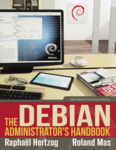
Raphaël Hertzog: The Debian Administrator s Handbook is available

The Debian Administrator's Handbook CoverI am so glad that we managed to complete this project. Roland and I have spent countless hours on this book since December, both for the translation itself and also for all the things that we tend to forget: a nice book cover, a great book layout for the print version, coordinating the work of reviewers, registering as an editor to get an ISBN, etc. I think I will come back to this in a future article because some parts of the story are interesting. In the mean time, enjoy the DFSG-free Debian Administrator s Handbook: Check out the official announce (there s a discount for early buyers of the paperback).

12 comments Liked this article? Click here. My blog is Flattr-enabled.

8 May 2012

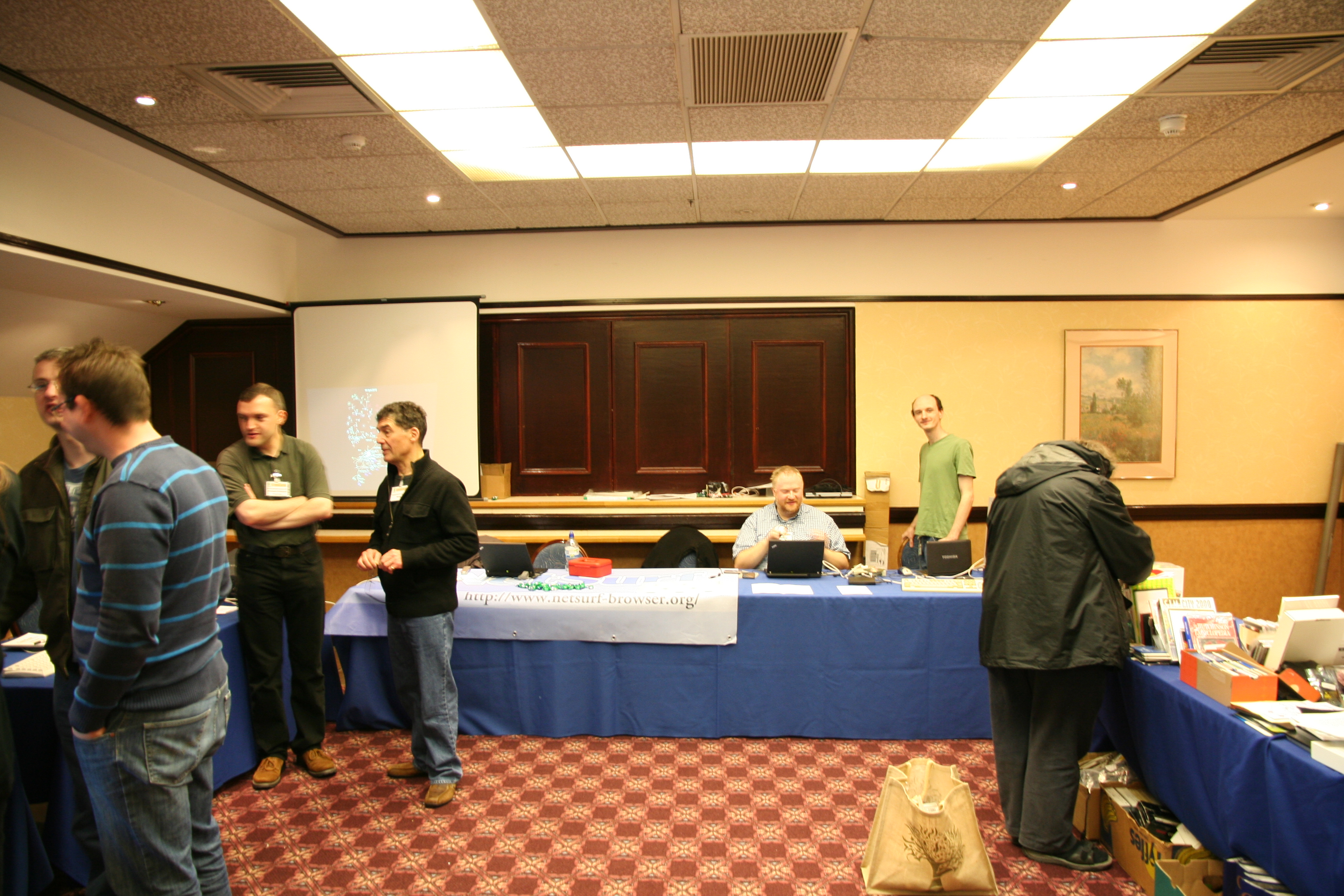
Vincent Sanders: NetSurf at a show

The wakefield RISC OS show is an event the NetSurf project has attended for a long time. in fact since 2005 when the "stand" was a name on an A4 sheet through 2006, 2007, 2008, 2009, 2010 to 2011 we have always been present.

The event has changed in that time from a large affair with many exhibitors to a small specialist interest event with a handful of stands. I took some pictures this year which give a fair impression of the event.

We were seriously considering not attending this year as 2011 had seen us barely break even on donations versus expenses to attend. However we decided that the projects annual Grey Ox Inn post event dinner was probably worth making the effort.

So we all met up in a hotel just off the M1 near Wakefield and set up our table. And although NetSurf as a project now has much more usage on other platforms we still represent the principle browser for the RISC OS platform!

We had a pleasant time, talked to a lot of users and made our expenses back in donations. Overall an amusing Saturday. Based on the size of the event and number and age of the attendees, I fear the RISC OS may be destined for the history books.

7 May 2012

Christoph Berg: Andreas

May 7th, 2012

6 May 2012

Russell Coker: A Quick Review of the Mac Mini with OS/X Lion compared to Linux

A client just lent me a new Mac Mini with OS/X Lion to play with. I think it s interesting to compare it with regular PCs running Linux. Hardware The Mac Mini is tiny. It s volume can be compared to that of a laptop. The entire outside apart from the base is made from aluminium which helps dissipate heat, it s not as effective as copper but a lot better than plastic. The ports on the system are sound input/output, 4*USB, Ethernet, Firewire, Thunderbolt (replacement for Firewire), SDXC, and HDMI. It ships with a HDMI to DVI-D adapter which is convenient if you have an older monitor (or if you have a recent monitor but no HDMI cable as I do). To open the case you unscrew the bottom, this is much like opening a watch. Also like opening a watch it s not particularly easy to screw it back on tightly, I will probably return the Mac Mini without managing to completely screw the base in. The hardware is very stylish and intricately designed, what we expect from Apple. It s also quiet. In every way it s a much better system than the workstation I m using to write this blog post. The difference of course is that this workstation was free and the Mac Mini cost just over $1000 including the RAM upgrade. A Mac Mini could be a decent Linux workstation and if I see one about to be recycled I ll be sure to grab it! Installation The Mac OS comes pre-installed so I didn t get to do a full installation. When I first booted it up it asked me if I wanted to migrate the configuration from an existing server, I don t know how well this works as I don t have a second Mac system but the concept is a good one. Maybe having full support for such a migration process would be a good release goal for a Linux distribution. After determining that the installation is a fresh one I was asked for a mac.com email address or other form of registration. I skipped this step as I don t have such an email address, but it could be useful. Red Hat has Kickstart to allow configuration of an OS install based on a file from a server (via NFS or HTTP). Debian supports preseeding to take OS configuration options from a file at install time [1] and the same option can be used for later stages of OS autoconfiguration. One thing that would be really useful is to allow the user to enter a URL for configuration data for an individual account or for all accounts, so someone with an account on one workstation could upload the configuration (which would be either encrypted or sanitised to not have secret data) and then download it when first logging in to a new system. I can easily take a tar archive of my home directory to a new system, but people like my parents don t have the skill to do that. One of the final stages of system configuration was to identify the keyboard. The system asked me to press the key to the right of the left shift key and then the key to the left of the right shift key and then offered me three choices of keyboard. That was an interesting way of reducing the list of possible keyboards offered to the user and thus preventing the user from selecting one that is grossly incorrect. Cloud Storage When first logging in I was asked for an iCloud [2] login. iCloud doesn t seem like a service that should be trusted, it s based in the US and has been designed to facilitate access by government agencies. Ubuntu One [3] is a similar service that is run by a more reputable organisation, but the data is still stored by Amazon (a US corporation) which seems like a security risk. Ubuntu One isn t in Debian (which is strange as Ubuntu is based on Debian) so it was too much effort for me to determine whether it encrypts data in a way that protects the users against US surveillance. The cost of Ubuntu One storage is $4 per month with music streaming. A better option is to use a self-hosted OwnCloud installation for a private or semi-private cloud [4]. A cheap server from someone like Hetzner (E49 per month for 3TB of RAID-1 storage) [5] is a good option for OwnCloud hosting. A cheap Hetzner server is about $US64 per month (at current conversion rates) which is equivalent to about 16 users of Ubuntu One for music streaming. So if 20 people shared a Hetzner server they could save money when compared to Ubuntu One while also getting a lot more storage. I ve got about 300G of unused disk space on the Hetzner server that hosts my blog and when the system is migrated to a newer Hetzner server with 3TB disks it will have 2.5TB of unused space, I could store a lot of cloud data in that! The main features of iCloud and Ubuntu One seem to be distribution of random data files (anything you wish), streaming music to various playing systems, and copying pictures from phones as soon as they are taken. These are all great features but it s a pity that they don t appear to support distributed document storage. Apple Pages apparently allows documents to be immediately saved to the cloud. I d like to be able to save a file with Libre Office at home and then access it from my netbook using the cloud, of course that would require encryption for secret files but that s not so hard to do. One advantage with such distributed storage is that when combined with offline-IMAP for email it would almost entirely remove the need for backups of the desktop systems I maintain for my relatives. I could have all their pictures and documents go to the cloud and all their email stay on the server so if their desktop PC dies I could just give them a new PC and get it all back from the cloud! OwnCloud supports replication, so if I got two servers I would be covered against a server failure. But I think that for a small server with less than a dozen users it s probably better to just take some down-time when things go wrong and do regular backups to an array of cheap SATA disks. App Store Apple has an App Store in the OS. The use of such a store on a desktop OS is a new thing for me. It s basically the same as the Android Market (Google Play) but on the desktop. I think that there is a real scope for an organisation such as Canonical to provide such a market service for Linux. I think that there is a lot of potential for apps to be sold for less than $10 to a reasonable number of Linux users. A small payment would be inconvenient for the seller if they have to interact with the customer in any way and also inconvenient for the buyer if they are entering all their credit card details into a web site for the sale. But for repeat sales with one company being an intermediary it would be convenient for everyone. A market program for a desktop Linux system could provide a friendly interface to selecting free apps from repositories (for Debian, Ubuntu, Fedora, or other distributions) and also have the same interface used for selecting paid applications. Conclusion This isn t much of a review of Apple OS/X or the Mac Mini. Thinking about ways of implementing the best features of Lion on Linux is a lot more interesting. I admire Apple in the same way that I admire sharks, they are really good at what they do but they don t care about my best interests any more than a hungry shark cares about me. Update I got the currency conversion wrong in the first version of this article. It seems that to save money via a shared Hetzner server instead of Ubuntu One about 20 users would be needed instead of 10. But that s still not too many and would still give a lot more storage. It would be a little more difficult to arrange though, probably anyone who is seriously into computers knows 10 people who would want to share such a service (including people like their parents who want things to just work and don t understand what s happening). But getting 20 people would be more difficult. Related posts:
  1. Xen and SE Linux EWeek review of RHEL5 The online magazine EWeek has done a review of RHEL5....
  2. Servers vs Phones Hetzner have recently updated their offerings to include servers with...
  3. Modern Laptops Suck One of the reasons why I m moving from a laptop...

Gregor Herrmann: RC bugs 2012/17-18

as I was mostly offline last week, this is a report covering two weeks. as in the week before, it's mainly a mix of build-arch & gcc 4.7 bugs.

Maximilian Attems: Gnome shell rocks

The Gnome shell is a great step. Finally the Linux default Desktop is not only useful (as Gnome 2.X used to be), but also stylish and modern. It's a different kind of desktop, which seems to irk desktop habits of some peoples. I'm proud to show it off. This happened for the last time years ago while doing some funny config quirks of fvwm. Gnome 3.x is cool. (: Also the customisability via all the extensions is fun. What I do miss is the gnome weather (There used to be an incarnation with plenty of geographical sites, which got somehow got axed later.) and more packaged extensions for out of the box deployments (wish #661782). I seem to be too lunatic to find session settings in "System Settings" for having startup applications run or the used applications reopened (please yes evince show the same pdfs). The other minor critic is that "System Settings" is quite empty, but has on each system a funny advertisement for "Wacom Tablets". Ah and after a myriad of suspends and network-manager stops/restarts gnome-shell likes to segfault, which is no nuisance as it restarts.

5 May 2012

Ritesh Raj Sarraf: Cancer cure drugs now more affordable

Now these are the kind of moves that needs to happen more often. Whether this will cause a negative impact on the overall market, and the further invention of drugs (including patent control), but the affordability of the medicatoin to an average citizen is a great move.The typical Chemotherapy can be on an average of 22 times. When summed up with the dosage (somewhere around 250 mg IIRC), the cost comes to approx: (22/4) * 15000 = 82k, which now, will be affordable at 27k.I guess the price slash is only for India and am not sure what the impact to the global market will look like.Quoting the article: http://www.moneycontrol.com/news/business/cipla-drug-price-cut-not-to-hurt-revenue-much-say-analysts_700380.html

Cipla cut price of its kidney cancer drug Sorafenib, which is sold under brand name Nexavar by multi-national Bayer to Rs 6,840 for a month's supply, from around Rs 28,000 earlier. Its lung cancer drug Gestinib, which is sold under brand name Iressa by AstraZeneca will cost Rs 4,250, versus Rs 10,200 earlier, and price of Temozolamide used to treat brain tumour, has been reduced by Rs 15,000 to Rs 5,000.

India's Patent Office recently issued a compulsory licence allowing Natco to make a generic copy of Sorafenib, on the payment of a royalty to Bayer, which sells the drug at around Rs 2 lakh.

Domestic sales account for 46-47% of Cipla's total sales and of that the cancer drugs portfolio is a very small portion, so these price cuts are unlikely to have any major impact on its revenue, Hitesh Mahida of Fortune Equity Brokers told moneycontrol.com

"Cipla's idea seems to be to create disruption in the market, increase its market share..." the analyst says.

Swiss pharma major Roche had earlier this year signed a manufacturing deal with India's Emcure Pharma so that its anti-cancer drugs Herceptin and MabThera could be made in India at affordable prices. Analysts say Cipla's move to slash prices could in future deter some MNCs from launching their drugs in India at all, but some may also look at doing deals like the one struck by Roche.

Meanwhile, shares of pharma major Cipla surged over 3% on Friday after brokerage CLSA upgraded the stock to "outperform" from "underperform," saying, Cipla would be strongest beneficiaries of a weakening rupee.

The rupee has been sliding sharply against the US dollar in recent days and hit over four month low of around Rs 53.78 earlier in trade.

"We expect improving margins over the coming quarters on back of a weak rupee and a low base. We expect strong operating profit growth over coming quarters led by margin expansion and high margin product supplies," CLSA's Hemant Bakhru said.

The US Food and Drugs Administration has approved Meda's drug Dymista for allergic rhinitis and the product is widely expected to reach USD 300-500 million in annual sales over the coming years. The analyst says Cipla being a partner, will benefit through product supplies over a longer term.

"Apart from approval (outside North America) related milestone payment (US$5m), we expect gradual increase in Cipla s sales from product related supplies to Meda. Assuming Cipla supplies product at 10-15% of sales, it could earn US$50-75m at peak sales," Bakhru said.

Additionally, a low base in domestic formulations could result in reasonable India growth, he adds.

Cipla shares were up 2.8% at Rs 326.60 on NSE in noon trade.

Keywords:

Russell Coker: Liberty and Mobile Phones

I own two mobile phones at the moment, I use a Samsung Galaxy S running Cyanogenmod [1] (Android 2.3.7) for most things, and I have a Sony Ericsson Xperia X10 running Android 2.1 that I use for taking photos, some occasional Wifi web browsing, and using some applications. Comparing Android Hardware The hardware for the Xperia X10 is better than that of the Galaxy S in many ways. It has a slightly higher resolution (480*854 vs 480*800), a significantly better camera (8.1MP with a flash vs 5MP without), and a status LED which I find really handy (although some people don t care about it). The only benefit of the Galaxy S hardware is that it has 16G of internal storage (of which about 2G can be used for applications) and 512M of RAM while the Xperia X10 has 1G of internal storage and 384M of RAM. These are significant issues, I have had applications run out of RAM on the Xperia X10 and I have been forced to uninstall applications to make space. Overall I consider the Xperia X10 to be a significantly better piece of hardware as I am willing to trade off some RAM and internal storage to get a better resolution screen and a better camera. The problem is that Sony Ericsson have locked down their phones as much as possible and they don t even give users the option of making a useful backup they inspired my post about 5 principles of backups [2]. The fact that the Galaxy S allows installing CyanogenMod which then gives me the liberty to do whatever I want with my phone is a massive feature. It outweighs the hardware benefits of the Sony Ericsson phones over Samsung phones prior to the Galaxy Nexus and Galaxy Note. For an individual user the ability to control their own hardware is a feature. Such an ability wouldn t be much use if there wasn t a community of software developers, so if you buy an Android phone that isn t supported by CyanogenMod or another free Android distribution then whether it is locked probably won t matter to you. But for any popular Android phone that s sold on the mass market it seems that if it s not locked then it will get a binary distribution of Android in a reasonable amount of time. Comparing with Apple It seems that Apple is the benchmark for non-free computing at the moment. The iPhone is locked down and Apple takes steps to re-lock phones that can be rooted as opposed to the Android vendors who ship phones and then don t bother to update the firmware for any reason. The Apple app market is more expensive and difficult to enter and if an app isn t in the market then you have to pay if you want to install it on a small number of development/test phones. This compares to Android where the Google market is cheaper and easier to enter and anyone can distribute an app outside the market and have people use it. But for an individual this doesn t necessarily cause any problems. I have friends and clients who use iPhones and are very happy with them. In terms of software development it s a real benefit to have a large number of systems running the same software. As Apple seems to have higher margins and larger volume than any other phone vendor as well as shipping only one phone at any time (compared to every other phone vendor which seems to ship at least 3 different products for different use cases) they are in a much better economic position to get the software development right. As far as I can tell the hardware and software of the iPhone is of very high quality. The iPad (which has a similar market position) is also a quality product. The fact that the Apple app market is more difficult to enter (both in terms of Apple liking the application and the cost of entry) also has it s advantages, I get the impression that the general quality of iPhone apps is quite high as opposed to Android where there are a lot of low quality apps and many more fraudulent apps than there should be. The lack of choice in Apple hardware (one phone and one tablet) is a disadvantage for the user. There is no option for a phone with a slide-out keyboard, a large screen (for the elderly and people with fat fingers), or any of the other features that some Android phones have. The lack of a range of sizes for the iPad is also a disadvantage. But it seems that Apple has produced hardware that is good enough for most users so there aren t many complaints about a lack of choice. It seems to me that the biggest disadvantage of the closed Apple ecosystem is for society in general. Anyone who wants to write a mobile app to do something which might be considered controversial would probably think twice about whether to develop for the iPhone/iPad as Apple could remove the app at a whim which would waste all the software development work that was invested in writing the app. Google seem to have much less interest in removing apps from their store and if they do remove an app then with some inconvenience it can be distributed on the web without involving them so the work won t be wasted. How Much Freedom Should a Vendor Provide? The Apple approach of locking everything down is clearly working for them at the moment. The Samsung approach of taking the Google prescribed code and allowing users to replace it is good for the users and works well. The Sony Ericsson approach of taking the Google code, adding some proprietary code, and then locking the phone down is bad for the users and I think it will be bad for Sony Ericsson. People are more likely to tell others about negative experiences and negative reviews are more likely to be noticed than positive reviews. So while many people are reasonably happy with Sony Ericsson products (until they find themselves unable to restore from a backup) it s still not a good situation for Sony Ericsson marketing. It seems that there are benefits to hardware vendors for being really open and for locking their users in properly. But being somewhat open isn t a good choice, particularly for a vendor that ships poor quality proprietary apps such as the Sony Ericsson ones. In terms of application distribution Google isn t as nice as they appear. The Skyhook case revealed that Google will do whatever it takes to prevent apps that compete with Google apps from being installed by default [3]. Google is also trying to make money from DRM sales via Youtube which it denies to rooted phones [4]. Again it seems to me that the best options here are being more open than Google is and being as closed as Apple. Google might gain some useful benefits from applying DRM (even though everyone with technical knowledge knows that it doesn t work) but the Skyhook shenanigans have got to be costing Google more than it s worth. How to make Android devices more Free The F-droid market is an alternative to the Google App market which only has free software [5]. On it s web site there are links to download the source for the applications, including the source and binaries for old versions. In the Google App market if an upgrade breaks your system then you just lose, with F-droid you can revert to the old version. A self-hosted OwnCloud installation for a private or semi-private cloud [6] can be used as an alternative to the Google Music store as well as for hosting any other data that you want to store online. The Open Street Map for Android (Osmand) project provides an alternative to the Google Map service [7]. Osmand allows you to download all the vector data for the regions you will ever visit so it can run without Internet access. But it doesn t have the ability to search for businesses and the search for an address functionality is clunky and doesn t accept plain text, which among other things precludes pasting data that s copied from email or SMS. While Osmand provides some important features that Google Maps will probably never provide, it doesn t provide some of the most used features of Google Maps so uninstalling Google Maps isn t a good option at the moment. The K9mail project provides a nice IMAP client for Android [8]. Use K9 with a mail server that you run and you won t need to use Gmail. There are alternatives to all the Google applications. It seems that apart from the lack of commercial data and search ability in Osmand an Android device that is used for many serious purposes wouldn t lack much if it had no Google apps. Google seems to be going too far in controlling Android. Escaping from their control and helping others to do the same seems to be good for society and good for the users who don t need apps which are only available in proprietary form. Related posts:
  1. Dual SIM Phones vs Amaysim vs Contract for Mobile Phones Currently Dick Smith is offering two dual-SIM mobile phones for...
  2. My Ideal Mobile Phone Based on my experience testing the IBM Seer software on...
  3. Old Mobile Phones as Toys In the past I have had parents ask for advice...

Wouter Verhelst: First-rate Linux support by Xerox

When buying hardware for a Linux system, often we need to hunt for their support status by searching for PCI or USB IDs in the kernel source, or by looking up the printer model on the linuxprinting.org (now freedesktop.org) openprinting database, or similar things. This is something I'm used to, and not at all unexpected anymore. And after having done it a thousand times for several customers as well as for myself, it's become routine. So in that light, I was pleasantly surprised last monday when I delivered and installed a Xerox WorkCentre 3220 at a customer last week to see that they support Linux on the same level as they do Windows and MacOS: the "system requirements" part of the manual contains a section laying out the requirements for a computer running Linux, as does the "troubleshooting" section; and when there are Linux-specific bits to be said, there'll just be a Linux-specific section in the manual to tell you what to do. Also, the CD-ROM that came with the device has a Rock Ridge extension, which means that if you pop it into a Linux system you'll see an installer for CUPS and SANE drivers. The only criticism I have is that it's an installer, and not an LSB package or some such. But hey, for once I didn't have to fight to get a printer to work properly!

Next.

Previous.