Search Results: "ina"

20 July 2013

Francesca Ciceri: #debcraft n.3: Debian swirl reverse appliqu on t-shirt

please, do try this at home the finished result This week's project is a quick t-shirt reconstruction with the reverse appliqu technique which basically means layering two different fabrics, sew them togheter, and then cut away part of the top one to reveal the one underneath.
Ready to start? What you will need the t-shirt before the reconstruction A guitar, Infinite Jest, The Illuminatus Trilogy and The Year of the Flood, while suggested for your personal enjoyment, are not strictly necessary for this project. Step 1 cutting the red fabric Cut a square of red fabric of the desired dimensions, I've used the short sleeve of a ruined red t-shirt.
On the wrong side of your patch, apply the fusible interfacing. Step 2 drawing the swirl on the interfacing Draw a swirl on the interfacing.
IMPORTANT: remember to draw the swirl as mirrored, because the interfacing is the wrong side of our patch.
So, if usually the Debian swirl has the back to the left and the front to the right - like a "(" - when you draw it on the interfacing it will need to have the back to the right and front to the side - like a ")".
I do realize that this explanation isn't really clear: just look at the picture above. Step 3 pin the patch to the t-shirt Turn your t-shirt inside out and pin the patch (with the interfacing up) in the place you want to put it: I decided to put mine on the lower left corner, approximately 10 cm above the bottom hem.
(In the picture is lower, I changed idea on the position just before sewing it)
Now you can sew it, following closely the drawn line.
Because I'm lazy, I decided to do it by hand, but if you're not afraid of sewing curved shapes, doing it with the sewing machine is definitely the right (and quick) way to do it. Step 4 cut the extra fabric Now, you can cut the extra fabric around your swirl. Step 5 revealing the swirl Turn your shirt right side out.
Make a snip through the knit in the fabric on the inside part of your stitches and cut off the extra fabric, to reveal the red swirl underneath.
Be careful to not cut the red fabric! Step 6 ending with a embroidered dashed line If you like it, you can end embroidering a dashed line (with running stitches) in a contrasting thread all around the swirl. And you're finished: now you can enjoy your new Debian t-shirt! :) For any questions feel free to contact me.

19 July 2013

Jan Wagner: Debian (wheezy) 7.x and mailscanner

Mailscanner is an e-mail security and anti-spam solution for e-mail gateways. In combination of postfix it uses a very ugly way messing around in postfixs queue directories. Anyways .. if you are still interested, keep reading. Mailscanner was removed from Debian, so it's not available in wheezy. Anyways ... there is a web 2.0 Frontend for Mailscanner, called Baruwa, which provides mailscanner packages for Debian. Add the baruwa sources file
cat > /etc/apt/sources.list.d/mailscanner.list << 'EOF'
deb http://apt.baruwa.org/debian wheezy main
deb-src http://apt.baruwa.org/debian wheezy main
EOF
Optional, install the GPG key for the reprosority
wget -O - http://apt.baruwa.org/baruwa-apt-keys.gpg   apt-key add -
If you're running squeeze with Mailscanner, you should do this before upgrading to wheezy. If you are installing Mailscanner on a fresh wheezy, just:
aptitude update && aptitude install mailscanner
As of Version 4.78 and above, you can place you local changes into /etc/MailScanner/conf.d/, no need to mess directly around into /etc/MailScanner/MailScanner.conf

Michal &#268;iha&#345;: Speed improvements in Weblate

Yesterday, I've spent some time trying to improve speed of translation import in Weblate. It got annoyingly slow while adding new features and I felt there has to be some area for improvements even with all the features. I was testing on development server with debug stuff enabled (what slows down things quite a lot already) and first import took about 30 seconds. Quick look revealed that for linked repositories, the link lookup happens too often, so some caching could be used. This has saved about 3 seconds... With offloaded indexing (what is anyway only useful setup for production use), every reindex request was checking whether there is already one before creating new one. In most cases there is none before, so it's simply faster to try to create one and ignore error in case it is already there. We're now 5 seconds faster. Another big resource consumer are quality checks. They provide useful feedback to translators, but it means that quite a lot of code needs to be executed for every single string. First thing I've realized is that unit check state is recalculated everytime regardless the fact whether there was any change, what was easy to fix. The other speed issue is in consistency check - it does too complex SQL query, which usually does not match anything. Converting this to much simpler one (which will in most cases still have no results) improves performance for usual path while having minimal impact for the real checking. Another 4 seconds down on my test import. Last thing which I changed is way how per translation statistics are updated. In past this required quite a lot of queries, but yesterday I've realized this can be much reduced. During test suite run on PostgreSQL, I saw that it's not that easy - PostgreSQL does not allow to sum boolean fields, but fortunately this can be fixed as well. This has saved about 2 seconds. In the end the tested import took 16 seconds instead of original 30 and issued 2500 SQL queries instead of 5000 at the beginning. I hope you will enjoy regained speed of imports :-).

Filed under: English Weblate 0 comments Flattr this!

18 July 2013

Thorsten Glaser: mksh/Win32

Michael Langguth and Scalaris AG asked me to publish the mksh/Win32 Beta 14 source and binary archive, and it is with joy I m doing this. Checksums and Hashes Just a few words on it (more in the README.1st file included): this is a port of The MirBSD Korn Shell R39 to the native WinAPI; it s not quite got the full Unix feel (especially as it targets the Weihenstephan unxutils instead of a full Interix or Cygwin environment) but doesn t need a full POSIX emulation layer either. It s intended to replace MKS ksh and the MKS Toolkit. Source for the compatibility library is also included under The MirOS Licence; we aim at publishing it as OSI Certified Open Source Software like mksh itself. (There is a situation with dlmalloc/nedmalloc being resolved, and the icon is derived from the BSD d mon which is a protected unregistered trademark, but we re not Mozilla and allow distro packages to keep using it ) Rebasing it on a newer mksh(1) followed by (partial) integration into the main source code is a goal. Have fun trying it out and hacking on it. It s currently built with -DMKSH_NOPROSPECTOFWORK (so coprocesses and a few other minor things won t work), but a SIGCHLD emulation is being worked on but if you want to help out, I m sure it s welcome, just come on IRC or post on the mailing list, and I ll forward things to Michael as needed. Reports on testing with other toolchain and OS versions are also welcome.

Vincent Bernat: Packaging a daemon for OS X

There are three main ways to distribute a command-line daemon for OS X:
  1. Distributing source code and instructions on how to compile it.
  2. Using a third-party package manager, like Homebrew.
  3. Providing an installer package.

Homebrew Homebrew is a popular package management system. It works like the BSDs ports collections by downloading, compiling and installing the requested software, while also installing any required dependencies automatically. Creating a new package is quite easy and there are a lot of examples available. However, there are some limitations:
  • You don t really build a package but execute a recipe to locally install the software.
  • You need to install development tools, either a whole Xcode installation1 or the command line version.
  • If you need to execute some steps as root, you will have to explain them to the user for her to execute by hand. This includes the creation of a system user or the installation of a daemon through launchd.
If you can t live with those limitations, you may need to build an installer package.

Building an installer package OS X comes with a graphical and a command-line installer. The graphical one is run by opening a package from the Finder. Then, the user experiences some familiar wizard allowing her to install the software in a matter of a few seconds. OS X graphical installer The documentation around how to build such a package is somewhat clumsy. You may find outdated information or pieces of information that only apply to projects using Xcode. I will try to provide here accurate bits in the following context:
  1. You are packaging a pure command-line tool.
  2. You are using Autoconf and Automake as a build system.
  3. You want to support several architectures.
  4. You want to support older versions of OS X.

Creating a package Building such a package was previously done with some graphical tool called PackageMaker. This tool is not available any more and developers are asked to switch to pkgbuild and productbuild. There is a very neat Stackoverflow article on how those tools work. A package is built in two steps:
  1. Build component packages.
  2. Combine them into a product archive.
A component package contains a set of files and a set of scripts to execute at various steps of the installation. You can have several component packages, for example a package for the daemon and a package for the client. They are built with pkgbuild. A product archive contains the previously created component packages as well as a file describing various options of the installer (required and optional components, license, welcome text, ). To create a component package, we need to install the needed files in some directory:
$ ./configure --prefix=/usr --sysconfdir=/private/etc
$ make
$ make install DESTDIR=$PWD/osx-pkg
We will now put the content of osx-pkg into a component package with pkgbuild:
$ mkdir pkg1
$ pkgbuild --root osx-pkg \
>    --identifier org.someid.daemon \
>    --version 0.47 \
>    --ownership recommended
>    pkg1/output.pkg
pkgbuild: Inferring bundle components from contents of osx-pkg
pkgbuild: Wrote package to output.pkg
You need to be careful with the identifier. It needs to be unique and identify your software as well as the specific component. Then, you need to create an XML file describing the installer. Let s call it distribution.xml:
<?xml version="1.0" encoding="utf-8" standalone="no"?>
<installer-gui-script minSpecVersion="1">
    <title>Some daemon</title>
    <organization>org.someid</organization>
    <domains enable_localSystem="true"/>
    <options customize="never" require-scripts="true" rootVolumeOnly="true" />
    <!-- Define documents displayed at various steps -->
    <welcome    file="welcome.html"    mime-type="text/html" />
    <license    file="license.html"    mime-type="text/html" />
    <conclusion file="conclusion.html" mime-type="text/html" />
    <!-- List all component packages -->
    <pkg-ref id="org.someid.daemon"
             version="0"
             auth="root">output.pkg</pkg-ref>
    <!-- List them again here. They can now be organized
         as a hierarchy if you want. -->
    <choices-outline>
        <line choice="org.someid.daemon"/>
    </choices-outline>
    <!-- Define each choice above -->
    <choice
        id="org.someid.daemon"
        visible="false"
        title="some daemon"
        description="The daemon"
        start_selected="true">
      <pkg-ref id="org.someid.daemon"/>
    </choice>
</installer-gui-script>
Fortunately, this file is documented on Apple Developer Library. Since we only describe one package, we pass customize="never" as an option to skip the choice part. You can however remove this attribute when you have several component packages. The attribute rootVolumeOnly="true" explains that this daemon can only be installed system-wide. It is marked as deprecated but still works. Its replacement (domains tag) displays an unusual and buggy pane which Apple doesn t use in any of its packages. You need to put the HTML2 documents into a resources directory. It is also possible to choose the background by specifying a <background/> tag. The following command will generate the product archive:
$ productbuild --distribution distribution.xml \
>              --resources resources \
>              --package-path pkg1 \
>              --version 0.47 \
>              ../final.pkg
productbuild: Wrote product to ../final.pkg

Scripts The installer can execute some scripts during installation. For example, suppose we would like to register our daemon with launchd for it to be run at system start. You first need to write some org.someid.plist file and ensure it will get installed in /Library/LaunchDaemons:
<?xml version="1.0" encoding="UTF-8"?>
<!DOCTYPE plist PUBLIC "-//Apple//DTD PLIST 1.0//EN" "http://www.apple.com/DTDs/PropertyList-1.0.dtd">
<plist version="1.0">
<dict>
  <key>Label</key>
  <string>org.someid</string>
  <key>ProgramArguments</key>
  <array>
    <string>/usr/sbin/mydaemon</string>
    <string>-d</string>
  </array>
  <key>RunAtLoad</key><true/>
  <key>KeepAlive</key><true/>
</dict>
</plist>
Then create a scripts/postinstall file with the following content:
#!/bin/sh
set -e
/bin/launchctl load "/Library/LaunchDaemons/org.someid.plist"
You also need a scripts/preinstall file which will allow your program to be smoothly upgraded:
#!/bin/bash
set -e
if /bin/launchctl list "org.someid" &> /dev/null; then
    /bin/launchctl unload "/Library/LaunchDaemons/org.someid.plist"
fi
Ensure that those scripts are executable and add --scripts scripts to pkgbuild invocation. If you need to add a system user, use dscl.

Dependencies There is no dependency management built into OS X installer. Therefore, you should ensure that everything is present in the package or in the base system. For example, lldpd relies on libevent, an event notification library. This library is not provided with OS X. When it is not found, the build system will use an embedded copy. However, if you have installed libevent with Homebrew, you will get binaries linked to this local libevent installation. Your package won t work on another host. The output of otool -L can detect unwanted dependencies:
$ otool -L build/usr/sbin/lldpd
build/usr/sbin/lldpd:
        /usr/lib/libresolv.9.dylib (compatibility version 1.0.0, current version 1.0.0)
        /System/Library/Frameworks/IOKit.framework/Versions/A/IOKit (compatibility version 1.0.0, current version 275.0.0)
        /System/Library/Frameworks/CoreFoundation.framework/Versions/A/CoreFoundation (compatibility version 150.0.0, current version 744.19.0)
        /System/Library/Frameworks/Foundation.framework/Versions/C/Foundation (compatibility version 300.0.0, current version 945.18.0)
        /usr/lib/libSystem.B.dylib (compatibility version 1.0.0, current version 169.3.0)

Compilation for older versions of OS X The package as built above may only work on the same version of OS X that you use to compile. If you want a package that will work on OS X 10.6, you will need to download the appropriate SDK3. Then, you need to tell the compiler the target version of OS X and the SDK location. You can do this by setting CFLAGS and LDFLAGS (and CXXFLAGS if you use C++):
$ SDK=/Developer/SDKs/MacOSX10.6.sdk
$ ./configure --prefix=/usr --sysconfdir=/private/etc \
>         CFLAGS="-mmacosx-version-min=10.6 -isysroot $SDK" \
>         LDFLAGS="-mmacosx-version-min=10.6 -isysroot $SDK"
The -mmacosx-version-min flag will be used by various macros in the headers to mark some functions as available or not, depending on the version of OS X you target. It will also be used by the linker. The -isysroot will tell the location of the SDK. Headers and libraries will be looked up in this location first.

Universal binaries Mac OS X 10.6 was available for both IA-32 and x86-64 architectures. If you want to support both installations with a single package, you need to build universal binaries. The Mach object file format, used by OS X, allows several versions of the executable in the same file. The operating system will select the most appropriate one. An easy way to generate such files is to pass -arch i386 -arch x86_64 to the compiler:
$ ./configure --prefix=/usr --sysconfdir=/private/etc \
>     CC="gcc -arch i386 -arch x86_64" \
>     CPP="gcc -E"
However, this is a dangerous option. Suppose that your ./configure script tries to determine some architecture-dependent parameter, like the size of an integer (with AC_CHECK_SIZEOF); it will compute it for the host architecture. The binary generated for the other architecture will therefore use a wrong value and may crash at some point. The correct way to generate an universal binary is to execute two separate compilations and to build the universal binary with lipo:
$ for arch in i386 x86_64; do
>   mkdir $arch ; cd $arch
>   ../configure --prefix=/usr --sysconfdir=/private/etc \
>       CC="gcc -arch $ARCH" \
>       CPP="gcc -E"
>   make
>   make install DESTDIR=$PWD/../target-$ARCH
>   cd ..
> done
[...]
$ lipo -create -output daemon i386/usr/sbin/daemon x86_64/usr/sbin/daemon
Since lipo only works on file, I have written a Python script applying lipo recursively to several directories.

Putting everything together Now, we need to automate a bit. You could provide some nifty script. I propose an appropriate Makefile.am instead. This way, we can use the output variables, like @VERSION@, from ./configure to generate some of the files, like distribution.xml. You need to add that in your configure.ac:
AC_CONFIG_FILES([osx/Makefile osx/distribution.xml osx/im.bernat.lldpd.plist])
AC_CONFIG_FILES([osx/scripts/preinstall],  [chmod +x osx/scripts/preinstall])
AC_CONFIG_FILES([osx/scripts/postinstall], [chmod +x osx/scripts/postinstall])
AC_SUBST([CONFIGURE_ARGS], [$ac_configure_args])
Let s have a look at osx/Makefile.am. First, we define some variables:
PKG_NAME=@PACKAGE@-@VERSION@.pkg
PKG_TITLE=@PACKAGE@ @VERSION@
PKG_DIR=@PACKAGE@-@VERSION@
ARCHS=@host_cpu@
If we want to build for several architectures, we will type make ARCHS="x86_64 i386". Otherwise it defaults to the current host s architecture. We use install-data-local target to install files specific to OS X:
install-data-local:
    install -m 0755 -d $(DESTDIR)/Library/LaunchDaemons
    install -m 0644 im.bernat.@PACKAGE@.plist $(DESTDIR)/Library/LaunchDaemons
uninstall-local:
    rm -f $(DESTDIR)/Library/LaunchDaemons/im.bernat.@PACKAGE@.plist
The main target is the product archive, built with productbuild:
../$(PKG_NAME): pkg.1/$(PKG_NAME) distribution.xml resources
    $(PRODUCTBUILD) \
        --distribution distribution.xml \
        --resources resources \
        --package-path pkg.1 \
        --version @VERSION@ \
        $@
Its main dependency is the component package:
pkg.1/$(PKG_NAME): $(PKG_DIR) scripts
    [ -d pkg.1 ]   mkdir pkg.1
    $(PKGBUILD) \
        --root $(PKG_DIR) \
        --identifier im.bernat.@PACKAGE@.daemon \
        --version @VERSION@ \
        --ownership recommended \
        --scripts scripts \
        $@
Now, we need to build $(PKG_DIR):
$(PKG_DIR): stamp-$(PKG_DIR)
stamp-$(PKG_DIR): $(ARCHS:%=%/$(PKG_DIR))
    $(srcdir)/lipo $(PKG_DIR) $^
    touch $@
The $(ARCHS:%=%/$(PKG_DIR)) will expand to x86_64/$(PKG_DIR) i386/$(PKG_DIR). This is a substitution reference4. Before applying our lipo script, we need to be able to build the architecture-dependent package directories:
pkg_curarch = $(@:stamp-%=%)
$(ARCHS:%=%/$(PKG_DIR)): %/$(PKG_DIR): stamp-%
$(ARCHS:%=stamp-%): stamp-%: im.bernat.lldpd.plist
    [ -d $(pkg_curarch) ]   mkdir -p $(pkg_curarch)
    (cd $(pkg_curarch) && \
        $(abs_top_srcdir)/configure @CONFIGURE_ARGS@ \
            CC="@CC@ -arch $(pkg_curarch)" \
            CPP="@CPP@")
    (cd $(pkg_curarch) && \
        $(MAKE) install DESTDIR=$(abs_builddir)/$(pkg_curarch)/$(PKG_DIR))
    touch $@
This may seem a bit obscure, but this is really like what we have described previously. Note that we use @CONFIGURE_ARGS@ which is a variable we have defined in configure.ac. Here is how a user would create its own OS X package:
$ SDK=/Developer/SDKs/MacOSX10.6.sdk
$ mkdir build && cd build
$ ../configure --prefix=/usr --sysconfdir=/private/etc --with-embedded-libevent \
   CFLAGS="-mmacosx-version-min=10.6 -isysroot $SDK" \
   LDFLAGS="-mmacosx-version-min=10.6 -isysroot $SDK"
[...]
$ make -C osx pkg ARCHS="i386 x86_64"
[...]
productbuild: Wrote product to ../lldpd-0.7.5-21-g5b90c4f-dirty.pkg
The package has been built in ../lldpd-0.7.5-21-g5b90c4f-dirty.pkg.

  1. Even if Xcode is free, you will need to register to Apple and show a valid credit card number. That s quite an interesting requirement.
  2. It is possible to use other formats (like RTF or just plain text) for documents but HTML seems the best choice if you want some formatting without fiddling with RTF.
  3. Unfortunately, Apple makes it difficult to find them. The easiest way to get the SDK for Mac OS X 10.6 is to download Xcode 4.3.3, mount the image and copy the SDK to /Developer/SDKs.
  4. This is equivalent to the use of patsubst function. However, this function is specific to GNU make. The substitution reference pattern was accepted recently in POSIX and is coined as pattern macro expansion.

Craig Small: Step or Sloping Graphs

Even though the backend of Rosenberg NMS uses rrdtool RRD files, the front end graphs are created using jqPlot. The idea is to have a set of templates for the different types of graphs and just apply them to the various data sets. It makes things a lot simpler for new graphs because you just select which one you want; unless you want something a lot different which would involve a new graph template. In any case, anyone that looks enough at the standard rrdtool graphs will know they are a series of steps. While it depends on the RRA, usually they are 5 minute steps, so a graph showing an increasing rate might show 5 minutes of 2 Mbps and then the next 5 minutes of 11 Mbps. jqPlot graphs as I ve currently got them draws a line between two data points, so there would be a sloping line starting at 2.5 minutes (half of the first 5 minute interval) and 2Mbps sloping up to 11 Mbps at 7.5 minutes. At first I thought this was wrong and spent some time attempting to fix the graph by making it look like a rrdtool graph more. Someway through that process I stopped and wondered, what IS the right way? The answer like a lot of other things, is it depends . For a graph showing a rate, such as the output bits per second on an interface, the way this is done is at regular intervals a counter is measured. So if at time 0 the counter is 140 and time 60 the counter is 200 and finally at time 120 the counter is at 800 there has been an average rate of 1 [(200-140)/60] and 100 [(800-200)/60)]. rrdtool would show a horizontal bar at 1 bps and then another horizontal bar at 100 at the next time interval. jqPlot would show a sloping line going from 30,1 up to 90,100. Two graphs looking very different from the same data, what gives? Each graph is right, or rather is showing an estimation of different things, hence their differences. rrdtool is showing the average rate for that time period. It is in some ways accurate because leaving aside missed wrap-arounds and resets that many bits did pass through that interface for the time specified. However often the graphs are interpreted incorrectly as the real rate and not an average. We can be reasonably sure for a rate that it would not be 1 for exactly a minute and then immediately jump to 100 for another minute. This isn t rrdtool s fault, it is just how the graphs can be interpreted. jqplot will show more realistic graphs, with a curve sloping up. However this too makes assumptions that the rate increase is linear which often it is not. It just gives the illusion that the graph knows more about the data than it really does. In the end, both graphs are at the same time accurate and misleading. It s important when looking at any graph in general (not just these two types) that you understand its limits and assumptions. To give one example of the problems that can be missed, traffic interfaces may have microbursts (large amount of traffic in short amount of time) which, due to the averaging that goes on in graphing are invisible to graphs and give an incorrect account of what is going on.

16 July 2013

Joachim Breitner: Ultimate Tic Tac Toe is always won by X

The blog Math with Bad Drawings recently featured an article about Ultimate Tic Tac Toe, a variant of Tic Tac Toe where each of the nine fields is a separate game of Tic Tac Toe. To mark a field of the large game as your, you have to win the small game therein. If you chose a field in the small game, this position determines the small field that the other play may play next. See the linked article for a full explanation. As far as I know, the question of who wins this game was open; at least nothing definite was known on Hacker News or on the Board Games StackExchange site. We discussed this a bit in our office, and my coworker Denis Lohner came up with what seems to be a winning strategy. Update: Not surprising, but with these variants of the rule, the winning strategy was already known.
Strategy Assume Denis ( ) plays against me ( ). Like most suggestions for a winning strategy for the first player, Denis (X) starts with the middle:


Now I have to put my in the center field of the center game. No matter where I place it, Denis will send me back ot the middle, until one field of the center game is free. Doing this eight times inevitably puts us in a position like this:


The only way I can influence the game is by chosing which I place last; this determines where Denis goes now. But (and please verify that carefully) it will not matter: The only thing required from that field is that there is a second field that, together with the center, forms a row (or column or diagonal); all fields satisfy that. Assume I placed the top-left last, and Denis has to go there. He will send me to that field:


Now the game of the first field is repeated: Whereever I send him, he will send me back. This works great for all fields but the middle field. The middle field is special: When I send him there, he has the free choice. He will pick the bottom-right game. In any case we will end up in this situation: I won the center game; I likely have a few in the top-left game. To be precise: I have a there if and only if the he has a in the top-left corner of the corresponding game. He also has the diagonal of the lower-right game. For example:


I have to put my mark in the lower-right game now. From now on, whereever I go, he will send me to either to the top-left or bottom-right game. I can do nothing about it (I cannot send him to the diagonal any more, and whereever I send him there is at least one of the top-left or bottom-right fields fee), so he wil easily win all the other games by getting the diagonal. Eventually, he wins the whole game with the bottom row or the right column:


This is not a formal proof yet, but hopefully close enough to convince you, or alternatively allow you to precisely describe how you can prevent losing against Denis strategy.

15 July 2013

Matthew Garrett: How XMir and Mir fit together

Mir is Canonical's new display server. It fulfils a broadly similar role to Wayland and Android's Surfaceflinger, in that it takes final responsibility for getting pixels onto the screen. XMir is an X server that runs on top of Mir. It permits applications that know how to speak the X protocol but don't know how to speak to Mir (ie, approximately all of them at present) to run in a Mir-based environment.

For Ubuntu 13.10, Canonical are proposing to use Mir by default. This doesn't mean that most applications will be using Mir, though - instead, the default session will run XMir as a full-screen client and a normal X environment will be run on that. This lets Canonical deploy Mir without forcing anyone to update their applications, allowing them to take a gradual approach. By 14.10, Canonical expect the default Unity session to be a Mir client rather than an X client. In theory it will then be possible to run an Ubuntu system without any X applications at all, leaving XMir to do nothing other than run legacy applications.

Of course, this requires a certain amount of replumbing. X would normally be responsible for doing things like setting up the screen and pushing the pixels out to the hardware, but this is now handled by Mir instead. Where a native X server would allocate a framebuffer in video memory and render into it, XMir asks Mir for a window corresponding to the size of the screen and renders into that and then simply asks Mir to display it. This step is actually more interesting than it sounds.

Unless you're willing to throw lots of CPU at them, unaccelerated graphics are slow. Even if you are, you're going to end up consuming more power for the same performance, so XMir would be impractical if it didn't provide access to accelerated hardware graphics functions. It makes use of the existing Xorg accelerated X drivers to do this, which is as simple as telling the drivers to render into the window that XMir requested from Mir rather than into the video framebuffer directly. In other words, when displaying through XMir, you're using exactly the same display driver stack as you would be if you were using Xorg. In theory you'd expect identical performance - in practice there's a 10-20% performance hit right now, but that's being actively worked on. Fullscreen 3D apps will also currently take a hit due to there being no support for skipping compositing, which is being fixed. XMir should certainly be capable of performing around as well as native X, but there's no reason for it to be any faster.

The output drivers aren't the only part of the stack. XMir still needs some way to get input events. You might naively expect that Mir would forward input events to XMir, but the current state of affairs is that XMir loads the existing X input drivers which in turn open the input devices themselves. This explains why XMir currently shows two cursors[1] - the first cursor is the Mir cursor that's being driven by the input events Mir is receiving, while the second is the cursor being drawn by XMir in response to the input events that it's receiving[2].

The final main piece of duplicated functionality is output management. In the case where X is its own display server, it can simply ask the kernel to program the outputs. XMir can't do that, so would have to ask Mir to do it instead. Sadly, that functionality's not implemented yet. Running xrandr on Xmir gives:
Screen 0: minimum 320 x 320, current 1366 x 768, maximum 8192 x 8192
XMIR-1 connected primary 1366x768+0+0 (normal left inverted right x axis y axis) 0mm x 0mm
   XMIR mode of death[3]   60.0*+
which translates as "I have a screen that can be any size from 320x320 to 8192x8192, and have one output of unknown physical size that can only display 1366x768 at 60Hz". Other than the 1366x768, the result will be identical no matter how many outputs you have - XMir currently has no support for configuring multiple displays, and will always report 60Hz. It also has no support for placing monitors into any kind of DPMS state.

Obviously, this is still software under active development. There's three months from now until until Ubuntu is due to release with this functionality enabled by default, and the only significant missing features are xrandr and DPMS support. As long as Mir exposes interfaces for controlling those, they shouldn't be a problem to implement. To most users, the transition from native Xorg to XMir should be completely invisible.

Which is kind of the problem. What benefits does the user gain from using XMir on Mir rather than native Xorg?

Features? XMir is a total of around 1000 lines of code on top of Xorg. It implements no functionality that isn't present in Xorg.

Performance? XMir effectively is Xorg - it's the same code running the same drivers. It's not going to be any faster. At the moment it's actually slower, but that's probably fixable.

Security? Again, XMir is effectively Xorg. It still runs as root. It has the same privileges. There's no security benefit to using XMir instead of Xorg.

Like I said, the transition should be completely invisible - no drawbacks, but no benefits. What it does do is get Mir deployed on a larger number of systems, which means Canonical can both get wider testing of the basic Mir functionality and argue that the number of deployed Mir systems means hardware vendors should support it. Users won't see any of the benefits until Unity transitions to being a native Mir client, which is slated for 14.10 next year.

As a PR move, it's pretty great. The public perception is that Mir has gone from not existing to being sufficient to run a full desktop environment in very little time, and it's natural to compare it to Wayland which has been in development for longer and still isn't running a fully featured desktop session. The problem with that perception is that Mir is doing very little at the moment. It's setting an output mode (by asking the kernel to), allocating a window for XMir to draw into and then pushing that window onto the screen whenever XMir tells it that it's changed. This isn't advanced display server functionality, it's the bare minimum that a display server could possibly do[4]. Which is a shame, because Mir is significantly more functional than that, it's just not being used to do anything we couldn't already do.

In summary: XMir on Mir in Ubuntu provides no user benefits and isn't a compelling technology demo. Mir itself will permit a range of additional features, but isn't slated to be running a user session itself until 14.10. The only obvious benefit to Canonical in shipping XMir on Mir is to gain additional testing, which makes using it in 14.04, a supposedly stable and long term release, a somewhat surprising choice.

[1] Although this is in the process of being fixed
[2] This also explains why, on systems with a trackpoint and a touchpad, only the trackpoint moves the Mir cursor while both move the XMir cursor. The X touchpad driver has put the touchpad in absolute mode, which means it's now reporting events that Mir currently ignores.
[3] "XMIR mode of death" is hardcoded into XMir. I'm really hoping it's a Regular Show reference.
[4] So why hasn't anyone done this with Wayland? Mostly because, as described above, there's no technical benefit in doing so. Wayland does have an X server for compatibility purposes, and if you wanted you could run it as a full screen client and run an entire session underneath it. But you'd gain nothing by doing so. The Wayland X server is intended for running individual clients rather than an entire X session. Run an X client under Wayland and it'll pop up in its own individual window and managed by your Wayland session's window manager, just like it would under X. XMir currently has no support for this "rootless" mode - right now if you want to run X apps under Mir, you'll need to launch an entire X session with its own window manager.

comment count unavailable comments

Joey Hess: guesting on GitMinutes

Last Friday, I spent and hour and a half clamping a landline phone to the side of my head, while also wearing a headset. I was recording an interview on the GitMinutes podcast about git-annex. I've been listening to GitMinutes for a while, ever since I heard git-annex was mentioned on it. Actually, I think it's come up in 4 or 5 interviews on the podcast. Most notably with core git dev Peff King, who had some interesting things to say, for sure. I responded to that in my interview, and we covered quite a wide amount of stuff in reasonable depth in just over an hour. Thomas is quite a good host and great at drawing stuff out, and it's nice to not need to worry about going into too much technical depth. (Although I didn't get a chance to explain the automatic union merging used to maintain the git-annex branch.) This is the first podcast I've been in, and I've always worried about audio quality if I was in one. That is, I'd want it to be really good, and probably end up annoying the host. ;) For this one, we settled on using my land line call, which went through some Skype thing to get the Europe, and mixing in a local recording I made with a not too great headset. I think the result is pretty good, considering. You can listen to the whole thing here, if you dare! (1 hour 8 minutes) http://episodes.gitminutes.com/2013/07/gitminutes-16-joey-hess-on-git-annex.html (Special bonus guest: The songbird that lives on my porch.)
git-annex fundraising campaign update: Initial goal reached in a mere seven hours. I will be developing git-annex fulltime for at least the next three months! Gone to stretch goal. Also it made the top of Hacker News: thread

Daniel Pocock: Linux init-systems

Several value-added init systems have emerged in recent times. Most notably, Upstart has become the default on Ubuntu while systemd is now default in Fedora. Let's not forget the crusade to move beyond traditional init was given a big boost back in 2005 by Sun's introduction of SMF on Solaris 10 some years before the main Linux solutions gained prominence. Debian is currently debating whether to use one of these alternatives as a default. My own position on the matter is not decided, but I do feel that some of the debates are asking the wrong questions. Some of the most interesting issues here are likely to have ramifications for other distributions. My experience with systemd I've come across systemd in my efforts to package reSIProcate on Fedora. One of the challenges I came across was trying to both create a /var/run/repro directory and telling systemd to launch the process as a non-root user. I tried using the ExecStartPre directive in the systemd manifest to invoke mkdir. Unfortunately, it runs as the non-root user too and could not create the PID directory. The conventional init script doesn't suffer this problem. In the end, I have patched the repro binary to start as root and drop privileges itself, but that was only when it became apparent that we need to do that for WebRTC support (listening on port 443). While most daemons have the ability to drop privileges, there will be edge cases like this that need more than just a systemd manifest. Maintainers who encounter such issues may have to give feedback to the systemd and Upstart upstreams and give them the opportunity to provide generalized solutions. Then again, the most generalized solution would be another scripting language and then we'd be back where we started. The reason to change and the reason not to Some people have argued that Debian should change simply because other distributions did so. This is not a compelling technical argument alone. The fragmentation of init-alternatives is not something that makes upstreams excited either. It would be interesting to see if Upstart and systemd could agree on a common manifest format - maybe even a format that could be parsed by a wrapper from SysV init. Then Debian wouldn't really have to give up support for kFreeBSD and other non-Linux kernel efforts. A slight alternative to this approach would be using a system like cmake to read a single service XML manifest and spit out permutations readable by each of the different init schemes. It has also been well argued that the simple and well known solution of scripts is much less complicated to understand and maintain and is extremely stable. Wishlist items for all distributions While I don't know which solution is the best, one thing I do believe is that if there is a change and if it is going to be disruptive to maintainers and users then it should aim to bring in as many benefits as possible to offset the pain and encourage people to support the migration effort. Some of the potential road-map items are not only possible for Debian but could also become part of other platforms. Here are some of the issues that came to my mind:
  • Better support for starting multiple instances of a single process
  • Support for distributed solutions, for example, making sure that process A only starts on host 1 after process B on host 2
  • Support for clustering, for example, making sure that at least 2 instances of process A are running across 3 hosts.
  • Automated integration with monitoring and fault recovery systems: for example, can Nagios (or another tool) automatically detect whether a particular process should be running and whether it is running? Given that init-replacements typically need to start processes in the correct order, can they share that dependency information with Nagios to avoid manual/duplicated dependency mappings? Can Nagios restart the process without any manual scripting? Can this all be enabled for all processes on a given system in a plug-and-play manner?
  • Scheduler interaction: can and should any of the above, particularly the dependency mappings, be integrated with scheduling? For example, should some cron jobs be deferred when MySQL is down?
What other potential improvements do people feel to be worthwhile?

14 July 2013

Matt Zimmerman: Liberty and justice for all, but not in equal measure

200302020-001 As Americans we might like to believe that the US legal system is intended to protect all of our citizens. Unfortunately, it doesn t protect us all equally, and in fact disproportionately fails to protect the most vulnerable. We re surrounded by instances of injustice related to gender, race and other axes of social privilege, and the machinations of law are not exempt. The state of Florida has recently provided an especially stark example in the application of its self-defense laws in two cases: Marissa Alexander and George Zimmerman. This example is notable because although there were many similarities between the cases, the outcomes were very different. Alexander s case was tried in May 2012 , Zimmerman s in July 2013, both prosecuted by Florida state s attorney Angela Corey. Both cases involved the use of firearms which were legally purchased and carried, and their owners were trained in their use. Both prosecutions cast the defendant as the aggressor, who could have avoided the confrontation. Both of the encounters were with unarmed persons. Both defenses were based on Florida self-defense laws, which include stand your ground laws justifying the use of deadly force without the obligation to retreat. Both shooters admitted to firing a single shot with the intent of defending themselves. Beyond those similarities, each case had its own unique circumstances. The events of Alexander s case took place in her home. Her altercation was with her husband, Rico Gray Sr., who was under a restraining order following a conviction for domestic battery which put Alexander in the hospital. After Gray threatened to kill her, Alexander retrieved a handgun from her car, returned to confront him, firing once. She was arrested and charged the same day. She had had no prior criminal record. A jury deliberated for just 12 minutes before convicting her. A judge sentenced her to 20 years in prison, in accord with mandatory minimums specified by law. Gray, previously sentenced to probation for his earlier conviction, remains free. Zimmerman,_George_-_Seminole_County_MugZimmerman s shot was fired in his neighborhood, in an altercation with a teenager, Trayvon Martin, who was a guest in the community and walking by himself. The two were not acquainted. Zimmerman called police from his car, claiming that Martin appeared suspicious, and began to follow him. Some of the facts of their encounter remain in dispute, but that Zimmerman fired his gun is not in question. Afterward, Zimmerman was detained by police, questioned and released the same night without being arrested or charged. Following a public outcry, a new investigation was launched and two months later he was arrested and charged. He had been previously arrested and charged with assaulting a police officer, but the charges were later dropped. After 16 hours of deliberation, the jury found Zimmerman not guilty, and he is free today. The most striking difference between the two cases is where each defendant aimed their gun: George Zimmerman shot Trayvon Martin in the chest and killed him, while Marissa Alexander fired at a wall and injured no one. Alexander, a black woman, is in prison for scaring her abusive husband away, while Zimmerman, who killed a young black man, walks free. Alexander and Martin s families have lost a mother and a son. The outcomes for the people involved in these cases could not be more different. Regardless of the merits of the relevant laws themselves, their radically unequal application is deeply troubling. What does this tell us about the relative value of these human lives, as weighed by the judicial system?
The Florida criminal justice system has sent two clear messages today. One is that if women who are victims of domestic violence try to protect themselves, the Stand Your Ground Law will not apply to them. [...] The second message is that if you are black, the system will treat you differently. - U.S. Rep. Corrine Brown
References

Dirk Eddelbuettel: Go home, Feedly, you're drunk!

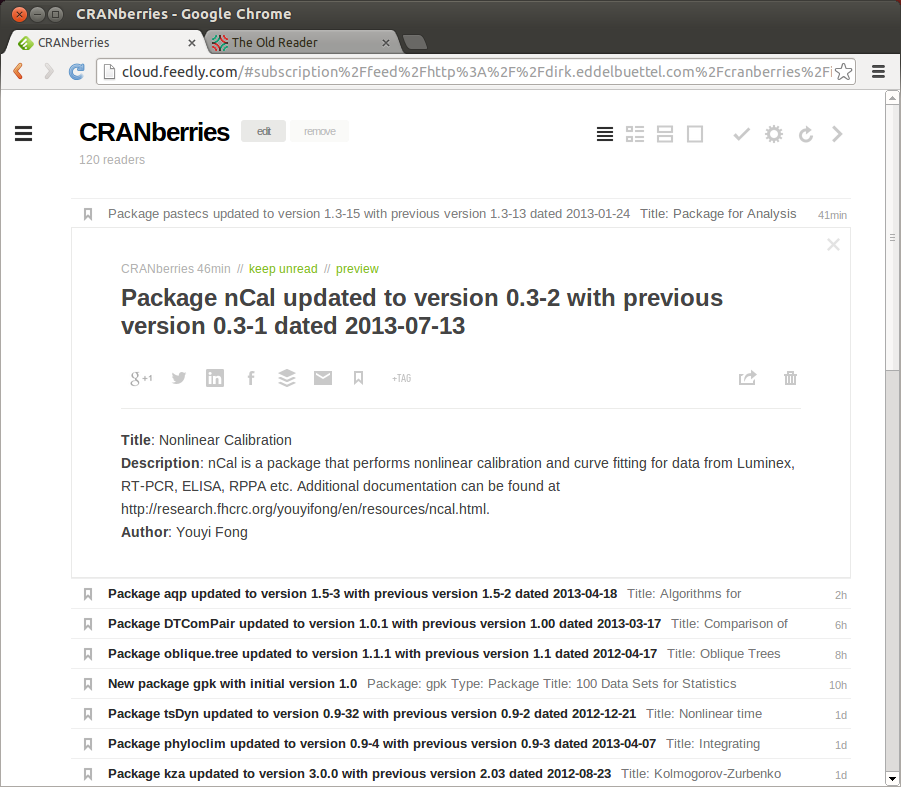
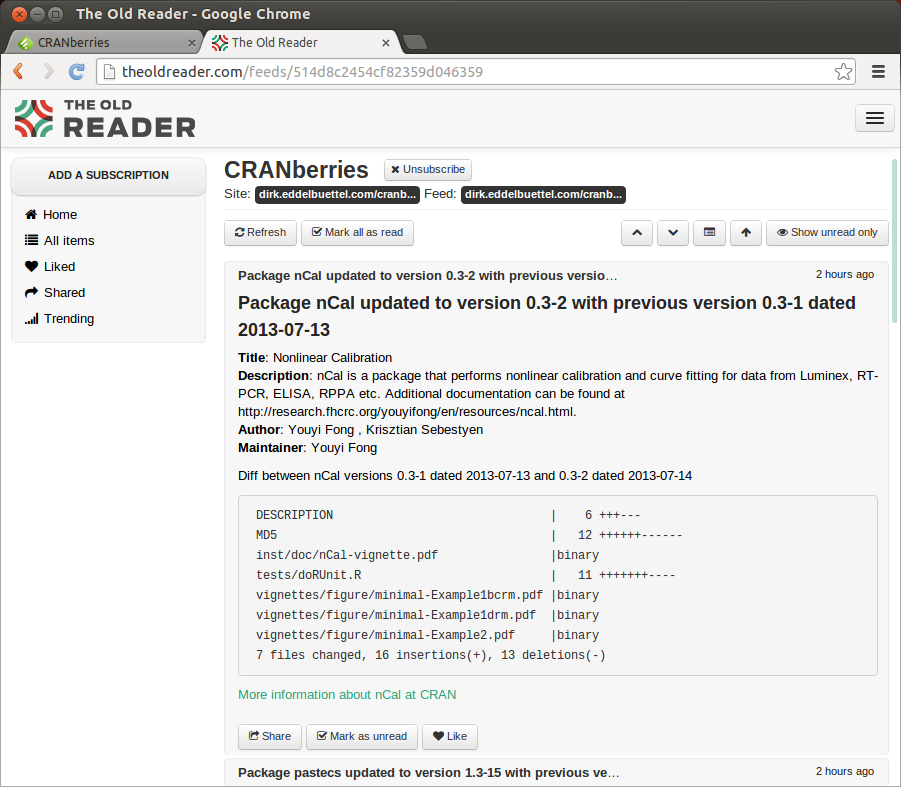
With the demise of Google Reader, many of us have scrambled to find alternatives which cover many/most of the features we were used to. For me, synchronised access from web and mobile counts quite high, and I want the (Android) mobile experience to be pretty pleasant too. So with that, and like many other folks, I had shifted over to Feedly. And before I carry on, let me say that Feedly actually does pretty well. They handled the onslaught of new users; they also listened and changed their UI a little to be more compact and Reader-alike And most importantly, it mostly just works. Until it doesn't. Around the time Feedly shifted folks to their own cloud-based backend, posts from my very own CRANberries aggregator of CRAN package changes for R started to show only truncated posts. See this screenshot from reading Feedly: Feedly truncates the CRANberries post and compare it with this one from TheOldReader: OldReader shows the full CRANberries post which contains the diffstat output, nicely marked up and all. Now, it so happens that I am the creator of the very RSS feed I am consuming here, and I wrote it so that I could read the very diffstat output that is now missing. And I know full well that neither the code, nor the hosting (on my own box), nor any other aspect changed. Before confirming this via TheOldReader, I looked at the RSS output, and I tried other frontend and apps --- and it became clear that the bug seems to be at the Feedly cloud storage level. And trying to be a good sport, I submitted a bug report / suggestion, but to no avail (apart from two other chiming in that they see this elsewhere too). Given that I am the coder behind the feed that is displayed in a truncated manner, I am aware that I am using a code stack that is stale (the original Blosxom static web generator) yet which has not posed another problem anywhere in the decade I used it. Nor does the CRANberries feed pose a problem when aggregated and viewed via the TheOldReader code path, or for that matter via Planet R which also carries (parts of) CRANberries. So for now, I have to either pivot out of the CRANberries RSS reading in Feedly and go directly to the webpage (fine, but cumbersome and in need of a working connection) or use a second subscription mechanism. I appreciate what the TheOldReader folks are doing---presumably with a minor fraction of the resources available to Feedly---and may hang with them for now. But it would be awfully nice if Feedly could sleep off its hangover and fix this. In which case I'd be much happier recommending its service.

Gregor Herrmann: RC bugs 2013/28

this week(end) I was more in the "RC bug fix flow" than in the last weeks, & here are the results:

Michael Stapelberg: Systemd support in Debian packages: how to help

Sometimes, people show up in our IRC channel #debian-systemd or on our mailing list pkg-systemd-maintainers@lists.alioth.debian.org and ask how they can help. This blog post answers that question. First of all, whatever you end up doing, please coordinate with us first! Saying hi in our IRC channel or on our mailing list and explaining what you intend to do is all we ask for. In the past, people have filed bug reports with service files that are not idiomatic, and we really need to avoid that. Currently, our biggest task is to add/improve systemd support to individual Debian packages, and this is where we can use a lot of help. We have a dashboard which contains two lists:
  1. Packages that ship a service file, but don t use dh-systemd yet.
    These need to be updated to get proper maintscripts (e.g. deb-systemd-helper enable/disable calls, possibly start/stop/restart calls).
  2. Packages that ship an init script but no service file yet.
    These need a service file plus dh-systemd support.
Adding a service file and dh-systemd support After you picked a service from the second list in our dashboard, first double-check that there is no bug filed against it yet (the dashboard might be a few hours behind). Then, search for a service file, either upstream or in other distributions such as Arch Linux, Fedora, Gentoo, etc. In case there is no service file yet, write one. Please carefully test the service file (e.g. does starting/stopping/restarting and reloading work) and send it to us for review. Be careful to avoid obvious regressions from the sysvinit init script. That is, don t just write a very simplistic service file that breaks a use-case which formerly worked. If in doubt, ask pkg-systemd-maintainers or chose a different package to work on. Afterwards, add systemd support by using the dh-systemd helper, see https://wiki.debian.org/Systemd/Packaging. The last step is to file a proper bug report against the package that uses our usertag and CCs pkg-systemd-maintainers. See http://bugs.debian.org/714190 for an example. Replacing custom maintscripts with dh-systemd Check if the package currently has any direct systemctl calls in its maintscripts and remove them if so (see http://bugs.debian.org/713853 for an example). Follow https://wiki.debian.org/Systemd/Packaging to add systemd support using the dh-systemd helper. Check whether the maintscripts look good and generate a debdiff to highlight the differences between the old and the new version:
debdiff --controlfiles=ALL OLD_amd64.changes NEW_amd64.changes
Then file a bug report which uses our usertag and CCs pkg-systemd-maintainers. See http://bugs.debian.org/713853 for an example. Thanks! Thank you for helping us and Debian in general!

Niels Thykier: Britney excuses out of date

In my previous post, I explained about the age excuse in Britney. In this post, I will cover the slightly more tricky out of date excuse. A simple example of excuse is:
out of date on mipsel: blinken (from 4:4.8.4-1)
In this simple case, Britney simply states that the binary blinken on mipsel has not yet been rebuilt. Generally, the presence of an excuse like this is sufficient to stop testing migration. The exception to this rule is if the architecture has been marked as not keeping up . At the moment we do not have any such architectures. The tricky part of an out of date -excuse is that Britney simply identifies a symptom and not a cause. In the excuse above, it is not possible to determine if the build failed on that architecture or simply has not finished yet. But the part that probably confuses the most, is when Britney lists binaries no longer built from that source:
out of date on i386: libfsoframework0 (from 0.11.0-1.1)
This case actually happens quite often and is (usually) a sign of a transition has been started. The part that confuses many is that the build-state of their package will be Installed (as in It was built successfully and has been uploaded to the archive ). From there they tend to conclude Britney is broken , where The excuse information is a bit unhelpful might be more accurate. Caveats:
  1. If the source package has not yet been built on that architecture, these old binaries are interleaved into the regular list of out of date -binaries.
  2. The list of excuses are updated twice a day (and there is also a delay between its update and the PTS picking it up). Thus, if the build-state of your package for that architecture has been Installed for less than 24 hours, you may just want double check before jumping to conclusions.
The problem is that the binary still has reverse dependencies in unstable, so it cannot migrate to testing. When the last reverse dependency has been updated, the FTP masters will usually semi-automatically decruft your package and the excuse will disappear. On the other hand, if the binary still has reverse dependencies, you probably started a transition. In that case, your package will be stuck in unstable until all the reverse dependencies are ready (or, at least, rebuilt to use the replacement package). Generally, it is good if the Release Team was involved before you did this (see this page ). In summary, if your package has Out of date on [architecture] in its excuses it can be one (or more) of:

Nicolas Dandrimont: Bootstrapping fedmsg for Debian

As you might (or might not) know, this summer, I have taken on mentoring of a GSoC project by Simon Chopin (a.k.a. laarmen) which goal is to bring fedmsg, the Fedora Infrastructure message bus, to Debian. Most of the work I ll be talking about here is Simon s work, please send all the praise towards him (I can take the blame, though). What is this about? As the project proposal states, the idea is to provide Debian with a unified, real-time, and open mechanism of communication between its services. This communication bus would allow anyone, anywhere, to start consuming messages and reacting to events happening in Debian s infrastructure: When we told upstream about our plan of adapting fedmsg to work on Debian, they were thrilled. And they have been very supportive of the project. How is the project going? Are you excited? I know I m excited. yep, he's excited too Well, the general idea was easy enough, but the task at hand is a challenge. First of all, fedmsg has a lot of (smallish) dependencies, most of them new to Debian. Thanks to Simon s work during the bonding period, and thanks to paultag s careful reviews, the first batch of packages (the first dependency level, comprising kitchen, bunch, m2ext, grapefruit, txws, txzmq and stomper) is currently sitting in the NEW queue. The four remaining packages (fabulous, moksha.common, moksha.hub and fedmsg proper) are mostly ready, waiting in the Debian Python Module Team SVN repository for a review and sponsorship. While we re waiting for the packages to trickle into Debian, Simon is not twiddling his thumbs. Work has taken place on a few fronts: fedmsging mentors.debian.net Package backports mentors.debian.net was chosen because I m an admin and could do the integration quickly. That involved backporting the eleven aforementioned packages, plus zeromq3 and python-zmq (that only have TCP_KEEPALIVE on recent versions), to wheezy, as that s what the mentors.d.n host is running. (Also, python-zmq needs a new-ish cython to build so I had to backport that too). Thankfully, those were no-changes backports, that were easily scripted, using a pbuilder hook to allow the packages to depend on previously built packages. I have made a wheezy package repository available here. It s signed with my GnuPG key, ID 0xB8E5087766475AAF, which should be fairly well connected. Code changes After Simon s initial setup of debexpo (which is not an easy task), the code changes have been fairly simple (yes, this is just a proof of concept). You can see them on top of the live branch on debexpo s sources. I finally had the time to make them live earlier this week, and mentors.debian.net has been sending messages on Debian s fedmsg bus ever since. Deployment mentors.d.n sends its messages on five endpoints, tcp://mentors.debian.net:3000 through tcp://mentors.debian.net:3004. That is one endpoint per WSGI worker, plus one for the importer process(es). You can tap in directly, by following the instructions below. debmessenger Debmessenger is the stop-gap email-to-fedmsg bridge that Simon is developing. The goal is to create some activity on the bus without disrupting or modifying any infrastructure service. It s written in hy, and it leverages the existing Debian-related python modules to do its work, using inotify to react when a mail gets dropped in a Maildir. Right now, it s supposed to understand changes mails (received from debian-devel-changes) and bugs mail (from debian-bugs-dist). I ll work on deploying an instance of debmessenger this weekend, to create some more traffic on the bus. Reliability of the bus I suggested using fedmsg as this was something that already existed, and that solved a problem identical to the one we wanted to tackle (open interconnection of a distribution s infrastructure services). Reusing a piece of infrastructure that already works in another distro means that we can share tools, share ideas, and come up with solutions that we might not have considered when working alone. The drawback is that we have to either adapt to the tool s idiosyncrasies, or to adapt the tool to our way of working. One of the main points raised by DSA when the idea of using fedmsg was brought up, was that of reliability. Debian s infrastructure is spread in datacenters (and basements :D ) all over the world, and thus faces different challenges than Fedora s infrastructure, which is more tightly integrated. Therefore, we have to ensure that a critical consumer (say, a buildd) doesn t miss any message it would need for its operation (say, that a package got accepted). There has been work upstream, to ensure that fedmsg doesn t lose messages, but we need to take extra steps to make sure that a given consumer can replay the messages it has missed, should the need arise. Simon has started a discussion on the upstream mailing list, and is working on a prototype replay mechanism. Obviously, we need to test scenarios of endpoints dropping off the grid, hence the work on getting some activity on the bus. How can I take a look? a.k.a. Another one rides the bus A parisian bus built in 1932 (Picture Yves-Laurent Allaert, CC-By-SA v2.5 / GFDL v1.2 license) So, the bus is pretty quiet right now, as only two kinds of events are triggering messages: a new upload to mentors.debian.net, and a new comment on a package there. Don t expect a lot of traffic. However, generating some traffic is easy enough: just login to mentors.d.n, pick a package of mine (not much choice there), or a real package you want to review, and leave a comment. poof, a message appears. For the lazy Join #debian-fedmsg on OFTC, and look for messages from the debmsg bot. Current example output:

01:30:25 <debmsg> debexpo.voms-api-java.upload (unsigned) --
02:03:16 <debmsg> debexpo.ocamlbricks.comment (unsigned) --
(definitely needs some work, but it s a start) Listening in by yourself You need to setup fedmsg. I have a repository of wheezy packages and one of sid packages, signed with my GnuPG key, ID 0xB8E5087766475AAF. You can add them to a file in /etc/apt/sources.list.d like this:
deb http://perso.crans.org/dandrimont/fedmsg-<sid wheezy>/ ./
Then, import my GnuPG key into apt (apt-key add), update your sources (apt-get update), and install fedmsg (apt-get install python-fedmsg). The versions are << to anything real, so you should get the real thing as soon as it hits the archive. Finally, in /etc/fedmsg.d/endpoints.py, you can comment-out the Fedora entries, and add a Debian entry like this:
    "debian": [
        "tcp://fedmsg.olasd.eu:9940",
    ],
fedmsg.olasd.eu runs a fedmsg gateway connected to the mentors.d.n endpoints, and thus forwards all the mentors messages. It ll be connected to debmessenger as soon as it s running too. To actually see mesages, disable validate_signatures in /etc/fedmsg.d/ssl.py, setting it to False. The Debian messages aren t signed yet (it s on the roadmap), and we don t ship the Fedora certificates so we can t authenticate their messages either. Finally, you can run fedmsg-tail --really-pretty in a terminal. As soon as there s some activity, you should get that kind of output (color omitted):
 
  "i": 1, 
  "msg":  
    "version": "2.0.9-1.1", 
    "uploader": "Emmanuel Bourg <ebourg@apache.org>"
   , 
  "topic": "org.debian.dev.debexpo.voms-api-java.upload", 
  "username": "expo", 
  "timestamp": 1373758221.491809
 
Enjoy real-time updates from your favorite piece of infrastructure! What s next? While Simon continues working on reliability, and gets started on message signing according to his schedule, I ll take a look at deploying the debmessenger bridge, and making the pretty-printer outputs useful for our topics. There will likely be some changes to the messages sent by debexpo, as we got some feedback from the upstream developers about making them work in the fedmsg tool ecosystem (datanommer and datagrepper come to mind). You can tune in to Simon s weekly reports on the soc-coordination list, and look at the discussions with upstream on the fedora messaging-sig list. You can also catch us on IRC, #debian-soc on OFTC. We re also hanging out on the upstream channel, #fedora-apps on freenode.

13 July 2013

Michael Stapelberg: Survey answers part 3: systemd is not portable and what this means for our ports

This blog post is the third of a series of posts dealing with the results of the Debian systemd survey. I intend to give a presentation at DebConf 2013, too, so you could either read my posts, or watch the talk, or both :-). The second-biggest concern in the survey results was that systemd is not portable to non-Linux systems, for example Debian GNU/kFreeBSD or Debian GNU/HURD. For convenience, I will from now on write kFreeBSD when I really mean all non-Linux ports. systemd not being portable is not an arbitrary decision Some people seem to think that the systemd upstream is just hostile to users of other operating systems when they hear that systemd is not portable. However, keep in mind that Lennart, Kay and other contributors have considerable experience with writing portable software such as Avahi and PulseAudio. The decision to only support Linux in systemd was thus not taken lightly. systemd s design requires many kernel features and certain semantics (e.g. procfs is not enough, /proc/$PID/exe needs to be supported), which are currently only available on Linux. Point 15 of Lennart s blog post 0pointer.de/blog/projects/the-biggest-myths.html contains an incomplete list of these features. Maintaining portable code increases complexity Since systemd is written in C, the canonical way to write portable code is by using conditional compilation, for example with ifdef statements. That makes the code harder to understand and reason about, but more importantly it blows up the test matrix. It also requires any new change to be tested on all supported systems, which is not feasible for most contributors. I think everybody agrees keeping complexity low is a good thing. What are the implications for our non-Linux ports? We, the Debian project, have two realistic options in my point of view:
  1. We stay with sysvinit, the least common denominator, forever.
  2. We use a modern init system such as systemd on Debian GNU/Linux.
In case we go with the first option, Debian will diverge more and more from virtually every other Linux distribution. This also means we are stuck with the limited features and capabilities that sysvinit has. A modern operating system needs to be able to adapt to a changing environment and the once static world in which sysvinit was developed has become much more dynamic. In our opinion, the only reasonable choice is the latter option: use systemd on Debian GNU/Linux. How will this work? For individual maintainers, this means they need to support two init systems. Luckily, systemd service files are usually really simple, but there still is additional maintenance work such as testing whether your service actually starts when using systemd. We think this maintenance overhead is justified due to the advantages a modern init system brings. Of course, not every maintainer can arrange it to install systemd and test his/her package. You are invited to contact us at pkg-systemd-maintainers@lists.alioth.debian.org at any time and we can help you out. Furthermore, automation can be introduced (and we have a proof of concept) to make it easier to spot mistakes and perform some simple tests, such as whether the service can be started. A concern that was voiced is that as sysvinit usage decreases, the init scripts would bit-rot and stop working at some point. If that happens, we rely on the users to file appropriate bug reports. This is no different from the situation today it is not feasible for maintainers to test every single combination of features all the time. Ports are different and that diversity is good The FreeBSD kernel and the Linux kernel are different, and each kernel provides distinct features that the other kernel does not have. As an example, Linux provides cgroups, which are heavily used by systemd. The FreeBSD kernel in turn offers the packet filter pf , which is not available on Linux. There certainly is value in having common infrastructure. But there also is value in providing the best features that each platform has to offer in case of Linux, that is clearly systemd as an init system IMO. Conclusion systemd is not portable because it relies on features only the Linux kernel provides an example is cgroups, which systemd uses to track processes in a reliable way. Not embracing these features and staying with sysvinit indefinitely is not a viable option if Debian wants to remain relevant for today s demands. In the short term, the migration to systemd will cause additional maintenance effort for individual package maintainers, but it will pay off in the long term.

12 July 2013

Daniel Pocock: Practical VPNs with strongSwan, Shorewall, Linux firewalls and OpenWRT routers

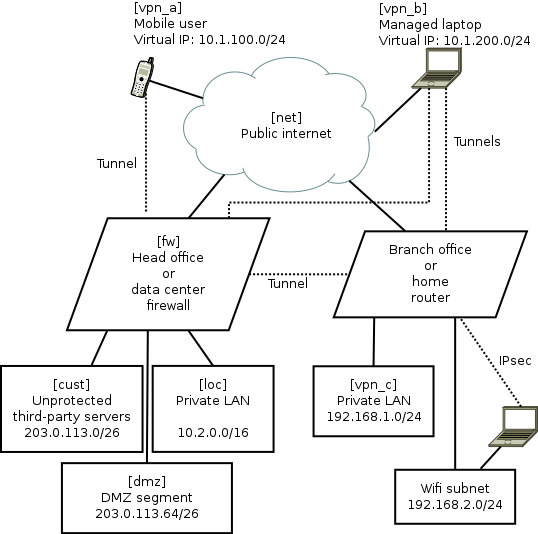
There is intense interest in communications privacy at the moment thanks to the Snowden scandal. Open source software has offered credible solutions for privacy and encryption for many years. Sadly, making these solutions work together is not always plug-and-play. In fact, secure networking, like VoIP, has been plagued by problems with interoperability and firewall/filtering issues although now the solutions are starting to become apparent. Here I will look at some of them, such as the use of firewall zones to simplify management or the use of ECDSA certificates to avoid UDP fragmentation problems. I've drawn together a lot of essential tips from different documents and mailing list discussions to demonstrate how to solve a real-world networking problem. A typical network scenario and requirements Here is a diagram of the network that will be used to help us examine the capabilities of these open source solutions. Some comments about the diagram:
  • The names in square brackets are the zones for Shorewall, they are explained later.
  • The dotted lines are IPsec tunnels over the untrusted Internet.
  • The road-warrior users (mobiles and laptops) get virtual IP addresses from the VPN gateway. The branch offices/home routers do not use virtual IPs.
  • The mobile phones are largely untrusted: easily lost or stolen, many apps have malware, they can only tunnel to the central VPN and only access a very limited range of services.
  • The laptops are managed devices so they are trusted with access to more services. For efficiency they can connect directly to branch office/home VPNs as well as the central server.
  • Smart-phone user browsing habits are systematically monitored by mobile companies with insidious links into mass-media and advertising. Road-warriors sometimes plug-in at client sites or hotels where IT staff may monitor their browsing. Therefore, all these users want to tunnel all their browsing through the VPN.
  • The central VPN gateway/firewall is running strongSwan VPN and Shorewall firewall on Linux. It could be Debian, Fedora or Ubuntu. Other open source platforms such as OpenBSD are also very well respected for building firewall and VPN solutions, but Shorewall, which is one of the key ingredients in this recipe, only works on Linux at present.
  • The branch office/home network could be another strongSwan/Shorewall server or it could also be an OpenWRT router
  • The default configuration for most wifi routers creates a bridge joining wifi users with wired LAN users. Not here, it has been deliberately configured as an independent network. Road-warriors who attach to the wifi must use VPN tunnelling to access the local wired network. In OpenWRT, it is relatively easy to make the Wifi network an independent subnet. This is an essential security precaution because wifi passwords should not be considered secure: they are often transmitted to third parties, for example, by the cloud backup service in many newer smart phones.
Package mayhem The major components are packaged on all the major Linux distributions. Nonetheless, in every case, I found that it is necessary to re-compile fresh strongSwan packages from sources. It is not so hard to do but it is necessary and worth the effort. Here are related blog entries where I provide the details about how to re-build fresh versions of the official packages with all necessary features enabled: Using X.509 certificates as a standard feature of the VPN For convenience, many people building a point-to-point VPN start with passwords (sometimes referred to as pre-shared keys (PSK)) as a security mechanism. As the VPN grows, passwords become unmanageable. In this solution, we only look at how to build a VPN secured by X.509 certificates. The certificate concept is not hard. In this scenario, there are a few things that make it particularly easy to work with certificates:
  • strongSwan comes with a convenient command line tool, ipsec pki. Many of it's functions are equivalent to things you can do with OpenSSL or GnuTLS. However, the ipsec pki syntax is much more lightweight and simply provides a convenient way to do the things you need to do when maintaining a VPN.
  • Many of the routine activities involved in certificate maintainence can be scripted. My recent blog about using Android clients with strongSwan gives a sample script demonstrating how ipsec pki commands can be used to prepare a PKCS#12 (.p12) file that can be easily loaded into an Android device using the SD-card.
  • For building a VPN, there is no need to use a public certificate authority such as Verisign. Consequently, there is no need to fill in all their forms or make any payments for each device/certificate. Some larger organisations do choose to outsource their certificate management to such firms. For smaller organisations, an effective and sometimes better solution can be achieved by maintaining the process in-house with a private root CA.
UDP fragmentation during IPsec IKEv2 key exchange and ECDSA A common problem for IPsec VPNs using X.509 certificates is the fragmentation of key exchange datagrams during session setup. Sometimes it works, sometimes it doesn't. Various workarounds exist, such as keeping copies of all certificates from potential peers on every host. As the network grows, this becomes inconvenient to maintain and to some extent it eliminates the benefits of using PKI. Fortunately, there is a solution: Elliptic Curve Cryptography (ECC). Many people currently use RSA key-pairs. Best practice suggests using RSA keys of at least 2048 bits and often 4096 bits. Using ECC with a smaller 384-bit key is considered to be equivalent to a 7680 bit RSA key pair. Consequently, ECDSA certificates are much smaller than RSA certificates. Furthermore, at these key sizes, the key exchange packets are almost always smaller than the typical 1500 byte MTU. A further demand for ECDSA is arising due to the use of ECC within smart cards. Many smartcards don't support any RSA key larger than 2048 bits. The highly secure 384-bit ECC key is implemented in quite a few common smart cards. Smart card vendors have shown a preference for the ECC keys due to the US Government's preference for ECC and the lower computational overheads make them more suitable for constrained execution environments. Anyone who wants to use smart cards as part of their VPN or general IT security now, or in the future, needs to consider ECC/ECDSA. Making the network simple with Shorewall zones For this example, we are not just taking some easy point-to-point example. We have a real-world, multi-site, multi-device network with road warriors. Simplifying this architecture is important to help us understand and secure it. The solution? Each of these is abstracted to a "zone" in Shorewall. In the diagram above, the zone names are in square brackets. The purpose of each zone is described below:
Zone name Description
loc This is the private LAN and contains servers like databases, private source code respositories and NFS file servers
dmz This is the DMZ and contains web servers that are accessible from the public internet. Some of these servers talk to databases or message queues in the LAN network loc
vpn_a These are road warriors that are not very trustworthy, such as mobile devices. They are occasionally stolen and usually full of spyware (referred to by users as "apps"). They have limited access to ports on some DMZ servers, e.g. for sending and receiving mail using SMTP and IMAP (those ports are not exposed to the public Internet at large). They use the VPN tunnel for general internet access/browsing, to avoid surveillance by their mobile carrier.
vpn_b These are managed laptops that have a low probability of malware infection. They may well be using smart cards for access control. Consequently, they are more trusted than the vpn_a users and have access to some extra intranet pages and file servers. Like the smart-phone users, they use the VPN tunnel for general internet access/browsing, to avoid surveillance by third-party wifi hotspot operators.
vpn_c This firewall zone represents remote sites with managed hardware, such as branch offices or home networks with IPsec routers running OpenWRT.
cust These are servers hosted for third-parties or collaborative testing/development purposes. They have their own firewall arrangements if necessary.
net This zone represents traffic from the public Internet.
A practical Shorewall configuration Shorewall is chosen to manage the iptables and ip6tables firewall rules. Shorewall provides a level of abstraction that makes netfilter much more manageable than manual iptables scripting. The Shorewall concept of zones is very similar to the zones implemented in OpenWRT and this is an extremely useful paradigm for firewall management. Practical configuration of Shorewall is very well explained in the Shorewall quick start. The one thing that is not immediately obvious is a strategy for planning the contents of the /etc/shorewall/policy and /etc/shorewall/rules files. The exact details for making it work effectively with a modern IPsec VPN are not explained in a single document, so I've gathered those details below as well. An effective way to plan the Shorewall zone configuration is with a table like this:
Destination zone
loc dmz vpn_a vpn_b vpn_c cust net
Source zone loc \
dmz ? \ X X X
vpn_a ? ? \ X X
vpn_b ? ? X \ X
vpn_c X \
cust X ? X X X \
net X ? X X X \
The symbols in the table are defined:
Symbol Meaning
ACCEPT in policy file
X REJECT or DROP in policy file
? REJECT or DROP in policy file, but ACCEPT some specific ports in the rules file
Naturally, this modelling technique is valid for both IPv4 and IPv6 firewalling (with Shorewall6) Looking at the diagram in two dimensions, it is easy to spot patterns. Each pattern can be condensed into a single entry in the rules file. For example, it is clear from the first row that the loc zone can access all other zones. That can be expressed very concisely with a single line in the policy file:
loc all ACCEPT
Specific Shorewall tips for use with IPsec VPNs and strongSwan Shorewall has several web pages dedicated to VPNs, including the IPsec specific documentation.. Personally, I found that I had to gather a few details from several of these pages to make an optimal solution. Here are those tips:
  • Ignore everything about the /etc/shorewall/tunnels file. It is not needed and not used any more
  • Name the VPN zones (we call them vpn_a, vpn_b and vpn_c) in the zones file but there is no need to put them in the /etc/shorewall/interfaces file.
  • The /etc/shorewall/hosts file is not just for hosts and can be used to specify network ranges, such as those associated with the VPN virtual IP addresses. The ranges you put in this file should match the rightsourceip pool assignments in strongSwan's /etc/ipsec.conf
  • One of the examples suggests using mss=1400 in the /etc/shorewall/zones file. I found that is too big and leads to packets being dropped in some situations. To start with, try a small value such as 1024 and then try larger values later after you prove everything works. Setting mss for IPsec appears to be essential.
  • Do not use the routefilter feature in the /etc/shorewall/interfaces file as it is not compatible with IPsec
Otherwise, just follow the typical examples from the Shorewall quick start guide and configure it to work the way you want. Here is an example /etc/shorewall/zones file:
fw firewall
net ipv4
dmz ipv4
loc ipv4
cust ipv4
vpn_a ipsec mode=tunnel mss=1024
vpn_b ipsec mode=tunnel mss=1024
vpn_c ipsec mode=tunnel mss=1024
Here is an example /etc/shorewall/hosts file describing the VPN ranges from the diagram:
vpn_a eth0:10.1.100.0/24 ipsec
vpn_b eth0:10.1.200.0/24 ipsec
vpn_c eth0:192.168.1.0/24 ipsec
Here is an example /etc/shorewall/policy file based on the table above:
loc all ACCEPT
vpn_c all ACCEPT
cust net ACCEPT
net cust ACCEPT
all all REJECT
Here is an example /etc/shorewall/rules file based on the network:
SECTION ALL
# allow connections to the firewall itself to start VPNs:
# Rule  source    dest    protocol/port details
ACCEPT   all       fw                ah
ACCEPT   all       fw                esp
ACCEPT   all       fw                udp 500
ACCEPT   all       fw                udp 4500
# allow access to HTTP servers in DMZ:
ACCEPT   all       dmz               tcp 80
# allow connections from HTTP servers to MySQL database in private LAN:
ACCEPT   dmz       loc:10.2.0.43     tcp 3306
# allow connections from all VPN users to IMAPS server in private LAN:
ACCEPT vpn_a,vpn_b,vpn_c loc:10.2.0.58 tcp 993
# allow VPN users (but not the smartphones in vpn_a) to the
# PostgresQL database for PostBooks accounting system:
ACCEPT vpn_b,vpn_c loc:10.2.0.48      tcp 5432
SECTION ESTABLISHED
ACCEPT   all       all
SECTION RELATED
ACCEPT   all       all
Once the files are created, Shorewall can be easily activated with:
# shorewall compile && shorewall restart
strongSwan IPsec VPN setup Like Shorewall, strongSwan is also very well documented and I'm just going to focus on those specific areas that are relevant to this type of VPN project.
  • Allow the road-warriors to send all browsing traffic over the VPN means including leftsubnet=0.0.0.0/0 in the VPN server's /etc/ipsec.conf file. Be wary though: sometimes the road-warriors start sending the DHCP renewal over the tunnel instead of to their local DHCP server.
  • As we are using Shorewall zones for firewalling, you must set the options leftfirewall=no and lefthostaccess=no in ipsec.conf. Shorewall already knows about the remote networks as they are defined in the /etc/shorewall/hosts file and so firewall rules don't need to be manipulated each time a tunnel goes up or down.
  • As discussed above, X.509 certificates are used for peer authentication. In the certificate Distinguished Name (DN), store the zone name in the Organizational Unit (OU) component, for example, OU=vpn_c, CN=gw.branch1.example.org
  • In the ipsec.conf file, match the users to connections using wildcard specifications such as rightid="OU=vpn_a, CN=*"
  • Put a subjectAltName with hostname in every certificate. The --san option to the ipsec pki commands adds the subjectAltName.
  • Keep the certificate distinguished names (DN) short, this makes the certificate smaller and reduces the risk of fragmented authentication packets. Many examples show a long and verbose DN such as C=GB, O=Acme World Wide Widget Corporation, OU=Engineering, CN=laptop1.eng.acme.example.org. On a private VPN, it is rarely necessary to have all that in the DN, just include OU for the zone name and CN for the host name.
  • As discussed above, use the ECDSA scheme for keypairs (not RSA) to ensure that the key exchange datagrams don't suffer from fragmentation problems. For example, generate a keypair with the command ipsec pki --gen --type ecdsa --size 384 > user1Key.der
  • Road warriors should have leftid=%fromcert in their ipsec.conf file. This forces them to use the Distinguished Name and not the subjectAltName (SAN) to identify themselves.
  • For road warriors who require virtual tunnel IPs, configure them to request both IPv4 and IPv6 addresses (dual stack) with leftsourceip=%config4,%config6 and on the VPN gateway, configure the ranges as arguments to rightsourceip
  • To ensure that roadwarriors query the LAN DNS, add the DNS settings to strongswan.conf and make sure road warriors are using a more recent strongSwan version that can dynamically update /etc/resolv.conf. Protecting DNS traffic is important for privacy reasons. It also makes sure that the road-warriors can discover servers that are not advertised in public DNS records.
Central firewall/VPN gateway configuration Although they are not present in the diagram, IPv6 networks are also configured in these strongSwan examples. It is very easy to combine IPv4 and IPv6 into a single /etc/ipsec.conf file. As long as the road-warriors have leftsourceip=%config4,%config6 in their own configurations, they will operate dual-stack IPv4/IPv6 whenver they connect to the VPN. Here is an example /etc/ipsec.conf for the central VPN gateway:
config setup
        charonstart=yes
        charondebug=all
        plutostart=no
conn %default
        ikelifetime=60m
        keylife=20m
        rekeymargin=3m
        keyingtries=1
        keyexchange=ikev2
conn branch1
        left=198.51.100.1
        leftsubnet=203.0.113.0/24,10.0.0.0/8,2001:DB8:12:80:/64
        leftcert=fw1Cert.der
        leftid=@fw1.example.org
        leftfirewall=no
        lefthostaccess=no
        right=%any
        rightid=@branch1-fw.example.org
        rightsubnet=192.168.1.0/24
        auto=add
conn rw_vpn_a
        left=198.51.100.1
        leftsubnet=0.0.0.0/0,::0/0
        leftcert=fw1Cert.der
        leftid=@fw1.example.org
        leftfirewall=no
        lefthostaccess=no
        right=%any
        rightid="OU=vpn_a, CN=*"
        rightsourceip=10.1.100.0/24,2001:DB8:1000:100::/64
        auto=add
conn rw_vpn_b
        left=198.51.100.1
        leftsubnet=0.0.0.0/0,::0/0
        leftcert=fw1Cert.der
        leftid=@fw1.example.org
        leftfirewall=no
        lefthostaccess=no
        right=%any
        rightid="OU=vpn_b, CN=*"
        rightsourceip=10.1.200.0/24,2001:DB8:1000:200::/64
        auto=add
Sample branch office or home router VPN configuration Here is an example /etc/ipsec.conf for the Linux server or OpenWRT VPN at the branch office or home:
conn head_office
        left=%defaultroute
        leftid=@branch1-fw.example.org
        leftcert=branch1-fwCert.der
        leftsubnet=192.168.1.0/24,2001:DB8:12:80:/64
        leftfirewall=no
        lefthostaccess=no
        right=fw1.example.org
        rightid=@fw1.example.org
        rightsubnet=203.0.113.0/24,10.0.0.0/8,2001:DB8:1000::/52
        auto=start
# notice we only allow vpn_b users, not vpn_a
# these users are given virtual IPs from our own
# 192.168.1.0 subnet
conn rw_vpn_b
        left=branch1-fw.example.org
        leftsubnet=192.168.1.0/24,2001:DB8:12:80:/64
        leftcert=branch1-fwCert.der
        leftid=@branch1-fw.example.org
        leftfirewall=no
        lefthostaccess=no
        right=%any
        rightid="OU=vpn_b, CN=*"
        rightsourceip=192.168.1.160/27,2001:DB8:12:80::8000/116
        auto=add
Further topics Shorewall and Shorewall6 don't currently support a unified configuration. This can make it slightly tedious to duplicate rules between the two IP variations. However, the syntax for IPv4 and IPv6 configuration is virtually identical. Shorewall only currently supports Linux netfilter rules. In theory it could be extended to support other types of firewall API, such as pf used by OpenBSD and the related BSD family of systems. A more advanced architecture would split the single firewall into multiple firewall hosts, like the inner and outer walls of a large castle. The VPN gateway would also become a standalone host in the DMZ. This would require more complex routing table entries. Smart cards with PIN numbers provide an effective form of two-factor authentication that can protect certificates for remote users. Smart cards are documented well by strongSwan already so I haven't repeated any of that material in this article. Managing a private X.509 certificate authority in practice may require slightly more effort than I've described, especially when an organisation grows. Small networks and home users don't need to worry about these details too much, but for most deployments it is necessary to consider things like certificate revocation lists and special schemes to protect the root certificate's private key. EJBCA is one open source project that might help. Some users may want to consider ways to prevent the road-warriors from accidentally browsing the Internet when the IPsec tunnel is not active. Such policies could be implemented with some basic iptables firewalls rules in the road-warrior devices. Summary Using these strategies and configuration tips, planning and building a VPN will hopefully be much simpler. Please feel free to ask questions on the mailing lists for any of the projects discussed in this blog.

Keith Packard: Present

The Present Extension I ve finally gotten an initial implementation of the Present extension written and running and thought I should write up the current design and status. Present Design The current Present extension consists of two requests:
  1. PresentRegion. Puts new bits from a pixmap in a window.
  2. PresentSelectInput. Asks for Present events to be delivered.
PresentRegion This request takes a pile of arguments:
 
    PresentRegion
    window: WINDOW
    pixmap: PIXMAP
    valid-area: REGION or None
    update-area: REGION or None
    x-off, y-off: INT16
    target-msc: CARD64
    divisor: CARD64
    remainder: CARD64
    idle-fence: FENCE
 
Errors: Drawable, Pixmap, Match
Provides new content for the specified window, to be made visible at the specified time (defined by target-msc , divisor and remainder ). update-area defines the subset of the window to be updated, or None if the whole window is to be updated. valid-area defines the portion of pixmap which contains valid window contents, or None if the pixmap contains valid contents for the whole window. PresentRegion may use any region of pixmap which contains update-area and which is contained by valid-area . In other words, areas inside update-area will be presented from pixmap , areas outside valid-area will not be presented from pixmap and areas inside valid-area but outside update-area may or may not be presented at the discretion of the X server. x-off and y-off define the location in the window where the 0,0 location of the pixmap will be presented. valid-area and update-area are relative to the pixmap. If target-msc is greater than the current msc for window , the presentation will occur at (or after) the target-msc field. Otherwise, the presentation will occur after the next field where msc % divisor == remainder . If divisor is zero, then the presentation will occur after the current field. idle-fence is triggered when pixmap is no longer in use. This may be at any time following the PresentRegion request, the contents may be immediately copied to another buffer, copied just in time for the vblank interrupt or the pixmap may be used directly for display, in which case it will be busy until some future PresentRegion operation. If window is destroyed before the presentation occurs, then the presentation action will not be completed. PresentRegion holds a reference to pixmap until the presentation occurs, so pixmap may be immediately freed after the request executes, even if that is before the presentation occurs. If idle-fence is destroyed before the presentation occurs, then idle-fence will not be signaled but the presentation will occur normally. PresentSelectInput
 
    PresentSelectInput
    event-id: PRESENTEVENTID
    window: WINDOW
    eventMask: SETofPRESENTEVENT
 
Errors: Window, Value, Match, IDchoice, Access
Selects the set of Present events to be delivered for the specified window and event context. PresentSelectInput can create, modify or delete event contexts. An event context is associated with a specific window; using an existing event context with a different window generates a Match error. If eventContext specifies an existing event context, then if eventMask is empty, PresentSelectInput deletes the specified context, otherwise the specified event context is changed to select a different set of events. If eventContext is an unused XID, then if eventMask is empty no operation is performed. Otherwise, a new event context is created selecting the specified events. Present Extension Events There are three different events for the Present extension:
  1. PresentConfigureNotify
  2. PresentCompleteNotify
  3. PresentRedirectNotify
PresentConfigureNotify This event is moving from the DRI3 extension where it doesn t belong.
 
    PresentConfigureNotify
    type: CARD8         XGE event type (35)
    extension: CARD8        Present extension request number
    length: CARD16          2
    evtype: CARD16          Present_ConfigureNotify
    eventID: PRESENTEVENTID
    window: WINDOW
    x: INT16
    y: INT16
    width: CARD16
    height: CARD16
    off_x: INT16
    off_y: INT16
    pixmap_width: CARD16
    pixmap_height: CARD16
    pixmap_flags: CARD32
 
PresentConfigureNotify events are sent when the window configuration changes if PresentSelectInput has requested it. PresentConfigureNotify events are XGE events and so do not have a unique event type. x and y are the parent-relative location of window . PresentCompleteNotify
 
    PresentCompleteNotify
    type: CARD8         XGE event type (35)
    extension: CARD8        Present extension request number
    length: CARD16          2
    evtype: CARD16          Present_CompleteNotify
    eventID: PRESENTEVENTID
    window: WINDOW
    ust: CARD64
    msc: CARD64
    sbc: CARD64
 
Notify events are delivered when a PresentRegion operation has completed and the specified contents are being displayed. sbc, msc and ust indicate the swap count, frame count and system time of the related PresentRegion request. PresentRedirectNotify This one is not specified yet, but the intent is for it to contain sufficient information for the compositing manager to be able to construct a suitable screen update that includes an application window update. Finishing GLXOMLsync_control At this point, Mesa only exposes the old swapinterval configuration value, it doesn t provide any of the GLXOMLsynccontrol APIs. However, the Present protocol does have the bits necessary to support glXSwapBuffersMscOML in the PresentRegion request. Let s see how the remaining APIs in this GL extension will be supported. glXGetSyncValuesOML This one is easy; it only needs to return the UST/MSC/SBC values from the most recent SwapBuffers request. Those are returned in the PresentCompleteNotify event, so Mesa just needs to capture that event and save the values away for return to the application. We don t need any new Present protocol for this. glXGetMscRateOML This returns the refresh rate of the monitor associated with the specified drawable. RandR exposes all of the necessary data for each monitor, but the monitor each window is going to be synchronized against isn t exposed anywhere, and is effectively implementation-dependent. So, I think the easy thing to do here is to have a Present request which reports which RandR output a window will be synchronized with. glXSwapBuffersMscOML This is the one API which is already directly supported by the Present extension. glXWaitForMscOML This is effectively the same as glXSwapBuffersMscOML, except that it doesn t actually perform a swap. For this, I think we want a new request that generates an X event when the target values are reached, and then have the client block until that event is received. This will avoid blocking other threads using the same X connection. glXWaitForSbcOML Like glXWaitForMscOML, this just needs to trigger an event to be delivered at the right time. Presentation Redirection I m focusing on finishing the above stuff before I start writing the redirection spec and code, but I ve been thinking a bit about it. What we want is for applications that are presenting a new frame within a redirected window to have that presentation delivered directly to the compositing manager instead of having the bits copied to the redirected buffer and have the compositing manager only learn about this when the damage event is received from copying the bits. Once the compositing manager receives notification that there are new bits available for a portion of a window, it can then get those bits onto the screen in one of two ways:
  1. Copy them to the back buffer for the whole screen and then present that back buffer to the screen.
  2. Present them directly to the screen, bypassing the compositing manager s back buffer entirely.
The first option is what you d do if there were more updates than just a single window; it would update the whole screen at the same time. The second option is what you d do if there was only the one window update to act on, and this would automatically take advantage of page flipping to avoid copying data at all. No need to un-redirect windows for the page flip to work. In both cases, we need to inform the original application both when its pixmap is idle and when the swap actually hits the screen. And we need to make sure the final swap happens when the application requested. For the pixmap idle notification, the current PresentRegion idlefence argument should suffice; we just need to pass the idlefence XID along in the redirection event. Simple. For completion notification, we need to make sure the SBC value for the original window gets incremented and that a PresentCompleteNotify event is delivered. I think that means we want to append a chunk of data to the PresentRegion request so that suitable events can be delivered when the compositing manager PresentRegion occur. I think that just needs to be the window of that original window. To make sure the swap happens at the right time, we just need to have the targetmsc value provided to the compositing manager. I m hoping that having this all event driven is that when a later PresentRegion is redirected that has an *earlier* targetmsc, we can simply queue that as well and things should just work . Current Status I ve got the protocol definitions (both X server and XCB) done, and libxcb supporting the extension. I ve got the X server bits working, but the actual updates are not synchronized to the monitor; they re using OS timers and CopyArea for now, mostly so I can test things without also hacking drivers. Mesa is using the extension, but it only provides the swapinterval value and is not yet supporting the full GLXOMLsynccontrol extension. I ve also got a simple 2D core X application using the extension which is in the shmfd repository in my home directory on freedesktop.org. Availability As always, these bits are already published in my home directory on freedesktop.org in various git repositories.

11 July 2013

Michal &#268;iha&#345;: New tools for generating StarDict dictionaries

For quite some time, I maintain set of few scripts to generate dictionaries for StarDict. The generated dictionaries are quite popular, but the scripts become quite horrible over the time. Now I finally found time to cleanup and refactoring, so that they share as much code as possible. As the duplication was quite massive, I was able to reduce code size to 60%, while adding new features and doing better error handling. Also now it should be pretty easy to add support for additional resources, so contributions are welcome :-). The code can be found on GitHub.

Filed under: English Stardict 0 comments Flattr this!

Next.

Previous.