Search Results: "tim"

31 October 2014

Russell Coker: Links October 2014

The Verge has an interesting article about Tim Cook (Apple CEO) coming out [1]. Tim says if hearing that the CEO of Apple is gay can help someone struggling to come to terms with who he or she is, or bring comfort to anyone who feels alone, or inspire people to insist on their equality, then it s worth the trade-off with my own privacy . Graydon2 wrote an insightful article about the right-wing libertarian sock-puppets of silicon valley [2]. George Monbiot wrote an insightful article for The Guardian about the way that double-speak facilitates killing people [3]. He is correct that the media should hold government accountable for such use of language instead of perpetuating it. Anne Th riault wrote an insightful article for Vice about the presumption of innocence and sex crimes [4]. Dr Nerdlove wrote an interesting article about Gamergate as the extinction burst of gamer culture [5], we can only hope. Shweta Narayan wrote an insightful article about Category Structure and Oppression [6]. I can t summarise it because it s a complex concept, read the article. Some Debian users who don t like Systemd have started a Debian Fork project [7], which so far just has a web site and nothing else. I expect that they will never write any code. But it would be good if they did, they would learn about how an OS works and maybe they wouldn t disagree so much with the people who have experience in developing system software. A GamerGate terrorist in Utah forces Anita Sarkeesian to cancel a lecture [8]. I expect that the reaction will be different when (not if) an Islamic group tries to get a lecture cancelled in a similar manner. Model View Culture has an insightful article by Erika Lynn Abigail about Autistics in Silicon Valley [9]. Katie McDonough wrote an interesting article for Salon about Ed Champion and what to do about men who abuse women [10]. It s worth reading that while thinking about the FOSS community

Russell Coker: Samsung Galaxy Note 3

In June last year I bought a Samsung Galaxy Note 2 [1]. Generally I was very happy with that phone, one problem I had is that less than a year after purchasing it the Ingress menus burned into the screen [2]. 2 weeks ago I bought a new Galaxy Note 3. One of the reasons for getting it is the higher resolution screen, I never realised the benefits of a 1920*1080 screen on a phone until my wife got a Nexus 5 [3]. I had been idly considering a Galaxy Note 4, but $1000 is a lot of money to pay for a phone and I m not sure that a 2560*1440 screen will offer much benefit in that size. Also the Note 3 and Note 4 both have 3G of RAM, as some applications use more RAM when you have a higher resolution screen the Note 4 will effectively have less usable RAM than the Note 3. My first laptop cost me $3,800 in 1998, that s probably more than $6,000 in today s money. The benefits that I receive now from an Android phone are in many ways greater than I received from that laptop and that laptop was definitely good value for money for me. If the cheapest Android phone cost $6,000 then I d pay that, but given that the Note 3 is only $550 (including postage) there s no reason for me to buy something more expensive. Another reason for getting a new phone is the limited storage space in the Note 2. 16G of internal storage is a limit when you have some big games installed. Also the recent Android update which prevented apps from writing to the SD card meant that it was no longer convenient to put TV shows on my SD card. 32G of internal storage in the Note 3 allows me to fit everything I want (including the music video collection I downloaded with youtube-dl). The Note 2 has 16G of internal storage and an 8G SD card (that I couldn t fully use due to Android limitations) while the Note 3 has 32G (the 64G version wasn t on sale at any of the cheap online stores). Also the Note 3 supports an SD card which will be good for my music video collection at some future time, this is a significant benefit over the Nexus 5. In the past I ve written about Android service life and concluded that storage is the main issue [4]. So it is a bit unfortunate that I couldn t get a phone with 64G of storage at a reasonable price. But the upside is that getting a cheaper phone allows me to buy another one sooner and give the old phone to a relative who has less demanding requirements. In the past I wrote about the warranty support for my wife s Nexus 5 [5]. I should have followed up on that before, 3 days after that post we received a replacement phone. One good thing that Google does is to reserve money on a credit card to buy the new phone and then send you the new phone before you send the old one back. So if the customer doesn t end up sending the broken phone they just get billed for the new phone, that avoids excessive delays in getting a replacement phone. So overall the process of Google warranty support is really good, if 2 products are equal in other ways then it would be best to buy from Google to get that level of support. I considered getting a Nexus 5 as the hardware is reasonably good (not the greatest but quite good enough) and the price is also reasonably good. But one thing I really hate is the way they do the buttons. Having the home button appear on the main part of the display is really annoying. I much prefer the Samsung approach of having a hardware button for home and touch-screen buttons outside the viewable area for settings and back. Also the stylus on the Note devices is convenient on occasion. The Note 3 has a fake-leather back. The concept of making fake leather is tacky, I believe that it s much better to make honest plastic that doesn t pretend to be something that it isn t. However the texture of the back improves the grip. Also the fake stitches around the edge help with the grip too. It s tacky but utilitarian. The Note 3 is slightly smaller and lighter than the Note 2. This is a good technical achievement, but I d rather they just gave it a bigger battery. Update USB 3 One thing I initially forgot to mention is that the Note 3 has USB 3. This means that it has a larger socket which is less convenient when you try and plug it in at night. USB 3 seems unlikely to provide any benefit for me as I ve never had any of my other phones transfer data at rates more than about 5MB/s. If the Note 3 happens to have storage that can handle speeds greater than the 32MB/s a typical USB 2 storage device can handle then I m still not going to gain much benefit. USB 2 speeds would allow me to transfer the entire contents of a Note 3 in less than 20 minutes (if I needed to copy the entire storage contents). I can t imagine myself having a real-world benefit from that. The larger socket means more fumbling when charging my phone at night and it also means that the Note 3 cable can t be used in any other phone I own. In a year or two my wife will have a phone with USB 3 support and that cable can be used for charging 2 phones. But at the moment the USB 3 cable isn t useful as I don t need to have a phone charger that can only charge one phone. Conclusion The Note 3 basically does everything I expected of it. It s just like the Note 2 but a bit faster and with more storage. I m happy with it.

Konstantinos Margaritis: SIMD on javascript, MHO

Just read the Mozilla announcement on SIMD.js and I can say I got mixed feelings about this. I don't really comment other news/blogs/announcements, but this is an exception. On one hand, I definitely welcome more SIMD use everywhere, being a SIMD advocate and enthusiast for many years (since 2004 actually). So seeing more of it and by someone such as Mozilla, that's even better! On the other hand, wait, that's SIMD in Javascript?!? Really? Why? As if we already covered native coverage of SIMD in every other part, including the browser itself (No browser uses SIMD extensively in its core, though that would prove to be of actual benefit, the only SIMD code I know of is in the media playback code, which is usually some external library like ffmpeg/x264/etc that already has SIMD optimized parts anyway. So, instead of using resources to optimize the core browser with SIMD -I'm sure there will be plenty of opportunities in the codebase for such optimizations- so that every web application, including Javascript ones will be optimized, or even the JS JITs themselves, yet Mozilla wants to push the effort to the web app developer to use their SIMD.js to do the equivalent of what SIMD coders have been doing to native apps for a long time now, only for JS apps. Ok, so what's the gain? I read the PDF presentation that shows mandebrot.js to go from 9 FPS to 37FPS using SIMD.js. Admittedly that's impressive. But it also proves that the whole buzz about lower energy footprint computers, power efficiency is just useless. Why is that? For comparison running Xaos (fractal/mandelbrot program) on my very low end PC (2-core Athlon X2, AM2 socket, so DDR2) gives me ~250FPS, and I'm not even sure it's using SSE at all (from a simple check it doesn't). Zooming is realtime and at full detail. In the same talk, there was a benchmark of LLVM Javascript being as fast as C++ or 1.5x the native running time. I admit haven't tried the tests listed, but the mandelbrot test was using asm.js and 9 is definetely not 250/1.5. But I guess I'm just picky. So, the latest trend of moving everything to the browser and JS,means that instead of optimizing my apps to run great on native, instead of making stuff running faster on my 5Wt big.Little 8-core ARM SoC, I have to get a much more power-hungry CPU to see the same performance. I'm totally against that. I want my newer CPUs, who are more energy-efficient and faster to actually feel like THAT. I don't want to upgrade just to experience the performance of a 486 20 years ago! The talk mentioned HTML5 (and hence javascript) overtaking all other platforms for application development everywhere, including the smartphones. I certainly hope that's not the case, and I know of many people who also don't feel that way. We're not buying the "Everything on the web/cloud" paradigm, but I guess we're just a minority. I could go on for a long time, but I have an actual SIMD-related bug to fix, cheers. Note: I used to have comments enabled on my blog, but moderating spam was too time consuming, even with CAPTCHAs, so I disabled them entirely, if anyone could suggest of a better method, I'd gladly take advice -have been thinking about disqus, not sure if it's actually a good solution).

30 October 2014

Chris Lamb: Are you building an internet fridge?

Mikkel Rasmussen:
If you look at the idea of "The Kitchen of Tomorrow" as IKEA thought about it is the core idea is that cooking is slavery. It's the idea that technology can free us from making food. It can do it for us. It can recognise who we are, we don't have to be tied to the kitchen all day, we don't have to think about it. Now if you're an anthropologist, they would tell you that cooking is perhaps one of the most complicated things you can think about when it comes to the human condition. If you think about your own cooking habits they probably come from your childhood, the nation you're from, the region you're from. It takes a lot of skill to cook. It's not so easy. And actually, it's quite fun to cook. there's also a lot of improvisation. I don't know if you ever tried to come home to a fridge and you just look into the fridge: oh, there's a carrot and some milk and some white wine and you figure it out. That's what cooking is like it's a very human thing to do.
https://chris-lamb.co.uk/wp-content/2014/fridge.jpg

The physical version of your smart recipe site?


Therefore, if you think about it, having anything that automates this for you or decides for you or improvises for you is actually not doing anything to help you with what you want to do, which is that it's nice to cook. More generally, if you make technology for example that has at its core the idea that cooking is slavery and that idea is wrong, then your technology will fail. Not because of the technology, but because it simply gets people wrong. This happens all the time. You cannot swing a cat these days without hitting one of those refrigerator companies that make smart fridges. I don't know you've ever seen them, like a "intelligent fridge". There's so many of them that there is actually a website called "Fuck your internet fridge" by a guy who tracks failed prototypes on intelligent fridges. Why? Because the idea is wrong. Not the technology, but the idea about who we are - that we do not want the kitchen to be automated for us. We want to cook. We want Japanese knives. We want complicated cooking. And so what we are saying here is not that technology is wrong as such. It's just you need to base it especially when you are innovating really big ideas on something that's a true human insight. And cooking as slavery is not a true human insight and therefore the prototypes will fail.
(I hereby nominate "internet fridge" as the term to describe products or ideas that whilst technologically sound is based on fundamentally flawed anthropology.) Hearing "I hate X" and thinking that simply removing X will provide real value to your users is short-sighted, especially when you don't really understand why humans are doing X in the first place.

EvolvisForge blog: Tip of the day: bind tomcat7 to loopback i/f only

We already edit /etc/tomcat7/server.xml after installing the tomcat7 Debian package, to get it to talk AJP instead of HTTP (so we can use libapache2-mod-jk to put it behind an Apache 2 httpd, which also terminates SSL): We already comment out the block
    <Connector port="8080" protocol="HTTP/1.1"  
               connectionTimeout="20000"
               URIEncoding="UTF-8"
               redirectPort="8443" />
and remove the comment chars around the line
    <Connector port="8009" protocol="AJP/1.3" redirectPort="8443" />
so all we need to do is edit that line to make it look like
    <Connector address="127.0.0.1" port="8009" protocol="AJP/1.3" redirectPort="8443" />
and we re all set. (Your apache2 vhost needs a line
JkMount /?* ajp13_worker
and everything Just Works with the default configuration.) Now, tomcat7 is only accessible from localhost (Legacy IP), and we don t need to firewall the AJP (or HTTP/8080) port. Do make sure your Apache 2 access configuration works, though

Alessio Treglia: Handling identities in distributed Linux cloud instances

I ve many distributed Linux instances across several clouds, be them global, such as Amazon or Digital Ocean, or regional clouds such as TeutoStack or Enter. Probably many of you are facing the same issue: having a consistent UNIX identity across all multiple instances. While in an ideal world LDAP would be a perfect choice, letting LDAP open to the wild Internet is not a great idea. So, how to solve this issue, while being secure? The trick is to use the new NSS module for SecurePass. While SecurePass has been traditionally used into the operating system just as a two factor authentication, the new beta release is capable of holding extended attributes , i.e. arbitrary information for each user profile. We will use SecurePass to authenticate users and store Unix information with this new capability. In detail, we will: SecurePass and extended attributes The next generation of SecurePass (currently in beta) is capable of storing arbitrary data for each profile. This is called Extended Attributes (or xattrs) and -as you can imagine- is organized as key/value pair. You will need the SecurePass tools to be able to modify users extended attributes. The new releases of Debian Jessie and Ubuntu Vivid Vervet have a package for it, just:
# apt-get install securepass-tools
ERRATA CORRIGE: securepass-tools hasn t been uploaded to Debian yet, Alessio is working hard to make the package available in time for Jessie though.
For other distributions or previous releases, there s a python package (PIP) available. Make sure that you have pycurl installed and then:
# pip install securepass-tools
While SecurePass tools allow local configuration file, we highly recommend for this tutorial to create a global /etc/securepass.conf, so that it will be useful for the NSS module. The configuration file looks like:
[default]
app_id = xxxxx
app_secret = xxxx
endpoint = https://beta.secure-pass.net/
Where app_id and app_secrets are valid API keys to access SecurePass beta. Through the command line, we will be able to set UID, GID and all the required Unix attributes for each user:
# sp-user-xattrs user@domain.net set posixuid 1000
While posixuid is the bare minimum attribute to have a Unix login, the following attributes are valid: Install and Configure NSS SecurePass In a similar way to the tools, Debian Jessie and Ubuntu Vivid Vervet have native package for SecurePass:
# apt-get install libnss-securepass
For previous releases of Debian and Ubuntu can still run the NSS module, as well as CentOS and RHEL. Download the sources from: https://github.com/garlsecurity/nss_securepass Then:
./configure
make
make install (Debian/Ubuntu Only)
For CentOS/RHEL/Fedora you will need to copy files in the right place:
/usr/bin/install -c -o root -g root libnss_sp.so.2 /usr/lib64/libnss_sp.so.2
ln -sf libnss_sp.so.2 /usr/lib64/libnss_sp.so
The /etc/securepass.conf configuration file should be extended to hold defaults for NSS by creating an [nss] section as follows:
[nss]
realm = company.net
default_gid = 100
default_home = "/home"
default_shell = "/bin/bash"
This will create defaults in case values other than posixuid are not being used. We need to configure the Name Service Switch (NSS) to use SecurePass. We will change the /etc/nsswitch.conf by adding sp to the passwd entry as follows:
$ grep sp /etc/nsswitch.conf
 passwd:  files sp
Double check that NSS is picking up our new SecurePass configuration by querying the passwd entries as follows:
$ getent passwd user
 user:x:1000:100:My User:/home/user:/bin/bash
$ id user
 uid=1000(user)  gid=100(users) groups=100(users)
Using this setup by itself wouldn t allow users to login to a system because the password is missing. We will use SecurePass authentication to access the remote machine. Configure PAM for SecurePass On Debian/Ubuntu, install the RADIUS PAM module with:
# apt-get install libpam-radius-auth
If you are using CentOS or RHEL, you need to have the EPEL repository configured. In order to activate EPEL, follow the instructions on http://fedoraproject.org/wiki/EPEL Be aware that this has not being tested with SE-Linux enabled (check off or permissive). On CentOS/RHEL, install the RADIUS PAM module with:
# yum -y install pam_radius
Note: as per the time of writing, EPEL 7 is still in beta and does not contain the Radius PAM module. A request has been filed through RedHat s Bugzilla to include this package also in EPEL 7 Configure SecurePass with your RADIUS device. We only need to set the public IP Address of the server, a fully qualified domain name (FQDN), and the secret password for the radius authentication. In case of the server being under NAT, specify the public IP address that will be translated into it. After completion we get a small recap of the already created device. For the sake of example, we use secret as our secret password. Configure the RADIUS PAM module accordingly, i.e. open /etc/pam_radius.conf and add the following lines:
radius1.secure-pass.net secret 3
radius2.secure-pass.net secret 3
Of course the secret is the same we have set up on the SecurePass administration interface. Beyond this point we need to configure the PAM to correct manage the authentication. In CentOS, open the configuration file /etc/pam.d/password-auth-ac; in Debian/Ubuntu open the /etc/pam.d/common-auth configuration and make sure that pam_radius_auth.so is in the list.
auth required   pam_env.so
auth sufficient pam_radius_auth.so try_first_pass
auth sufficient pam_unix.so nullok try_first_pass
auth requisite  pam_succeed_if.so uid >= 500 quiet
auth required   pam_deny.so
Conclusions Handling many distributed Linux poses several challenges, from software updates to identity management and central logging. In a cloud scenario, it is not always applicable to use traditional enterprise solutions, but new tools might become very handy. To freely subscribe to securepass beta, join SecurePass on: http://www.secure-pass.net/open
And then send an e-mail to info@garl.ch requesting beta access.

Juliana Louback: JSCommunicator at xTupleCon 2014

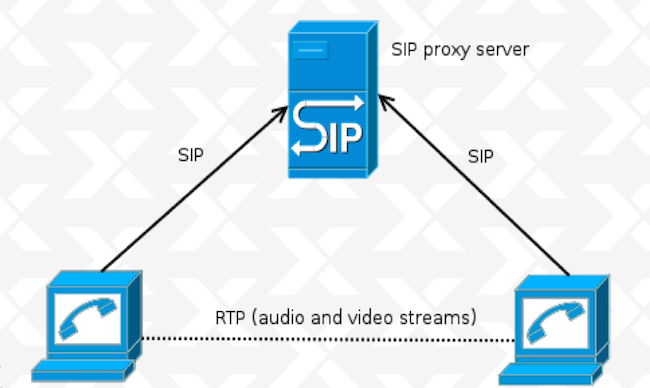
Two weeks ago I left NYC for a day trip to Norfolk, Virginia, to attend xTupleCon 2014. For those who don t know, xTuple is an incredibly reknown open source Enterprise Resource Planning (ERP) software. If you ve been following this blog, you might recall that during my participation in the Google Summer of Code 2014, I wrote a beta JSCommunicator extension for xTuple (to see how I went about doing that, look up Kickstarting the JSCommunicator-xTuple extension). Now, I wasn t flying down to Virginia on the eve of my first grad school midterms (gasp!) for fun - although I will admit, I enjoyed myself a fair amount. My GSoC mentor, Daniel Pocock was giving a talk about WebRTC and JSCommunicator at xTupleCon and invited me to participate. So that was the first perk of going to xTupleCon, I got to finally meet my GSoC mentor in person! During the presentation, Daniel provided a high level expanation of WebRTC and how it works. WebRTC (Web Real Time Communications) enables real time transmission of audio, video and data streams through browser-to-browser applications. This is one of the many perks of WebRTC; it doesn t require installation of plugins, making its use less vulnerable to security breaches. Websockets are used for the signalling channel and the SIP or XMPP can be used as the signaling protocol - in JSCommunicator, we used SIP. What was also done in JSCommunicator and can be done in other applications is to use a library to implement the signaling and SIP stack. JSCommunicator uses (and I highly reccomend) JsSIP. The basic SIP architecture is comprised of peers and a SIP Proxy Server that supports SIP over Websockets transport: sipArch If you have users behind NAT, you ll also need a TURN server for relay: sipArch2 In both cases, setup is not too difficult, particularly if using reSIProcate which offers both the SIP proxy and the TURN server. Daniel Pocock has an excellent post on how to setup and configure your SIP proxy and TURN server. With regard to JSCommunicator, it is a generic telephone in HTML5 which can easily be embedded in any web site or web app. Almost every aspect of JSCommunicator is easily customizable. More about JSCommunicator setup and architecture is detailed in a previous post. The JSCommunicator-xTuple extension can be installed in xTuple as an npm package (xtuple-jscommunicator). It is still at a very beta - or even pre-beta - stage and there are various limitations; the configuration must be hard-coded and dialing is done manually as opposed to clicking on a contact. Some of these limitations are features are on the wish list for future work. For example, some ideas for the next version of the extension are a click to dial from CRM records functionality and to bring up CRM records for an incomming call. Additionaly, the SIP proxy could be automatically installed with the xTuple server installation if desired. We closed the presentation with a live demo during which I made a video call from a JSCommunicator instance embedded in freephonebox.net to the JSCommunicator xTuple extension running on Daniel s laptop. Despite the occasionally iffy hotel Wifi, the demo was a hit - at one point I even left the conference room and took a quick walk around the hotel and invited other xTupleCon attendees to say hello to those in the room. The audience s reception was more enthusiastic than I anticipated, giving way to a pretty extensive Q&A session. It s great to see more and more people interested in WebRTC, I can t emphasize enough what a useful and versatile tool it is. Here s an action shot of part of the xTuple WebRTC presentation: xtuple

Keith Packard: Glamor cleanup

Glamor Cleanup Before I start really digging in to reworking the Render support in Glamor, I wanted to take a stab at cleaning up some cruft which has accumulated in Glamor over the years. Here's what I've done so far. Get rid of the Intel fallback paths I think it's my fault, and I'm sorry. The original Intel Glamor code has Glamor implement accelerated operations using GL, and when those fail, the Intel driver would fall back to its existing code, either UXA acceleration or software. Note that it wasn't Glamor doing these fallbacks, instead the Intel driver had a complete wrapper around every rendering API, calling special Glamor entry points which would return FALSE if GL couldn't accelerate the specified operation. The thinking was that when GL couldn't do something, it would be far faster to take advantage of the existing UXA paths than to have Glamor fall back to pulling the bits out of GL, drawing to temporary images with software, and pushing the bits back to GL. And, that may well be true, but what we've managed to prove is that there really aren't any interesting rendering paths which GL can't do directly. For core X, the only fallbacks we have today are for operations using a weird planemask, and some CopyPlane operations. For Render, essentially everything can be accelerated with the GPU. At this point, the old Intel Glamor implementation is a lot of ugly code in Glamor without any use. I posted patches to the Intel driver several months ago which fix the Glamor bits there, but they haven't seen any review yet and so they haven't been merged, although I've been running them since 1.16 was released... Getting rid of this support let me eliminate all of the _nf functions exported from Glamor, along with the GLAMOR_USE_SCREEN and GLAMOR_USE_PICTURE_SCREEN parameters, along with the GLAMOR_SEPARATE_TEXTURE pixmap type. Force all pixmaps to have exact allocations Glamor has a cache of recently used textures that it uses to avoid allocating and de-allocating GL textures rapidly. For pixmaps small enough to fit in a single texture, Glamor would use a cache texture that was larger than the pixmap. I disabled this when I rewrote the Glamor rendering code for core X; that code used texture repeat modes for tiles and stipples; if the texture wasn't the same size as the pixmap, then texturing would fail. On the Render side, Glamor would actually reallocate pixmaps used as repeating texture sources. I could have fixed up the core rendering code to use this, but I decided instead to just simplify things and eliminate the ability to use larger textures for pixmaps everywhere. Remove redundant pixmap and screen private pointers Every Glamor pixmap private structure had a pointer back to the pixmap it was allocated for, along with a pointer to the the Glamor screen private structure for the related screen. There's no particularly good reason for this, other than making it possible to pass just the Glamor pixmap private around a lot of places. So, I removed those pointers and fixed up the functions to take the necessary extra or replaced parameters. Similarly, every Glamor fbo had a pointer back to the Glamor screen private too; I removed that and now pass the Glamor screen private parameter as needed. Reducing pixmap private complexity Glamor had three separate kinds of pixmap private structures, one for 'normal' pixmaps (those allocated by them selves in a single FBO), one for 'large' pixmaps, where the pixmap was tiled across many FBOs, and a third for 'atlas' pixmaps, which presumably would be a single FBO holding multiple pixmaps. The 'atlas' form was never actually implemented, so it was pretty easy to get rid of that. For large vs normal pixmaps, the solution was to move the extra data needed by large pixmaps into the same structure as that used by normal pixmaps and simply initialize those elements correctly in all cases. Now, most code can ignore the difference and simply walk the array of FBOs as necessary. The other thing I did was to shrink the number of possible pixmap types from 8 down to three. Glamor now exposes just these possible pixmap types: Future Work

Matthew Garrett: On joining the FSF board

I joined the board of directors of the Free Software Foundation a couple of weeks ago. I've been travelling a bunch since then, so haven't really had time to write about it. But since I'm currently waiting for a test job to finish, why not?

It's impossible to overstate how important free software is. A movement that began with a quest to work around a faulty printer is now our greatest defence against a world full of hostile actors. Without the ability to examine software, we can have no real faith that we haven't been put at risk by backdoors introduced through incompetence or malice. Without the freedom to modify software, we have no chance of updating it to deal with the new challenges that we face on a daily basis. Without the freedom to pass that modified software on to others, we are unable to help people who don't have the technical skills to protect themselves.

Free software isn't sufficient for building a trustworthy computing environment, one that not merely protects the user but respects the user. But it is necessary for that, and that's why I continue to evangelise on its behalf at every opportunity.

However.

Free software has a problem. It's natural to write software to satisfy our own needs, but in doing so we write software that doesn't provide as much benefit to people who have different needs. We need to listen to others, improve our knowledge of their requirements and ensure that they are in a position to benefit from the freedoms we espouse. And that means building diverse communities, communities that are inclusive regardless of people's race, gender, sexuality or economic background. Free software that ends up designed primarily to meet the needs of well-off white men is a failure. We do not improve the world by ignoring the majority of people in it. To do that, we need to listen to others. And to do that, we need to ensure that our community is accessible to everybody.

That's not the case right now. We are a community that is disproportionately male, disproportionately white, disproportionately rich. This is made strikingly obvious by looking at the composition of the FSF board, a body made up entirely of white men. In joining the board, I have perpetuated this. I do not bring new experiences. I do not bring an understanding of an entirely different set of problems. I do not serve as an inspiration to groups currently under-represented in our communities. I am, in short, a hypocrite.

So why did I do it? Why have I joined an organisation whose founder I publicly criticised for making sexist jokes in a conference presentation? I'm afraid that my answer may not seem convincing, but in the end it boils down to feeling that I can make more of a difference from within than from outside. I am now in a position to ensure that the board never forgets to consider diversity when making decisions. I am in a position to advocate for programs that build us stronger, more representative communities. I am in a position to take responsibility for our failings and try to do better in future.

People can justifiably conclude that I'm making excuses, and I can make no argument against that other than to be asked to be judged by my actions. I hope to be able to look back at my time with the FSF and believe that I helped make a positive difference. But maybe this is hubris. Maybe I am just perpetuating the status quo. If so, I absolutely deserve criticism for my choices. We'll find out in a few years.

comment count unavailable comments

29 October 2014

Gunnar Wolf: Guests in the classroom: @chemaserralde talks about real time scheduling

Last Wednesday I had the pleasure and honor to have a great guest again at my class: Jos Mar a Serralde, talking about real time scheduling. I like inviting different people to present interesting topics to my students a couple of times each semester, and I was very happy to have Chema come again. Chema is a professional musician (formally, a pianist, although he has far more skills than what a title would confer to him Skills that go way beyond just music), and he had to learn the details on scheduling due to errors that appear when recording and performing. The audio could use some cleaning, and my main camera (the only one that lasted for the whole duration) was by a long shot not professional grade, but the video works and is IMO quite interesting and well explained. So, here is the full video (also available at The Internet archive), all two hours and 500MB of it for you to learn and enjoy!

Rhonda D'Vine: Feminist Year

If someone would have told me that I would visit three feminist events this year I would have slowly nodded at them and responded with "yeah, sure..." not believing it. But sometimes things take their own turns. It all started with the Debian Women Mini-Debconf in Barcelona. The organizers did ask me how they have to word the call for papers so that I would feel invited to give a speech, which felt very welcoming and nice. So we settled for "people who identify themselves as female". Due to private circumstances I didn't prepare well for my talk, but I hope it was still worth it. The next interesting part though happened later when there were lightning talks. Someone on IRC asked why there are male people in the lightning talks, which was explicitly allowed for them only. This also felt very very nice, to be honest, that my talk wasn't questioned. Those are amongst the reasons why I wrote My place is here, my home is Debconf. Second event I went to was the FemCamp Wien. It was my first event that was a barcamp, I didn't know what to expect organization wise. Topic-wise it was set about Queer Feminism. And it was the first event that I went to which had a policy. Granted, there was an extremely silly written part in it, which naturally ended up in a shit storm on twitter (which people from both sides did manage very badly, which disappointed me). Denying that there is sexism against cis-males is just a bad idea, but the background of it was that this wasn't the topic of this event. The background of the policy was that usually barcamps but events in general aren't considered that save of a place for certain people, and that this barcamp wanted to make it clear that people usually shying away from such events in the fear of harassment can feel at home there.
And what can I say, this absolutely was the right thing to do. I never felt any more welcomed and included in any event, including Debian events sorry to say that so frankly. Making it clear through the policy that everyone is on the same boat with addressing each other respectfully totally managed to do exactly that. The first session of the event about dominant talk patterns and how to work around or against them also made sure that the rest of the event was giving shy people a chance to speak up and feel comfortable, too. And the range of the sessions that were held was simply great. This was the event that I came up with the pattern that I have to define the quality of an event on the sessions that I'm unable to attend. The thing that hurt me most in the afterthought was that I couldn't attend the session about minorities within minorities. :/ Last but not least I attended AdaCamp Berlin. This was a small unconference/barcamp dedicated to increase women's participation in open technology and culture named after Ada Lovelace who is considered the first programmer. It was a small event with only 50 slots for people who identify as women. So I was totally hyper when I received the mail that was accepted. It was another event with a policy, and at first reading it looked strange. But given that there are people who are allergic to ingredients of scents, it made sense to raise awareness of that topic. And given that women are facing a fair amount of harassment in the IT and at events, it also makes sense to remind people to behave. After all it was a general policy for all AdaCamps, not for this specific one with only women.
I enjoyed the event. Totally. And that's not only because I was able to meet up with a dear friend who I haven't talked to in years, literally. I enjoyed the environment, and the sessions that were going on. And quite similar to the FemCamp, it started off with a session that helped a lot for the rest of the event. This time it was about the Impostor Syndrome which is extremely common for women in IT. And what can I say, I found myself in one of the slides, given that I just tweeted the day before that I doubted to belong there. Frankly spoken, it even crossed my mind that I was only accepted so that at least one trans person is there. Which is pretty much what the impostor syndrome is all about, isn't it. But when I was there, it did feel right. And we had great sessions that I truly enjoyed. And I have to thank one lady once again for her great definition on feminism that she brought up during one session, which is roughly that feminism for her isn't about gender but equality of all people regardless their sexes or gender definition. It's about dropping this whole binary thinking. I couldn't agree more. All in all, I totally enjoyed these events, and hope that I'll be able to attend more next year. From what I grasped all three of them think of doing it again, the FemCamp Vienna already has the date announced at the end of this year's event, so I am looking forward to meet most of these fine ladies again, if faith permits. And keep in mind, there will always be critics and haters out there, but given that thy wouldn't think of attending such an event anyway in the first place, don't get wound up about it. They just try to talk you down. P.S.: Ah, almost forgot about one thing to mention, which also helps a lot to reduce some barrier for people to attend: The catering during the day and for lunch both at FemCamp and AdaCamp (there was no organized catering at the Debian Women Mini-Debconf) did take off the need for people to ask about whether there could be food without meat and dairy products by offering mostly Vegan food in the first place, even without having to query the participants. Often enough people otherwise choose to go out of the event or bring their own food instead of asking for it, so this is an extremely welcoming move, too. Way to go!

/personal permanent link Comments: 2 Flattr this

28 October 2014

Keith Packard: Goodbye-Barnes-and-Noble

Goodbye Barnes & Noble I've read books on electronic devices for many years now; the convenience of having a huge library with me while traveling makes up for the lower quality of the presentation. I've read books on a selection of Palm devices, an old OpenInkpot compatible ereader, my phone and, most recently, on my Kobo Aura. To get reading material, I've used a variety of sources, including the venerable Project Gutenberg, the Internet Archive, directly from authors like Cory Doctorow and even our local Multnomah County Public Library. I like to have books in epub format; it's a published standard, based on HTML and CSS. My recent devices have all happily supported that, and it allows for editing when I feel the need to correct typos or formatting problems. Purchasing Books When I wanted to actually purchase a book, I bought from Barnes & Noble; they have a good selection, and reasonable automatic recommendations. According to their web site, since I started shopping there, I've purchased 51 books. I can't tell how much I've spent, but probably in excess of $500. Not knowing which device I'd be reading on at any one time, and liking to have the assurance of ongoing access to my library, I would always download the epub files to my laptop and then transfer them to whichever device I wanted to read on. This ensured that my books would be available even when I didn't have a network connection (as happened yesterday during a wind storm which cut the power to the DSLAM which connects me to the internet). I'd created a simple shell script which captured the file after it was downloaded on my laptop and prepared it for my reader. A bit of browser configuration and it really was as simple as clicking the 'download' button to get a book onto both my laptop and my reading device. Barnes & Noble Disables Downloading I was traveling in Bordeaux a couple of weeks ago and wanted to get the latest volume in a series I was reading. My library didn't have it available, and so I decided that it was worth a few dollars to purchase it for the flight home. After clicking through the Barnes & Noble store, I was ready to download the book so that I could transfer it to my reader. Going to 'My Library', I found my new purchases but the usual 'Download' button was missing. I was a bit surprised as I'd purchased and downloaded the previous volume just before leaving without any troubles. At first, I assumed there was some kind of region restriction on the distribution of this book. I'm familiar with that from DVD region locking of movies, and supposed that the same could be done with books for some reason. However, after setting up a VPN back to home and browsing through that (to ensure that my browser would appear with an Oregon address), the download button was still not present. The unhelpful Barnes & Noble representative that I accessed through the 'help' button disclosed that the 'download' "feature" had been disabled for "security" reasons. Not really having any alternative, I requested a refund for the new book. Barnes & Noble Loses a Customer With no way to actually use ebooks purchased through the Barnes & Noble store, I won't be spending any more money with them. I'm not sure how that helps their "security" issues, although if they lose enough customers and they close their doors, I guess that would make them about as secure as imaginable. Kobo Makes a Sale Having purchased a Kobo Aura, it had built-in access to their book store, which made it easy to download the book that I wanted. Then, I simply connected my reader to my laptop and copied the file over for safe keeping. Buying Books under Linux After I got home, I had to figure out how to get Adobe Digital Editions installed on my laptop. Fortunately, I discovered that version 2.0.1 runs fine under wine. Now, purchasing books can be done with my laptop (a vastly superior browsing experience). The .acsm file can be dragged straight from the iceweasel download menu to Adobe Digital Editions, which happily downloads the actual .epub file and makes it available for transferring to my reader. Of course, now that I've got Adobe Digital Editions working, I can also get digitally restricted books from all over the net, greatly expanding my options for purchasing (or borrowing) books. It's a bit less convenient, and requires that I run an icky Windows binary under wine, but at least I have choices, which is some consolation.

27 October 2014

Petter Reinholdtsen: First Jessie based Debian Edu released (alpha0)

I am happy to report that I on behalf of the Debian Edu team just sent out this announcement:
The Debian Edu Team is pleased to announce the release of Debian Edu
Jessie 8.0+edu0~alpha0
Debian Edu is a complete operating system for schools. Through its
various installation profiles you can install servers, workstations
and laptops which will work together on the school network. With
Debian Edu, the teachers themselves or their technical support can
roll out a complete multi-user multi-machine study environment within
hours or a few days. Debian Edu comes with hundreds of applications
pre-installed, but you can always add more packages from Debian.
For those who want to give Debian Edu Jessie a try, download and
installation instructions are available, including detailed
instructions in the manual[1] explaining the first steps, such as
setting up a network or adding users. Please note that the password
for the user your prompted for during installation must have a length
of at least 5 characters!
 [1] <URL: https://wiki.debian.org/DebianEdu/Documentation/Jessie >
Would you like to give your school's computer a longer life? Are you
tired of sneaker administration, running from computer to computer
reinstalling the operating system? Would you like to administrate all
the computers in your school using only a couple of hours every week?
Check out Debian Edu Jessie!
Skolelinux is used by at least two hundred schools all over the world,
mostly in Germany and Norway.
About Debian Edu and Skolelinux
===============================
Debian Edu, also known as Skolelinux[2], is a Linux distribution based
on Debian providing an out-of-the box environment of a completely
configured school network. Immediately after installation a school
server running all services needed for a school network is set up just
waiting for users and machines being added via GOsa , a comfortable
Web-UI. A netbooting environment is prepared using PXE, so after
initial installation of the main server from CD or USB stick all other
machines can be installed via the network.  The provided school server
provides LDAP database and Kerberos authentication service,
centralized home directories, DHCP server, web proxy and many other
services.  The desktop contains more than 60 educational software
packages[3] and more are available from the Debian archive, and
schools can choose between KDE, Gnome, LXDE, Xfce and MATE desktop
environment.
 [2] <URL: http://www.skolelinux.org/ >
 [3] <URL: http://people.skolelinux.org/pere/blog/Educational_applications_included_in_Debian_Edu___Skolelinux__the_screenshot_collection____.html >
Full release notes and manual
=============================
Below the download URLs there is a list of some of the new features
and bugfixes of Debian Edu 8.0+edu0~alpha0 Codename Jessie. The full
list is part of the manual. (See the feature list in the manual[4] for
the English version.) For some languages manual translations are
available, see the manual translation overview[5].
 [4] <URL: https://wiki.debian.org/DebianEdu/Documentation/Jessie/Features >
 [5] <URL: http://maintainer.skolelinux.org/debian-edu-doc/ >
Where to get it
---------------
To download the multiarch netinstall CD release (624 MiB) you can use
 * ftp://ftp.skolelinux.org/skolelinux-cd/debian-edu-8.0+edu0~alpha0-CD.iso
 * http://ftp.skolelinux.org/skolelinux-cd/debian-edu-8.0+edu0~alpha0-CD.iso
 * rsync -avzP ftp.skolelinux.org::skolelinux-cd/debian-edu-8.0+edu0~alpha0-CD.iso .
The SHA1SUM of this image is: 361188818e036ce67280a572f757de82ebfeb095
New features for Debian Edu 8.0+edu0~alpha0 Codename Jessie released 2014-10-27
===============================================================================
Installation changes
--------------------
 * PXE installation now installs firmware automatically for the hardware present.
Software updates
----------------
Everything which is new in Debian Jessie 8.0, eg:
 * Linux kernel 3.16.x
 * Desktop environments KDE "Plasma" 4.11.12, GNOME 3.14, Xfce 4.10,
   LXDE 0.5.6 and MATE 1.8 (KDE "Plasma" is installed by default; to
   choose one of the others see manual.)
 * the browsers Iceweasel 31 ESR and Chromium 38 
 * !LibreOffice 4.3.3
 * GOsa 2.7.4
 * LTSP 5.5.4
 * CUPS print system 1.7.5
 * new boot framework: systemd
 * Educational toolbox GCompris 14.07 
 * Music creator Rosegarden 14.02
 * Image editor Gimp 2.8.14
 * Virtual stargazer Stellarium 0.13.0
 * golearn 0.9
 * tuxpaint 0.9.22
 * New version of debian-installer from Debian Jessie.
 * Debian Jessie includes about 42000 packages available for
   installation.
 * More information about Debian Jessie 8.0 is provided in the release
   notes[6] and the installation manual[7].
 [6] <URL: http://www.debian.org/releases/jessie/releasenotes >
 [7] <URL: http://www.debian.org/releases/jessie/installmanual >
Fixed bugs
----------
 * Inserting incorrect DNS information in Gosa will no longer break
   DNS completely, but instead stop DNS updates until the incorrect
   information is corrected (Debian bug #710362)
 * and many others.
Documentation and translation updates
------------------------------------- 
 * The Debian Edu Jessie Manual is fully translated to German, French,
   Italian, Danish and Dutch. Partly translated versions exist for
   Norwegian Bokmal and Spanish.
Other changes
-------------
 * Due to new Squid settings, powering off or rebooting the main
   server takes more time.
 * To manage printers localhost:631 has to be used, currently www:631
   doesn't work.
Regressions / known problems
----------------------------
 * Installing LTSP chroot fails with a bug related to eatmydata about
   exim4-config failing to run its postinst (see Debian bug #765694
   and Debian bug #762103).
 * Munin collection is not properly configured on clients (Debian bug
   #764594).  The fix is available in a newer version of munin-node.
 * PXE setup for Main Server and Thin Client Server setup does not
   work when installing on a machine without direct Internet access.
   Will be fixed when Debian bug #766960 is fixed in Jessie.
See the status page[8] for the complete list.
 [8] <URL: https://wiki.debian.org/DebianEdu/Status/Jessie >
How to report bugs
------------------
<URL: http://wiki.debian.org/DebianEdu/HowTo/ReportBugs >
About Debian
============
The Debian Project was founded in 1993 by Ian Murdock to be a truly
free community project. Since then the project has grown to be one of
the largest and most influential open source projects. Thousands of
volunteers from all over the world work together to create and
maintain Debian software. Available in 70 languages, and supporting a
huge range of computer types, Debian calls itself the universal
operating system.
Contact Information
For further information, please visit the Debian web pages[9] or send
mail to press@debian.org.
 [9] <URL: http://www.debian.org/ >

26 October 2014

Joey Hess: a programmable alarm clock using systemd

I've taught my laptop to wake up at 7:30 in the morning. When it does, it will run whatever's in my ~/bin/goodmorning script. Then, if the lid is still closed, it will go back to sleep again. So, it's a programmable alarm clock that doesn't need the laptop to be left turned on to work. But it doesn't have to make noise and wake me up (I rarely want to be woken up by an alarm; the sun coming in the window is a much nicer method). It can handle other tasks like downloading my email, before I wake up. When I'm at home and on dialup, this tends to take an hour in the morning, so it's nice to let it happen before I get up. This took some time to figure out, but it's surprisingly simple. Besides ~/bin/goodmorning, which can be any program/script, I needed just two files to configure systemd to do this. /etc/systemd/system/goodmorning.timer
[Unit]
Description=good morning
[Timer]
Unit=goodmorning.service
OnCalendar=*-*-* 7:30
WakeSystem=true
Persistent=false
[Install]
WantedBy=multi-user.target
/etc/systemd/system/goodmorning.service
[Unit]
Description=good morning
RefuseManualStart=true
RefuseManualStop=true
ConditionACPower=true
[Service]
Type=oneshot
ExecStart=/bin/systemd-inhibit --what=handle-lid-switch --why=goodmorning /bin/su joey -c "/usr/bin/timeout 45m /home/joey/bin/goodmorning"
installation After installing those files, run (as root): systemctl enable goodmorning.timer; systemctl start goodmorning.timer Then, you'll also need to edit /etc/systemd/logind.conf, and set LidSwitchIgnoreInhibited=no -- this overrides the default, which is not to let systemd-inhibit block sleep on lid close. almost too easy I don't think this would be anywhere near as easy to do without systemd, logind, etc. Especially the handling of waking the system at the right time, and the behavior around lid sleep inhibiting. The WakeSystem=true relies on some hardware support for waking from sleep; my laptop supported it with no trouble but I don't know how broadly available that is. Also, notice the ConditionACPower=true, which I added once I realized I don't want the job to run if I forgot to leave the laptop plugged in overnight. Technically, it will still wake up when on battery power, but then it should go right back to sleep. Quite a lot of nice peices of systemd all working together here! xfce workaround If using xfce, xfce4-power-manager takes over handling of lid close from systemd, and currently prevents the system from going back to sleep if the lid is still closed when goodmorning finishes. Happily, there is an easy workaround; this configures xfce to not override the lid switch behavior: xfconf-query -c xfce4-power-manager -n -p /xfce4-power-manager/logind-handle-lid-switch -t bool -s true Other desktop environments may have similar issues. why not a per-user unit? It would perhaps be better to use the per-user systemd, not the system wide one. Then I could change the time the alarm runs without using root. What's prevented me from doing this is that systemd-inhibit uses policykit, and policykit prevents it from being used in this situation. It's a lot easier to run it as root and use su, than it is to reconfigure policykit.

Colin Watson: Moving on, but not too far

The Ubuntu Code of Conduct says:
Step down considerately: When somebody leaves or disengages from the project, we ask that they do so in a way that minimises disruption to the project. They should tell people they are leaving and take the proper steps to ensure that others can pick up where they left off.
I've been working on Ubuntu for over ten years now, almost right from the very start; I'm Canonical's employee #17 due to working out a notice period in my previous job, but I was one of the founding group of developers. I occasionally tell the story that Mark originally hired me mainly to work on what later became Launchpad Bugs due to my experience maintaining the Debian bug tracking system, but then not long afterwards Jeff Waugh got in touch and said "hey Colin, would you mind just sorting out some installable CD images for us?". This is where you imagine one of those movie time-lapse clocks ... At some point it became fairly clear that I was working on Ubuntu, and the bug system work fell to other people. Then, when Matt Zimmerman could no longer manage the entire Ubuntu team in Canonical by himself, Scott James Remnant and I stepped up to help him out. I did that for a couple of years, starting the Foundations team in the process. As the team grew I found that my interests really lay in hands-on development rather than in management, so I switched over to being the technical lead for Foundations, and have made my home there ever since. Over the years this has given me the opportunity to do all sorts of things, particularly working on our installers and on the GRUB boot loader, leading the development work on many of our archive maintenance tools, instituting the +1 maintenance effort and proposed-migration, and developing the Click package manager, and I've had the great pleasure of working with many exceptionally talented people. However. In recent months I've been feeling a general sense of malaise and what I've come to recognise with hindsight as the symptoms of approaching burnout. I've been working long hours for a long time, and while I can draw on a lot of experience by now, it's been getting harder to summon the enthusiasm and creativity to go with that. I have a wonderful wife, amazing children, and lovely friends, and I want to be able to spend a bit more time with them. After ten years doing the same kinds of things, I've accreted history with and responsibility for a lot of projects. One of the things I always loved about Foundations was that it's a broad church, covering a wide range of software and with a correspondingly wide range of opportunities; but, over time, this has made it difficult for me to focus on things that are important because there are so many areas where I might be called upon to help. I thought about simply stepping down from the technical lead position and remaining in the same team, but I decided that that wouldn't make enough of a difference to what matters to me. I need a clean break and an opportunity to reset my habits before I burn out for real. One of the things that has consistently held my interest through all of this has been making sure that the infrastructure for Ubuntu keeps running reliably and that other developers can work efficiently. As part of this, I've been able to do a lot of work over the years on Launchpad where it was a good fit with my remit: this has included significant performance improvements to archive publishing, moving most archive administration operations from excessively-privileged command-line operations to the webservice, making build cancellation reliable across the board, and moving live filesystem building from an unscalable ad-hoc collection of machines into the Launchpad build farm. The Launchpad development team has generally welcomed help with open arms, and in fact I joined the ~launchpad team last year. So, the logical next step for me is to make this informal involvement permanent. As such, at the end of this year I will be moving from Ubuntu Foundations to the Launchpad engineering team. This doesn't mean me leaving Ubuntu. Within Canonical, Launchpad development is currently organised under the Continuous Integration team, which is part of Ubuntu Engineering. I'll still be around in more or less the usual places and available for people to ask me questions. But I will in general be trying to reduce my involvement in Ubuntu proper to things that are closely related to the operation of Launchpad, and a small number of low-effort things that I'm interested enough in to find free time for them. I still need to sort out a lot of details, but it'll very likely involve me handing over project leadership of Click, drastically reducing my involvement in the installer, and looking for at least some help with boot loader work, among others. I don't expect my Debian involvement to change, and I may well find myself more motivated there now that it won't be so closely linked with my day job, although it's possible that I will pare some things back that I was mostly doing on Ubuntu's behalf. If you ask me for help with something over the next few months, expect me to be more likely to direct you to other people or suggest ways you can help yourself out, so that I can start disentangling myself from my current web of projects. Please contact me sooner or later if you're interested in helping out with any of the things I'm visible in right now, and we can see what makes sense. I'm looking forward to this!

Gregor Herrmann: RC bugs 2014/38-43

it's this time of the year^Wrelease cycle again almost. in ten days (& roughly two hours), the freeze for the next debian release, codenamed jessie, will start. by this time packages must be in testing in order to be candidates for the release, as explained in the release team's detailed freeze policy. this also means, with the regular testing migration time set to ten days, that tonight's dinstall run closed the regular upload window. & this also means that we should all concentrate on fixing RC bugs to make the freeze as short as possible & jessie yet another great release. before I head over to the UDD bugs page, I'd like to summarize my work on RC bugs in the last weeks, which was again focussed on packages in the Debian Perl Group.

Sune Vuorela: KDE makes Qt

Recently I was trying some statistics on the qtbase-module (where QtCore, QtGui, QtWidgets and so on lives) and was wondering who made them.
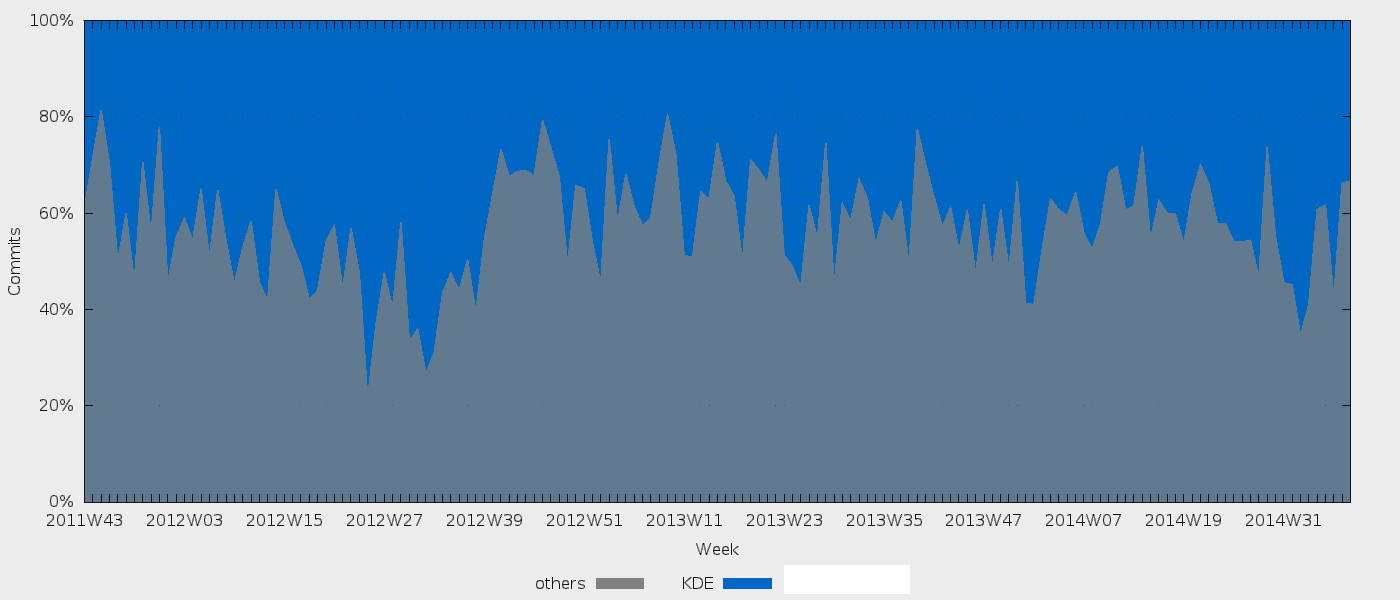
Not based on their current paid affilation, like Thiago s graphs, but if each commit was made by a person coming from KDE. So, I got hold of Thiago s scripts, a lovely mix of perl and zsh, and a QtBase git repository. First steps was to try to classify people as person coming from KDE or not. Of course, I m a KDE person. Thiago is a KDE person. David Faure is a KDE person. Olivier Goffart is a KDE person. Lars Knoll is a KDE person. By the help of the KDE accounts file, and some of the long time KDE contributors, I got after a half day of work a good list of it. Then next steps was trying to put it into Thiago s perlscripts All of it kind of succeeded: qtbase-KDE.graph So, KDE people makes up for 40-60% of the weekly commits to QtBase. This is again shows that KDE is important to Qt, just as the reverse is. So, let s keep KDE healthy. KDE is running a end-of-year fundraiser over here https://www.kde.org/fundraisers/yearend2014/. Go ahead and donate, and help KDE stay healthy. For your own sake. And for Qt s.

Pau Garcia i Quiles: FOSDEM 2015 Desktops DevRoom Call for Talks

FOSDEM is one of the largest gatherings of Free Software contributors in the world and happens each February in Brussels (Belgium). One of the tracks will be the Desktops DevRoom (formerly known as CrossDesktop DevRoom ), which will host Desktop-related talks. We are now inviting proposals for talks about Free/Libre/Open-source Software on the topics of Desktop development, Desktop applications and interoperability amongst Desktop Environments. This is a unique opportunity to show novel ideas and developments to a wide technical audience. Topics accepted include, but are not limited to: Enlightenment, Gnome, KDE, Unity, XFCE, LXQt, Windows, Mac OS X, software development for the desktop, general desktop matters, applications that enhance desktops and web (when related to desktop). Talks can be very specific, such as the advantages/disadvantages of development with Qt on Wayland over X11/Mir; or as general as predictions for the fusion of Desktop and web in 5 years time. Topics that are of interest to the users and developers of all desktop environments are especially welcome. The FOSDEM 2014 schedule might give you some inspiration. Please include the following information when submitting a proposal: The deadline for submissions is December 7th 2014. FOSDEM will be held on the weekend of January 31st-February 1st 2015 and the Desktops DevRoom will take place on Sunday, February 1st 2015. Please use the following website to submit your proposals: https://penta.fosdem.org/submission/FOSDEM15 (you do not need to create a new Pentabarf account if you already have one from past years). You can also join the devroom s mailing list, which is the official communication channel for the DevRoom: desktops-devroom@lists.fosdem.org (subscription page for the mailing list) The Desktops DevRoom 2015 Organization Team

Russ Allbery: California general election

Probably only of interest to California residents. Time again for the general election voting. This is probably too late to be helpful for a lot of people voting permanent absentee, but may as well write this down anyway. (Hm, I apparently didn't do this in 2012.) Propositions: Proposition 1: YES. Now is one of the best times in history to borrow money for infrastructure improvements, and our water infrastructure in the state can certainly use it. Proposition 2: YES. I have somewhat mixed feelings about this, since I hate passing complex legislation like this via proposition, but this already went through the legislature. It would be dumb for the federal government, which can more easily borrow money, but given how the finances of state governments work in the US, this sort of rainy day fund is probably prudent. This one seems reasonably well-designed, and the opposition is panic about a secondary effect on how school reserves are managed that can be changed with later legislative action and which is rather unconvincing. Proposition 45: YES. I can't get very enthused about yet more bandaids on top of our completely broken health care system, but forcing insurance companies to justify rate increases results in some public pressure against profit-taking by insurance companies. Single payer is what we actually need, but this might be mildly helpful. Plus, the argument against is more incoherent nonsense. So, I'm voting yes, but I don't think it's important and I won't mind if it loses. Proposition 46: NO. There are a lot of things that we should do about preventable medical errors, starting with funding our health care system properly, testing drugs properly, and investing in proper inspections and medical licensing investigations. Drug testing doctors is not among those things. This is a well-meaning but horrible idea pushed by a victim's advocacy group that won't do anything to improve our health care system. The fear-mongering of the opponents about malpractice lawsuits is a bit much, but there are essentially no positive benefits here. Proposition 47: YES. Requires that misdemeanor crimes actually be misdemeanors, rather than giving prosecutors discretion to charge them as felonies if the person charged happens to be black-- er, I mean, if the prosecutor doesn't like them for some reason. Obviously a good idea on all fronts: stop over-charging crimes, stop giving prosecutors discretion to choose the impact of laws on particular people (since they rarely use it appropriately), and further try to decriminalize our completely worthless "war on drugs." Proposition 48: YES. I'm opposed to the Indian gaming system in general, but this proposition appears to be a rather cynical attempt to block new casino development by tribes that already have casinos. My general feeling is that if we're going to have casinos, they should generally be legal; the bizarre system where each casino is subject to public approval seems designed to create political cronyism. State offices: I'm not going to comment on the partisan offices, since no one interesting survived the primaries. Across the board, it's basically the Democratic incumbants against various Republicans. The state Republican party in California is dominated by science denialists, Randian objectivists, and people who think the solution to all problems is ensuring rich people don't pay taxes, so it takes rather a lot to get me to vote for any of them. At the moment, the Democrats are doing a reasonably good job running the state, so while I'd vote for challengers from the left against several of them, given the boring candidate slate, I'm just voting Democrat down the line. California has a system that requires voter approval for various state judicial offices. In general, I don't agree with voter approval for judges, since voters are rarely in a position to make reasonable choices about justices. Since there's a Democratic administration in power at the moment, these are probably the best judges that we're going to get (the few I've heard of are good choices), and I don't think the yes/no approval voting is useful anyway. So I'm voting to approve across the board. Superintendent of Public Instruction: Tom Torlakson. I'm not a huge fan of Torlakson, but Tuck is a Harvard MBA who ran charter schools and then a school privatization initiative. Everyone always claims that they want to reduce bureaucracy and empower teachers, but Tuck has a past track record of trying to do so by taking public education private, something that I am passionately opposed to. So Torlakson it is. Local measures: Measure B: YES. Increases the local hotel tax and uses it for local infrastructure. I'm generally in favor of raising taxes, and the amount certainly won't be significant in the ridiculous Palo Alto hotel market. The arguments against feature one of my favorite stupid right-wing talking points: the tax is unfair because it isn't earmarked to benefit the people paying it. Measure C: YES. Reasonable, small reform of the local utility tax, opposed by the Libertarian Party and "taxpayer associations" using an "all taxation is theft" argument. What's not to like? Measure D: NO. Reduces the size of the city council for no clear reason. The stated reasons are saving money (not credible given how little money is involved) and making city meetings not take as long. I'm going to need something better than that to vote for this. Local offices: Judge of the Superior Court, Office #24: Matthew S. Harris. I'm making one exception for my normal rule against voting for former prosecutors for judges because the incumbant, Diane Ritchie, is apparently a train wreck. All it takes is a quick Google search to reveal multiple news stories about strange behavior, clear conflicts of interest, and other serious problems, including a rebuke by the local bar association. Even if not all of that information is true, judges should be above reproach, or at least farther above reproach than this. Palo Alto City Council: I have an agenda here: I think housing density is about the best thing that the local community could support. Housing density enables better mass transit options, makes housing more affordable and brings more housing under possible rent control, and simply makes more sense given the cost of housing in the area. A lot of the city council members run on low-density or anti-growth platforms; I vote against those and for people who support development. And, of course, I'll filter out candidates who believe stupid things, like claiming a minimum wage is un-American (Seelam-Sea Reddy). The best seem to be Greg Scharff, A.C. Johnston, Nancy Shepherd, Cory Wolbach, and Wayne Douglass. Palo Alto Unified School District: The Democratic party has endorsed four out of the five candidates, so it probably doesn't matter too much. Gina Dalma and Ken Dauber sound like the best of the candidates to me, so I will probably vote for them. Santa Clara Valley Water District #7: I voted for Brian Schmidt last time, and I don't see a reason to change my mind. His opponent is a Silicon Valley millionaire who is spending a surprisingly large amount of money on this race and is involved with a business that sells software to water boards, which raises some eyebrows.

Ben Armstrong: Eleventh hour upload of tuxpaint

I have just made an eleventh hour upload of tuxpaint, tuxpaint-config and tuxpaint-stamps. With luck, this will make it in time for the Nov. 5 Jessie freeze deadline so it goes in as an unassisted migration. Coming soon to a mirror near you!

Next.

Previous.