Search Results: "sto"

15 June 2012

John Goerzen: Windows & a dying hard disk: Solving with Linux

Today, my workstation sent me this email:
The following warning/error was logged by the smartd daemon:
Device: /dev/sda [SAT], 1 Currently unreadable (pending) sectors
and then a little later, this one:
The following warning/error was logged by the smartd daemon:
Device: /dev/sda [SAT], 1 Offline uncorrectable sectors
From the hard disk s SMART data, this is a clue that the drive is failing or will soon. Sigh. Incidentally, if smartmontools isn t installed on your machine, whether it s a laptop, desktop, or server, it should be. Although most of you know I run Linux on the metal on my machines almost exclusively, I do maintain a small drive with a Windows installation that I boot into every few months for various reasons. This is that drive. The drive is non-redundant (no RAID), and although it is backed up, the backup is made via backuppc from the NTFS filesystem mounted on Linux, and is a partial backup backing up certain data, not the OS. There are, of course, bare metal Windows backup solutions, but I generally don t want to back up Windows from within Windows on this machine. Restoring Windows isn t quite as simple as an mkfs, an untar, and a grub-install, either. So my first thought is: immediately save whatever of the drive I can. So I ran apt-get install gddrescue to install the GNU ddrescue tool. ddrescue is somewhat similar to dd, but deals much more intelligently with bad blocks on the drive. It will try to read them repeatedly, with decreasing block sizes, in an effort to get every last good byte off the disk that it can. If it ultimately fails to get certain bytes read, it will write placeholder data to the output file in place of the missing data, so that the output file maintains proper size and alignment. It also saves a log file that notes what it found (see info ddrescue for more on that.) So I created an LVM volume for the purpose (not enough free space on /home, and didn t want to have to shrink it somehow later), and ran:
ddrescue /dev/sda /mnt/sdasave.ddrescue /mnt/sdasave.logfile
Then I went to dinner. When I got back, I discovered there were 1 or 2 bad sectors, about halfway through the disk, but everything else was fine. So now, the question became: did I lose any data? If so, what? I needed to know if I had to revert to a backup for anything or not. To answer THAT question, first I had to figure out the offset of the bad spots on the disk. That s not too hard; the logfile gives it to me:
# Rescue Logfile. Created by GNU ddrescue version 1.15
# Command line: ddrescue /dev/sda /mnt/sdasave.ddrescue sdasave.logfile
# current_pos  current_status
0x3BBB8BFC00     +
#      pos        size  status
0x00000000  0x3BBB8BF000  +
0x3BBB8BF000  0x00001000  -
0x3BBB8C0000  0x38B5346000  +
what we see is that the bad sector starts at byte 0x3BBB8BF000 (256549580800 decimal) and extends for 0 1000 bytes (4096 decimal). Both the drive and NTFS use 512-byte sectors. So dividing by 512, we get sector 501073400 501073407 (4096 bytes is 8 sectors). As a check, I ran grep sector /var/log/kern.log and turned up a bunch of lines like this: Jun 14 21:39:11 hephaestus kernel: [35346.929957] end_request: I/O error, dev sda, sector 501073404 Which is within my calculated range. But this is an absolute sector on the disk. We need the sector within the partition, so for that, we have to enlist fdisk to make that calculation. fdisk shows, among other things:
Units = sectors of 1 * 512 = 512 bytes
Sector size (logical/physical): 512 bytes / 512 bytes
   Device Boot      Start         End      Blocks   Id  System
/dev/sda1   *        2048   976771071   488384512    7  HPFS/NTFS/exFAT
So the Windows partition starts at disk sector 2048. Let s just confirm that. If I use dd if=/dev/sda1 bs=512 count=1 hd head, I see a line beginning with .R.NTFS . Exactly the same as with dd if=/dev/sda bs=512 count=1 skip=2048 hd head, so I read the partition table information correctly. Subtract offset of 2048 from the earlier values, and I get relative sectors 501071352-501071359. That s enough to get some solid info from the filesystem via ntfscluster, part of Debian s ntfs-3g package. I pass -s to it, and ignoring some irrelevant stuff, get my answer:
ntfscluster -s 501071352-501071359 /dev/sda1
Inode 190604 /System Volume Information/ b4816feb-b609-11e1-a908-50e549b934f7 3808876b-c176-4e48-b7ae-04046e6cc752 /$DATA
I even reran it with a much larger sector range, just to be absolutely sure I had wiggle room in case calculations had an off-by-one error or something somewhere. This is really great news, because the file in question is pretty much useless I believe it s a system restore point, which I won t be needing anyhow. So at this point, all that remains is to reinstall this on a different drive. For that, I could just use my ddrescue image. I thought I would take a second image, just to be very extra careful, and use that; I used:
partclone.ntfs --rescue -c -s /dev/sda1 -o sda1.partclone
although ntfsclone would work just as well. This captures only the partition; I ll need the partition table as well, and perhaps also the space between the partition table and the first partition. I could capture it separately with dd, but it s already in the ddrescue image, so there s no need. (GRUB is installed on this drive, but there is no Linux filesystem on it, so it may well exceed the size of the MBR). Note that for Linux ext[234] filesystems, debugfs can provide the same (and more) info as I got from ntfscluster. I happen to have a drive of the right size sitting here, which I was about to install in a different machine. So a wipe and a swap and a restore later, and I should be good to go. This scenario is commonplace enough that I thought I d post how I dealt with it, in case anyone else ever has hard drive issues.

Matthew Garrett: No, really, secure boot does add security

Carla Schroder wrote a piece for linux.com on secure boot, which gives a reasonable overview of the technology and some of the concerns. It unfortunately then encourages everyone to ignore those legitimate concerns by making the trivially false claim that secure boot is just security theatre.

Security isn't some magic binary state where you're either secure or insecure and you can know which. Right now I'd consider my web server secure. If someone finds an exploitable bug in Apache then that would obviously no longer be the case. I could make it more secure by ensuring that Apache runs in a sufficiently isolated chroot that there's no easy mechanism for anyone to break out, which would be fine up until there's also a kernel exploit that allows someone to escalate their privileges enough to change their process root. So it's entirely possible that someone could right now be breaking into my system through bugs I don't even know exist. Am I secure? I don't know. Does that mean I should just disable all security functionality and have an open root shell bound to a well known port? No. Obviously.

Secure boot depends on the correctness of the implementation and the security of the signing key. If the implementation is flawed or if control of the signing key is lost then it stops providing security, and understanding that is important in order to decide how much trust you place in the technology. But much the same is true of any security technique. Kernel flaws make it possible for an unprivileged user to run with arbitrary privileges. Is user/admin separation security theatre? SSL certificate authorities have leaked keys. Is it security theatre for your bank to insist that you use SSL when logging in?

Secure boot doesn't instantly turn an insecure system into a secure one. It's one more technology that makes it more difficult for attackers to take control of your system. It will be broken and it will be fixed, just like almost any other security. If it's security theatre, so is your doorlock.

Why is this important? Because if you tell anyone that understands the technology that secure boot adds no security, they'll just assume that you're equally uninformed about everything else you're saying. It's a perfect excuse for them to just ignore discussion of market restrictions and user freedoms. We don't get anywhere by arguing against reality. Facts are important.

comment count unavailable comments

10 June 2012

Gregor Herrmann: RC bugs 2012/23

here's the list of RC bugs I've worked on during the last week:

C.J. Adams-Collier: Spinning up a telco with Asterisk

Back in 2010 our family moved to an island in an archipelago in the very top left of the US s continental 48. Before moving, we did some research regarding high speed network access. There are a number of ISPs in the county, and even one headquartered on our particular island. But we found that the location where we were moving was in a location that was only serviced by 1.5Mbit DSL. We had been spoiled in our previous two locations and had seen bittorrent swarms reach over 1 megabyte (8Mbit) per second. Our bill said 12 down and 2 up and I wouldn t be surprised if we achieved that. At any rate, we were disappointed by the speeds available and I wanted to do something to increase the availability of higher speed network access. Some of my friends from the North American Network Operators Group (NANOG) told me that one way to improve the infrastructure would be to get involved with telecommunications provisioning as a Competitive Local Exchange Carrier (CLEC). With the above in mind, I did some research and found that in my state, the authority which certifies and regulates telecommunication companies is the Washington Utilities and Transportation Commission (UTC). I found the application forms on their web site, filled them in, filed the appropriate documents with the appropriate departments and received a certificate in the mail shortly thereafter. We have since filed annual reports as required by regulations. And with the regulatory bits out of the way, we re now left with only the technical details. We have established collocation of some equipment near our state s central telecommunications facility at the Westin Building. Technically speaking, the equipment is not in the Westin, but at a facility connected to the Westin by multiple 10Gbit links. Close enough for me. On this equipment, we re running a Debian Squeeze Xen virtual machine and Digium s Asterisk packages:
cjac@sip0:/etc/asterisk$ grep -B1 -A3 Digium /etc/apt/sources.list
#
#  Digium asterisk packages
#
deb http://packages.asterisk.org/deb squeeze main
deb-src http://packages.asterisk.org/deb squeeze main
cjac@sip0:/etc/asterisk$ dpkg -l   grep digium
ii  asterisk                           1:1.8.11.1-1digium1~squeeze  Open Source Private Branch Exchange (PBX)
ii  asterisk-config                    1:1.8.11.1-1digium1~squeeze  Configuration files for Asterisk
ii  asterisk-core-sounds-en-gsm        1.4.21-1digium1~squeeze      asterisk PBX sound files - English/gsm
ii  asterisk-voicemail                 1:1.8.11.1-1digium1~squeeze  simple voicemail support for the Asterisk PBX
We saved up our nickles and dimes to purchase a 24-port analog telephony adapter (ATA). At the recommendation of one of the denizens of the #asterisk IRC channel on Freenode, we decided on the GrandStream GXW4024. It is pretty simple to configure them to register with the Asterisk server using SIP. The only problem we had was getting the RTP streams, and specifically their dynamically negotiated service ports, to traverse the NATting routers. We currently have no public IPv4 address space at the facility which hosts the ATA and so the rest of the internet sees all traffic originating from this facility as sourced from a single IP address. In order for this to work, the edge NAT/router device (in our case, BIG-IP LTM) needs to map its external L4 ports (TCP and UDP) to the ports of internal hosts so that traffic can flow correctly. This works fine for traffic which originates from internal hosts and is destined to hosts on the outside, but does not work so well when hosts on the outside wish to establish connections to hosts on the inside. Call management sessions established with the SIP protocol fall in the former category, but call media (voice, video, txt) sessions established with the RTP protocol fall into the latter; the host and port used to carry the media data are negotiated during the SIP session and the media socket is established out of band. The problem occurs when the call server (on the outside) attempts to establish an RTP stream with the caller (on the inside). The call server attempts to connect to the caller using the IP address from which it connected. The problem is that this address belongs to the NATting router, not the caller, and the router is not expecting the incoming request. To get around the NAT problem, we temporarily configured an OpenVPN tunnel to extend our L2 network segment. Our long-term solution will be to provision an Asterisk server in the same facility as the ATA and then register with it instead of the server in the exterior facility. Calls will then be switched at the local facility and the upstream link will be established using the IAX2 protocol, which does not suffer from the same NAT problems. All of the above provides us with the ability to make voice calls between the 24 channels of the ATA and any other SIP client which happens to be registered with our call server. This is all well and good, but we want to allow our customers to call the rest of the world. Enter our upstream provider, Threshold Communications, Inc. These folks are experienced and professional and have helped us successfully establish both outbound and inbound calling for very reasonable monthly costs. The call quality is indistinguishable from the lines provisioned by the local bell company, and inter-operates flawlessly with the Asterisk call server stack. Because calls transit our Asterisk server, we can add additional features such voicemail, speech to text, DTMF-driven menus, or call forwarding, for instance. We could even theoretically set up autopatch service using amateur frequencies or launch perl scripts to automate arbitrary fancyness. Our next step is to finish configuration of our 12-channel ZyXEL AAM1212 DSLAM modules so that we can deliver ADSL service over the same copper pairs as we deliver voice.

9 June 2012

Petter Reinholdtsen: TV with face recognition, for improved viewer experience

Slashdot got a story about Intel planning a TV with face recognition to recognise the viewer, and it occurred to me that it would be more interesting to turn it around, and do face recognition on the TV image itself. It could let the viewer know who is present on the screen, and perhaps look up their credibility, company affiliation, previous appearances etc for the viewer to better evaluate what is being said and done. That would be a feature I would be willing to pay for. I would not be willing to pay for a TV that point a camera on my household, like the big brother feature apparently proposed by Intel. It is the telescreen idea fetched straight out of the book 1984 by George Orwell.

Neil McGovern: Anti-ACTA Demo my speech

I'm on my way back from the Anti ACTA demo in London, at which I was asked to speak. I was good to see a number of people attend. I bumped into the wonderful Bridget Fox too! Here's my speech:

As I was travelling here on the train, I found myself thinking: why am I here?
What has gone so wrong with the political system that politicians pass laws - the DMCA, the DEA, SOPA, PIPA, ACTA. Laws that look attractive on the surface, but are so deeply flawed. Why have they stopped listening?
But, they haven't stopped listening. They're falling in to a trap set by big businesses with vested interests. The ones with money to influence policy, the lobbying firms, the corporate hospitality arrangements. They hear that the economy is bumbling along the bottom. That many businesses are struggling, and these are hard problems to solve. And suddenly a shining beacon is held out - support our creative industries and all will be well. No one is interested in this new fangled Internet thing anyway. Well, apart from the people stood here today! People like you, and me. People like Julian Huppert - we helped take a motion to the Liberal Democrat Conference to repeal the damaging parts of the Digital Economy Act. The Alliance of Liberals and Democrats in Europe will vote against ACTA, and in three major committees it has already been rejected it. Something has changed. The people who represent us are starting to hear our stories. How we will not put up with censorship, interference and snooping. And let me tell you this. The big industries are scared. Shady back room negotiations so that they may be able to slip it past the public. Thanks to you, this won't work anymore. We have a voice, and it's here today. It's not too late to stop damaging our freedoms. Go visit your elected representatives. Tell them why we need to stop these bad laws. Help them understand that it's not ok to pass these. Write about it, tell people, shout in the streets! We know ACTA is bad. Let's tell the world.

Mike Hommey: Attempting to close a LinkedIn account

Following the trend, I attempted to close my LinkedIn account. Closing a LinkedIn account involves confirming and confirming and confirming again. Once it s all done, you d expect to, well, be done with it. I m outraged at the result: The only upside is that after I login, I can only see a page saying Your LinkedIn account has been temporarily restricted . Contact our customer service team to get this resolved as soon as possible. Update: After contacting their customer service, the account was closed and the public profile is now unavailable.

8 June 2012

Lars Wirzenius: Obnam 1.0 (backup software); a story in many words

tl;dr: Version 1.0 of Obnam, my snapshotting, de-duplicating, encrypting backup program is released. See the end of this announcement for the details. Where we see the hero in his formative years; parental influence From the very beginning, my computing life has involved backups. In 1984, when I was 14, my father was an independent telecommunications consultant, which meant he needed a personal computer for writing reports. He bought a Luxor ABC-802, a Swedish computer with a Z80 microprocessor and two floppy drives. My father also taught me how to use it. When I needed to save files, he gave me not one, but two floppies, and explained that I should store my files one one, and then copy them to the other one every now and then. Later on, over the years, I've made backups from a hard disk (30 megabytes!) to a stack of floppies, to a tape drive installed into a floppy interface (400 megabytes!), to a DAT drive, and various other media. It was always a bit tedious. The start of the quest; lengthy justification for NIH In 2004, I decided to do a full backup, by burning a copy of all my files onto CD-R disks. It took me most of the day. Afterwards, I sat admiring the large stack of disks, and realized that I would not ever do that again. I'm too lazy for that. That I had done it once was an aberration in the space-time continuum. Switching to DVD-Rs instead CD-Rs would reduce to the number of disks to burn, but not enough: it would still take a stack of them. I needed something much better. I had a little experience with tape drives, and that was enough to convince me that I didn't want them. Tape drives are expensive hardware, and the tapes also cost money. If the drive goes bad, you have to get a compatible one, or all your backups are toast. The price per gigabyte was coming down fast for hard drives, and it was clear that they were about to be very competitive with tapes for price. I looked for backup programs that I could use for disk based backups. rsync, of course, was the obvious choice, but there were others. I ended up doing what many geeks do: I wrote my own wrapper around rsync. There's hundred, possibly thousands, of such wrappers around the Internet. I also got the idea that doing a startup to provide online backup space would be a really cool thing. However, I didn't really do anything about that until 2007. More on that later. The rsync wrapper script I wrote used hardlinked directory trees to provide a backup history, though not in the smart way that backuppc does it. The hardlinks were wonderful, because they were cheap, and provided de-duplication. They were also quite cumbersome, when I needed to move my backups to a new disk the first time. It turned out that a lot of tools deal very badly with directory trees with large numbers of hardlinks. I also decided I wanted encrypted backups. This led me to find duplicity, which is a nice program that does encrypted backups, but I had issues with some of its limitations. To fix those limitations, I would have had to re-design and possibly re-implement the entire program. The biggest limitation was that it treated backups as full backup, plus a sequence of incremental backups, which were deltas against the previous backup. Delta based incrementals make sense for tape drives. You run a full backup once, then incremental deltas for every day. When enough time has passed since the full backup, you do a new full backup, and then future incrementals are based on that. Repeat forever. I decided that this makes no sense for disk based backups. If I already have backed up a file, there's no point in making me backup it again, since it's already there on the same hard disk. It makes even less sense for online backups, since doing a new full backup would require me to transmit all the data all over again, even though it's already on the server. The first battle I could not find a program that did what I wanted to do, and like every good NIHolic, I started writing my own. After various aborted attempts, I started for real in 2006. Here is the first commit message:
revno: 1
committer: Lars Wirzenius <liw@iki.fi>
branch nick: wibbr
timestamp: Wed 2006-09-06 18:35:52 +0300
message:
  Initial commit.
wibbr was the placeholder name for Obnam until we came up with something better. We was myself and Richard Braakman, who was going to be doing the backup startup with me. We eventually founded the company near the end of 2006, and started doing business in 2007. However, we did not do very much business, and ran out of money in September 2007. We ended the backup startup experiment. That's when I took a job with Canonical, and Obnam became a hobby project of mine: I still wanted a good backup tool. In September 2007, Obnam was working, but it was not very good. For example, it was quite slow and wasteful of backup space. That version of Obnam used deltas, based on the rsync algorithm, to backup only changes. It did not require the user to do full and incremental backups manually, but essentially created an endless sequence of incrementals. It was possible to remove any generation, and Obnam would manage the deltas as necessary, keeping the ones needed for the remaining generations, and removing the rest. Obnam made it look as if each generation was independent of each other. The wasteful part was the way in which metadata about files was stored: each generation stored the full list of filenames and their permissions and other inode fields. This turned out to be bigger than my daily delta. The lost years; getting lost in the forest For the next two years, I did a little work on Obnam, but I did not make progress very fast. I changed the way metadata was stored, for example, but I picked another bad way of doing it: the new way was essentially building a tree of directory and file nodes, and any unchanged subtrees were shared between generations. This reduced the space overhead per generation, but made it quite slow to look up the metadata for any one file. The final battle; finding cows in the forest In 2009 I decided to leave Canonical and after that, my Obnam hobby picked up in speed again. Below is a table of the number of commits per year, from the very first commit (bzr log -n0 awk '/timestamp:/ print $3 ' sed 's/-.*//' uniq -c awk ' print $2, $1 ' tac):
2006 466
2007 353
2008 402
2009 467
2010 616
2011 790
2012 282
During most of 2010 and 2011 I was unemployed, and happily hacking Obnam, while moving to another country twice. I don't recommend that as a way to hack on hobby projects, but it worked for me. After Canonical, I decided to tackle the way Obnam stores data from a new angle. Richard told me about the copy-on-write (or COW) B-trees that btrfs uses, originally designed by Ohad Rodeh (see his paper for details), and I started reading about that. It turned out that they're pretty ideal for backups: each B-tree stores data about one generation. To start a new generation, you clone the previous generation's B-tree, and make any modifications you need. I implemented the B-tree library myself, in Python. I wanted something that was flexible about how and where I stored data, which the btrfs implementation did not seem to give me. (Also, I worship at the altar of NIH.) With the B-trees, doing file deltas from the previous generation no longer made any sense. I realized that it was, in any case, a better idea to store file data in chunks, and re-use chunks in different generations as needed. This makes it much easier to manage changes to files: with deltas, you need to keep a long chain of deltas and apply many deltas to reconstruct a particular version. With lists of chunks, you just get the chunks you need. The spin-off franchise; lost in a maze of dependencies, all alike In the process of developing Obnam, I have split off a number of helper programs and libraries: I have found it convenient to keep these split off, since I've been able to use them in other projects as well. However, it turns out that those installing Obnam don't like this: it would probably make sense to have a fat release with Obnam and all dependencies, but I haven't bothered to do that yet. The blurb; readers advised about blatant marketing The strong points of Obnam are, I think: Backups may be stored on local hard disks (e.g., USB drives), any locally mounted network file shares (NFS, SMB, almost anything with remotely Posix-like semantics), or on any SFTP server you have access to. What's not so strong is backing up online over SFTP, particularly with long round trip times to the server, or many small files to back up. That performance is Obnam's weakest part. I hope to fix that in the future, but I don't want to delay 1.0 for it. The big news; readers sighing in relief I am now ready to release version 1.0 of Obnam. Finally. It's been a long project, much longer than I expected, and much longer than was really sensible. However, it's ready now. It's not bug free, and it's not as fast as I would like, but it's time to declare it ready for general use. If nothing else, this will get more people to use it, and they'll find the remaining problems faster than I can do on my own. I have packaged Obnam for Debian, and it is in unstable, and will hopefully get into wheezy before the Debian freeze. I provide packages built for squeeze on my own repository, see the download page. The changes in the 1.0 release compared to the previous one: The future; not including winning lottery numbers I expect to get a flurry of bug reports in the near future as new people try Obnam. It will take a bit of effort dealing with that. Help is, of course, welcome! After that, I expect to be mainly working on Obnam performance for the foreseeable future. There may also be a FUSE filesystem interface for restoring from backups, and a continous backup version of Obnam. Plus other features, too. I make no promises about how fast new features and optimizations will happen: Obnam is a hobby project for me, and I work on it only in my free time. Also, I have a bunch of things that are on hold until I get Obnam into shape, and I may decide to do one of those things before the next big Obnam push. Where; the trail of an errant hacker I've developed Obnam in a number of physical locations, and I thought it might be interesting to list them: Espoo, Helsinki, Vantaa, Kotka, Raahe, Oulu, Tampere, Cambridge, Boston, Plymouth, London, Los Angeles, Auckland, Wellington, Christchurch, Portland, New York, Edinburgh, Manchester, San Giorgio di Piano. I've also hacked on Obnam in trains, on planes, and once on a ship, but only for a few minutes on the ship before I got seasick. Thank you; sincerely SEE ALSO

6 June 2012

Tim Retout: NMUs on the go

Today, as an experiment, I attempted to fix a Debian bug while on the train to work. I use a 3G card from Three.co.uk in my Lenovo Thinkpad x121e, and my commute is from Southampton Central to Fleet (changing at Winchester) - just under an hour. 3G coverage is not 100%, but tends to be better around the major stops. Thoughts: firstly, part of me is amazed that this is possible. Secondly, there could be a case for a local Debian mirror on my laptop. Otherwise, an interesting experimental extension to UDD would be "Required bandwidth" - the sum of the recursive build-dependencies plus the upload size of the diff/binaries.

Christian Perrier: Developers per country (June 2012)

This is time again for my annual report about the number of developers per country. This is now the fourth edition of this report, after the 2011, 2010 and 2009 editions. So, here we are with the June 2012 version, sorted by the ratio of *active* developers per million population for each country.

Act: number of active developers
Dev: total number of developers
A/M: number of active devels per million pop.
D/M: number of devels per million pop.
2009: rank in 2009
2010: rank in 2010
2011: rank in 2011 (June)
2012: rank now
Code Name Population Act Dev Dev Act/Million Dev/Million 2009 2010 June 2011 June 2012
fi Finland 5259250 21 33 3,99 6,27 1 1 1 1
ie Ireland 4670976 12 15 2,57 3,21 13 9 6 2 *
ch Switzerland 7870134 20 26 2,54 3,3 2 2 2 3
mq Martinique 396404 1 1 2,52 2,52

3 4
se Sweden 9088728 22 37 2,42 4,07 3 6 7 5 *
no Norway 4973029 12 15 2,41 3,02 5 4 4 6
nz New Zealand 4331600 10 15 2,31 3,46 4 3 5 7
lu Luxemburg 503302 1 1 1,99 1,99 8 5 8 8
de Germany 81471834 155 223 1,9 2,74 7 7 9 9
at Austria 8217280 14 24 1,7 2,92 6 8 10 10
fr France 65350000 94 124 1,44 1,9 12 12 11 11
au Australia 22607571 29 57 1,28 2,52 9 10 12 12
be Belgium 11071483 13 16 1,17 1,45 10 11 13 13
uk United-Kingdom 62698362 71 111 1,13 1,77 14 14 14 14
nl Netherlands 16728091 18 38 1,08 2,27 11 13 15 15
ca Canada 33476688 31 60 0,93 1,79 15 15 17 16 *
dk Denmark 5529888 5 10 0,9 1,81 17 17 16 17
es Spain 46754784 32 53 0,68 1,13 16 16 19 18 *
it Italy 59464644 37 52 0,62 0,87 23 22 22 19 *
hu Hungary 10076062 6 11 0,6 1,09 18 25 26 20 *
cz Czech Rep 10190213 6 6 0,59 0,59 21 20 21 21
lt Lithuania 3535547 2 2 0,57 0,57 28 19 20 22
bg Bulgaria 7364570 4 4 0,54 0,54 25 23 23 23
us USA 313232044 165 368 0,53 1,17 19 21 25 24 *
il Israel 7740900 4 6 0,52 0,78 24 24 24 25
hr Croatia 4290612 2 2 0,47 0,47 20 18 18 26 *
lv Latvia 2204708 1 1 0,45 0,45 26 26 27 27
uy Uruguay 3477778 1 2 0,29 0,58 22 27 28 28
jp Japan 127078679 35 50 0,28 0,39 30 28 29 29
pl Poland 38441588 9 13 0,23 0,34 29 29 30 30
cr Costa Rica 4301712 1 1 0,23 0,23 31 30 31 31
ar Argentina 40677348 8 10 0,2 0,25 34 33 35 32 *
sg Singapore 5183700 1 1 0,19 0,19


33 *
pt Portugal 10561614 2 4 0,19 0,38 27 32 32 34
gr Greece 10787690 2 3 0,19 0,28 33 38 34 35
sk Slovakia 5477038 1 1 0,18 0,18 32 31 33 36
tw Taiwan 23040040 3 3 0,13 0,13 37 34 37 37
br Brazil 192376496 21 22 0,11 0,11 36 35 38 38
by Belarus 9577552 1 1 0,1 0,1 35 36 39 39
mg Madagascar 21281844 2 2 0,09 0,09 44 37 40 40
cu Cuba 11241161 1 1 0,09 0,09
38 41 41
kr South Korea 48754657 4 6 0,08 0,12 39 39 42 42
ec Ecuador 15007343 1 1 0,07 0,07
40 43 43
cl Chile 16746491 1 2 0,06 0,12 42 41 44 44
ru Russia 143030106 7 8 0,05 0,06 43 42 47 45 *
ro Romania 21904551 1 2 0,05 0,09 45 43 45 46
co Colombia 45566856 2 3 0,04 0,07 41 44 46 47
za South Africa 50590000 2 9 0,04 0,18 38 48 48 48
ve Venezuela 28047938 1 1 0,04 0,04 40 45 50 49
my Malaysia 28250000 1 1 0,04 0,04

49 50
pe Peru 29907003 1 1 0,03 0,03 46 46 51 51
tr Turkey 74724269 2 2 0,03 0,03 47 47 52 52
mx Mexico 112336538 2 2 0,02 0,02 49 49 53 53
th Thailand 66720153 1 2 0,01 0,03 50 50 54 54
eg Egypt 80081093 1 3 0,01 0,04 51 51 55 55
cn China 1344413526 9 13 0,01 0,01 53 53 57 56
in India 1210193422 8 8 0,01 0,01 52 52 56 57
sv El Salvador 7066403 0 1 0 0,14

36 58 *
ua Ukraine 45134707 0 0 0 0 48 53 58 59


920 1490 61,74%


A few interesting facts: PS: no, comments are still impossible on this blog. Yes, I know: not good. But I really don't want to have the hassle of dealing with spam and I'm old school. So, comments should be sent by mail to bubulle@d.o.

5 June 2012

Axel Beckert: Finding similar but not identical files

There are quite some tools to find duplicate files in Debian and depending on the task I use either hardlink (see this blog posting), fdupes (if I need output with all identical files on one line; see example below), or duff (if it has to be performant). But for code deduplication in historically grown code you sometimes need a tool which does not only find identical files, but also those which just differ in a few blanks or blank lines. I found two tools in Debian which can give you some kind of percentage of similarity: simhash (which is btw. orphaned; upstream homepage) and similarity-tester (upstream homepage). simhash has the shorter name and hecne sounds more usable on the command-line. But it seems only be able to compare two files at once and also only after first computing and writing down its similarity hash to a file. Not really usable for those one-liner cases on the command-line. similarity-tester has the longer name (and one which made me suspect that it may be a GUI tool), but provides what I was looking for:
$ find . -type f   sim_text -ipTt 75
This lists all files in the current directory which have at 75% ( -t 75 ) in common with another file in the list of files. The option -i causes sim_text to read the files to compare from standard input; -p causes sim_text to just output the similarity percentage; and -T suppresses the per-file list of found tokens. I used similarity-tester s sim_text tool to compare natural langauge as most of the files, I had to test, are shell scripts. But similarity-tester also provides tools to test the similarity of code in specific programming languages, namely C, Java, Pascal, Modula-2, Lisp and Miranda. Example output from the xen-tools project (after I already did a lot of code deduplication):
./intrepid/30-disable-gettys consists for 100 % of ./edgy/30-disable-gettys material
./edgy/30-disable-gettys consists for 100 % of ./intrepid/30-disable-gettys material
./common/90-make-fstab-rpm consists for 98 % of ./centos-5/90-make-fstab material
./centos-5/90-make-fstab consists for 98 % of ./common/90-make-fstab-rpm material
./gentoo/55-create-dev consists for 91 % of ./dapper/55-create-dev material
./dapper/55-create-dev consists for 90 % of ./gentoo/55-create-dev material
./gentoo/55-create-dev consists for 88 % of ./common/55-create-dev material
./common/90-make-fstab-deb consists for 87 % of ./common/90-make-fstab-rpm material
./common/90-make-fstab-rpm consists for 85 % of ./common/90-make-fstab-deb material
./common/30-disable-gettys consists for 81 % of ./karmic/30-disable-gettys material
./intrepid/80-install-kernel consists for 78 % of ./edgy/80-install-kernel material
./edgy/30-disable-gettys consists for 76 % of ./karmic/30-disable-gettys material
./karmic/30-disable-gettys consists for 76 % of ./edgy/30-disable-gettys material
./common/50-setup-hostname-rpm consists for 76 % of ./gentoo/50-setup-hostname material
Depending on the length of possible filenames and amount of files this can be made more readable using the column utility from the bsdmainutils package and reversed by using tac from the coreutils package:
$ find . -type f   sim_text -ipTt 75   tac   column -t
./common/50-setup-hostname-rpm  consists  for  76   %  of  ./gentoo/50-setup-hostname    material
./karmic/30-disable-gettys      consists  for  76   %  of  ./edgy/30-disable-gettys      material
./edgy/30-disable-gettys        consists  for  76   %  of  ./karmic/30-disable-gettys    material
./intrepid/80-install-kernel    consists  for  78   %  of  ./edgy/80-install-kernel      material
./common/30-disable-gettys      consists  for  81   %  of  ./karmic/30-disable-gettys    material
./common/90-make-fstab-rpm      consists  for  85   %  of  ./common/90-make-fstab-deb    material
./common/90-make-fstab-deb      consists  for  87   %  of  ./common/90-make-fstab-rpm    material
./gentoo/55-create-dev          consists  for  88   %  of  ./common/55-create-dev        material
./dapper/55-create-dev          consists  for  90   %  of  ./gentoo/55-create-dev        material
./gentoo/55-create-dev          consists  for  91   %  of  ./dapper/55-create-dev        material
./centos-5/90-make-fstab        consists  for  98   %  of  ./common/90-make-fstab-rpm    material
./common/90-make-fstab-rpm      consists  for  98   %  of  ./centos-5/90-make-fstab      material
./edgy/30-disable-gettys        consists  for  100  %  of  ./intrepid/30-disable-gettys  material
./intrepid/30-disable-gettys    consists  for  100  %  of  ./edgy/30-disable-gettys      material
Compared to that, fdupes only finds the two 100% identical files:
$ fdupes -r1 . 
./intrepid/30-disable-gettys ./edgy/30-disable-gettys 
But fdupes helped me already a lot to find the first bunch of identical files in xen-tools. :-)

Anand Kumria: Internet-o! Or why the Internode Business SLA is not worth a damn.

Last week (28th May), I had five Internet services across two countries. This week, I have seven (7), with two new ones in Australia. It all begin, when Internode decided that in their own best interest to migrate me from my existing DSLAM to one of their own infrastructure. They had sent an email indicating when it was likely to occur. And they were sending invoices to the same address. Naturally, they would send the date of the migration to the same address they had used for the past 9 months to communicate to me with, right? Wrong. Internode still do not understand why they never sent the notification email, as it turns out. Compare the response time, update times, and restore times they specify to what actually occurred.
2012-05-28 12:05 BST
I'm informed of an outage. In the past, the problem has been at my end, so I run through the standard diagnostic procedure. Everything seems to be normal, so I call Internode. Sure enough, our service dropped off the Internet. According to Timothy, that happened at 11:15 AEST because of a migration to their own DSLAM. After some diagnosis from Internode, they realise that whilst the migration has successfully disconnected the service, they have not reconnected anything. There is no sync. Ticket #454448 raised - which is when I'm informed that I'm on the business SLA. I've asked for updated to both an Australian and UK mobile. "Not a problem". Estimated time of resolution: 48 hours. Yes, 48 hours. There goes the first SLA milestone.
2012-05-30 07:28 BST
I ring and speak with Carl. He indicates that as best he knows, the service is to be 7pm. for those keeping score, no updates have occurred during this time. To either number. I query him about the SLA period. He says the response time is 2hrs and restore time is 10hrs. He also indicates that this can all be checked online and that we can apply for a refund.
2012-05-30 10:27 BST
I ring, again, and this time speak with Justin. I ask why I've not have an updated, since 7pm AEST has well and truly gone. He authenticates me and places me on hold to investigate. Advises that the issue is fixed, says he sees sync on the line. I indicate that I do not. He asks me to turn off the ADSL modem, we do, and he still sees sync. on the line. Believes there is another problem at the exchange, another issue raised with wholesaler. No ticket number issues to me. ETA to fix 7pm 2nd June. Note:This was a 1 hour International call
2012-06-01 04:00 BST
I happened to check, and notice I have connectivity to the external interfaces (and thus, obviously, line sync.) again. No notification though.
2012-06-01 14:31 BST
Amidst all this, I also have to to source two external connections - Telstra & Optus, get them setup, reconfigure routing, email delivery and other network services so that the businesses which are relying on the Internet, still work. Not fun. Especially when I have no access to the routers. I had to get multiple people on site.
2012-06-04 11:XX CEST
I'm told that the second site has gone done. Inexplicably. After some round-trip and diagnosis, we determine that the routing change has occurred. However it has been done incorrectly. And, of course, no notice / or update occurred either. Multiple tickets are raised by multiple people, amongst them: #4562559 from my mobile phone whilst I am in Zurich.
2012-06-04 16:56 CEST
I am informed, and it is confirmed, that the attempted routing change has been reverted and we are back to how things were on 2012-06-01.
2012-06-05 05:44 CEST
I wake up, and find out that of at least three hours ago, they appear to have called (finally!) and actually fixed the routing to both sites. That is a week of down time, multiple people (4 people) around in various countries around the World and hundreds of dollars in calls between us all to get things working. Now, to look into compensation.
2012-06-05 09:43 CEST
I receive a missed call, which I later learn is Internode actually calling me (for once!). At that moment, I'm actually giving a lightening talk on Django-PaaS
And that, dear reader, is why Internode Business SLA is a waste of money. The services were broken by a change of no net benefit to me, was over a week ago. Also, during this process. My UK home Internet went down. My UK Three post-paid service "ran out of money" and Vodafone has a service outage for half a day. A perfect storm of Internet dis-connectivity. So, if you have been wondering, that is why I've been offline for various parts of the last week.

4 June 2012

Steve McIntyre: Wandering around Hong Kong

Jo and I flew in to HK a few days early for the Linaro conference, so we got some time to ourselves for doing touristy stuff. That was a good plan - we got to see quite a lot of Kowloon for a couple of days, then we wandered over to Hong Kong island itself for a day. Jo also had more time during the week while I was in the sessions at the conference. Hong Kong is a busy place, very densely packed at all times of day and night that we could see. The first impression we got on the taxi from the airport on day one was that it was a city full of tower blocks - huge numbers of apartments stacked very closely together for living space. That makes sense, I guess, with the large population in such a small space. There are houses around with more space for people to live, but they are understandably very expensive. Later on in Kowloon, we got to meet lots of the local street vendors, mostly offering us "Copy Rolex", "Fake handbag" and the like. Even "Sharp trousers" at one point. We decided not to try them out... :-) We saw lots and lots of very expensive shops downtown, crammed into huge shopping centres in the tourist area. As an antidote for all of that, we headed up to the "Golden Computer Arcade" to go browsing around the vast array of tiny technology stalls and shops there. Picked up some nice cheap laptop memory and some SD cards there. Yay! Across on Hong Kong island itself on Sunday, we found my grandfather's grave then rode around on the trams for a while to get a good view of the city, including a democracy protest that happened to be on that day! We had a quick look around Tin Hau Temple, where we found a very specific set of rules for visitors:
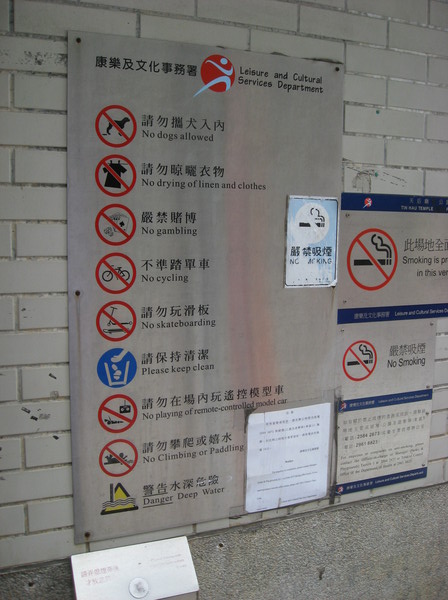
temple rules I can only guess that they must have been terrified by gangs of kids racing their RC cars at one point! We finished the day by heading up to Victoria Peak for the sunset view and some dinner, then back to the hotel. Killing time in a shopping centre waiting for the bus to turn up, we found a truly astonishing little item on sale, a Solar Queen!

solar queen Apparently this gift has a solar panel on the handbag to provide power to a little motor in the Queen's hand to make her wave to her subjects. We decided that we'd somehow have to live without such a delight in our lives... :-) HK was a cool place to visit. It still feels very British in some ways, as you'd expect from an ex-colony (power sockets are still the same as ours, driving on the left, everybody spoke English, etc.) but utterly alien in others (the climate, working public transport *grin*). I look forwards to heading out there again!

Steve McIntyre: Linaro Connect in Hong Kong, 2012: Ruby bug squashed!

Connect logoSometimes conferences can be dull and boring, but sometimes they can be just awesome in terms of finding the right people to collaborate with. Linaro Connect in Hong Kong last week was definitely one of the great ones! I chaired my my usual sessions (armhf status and cross-distro ARM) and we had some lively discussion in both. We're probably just about done with the armhf sessions, as most distros have accepted a hard-float ARMv7 port now and there's not so much specific work left there now that future sessions will be necessary. The cross-distro work for ARM ports is likely to continue into the future, but we're going to be concentrating on bootstrapping work for ARMv8 soon. Talking v8, there were a lot of meetings discussing the various work topics for this new 64-bit ARM architecture: kernel, toolchains, bootstrapping etc. More to come on that soon! On top of all this useful discussion and planning, we also found time during the week for some hacking. This was the highlight of the week for me, as I found some expert help to solve my long-standing Ruby on ARM bug (Debian bug #652674, ruby1.9.1: FTBFS on armhf: test suite segfaults). Ulrich Weigand (an IBM toolchain wizard seconded into the Linaro team) sat with me for a couple of hours while we worked through reproducing the problem, only to find that he could not reproduce it! The crash had looked very much like a pthreads locking bug, which was scaring me. After some digging, we worked out where the problem was, and how it was now fixed. For a long time on ARM, the Linux getcontext/setcontext system calls have never been implemented; apparently nobody really missed them, so they have never been a priority. In Ruby 1.9.x, the implementation of the new "fiber" primitive wanted to use getcontext/setcontext to control stack state etc. in different threads of control. In cases where they are not available or known not to work well, Ruby has fallback code to implement similar functionality. It seems that fallback code is buggy. Maybe it was correct at some point and has bit-rotted due to not being exercised, or maybe it was buggy as written, but it clearly does not work correctly for us now. In the last few months, getcontext/setcontext have finally been implemented for ARM in glibc trunk (by Michael Hope, also in the Linaro toolchain team!) and backported into current Debian and Ubuntu eglibc versions. Re-running configure and rebuilding Ruby against the most recent code in both Sid and Precise fixed the test suite crash we were seeing earlier. Yay! We could also provoke the bug again at will by quickly hacking around the Ruby source to force it to switch back to the fallback code, thereby verifying the fix. Why does this matter? As we're expecting ARM servers to enter the market soon, web apps written in Ruby on Rails are going to be an important part of the software stack that customers will want to run. Broken fibers and threading would not help here! It's great to meet up and work with talented folks like this; Linaro Connect is an excellent event for getting stuff done!

Steve McIntyre: Visiting my grandfather in Hong Kong

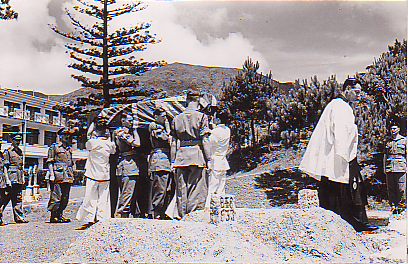
I never met my father's father, as he died many years before I was born. He was a soldier in the British Army and was killed in an accident in Burma in the 1950s. I'm told that back then the Army did not repatriate casualties as a matter of course like they do today, so none of the family got to see his funeral or even visit the grave. Like many of the military casualties in the Far East, he was buried in the Colonial Cemetery in Hong Kong. A few photographs were sent to my grandmother of the ceremony and the headstone, but that's all we ever saw.

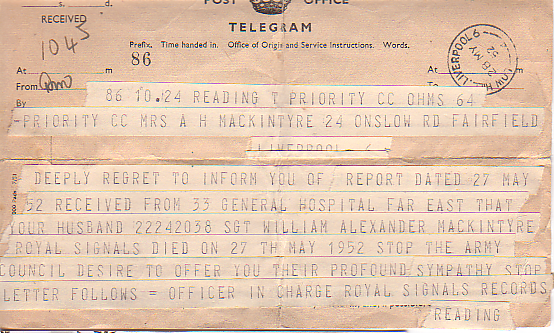
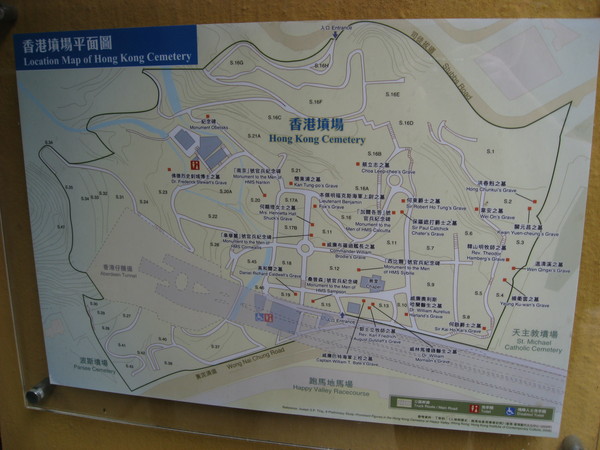
telegramfuneral Fast forward to 2012. I travelled to Hong Kong for a conference (Linaro Connect, more about that later...). I looked up the details of where grandad was laid to rest, and found a major coincidence. He was killed on 27th May 1952, almost exactly 60 years ago! I resolved to go to find him on 27th May 2012 to make the most of this lucky anniversary. Wikipedia told me that in the intervening years the Colonial Cemetery had been renamed to Happy Valley Cemetery, then simply Hong Kong Cemetery, and repurposed from military to civilian use. Jo and I bought some flowers and headed over to Happy Valley on Hong Kong Island on Sunday afternoon. We found a very large cemetery with a helpful map posted to show the different sections, but nothing to tell us where we should be looking. One of the attendants at the office on site looked at the details we had and shrugged to say "sorry, can't help". Ah well, nobody said this was going to be very easy... What we found after a few minutes was that the graves weren't laid out in any obviously logical fashion. In any given small area, you'd find people buried from roughly the same period, but people for any given period could (and would) be scattered across multiple sections at all corners of the site. Great, time for an exhaustive search then. I started combing the site, checking all the markers I could find that looked anything like the tiny grainy black and white photo we had of grandad's headstone.

cemeteryheadstone Almost two hours later, I eventually found him. Two hours of heavy work: the cemetery is built on the side of quite a steep hill, and the prevailing weather was very hot with 100% humidity. But, I forgot all that as we eventually stumbled across the correct grave in (no exaggeration!) the very last part of the last section of the site, 20a.
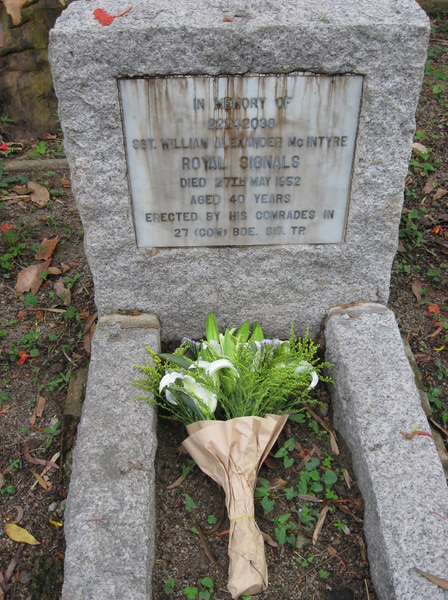
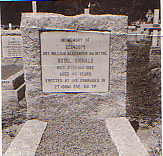
grave I was relieved at this point: as things had taken so long, I had started to worry that maybe the grave had been moved or the headstone damaged and lost. But no, I found the man who had gone off to war leaving my dad and aunt as small children. We took some photos and took note of where we had found the final resting place of Sergeant William Alexander McIntyre of the Royal Signals, a man I never met in life but clearly a very important member of our family.

John Sullivan: To nook

My curiosity was definitely nookd by this story. While this doesn't seem to have been an act of censorship or anything nefarious by Barnes and Noble itself, this does point to just how terrifying ebooks can be if we aren't careful. In the future, when we are dealing with the entirety of human knowledge, we better be careful with the find and replace function. And we better make sure we control our computer systems so that other people can't nook us without our permission. See also: As someone who read War and Peace in paper form, much of it in bed, I definitely empathized with this:
Some weeks ago I decided that I wanted to read Tolstoy's War and Peace. Lou Ann loaned me her copy. At more than 1100 pages, reading it in bed required as much strength as balancing a box of bricks in my hands. In my senior years I have developed arthritis in my thumbs, which made the effort not only difficult, but painful.

Benjamin Mako Hill: Why Facebook's Network Effects are Overrated

A lot of people interested in free software, and user autonomy and network services are very worried about Facebook. Folks are worried for the same reason that so many investors are interested: the networks effects brought by hundreds of millions of folks signed up to use the service. Network effects -- the concept that a good or service increases in value as more people use it -- are not a new problem for free software. Software developers target Microsoft Windows because that is where the large majority of users are. Users with no love for Microsoft and who are otherwise sympathetic to free software use Windows because programs they need will only run there. Folks worried about Facebook are afraid for similar reasons. Sure, you can close down your Facebook account and move to Diaspora. But who will you talk to there? You can already hear people complaining about Facebook the same way they've been complaining about Windows or Office for years. People feel that their hands are tied and that their software, and their social network, will be determined by what everybody is doing. I'm worried about Facebook. But I'm not too intimidated by Facebook's network effects for two reasons. First, using Facebook doesn't preclude using anything else. Twitter has enormous overlapping functionality with Facebook. Sure, people use the systems very differently. But they both ask you to create lists of friends and followers and are designed around sending and receiving short status messages. Millions of people do both and both systems are thriving. For the millions of people who use both Facebook and Twitter, the two services have had to negotiate their marginal utility in a world they share with the other one. People decide that Twitter is for certain types of short messages and Facebook is for others. But these arrangements shift over time. And the relationships between services aren't always peaceful coexistence. Remember Friendster? Remember Orkut? Remember Tribe? Remember MySpace? MySpace, and all the others, are great examples of how social networks die. They very slowly fade away. MySpace users signed up for Facebook accounts and used both. They almost never just switched. Over time, as one platform became more attractive than the other, for many complicated reasons, attention and activity shifted. People logged in on MySpace less and Facebook more and, eventually, realized they were effectively no longer MySpace users. Anyone that has been on the Internet long enough to watch a few of these shifts from one platform to another knows that they're not abrupt -- even if they can be set in motion by a particular event or action. Users of social networking sites simply don't have to choose in the way that a person choosing to boot Windows and GNU/Linux does. I'm sure the vast majority of people with Diaspora accounts use Facebook actively. This is not a problem for Diaspora. It is how Diaspora -- or whatever else eventually achieves what many of us hoped Diaspora would -- could win. Second, Facebook is for the ephemeral. Facebook is primarily used for information that was produced very recently. This week if not today. If not this hour. Facebook has an enormous amount of data that users have fed it that may be hard to get out and move somewhere else. But most people don't care very much about having any regular access to the large majority of this information. What people care deeply about is having access to the data that they and their friends created today. And that data can just as easily be created somewhere else tomorrow. Or, with the right tools, created just as easily in both places. Compare this to something like Windows where moving away would require learning, converting, and perhaps even writing, new software. Perhaps even in new programming languages that most developers don't know yet. Compared to Windows, a migration away from Facebook will be easy. Facebook's photo galleries are an example of an important place where this holds less well. Social network information -- i.e., the list of who is friends with who -- is another example of something that is persistently valuable. That said, people really enjoy the act of finding and friending. Indeed, this process was part of the initial draw of Facebook and other social networks. None of this means that Facebook is over. It doesn't even mean that its ascendancy will be slowed. What it does mean is that Facebook is vulnerable to the next thing more than many technology firms that have benefited from network effects in the past. If users are given compelling reasons to switch to something else, they can with less trouble and they will. That compelling reason might be a new social network with better features or an awesome distributed architecture that allows freedom for users and the ability of those users to benefit from new and fantastic things that Facebook's overseers would never let them have and without the things Facebook's users suffer through today. Or it might be a sexier proprietary box to store users' private information. It doesn't mean that I'm not worried about Facebook. I remain deeply worried. It's just not very hard for me to imagine the end.

3 June 2012

Joey Hess: a year of olduse.net

My olduse.net exhibit has now finished replaying the first year of historical Usenet posts from 30 years ago, in real time. That was only twelve thousand messages, probably less than many people get on Facebook in a year.. but if you read along this year, you probably have a much better feel for what early Usenet was like. If you didn't, it's not too early to start, 9 years of Usenet's flowering lie ahead. I don't know how many people followed along. I read .. not every message, but a large fraction of them. I see 40 or so unique NNTP connections per day, and some seem to stick around and read for quite a while, so I'm guessing there might be a few hundred people following on a weekly basis. If you're not one of them, and don't read our olduse.net blog, here are a few of the year's highlights: I will probably be expiring the first year's messages before too long, to have a more uncluttered view. So if you wanted to read them, hurry up!

Sandro Tosi: How to migrate your entire Google account to a new one

I've been using a Google account since years, but having a "more serious" one along. The time has come to make the switch and elect the other as main one.

Google has a lot of services, and I'm using several of them, so changing the main account requires to migrate data of those services to the new account, given it's not possible to merge two accounts. To know the full list of services your account is signed in, go to your Account Product page. Some migrations are easy, others hell no: so I'm writing this post to keep track of the migration as it's going on.

First of all, there's a really good post about this migration at LifeHacker: it contains a lot of info I'm using here, but not all the services I need. Additionally, Google has a list of services and methods to migrate from one account to another.

Just to be generic, I'll call AccountSRC the original account and AccountDST the one I want to migrate to.

Migrate GMail

GMail is probably the most important service I have, and also the most difficult one to migrate. I have a lot of filters, so the first step is to migrate them:
  1. Login into GMail for AccountSRC
  2. Gear icon > Settings > Labs
  3. Enable the "Filter import/export" plugin
  4. Reload GMail to enable the plugin (if not done automatically)
  5. Gear icon > Settings > Filters
  6. At the bottom of the page, Select all
  7. Export: this will download an XML file with the filters in it
  8. Login into GMail for AccountDST
  9. Enable "Filter import/export" plugin
  10. Load the file containing the saved filters
  11. Import all (or select which one) filters; this will also create automatically the labels defined in the filters.
I currently have a forward rule from AccountDST to AccountSRC: so let's revert the forward direction: from AccountSRC to AccountDST. This will allow the new account to receive the mails sent to the old one.
  1. Login into GMail for AccountDST
  2. Gear icon > Forwarding and POP/IMAP > Disable forwarding: this will stop redirecting mails from AccountDST to AccountSRC
  3. Login into GMail for AccountSRC
  4. Gear icon > Forwarding and POP/IMAP > add a forwarding address
  5. Enter AccountDST as the address to forward mails to
  6. A verification code is sent to AccountDST and you'll need to enter that code in AccountSRC to verify you have access to both mailboxes
  7. Once verified, select "Forward a copy of incoming mail to" to AccountDST and to delete the GMail copy on AccountSRC
There's no automatic way to migrate all your settings from the old GMail account to the new one, so you'll have to comparing settings pages to set what you had before to AccountDST. I suggest to first enable the labs you have on AccountSRC, and then go thru every page and report the configurations.

Did I forget something? yes, the hardest part: migrate mails! There are a lot of guides about migrating mails, the way I prefer is thru IMAP and Thunderbird (as described here): you'll move IMAP folders, and since they are equivalent to GMail labels, you'll automatically get your email with the correct labels (yes, the same mail appears in several folders, one for each label, and moving an email from one folder will not remove it from all the others).
  1. Enable IMAP access on both AccountSRC and AccountDST
  2. Open Thunderbird (or Icedove if you're on Debian like me) and register both accounts
  3. You can now start moving folders/emails from AccountSRC to AccountDST
    1. Copying a (missing) folder, will automatically create a label with the same name
    2. Moving a mail from the same folders on the two accounts will add the label called with the name of the folder to that email
  4. Be ready, it's a LOOOOONG process, but it's safe and it guarantees a perfect result
With the method above you have all the labels you had before, but not the label colors (and I have a lot :( ).

Another tool that's would be interesting to evaluate for this task is Gmvault.


Migrate Contacts

Contacts are available inside GMail:
  1. Login into GMail for AccountSRC
  2. On the combobox on top-left, select Contacts
  3. More > Export
  4. Export all the contacts in Google CSV, since it's specific to be re-imported
  5. Login into GMail for AccountDST
  6. Contacts > More > Import
  7. Select the previously saved file and import it

Migrate Reader

Migrating Reader subscriptions is easy:
  1. Login into Reader for AccountSRC
  2. Reader Settings -> Import/export
  3. Export your subscriptions in OPML format
  4. Now login into Reader for AccountDST
  5. Reader Settings -> Import/export
  6. And import the saved OPML file
Sadly, that doesn't migrate your starred items, but there's a (long & manual) solution here.


Migrate Blogger

Login to Blogger for AccountSRC; then, for each blog you have there do this dance:
  1. Select the blog
  2. Go into Settings > Permissions
  3. Add AccountDST as a new author: this will send an email to AccountDST GMail account
  4. Accept the invitation (this will ask you to create a new Blogger account for AccountDST if you don't already have one)
  5. Go back to to Blogger with AccountSRC
  6. Blog > Settings > Permissions
  7. Grand admin rights to AccountDST
At this point, both AccountSRC and AccountDST have admin rights; you can leave it as it is, or remove AccountSRC and so only AccountDST will be the admin (other shares should be kept unchanged). The same procedure is described in this Google support answer.

What can't be migrated as easily are all the profile settings you've done on AccountSRC. So profile information, blogs followed and so on have to be migrated by hand: boring but they are just few things, doable in a bunch of minutes.


Migrate Android phone

Android phones require a primary Google account to work, and of course my phone uses AccountSRC. Several sources say the only way to change primary account is to factory reset the phone. But since new market app supports multiple accounts and Android 4.0 (Ice Cream Sandwich) not longer needs a primary account, I just waited for the update to ICS to come.

What you really need to do is to add a new account, AccountDST, to Settings > Account & Sync, and all the Google apps on the phone will be able to use the new account (you might need to select what to sync, and the new account from inside each app).


Migrate Calendar

Even with Calendar the settings will have to be migrated by hand: they are just in one page, so just keep two windows opened and keep switching to sync them. The calendars are easy to move over: for the main calendar:
  1. Login into Calendars for AccountSRC
  2. Go into Settings > Calendars tab
  3. Select export calendars: this will download an archive of your calendars in a zip file; you will need to extract all the ics files from that zip archive so you'll have the main calendar readily available
  4. Login into Calendars for AccountDST
  5. Settings > Calendars tab
  6. Import the main calendar
for the other calendars you can do this way:
  1. Login into Calendars for AccountSRC
  2. Settings > Calendars tab
  3. Share the calendar with AccountDST and give it "Make changes AND manage sharing" right - the new account will have full control over that calendar

Migrate Docs

The procedure to migrate documents in Google Docs (now Google Drive) is described here, and it boils down to:
  1. Login into Docs for AccountSRC
  2. Select all the documents
  3. Share them with AccountDST
  4. In the same window select AccountDST as "is owner"
and you've got all the docs as owned by the new account.


Migrate Groups

There's no way to migrate all your Groups subscriptions from one account to another (if not playing with alternate email address, but it was too risky to try it), so you'll have to migrate all of them by hand.

On the other hand, if you've created some groups, that's possible to move them to the new account:
  1. Login into Groups for AccountSRC
  2. Enter in the "manage" area for the groups you've created
  3. Manage members > Invite members
  4. Invite AccountDST
  5. Accept the invitation, clicking on the email sent to AccountDST account
  6. Go back into AccountSRC manage area
  7. Select the AccountDST account
  8. Edit the subscription and set "Membership type" to "owner": now AccountDST is the owner of the list

Migrate Analytics

The process to migrate the account on Google Analytics is similar to Groups:
  1. Login into Analytics for AccountSRC
  2. Select Admin on top-right, then for each account you have
  3. Select the account, select "Users" tab, click on "+ New User"
  4. Enter AccountDST into the "Email Address" field and give that account the "Administrator" role
  5. Save
  6. Now AccountDST is able to access the same data on Analytics as AccountSRC

Migrate Picasa

To transfer your whole Picasa account follow these steps (as also described in this support post):
  1. Login into Picasa for AccountSRC
  2. Click on the gear on top-right > Photo Settings > Privacy and permissions
  3. On the "Migrate account" line click on "Migrate my photos"
  4. Insert AccountDST into the box for destination address
  5. In case you're using picasa to store blogger photos, also select the tick below
  6. At this point, AccountSRC will receive an email: copy the link in a session where you've logged in as AccountDST and then visit the page: that will start the process
  7. Wait until the transfer is completed: you'll receive an email to AccountDST when it's done

Migrate Google+

I'm not exactly a heavy user of G+ but I have some circles I'd like to move over (also because Reader sharing now works with G+ and it's a feature I user a lot), this is a process to move circles and contacts; as stated there, there's no way to move shared items and stuff (sad!).


Migrate AdSense

It's not possible to migrate the current AdSense account: you have to register a new one. When you do, it's possible that Google notice the new account is for the same person of the first one, and will ask to close the old account on AdSense in favor of the new one.


Migrate Alert

Alerts allows to export the list of alerts you've created but it's not possible to import that list in another Google account, so you'll have to recreate them from scratch (I had just a few so it was a matter of 1 minute or so).


Migrate Zoho Notebook

If you still miss Google Notebook (why big-G you let it die? couldn't you open-sourced it? it was so awesome! anyway...), you probably know that there are two main alternatives to it: Evernote and Zoho Notebook. I decided to go with Zoho (I'm not entirely happy with it, but it's running for now), and given it allows to login with Google account, it was currently using AccountSRC, so I need to migrate that too:
  1. Login into Zoho Notebook for AccountSRC
  2. My Account > Profile > Email address
  3. "Add new email" and add AccountDST, it will send a confirmation email
  4. Then "Make Primary" on AccountDST, so now the new account can login into Zoho notebook with the Google info and have all the notes there.

Migrate Bookmarks

Google provides a guide to migrate Bookmarks from one account to another that basically is:
  1. Login into Bookmarks for AccountSRC
  2. Click on Export bookmarks and it will save an HTML file with the bookmarks in it
  3. Import the file in a browser
  4. Use the Google toolbar to import in into AccountDST
That's kinda ugly way, but it seems to work.


Re-enable Web History

If you used History, then you need to re-enable it on the new account:
  1. Login into History for AccountDST
  2. Click on "Turn Web History on" to enable Web History on the new account
but it seems to be impossible to export/import or migrate the history from one account to another, that's a shame: years and years of stats lost.


Migrate Books

Books doesn't allow to migrate the contents between accounts, so you'll have to do it by hand:
  1. Select one book from AccountSRC, copying its link
  2. Go to AccountDST and navigate to the copied link
  3. Add the book to the right category, as it was before.

Migrate Webmaster Tools

Google released a document that describes how to migrate to another account; it's similar to Analytics and Groups migration.

In addition to that, you might also want to become an owner, that will give full control on the sites.


Did I forget some services? Let me know!

Everyone has a different experience with Google products, so in case you want me to let know how you migrated from one account to another for a product I didn't mentioned, just leave a comment and I'll edit the post (to be as complete as possible).

2 June 2012

Petter Reinholdtsen: Debian Edu interview: Mike Gabriel

Back in 2010, Mike Gabriel showed up on the Debian Edu and Skolelinux mailing list. He quickly proved to be a valuable developer, and thanks to his tireless effort we now have Kerberos integrated into the Debian Edu Squeeze version. Who are you, and how do you spend your days? My name is Mike Gabriel, I am 38 years old and live near Kiel, Schleswig-Holstein, Germany. I live together with a wonderful partner (Angela Fu ) and two own children and two bonus children (contributed by Angela). During the day I am part-time employed as a system administrator and part-time working as an IT consultant. The consultancy work touches free software topics wherever and whenever possible. During the nights I am a free software developer. In the gaps I also train in becoming an osteopath. Starting in 2010 we (Andreas Buchholz, Angela Fu , Mike Gabriel) have set up a free software project in the area of Kiel that aims at introducing free software into schools. The project's name is "IT-Zukunft Schule" (IT future for schools). The project links IT skills with communication skills. How did you get in contact with the Skolelinux/Debian Edu project? While preparing our own customised Linux distribution for "IT-Zukunft Schule" we were repeatedly asked if we really wanted to reinvent the wheel. What schools really need is already available, people said. From this impulse we started evaluating other Linux distributions that target being used for school networks. At the end we short-listed two approaches and compared them: a commercial Linux distribution developed by a company in Bremen, Germany, and Skolelinux / Debian Edu. Between 12/2010 and 03/2011 we went to several events and met people being responsible for marketing and development of either of the distributions. Skolelinux / Debian Edu was by far much more convincing compared to the other product that got short-listed beforehand--across the full spectrum. What was most attractive for me personally: the perspective of collaboration within the developmental branch of the Debian Edu project itself. In parallel with this, we talked to many local and not-so-local people. People teaching at schools, headmasters, politicians, data protection experts, other IT professionals. We came to two conclusions: First, a technical conclusion: What schools need is available in bits and pieces here and there, and none of the solutions really fit by 100%. Any school we have seen has a very individual IT setup whereas most of each school's requirements could mapped by a standard IT solution. The requirement to this IT solution is flexibility and customisability, so that individual adaptations here and there are possible. In terms of re-distributing and rolling out such a standardised IT system for schools (a system that is still to some degree customisable) there is still a lot of work to do here locally. Debian Edu / Skolelinux has been our choice as the starting point. Second, a holistic conclusion: What schools need does not exist at all (or we missed it so far). There are several technical solutions for handling IT at schools that tend to make a good impression. What has been missing completely here in Germany, though, is the enrolment of people into using IT and teaching with IT. "IT-Zukunft Schule" tries to provide an approach for this. Only some schools have some sort of a media concept which explains, defines and gives guidance on how to use IT in class. Most schools in Northern Germany do not have an IT service provider, the school's IT equipment is managed by one or (if the school is lucky) two (admin) teachers, most of the workload these admin teachers get done in there spare time. We were surprised that only a very few admin teachers were networked with colleagues from other schools. Basically, every school here around has its individual approach of providing IT equipment to teachers and students and the exchange of ideas has been quasi non-existent until 2010/2011. Quite some (non-admin) teachers try to avoid using IT technology in class as a learning medium completely. Several reasons for this avoidance do exist. We discovered that no-one has ever taken a closer look at this social part of IT management in schools, so far. On our quest journey for a technical IT solution for schools, we discussed this issue with several teachers, headmasters, politicians, other IT professionals and they all confirmed: a holistic approach of considering IT management at schools, an approach that includes the people in place, will be new and probably a gain for all. What do you see as the advantages of Skolelinux/Debian Edu? There is a list of advantages: international context, openness to any kind of contributions, do-ocracy policy, the closeness to Debian, the different installation scenarios possible (from stand-alone workstation to complex multi-server sites), the transparency within project communication, honest communication within the group of developers, etc. What do you see as the disadvantages of Skolelinux/Debian Edu? Every coin has two sides: Technically: BTS issue #311188, tricky upgradability of a Debian Edu main server, network client installations on top of a plain vanilla Debian installation should become possible sometime in the near future, one could think about splitting the very complex package debian-edu-config into several portions (to make it easier for new developers to contribute). Another issue I see is that we (as Debian Edu developers) should find out more about the network of people who do the marketing for Debian Edu / Skolelinux. There is a very active group in Germany promoting Skolelinux on the bigger Linux Days within Germany. Are there other groups like that in other countries? How can we bring these marketing people together (marketing group A with group B and all of them with the group of Debian Edu developers)? During the last meeting of the German Skolelinux group, I got the impression of people there being rather disconnected from the development department of Debian Edu / Skolelinux. Which free software do you use daily? For my daily business, I do not use commercial software at all. For normal stuff I use Iceweasel/Firefox, Libreoffice.org. For serious text writing I prefer LaTeX. I use gimp, inkscape, scribus for more artistic tasks. I run virtual machines in KVM and Virtualbox. I am one of the upstream developers of X2Go. In 2010 I started the development of a Python based X2Go Client, called PyHoca-GUI. PyHoca-GUI has brought forth a Python X2Go Client API that currently is being integrated in Ubuntu's software center. For communications I have my own Kolab server running using Horde as web-based groupware client. For IRC I love to use irssi, for Jabber I have several clients that I use, mostly pidgin, though. I am also the Debian maintainer of Coccinella, a Jabber-based interactive whiteboard. My favourite terminal emulator is KDE's Yakuake. Which strategy do you believe is the right one to use to get schools to use free software? Communicate, communicate, communicate. Enrol people, enrol people, enrol people.

Next.

Previous.