Search Results: "rra"

22 August 2017

Daniel Silverstone: Building a USB descriptor table set

In order to proceed further on our USB/STM32 oddessy, we need to start to build a USB descriptor set for our first prototype piece of code. For this piece, we're going to put together a USB device which is vendor-specific class-wise and has a single configuration with a interface with a single endpoint which we're not going to actually implement anything of. What we're after is just to get the information presented to the computer so that lsusb can see it. To get these built, let's refer to information we discovered and recorded in a previous post about how descriptors go together.

Device descriptor Remembering that values which are > 1 byte in length are always stored little-endian, we can construct our device descriptor as:
Our device descriptor
Field Name Value Bytes
bLength 18 0x12
bDescriptorType DEVICE 0x01
bcdUSB USB 2.0 0x00 0x02
bDeviceClass 0 0x00
bDeviceSubClass 0 0x00
bDeviceProtocol 0 0x00
bMaxPacketSize 64 0x40
idVendor TEST 0xff 0xff
idProduct TEST 0xff 0xff
bcdDevice 0.0.1 0x01 0x00
iManufacturer 1 0x01
iProduct 2 0x02
iSerialNumber 3 0x03
bNumConfigurations 1 0x01
We're using the vendor ID and product id 0xffff because at this point we don't have any useful values for this (it costs $5,000 to register a vendor ID). This gives us a final byte array of:
0x12 0x01 0x00 0x02 0x00 0x00 0x00 0x40 (Early descriptor) 0xff 0xff 0xff 0xff 0x01 0x00 0x01 0x02 0x03 0x01 (and the rest)
We're reserving string ids 1, 2, and 3, for the manufacturer string, product name string, and serial number string respectively. I'm deliberately including them all so that we can see it all come out later in lsusb. If you feed the above hex sequence into a USB descriptor decoder then you can check my working.

Endpoint Descriptor We want a single configuration, which covers our one interface, with one endpoint in it. Let's start with the endpoint...
Our bulk IN endpoint
Field Name Value Bytes
bLength 7 0x07
bDescriptorType ENDPOINT 0x05
bEndpointAddress EP2IN 0x82
bmAttributes BULK 0x02
wMaxPacketSize 64 0x40 0x00
bInterval IGNORED 0x00
We're giving a single bulk IN endpoint, since that's the simplest thing to describe at this time. This endpoint will never be ready and so nothing will ever be read into the host. All that gives us:
0x07 0x05 0x82 0x02 0x40 0x00 0x00

Interface Descriptor The interface descriptor prefaces the endpoint set, and thanks to our simple single endpoint, and no plans for alternate interfaces, we can construct the interface simply as:
Our single simple interface
Field Name Value Bytes
bLength 9 0x09
bDescriptorType INTERFACE 0x04
bInterfaceNumber 1 0x01
bAlternateSetting 1 0x01
bNumEndpoints 1 0x01
bInterfaceClass 0 0x00
bInterfaceSubClass 0 0x00
bInterfaceProtocol 0 0x00
iInterface 5 0x05
All that gives us:
0x09 0x04 0x01 0x01 0x01 0x00 0x00 0x00 0x05

Configuration descriptor Finally we can put it all together and get the configuration descriptor...
Our sole configuration, encapsulating the interface and endpoint above
Field Name Value Bytes
bLength 9 0x09
bDescriptorType CONFIG 0x02
wTotalLength 9+9+7 0x19 0x00
bNumInterfaces 1 0x01
bConfigurationValue 1 0x01
iConfiguration 4 0x04
bmAttributes Bus powered, no wake 0x80
bMaxPower 500mA 0xfa
The wTotalLength field is interesting. It contains the configuration length, the interface length, and the endpoint length, hence 9 plus 9 plus 7 is 25. This gives:
0x09 0x02 0x19 0x00 0x01 0x01 0x04 0x80 0xfa

String descriptors We allowed ourselves a total of five strings, they were iManufacturer, iProduct, iSerial (from the device descriptor), iConfiguration (from the configuration descriptor), and iInterface (from the interface descriptor) respectively. Our string descriptors will therefore be:
String descriptor zero, en_GB only
Field Name Value Bytes
bLength 4 0x04
bDescriptorType STRING 0x03
wLangID[0] en_GB 0x09 0x08
0x04 0x03 0x09 0x08
...and...
String descriptor one, iManufacturer
Field Name Value Bytes
bLength 38 0x26
bDescriptorType STRING 0x03
bString "Rusty Manufacturer" ...
0x26 0x03 0x52 0x00 0x75 0x00 0x73 0x00 0x74 0x00 0x79 0x00 0x20 0x00 0x4d 0x00 0x61 0x00 0x6e 0x00 0x75 0x00 0x66 0x00 0x61 0x00 0x63 0x00 0x74 0x00 0x75 0x00 0x72 0x00 0x65 0x00 0x72 0x00
(You get the idea, there's no point me breaking down the rest of the string descriptors here, suffice it to say that the other strings are appropriate for the values they represent - namely product, serial, configuration, and interface.)

Putting it all together Given all the above, we have a device descriptor which is standalone, then a configuration descriptor which encompasses the interface and endpoint descriptors too. Finally we have a string descriptor table with six entries, the first is the language sets available, and the rest are our strings. In total we have:
    // Device descriptor
    const DEV_DESC: [u8; 18] =  
        0x12, 0x01, 0x00, 0x02, 0x00, 0x00, 0x00, 0x40,
        0xff, 0xff, 0xff, 0xff, 0x01, 0x00, 0x01, 0x02,
        0x03, 0x01
     ;
    // Configuration descriptor
    const CONF_DESC: [u8; 25] =  
        0x09, 0x02, 0x19, 0x00, 0x01, 0x01, 0x04, 0x80, 0xfa,
        0x09, 0x04, 0x01, 0x01, 0x01, 0x00, 0x00, 0x00, 0x05,
        0x07, 0x05, 0x82, 0x02, 0x40, 0x00, 0x00
     ;
    // String Descriptor zero
    const STR_DESC_0: [u8; 4] =  0x04, 0x03, 0x09, 0x08 ;
    // String Descriptor 1, "Rusty Manufacturer"
    const STR_DESC_1: [u8; 38] =  
        0x26, 0x03, 0x52, 0x00, 0x75, 0x00, 0x73, 0x00,
        0x74, 0x00, 0x79, 0x00, 0x20, 0x00, 0x4d, 0x00,
        0x61, 0x00, 0x6e, 0x00, 0x75, 0x00, 0x66, 0x00,
        0x61, 0x00, 0x63, 0x00, 0x74, 0x00, 0x75, 0x00,
        0x72, 0x00, 0x65, 0x00, 0x72, 0x00
     ;
    // String Descriptor 2, "Rusty Product"
    const STR_DESC_2: [u8; 28] =  
        0x1c, 0x03, 0x52, 0x00, 0x75, 0x00, 0x73, 0x00,
        0x74, 0x00, 0x79, 0x00, 0x20, 0x00, 0x50, 0x00,
        0x72, 0x00, 0x6f, 0x00, 0x64, 0x00, 0x75, 0x00,
        0x63, 0x00, 0x74, 0x00
     ;
    // String Descriptor 3, "123ABC"
    const STR_DESC_3: [u8; 14] =  
        0x0e, 0x03, 0x31, 0x00, 0x32, 0x00, 0x33, 0x00,
        0x41, 0x00, 0x42, 0x00, 0x43, 0x00
     ;
    // String Descriptor 4, "Rusty Configuration"
    const STR_DESC_4: [u8; 40] =  
        0x28, 0x03, 0x52, 0x00, 0x75, 0x00, 0x73, 0x00,
        0x74, 0x00, 0x79, 0x00, 0x20, 0x00, 0x43, 0x00,
        0x6f, 0x00, 0x6e, 0x00, 0x66, 0x00, 0x69, 0x00,
        0x67, 0x00, 0x75, 0x00, 0x72, 0x00, 0x61, 0x00,
        0x74, 0x00, 0x69, 0x00, 0x6f, 0x00, 0x6e, 0x00
     ;
    // String Descriptor 5, "Rusty Interface"
    const STR_DESC_5: [u8; 32] =  
        0x20, 0x03, 0x52, 0x00, 0x75, 0x00, 0x73, 0x00,
        0x74, 0x00, 0x79, 0x00, 0x20, 0x00, 0x49, 0x00,
        0x6e, 0x00, 0x74, 0x00, 0x65, 0x00, 0x72, 0x00,
        0x66, 0x00, 0x61, 0x00, 0x63, 0x00, 0x65, 0x00
     ;
With the above, we're a step closer to our first prototype which will hopefully be enumerable. Next time we'll look at beginning our prototype low level USB device stack mock-up.

17 August 2017

Shirish Agarwal: Composers are not given due recognition

Update Some youtube links are not viewable or even seen on planet.debian.org. Seems p.d.o. tries its best to remove external links, sorry for the breakage. Beware some youtube-links would be shared in this entry, sorry couldn t find a better/easier media platform to work with. If anyone knows any other platform or wants to suggest, feel free to either mail me or let me know in comments. I want to start today s sharing with a picture of Ganesha I saw today. It is and was public art hence sharing it without an issue. Sketch of Ganesha/Ganapati This is starting of festivities time in India and Ganesha or Ganpati is looked up as a good omen in India. The festival of Ganesh Chaturthi would be starting on the 25th of August and is a sight to behold. Just like Rio has its carnival, Ganesh Chaturthi is also a carnival. We also have parades where people come with Pandals (or temporary structures) The mythology says he has a sweet tooth (hence lot of distribution of sweets, especially modak) and anything which might be troubling people, he creates solutions for them. Here is one video of how people celebrate his immersion in India. This is from my home-town few years ago, every year the madness and the celebrations are becoming more and more. People from far off come to see how we celebrate and see how different people make their Pandals. While some are with music, others are with social messages. Usually people start going to see these structures after dusk and return home way after midnight or early morning. I hope to do this endeavour after many years. One is drunk from hearing all sorts of different kids of music, decoration, messages, a feast and a strain to all the senses. Ganesha immersion celebrations https://www.youtube.com/watch?v=hjWfpGUryho If one is interested one can find more info. at https://en.wikipedia.org/wiki/Ganesh_Chaturthi After quite a bit of time, I wrote an article about various foss internships which I knew besides GSOC over the years. I finally penned them down at https://itsfoss.com/best-open-source-internships/ Interestingly, I was amazed to see that all FOSS U.S. projects (outside of GSOC) are for students who are either living or studying in U.S. and have a student work visa (which from private discussions I came to know is lot harder to get nowadays than before). Except for the National Science Foundation (NSF) which probably has U.S. defence relations and hence they might be sensitive, I fail to understand other institutes preferences for only getting people from the U.S. and hence having a lesser talent pool of people. This also affects the growth of the projects themselves. Just think how limited Debian would have been if it had decided to only have people from only any one community develop it. Dunno if this is due to the present President Trump or these policies had been there before. It would be nice and interesting if people in the know can share. What has also been interesting to watch is Mr. Trump blaming low-cost manufacturing centres like India and China when as far as I recall, lot of manufacturing, specifically auto-mobiles manufacturing was shifted out of the U.S. to Ireland and other places years before which are relatively high-cost places (at least compared to India). I *believe* the change was as early as in 1980 s itself where India was insulated and had a limited market for everything (similar to Russian communism as shown in popular media but not so bad.) Interestingly, it took almost a month for the perl 2.56 to make the transition smoothly. It took quite a bit of time for all the components to work together and be installable. Also saw this few days back http://fortune.com/2017/04/12/auto-industry-decline/ While Tesla is expensive even by American standards the idea of lesser parts, lesser complexity and hence lower costs to use, maintain is good. I do hope that he and his team or any of the competitors do overcome the significant challenges. Any significant improvement in battery technology is bound to have huge impact in almost everything that is used in 21st century. Two recent articles tell me the future may become present very quickly. https://www.purdue.edu/newsroom/releases/2017/Q2/instantly-rechargeable-battery-could-change-the-future-of-electric-and-hybrid-automobiles.html Toyota could finally start mass producing electric cars thanks to China I do hope to see EV being prevalent before the next decade is over otherwise we don t have any hope due to climate change. As for my health, I am much better than before. Just to share some stats, before my illness for lack of better word, I was 120 kgs. , when I was kept in the hospital for about 2-2.5 weeks I came down to 95 kgs. and now back upto 108 kgs. Do go for exercising every other day and trying to get back the strength, stamina and increasing a bit of both. Doctors have given me another 4-5 months after which a brain scan will reveal if there are any remaining blood clots in the brain or not. Lastly, while it has become somewhat of a sensitive issue to love Muslims or to talk about their work in any field in the current political climate, there are 4-5 music pieces I listen whenever I can, especially before going to bed. While almost all the pieces have been sung and written by Muslims, sadly I don t know who the composers of these beautiful songs are. While it is much easier to get the names of the singer and the lyricist, one of the more important roles in my view is the composer or/and music arranger. Without them, the songs would not have the same haunting quality that the songs have. While I have been lucky to find the names of the composer/music arranger for the pieces below but this is not the case if and when the songs comes on television. I do remember in old times at least on Radio they used to mention about who has given the music as well, dunno in modern times. I am sharing the songs, and hopefully will also share the translations if I find on the web, please see the lyrics. The numbering is for convenience only and am torn in these 4-5 songs which is the best. Just to share these are all sufi love songs except the last one which I am sharing. 1. Lyrical song https://www.youtube.com/watch?v=ehqN6oTpmb8 Translation with video of song http://www.bollynook.com/en/lyrics/6443/aaj-din-chadheya/ While there probably are stories with each song, I was lucky to find the story about this one. The lyrics of the song are actually a love lost Punjabi poet who writes in the memory of his beloved to which he could not marry and he pens those when standing in line for his liquor. The story goes on that he marries a girl later in life who bears a resemblance to his beloved whom he couldn t forget till his dying day. 2. Lyrical song https://www.youtube.com/watch?v=uTC_2c83qn0 The same song has been sung by different people and I love them all the more for it. Another video https://www.youtube.com/watch?v=3G7Qg4LJ7WE Another video https://www.youtube.com/watch?v=kOsvNuR3m5Y Translation http://www.bollynook.com/en/lyrics/10703/o-re-piya/ 3. Lyrical song https://www.youtube.com/watch?v=qG7Kms_YA5Q The translation http://www.filmyquotes.com/songs/885 The translation of the song is a bit crude but then translations are supposed to be crude  Anyways, the above song is what would be called a perfect Sufi song. I hope people enjoy the longing and the silence which follows this piece. Another classic one 4. Lyrical song https://www.youtube.com/watch?v=Ube5XhN_lpM English translation http://www.ardhamy.com/song/aye-dil-e-naadan While the song is from the movie Razia Sultana and was a flop as the movie was about Race and controversial then as it probably would be now. As seen in the other songs of the same genre, it has strands of longing, loneliness as seen of the above. 5. Lyrical song https://www.youtube.com/watch?v=tv242qOnHJA This one is not a sufi song but I love all the women and the girls and the way they enhanced the song. I dunno how much they must have practised as it s a very fast and peppy song and doesn t give time to the singer to breathe except for that one section which has a bit of Carnatic music. At the very end I would like to share http://www.globalrhythm.net/ I have found some interesting sounds on the site. Hope the site enriches you as well. FWIW I have no links with the site except as somebody who likes to diversify his music listening. Lastly, for a long period of time, I had been hearing the criticism, especially for FOSS games that they don t have AAA quality assets. Recently I came across a game called Starship Theory (sadly its only for MS-Windows) Game video https://www.youtube.com/watch?v=imaL2pjNURg You look at the game and see the number of videos the guy has made. What FOSS game developers can learn from this, you don t need high-end 2.5/3d models, clipart will do but need depth in gameplay which can make FOSS games be popular and also earn a pretty bundle. I do hope some FOSS game upstream developers take note and use that game s inspiration to bring more depth. That doesn t mean games like 0ad are not liked by people but it takes huge amount of time and resources. 0ad video https://www.youtube.com/watch?v=DHx5XBtypcQ Hope you have a good time with all the ideas, anecdotes and videos I shared above.
Filed under: Miscellenous Tagged: #FOSS Internships, #Ganesh Chaturthi, #Ganeshji, #planet-debian, #Sufi Bollywood Music, FOSS, FOSS games, politics

16 August 2017

Ross Gammon: My Debian & Ubuntu work from April to mid-August 2017

Okay, so I have been slack with my blogging again. I have been travelling around Europe with work quite a bit, had a short holiday over Easter in Denmark, and also had 3 weeks of Summer Holiday in Germany. Debian
  • Tidied up the packaging and tried building the latest version of libdrumstick, but tests had been added to the package by upstream which were failing. I still need to get back and investigate that.
  • Updated node-seq (targeted at experimental due to the Debian Stretch release freeze) and asked for sponsorship (as I did not have DM rights for it yet).
  • Uploaded the latest version of abcmidi (also to experimental), and again.
  • Updated node-tmp to the latest version and uploaded to experimental.
  • Worked some more on bluebird RFP, but getting errors when running tests. I still haven t gone back to investigate that.
  • Updated node-coffeeify to the latest version and uploaded to experimental.
  • Uploaded the latest version of node-os-tmpdir (also to experimental).
  • Uploaded the latest version of node-concat-stream (also to experimental).
  • After encouragement from several Debian Developers, I applied to become a full Debian Developer. Over the summer months I worked with Santiago as my Application Manager and answered questions about working in the Debian Project.
  • A web vulnerability was identified in node-concat-stream, so I prepared a fix to the version in unstable, uploaded it to unstable, and submitted a unblock request bug so that it would be fixed in the coming Debian Stretch release.
  • Debian 10 (Stretch) was released! Yay!
  • Moved abcmidi from experimental to unstable, adding an autopkgtest at the same time.
  • Moved node-concat-stream from experimental to unstable. During the process I had to take care of the intermediate upload to stretch (on a separate branch) because of the freeze.
  • Moved node-tmp to unstable from experimental.
  • Moved node-os-tmpdir from experimental to unstable.
  • Filed a removal bug for creepy, which seems to be unmaintained upstream these days. Sent my unfinished Qt4 to Qt5 porting patches upstream just in case!
  • Uploaded node-object-inspect to experimental to check the reverse dependencies, then moved it to unstable. Then a new upstream version came out which is now in experimental waiting for a retest of reverse dependencies.
  • Uploaded the latest version of gramps (4.2.6).
  • Uploaded a new version of node-cross-spawn to experimental.
  • Discovered that I had successfully completed the DD application process and I was now a Debian Developer. I celebrated by uploading the Debian Multimedia Blends package to the NEW queue, which I was not able to do before!
  • Tweaked and uploaded the node-seq package (with an RC fix) which had been sitting there because I did not have DM rights to the package. It is not an important package anyhow, as it is just one of the many dependencies that need to be packaged for Browserify.
  • Packaged and uploaded the latest node-isarray directly to unstable, as the changes seemed harmless.
  • Prepared and uploaded the latest node-js-yaml to experimental.
  • Did an update to the Node packaging Manual now that we are allowed to use node as the executable in Debian instead of nodejs which caused us to do a lot of patching in the past to get node packages working in Debian.
Ubuntu
  • Did a freeze exception bug for ubuntustudio-controls, but we did not manage to get it sponsored before the Ubuntu Studio Zesty 17.04 release.
  • Investigated why Ardour was not migrating from zesty-proposed, but I couldn t be sure of what was holding it up. After getting some help from the Developer s mailing list, I prepared no change rebuild of pd-aubio which was sponsored by Steve Langasek after a little tweak. This did the trick.
  • Wrote to the Ubuntu Studio list asking for support for testing the Ubuntu Studio Zesty release, as I would be on holiday in the lead up to the release. When I got back, I found the release had gone smoothly. Thanks team!
  • Worked on some blueprints for the next Ubuntu Studio Artful release.
  • As Set no longer has enough spare time to work on Ubuntu Studio, we had a meeting on IRC to decide what to do. We decided that we should set up a Council like Xubuntu have. I drafted an announcement, but we still have not gone live with it yet. Maybe someone will have read this far and give us a push (or help).
  • Did a quick test of Len s ubuntustudio-controls re-write (at least the GUI bits). We better get a move on if we want this to be part of Artful!
  • Tested ISO for Ubuntu Studio Xenial 16.04.3 point release, and updated the release notes.
  • Started working on a merge of Qjackctl using git-ubuntu for the first time. Had some issues getting going, so I asked the authors for some advice.

4 August 2017

Daniel Silverstone: USB Device Stacks, on RTFM

I have been spending time with Jorge Aparicio's RTFM for Cortex M3 framework for writing Rust to target Cortex-M3 devices from Arm (and particularly the STM32F103 from ST Microelectronics). Jorge's work in this area has been of interest to me ever since I discovered him working on this stuff a while ago. I am very tempted by the idea of being able to implement code for the STM32 with the guarantees of Rust and the language features which I have come to love such as the trait system. I have been thinking to myself that, while I admire and appreciate the work done on the GNUK, I would like to, personally, have a go at implementing some kind of security token on an STM32 as a USB device. And with the advent of the RTFM for M3 work, and Jorge's magical tooling to make it easier to access and control the registers on an M3 microcontroller, I figured it'd be super-nice to do this in Rust, with all the advantages that entails in terms of isolating unsafe behaviour and generally having the potential to be more easily verified as not misbehaving. To do this though, means that I need a USB device stack which will work in the RTFM framework. Sadly it seems that, thus-far, only Jorge has been working on drivers for any of the M3 devices his framework supports. And one person can only do so much. So, in my infinite madness, I decided I should investigate the complexity of writing a USB device stack in Rust for the RTFM/M3 framework. (Why I thought this was a good idea is lost to the mists of late night Googling, but hey, it might make a good talk at the next conference I go to). As such, this blog post, and further ones along these lines, will serve as a partial tour of what I'm up to, and a partial aide-memoir for me about learning USB. If I get something horribly wrong, please DO contact me to correct me, otherwise I'll just continue to be wrong. If I've simplified something but it's still strictly correct, just let me know if it's an oversimplification since in a lot of cases there's no point in me putting the full details into a blog posting. I will mostly be considering USB2.0 protocol details but only really for low and full speed devices. (The hardware I'm targetting does low-speed and full-speed, but not high-speed. Though some similar HW does high-speed too, I don't have any to hand right now)

A brief introduction to USB In order to go much further, I needed a grounding in USB. It's a multi-layer protocol as you might expect, though we can probably ignore the actual electrical layer since any device we might hope to support will have to have a hardware block to deal with that. We will however need to consider the packet layer (since that will inform how the hardware block is implemented and thus its interface) and then the higher level protocols on top. USB is a deliberately asymmetric protocol. Devices are meant to be significantly easier to implement, both in terms of hardware and software, as compared with hosts. As such, despite some STM32s having OTG ports, I have no intention of supporting host mode at this time. USB is arranged into a set of busses which are, at least in the USB1.1 case, broadcast domains. As such, each device has an address assigned to it by the host during an early phase called 'configuration'. Once the address is assigned, the device is expected to only ever respond to messages addressed to it. Note that since everything is asymmetric in USB, the device can't send messages on its own, but has to be asked for them by the host, and as such the addressing is always from host toward device. USB devices then expose a number of endpoints through which communication can flow IN to the host or OUT to the device. Endpoints are not bidirectional, but the in and out endpoints do overlap in numbering. There is a special pair of endpoints, IN0 and OUT0 which, between them, form what I will call the device control endpoints. The device control endpoints are important since every USB device MUST implement them, and there are a number of well defined messages which pass over them to control the USB device. In theory a bare minimum USB device would implement only the device control endpoints.

Configurations, and Classes, and Interfaces, Oh My! In order for the host to understand what the USB device is, and what it is capable of, part of the device control endpoints' responsibility is to provide a set of descriptors which describe the device. These descriptors form a heirarchy and are then glommed together into a big lump of data which the host can download from the device in order to decide what it is and how to use it. Because of various historical reasons, where a multi-byte value is used, they are defined to be little-endian, though there are some BCD fields. Descriptors always start with a length byte and a type byte because that way the host can parse/skip as necessary, with ease. The first descriptor is the device descriptor, is a big one, and looks like this:
Device Descriptor
Field Name Byte start Byte length Encoding Meaning
bLength 0 1 Number Size of the descriptor in bytes (18)
bDescriptorType 1 1 Constant Device Descriptor (0x01)
bcdUSB 2 2 BCD USB spec version compiled with
bDeviceClass 4 1 Class Code, assigned by USB org (0 means "Look at interface descriptors", common value is 2 for CDC)
bDeviceSubClass 5 1 SubClass Code, assigned by USB org (usually 0)
bDeviceProtocol 6 1 Protocol Code, assigned by USB org (usually 0)
bMaxPacketSize 7 1 Number Max packet size for IN0/OUT0 (Valid are 8, 16, 32, 64)
idVendor 8 2 ID 16bit Vendor ID (Assigned by USB org)
idProduct 10 2 ID 16bit Product ID (Assigned by manufacturer)
bcdDevice 12 2 BCD Device version number (same encoding as bcdUSB)
iManufacturer 14 1 Index String index of manufacturer name (0 if unavailable)
iProduct 15 1 Index String index of product name (0 if unavailable)
iSerialNumber 16 1 Index String index of device serial number (0 if unavailable)
bNumConfigurations 17 1 Number Count of configurations the device has.
This looks quite complex, but breaks down into a relatively simple two halves. The first eight bytes carries everything necessary for the host to be able to configure itself and the device control endpoints properly in order to communicate effectively. Since eight bytes is the bare minimum a device must be able to transmit in one go, the host can guarantee to get those, and they tell it what kind of device it is, what USB protocol it supports, and what the maximum transfer size is for its device control endpoints. The encoding of the bcdUSB and bcdDevice fields is interesting too. It is of the form 0xMMmm where MM is the major number, mm the minor. So USB2.0 is encoded as 0x0200, USB1.1 as 0x0110 etc. If the device version is 17.36 then that'd be 0x1736. Other fields of note are bDeviceClass which can be 0 meaning that interfaces will specify their classes, and idVendor/idProduct which between them form the primary way for the specific USB device to be identified. The Index fields are indices into a string table which we'll look at later. For now it's enough to know that wherever a string index is needed, 0 can be provided to mean "no string here". The last field is bNumConfigurations and this indicates the number of ways in which this device might function. A USB device can provide any number of these configurations, though typically only one is provided. If the host wishes to switch between configurations then it will have to effectively entirely quiesce and reset the device. The next kind of descriptor is the configuration descriptor. This one is much shorter, but starts with the same two fields:
Configuration Descriptor
Field Name Byte start Byte length Encoding Meaning
bLength 0 1 Number Size of the descriptor in bytes (9)
bDescriptorType 1 1 Constant Configuration Descriptor (0x02)
wTotalLength 2 2 Number Size of the configuration in bytes, in total
bNumInterfaces 4 1 Number The number of interfaces in this configuration
bConfigurationValue 5 1 Number The value to use to select this configuration
iConfiguration 6 1 Index The name of this configuration (0 for unavailable)
bmAttributes 7 1 Bitmap Attributes field (see below)
bMaxPower 8 1 Number Maximum bus power this configuration will draw (in 2mA increments)
An important field to consider here is the bmAttributes field which tells the host some useful information. Bit 7 must be set, bit 6 is set if the device would be self-powered in this configuration, bit 5 indicates that the device would like to be able to wake the host from sleep mode, and bits 4 to 0 must be unset. The bMaxPower field is interesting because it encodes the power draw of the device (when set to this configuration). USB allows for up to 100mA of draw per device when it isn't yet configured, and up to 500mA when configured. The value may be used to decide if it's sensible to configure a device if the host is in a low power situation. Typically this field will be set to 50 to indicate the nominal 100mA is fine, or 250 to request the full 500mA. Finally, the wTotalLength field is interesting because it tells the host the total length of this configuration, including all the interface and endpoint descriptors which make it up. With this field, the host can allocate enough RAM to fetch the entire configuration descriptor block at once, simplifying matters dramatically for it. Each configuration has one or more interfaces. The interfaces group some endpoints together into a logical function. For example a configuration for a multifunction scanner/fax/printer might have an interface for the scanner function, one for the fax, and one for the printer. Endpoints are not shared among interfaces, so when building this table, be careful. Next, logically, come the interface descriptors:
Interface Descriptor
Field Name Byte start Byte length Encoding Meaning
bLength 0 1 Number Size of the descriptor in bytes (9)
bDescriptorType 1 1 Constant Interface Descriptor (0x04)
bInterfaceNumber 2 1 Number The number of the interface
bAlternateSetting 3 1 Number The interface alternate index
bNumEndpoints 4 1 Number The number of endpoints in this interface
bInterfaceClass 5 1 Class The interface class (USB Org defined)
bInterfaceSubClass 6 1 SubClass The interface subclass (USB Org defined)
bInterfaceProtocol 7 1 Protocol The interface protocol (USB Org defined)
iInterface 8 1 Index The name of the interface (or 0 if not provided)
The important values here are the class/subclass/protocol fields which provide a lot of information to the host about what the interface is. If the class is a USB Org defined one (e.g. 0x02 for Communications Device Class) then the host may already have drivers designed to work with the interface meaning that the device manufacturer doesn't have to provide host drivers. The bInterfaceNumber is used by the host to indicate this interface when sending messages, and the bAlternateSetting is a way to vary interfaces. Two interfaces with the came bInterfaceNumber but different bAlternateSettings can be switched between (like configurations, but) without resetting the device. Hopefully the rest of this descriptor is self-evident by now. The next descriptor kind is endpoint descriptors:
Endpoint Descriptor
Field Name Byte start Byte length Encoding Meaning
bLength 0 1 Number Size of the descriptor in bytes (7)
bDescriptorType 1 1 Constant Endpoint Descriptor (0x05)
bEndpointAddress 2 1 Endpoint Endpoint address (see below)
bmAttributes 3 1 Bitmap Endpoint attributes (see below)
wMaxPacketSize 4 2 Number Maximum packet size this endpoint can send/receive
bInterval 6 1 Number Interval for polling endpoint (in frames)
The bEndpointAddress is a 4 bit endpoint number (so there're 16 endpoint indices) and a bit to indicate IN vs. OUT. Bit 7 is the direction marker and bits 3 to 0 are the endpoint number. This means there are 32 endpoints in total, 16 in each direction, 2 of which are reserved (IN0 and OUT0) giving 30 endpoints available for interfaces to use in any given configuration. The bmAttributes bitmap covers the transfer type of the endpoint (more below), and the bInterval is an interval measured in frames (1ms for low or full speed, 125 s in high speed). bInterval is only valid for some endpoint types. The final descriptor kind is for the strings which we've seen indices for throughout the above. String descriptors have two forms:
String Descriptor (index zero)
Field Name Byte start Byte length Encoding Meaning
bLength 0 1 Number Size of the descriptor in bytes (variable)
bDescriptorType 1 1 Constant String Descriptor (0x03)
wLangID[0] 2 2 Number Language code zero (e.g. 0x0409 for en_US)
wLangID[n] 4.. 2 Number Language code n ...
This form (for descriptor 0) is that of a series of language IDs supported by the device. The device may support any number of languages. When the host requests a string descriptor, it will supply both the index of the string and also the language id it desires (from the list available in string descriptor zero). The host can tell how many language IDs are available simply by dividing bLength by 2 and subtracting 1 for the two header bytes. And for string descriptors of an index greater than zero:
String Descriptor (index greater than zero)
Field Name Byte start Byte length Encoding Meaning
bLength 0 1 Number Size of the descriptor in bytes (variable)
bDescriptorType 1 1 Constant String Descriptor (0x03)
bString 2.. .. Unicode The string, in "unicode" format
This second form of the string descriptor is simply the the string is in what the USB spec calls 'Unicode' format which is, as of 2005, defined to be UTF16-LE without a BOM or terminator. Since string descriptors are of a variable length, the host must request strings in two transactions. First a request for 2 bytes is sent, retrieving the bLength and bDescriptorType fields which can be checked and memory allocated. Then a request for bLength bytes can be sent to retrieve the entire string descriptor.

Putting that all together Phew, this is getting to be quite a long posting, so I'm going to leave this here and in my next post I'll talk about how the host and device pass packets to get all that information to the host, and how it gets used.

1 August 2017

Russ Allbery: Review: The Fifth Season

Review: The Fifth Season, by N.K. Jemisin
Series: The Broken Earth #1
Publisher: Orbit
Copyright: 2015
ISBN: 0-316-22930-X
Format: Kindle
Pages: 497
The world of The Fifth Season is one of near-constant seismic activity. Volcanoes, massive earthquakes, and all the catastrophes that follow them are a constant threat. Civilization barely survives the turmoil, and only because of two things: strict cultural rules about how to handle a "fifth season" of heavy seismic activity and its aftermath (called stonelore), and the orogenes. Orogenes are humans (well, there is some debate about that) who have an organ that others don't, a biological ability to manipulate the seismic activity and the earth itself. They can protect others by damping down activity, smoothing faults, and redirecting seismic shock waves, but they can also destroy: pull earth out of shape, set off quakes, and create paths for magma to surface. And, to gather the power to manipulate the earth, they draw energy from everything around them, including from other people, often fatally. Orogenes are feared and hated by the typical person. The Stillness, the ironically-named continent on which this book is set, is very old and has had numerous civilizations destroyed by some seismic catastrophe. The landscape is scattered with useless or dangerous remnants of previous forgotten civilizations; the history, likewise, with only the stonelore and some muddled mythology available to most people. The current rulers have kept their empire for a surprising length of time, however, due mostly to the stable ground beneath their centrally-located capital. That stability comes from Fulcrum-trained orogenes, who are taken from their family as children and trained harshly to serve their society by suppressing or fixing dangerous seismic events. Fulcrum orogenes don't have an awful life (well, most of them; for some, it is pure torture), but they're effectively slaves, kept under the watchful eye of Guardians who have mysterious powers of their own. Against this background, The Fifth Season tells three interwoven stories. Essun lives in a small village (comm) at the start of the book, leading a quiet life, until one of her children is beaten to death by her husband following a seismic event that he thinks the child stopped. He's taken their other child and left. Essun, severely traumatized, heads after him to attempt a rescue, or at least revenge. Damaya is a child from another comm who is sold to the Guardians by her parents when she demonstrates orogenic ability, and who goes through Fulcrum training. And Syenite is a Fulcrum orogene, assigned to a field mission with a difficult but very senior orogene named Alabaster. All of these stories eventually interweave, and eventually reveal where they fit in the somewhat unobvious chronology of the story, but it takes some time to get there. It also takes some time for the primary characters to have much in the way of agency. Essun starts with the most, once she recovers her senses enough to start her hunt for revenge. Syenite is ambitious but junior, and Damaya is a child, trying to navigate an unknown world of student politics and strict rules. And all three of the main characters are orogenes, rogga when one is being insulting, and this world does not like orogenes. At all. The Fifth Season starts with an unusual narrative style: a conversational narrator who begins with some of the world background and some mysterious scenes that didn't make sense until much later in the book (late enough that I didn't remember them or make sense of them until I re-read them for this review). The book then focuses on Essun, whose scenes are written in second person present. Normally I think second person feels weirdly intrusive and off-putting, but once I got used to it here, I think it works as well as I've seen it work anywhere. I also see why Jemisin did it: Essun starts the story so traumatized that she's partly disassociating. First person wouldn't have worked, and the second-person voice gives that trauma some immediacy and emotional heft that would have been hard to achieve in third person. The story starts slowly, and builds slowly, as the world is introduced and Jemisin lays down the texture and history of the world. The world-building is ambitious in tracing down the ramifications of the seismic chaos and the implications of orogene ability (although it's best to think of it as pure magic, despite the minor science fiction trappings). But through that world-building, what this story is building is a deep, powerful, frustrated rage. The Fifth Season is an angry book. It's a book about outcasts, about slaves. About people who, even if they're succeeding within the parameters they're given, are channeled and stymied and controlled. It's a story about smiling, kind paternalism hiding lies, control, and abuse, about how hard it is to find enough space from the smothering destructiveness of a totalitarian culture to let yourself relax. It's a story about the horrible things people are willing to do to those they don't consider fully human, and all the ways in which safety, expediency, tradition, culture, and established social roles conspire to keep people within the box where they belong. And it's a story about how being constantly on edge, constantly dreading the next abuse, breaking under it, and being left wanting to burn the whole world to the ground. I struggled at the start of this book, but it grew on me, and by about halfway through it had me hooked completely. At first, Syenite's part of the story (the most traditionally told) was my favorite, but the coming-of-age stories of her and Damaya were overtaken by Essun's far more complex, cautious, and battle-weary tale. And I loved Jemisin's world-building. There's a lot of depth here, a lot of things going on that are unexplained but clearly important, and a restraint and maturity in how the world is revealed that makes it feel older and more layered than Jemisin's The Hundred Thousand Kingdoms. The major drawback of this book is that it is very much the first book of a series, and it doesn't so much have an ending as a hard stop. It's not quite a cliff-hanger, but it's nearly as unsatisfying as one. Most of the major questions of the book who the stone eaters are and what they want, and the fate of Essun's husband and child, just to name two are still unresolved at the end of the story. There is a bit of emotional closure, but not a true moment of catharsis for all of the rage. Hopefully that will be coming in a future book. This is a very unusual story, mixing fantasy and a sort of magic (orogeny) with some science fiction elements and a deep history. It's gritty, textured, emotional, and furious, and very much worth reading. I'm looking forward to the next book in the series. Followed by The Obelisk Gate. Rating: 8 out of 10

31 July 2017

Russell Coker: Running a Tor Relay

I previously wrote about running my SE Linux Play Machine over Tor [1] which involved configuring ssh to use Tor. Since then I have installed a Tor hidden service for ssh on many systems I run for clients. The reason is that it is fairly common for them to allow a server to get a new IP address by DHCP or accidentally set their firewall to deny inbound connections. Without some sort of VPN this results in difficult phone calls talking non-technical people through the process of setting up a tunnel or discovering an IP address. While I can run my own VPN for them I don t want their infrastructure tied to mine and they don t want to pay for a 3rd party VPN service. Tor provides a free VPN service and works really well for this purpose. As I believe in giving back to the community I decided to run my own Tor relay. I have no plans to ever run a Tor Exit Node because that involves more legal problems than I am willing or able to deal with. A good overview of how Tor works is the EFF page about it [2]. The main point of a Middle Relay (or just Relay ) is that it only sends and receives encrypted data from other systems. As the Relay software (and the sysadmin if they choose to examine traffic) only sees encrypted data without any knowledge of the source or final destination the legal risk is negligible. Running a Tor relay is quite easy to do. The Tor project has a document on running relays [3], which basically involves changing 4 lines in the torrc file and restarting Tor. If you are running on Debian you should install the package tor-geoipdb to allow Tor to determine where connections come from (and to not whinge in the log files). ORPort [IPV6ADDR]:9001 If you want to use IPv6 then you need a line like the above with IPV6ADDR replaced by the address you want to use. Currently Tor only supports IPv6 for connections between Tor servers and only for the data transfer not the directory services. Data Transfer I currently have 2 systems running as Tor relays, both of them are well connected in a European DC and they are each transferring about 10GB of data per day which isn t a lot by server standards. I don t know if there is a sufficient number of relays around the world that the share of the load is small or if there is some geographic dispersion algorithm which determined that there are too many relays in operation in that region.

10 July 2017

Kees Cook: security things in Linux v4.12

Previously: v4.11. Here s a quick summary of some of the interesting security things in last week s v4.12 release of the Linux kernel: x86 read-only and fixed-location GDT
With kernel memory base randomization, it was stil possible to figure out the per-cpu base address via the sgdt instruction, since it would reveal the per-cpu GDT location. To solve this, Thomas Garnier moved the GDT to a fixed location. And to solve the risk of an attacker targeting the GDT directly with a kernel bug, he also made it read-only. usercopy consolidation
After hardened usercopy landed, Al Viro decided to take a closer look at all the usercopy routines and then consolidated the per-architecture uaccess code into a single implementation. The per-architecture code was functionally very similar to each other, so it made sense to remove the redundancy. In the process, he uncovered a number of unhandled corner cases in various architectures (that got fixed by the consolidation), and made hardened usercopy available on all remaining architectures. ASLR entropy sysctl on PowerPC
Continuing to expand architecture support for the ASLR entropy sysctl, Michael Ellerman implemented the calculations needed for PowerPC. This lets userspace choose to crank up the entropy used for memory layouts. LSM structures read-only
James Morris used __ro_after_init to make the LSM structures read-only after boot. This removes them as a desirable target for attackers. Since the hooks are called from all kinds of places in the kernel this was a favorite method for attackers to use to hijack execution of the kernel. (A similar target used to be the system call table, but that has long since been made read-only.) KASLR enabled by default on x86
With many distros already enabling KASLR on x86 with CONFIG_RANDOMIZE_BASE and CONFIG_RANDOMIZE_MEMORY, Ingo Molnar felt the feature was mature enough to be enabled by default. Expand stack canary to 64 bits on 64-bit systems
The stack canary values used by CONFIG_CC_STACKPROTECTOR is most powerful on x86 since it is different per task. (Other architectures run with a single canary for all tasks.) While the first canary chosen on x86 (and other architectures) was a full unsigned long, the subsequent canaries chosen per-task for x86 were being truncated to 32-bits. Daniel Micay fixed this so now x86 (and future architectures that gain per-task canary support) have significantly increased entropy for stack-protector. Expanded stack/heap gap
Hugh Dickens, with input from many other folks, improved the kernel s mitigation against having the stack and heap crash into each other. This is a stop-gap measure to help defend against the Stack Clash attacks. Additional hardening needs to come from the compiler to produce stack probes when doing large stack expansions. Any Variable Length Arrays on the stack or alloca() usage needs to have machine code generated to touch each page of memory within those areas to let the kernel know that the stack is expanding, but with single-page granularity. That s it for now; please let me know if I missed anything. The v4.13 merge window is open!

2017, Kees Cook. This work is licensed under a Creative Commons Attribution-ShareAlike 3.0 License.
Creative Commons License

6 July 2017

Joachim Breitner: The Micro Two Body Problem

Inspired by recent PhD comic Academic Travel and not-so-recent xkcd comic Movie Narrative Charts , I created the following graphics, which visualizes the travels of an academic couple over the course of 10 months (place names anonymized).
Two bodies traveling the world

Two bodies traveling the world

2 July 2017

Ritesh Raj Sarraf: apt-offline 1.8.1 released

apt-offline 1.8.1 released. This is a bug fix release fixing some python3 glitches related to module imports. Recommended for all users. apt-offline (1.8.1) unstable; urgency=medium * Switch setuptools to invoke py3
* No more argparse needed on py3
* Fix genui.sh based on comments from pyqt mailing list
* Bump version number to 1.8.1 -- Ritesh Raj Sarraf <rrs@debian.org> Sat, 01 Jul 2017 21:39:24 +0545
What is apt-offline
Description: offline APT package manager
 apt-offline is an Offline APT Package Manager.
 .
 apt-offline can fully update and upgrade an APT based distribution without
 connecting to the network, all of it transparent to APT.
 .
 apt-offline can be used to generate a signature on a machine (with no network).
 This signature contains all download information required for the APT database
 system. This signature file can be used on another machine connected to the
 internet (which need not be a Debian box and can even be running windows) to
 download the updates.
 The downloaded data will contain all updates in a format understood by APT and
 this data can be used by apt-offline to update the non-networked machine.
 .
 apt-offline can also fetch bug reports and make them available offline.

Categories:

Keywords:

Like:

1 July 2017

Keith Packard: DRM-lease-4

DRM leasing part three (vblank) The last couple of weeks have been consumed by getting frame sequence numbers and events handled within the leasing environment (and Vulkan) correctly. Vulkan EXT_display_control extension This little extension provides the bits necessary for applications to track the display of frames to the user.
VkResult
vkGetSwapchainCounterEXT(VkDevice           device,
             VkSwapchainKHR         swapchain,
             VkSurfaceCounterFlagBitsEXT    counter,
             uint64_t           *pCounterValue);
This function just retrieves the current frame count from the display associated with swapchain.
VkResult
vkRegisterDisplayEventEXT(VkDevice          device,
              VkDisplayKHR          display,
              const VkDisplayEventInfoEXT   *pDisplayEventInfo,
              const VkAllocationCallbacks   *pAllocator,
              VkFence           *pFence);
This function creates a fence that will be signaled when the specified event happens. Right now, the only event supported is when the first pixel of the next display refresh cycle leaves the display engine for the display. If you want something fancier (like two frames from now), you get to do that on your own using this basic function. drmWaitVBlank drmWaitVBlank is the existing interface for all things sequence related and has three modes (always nice to have one function do three things, I think). It can:
  1. Query the current vblank number
  2. Block until a specified vblank number
  3. Queue an event to be delivered at a specific vblank number
This interface has a few issues: For leases, figuring out the index into the kernel list of crtcs is pretty tricky -- our lease has a subset of those crtcs, so we can't actually compute the global crtc index. drmCrtcGetSequence
int drmCrtcGetSequence(int fd, uint32_t crtcId,
               uint64_t *sequence, uint64_t *ns);
Here's a simple new function hand it a crtc ID and it provides the current frame sequence number and the time when that frame started (in nanoseconds). drmCrtcQueueSequence
int drmCrtcQueueSequence(int fd, uint32_t crtcId,
                 uint32_t flags, uint64_t sequence,
             uint64_t user_data);
struct drm_event_crtc_sequence  
    struct drm_event    base;
    __u64           user_data;
    __u64           time_ns;
    __u64           sequence;
 ;
This will cause a CRTC_SEQUENCE event to be delivered at the start of the specified frame sequence. That event will include the frame when the event was actually generated (in case it's late), along with the time (in nanoseconds) when that frame was started. The event also includes a 64-bit user_data value, which can be used to hold a pointer to whatever data the application wants to see in the event handler. The 'flags' argument contains a combination of:
#define DRM_CRTC_SEQUENCE_RELATIVE      0x00000001  /* sequence is relative to current */
#define DRM_CRTC_SEQUENCE_NEXT_ON_MISS      0x00000002  /* Use next sequence if we've missed */
#define DRM_CRTC_SEQUENCE_FIRST_PIXEL_OUT   0x00000004  /* Signal when first pixel is displayed */
These are similar to the values provided for the drmWaitVBlank function, except I've added a selector for when the event should be delivered to align with potential future additions to Vulkan. Right now, the only time you can ask for is first-pixel-out, which says that the event should correspond to the display of the first pixel on the screen. DRM events Vulkan fences With the kernel able to deliver a suitable event at the next frame, all the Vulkan code needed was a to create a fence and hook it up to such an event. The existing fence code only deals with rendering fences, so I added window system interface (WSI) fencing infrastructure and extended the radv driver to be able to handle both kinds of fences within that code. Multiple waiting threads I've now got three places which can be waiting for a DRM event to appear:
  1. Frame sequence fences.
  2. Wait for an idle image. Necessary when you want an image to draw the next frame to.
  3. Wait for the previous flip to complete. The kernel can only queue one flip at a time, so we have to make sure the previous flip is complete before queuing another one.
Vulkan allows these to be run from separate threads, so I needed to deal with multiple threads waiting for a specific DRM event at the same time. XCB has the same problem and goes to great lengths to manage this with a set of locking and signaling primitives so that only one thread is ever doing poll or read from the socket at time. If another thread wants to read at the same time, it will block on a condition variable which is then signaled by the original reader thread at the appropriate time. It's all very complicated, and it didn't work reliably for a number of years. I decided to punt and just create a separate thread for processing all DRM events. It blocks using poll(2) until some events are readable, processes those and then broadcasts to a condition variable to notify any waiting threads that 'something' has happened. Each waiting thread simply checks for the desired condition and if not satisfied, blocks on that condition variable. It's all very simple looking, and seems to work just fine. Code Complete, Validation Remains At this point, all of the necessary pieces are in place for the VR application to take advantage of an HMD using only existing Vulkan extensions. Those will be automatically mapped into DRM leases and DRM events as appropriate. The VR compositor application is working pretty well; tests with Dota 2 show occasional jerky behavior in complex scenes, so there's clearly more work to be done somewhere. I need to go write a pile of tests to independently verify that my code is working. I wonder if I'll need to wire up some kind of light sensor so I can actually tell when frames get displayed as it's pretty easy to get consistent-but-wrong answers in this environment. Source Code

27 June 2017

Colin Watson: New address book

I ve had a kludgy mess of electronic address books for most of two decades, and have got rather fed up with it. My stack consisted of: The biggest practical problem with this was that I had the address book that was most convenient for me to add things to (Google Contacts) and the one I used when sending email, and no sensible way to merge them or move things between them. I also wasn t especially comfortable with having all my contact information in a proprietary web service. My goals for a replacement address book system were: I think I have all this now! New stack The obvious basic technology to use is CardDAV: it s fairly complex, admittedly, but lots of software supports it and one of my goals was not having to write my own thing. This meant I needed a CardDAV server, some way to sync the database to and from both Android and the system where I run mutt, and whatever query glue was necessary to get mutt to understand vCards. There are lots of different alternatives here, and if anything the problem was an embarrassment of choice. In the end I just decided to go for things that looked roughly the right shape for me and tried not to spend too much time in analysis paralysis. CardDAV server I went with Xandikos for the server, largely because I know Jelmer and have generally had pretty good experiences with their software, but also because using Git for history of the backend storage seems like something my future self will thank me for. It isn t packaged in stretch, but it s in Debian unstable, so I installed it from there. Rather than the standalone mode suggested on the web page, I decided to set it up in what felt like a more robust way using WSGI. I installed uwsgi, uwsgi-plugin-python3, and libapache2-mod-proxy-uwsgi, and created the following file in /etc/uwsgi/apps-available/xandikos.ini which I then symlinked into /etc/uwsgi/apps-enabled/xandikos.ini:
[uwsgi]
socket = 127.0.0.1:8801
uid = xandikos
gid = xandikos
umask = 022
master = true
cheaper = 2
processes = 4
plugin = python3
module = xandikos.wsgi:app
env = XANDIKOSPATH=/srv/xandikos/collections
The port number was arbitrary, as was the path. You need to create the xandikos user and group first (adduser --system --group --no-create-home --disabled-login xandikos). I created /srv/xandikos owned by xandikos:xandikos and mode 0700, and I recommend setting a umask as shown above since uwsgi s default umask is 000 (!). You should also run sudo -u xandikos xandikos -d /srv/xandikos/collections --autocreate and then Ctrl-c it after a short time (I think it would be nicer if there were a way to ask the WSGI wrapper to do this). For Apache setup, I kept it reasonably simple: I ran a2enmod proxy_uwsgi, used htpasswd to create /etc/apache2/xandikos.passwd with a username and password for myself, added a virtual host in /etc/apache2/sites-available/xandikos.conf, and enabled it with a2ensite xandikos:
<VirtualHost *:443>
        ServerName xandikos.example.org
        ServerAdmin me@example.org
        ErrorLog /var/log/apache2/xandikos-error.log
        TransferLog /var/log/apache2/xandikos-access.log
        <Location />
                ProxyPass "uwsgi://127.0.0.1:8801/"
                AuthType Basic
                AuthName "Xandikos"
                AuthBasicProvider file
                AuthUserFile "/etc/apache2/xandikos.passwd"
                Require valid-user
        </Location>
</VirtualHost>
Then service apache2 reload, set the new virtual host up with Let s Encrypt, reloaded again, and off we go. Android integration I installed DAVdroid from the Play Store: it cost a few pounds, but I was OK with that since it s GPLv3 and I m happy to help fund free software. I created two accounts, one for my existing Google Contacts database (and in fact calendaring as well, although I don t intend to switch over to self-hosting that just yet), and one for the new Xandikos instance. The Google setup was a bit fiddly because I have two-step verification turned on so I had to create an app-specific password. The Xandikos setup was straightforward: base URL, username, password, and done. Since I didn t completely trust the new setup yet, I followed what seemed like the most robust option from the DAVdroid contacts syncing documentation, and used the stock contacts app to export my Google Contacts account to a .vcf file and then import that into the appropriate DAVdroid account (which showed up automatically). This seemed straightforward and everything got pushed to Xandikos. There are some weird delays in syncing contacts that I don t entirely understand, but it all seems to get there in the end. mutt integration First off I needed to sync the contacts. (In fact I happen to run mutt on the same system where I run Xandikos at the moment, but I don t want to rely on that, and going through the CardDAV server means that I don t have to poke holes for myself using filesystem permissions.) I used vdirsyncer for this. In ~/.vdirsyncer/config:
[general]
status_path = "~/.vdirsyncer/status/"
[pair contacts]
a = "contacts_local"
b = "contacts_remote"
collections = ["from a", "from b"]
[storage contacts_local]
type = "filesystem"
path = "~/.contacts/"
fileext = ".vcf"
[storage contacts_remote]
type = "carddav"
url = "<Xandikos base URL>"
username = "<my username>"
password = "<my password>"
Running vdirsyncer discover and vdirsyncer sync then synced everything into ~/.contacts/. I added an hourly crontab entry to run vdirsyncer -v WARNING sync. Next, I needed a command-line address book tool based on this. khard looked about right and is in stretch, so I installed that. In ~/.config/khard/khard.conf (this is mostly just the example configuration, but I preferred to sort by first name since not all my contacts have neat first/last names):
[addressbooks]
[[contacts]]
path = ~/.contacts/<UUID of my contacts collection>/
[general]
debug = no
default_action = list
editor = vim
merge_editor = vimdiff
[contact table]
# display names by first or last name: first_name / last_name
display = first_name
# group by address book: yes / no
group_by_addressbook = no
# reverse table ordering: yes / no
reverse = no
# append nicknames to name column: yes / no
show_nicknames = no
# show uid table column: yes / no
show_uids = yes
# sort by first or last name: first_name / last_name
sort = first_name
[vcard]
# extend contacts with your own private objects
# these objects are stored with a leading "X-" before the object name in the vcard files
# every object label may only contain letters, digits and the - character
# example:
#   private_objects = Jabber, Skype, Twitter
private_objects = Jabber, Skype, Twitter
# preferred vcard version: 3.0 / 4.0
preferred_version = 3.0
# Look into source vcf files to speed up search queries: yes / no
search_in_source_files = no
# skip unparsable vcard files: yes / no
skip_unparsable = no
Now khard list shows all my contacts. So far so good. Apparently there are some awkward vCard compatibility issues with creating or modifying contacts from the khard end. I ve tried adding one address from ~/.mutt/aliases using khard and it seems to at least minimally work for me, but I haven t explored this very much yet. I had to install python3-vobject 0.9.4.1-1 from experimental to fix eventable/vobject#39 saving certain vCard files. Finally, mutt integration. I already had set query_command="lbdbq '%s'" in ~/.muttrc, and I wanted to keep that in place since I still wanted to use LDAP querying as well. I had to write a very small amount of code for this (perhaps I should contribute this to lbdb upstream?), in ~/.lbdb/modules/m_khard:
#! /bin/sh
m_khard_query ()  
    khard email --parsable --remove-first-line --search-in-source-files "$1"
 
My full ~/.lbdb/rc now reads as follows (you probably won t want the LDAP stuff, but I ve included it here for completeness):
MODULES_PATH="$MODULES_PATH $HOME/.lbdb/modules"
METHODS='m_muttalias m_khard m_ldap'
LDAP_NICKS='debian canonical'
Next steps I ve deleted one account from Google Contacts just to make sure that everything still works (e.g. I can still search for it when composing a new message), but I haven t yet deleted everything. I won t be adding anything new there though. I need to push everything from ~/.mutt/aliases into the new system. This is only about 30 contacts so shouldn t take too long. Overall this feels like a big improvement! It wasn t a trivial amount of setup for just me, but it means I have both better usability for myself and more independence from proprietary services, and I think I can add extra users with much less effort if I need to. Postscript A day later and I ve consolidated all my accounts from Google Contacts and ~/.mutt/aliases into the new system, with the exception of one group that I had defined as a mutt alias and need to work out what to do with. This all went smoothly. I ve filed the new lbdb module as #866178, and the python3-vobject bug as #866181.

Joey Hess: 12 to 24 volt house conversion

Upgrading my solar panels involved switching the house from 12 volts to 24 volts. No reasonably priced charge controllers can handle 1 KW of PV at 12 volts. There might not be a lot of people who need to do this; entirely 12 volt offgrid houses are not super common, and most upgrades these days probably involve rooftop microinverters and so would involve a switch from DC to AC. I did not find a lot of references online for converting a whole house's voltage from 12V to 24V. To prepare, I first checked that all the fuses and breakers were rated for > 24 volts. (Actually, > 30 volts because it will be 26 volts or so when charging.) Also, I checked for any shady wiring, and verified that all the wires I could see in the attic and wiring closet were reasonably sized (10AWG) and in good shape. Then I:
  1. Turned off every light, unplugged every plug, pulled every fuse and flipped every breaker.
  2. Rewired the battery bank from 12V to 24V.
  3. Connected the battery bank to the new charge controller.
  4. Engaged the main breaker, and waited for anything strange.
  5. Screwed in one fuse at a time.
lighting The house used all fluorescent lights, and they have ballasts rated for only 12V. While they work at 24V, they might blow out sooner or overheat. In fact one died this evening, and while it was flickering before, I suspect the 24V did it in. It makes sense to replace them with more efficient LED lights anyway. I found some 12-24V DC LED lights for regular screw-in (edison) light fixtures. Does not seem very common; Amazon only had a few models and they shipped from China. Also, I ordered a 15 foot long, 300 LED strip light, which runs on 24V DC and has an adhesive backing. Great stuff -- it can be cut to different lengths and stuck anywhere. I installed some underneath the cook stove hood and the kitchen cabinets, which didn't have lights before. Similar LED strips are used in some desktop lamps. My lamp was 12V only (barely lit at 24V), but I was able to replace its LED strip, upgrading it to 24V and three times as bright. (Christmas lights are another option; many LED christmas lights run on 24V.) appliances My Lenovo laptop's power supply that I use in the house is a vehicle DC-DC converter, and is rated for 12-24V. It seems to be running fine at 26V, did not get warm even when charging the laptop up from empty. I'm using buck converters to run various USB powered (5V) ARM boxes such as my sheevaplug. They're quarter sized, so fit anywhere, and are very efficient. My satellite internet receiver is running with a large buck converter, feeding 12V to an inverter, feeding to a 30V DC power supply. That triple conversion is inneficient, but it works for now. The ceiling fan runs on 24V, and does not seem to run much faster than on 12V. It may be rated for 12-24V. Can't seem to find any info about it. The radio is a 12V car radio. I used a LM317 to run it on 24V, to avoid the RF interference a buck converter would have produced. This is a very inneficient conversion; half of the power is wasted as heat. But since I can stream internet radio all day now via satellite, I'll not use the FM radio very often. Fridge... still running on propane for now, but I have an idea for a way to build a cold storage battery that will use excess power from the PV array, and keep a fridge at a constant 34 degrees F. Next home improvement project in the queue.

26 June 2017

Jonathan Dowland: Coming in from the cold

I've been using a Mac day-to-day since around 2014, initially as a refreshing break from the disappointment I felt with GNOME3, but since then a few coincidences have kept me on the platform. Something happened earlier in the year that made me start to think about a move back to Linux on the desktop. My next work hardware refresh is due in March next year, which gives me about nine months to "un-plumb" myself from the Mac ecosystem. From the top of my head, here's the things I'm going to have to address: I think that's probably it: not a big list! Notably, I'm not locked into iTunes, which I avoid where possible; Apple's Photo app (formerly iPhoto) which is a bit of a disaster; nor Time Machine, which is excellent, but I have a backup system for other things in place that I can use.

23 June 2017

Joey Hess: PV array is hot

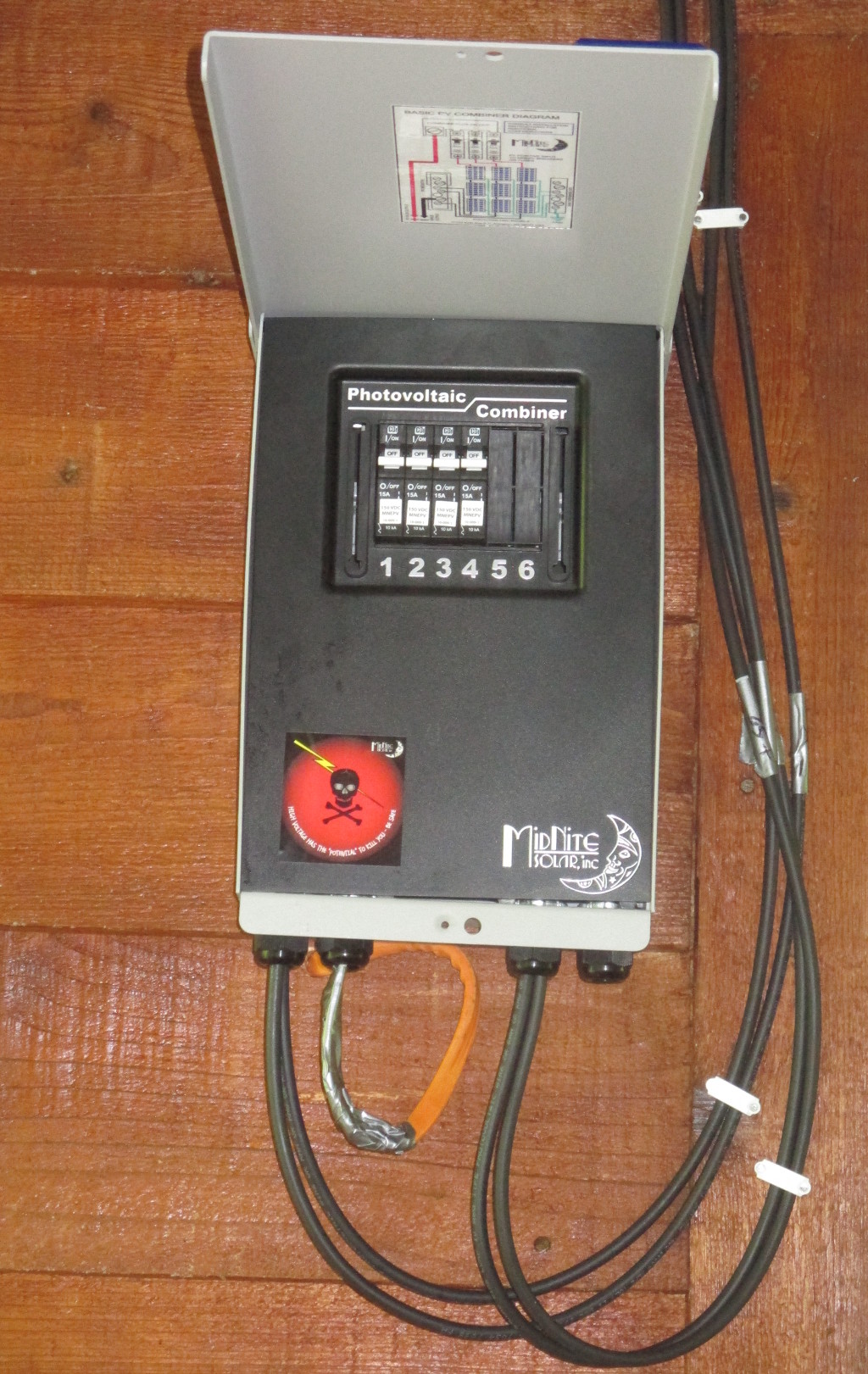
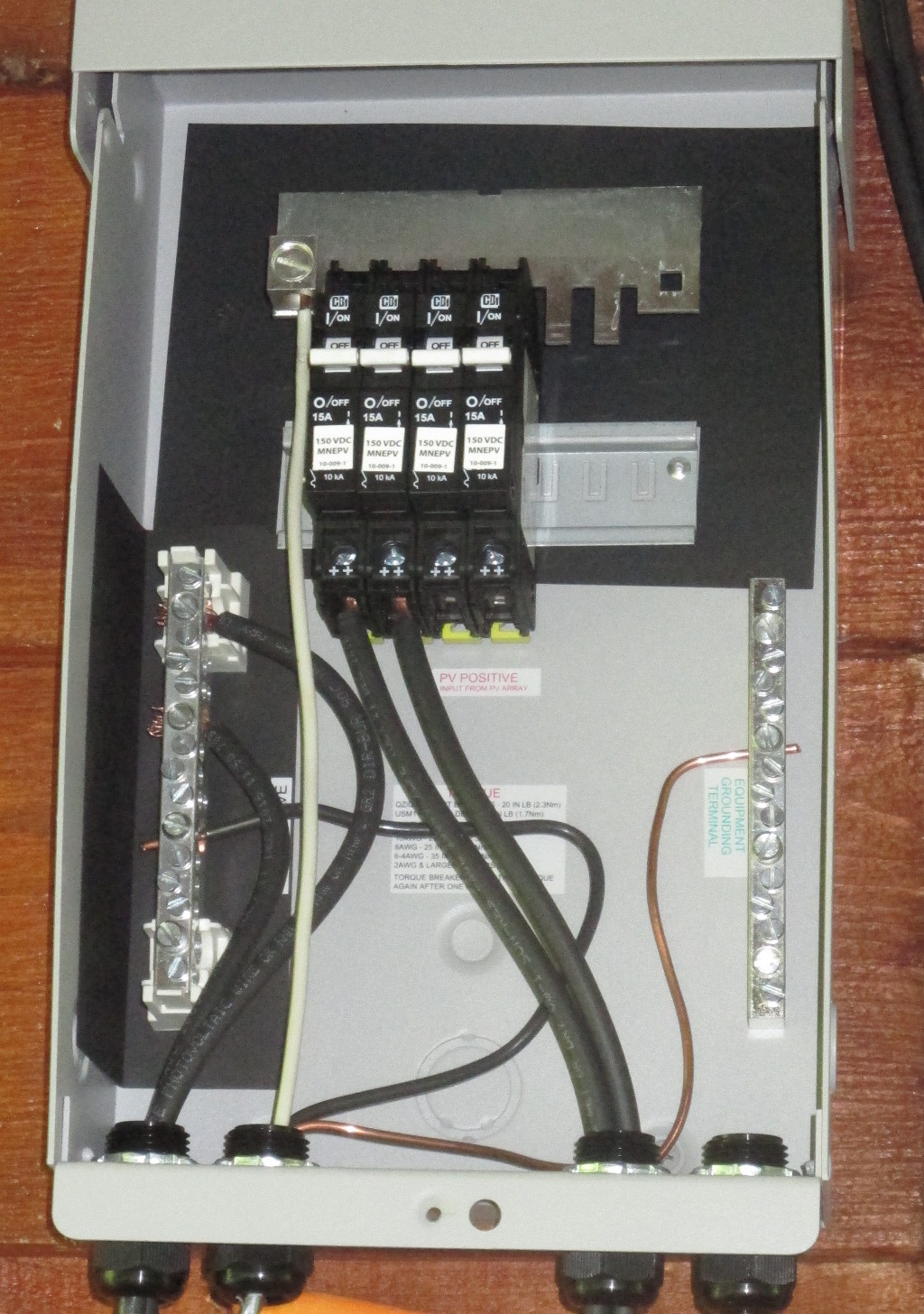
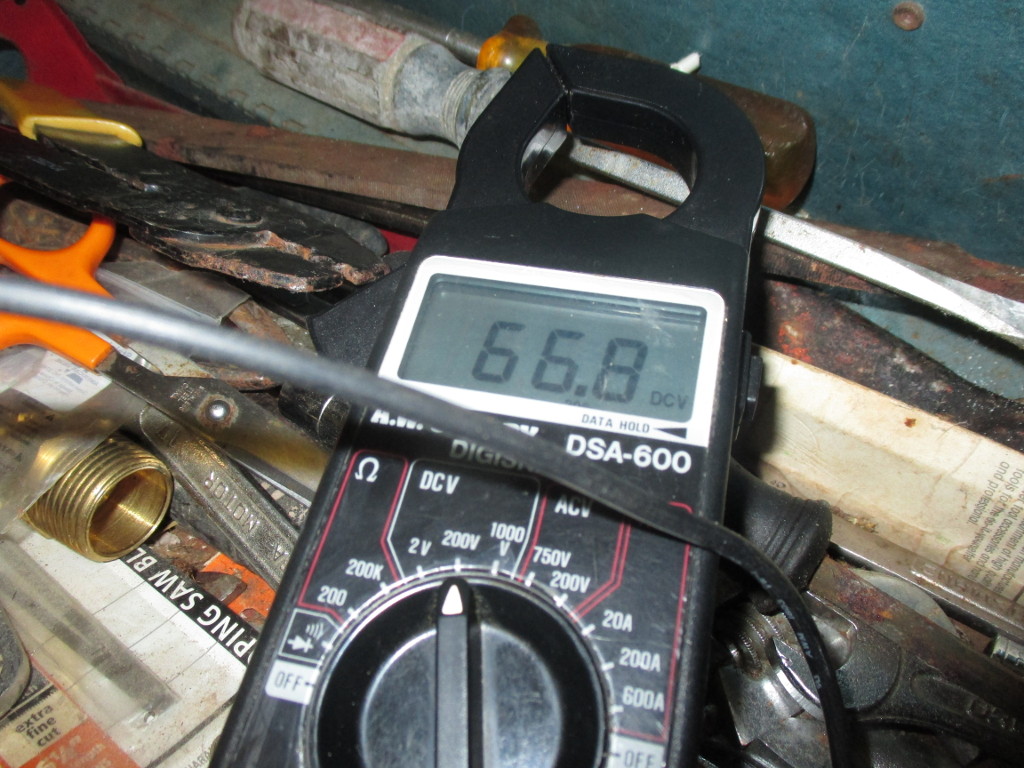
Only took a couple hours to wire up and mount the combiner box. PV combiner box with breakers Something about larger wiring like this is enjoyable. So much less fiddly than what I'm used to. PV combiner box wiring And the new PV array is hot! multimeter reading 66.8 DVC Update: The panels have an open circuit voltage of 35.89 and are in strings of 2, so I'd expect to see 71.78 V with only my multimeter connected. So I'm losing 0.07 volts to wiring, which is less than I designed for.

20 June 2017

Norbert Preining: TeX Live 2017 hits Debian/unstable

Yesterday I uploaded the first packages of TeX Live 2017 to Debian/unstable, meaning that the new release cycle has started. Debian/stretch was released over the weekend, and this opened up unstable for new developments. The upload comprised the following packages: asymptote, cm-super, context, context-modules, texlive-base, texlive-bin, texlive-extra, texlive-extra, texlive-lang, texworks, xindy.
I mentioned already in a previous post the following changes: The last two changes are described together with other news (easy TEXMF tree management) in the TeX Live release post. These changes more or less sum up the new infra structure developments in TeX Live 2017. Since the last release to unstable (which happened in 2017-01-23) about half a year of package updates have accumulated, below is an approximate list of updates (not split into new/updated, though). Enjoy the brave new world of TeX Live 2017, and please report bugs to the BTS! Updated/new packages:
academicons, achemso, acmart, acro, actuarialangle, actuarialsymbol, adobemapping, alkalami, amiri, animate, aomart, apa6, apxproof, arabluatex, archaeologie, arsclassica, autoaligne, autobreak, autosp, axodraw2, babel, babel-azerbaijani, babel-english, babel-french, babel-indonesian, babel-japanese, babel-malay, babel-ukrainian, bangorexam, baskervaldx, baskervillef, bchart, beamer, beamerswitch, bgteubner, biblatex-abnt, biblatex-anonymous, biblatex-archaeology, biblatex-arthistory-bonn, biblatex-bookinother, biblatex-caspervector, biblatex-cheatsheet, biblatex-chem, biblatex-chicago, biblatex-claves, biblatex-enc, biblatex-fiwi, biblatex-gb7714-2015, biblatex-gost, biblatex-ieee, biblatex-iso690, biblatex-manuscripts-philology, biblatex-morenames, biblatex-nature, biblatex-opcit-booktitle, biblatex-oxref, biblatex-philosophy, biblatex-publist, biblatex-shortfields, biblatex-subseries, bibtexperllibs, bidi, biochemistry-colors, bookcover, boondox, bredzenie, breqn, bxbase, bxcalc, bxdvidriver, bxjalipsum, bxjaprnind, bxjscls, bxnewfont, bxorigcapt, bxpapersize, bxpdfver, cabin, callouts, chemfig, chemformula, chemmacros, chemschemex, childdoc, circuitikz, cje, cjhebrew, cjk-gs-integrate, cmpj, cochineal, combofont, context, conv-xkv, correctmathalign, covington, cquthesis, crimson, crossrefware, csbulletin, csplain, csquotes, css-colors, cstldoc, ctex, currency, cweb, datetime2-french, datetime2-german, datetime2-romanian, datetime2-ukrainian, dehyph-exptl, disser, docsurvey, dox, draftfigure, drawmatrix, dtk, dviinfox, easyformat, ebproof, elements, endheads, enotez, eqnalign, erewhon, eulerpx, expex, exsheets, factura, facture, fancyhdr, fbb, fei, fetamont, fibeamer, fithesis, fixme, fmtcount, fnspe, fontmfizz, fontools, fonts-churchslavonic, fontspec, footnotehyper, forest, gandhi, genealogytree, glossaries, glossaries-extra, gofonts, gotoh, graphics, graphics-def, graphics-pln, grayhints, gregoriotex, gtrlib-largetrees, gzt, halloweenmath, handout, hang, heuristica, hlist, hobby, hvfloat, hyperref, hyperxmp, ifptex, ijsra, japanese-otf-uptex, jlreq, jmlr, jsclasses, jslectureplanner, karnaugh-map, keyfloat, knowledge, komacv, koma-script, kotex-oblivoir, l3, l3build, ladder, langsci, latex, latex2e, latex2man, latex3, latexbug, latexindent, latexmk, latex-mr, leaflet, leipzig, libertine, libertinegc, libertinus, libertinust1math, lion-msc, lni, longdivision, lshort-chinese, ltb2bib, lualatex-math, lualibs, luamesh, luamplib, luaotfload, luapackageloader, luatexja, luatexko, lwarp, make4ht, marginnote, markdown, mathalfa, mathpunctspace, mathtools, mcexam, mcf2graph, media9, minidocument, modular, montserrat, morewrites, mpostinl, mptrees, mucproc, musixtex, mwcls, mweights, nameauth, newpx, newtx, newtxtt, nfssext-cfr, nlctdoc, novel, numspell, nwejm, oberdiek, ocgx2, oplotsymbl, optidef, oscola, overlays, pagecolor, pdflatexpicscale, pdfpages, pdfx, perfectcut, pgfplots, phonenumbers, phonrule, pkuthss, platex, platex-tools, polski, preview, program, proofread, prooftrees, pst-3dplot, pst-barcode, pst-eucl, pst-func, pst-ode, pst-pdf, pst-plot, pstricks, pstricks-add, pst-solides3d, pst-spinner, pst-tools, pst-tree, pst-vehicle, ptex2pdf, ptex-base, ptex-fontmaps, pxbase, pxchfon, pxrubrica, pythonhighlight, quran, ran_toks, reledmac, repere, resphilosophica, revquantum, rputover, rubik, rutitlepage, sansmathfonts, scratch, seealso, sesstime, siunitx, skdoc, songs, spectralsequences, stackengine, stage, sttools, studenthandouts, svg, tcolorbox, tex4ebook, tex4ht, texosquery, texproposal, thaienum, thalie, thesis-ekf, thuthesis, tikz-kalender, tikzmark, tikz-optics, tikz-palattice, tikzpeople, tikzsymbols, titlepic, tl17, tqft, tracklang, tudscr, tugboat-plain, turabian-formatting, txuprcal, typoaid, udesoftec, uhhassignment, ukrainian, ulthese, unamthesis, unfonts-core, unfonts-extra, unicode-math, uplatex, upmethodology, uptex-base, urcls, variablelm, varsfromjobname, visualtikz, xassoccnt, xcharter, xcntperchap, xecjk, xepersian, xetexko, xevlna, xgreek, xsavebox, xsim, ycbook.

18 June 2017

Simon Josefsson: OpenPGP smartcard under GNOME on Debian 9.0 Stretch

I installed Debian 9.0 Stretch on my Lenovo X201 laptop today. Installation went smooth, as usual. GnuPG/SSH with an OpenPGP smartcard I use a YubiKey NEO does not work out of the box with GNOME though. I wrote about how to fix OpenPGP smartcards under GNOME with Debian 8.0 Jessie earlier, and I thought I d do a similar blog post for Debian 9.0 Stretch . The situation is slightly different than before (e.g., GnuPG works better but SSH doesn t) so there is some progress. May I hope that Debian 10.0 Buster gets this right? Pointers to which package in Debian should have a bug report tracking this issue is welcome (or a pointer to an existing bug report). After first login, I attempt to use gpg --card-status to check if GnuPG can talk to the smartcard.
jas@latte:~$ gpg --card-status
gpg: error getting version from 'scdaemon': No SmartCard daemon
gpg: OpenPGP card not available: No SmartCard daemon
jas@latte:~$ 
This fails because scdaemon is not installed. Isn t a smartcard common enough so that this should be installed by default on a GNOME Desktop Debian installation? Anyway, install it as follows.
root@latte:~# apt-get install scdaemon
Then try again.
jas@latte:~$ gpg --card-status
gpg: selecting openpgp failed: No such device
gpg: OpenPGP card not available: No such device
jas@latte:~$ 
I believe scdaemon here attempts to use its internal CCID implementation, and I do not know why it does not work. At this point I often recall that want pcscd installed since I work with smartcards in general.
root@latte:~# apt-get install pcscd
Now gpg --card-status works!
jas@latte:~$ gpg --card-status
Reader ...........: Yubico Yubikey NEO CCID 00 00
Application ID ...: D2760001240102000006017403230000
Version ..........: 2.0
Manufacturer .....: Yubico
Serial number ....: 01740323
Name of cardholder: Simon Josefsson
Language prefs ...: sv
Sex ..............: male
URL of public key : https://josefsson.org/54265e8c.txt
Login data .......: jas
Signature PIN ....: not forced
Key attributes ...: rsa2048 rsa2048 rsa2048
Max. PIN lengths .: 127 127 127
PIN retry counter : 3 3 3
Signature counter : 8358
Signature key ....: 9941 5CE1 905D 0E55 A9F8  8026 860B 7FBB 32F8 119D
      created ....: 2014-06-22 19:19:04
Encryption key....: DC9F 9B7D 8831 692A A852  D95B 9535 162A 78EC D86B
      created ....: 2014-06-22 19:19:20
Authentication key: 2E08 856F 4B22 2148 A40A  3E45 AF66 08D7 36BA 8F9B
      created ....: 2014-06-22 19:19:41
General key info..: sub  rsa2048/860B7FBB32F8119D 2014-06-22 Simon Josefsson 
sec#  rsa3744/0664A76954265E8C  created: 2014-06-22  expires: 2017-09-04
ssb>  rsa2048/860B7FBB32F8119D  created: 2014-06-22  expires: 2017-09-04
                                card-no: 0006 01740323
ssb>  rsa2048/9535162A78ECD86B  created: 2014-06-22  expires: 2017-09-04
                                card-no: 0006 01740323
ssb>  rsa2048/AF6608D736BA8F9B  created: 2014-06-22  expires: 2017-09-04
                                card-no: 0006 01740323
jas@latte:~$ 
Using the key will not work though.
jas@latte:~$ echo foo gpg -a --sign
gpg: no default secret key: No secret key
gpg: signing failed: No secret key
jas@latte:~$ 
This is because the public key and the secret key stub are not available.
jas@latte:~$ gpg --list-keys
jas@latte:~$ gpg --list-secret-keys
jas@latte:~$ 
You need to import the key for this to work. I have some vague memory that gpg --card-status was supposed to do this, but I may be wrong.
jas@latte:~$ gpg --recv-keys 9AA9BDB11BB1B99A21285A330664A76954265E8C
gpg: failed to start the dirmngr '/usr/bin/dirmngr': No such file or directory
gpg: connecting dirmngr at '/run/user/1000/gnupg/S.dirmngr' failed: No such file or directory
gpg: keyserver receive failed: No dirmngr
jas@latte:~$ 
Surprisingly, dirmngr is also not shipped by default so it has to be installed manually.
root@latte:~# apt-get install dirmngr
Below I proceed to trust the clouds to find my key.
jas@latte:~$ gpg --recv-keys 9AA9BDB11BB1B99A21285A330664A76954265E8C
gpg: key 0664A76954265E8C: public key "Simon Josefsson " imported
gpg: no ultimately trusted keys found
gpg: Total number processed: 1
gpg:               imported: 1
jas@latte:~$ 
Now the public key and the secret key stub are available locally.
jas@latte:~$ gpg --list-keys
/home/jas/.gnupg/pubring.kbx
----------------------------
pub   rsa3744 2014-06-22 [SC] [expires: 2017-09-04]
      9AA9BDB11BB1B99A21285A330664A76954265E8C
uid           [ unknown] Simon Josefsson 
sub   rsa2048 2014-06-22 [S] [expires: 2017-09-04]
sub   rsa2048 2014-06-22 [E] [expires: 2017-09-04]
sub   rsa2048 2014-06-22 [A] [expires: 2017-09-04]
jas@latte:~$ gpg --list-secret-keys
/home/jas/.gnupg/pubring.kbx
----------------------------
sec#  rsa3744 2014-06-22 [SC] [expires: 2017-09-04]
      9AA9BDB11BB1B99A21285A330664A76954265E8C
uid           [ unknown] Simon Josefsson 
ssb>  rsa2048 2014-06-22 [S] [expires: 2017-09-04]
ssb>  rsa2048 2014-06-22 [E] [expires: 2017-09-04]
ssb>  rsa2048 2014-06-22 [A] [expires: 2017-09-04]
jas@latte:~$ 
I am now able to sign data with the smartcard, yay!
jas@latte:~$ echo foo gpg -a --sign
-----BEGIN PGP MESSAGE-----
owGbwMvMwMHYxl2/2+iH4FzG01xJDJFu3+XT8vO5OhmNWRgYORhkxRRZZjrGPJwQ
yxe68keDGkwxKxNIJQMXpwBMRJGd/a98NMPJQt6jaoyO9yUVlmS7s7qm+Kjwr53G
uq9wQ+z+/kOdk9w4Q39+SMvc+mEV72kuH9WaW9bVqj80jN77hUbfTn5mffu2/aVL
h/IneTfaOQaukHij/P8A0//Phg/maWbONUjjySrl+a3tP8ll6/oeCd8g/aeTlH79
i0naanjW4bjv9wnvGuN+LPHLmhUc2zvZdyK3xttN/roHvsdX3f53yTAxeInvXZmd
x7W0/hVPX33Y4nT877T/ak4L057IBSavaPVcf4yhglVI8XuGgaTP666Wuslbliy4
5W5eLasbd33Xd/W0hTINznuz0kJ4r1bLHZW9fvjLduMPq5rS2co9tvW8nX9rhZ/D
zycu/QA=
=I8rt
-----END PGP MESSAGE-----
jas@latte:~$ 
Encrypting to myself will not work smoothly though.
jas@latte:~$ echo foo gpg -a --encrypt -r simon@josefsson.org
gpg: 9535162A78ECD86B: There is no assurance this key belongs to the named user
sub  rsa2048/9535162A78ECD86B 2014-06-22 Simon Josefsson 
 Primary key fingerprint: 9AA9 BDB1 1BB1 B99A 2128  5A33 0664 A769 5426 5E8C
      Subkey fingerprint: DC9F 9B7D 8831 692A A852  D95B 9535 162A 78EC D86B
It is NOT certain that the key belongs to the person named
in the user ID.  If you *really* know what you are doing,
you may answer the next question with yes.
Use this key anyway? (y/N) 
gpg: signal Interrupt caught ... exiting
jas@latte:~$ 
The reason is that the newly imported key has unknown trust settings. I update the trust settings on my key to fix this, and encrypting now works without a prompt.
jas@latte:~$ gpg --edit-key 9AA9BDB11BB1B99A21285A330664A76954265E8C
gpg (GnuPG) 2.1.18; Copyright (C) 2017 Free Software Foundation, Inc.
This is free software: you are free to change and redistribute it.
There is NO WARRANTY, to the extent permitted by law.
Secret key is available.
pub  rsa3744/0664A76954265E8C
     created: 2014-06-22  expires: 2017-09-04  usage: SC  
     trust: unknown       validity: unknown
ssb  rsa2048/860B7FBB32F8119D
     created: 2014-06-22  expires: 2017-09-04  usage: S   
     card-no: 0006 01740323
ssb  rsa2048/9535162A78ECD86B
     created: 2014-06-22  expires: 2017-09-04  usage: E   
     card-no: 0006 01740323
ssb  rsa2048/AF6608D736BA8F9B
     created: 2014-06-22  expires: 2017-09-04  usage: A   
     card-no: 0006 01740323
[ unknown] (1). Simon Josefsson 
[ unknown] (2)  Simon Josefsson 
gpg> trust
pub  rsa3744/0664A76954265E8C
     created: 2014-06-22  expires: 2017-09-04  usage: SC  
     trust: unknown       validity: unknown
ssb  rsa2048/860B7FBB32F8119D
     created: 2014-06-22  expires: 2017-09-04  usage: S   
     card-no: 0006 01740323
ssb  rsa2048/9535162A78ECD86B
     created: 2014-06-22  expires: 2017-09-04  usage: E   
     card-no: 0006 01740323
ssb  rsa2048/AF6608D736BA8F9B
     created: 2014-06-22  expires: 2017-09-04  usage: A   
     card-no: 0006 01740323
[ unknown] (1). Simon Josefsson 
[ unknown] (2)  Simon Josefsson 
Please decide how far you trust this user to correctly verify other users' keys
(by looking at passports, checking fingerprints from different sources, etc.)
  1 = I don't know or won't say
  2 = I do NOT trust
  3 = I trust marginally
  4 = I trust fully
  5 = I trust ultimately
  m = back to the main menu
Your decision? 5
Do you really want to set this key to ultimate trust? (y/N) y
pub  rsa3744/0664A76954265E8C
     created: 2014-06-22  expires: 2017-09-04  usage: SC  
     trust: ultimate      validity: unknown
ssb  rsa2048/860B7FBB32F8119D
     created: 2014-06-22  expires: 2017-09-04  usage: S   
     card-no: 0006 01740323
ssb  rsa2048/9535162A78ECD86B
     created: 2014-06-22  expires: 2017-09-04  usage: E   
     card-no: 0006 01740323
ssb  rsa2048/AF6608D736BA8F9B
     created: 2014-06-22  expires: 2017-09-04  usage: A   
     card-no: 0006 01740323
[ unknown] (1). Simon Josefsson 
[ unknown] (2)  Simon Josefsson 
Please note that the shown key validity is not necessarily correct
unless you restart the program.
gpg> quit
jas@latte:~$ echo foo gpg -a --encrypt -r simon@josefsson.org
-----BEGIN PGP MESSAGE-----
hQEMA5U1Fip47NhrAQgArTvAykj/YRhWVuXb6nzeEigtlvKFSmGHmbNkJgF5+r1/
/hWENR72wsb1L0ROaLIjM3iIwNmyBURMiG+xV8ZE03VNbJdORW+S0fO6Ck4FaIj8
iL2/CXyp1obq1xCeYjdPf2nrz/P2Evu69s1K2/0i9y2KOK+0+u9fEGdAge8Gup6y
PWFDFkNj2YiVa383BqJ+kV51tfquw+T4y5MfVWBoHlhm46GgwjIxXiI+uBa655IM
EgwrONcZTbAWSV4/ShhR9ug9AzGIJgpu9x8k2i+yKcBsgAh/+d8v7joUaPRZlGIr
kim217hpA3/VLIFxTTkkm/BO1KWBlblxvVaL3RZDDNI5AVp0SASswqBqT3W5ew+K
nKdQ6UTMhEFe8xddsLjkI9+AzHfiuDCDxnxNgI1haI6obp9eeouGXUKG
=s6kt
-----END PGP MESSAGE-----
jas@latte:~$ 
So everything is fine, isn t it? Alas, not quite.
jas@latte:~$ ssh-add -L
The agent has no identities.
jas@latte:~$ 
Tracking this down, I now realize that GNOME s keyring is used for SSH but GnuPG s gpg-agent is used for GnuPG. GnuPG uses the environment variable GPG_AGENT_INFO to connect to an agent, and SSH uses the SSH_AUTH_SOCK environment variable to find its agent. The filenames used below leak the knowledge that gpg-agent is used for GnuPG but GNOME keyring is used for SSH.
jas@latte:~$ echo $GPG_AGENT_INFO 
/run/user/1000/gnupg/S.gpg-agent:0:1
jas@latte:~$ echo $SSH_AUTH_SOCK 
/run/user/1000/keyring/ssh
jas@latte:~$ 
Here the same recipe as in my previous blog post works. This time GNOME keyring only has to be disabled for SSH. Disabling GNOME keyring is not sufficient, you also need gpg-agent to start with enable-ssh-support. The simplest way to achieve that is to add a line in ~/.gnupg/gpg-agent.conf as follows. When you login, the script /etc/X11/Xsession.d/90gpg-agent will set the environment variables GPG_AGENT_INFO and SSH_AUTH_SOCK. The latter variable is only set if enable-ssh-support is mentioned in the gpg-agent configuration.
jas@latte:~$ mkdir ~/.config/autostart
jas@latte:~$ cp /etc/xdg/autostart/gnome-keyring-ssh.desktop ~/.config/autostart/
jas@latte:~$ echo 'Hidden=true' >> ~/.config/autostart/gnome-keyring-ssh.desktop 
jas@latte:~$ echo enable-ssh-support >> ~/.gnupg/gpg-agent.conf 
jas@latte:~$ 
Log out from GNOME and log in again. Now you should see ssh-add -L working.
jas@latte:~$ ssh-add -L
ssh-rsa AAAAB3NzaC1yc2EAAAADAQABAAABAQDFP+UOTZJ+OXydpmbKmdGOVoJJz8se7lMs139T+TNLryk3EEWF+GqbB4VgzxzrGjwAMSjeQkAMb7Sbn+VpbJf1JDPFBHoYJQmg6CX4kFRaGZT6DHbYjgia59WkdkEYTtB7KPkbFWleo/RZT2u3f8eTedrP7dhSX0azN0lDuu/wBrwedzSV+AiPr10rQaCTp1V8sKbhz5ryOXHQW0Gcps6JraRzMW+ooKFX3lPq0pZa7qL9F6sE4sDFvtOdbRJoZS1b88aZrENGx8KSrcMzARq9UBn1plsEG4/3BRv/BgHHaF+d97by52R0VVyIXpLlkdp1Uk4D9cQptgaH4UAyI1vr cardno:000601740323
jas@latte:~$ 
Topics for further discussion or research include 1) whether scdaemon, dirmngr and/or pcscd should be pre-installed on Debian desktop systems; 2) whether gpg --card-status should attempt to import the public key and secret key stub automatically; 3) why GNOME keyring is used by default for SSH rather than gpg-agent; 4) whether GNOME keyring should support smartcards, or if it is better to always use gpg-agent for GnuPG/SSH, 5) if something could/should be done to automatically infer the trust setting for a secret key. Enjoy!

Vasudev Kamath: Rust - Shell like Process pipelines using subprocess crate

I had to extract copyright information from the git repository of the crate upstream. The need aroused as part of updating debcargo, tool to create Debian package source from the Rust crate. General idea behind taking copyright information from git is to extract starting and latest contribution year for every author/committer. This can be easily achieved using following shell snippet
for author in $(git log --format="%an"   sort -u); do
   author_email=$(git log --format="%an <%ae>" --author="$author"   head -n1)
   first=$(git \
   log --author="$author" --date=format:%Y --format="%ad" --reverse \
               head -n1)
   latest=$(git log --author="$author" --date=format:%Y --format="%ad" \
               head -n1)
   if [ $first -eq $latest ]; then
       echo "$first, $author_email"
   else
       echo "$first-$latest, $author_email"
   fi
done
Now challenge was to execute these command in Rust and get the required answer. So first step was I looked at std::process, default standard library support for executing shell commands. My idea was to execute first command to extract authors into a Rust vectors or array and then have 2 remaining command to extract years in a loop. (Yes I do not need additional author_email command in Rust as I can easily get both in the first command which is used in for loop of shell snippet and use it inside another loop). So I setup to 3 commands outside the loop with input and output redirected, following is snippet should give you some idea of what I tried to do.
let authors_command = Command::new("/usr/bin/git")
             .arg("log")
             .arg("--format=\"%an <%ae>\"")
             .spawn()?;
let output = authors_command.wait()?;
let authors: Vec<String> = String::from_utf8(output.stdout).split('\n').collect();
let head_n1 = Command::new("/usr/bin/head")
             .arg("-n1")
             .stdin(Stdio::piped())
             .stdout(Stdio::piped())
             .spwn()?;
for author in &authors  
             ...
 
And inside the loop I would create additional 2 git commands read their output via pipe and feed it to head command. This is where I learned that it is not straight forward as it looks :-). std::process::Command type does not implement Copy nor Clone traits which means one use of it I will give up the ownership!. And here I started fighting with borrow checker. I need to duplicate declarations to make sure I've required commands available all the time. Additionally I needed to handle error output at every point which created too many nested statements there by complicating the program and reducing its readability When all started getting out of control I gave a second thought and wondered if it would be good to write down this in shell script ship it along with debcargo and use the script Rust program. This would satisfy my need but I would need to ship additional script along with debcargo which I was not really happy with. Then a search on crates.io revealed subprocess, a crate designed to be similar with subprocess module from Python!. Though crate is not highly downloaded it still looked promising, especially the trait implements a trait called BitOr which allows use of operator to chain the commands. Additionally it allows executing full shell commands without need of additional chaining of argument which was done above snippet. End result a much simplified easy to read and correct function which does what was needed. Below is the function I wrote to extract copyright information from git repo.
fn copyright_fromgit(repo: &str) -> Result<Vec<String>>  
    let tempdir = TempDir::new_in(".", "debcargo")?;
    Exec::shell(OsStr::new(format!("git clone --bare    ",
                                repo,
                                tempdir.path().to_str().unwrap())
                              .as_str())).stdout(subprocess::NullFile)
                              .stderr(subprocess::NullFile)
                              .popen()?;
    let author_process =  
         Exec::shell(OsStr::new("git log --format=\"%an <%ae>\"")).cwd(tempdir.path())  
         Exec::shell(OsStr::new("sort -u"))
      .capture()?;
    let authors = author_process.stdout_str().trim().to_string();
    let authors: Vec<&str> = authors.split('\n').collect();
    let mut notices: Vec<String> = Vec::new();
    for author in &authors  
        let reverse_command = format!("git log --author=\" \" --format=%ad --date=format:%Y \
                                    --reverse",
                                   author);
        let command = format!("git log --author=\" \" --format=%ad --date=format:%Y",
                           author);
        let first =  
             Exec::shell(OsStr::new(&reverse_command)).cwd(tempdir.path())  
             Exec::shell(OsStr::new("head -n1"))
          .capture()?;
         let latest =  
             Exec::shell(OsStr::new(&command)).cwd(tempdir.path())   Exec::shell("head -n1")
          .capture()?;
        let start = i32::from_str(first.stdout_str().trim())?;
        let end = i32::from_str(latest.stdout_str().trim())?;
        let cnotice = match start.cmp(&end)  
            Ordering::Equal => format!(" ,  ", start, author),
            _ => format!(" - ,  ", start, end, author),
         ;
        notices.push(cnotice);
     
    Ok(notices)
 
Of course it is not as short as the shell or probably Python code, but that is fine as Rust is system level programming language (which is intended to replace C/C++) and doing complex Shell code (complex due to need of shell pipelines) in approximately 50 lines of code in safe and secure way is very much acceptable. Besides code is as much readable as a plain shell snippet thanks to the operator implemented by subprocess crate.

12 June 2017

Sven Hoexter: UEFI PXE preseeded Debian installation on HPE DL120

We bought a bunch of very cheap low end HPE DL120 server. Enough to warrant a completely automated installation setup. Shouldn't be that much of a deal, right? Get dnsmasq up and running, feed it a preseed.cfg and be done with it. In practise it took us more hours then we expected. Setting up the hardware Our hosts are equipped with an additional 10G dual port NIC and we'd like to use this NIC for PXE booting. That's possible, but it requires you to switch to UEFI boot. Actually it enables you to boot from any available NIC. Setting up dnsmasq We decided to just use the packaged debian-installer from jessie and do some ugly things like overwritting files in /usr/lib via ansible later on. So first of all install debian-installer-8-netboot-amd64 and dnsmasq, then enroll our additional config for dnsmasq, ours looks like this:
domain=int.foobar.example
dhcp-range=192.168.0.240,192.168.0.242,255.255.255.0,1h
dhcp-boot=bootnetx64.efi
pxe-service=X86-64_EFI, "Boot UEFI PXE-64", bootnetx64.efi
enable-tftp
tftp-root=/usr/lib/debian-installer/images/8/amd64/text
dhcp-option=3,192.168.0.1
dhcp-host=00:c0:ff:ee:00:01,192.168.0.123,foobar-01
Now you've to link /usr/lib/debian-installer/images/8/amd64/text/bootnetx64.efi to /usr/lib/debian-installer/images/8/amd64/text/debian-installer/amd64/bootnetx64.efi. That got us of the ground and we had a working UEFI PXE boot that got us into debian-installer. Feeding d-i the preseed file Next we added some grub.cfg settings and parameterized some basic stuff to be handed over to d-i via the kernel command line. You'll find the correct grub.cfg in /usr/lib/debian-installer/images/8/amd64/text/debian-installer/amd64/grub/grub.cfg. We added the following two lines to automate the start of the installer:
set default="0"
set timeout=5
and our kernel command line looks like this:
 linux    /debian-installer/amd64/linux vga=788 --- auto=true interface=eth1 netcfg/dhcp_timeout=60 netcfg/choose_interface=eth1 priority=critical preseed/url=tftp://192.168.0.2/preseed.cfg quiet
Important points: preseeed.cfg, GPT and ESP One of the most painful points was the fight to find out the correct preseed values to install with GPT to create a ESP (EFI system partition) and use LVM for /. Relevant settings are:
# auto method must be lvm
d-i partman-auto/method string lvm
d-i partman-lvm/device_remove_lvm boolean true
d-i partman-md/device_remove_md boolean true
d-i partman-lvm/confirm boolean true
d-i partman-lvm/confirm_nooverwrite boolean true
d-i partman-basicfilesystems/no_swap boolean false
# Keep that one set to true so we end up with a UEFI enabled
# system. If set to false, /var/lib/partman/uefi_ignore will be touched
d-i partman-efi/non_efi_system boolean true
# enforce usage of GPT - a must have to use EFI!
d-i partman-basicfilesystems/choose_label string gpt
d-i partman-basicfilesystems/default_label string gpt
d-i partman-partitioning/choose_label string gpt
d-i partman-partitioning/default_label string gpt
d-i partman/choose_label string gpt
d-i partman/default_label string gpt
d-i partman-auto/choose_recipe select boot-root-all
d-i partman-auto/expert_recipe string \
boot-root-all :: \
538 538 1075 free \
$iflabel  gpt   \
$reusemethod    \
method  efi   \
format    \
. \
128 512 256 ext2 \
$defaultignore    \
method  format   format    \
use_filesystem    filesystem  ext2   \
mountpoint  /boot   \
. \
1024 4096 15360 ext4 \
$lvmok    \
method  format   format    \
use_filesystem    filesystem  ext4   \
mountpoint  /   \
. \
1024 4096 15360 ext4 \
$lvmok    \
method  format   format    \
use_filesystem    filesystem  ext4   \
mountpoint  /var   \
. \
1024 1024 -1 ext4 \
$lvmok    \
method  format   format    \
use_filesystem    filesystem  ext4   \
mountpoint  /var/lib   \
.
# This makes partman automatically partition without confirmation, provided
# that you told it what to do using one of the methods above.
d-i partman-partitioning/confirm_write_new_label boolean true
d-i partman/choose_partition select finish
d-i partman-md/confirm boolean true
d-i partman/confirm boolean true
d-i partman/confirm_nooverwrite boolean true
# This is fairly safe to set, it makes grub install automatically to the MBR
# if no other operating system is detected on the machine.
d-i grub-installer/only_debian boolean true
d-i grub-installer/with_other_os boolean true
d-i grub-installer/bootdev  string /dev/sda
I hope that helps to ease the processes to setup automated UEFI PXE installations for some other people out there still dealing with bare metal systems. Some settings took us some time to figure out, for example d-i partman-efi/non_efi_system boolean true required some searching on codesearch.d.n (amazing ressource if you're writing preseed files and need to find the correct templates) and reading scripts on git.d.o where you'll find the source for partman-* and grub-installer. Kudos Thanks especially to P.P. and M.K. to figure out all those details.

6 June 2017

Gunnar Wolf: Made with Creative Commons: Starting a translation project

Dear Lazyweb, About a week ago, I learnt about the release of an interesting book by the fine people at Creative Commons: Made with Creative Commons. The book itself is, of course, CC BY-SA-licensed. I downloaded it and started reading right away. Some minutes later, I ordered a dead-tree copy, which arrived a couple of days ago. (I'm linking to the publisher's page, but bought it from Amazon M xico... Shipping it from Denmark would not have been as cheap and fast, I guess). Anyway, given my workplace, given the community I know, given I know something like this is much needed... I will start a Spanish translation of the content. There are at least two other people interested in participating, and I haven't yet publicized my intentions (this is the first public statement about it). So, dear Lazyweb: What I need is a good framework for doing this. I started by creating a Git repository, and we were discussing to translate to Markdown (to later format according to the desired output) but then I thought... If we want the translation to be updateable, and to be able to properly accept other people's work, maybe a better format is warranted? So, my current idea is to create a Markdown version for the English original, and find a way to shoehorn^Wseparate it by paragraphs and feed it to Gettext, which is the best translation framework I have used (but is meant for code translation, not for full-text)... Dear lazyweb: What tools do you recommend me to use? Quite important to me: Are they Free tools? Are they easy to use by third-parties, maybe incorporating work via Git? Or, at least, via a Web front-end that allows me as a project lead to review and approve/fix/reject strings? Thanks, lazyweb!

3 June 2017

Norbert Preining: TeX Live 2017 released

TeX Live 2017 has been released! CTAN mirrors are busy updating. Get out bottles of good wine, and enjoy a good long download
Besides the huge amount of package updates due to the 2 month testing hiatus, I want to pick a few changes before copying the complete changelog entry: Additional TEXMF trees tlmgr got a new functionality to easily add and remove additional TEXMF trees to the search path. MikTeX had this features since long, and it was often requested. As it turned out, it is a rather trivial thing to achieve by some texmf.cnf lines. The rest is just front end in tlmgr. Here a few invocations (not very intelligent usage, though):
$ tlmgr conf auxtrees show
tlmgr: no auxiliary texmf trees defined.
$ tlmgr conf auxtrees add /projects/book-abc
$ tlmgr conf auxtrees
List of auxiliary texmf trees:
  /projects/book-abc
$ tlmgr conf auxtrees remove /projects/book-abc
$ tlmgr conf auxtrees show
tlmgr: no auxiliary texmf trees defined.
TeX Live Manager interactive shell tlmgr also got an interactive shell now, that can also be used for scripting. Available commands are all the usual command line actions, plus a few more (see documentation). Again, here a simple session:
$ tlmgr shell
protocol 1
tlmgr> load local
OK
tlmgr> load remote
tlmgr: package repositories
	main = /home/norbert/public_html/tlnet (verified)
	koma = http://www.komascript.de/repository/texlive/2017 (verified)
OK
tlmgr> update --list
tlmgr: package repositories
	main = /home/norbert/public_html/tlnet (verified)
	koma = http://www.komascript.de/repository/texlive/2017 (verified)
tlmgr: saving backups to /home/norbert/tl/2017/tlpkg/backups
tlmgr: no updates available
OK
tlmgr> byebye
$
User versus System mode for updmap and fmtutil I have reported on this during BachoTeX/TUG 2017, here are the slides, that the two central configuration programs updmap and fmtutil will change their operation mode slightly by disallowing invocations without mde specification. That is, one either needs to call updmap -sys (or updmap-sys, nothing changed here from previous years) or updmap -user (or updmap-user, new in TeX Live 2017). We hope by this and the accompanying web page of recommendations to help users not to shoot themselves to often by calling updmap without knowing the consequences. The upcoming proceedings of the BachoTeX will also comtain an article fully documenting both updmap and fmtutil including the most recent changes.
These were only a few changes where I had my fingers in the development. For the full list, read on below. Now get ready for partying, and also for the end of the peace, because daily package updates will restart in the next days. Enjoy Changes since TeX Live 2016 The following list of changes is directly from the TeX Live documentation.

Next.

Previous.