Enrico Zini: New laptop setup
My new laptop Framework (Framework Laptop 13 DIY Edition (AMD Ryzen 7040 Series)) arrived, all the hardware works out of the box on Debian Stable, and I'm very happy indeed.
This post has the notes of all the provisioning steps, so that I can replicate
them again if needed.
Installing Debian 12
Debian 12's installer just worked, with Secure Boot enabled no less, which was nice.
The only glitch is an argument with the guided partitioner, which was uncooperative: I have been hit before by a /boot partition too small, and I wanted 1G of EFI and 1G of boot, while the partitioner decided that 512Mb were good enough. Frustratingly, there was no way of changing that, nor I found how to get more than 1G of swap, as I wanted enough swap to fit RAM for hybernation.
I let it install the way it pleased, then I booted into grml for a round of gparted.
The tricky part of that was resizing the root btrfs filesystem, which is in an
LV, which is in a VG, which is in a PV, which is in LUKS. Here's a cheatsheet.
Shrink partitions:
which is handy for grepping things like hotkeys.
I can manually set a value with:
and I can reset it to its default with:
Some applications like Gnome Terminal use "relocatable schemas", and in those cases you also need to specify a path, which can be discovered using
Install appindicators
First thing first:
And in Settings/Displays, set a reasonable scaling factor for each display.
Disable Alt/Super as hotkey for the Overlay
Seeing all my screen reorganize and reshuffle every time I accidentally press
Alt leaves me disoriented and seasick:
Focus-follows-mouse and Raise-or-lower
My desktop is like my desktop: messy and cluttered. I have lots of overlapping
window and I switch between them by moving the focus with the mouse, and when
the visible part is not enough I have a handy hotkey mapped to raise-or-lower
to bring forward what I need and send back what I don't need anymore.
Thankfully Gnome can be configured that way, with some work:
Mouse and keyboard shortcuts
Gnome has lots of preconfigured sounds, shortcuts, animations and other
distractions that I do not need. They also either interfere with key
combinations I want to use in terminals, or cause accidental window moves or
resizes that make me break flow, or otherwise provide sensory overstimulation
that really does not work for me.
It was a lot of work, and these are the steps I used to get rid of most of
them.
Disable Super+N combinations that accidentally launch a questionable choice
of programs:
Gnome-Shell settings:
Note that even after removing F10 from being bound to
I still cannot quit Midnight Commander using F10 in a terminal, as that moves
the focus in the window title bar. This looks like a Gnome bug, and a very
frustrating one for me.
Appearance
Gnome-Shell settings:
Extensions
I enabled the Applications Menu extension, since it's impossible to find less
famous applications in the Overview without knowing in advance how they're
named in the desktop. This stole a precious hotkey, which I had to disable in
gsettings:
I also enabled:
I tried out several run dialogs present in Debian, with sad results, possibly
due to most of them not being tested on wayland:
- mount the root filesystem in
/mnt - btrfs filesystem resize 6G
/mnt - umount the root filesystem
- lvresize -L 7G vgname/lvname
- pvresize --setphysicalvolumesize /dev/mapper/pvname 8G
- cryptsetup resize --device-size 9G name
- cryptsetup resize name
- pvresize /dev/mapper/pvname
- lvresize -L 100% vgname/lvname
- mount the root filesystem in
/mnt - btrfs filesystem resize max
/mnt - umount the root filesystem
gsettings list-recursively
gsettings set <schema> <key> <value>
gsettings reset <schema> <key>
dconf-editor:
gsettings set <schema>:<path> <key> <value>
app install gnome-shell-extension-appindicator, log out
and in again: the Gnome Extension manager won't see the extension as available
until you restart the whole session.
I have no idea why that is so, and I have no idea why a notification area is
not present in Gnome by default, but at least now I can get one.
Fix font sizes across monitors
My laptop screen and monitor have significantly different DPIs, so:
gsettings set org.gnome.mutter experimental-features "['scale-monitor-framebuffer']"
gsettings set org.gnome.mutter overlay-key ''
- In gnome-shell settings, keyboard, shortcuts, windows, set "Raise window if covered, otherwise lower it" to "Super+Escape"
- In gnome-tweak-tool, Windows, set "Focus on Hover"
gsettings set org.gnome.shell.overrides focus-change-on-pointer-rest false
for i in seq 1 9 ; do gsettings set org.gnome.shell.keybindings switch-to-application-$i '[]'; done
- Multitasking:
- disable hot corner
- disable active edges
- set a fixed number of workspaces
- workspaces on all displays
- switching includes apps from current workspace only
- Sound:
- disable system sounds
- Keyboard
- Compose Key set to Caps Lock
- View and Customize Shortcuts:
- Launchers
- launch help browser: remove
- Navigation
- move to workspace on the left: Super+Left
- move to workspace on the right: Super+Right
- move window one monitor : remove
- move window one workspace to the left: Shift+Super+Left
- move window one workspace to the right: Shift+Super+Right
- move window to : remove
- switch system : remove
- switch to : remove
- switch windows : disabled
- Screenshots
- Record a screenshot interactively: Super+Print
- Take a screenshot interactively: Print
- Disable everything else
- System
- Focus the active notification: remove
- Open the applcation menu: remove
- Restore the keyboard shortctus: remove
- Show all applications: remove
- Show the notification list: remove
- Show the overvire: remove
- Show the run command prompt: remove (the default Gnome launcher is not for me) Super+F2 (or remove to leave it to the terminal)
- Windows
- Close window: remove
- Hide window: remove
- Maximize window: remove
- Move window: remove
- Raise window if covered, otherwise lower it: Super+Escape
- Resize window: remove
- Restore window: remove
- Toggle maximization state: remove
- Launchers
- Custom shortcuts
- xfrun4, launching xfrun4, bound to Super+F2
- Accessibility:
- disable "Enable animations"
- Keyboard & Mouse
- Overview shortcut: Right Super. This cannot be disabled, but since my keyboard doesn't have a Right Super button, that's good enough for me. Oddly, I cannot find this in gsettings.
- Window titlebars
- Double-Click: Toggle-Maximize
- Middle-Click: Lower
- Secondary-Click: Menu
- Windows
- Resize with secondary click
-
Shortcuts
- New tab: Super+T
- New window: Super+N
- Close tab: disabled
- Close window: disabled
- Copy: Super+C
- Paste: Super+V
- Search: all disabled
- Previous tab: Super+Page Up
- Next tab: Super+Page Down
- Move tab : Disabled
- Switch to tab N: Super+Fn (only available after disabling overview)
-
Switch to tab N with Alt+Fn cannot be configured in the UI:
Alt+Fnis detected as simplyFn. It can however be set with gsettings:sh for i in seq 1 12 ; do gsettings set org.gnome.Terminal.Legacy.Keybindings:/org/gnome/terminal/legacy/keybindings/ switch-to-tab-$i "<Alt>F$i"; done
-
Profile
- Text
- Sound: disable terminal bell
- Text
for n in  seq 1 12 ; do gsettings set org.gnome.mutter.wayland.keybindings switch-to-session-$n '[]'; done
gsettings set org.gnome.desktop.wm.keybindings move-to-workspace-down '[]'
gsettings set org.gnome.desktop.wm.keybindings move-to-workspace-up '[]'
gsettings set org.gnome.desktop.wm.keybindings panel-main-menu '[]'
gsettings set org.gnome.desktop.interface menubar-accel '[]'
menubar-accel, and after having to gsetting binding to F10 as is:
$ gsettings list-recursively grep F10
org.gnome.Terminal.Legacy.Keybindings switch-to-tab-10 '<Alt>F10'
- Appearance:
- dark mode
- Fonts
- Antialiasing: Subpixel
- Top Bar
- Clock/Weekday: enable (why is this not a default?)
- General
- Theme variant: Dark (somehow it wasn't picked by up from the system settings)
- Profile
- Colors
- Background: #000
- Colors
- Search
- disable application search
- Removable media
- set everything to "ask what to do"
- Default applications
- Web: Chromium
- Mail: mutt
- Calendar: khal is not sadly an option
- Video: mpv
- Photos: Geequie
gsettings set org.gnome.desktop.screensaver lock-delay 30
gsettings set org.gnome.shell.extensions.apps-menu apps-menu-toggle-menu '[]'
- Removable Drive Menu: why is this not on by default?
- Workspace Indicator
- Ubuntu Appindicators (apt install gnome-shell-extension-appindicator and restart Gnome)
dconf-editor:
gsettings list-recursively grep custom-key
org.gnome.settings-daemon.plugins.media-keys custom-keybindings ['/org/gnome/settings-daemon/plugins/media-keys/custom-keybindings/custom0/']
- fuzzel does not start
- gmrun is gtk2, last updated in 2016, but works fine
- kupfer segfaults as I type
- rofi shows, but can't get keboard input
- shellex shows a white bar at top of the screen and lots of errors on stderr
- superkb wants to grab the screen for hotkeys
- synapse searched news on the internet as I typed, which is a big no for me
- trabucco crashes on startup
- wofi works but looks like very much an acquired taste, though it has some completion that makes it more useful than Gnome's run dialog
- xfrun4 (package xfce4-appfinder) struggles on wayland, being unable to center its window and with the pulldown appearing elsewhere in the screen, but it otherwise works
- Figure out what is still binding F10 to menu, and what I can do about it
- Figure out how to reduce the size of window titlebars, which to my taste should be unobtrusive and not take 2.7% of vertical screen size each. There's a minwaita theme which isn't packaged in Debian. There's a User Theme extension, and then the whole theming can of worms to open. For another day.
- Figure out if Gnome can be convinced to resize popup windows? Take the Gnome Terminal shortcut preferences for example: it takes of the vertical screen and can only display of all available shortcuts, and I cannot find a valid reason why I shouldn't be allowed to enlarge it vertically.
- Figure out if I can place shortcut launcher icons in the top panel, and how
gsettings oddly feels to me like a better UI than the interactive settings
managers: it's more comprehensive, more discoverable, more scriptable, and more
stable across releases. Most of the Q&A I found on the internet with guidance
given on the UI was obsolete, while when given with gsettings command lines
it kept being relevant. I also have the feeling that these notes would be
easier to understand and follow if given as gsettings invocations instead of
descriptions of UI navigation paths.
At some point I'll upgrade to Trixie and reevaluate things, and these notes
will be a useful checklist for that.
Fingers crossed that this time I'll manage to stay on Wayland. If not, I know
that Xfce is still there for me, and I can trust it to be both helpful and good
at not getting in the way of my work.

 You may have seen
 In order to prepare for the Akademy I started some days before to give my Librem 5 ( an Open Hardware Phone) another try and ended up with a non starting Plasma 6.
Actually this issue was known already, but hasn't been addressed.
In the end I reached the Akademy with my Librem 5 having phosh installed (which is Gnome based), in order to have something working.
I met Bushan and Bart who took care and the issue was fixed two days later I could finally install Plasma 6 on it.
The last time I tested my Librem 5 with Plasma 5 it felt sluggish and not well working.
But this time I was impressed how well the system reacts.
Sure there are some things here and there, but in the bigger picture it is quite useable.
One annoying issue is that the camera is only working with one app and the other issue is the battery capacity, you have to charge it once a day.
Because of missing a QR reader that can use the camera, getting data to the phone was quite challenging.
Unfortunately the conference Wifi separated the devices and I couldn't use KDE Connect to transfer data.
In the end the only way to import data was taking five photos from the QR Code to import my D-Ticket to Itinerary.
With a device with Plasma Mobile, it directly was used for a experiment: How well does Dolphin works on a Plasma Mobile device.
Together with Felix Ernst we tried it out and were quite impressed, that Dolphin does work very well on Plasma Mobile, after some simple modifications on the UI.
That resulted in a patch to add a mobile UI for Dolphin
 In order to not have a hard cut from Akademy to normal life, I had a lunch with Carlos, to discuss KDE Neon and how we can improve the interaction with Debian.
In the future this should have less friction and make both communities work together more smoothly.
Additionally as I used to develop on KDEPIM with the help of Docker images based on Neon I ask for a meta kf6 dev meta package.
That should help to get rid of most hand written lists of dev packages in the Docker file in order to make it more simple for new contributors to start hacking on KDEPIM.
The rest of the day I finally found time to do the normal tourist stuff: Going to the Wine bridge and having a walk to the castle of W rzburg.
Unfortunately you hear a lot of car noises up there, but I could finally relaxe in a Japanese designed garden.
Finally at Saturday I started my trip back.
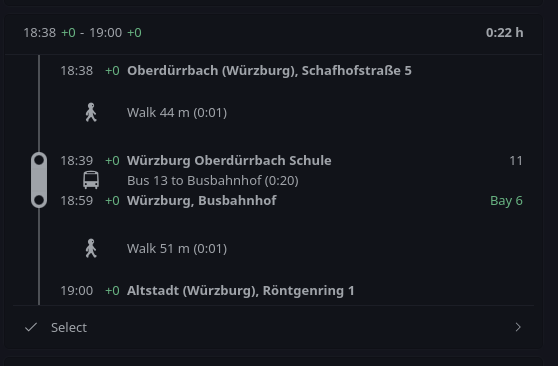
The trains towards Eberswalde are broken and I needed to find alternative routing.
I got a little bit nervous, as it was the first time I travelled with my Librem 5 and Itinerary only and needed to reach the next train in less than two mins.
With the indoor maps provided, I could prepare my run through the train station so I reached successfully my next train.
By the way, also if you only only use KDE software, I would recommend everyone to join Akademy ;)
 For the past decade-plus, every piece of software I write has had one of two release processes.
Software that gets deployed directly onto servers (websites, mostly, but also the infrastructure that runs
 debian.org's infrastructure now supports using Security Key-backed SSH keys. DDs (and guests) can use the mail gateway to add SSH keys of the types sk-ecdsa-sha2-nistp256@openssh.com and sk-ssh-ed25519@openssh.com to their LDAP accounts.This was done in support of hardening our infrastructure: Hopefully we can require these hardware-backed keys for sensitive machines in the future, to have some assertion that it is a human that is connecting to them.
 Our Debian User Group met on November 2nd after a somewhat longer summer hiatus
than normal. It was lovely to see a bunch of people again and to be able to
dedicate a whole day to hacking :)
Here is what we did:
lavamind:


 In basically every engineering organization I ve ever regarded as particularly
high functioning, I ve sat through one specific recurring conversation which is
not a conversation about complexity . Things are good or bad because they
are or aren t complex, architectures needs to be redone because it s too
complex some refactor of whatever it is won t work because it s too complex.
You may have even been a part of some of these conversations or even been
the one advocating for simple light-weight solutions. I ve done it. Many times.
Rarely, if ever, do we talk about complexity within its rightful context
complexity for whom. Is a solution complex because it s complex for the
end user? Is it complex if it s complex for an API consumer? Is it complex if
it s complex for the person maintaining the API service? Is it complex if it s
complex for someone outside the team maintaining it to understand?
Complexity within a problem domain I ve come to believe, is fairly zero-sum
there s a fixed amount of complexity in the problem to be solved, and you can
choose to either solve it, or leave it for those downstream of you
to solve that problem on their own.
That being said, while I believe there is a lower bound in complexity to
contend with for a problem, I do not believe there is an upper bound to the
complexity of solutions possible. It is always possible, and in fact, very
likely that teams create problems for themselves while trying to solve a
problem. The rest of this post is talking to the lower bound. When getting
feedback on an early draft of this blog post, I ve been informed that Fred
Brooks coined a term for what I call lower bound complexity Essential
Complexity , in the paper
 Like each month, have a look at the work funded by
 Version 0.0.19 of