Search Results: "gio"

28 June 2012

DebConf team: DebConf12 schedule ready! (Posted by Gunnar Wolf)

The DebConf12 schedule is finally available! As usual, the DebConf conference can only be finalized a couple of days before DebConf itself starts. But hey Take a look at it, and start planning your activities! Not final, never final Remember that, even now that the conference schedule is announced, you can still submit talks to DebConf, following what we call ad-hoc talks. What are the steps to do it?
  1. Check the schedule and find the timeslot (day, hour and room) you want to talk in
  2. Register your event in Pentabarf, and note the generated event ID (the last number in the URL after the submission is accepted)
  3. Send a mail to schedule@debconf.org detailing the event ID, title (just to confirm it), and the requested timeslot
  4. All requests _must_ be received at least 24hr before the requested event for the scheduling team to act accordingly and for the video team to be able to plan on resources to cover the requested session
  5. Video team coverage (event recording plus streaming on a best-effort basis) will be given to activities scheduled on the Aula Magna and Roberto Ter n auditoriums.
  6. We will try to grant requests on a first-come-first-serve basis. If two events are requested for the same timeslot, the first will have precedence, and we will schedule the second as close as possible to it. We will notify the submitters if this happens, of course.
Conference tracks In DebConf12, many talks are organized around the following tracks:
DebianDay
This track is meant for the local (Nicaraguan/Central American) community to be attracted to Debian. It does not usually have technically minded talks; the DebConf general audience is, of course, invited to take part in it, as there will surely be interesting angles on how Debian is used in different use-cases, and there will be interesting Q&A session with the audience.
Getting involved in Debian
Central America is a very special region. It has vibrant Free Software user groups and communities, among which there is an important interest to get involved in Debian.
This track will have some talks in Spanish, some talks in English, explaining different Debian processes and tools, aiming at attracting locals to contribute to Debian.
Debian for the cloud
All about virtualization. Management infrastructure, details on virtual machine engines, insight on how to tweak your kernel for optimum virtualized performance, and of course how to get it all humming perfectly with your Debian packages.
Building and porting
With an every day stronger transit to mobile computing, we are seeing a renaissance of porting. At the same time, we finally have multiarch as part of Debian. And were that not to be enough, we finally have more than one compiler that can be used for most of the software in the archive. Put all this together, and you will have a very interesting track.
Social activities
DebConf is as much about technical stuff as it is about building closer ties within the members of its community. Eating cheese+wine, going on a trip to the guts of a volcano, having a nice banquet Do you want to add an activity to this pseudo-track?
Skills exchange
Knowledge can also be built by all of us putting our grain of sand. We first had explicit skills exchange sessions in Bosnia last year, and they were very well received. Feel free to propose similar sessions!
And Well, three days to DebCamp and counting. See you Real Soon Now in Managua!

26 June 2012

Petter Reinholdtsen: Debian Edu interview: Jos Luis Redrejo Rodr guez

I've been too busy at home, but finally I found time to wrap up another interview with the people behind Debian Edu and Skolelinux. This time we get to know Jos Luis Redrejo Rodr guez, one of our great helpers from Spain. His effort was the reason we added support for several desktop types (KDE, Gnome and most recently LXDE) in Debian Edu, and have all of these available in the recently published Debian Edu Squeeze version. Who are you, and how do you spend your days? I'm a father, teacher and engineer who is working for the Education ministry of the Region of Extremadura (Spain) in the implementation of ICT in schools How did you get in contact with the Skolelinux/Debian Edu project? At 2006, I verified that both, we in Extremadura and Skolelinux project, had been working in parallel for some years, doing very similar things, using very similar tools and with similar targets, so I decided it was time to join forces as much as possible. What do you see as the advantages of Skolelinux/Debian Edu? A community of highly skilled experts working together, with a really open schema of collaboration and work. I really love the concepts of Do-ocracy and Merit-ocracy and the way these concepts are been used everyday inside Debian Edu. What do you see as the disadvantages of Skolelinux/Debian Edu? Sometimes the differences in the implementations, laws or economical and technical resources in the different countries don't allow us to agree in the same solution for all of us, and several approaches are needed, what is a waste of effort. Also, there is a lack of more man power to be able to follow the fast evolution of the technologies in school. Which free software do you use daily? Debian, of course, and due to my kind of job I am most of my time between Iceweasel, Geany and Terminator. Which strategy do you believe is the right one to use to get schools to use free software? I think there is not a single strategy because there are very different scenarios: schools with mixed proprietary and free environments, schools using only workstations, other schools using laptops, netbooks, tablets, interactive white-boards, etc. Also the range of ages of the students is very broad and you can not use the same solutions for primary schools and secondary or even universities. So different strategies are needed. But, looking at these differences, and looking back to the things we've done and implemented, and the places were we have spent most of our forces, I think we should focus as much as possible in free multi-platform environments, using only standards tools, and moving more and more to Internet or network solutions that could be deployed using wireless. I think we'll see more and more personal devices in the schools, devices the students and teachers will take home with them, so the solutions must be able to be taken at home and continue working there.

25 June 2012

Jan Wagner: nagios-plugins 1.4.16 is going to be released

Short before Debian is freezing the upcoming release of a new version of nagios-plugins is scheduled for Wednesday. The good news is, that a recent version is available in unstable and testing. Upstream only fixed some check_ping issues, which are not included in nagios-plugins 1.4.16~pre1-1. There is also a package available through squeeze-backports. If you are able to, please test the packages as soon as possible. If there are some quirks, these can be fixed in the next two days upstream.

23 June 2012

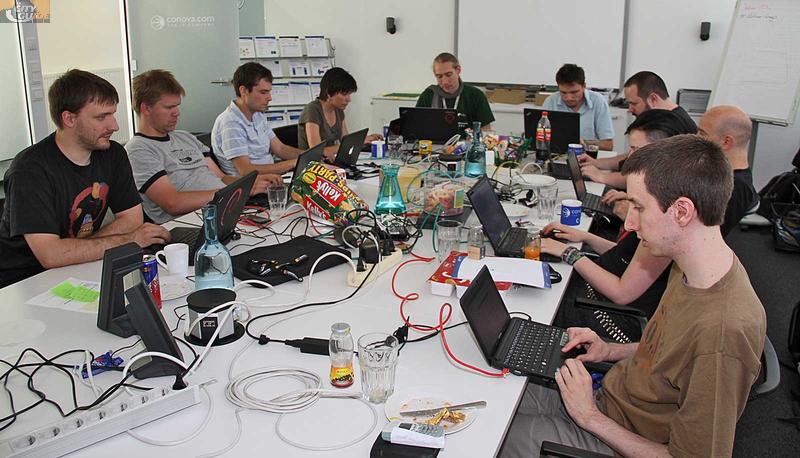
Bernd Zeimetz: Report from the Bug Squashing Party in Salzburg

bsp_2012_salzburg photo from salzburg-cityguide.com, Copyright (C) Uwe Brandl

Participation and Results From June 15-17th we held a Debian BugSquashingParty in Salzburg, hosted and sponsored by conova communications GmbH. It was a fun and busy weekend, with 15-17 people from 5 countries being around, mainly working on RC bugs in Testing/Unstable. Gerfried Fuchs (rhonda) also worked on triaging the impact of RC bugs on the version in Squeeze, while Peter Palfrader (weasel) took care of Tor related things and Debian sysadmin work, including starting on the new bugs and udd hosts. Phillip Hug (hug) worked on the debian.ch infrastructure. Together with Miroslav Such from Red Hat Bernd Zeimetz (bzed) worked on the packaging of the necessary libraries and daemons to add (basic) Spacewalk client support to Debian. As soon as the packages passed NEW and #677871 was applied (thanks to the APT guys for working on that already), managing Debian clients with Spacewalk should work out of the box. Of course we also had a little keysigning party :)

Statistics
  • about 68 bugs in unstable/testing were triaged/patched/fixed or at least pinged
  • 54 bugs were tagged to show if they affect Squeeze, several other bugs were pinged to retrieve necessary information or to trigger an update in the next stable pointrelease.
  • 5 packages were introduced into Debian (still in NEW, though) - the Spacewalk client related packages and libapache2-mod-auth-memcookie.

Accomodation Thanks to Debian funds we were able to provide accomodation for four participants in the JUFA youth hostel in Salzburg. We had paid in advance for eight, but changing to rooms with a higher category for only 4 people would have been equally or more expensive.

Press/Media coverage Additionally to being mentioned in the calendars on ProLinux and similar pages, we had some press coverage by the local newspaper and online magazines:

Fun facts We consumed 2kg of Leberkas, a big plate of "Buchteln mit Vanillesosse", about 16000cm^2 of Pizza, about 80 litres of coke, juice, beer and wine and I guess we drank at least the same amount of water. We had coffee made of 1.5kg coffee beans and managed to empty the (formerly well filled) icemaker in the fridge. Also we had successful training sessions of a standard Debconf game (rules won't be explained here obviously). Maybe we even successfully spread the game to the employees of a commercial linux distribution ;)

22 June 2012

Tanguy Ortolo: We need you for the NTP pool!

Ferdinand Berthoud's marine clock #2 You already know NTP, the protocol that allows your computers to keep an accurate clock. Thanks to a global pool of time servers, it is available to everyone on the Internet. This public pool is constituted by volunteers' servers and it needs more.So, if you you should consider joining the pool. It is actually quite easy:
  1. install NTP;
  2. configure it to use five good servers from your region;
  3. register your server.

21 June 2012

Russell Coker: New SE Linux Policy for Wheezy

I ve just uploaded a new SE Linux policy for Debian/Wheezy. It now works correctly with systemd and Chromium, two significant features that I wanted for Wheezy. Now it turns out that we have until the end of the month for Wheezy updates, so I may get another version of the policy uploaded before then. If so it will only be for relatively minor changes, I think that most SE Linux users would be reasonably happy with policy the way it is. Anything that doesn t work now can probably be solved by local configuration changes. execmem The current version of KDE in Debian is 4.8.4, it seems that large parts of the KDE environment depend on execmem access, this includes kwin and plasma-desktop. Basically there is no possibility of having a KDE desktop environment without those programs and therefore KDE depends on execmem access. Debugging this is difficult as the important programs SEGV when denied execmem access and the KDE crash handler really gets in the way of debugging it running /usr/bin/plasma-desktop results in the process forking a child and detaching from the gdb session. The most clear example of an execmem issue in KDE is from the program /usr/lib/kde4/libexec/kwin_opengl_test which gives the following error:
LLVM ERROR: Allocation failed when allocating new memory in the JIT
Can t allocate RWX Memory: Permission denied To make this work you run the command setsebool -P allow_execmem 1 which gives many domains the ability to create writable-executable memory regions. I raised this issue for discussion on the SE Linux mailing list and Hinnerk van Bruinehsen wrote an informative message in response summarising the situation [1]. It seems that it s possible to compile some of the programs in question to not use the JIT and therefore not require such access and there is a build option in Gentoo to allow it. But it s impractically difficult for me to fork KDE in Debian so the only option is to recommend that people enable the allow_execmem boolean for Debian desktop systems running SE Linux. Related posts:
  1. /run and SE Linux Policy Currently Debian/Unstable is going through a transition to using /run...
  2. An Update on DKIM Signing and SE Linux Policy In my previous post about DKIM [1] I forgot to...
  3. New SE Linux Policy for Squeeze I have just uploaded refpolicy version 0.2.20100524-1 to Unstable. This...

11 June 2012

Petter Reinholdtsen: Debian Edu - some ideas for the future versions

During my work on Debian Edu based on Squeeze, I came across some issues that should be addressed in the Wheezy release. I finally found time to wrap up my notes and provide quick summary of what I found, with a bit explanation. I guess we will discover more as we continue to work on the Wheezy version.

8 June 2012

Lars Wirzenius: Obnam 1.0 (backup software); a story in many words

tl;dr: Version 1.0 of Obnam, my snapshotting, de-duplicating, encrypting backup program is released. See the end of this announcement for the details. Where we see the hero in his formative years; parental influence From the very beginning, my computing life has involved backups. In 1984, when I was 14, my father was an independent telecommunications consultant, which meant he needed a personal computer for writing reports. He bought a Luxor ABC-802, a Swedish computer with a Z80 microprocessor and two floppy drives. My father also taught me how to use it. When I needed to save files, he gave me not one, but two floppies, and explained that I should store my files one one, and then copy them to the other one every now and then. Later on, over the years, I've made backups from a hard disk (30 megabytes!) to a stack of floppies, to a tape drive installed into a floppy interface (400 megabytes!), to a DAT drive, and various other media. It was always a bit tedious. The start of the quest; lengthy justification for NIH In 2004, I decided to do a full backup, by burning a copy of all my files onto CD-R disks. It took me most of the day. Afterwards, I sat admiring the large stack of disks, and realized that I would not ever do that again. I'm too lazy for that. That I had done it once was an aberration in the space-time continuum. Switching to DVD-Rs instead CD-Rs would reduce to the number of disks to burn, but not enough: it would still take a stack of them. I needed something much better. I had a little experience with tape drives, and that was enough to convince me that I didn't want them. Tape drives are expensive hardware, and the tapes also cost money. If the drive goes bad, you have to get a compatible one, or all your backups are toast. The price per gigabyte was coming down fast for hard drives, and it was clear that they were about to be very competitive with tapes for price. I looked for backup programs that I could use for disk based backups. rsync, of course, was the obvious choice, but there were others. I ended up doing what many geeks do: I wrote my own wrapper around rsync. There's hundred, possibly thousands, of such wrappers around the Internet. I also got the idea that doing a startup to provide online backup space would be a really cool thing. However, I didn't really do anything about that until 2007. More on that later. The rsync wrapper script I wrote used hardlinked directory trees to provide a backup history, though not in the smart way that backuppc does it. The hardlinks were wonderful, because they were cheap, and provided de-duplication. They were also quite cumbersome, when I needed to move my backups to a new disk the first time. It turned out that a lot of tools deal very badly with directory trees with large numbers of hardlinks. I also decided I wanted encrypted backups. This led me to find duplicity, which is a nice program that does encrypted backups, but I had issues with some of its limitations. To fix those limitations, I would have had to re-design and possibly re-implement the entire program. The biggest limitation was that it treated backups as full backup, plus a sequence of incremental backups, which were deltas against the previous backup. Delta based incrementals make sense for tape drives. You run a full backup once, then incremental deltas for every day. When enough time has passed since the full backup, you do a new full backup, and then future incrementals are based on that. Repeat forever. I decided that this makes no sense for disk based backups. If I already have backed up a file, there's no point in making me backup it again, since it's already there on the same hard disk. It makes even less sense for online backups, since doing a new full backup would require me to transmit all the data all over again, even though it's already on the server. The first battle I could not find a program that did what I wanted to do, and like every good NIHolic, I started writing my own. After various aborted attempts, I started for real in 2006. Here is the first commit message:
revno: 1
committer: Lars Wirzenius <liw@iki.fi>
branch nick: wibbr
timestamp: Wed 2006-09-06 18:35:52 +0300
message:
  Initial commit.
wibbr was the placeholder name for Obnam until we came up with something better. We was myself and Richard Braakman, who was going to be doing the backup startup with me. We eventually founded the company near the end of 2006, and started doing business in 2007. However, we did not do very much business, and ran out of money in September 2007. We ended the backup startup experiment. That's when I took a job with Canonical, and Obnam became a hobby project of mine: I still wanted a good backup tool. In September 2007, Obnam was working, but it was not very good. For example, it was quite slow and wasteful of backup space. That version of Obnam used deltas, based on the rsync algorithm, to backup only changes. It did not require the user to do full and incremental backups manually, but essentially created an endless sequence of incrementals. It was possible to remove any generation, and Obnam would manage the deltas as necessary, keeping the ones needed for the remaining generations, and removing the rest. Obnam made it look as if each generation was independent of each other. The wasteful part was the way in which metadata about files was stored: each generation stored the full list of filenames and their permissions and other inode fields. This turned out to be bigger than my daily delta. The lost years; getting lost in the forest For the next two years, I did a little work on Obnam, but I did not make progress very fast. I changed the way metadata was stored, for example, but I picked another bad way of doing it: the new way was essentially building a tree of directory and file nodes, and any unchanged subtrees were shared between generations. This reduced the space overhead per generation, but made it quite slow to look up the metadata for any one file. The final battle; finding cows in the forest In 2009 I decided to leave Canonical and after that, my Obnam hobby picked up in speed again. Below is a table of the number of commits per year, from the very first commit (bzr log -n0 awk '/timestamp:/ print $3 ' sed 's/-.*//' uniq -c awk ' print $2, $1 ' tac):
2006 466
2007 353
2008 402
2009 467
2010 616
2011 790
2012 282
During most of 2010 and 2011 I was unemployed, and happily hacking Obnam, while moving to another country twice. I don't recommend that as a way to hack on hobby projects, but it worked for me. After Canonical, I decided to tackle the way Obnam stores data from a new angle. Richard told me about the copy-on-write (or COW) B-trees that btrfs uses, originally designed by Ohad Rodeh (see his paper for details), and I started reading about that. It turned out that they're pretty ideal for backups: each B-tree stores data about one generation. To start a new generation, you clone the previous generation's B-tree, and make any modifications you need. I implemented the B-tree library myself, in Python. I wanted something that was flexible about how and where I stored data, which the btrfs implementation did not seem to give me. (Also, I worship at the altar of NIH.) With the B-trees, doing file deltas from the previous generation no longer made any sense. I realized that it was, in any case, a better idea to store file data in chunks, and re-use chunks in different generations as needed. This makes it much easier to manage changes to files: with deltas, you need to keep a long chain of deltas and apply many deltas to reconstruct a particular version. With lists of chunks, you just get the chunks you need. The spin-off franchise; lost in a maze of dependencies, all alike In the process of developing Obnam, I have split off a number of helper programs and libraries: I have found it convenient to keep these split off, since I've been able to use them in other projects as well. However, it turns out that those installing Obnam don't like this: it would probably make sense to have a fat release with Obnam and all dependencies, but I haven't bothered to do that yet. The blurb; readers advised about blatant marketing The strong points of Obnam are, I think: Backups may be stored on local hard disks (e.g., USB drives), any locally mounted network file shares (NFS, SMB, almost anything with remotely Posix-like semantics), or on any SFTP server you have access to. What's not so strong is backing up online over SFTP, particularly with long round trip times to the server, or many small files to back up. That performance is Obnam's weakest part. I hope to fix that in the future, but I don't want to delay 1.0 for it. The big news; readers sighing in relief I am now ready to release version 1.0 of Obnam. Finally. It's been a long project, much longer than I expected, and much longer than was really sensible. However, it's ready now. It's not bug free, and it's not as fast as I would like, but it's time to declare it ready for general use. If nothing else, this will get more people to use it, and they'll find the remaining problems faster than I can do on my own. I have packaged Obnam for Debian, and it is in unstable, and will hopefully get into wheezy before the Debian freeze. I provide packages built for squeeze on my own repository, see the download page. The changes in the 1.0 release compared to the previous one: The future; not including winning lottery numbers I expect to get a flurry of bug reports in the near future as new people try Obnam. It will take a bit of effort dealing with that. Help is, of course, welcome! After that, I expect to be mainly working on Obnam performance for the foreseeable future. There may also be a FUSE filesystem interface for restoring from backups, and a continous backup version of Obnam. Plus other features, too. I make no promises about how fast new features and optimizations will happen: Obnam is a hobby project for me, and I work on it only in my free time. Also, I have a bunch of things that are on hold until I get Obnam into shape, and I may decide to do one of those things before the next big Obnam push. Where; the trail of an errant hacker I've developed Obnam in a number of physical locations, and I thought it might be interesting to list them: Espoo, Helsinki, Vantaa, Kotka, Raahe, Oulu, Tampere, Cambridge, Boston, Plymouth, London, Los Angeles, Auckland, Wellington, Christchurch, Portland, New York, Edinburgh, Manchester, San Giorgio di Piano. I've also hacked on Obnam in trains, on planes, and once on a ship, but only for a few minutes on the ship before I got seasick. Thank you; sincerely SEE ALSO

1 June 2012

Petter Reinholdtsen: SOAP based webservice from Dell to check server support status

A few years ago I wrote how to extract support status for your Dell and HP servers. Recently I have learned from colleges here at the University of Oslo that Dell have made this even easier, by providing a SOAP based web service. Given the service tag, one can now query the Dell servers and get machine readable information about the support status. This perl code demonstrate how to do it:
use strict;
use warnings;
use SOAP::Lite;
use Data::Dumper;
my $GUID = '11111111-1111-1111-1111-111111111111';
my $App = 'test';
my $servicetag = $ARGV[0] or die "Please supply a servicetag. $!\n";
my ($deal, $latest, @dates);
my $s = SOAP::Lite
    -> uri('http://support.dell.com/WebServices/')
    -> on_action( sub   join '', @_   )
    -> proxy('http://xserv.dell.com/services/assetservice.asmx')
    ;
my $a = $s->GetAssetInformation(
    SOAP::Data->name('guid')->value($GUID)->type(''),
    SOAP::Data->name('applicationName')->value($App)->type(''),
    SOAP::Data->name('serviceTags')->value($servicetag)->type(''),
);
print Dumper($a -> result) ;
The output can look like this:
$VAR1 =  
          'Asset' =>  
                     'Entitlements' =>  
                                       'EntitlementData' => [
                                                             
                                                              'EntitlementType' => 'Expired',
                                                              'EndDate' => '2009-07-29T00:00:00',
                                                              'Provider' => '',
                                                              'StartDate' => '2006-07-29T00:00:00',
                                                              'DaysLeft' => '0'
                                                             ,
                                                             
                                                              'EntitlementType' => 'Expired',
                                                              'EndDate' => '2007-07-29T00:00:00',
                                                              'Provider' => '',
                                                              'StartDate' => '2006-07-29T00:00:00',
                                                              'DaysLeft' => '0'
                                                             
                                                          ]
                                      ,
                     'AssetHeaderData' =>  
                                          'SystemModel' => 'GX620',
                                          'ServiceTag' => '8DSGD2J',
                                          'SystemShipDate' => '2006-07-29T19:00:00-05:00',
                                          'Buid' => '2323',
                                          'Region' => 'Europe',
                                          'SystemID' => 'PLX_GX620',
                                          'SystemType' => 'OptiPlex'
                                         
                    
         ;
I have not been able to find any documentation from Dell about this service outside the inline documentation, and according to one comment it can have stability issues, but it is a lot better than scraping HTML pages. :) Wonder if HP and other server vendors have a similar service. If you know of one, drop me an email. :)

31 May 2012

Russell Coker: Links May 2012

Vijay Kumar gave an interesting TED talk about autonomous UAVs [1]. His research is based on helicopters with 4 sets of blades and his group has developed software to allow them to develop maps, fly in formation, and more. Hadiyah wrote an interesting post about networking at TED 2012 [2]. It seems that giving every delegate the opportunity to have their bio posted is a good conference feature that others could copy. Bruce Schneier wrote a good summary of the harm that post-911 airport security has caused [3]. Chris Neugebauer wrote an insightful post about the drinking culture in conferences, how it excludes people and distracts everyone from the educational purpose of the conference [4]. Matthew Wright wrote an informative article for Beyond Zero Emissions comparing current options for renewable power with the unproven plans for new nuclear and fossil fuel power plants [5]. The Free Universal Construction Kit is a set of design files to allow 3D printing of connectors between different types of construction kits (Lego, Fischer Technic, etc) [6]. Jay Bradner gave an interesting TED talk about the use of Open Source principles in cancer research [7]. He described his research into drugs which block cancer by converting certain types of cancer cell into normal cells and how he shared that research to allow the drugs to be developed for clinical use as fast as possible. Christopher Priest wrote an epic blog post roasting everyone currently associated with the Arthur C. Clarke awards, he took particular care to flame Charles Stross who celebrated The Prestige of such a great flaming by releasing a t-shirt [8]. For a while I ve been hoping that an author like Charles Stross would manage to make more money from t-shirt sales than from book sales, Charles is already publishing some of his work for free on the Internet and it would be good if he could publish it all for free. Erich Schubert wrote an interesting post about the utility and evolution of Favebook likes [9]. Richard Hartmann wrote an interesting summary of the problems with Google products that annoy him the most [10]. Sam Varghese wrote an insightful article about the political situation in China [11]. The part about the downside of allowing poorly educated people to vote seems to apply to the US as well. Sociological Images has an article about the increased rate of Autism diagnosis as social contagion [12]. People who get their children diagnosed encourage others with similar children to do the same. Vivek wrote a great little post about setting up WPA on Debian [13]. It was much easier than expected once I followed that post. Of course I probably could have read the documentation for ifupdown, but who reads docs when Google is available? Related posts:
  1. Links March 2012 Washington s Blog has an informative summary of recent articles about...
  2. Links April 2012 Karen Tse gave an interesting TED talk about how to...
  3. Links February 2012 Sociological Images has an interesting article about the attempts to...

Matthew Garrett: Implementing UEFI Secure Boot in Fedora

Edit 16:17EDT 31/5/12: Clarification of who gets the $99
Edit 02:10EDT 01/6/12: Clarification that it's a one-off payment

(Brief disclaimer - while I work for Red Hat, I'm only going to be talking about Fedora here. Anything written below represents only my opinions and my work on Fedora, not Red Hat's opinions or future plans)

Fedora 17 was released this week. It's both useful and free, and serves as a welcome addition to any family gathering. Do give it a go. But it's also noteworthy for another reason - it's the last Fedora release in the pre-UEFI secure boot era. Fedora 18 will be released at around the same time as Windows 8, and as previously discussed all Windows 8 hardware will be shipping with secure boot enabled by default. While Microsoft have modified their original position and all x86 Windows machines will be required to have a firmware option to disable this or to permit users to enrol their own keys, it's not really an option to force all our users to play with hard to find firmware settings before they can run Fedora. We've been working on a plan for dealing with this. It's not ideal, but of all the approaches we've examined we feel that this one offers the best balance between letting users install Fedora while still permitting user freedom.

Getting the machine booted
Most hardware you'll be able to buy towards the end of the year will be Windows 8 certified. That means that it'll be carrying a set of secure boot keys, and if it comes with Windows 8 pre-installed then secure boot will be enabled by default. This set of keys isn't absolutely fixed and will probably vary between manufacturers, but anything with a Windows logo will carry the Microsoft key[1].

We explored the possibility of producing a Fedora key and encouraging hardware vendors to incorporate it, but turned it down for a couple of reasons. First, while we had a surprisingly positive response from the vendors, there was no realistic chance that we could get all of them to carry it. That would mean going back to the bad old days of scouring compatibility lists before buying hardware, and that's fundamentally user-hostile. Secondly, it would put Fedora in a privileged position. As one of the larger distributions, we have more opportunity to talk to hardware manufacturers than most distributions do. Systems with a Fedora key would boot Fedora fine, but would they boot Mandriva? Arch? Mint? Mepis? Adopting a distribution-specific key and encouraging hardware companies to adopt it would have been hostile to other distributions. We want to compete on merit, not because we have better links to OEMs.

An alternative was producing some sort of overall Linux key. It turns out that this is also difficult, since it would mean finding an entity who was willing to take responsibility for managing signing or key distribution. That means having the ability to keep the root key absolutely secure and perform adequate validation of people asking for signing. That's expensive. Like millions of dollars expensive. It would also take a lot of time to set up, and that's not really time we had. And, finally, nobody was jumping at the opportunity to volunteer. So no generic Linux key.

The last option wasn't hugely attractive, but is probably the least worst. Microsoft will be offering signing services through their sysdev portal. It's not entirely free (there's a one-off $99 fee to gain access edit: The $99 goes to Verisign, not Microsoft - further edit: once paid you can sign as many binaries as you want), but it's cheaper than any realistic alternative would have been. It ensures compatibility with as wide a range of hardware as possible and it avoids Fedora having any special privileges over other Linux distributions. If there are better options then we haven't found them. So, in all probability, this is the approach we'll take. Our first stage bootloader will be signed with a Microsoft key.

Bootloaders
We've decided to take a multi-layer approach to our signing for a fairly simple reason. Signing through the Microsoft signing service is a manual process, and that's a pain. We don't want to have bootloader updates delayed because someone needs to find a copy of Internet Explorer and a smartcard and build packages by hand. Instead we're writing a very simple bootloader[2]. This will do nothing other than load a real bootloader (grub 2), validate that it's signed with a Fedora signing key and then execute it. Using the Fedora signing key there means that we can build grub updates in our existing build infrastructure and sign them ourselves. The first stage bootloader should change very rarely, and we don't envisage updating it more than once per release cycle. It shouldn't be much of a burden on release management.

What about grub? We've already switched Fedora 18 over to using grub 2 by default on EFI systems, but it still needs some work before it's ready for secure boot. The first thing is that we'll be disabling the module loading. Right now you can load arbitrary code into grub 2 at runtime, and that defeats the point of secure boot. So that'll be disabled. Next we'll be adding support for verifying that the kernel it's about to boot is signed with a trusted key. And finally we'll be sanitising the kernel command line to avoid certain bits of functionality that would permit an attacker to cause even a signed kernel to launch arbitrary code. These restrictions will all vanish if secure boot is disabled.

Kernel
Secure boot is built on the idea that all code that can touch the hardware directly is trusted, and any untrusted code must go through the trusted code. This can be circumvented if users can execute arbitrary code in the kernel. So, we'll be moving to requiring signed kernel modules and locking down certain aspects of kernel functionality. The most obvious example is that it won't be possible to access PCI regions directly from userspace, which means all graphics cards will need kernel drivers. Userspace modesetting will be a thing of the past. Again, disabling secure boot will disable these restrictions.

Signed modules are obviously troubling from a user perspective. We'll be signing all the drivers that we ship, but what about out of tree drivers? We don't have a good answer for that yet. As before, we don't want any kind of solution that works for us but doesn't work for other distributions. Fedora-only or Ubuntu-only drivers are the last thing anyone wants, and this really needs to be handled in a cross-distribution way.

Wait signed what
Secure boot is designed to protect against malware code running before the operating system. This isn't a hypothetical threat. Pre-boot malware exists in the wild, and some of it is nastier than you expect. So obviously bootloaders need to be signed, since otherwise you'd just replace the signed bootloader with an unsigned one that installed malware and booted your OS.

But what about the kernel? The kernel is just code. If I take a signed Linux bootloader and then use it to boot something that looks like an unsigned Linux kernel, I've instead potentially just booted a piece of malware. And if that malware can attack Windows then the signed Linux bootloader is no longer just a signed Linux bootloader, it's a signed Windows malware launcher and that's the kind of thing that results in that bootloader being added to the list of blacklisted binaries and suddenly your signed Linux bootloader isn't even a signed Linux bootloader. So kernels need to be signed.

And modules? Again, modules are just code. It's a little trickier, but if your signed kernel loads an unsigned module then that unsigned module can set up a fake UEFI environment and chain into a compromised OS bootloader. Now the attacker just has to include a signed kernel and a minimal initramfs that loads their malware module. It'd slow down boot by a couple of seconds, but other than that it'd be undetectable. X? If you can access the registers on a GPU then you can get the GPU to DMA over the kernel and execute arbitrary code. Trickier again, but still achievable - and if you've locked down every other avenue of attack, it's even attractive.

If we produce signed code that can be used to attack other operating systems then those other operating systems are justified in blacklisting us. That doesn't seem like a good outcome.

Customisation
A lot of our users want to build their own kernels. Some even want to build their own distributions. Signing our bootloader and kernel is an impediment to that. We'll be providing all the tools we use for signing our binaries, but for obvious reasons we can't hand out our keys. There's three approaches here. The first is for a user to generate their own key and enrol it in their system firmware. We'll trust anything that's signed with a key that's present in the firmware. The second is to rebuild the shim loader with their own key installed and then pay $99 and sign that with Microsoft. That means that they'll be able to give copies to anyone else and let them install it without any fiddling. The third is to just disable secure boot entirely, at which point the machine should return to granting the same set of freedoms as it currently does.

But I don't trust Microsoft
A system in custom mode should allow you to delete all existing keys and replace them with your own. After that it's just a matter of re-signing the Fedora bootloader (like I said, we'll be providing tools and documentation for that) and you'll have a computer that will boot Fedora but which will refuse to boot any Microsoft code. It may be a little more awkward for desktops because you may have to handle the Microsoft-signed UEFI drivers on your graphics and network cards, but this is also solvable. I'm looking at ways to implement a tool to allow you to automatically whitelist the installed drivers. Barring firmware backdoors, it's possible to configure secure boot such that your computer will only run software you trust. Freedom means being allowed to run the software you want to run, but it also means being able to choose the software you don't want to run.

You've sold out
We've been working on this for months. This isn't an attractive solution, but it is a workable one. We came to the conclusion that every other approach was unworkable. The cause of free software isn't furthered by making it difficult or impossible for unskilled users to run Linux, and while this approach does have its downsides it does also avoid us ending up where we were in the 90s. Users will retain the freedom to run modified software and we wouldn't have accepted any solution that made that impossible.

But is this a compromise? Of course. There's already inequalities between Fedora and users - trademarks prevent the distribution of the Fedora artwork with modified distributions, and much of the Fedora infrastructure is licensed such that some people have more power than others. This adds to that inequality. It's not the ideal outcome for anyone, and I'm genuinely sorry that we weren't able to come up with a solution that was better. This isn't as bad as I feared it would be, but nor is it as good as I hoped it would be.

What about ARM
Microsoft's certification requirements for ARM machines forbid vendors from offering the ability to disable secure boot or enrol user keys. While we could support secure boot in the same way as we plan to on x86, it would prevent users from running modified software unless they paid money for a signing key. We don't find that acceptable and so have no plans to support it.

Thankfully this shouldn't be anywhere near as much of a problem as it would be in the x86 world. Microsoft have far less influence over the ARM market, and the only machines affected by this will be the ones explicitly designed to support Windows. If you want to run Linux on ARM then there'll be no shortage of hardware available to you.

Is this all set in stone?
No. We've spent some time thinking about all of this and are happy that we can implement it in the Fedora 18 timescale, but there's always the possibility that we've missed something or that a new idea will come up. If we can increase user freedom without making awful compromises somewhere else then we'll do it.

[1] In fact, chances are that everything will carry the Microsoft key. Secure boot requires that UEFI drivers also be signed. The signing format only permits a single signature per binary. For compatibility, approximately all add-on hardware shipped will be signed with Microsoft's key, and that means that all system vendors have to recognise Microsoft's key in order to permit that hardware to run on their systems.
[2] Current source is here. It relies on a port of the UEFI crypto library and OpenSSL that I have building with some handholding, and which I'll upload as soon as possible.

comment count unavailable comments

12 May 2012

Steve Kemp: On working from home

Recently an ex-colleague of mine changed jobs and suggested that I write something about the pros and cons of working from home. I've thought about this subject, off and on, for a few years and frustratingly I think most of the pros and the cons are the same: I live in a two-bedroom flat in Edinburgh. (Having just spent thousands on a new bathroom I don't expect I'll be moving any time soon. A rough budget of 40-50,000 would let me convert my attic into two/three rooms. So there is growth potential!) In my flat I have made one of the bedrooms an office. The office contains: One PC is for work. One PC is for me. One phone is for work. One phone is my own. Every working day I switch on the work router, the work phone, the work PC around 09:30. I then work, taking a lunch-break between either 12:00-13:00 or 13:00-14:00, until 18:00 at which point I switch off the work toys. I ignore my personal PC during the working day with the exception that it is the source of my music. I can reach across and hit the appropriate multi-media keys to select Play/Pause/Next Track/Previous Track/Volume Up/Volume Down. (When thenever the work-phone rings the first ring is ignored as I scramble to hit "Mute" or "Pause"..!) So what are some of the advantages/drawbacks? Well I'm at home. So the environment is one that I've made myself, and enjoy. The music is mine. The colour-scheme is mine. The pictures on the walls are mine. I have a Steve-loving chair. There is no soulless air-conditioning, no horrible cubicles, and no noisy people talking. The downside? No people talking. If I didn't leave my house at lunchtime I'd speak to zero people face to face in an average working day. That took a while for me to notice, but it is not nice. Since I work from home "the commute" takes seconds. I tend to get out of bed and wander straight to the desk. I'll work non-stop, then get dressed around lunchtime so that I can go out for lunch. Hail, Rain, Snow, or Sunshine I leave the house for lunch every single day (unless waiting for an atypical delivery). Because if I didn't I'd have no human contact. In the afternoon if it is a nice day I'll get undressed again, because I can, so why the hell not? Providing you're focussed working from home has several advantages that I can think of - I've no qualms about setting the washing machine going before I start work knowing that I can "spare" five minutes to empty it later in the day. Similarly I've no concern about ordering (even large) items, because I know what time the postman comes, and I know I'm never going to be out and miss a delivery. When I first started working from home I had a laptop instead of a PC and there were mornings when I worked, lazily, from my bed, or from my sofa whilst watching TV. That didn't last for long because I just didn't do a good job. I think I got away with it in the sense that I don't think people noticed, but I expect if it had lasted for longer it would have been quickly apparent. I stopped because the line was blurring between "home life" and "work life". Having a dedicated working area is essential in keeping me focussed. I don't do "home things" when I'm in "work time" - with very rare exceptions. Yes I wander around and pace if I'm thinking, yes I make more tea and coffee than I would in a real office, and yes I might open windows, phone a friend, read my gas meter, washup dishes, or similar as I'm "making coffee". But on the whole it only works if I work when I'm working. I could save money by using my work-internet instead of paying for personal-internet, but keeping the two links separate is another way of being focussed. I don't do "dodgy" things on the internet, on the whole (haha), but if I do I'd want to be damn sure that that was via my link and not the work-link - and having two PCs and two network links I know that is the case. There have been times when the work link has broken and I've used my personal link + openvpn to continue working, or at the very least re-join our internal chatroom and say "Internet down, brb". As a system administrator there are times when I have to do things either early in the morning, late at night, or even during a weekend. I guess a final advantage is that this is not a struggle - providing I don't schedule such operations at times when I'm in the pub, meeting friends, or taking pictures of cute strangers, it isn't a struggle to say "I'll do this after 8pm tonight", or set the alarm early. No long walk to an office, and if I've already got food cooking for my tea I can eat it nearby whilst still configuring things and testing sites/services/machines. So pros: I'm in my own environment, I don't worry about receiving parcels, meter-readings, and have wonderfully pleasant music all day. Ancillory bonuses are really side-effects of being in my environment: I have my good coffee, my nice cups, I can eat food I enjoy. etc, etc. Cons: You must be dedicated. You must be focussed lest you give in to temptation and cease working for minutes/hours at a time. You lose part of your home space - I can't turn this room into a childrens bedroom, for example. Nothing earth-shattering. I've done this for five years now, and although I was a little skeptical initially I thought "Why not?" It has worked out well and I think if I ever did need to leave my current position I'd have no hesitation about working from home in the future. Finally it has to be said that when I've had partners in my life they've traditionally been the type to wake up later than me. I get significant brownie points for being able to wake them up around 10/11AM with a cup of hot coffee & breakfast in bed every morning. By virtue of having a separate space I can close the door and not be disturbed by them walking around. I'm sure I've forgotten things - but as an initial pass the benefits and disadvantages of working from home are the same: You're in your own house. ObQuote: "Explorers in the further regions of experience." - HellRaiser

10 May 2012

DebConf team: Submit your greatest ideas as a DebConf12 talk (read: Call for Papers reminder) (Posted by Gunnar Wolf)

DebConf12 is drawing closer and closer! Have you ever been to a DebConf? You will surely agree with us: It s a life-changing event! It s one of the greatest geek gatherings in the world! It s something you can t afford on missing out! It s wait.. Oh, sorry, I had my spam mode set to highest. But still, that does not make it any less true. And one third of May has already passed. This means that the first deadlines are just around the corner: next Tuesday (15-may), sponsored registration will close, so make sure to register before it s too late. But wait wasn t this about the call for papers? Right, that s not the point of my post, I wandered off again. I m sorry, I just visited Managua last weekend (Holger will soon tell you about our visit), and it s impossible to keep the mind off the excitement. I wanted to ask you to share your greatest, latest ideas or projects. DebConf is about many things But one of its most important features is its rich set of talks, usually with very high and interesting contents in the technical, social, organizational levels Or several of them at once. As always, you will be able to submit talks until a day before you present it. However, it s best for your intended audience to know bits about your proposed topic, possibly even to share some information beforehand, so that the exposition can be as smooth as possible and the interaction during the talk even more And this is specially true for BoF sessions. However, we do have one advertised deadline: Talks submitted up to June 1st will be considered to be pre-scheduled. This means, to be part of the officially announced program, and have guaranteed coverage of our (always great) video team. DebConf Tracks But maybe you don t feel comfortable presenting a topic. Or you are, but you think it would be important to have several thematically related talks be grouped together. And if you are interested in this group of talks, you will probably know who would be more interesting to invite to present the topics - And will be able to prod them to do so. You can request to coordinate a track. That will ensure you get a contiguous block of timeslots for the talks you schedule, and do a great contribution to DebConf. To add your track, please mail talks@debconf.org. Please, specially if you do so in the few days following May 9, send me a copy to gwolf@gwolf.org, as it seems the alias is not yet set up. Tutorials and mentoring This year, we will have a high number of very motivated attendees from the many countries in the Central American region who want to get started in helping Debian, but have not yet found how to do it. Usually we would see local communities as prime material for DebianDay However, many of them are more interested in getting hands-on tutorials and be mentored into contributing to Debian. So, if you are part of a team working on a given aspect of Debian, or want to get people involved into your project, register it in the Tutorials and mentoring track. See you all soon, very soon, in tropical Managua for the hottest DebConf ever! (oh For those who remember days long past in Helsinki: There is even a sauna! ;-) And it s GREAT)

5 May 2012

Russell Coker: Liberty and Mobile Phones

I own two mobile phones at the moment, I use a Samsung Galaxy S running Cyanogenmod [1] (Android 2.3.7) for most things, and I have a Sony Ericsson Xperia X10 running Android 2.1 that I use for taking photos, some occasional Wifi web browsing, and using some applications. Comparing Android Hardware The hardware for the Xperia X10 is better than that of the Galaxy S in many ways. It has a slightly higher resolution (480*854 vs 480*800), a significantly better camera (8.1MP with a flash vs 5MP without), and a status LED which I find really handy (although some people don t care about it). The only benefit of the Galaxy S hardware is that it has 16G of internal storage (of which about 2G can be used for applications) and 512M of RAM while the Xperia X10 has 1G of internal storage and 384M of RAM. These are significant issues, I have had applications run out of RAM on the Xperia X10 and I have been forced to uninstall applications to make space. Overall I consider the Xperia X10 to be a significantly better piece of hardware as I am willing to trade off some RAM and internal storage to get a better resolution screen and a better camera. The problem is that Sony Ericsson have locked down their phones as much as possible and they don t even give users the option of making a useful backup they inspired my post about 5 principles of backups [2]. The fact that the Galaxy S allows installing CyanogenMod which then gives me the liberty to do whatever I want with my phone is a massive feature. It outweighs the hardware benefits of the Sony Ericsson phones over Samsung phones prior to the Galaxy Nexus and Galaxy Note. For an individual user the ability to control their own hardware is a feature. Such an ability wouldn t be much use if there wasn t a community of software developers, so if you buy an Android phone that isn t supported by CyanogenMod or another free Android distribution then whether it is locked probably won t matter to you. But for any popular Android phone that s sold on the mass market it seems that if it s not locked then it will get a binary distribution of Android in a reasonable amount of time. Comparing with Apple It seems that Apple is the benchmark for non-free computing at the moment. The iPhone is locked down and Apple takes steps to re-lock phones that can be rooted as opposed to the Android vendors who ship phones and then don t bother to update the firmware for any reason. The Apple app market is more expensive and difficult to enter and if an app isn t in the market then you have to pay if you want to install it on a small number of development/test phones. This compares to Android where the Google market is cheaper and easier to enter and anyone can distribute an app outside the market and have people use it. But for an individual this doesn t necessarily cause any problems. I have friends and clients who use iPhones and are very happy with them. In terms of software development it s a real benefit to have a large number of systems running the same software. As Apple seems to have higher margins and larger volume than any other phone vendor as well as shipping only one phone at any time (compared to every other phone vendor which seems to ship at least 3 different products for different use cases) they are in a much better economic position to get the software development right. As far as I can tell the hardware and software of the iPhone is of very high quality. The iPad (which has a similar market position) is also a quality product. The fact that the Apple app market is more difficult to enter (both in terms of Apple liking the application and the cost of entry) also has it s advantages, I get the impression that the general quality of iPhone apps is quite high as opposed to Android where there are a lot of low quality apps and many more fraudulent apps than there should be. The lack of choice in Apple hardware (one phone and one tablet) is a disadvantage for the user. There is no option for a phone with a slide-out keyboard, a large screen (for the elderly and people with fat fingers), or any of the other features that some Android phones have. The lack of a range of sizes for the iPad is also a disadvantage. But it seems that Apple has produced hardware that is good enough for most users so there aren t many complaints about a lack of choice. It seems to me that the biggest disadvantage of the closed Apple ecosystem is for society in general. Anyone who wants to write a mobile app to do something which might be considered controversial would probably think twice about whether to develop for the iPhone/iPad as Apple could remove the app at a whim which would waste all the software development work that was invested in writing the app. Google seem to have much less interest in removing apps from their store and if they do remove an app then with some inconvenience it can be distributed on the web without involving them so the work won t be wasted. How Much Freedom Should a Vendor Provide? The Apple approach of locking everything down is clearly working for them at the moment. The Samsung approach of taking the Google prescribed code and allowing users to replace it is good for the users and works well. The Sony Ericsson approach of taking the Google code, adding some proprietary code, and then locking the phone down is bad for the users and I think it will be bad for Sony Ericsson. People are more likely to tell others about negative experiences and negative reviews are more likely to be noticed than positive reviews. So while many people are reasonably happy with Sony Ericsson products (until they find themselves unable to restore from a backup) it s still not a good situation for Sony Ericsson marketing. It seems that there are benefits to hardware vendors for being really open and for locking their users in properly. But being somewhat open isn t a good choice, particularly for a vendor that ships poor quality proprietary apps such as the Sony Ericsson ones. In terms of application distribution Google isn t as nice as they appear. The Skyhook case revealed that Google will do whatever it takes to prevent apps that compete with Google apps from being installed by default [3]. Google is also trying to make money from DRM sales via Youtube which it denies to rooted phones [4]. Again it seems to me that the best options here are being more open than Google is and being as closed as Apple. Google might gain some useful benefits from applying DRM (even though everyone with technical knowledge knows that it doesn t work) but the Skyhook shenanigans have got to be costing Google more than it s worth. How to make Android devices more Free The F-droid market is an alternative to the Google App market which only has free software [5]. On it s web site there are links to download the source for the applications, including the source and binaries for old versions. In the Google App market if an upgrade breaks your system then you just lose, with F-droid you can revert to the old version. A self-hosted OwnCloud installation for a private or semi-private cloud [6] can be used as an alternative to the Google Music store as well as for hosting any other data that you want to store online. The Open Street Map for Android (Osmand) project provides an alternative to the Google Map service [7]. Osmand allows you to download all the vector data for the regions you will ever visit so it can run without Internet access. But it doesn t have the ability to search for businesses and the search for an address functionality is clunky and doesn t accept plain text, which among other things precludes pasting data that s copied from email or SMS. While Osmand provides some important features that Google Maps will probably never provide, it doesn t provide some of the most used features of Google Maps so uninstalling Google Maps isn t a good option at the moment. The K9mail project provides a nice IMAP client for Android [8]. Use K9 with a mail server that you run and you won t need to use Gmail. There are alternatives to all the Google applications. It seems that apart from the lack of commercial data and search ability in Osmand an Android device that is used for many serious purposes wouldn t lack much if it had no Google apps. Google seems to be going too far in controlling Android. Escaping from their control and helping others to do the same seems to be good for society and good for the users who don t need apps which are only available in proprietary form. Related posts:
  1. Dual SIM Phones vs Amaysim vs Contract for Mobile Phones Currently Dick Smith is offering two dual-SIM mobile phones for...
  2. My Ideal Mobile Phone Based on my experience testing the IBM Seer software on...
  3. Old Mobile Phones as Toys In the past I have had parents ask for advice...

30 April 2012

John Goerzen: Review: Amateur Radio Handhelds (HTs), APRS, and Battery Tuning Tips

There are a lot of opinions about handhelds for amateur radio users (these handhelds are often known as HTs). I ve used three of them, two with APRS capability, and thought it s about time I write about them. First, I ll talk about the units in particular, then I ll get to some broader Yaesu vs. Kenwood generalizations and conclusions. Yaesu VX-7R a rugged first HT without APRS Cost: $350 as of 4/30/2012 This was the first HT I got as a ham, at the suggestion of Mike AE0MW. It truly does make a great first handheld for a ham. Radio-wise, one unique feature is a receive that s wideband enough to cover both broadcast FM and broadcast AM, the various ham bands, and plenty of others besides. The battery life quoted in the manual is 6 hours on 2m and 5.5 hours on 440 (using standard 6s TX / 6s RX / 48s squelched metric), and in my experience it seems it must be even better in some cases. The real piece of news about this unit, though, is just how rugged it is. It says submersible across the front and I absolutely believe it. I have personal experience with its ruggedness. I once was at an event and put the radio on my car roof while helping one of my children into the car. I then started driving home and forgot it there. When we got home, I realized what had happened, and also realized what that mysterious CLUNK along the busy county road was. So I drove 45 minutes back to where I heard the clunk, and found the VX-7R still lying in the roadway, where it had been for 1.5 hours on the 55 MPH road. The thing was really beat up. It had obviously been hit by numerous vehicles. The antenna was ripped off, taking the SMA mount with it. But wouldn t you know it, the darn thing still powered up. I took it to a local amateur radio shop, and about $80 later it was repaired. Incredible. The only real problem was the antenna connector. I took this radio with me on my bicycle many days, mounted on my handlebars. It got bounced around, but still worked great. Some days I listened to FM radio from it while riding my bike, monitoring a local repeater while I rode. Other days, I spent most of my ride (about an hour each way) chatting with people on the repeaters I have a mobile antenna mounted on the bike, fed to the VX-7R, and a headset. It all worked fine never a problem at all. The ruggedness has its downside. All of the connectors on the radio, except for DC in, are screw-down even the speaker/mic connector. This obviously helps keep water out, but means that it can take a lot longer than normal to do a simple thing like plug in a speaker/mic. It doesn t need any tools, but can get a little annoying. The radio physically is small (unless you install the belt clip, which has an odd peg-based mechanism that protrudes unnecessarily far and is surprisingly non-rugged). It can easily fit into a pocket. The other downsides of the VX-7R mostly surround its interface. I m not one of the Yaesu haters that seem to be so common. I find the interface usable if you read the manual; it seems a lot of people that complain about it don t. But it is quirky. The SET mode is one long menu in sort of a ring. You scroll with the knob, and when you get to the end, it repeats to the beginning. There are one or two shortcut keys to a specific setting, but overall either you use the thing so much you know exactly where you re going, or you re twisting the knob for awhile until the option you want rolls around. (I know of nobody that uses it so much they know exactly where they re going.) They do have options grouped into categories, but it doesn t help much because there s no quick way to skip between categories. The dual transceivers work less elegantly than on the TH-D72A or VX-8GR. Instead of being two equal transceivers A and B, they are main and sub . The sub transceiver is not broadband receive like the main receiver is. But there are also other limitations that have no apparent logic. For instance, you can program memory groups into the device putting, say, all the local repeaters into a certain group, or all the public safety frequencies (to use as a scanner). You can go to the special set menu, select group, then activate SCAN, and it will scan only the memories in that group. But you can t select the special group mode on the sub transceiver for no apparent reason. One other complaint is that the AC charger introduces so much noise to a transmission that you cannot really use the VX-7R to transmit while the charger is connected. Yaesu sells a programming cable that plugs into the speaker/mic port on one end, and a DB-9 serial port on the other, and includes programming software. For an incredibly high price. For far less, I found a similar cable on eBay that has a USB port on the other end (with a built-in USB/serial converter), and used VX-7R Commander though now that Chirp is available for Linux, I ll probably switch to it. I would probably continue to recommend this transceiver for a new ham. The ruggedness, plus the broadband RX, are features that should make it appealing. It is an excellent emergency preparedness/response radio due to those properties; having TX and RX on ham bands, plus RX on broadcast and public safety could be quite the asset. However, for someone that has any interest in APRS, one of the other two radios I mention is probably a better choice. At only $10 more, the VX-8GR sacrifices ruggedness and broadband receive for APRS functionality and could make a compelling alternative to the VX-7R at the same price point. The very low-power transmit at 50MHz and 220MHz on the VX-7R strikes me as a gimmick feature at best that has very little actual use. Shipped battery: FNB-80LI, 7.4V, 1400 mAh, lithium-ion Kenwood TH-D72A / D72E The Cadillac HT, with APRS and GPS Cost: $464 as of April 30, 2012 It s hard to use any word but incredible to describe this HT, though it does have its own rough edges. Starting with the basics, it has dual transceivers with full duplex (meaning you can be transmitting on one band while receiving on another). Its stored memory system and memory bank scanning system are both a lot easier and faster to use than Yaesu s, and work the same on both transceivers A and B, though perhaps offer slightly less flexibility than Yaesu s (on the VX-7R, a single memory can be a member of more than one group). The quoted operating time is 6 hours, which is probably accurate with APRS and GPS off, matching (or nearly matching) the VX-7R. The TH-D72A has the usual mic and speaker ports. Unlike Yaesu, Kenwood has used the same jack for years, so it is not necessary to purchase new accessories with each upgrade. The unit also has both serial (Kenwood connector) and standard mini USB ports, and even ships with a USB cable. The USB port is designed to interface to a PC, and the radio presents itself as a serial-over-USB device. Kenwood also includes MCP-4A, the programming software for the unit, free. This is one example of several things that Kenwood includes for free but are costly add-ons with Yaesu. Kenwood s configuration menu system is hierarchical. You can scroll through the four top-level menus (RADIO, GPS, APRS, and SKY), then navigate through sub menus. The result is that it s both faster and easier to find what you want than on the Yaesu menus. Plus, as you navigate, the radio shows you the shortcut key to get to a particular option (each level of menu is numbered starting) so, for instance, Menu-1-1-0 takes me directly to the configuration for RX battery saver interval far faster than I could get there on the VX-7R or VX-8GR. Only the APRS menu gets a bit crowded with this setup. The D72A supports Kenwood s Sky Command II an intriguing way of making it essentially a remote for a Kenwood HF rig such as the TS-2000. It works by engaging a crossband repeater for the audio, and setting up a AX.25 packet link for the control. It works, but as the response time to frequency adjustments is measured in seconds, is klunky for tuning around a HF band. A nifty, though perhaps not supremely useful, feature with some hackable potential that I haven t explored yet. The TH-D72A is one of only two shipping general-purpose amateur radios that have a built-in GPS the other is the Yaesu VX-8GR, which I ll review below. The GPS works well, and can get a fix indoors if desired. It has a system of saving waypoints, which you can then navigate back to later (using distance/bearing indicators). It also has a track log. While the track log can t be viewed on the unit, it can be downloaded with the included MCP-4A software and saved in a variety of formats including Google s KML for later importing into Google Maps or Google Earth. I enjoy this feature on trips to see where I went later on. There is also a GPS-only mode, which disables all of the other radio circuitry on the radio for very low power consumption. The GPS navigation screens all support heading-up or north-up indicators. But where this radio really shines is APRS. The D72 has all the basics you d expect sending and receiving beacons, sending and receiving messages and bulletins, etc. It has built-in support for being a digipeater in many different ways, including new-N UI-Trace. Coupled with an MFJ VHF amplifier, this could make a nice temporary (or even permanent) digi. The message interface permits sending, receiving, and shortcuts for replying to messages. Beacon transmission can be completely manual, at set intervals, or using SmartBeaconing. Outbound beacons also support proportional pathing (meaning adjusting via-path to not have wide coverage with every transmission). Also, if not using SmartBeaconing, a decay algorithm can be used to send beacons less frequently when the station s location isn t changing. An alternative tells the system to transmit a beacon every time PTT is released, subject to rate limiting by interval. So lots of choices there. For incoming beacons, there are various filters by callsign pattern, packet type, etc. that control whether they will be processed at all, and what kind of alert (visual or audible) to present. Beacons are also placed in a received beacon list, sorted with the most recent at the top (duplicates from the same station are always removed, so only the most recent is presented.) A long press of the LIST button shows time received and type of device next to the callsign. Selecting a specific beacon shows status text, comment, device type, bearing/distance (with graphical north-up or heading-up display), telemetry (weather information and the like), and a little bit of info about the via-path. Pretty nice to see weather reports from local weather stations on there. You can sort the list by received time, station call, or distance from your position but it doesn t stay sorted by anything other than received time, and takes several seconds to re-sort. Seems like a bit of an oversight there. The D72A supports QSY information in beacons. This can automatically insert the frequency of the other band on the transceiver into your transmitted beacons for you, or give you a quick way to tune to the frequency mentioned on others beacons. Either way, a nice touch. The D72 also supports query packets, such as packets asking your station to transmit its position right now. The TH-D72A can directly interface with several types of weather stations via serial link to read weather sensor information and transmit it into APRS packets directly, with no need for a PC to be in the picture at all. But if you do hook up a PC to it, there are quite a few more possibilities. You can hook it up to PC APRS software (or a hardware device such as the AVMAP) to see locations of other APRS stations on a map. It can emit APRS packets, plus even GPS sentences, down the USB port to the PC. Moreover, in PACKET mode, it acts as a full TNC, with a fairly robust TNC command set. In short, it can do more than APRS; it can also do regular AX.25 such as DX clusters, BBS, nodes, etc. As far as I know, this is the only HT that can interface with a PC in this manner, and only Kenwood s mobile D710 has the same kind of feature set at that. Kenwood includes a lot of documentation with the TH-D72A. The 51-page printed manual is a summary or introductory guide. The included CD-ROM supplies another 75 pages of detailed reference material, and the 92-page in-depth APRS manual has a level of detail that true geeks like me appreciate. I ve referred to Kenwood s documentation more than once while figuring out things about the VX-8GR (which woefully under-documents things like SmartBeaconing). That said, it appears that at least some of the documentation has been copied from the earlier TH-D7A. Page 4 of the printed book is a good example. It talks about the memory effect of the battery, and warns against unplugging and replugging the charger because the charge cycle will be reset and the battery will be over-charged (I find it hard to believe that a Li-Ion charge controller would be that stupid, and furthermore direct observation suggests that it isn t.) Parts of the in-depth APRS guide appear to have been written for the D710, but that s a really minor nit. Unlike Yaesu, Kenwood issues periodic firmware updates to the D72A, which you can apply over USB. They have fixed bugs and added features to the unit over time. Now onto the things that aren t so good about the D72A. I ll start with the battery system, since we were already discussing it. Despite shipping with a much larger battery than the VX-8GR (1800 mAh vs. 1100 mAh), it only manages roughly equal battery life with APRS and GPS engaged. (It will probably do better as a simple voice unit, however.) This has been confirmed by numerous reports on the Internet. I will discuss this topic more below. There is very little else to fault the D72A on, feature-wise. I have a minor nit in that it is impossible to cause the keylock feature to also lock PTT. It would be nice to be able to see raw APRS packets on beacons and messages. Other than that, I can t think of a feature it really lacks. Compared to the VX-7R and VX-8GR, the TH-D72A is significantly larger physically, in every dimension. It is not uncomfortably large, and still fits in my hand fine. But its size is enough different that it feels like the design is dated and could have been more compact if Kenwood would have bothered. It s a nit, sure, but a nontrivial one. With the single exception of the sturdy metal belt clip, the D72 doesn t feel nearly as rugged as the VX-7R, and not even as rugged as the VX-8GR. The keys have a squishy feel to them, the PTT button works fine but has a cheap plastic design (as opposed to the rubberized versions on Yaesu s HTs). The manual doesn t mention it, but one Kenwood brochure mentions and IP54 weatherproofing. That means it is protected against limited ingress of dust and against water sprayed from all directions limited ingress permitted. Contrast that to the VX-7R, which is rated for 30 minutes of submersion at 3ft and has a magnesium case. It seems to be specced similarly to the VX-8GR, though the VX-8GR certainly feels a lot more solid. I have no proof, as I m not about to sacrifice my HTs for science, but I doubt that the TH-D72A would have survived over an hour on a busy road as well as the VX-7R did, and probably not even as well as the VX-8GR would. The case is plastic a stout plastic, but still plastic. Like the VX-8GR, and unlike the VX-7R, the D72A does not have broadband receive. It can receive some bands adjacent to the ham bands it supports, which includes a lot of bands of interest to people with scanners, but still can t receive broadcast FM signals like the VX-7R. Shipped battery: PB-45L, 1800 mAh, lithium-ion Yaesu VX-8GR: Cheaper APRS & GPS Cost: $360 as of 4/30/2012 One could probably call this Yaesu s closest competitor to the D72A. At about $100 cheaper, it doesn t have a featureset that matches Kenwood s, but it does have a few innovations that the D72A lacks. Starting with the basics, it lacks the VX-7R s broadband receive, with the receive roughly matching the TH-D72A s. The 8GR is a dual-transceiver HT, and it works this effectively (moreso than the VX-7R). Yaesu has a bad habit of changing connectors on radios with regularity, and charging an arm and a leg for accessories to boot. Even within the VX-8 line, the 8GR uses different accessories than the 8DR, and of course has different plugs than the 7R (though it appears that the DC power plug is the same, and with some luck you might be able to use a VX-7R speaker/mic on the 8GR, though not the reverse). The menu system on the 8GR is still similar to the 7R, though Yaesu has done several things to improve it. For one, scrolling through the menu now shows several lines of context on the screen at once, making it faster to scan. Also, there are more ways to jump into the menu at a certain location than before and even a small bit of clumsily-implemented hierarchy (there are several settings on the SmartBeaconing page, for instance). The menu key now toggles between various displays: the default frequency/status display, a GPS display, an APRS staion list, and an APRS message list. Just about everything operationally takes more keypresses than the D72A. On the D72A, it s one or two keys (a physical button or F+button) to do almost everything: toggle GPS state, change TNC/APRS state (turn on or off), etc. All of that is in the scrolling menus on the 8GR. The quickest way there, which is documented in the manual, is to press MENU until a certain screen comes up, then press and hold MENU to bring up the settings (defaulting to a certain APRS-related category), then scroll and change settings. It s a pain to turn APRS on and off, because you have to do this process for both the GPS and the APRS modem. Inexplicably, there is a hotkey to change the APRS beacon method (manual, auto, or SmartBeaconing) but not to turn APRS itself on or off. (The D72A has a hotkey to toggle the beaconing, though not to change its method; though in truth, if you do it frequently, the menu shortcuts will get you there rapidly.) Physically, the VX-8GR is closer to the size of the 7R than the size of the D72A, and notably is significantly smaller than the D72A (at least with the standard battery). As noted in the D72A review, the VX-8GR feels more rugged than the D72A, though whether that is actually true or not is hard to pin down. It is definitely less rugged than the VX-7R. The keys require more pressure than the D72A, and in this they are similar to the 7R, but feel satisfyingly solid. Unlike the other radios here, the 8GR does not have a dedicated volume knob, having only one dial on the top. To adjust volume, you hold the volume button on the left while twisting the knob. In practice, this is probably not usually very annoying, but if the radio is on your belt or otherwise not in your hand, this would be a frustration. (I think it would be particularly annoying if using it with a speaker/mic). Setting 99 will let you change the key so you don t have to hold it in, which could probably go a long way to making the situation more tolerable. One unique feature of the VX-8GR, as far as I know completely unique to it, is a vibrating alert. This would most frequently be used with APRS to provide a nearly-silent alert of incoming messages and the like. The screen of the 8G, while similar in size to both the D72A and the 7R, appears to be higher-resolution (or if not, they make better use of it). More information is packed onto the screen at once, and although the D72A does have a small font, it uses it so rarely that lots of scrolling is needed. The 8GR uses a smaller font than the D72A to show content of messages and the like, which makes a much faster experience since there is a lot less scrolling. Neither radio has a setting to change this behavior, so if your eyesight isn t good, you may prefer the D72A anyhow. The VX-8GR supports a heading-up or a north-up view of the received GPS data, but strangely it does not support this when navigating to a received beacon (north-up is the only option). Unlike the TH-D72A, you can engage keylock on the 8GR while someone s beacon is on the display. Also unlike the TH-D72A, you can lock out the PTT key on the 8GR. However, the keylock feature is just a quick press of the power button, which makes me a bit nervous. And worse, if you tell it to lock the PTT key, then it also won t transmit any automatic APRS beacons! There are a lot of things the D72A supports in the APRS area that the 8GR doesn t. Here s a summary of features missing in the 8GR compared to the D72A: voice alert (can t even do it manually since tone/CTCSS are locked out in APRS mode), quick replying to messages, TNC mode (meaning you can t use it with PC-based APRS programs), full AX.25 packet mode, full PC linking, weather station inputs, built-in digipeater mode, heading-up display, GPS track logs, QSY in beacons, quick tuning to others QSY info, responding to position queries, proportional pathing, automatic decay, beaconing on PTT release, sorting of beacon list, hotkey access to many features, and I m sure the list goes on. On the flipside, the only thing feature-wise that you get on the 8GR s APRS implementation that the D72A lacks is ability to inspect raw APRS packets. The VX-8GR has the lowest-capacity battery of the three radios covered in this post, and this is an oft-cited problem for users of the unit. Yeasu does seem to do a much better job of power management than Kenwood, though, so in full APRS and GPS mode, the battery life is roughly the same, amazingly enough. It is unlikely that the talk time on the 8GR would match either the 7R or the D72A, however. Kenwood and Yaesu both have a battery saver feature which cuts power to the RX circuit except for brief checks for signals. Yaesu completely disables this while the APRS modem is on (and STILL matches Kenwood s battery life, despite the smaller battery!) Kenwood doesn t, though recommends changing the signal-check interval from 0.2s to 0.03s in order to avoid truncating APRS packets. Yaesu offers an 1800 mAh extended-life battery which should significantly exceed Kenwood s battery life. Aftermarket vendors have 2000 mAh batteries as well. Either way, expect APRS to be a drain on batteries. More on that below. Although Yaesu includes 168 pages of documentation with the 8GR, don t expect it to match the quality and detail of Kenwood s 218 pages. There are a lot of gimmicky/useless features on the 8GR (WIRES, for one) that get extensive treatment, and there is a fair bit of repetition. I particularly single out the SmartBeaconing documentation on the 8GR as being, at best, woefully incomplete and probably also inaccurate to boot. Read the D72A manuals to figure out how that feature works on your 8GR. I bought the VX-8GR intending it to be something akin to a more versatile TinyTrak. On that score, it mostly succeeds. It may be my go-to rig for use at bicycle rides, marathons, emergencies, etc., while the D72A will probably be the one that goes with me on trips. Shipped battery: FNB-101LI, 7.4V, 1100 mAh, lithium-ion Not covered: VX-8DR poor value for the dollar Cost: $434 ($550 with GPS and GPS connector) Yaesu s top-of-the-line HT is sometimes considered to be the VX-8DR. It maintains the broadband capability of the 7R, is probably almost as rugged as the 7R, and has APRS built in, like the 8GR. It even has an option to add a Bluetooth board. What is doesn t have built-in is a GPS. You can add one on for $77 for the FGPS-2 plus $39 for the CT-136 connector which connects the GPS to the unit. But then you have a unit a lot less rugged than even the D72A (that s a small connector for the GPS), a lot less small, with the same APRS featureset as the 8GR (meaning a lot less than the D72A), which costs about $100 more than the D72A. Frankly I think this makes for a poor APRS package, and would probably only be reasonable for someone that wants other 8DR features and has a desire for some very occasionaly APRS work. Battery Life and APRS One of my first surprises with APRS HTs was the poor battery life I saw. Doing my research seemed to suggest that, contrary to popular opinion, the transmitted beacons were not the culiprit, but the receive circuits were to blame. Because it is not acceptable to cut off the first 200ms of an AX.25 packet like it is with a repeater, the RX circuit is either engaged much more frequently (Kenwood) or continuously (Yaesu), putting a lot more drain on the battery. (This has also been confirmed by multiple others that have done testing) The GPS receiver also adds drain, and on the D72A, so does the TNC, which is always active when APRS is. If you don t care about received beacons, you can dramatically raise the battery life on the D72A by setting the power saver to 1 second or greater as high as 14 hours by one report. On either unit, raising the squelch should have some effect (though not as much; but in any case, weak packets won t decode anyhow, so there s no sense in letting them in.) On the 8GR, getting the extended life 1800 mAh (or aftermarket version) could produce battery life in nearly that same region, without compromising on the RX side of things. Conclusions If you want a HT capable of APRS, seriously think of the TH-D72A before anything else. It is $100 more expensive than the 8GR, but has more than $100 worth of extra features (and included things, like PC link cable and software, that are extra on the 8GR), so it has a better value. If you re particularly budget-conscious or want the most ruggedness you can find, the 7R and 8GR are solid contenders if you can sacrifice the extra APRS features. Update May 1: Clarified what the lack of TNC mode on the VX-8GR means, and also how the VX-8GR PTT keylock also locks out APRS transmissions.

27 April 2012

Richard Hartmann: , ,

I have no idea if the literal translation carries over, but to be on the safe side: I like what I've seen up to now. First impressions are always the most honest (and I may have sketchy access to the Internet at best in the coming days) so here goes. I haven't even been here for 24 hours so take everything I say with a sack of salt.

25 April 2012

Vincent Bernat: XBMC Eden on Debian Wheezy

I bought some HTPC a few years ago to run XBMC, a neat media center solution. At the time, to avoid any problems, I installed it on top of a minimal Ubuntu Lucid installation with the official packages from the team XBMC. Recently, XBMC Eden has been released and XBMC has landed into Debian unstable. It was a good occasion to make the switch. Unofficial XBMC logo for Eden TL;DR: Installing XBMC on Debian Wheezy is quite easy: it almost works out of the box. The big difficulty is the configuration of the remote control: either it works as you expect or you will have to scratch your head over the pile of layers needed to work with a remote control. The configuration of my HTPC is as follows:

Installation

Installing Debian Wheezy Installing Debian Wheezy2 is pretty easy. Nowadays, getting a bootable USB key from a netinst image of Debian Installer for Wheezy is simplified:
$ sudo dd if=debian-testing-i386-netinst.iso \
>         of=/dev/disk/by-id/usb...
The installation was smooth with the exception of GRUB which was unable to install itself on the disk. This is a known bug when dealing with LVM and it comes with a simple workaround. I hope it will be corrected in time for Wheezy release. While this has little to do with the installation of XBMC, I wanted to test systemd which may become the default init in Debian (at least in Debian GNU/Linux). From README.Debian:
systemd can be installed alongside sysvinit and will not change the behaviour of the system out of the box. This is intentional. To test systemd, add init=/bin/systemd to the kernel command line and then rebooting, or install the systemd-sysv package.
The final system boots in about 15 seconds.

Configuring X Because video decoding in nouveau driver is still a work in progress, the use of the proprietary NVIDIA drivers is mandatory to be able to watch high resolution videos. Therefore, /etc/apt/sources.list should be completed with contrib and non-free repository. Then, you can install the appropriate packages: xserver-xorg-video-nvidia, nvidia-vdpau-driver and xserver-xorg. Here is my /etc/X11/xorg.conf.d/nvidia.conf:
Section "Device"
    Identifier     "NVidia ION"
    Driver         "nvidia"
    VendorName     "NVIDIA Corporation"
    Option         "HWCursor" "False"
    Option         "NoFlip" "False"
    Option         "FlatPanelProperties" "Scaling = Native"
    Option         "DynamicTwinView" "False"
    Option         "ConnectedMonitor" "DFP-1"
    Option         "CustomEDID" "DFP-1:/etc/X11/edid.bin"
    Option         "NoLogo" "True"
EndSection
Section "Extensions"
    Option "Composite" "false"
EndSection
The CustomEDID option allows the driver to get an appropriate EDID even when the AV receiver is off. You can get yours, free of charge, with get-edid from read-edid package.

Installing XBMC Thanks to the work of Andr s Mej a, XBMC is now available in Debian Wheezy. To install it, just type aptitude install xbmc. I have dropped the following xbmc.service in /etc/systemd/system directory:
[Unit]
Description = XBMC media center
After = syslog.target
[Service]
User = xbmc
Group = xbmc
Type = simple
ExecStart = /usr/bin/xinit /usr/bin/xbmc-standalone -- :0
Restart = on-failure
[Install]
WantedBy = multi-user.target
Enable this service on boot with systemctl enable xbmc.service. You need to allow xbmc user to run X. The simplest way is to run dpkg-reconfigure -plow x11-common and to allow anybody to run X. sudo may be an alternative.

Configuration

Sound While I wanted to use PulseAudio, I want the AV receiver to be able to upmix stereo streams itself. With PulseAudio, it would always receive a 6-channel signal. Therefore, I directly use ALSA. First, unmute the appropriate outputs:
$ amixer scontrols   grep IEC958
Simple mixer control 'IEC958',0
Simple mixer control 'IEC958 Default PCM',0
Simple mixer control 'IEC958',1
$ amixer sset 'IEC958',0 unmute
$ amixer sset 'IEC958 Default PCM',0 unmute
$ amixer sset 'IEC958',1 unmute
$ sudo systemctl stop alsa-utils.service
The order of channels is incorrect. With the following /etc/asound.conf, we declare a new output, hdmi2, with a different mapping:
pcm.hdmi2  
  type asym
  playback.pcm  
    type plug
    slave.pcm "remap-surround51"
   
 
pcm.!remap-surround51  
  type route
  slave.pcm "hdmi"
  ttable  
    0.0= 1
    1.1= 1
    2.4= 1
    3.5= 1
    4.2= 1
    5.3= 1
   
 
In XBMC, this output should be used instead of the default one. hdmi should still be used for passthrough. To check if each speaker is mapped correctly, one can use speaker-test -D hdmi2 -c 6.

LCD display The LCD display integrated into the SoundGraph iMON is supported by the imon kernel module and the lcdproc package. I have only modified a few lines of /etc/LCDd.conf to make it work:
[server]
Driver=imonlcd
ServerScreen=off
[imonlcd]
Protocol=1
OnExit=2
Contrast=400

Remote control This is the most difficult part. I have a Logitech Harmony remote which is a great universal remote. Its support in Linux is acceptable: you can configure through Logitech website and use congruity to push the new configuration.

Remote controls and Linux Before Linux 2.6.36, most remote controls would need LIRC to work:
  • The driver receives the signal from the IR receiver and make it available through /dev/lirc.
  • lircd, with the help of a configuration file describing the protocol used by the remote control, will read the signal and turn it into the appropriate LIRC code.
  • XBMC connects to lircd and receives incoming LIRC codes. It will translate them to an XBMC command. This translation is specified in Lircmap.xml.
  • XBMC maps each command to an action (like Play, Fullscreen, ) using a keymap. This keymap can handle commands received by a remote control, but also by a keyboard, a mouse or a joystick.
Since Linux 2.6.36, remote controls will be mapped as a generic input device (just like a keyboard):
  • The driver receives the signal from the IR receiver.
  • The signal will be handled by a decoder. The configuration of this decoder is done in userland by ir-keytable. The decoder will turn the signal into the appropriate event (usually, some keypress).
  • X will listen to those events and turn them into X key events.
  • XBMC will receive them and use the appropriate keymap to turn them into actions.
And to add more complexity to the mix, in this last case, you can still use LIRC: lircd will listen to events generated by the kernel and turn them into LIRC codes. This can be very confusing. Moreover, the SoundGraph iMON IR receiver accepts two IR protocols: the iMON protocol and the RC-6 one. The Linux driver accepts both of them but uses the first one by default. The RC-6 protocol is the protocol used by many MCE remote controls. I hope you are still with me here.

The easy way To get a reasonable configuration out of the box, here is how to configure each layer:
Logitech Harmony remote
Configure it as a Microsoft branded Media Center PC: Windows Media Center SE.
iMON IR receiver
It must use RC-6 protocol. See below for more details.
LIRC
In /etc/lirc/hardware.conf, put DEVICE=/dev/input/by-id/usb-15c2_0038-event-if00 and DRIVER=devinput. In /etc/lirc/lircd.conf, just put include "/usr/share/lirc/remotes/devinput/lircd.conf.devinput".
XBMC
With the previous bits done, it should just work out of the box.
To switch to RC-6 protocol, install the ir-keytable package and use the following commands:
$ sudo modprobe rc-imon-mce
$ sudo ir-keytable -s rc0 -p rc-6 -c -w /lib/udev/rc_keymaps/imon_mce
Read imon_mce table
Old keytable cleared
Wrote 77 keycode(s) to driver
Protocols changed to RC-6
To make the change permanent, add the rc-imon-mce module to /etc/modules and create /etc/udev/rules.d/90-imon.rules with the following content:
# Override the keytable for iMON
ACTION=="add change", SUBSYSTEM=="rc", DRV_NAME="imon", \
   RUN+="/usr/bin/ir-keytable -s $name -p rc-6 -c -w /lib/udev/rc_keymaps/imon_mce"

The hard way Now, you may want to bind custom actions to some (physical or virtual) buttons. Basically, you are left with two solutions:
  1. Start from the basic configuration with LIRC and add more buttons at each levels (there are five of them!).
  2. Remove LIRC and start with the Logitech Harmony acting as a Microsoft MCE keyboard.
The first option can be quite difficult. You need to find an unused code for the Logitech Harmony. You can try to make it learn a new code if you have some RC-6 remote control. Then, you need to ensure that this code will be present in the keytable used by ir-keytable. If not, you need to add it. That s not easy since you need a to enable some debug stuff in the kernel to find the appropriate scancode. After that, the code needs to be translated in lircd.conf. You will then have to translate it again in Lircmap.xml. At least, you need to add it to a keymap in XBMC. The other way is not ideal but seems less cumbersome. The first step is to configure the Logitech Harmony as a Microsoft MCE keyboard: it has a lot of available keys. Because of the lack of multimedia keys, let s match the keyboard configuration of XBMC:
Button Command Button Command
Channel Down PageDown Stop X
Channel Up PageUp Skip back Comma
Prev Backspace Skip forward .
Up DirectionUp Play P
Down DirectionDown Rewind R
Left DirectionLeft Fast forward F
Right DirectionRight Star Delete
OK Enter Pound W
Menu C Red F1
Exit Esc Green F2
Guide Tab Yellow F3
Info I Blue F4
Unfortunately, the keytables provided with ir-keytable are not complete enough. I have built a more complete table3. With this table and the bindings described above, most functions will work out of the box without LIRC. Additional keys can be configured in a dedicated keymap4. Here is an excerpt of mine:
<keymap>
 <global>
  <keyboard>
    <end>XBMC.ShutDown()</end>
    <f1>XBMC.ActivateWindow(MusicLibrary)</f1>
    <f2>XBMC.ActivateWindow(Videos,TvShowTitles)</f2>
    <f3>XBMC.ActivateWindow(Videos,MovieTitles)</f3>
    <f4>XBMC.ActivateWindow(Weather)</f4>
  </keyboard>
 </global>
 <FullscreenVideo>
  <keyboard>
   <opensquarebracket>SubtitleDelayMinus</opensquarebracket>
   <closesquarebracket>SubtitleDelayPlus</closesquarebracket>
   <f6>xbmc.runscript(script.xbmc.subtitles)</f6>
  </keyboard>
 </FullscreenVideo>
</keymap>

FTP Instead of using SSH, I prefer to drop new files with anonymous FTP. vsftpd fits this purpose. Here is my configuration file:
listen=YES
xferlog_enable=YES
use_localtime=YES
setproctitle_enable=YES
secure_chroot_dir=/var/run/vsftpd/empty
nopriv_user=ftp
ftpd_banner=XBMC
hide_ids=YES
ftp_username=xbmc
anon_umask=022
anon_root=/home/xbmc/media
anonymous_enable=YES
write_enable=YES
anon_upload_enable=YES
anon_world_readable_only=YES
It is currently not compatible with systemd (see bug #670308). I have removed the symlink in /etc/rc2.d and I have used the following unit file:
[Unit]
Description=Vsftpd ftp daemon
After=syslog.target network.target
[Service]
Type=simple
ExecStart=/usr/sbin/vsftpd /etc/vsftpd.conf
ExecReload=/bin/kill -HUP $MAINPID
ExecStartPre=-/bin/mkdir -p /var/run/vsftpd/empty
[Install]
WantedBy=multi-user.target

Miscellaneous
  1. In /etc/default/grub, reduce TIMEOUT to 0 to shorten the boot time.
  2. Enabling dirty regions can help speed up XBMC.
  3. aptitude install upower pm-utils to be able to shutdown/suspend from XBMC. Since XBMC was configured to be started outside any session, you need to explicitely give the appropriate rights by creating the following /var/lib/polkit-1/localauthority/50-local.d/xbmc.pkla:
    [Actions for xbmc user]
    Identity=unix-user:xbmc
    Action=org.freedesktop.upower.*;org.freedesktop.consolekit.system.*
    ResultAny=yes
    ResultInactive=yes
    ResultActive=yes
    

  1. The readibility of the LCD screen is very bad. You should look at the VFD version. The IR receiver reception is poor. The provided remote control is a joke.
  2. Debian Wheezy is not yet released. If you are unfamiliar with Debian, it may be cumbersome to maintain it until the freeze happens in a few months.
  3. Some keys are missing from the provided table. For example, there is no exclamation mark. While there is a scan code for such a key in RC-6 protocol, there is no appropriate key code to translate to: on a QWERTY keyboard, the exclamation mark is on the same key as the number 1. It is possible to map it to some other key code, but the mapping would have been difficult to use.
  4. For example, in ~/.xbmc/userdata/keymaps/harmony.xml.

17 April 2012

Russell Coker: The Most Important things for running a Reliable Internet Service

One of my clients is currently investigating new hosting arrangements. It s a bit of a complex process because there are lots of architectural issues relating to things such as the storage and backup of some terabytes of data and some serious computation on the data. Among other options we are considering cheap servers in the EX range from Hetzner [1] which provide 3TB of RAID-1 storage per server along with reasonable CPU power and RAM and Amazon EC2 [2]. Hetzner and Amazon aren t the only companies providing services that can be used to solve my client s problems, but they both provide good value for what they provide and we have prior experience with them. To add an extra complication my client did some web research on hosting companies and found that Hetzner wasn t even in the list of reliable hosting companies (whichever list that was). This is in some ways not particularly surprising, Hetzner offers servers without a full management interface (you can t see a serial console or a KVM, you merely get access to reset it) and the best value servers (the only servers to consider for many terabytes of data) have SATA disks which presumably have a lower MTBF than SAS disks. But I don t think that this is a real problem. Even when hardware that s designed for the desktop is run in a server room the reliability tends to be reasonable. My experience is that a desktop PC with two hard drives in a RAID-1 array will give a level of reliability in practice that compares very well to an expensive server with ECC RAM, redundant fans, redundant PSUs, etc. My experience is that the most critical factor for server reliability is management. A server that is designed to be reliable can give very poor uptime if poorly maintained or if there is no rapid way of discovering and fixing problems. But a system that is designed to be cheap can give quite good uptime if well maintained, if problems can be repidly discovered and fixed. A Brief Overview of Managing Servers There are text books about how to manage servers, so obviously I can t cover the topic in detail in a blog post. But here are some quick points. Note that I m not claiming that this list includes everything, please add comments about anything particularly noteworthy that you think I ve missed.
  1. For a server to be well managed it needs to be kept up to date. It s probably a good idea for management to have this on the list of things to do. A plan to check for necessary updates and apply them at fixed times (at least once a week) would be a good thing. My experience is that usually managers don t have anything to do with this and sysadmins either apply patches or not at their own whim.
  2. It is really ideal for people to know how all the software works. For every piece of software that s running it should either have come from a source that provides some degree of support (EG a Linux distribution) or be maintained by someone who knows it well. When you install custom software from people who become unavailable then it puts the reliability of the entire system at risk if anything breaks then you won t be able to get it fixed quickly.
  3. It should be possible to rapidly discover problems, having a client phone you to tell you that your web site is offline is a bad thing. Ideally you will have software like Nagios monitoring the network and reporting problems via a SMS gateway service such as ClickaTell.com. I am not sure that Nagios is the best network monitoring system or that ClickaTell is the best SMS gateway, but they have both worked well in my experience. If you think that there are better options for either of those then please write a comment.
  4. It should be possible to rapidly fix problems. That means that a sysadmin must be available 24*7 to respond to SMS and you must have a backup sysadmin for when the main person takes a holiday, or ideally two backup sysadmins so that if one is on holiday and another has an emergency then problems can still be fixed. Another thing to consider is that an increasing number of hotels, resorts, and cruise ships are providing net access. So you could decrease your need for backup sysadmins if you give a holiday bonus to a sysadmin who uses a hotel, resort, or cruise ship that has good net access. ;)
  5. If it seems likely that there may be some staff changes then it s a really good idea to hire a potential replacement on a casual basis so that they can learn how things work. There have been a few occasions when I started a sysadmin contract after the old sysadmin ceased being on speaking terms with the company owner. This made it difficult for me to learn what s going on.
  6. If your network is in any way complex (IE it s something that needs some skill to manage) then it will probably be impossible to hire someone who has experience in all the areas of technology at a salary you are prepared to pay. So you should assume that whoever you hire will do some learning on the job. This isn t necessarily a problem but is something that needs to be considered. If you use some unusual hardware or software and want it to run reliably then you should have a spare system for testing so that the types of mistake which are typically made in the learning process are not made on your production network.
Conclusion If you have a business which depends on running servers on the Internet and you don t do all the things in the above list then the reliability of a service like Hetzner probably isn t going to be an issue at all. Related posts:
  1. Servers vs Phones Hetzner have recently updated their offerings to include servers with...
  2. Why Internet Access in Australia Sucks In a comment on my post about (relatively) Cheap Net...
  3. The National Cost of Slow Internet Access Australia has slow Internet access when compared to other first-world...

15 April 2012

Gregor Herrmann: RC bugs 2012/15

another weekend, another RCBW report:

9 April 2012

Gunnar Wolf: Xilitla

On this Semana Santa (holy/major week), Regina and I took a little vacation: We went ~400Km North, to the magical Xilitla, in the Eastern part of San Luis Potos state. To get there, we went by the Sierra Gorda de Quer taro route: A beautiful but quite hard to drive road, crossing desert, forest and jungle through a very steep mountain ridge. What does hard to drive mean? It means that for ~200Km we had a speed average of 40-50Km/h. The road is in very good conditions, and traffic was quite light. And although our plans were to come back via the other ridge road (crossing Hidalgo state instead of Quer taro), we were persuaded to go the long way instead: We came back via San Luis Potos city, making ~700Km instead of ~400, but I'll concede it was a much easier drive. But although I take the road as an important part of the vacation, and although it was a very quick vacation, what is it we went to see there? Xilitla is a town at the beginning of the huasteca potosina region, with really exuberant vegetation, that captured Sir Edward James' heart back in the 1940s. Sir Edward, a noble Englishman, was good friends with several surrealist artists, and became one himself. After moving to Xilitla and buying an impressive chunk of jungle, in the 1960s he started building a surrealist garden in the middle of the jungle, which he continued to work on until his death, in 1984. We took some pictures, but of course, they pay very little tribute to the magic and beauty of the place. And going to the huasteca means going to places of nature, of many crystaline rivers. Yes, only three days (two of them spent getting there and back) are far too little to enjoy it. But even so, we went to the birth of river Huichihuay n (~45 minutes North of Xilitla) and to the Los Micos waterfalls (~20 minutes West of Ciudad Valles). Very nice places to visit, among so many others. We should go back to the huasteca soon! I uploaded many of the pictures here. They will not be syndicated on the planets that follow my blog on RSS (or for individuals following RSS, FWIW), but you will find them following the relevant links. And of course: I pay for a very cheap package on my hosting provider. Drupal often answers with an error page when the server is (even mildly) overloaded. So, feel free to hit reload if something appears unavailable.

Next.

Previous.