Search Results: "dom"

17 September 2022

James Valleroy: How I avoid sysadmin work

The server running this blog is a RockPro64 sitting in my living room. Besides WordPress (the blogging software), I run various other services on it: Most of these are for my personal use, and a few of them have pages for public viewing (linked at the top of this page). Despite running a server, I don t really consider myself to be a system administrator (or sysadmin for short). I generally try to avoid doing system administration work as much as possible. I think this is due to a number of reasons: These reasons might be surprising to some, but they also suggest that an alternative approach: So my approach is this: if I want to run an additional service, enhance an existing one, or fix a bug, I don t do those changes directly on my server. Instead, I will make (or suggest, or request) the change somewhere upstream of my server: So basically my system administration task turns into a software development task instead. And (in my opinion) there are much better tools available for this: source control systems such as git, test suites and Continuous Integration (CI) pipelines, and code review processes. These make it easier to keep track of and understand the changes, and reduce the possibility of making a catastrophic mistake. Besides this, there is one other major advantage to working upstream: the work is not just benefiting the server running in my home, but many others. Anyone who is using the same software or packages will also get the improvements or bug fixes. And likewise, I get to benefit from the work done by many other contributors. Some final notes about this approach:

Jonathan Dowland: Prusa Mini

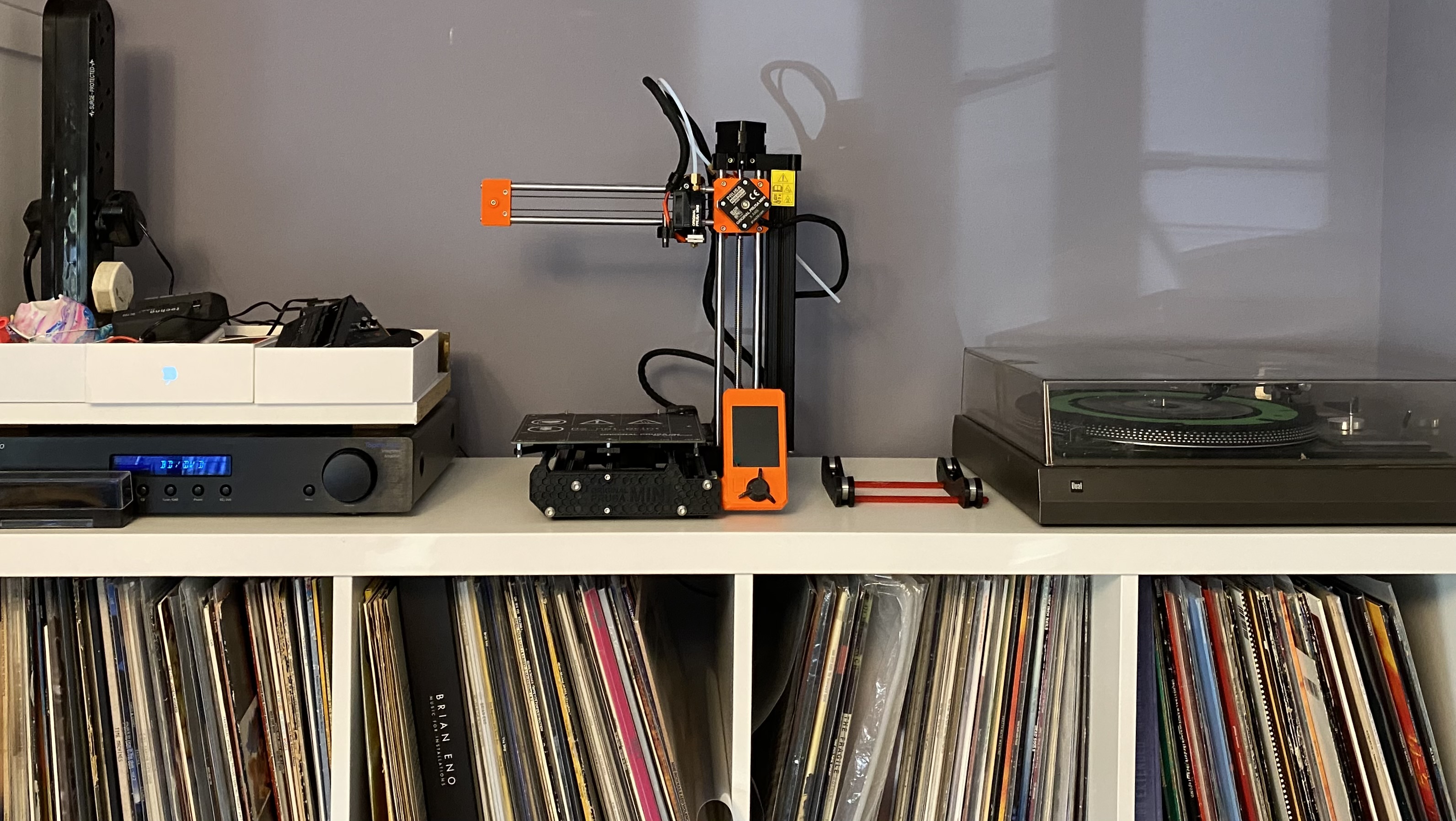
In June I caved and bought a Prusa Mini 3D printer for home. I bought it just before an announced price hike. I went for a Prusa because of their reputation for "just working", and the Mini mostly as its the cheapest, although, the print area (7" ) is large enough for most of the things I am likely to print.
Prusa Mini in its setting
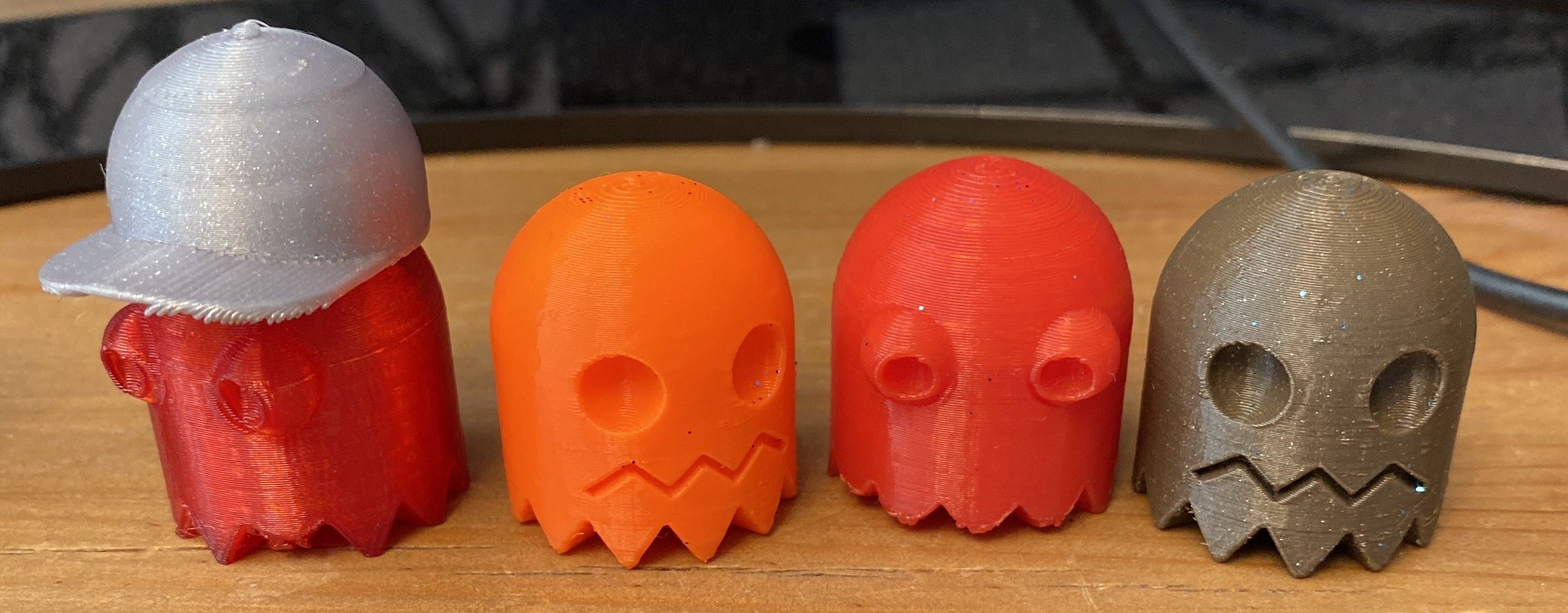
To get started, at the same time I bought some Prusament recycled PLA to print with which, unfortunately, I've been a little disappointed with. I was attracted to the idea of buying a recycled material and Prusa make a lot about the quality of their filaments. The description was pretty clear that the colour would be somewhat random and vary throughout the spool, but I didn't mind that, and I planned to use it for mainly functional prints where the precise colour didn't matter. The colour examples from the product page were mostly off-white grey with some tint, typically green. There are not a lot of reviews of the recycled PLA that comment on the colour of their spools, but in a couple of youtube videos (1, 2) the spools have looked a grey-ish silver, sometimes with a greenish tint, pretty similar to the product page. The colour I got is quite unlike those: it's a dull brown, with little flecks of glitter, presumably originally from recycling something like Galaxy Black. That's totally within "spec", of course, but it's a bit boring.
Brown recycled Prusament PLA on the right Brown recycled Prusament PLA on the right
In terms of quality, sadly I've ended up with had at least one tangle in the spool wind so far. There's at least two reviews on their own product page from people who have had similar difficulties. Edit: I realised after I wrote this post that I hadn't actually written much about the printer. That's because I'm still in the early days of using it. In short I'd say it's a very high quality machine, very pleasant to use. Since I also went on a tangent about the recycled Prusament, the tone of the whole post was more negative than I intended. Watch this space for some more positive Prusa news soon!

15 September 2022

Joachim Breitner: rec-def: Dominators case study

More ICFP-inspired experiments using the rec-def library: In Norman Ramsey s very nice talk about his Functional Pearl Beyond Relooper: Recursive Translation of Unstructured Control Flow to Structured Control Flow , he had the following slide showing the equation for the dominators of a node in a graph:
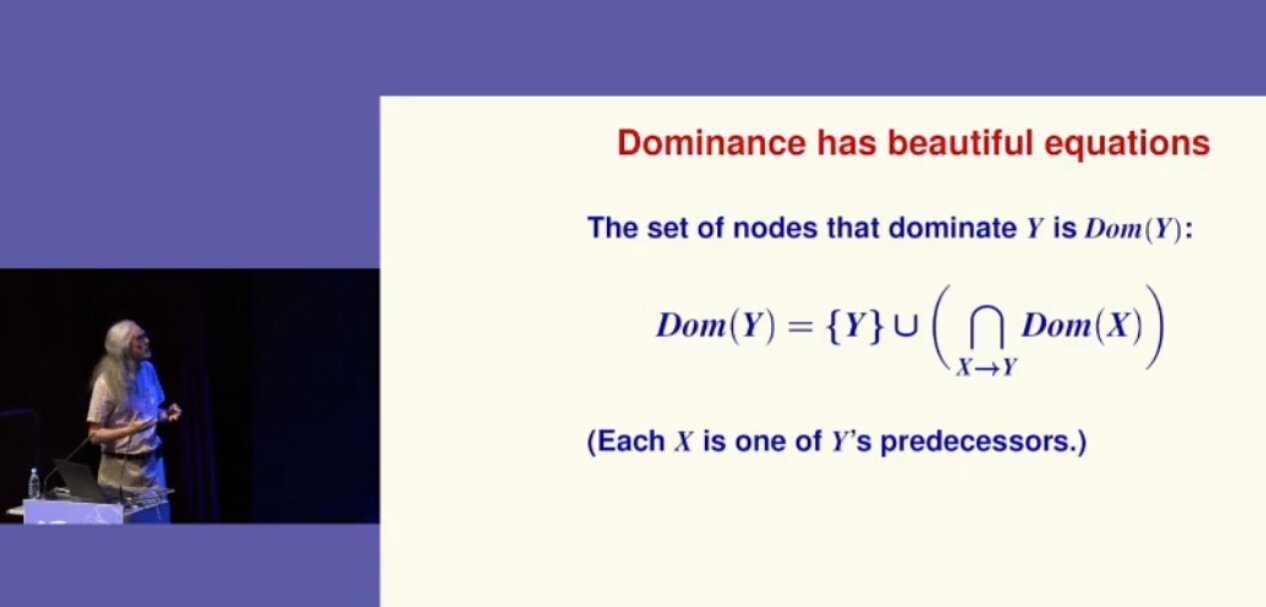
Norman Ramsey shows a formula Norman Ramsey shows a formula
He said it s ICFP and I wanted to say the dominance relation has a beautiful set of equations you can read all these algorithms how to compute this, but the concept is simple . This made me wonder: If the concept is simple and this formula is beautiful shouldn t this be sufficient for the Haskell programmer to obtain the dominator relation, without reading all those algorithms? Before we start, we have to clarify the formula a bit: If a node is an entry node (no predecessors) then the big intersection is over the empty set, and that is not a well-defined concept. For these nodes, we need that big intersection to return the empty set, as entry nodes are not dominated by any other node. (Let s assume that the entry nodes are exactly those with no predecessors.) Let s try, first using plain Haskell data structures. We begin by implementing this big intersection operator on Data.Set, and also a function to find the predecessors of a node in a graph: Now we can write down the formula that Norman gave, quite elegantly: Does this work? It seems it does: But not surprising if you have read my previous blog posts it falls over once we have recursion: So let us reimplement it with Data.Recursive.Set. The hope is that we can simply replace the operations, and that now it can suddenly handle cyclic graphs as well. Let s see: It does! Well, it does return a result but it looks strange. Clearly node 3 and 4 are also dominated by 1, but the result does not reflect that. But the result is a solution to Norman s equation. Was the equation wrong? No, but we failed to notice that the desired solution is the largest, not the smallest. And Data.Recursive.Set calculates, as documented, the least fixed point. What now? Until the library has code for RDualSet a, we can work around this by using the dual formula to calculate the non-dominators. To do this, we
  • use union instead of intersection
  • delete instead of insert,
  • S.empty, use the set of all nodes (which requires some extra plumbing)
  • subtract the result from the set of all nodes to get the dominators
and thus the code turns into:
And with this, now we do get the correct result:
ghci> domintors3 [(1,2),(1,3),(2,4),(3,4),(4,3)]
fromList [(1,[1]),(2,[1,2]),(3,[1,3]),(4,[1,4])]
We worked a little bit on how to express the beautiful formula to Haskell, but at no point did we have to think about how to solve it. To me, this is the essence of declarative programming.

14 September 2022

Russell Coker: Storing Local Secrets

In the operation of a normal Linux system there are many secrets stored on behalf of a user. Wifi passwords, passwords from web sites, etc. Ideally you want them to be quickly and conveniently accessible to the rightful user but also be as difficult as possible for hostile parties to access. The solution in GNOME and KDE is to have a wallet that is encrypted to store such passwords, the idea is that if a hostile party gets access to a PC that doesn t use full disk encryption then the secrets will be protected. This is an OK feature. In early versions it required entering a password every time you logged in. The current default mode of operation is to have the login password used to decrypt the wallet which is very convenient. The problem is the case where the user login password has a scope larger than the local PC, EG a domain login password for Active Directory, Kerberos, or similar systems. In such a case if an attacker gets the encrypted wallet that could facilitate a brute force attack on the password used for domain logins. I think that a better option for this would be to store wallets in a directory that the user can t access directly, EG a mode 1770 directory with group wallet . Then when logging in a PAM process running as root could open the wallet and pass a file handle to a process running in the context of the user. For access apart from login there could be SETGID programs to manage it which could require authenticating the user s password before any operation that exports the data so that a vulnerability in a web browser or other Internet facing program can t just grab the file contents. Storing the data in a file that needs a SETGID or root owned process to access it doesn t preclude the possibility of encrypting that file. The same encryption options would be available including encrypting with the login password and unlocking at login time via PAM. The difference is that a brute force attack to discover the login password would first require breaking the security of one of those SETGID programs to get access to the raw data direct attacks by running the wallet open command repeatedly could be managed by the usual rate limiting mechanisms and logging in the system logs. The same methods could be used for protecting the secret keys for GPG and SSH which by default are readable by all processes running in the user context and encrypted with a passphrase. The next issue to consider is where to store such an restricted directory for wallets. Under the user home directory would give the advantage of having the same secrets operate over a network filesystem and not need anything special in backup configuration. Under /var/lib would give the advantage of better isolation from all the less secret (in a cryptographic sense) data in the user home directories. What do you think?

9 September 2022

Reproducible Builds: Reproducible Builds in August 2022

Welcome to the August 2022 report from the Reproducible Builds project! In these reports we outline the most important things that we have been up to over the past month. As a quick recap, whilst anyone may inspect the source code of free software for malicious flaws, almost all software is distributed to end users as pre-compiled binaries. The motivation behind the reproducible builds effort is to ensure no flaws have been introduced during this compilation process by promising identical results are always generated from a given source, thus allowing multiple third-parties to come to a consensus on whether a build was compromised. As ever, if you are interested in contributing to the project, please visit our Contribute page on our website.

Community news As announced last month, registration is currently open for our in-person summit this year which is due to be held between November 1st November 3rd. The event will take place in Venice (Italy). Very soon we intend to pick a venue reachable via the train station and an international airport. However, the precise venue will depend on the number of attendees. Please see the announcement email for information about how to register.
The US National Security Agency (NSA), Cybersecurity and Infrastructure Security Agency (CISA) and the Office of the Director of National Intelligence (ODNI) have released a document called Securing the Software Supply Chain: Recommended Practices Guide for Developers (PDF) as part of their Enduring Security Framework (ESF) work. The document expressly recommends having reproducible builds as part of advanced recommended mitigations, along with hermetic builds. Page 31 (page 35 in the PDF) says:
Reproducible builds provide additional protection and validation against attempts to compromise build systems. They ensure the binary products of each build system match: i.e., they are built from the same source, regardless of variable metadata such as the order of input files, timestamps, locales, and paths. Reproducible builds are those where re-running the build steps with identical input artifacts results in bit-for-bit identical output. Builds that cannot meet this must provide a justification why the build cannot be made reproducible.
The full press release is available online.
On our mailing list this month, Marc Prud hommeaux posted a feature request for diffoscope which additionally outlines a project called The App Fair, an autonomous distribution network of free and open-source macOS and iOS applications, where validated apps are then signed and submitted for publication .
Author/blogger Cory Doctorow posted published a provocative blog post this month titled Your computer is tormented by a wicked god . Touching on Ken Thompson s famous talk, Reflections on Trusting Trust , the early goals of Secure Computing and UEFI firmware interfaces:
This is the core of a two-decade-old debate among security people, and it s one that the benevolent God faction has consistently had the upper hand in. They re the curated computing advocates who insist that preventing you from choosing an alternative app store or side-loading a program is for your own good because if it s possible for you to override the manufacturer s wishes, then malicious software may impersonate you to do so, or you might be tricked into doing so. [..] This benevolent dictatorship model only works so long as the dictator is both perfectly benevolent and perfectly competent. We know the dictators aren t always benevolent. [ ] But even if you trust a dictator s benevolence, you can t trust in their perfection. Everyone makes mistakes. Benevolent dictator computing works well, but fails badly. Designing a computer that intentionally can t be fully controlled by its owner is a nightmare, because that is a computer that, once compromised, can attack its owner with impunity.

Lastly, Chengyu HAN updated the Reproducible Builds website to correct an incorrect Git command. [ ]

Debian In Debian this month, the essential and required package sets became 100% reproducible in Debian bookworm on the amd64 and arm64 architectures. These two subsets of the full Debian archive refer to Debian package priority levels as described in the 2.5 Priorities section of the Debian Policy there is no canonical minimal installation package set in Debian due to its diverse methods of installation. As it happens, these package sets are not reproducible on the i386 architecture because the ncurses package on that architecture is not yet reproducible, and the sed package currently fails to build from source on armhf too. The full list of reproducible packages within these package sets can be viewed within our QA system, such as on the page of required packages in amd64 and the list of essential packages on arm64, both for Debian bullseye.
It recently has become very easy to install reproducible Debian Docker containers using podman on Debian bullseye:
$ sudo apt install podman
$ podman run --rm -it debian:bullseye bash
The (pre-built) image used is itself built using debuerrotype, as explained on docker.debian.net. This page also details how to build the image yourself and what checksums are expected if you do so.
Related to this, it has also become straightforward to reproducibly bootstrap Debian using mmdebstrap, a replacement for the usual debootstrap tool to create Debian root filesystems:
$ SOURCE_DATE_EPOCH=$(date --utc --date=2022-08-29 +%s) mmdebstrap unstable > unstable.tar
This works for (at least) Debian unstable, bullseye and bookworm, and is tested automatically by a number of QA jobs set up by Holger Levsen (unstable, bookworm and bullseye)
Work has also taken place to ensure that the canonical debootstrap and cdebootstrap tools are also capable of bootstrapping Debian reproducibly, although it currently requires a few extra steps:
  1. Clamping the modification time of files that are newer than $SOURCE_DATE_EPOCH to be not greater than SOURCE_DATE_EPOCH.
  2. Deleting a few files. For debootstrap, this requires the deletion of /etc/machine-id, /var/cache/ldconfig/aux-cache, /var/log/dpkg.log, /var/log/alternatives.log and /var/log/bootstrap.log, and for cdebootstrap we also need to delete the /var/log/apt/history.log and /var/log/apt/term.log files as well.
This process works at least for unstable, bullseye and bookworm and is now being tested automatically by a number of QA jobs setup by Holger Levsen [ ][ ][ ][ ][ ][ ]. As part of this work, Holger filed two bugs to request a better initialisation of the /etc/machine-id file in both debootstrap [ ] and cdebootstrap [ ].
Elsewhere in Debian, 131 reviews of Debian packages were added, 20 were updated and 27 were removed this month, adding to our extensive knowledge about identified issues. Chris Lamb added a number of issue types, including: randomness_in_browserify_output [ ], haskell_abi_hash_differences [ ], nondeterministic_ids_in_html_output_generated_by_python_sphinx_panels [ ]. Lastly, Mattia Rizzolo removed the deterministic flag from the captures_kernel_variant flag [ ].

Other distributions Vagrant Cascadian posted an update of the status of Reproducible Builds in GNU Guix, writing that:
Ignoring the pesky unknown packages, it is more like ~93% reproducible and ~7% unreproducible... that feels a bit better to me! These numbers wander around over time, mostly due to packages moving back into an "unknown" state while the build farms catch up with each other... although the above numbers seem to have been pretty consistent over the last few days.
The post itself contains a lot more details, including a brief discussion of tooling. Elsewhere in GNU Guix, however, Vagrant updated a number of packages such as itpp [ ], perl-class-methodmaker [ ], libnet [ ], directfb [ ] and mm-common [ ], as well as updated the version of reprotest to 0.7.21 [ ]. In openSUSE, Bernhard M. Wiedemann published his usual openSUSE monthly report.

diffoscope diffoscope is our in-depth and content-aware diff utility. Not only can it locate and diagnose reproducibility issues, it can provide human-readable diffs from many kinds of binary formats. This month, Chris Lamb prepared and uploaded versions 220 and 221 to Debian, as well as made the following changes:
  • Update external_tools.py to reflect changes to xxd and the vim-common package. [ ]
  • Depend on the dedicated xxd package now, not the vim-common package. [ ]
  • Don t crash if we can open a PDF file using the PyPDF library, but cannot subsequently parse the annotations within. [ ]
In addition, Vagrant Cascadian updated diffoscope in GNU Guix, first to to version 220 [ ] and later to 221 [ ].

Community news The Reproducible Builds project aims to fix as many currently-unreproducible packages as possible as well as to send all of our patches upstream wherever appropriate. This month we created a number of patches, including:

Testing framework The Reproducible Builds project runs a significant testing framework at tests.reproducible-builds.org, to check packages and other artifacts for reproducibility. This month, Holger Levsen made the following changes:
  • Debian-related changes:
    • Temporarily add Debian unstable deb-src lines to enable test builds a Non-maintainer Upload (NMU) campaign targeting 708 sources without .buildinfo files found in Debian unstable, including 475 in bookworm. [ ][ ]
    • Correctly deal with the Debian Edu packages not being installable. [ ]
    • Finally, stop scheduling stretch. [ ]
    • Make sure all Ubuntu nodes have the linux-image-generic kernel package installed. [ ]
  • Health checks & view:
    • Detect SSH login problems. [ ]
    • Only report the first uninstallable package set. [ ]
    • Show new bootstrap jobs. [ ] and debian-live jobs. [ ] in the job health view.
    • Fix regular expression to detect various zombie jobs. [ ]
  • New jobs:
    • Add a new job to test reproducibility of mmdebstrap bootstrapping tool. [ ][ ][ ][ ]
    • Run our new mmdebstrap job remotely [ ][ ]
    • Improve the output of the mmdebstrap job. [ ][ ][ ]
    • Adjust the mmdebstrap script to additionally support debootstrap as well. [ ][ ][ ]
    • Work around mmdebstrap and debootstrap keeping logfiles within their artifacts. [ ][ ][ ]
    • Add support for testing cdebootstrap too and add such a job for unstable. [ ][ ][ ]
    • Use a reproducible value for SOURCE_DATE_EPOCH for all our new bootstrap jobs. [ ]
  • Misc changes:
    • Send the create_meta_pkg_sets notification to #debian-reproducible-changes instead of #debian-reproducible. [ ]
In addition, Roland Clobus re-enabled the tests for live-build images [ ] and added a feature where the build would retry instead of give up when the archive was synced whilst building an ISO [ ], and Vagrant Cascadian added logging to report the current target of the /bin/sh symlink [ ].

Contact As ever, if you are interested in contributing to the Reproducible Builds project, please visit our Contribute page on our website. However, you can get in touch with us via:

8 September 2022

Antoine Beaupr : Complaint about Canada's phone cartel

I have just filed a complaint with the CRTC about my phone provider's outrageous fees. This is a copy of the complaint.
I am traveling to Europe, specifically to Ireland, for a 6 days for a work meeting. I thought I could use my phone there. So I looked at my phone provider's services in Europe, and found the "Fido roaming" services: https://www.fido.ca/mobility/roaming The fees, at the time of writing, at fifteen (15!) dollars PER DAY to get access to my regular phone service (not unlimited!!). If I do not use that "roaming" service, the fees are: That is absolutely outrageous. Any random phone plan in Europe will be cheaper than this, by at least one order of magnitude. Just to take any example: https://www.tescomobile.ie/sim-only-plans.aspx Those fine folks offer a one-time, prepaid plan for 15 for 28 days which includes: I think it's absolutely scandalous that telecommunications providers in Canada can charge so much money, especially since the most prohibitive fee (the "non-prepaid" plans) are automatically charged if I happen to forget to remove my sim card or put my phone in "airplane mode". As advised, I have called customer service at Fido for advice on how to handle this situation. They have confirmed those are the only plans available for travelers and could not accommodate me otherwise. I have notified them I was in the process of filing this complaint. I believe that Canada has become the technological dunce of the world, and I blame the CRTC for its lack of regulation in that matter. You should not allow those companies to grow into such a cartel that they can do such price-fixing as they wish. I haven't investigated Fido's competitors, but I will bet at least one of my hats that they do not offer better service. I attach a screenshot of the Fido page showing those outrageous fees.
I have no illusions about this having any effect. I thought of filing such a complain after the Rogers outage as well, but felt I had less of a standing there because I wasn't affected that much (e.g. I didn't have a life-threatening situation myself). This, however, was ridiculous and frustrating enough to trigger this outrage. We'll see how it goes...
"We will respond to you within 10 working days."

Response from CRTC They did respond within 10 days. Here is the full response:
Dear Antoine Beaupr : Thank you for contacting us about your mobile telephone international roaming service plan rates concern with Fido Solutions Inc. (Fido). In Canada, mobile telephone service is offered on a competitive basis. Therefore, the Canadian Radio-television and Telecommunications Commission (CRTC) is not involved in Fido's terms of service (including international roaming service plan rates), billing and marketing practices, quality of service issues and customer relations. If you haven't already done so, we encourage you to escalate your concern to a manager if you believe the answer you have received from Fido's customer service is not satisfactory. Based on the information that you have provided, this may also appear to be a Competition Bureau matter. The Competition Bureau is responsible for administering and enforcing the Competition Act, and deals with issues such as false or misleading representations, deceptive marketing practices and collusion. You can reach the Competition Bureau by calling 1-800-348-5358 (toll-free), by TTY (for deaf and hard of hearing people) by calling 1-866-694-8389 (toll-free). For more contact information, please visit http://www.competitionbureau.gc.ca/eic/site/cb-bc.nsf/eng/00157.html When consumers are not satisfied with the service they are offered, we encourage them to compare the products and services of other providers in their area and look for a company that can better match their needs. The following tool helps to show choices of providers in your area: https://crtc.gc.ca/eng/comm/fourprov.htm Thank you for sharing your concern with us.
In other words, complain with Fido, or change providers. Don't complain to us, we don't manage the telcos, they self-regulate. Great job, CRTC. This is going great. This is exactly why we're one of the most expensive countries on the planet for cell phone service.

Live chat with Fido Interestingly, the day after I received that response from the CRTC, I received this email from Fido, while traveling:
Date: Tue, 13 Sep 2022 10:10:00 -0400 From: Fido DONOTREPLY@fido.ca To: REDACTED Subject: Courriel d avis d itin rance Fido Roaming Welcome Confirmation Fido Date : 13 septembre 2022
Num ro de compte : [redacted] Bonjour
Antoine Beaupr ! Nous vous crivons pour vous indiquer qu au moins un utilisateur inscrit votre compte s est r cemment connect un r seau en itin rance.
Vous trouverez ci-dessous le message texte de bienvenue en itin rance envoy l utilisateur (ou aux utilisateurs), qui contenait les tarifs d itin rance
applicables. Message texte de bienvenue en itin rance Destinataire : REDACTED Date et heure : 2022-09-13 / 10:10:00
Allo, ici Fido : Bienvenue destination! Vous tes inscrit Fido Nomade alors utilisez vos donn es, parlez et textez comme vous le faites la
maison. Depuis le 1 mars 2022 le tarif cette destination pour 15 $/jour (+ taxes) et valide tous les jours jusqu' 23 h 59 HE, peu importe le fuseau
horaire dans lequel vous vous trouvez. Bon voyage! Des questions? Consultez fido.ca/m/itinerance ou composez +15149333436 (sans frais). Besoin d aide?
  • PLANIFIEZ UN VOYAGE AVEC Fido NomadeMC
    D couvrez nos options d itin rance et restez en contact l tranger sans vous soucier de votre
    facture.
D tails
  • G rez votre compte
    G rez vos produits et services Fido la maison ou sur la route gr ce Mon
    Compte.
D tails Ce courriel est produit automatiquement; veuillez ne pas y r pondre. Ce courriel (et toute pi ce jointe) est confidentiel. Si vous n tes pas le destinataire,
veuillez supprimer le pr sent message et en d truire toute copie. FIDO SOLUTIONS 800, RUE DE LA GAUCHETI RE OUEST
BUREAU 4000 MONTR AL (QU BEC) H5A 1K3
Fido
I found that message utterly confusing (and yes, I can read french). Basically, it says that some user (presumably me!) connected to the network with roaming. I did just disabled airplane mode on my phone to debug a Syncthing bug but had not enabled roaming. So this message seemed to say that I would be charged 15$ (per DAY!) for roaming from now on. Confused, I tried their live chat to try to clarify things, worried I would get charged even more for calling tech support on *611. This is a transcript of the chat:
F: Hi! What are we doing today? Type in your question or choose from the options below: * Track my Equipment Order * View Bill Online * Payment Options * iPhone 14 Pre-Order A: i received a message about roaming while abroad but i did not enable roaming on my phone, will i be charged anyways? F: I think I know what you re asking for. Select the topic that best matches your request or try rephrasing your question. A: no F: Thank you, this will help us to improve! Would you like to chat with a specialist? Chat with a specialist I'll get a specialist to help you with this. It appears that you're not signed in. Your session may have timed out. To save time and identify your account details, please sign in to My Account.
  • Sign in
  • I'm not able to sign in
Have any questions specific to your Fido account? To service you faster, please identify yourself by completing the form below. A: Personal info Form submitted F: Thank you! I'll connect you with the next available specialist. Your chat is being transferred to a Live Chat agent. Thanks for your patience. We are here to assist you and we kindly ask that our team members be treated with respect and dignity. Please note that abuse directed towards any Consumer Care Specialist will not be tolerated and will result in the termination of your conversation with us. All of our agents are with other customers at the moment. Your chat is in a priority sequence and someone will be with you as soon as possible. Thanks! Thanks for continuing to hold. An agent will be with you as soon as possible. Thank you for your continued patience. We re getting more Live Chat requests than usual so it s taking longer to answer. Your chat is still in a priority sequence and will be answered as soon as an agent becomes available. Thank you so much for your patience we're sorry for the wait. Your chat is still in a priority sequence and will be answered as soon as possible. Hi, I'm [REDACTED] from Fido in [REDACTED]. May I have your name please? A: hi i am antoine, nice to meet you sorry to use the live chat, but it's not clear to me i can safely use my phone to call support, because i am in ireland and i'm worried i'll get charged for the call F: Thank You Antoine , I see you waited to speak with me today, thank you for your patience.Apart from having to wait, how are you today? A: i am good thank you
[... delay ...]
A: should i restate my question? F: Yes please what is the concern you have? A: i have received an email from fido saying i someone used my phone for roaming it's in french (which is fine), but that's the gist of it i am traveling to ireland for a week i do not want to use fido's services here... i have set the phon eto airplane mode for most of my time here F: The SMS just says what will be the charges if you used any services. A: but today i have mistakenly turned that off and did not turn on roaming well it's not a SMS, it's an email F: Yes take out the sim and keep it safe.Turun off or On for roaming you cant do it as it is part of plan. A: wat F: if you used any service you will be charged if you not used any service you will not be charged. A: you are saying i need to physically take the SIM out of the phone? i guess i will have a fun conversation with your management once i return from this trip not that i can do that now, given that, you know, i nee dto take the sim out of this phone fun times F: Yes that is better as most of the customer end up using some kind of service and get charged for roaming. A: well that is completely outrageous roaming is off on the phone i shouldn't get charged for roaming, since roaming is off on the phone i also don't get why i cannot be clearly told whether i will be charged or not the message i have received says i will be charged if i use the service and you seem to say i could accidentally do that easily can you tell me if i have indeed used service sthat will incur an extra charge? are incoming text messages free? F: I understand but it is on you if you used some data SMS or voice mail you can get charged as you used some services.And we cant check anything for now you have to wait for next bill. and incoming SMS are free rest all service comes under roaming. That is the reason I suggested take out the sim from phone and keep it safe or always keep the phone or airplane mode. A: okay can you confirm whether or not i can call fido by voice for support? i mean for free F: So use your Fido sim and call on +1-514-925-4590 on this number it will be free from out side Canada from Fido sim. A: that is quite counter-intuitive, but i guess i will trust you on that thank you, i think that will be all F: Perfect, Again, my name is [REDACTED] and it s been my pleasure to help you today. Thank you for being a part of the Fido family and have a great day! A: you too
So, in other words:
  1. they can't tell me if I've actually been roaming
  2. they can't tell me how much it's going to cost me
  3. I should remove the SIM card from my phone (!?) or turn on airplane mode, but the former is safer
  4. I can call Fido support, but not on the usual *611, and instead on that long-distance-looking phone number, and yes, that means turning off airplane mode and putting the SIM card in, which contradicts step 3
Also notice how the phone number from the live chat (+1-514-925-4590) is different than the one provided in the email (15149333436). So who knows what would have happened if I would have called the latter. The former is mentioned in their contact page. I guess the next step is to call Fido over the phone and talk to a manager, which is what the CRTC told me to do in the first place... I ended up talking with a manager (another 1h phone call) and they confirmed there is no other package available at Fido for this. At best they can provide me with a credit if I mistakenly use the roaming by accident to refund me, but that's it. The manager also confirmed that I cannot know if I have actually used any data before reading the bill, which is issued on the 15th of every month, but only available... three days later, at which point I'll be back home anyways. Fantastic.

6 September 2022

Jonathan Dowland: Borg corrupted hints file

I've been using Borg backup for a couple of years and it has seemingly worked very well for me. One difference I really appreciate from my previous arrangement (rdiff-backup) is the freedom to move large files or file hierarchies around (including between different filesystems) without provoking large backup incrementals. About a week ago I had my first real problem with Borg: backups started to fail with the following complaints:
Creating archive at "/backup/borg:: hostname -home-jon- now:%Y-%m-%dT%H:%M:%S.%f "
segment 61916 not found, but listed in compaction data
[ further, similar lines ]
Local Exception
Traceback (most recent call last):
  File "/usr/lib/python3/dist-packages/borg/archiver.py", line 4690, in main
    exit_code = archiver.run(args)
  File "/usr/lib/python3/dist-packages/borg/archiver.py", line 4622, in run
    return set_ec(func(args))
  File "/usr/lib/python3/dist-packages/borg/archiver.py", line 177, in wrapper
    return method(self, args, repository=repository, **kwargs)
  File "/usr/lib/python3/dist-packages/borg/archiver.py", line 595, in do_create
    create_inner(archive, cache)
  File "/usr/lib/python3/dist-packages/borg/archiver.py", line 560, in create_inner
    archive.save(comment=args.comment, timestamp=args.timestamp)
  File "/usr/lib/python3/dist-packages/borg/archive.py", line 530, in save
    self.repository.commit()
  File "/usr/lib/python3/dist-packages/borg/repository.py", line 475, in commit
    self.compact_segments()
  File "/usr/lib/python3/dist-packages/borg/repository.py", line 835, in compact_segments
    assert segments[segment] == 0, 'Corrupted segment reference count - corrupted index or hints'
AssertionError: Corrupted segment reference count - corrupted index or hints
At about the same time I had managed to fill the backup host's root filesystem. I thought the two issues must be related. Although all the files Borg is backing up, and the backup repository it writes to, are located on different partitions, Borg's client-side of things does maintain some caching in /root/.cache/borg. My first idea was that this must have been corrupted by an aborted write, but zapping it did not cure the above problem. It occurred to me that I run Borg via the convenience wrapper Borgmatic, and it was possible that was failing, but after a short investigation I ruled that out. Various attempts at running borg check or borg check --repair didn't help either. The underlying filesystem (XFS) passed a filesystem check. There wasn't any obvious complaints about IO errors from the kernel or anything reported in the HDD's SMART data. What did work, in the end, was removing the file matching $BORG_REPO/*hint* and trying again. Although this is read/written to on the backup partition, it seems filling the root partition caused Borg (1.1.16-3) to corrupt that file. Everything seems fine following that. I have recently started trying to semi- automatically verify backups on a monthly basis, on a machine independent from the NAS; all the tests I have written so far passed.

3 September 2022

James Valleroy: File sharing with bepasty

One of the apps running on my FreedomBox that I use frequently is bepasty. bepasty is essentially a self-hosted, free software pastebin. It allows you to paste text, or upload any type of file. You can also set an expiration date for when the file or text will automatically be deleted. If you are uploading multiple related files, you can organize them into a list. bepasty does not have user accounts. Instead, it has shared passwords, where each password is linked to a set of permissions. There are five permissions: Read, List, Create, Delete, and Admin. (The meanings are mostly straightforward, except for Admin, which means the ability to lock and unlock files.) This allows very fine-grained control. For example, if you want someone to be able to upload files to your bepasty, but not view or download anything, than you can generate a password with only the Create permission, and give this password to the person who will be uploading files. To simplify the initial setup in FreedomBox, we generate three passwords by default: one for viewers (List and Read), one for editors (List, Read, Create, and Delete), and one for admins (all permissions). In addition, when no password has been provided, the Read (but not List) permission is provided by default. This allows files to be easily shared by sending just their URLs (and no password required). The URLs contain some random characters, so it is not easy to guess. I mostly use bepasty for moving files between systems, whether its a physical machine or VPS, or a VM or container that I will use only briefly. Especially in the latter case, it s nice that I don t need to do any extra setup (such as copying SSH keys) before I copy my files over. The bepasty package is available in Debian stable (with a newer version in stable-backports and testing). The many use-cases that it provides, and the well-maintained Debian packaging, made it a compelling choice for integration into FreedomBox, which has included bepasty for one-click installation since version 20.14.

Shirish Agarwal: Fantasy, J.R.R. Tolkein

J.R.R. Tolkein Now unless you have been living under a rock cave, I am sure you know who Mr. Tolkein is. Apparently, the gentleman passed away on 2nd September 1973 at the sprightly age of 80. And this gives fans like me to talk about fantasy, fantasy authors, and the love-hate relationship we have with them. For a matter of record, I am currently reading Babylon Steel by Gaie Sebold. Now while I won t go into many details (I never like to, if I enjoy a book, I would want the book to be mysterious rather than give praise, simply so that the next person enjoys it as much as I did without having any expectations.) Now this book has plenty of sex so wouldn t recommend it for teenagers but more perhaps to mature audiences, although for the life of me couldn t find any rating on the book. I did come across common sense media but unfortunately, it isn t well known beyond perhaps some people who use it. They sadly don t have a google/Android app  And before anybody comments, I know that Android is no longer interested in supporting FOSS, their loss, not ours but that is entirely a blog post/article in itself. so let s leave that aside for now.

Fantasy So before talking about Mr. Tolkien and his creations let s talk and share a bit about fantasy. We know for a fact that the conscious mind functions at less than 5%, while the other bits are made by the subconscious and the unconscious mind (the three mind model.) So any thought or idea first germinates n either the unconscious or the subconscious part of the mind and then comes into the conscious mind. It is the reason we also dream. That s the subconscious and unconscious mind at work. While we say fantasy mostly to books, it is all around us and not just in prose but in song, dance, and all sorts of creativity are fantasy. Even Sci-fi actually comes from fantasy. Unfortunately, for reasons best known to people, they took out sci-fi and even divided fantasy into high fantasy and low fantasy. I am not going to go much into that but here s a helpful link for those who might want to look more into it. Now the question arises, why do people write? I have asked this question many a time to the authors I have met and the answers are as varied as they come. Two of the most common answers are the need to write (an itch they can t control or won t control) and the other is it s extremely healing. In my own case, even writing mere blog posts I found it unburdening & cathartetic. I believe this last part is what drove Mr. Tolkein and the story and arc that LOTR became. Tolkien, LOTR, World War I The casual reader might not know but if you followed or were curious about Mr. Tolkien, you would have found out that Mr. Tolkien served in World War 1 or what is known as the Great War. It was supposed to be the war that ended all wars but sadly didn t. One of the things that set apart Mr. Tolkein from many of his peers was that Mr. Tolkien was very straight about himself and corresponded with people far and wide. There is actually a book called The Letters of J.R.R. Tolkien that I hope to get at one of the used book depots. That book spans about 480 pages and gives all the answers as to why Mr. Tolkien made Middle-earth as it was made. I sadly haven t had the opportunity to get it and it is somewhat expensive. But I m sure that if World War 1 wouldn t have happened and Mr. Tolkein hadn t taken part and experienced what he experienced, we wouldn t have LOTR. I can bet losing his friends and comrades, and the pain he felt for those around him propelled him to write about land and a race called Hobbits. I haven t done enough fantasy reading but I do feel that his description of hobbits and the way they were and are is unique. The names and surnames he used were for humor as well as to make a statement about them. Having names such as Harfoots, Padfoot, Took and others just wouldn t be for fun, would it? Also, the responses and the behavior in the four books by Hobbits are almost human-like. It is almost like they are or were our cousins at one point in time but we allowed ourselves to forget. Even the corruption of humans has been shown as well as self-doubt. There is another part that I found and find fascinating, unlike most books where there is a single hero, in LOTR we have many heroes and heroines. This again, I would attribute to Mr. Tolkien and the heroism he saw on the battlefield and beyond it. All the tender emotions he shares with readers like us are because either he himself or others around him were subjected to grace and wonderment. This is all I derive from the books, those who have The letters of J.R.R. Tolkein , feel free to correct me. I was supposed to write this yesterday but real life has its own way. I could go on and on, perhaps at a later date or time I may expand on it, but it isn t a coincidence that Lord of the Rings: Rings of Power is starting broadcast on the same day when Mr. Tolkein died. In the very end, fantasy is something humans got and does not matter how rich or poor you are. If one were to look, both artists like Michaelangelo and many other artists, who often didn t have enough to have two square meals in the day, but still somehow were inspired to sketch models of airplanes, flying machines which are shockingly similar to the real thing. Many may not know that almost all primates, including apes, monkeys, squirrels, and even dolphins dream. And all of them have elaborate, complex dreams just as we do. Sadly, this info. is not known by most people otherwise, we would be so much empathetic towards our cousins in the animal kingdom.

1 September 2022

Shirish Agarwal: Culture, Books, Friends

Culture Just before I start, I would like to point out that this post may or would probably be NSFW. Again, what is SFW (Safe at Work) and NSFW that so much depends on culture and perception of culture from wherever we are or wherever we take birth? But still, to be on the safe side I have put it as NSFW. Now there have been a few statements and ideas that gave me a pause. This will be a sort of chaotic blog post as I am in such a phase today. For e.g. while I do not know which culture or which country this comes from, somebody shared that in some cultures one can talk/comment May your poop be easy and with a straight face. I dunno which culture is this but if somebody asked me that I would just die from laughing or maybe poop there itself. While I can understand if it is a constipated person, but a whole culture? Until and unless their DNA is really screwed, I don t think so but then what do I know? I do know that we shit when we have extreme reactions of either joy or fear. And IIRC, this comes from mammal response when they were in dangerous situations and we got the same as humans evolved. I would really be interested to know which culture is that. I did come to know that the Japanese do wish that you may not experience hard work or something to that effect while ironically they themselves are becoming extinct due to hard work and not enough relaxation, toxic workplace is common in Japan according to social scientists and population experts. Another term that I couldn t figure out is The Florida Man Strikes again and this term is usually used when somebody does something stupid or something weird. While it is exclusively used in the American context, I am curious to know how that came about. Why does Florida have such people or is it an exaggeration? I have heard the term e.g. What happens in Vegas, stays in Vegas . Think it is also called Sin city although why just Vegas is beyond me?

Omicron-8712 Blood pressure machine I felt so stupid. I found another site or e-commerce site called Wellness Forever. They had the blood pressure machine I wanted, an Omron-8172. I bought it online and they delivered the same within half an hour. Amazon took six days and in the end, didn t deliver it at all. I tried taking measurements from it yesterday. I have yet to figure out what it all means but I did get measurements of 109 SYS, 88 DIA and Pulse is 72. As far as the pulse is concerned, guess that is normal, the others just don t know. If only I had known this couple of months ago. I was able to register the product as well as download and use the Omron Connect app. For roughly INR 2.5k you have a sort of health monitoring system. It isn t Star Trek Tricorder in any shape or form but it will have to do while the tricorder gets invented. And while we are on the subject let s not forget Elizabeth Holmes and the scam called Theranos. It really is something to see How Elizabeth Holmes modeled so much of herself on Steve Jobs mimicking how he left college/education halfway. A part of me is sad that Theranos is not real. Joe Scott just a few days ago shared some perspectives on the same just a few days ago. The idea in itself is pretty seductive, to say the least, and that is the reason the scam went on for more than a decade and perhaps would have been longer if some people hadn t gotten the truth out. I do see potentially, something like that coming on as A.I. takes a bigger role in automating testing. Half a decade to a decade from now, who knows if there is an algorithm that is able to do what is needed? If such a product were to come to the marketplace at a decent price, it would revolutionize medicine, especially in countries like India, South Africa, and all sorts of remote places. Especially, with all sorts of off-grid technologies coming and maturing in the marketplace. Before I forget, there is a game called Cell on Android that tells or shares about the evolution of life on earth. It also shares credence to the idea that life has come 6 times on Earth and has been destroyed multiple times by asteroids. It is in the idle sort of game format, so you can see the humble beginnings from the primordial soup to various kinds of cells and bacteria to finally a mammal. This is where I am and a long way to go.

Indian Bureaucracy One of the few things that Britishers gave to India, is the bureaucracy and the bureaucracy tests us in myriad ways. It would be full 2 months on 5th September and I haven t yet got a death certificate. And I need that for a sundry number of things. The same goes for a disability certificate. What is and was interesting is my trip to the local big hospital called Sassoon Hospital. My mum had shared incidents that occurred in the 1950s when she and the family had come to Pune. According to her, when she was alive, while Sassoon was the place to be, it was big and chaotic and you never knew where you are going. That was in 1950, I had the same experience in 2022. The term/adage the more things change, the more they remain the same seems to be held true for Sassoon Hospital. Btw, those of you who think the Devil exists, he is totally a fallacy. There is a popular myth that the devil comes to deal that he/she/they come to deal with you when somebody close to you passes, I was waiting desperately for him when mum passed. Any deal that he/she/they would have offered me I would have gladly taken, but all my wait was all for nothing. While I believe evil exists, that is manifested by humans and nobody else. The whole idea and story of the devil is just to control young children and nothing beyond that

Debconf 2023, friends, JPEGOptim, and EV s Quite a number of friends had gone to Albania this year as India won the right to host Debconf for the year 2023. While I did lurk on the Debconf orga IRC channel, I m not sure how helpful I would be currently. One news that warmed my heart is some people would be coming to India to check the site way before and make sure things go smoothly. Nothing like having more eyes (in this case bodies) to throw at a problem and hopefully it will be sorted. While I have not been working for the last couple of years, one of the things that I had to do and have been doing is moving a lot of stuff online. This is in part due to the Government s own intention of having everything on the cloud. One of the things I probably may have shared it more than enough times is that the storage most of these sites give is like the 1990s. I tried jpegoptim and while it works, it degrades the quality of the image quite a bit. The whole thing seems backward, especially as newer and newer smartphones are capturing more data per picture (megapixel resolution), case in point Samsung Galaxy A04 that is being introduced. But this is not only about newer phones, even my earlier phone, Samsung J-5/500 which I bought in 2016 took images at 5 MB. So it is not a new issue but a continuous issue. And almost all Govt. sites have the upper band fixed at 1 MB. But this is not limited to Govt. sites alone, most sites in India are somewhat frozen in the 1990s. And it isn t as if resources for designing web pages using HTML5, CSS3, Javascript, Python, or Java aren t available. If worse comes to worst, one can even use amp to make his, her or their point. But this is if they want to do stuff. I would be sharing a few photos with commentary, there are still places where I can put photos apart from social media

Friends Last week, Saturday suddenly all the friends decided to show up. I have no clue one way or the other why but am glad they showed up.
Mahendra, Akshat, Shirish and Sagar Sukhose (Mangesh's friend). Mahendra, Akshat, Shirish and Sagar Sukhose (Mangesh s friend) at Bal Gandharva..
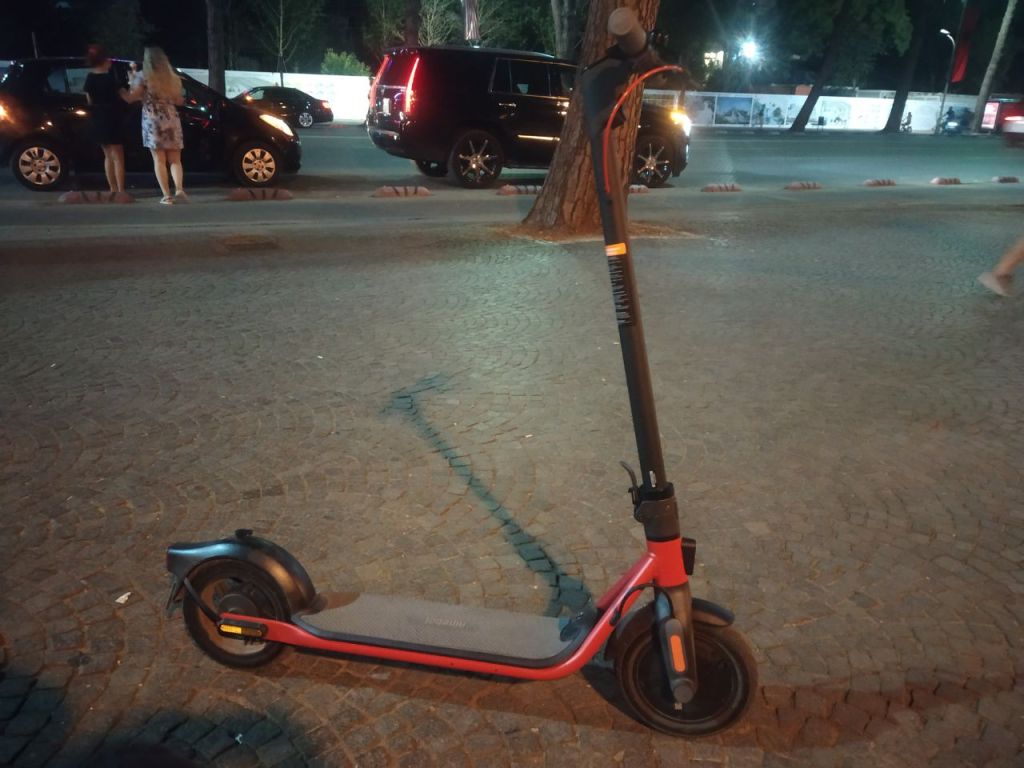
Electric scooter as shared by Akshat seen in Albania Electric scooter as shared by Akshat seen in Albania
Somebody making a  real-life replica of Wall Street on F.C. Road (Commercial, all glass)Somebody making a real-life replica of Wall Street on F.C. Road (Commercial, all glass)
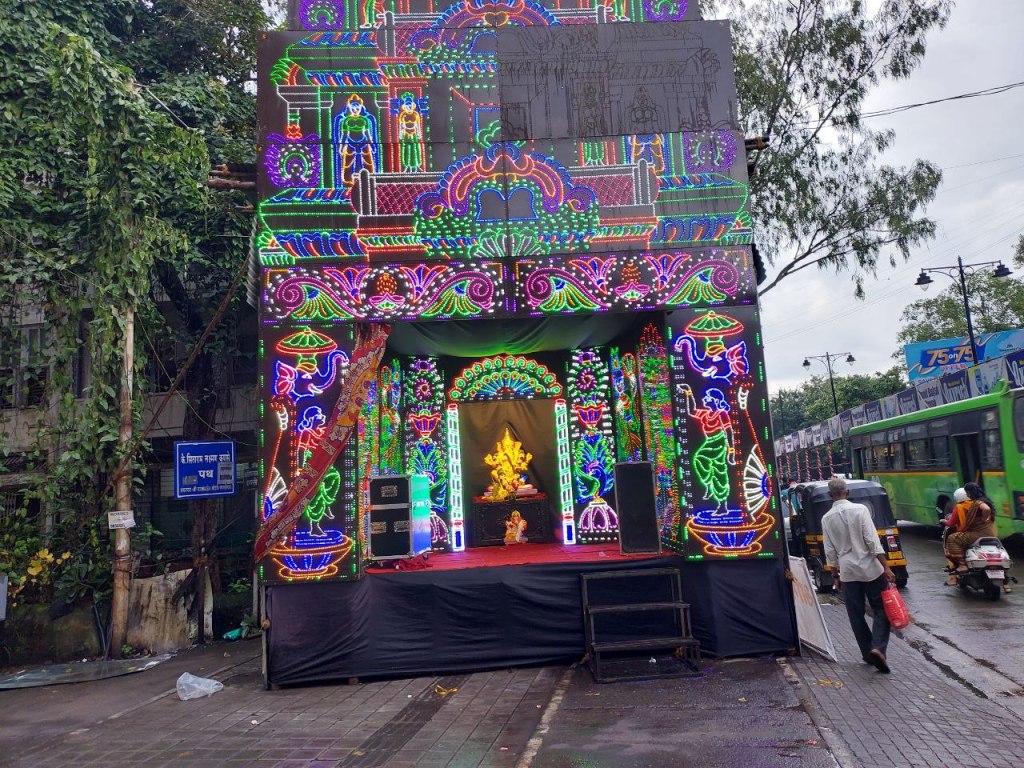
Ganesh Idol near my houseGanesh Idol near my house
Wearing new clothesWearing new clothes
I will have to be a bit rapid about what I am sharing above so here goes nothing

1. The first picture shows Mahendra, Akshat, me, and Sagar Sukhose (Mangesh s friend). The picture was taken by Mangesh Diwate. We talked quite a bit of various things that could be done in Debian. A few of the things that I shared were (bringing more stuff from BSD to Debian, I am sure there s still quite a lot of security software that could be advantageous to have in Debian.) The best person to talk to or guide about this would undoubtedly be Paul Wise or as he is affectionally called Pabs. He is one of the shy ones and yet knows so much about how things work. The one and only time I met him is 2016. The other thing that we talked about is porting Debian to one of the phones. This has been done in the past and done by a Puneitie some 4-5 years back. While I don t recollect the gentleman s name, I remember that the porting was done on a Motorola phone as that was the easiest to do. He had tried some other mobile but that didn t work. Making Debian available on phone is hard work. Just to have an idea, I went to the xda developers forum and found out that while M51 has been added, my specific phone model is not there. A Samsung Galaxy M52G Android (samsung; SM-M526B; lahaina; arm64-v8a) v12 . You look at the chat and you understand how difficult the process might be. One of the other ideas that Akshat pitched was Debian Astro, this is something that is close to the heart of many, including me. I also proposed to have some kind of web app or something where we can find and share about the various astronomy and related projects done by various agencies. While there is a NASA app, nothing comes close to JSR and that site just shares stuff, no speculation. There are so many projects taken or being done by the EU, JAXA, ISRO, and even middle-east countries are trying but other than people who are following some of the developments, we hear almost nothing. Even the Chinese have made some long strides but most people know nothing about the same. And it s sad to know that those developments are not being known, shared, or even speculated about as much as say NASA or SpaceX is. How do we go about it and how do we get people to contribute or ask questions around it would be interesting. 2. The second picture was something that was shared by Akshat. Akshat was sharing how in Albania people are moving on these electric scooters . I dunno if that is the right word for it or what. I had heard from a couple of friends who had gone to Vietnam a few years ago how most people in Vietnam had modified their scooters and they were snaking lines of electric wires charging scooters. I have no clue whether they were closer to Vespa or something like above. In India, the Govt. is in partnership with the oil, gas, and coal mafia just as it was in Australia (the new Govt. in Australia is making changes) the same thing is here. With the humongous profits that the oil sector provides the petro states and others, Corruption is bound to happen. We talk and that s the extent of things. 3. The third picture is from a nearby area called F.C. Road or Fergusson College Road. The area has come up quite sharply (commercially) in the last few years. Apparently, Mr. Kushal is making a real-life replica of Wall Street which would be given to commercial tenants. Right now the real estate market is tight in India, we will know how things pan out in the next few years. 4. Number four is an image of a Ganesh idol near my house. There is a 10-day festival of the elephant god that people used to celebrate every year. For the last couple of years because of the pandemic, people were unable to celebrate the festival as it is meant to celebrate. This time some people are going overboard while others are cautious and rightfully so. 5. Last and not least, one of the things that people do at this celebration is to have new clothes, so I shared a photo of a gentleman who had bought and was wearing new clothes. While most countries around the world are similar, Latin America is very similar to India in many ways, perhaps Gunnar can share. especially about religious activities. The elephant god is known for his penchant for sweets and that can be seen from his rounded stomach, that is also how he is celebrated. He is known to make problems disappear or that is supposed to be his thing. We do have something like 4 billion gods, so each one has to be given some work or quality to justify the same

31 August 2022

Raphaël Hertzog: Freexian s report about Debian Long Term Support, July 2022

A Debian LTS logo
Like each month, have a look at the work funded by Freexian s Debian LTS offering. Debian project funding No any major updates on running projects.
Two 1, 2 projects are in the pipeline now.
Tryton project is in a review phase. Gradle projects is still fighting in work. In July, we put aside 2389 EUR to fund Debian projects. We re looking forward to receive more projects from various Debian teams! Learn more about the rationale behind this initiative in this article. Debian LTS contributors In July, 14 contributors have been paid to work on Debian LTS, their reports are available: Evolution of the situation In July, we have released 3 DLAs. July was the period, when the Debian Stretch had already ELTS status, but Debian Buster was still in the hands of security team. Many member of LTS used this time to update internal infrastructure, documentation and some internal tickets. Now we are ready to take the next release in our hands: Buster! Thanks to our sponsors Sponsors that joined recently are in bold.

30 August 2022

John Goerzen: The PC & Internet Revolution in Rural America

Inspired by several others (such as Alex Schroeder s post and Szcze uja s prompt), as well as a desire to get this down for my kids, I figure it s time to write a bit about living through the PC and Internet revolution where I did: outside a tiny town in rural Kansas. And, as I ve been back in that same area for the past 15 years, I reflect some on the challenges that continue to play out. Although the stories from the others were primarily about getting online, I want to start by setting some background. Those of you that didn t grow up in the same era as I did probably never realized that a typical business PC setup might cost $10,000 in today s dollars, for instance. So let me start with the background.

Nothing was easy This story begins in the 1980s. Somewhere around my Kindergarten year of school, around 1985, my parents bought a TRS-80 Color Computer 2 (aka CoCo II). It had 64K of RAM and used a TV for display and sound. This got you the computer. It didn t get you any disk drive or anything, no joysticks (required by a number of games). So whenever the system powered down, or it hung and you had to power cycle it a frequent event you d lose whatever you were doing and would have to re-enter the program, literally by typing it in. The floppy drive for the CoCo II cost more than the computer, and it was quite common for people to buy the computer first and then the floppy drive later when they d saved up the money for that. I particularly want to mention that computers then didn t come with a modem. What would be like buying a laptop or a tablet without wifi today. A modem, which I ll talk about in a bit, was another expensive accessory. To cobble together a system in the 80s that was capable of talking to others with persistent storage (floppy, or hard drive), screen, keyboard, and modem would be quite expensive. Adjusted for inflation, if you re talking a PC-style device (a clone of the IBM PC that ran DOS), this would easily be more expensive than the Macbook Pros of today. Few people back in the 80s had a computer at home. And the portion of those that had even the capability to get online in a meaningful way was even smaller. Eventually my parents bought a PC clone with 640K RAM and dual floppy drives. This was primarily used for my mom s work, but I did my best to take it over whenever possible. It ran DOS and, despite its monochrome screen, was generally a more capable machine than the CoCo II. For instance, it supported lowercase. (I m not even kidding; the CoCo II pretty much didn t.) A while later, they purchased a 32MB hard drive for it what luxury! Just getting a machine to work wasn t easy. Say you d bought a PC, and then bought a hard drive, and a modem. You didn t just plug in the hard drive and it would work. You would have to fight it every step of the way. The BIOS and DOS partition tables of the day used a cylinder/head/sector method of addressing the drive, and various parts of that those addresses had too few bits to work with the big drives of the day above 20MB. So you would have to lie to the BIOS and fdisk in various ways, and sort of work out how to do it for each drive. For each peripheral serial port, sound card (in later years), etc., you d have to set jumpers for DMA and IRQs, hoping not to conflict with anything already in the system. Perhaps you can now start to see why USB and PCI were so welcomed.

Sharing and finding resources Despite the two computers in our home, it wasn t as if software written on one machine just ran on another. A lot of software for PC clones assumed a CGA color display. The monochrome HGC in our PC wasn t particularly compatible. You could find a TSR program to emulate the CGA on the HGC, but it wasn t particularly stable, and there s only so much you can do when a program that assumes color displays on a monitor that can only show black, dark amber, or light amber. So I d periodically get to use other computers most commonly at an office in the evening when it wasn t being used. There were some local computer clubs that my dad took me to periodically. Software was swapped back then; disks copied, shareware exchanged, and so forth. For me, at least, there was no online to download software from, and selling software over the Internet wasn t a thing at all.

Three Different Worlds There were sort of three different worlds of computing experience in the 80s:
  1. Home users. Initially using a wide variety of software from Apple, Commodore, Tandy/RadioShack, etc., but eventually coming to be mostly dominated by IBM PC clones
  2. Small and mid-sized business users. Some of them had larger minicomputers or small mainframes, but most that I had contact with by the early 90s were standardized on DOS-based PCs. More advanced ones had a network running Netware, most commonly. Networking hardware and software was generally too expensive for home users to use in the early days.
  3. Universities and large institutions. These are the places that had the mainframes, the earliest implementations of TCP/IP, the earliest users of UUCP, and so forth.
The difference between the home computing experience and the large institution experience were vast. Not only in terms of dollars the large institution hardware could easily cost anywhere from tens of thousands to millions of dollars but also in terms of sheer resources required (large rooms, enormous power circuits, support staff, etc). Nothing was in common between them; not operating systems, not software, not experience. I was never much aware of the third category until the differences started to collapse in the mid-90s, and even then I only was exposed to it once the collapse was well underway. You might say to me, Well, Google certainly isn t running what I m running at home! And, yes of course, it s different. But fundamentally, most large datacenters are running on x86_64 hardware, with Linux as the operating system, and a TCP/IP network. It s a different scale, obviously, but at a fundamental level, the hardware and operating system stack are pretty similar to what you can readily run at home. Back in the 80s and 90s, this wasn t the case. TCP/IP wasn t even available for DOS or Windows until much later, and when it was, it was a clunky beast that was difficult. One of the things Kevin Driscoll highlights in his book called Modem World see my short post about it is that the history of the Internet we usually receive is focused on case 3: the large institutions. In reality, the Internet was and is literally a network of networks. Gateways to and from Internet existed from all three kinds of users for years, and while TCP/IP ultimately won the battle of the internetworking protocol, the other two streams of users also shaped the Internet as we now know it. Like many, I had no access to the large institution networks, but as I ve been reflecting on my experiences, I ve found a new appreciation for the way that those of us that grew up with primarily home PCs shaped the evolution of today s online world also.

An Era of Scarcity I should take a moment to comment about the cost of software back then. A newspaper article from 1985 comments that WordPerfect, then the most powerful word processing program, sold for $495 (or $219 if you could score a mail order discount). That s $1360/$600 in 2022 money. Other popular software, such as Lotus 1-2-3, was up there as well. If you were to buy a new PC clone in the mid to late 80s, it would often cost $2000 in 1980s dollars. Now add a printer a low-end dot matrix for $300 or a laser for $1500 or even more. A modem: another $300. So the basic system would be $3600, or $9900 in 2022 dollars. If you wanted a nice printer, you re now pushing well over $10,000 in 2022 dollars. You start to see one barrier here, and also why things like shareware and piracy if it was indeed even recognized as such were common in those days. So you can see, from a home computer setup (TRS-80, Commodore C64, Apple ][, etc) to a business-class PC setup was an order of magnitude increase in cost. From there to the high-end minis/mainframes was another order of magnitude (at least!) increase. Eventually there was price pressure on the higher end and things all got better, which is probably why the non-DOS PCs lasted until the early 90s.

Increasing Capabilities My first exposure to computers in school was in the 4th grade, when I would have been about 9. There was a single Apple ][ machine in that room. I primarily remember playing Oregon Trail on it. The next year, the school added a computer lab. Remember, this is a small rural area, so each graduating class might have about 25 people in it; this lab was shared by everyone in the K-8 building. It was full of some flavor of IBM PS/2 machines running DOS and Netware. There was a dedicated computer teacher too, though I think she was a regular teacher that was given somewhat minimal training on computers. We were going to learn typing that year, but I did so well on the very first typing program that we soon worked out that I could do programming instead. I started going to school early these machines were far more powerful than the XT at home and worked on programming projects there. Eventually my parents bought me a Gateway 486SX/25 with a VGA monitor and hard drive. Wow! This was a whole different world. It may have come with Windows 3.0 or 3.1 on it, but I mainly remember running OS/2 on that machine. More on that below.

Programming That CoCo II came with a BASIC interpreter in ROM. It came with a large manual, which served as a BASIC tutorial as well. The BASIC interpreter was also the shell, so literally you could not use the computer without at least a bit of BASIC. Once I had access to a DOS machine, it also had a basic interpreter: GW-BASIC. There was a fair bit of software written in BASIC at the time, but most of the more advanced software wasn t. I wondered how these .EXE and .COM programs were written. I could find vague references to DEBUG.EXE, assemblers, and such. But it wasn t until I got a copy of Turbo Pascal that I was able to do that sort of thing myself. Eventually I got Borland C++ and taught myself C as well. A few years later, I wanted to try writing GUI programs for Windows, and bought Watcom C++ much cheaper than the competition, and it could target Windows, DOS (and I think even OS/2). Notice that, aside from BASIC, none of this was free, and none of it was bundled. You couldn t just download a C compiler, or Python interpreter, or whatnot back then. You had to pay for the ability to write any kind of serious code on the computer you already owned.

The Microsoft Domination Microsoft came to dominate the PC landscape, and then even the computing landscape as a whole. IBM very quickly lost control over the hardware side of PCs as Compaq and others made clones, but Microsoft has managed in varying degrees even to this day to keep a stranglehold on the software, and especially the operating system, side. Yes, there was occasional talk of things like DR-DOS, but by and large the dominant platform came to be the PC, and if you had a PC, you ran DOS (and later Windows) from Microsoft. For awhile, it looked like IBM was going to challenge Microsoft on the operating system front; they had OS/2, and when I switched to it sometime around the version 2.1 era in 1993, it was unquestionably more advanced technically than the consumer-grade Windows from Microsoft at the time. It had Internet support baked in, could run most DOS and Windows programs, and had introduced a replacement for the by-then terrible FAT filesystem: HPFS, in 1988. Microsoft wouldn t introduce a better filesystem for its consumer operating systems until Windows XP in 2001, 13 years later. But more on that story later.

Free Software, Shareware, and Commercial Software I ve covered the high cost of software already. Obviously $500 software wasn t going to sell in the home market. So what did we have? Mainly, these things:
  1. Public domain software. It was free to use, and if implemented in BASIC, probably had source code with it too.
  2. Shareware
  3. Commercial software (some of it from small publishers was a lot cheaper than $500)
Let s talk about shareware. The idea with shareware was that a company would release a useful program, sometimes limited. You were encouraged to register , or pay for, it if you liked it and used it. And, regardless of whether you registered it or not, were told please copy! Sometimes shareware was fully functional, and registering it got you nothing more than printed manuals and an easy conscience (guilt trips for not registering weren t necessarily very subtle). Sometimes unregistered shareware would have a nag screen a delay of a few seconds while they told you to register. Sometimes they d be limited in some way; you d get more features if you registered. With games, it was popular to have a trilogy, and release the first episode inevitably ending with a cliffhanger as shareware, and the subsequent episodes would require registration. In any event, a lot of software people used in the 80s and 90s was shareware. Also pirated commercial software, though in the earlier days of computing, I think some people didn t even know the difference. Notice what s missing: Free Software / FLOSS in the Richard Stallman sense of the word. Stallman lived in the big institution world after all, he worked at MIT and what he was doing with the Free Software Foundation and GNU project beginning in 1983 never really filtered into the DOS/Windows world at the time. I had no awareness of it even existing until into the 90s, when I first started getting some hints of it as a port of gcc became available for OS/2. The Internet was what really brought this home, but I m getting ahead of myself. I want to say again: FLOSS never really entered the DOS and Windows 3.x ecosystems. You d see it make a few inroads here and there in later versions of Windows, and moreso now that Microsoft has been sort of forced to accept it, but still, reflect on its legacy. What is the software market like in Windows compared to Linux, even today? Now it is, finally, time to talk about connectivity!

Getting On-Line What does it even mean to get on line? Certainly not connecting to a wifi access point. The answer is, unsurprisingly, complex. But for everyone except the large institutional users, it begins with a telephone.

The telephone system By the 80s, there was one communication network that already reached into nearly every home in America: the phone system. Virtually every household (note I don t say every person) was uniquely identified by a 10-digit phone number. You could, at least in theory, call up virtually any other phone in the country and be connected in less than a minute. But I ve got to talk about cost. The way things worked in the USA, you paid a monthly fee for a phone line. Included in that monthly fee was unlimited local calling. What is a local call? That was an extremely complex question. Generally it meant, roughly, calling within your city. But of course, as you deal with things like suburbs and cities growing into each other (eg, the Dallas-Ft. Worth metroplex), things got complicated fast. But let s just say for simplicity you could call others in your city. What about calling people not in your city? That was long distance , and you paid often hugely by the minute for it. Long distance rates were difficult to figure out, but were generally most expensive during business hours and cheapest at night or on weekends. Prices eventually started to come down when competition was introduced for long distance carriers, but even then you often were stuck with a single carrier for long distance calls outside your city but within your state. Anyhow, let s just leave it at this: local calls were virtually free, and long distance calls were extremely expensive.

Getting a modem I remember getting a modem that ran at either 1200bps or 2400bps. Either way, quite slow; you could often read even plain text faster than the modem could display it. But what was a modem? A modem hooked up to a computer with a serial cable, and to the phone system. By the time I got one, modems could automatically dial and answer. You would send a command like ATDT5551212 and it would dial 555-1212. Modems had speakers, because often things wouldn t work right, and the telephone system was oriented around speech, so you could hear what was happening. You d hear it wait for dial tone, then dial, then hopefully the remote end would ring, a modem there would answer, you d hear the screeching of a handshake, and eventually your terminal would say CONNECT 2400. Now your computer was bridged to the other; anything going out your serial port was encoded as sound by your modem and decoded at the other end, and vice-versa. But what, exactly, was the other end? It might have been another person at their computer. Turn on local echo, and you can see what they did. Maybe you d send files to each other. But in my case, the answer was different: PC Magazine.

PC Magazine and CompuServe Starting around 1986 (so I would have been about 6 years old), I got to read PC Magazine. My dad would bring copies that were being discarded at his office home for me to read, and I think eventually bought me a subscription directly. This was not just a standard magazine; it ran something like 350-400 pages an issue, and came out every other week. This thing was a monster. It had reviews of hardware and software, descriptions of upcoming technologies, pages and pages of ads (that often had some degree of being informative to them). And they had sections on programming. Many issues would talk about BASIC or Pascal programming, and there d be a utility in most issues. What do I mean by a utility in most issues ? Did they include a floppy disk with software? No, of course not. There was a literal program listing printed in the magazine. If you wanted the utility, you had to type it in. And a lot of them were written in assembler, so you had to have an assembler. An assembler, of course, was not free and I didn t have one. Or maybe they wrote it in Microsoft C, and I had Borland C, and (of course) they weren t compatible. Sometimes they would list the program sort of in binary: line after line of a BASIC program, with lines like 64, 193, 253, 0, 53, 0, 87 that you would type in for hours, hopefully correctly. Running the BASIC program would, if you got it correct, emit a .COM file that you could then run. They did have a rudimentary checksum system built in, but it wasn t even a CRC, so something like swapping two numbers you d never notice except when the program would mysteriously hang. Eventually they teamed up with CompuServe to offer a limited slice of CompuServe for the purpose of downloading PC Magazine utilities. This was called PC MagNet. I am foggy on the details, but I believe that for a time you could connect to the limited PC MagNet part of CompuServe for free (after the cost of the long-distance call, that is) rather than paying for CompuServe itself (because, OF COURSE, that also charged you per the minute.) So in the early days, I would get special permission from my parents to place a long distance call, and after some nerve-wracking minutes in which we were aware every minute was racking up charges, I could navigate the menus, download what I wanted, and log off immediately. I still, incidentally, mourn what PC Magazine became. As with computing generally, it followed the mass market. It lost its deep technical chops, cut its programming columns, stopped talking about things like how SCSI worked, and so forth. By the time it stopped printing in 2009, it was no longer a square-bound 400-page beheamoth, but rather looked more like a copy of Newsweek, but with less depth.

Continuing with CompuServe CompuServe was a much larger service than just PC MagNet. Eventually, our family got a subscription. It was still an expensive and scarce resource; I d call it only after hours when the long-distance rates were cheapest. Everyone had a numerical username separated by commas; mine was 71510,1421. CompuServe had forums, and files. Eventually I would use TapCIS to queue up things I wanted to do offline, to minimize phone usage online. CompuServe eventually added a gateway to the Internet. For the sum of somewhere around $1 a message, you could send or receive an email from someone with an Internet email address! I remember the thrill of one time, as a kid of probably 11 years, sending a message to one of the editors of PC Magazine and getting a kind, if brief, reply back! But inevitably I had

The Godzilla Phone Bill Yes, one month I became lax in tracking my time online. I ran up my parents phone bill. I don t remember how high, but I remember it was hundreds of dollars, a hefty sum at the time. As I watched Jason Scott s BBS Documentary, I realized how common an experience this was. I think this was the end of CompuServe for me for awhile.

Toll-Free Numbers I lived near a town with a population of 500. Not even IN town, but near town. The calling area included another town with a population of maybe 1500, so all told, there were maybe 2000 people total I could talk to with a local call though far fewer numbers, because remember, telephones were allocated by the household. There was, as far as I know, zero modems that were a local call (aside from one that belonged to a friend I met in around 1992). So basically everything was long-distance. But there was a special feature of the telephone network: toll-free numbers. Normally when calling long-distance, you, the caller, paid the bill. But with a toll-free number, beginning with 1-800, the recipient paid the bill. These numbers almost inevitably belonged to corporations that wanted to make it easy for people to call. Sales and ordering lines, for instance. Some of these companies started to set up modems on toll-free numbers. There were few of these, but they existed, so of course I had to try them! One of them was a company called PennyWise that sold office supplies. They had a toll-free line you could call with a modem to order stuff. Yes, online ordering before the web! I loved office supplies. And, because I lived far from a big city, if the local K-Mart didn t have it, I probably couldn t get it. Of course, the interface was entirely text, but you could search for products and place orders with the modem. I had loads of fun exploring the system, and actually ordered things from them and probably actually saved money doing so. With the first order they shipped a monster full-color catalog. That thing must have been 500 pages, like the Sears catalogs of the day. Every item had a part number, which streamlined ordering through the modem.

Inbound FAXes By the 90s, a number of modems became able to send and receive FAXes as well. For those that don t know, a FAX machine was essentially a special modem. It would scan a page and digitally transmit it over the phone system, where it would at least in the early days be printed out in real time (because the machines didn t have the memory to store an entire page as an image). Eventually, PC modems integrated FAX capabilities. There still wasn t anything useful I could do locally, but there were ways I could get other companies to FAX something to me. I remember two of them. One was for US Robotics. They had an on demand FAX system. You d call up a toll-free number, which was an automated IVR system. You could navigate through it and select various documents of interest to you: spec sheets and the like. You d key in your FAX number, hang up, and US Robotics would call YOU and FAX you the documents you wanted. Yes! I was talking to a computer (of a sorts) at no cost to me! The New York Times also ran a service for awhile called TimesFax. Every day, they would FAX out a page or two of summaries of the day s top stories. This was pretty cool in an era in which I had no other way to access anything from the New York Times. I managed to sign up for TimesFax I have no idea how, anymore and for awhile I would get a daily FAX of their top stories. When my family got its first laser printer, I could them even print these FAXes complete with the gothic New York Times masthead. Wow! (OK, so technically I could print it on a dot-matrix printer also, but graphics on a 9-pin dot matrix is a kind of pain that is a whole other article.)

My own phone line Remember how I discussed that phone lines were allocated per household? This was a problem for a lot of reasons:
  1. Anybody that tried to call my family while I was using my modem would get a busy signal (unable to complete the call)
  2. If anybody in the house picked up the phone while I was using it, that would degrade the quality of the ongoing call and either mess up or disconnect the call in progress. In many cases, that could cancel a file transfer (which wasn t necessarily easy or possible to resume), prompting howls of annoyance from me.
  3. Generally we all had to work around each other
So eventually I found various small jobs and used the money I made to pay for my own phone line and my own long distance costs. Eventually I upgraded to a 28.8Kbps US Robotics Courier modem even! Yes, you heard it right: I got a job and a bank account so I could have a phone line and a faster modem. Uh, isn t that why every teenager gets a job? Now my local friend and I could call each other freely at least on my end (I can t remember if he had his own phone line too). We could exchange files using HS/Link, which had the added benefit of allowing split-screen chat even while a file transfer is in progress. I m sure we spent hours chatting to each other keyboard-to-keyboard while sharing files with each other.

Technology in Schools By this point in the story, we re in the late 80s and early 90s. I m still using PC-style OSs at home; OS/2 in the later years of this period, DOS or maybe a bit of Windows in the earlier years. I mentioned that they let me work on programming at school starting in 5th grade. It was soon apparent that I knew more about computers than anybody on staff, and I started getting pulled out of class to help teachers or administrators with vexing school problems. This continued until I graduated from high school, incidentally often to my enjoyment, and the annoyance of one particular teacher who, I must say, I was fine with annoying in this way. That s not to say that there was institutional support for what I was doing. It was, after all, a small school. Larger schools might have introduced BASIC or maybe Logo in high school. But I had already taught myself BASIC, Pascal, and C by the time I was somewhere around 12 years old. So I wouldn t have had any use for that anyhow. There were programming contests occasionally held in the area. Schools would send teams. My school didn t really send anybody, but I went as an individual. One of them was run by a local college (but for jr. high or high school students. Years later, I met one of the professors that ran it. He remembered me, and that day, better than I did. The programming contest had problems one could solve in BASIC or Logo. I knew nothing about what to expect going into it, but I had lugged my computer and screen along, and asked him, Can I write my solutions in C? He was, apparently, stunned, but said sure, go for it. I took first place that day, leading to some rather confused teams from much larger schools. The Netware network that the school had was, as these generally were, itself isolated. There was no link to the Internet or anything like it. Several schools across three local counties eventually invested in a fiber-optic network linking them together. This built a larger, but still closed, network. Its primary purpose was to allow students to be exposed to a wider variety of classes at high schools. Participating schools had an ITV room , outfitted with cameras and mics. So students at any school could take classes offered over ITV at other schools. For instance, only my school taught German classes, so people at any of those participating schools could take German. It was an early Zoom room. But alongside the TV signal, there was enough bandwidth to run some Netware frames. By about 1995 or so, this let one of the schools purchase some CD-ROM software that was made available on a file server and could be accessed by any participating school. Nice! But Netware was mainly about file and printer sharing; there wasn t even a facility like email, at least not on our deployment.

BBSs My last hop before the Internet was the BBS. A BBS was a computer program, usually ran by a hobbyist like me, on a computer with a modem connected. Callers would call it up, and they d interact with the BBS. Most BBSs had discussion groups like forums and file areas. Some also had games. I, of course, continued to have that most vexing of problems: they were all long-distance. There were some ways to help with that, chiefly QWK and BlueWave. These, somewhat like TapCIS in the CompuServe days, let me download new message posts for reading offline, and queue up my own messages to send later. QWK and BlueWave didn t help with file downloading, though.

BBSs get networked BBSs were an interesting thing. You d call up one, and inevitably somewhere in the file area would be a BBS list. Download the BBS list and you ve suddenly got a list of phone numbers to try calling. All of them were long distance, of course. You d try calling them at random and have a success rate of maybe 20%. The other 80% would be defunct; you might get the dreaded this number is no longer in service or the even more dreaded angry human answering the phone (and of course a modem can t talk to a human, so they d just get silence for probably the nth time that week). The phone company cared nothing about BBSs and recycled their numbers just as fast as any others. To talk to various people, or participate in certain discussion groups, you d have to call specific BBSs. That s annoying enough in the general case, but even more so for someone paying long distance for it all, because it takes a few minutes to establish a connection to a BBS: handshaking, logging in, menu navigation, etc. But BBSs started talking to each other. The earliest successful such effort was FidoNet, and for the duration of the BBS era, it remained by far the largest. FidoNet was analogous to the UUCP that the institutional users had, but ran on the much cheaper PC hardware. Basically, BBSs that participated in FidoNet would relay email, forum posts, and files between themselves overnight. Eventually, as with UUCP, by hopping through this network, messages could reach around the globe, and forums could have worldwide participation asynchronously, long before they could link to each other directly via the Internet. It was almost entirely volunteer-run.

Running my own BBS At age 13, I eventually chose to set up my own BBS. It ran on my single phone line, so of course when I was dialing up something else, nobody could dial up me. Not that this was a huge problem; in my town of 500, I probably had a good 1 or 2 regular callers in the beginning. In the PC era, there was a big difference between a server and a client. Server-class software was expensive and rare. Maybe in later years you had an email client, but an email server would be completely unavailable to you as a home user. But with a BBS, I could effectively run a server. I even ran serial lines in our house so that the BBS could be connected from other rooms! Since I was running OS/2, the BBS didn t tie up the computer; I could continue using it for other things. FidoNet had an Internet email gateway. This one, unlike CompuServe s, was free. Once I had a BBS on FidoNet, you could reach me from the Internet using the FidoNet address. This didn t support attachments, but then email of the day didn t really, either. Various others outside Kansas ran FidoNet distribution points. I believe one of them was mgmtsys; my memory is quite vague, but I think they offered a direct gateway and I would call them to pick up Internet mail via FidoNet protocols, but I m not at all certain of this.

Pros and Cons of the Non-Microsoft World As mentioned, Microsoft was and is the dominant operating system vendor for PCs. But I left that world in 1993, and here, nearly 30 years later, have never really returned. I got an operating system with more technical capabilities than the DOS and Windows of the day, but the tradeoff was a much smaller software ecosystem. OS/2 could run DOS programs, but it ran OS/2 programs a lot better. So if I were to run a BBS, I wanted one that had a native OS/2 version limiting me to a small fraction of available BBS server software. On the other hand, as a fully 32-bit operating system, there started to be OS/2 ports of certain software with a Unix heritage; most notably for me at the time, gcc. At some point, I eventually came across the RMS essays and started to be hooked.

Internet: The Hunt Begins I certainly was aware that the Internet was out there and interesting. But the first problem was: how the heck do I get connected to the Internet?

Computer labs There was one place that tended to have Internet access: colleges and universities. In 7th grade, I participated in a program that resulted in me being invited to visit Duke University, and in 8th grade, I participated in National History Day, resulting in a trip to visit the University of Maryland. I probably sought out computer labs at both of those. My most distinct memory was finding my way into a computer lab at one of those universities, and it was full of NeXT workstations. I had never seen or used NeXT before, and had no idea how to operate it. I had brought a box of floppy disks, unaware that the DOS disks probably weren t compatible with NeXT. Closer to home, a small college had a computer lab that I could also visit. I would go there in summer or when it wasn t used with my stack of floppies. I remember downloading disk images of FLOSS operating systems: FreeBSD, Slackware, or Debian, at the time. The hash marks from the DOS-based FTP client would creep across the screen as the 1.44MB disk images would slowly download. telnet was also available on those machines, so I could telnet to things like public-access Archie servers and libraries though not Gopher. Still, FTP and telnet access opened up a lot, and I learned quite a bit in those years.

Continuing the Journey At some point, I got a copy of the Whole Internet User s Guide and Catalog, published in 1994. I still have it. If it hadn t already figured it out by then, I certainly became aware from it that Unix was the dominant operating system on the Internet. The examples in Whole Internet covered FTP, telnet, gopher all assuming the user somehow got to a Unix prompt. The web was introduced about 300 pages in; clearly viewed as something that wasn t page 1 material. And it covered the command-line www client before introducing the graphical Mosaic. Even then, though, the book highlighted Mosaic s utility as a front-end for Gopher and FTP, and even the ability to launch telnet sessions by clicking on links. But having a copy of the book didn t equate to having any way to run Mosaic. The machines in the computer lab I mentioned above all ran DOS and were incapable of running a graphical browser. I had no SLIP or PPP (both ways to run Internet traffic over a modem) connectivity at home. In short, the Web was something for the large institutional users at the time.

CD-ROMs As CD-ROMs came out, with their huge (for the day) 650MB capacity, various companies started collecting software that could be downloaded on the Internet and selling it on CD-ROM. The two most popular ones were Walnut Creek CD-ROM and Infomagic. One could buy extensive Shareware and gaming collections, and then even entire Linux and BSD distributions. Although not exactly an Internet service per se, it was a way of bringing what may ordinarily only be accessible to institutional users into the home computer realm.

Free Software Jumps In As I mentioned, by the mid 90s, I had come across RMS s writings about free software most probably his 1992 essay Why Software Should Be Free. (Please note, this is not a commentary on the more recently-revealed issues surrounding RMS, but rather his writings and work as I encountered them in the 90s.) The notion of a Free operating system not just in cost but in openness was incredibly appealing. Not only could I tinker with it to a much greater extent due to having source for everything, but it included so much software that I d otherwise have to pay for. Compilers! Interpreters! Editors! Terminal emulators! And, especially, server software of all sorts. There d be no way I could afford or run Netware, but with a Free Unixy operating system, I could do all that. My interest was obviously piqued. Add to that the fact that I could actually participate and contribute I was about to become hooked on something that I ve stayed hooked on for decades. But then the question was: which Free operating system? Eventually I chose FreeBSD to begin with; that would have been sometime in 1995. I don t recall the exact reasons for that. I remember downloading Slackware install floppies, and probably the fact that Debian wasn t yet at 1.0 scared me off for a time. FreeBSD s fantastic Handbook far better than anything I could find for Linux at the time was no doubt also a factor.

The de Raadt Factor Why not NetBSD or OpenBSD? The short answer is Theo de Raadt. Somewhere in this time, when I was somewhere between 14 and 16 years old, I asked some questions comparing NetBSD to the other two free BSDs. This was on a NetBSD mailing list, but for some reason Theo saw it and got a flame war going, which CC d me. Now keep in mind that even if NetBSD had a web presence at the time, it would have been minimal, and I would have not all that unusually for the time had no way to access it. I was certainly not aware of the, shall we say, acrimony between Theo and NetBSD. While I had certainly seen an online flamewar before, this took on a different and more disturbing tone; months later, Theo randomly emailed me under the subject SLIME saying that I was, well, SLIME . I seem to recall periodic emails from him thereafter reminding me that he hates me and that he had blocked me. (Disclaimer: I have poor email archives from this period, so the full details are lost to me, but I believe I am accurately conveying these events from over 25 years ago) This was a surprise, and an unpleasant one. I was trying to learn, and while it is possible I didn t understand some aspect or other of netiquette (or Theo s personal hatred of NetBSD) at the time, still that is not a reason to flame a 16-year-old (though he would have had no way to know my age). This didn t leave any kind of scar, but did leave a lasting impression; to this day, I am particularly concerned with how FLOSS projects handle poisonous people. Debian, for instance, has come a long way in this over the years, and even Linus Torvalds has turned over a new leaf. I don t know if Theo has. In any case, I didn t use NetBSD then. I did try it periodically in the years since, but never found it compelling enough to justify a large switch from Debian. I never tried OpenBSD for various reasons, but one of them was that I didn t want to join a community that tolerates behavior such as Theo s from its leader.

Moving to FreeBSD Moving from OS/2 to FreeBSD was final. That is, I didn t have enough hard drive space to keep both. I also didn t have the backup capacity to back up OS/2 completely. My BBS, which ran Virtual BBS (and at some point also AdeptXBBS) was deleted and reincarnated in a different form. My BBS was a member of both FidoNet and VirtualNet; the latter was specific to VBBS, and had to be dropped. I believe I may have also had to drop the FidoNet link for a time. This was the biggest change of computing in my life to that point. The earlier experiences hadn t literally destroyed what came before. OS/2 could still run my DOS programs. Its command shell was quite DOS-like. It ran Windows programs. I was going to throw all that away and leap into the unknown. I wish I had saved a copy of my BBS; I would love to see the messages I exchanged back then, or see its menu screens again. I have little memory of what it looked like. But other than that, I have no regrets. Pursuing Free, Unixy operating systems brought me a lot of enjoyment and a good career. That s not to say it was easy. All the problems of not being in the Microsoft ecosystem were magnified under FreeBSD and Linux. In a day before EDID, monitor timings had to be calculated manually and you risked destroying your monitor if you got them wrong. Word processing and spreadsheet software was pretty much not there for FreeBSD or Linux at the time; I was therefore forced to learn LaTeX and actually appreciated that. Software like PageMaker or CorelDraw was certainly nowhere to be found for those free operating systems either. But I got a ton of new capabilities. I mentioned the BBS didn t shut down, and indeed it didn t. I ran what was surely a supremely unique oddity: a free, dialin Unix shell server in the middle of a small town in Kansas. I m sure I provided things such as pine for email and some help text and maybe even printouts for how to use it. The set of callers slowly grew over the time period, in fact. And then I got UUCP.

Enter UUCP Even throughout all this, there was no local Internet provider and things were still long distance. I had Internet Email access via assorted strange routes, but they were all strange. And, I wanted access to Usenet. In 1995, it happened. The local ISP I mentioned offered UUCP access. Though I couldn t afford the dialup shell (or later, SLIP/PPP) that they offered due to long-distance costs, UUCP s very efficient batched processes looked doable. I believe I established that link when I was 15, so in 1995. I worked to register my domain, complete.org, as well. At the time, the process was a bit lengthy and involved downloading a text file form, filling it out in a precise way, sending it to InterNIC, and probably mailing them a check. Well I did that, and in September of 1995, complete.org became mine. I set up sendmail on my local system, as well as INN to handle the limited Usenet newsfeed I requested from the ISP. I even ran Majordomo to host some mailing lists, including some that were surprisingly high-traffic for a few-times-a-day long-distance modem UUCP link! The modem client programs for FreeBSD were somewhat less advanced than for OS/2, but I believe I wound up using Minicom or Seyon to continue to dial out to BBSs and, I believe, continue to use Learning Link. So all the while I was setting up my local BBS, I continued to have access to the text Internet, consisting of chiefly Gopher for me.

Switching to Debian I switched to Debian sometime in 1995 or 1996, and have been using Debian as my primary OS ever since. I continued to offer shell access, but added the WorldVU Atlantis menuing BBS system. This provided a return of a more BBS-like interface (by default; shell was still an uption) as well as some BBS door games such as LoRD and TradeWars 2002, running under DOS emulation. I also continued to run INN, and ran ifgate to allow FidoNet echomail to be presented into INN Usenet-like newsgroups, and netmail to be gated to Unix email. This worked pretty well. The BBS continued to grow in these days, peaking at about two dozen total user accounts, and maybe a dozen regular users.

Dial-up access availability I believe it was in 1996 that dial up PPP access finally became available in my small town. What a thrill! FINALLY! I could now FTP, use Gopher, telnet, and the web all from home. Of course, it was at modem speeds, but still. (Strangely, I have a memory of accessing the Web using WebExplorer from OS/2. I don t know exactly why; it s possible that by this time, I had upgraded to a 486 DX2/66 and was able to reinstall OS/2 on the old 25MHz 486, or maybe something was wrong with the timeline from my memories from 25 years ago above. Or perhaps I made the occasional long-distance call somewhere before I ditched OS/2.) Gopher sites still existed at this point, and I could access them using Netscape Navigator which likely became my standard Gopher client at that point. I don t recall using UMN text-mode gopher client locally at that time, though it s certainly possible I did.

The city Starting when I was 15, I took computer science classes at Wichita State University. The first one was a class in the summer of 1995 on C++. I remember being worried about being good enough for it I was, after all, just after my HS freshman year and had never taken the prerequisite C class. I loved it and got an A! By 1996, I was taking more classes. In 1996 or 1997 I stayed in Wichita during the day due to having more than one class. So, what would I do then but enjoy the computer lab? The CS dept. had two of them: one that had NCD X terminals connected to a pair of SunOS servers, and another one running Windows. I spent most of the time in the Unix lab with the NCDs; I d use Netscape or pine, write code, enjoy the University s fast Internet connection, and so forth. In 1997 I had graduated high school and that summer I moved to Wichita to attend college. As was so often the case, I shut down the BBS at that time. It would be 5 years until I again dealt with Internet at home in a rural community. By the time I moved to my apartment in Wichita, I had stopped using OS/2 entirely. I have no memory of ever having OS/2 there. Along the way, I had bought a Pentium 166, and then the most expensive piece of computing equipment I have ever owned: a DEC Alpha, which, of course, ran Linux.

ISDN I must have used dialup PPP for a time, but I eventually got a job working for the ISP I had used for UUCP, and then PPP. While there, I got a 128Kbps ISDN line installed in my apartment, and they gave me a discount on the service for it. That was around 3x the speed of a modem, and crucially was always on and gave me a public IP. No longer did I have to use UUCP; now I got to host my own things! By at least 1998, I was running a web server on www.complete.org, and I had an FTP server going as well.

Even Bigger Cities In 1999 I moved to Dallas, and there got my first broadband connection: an ADSL link at, I think, 1.5Mbps! Now that was something! But it had some reliability problems. I eventually put together a server and had it hosted at an acquantaince s place who had SDSL in his apartment. Within a couple of years, I had switched to various kinds of proper hosting for it, but that is a whole other article. In Indianapolis, I got a cable modem for the first time, with even tighter speeds but prohibitions on running servers on it. Yuck.

Challenges Being non-Microsoft continued to have challenges. Until the advent of Firefox, a web browser was one of the biggest. While Netscape supported Linux on i386, it didn t support Linux on Alpha. I hobbled along with various attempts at emulators, old versions of Mosaic, and so forth. And, until StarOffice was open-sourced as Open Office, reading Microsoft file formats was also a challenge, though WordPerfect was briefly available for Linux. Over the years, I have become used to the Linux ecosystem. Perhaps I use Gimp instead of Photoshop and digikam instead of well, whatever somebody would use on Windows. But I get ZFS, and containers, and so much that isn t available there. Yes, I know Apple never went away and is a thing, but for most of the time period I discuss in this article, at least after the rise of DOS, it was niche compared to the PC market.

Back to Kansas In 2002, I moved back to Kansas, to a rural home near a different small town in the county next to where I grew up. Over there, it was back to dialup at home, but I had faster access at work. I didn t much care for this, and thus began a 20+-year effort to get broadband in the country. At first, I got a wireless link, which worked well enough in the winter, but had serious problems in the summer when the trees leafed out. Eventually DSL became available locally highly unreliable, but still, it was something. Then I moved back to the community I grew up in, a few miles from where I grew up. Again I got DSL a bit better. But after some years, being at the end of the run of DSL meant I had poor speeds and reliability problems. I eventually switched to various wireless ISPs, which continues to the present day; while people in cities can get Gbps service, I can get, at best, about 50Mbps. Long-distance fees are gone, but the speed disparity remains.

Concluding Reflections I am glad I grew up where I did; the strong community has a lot of advantages I don t have room to discuss here. In a number of very real senses, having no local services made things a lot more difficult than they otherwise would have been. However, perhaps I could say that I also learned a lot through the need to come up with inventive solutions to those challenges. To this day, I think a lot about computing in remote environments: partially because I live in one, and partially because I enjoy visiting places that are remote enough that they have no Internet, phone, or cell service whatsoever. I have written articles like Tools for Communicating Offline and in Difficult Circumstances based on my own personal experience. I instinctively think about making protocols robust in the face of various kinds of connectivity failures because I experience various kinds of connectivity failures myself.

(Almost) Everything Lives On In 2002, Gopher turned 10 years old. It had probably been about 9 or 10 years since I had first used Gopher, which was the first way I got on live Internet from my house. It was hard to believe. By that point, I had an always-on Internet link at home and at work. I had my Alpha, and probably also at least PCMCIA Ethernet for a laptop (many laptops had modems by the 90s also). Despite its popularity in the early 90s, less than 10 years after it came on the scene and started to unify the Internet, it was mostly forgotten. And it was at that moment that I decided to try to resurrect it. The University of Minnesota finally released it under an Open Source license. I wrote the first new gopher server in years, pygopherd, and introduced gopher to Debian. Gopher lives on; there are now quite a few Gopher clients and servers out there, newly started post-2002. The Gemini protocol can be thought of as something akin to Gopher 2.0, and it too has a small but blossoming ecosystem. Archie, the old FTP search tool, is dead though. Same for WAIS and a number of the other pre-web search tools. But still, even FTP lives on today. And BBSs? Well, they didn t go away either. Jason Scott s fabulous BBS documentary looks back at the history of the BBS, while Back to the BBS from last year talks about the modern BBS scene. FidoNet somehow is still alive and kicking. UUCP still has its place and has inspired a whole string of successors. Some, like NNCP, are clearly direct descendents of UUCP. Filespooler lives in that ecosystem, and you can even see UUCP concepts in projects as far afield as Syncthing and Meshtastic. Usenet still exists, and you can now run Usenet over NNCP just as I ran Usenet over UUCP back in the day (which you can still do as well). Telnet, of course, has been largely supplanted by ssh, but the concept is more popular now than ever, as Linux has made ssh be available on everything from Raspberry Pi to Android. And I still run a Gopher server, looking pretty much like it did in 2002. This post also has a permanent home on my website, where it may be periodically updated.

29 August 2022

Emmanuel Kasper: Moving blog from blogger.com to wordpress.com

I switched from blogger.com the Google Blog platform to the hosted wordpress.com of Automaticc, the WordPress blog engine main authors.
I thus gain: I lose:
  • free CNAME redirect using my own domain name
  • a bit of advertising-free space. The blog at wordpress.com has a prominent header indicating I am using the free plan, but I am OK so far with that.
What stays the same:
  • Blogger and WordPress.com offer both tag-based RSS feed exports, so I decided to keep for Debian Planet a feed containing only the posts related to free, libre and opensource software.
I was not ready to make the jump to a self hosted static blog generator, as I still wanted to have the possibility to comment, without me having to host the comment subsystem. On the personal side, I also intend to pause twitter activity, as I notice current microblogging platforms tend to mostly contain flame wars, self promotion, or shared links I could find anyway with a good feed reader.

27 August 2022

James Valleroy: FreedomBox Packages in Debian

FreedomBox is a Debian pure blend that reduces the effort needed to run and maintain a small personal server. Being a pure blend means that all of the software packages which are used in FreedomBox are included in Debian. Most of these packages are not specific to FreedomBox: they are common things such as Apache web server, firewalld, slapd (LDAP server), etc. But there are a few packages which are specific to FreedomBox: they are named freedombox, freedombox-doc-en, freedombox-doc-es, freedom-maker, fbx-all and fbx-tasks. freedombox is the core package. You could say, if freedombox is installed, then your system is a FreedomBox (or a derivative). It has dependencies on all of the packages that are needed to get a FreedomBox up and running, such as the previously mentioned Apache, firewalld, and slapd. It also provides a web interface for the initial setup, configuration, and installing apps. (The web interface service is called Plinth and is written in Python using Django framework.) The source package of freedombox also builds freedombox-doc-en and freedombox-doc-es. These packages install the FreedomBox manuals for English and Spanish, respectively. freedom-maker is a tool that is used to build FreedomBox disk images. An image can be copied to a storage device such as a Solid State Disk (SSD), eMMC (internal flash memory chip), or a microSD card. Each image is meant for a particular hardware device (or target device), or a set of devices. In some cases, one image can be used across a wide range of devices. For example, the amd64 image is for all 64-bit x86 architecture machines (including virtual machines). The arm64 image is for all 64-bit ARM machines that support booting a generic image using UEFI. fbx-all and fbx-tasks are special metapackages, both built from a single source package named debian-fbx. They are related to tasksel, a program that displays a curated list of packages that can be installed, organized by interest area. Debian blends typically provide task files to list their relevant applications in tasksel. fbx-tasks only installs the tasks for FreedomBox (without actually installing FreedomBox). fbx-all goes one step further and also installs freedombox itself. In general, FreedomBox users won t need to interact with these two packages. Links:

26 August 2022

Jonathan Dowland: Replacement nosecone for Janod Rocket

My youngest has a cute little wooden Rocket puzzle, made by a French company called Janod. Sadly, at some point, we lost the nose cone part, so I designed and printed a replacement.
Rocket cone
It's substantially based on one module from an OpenSCAD "Nose Cone Library" by Garrett Goss, which he kindly released to the public domain. I embellished the cone with a top pointy bit and a rounded brim. I also hollowed out the bottom to make space for a magnet. Originally I designed an offset-from-centre slot for the magnet, the idea being, you would insert the magnet off-centre and it would slot into position and be partly held in by the offset, and you could then stick a blob of glue or similar to finish the job. Unfortunately I had a layer shift during the print, so that didn't work. I reamed out a small alcove instead. The white trim is adapted from the lid from some kitchen herbs, trimmed back. I secured the magnet and glued the lid over the bottom. Here it is: rocket.scad. My contributions are under the terms of Creative Commons Attribution-ShareAlike 4.0 International (CC BY-SA 4.0).

22 August 2022

Antoine Beaupr : Alternative MPD clients to GMPC

GMPC (GNOME Music Player Client) is a audio player based on MPD (Music Player Daemon) that I've been using as my main audio player for years now. Unfortunately, it's marked as "unmaintained" in the official list of MPD clients, along with basically every client available in Debian. In fact, if you look closely, all but one of the 5 unmaintained clients are in Debian (ario, cantata, gmpc, and sonata), which is kind of sad. And none of the active ones are packaged.

GMPC status and features GMPC, in particular, is basically dead. The upstream website domain has been lost and there has been no release in ages. It's built with GTK2 so it's bound to be destroyed in a fire at some point anyways. Still: it's really an awesome client. It has:
  • cover support
  • lyrics and tabs lookups (although those typically fail now)
  • last.fm lookups
  • high performance: loading thousands of artists or tracks is almost instant
  • repeat/single/consume/shuffle settings (single is particularly nice)
  • (global) keyboard shortcuts
  • file, artist, genre, tag browser
  • playlist editor
  • plugins
  • multi-profile support
  • avahi support
  • shoutcast support
Regarding performance, the only thing that I could find to slow down gmpc is to make it load all of my 40k+ artists in a playlist. That's slow, but it's probably understandable. It's basically impossible to find a client that satisfies all of those. But here are the clients that I found, alphabetically. I restrict myself to Linux-based clients.

CoverGrid CoverGrid looks real nice, but is sharply focused on browsing covers. It's explicitly "not to be a replacement for your favorite MPD client but an addition to get a better album-experience", so probably not good enough for a daily driver. I asked for a FlatHub package so it could be tested.

mpdevil mpdevil is a nice little client. It supports:
  • repeat, shuffle, single, consume mode
  • playlist support (although it fails to load any of my playlist with a UnicodeDecodeError)
  • nice genre / artist / album cover based browser
  • fails to load "all artists" (or takes too long to (pre-?)load covers?)
  • keyboard shortcuts
  • no file browser
Overall pretty good, but performance issues with large collections, and needs a cleanly tagged collection (which is not my case).

QUIMUP QUIMUP looks like a simple client, C++, Qt, and mouse-based. No Flatpak, not tested.

SkyMPC SkyMPC is similar. Ruby, Qt, documentation in Japanese. No Flatpak, not tested.

Xfmpc Xfmpc is the XFCE client. Minimalist, doesn't seem to have all the features I need. No Flatpak, not tested.

Ymuse Ymuse is another promising client. It has trouble loading all my artists or albums (and that's without album covers), but it eventually does. It does have a Files browser which saves it... It's noticeably slower than gmpc but does the job. Cover support is spotty: it sometimes shows up in notifications but not the player, which is odd. I'm missing a "this track information" thing. It seems to support playlists okay. I'm missing an album cover browser as well. Overall seems like the most promising. Written in Golang. It crashed on a library update. There is an ITP in Debian.

Conclusion For now, I guess that ymuse is the most promising client, even though it's still lacking some features and performance is suffering compared to gmpc. I'll keep updating this page as I find more information about the projects. I do not intend to package anything yet, and will wait a while to see if a clear winner emerges.

Simon Josefsson: Static network config with Debian Cloud images

I self-host some services on virtual machines (VMs), and I m currently using Debian 11.x as the host machine relying on the libvirt infrastructure to manage QEMU/KVM machines. While everything has worked fine for years (including on Debian 10.x), there has always been one issue causing a one-minute delay every time I install a new VM: the default images run a DHCP client that never succeeds in my environment. I never found out a way to disable DHCP in the image, and none of the documented ways through cloud-init that I have tried worked. A couple of days ago, after reading the AlmaLinux wiki I found a solution that works with Debian. The following commands creates a Debian VM with static network configuration without the annoying one-minute DHCP delay. The three essential cloud-init keywords are the NoCloud meta-data parameters dsmode:local, static network-interfaces setting combined with the user-data bootcmd keyword. I m using a Raptor CS Talos II ppc64el machine, so replace the image link with a genericcloud amd64 image if you are using x86.
wget https://cloud.debian.org/images/cloud/bullseye/latest/debian-11-generic-ppc64el.qcow2
cp debian-11-generic-ppc64el.qcow2 foo.qcow2
cat>meta-data
dsmode: local
network-interfaces:  
 iface enp0s1 inet static
 address 192.168.98.14/24
 gateway 192.168.98.12
^D
cat>user-data
#cloud-config
fqdn: foo.mydomain
manage_etc_hosts: true
disable_root: false
ssh_pwauth: false
ssh_authorized_keys:
- ssh-ed25519 AAAA...
timezone: Europe/Stockholm
bootcmd:
- rm -f /run/network/interfaces.d/enp0s1
- ifup enp0s1
^D
virt-install --name foo --import --os-variant debian10 --disk foo.qcow2 --cloud-init meta-data=meta-data,user-data=user-data
Unfortunately virt-install from Debian 11 does not support the cloud-init network-config parameter, so if you want to use a version 2 network configuration with cloud-init (to specify IPv6 addresses, for example) you need to replace the final virt-install command with the following.
cat>network_config_static.cfg
version: 2
 ethernets:
  enp0s1:
   dhcp4: false
   addresses: [ 192.168.98.14/24, fc00::14/7 ]
   gateway4: 192.168.98.12
   gateway6: fc00::12
   nameservers:
    addresses: [ 192.168.98.12, fc00::12 ]
^D
cloud-localds -v -m local --network-config=network_config_static.cfg seed.iso user-data
virt-install --name foo --import --os-variant debian10 --disk foo.qcow2 --disk seed.iso,readonly=on --noreboot
virsh start foo
virsh detach-disk foo vdb --config
virsh console foo
There are still some warnings like the following, but it does not seem to cause any problem: [FAILED] Failed to start Initial cloud-init job (pre-networking). Finally, if you do not want the cloud-init tools installed in your VMs, I found the following set of additional user-data commands helpful. Cloud-init will not be enabled on first boot and a cron job will be added that purges some unwanted packages.
runcmd:
- touch /etc/cloud/cloud-init.disabled
- apt-get update && apt-get dist-upgrade -uy && apt-get autoremove --yes --purge && printf '#!/bin/sh\n  rm /etc/cloud/cloud-init.disabled /etc/cloud/cloud.cfg.d/01_debian_cloud.cfg && apt-get purge --yes cloud-init cloud-guest-utils cloud-initramfs-growroot genisoimage isc-dhcp-client && apt-get autoremove --yes --purge && rm -f /etc/cron.hourly/cloud-cleanup && shutdown --reboot +1;   2>&1   logger -t cloud-cleanup\n' > /etc/cron.hourly/cloud-cleanup && chmod +x /etc/cron.hourly/cloud-cleanup && reboot &
The production script I m using is a bit more complicated, but can be downloaded as vello-vm. Happy hacking!

21 August 2022

Russ Allbery: Review: A Prayer for the Crown-Shy

Review: A Prayer for the Crown-Shy, by Becky Chambers
Series: Monk & Robot #2
Publisher: Tordotcom
Copyright: 2022
ISBN: 1-250-23624-X
Format: Kindle
Pages: 151
A Prayer for the Crown Shy is the second novella in the Monk & Robot series and a direct sequel to A Psalm for the Wild-Built. Don't start here. I would call this the continuing adventures of Sibling Dex and Mosscap the robot, except adventures is entirely the wrong term for stories with so little risk or danger. The continuing tour? The continuing philosophical musings? Whatever one calls it, it's a slow exploration of Dex's world, this time with Mosscap alongside. Humans are about to have their first contact with a robot since the Awakening. If you're expecting that to involve any conflict, well, you've misunderstood the sort of story that this is. Mosscap causes a sensation, certainly, but a very polite and calm one, and almost devoid of suspicion or fear. There is one village where they get a slightly chilly reception, but even that is at most a quiet disapproval for well-understood reasons. This world is more utopian than post-scarcity, in that old sense of utopian in which human nature has clearly been rewritten to make the utopia work. I have to admit I'm struggling with this series. It's calm and happy and charming and occasionally beautiful in its descriptions. Dex continues to be a great character, with enough minor frustration, occasional irritation, and inner complications to make me want to keep reading about them. But it's one thing to have one character in a story who is simply a nice person at a bone-deep level, particularly given that Dex chose religious orders and to some extent has being a nice person as their vocation. It's another matter entirely when apparently everyone in the society is equally nice, and the only conflicts come from misunderstandings, respectful disagreements of opinion, and the occasional minor personality conflict. Realism has long been the primary criticism of Chambers's work, but in her Wayfarers series the problems were mostly in the technology and its perpetual motion machines. Human civilization in the Exodus Fleet was a little too calm and nice given its traumatic past (and, well, humans), but there were enough conflicts, suspicions, and poor decisions for me to recognize it as human society. It was arguably a bit too chastened, meek, and devoid of shit-stirring demagogues, but it was at least in contact with human society as I recognize it. I don't recognize Panga as humanity. I realize this is to some degree the point of this series: to present a human society in which nearly all of the problems of anger and conflict have been solved, and to ask what would come after, given all of that space. And I'm sure that one purpose of this type of story is to be, as I saw someone describe it, hugfic: the fictional equivalent of a warm hug from a dear friend, safe and supportive and comforting. Maybe it says bad, or at least interesting, things about my cynicism that I don't understand a society that's this nice. But that's where I'm stuck. If there were other dramatic elements to focus on, I might not mind it as much, but the other pole of the story apart from the world tour is Mosscap's philosophical musings, and I'm afraid I'm already a bit tired of them. Mosscap is earnest and thoughtful and sincere, but they're curious about Philosophy 101 material and it's becoming frustrating to see Mosscap and Dex meander through these discussions without attempting to apply any theoretical framework whatsoever. Dex is a monk, who supposedly has a scholarship tradition from which to draw, and yet appears to approach all philosophical questions with nothing more than gut feeling, common sense, and random whim. Mosscap is asking very basic meaning-of-life sorts of questions, the kind of thing that humans have been writing and arguing about from before we started keeping records and which are at the center of any religious philosophy. I find it frustrating that someone supposedly educated in a religious tradition can't bring more philosophical firepower to these discussions. It doesn't help that this entry in the series reinforces the revelation that Mosscap's own belief system is weirdly unsustainable to such a degree that it's staggering that any robots still exist. If I squint, I can see some interesting questions raised by the robot attitude towards their continued existence (although most of them feel profoundly depressing to me), but I was completely unable to connect their philosophy in any believable way with their origins and the stated history of the world. I don't understand how this world got here, and apparently I'm not able to let that go. This all sounds very negative, and yet I did enjoy this novella. Chambers is great at description of places that I'd love to visit, and there is something calm and peaceful about spending some time in a society this devoid of conflict. I also really like Dex, even more so after seeing their family, and I'm at least somewhat invested in their life decisions. I can see why people like these novellas. But if I'm going to read a series that's centered on questions of ethics and philosophy, I would like it to have more intellectual heft than we've gotten so far. For what it's worth, I'm seeing a bit of a pattern where people who bounced off the Wayfarers books like this series much better, whereas people who loved the Wayfarers books are not enjoying these quite as much. I'm in the latter camp, so if you didn't like Chambers's earlier work, maybe you'll find this more congenial? There's a lot less found family here, for one thing; I love found family stories, but they're not to everyone's taste. If you liked A Psalm for the Wild-Built, you will probably also like A Prayer for the Crown-Shy; it's more of the same thing in both style and story. If you found the first story frustratingly unbelievable or needing more philosophical depth, I'm afraid this is unlikely to be an improvement. It does have some lovely scenes, though, and is stuffed full of sheer delight in both the wild world and in happy communities of people. Rating: 7 out of 10

18 August 2022

Lukas M rdian: Netplan v0.105 is now available

I m happy to announce that Netplan version 0.105 is now available on GitHub and is soon to be deployed into an Ubuntu/Debian installation near you! Six month and exactly 100 commits after the previous version, this release is brought to you by 7 free software contributors from around the globe. Changelog Bug fixes

15 August 2022

John Goerzen: The Joy of Easy Personal Radio: FRS, GMRS, and Motorola DLR/DTR

Most of us carry cell phones with us almost everywhere we go. So much so that we often forget not just the usefulness, but even the joy, of having our own radios. For instance: From my own experience, as a person and a family that enjoys visiting wilderness areas, having radio communication is great. I have also heard from others that they re also very useful on cruise ships (I ve never been on one so I can t attest to that). There is also a sheer satisfaction in not needing anybody else s infrastructure, not paying any sort of monthly fee, and setting up the radios ourselves.

How these services fit in This article is primarily about handheld radios that can be used by anybody. I laid out some of their advantages above. Before continuing, I should point out some of the other services you may consider:
  • Cell phones, obviously. Due to the impressive infrastructure you pay for each month (many towers in high locations), in areas of cell coverage, you have this ability to connect to so many other phones around the world. With radios like discussed here, your range will likely a few miles.
  • Amateur Radio has often been a decade or more ahead of what you see in these easy personal radio devices. You can unquestionably get amateur radio devices with many more features and better performance. However, generally speaking, each person that transmits on an amateur radio band must be licensed. Getting an amateur radio license isn t difficult, but it does involve passing a test and some time studying for the exam. So it isn t something you can count on random friends or family members being able to do. That said, I have resources on Getting Started With Amateur Radio and it s not as hard as you might think! There are also a lot of reasons to use amateur radio if you want to go down that path.
  • Satellite messengers such as the Garmin Inreach or Zoleo can send SMS-like messages across anywhere in the globe with a clear view of the sky. They also often have SOS features. While these are useful safety equipment, it can take many minutes for a message to be sent and received it s not like an interactive SMS conversation and there are places where local radios will have better signal. Notably, satellite messengers are almost useless indoors and can have trouble in areas without a clear view of the sky, such as dense forests, valleys, etc.
  • My earlier Roundup of secure messengers with off-the-grid capabilities (distributed/mesh messengers) highlighted a number of other options as well, for text-only communication. For instance:
    • For very short-range service, Briar can form a mesh over Bluetooth from cell phones or over Tor, if Internet access is available.
    • Dedicated short message services Mesh Networks like Meshtastic or Beartooth have no voice capability, but share GPS locations and short text messages over their own local mesh. Generally they need to pair to a cell phone (even if that phone has no cell service) for most functionality.
  • Yggdrasil can do something similar over ad-hoc Wifi, but it is a lower-level protocol and you d need some sort of messaging to run atop it.
This article is primarily about the USA, though these concepts, if not the specific implementation, apply many other areas as well.

The landscape of easy personal radios The oldest personal radio service in the US is Citizens Band (CB). Because it uses a lower frequency band than others, handheld radios are larger, heavier, and less efficient. It is mostly used in vehicles or other installations where size isn t an issue. The FRS/GMRS services mostly share a set of frequencies. The Family Radio Service is unlicensed (you don t have to get a license to use it) and radios are plentiful and cheap. When you get a blister pack or little radios for maybe $50 for a pair or less, they re probably FRS. FRS was expanded by the FCC in 2017, and now most FRS channels can run up to 2 watts of power (with channels 8-14 still limited to 0.5W). FRS radios are pretty much always handheld. GMRS runs on mostly the same frequencies as FRS. GMRS lets you run up to 5W on some channels, up to 50W on others, and operate repeaters. GMRS also permits limited occasional digital data bursts; three manufacturers currently use this to exchange GPS data or text messages. To use GMRS, you must purchase a GMRS license; it costs $35 for a person and their immediate family and is good for 10 years. No exam is required. GMRS radios can transmit on FRS frequencies using the GMRS authorization. The extra power of GMRS gets you extra distance. While only the best handheld GMRS radios can put out 5W of power, some mobile (car) or home radios can put out the full 50W, and use more capable exterior antennas too. There is also the MURS band, which offers very few channels and also very few devices. It is not in wide use, probably for good reason. Finally, some radios use some other unlicensed bands. The Motorola DTR and DLR series I will talk about operate in the 900MHz ISM band. Regulations there limit them to a maximum power of 1W, but as you will see, due to some other optimizations, their range is often quite similar to a 5W GMRS handheld. All of these radios share something in common: your radio can either transmit, or receive, but not both simultaneously. They all have a PTT (push-to-talk) button that you push and hold while you are transmitting, and at all other times, they act as receivers. You ll learn that doubling is a thing where 2 or more people attempt to transmit at the same time. To listeners, the result is often garbled. To the transmitters, they may not even be aware they did it since, after all, they were transmitting. Usually it will be clear pretty quickly as people don t get responses or responses say it was garbled. Only the digital Motorola DLR/DTR series detects and prevents this situation.

FRS and GMRS radios As mentioned, the FRS/GMRS radios are generally the most popular, and quite inexpensive. Those that can emit 2W will have pretty decent range; 5W even better (assuming a decent antenna), though the 5W ones will require a GMRS license. For the most part, there isn t much that differentiates one FRS radio from another, or (with a few more exceptions) one GMRS handheld from another. Do not believe the manufacturers claims of 50 mile range or whatever; more on range below. FRS and GMRS radios use FM. GMRS radios are permitted to use a wider bandwidth than FRS radios, but in general, FRS and GMRS users can communicate with each other from any brand of radio to any other brand of radio, assuming they are using basic voice services. Some FRS and GMRS radios can receive the NOAA weather radio. That s nice for wilderness use. Nicer ones can monitor it for alert tones, even when you re tuned to a different channel. The very nicest on this as far as I know, only the Garmin Rino series will receive and process SAME codes to only trigger alerts for your specific location. GMRS (but not FRS) also permits 1-second digital data bursts at periodic intervals. There are now three radio series that take advantage of this: the Garmin Rino, the Motorola T800, and BTech GMRS-PRO. Garmin s radios are among the priciest of GMRS handhelds out there; the top-of-the-line Rino will set you back $650. The cheapest is $350, but does not contain a replaceable battery, which should be an instant rejection of a device like this. So, for $550, you can get the middle-of-the-road Rino. It features a sophisticated GPS system with Garmin trail maps and such, plus a 5W GMRS radio with GPS data sharing and a very limited (13-character) text messaging system. It does have a Bluetooth link to a cell phone, which can provide a link to trail maps and the like, and limited functionality for the radio. The Rino is also large and heavy (due to its large map-capable screen). Many consider it to be somewhat dated technology; for instance, other ways to have offline maps now exist (such as my Garmin Fenix 6 Pro, which has those maps on a watch!). It is bulky enough to likely be left at home in many situations. The Motorola T800 doesn t have much to talk about compared to the other two. Both of those platforms are a number of years old. The newest entrant in this space, from budget radio maker Baofeng, is the BTech GMRS-PRO, which came out just a couple of weeks ago. Its screen, though lacking built-in maps, does still have a GPS digital link similar to Garmin s, and can show you a heading and distance to other GMRS-PRO users. It too is a 5W unit, and has a ton of advanced features that are rare in GMRS: ability to pair a Bluetooth headset to it directly (though the Garmin Rino supports Bluetooth, it doesn t support this), ability to use the phone app as a speaker/mic for the radio, longer text messages than the Garmin Rino, etc. The GMRS-PRO sold out within a few days of its announcement, and I am presently waiting for mine to arrive to review. At $140 and with a more modern radio implementation, for people that don t need the trail maps and the like, it makes a compelling alternative to Garmin for outdoor use. Garmin documents when GPS beacons are sent out: generally, when you begin a transmission, or when another radio asks for your position. I couldn t find similar documentation from Motorola or BTech, but I believe FCC regulations mean that the picture would be similar with them. In other words, none of these devices is continuously, automatically, transmitting position updates. However, you can request a position update from another radio. It should be noted that, while voice communication is compatible across FRS/GMRS, data communication is not. Garmin, Motorola, and BTech all have different data protocols that are incompatible with radios from other manufacturers. FRS/GMRS radios often advertise privacy codes. These do nothing to protect your privacy; see more under the privacy section below.

Motorola DLR and DTR series Although they can be used for similar purposes, and I do, these radios are unique from the others in this article in several ways:
  • Their sales and marketing is targeted at businesses rather than consumers
  • They use digital encoding of audio, rather than analog FM or AM
  • They use FHSS (Frequency-Hopping Spread Spectrum) rather than a set frequency
  • They operate on the 900MHz ISM band, rather than a 460MHz UHF band (or a lower band yet for MURS and CB)
  • The DLR series is quite small, smaller than many GMRS radios.
I don t have space to go into a lot of radio theory in this article, but I ll briefly expand on some of this. First, FHSS. A FHSS radio hops from frequency to frequency many times per second, following some preset hopping algorithm that is part of the radio. Although it complicates the radio design, it has some advantages; it tends to allow more users to share a band, and if one particular frequency has a conflict with something else, it will be for a brief fraction of a second and may not even be noticeable. Digital encoding generally increases the quality of the audio, and keeps the quality high even in degraded signal conditions where analog radios would experience static or a quieter voice. However, you also lose that sort of audible feedback that your signal is getting weak. When you get too far away, the digital signal drops off a cliff . Often, either you have a crystal-clear signal or you have no signal at all. Motorola s radios leverage these features to build a unique radio. Not only can you talk to a group, but you can select a particular person to talk to with a private conversation, and so forth. DTR radios can send text messages to each other (but only preset canned ones, not arbitrary ones). Channels are more like configurations; they can include various arbitrary groupings of radios. Deconfliction with other users is established via hopsets rather than frequencies; that is, the algorithm that it uses to hop from frequency to frequency. There is a 4-digit PIN in the DLR radios, and newer DTR radios, that makes privacy very easy to set up and maintain. As far as I am aware, no scanner can monitor DLR/DTR signals. Though they technically aren t encrypted, cracking a DLR/DTR conversation would require cracking Motorola s firmware, and the chances of this happening in your geographical proximity seem vanishingly small. I will write more below on comparing the range of these to GMRS radios, but in a nutshell, it compares well, despite the fact that the 900MHz band restrictions allow Motorola only 1W of power output with these radios. There are three current lines of Motorola DLR/DTR radios:
  • The Motorola DLR1020 and DLR1060 radios. These have no screen; the 1020 has two channels (configurations) while the 1060 supports 6. They are small and compact and great pocketable just work radios.
  • The Motorola DTR600 and DTR700 radios. These are larger, with a larger antenna (that should theoretically provide greater range) and have a small color screen. They support more channels and more features (eg, short messages, etc).
  • The Motorola Curve (aka DLR110). Compared to the DLR1060, it adds limited WiFi capabilities that are primarily useful in certain business environments. See this thread for more. These features are unlikely to be useful in the environments we re talking about here.
These radios are fairly expensive new, but DLRs can be readily found at around $60 on eBay. (DTRs for about $250) They are quite rugged. Be aware when purchasing that some radios sold on eBay may not include a correct battery and charger. (Not necessarily a problem; Motorola batteries are easy to find online, and as with any used battery, the life of a used one may not be great.) For more advanced configuration, the Motorola CPS cable works with both radios (plugs into the charging cradle) and is used with the programming software to configure them in more detail. The older Motorola DTR650, DTR550, and older radios are compatible with the newer DLR and DTR series, if you program the newer ones carefully. The older ones don t support PINs and have a less friendly way of providing privacy, but they do work also. However, for most, I think the newer ones will be friendlier; but if you find a deal on the older ones, hey, why not? This thread on the MyGMRS forums has tons of useful information on the DLR/DTR radios. Check it out for a lot more detail. One interesting feature of these radios is that they are aware if there are conflicting users on the channel, and even if anybody is hearing your transmission. If your transmission is not being heard by at least one radio, you will get an audible (and visual, on the DTR) indication that your transmission failed. One thing that pleasantly surprised me is just how tiny the Motorola DLR is. The whole thing with antenna is like a small candy bar, and thinner. My phone is slightly taller, much wider, and only a little thinner than the Motorola DLR. Seriously, it s more pocketable than most smartphones. The DTR is of a size more commonly associated with radios, though still on the smaller side. Some of the most low-power FRS radios might get down to that size, but to get equivolent range, you need a 5W GMRS unit, which will be much bulkier. Being targeted at business users, the DLR/DTR don t include NOAA weather radio or GPS.

Power These radios tend to be powered by:
  • NiMH rechargable battery packs
  • AA/AAA batteries
  • Lithium Ion batteries
Most of the cheap FRS/GMRS radios have a NiMH rechargable battery pack and a terrible charge controller that will tend to overcharge, and thus prematurely destroy, the NiMH packs. This has long ago happened in my GMRS radios, and now I use Eneloop NiMH AAs in them (charged separately by a proper charger). The BTech, Garmin, and Motorola DLR/DTR radios all use Li-Ion batteries. These have the advantage of being more efficient batteries, though you can t necessarily just swap in AAs in a pinch. Pay attention to your charging options; if you are backpacking, for instance, you may want something that can charge from solar-powered USB or battery banks. The Motorola DLR/DTR radios need to sit in a charging cradle, but the cradle is powered by a Micro USB cable. The BTech GMRS-PRO is charged via USB-C. I don t know about the Garmin Rino or others. Garmin offers an optional AA battery pack for the Rino. BTech doesn t (yet) for the GMRS-PRO, but they do for some other models, and have stated accessories for the GMRS-PRO are coming. I don t have information about the T800. This is not an option for the DLR/DTR.

Meshtastic I ll briefly mention Meshtastic. It uses a low-power LoRa system. It can t handle voice transmissions; only data. On its own, it can transmit and receive automatic GPS updates from other Meshtastic devices, which you can view on its small screen. It forms a mesh, so each node can relay messages for others. It is also the only unit in this roundup that uses true encryption, and its battery lasts about a week more than the a solid day you can expect out of the best of the others here. When paired with a cell phone, Meshtastic can also send and receive short text messages. Meshtastic uses much less power than even the cheapest of the FRS radios discussed here. It can still achieve respectable range because it uses LoRa, which can trade bandwidth for power or range. It can take it a second or two to transmit a 50-character text message. Still, the GMRS or Motorola radios discussed here will have more than double the point-to-point range of a Meshtastic device. And, if you intend to take advantage of the text messaging features, keep in mind that you must now take two electronic devices with you and maintain a charge for them both.

Privacy The privacy picture on these is interesting.

Cell phone privacy Cell phones are difficult for individuals to eavesdrop, but a sophisticated adversary probably could: or an unsophisticated adversary with any manner of malware. Privacy on modern smartphones is a huge area of trouble, and it is safe to say that data brokers and many apps probably know at least your location and contact list, if not also the content of your messages. Though end-to-end encrypted apps such as Signal can certainly help. See Tools for Communicating Offline and in Difficult Circumstances for more details.

GMRS privacy GMRS radios are unencrypted and public. Anyone in range with another GMRS radio, or a scanner, can listen to your conversations even if you have a privacy code set. The privacy code does not actually protect your privacy; rather, it keeps your radio from playing conversations from others using the same channel, for your convenience. However, note the in range limitation. An eavesdropper would generally need to be within a few miles of you.

Motorola DLR/DTR privacy As touched on above, while these also aren t encrypted, as far as I am aware, no tools exist to eavesdrop on DLR/DTR conversations. Change the PIN away from the default 0000, ideally to something that doesn t end in 0 (to pick a different hopset) and you have pretty decent privacy right there. Decent doesn t mean perfect; it is certainly possible that sophisticated adversaries or state agencies could decode DLR/DTR traffic, since it is unencrypted. As a practical matter, though, the lack of consumer equipment that can decode this makes it be, as I say, pretty decent .

Meshtastic Meshtastic uses strong AES encryption. But as messaging features require a paired phone, the privacy implications of a phone also apply here.

Range I tested my best 5W GMRS radios, as well as a Motorola DTR600 talking to a DLR1060. (I also tried two DLR1060s talking to each other; there was no change in rnage.) I took a radio with me in the car, and had another sitting on my table indoors. Those of you familiar with radios will probably recognize that being in a car and being indoors both attenuate (reduce the strength of) the signal significantly. I drove around in a part of Kansas with gentle rolling hills. Both the GMRS and the DLR/DTR had a range of about 2-3 miles. There were times when each was able to pull out a signal when the other was not. The DLR/DTR series was significantly better while the vehicle was in motion. In weaker signal conditions, the GMRS radios were susceptible to significant picket fencing (static caused by variation in the signal strength when passing things like trees), to the point of being inaudible or losing the signal entirely. The DLR/DTR remained perfectly clear there. I was able to find some spots where, while parked, the GMRS radios had a weak but audible signal but the DLR/DTR had none. However, in all those cases, the distance to GMRS dropping out as well was small. Basically, no radios penetrate the ground, and the valleys were a problem for them all. Differences may play out in other ways in other environments as well: for instance, dense urban environments, heavy woods, indoor buildings, etc. GMRS radios can be used with repeaters, or have a rooftop antenna mounted on a car, both of which could significantly extend range and both of which are rare. The DLR/DTR series are said to be exceptionally good at indoor environments; Motorola rates them for penetrating 20 floors, for instance. Reports on MyGMRS forums state that they are able to cover an entire cruise ship, while the metal and concrete in them poses a big problem for GMRS radios. Different outdoor landscapes may favor one or the other also. Some of the cheapest FRS radios max out at about 0.5W or even less. This is probably only a little better than yelling distance in many cases. A lot of manufacturers obscure transmit power and use outlandish claims of range instead; don t believe those. Find the power output. A 2W FRS transmitter will be more credible range-wise, and the 5W GMRS transmitter as I tested better yet. Note that even GMRS radios are restricted to 0.5W on channels 8-14. The Motorola DLR/DTR radio gets about the same range with 1W as a GMRS radio does with 5W. The lower power output allows the DLR to be much smaller and lighter than a 5W GMRS radio for similar performance.

Overall conclusions Of course, what you use may depend on your needs. I d generally say:
  • For basic use, the high quality, good range, reasonable used price, and very small size of the Motorola DLR would make it a good all-arounder. Give one to each person (or kid) for use at the mall or amusement park, take them with you to concerts and festivals, etc.
  • Between vehicles, the Motorola DLR/DTR have a clear range advantage over the GMRS radios for vehicles in motion, though the GPS features of the more advanced GMRS radios may be more useful here.
  • For wilderness hiking and the like, GMRS radios that have GPS, maps, and NOAA weather radio reception may prove compelling and worth the extra bulk. More flexible power options may also be useful.
  • Low-end FRS radios can be found very cheap; around $20-$30 new for the lowest end, though their low power output and questionable charging circuits may limit their utility where it really counts.
  • If you just can t move away from cell phones, try the Zoleo app, which can provide some radio-like features.
  • A satellite communicator is still good backup safety gear for the wilderness.

Postscript: A final plug for amateur radio My 10-year-old Kenwood TH-D71A already had features none of these others have. For instance, its support for APRS and ability to act as a digipeater for APRS means that TH-D71As can form an automatic mesh between them, each one repeating new GPS positions or text messages to the others. Traditional APRS doesn t perform well in weak signal situations; however, more modern digital systems like D-Star and DMR also support APRS over more modern codecs and provide all sorts of other advantages as well (though not FHSS). My conclusions above assume a person is not going to go the amateur radio route for whatever reason. If you can get those in your group to get their license the technician is all you need a whole world of excellent options opens to you.

Appendix: The Trisquare eXRS Prior to 2012, a small company named Trisquare made a FHSS radio they called the eXRS that operated on the 900MHz band like Motorola s DLR/DTR does. Trisquare aimed at consumers and their radios were cheaper than the Motorola DLR/DTR. However, that is where the similarities end. Trisquare had an analog voice transmission, even though it used FHSS. Also, there is a problem that can arise with FHSS systems: synchronization. The receiver must hop frequencies in exactly the same order at exactly the same time as the sender. Motorola has clearly done a lot of engineering around this, and I have never encountered a synchronization problem in my DLR/DTR testing, not even once. eXRS, on the other hand, had frequent synchronization problems, which manifested themselves in weak signal conditions and sometimes with doubling. When it would happen, everyone would have to be quiet for a minute or two to give all the radios a chance to timeout and reset to the start of the hop sequence. In addition, the eXRS hardware wasn t great, and was susceptible to hardware failure. There are some that still view eXRS as a legendary device and hoard them. You can still find them used on eBay. When eXRS came out in 2007, it was indeed nice technology for the day, ahead of its time in some ways. I used and loved the eXRS radios back then; powerful GMRS wasn t all that common. But compared to today s technology, eXRS has inferior range to both GMRS and Motorola DLR/DTR (from my recollection, about a third to half of what I get with today s GMRS and DLR/DTR), is prone to finicky synchronization issues when signals are weak, and isn t made very robustly. I therefore don t recommend the eBay eXRS units. Don t assume that the eXRS weaknesses extend to Motorola DLR/DTR. The DLR/DTR radios are done well and don t suffer from the same problems. Note: This article has a long-term home on my website, where it may be updated from time to time.

Next.

Previous.