John Goerzen: My boys love 1986 computing
Yesterday, Jacob (age 8) asked to help me put together a 30-year-old computer from parts in my basement. Meanwhile, Oliver (age 5) asked Laura to help him learn cursive. Somehow, this doesn t seem odd for a Saturday at our place.
 Let me tell you how this came about.
I ve had a project going on for a while now to load data from old floppies. It s been fun, and had a surprise twist the other day: my parents gave me an old TRS-80 Color Computer II (aka CoCo 2 ). It was, in fact, my first computer, one they got for me when I was in Kindergarten. It is nearly 30 years old.
I have been musing lately about the great disservice Apple did the world by making computers easy to learn namely the fact that few people ever bother to learn about them. Who bothers to learn about them when, on the iPhone for instance, the case is sealed shut, the lifespan is 1 or 2 years for many purchasers, and the platform is closed in lots of ways?
I had forgotten how finicky computers used to be. But after some days struggling with IDE incompatibilities, booting issues, etc., when I actually managed to get data off a machine that had last booted in 1999, I had quite the sense of accomplishment, which I rarely have lately. I did something that was hard to do in a world where most of the interfaces don t work with equipment that old (even if nominally they are supposed to.)
The CoCo is one of those computers normally used with a floppy drive or cassette recorder to store programs. You type DIR, and you feel the clack of the drive heads through the desk. You type CLOAD and you hear the relay click closed to turn on the tape motor. You wiggle cables around until they make contact just right. You power-cycle for the times when the reset button doesn t quite do the job. The details of how it works aren t abstracted away by innumerable layers of controllers, interfaces, operating system modules, etc. It s all right there, literally vibrating your desk.
So I thought this could be a great opportunity for Jacob to learn a few more computing concepts, such as the difference between mass storage and RAM, plus a great way to encourage him to practice critical thinking. So we trekked down to the basement and came up with handfulls of parts. We brought up the computer, some joysticks, all sorts of tangled cables. We needed adapters, an old TV. Jacob helped me hook everything up, and then the moment of truth: success! A green BASIC screen!
I added more parts, but struck out when I tried to connect the floppy drive. The thing just wouldn t start up right whenever the floppy controller cartridge was installed. I cleaned the cartridge. I took it apart, scrubbed the contacts, even did a re-seat of the chips. No dice.
So I fired up my CoCo emulator (xroar), and virtually saved some programs to cassette (a .wav file). I then burned those .wav files to an audio CD, brought up an old CD player from the basement, connected the cassette in plug to the CD player s headphone jack, and presto instant programs. (Well, almost. It takes a couple of minutes to load a program from audio codes.)
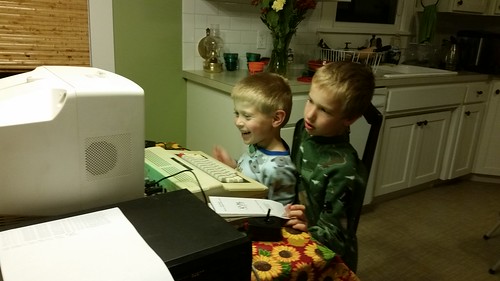
The picture above is Oliver cackling at one of the very simplest BASIC programs there is: number find. The computer picks a random number between 1 and 2000, and asks the user to guess it, giving a too low or too high clue with each incorrect guess. Oliver delighted in giving invalid input (way too high numbers, or things that weren t numbers at all) and cackled at the sarcastic error messages built into the program. During Jacob s turn, he got very serious about it, and is probably going to be learning about how to calculate halfway points before too long.
But imagine my pride when this morning, Jacob found the new CD I had made last night (correcting a couple recordings), found my one-line instruction on just part of how to load a program, and correctly figured out by himself all the steps to do in order (type CLOAD on the CoCo, advance the CD to the proper track, press play on the player, wait for it to load on the CoCo, then type RUN).
I ordered a replacement floppy controller off eBay tonight, and paid $5 for a coax adapter that should fix some video quality issues. I rescued some 5.25 floppies from my trash can from another project, so they should have plenty of tools for exploration.
It is so much easier for them to learn how a disk drive works, and even what the heck a track is, when you can look at a floppy drive with the cover off and see the heads move. There are other things we can do with more modern equipment Jacob has shown a lot of interest in Arduino projects but I have so far drawn a blank on ways to really let kids discover how a modern PC (let alone a modern phone or tablet) works.
Update Nov. 24: Every so often, the world surprises me by deciding to, well, read one of my random blog posts. For the benefit of those of you that don t already know my boys, you might want to know that among their common play activites are turning trees into pretend trains, typing at a manual typewriter, reading, writing their own books, using a cassette recorder, building a PC and learning to use bash or xmonad, making long paper tapes with an adding machine, playing records on a record player, building electric gizmos, and even making mud balls.
I am often asked about the role of the computer in the lives, given that my hobby and profession involves computers. The answer: less than that of most of their peers. I look for opportunities for them to learn by doing, discovering, playing, or imagining. I make no presumption that they will develop the passion for computers that I did. What I want is for them to have the curiosity and drive to learn everything there is to know about whatever they do develop a passion for, so they will be great at it.
Let me tell you how this came about.
I ve had a project going on for a while now to load data from old floppies. It s been fun, and had a surprise twist the other day: my parents gave me an old TRS-80 Color Computer II (aka CoCo 2 ). It was, in fact, my first computer, one they got for me when I was in Kindergarten. It is nearly 30 years old.
I have been musing lately about the great disservice Apple did the world by making computers easy to learn namely the fact that few people ever bother to learn about them. Who bothers to learn about them when, on the iPhone for instance, the case is sealed shut, the lifespan is 1 or 2 years for many purchasers, and the platform is closed in lots of ways?
I had forgotten how finicky computers used to be. But after some days struggling with IDE incompatibilities, booting issues, etc., when I actually managed to get data off a machine that had last booted in 1999, I had quite the sense of accomplishment, which I rarely have lately. I did something that was hard to do in a world where most of the interfaces don t work with equipment that old (even if nominally they are supposed to.)
The CoCo is one of those computers normally used with a floppy drive or cassette recorder to store programs. You type DIR, and you feel the clack of the drive heads through the desk. You type CLOAD and you hear the relay click closed to turn on the tape motor. You wiggle cables around until they make contact just right. You power-cycle for the times when the reset button doesn t quite do the job. The details of how it works aren t abstracted away by innumerable layers of controllers, interfaces, operating system modules, etc. It s all right there, literally vibrating your desk.
So I thought this could be a great opportunity for Jacob to learn a few more computing concepts, such as the difference between mass storage and RAM, plus a great way to encourage him to practice critical thinking. So we trekked down to the basement and came up with handfulls of parts. We brought up the computer, some joysticks, all sorts of tangled cables. We needed adapters, an old TV. Jacob helped me hook everything up, and then the moment of truth: success! A green BASIC screen!
I added more parts, but struck out when I tried to connect the floppy drive. The thing just wouldn t start up right whenever the floppy controller cartridge was installed. I cleaned the cartridge. I took it apart, scrubbed the contacts, even did a re-seat of the chips. No dice.
So I fired up my CoCo emulator (xroar), and virtually saved some programs to cassette (a .wav file). I then burned those .wav files to an audio CD, brought up an old CD player from the basement, connected the cassette in plug to the CD player s headphone jack, and presto instant programs. (Well, almost. It takes a couple of minutes to load a program from audio codes.)
The picture above is Oliver cackling at one of the very simplest BASIC programs there is: number find. The computer picks a random number between 1 and 2000, and asks the user to guess it, giving a too low or too high clue with each incorrect guess. Oliver delighted in giving invalid input (way too high numbers, or things that weren t numbers at all) and cackled at the sarcastic error messages built into the program. During Jacob s turn, he got very serious about it, and is probably going to be learning about how to calculate halfway points before too long.
But imagine my pride when this morning, Jacob found the new CD I had made last night (correcting a couple recordings), found my one-line instruction on just part of how to load a program, and correctly figured out by himself all the steps to do in order (type CLOAD on the CoCo, advance the CD to the proper track, press play on the player, wait for it to load on the CoCo, then type RUN).
I ordered a replacement floppy controller off eBay tonight, and paid $5 for a coax adapter that should fix some video quality issues. I rescued some 5.25 floppies from my trash can from another project, so they should have plenty of tools for exploration.
It is so much easier for them to learn how a disk drive works, and even what the heck a track is, when you can look at a floppy drive with the cover off and see the heads move. There are other things we can do with more modern equipment Jacob has shown a lot of interest in Arduino projects but I have so far drawn a blank on ways to really let kids discover how a modern PC (let alone a modern phone or tablet) works.
Update Nov. 24: Every so often, the world surprises me by deciding to, well, read one of my random blog posts. For the benefit of those of you that don t already know my boys, you might want to know that among their common play activites are turning trees into pretend trains, typing at a manual typewriter, reading, writing their own books, using a cassette recorder, building a PC and learning to use bash or xmonad, making long paper tapes with an adding machine, playing records on a record player, building electric gizmos, and even making mud balls.
I am often asked about the role of the computer in the lives, given that my hobby and profession involves computers. The answer: less than that of most of their peers. I look for opportunities for them to learn by doing, discovering, playing, or imagining. I make no presumption that they will develop the passion for computers that I did. What I want is for them to have the curiosity and drive to learn everything there is to know about whatever they do develop a passion for, so they will be great at it.
 I've rebuilt many Debian packages over the years, largely to fix bugs which affected me, or to add features which didn't make the cut in various releases. For example I made a package of fabric available for Wheezy, since it wasn't in the release. (Happily in that case a wheezy-backport became available. Similar cases involved repackaging gtk-gnutella when the protocol changed and the official package in the lenny release no longer worked.)
I generally release a lot of my own software as Debian packages, although I'll admit I've started switching to publishing Perl-based projects on CPAN instead - from which they can be debianized via

 I left Debian. I don't really have a lot to say about why, but I do
want to clear one thing up right away. It's not about systemd.
As far as systemd goes, I agree with my friend John Goerzen:

 There s a lot of discussion / moaning /arguing at this time, so I thought I d post something about how LAVA got into Debian Jessie, the work involved and the lessons I ve learnt. Hopefully, it will help someone avoid the disappointment of having their package missing the migration into a future stable release. This was going to be a talk at the Minidebconf-uk in Cambridge but I decided to put this out as a permanent blog entry in the hope that it will be a useful reference for the future, not just Jessie.
Context
LAVA relies on a number of dependencies which were at the time all this started NEW to Debian as well as many others already in Debian. I d been running LAVA using packages on my own system for a few months before the packages were ready for use on the main servers (I never actually installed LAVA using the old virtualenv method on my own systems, except in a VM). I did do quite a lot of this on my own but I also had a team supporting the effort and valuing the benefits of moving to a packaged system.
At the time, LAVA was based on Ubuntu (12.04 LTS Precise Pangolin) and a new Ubuntu LTS was close (Trusty Tahr 14.04) but I started work on this in 2013. By the time my packages were ready for general usage, it was winter 2013 and much too close to get anything into Ubuntu in time for Trusty. So I started a local repo using space provided by Linaro. At the same time, I started uploading the dependencies to Debian. json-schema-validator, django-testscenarios and others arrived in April and May 2014. (Trusty was released in April). LAVA arrived in NEW in May, being accepted into unstable at the end of June. LAVA arrived in testing for the first time in July 2014.
Upstream development continued apace and a regular monthly upload, with some hotfixes in between, continued until close to the freeze.
At this point, note that although upstream is a medium sized team, the Debian packaging also has a team but all the uploads were made by me. I planned ahead. I knew that I would be going to Macau for Linaro Connect in February a critical stage in the finalisation of the packages and the migration of existing instances from the old methods. I knew that I would be on vacation from August through to the end of September 2014 including at least two weeks with absolutely no connectivity of any kind.
Right at this time, Django1.7 arrived in experimental with the intent to go into unstable and hence into Jessie. This was a headache for me, I initially sought to delay the migration until after Jessie. However, we discussed it upstream, allocated time within the busy schedule and also sought help from within Debian with the RFH tag. Rapha l Hertzog contributed patches for django1.7 support and we worked on those patches upstream, once I was back from vacation. (The final week of my vacation was a work conference, so we had everyone together at one hacking table.)
Still there was more to do, the django1.7 patches allowed the unit tests to complete but broke other parts of the lava-server package and needed subsequent tweaks and fixes.
Even with all this, the auto-removal from testing for packages affected by RC bugs in their dependencies became very important to monitor (it still is). It would be useful if some packages had less complex dependency chains (I m looking at you, uwsgi) as the auto-removal also covers build-depends. This led to some more headaches with libmatheval. I m not good with functional programming languages, I did have some exposure to Scheme when working on Gnucash upstream but it wasn t pleasant. The thought of fixing a scheme problem in the test suite of libmatheval was daunting. Again though, asking for help, I found people in the upstream team who wanted to refresh their use of scheme and were able to help out. The fix migrated into testing in October.
Just for added complications, lava-server gained a few RC bugs of it s own during that time too fixed upstream but awkward nonetheless.
Achievement unlocked
So that s how a complex package like lava-server gets into stable. With a lot of help. The main problem with top-level packages like this is the sheer weight of the dependency chain. Something seemingly unrelated (like libmatheval) can seriously derail the migrations. The package doesn t use the matheval support provided by uwsgi. The bug in matheval wasn t in the parts of matheval used by uwsgi. It wasn t in a language I am at all comfortable in fixing but it s my name on the changelog of the NMU. That happened because I asked for help. OK, when django1.7 was scheduled to arrive in Debian unstable and I knew that lava was not ready, I reacted out of fear and anxiety. However, I sought help, help was provided and that help was enough to get upstream to a point where the side-effects of the required changes could be fixed.
Maintaining a top-level package in Debian is becoming more like maintaining a core package in Debian and that is a good thing. When your package has a lot of dependencies, those dependencies become part of the maintenance workload of your package. It doesn t matter if those are install time dependencies, build dependencies or reverse dependencies. It doesn t actually matter if the issues in those packages are in languages you would personally wish to be expunged from the archive. It becomes your problem but not yours alone.
Debian has a lot of flames right now and Enrico encouraged us to look at what else is actually happening in Debian besides those arguments. Well, on top of all this with lava, I also did what I could to help the arm64 port along and I m very happy that this has been accepted into Jessie as an official release architecture. That s a much bigger story than LAVA yet LAVA was and remains instrumental in how arm64 gained the support in the kernel and various upstreams which allowed patches to be accepted and fixes to be incorporated into Debian packages.
So a roll call of helpers who may otherwise not have been recognised via changelogs, in no particular order:





 I joined the board of directors of the
 This brief announcement was released yesterday to the



 On behalf of Jacques-Pascal Deplaix
I am happy to announce the release of OASIS v0.4.5.
 OASIS is a tool to help OCaml developers to integrate configure, build and install systems in their projects. It should help to create standard entry points in the source code build system, allowing external tools to analyse projects easily.
This tool is freely inspired by Cabal which is the same kind of tool for Haskell.
You can find the new release

 A new maintenance release of


