Bastian Blank: Using SECCOMP to filter sync operations
Linux includes a syscall filter since a long time.
It was restricted to a pre-defined set of syscalls.
Since some versions Linux got a more generic filter.
Linux can use a BPF-filter to define actions for syscalls.
This allows a fine granular specification on which syscalls to act.
Also it supports different outcomes assigned to the filter.
This filter can be used to filter out sync operations.
Debian already got a tool to do this called eatmydata.
It is pretty limited as it uses a shared library to drop the library functions.
It needs to be available at all times, or it will not do anything.
I wrote a small tool that asks the kernel to filter out sync operations for all children.
It sets a filter with all currently supported sync-like operations and makes them return success.
However it can't filter the O_SYNC-flag from the open-syscall,
so it just makes it return an error.
It executes the command given on the command-line after that.
This is just a proof of concept, but lets see.
/*
 * Copyright (C) 2013 Bastian Blank <waldi@debian.org>
 *
 * Redistribution and use in source and binary forms, with or without
 * modification, are permitted provided that the following conditions are met:
 *
 * 1. Redistributions of source code must retain the above copyright notice, this
 *    list of conditions and the following disclaimer.
 * 2. Redistributions in binary form must reproduce the above copyright notice,
 *    this list of conditions and the following disclaimer in the documentation
 *    and/or other materials provided with the distribution.
 *
 * THIS SOFTWARE IS PROVIDED BY THE COPYRIGHT HOLDERS AND CONTRIBUTORS "AS IS" AND
 * ANY EXPRESS OR IMPLIED WARRANTIES, INCLUDING, BUT NOT LIMITED TO, THE IMPLIED
 * WARRANTIES OF MERCHANTABILITY AND FITNESS FOR A PARTICULAR PURPOSE ARE
 * DISCLAIMED. IN NO EVENT SHALL THE COPYRIGHT OWNER OR CONTRIBUTORS BE LIABLE FOR
 * ANY DIRECT, INDIRECT, INCIDENTAL, SPECIAL, EXEMPLARY, OR CONSEQUENTIAL DAMAGES
 * (INCLUDING, BUT NOT LIMITED TO, PROCUREMENT OF SUBSTITUTE GOODS OR SERVICES;
 * LOSS OF USE, DATA, OR PROFITS; OR BUSINESS INTERRUPTION) HOWEVER CAUSED AND
 * ON ANY THEORY OF LIABILITY, WHETHER IN CONTRACT, STRICT LIABILITY, OR TORT
 * (INCLUDING NEGLIGENCE OR OTHERWISE) ARISING IN ANY WAY OUT OF THE USE OF THIS
 * SOFTWARE, EVEN IF ADVISED OF THE POSSIBILITY OF SUCH DAMAGE.
 */
#define _GNU_SOURCE 1
#include <errno.h>
#include <fcntl.h>
#include <seccomp.h>
#include <stdio.h>
#include <stdlib.h>
#include <string.h>
#include <unistd.h>
#define filter_rule_add(action, syscall, count, ...) \
  if (seccomp_rule_add(filter, action, syscall, count, ##__VA_ARGS__)) abort();
static int filter_init(void)

  scmp_filter_ctx filter;
  if (!(filter = seccomp_init(SCMP_ACT_ALLOW))) abort();
  if (seccomp_attr_set(filter, SCMP_FLTATR_CTL_NNP, 1)) abort();
  filter_rule_add(SCMP_ACT_ERRNO(EINVAL), SCMP_SYS(open), 1, SCMP_A1(SCMP_CMP_MASKED_EQ, O_SYNC, O_SYNC));
  filter_rule_add(SCMP_ACT_ERRNO(0), SCMP_SYS(fsync), 0);
  filter_rule_add(SCMP_ACT_ERRNO(0), SCMP_SYS(fdatasync), 0);
  filter_rule_add(SCMP_ACT_ERRNO(0), SCMP_SYS(msync), 0);
  filter_rule_add(SCMP_ACT_ERRNO(0), SCMP_SYS(sync), 0);
  filter_rule_add(SCMP_ACT_ERRNO(0), SCMP_SYS(syncfs), 0);
  filter_rule_add(SCMP_ACT_ERRNO(0), SCMP_SYS(sync_file_range), 0);
  return seccomp_load(filter);

int main(__attribute__((unused)) int argc, char *argv[])

  if (argc <= 1)

    fprintf(stderr, "usage: %s COMMAND [ARG]...\n", argv[0]);
    return 2;

  if (filter_init())

    fprintf(stderr, "%s: can't initialize seccomp filter\n", argv[0]);
    return 1;

  execvp(argv[1], &argv[1]);
  if (errno == ENOENT)

    fprintf(stderr, "%s: command not found: %s\n", argv[0], argv[1]);
    return 127;

  fprintf(stderr, "%s: failed to execute: %s: %s\n", argv[0], argv[1], strerror(errno));
  return 1;

 x-on-resize: a simple display configuration daemon
I like things to be automated as much as possible, and having
abandoned Gnome to their own fate and switched to xfce, I missed the
automatic display reconfiguration stuff. I decided to write something
as simple as possible that did just what I needed. I did this a few
months ago, and when Carl Worth asked what I was using, I decided to
pack it up and make it available.
Automatic configuration with a shell script
I ve had a shell script around that I used to bind to a key press
which I d hit when I plugged or unplugged a monitor. So, all I really
need to do is get this script run when something happens.
The missing tool here was something to wait for a change to happen and
automatically invoke the script I d already written.
Resize vs Configure
The first version of x-on-resize just listened for ConfigureNotify
events on the root window. These get sent every time anything happens
with the screen configuration, from hot-plug to notification when
someone runs xrandr. That was as simple as possible; the application
was a few lines of code to select for ConfigureNotify events, and
invoke a program provided on the command line.
However, it was a bit too simple as it would also respond to manual
invocations of xrandr and call the script then as well. So, as long as
I was content to accept whatever the script did, things were
fine. And, with a laptop that had a DisplayPort connector for
my external desktop monitor, and a separate VGA connector for
projectors at conferences, the script always did something useful.
Then I got this silly laptop that has only DisplayPort, and for which
a dongle is required to get to VGA for projectors. I probably could
write something fancy to figure out the difference between a desktop
DisplayPort monitor and DisplayPort to VGA dongle, but I decided that
solving the simpler problem of only invoking the script on actual
hotplug events would be better.
So, I left the current invoke-on-resize behavior intact and added new
code that watched the list of available outputs and invoked a new
config script when that set changed.
The final program, x-on-resize, is available via git at

 I feel like i've done a lot of blogging recently about failing to do things with proprietary software. That's annoying. This post is about something i made successfully with free software (and some non-software crafting): I made a Woolly Mammoth for my nephew!
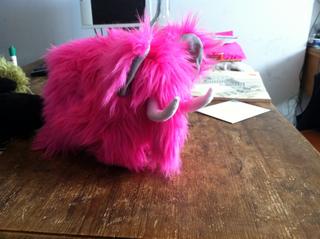 I documented
 Also this year I registered a

 I'll soon be disposing of the Nissan Leaf that

