Search Results: "tim"

28 November 2014

Daniel Pocock: XCP / XenServer and Debian Jessie

In 2013, Debian wheezy was released with a number of great virtualization options include the Xen Cloud Platform (XCP / Xen-API) toolstack packaged by Thomas Goirand to run in a native Debian host environment. Unfortunately, XCP is not available as a host (dom0) solution for the upcoming Debian 8 (jessie) release. However, it is possible to continue running a Debian wheezy system as the dom0 host and run virtualized (domU) jessie systems inside it. It may also be possible to use the packages from wheezy on a jessie system, but I haven't looked into that myself so far. Newer kernel boot failures in Xen After successfully upgrading a VM (domU in Xen terminology) from wheezy to jessie, I tried to reboot the VM and found that it wouldn't start. People have reported similar problems booting newer versions of Ubuntu and Fedora in XCP and XenServer environments. PyGrub displayed an error on the dom0 console:
# xe vm-start name-label=server05
Error code: Using  to parse /grub/grub.cfg
Error parameters: Traceback (most recent call last):,
   File "/usr/lib/xcp/lib/pygrub.xcp", line 853, in ,
     raise RuntimeError, "Unable to find partition containing kernel"
There is a quick and easy workaround. Hard-code the kernel and initrd filenames into config values that will be used to boot. A more thorough solution will probably involve using a newer version of PyGrub in wheezy. If the /boot tree is a separate filesystem inside the VM, use commands like the following (substitute the correct UUID for the VM and the exact names/versions of the vmlinuz and initrd.img files):
xe vm-param-set uuid=da654fd0-74db-11e4-82f8-0800200c9a66 \
   PV-bootloader-args="--kernel=/vmlinuz-3.16-3-amd64
   --ramdisk=/initrd.img-3.16-3-amd64"
xe vm-param-set uuid=da654fd0-74db-11e4-82f8-0800200c9a66 \
   PV-args="root=/dev/mapper/vg00-root ro quiet"
and if /boot is on the root filesystem of the VM, this will do the trick:
xe vm-param-set uuid=da654fd0-74db-11e4-82f8-0800200c9a66 \
   PV-bootloader-args="--kernel=/boot/vmlinuz-3.16-3-amd64
   --ramdisk=/boot/initrd.img-3.16-3-amd64"
xe vm-param-set uuid=da654fd0-74db-11e4-82f8-0800200c9a66 \
   PV-args="root=/dev/mapper/vg00-root ro quiet"
Future strategy Once a comprehensive XCP solution appears in Debian again, hopefully it will be possible to migrate running VMs into the new platform without any downtime and retire the wheezy dom0. Other upgrade/migration options exist and the choice will depend on various factors, such as whether or not you have built your own tools around the XCP API and whether you use a solution like OpenStack that depends on it. Debian's pkg-xen-devel mailing list may be a good place to discuss these options further.

Ian Wienand: rstdiary

I find it very useful to spend 5 minutes a day to keep a small log of what was worked on, major bugs or reviews and a general small status report. It makes rolling up into a bigger status report easier when required, or handy as a reference before you go into meetings etc. I was happily using an etherpad page until I couldn't save any more revisions and the page got too long and started giving javascript timeouts. For a replacement I wanted a single file as input with no boilerplate to aid in back-referencing and adding entries quickly. It should be formatted to be future-proof, as well as being emacs, makefile and git friendly. Output should be web-based so I can refer to it easily and point people at it when required, but it just has to be rsynced to public_html with zero setup. rstdiary will take a flat RST based input file and chunk it into some reasonable looking static-HTML that looks something like this. It's split by month with some minimal navigation. Copy the output directory somewhere and it is done. It might also serve as a small example of parsing and converting RST nodes where it does the chunking; unfortunately the official documentation on that is "to be completed" and I couldn't find anything like a canonical example, so I gathered what I could from looking at the source of the transformation stuff. As the license says, the software is provided "as is" without warranty! So if you've been thinking "I should keep a short daily journal in a flat-file and publish it to a web-server but I can't find any software to do just that" you now have one less excuse.

27 November 2014

Stefano Zacchiroli: CTTE nomination

Apparently, enough fellow developers have been foolish enough to nominate me as a prospective member of the Debian Technical Committee (CTTE), that I've been approached to formally accept/decline the nomination. (Accepted nominees would then go through a selection process and possibly proposed to the DPL for nomination.) I'm honored by the nominations and I thank the fellow developers that have thrown my name in the hat. But I've respectfully declined the nomination. Given my current involvement in an ongoing attempt to introduce a maximum term limit for CTTE membership, it would have been highly inappropriate for me to accept the nomination at this time. I have no doubt that the current CTTE and the DPL will fill the empty seats with worthy project members.

Jonathan Dowland: PGP transition statement

-----BEGIN PGP SIGNED MESSAGE-----
Hash: SHA512,SHA1
I'm transitioning from my old, 1024-bit DSA PGP key, FD35 0B0A C6DD 5D91 DB7A 83D1 168B 4E71 7032 F238, to my newer, 4096-bit RSA key, E037 CB2A 1A00 61B9 4336 3C8B 0907 4096 06AA AAAA. If you have signed my old key, I'd be very grateful if you would consider signing my new key. (Thanks in advance!) This is long overdue! I've had 06AAAAAA since 2009, but it took me a while to get enough signatures on it for me to consider a transition. I still have far more signatures on my older key, owing to attending more conferences when I was using it than since I switched. This statement, available in plaintext at http://jmtd.net/log/pgp_transition/statement.txt, has been signed with both keys. I've marked my old key as expiring in around 72 days time, which coincides with my change of job, and will be just short of ten years since I generated it.
-----BEGIN PGP SIGNATURE-----
Version: GnuPG/MacGPG2 v2.0.22 (Darwin)
iQIcBAEBCgAGBQJUdysuAAoJEAkHQJYGqqqquQ0QALVGcn9Wbasg0oh8JeE8rN7h
k7FeZjmGk+ZwfXwo4Eq4pjxKp+TN+r4xBCFSHDRmMaAm9q7aWF/RqkdNiEtioQfJ
SmfzLsoEnSBmS9dr1LvAoxIlUzs/9Lt8EY2tB4NQne3QIu3VyRBjQDvqff6KJgkV
849+GsrJezkg/2VFZkZp1N9y0YwrmezV/1j0N6zR8Y20LlF4YuD3egUJYvbrQ1pA
krJwhiHskXRinqviYMg4CuTZZ3m2wc4fM6uiY5t9taqK90KFgmg73KvW6Rx2L+XP
BUzTlSYHnK+qI23Cng//DthFww2Wf9RofkfRgXk0zAe4+DcoMZzALKtZQA6GrT46
wzsmu459p5nUwwa6BzUvqBzyVtzbtHN5xaFwbjHCPlemsFlH/8LHackJLsBvr2Gp
q292huYu/HNo+Q6OIslFX6rc5AR3HKdbU2DxYMPAfI+CEtW1XwetK8ADSZc1v54C
+sc+Yb2kAleLX2xMIfS9JqvcKOP2Gbo7nTdRPnS2jZRWOv8JxVfFiSzHVODtlLfk
AmRvms5rQ2nPnB21yOd+DP2sACVKY0MS7/UwMh2hoQLR/bSu/jRh24n3WHDfQWtF
Jp4AD80ABFV2t/pSP1L70HlxwPmOzra8AVzCdXMOT/SdT387rSM9fvue4FY5goT+
/pResJSl9pAbBCtjOFJoiEYEARECAAYFAlR3Ky4ACgkQFotOcXAy8jiLawCgofsp
ggze/iSpfkyeL0vhXi6N/WMAoLQogFQY+VaQrVP3lGl1VVh4jw0W
=JBA4
-----END PGP SIGNATURE-----

Keith Packard: Black Friday 2014

Altus Metrum's 2014 Black Friday Event BLACK FOREST, Colorado USA Altus Metrum announces two special offers for "Black Friday" 2014. We are pleased to announce that both TeleMetrum and TeleMega will be back in stock and available for shipment before the end of November. To celebrate this, any purchase of a TeleMetrum, TeleMega, or EasyMega board will include, free of charge, one each of our 160, 400, and 850 mAh Polymer Lithium Ion batteries and a free micro USB cable! To celebrate NAR's addition of our 1.9 gram recording altimeter, MicroPeak, to the list of devices approved for use in contests and records, and help everyone get ready for NARAM 2015's altitude events, purchase 4 MicroPeak boards and we'll throw in a MicroPeak USB adapter for free! These deals will be available from 00:00 Friday, 28 November 2014 through 23:59 Monday, 1 December, 2014. Only direct sales through our web store at http://shop.gag.com are included; no other discounts apply. Find more information on all Altus Metrum products at http://altusmetrum.org. Thank you for your continued support of Altus Metrum in 2014. We continue to work on more cool new products, and look forward to meeting many of you on various flight lines in 2015!

26 November 2014

Enrico Zini: calypso-davdroid

Calypso and DAVDroid calypso and DAVdroid appeal to me. Let's try to make the whole thing work. Update: radicale seems to also support git as a backend, and I plan to give it a try, too. A self-signed SSL certificate Generating the certificate:
$ openssl req -nodes -x509 -newkey rsa:2048 -keyout cal-key.pem -out cal-cert.pem -days 3650
[...]
Country Name (2 letter code) [AU]:IT
State or Province Name (full name) [Some-State]:Bologna
Locality Name (eg, city) []:
Organization Name (eg, company) [Internet Widgits Pty Ltd]:enricozini.org
Organizational Unit Name (eg, section) []:
Common Name (e.g. server FQDN or YOUR name) []:cal.enricozini.org
Email Address []:postmaster@enricozini.org
Installing it on my phone:
$ openssl x509 -in cal-cert.pem -outform DER -out cal-cert.crt
$ adb push cal-cert.crt /mnt/sdcard/
$ enrico --follow-instructions http://davdroid.bitfire.at/faq/entry/importing-a-certificate
Installing calypso in my VPS An updated calypso package:
$ git clone git://keithp.com/git/calypso
$ git checkout debian -b enrico
$ git remote add chrysn  git://prometheus.amsuess.com/calypso-patches
$ git fetch chrysn
$ git merge chrysn/chrysn/integration
$ dch -v 1.4+enrico  "Merged with chrysn integration branch"
$ debuild -us -uc -rfakeroot
Install the package:
# dpkg -i calypso_1.4+enrico_all.deb
Create a system user to run it:
# adduser --system --disabled-password calypso
# chsh calypso  # /bin/dash
Make it run at boot time (based on calypso-init from the git repo):
# cat /etc/default/calypso
CALYPSO_OPTS="-d -P $PIDFILE"
# diff -Nau calypso-init calypso-init.enrico
--- calypso-init        2014-11-26 11:50:35.301001194 +0100
+++ calypso-init.enrico 2014-11-26 12:18:16.564138554 +0100
@@ -62,8 +62,8 @@
          return 1
    mkdir -p $(dirname $PIDFILE)
-       chown calypso:calypso $(dirname $PIDFILE)
-       start-stop-daemon --start -c $NAME --quiet --pidfile $PIDFILE --exec $DAEMON -- \
+       chown calypso:nogroup $(dirname $PIDFILE)
+       start-stop-daemon --start -c $NAME:nogroup --quiet --pidfile $PIDFILE --exec $DAEMON -- \
        $CALYPSO_OPTS \
          return 2
    # Add code here, if necessary, that waits for the process to be ready
# cp calypso-init.enrico /etc/init.d/calypso
# update-rc.d calypso defaults
Setting up the database
# su - calypso
Certificates and server setup:
$ mkdir .config/calypso/certs
$ mv cal-key.pem .config/calypso/certs/cal.key
$ mv cal-cert.pem .config/calypso/certs/cal.pem
$ chmod 0600 .config/calypso/certs/*
$ cat > .config/calypso/config << EOF
[server]
certificate=/home/calypso/.config/calypso/certs/cal.pem
key=/home/calypso/.config/calypso/certs/cal.key
[acl]
type=htpasswd
encryption=sha1
filename=/home/calypso/.config/calypso/htpasswd
    EOF
User passwords:
    $ htpasswd -s .config/calypso/htpasswd enrico
Database initialization:
$ mkdir -p .config/calypso/calendars
$ cd .config/calypso/calendars
$ git init
    $ cat > .calypso-collection << EOF
[collection]
is-calendar = True
is-addressbook = False
displayname = Test
description = Test calendar
EOF
    $ git add .calypso-collection
$ git commit --allow-empty -m'initialize new calendar'
Start the server
# /etc/init.d/calypso start
DAVdroid configuration
  1. Add a new DAVdroid sync account
  2. Use server/username configuration
  3. For server, use https://:5233
  4. Add username and password
It should work. Related links

25 November 2014

Holger Levsen: 20141125-change

Change Not many people adapt to fundamental changes easily, but at least people can change at all. I'm sure what looks funny now has also been a painful experience, but... - that's life. Sometimes it sucks. And suddenly...

Enrico Zini: mock-webserver

A mock webserver to use for unit testing HTTP clients With python -m SimpleHTTPServer it's easy to bring up an HTTP server to use to test HTTP client code, however it only supports GET requests, and I needed to test an HTTP client that needs to perform a file upload. It took way more than I originally expected to put this together, so here it is, hopefully saving other people (including future me) some time:
#!/usr/bin/python3
import http.server
import cgi
import socketserver
import hashlib
import json
PORT = 8081
class Handler(http.server.SimpleHTTPRequestHandler):
    def do_POST(self):
        info =  
            "method": "POST",
            "headers":   k: v for k, v in self.headers.items()  ,
         
        # From https://snipt.net/raw/f8ef141069c3e7ac7e0134c6b58c25bf/?nice
        form = cgi.FieldStorage(
            fp=self.rfile,
            headers=self.headers,
            environ= 'REQUEST_METHOD':'POST',
                     'CONTENT_TYPE':self.headers['Content-Type'],
                      )
        postdata =  
        for k in form.keys():
            if form[k].file:
                buf = form.getvalue(k)
                postdata[k] =  
                    "type": "file",
                    "name": form[k].filename,
                    "size": len(buf),
                    # json.dumps will not serialize a byte() object, so we
                    # return the shasum instead of the file body
                    "sha256": hashlib.sha256(buf).hexdigest(),
                 
            else:
                vals = form.getlist(k)
                if len(vals) == 1:
                    postdata[k] =  
                        "type": "field",
                        "val": vals[0],
                     
                else:
                    postdata[k] =  
                        "type": "multifield",
                        "vals": vals,
                     
        info["postdata"] = postdata
        resbody = json.dumps(info, indent=1)
        print(resbody)
        resbody = resbody.encode("utf-8")
        self.send_response(200)
        self.send_header("Content-type", "application/json")
        self.send_header("Content-Length", str(len(resbody)))
        self.end_headers()
        self.wfile.write(resbody)
class TCPServer(socketserver.TCPServer):
    # Allow to restart the mock server without needing to wait for the socket
    # to end TIME_WAIT: we only listen locally, and we may restart often in
    # some workflows
    allow_reuse_address = True
httpd = TCPServer(("", PORT), Handler)
print("serving at port", PORT)
httpd.serve_forever()

Dirk Eddelbuettel: Rcpp now used by 300 CRAN packages

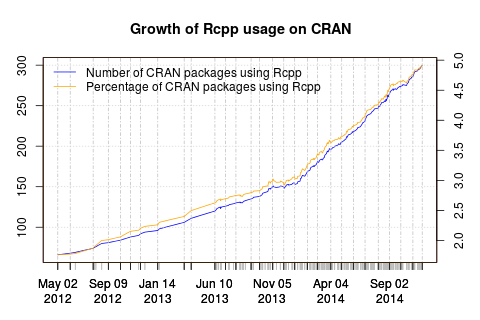
max-heap image This morning, Rcpp reached another round milestone: 300 packages on CRAN now depend on it (as measured by Depends, Imports and LinkingTo declarations). The graph is on the left depicts the growth of Rcpp usage over time. There are 41 more on BioConductor (which is not included in the chart). The first and less detailed part uses manually save entries, the second half of the data set was generated semi-automatically via a short script appending updates to a small file-based backend. A list of user package is kept on this page. Also displayed in the graph is the relative proportion of CRAN packages using Rcpp. The four per-cent hurdle was cleared just before useR! 2014 where I showed a similar graph (as two distinct graphs) in my invited talk. We may well hit five per-cent before the end of the year. 300 is a pretty humbling and staggering number. Also interesting that we we cleared 200 only at the end of April, and 250 in early August. So from everybody behind Rcpp, a heartfelt Thank You! to all the users and of course other contributors.

This post by Dirk Eddelbuettel originated on his Thinking inside the box blog. Please report excessive re-aggregation in third-party for-profit settings.

Erich Schubert: Installing Debian with sysvinit

First let me note that I am using systemd, so these things here are untested by me. See e.g. Petter's and Simon's blog entries on the same overall topic.
According to the Debian installer maintainers, the only accepted way to install Debian with sysvinit is to use preseeding. This can either be done at the installer boot prompt by manually typing the magic spell:
preseed/late_command="in-target apt-get install -y sysvinit-core"
or by using a preseeding file (which is a really nice feature I used for installing my Hadoop nodes) to do the same:
d-i preseed/late_command string in-target apt-get install -y sysvinit-core
If you are a sysadmin, using preseeding can save you a lot of typing. Put all your desired configuration into preseeding files, put them on a webserver (best with a short name resolvable by local DNS). Let's assume you have set up the DNS name d-i.example.com, and your DHCP is configured such that example.com is on the DNS search list. You can also add a vendor extension to DHCP to serve a full URL. Manually enabling preseeding then means adding
auto url=d-i
to the installer boot command line (d-i is the hostname I suggested to set up in your DNS before, and the full URL would then be http://d-i.example.com/d-i/jessie/./preseed.cfg. Preseeding is well documented in Appendix B of the installer manual, but nevertheless will require a number of iterations to get everything work as desired for a fully automatic install like I used for my Hadoop nodes.

There might be an easier option.
I have filed a wishlist bug suggesting to use the tasksel mechanism to allow the user to choose sysvinit at installation time. However, it got turned down by the Debian installer maintainers quire rudely in a "No." - essentially this is a "shut the f... up and go away", which is in my opinion an inappropriate to discard a reasonable user wishlist request.
Since I don't intend to use sysvinit anymore, I will not be pursuing this option further. It is, as far as I can tell, still untested. If it works, it might be the least-effort, least-invasive option to allow the installation of sysvinit Jessie (except for above command line magic).
If you have interest in sysvinit, you (because I don't use sysvinit) should now test if this approach works.
  1. Get the patch proposed to add a task-sysvinit package.
  2. Build an installer CD with this tasksel (maybe this documentation is helpful for this step).
  3. Test whether the patch works. Report results to above bug report, so that others interested in sysvinit can find them easily.
  4. Find and fix bugs if it didn't work. Repeat.
  5. Publish the modified ("forked") installer, and get user feedback.
If you are then still up for a fight, you can try to convince the maintainers (or go the nasty way, and ask the CTTE for their opinion, to start another flamewar and make more maintainers give up) that this option should be added to the mainline installer. And hurry up, or you may at best get this into Jessie reloaded, 8.1. - chance are that the release manager will not accept such patches this late anymore. The sysvinit supporters should have investigated this option much, much earlier instead of losing time on the GR.
Again, I won't be doing this job for you. I'm happy with systemd. But patches and proof-of-concept is what makes open source work, not GRs and MikeeUSA's crap videos spammed to the LKML...
(And yes, I am quite annoyed by the way the Debian installer maintainers handled the bug report. This is not how open-source collaboration is supposed to work. I tried to file a proper wishlist bug reporting, suggesting a solution that I could not find discussed anywhere before and got back just this "No. Shut up." answer. I'm not sure if I will be reporting a bug in debian-installer ever again, if this is the way they handle bug reports ...)
I do care about our users, though. If you look at popcon "vote" results, we have 4179 votes for sysvinit-core and 16918 votes for systemd-sysv (graph) indicating that of those already testing jessie and beyond - neglecting 65 upstart votes, and assuming that there is no bias to not-upgrade if you prefer sysvinit - about 20% appear to prefer sysvinit (in fact, they may even have manually switched back to sysvinit after being upgraded to systemd unintentionally?). These are users that we should listen to, and that we should consider adding an installer option for, too.

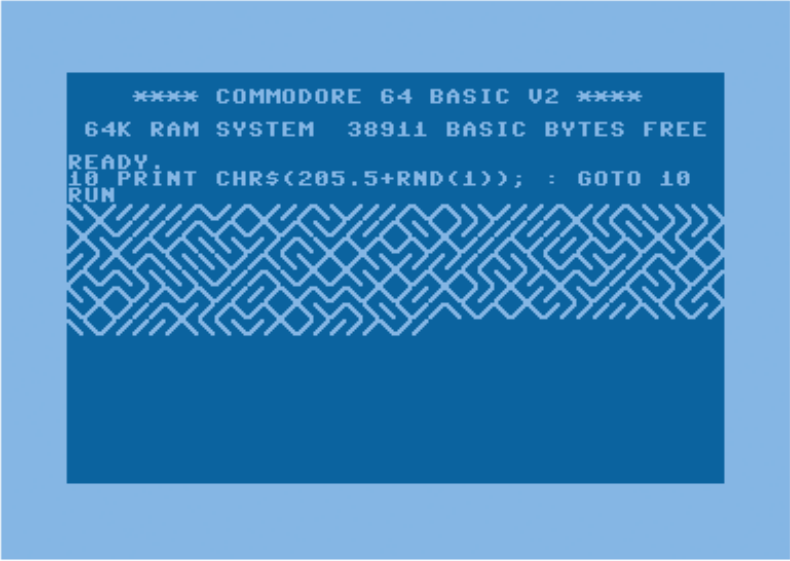
Gunnar Wolf: 10 PRINT CHR$(205.5+RND(1)); : GOTO 10 (also known as #10print )

The line of BASIC code that appears as the subject for this post is the title for a book I just finished reading And enjoyed thoroughly. The book is available online for download under a CC-BY-NC-SA 3.0 License, so you can take a good look at it before (or instead of) buying it. Although it's among the books I will enjoy having on my shelf; the printing is of a very enjoyable good quality. And what is this book about? Well, of course, it analizes that very simple line of code, as it ran on the Commodore 64 thirty years ago. And the analysis is made from every possible angle: What do mazes mean in culture? What have they meant in cultures through history? What about regularity in art (mainly 20th century art)? How would this code look (or how it would be adapted) on contemporary non-C64 computers? And in other languages more popular today? What does randomness mean? And what does random() mean? What is BASIC, and how it came to the C64? What is the C64, and where did it come from? And several other beautiful chapters. The book was collaboratively written by ten different authors, in a Wiki-like fashion. And... Well, what else is there to say? I enjoyed so much reading through long chapters of my childhood, of what attracted me to computers, of my cultural traits and values... I really hope that, in due time, I can be a part of such a beautiful project!
24 November 2014

John Goerzen: My boys love 1986 computing

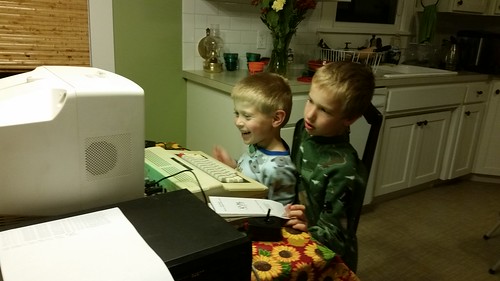
Yesterday, Jacob (age 8) asked to help me put together a 30-year-old computer from parts in my basement. Meanwhile, Oliver (age 5) asked Laura to help him learn cursive. Somehow, this doesn t seem odd for a Saturday at our place. 2014-11-22 18.58.36 Let me tell you how this came about. I ve had a project going on for a while now to load data from old floppies. It s been fun, and had a surprise twist the other day: my parents gave me an old TRS-80 Color Computer II (aka CoCo 2 ). It was, in fact, my first computer, one they got for me when I was in Kindergarten. It is nearly 30 years old. I have been musing lately about the great disservice Apple did the world by making computers easy to learn namely the fact that few people ever bother to learn about them. Who bothers to learn about them when, on the iPhone for instance, the case is sealed shut, the lifespan is 1 or 2 years for many purchasers, and the platform is closed in lots of ways? I had forgotten how finicky computers used to be. But after some days struggling with IDE incompatibilities, booting issues, etc., when I actually managed to get data off a machine that had last booted in 1999, I had quite the sense of accomplishment, which I rarely have lately. I did something that was hard to do in a world where most of the interfaces don t work with equipment that old (even if nominally they are supposed to.) The CoCo is one of those computers normally used with a floppy drive or cassette recorder to store programs. You type DIR, and you feel the clack of the drive heads through the desk. You type CLOAD and you hear the relay click closed to turn on the tape motor. You wiggle cables around until they make contact just right. You power-cycle for the times when the reset button doesn t quite do the job. The details of how it works aren t abstracted away by innumerable layers of controllers, interfaces, operating system modules, etc. It s all right there, literally vibrating your desk. So I thought this could be a great opportunity for Jacob to learn a few more computing concepts, such as the difference between mass storage and RAM, plus a great way to encourage him to practice critical thinking. So we trekked down to the basement and came up with handfulls of parts. We brought up the computer, some joysticks, all sorts of tangled cables. We needed adapters, an old TV. Jacob helped me hook everything up, and then the moment of truth: success! A green BASIC screen! I added more parts, but struck out when I tried to connect the floppy drive. The thing just wouldn t start up right whenever the floppy controller cartridge was installed. I cleaned the cartridge. I took it apart, scrubbed the contacts, even did a re-seat of the chips. No dice. So I fired up my CoCo emulator (xroar), and virtually saved some programs to cassette (a .wav file). I then burned those .wav files to an audio CD, brought up an old CD player from the basement, connected the cassette in plug to the CD player s headphone jack, and presto instant programs. (Well, almost. It takes a couple of minutes to load a program from audio codes.) The picture above is Oliver cackling at one of the very simplest BASIC programs there is: number find. The computer picks a random number between 1 and 2000, and asks the user to guess it, giving a too low or too high clue with each incorrect guess. Oliver delighted in giving invalid input (way too high numbers, or things that weren t numbers at all) and cackled at the sarcastic error messages built into the program. During Jacob s turn, he got very serious about it, and is probably going to be learning about how to calculate halfway points before too long. But imagine my pride when this morning, Jacob found the new CD I had made last night (correcting a couple recordings), found my one-line instruction on just part of how to load a program, and correctly figured out by himself all the steps to do in order (type CLOAD on the CoCo, advance the CD to the proper track, press play on the player, wait for it to load on the CoCo, then type RUN). I ordered a replacement floppy controller off eBay tonight, and paid $5 for a coax adapter that should fix some video quality issues. I rescued some 5.25 floppies from my trash can from another project, so they should have plenty of tools for exploration. It is so much easier for them to learn how a disk drive works, and even what the heck a track is, when you can look at a floppy drive with the cover off and see the heads move. There are other things we can do with more modern equipment Jacob has shown a lot of interest in Arduino projects but I have so far drawn a blank on ways to really let kids discover how a modern PC (let alone a modern phone or tablet) works. Update Nov. 24: Every so often, the world surprises me by deciding to, well, read one of my random blog posts. For the benefit of those of you that don t already know my boys, you might want to know that among their common play activites are turning trees into pretend trains, typing at a manual typewriter, reading, writing their own books, using a cassette recorder, building a PC and learning to use bash or xmonad, making long paper tapes with an adding machine, playing records on a record player, building electric gizmos, and even making mud balls. I am often asked about the role of the computer in the lives, given that my hobby and profession involves computers. The answer: less than that of most of their peers. I look for opportunities for them to learn by doing, discovering, playing, or imagining. I make no presumption that they will develop the passion for computers that I did. What I want is for them to have the curiosity and drive to learn everything there is to know about whatever they do develop a passion for, so they will be great at it.

23 November 2014

Iustin Pop: Debian, Debian

Due to some technical issues, I've been without access to my lists subscription email for a bit more than a week. Once I regained access and proceeded to read the batch of emails, I was - once again - shocked. Shocked at the amount of emails spent on the systemd issue, shocked at the number of people resigning, shocked at the amount of mud thrown. I just hope that the GR results finally will mean silence and getting over the last 3-6 months. For the record: However, some of the more recent emails on -private give me more hope, so I'm looking forward to the next 6 months. I wonder how this will all look in two years? (Side-note: emacs-nox shows me the italic word above as italic in text mode: I never saw that before, and didn't know, that it's possible to have italic fonts in xterm! What is this trickery it seems to be related to the font I use, fun!)

22 November 2014

Craig Small: WordPress 4.0.1 for Debian

WordPress recently released an update that had multiple security patches for their (then) current version 4.0. This release is 4.0.1 and includes important security fixes. The Debian packages got just uploaded, if you are running the Debian packaged wordpress, you should update to 4.0.1+dfsg-1 or later. I am going to look at these patches and see if they can and need to be backported to wordpress 3.6.1. Unfortunately I believe they will be. I m also asking it to be unblocked into Jessie as it is a security fix. There was, at the time of writing, no CVE numbers.

Petter Reinholdtsen: How to stay with sysvinit in Debian Jessie

By now, it is well known that Debian Jessie will not be using sysvinit as its boot system by default. But how can one keep using sysvinit in Jessie? It is fairly easy, and here are a few recipes, courtesy of Erich Schubert and Simon McVittie. If you already are using Wheezy and want to upgrade to Jessie and keep sysvinit as your boot system, create a file /etc/apt/preferences.d/use-sysvinit with this content before you upgrade:
Package: systemd-sysv
Pin: release o=Debian
Pin-Priority: -1
This file content will tell apt and aptitude to not consider installing systemd-sysv as part of any installation and upgrade solution when resolving dependencies, and thus tell it to avoid systemd as a default boot system. The end result should be that the upgraded system keep using sysvinit. If you are installing Jessie for the first time, there is no way to get sysvinit installed by default (debootstrap used by debian-installer have no option for this), but one can tell the installer to switch to sysvinit before the first boot. Either by using a kernel argument to the installer, or by adding a line to the preseed file used. First, the kernel command line argument:
preseed/late_command="in-target apt-get install --purge -y sysvinit-core"
Next, the line to use in a preseed file:
d-i preseed/late_command string in-target apt-get install -y sysvinit-core
One can of course also do this after the first boot by installing the sysvinit-core package. I recommend only using sysvinit if you really need it, as the sysvinit boot sequence in Debian have several hardware specific bugs on Linux caused by the fact that it is unpredictable when hardware devices show up during boot. But on the other hand, the new default boot system still have a few rough edges I hope will be fixed before Jessie is released. Update 2014-11-26: Inspired by a blog post by Torsten Glaser, added --purge to the preseed line.

21 November 2014

Joey Hess: propelling containers

Propellor has supported docker containers for a "long" time, and it works great. This week I've worked on adding more container support. docker containers (revisited) The syntax for docker containers has changed slightly. Here's how it looks now:
example :: Host
example = host "example.com"
    & Docker.docked webserverContainer
webserverContainer :: Docker.Container
webserverContainer = Docker.container "webserver" "joeyh/debian-stable"
    & os (System (Debian (Stable "wheezy")) "amd64")
    & Docker.publish "80:80"
    & Apt.serviceInstalledRunning "apache2"
    & alias "www.example.com"
That makes example.com have a web server in a docker container, as you'd expect, and when propellor is used to deploy the DNS server it'll automatically make www.example.com point to the host (or hosts!) where this container is docked. I use docker a lot, but I have drank little of the Docker KoolAid. I'm not keen on using random blobs created by random third parties using either unreproducible methods, or the weirdly underpowered dockerfiles. (As for vast complicated collections of containers that each run one program and talk to one another etc ... I'll wait and see.) That's why propellor runs inside the docker container and deploys whatever configuration I tell it to, in a way that's both replicatable later and lets me use the full power of Haskell. Which turns out to be useful when moving on from docker containers to something else... systemd-nspawn containers Propellor now supports containers using systemd-nspawn. It looks a lot like the docker example.
example :: Host
example = host "example.com"
    & Systemd.persistentJournal
    & Systemd.nspawned webserverContainer
webserverContainer :: Systemd.Container
webserverContainer = Systemd.container "webserver" chroot
    & Apt.serviceInstalledRunning "apache2"
    & alias "www.example.com"
  where
    chroot = Chroot.debootstrapped (System (Debian Unstable) "amd64") Debootstrap.MinBase
Notice how I specified the Debian Unstable chroot that forms the basis of this container. Propellor sets up the container by running debootstrap, boots it up using systemd-nspawn, and then runs inside the container to provision it. Unlike docker containers, systemd-nspawn containers use systemd as their init, and it all integrates rather beautifully. You can see the container listed in systemctl status, including the services running inside it, use journalctl to examine its logs, etc. But no, systemd is the devil, and docker is too trendy... chroots Propellor now also supports deploying good old chroots. It looks a lot like the other containers. Rather than repeat myself a third time, and because we don't really run webservers inside chroots much, here's a slightly different example.
example :: Host
example = host "mylaptop"
    & Chroot.provisioned (buildDepChroot "git-annex")
buildDepChroot :: Apt.Package -> Chroot.Chroot
buildDepChroot pkg = Chroot.debootstrapped system Debootstrap.BuildD dir
    & Apt.buildDep pkg
  where
    dir = /srv/chroot/builddep/"++pkg
   system = System (Debian Unstable) "amd64"
Again this uses debootstrap to build the chroot, and then it runs propellor inside the chroot to provision it (btw without bothering to install propellor there, thanks to the magic of bind mounts and completely linux distribution-independent packaging). In fact, the systemd-nspawn container code reuses the chroot code, and so turns out to be really rather simple. 132 lines for the chroot support, and 167 lines for the systemd support (which goes somewhat beyond the nspawn containers shown above). Which leads to the hardest part of all this... debootstrap Making a propellor property for debootstrap should be easy. And it was, for Debian systems. However, I have crazy plans that involve running propellor on non-Debian systems, to debootstrap something, and installing debootstrap on an arbitrary linux system is ... too hard. In the end, I needed 253 lines of code to do it, which is barely one magnitude less code than the size of debootstrap itself. I won't go into the ugly details, but this could be made a lot easier if debootstrap catered more to being used outside of Debian. closing Docker and systemd-nspawn have different strengths and weaknesses, and there are sure to be more container systems to come. I'm pleased that Propellor can add support for a new container system in a few hundred lines of code, and that it abstracts away all the unimportant differences between these systems. PS Seems likely that systemd-nspawn containers can be nested to any depth. So, here's a new kind of fork bomb!
infinitelyNestedContainer :: Systemd.Container
infinitelyNestedContainer = Systemd.container "evil-systemd"
    (Chroot.debootstrapped (System (Debian Unstable) "amd64") Debootstrap.MinBase)
    & Systemd.nspawned infinitelyNestedContainer
Strongly typed purely functional container deployment can only protect us against a certian subset of all badly thought out systems. ;)

Jonathan Wiltshire: On kFreeBSD and FOSDEM

Boy I love rumours. Recently I ve heard two, which I ought to put to rest now everybody s calmed down from recent events. kFreeBSD isn t an official Jessie architecture because <insert systemd-related scare story> Not true. Our sprint at ARM (who kindly hosted and caffeinated us for four days) was timed to coincide with the Cambridge Mini-DebConf 2014. The intention was that this would save on travel costs for those members of the Release Team who wanted to attend the conference, and give us a jolly good excuse to actually meet up. Winners all round. It also had an interesting side-effect. The room we used was across the hall from the lecture theatre being used as hack space and, later, the conference venue, which meant everybody attending during those two days could see us locked away there (and yes, we were in there all day for two days solid, except for lunch times and coffee missions). More than one conference attendee remarked to me in person that it was interesting for them to see us working (although of course they couldn t hear what we were discussing), and hadn t appreciated before that how much time and effort goes into our meetings. Most of our first morning was taken up with the last pieces of architecture qualification, and that was largely the yes/no decision we had to make about kFreeBSD. And you know what? I don t recall us talking about systemd in that context at all. Don t forget kFreeBSD already had a waiver for a reduced scope in Jessie because of the difficulty in porting systemd to it. It s sadly impossible to capture the long and detailed discussion we had into a couple of lines of status information in a bits mail. If bits mails were much longer, people would be put off reading them, and we really really want you to take note of what s in there. The little space we do have needs to be factual and to the point, and not include all the background that led us to a decision. So no, the lack of an official Jessie release of kFreeBSD has very little, if anything, to do with systemd. Jessie will be released during (or even before) FOSDEM Not necessarily true. Debian releases are made when they re ready. That sets us apart from lots of other distributions, and is a large factor in our reputation for stability. We may have a target date in mind for a freeze, because that helps both us and the rest of the project plan accordingly. But we do not have a release date in mind, and will not do so until we get much closer to being ready. (Have you squashed an RC bug today?) I think this rumour originated from the office of the DPL, but it s certainly become more concrete than I think Lucas intended. However, it is true that we ve gone into this freeze with a seriously low bug count, because of lots of other factors. So it may indeed be that we end up in good enough shape to think about releasing near (or even at) FOSDEM. But rest assured, Debian 8 Jessie will be released when it s ready, and even we don t know when that will be yet. (Of course, if we do release before then, you could consider throwing us a party. Plenty of the Release Team, FTP masters and CD team will be at FOSDEM, release or none.)
On kFreeBSD and FOSDEM is a post from: jwiltshire.org.uk Flattr

Gunnar Wolf: Status of the Debian OpenPGP keyring November update

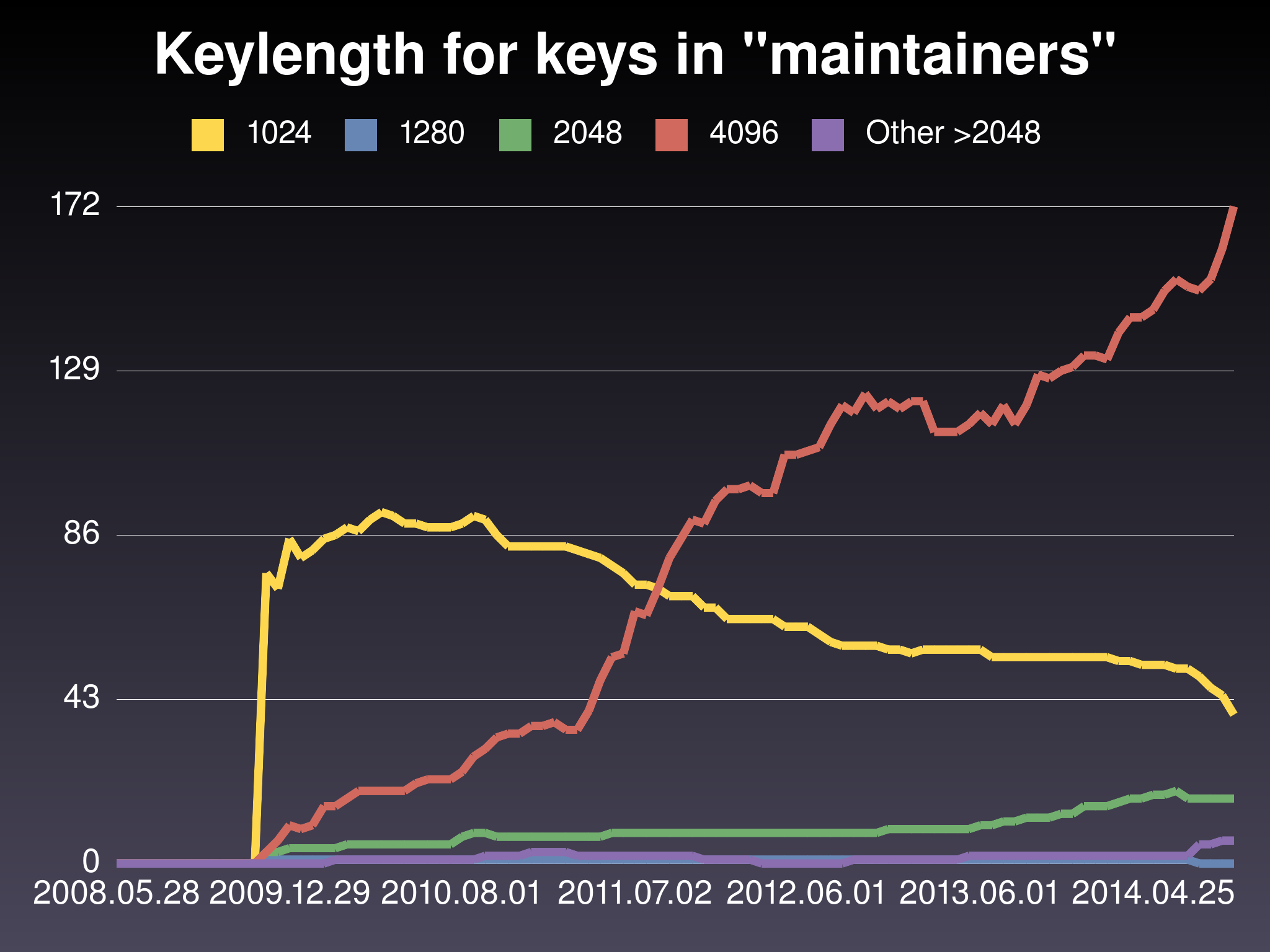
Almost two months ago I posted our keyring status graphs, showing the progress of the transition to >=2048-bit keys for the different active Debian keyrings. So, here are the new figures. First, the Non-uploading keyring: We were already 100% transitioned. You will only notice a numerical increase: That little bump at the right is our dear friend T ssia finally joining as a Debian Developer. Welcome! \o/ As for the Maintainers keyring: We can see a sharp increase in 4096-bit keys. Four 1024-bit DM keys were migrated to 4096R, but we did have eight new DMs coming in To them, also, welcome \o/. Sadly, we had to remove a 1024-bit key, as Peter Miller sadly passed away. So, in a 234-key universe, 12 new 4096R keys is a large bump! Finally, our current-greatest worry If for nothing else, for the size of the beast: The active Debian Developers keyring. We currently have 983 keys in this keyring, so it takes considerably more effort to change it. But we have managed to push it noticeably. This last upload saw a great deal of movement. We received only one new DD (but hey welcome nonetheless! \o/ ). 13 DD keys were retired; as one of the maintainers of the keyring, of course this makes me sad but then again, in most cases it's rather an acknowledgement of fact: Those keys' holders often state they had long not been really involved in the project, and the decision to retire was in fact timely. But the greatest bulk of movement was the key replacements: A massive 62 1024D keys were replaced with stronger ones. And, yes, the graph changed quite abruptly: We still have a bit over one month to go for our cutoff line, where we will retire all 1024D keys. It is important to say we will not retire the affected accounts, mark them as MIA, nor anything like that. If you are a DD and only have a 1024D key, you will still be a DD, but you will be technically unable to do work directly. You can still upload your packages or send announcements to regulated mailing lists via sponsor requests (although you will be unable to vote). Speaking of votes: We have often said that we believe the bulk of the short keys belong to people not really active in the project anymore. Not all of them, sure, but a big proportion. We just had a big, controversial GR vote with one of the highest voter turnouts in Debian's history. I checked the GR's tally sheet, and the results are interesting: Please excuse my ugly bash, but I'm posting this so you can play with similar runs on different votes and points in time using the public keyring Git repository:
  1. $ git checkout 2014.10.10
  2. $ for KEY in $( for i in $( grep '^V:' tally.txt
  3. awk ' print "<" $3 ">" ' )
  4. do
  5. grep $i keyids cut -f 1 -d ' '
  6. done )
  7. do
  8. if [ -f debian-keyring-gpg/$KEY -o -f debian-nonupload-gpg/$KEY ]
  9. then
  10. gpg --keyring /dev/null --keyring debian-keyring-gpg/$KEY \
  11. --keyring debian-nonupload-gpg/$KEY --with-colons \
  12. --list-key $KEY 2>/dev/null \
  13. head -2 tail -1 cut -f 3 -d :
  14. fi
  15. done sort uniq -c
  16. 95 1024
  17. 13 2048
  18. 1 3072
  19. 371 4096
  20. 2 8192
So, as of mid-October: 387 out of the 482 votes (80.3%) were cast by developers with >=2048-bit keys, and 95 (19.7%) were cast by short keys. If we were to run the same vote with the new active keyring, 417 votes would have been cast with >=2048-bit keys (87.2%), and 61 with short keys (12.8%). We would have four less votes, as they retired:
  1. 61 1024
  2. 14 2048
  3. 2 3072
  4. 399 4096
  5. 2 8192
So, lets hear it for November/December. How much can we push down that pesky yellow line? Disclaimer: Any inaccuracy due to bugs in my code is completely my fault!

Julien Danjou: Distributed group management and locking in Python with tooz

With OpenStack embracing the Tooz library more and more over the past year, I think it's a good start to write a bit about it. A bit of history A little more than year ago, with my colleague Yassine Lamgarchal and others at eNovance, we investigated on how to solve a problem often encountered inside OpenStack: synchronization of multiple distributed workers. And while many people in our ecosystem continue to drive development by adding new bells and whistles, we made a point of solving new problems with a generic solution able to address the technical debt at the same time. Yassine wrote the first ideas of what should be the group membership service that was needed for OpenStack, identifying several projects that could make use of this. I've presented this concept during the OpenStack Summit in Hong-Kong during an Oslo session. It turned out that the idea was well-received, and the week following the summit we started the tooz project on StackForge. Goals Tooz is a Python library that provides a coordination API. Its primary goal is to handle groups and membership of these groups in distributed systems. Tooz also provides another useful feature which is distributed locking. This allows distributed nodes to acquire and release locks in order to synchronize themselves (for example to access a shared resource). The architecture If you are familiar with distributed systems, you might be thinking that there are a lot of solutions already available to solve these issues: ZooKeeper, the Raft consensus algorithm or even Redis for example. You'll be thrilled to learn that Tooz is not the result of the NIH syndrome, but is an abstraction layer on top of all these solutions. It uses drivers to provide the real functionalities behind, and does not try to do anything fancy. All the drivers do not have the same amount of functionality of robustness, but depending on your environment, any available driver might be suffice. Like most of OpenStack, we let the deployers/operators/developers chose whichever backend they want to use, informing them of the potential trade-offs they will make. So far, Tooz provides drivers based on: All drivers are distributed across processes. Some can be distributed across the network (ZooKeeper, memcached, redis ) and some are only available on the same host (IPC). Also note that the Tooz API is completely asynchronous, allowing it to be more efficient, and potentially included in an event loop. Features Group membership Tooz provides an API to manage group membership. The basic operations provided are: the creation of a group, the ability to join it, leave it and list its members. It's also possible to be notified as soon as a member joins or leaves a group. Leader election Each group can have a leader elected. Each member can decide if it wants to run for the election. If the leader disappears, another one is elected from the list of current candidates. It's possible to be notified of the election result and to retrieve the leader of a group at any moment. Distributed locking When trying to synchronize several workers in a distributed environment, you may need a way to lock access to some resources. That's what a distributed lock can help you with. Adoption in OpenStack Ceilometer is the first project in OpenStack to use Tooz. It has replaced part of the old alarm distribution system, where RPC was used to detect active alarm evaluator workers. The group membership feature of Tooz was leveraged by Ceilometer to coordinate between alarm evaluator workers. Another new feature part of the Juno release of Ceilometer is the distribution of polling tasks of the central agent among multiple workers. There's again a group membership issue to know which nodes are online and available to receive polling tasks, so Tooz is also being used here. The Oslo team has accepted the adoption of Tooz during this release cycle. That means that it will be maintained by more developers, and will be part of the OpenStack release process. This opens the door to push Tooz further in OpenStack. Our next candidate would be write a service group driver for Nova. The complete documentation for Tooz is available online and has examples for the various features described here, go read it if you're curious and adventurous!

Next.

Previous.