Search Results: "will"

25 August 2013

Yves-Alexis Perez: Expiration extension on PGP subkeys

So, last year I've switched to an OpenPGP smartcard setup for my whole personal/Debian PGP usage. When doing so, I've also switched to subkeys, since it's pretty natural when using a smartcard. I initially set up an expiration of one year for the subkeys, and everything seems to be running just fine for now. The expiration date was set to october 27th, and I though it'd be a good idea to renew them quite in advance, considering there's my signing key in there, which is (for example) used to sign packages. If the Debian archive considers my signature subkey expired, that means I can't upload packages anymore, which is a bit of a problem (although I think I could still upload packages signed by the main key). dak (Debian Archive Kit, the software managing the Debian archive) uses keys from the keyring provided by Debian admins, which is usually updated every month or so from the keyring.debian.org public key server, so pushing the expiration date two months before the due date seemed like a good idea. I've just did that, and it was pretty easy, actually. For those who followed my setup last year, here's how I did it: First, I needed my main smartcard (the one storing the main key), since it's the only one able to do operations on the subkeys. So I plug it, and then:
corsac@scapa: gpg --edit-key 71ef0ba8
gpg (GnuPG) 1.4.14; Copyright (C) 2013 Free Software Foundation, Inc.
This is free software: you are free to change and redistribute it.
There is NO WARRANTY, to the extent permitted by law.
Secret key is available.
pub  4096R/71EF0BA8  created: 2009-05-06  expires: never       usage: SC  
                     trust: ultimate      validity: ultimate
sub  4096g/36E31BD8  created: 2009-05-06  expires: never       usage: E   
sub  2048R/CC0E273D  created: 2012-10-17  expires: 2013-10-27  usage: A   
sub  2048R/A675C0A5  created: 2012-10-27  expires: 2013-10-27  usage: S   
sub  2048R/D98D0D9F  created: 2012-10-27  expires: 2013-10-27  usage: E   
[ultimate] (1). Yves-Alexis Perez <corsac@corsac.net>
[ultimate] (2)  Yves-Alexis Perez (Debian) <corsac@debian.org>
gpg&> key 2
pub  4096R/71EF0BA8  created: 2009-05-06  expires: never       usage: SC  
                     trust: ultimate      validity: ultimate
sub  4096g/36E31BD8  created: 2009-05-06  expires: never       usage: E   
sub* 2048R/CC0E273D  created: 2012-10-17  expires: 2013-10-27  usage: A   
sub  2048R/A675C0A5  created: 2012-10-27  expires: 2013-10-27  usage: S   
sub  2048R/D98D0D9F  created: 2012-10-27  expires: 2013-10-27  usage: E   
[ultimate] (1). Yves-Alexis Perez <corsac@corsac.net>
[ultimate] (2)  Yves-Alexis Perez (Debian) <corsac@debian.org>
gpg> expire
Changing expiration time for a subkey.
Please specify how long the key should be valid.
         0 = key does not expire
      <n>  = key expires in n days
      <n>w = key expires in n weeks
      <n>m = key expires in n months
      <n>y = key expires in n years
Key is valid for? (0) 429d
Key expires at mar. 28 oct. 2014 12:43:35 CET
Is this correct? (y/N) y
At that point, a pinentry dialog should ask you the PIN, and the smartcard will sign the subkey. Repear for all the subkeys (in my case, 3 and 4). If you ask for PIN confirmation at every signature, the pinentry dialog should reappear each time. When you're done, check that everything is ok, and save:
gpg> save
corsac@scapa: gpg --list-keys 71ef0ba8
gpg: checking the trustdb
gpg: public key of ultimately trusted key AF2195C9 not found
gpg: 3 marginal(s) needed, 1 complete(s) needed, PGP trust model
gpg: depth: 0  valid:   4  signed:   5  trust: 0-, 0q, 0n, 0m, 0f, 4u
gpg: depth: 1  valid:   5  signed:  53  trust: 5-, 0q, 0n, 0m, 0f, 0u
gpg: next trustdb check due at 2013-12-28
pub   4096R/71EF0BA8 2009-05-06
uid                  Yves-Alexis Perez <corsac@corsac.net>
uid                  Yves-Alexis Perez (Debian) <corsac@debian.org>
sub   4096g/36E31BD8 2009-05-06 [expires: 2014-10-28]
sub   2048R/CC0E273D 2012-10-17 [expires: 2014-10-28]
sub   2048R/A675C0A5 2012-10-27 [expires: 2014-10-28]
sub   2048R/D98D0D9F 2012-10-27 [expires: 2014-10-28]
Now that we have the new subkeys definition locally, we need to push it to the keyservers so other people get it too. In my case, I also need to push it to Debian keyring keyserver so it gets picked at the next update:
corsac@scapa: gpg --send-keys 71ef0ba8
gpg: sending key 71EF0BA8 to hkp server subkeys.pgp.net
corsac@scapa: gpg --keyserver keyring.debian.org --send-keys 71ef0ba8
gpg: sending key 71EF0BA8 to hkp server keyring.debian.org
Main smartcard now back in safe place. As far as I can tell, there's no operation needed on the daily smartcard (which only holds the subkeys), but you will need to refresh your public key on any machine you use it on before it gets the updated expiration date.

Francesca Ciceri: Some things I learnt at DebConf13

My self-tagged badge

Matthias Klumpp: Some Tanglu updates

Tanglu Logo (big)Long time since I published the last update about Tanglu. So here is a short summary about what we did meanwhile (even if you don t hear that much, there is lots of stuff going on!) Better QA in the archive We now use a modified version of Debian s Britney tool to migrate packages from the newly-created staging suite to our current development branch aequorea . This ensures that all packages are completely built on all architectures and don t break other packages. New uploads and syncs/merges now happen through the staging area and can be tested there as well as being blocked on demand, so our current aequorea development branch stays installable and usable for development. People who want the *very* latest stuff, can embed the staging-sources into their sources.list (but we don t encourage you to do that). Improved syncs from Debian The Synchrotron toolset we use to sync packages with Debian recently gained the ability to sync packages using regular expressions. This makes it possible to sync many packages quickly which match a pattern. Tons of infrastructure bugfixes The infrastructure has been tweaked a lot to remove quirks, and it now works quite smoothly. Also, all Debian tools now work flawless in the Tanglu environment. A few issues are remaining, but nothing really important is affected anymore (and some problems are merely cosmetic). Long term we plan to replace the Jenkins build-infrastructure with the software which is running Paul Tagliamontes debuild.me (only the buildd service, the archive will still be managed by dak). This requires lots of work, but will result in software not only usable by Tanglu, but also by Debian itself and everyone who wants a build-service capable of building a Debian-distro. KDE 4.10 and GNOME 3.8 Tanglu now offers KDE 4.10 by default, a sync of GNOME 3.8 is currently in progress. The packages will be updated depending on our resources and otherwise just be synced from Debian unstable/experimental (and made working for Tanglu). systemd 204 & libudev1 Tanglu now offers systemd 204 as default init system, and we transitioned the whole distribution to the latest version of udev. This even highlighted a few issues which could be fixed before the latest systemd reached Debian experimental. The udev transition went nicely, and hopefully Debian will fix bug#717418 too, soon, so both distributions run with the same udev version (which obviously makes things easier for Tanglu ^^) Artwork We now have a plymouth-bootscreen and wallpapers and stuff is in progress :-) Alpha-release & Live-CD ? This is what we are working on we have some issues in creating a working live-cd, since live-build does have some issues with our stack. We are currently resolving issues, but because of the lack of manpower, this is progressing slowly (all contributors also work on other FLOSS projects and of course also have their work :P ) As soon as we have working live-media, we can do a first alpha release and offer installation media. You! Tanglu is a large task. And we need every help we can get, right now especially technical help from people who can build packages (Debian Developers/Maintainers, Ubuntu developers, etc.) We especially need someone to take care of the live-cd. But also the website needs some help, and we need more artwork or improved artwork ;-) In general, if you have an idea how to make Tanglu better (of course, something which matches it s goals :P ) and want to realize it, just come back to us! You can reach us on the mailiglists (tanglu-project for stuff related to the project, tanglu-devel for development of the distro) or in #tanglu / #tanglu-devel (on Freenode).

24 August 2013

Marko Lalic: PTS Rewrite Project Status

The rewrite has already achieved some of the major goals which have been set in the beginning, as well as made some changes and improvements along the way. Some of the major points of the new system implemented so far will be presented here.

    Tasks framework
    The current PTS implementation regenerates the HTML pages for all packages a few times per day. A goal of the rewrite was to make smaller incremental updates possible so that the information displayed for each package can be much more dynamic.

    In order to allow incremental updates, it is necessary to consider the situation where updating some information should trigger an update of other information.

    This is where the tasks framework comes in. It allows developers to define a task with a list of "events" that it produces. An event can be triggered by any change to shared information or anything else the task would like to signal. Each event is identified by a simple unique string name. Events can also contain arbitrary (JSON-serializable) objects. Other than events that it produces, a task defines a list of dependencies events it depends on.

    When a single task should be executed, the tasks framework uses this information to build a dependency graph (a DAG) and executes the tasks in topological sort order, making sure each task runs only after all tasks which could raise an event it depends on have finished. It automatically makes the raised events available to the task so that it can access the extra data. Tasks for which no event was raised are skipped.

    Such execution of a task along with all its dependencies is called a Job. A Job's state is persisted to the database after each task completes its operation. This allows Jobs to be continued if there is an unexpected error causing it to terminate.

    So far, the tasks framework has already proven useful. For example, there are tasks which extract some package information to a denormalized model suited for directly displaying the data in the package page after a new package version is detected in a repository. Other examples are tasks which update standards-version warnings (after a new package version is detected) and the news generation task based on various detected changes to the packages (new source version, version removed from repository, version migrated to another repository).

    Vendor-specific customizationAnother goal of the rewrite was to make the PTS less Debian-specific. This is so that derivatives could easily deploy their own versions of the PTS. The idea is to have a number of core PTS services which alternative deployments can customize and augment.

    The simplest way vendors can customize PTS is by changing some of the local settings values. An example of this would be changing the PTS_VENDOR_NAME which leads to this name being displayed in any part of the system.

    This is fairly uninteresting since the information is always static. What is more interesting is when the vendor should provide different information based on some context, e.g. package name, received message, etc. This requirement led to the concept of the vendor app with a rules module.

    Various core parts of the PTS specify hook functions which different vendors can implement to provide customized behavior of the core component. Some examples are:
    • providing URLs to a developer information site (e.g. http://qa.debian.org/developer.php in Debian's case) based on a developer's email
    • providing a URL to a bug tracker for a particular package (based on the package type and bug category type)
    • providing additional rules to tag received package mails with keywords
    • providing additional headers to be injected in the forwarded package mails
    • providing a list of bugs which should be displayed in the bugs panel
    A settings value is set giving the full dotted path to the Python module containing the implementation of these hook functions.

    Vendor-specific featuresA step beyond customizing core features is for vendors to include their own specific functionality. The already described tasks framework allows for implementing custom data update/generation processes (optionally depending on core events). Furthermore, since a vendor-specific Django app is expected, it can contain any vendor-specific models which are managed just as the core models are (syncdb, migrations, etc. all work as expected). The last piece of the puzzle is displaying this information on the package page.

    Currently, all package information is provided in various boxes (general, bugs, links, etc.) which were named panels. The rewrite has made it possible to implement additional panels in a really elegant way.

    It is required to implement a class with some properties giving:
    • the panel's title
    • position in the page (left, center, right)
    • panel importance (higher importance panels are placed above lower importance ones in the same column)
    To generate the HTML for a package, two alternatives are allowed. The first is to provide a property which gives (explicitly marked safe) HTML output which is then included in the correct position verbatim. The second alternative, which is what should cover most needs and should be preferred, is to provide a property giving a template name and a property giving the additional context variables necessary to render this template. By using the power of Python properties, the context can be dynamically generated for each package by the panel. The PTS then makes sure to pass the correct panel's context when rendering its template and to include the rendered result in the final package page.

    Various convenience classes are implemented in the panel API, but those are better left to be read about in the panels API documentation.

    Changes from current PTSSome existing features of PTS were not simply rewritten to fit into a Django project, but also improved upon.

    One of the first such changes was reducing the number of confirmation mails sent by the email control bot to only one per received control mail (as per a wishlist PTS bug).

    Work started by Markus Wanner (see this bug) was expanded on and integrated with the new News model so that any inline GPG signatures found in the content of a news item are automatically extracted and the signers name displayed in the package page.

    The existing TODO and Probems panels have been merged into a single Action Needed panel. However, besides merging their representation in the package page, all the package issues are now represented as an ActionItem Django model which provides additional meta-data (item type, date created/updated, severity level) which could be used in the future to provide additional functionality (such as all packages with a certain issue type).

    The descriptions of the action items were also shortened from their current rendition, with the detailed description being moved to a dedicated item page. If Javascript is enabled in the user's browser, it can also be displayed in a popup.

    GUIThe graphical interface has seen some changes, however I hesitate to claim improvements. In my opinion, some of it is definitely better, more polished and more "modern" (for what it's worth).

    Still, this could benefit from more people getting involved in testing and providing feedback so that the design is polished to suit the largest number of users. For example, the padding between the panels is increased, which to me definitely looks better, however, it is possible that this introduces too much whitespace and reduces the information density below what some may expect.

    RecapOverall, I am quite pleased with where the project is currently. Most of the information provided by the current PTS has been reimplemented, with only a few smaller ones remaining. For now, since we are nearly entering the final month of GSoC, the development will switch focus from porting old features to the new PTS to adding in some new ones. Namely, user registration and account management is in the pipeline for the coming week. It entails features such as managing package subscriptions via the online interface (for multiple emails associated with the account) and sso.debian.org integration for Debian Developers.

    This post aimed to provide the most notable changes and improvements made so far to the PTS. In reality, there has been quite a lot of them and not everything is covered here. For more information, check out the PTS documentation which is updated weekly (corresponding to the weekly deployments) or the source code repository.

    The latest iteration of the PTS can always be found at http://pts.debian.net. The mail control interface bot responds to mails sent to control@pts.debian.net.

    Stay tuned for updates and be sure to check out pts.debian.net on at least a weekly basis to see new deployments in action!

    Enrico Zini: On codes of conduct

    On codes of conduct A criticism of the status quo, with a simple proposal: video and lyrics. With compassion unyielding to grudge, mother, I learnt how to love.

    23 August 2013

    Thorsten Glaser: FrOSCon 2013, or, why is there no MirBSD exhibit?

    FrOSCon is approaching, and all MirBSD developers will attend but why s there no MirBSD exhibit? The answer to that is a bit complex. First let s state that of course we will participate in the event as well as the Open Source world. We ll also be geocaching around the campus with other interested (mostly OSS) people (including those we won for this sport) and helping out other OSS projects we ve become attached to. MirOS BSD, the operating system, is a niche system. The conference on the other hand got younger and more mainstream. This means that almost all conference visitors do not belong to the target group of MirOS BSD which somewhat is an ancient solution : the most classical BSD around (NetBSD loses because they have rc.d and PAM and lack sendmail(8), sorry guys, your attempt at being not reformable doesn t count) and running on restricted hardware (such as my 486SLC with 12 MiB RAM) and exots (SPARCstation). It s viable even as developer workstation (if your hardware is supported otherwise just virtualise it) but its strength lies with SPARC support and embedded x86 . And being run as virtual machine: we re reportedly more stable and more performant than OpenBSD. MirBSD is not cut off from modern development and occasionally takes a questionable but justified choice (such as using 16-bit Unicode internally) or a weird-looking but beneficial one (such as OPTU encoding saving us locale(1) hassles) or even acts as technological pioneer (64-bit time_t on ILP32 platforms) or, at least, is faster than OpenBSD (newer GNU toolchain, things like that), but usually more conservatively, and yes, this is by design, not by lack of manpower, most of the time. The MirPorts Framework, while technically superiour in enough places, is something that just cannot happen without manpower. I (tg@) am still using it exclusively, continuing to update ports I use and occasionally creating new ones (mupdf is in the works!), but it s not something I d recommend someone (other than an Mac OSX user) to use on a n n-MirBSD system (Interix is not exactly thriving either, and the Interix support was only begun; other OSes are not widely tested). The MirBSD Korn Shell is probably the one thing I will be remembered for. But I have absolutely no idea how one would present it on a booth at such an exhibition. A talk is much more likely. So no on that front too. jupp, the editor which sucks less, is probably something that does deserve mainstream interest (especially considering Natureshadow is using it while teaching computing to kids) but probably more in a workshop setting. And booth space is precious enough in the FH so I think that d be unfair. All the other subprojects and side projects Benny and I have, such as mir c , josef stalin, FreeWRT, Lunix Ewe, Shellsnippets, the fonts, etc. are interesting but share few, if any, common ground. Again, this does not match the vast majority of visitors. While we probably should push a number of these more, but a booth isn t it here, either. MirOS Linux ( MirLinux ) and MirOS Windows are, despite otherwise-saying rumours called W*k*p*d*a, only premature ideas that will not really be worked on (though MirLinux concepts are found in mir c and stalin). As you can see, despite all developers having full-time dayjobs, The MirOS Project is far from being obsolete. We hope that our website visitors understand our reasons to not have an exhibition booth of our own (even if the SPARCstation makes for a way cool one, it s too heavy to lift all the time), and would like to point out that there are several other booths (commercial ones, as well as OSS ones such as AllBSD, Debian and (talking to) others) and other itineries we participate in. This year both Benny and I have been roped into helping out the conference itself, too (not exactly unvoluntarily though). The best way to talk to us is IRC during regular European geek hours (i.e. until way too late into the night which Americans should benefit from), semi-synchronously, or mailing lists. We sort of expect you to not be afraid to RTFM and look up acronyms you don t understand; The MirOS Project is not unfriendly but definitely not suited for your proverbial Aunt Tilly, newbies, desktop users, and people who aren t at least somewhat capable of using written English (this is by design).

    Justus Winter: No noweb anymore...

    ... which is probably a good thing. But here is the boot log you all have been waiting for:
    start ext2fs: Hurd server bootstrap: ext2fs[device:hd0s1] exec init proc auth
    INIT: version 2.88 booting
    Using makefile-style concurrent boot in runlevel S.
    Activating swap...done.
    Checking root file system...fsck from util-linux 2.20.1
    hd2 : tray open or drive not ready
    hd2 : tray open or drive not ready
    hd2 : tray open or drive not ready
    hd2 : tray open or drive not ready
    end_request: I/O error, dev 02:00, sector 0
    /dev/hd0s1: clean, 44693/181056 files, 291766/723200 blocks
    done.
    Activating lvm and md swap...(default pager): Already paging to partition hd0s5!
    done.
    Checking file systems...fsck from util-linux 2.20.1
    hd2 : tray open or drive not ready
    hd2 : tray open or drive not ready
    end_request: I/O error, dev 02:00, sector 0
    done.
    Cleaning up temporary files... /tmp.
    Mounting local filesystems...done.
    Activating swapfile swap...(default pager): Already paging to partition hd0s5!
    done.
    df: Warning: cannot read table of mounted file systems: No such file or directory
    Cleaning up temporary files....
    Configuring network interfaces...Internet Systems Consortium DHCP Client 4.2.2
    Copyright 2004-2011 Internet Systems Consortium.
    All rights reserved.
    For info, please visit https://www.isc.org/software/dhcp/
    Listening on Socket//dev/eth0
    Sending on   Socket//dev/eth0
    *** stack smashing detected ***: dhclient terminated
    Aborted
    Failed to bring up /dev/eth0.
    done.
    Cleaning up temporary files....
    Setting up X socket directories... /tmp/.X11-unix /tmp/.ICE-unix.
    INIT: Entering runlevel: 2
    Using makefile-style concurrent boot in runlevel 2.
    Starting enhanced syslogd: rsyslogd.
    Starting deferred execution scheduler: atd.
    Starting periodic command scheduler: cron.
    Starting system message bus: dbusFailed to set socket option"/var/run/dbus/system_bus_socket": Protocol not available.
    Starting OpenBSD Secure Shell server: sshd.
    unexpected ACK from keyboard
    GNU 0.3 (debian) (console)
    login: root
    [...]
    root@debian:~# ifup /dev/eth0
    Internet Systems Consortium DHCP Client 4.2.2
    Copyright 2004-2011 Internet Systems Consortium.
    All rights reserved.
    For info, please visit https://www.isc.org/software/dhcp/
    Listening on Socket//dev/eth0
    Sending on   Socket//dev/eth0
    *** stack smashing detected ***: dhclient terminated
    Aborted
    Failed to bring up /dev/eth0.
    root@debian:~# dhclient -v -pf /run/dhclient.-dev-eth0.pid -lf /var/lib/dhcp/dhclient.-dev-eth0.leases /dev/eth0
    Internet Systems Consortium DHCP Client 4.2.2
    Copyright 2004-2011 Internet Systems Consortium.
    All rights reserved.
    For info, please visit https://www.isc.org/software/dhcp/
    Listening on Socket//dev/eth0
    Sending on   Socket//dev/eth0
    *** stack smashing detected ***: dhclient terminated
    Aborted
    root@debian:~# dhclient -pf /run/dhclient.-dev-eth0.pid -lf /var/lib/dhcp/dhclient.-dev-eth0.leases /dev/eth0
    root@debian:~# ifup /dev/eth0
    Internet Systems Consortium DHCP Client 4.2.2
    Copyright 2004-2011 Internet Systems Consortium.
    All rights reserved.
    For info, please visit https://www.isc.org/software/dhcp/
    Listening on Socket//dev/eth0
    Sending on   Socket//dev/eth0
    DHCPREQUEST on /dev/eth0 to 255.255.255.255 port 67
    DHCPACK from 10.0.2.2
    bound to 10.0.2.15 -- renewal in 34108 seconds.
    ps: comm: Unknown format spec
    root@debian:~# halt
    Broadcast message from root@debian (console) (Fri Aug 23 19:42:19 2013):
    The system is going down for system halt NOW!
    INIT: Switching to runlevel: 0root@debian:~#
    INIT: Sending processes the TERM signal
    INIT: Sending processes the KILL signal
    Using makefile-style concurrent boot in runlevel 0.
    Stopping deferred execution scheduler: atd.
    task c10f53f8 deallocating an invalid port 2098928, most probably a bug.
    Asking all remaining processes to terminate...done.
    All processes ended within 1 seconds...done.
    Stopping enhanced syslogd: rsyslogd.
    Deconfiguring network interfaces...Internet Systems Consortium DHCP Client 4.2.2
    Copyright 2004-2011 Internet Systems Consortium.
    All rights reserved.
    For info, please visit https://www.isc.org/software/dhcp/
    Listening on Socket//dev/eth0
    Sending on   Socket//dev/eth0
    DHCPRELEASE on /dev/eth0 to 10.0.2.2 port 67
    /dev/eth0 (2):
      inet address  0.0.0.0
      netmask       255.255.255.0
      broadcast     10.0.2.255
      flags         BROADCAST ALLMULTI MULTICAST
      mtu           1500
    done.
    Deactivating swap...swapoff: /dev/hd0s5: 177152k swap space
    done.
    Unmounting weak filesystems...umount: /etc/mtab: Warning: duplicate entry for device /dev/hd0s1 (/servers/socket/26)
    umount: /etc/mtab: Warning: duplicate entry for device /dev/hd0s1 (/dev/cons)
    umount: could not find entry for: /dev/cons
    umount: could not find entry for: /servers/socket/26
    done.
    mount: cannot remount /: Device or resource busy
    Will now halt.
    store a new irq 11init: notifying pfinet of shutdown...init: notifying tmpfs swap of shutdown...init: notifying tmpfs swap of shutdown...init: notifying tmpfs swap of shutdown...init: notifying ext2fs device:hd0s1 of shutdown...init: halting Mach (flags 0x8)...
    In tight loop: hit ctl-alt-del to reboot
    
    With some tiny patches for ifupdown I've been able to resolve network related issues. All of them? Of course not, funny thing about developing for the Hurd is that once you fix one thing, then some other thing or code path is executed that has never been run on Hurd before, and therefore something else breaks. In this case I fixed ifupdown to generate valid names for the pid file and leases file and all of the sudden dhclient starts dying. Funny thing about that is, if one drops the -v flag from the dhclient invocation as I did it above, the crash isn't triggered and once the lease file has been successfully written, it is safe to add the -v flag again. Not yet sure what goes on there, then again, looking at the source of isc-dhcp-client it is not so surprising that it crashes :/ When I first looked at ifupdown it was written in noweb, a literate programming tool. It is an interesting idea, even more so since (classic) c can be very verbose and cryptic. But it decouples the control flow from the structure of the program, which makes patching it quite a challenge since it is not as obvious where the changes have to go in. This is how ifupdown looked some weeks ago:
    % wc --lines ifupdown.nw
    6123 ifupdown.nw
    % pdftk ifupdown.pdf dump_data   grep NumberOfPages
    NumberOfPages: 113
    
    The ifupdown.nw is the noweb source, from which seven .c, four .h, two .pl and one Makefile are generated. It also contains a redicioulus amount of documentation, to the point that the authors at several points did not now what to write and just drop some nonsensical lines into the file. The source also compiles to a 113 page pdf file, that contains all of the documentation and all of the code, not at all in the order that one would expect a program to be written, but in the order the authors chose to structure the documentation. Fortunately for me the maintainer decided to drop the noweb source and to add the generated files to the source control system. This made my job much easier :) So here are the patches I published this week: I must admit that I do not know exactly what I will do next week. Obviously fixing the dhclient crash would be nice, I'll look into that. But I'm surely find some useful thing to do.

    22 August 2013

    Matthew Garrett: Re: Default offerings, target audiences, and the future of Fedora

    Eric (a fellow Fedora board member) has a post describing his vision for what Fedora as an end goal should look like. It's essentially an assertion that since we have no idea who our users are or what they want, we should offer them everything on an equal footing.

    Shockingly enough, I disagree.

    At the most basic level, the output of different Special Interest Groups is not all equal. We've had issues over the past few releases where various spins have shipped in a broken state, because the SIG responsible for producing them doesn't have the resources to actually test them. We're potentially going to end up shipping F20 with old Bluetooth code because the smaller desktops aren't able to port to the new API in time[1]. Promoting these equally implies that they're equal, and doing so when we know it isn't the case is a disservice to our users.

    But it's not just about our users. Before I joined the Fedora project, I'd worked on both Debian and Ubuntu. Debian is broadly similar to the current state of Fedora - no strong idea about what is actually being produced, and a desire among many developers to cater to every user's requirements. Ubuntu's pretty much the direct opposite, with a strongly defined goal and a willingness to sacrifice some use cases in order to achieve that goal.

    This leads to an interestingly different social dynamic. Ubuntu contributors know what they're working on. If a change furthers the well-defined aim of the project, that change happens. Moving from Ubuntu to Fedora was a shock to me - there were several rough edges in Fedora that simply couldn't be smoothed out because fixing them for one use case would compromise another use case, and nobody could decide which was more important[2]. It's basically unthinkable that such a situation could arise in Ubuntu, not just because there was a self appointed dictator but because there was an explicit goal and people could prioritise based on that[3].

    Bluntly, if you have a well-defined goal, people are more likely to either work towards that goal or go and do something else. If you don't, people will just do whatever they want. The risk of defining that goal is that you'll lose some of your existing contributors, but the benefit is that the existing contributors will be more likely to work together rather than heading off in several different directions.

    But perhaps more importantly, having a goal can attract people. Ubuntu's Bug #1 was a solid statement of intent. Being freer than Microsoft wasn't enough. Ubuntu had to be better than Microsoft products on every axis, and joining Ubuntu meant that you were going to be part of that. Now it's been closed and Ubuntu's wandered off into convergence land, and signing up to spend your free time on producing something to help someone sell phones is much less compelling than doing it to produce a product you can give to your friends.

    Fedora should be the obvious replacement, but it's not because it's unclear to a casual observer what Fedora actually is. The website proudly leads with a description of Fedora as a fast, stable and powerful operating system, but it's obvious that many of the community don't think of Fedora that way - instead it's a playground to produce a range of niche derivatives, with little consideration as to whether contributing to Fedora in that way benefits the project as a whole. Codifying that would actively harm our ability to produce a compelling product, and in turn reduce our ability to attract new contributors even further.

    Which is why I think the current proposal to produce three first-class products is exciting. Offering several different desktops on the download page is confusing. Offering distinct desktop, server and cloud products isn't. It makes it clear to our users what we care about, and in turn that makes it easier for users to be excited about contributing to Fedora. Let's not make the mistake of trying to be all things to all people.

    [1] Although clearly in this case the absence of a stable ABI in BlueZ despite it having had a dbus interface for the best part of a decade is a pretty fundamental problem.
    [2] See the multi-year argument over default firewall rules and the resulting lack of working SMB browsing or mDNS resolving
    [3] To be fair, one of the reasons I was happy to jump ship was because of the increasingly autocratic way Ubuntu was being run. By the end of my involvement, significant technical decisions were being made in internal IRC channels - despite being on the project's Technical Board, I had no idea how or why some significant technical changes were being made. I don't think this is a fundamental outcome of having a well-defined goal, though. A goal defined by the community (or their elected representatives) should function just as well.

    comment count unavailable comments

    Matthew Garrett: If you ever use text VTs, don't run XMir right now

    It'd be easy to assume that in a Mir-based world, the Mir server receives input events and hands them over to Mir clients. In fact, as I described here, XMir uses standard Xorg input drivers and so receives all input events directly. This led to issues like the duplicate mouse pointer seen in earlier versions of XMir - as well as the pointer being drawn by XMir, Mir was drawing its own pointer.

    But there's also some more subtle issues. Mir recently gained a fairly simple implementation of VT switching, simply listening for input events where a function key is hit while the ctrl and alt modifiers are set[1]. It then performs the appropriate ioctl on /dev/console and the kernel switches the VT. The problem here is that Mir doesn't tell XMir that this has happened, and so XMir still has all of its input devices open and still pays attention to any input events.

    This is pretty easy to demonstrate. Open a terminal or text editor under Xmir and make sure it has focus. Hit ctrl+alt+f1 and log in. Hit ctlr+alt+f7 again. Your username and password will be sitting in the window.

    This is Launchpad bug 1192843, filed on the 20th of June. A month and a half later, Mir was added to the main Ubuntu repositories. Towards the bottom, there's a note saying "XMir always listening to keyboard, passwords may appear in other X sessions". This is pretty misleading, since "other X sessions" implies that it's only going to happen if you run multiple X sessions. Regardless, it's a known bug that can potentially leak user passwords.

    So it's kind of odd that that's the only mention of it, hidden in a disused toilet behind a "Doesn't work on VESA" sign. If you follow the link to installation instructions you get this page which doesn't mention the problem at all. Now, to be fair, it doesn't mention any of the other problems with Mir either, but the other problems merely result in things not working rather than your password ending up in IRC.

    This being developmental software isn't an excuse. There's been plenty of Canonical-led publicity about Mir and people are inevitably going to test it out. The lack of clear and explicit warnings is utterly inexcusable, and these packages shouldn't have landed in the archive until the issue was fixed. This is brutally irresponsible behaviour on the part of Canonical.

    So, if you ever switch to a text VT, either make sure you're not running XMir at the moment or make sure that you never leave any kind of network client focused when you switch away from X. And you might want to check IRC and IM logs to make sure you haven't made a mistake already.

    [1] One lesser-known feature of X is that the VT switching events are actually configured in the keymap. ctrl+alt+f1 defaults to switching to VT1, but you can remap any key combination to any VT switch event. Except, of course, this is broken in XMir because Mir catches the keystroke and handles it anyway.

    comment count unavailable comments

    Mart&iacute;n Ferrari: Setting up my server: re-installing on an encripted LVM

    Very long post ahead (sorry for the wall of text), part of a series of posts on some sysadmin topics, see post 1 and post 2. I want to show you how I set up my tiny dedicated server to have encrypted partitions, and to reinstall it from scratch. All of this without ever accessing the actual server console.

    Introduction As much as my provider may have gold standards on how to do things (they don't, there are some very bad practises in the default installation, like putting their SSH key into root's authorized_keys file), I wouldn't trust an installation done by a third party. Also, I wanted to have all my data securely encrypted. I know this is not perfect, and there are possible attacks. But I think it is a good barrier to have to deter entities without big budgets from getting my data. I have done this twice on my servers, and today I was reviewing each step as he was doing the same thing (with some slight differences) on his brand new server, so I think this is all mostly correct. Please, tell me if you find a bug in this guide. This was done on my 12 /month Kimsufi dedicated server, sold by OVH (see my previous post on why I chose it), and some things are specific to them. But you can do the same thing with any dedicated server that has a rescue netboot image. The process is to boot into the rescue image (this is of course a weak link, as the image could have a keylogger, but we have to stop the paranoia at some point), manually partition the disk, set-up encryption, and LVM; and then install a Debian system with debootstrap. To be able to unlock the encrypted disks, you will have to ssh into the server after a reboot and enter the passphrase (this is done inside the initrd phase). Once unlocked, the normal boot process continues. If anything fails, you end up with an unreachable system: it might or might have not booted, the disk might or might not be unlocked, etc. You can always go back into the rescue netboot image, but that does not allow you to see the boot process. Some providers will give you real remote console access, OVH charges you silly money for that. They used to offer a "virtual KVM", which was a bit of a kludge, but it worked: another netboot image that started a QEMU connected to a VNC server, so by connecting to the VNC server, you would be able to interact with the emulated boot process, but with a fake BIOS and a virtual network. For some unspecified reason they've stopped offering this, but there is a workaround available. The bottom line is, if you have some kind of rescue netboot image, you can just download and run QEMU on it and do the same trick.

    The gritty details Start by netbooting into your rescue image. For OVH, you'd go to the control panel, in the Services/Netboot section and select "rescue pro". Then reboot your server. OVH will mail you a temporary password when it finishes rebooting. Connect to it, without saving the temporary SSH key:
    $ ssh -oUserKnownHostsFile=/dev/null -oStrictHostKeyChecking=no root@$ IP 
    
    For the rest of the text, I am assuming you have one hard drive called /dev/sda. We start by partitioning it:
    # fdisk /dev/sda
    
    Start a new partition table with o, and then create two primary partitions: a small one for /boot at the beginning (100 to 300 MB would do), and a second one with the remaining space. Set both as type 83 (Linux), and don't forget to activate the first one, as this servers refuse to boot from the hard drive without that. Create the file system for /boot, and the encrypted device:
    # mkfs.ext4 /dev/sda1
    # cryptsetup -s 512 -c aes-xts-plain64 luksFormat /dev/sda2
    
    The encryption parameters are the same as the ones used by the Debian Installer by default, so don't change them unless you really know what you are doing. You will need to type a passphrase for the encrypted device, be sure not to forget it! This passphrase can later be changed (or secondary passphrases added) with the cryptsetup tool. Look up the crypt device's UUID, and save it for later:
    # cryptsetup luksDump /dev/sda2   grep UUID:
    UUID:           xxxxxxxx-xxxx-xxxx-xxxx-xxxxxxxxxxxx
    
    Open the encrypted device (type the passphrase again), and set up the LVM volume group:
    # cryptsetup luksOpen /dev/sda2 sda2_crypt
    # pvcreate /dev/mapper/sda2_crypt
    # vgcreate vg0 /dev/mapper/sda2_crypt
    
    Create the logical volumes, this is of course a matter of personal taste and there are many possible variations. This is my current layout, note that I put most of the "big data" in /srv.
    # lvcreate -L 500m -n root vg0
    # lvcreate -L 1.5g -n usr vg0
    # lvcreate -L 3g -n var vg0
    # lvcreate -L 1g -n home vg0
    # lvcreate -L 10g -n srv vg0
    # lvcreate -L 500m -n swap vg0
    # lvcreate -L 100m -n tmp vg0
    
    Some possible variations:
    • You can decide to use a ramdisk for /tmp, so instead of creating a logical volume, you would add RAMTMP=yes to /etc/default/tmpfs.
    • You can merge / and /usr in one same partition, as neither of them change much.
    • You can avoid having swap if you prefer.
    • You can put /home in /srv, and bind mount it later.
    Now, create the file systems, swap space, and mount them in /target. Note that I like to use human-readable labels.
    # for i in home root srv tmp usr var; do 
      mkfs.ext4 -L $i /dev/mapper/vg-$i; done
    # mkswap -L swap /dev/mapper/vg0-swap
    # mkdir /target
    # mount /dev/mapper/vg0-root /target
    # mkdir /target/ boot,home,srv,tmp,usr,var 
    # mount /dev/sda1 /target/boot
    # for i in home srv tmp usr var; do
      mount /dev/mapper/vg-$i /target/$i; done
    # swapon /dev/mapper/vg-swap
    
    Don't forget to set the right permissions for /tmp.
    # chmod 1777 /target/tmp
    
    If you want to do the /home on /srv, you'll need to do this (and then copy to /etc/fstab):
    # mkdir /target/srv/home
    # mount -o bind /target/srv/home /target/home
    
    The disk is ready now. We will use debootstrap to install the base system. The OVH image carries it, otherwise consult the relevant section in the Install manual for details. It is important that at this point you check that you have a good GPG keyring for debootstrap to verify the installation source, by comparing it to a good one (for example, the one in your machine):
    # gpg /usr/share/keyrings/debian-archive-keyring.gpg
    pub  4096R/B98321F9 2010-08-07 Squeeze Stable Release Key <debian-release@lists.debian.org>
    pub  4096R/473041FA 2010-08-27 Debian Archive Automatic Signing Key (6.0/squeeze) <ftpmaster@debian.org>
    pub  4096R/65FFB764 2012-05-08 Wheezy Stable Release Key <debian-release@lists.debian.org>
    pub  4096R/46925553 2012-04-27 Debian Archive Automatic Signing Key (7.0/wheezy) <ftpmaster@debian.org>
    
    Now, for the actual installation. You can use any Debian mirror, OVH has their own in the local network. In OVH's case it is critical to specify the architecture, as the rescue image is i386. I didn't notice that and had to painfully switch architectures in place (which was absolutely not possible a couple of years ago).
    # debootstrap --arch amd64 wheezy /target http://debian.mirrors.ovh.net/debian
    
    After a few minutes downloading and installing stuff, you almost have a Debian system ready to go. Since this is not D-I, we still need to tighten a few screws manually. Let's mount some needed file systems, and enter the brand new system with chroot:
    # mount -o bind /dev /target/dev
    # mount -t proc proc /target/proc
    # mount -t sysfs sys /target/sys
    # XTERM=xterm-color LANG=C.UTF-8 chroot /target /bin/bash
    
    The most critical parts now are to correctly save the parameters for the encrypted device, and the partitions and logical volumes. You'll need the UUID saved before:
    # echo 'sda2_crypt UUID=xxxxxxxx-xxxx-xxxx-xxxx-xxxxxxxxxxxx none luks' \
      > /etc/crypttab
    
    Create the file systems table in /etc/fstab. Here I use labels to identify the devices:
    # file system   mount point type    options             dump    pass
    LABEL=root      /           ext4    errors=remount-ro   0       1
    LABEL=tmp       /tmp        ext4    rw,nosuid,nodev     0       2
    LABEL=var       /var        ext4    rw                  0       2
    LABEL=usr       /usr        ext4    rw,nodev            0       2
    LABEL=home      /home       ext4    rw,nosuid,nodev     0       2
    # Alternative home in /srv:
    #/srv/home      /home       auto    bind                0       0
    LABEL=srv       /srv        ext4    rw,nosuid,nodev     0       2
    LABEL=boot      /boot       ext4    rw,nosuid,nodev     0       2
    LABEL=swap      none        swap    sw                  0       0
    
    You can also just use the device mapper's names (/dev/mapper/<volume_group>-<logical_volume>), be sure not to use the /dev/<volume_group>/<logical_volume> naming, as there are some initrd-tools that choked on them.
    # file system           mount point type    options             dump    pass
    /dev/mapper/vg0-root    /           ext4    errors=remount-ro   0       1
    /dev/mapper/vg0-tmp     /tmp        ext4    rw,nosuid,nodev     0       2
    /dev/mapper/vg0-var     /var        ext4    rw                  0       2
    /dev/mapper/vg0-usr     /usr        ext4    rw,nodev            0       2
    /dev/mapper/vg0-home    /home       ext4    rw,nosuid,nodev     0       2
    # Alternative home in /srv:
    #/srv/home              /home       auto    bind                0   0
    /dev/mapper/vg0-srv     /srv        ext4    rw,nosuid,nodev     0   2
    /dev/sda1               /boot       ext4    rw,nosuid,nodev     0   2
    /dev/mapper/vg0-swap    none        swap    sw                  0   0
    
    Some tools depend on /etc/mtab, which now is just a symbolic link:
    # ln -sf /proc/mounts /etc/mtab
    
    Now configure the network. You most surely can use DHCP, but you might prefer static configuration, that's personal choice. For DHCP, it is very straightforward:
    # cat >> /etc/network/interfaces
    auto eth0
    iface eth0 inet dhcp
    
    For static configuration, first find the current valid addresses and routes as obtained by DHCP:
    # ip address
    # ip route
    
    And then store them:
    # cat >> /etc/network/interfaces
    auto eth0
    iface eth0 inet static
        address AAA.BBB.CCC.DDD/24
        gateway AAA.BBB.CCC.254
        pre-up /sbin/ip addr flush dev eth0   true
    
    Note that pre-up command I added; that is to remove the configuration that is to be done by the kernel during boot (more on that later), otherwise ifupdown will complain about existing addresses. If your provider does IPv6, add it too. For OVH, the IPv6 set-up is a bit weird, so you need to add the routes in post-up. Your default gateway is going to be your /64 prefix, with the last byte replaced by ff, and then followed by :ff:ff:ff:ff. As you can see, that gateway is not in your network segment, so you need to add an explicit route to it. They have some information, but it is completely unreadable. If your IPv6 address is 2001:41D0:1234:5678::1/64, you will add:
    iface eth0 inet6 static
        address 2001:41D0:1234:5678::1/64
        post-up /sbin/ip -6 route add 2001:41D0:1234:56ff:ff:ff:ff:ff dev eth0
        post-up /sbin/ip -6 route add default via 2001:41D0:1234:56ff:ff:ff:ff:ff
    
    You probably don't want the auto-configured IPv6 addresses, so disable them via sysctl:
    # cat >> /etc/sysctl.conf
    # Disable IPv6 autoconf 
    net.ipv6.conf.all.autoconf = 0
    net.ipv6.conf.default.autoconf = 0
    net.ipv6.conf.eth0.autoconf = 0
    net.ipv6.conf.all.accept_ra = 0
    net.ipv6.conf.default.accept_ra = 0
    net.ipv6.conf.eth0.accept_ra = 0
    
    To have a working DNS resolver, we can use the local server (OVH in this case):
    # cat > /etc/resolv.conf 
    search $DOMAIN
    nameserver 213.186.33.99
    
    The most important part of a new install: choose a host name (and make the system use it).
    # echo $HOSTNAME > /etc/hostname
    # hostname $HOSTNAME
    # echo "127.0.1.1 $HOSTNAME.$DOMAIN $HOSTNAME" >> /etc/hosts
    
    If we want to speficy the BIOS clock to use UTC:
    # echo -e '0.0 0 0.0\n0\nUTC' > /etc/adjtime
    
    Set up your time zone:
    # dpkg-reconfigure tzdata
    
    Configure APT with your preferred mirrors. I also prevent APT from installing recommends by default.
    # echo deb http://ftp2.fr.debian.org/debian wheezy main contrib non-free \
      >> /etc/apt/sources.list
    # echo deb http://ftp2.fr.debian.net/debian wheezy-updates main contrib non-free \
      >> /etc/apt/sources.list
    # echo deb http://security.debian.org/ wheezy/updates main contrib non-free \
      >> /etc/apt/sources.list
    # echo 'APT::Install-Recommends "False";' > /etc/apt/apt.conf.d/02recommends
    # apt-get update
    
    Before installing any package, let's make sure that the initial ram disk (initrd) that is going to be created will allow us to connect. There will be no chance of using the root password during boot. Your public key is usually found in $HOME/.ssh/id_rsa.pub.
    # mkdir -p /etc/initramfs-tools/root/.ssh/
    # echo $(YOUR_PUB_RSA_KEY) > /etc/initramfs-tools/root/.ssh/authorized_keys
    
    If you change this, or the host key stored at /etc/dropbear/dropbear_*_host_key, the /etc/crypttab, or any other critical piece of information for the booting process, you need to run update-initramfs -u. Now we can install the missing pieces:
    # apt-get install makedev cryptsetup lvm2 ssh dropbear busybox ssh \
      initramfs-tools locales linux-image-amd64 grub-pc kbd console-setup
    
    During the installation you will have to choose where to install grub, I recommend directly on /dev/sda. Also, the magic initrd will be created. We want to double check that it has all the important pieces for a successful boot:
    # zcat /boot/initrd.img-3.2.0-4-amd64   cpio -t conf/conf.d/cryptroot \
      etc/lvm/lvm.conf etc/dropbear/\* root/.ssh/authorized_keys sbin/dropbear
    etc/lvm/lvm.conf
    etc/dropbear/dropbear_dss_host_key
    etc/dropbear/dropbear_rsa_host_key
    sbin/dropbear
    root/.ssh/authorized_keys
    conf/conf.d/cryptroot
    
    All these files need to be there. Most critically, we need to check that the cryptroot file has the right information to access the root file system:
    # zcat /boot/initrd.img-*   cpio -i --to-stdout conf/conf.d/cryptroot
    target=sda2_crypt,source=UUID=xxxxxxxx-xxxx-xxxx-xxxx-xxxxxxxxxx,key=none,rootdev,lvm=vg0-root
    
    If all that was correct, now we need to tell the kernel to configure the network as soon as possible so we can connect to the initrd and unlock the disks. This is done by passing a command-line option though grub. This should match what was done in /etc/network/interfaces: either DHCP or static configuration. For DHCP, this line should be changed in /etc/default/grub:
    GRUB_CMDLINE_LINUX="ip=:::::eth0:dhcp"
    
    For static configuration:
    GRUB_CMDLINE_LINUX="ip=MY_IP_ADDR::MY_DEFAULT_GW:MY_NETMASK::eth0:none"
    
    It is also a good idea to disable the quiet boot and graphical boot splash, in case we need to use QEMU to fix some booting issue:
    GRUB_CMDLINE_LINUX_DEFAULT=""
    GRUB_TERMINAL=console
    
    And make the changes effective:
    # update-grub2
    
    Having fsck fix problems automatically can be a life-saver too:
    # echo FSCKFIX=yes >> /etc/default/rcS
    
    Get some very useful packages:
    # apt-get install vim less ntpdate sudo
    
    Create an user for yourself, possibly make it an administrator:
    # adduser tincho
    # adduser tincho sudo
    # adduser tincho adm
    
    This is mostly done, exit the chroot, and unmount everything.
    # exit  # the chroot.
    # umount /target/ dev,proc,sys,boot,home,srv,tmp,usr,var 
    # umount /target
    # swapoff -a
    # lvchange -an /dev/mapper/vg0-*
    # cryptsetup luksClose sda2_crypt
    
    Disable the netboot option from your administration panel, reboot, and hope it all goes well. If you followed every step carefully, a few minutes later you should be able to ping your server. Use this snippet to enter the password remotely:
    $ stty -echo; ssh -o UserKnownHostsFile=$HOME/.ssh/known_hosts.initramfs \
      -o BatchMode=yes root@"$HOST" 'cat > /lib/cryptsetup/passfifo'; \
      stty echo
    
    It is very important that you close the pipe (with control-D twice) without typing enter. For my servers, I have a script that reads the passphrase from a GPG-encrypted file and pipes it directly into the remote server. That way, I only type the GPG passphrase locally:
    $ cat unlock.sh 
    #!/bin/sh
    BASE="$(dirname "$0")"
    HOST="$1"
    gpg --decrypt "$BASE"/key-"$HOST".gpg   \
        ssh -o UserKnownHostsFile="$BASE"/known_hosts.initramfs -o BatchMode=yes \
            root@"$HOST" 'cat > /lib/cryptsetup/passfifo'
    
    It might be a good idea to create a long, impossible to guess passphrase that you can use in the GPG-encrypted file, and that you can also print and store in somewhere safe. See the luksAddKey function in the cryptsetup(8) man page. Once again, if everything went right, a few seconds later the openSSH server will replace the tiny dropbear and you will be able to access your server normally (and with the real SSH host key). Hope you find this article helpful! I would love to hear your feedback.

    21 August 2013

    Joey Hess: experimental multiuser git-annex repository

    On the last day of DebConf 13, RichiH and Ganneff and I set up a git-annex repository that all Debian developers have automatic commit access to, and everyone can clone and browse. See the announcement email. This is an interesting repository for me for several reasons. Selfishly, I have always wanted an easy way to download lots of DebConf photos for offline viewing, and never seem to get around to downloading everything from gallery.debconf.org when I have bandwidth. I've also wanted an example repository that shows how git-annex can be used by a large group for collaboration. Finally, the way this repository is set up with an incoming queue is fairly unique. With 430 files in the repository, totaling over 3.5 gigabytes (which doesn't include all the talk videos that are #included into it), and at least 18 people having cloned the repository so far, the debconf-share repository is well on its way to being a sort of large git-annex repository. Just running git annex whereis is interesting; many of the files already have 8 copies. Some talk videos are more popular than others and you can see when they're downloaded too. But enough snooping.. ;) So far people have uploaded mostly photos and talk slides. Other places exist to store those things in the DebConf infrastructure, but it's nice to have them all available in one tree. I particularly like today's addition of chrysn's files which include the raw photos and hugin files used to produce panoramas, and then pull those together into a postcard which has all its sources available. In my corner of the debconf-share repository, I'm collecting together files regarding the possibly-historic dpkg-source-git-re-re-redesign process that would have otherwise been scattered around various places and probably not all published. This includes an hour long recording of the main design session (recorded with permissions) made by my laptop's mic, which, surprisingly, turned out to be pretty listenable. I will probably have more to say about this process later, once Ian announces dgit. So, we're still seeing how usage develops. I hope that having this available during the next DebConf, and other Debian meetings, rather than only at the end, will further facilitate file sharing and storage. Especially if a fast clone is available right on the DebConf LAN. ;)
    The technical details of how the repository is put together are:
    • There's a repository on git.debian.org, which piggy-backs on the collab-maint group, so most Debian people have commit access to it.
    • git-annex is used to upload files to that repository, as an incoming queue.
    • A git-annex-shell annex-content hook is run whenever someone uploads a file to there. It moves all annexed content over to annex.debconf.org for publication. This involves some ugly but safe stuff to do with publically readable restricted use ssh private keys. It was the hardest piece to get working, and is only necessary because we don't want to bloat git.debian.org with this stuff and it's not practical to give everyone logins to annex.debconf.org.
    • As an additional guard against accidental bloat, the git.debian.org repository will refuse to accept uploads when there is less than 5 gb free disk.
    • annex.debconf.org was set up following the git-annex public repository on a web site howto.
    I've found at least 4 bugs in git-annex as a result of this repository, which is a rather unusual use case. And fixed 2 of them so far..

    Rog rio Brito: SNA Acceleration vs. UXA Acceleration

    Seeing as recent versions of Xorg have made it into Debian's testing (which I am using right now, instead of my usual sid installations), I decided to see what they would bring me in terms of performance, since they have the SNA acceleration implemented as well as the standard UXA acceleration. Well, I did not have any other tests to perform, but below are the results on my wife's laptop (a Core i5 2410M), when running gtkperf: With UXA
    GtkPerf 0.40 - Starting testing: Mon Aug 12 20:33:20 2013
    GtkEntry - time:  0.19
    GtkComboBox - time:  5.36
    GtkComboBoxEntry - time:  3.59
    GtkSpinButton - time:  0.60
    GtkProgressBar - time:  0.41
    GtkToggleButton - time:  0.73
    GtkCheckButton - time:  0.48
    GtkRadioButton - time:  0.97
    GtkTextView - Add text - time: 21.72
    GtkTextView - Scroll - time:  2.29
    GtkDrawingArea - Lines - time:  6.18
    GtkDrawingArea - Circles - time:  6.74
    GtkDrawingArea - Text - time:  4.32
    GtkDrawingArea - Pixbufs - time:  0.67
     --- 
    Total time: 54.25
    
    With SNA
    GtkPerf 0.40 - Starting testing: Mon Aug 12 20:36:58 2013
    GtkEntry - time:  0.21
    GtkComboBox - time:  4.86
    GtkComboBoxEntry - time:  2.67
    GtkSpinButton - time:  0.59
    GtkProgressBar - time:  0.24
    GtkToggleButton - time:  0.61
    GtkCheckButton - time:  0.51
    GtkRadioButton - time:  1.00
    GtkTextView - Add text - time: 17.19
    GtkTextView - Scroll - time:  1.84
    GtkDrawingArea - Lines - time:  2.70
    GtkDrawingArea - Circles - time:  2.65
    GtkDrawingArea - Text - time:  1.72
    GtkDrawingArea - Pixbufs - time:  0.11
     --- 
    Total time: 36.91
    
    So, with SNA, the timing that I get are almost 2 times lower, which is superb for a very simple /etc/X11/xorg.conf config file:
    Section "Device"
            Identifier "Intel Graphics"
            Driver "intel"
            Option "AccelMethod" "sna"
    EndSection
    
    I have not noticed any change, but if drawing graphics faster means that I get a bit more of battery life, then I will be super happy. I still have not tested if this works on my notebook with a Core2Duo T7250. Crossing my fingers so that it does.

    Raphael Geissert: A bashism a week: function names

    The bashism of this week is easy to hit when overriding the execution of a command with a shell function. Think of the following example scenario:

    Replacing the yes(1) command with a shell function:
    $ exec /bin/bash
    $ type -t yes
    file
    $ yes() while :; do echo $ 1:-y ; done;
    $ type -t yes
    function

    Now every time yes is called the above-defined shell function will be called instead of /usr/bin/yes.

    Apply the same principle to replace the run-parts(8) command with the following overly-simplified shell function:

    $ run-parts()   
    if [ "$1" = "--test" ]; then
    shift;
    simulate=true;
    else
    simulate=false;
    fi;
    for f in "$1"/*; do
    [ -x "$f" ] && [ -f "$f" ] continue;
    case "$(basename "$f")" in
    *[!a-zA-Z0-9_/-]*)
    :
    ;;
    *)
    if $simulate; then
    echo $f;
    else
    $f;
    fi
    ;;
    esac;
    done

    $ type -t run-parts
    function
    (note the use of negative matching)

    It also works as expected. However, when running it under a shell that only supports the function names required by the POSIX:2001 specification it will fail. One such shell is dash, which aborts with a "Syntax error: Bad function name", another is posh which aborts with a "run-parts: invalid function name".

    If you ever want to have function names with dashes, equal signs, commas, and other unusual characters make sure you use bash and ksh-like shells (and keep that code to yourself). Yes, you can even have batch-like silencing of stdout with
    function @   "$@" > /dev/null ;  

    Update: there were missing quotation marks in the example @ function.

    Michal &#268;iha&#345;: Changes in phpMyAdmin support

    As usual with our phpMyAdmin team meetings, quite a lot things get decided there and it was no difference this year, when we've met at DebConf 13. We've discussed quite a lot of topics and some had quite interesting outcome. One of already changes is that we're going to consolidate our support efforts on Stack Overflow. We've provided various support channels so far (IRC, mailing list, web forums and support tracker), which have overlapped quite a lot and we simply lack manpower to do all of that properly. So users on IRC mostly get bored and left before somebody got to them. The mailing list received just few mails in a month, so they were almost not used. The web forums worked quite well for answering questions, but nobody was able to find answers there (the forums on SourceForge are quite hard to get properly indexed by Google), so the questions got repeated quite a lot. In the end we've decide to use Stack Overflow as it was anyway already used by lot of our users and concentrating our effort on single channel will even improve this.

    Filed under: Debian English phpMyAdmin 2 comments Flattr this!

    20 August 2013

    Erich Schubert: Google turning evil

    I used to be a fan of the Google company. I used to think of this as a future career opportunity, as I've received a number of invitations to apply for a job with them.
    But I am no longer a fan.
    Recently, the company has in my opinion turned to the "evil" side; they probably became worse than Microsoft ever was and the "do no evil" principle is long gone.
    So what has changed? In my perception, Google:
    • Is much more focused on making money now, than making technology happen.
    • Instead of making cool technology, it tries more and more to be a "hipster" thing and following the classic old 80-20 rule: get 80% of the users with 20% of the effort. Think of the GMail changes that received so much hate and the various services it shuts down (Code search, Reader, Googlecode downloads) and how much Google is becoming a walled garden.
    • Google leverages its search market dominance as well as Android to push their products that don't perform as good as desired. Plus for example. There is a lot of things I like about plus. In particular when you use it as a "blog" type of conversation tool instead of a site for sharing your private data, then it's much better than Facebook because of the search function and communities. (And I definitely wouldn't cry if a Facebook successor emerges). But what I hate is how Google tries hard to leverage their Android and YouTube power to force people to Plus. And now they are spreading even further, into TV (ChromeCast) and ISP (Google Fiber) markets.
    • Hangups, oops, Hangouts is another such example. I've been using XMPP for a long time. At some point, Google started operating an XMPP server, and it would actually "federate" with other servers, and it worked quite nicely. But at some point they decided they need to have more "hipster" features, like ponies. Or more likely, they decided that they want all these users to use Plus. So now they are moving it away from an open standard towards a walled garden. But since 90% of my use is XMPP outside of Google, I will instead just move away from them. Worse.
    • Reader. They probably shut this down to support Currents and on the long run move people over to Plus, too. Fortunately here, there now exist a number of good alternatives such as Feedly. But again: Google failed my needs.
    • Maps. Again an example where they moved from "works good" to "hipster crap". The first thing the new maps always greets me with is a gray screen. The new 3D view looks like an earthquake happened, without offering any actual benefit over the classic (and fast) satellite imagery. Worse. In fact my favorite map service right now is an OpenStreetmap offline map.
    • Google Glass is pure hipsterdom crap. I have yet to see an actual use case for it. People use it to show off, and that's about it. If you are serious about photos, you use a DSLR camera with a large objective and sensor. But face it: it's just distraction. If you want productive, it's actually best to turn of all chat and email and focus. Best productivity tip ever: Turn off email notifications. And turn of chat, always-on and Glass, too.
    • Privacy. When privacy-aware US providers actually recommend against anyone trusting their private data to a company with physical ties to the United States, then maybe it's time to look out for services in countries that value freedom higher than spying. I cannot trust Google on keeping my data private.
    We are living in worrisome times. The U.S.A., once proud defenders of freedom, have become the most systematic spies in the world, even on their own people. The surveillance in the Eastern Bloc is no match for this machinery built the last decade. Say hello to Nineteen Eighty-Four. Surveillance, in a mixture of multi-state and commercial surveillance has indeed become omnipresent. Wireless sensors in trash cans track your device MACs. Your email is automatically scanned both by the NSA and Google. Your social friendships are tracked by Facebook and your iPhone.
    I'm not being paranoid. These things are real, and it can only be explained with a "brainwashing" with both the constantly raised fear of terror (note that you are much more likely to be killed in a traffic accident or by a random gun crazy in the U.S.A. than by terrorists) and the constant advertisement for useless technology such as Google Glass. Why have so many people stopped fighting for their freedom?
    So what now? I will look into options to move away stuff from Google (that is mostly, my email -- although I'd really like to see a successor to email finally emerge). Maybe I can find a number of good services located e.g. in Switzerland or Norway (who still seem to hold freedom in high respect - neither the UK nor Germany are an alternative these days). And I hope that some politicians will have the courage to openly discuss whether it may be necessary to break up Google into "Boogles" (Baby-Googles), just as Reagan did with AT&T. But unfortunately, todays politicians are really bad at such decisions, in particular when it might lower their short-run popularity. They are only good at making excuses.

    19 August 2013

    Sylvestre Ledru: Clang 3.3 and Debian

    The LLVM toolchain version 3.3 has been released a couple months ago.
    Here are now the result of the rebuild of Debian archive using this version of the compiler.
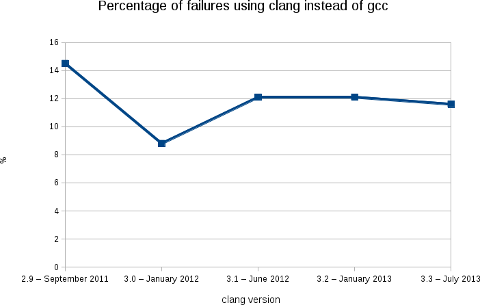
    Like the previous releases, we are at a bit less than 12% of packages failing (2188 packages on a total of 18854).
    More warnings / errors detections have been added to the software (for example: like this defect of the C++ standard or the detection of unused linker option) causing more build failures, but, in the mean time, we fixed some issues in the Debian packages... As usual, the following image shows clearly the evolution of the build failures over time.
    As stated in my blog post for the release 3.2, this rebuilds prove that Clang is ready for production in term of support of the C, C++ and Objective C languages. With the performance results showed by Chandler Carruth from Google at the last Euro LLVM summit (see this video from 5:40), I believe that it is now time to report and fix the bugs in the upstream packages. I also presented this work (video) at the Debconf 13 last week in Vaumarcus (Switzerland) and I will be also presenting this work at the Linux Plumbers Conference, New Orleans. With L o Cavaille (as part of his GSOC) and Paul Tagliamonte, we are also working on providing a better automatic rebuild infrastructure for clang-built packages (and other static analyzers). More in the next few weeks. Finally, I would like to thank folks at AWS for the Debian credit and David Suarez for helping on with the Ruby segfaults.

    Gunnar Wolf: After Debian's 20th birthday, everybody's life gets back to normality...

    As I slowly read my good friends wishing each other a good trip, telling they got home safely, and the IRC channels form thick drops of a bitter-sweet etheral substance, I cannot help feeling DebConf13 is over For me as well, from the distance. Many friends gave me warm greetings, and without being there, gave me that beautiful feeling of real community that Debian has given me for ten years already, since I met in real-life many of its developers at DebConf3 in Oslo. And yes, I have stated this far too many times I have attended every DebConf since (and worked organizing most of them). This year, over 300 people were gathered in Switzerland to enjoy the always most intense weeks of the year. This year, I was unable to attend due to calendar clashes. Even so, without the stress that organizers have, and thanks to the great work of the always-loved Video Team, I think I was able to be present at more sessions than at in any of the last few years. Oh, and for the readers of this blog who were not there Do you want to follow what was presented? You can download already the videos for all of the recorded presentations (that were, due to the planned coverage and the manageable size of the Video Team, about of the total scheduled sessions). And, as always, I was able to follow many very interesting talks and take part of a couple interesting meetings/BoF sessions. I still have a bit of catchup, partly due to the timezone difference (I was only at one of the sessions during the Swiss morning, at 02:30 local time, the pkg-ruby-extras team BoF). Anyway... Not being there, I surely was an avid consumer of the photos posted in the DebConf13 gallery, and will surely follow it for some more time as some of you upload your pending material. It was clear from the beginning that, no matter what your definition of consensus is, the chosen venue was beautiful. A beautiful place between the lake and the mountains where our sportiest guys had a very good share of morning runs, cycling sessions, competition sports of different types, outright plain fun for attendees of all sizes and all species... But, hey, wait! During a chat in the course of DebConf, a friend told me a bit worried that all this beauty and fun might make our dear and very important sponsors they are paying for a geek vacation, is it so? No, not at all. Not by a long stretch. And just looking at those same galleries makes it clear and obvious. After all, it's widely known that Debian is the operating system for the gurus. Simple: It's impossible to have all those geeks without getting amazing work done, in ways that even seem clich s (this last photo had Joey Hess explaining dpkg format version 3.0 (git) ideas, sketched after waking up at 3AM on the first sketching surface available to him). After all, Debian people are famous for their inclination to use any excuse to open their computers and hack away. We can find Debianers hacking in small spaces and also hacking out in the fields. But this time, people were able to hack indoors while enjoying the nature and hack outdoors under a tree. And, yes, one of the things that makes organizing DebConf worth it is, after eleven months having low-bandwidth meetings over IRC, having the opportunity to plan for the next days face to face, in a relaxed but work-full environment. Anyway, here at home I didn't sit idly just longing over them. How could I? We are just celebrating the Debian Project's 20th anniversary! http://gwolf.org/content/jonathan-host-and-organizer-rancho-electr-nico">Jonathan, a Debian enthusiast, student at my university, and collaborator for several free software-related collectives in Mexico City, invited me to the celebration at Rancho Electr nico (which I recently mentioned in this same blog). While I was unable to stay for the whole celebration, we had a very good time; I talked about some ways on how to contribute to Debian. Although I didn't have much of a presentation prepared for it, I feel it was successful and interesting for the attendees I just hope to start seeing some of them get into any of the ways for helping Debian soon. I also stayed as a listener and ocassional commenter for a talk on the Debian Project's history and goals, and to a presentation on a nifty electronic music programming tool called Supercollider (of course, available in Debian). Now, "regular" life should continue. For some value of "regular".

    17 August 2013

    Daniel Pocock: DebConf13: breakthroughs in OTP and WebRTC

    Saturday, 17 August was a day that saw groundbreaking new work revealed at DebConf13 and may have been a watershed moment in the emergence of WebRTC for the free software community.
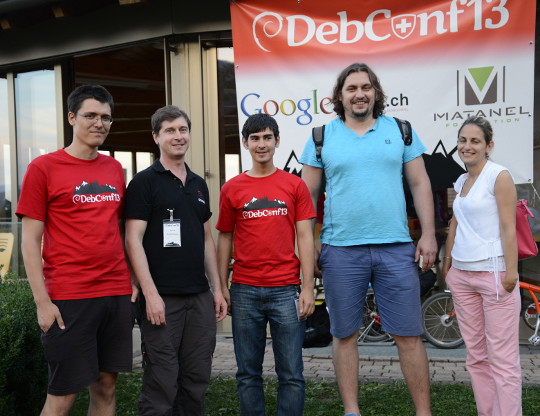
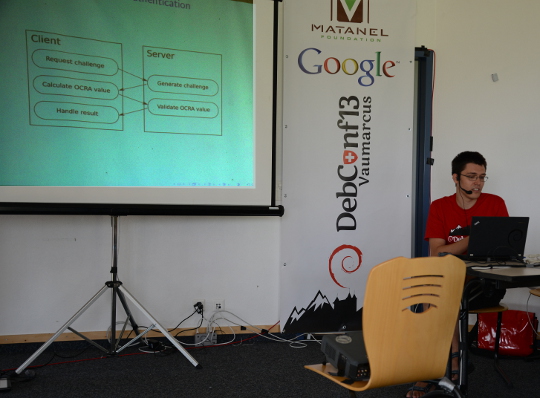
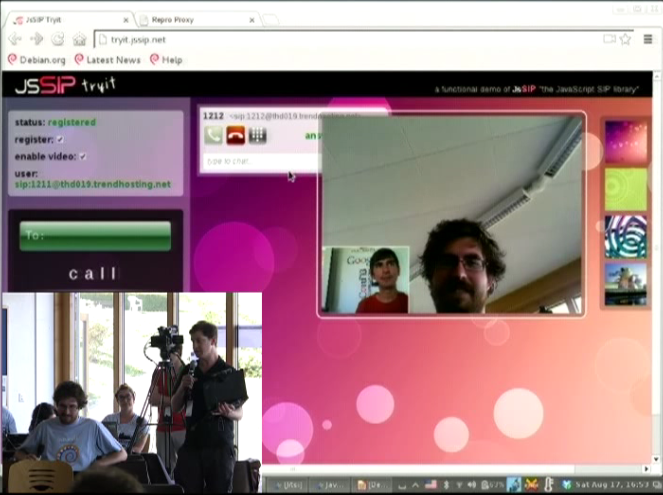
    Fabian Gr nbichler, Daniel Pocock, Catalin Constantin Usurelu, Emil Ivov, Yana Stamcheva Advancing the use of One Time Passwords with free software Google Summer of Code (GSoC) student Fabian Gr nbichler has spent the summer enhancing oath-toolkit and dynalogin to support a more diverse range of One Time Password schemes. dynalogin's original 1.0 release supports vanilla HOTP and TOTP authentication schemes. Fabian's work has extended the framework to support the more generic and powerful OCRA approach. To find out about all the benefits this brings, I would strongly encourage you to review his slides and video presentation, with a demo where it is explained thoroughly. While there are existing hardware tokens that support HOTP and TOTP using this open algorithm (Gooze has been kind enough to donate some which were on display), the mutual challenge-response schemes are yet to be widely supported in hardware and this means that Fabian's work is now at the cutting edge of development in this area. WebRTC: premium voice/video chat in modern browsers, no plugin required Another member of Debian's GSoC program, Catalin Constantin Usurelu helped organise and run one of the must-see sessions of DebConf13 (video available). In a demonstration that had all the hallmarks of a magic show, Catalin and I took random members of the audience and invited them to wave a magic wand over their web browsers and effortlessly turn them into Skype-busting softphones. As the grand finale, we took Wookey's blog and showed him how to add a WebRTC "call-me" page in less than 20 seconds, less time than it takes to hand over all your private data to the registration process of those rather uncomfortable alternatives. Anybody else seeking to duplicate this effort is encourage to review options like Drucall for Drupal or just directly use JsSIP Jitsi and the Jitsi Video-bridge The grand-finale of the DebConf13 real-time communications track was our guest speaker, Emil Ivov, founder of the Jitsi softphone project. Jitsi itself has recently been accepted into Debian and is easier than ever before to install and use. Emil's talk (video and slides available) went into some detail about the cutting edge development activities of his team, particularly the new Jitsi Video bridge Subsequent to the talk, we had some out-of-bands discussion about ways to potentially integrate Jitsi Video bridge with the open source dvswitch system used to produce streams and recordings from free software events such as DebConf and FOSDEM. It is hoped that this will provide an additional option for remote participation at free software events of all sizes. Upcoming events Emil and I have been invited to participate in the WebRTC Conference Paris 2013 in December. This will be an excellent opportunity to have further discussion about progress with WebRTC and do more to raise the compelling case for premium quality free software to meet the demanding needs of modern business communications. There are a series of talks for both technical and business-oriented audiences.
    Andrew Cater: Debian - 20th birthday

    Happy Birthday! Second oldest Linux distribution still going - Slackware is a little older. It's also been the bane of my life / my obsession / fixation and joy for about 15 of those years. I'm pleased and proud to be associated with the Debian Project as a Debian developer: many of my colleagues are at Debconf 13 in Vaumarcus in Switzerland right now but there will be celebrations around the world.

    Great distribution: great hardware support on lots of architectures: huge numbers of derivatives - but what makes it is the people, including some of those who have contributed hugely but are sadly no longer with us. Debian is a phenomenal, supportive, family but, as ever, sometimes dysfunctional

    Joel Klecker, Chris Rutter, Frans Pop, Adrian von Bidder and all the others - I so wish you'd all been here to see this.

    Daniel Leidert: Create a KNOPPIX USB (boot-)stick from a running Linux system

    I was recently examining, how to boot a (live) KNOPPIX from an USB stick. It turns out I did not find a manual about how to create a bootable USB stick containing KNOPPIX without burning KNOPPIX to a CD/DVD first?! So this is a short howto without burning anything. I'm showing how to put a KNOPPIX ISO image to an USB stick. I need an ISO image of KNOPPIX, an USB stick and syslinux installed. I've chosen to put the 4GB DVD image KNOPPIX_V7.2.0DVD-2013-06-16-EN.iso onto a 16GB USB stick. The place left on the USB device should be available to the user as NTFS partition. I'll use the term /dev/sdX to refer to the stick (where X is a lowercase character, e.g. /dev/sdb) and completely empty it first (THIS WILL DELETE ALL DATA INCLUDING THE PARTITION TABLE!):
    shred -z /dev/sdX
    Now after the ISO image has been downloaded, we need to alter it a bit. For this some information about the USB stick is required. The relevant bits heads and sectors/track are highlighted below:

    fdisk -l /dev/sdX

    Disk /dev/sdX: 16.0 GB, 16008609792 bytes
    64 heads, 32 sectors/track, 15267 cylinders, total 31266816 sectors
    Units = sectors of 1 * 512 = 512 bytes
    Sector size (logical/physical): 512 bytes / 512 bytes
    I/O size (minimum/optimal): 512 bytes / 512 bytes
    Disk identifier: 0x0000

    Device Boot Start End Blocks Id System
    Now we change the ISO image for hybrid mode:
    isohybrid -o 1 -h 64 -s 32 -e 1 KNOPPIX_V7.2.0DVD-2013-06-16-EN.iso
    and copy the ISO image to the USB stick:
    cat KNOPPIX_V7.2.0DVD-2013-06-16-EN.iso > /dev/sdX
    After the command has succeeded, the partition table will show a bootable "Hidden HPFS/NTFS" partition. Note that you can adjust the partition type by using the -t, --type switch of isohybrid.

    fdisk -l /dev/sdX

    Disk /dev/sdX: 16.0 GB, 16008609792 bytes
    64 heads, 32 sectors/track, 15267 cylinders, total 31266816 sectors
    Units = sectors of 1 * 512 = 512 bytes
    Sector size (logical/physical): 512 bytes / 512 bytes
    I/O size (minimum/optimal): 512 bytes / 512 bytes
    Disk identifier: 0x0000

    Device Boot Start End Blocks Id System
    /dev/sdX * 1 8032255 4016127+ 17 Hidden HPFS/NTFS
    Now we can create one or more partitions on the stick for shipping data or $whatever by using fdisk, e.g. create a new primary partition and set the type to HPFS/NTFS/exFAT:

    fdisk /dev/sdX

    Command (m for help): p

    Disk /dev/sdX: 16.0 GB, 16008609792 bytes
    64 heads, 32 sectors/track, 15267 cylinders, total 31266816 sectors
    Units = sectors of 1 * 512 = 512 bytes
    Sector size (logical/physical): 512 bytes / 512 bytes
    I/O size (minimum/optimal): 512 bytes / 512 bytes
    Disk identifier: 0x12345678

    Device Boot Start End Blocks Id System
    /dev/sdX * 1 8032255 4016127+ 17 Hidden HPFS/NTFS

    Command (m for help): n
    Partition type:
    p primary (1 primary, 0 extended, 3 free)
    e extended
    Select (default p): p
    Partition number (1-4, default 2): 2
    First sector (8032256-31266815, default 8032256):
    Using default value 8032256
    Last sector, +sectors or +size K,M,G (8032256-31266815, default 31266815):
    Using default value 31266815

    Command (m for help): t
    Partition number (1-4): 2
    Hex code (type L to list codes): 7
    Changed system type of partition 2 to 7 (HPFS/NTFS/exFAT)

    Command (m for help): p

    Disk /dev/sdX: 16.0 GB, 16008609792 bytes
    64 heads, 32 sectors/track, 15267 cylinders, total 31266816 sectors
    Units = sectors of 1 * 512 = 512 bytes
    Sector size (logical/physical): 512 bytes / 512 bytes
    I/O size (minimum/optimal): 512 bytes / 512 bytes
    Disk identifier: 0x12345678

    Device Boot Start End Blocks Id System
    /dev/sdX1 * 1 8032255 4016127+ 17 Hidden HPFS/NTFS
    /dev/sdX2 8032256 31266815 11617280 7 HPFS/NTFS/exFAT

    Command (m for help): w

    [..]
    Run mkfs.ntfs on /dev/sdX2 to create the NTFS file system there. The USB stick is ready now. Connected to the system where one wants to start a live KNOPPIX and chosen to boot this system from USB will result in a running KNOPPIX system.The same should also work for creating a Debian live system USB stick. Thanks to the author of this article.

    Next.

    Previous.