Search Results: "ag"

9 January 2017

Petter Reinholdtsen: Where did that package go? geolocated IP traceroute

Did you ever wonder where the web trafic really flow to reach the web servers, and who own the network equipment it is flowing through? It is possible to get a glimpse of this from using traceroute, but it is hard to find all the details. Many years ago, I wrote a system to map the Norwegian Internet (trying to figure out if our plans for a network game service would get low enough latency, and who we needed to talk to about setting up game servers close to the users. Back then I used traceroute output from many locations (I asked my friends to run a script and send me their traceroute output) to create the graph and the map. The output from traceroute typically look like this:
traceroute to www.stortinget.no (85.88.67.10), 30 hops max, 60 byte packets
 1  uio-gw10.uio.no (129.240.202.1)  0.447 ms  0.486 ms  0.621 ms
 2  uio-gw8.uio.no (129.240.24.229)  0.467 ms  0.578 ms  0.675 ms
 3  oslo-gw1.uninett.no (128.39.65.17)  0.385 ms  0.373 ms  0.358 ms
 4  te3-1-2.br1.fn3.as2116.net (193.156.90.3)  1.174 ms  1.172 ms  1.153 ms
 5  he16-1-1.cr1.san110.as2116.net (195.0.244.234)  2.627 ms he16-1-1.cr2.oslosda310.as2116.net (195.0.244.48)  3.172 ms he16-1-1.cr1.san110.as2116.net (195.0.244.234)  2.857 ms
 6  ae1.ar8.oslosda310.as2116.net (195.0.242.39)  0.662 ms  0.637 ms ae0.ar8.oslosda310.as2116.net (195.0.242.23)  0.622 ms
 7  89.191.10.146 (89.191.10.146)  0.931 ms  0.917 ms  0.955 ms
 8  * * *
 9  * * *
[...]
This show the DNS names and IP addresses of (at least some of the) network equipment involved in getting the data traffic from me to the www.stortinget.no server, and how long it took in milliseconds for a package to reach the equipment and return to me. Three packages are sent, and some times the packages do not follow the same path. This is shown for hop 5, where three different IP addresses replied to the traceroute request. There are many ways to measure trace routes. Other good traceroute implementations I use are traceroute (using ICMP packages) mtr (can do both ICMP, UDP and TCP) and scapy (python library with ICMP, UDP, TCP traceroute and a lot of other capabilities). All of them are easily available in Debian. This time around, I wanted to know the geographic location of different route points, to visualize how visiting a web page spread information about the visit to a lot of servers around the globe. The background is that a web site today often will ask the browser to get from many servers the parts (for example HTML, JSON, fonts, JavaScript, CSS, video) required to display the content. This will leak information about the visit to those controlling these servers and anyone able to peek at the data traffic passing by (like your ISP, the ISPs backbone provider, FRA, GCHQ, NSA and others). Lets pick an example, the Norwegian parliament web site www.stortinget.no. It is read daily by all members of parliament and their staff, as well as political journalists, activits and many other citizens of Norway. A visit to the www.stortinget.no web site will ask your browser to contact 8 other servers: ajax.googleapis.com, insights.hotjar.com, script.hotjar.com, static.hotjar.com, stats.g.doubleclick.net, www.google-analytics.com, www.googletagmanager.com and www.netigate.se. I extracted this by asking PhantomJS to visit the Stortinget web page and tell me all the URLs PhantomJS downloaded to render the page (in HAR format using their netsniff example. I am very grateful to Gorm for showing me how to do this). My goal is to visualize network traces to all IP addresses behind these DNS names, do show where visitors personal information is spread when visiting the page.
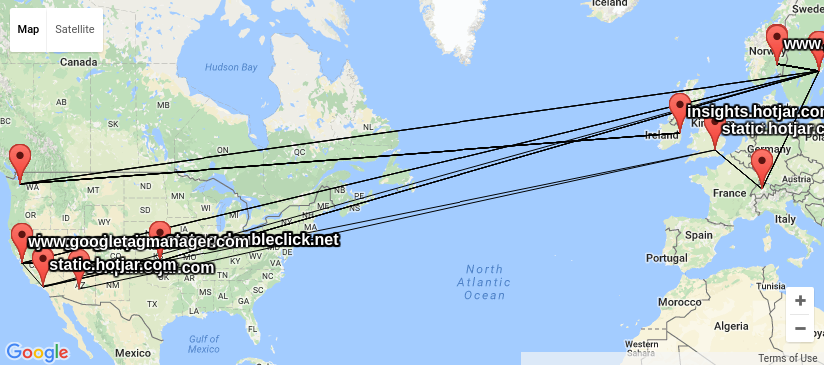
map of combined traces for URLs used by www.stortinget.no using GeoIP When I had a look around for options, I could not find any good free software tools to do this, and decided I needed my own traceroute wrapper outputting KML based on locations looked up using GeoIP. KML is easy to work with and easy to generate, and understood by several of the GIS tools I have available. I got good help from by NUUG colleague Anders Einar with this, and the result can be seen in my kmltraceroute git repository. Unfortunately, the quality of the free GeoIP databases I could find (and the for-pay databases my friends had access to) is not up to the task. The IP addresses of central Internet infrastructure would typically be placed near the controlling companies main office, and not where the router is really located, as you can see from the KML file I created using the GeoLite City dataset from MaxMind.

scapy traceroute graph for URLs used by www.stortinget.no I also had a look at the visual traceroute graph created by the scrapy project, showing IP network ownership (aka AS owner) for the IP address in question. The graph display a lot of useful information about the traceroute in SVG format, and give a good indication on who control the network equipment involved, but it do not include geolocation. This graph make it possible to see the information is made available at least for UNINETT, Catchcom, Stortinget, Nordunet, Google, Amazon, Telia, Level 3 Communications and NetDNA.
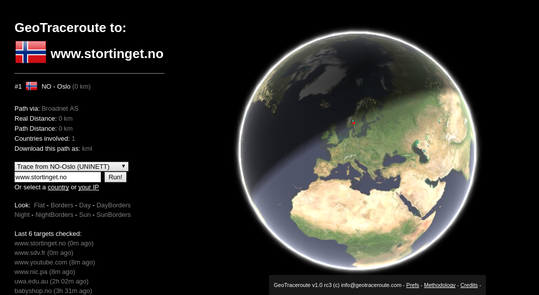
example geotraceroute view for www.stortinget.no In the process, I came across the web service GeoTraceroute by Salim Gasmi. Its methology of combining guesses based on DNS names, various location databases and finally use latecy times to rule out candidate locations seemed to do a very good job of guessing correct geolocation. But it could only do one trace at the time, did not have a sensor in Norway and did not make the geolocations easily available for postprocessing. So I contacted the developer and asked if he would be willing to share the code (he refused until he had time to clean it up), but he was interested in providing the geolocations in a machine readable format, and willing to set up a sensor in Norway. So since yesterday, it is possible to run traces from Norway in this service thanks to a sensor node set up by the NUUG assosiation, and get the trace in KML format for further processing.
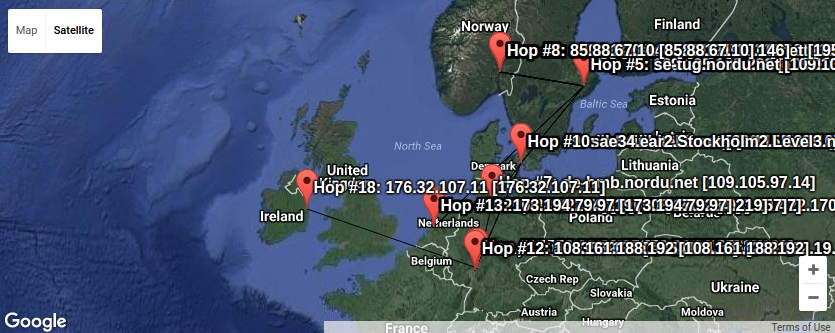
map of combined traces for URLs used by www.stortinget.no using geotraceroute Here we can see a lot of trafic passes Sweden on its way to Denmark, Germany, Holland and Ireland. Plenty of places where the Snowden confirmations verified the traffic is read by various actors without your best interest as their top priority. Combining KML files is trivial using a text editor, so I could loop over all the hosts behind the urls imported by www.stortinget.no and ask for the KML file from GeoTraceroute, and create a combined KML file with all the traces (unfortunately only one of the IP addresses behind the DNS name is traced this time. To get them all, one would have to request traces using IP number instead of DNS names from GeoTraceroute). That might be the next step in this project. Armed with these tools, I find it a lot easier to figure out where the IP traffic moves and who control the boxes involved in moving it. And every time the link crosses for example the Swedish border, we can be sure Swedish Signal Intelligence (FRA) is listening, as GCHQ do in Britain and NSA in USA and cables around the globe. (Hm, what should we tell them? :) Keep that in mind if you ever send anything unencrypted over the Internet. PS: KML files are drawn using the KML viewer from Ivan Rublev, as it was less cluttered than the local Linux application Marble. There are heaps of other options too. As usual, if you use Bitcoin and want to show your support of my activities, please send Bitcoin donations to my address 15oWEoG9dUPovwmUL9KWAnYRtNJEkP1u1b.

Guido G nther: Debian Fun in December 2016

Debian LTS November marked the 20th month I contributed to Debian LTS under the Freexian umbrella. I had 8 hours allocated which I used by: Other Debian stuff Some other Free Software activites

Riku Voipio: 20 years of being a debian maintainer


fte (0.44-1) unstable; urgency=low

* initial Release.

-- Riku Voipio Wed, 25 Dec 1996 20:41:34 +0200
Welp I seem to have spent holidays of 1996 doing my first Debian package. The process of getting a package into Debian was quite straightforward then. "I have packaged fte, here is my pgp, can I has an account to upload stuff to Debian?" I think the bureaucracy took until second week of January until I could actually upload the created package.

uid Riku Voipio
sig 89A7BF01 1996-12-15 Riku Voipio
sig 4CBA92D1 1997-02-24 Lars Wirzenius
A few months after joining, someone figured out that to pgp signatures to be useful, keys need to be cross-signed. Hence young me taking a long bus trip from countryside Finland to the capital Helsinki to meet the only other DD in Finland in a cafe. It would still take another two years until I met more Debian people, and it could be proven that I'm not just an alter ego of Lars ;) Much later an alternative process of phone-calling prospective DD's would be added.

Dirk Eddelbuettel: RcppCCTZ 0.2.0

A new version, now at 0.2.0, of RcppCCTZ is now on CRAN. And it brings a significant change: windows builds! Thanks to Dan Dillon who dug deep enough into the libc++ sources from LLVM to port the std::get_time() function that is missing from the 4.* series of g++. And with Rtools being fixed at g++-4.9.3 this was missing for us here. Now we can parse dates for use by RcppCCTZ on Windows as well. That is important not only for RcppCCTZ but also particularly for the one package (so far) depending on it: nanotime. CCTZ is a C++ library for translating between absolute and civil times using the rules of a time zone. In fact, it is two libraries. One for dealing with civil time: human-readable dates and times, and one for converting between between absolute and civil times via time zones. It requires only a proper C++11 compiler and the standard IANA time zone data base which standard Unix, Linux, OS X, ... computers tend to have in /usr/share/zoneinfo -- and for which R on Windows ships its own copy we can use. RcppCCTZ connects this library to R by relying on Rcpp. The RcppCCTZ page has a few usage examples, as does the post announcing the previous release. The changes in this version are summarized here:

Changes in version 0.2.0 (2017-01-08)
  • Windows compilation was enabled by defining OFFSET() and ABBR() for MinGW (#10 partially addressing #9)
  • Windows use completed with backport of std::get_time from LLVM's libc++ to enable strptime semantics (Dan Dillon in #11 completing #9)
  • Timezone information on Windows is supplied via R's own copy of zoneinfo with TZDIR set (also #10)
  • The interface to formatDouble was cleaned up

We also have a diff to the previous version thanks to CRANberries. More details are at the RcppCCTZ page; code, issue tickets etc at the GitHub repository.

This post by Dirk Eddelbuettel originated on his Thinking inside the box blog. Please report excessive re-aggregation in third-party for-profit settings.

8 January 2017

Steve Kemp: Patching scp and other updates.

I use openssh every day, be it the ssh command for connecting to remote hosts, or the scp command for uploading/downloading files. Once a day, or more, I forget that scp uses the non-obvious -P flag for specifying the port, not the -p flag that ssh uses. Enough is enough. I shall not file a bug report against the Debian openssh-client page, because no doubt compatibility with both upstream, and other distributions, is important. But damnit I've had enough. apt-get source openssh-client shows the appropriate code:
    fflag = tflag = 0;
    while ((ch = getopt(argc, argv, "dfl:prtvBCc:i:P:q12346S:o:F:")) != -1)
          switch (ch)  
          ..
          ..
            case 'P':
                    addargs(&remote_remote_args, "-p");
                    addargs(&remote_remote_args, "%s", optarg);
                    addargs(&args, "-p");
                    addargs(&args, "%s", optarg);
                    break;
          ..
          ..
            case 'p':
                    pflag = 1;
                    break;
          ..
          ..
          ..
Swapping those two flags around, and updating the format string appropriately, was sufficient to do the necessary. In other news I've done some hardware development, using both Arduino boards and the WeMos D1-mini. I'm still at the stage where I'm flashing lights, and doing similarly trivial things: I have more complex projects planned for the future, but these are on-hold until the appropriate parts are delivered: Even with a few LEDs though I've had fun, for example writing a trivial binary display.

Jonas Meurer: debian lts report 2016.12

Debian LTS report for December 2016 December 2016 was my fourth month as a Debian LTS team member. I was allocated 12 hours. Unfortunately I turned out to have way less time for Debian and LTS work than expected, so I only spent 5,25 hours of them for the following tasks:

Jonas Meurer: debian lts report 2016 12

Debian LTS report for December 2016 December 2016 was my fourth month as a Debian LTS team member. I was allocated 12 hours. Unfortunately I turned out to have way less time for Debian and LTS work than expected, so I only spent 5,25 hours of them for the following tasks:

Keith Packard: embedded-arm-libc

Finding a Libc for tiny embedded ARM systems You'd think this problem would have been solved a long time ago. All I wanted was a C library to use in small embedded systems -- those with a few kB of flash and even fewer kB of RAM. Small system requirements A small embedded system has a different balance of needs: Available small C libraries I've looked at: Current AltOS C library We've been using pdclib for a couple of years. It was easy to get running, but it really doesn't match what we need. In particular, it uses a lot of stack space in the stdio implementation as there's an additional layer of abstraction that isn't necessary. In addition, pdclib doesn't include a math library, so I've had to 'borrow' code from other places where necessary. I've wanted to switch for a while, but there didn't seem to be a great alternative. What's wrong with newlib? The "obvious" embedded C library is newlib. Designed for embedded systems with a nice way to avoid needing a 'real' kernel underneath, newlib has a lot going for it. Most of the functions have a good balance between speed and size, and many of them even offer two implementations depending on what trade-off you need. Plus, the build system 'just works' on multi-lib targets like the family of cortex-m parts. The big problem with newlib is the stdio code. It absolutely requires dynamic memory allocation and the amount of code necessary for 'printf' is larger than the flash space on many of our devices. I was able to get a cortex-m3 application compiled in 41kB of code, and that used a smattering of string/memory functions and printf. How about avr libc? The Atmel world has it pretty good -- avr-libc is small and highly optimized for atmel's 8-bit avr processors. I've used this library with success in a number of projects, although nothing we've ever sold through Altus Metrum. In particular, the stdio implementation is quite nice -- a 'FILE' is effectively a struct containing pointers to putc/getc functions. The library does no buffering at all. And it's tiny -- the printf code lacks a lot of the fancy new stuff, which saves a pile of space. However, much of the places where performance is critical are written in assembly language, making it pretty darn hard to port to another processor. Mixing code together for fun and profit! Today, I decided to try an experiment to see what would happen if I used the avr-libc stdio bits within the newlib environment. There were only three functions written in assembly language, two of them were just stubs while the third was a simple ultoa function with a weird interface. With those coded up in C, I managed to get them wedged into newlib. Figuring out the newlib build system was the only real challenge; it's pretty awful having generated files in the repository and a mix of autoconf 2.64 and 2.68 version dependencies. The result is pretty usable though; my STM 32L discovery board demo application is only 14kB of flash while the original newlib stdio bits needed 42kB and that was still missing all of the 'syscalls', like read, write and sbrk. Here's gitweb pointing at the top of the tiny-stdio tree: gitweb And, of course you can check out the whole thing
git clone git://keithp.com/git/newlib
'master' remains a plain upstream tree, although I do have a fix on that branch. The new code is all on the tiny-stdio branch. I'll post a note on the newlib mailing list once I've managed to subscribe and see if there is interest in making this option available in the upstream newlib releases. If so, I'll see what might make sense for the Debian libnewlib-arm-none-eabi packages.

Dirk Eddelbuettel: Rcpp now used by 900 CRAN packages

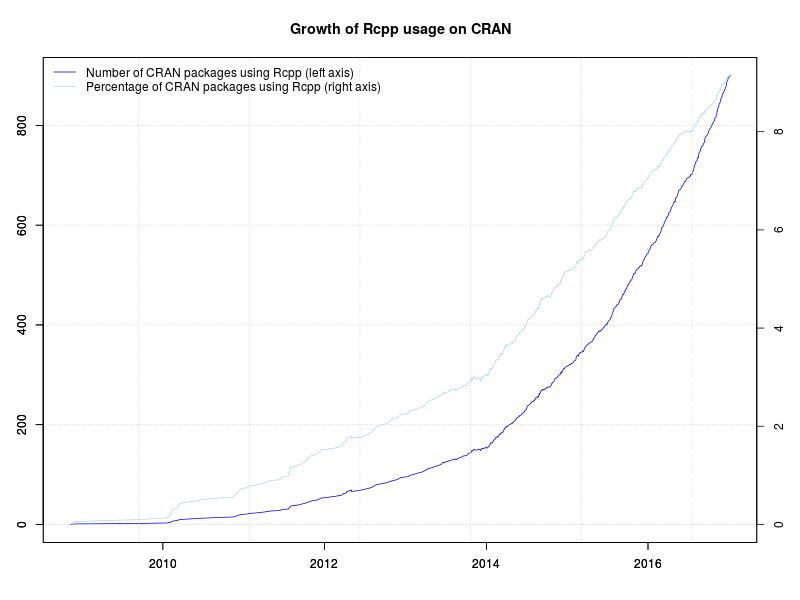
800 Rcpp packages Today, Rcpp passed another milestone as 900 packages on CRAN now depend on it (as measured by Depends, Imports and LinkingTo declarations). The graph is on the left depicts the growth of Rcpp usage over time. The easiest way to compute this is to use the reverse_dependencies_with_maintainers() function from a helper scripts file on CRAN. This still gets one or two false positives of packages declaring a dependency but not actually containing C++ code and the like. There is also a helper function revdep() in the devtools package but it includes Suggests: which does not firmly imply usage, and hence inflates the count. I have always opted for a tighter count with corrections. Rcpp cleared 300 packages in November 2014. It passed 400 packages in June 2015 (when I only tweeted about it), 500 packages in late October 2015, 600 packages last March, 700 packages last July and 800 packages last October. The chart extends to the very beginning via manually compiled data from CRANberries and checked with crandb. The next part uses manually saved entries. The core (and by far largest) part of the data set was generated semi-automatically via a short script appending updates to a small file-based backend. A list of packages using Rcpp is kept on this page. Also displayed in the graph is the relative proportion of CRAN packages using Rcpp. The four per-cent hurdle was cleared just before useR! 2014 where I showed a similar graph (as two distinct graphs) in my invited talk. We passed five percent in December of 2014, six percent July of last year, seven percent just before Christmas eight percent this summer, and nine percent mid-December. 900 user packages is a really large number. This puts more than some responsibility on us in the Rcpp team as we continue to keep Rcpp as performant and reliable as it has been. At the rate things are going, the big 1000 may be hit some time in April. And with that a very big Thank You! to all users and contributors of Rcpp for help, suggestions, bug reports, documentation or, of course, code.

This post by Dirk Eddelbuettel originated on his Thinking inside the box blog. Please report excessive re-aggregation in third-party for-profit settings.

7 January 2017

Simon Richter: Crossgrading Debian in 2017

So, once again I had a box that had been installed with the kind-of-wrong Debian architecture, in this case, powerpc (32 bit, bigendian), while I wanted ppc64 (64 bit, bigendian). So, crossgrade time. If you want to follow this, be aware that I use sysvinit. I doubt this can be done this way with systemd installed, because systemd has a lot more dependencies for PID 1, and there is also a dbus daemon involved that cannot be upgraded without a reboot. To make this a bit more complicated, ppc64 is an unofficial port, so it is even less synchronized across architectures than sid normally is (I would have used jessie, but there is no jessie for ppc64). Step 1: Be Prepared To work around the archive synchronisation issues, I installed pbuilder and created 32 and 64 bit base.tgz archives:

pbuilder --create --basetgz /var/cache/pbuilder/powerpc.tgz
pbuilder --create --basetgz /var/cache/pbuilder/ppc64.tgz \
    --architecture ppc64 \
    --mirror http://ftp.ports.debian.org/debian-ports \
    --debootstrapopts --keyring=/usr/share/keyrings/debian-ports-archive-keyring.gpg \
    --debootstrapopts --include=debian-ports-archive-keyring
Step 2: Gradually Heat the Water so the Frog Doesn't Notice Then, I added the sources to sources.list, and added the architecture to dpkg:
deb [arch=powerpc] http://ftp.debian.org/debian sid main
deb [arch=ppc64] http://ftp.ports.debian.org/debian-ports sid main
deb-src http://ftp.debian.org/debian sid main
dpkg --add-architecture ppc64
apt update
Step 3: Time to Go Wild
apt install dpkg:ppc64
Obviously, that didn't work, in my case because libattr1 and libacl1 weren't in sync, so there was no valid way to install powerpc and ppc64 versions in parallel, so I used pbuilder to compile the current version from sid for the architecture that wasn't up to date (IIRC, one for powerpc, and one for ppc64). Manually installed the libraries, then tried again:
apt install dpkg:ppc64
Woo, it actually wants to do that. Now, that only half works, because apt calls dpkg twice, once to remove the old version, and once to install the new one. Your options at this point are
apt-get download dpkg:ppc64
dpkg -i dpkg_*_ppc64.deb
or if you didn't think far enough ahead, cursing followed by
cd /tmp
ar x /var/cache/apt/archives/dpkg_*_ppc64.deb
cd /
tar -xJf /tmp/data.tar.xz
dpkg -i /var/cache/apt/archives/dpkg_*_ppc64.deb
Step 4: Automate That Now, I'd like to get this a bit more convenient, so I had to repeat the same dance with apt and aptitude and their dependencies. Thanks to pbuilder, this wasn't too bad. With the aptitude resolver, it was then simple to upgrade a test package
aptitude install coreutils:ppc64 coreutils:powerpc-
The resolver did its thing, and asked whether I really wanted to remove an Essential package. I did, and it replaced the package just fine. So I asked dpkg for a list of all powerpc packages installed (since it's a ppc64 dpkg, it will report powerpc as foreign), massage that into shape with grep and sed, and give the result to aptitude as a command line. Some time later, aptitude finished, and I had a shiny 64 bit system. Crossgrade through an ssh session that remained open all the time, and without a reboot. After closing the ssh session, the last 32 bit binary was deleted as it was no longer in use. There were a few minor hiccups during the process where dpkg refused to overwrite "shared" files with different versions, but these could be solved easily by manually installing the offending package with
dpkg --force-overwrite -i ...
and then resuming what aptitude was doing, using
aptitude install
So, in summary, this still works fairly well.

Thorsten Alteholz: My Debian Activities in December 2016

FTP assistant This month I marked 367 packages for accept and rejected 45 packages. This time I only sent 10 emails to maintainers asking questions. Debian LTS This was my thirtieth month that I did some work for the Debian LTS initiative, started by Raphael Hertzog at Freexian. This month my all in all workload has been 13.50h. During that time I did uploads of Other stuff The Debian Med Advent Calendar was really successful this year. As announced in [1] this year the second highest number of bugs has been closed during tht bug squashing:
year number of bugs closed
2011 63
2012 28
2013 73
2014 5
2015 150
2016 95
Well done everybody who participated! In December I also uploaded new upstream versions of duktape, fixed bugs in openzwave, did a binary upload for mpb on mipsel, sponsored openzwave-controlpanel, sidedoor and printrun.
Thanks to lamby that openzwave-controlpanel and sidedoor even made it into Stretch. Last but not least I want to wish everybody a Happy New Year. [1] https://lists.debian.org/debian-med/2016/12/msg00180.html

Enrico Zini: Teamwork

When I saw this video or this video I thought of this article. When I feel part of a tightly coordinated and synchronized team I feel proud for the achievements of the team as a whole, which I see as bigger than what I could have achieved alone. I also don't feel at risk of taking bad decisions. I feel less responsible. If I do what I'm told, I can't be blamed for doing the wrong things. I find it relaxing, every once in a while, to not have to be in charge. I guess this could be part of the allure of a totalitarian regime: being freed from the burden of growing up Thinking about this, reading those articles about romantic relationships, I see quite a bit of parallels also with organising cooperation and teamwork. It looks like I ended up making parallels between Polyamory, Anarchism, and Free Software again. If you think there should traditionally be also a mention of BDSM, go back to "I find it relaxing, every once in a while, to not have to be in charge".

6 January 2017

Vincent Fourmond: RFH: screen that hurts my eyes

Short summary:My eyes hurt when I use my home desktop computer - but only with this computer. This has been very long and frustrating for me, so if you think you can help, read the whole story just below, or skip to what I've tried and what I suspect might be the problem, and post comments below, or send me a mail (my adress should be quite obvious in this page).

Whole story:Two years ago, I bought myself a new fancy motherboard (a Asus B85M-G C2) with a new fancy Intel-based processor with built-in graphics (an Intel Core i7-4770) and memory to go with it. I installed it in the place of my old AMD-based motherboard, keeping everything else (my hoard of hard drives and such) excepted the graphics card, which was not needed anymore. I immediately noticed my eyes were aching when using the computer. I was quite surprised since I had been using the screen very heavily for almost 10 years before that, without any problems. I attributed that to Intel Graphics, so I tried putting back the old graphics card, but it did not help. The situation was very frustrating, since working on the computer for an hour or so was making my eyes hurt for several days. This problem was specific to this computer, I could keep on using my computer at work and my laptop without problems.I could use the computer using SSH from my laptop, so I could profit from the faster processor, but, hey, that wasn't how it was meant to happen. I bought another screen, also tried with one from the work, without any change. I tried using two screens at the same time (this is what I have at work), also without success, so I just kept not using the computer directly. I moved recently to a new place and tried to get that working back again, but didn't get any luck. Frustrated, I got another desktop computer and another screen, and I still have the same problem ! I also tried remounting the old motherboard with the AMD processor and the old graphics card, but that didn't bring any improvement. I just don't get it. This situation is rather frustrating for me, and it's been holding me back in my software projects for two years now (which partly explains my lack of involvement in Debian over the past few years). This post is here in the hope someone will have a idea, but also for me to keep track of what I've done and what I should.

What is puzzling me is that the computer I had before was perfectly fine, and that I have a very very similar setup at work (also with a NVIDIA graphics card) that doesn't hurt my eyes at all.

What I've tried:Here is what I tried, you need to keep in mind that when a trial fails, my eyes keep on hurting for several days, and might trigger false positives.
  • putting back the old (NVIDIA) graphics card, buying a new one (NVIDIA as well);
  • putting back the old motherboard (but with a new OS, but maybe my eyes were too sore for a clean test);
  • using another screen (a new one from the same brand, Samsung), a Dell and a HP from my work, and a brand new Phillips;
  • using two screens at the same time;
  • using a completely different (new, based on Xeon processors and a NVIDIA graphics card) computer (with new mouse, keyboard, hard drives and so on);
  • changing house, including changing the lighting conditions, the desk, the internet provider (no, I didn't do that just because of my computer problems !);
  • changing the way I drive the screens between VGA, DVI and HDMI;
  • copying the system I have in my workplace to the new computer and booting from that system (after a few adaptations, though).

As you can guess, none of those brought any improvement.

Wild hypotheses:
  • Is that a software thing ? Is there something wrong for me in the versions of Debian dating from August 2014 and after ?
  • Is that a BIOS problem with recent computers ?
  • Is that linked to some waves (bluetooth shoudln't be on, but maybe I didn't check well enough ?)
  • Is that linked to EFI (but I also have the problems when I use legacy BIOS for booting)
  • Something weird in my home ?
  • Anything else ?

Any help will be greatly appreciated, but please don't advise going to see a doctor, I don't see how this could be a medical condition specific to my home desktop computer, unless this is a very specific psychosomatic problem.

Urvika Gola: Outreachy- Week 3 Progress

In my previous blog I had tried to explain what White Labelling is and my approach of implementing it in Lumicall. This week I went ahead with the implementation by using productFlavors feature in Android. I baked my cake!
I ve created two flavors :
  1. Lumicall (which runs like the default version)
  2. Whitelabel
To switch to the desired version, there is a build variant window on the bottom left of Android Studio, when you open it, you can change your current active flavor from the ones you defined. So the idea is, there would be different flavors for each client. And all the client specific resources would go under src/(flavorname) folder. The client specific resources could be:
  1. Application name
  2. Client s logo (Drawable)
  3. Details about the client s organization which would go under about tab
  4. Colors / Themes (Colors.xml)
  5. Strings (Strings.xml)
  6. Additional Files which include new features
To understand how to modify these resources in the flavored version, Let s take an example in which we would like to replace the application name from from Lumicall to, lets say ClientApp .
  1. Go to file : /res/values/strings.xml which has the application name <string name= app_name >Lumicall</string>
  2. To replace it with client s app name, You d have to create a new strings.xml file (Note : Same name as that of the existing strings.xml file ) in the directory LumicallWhitelabel/src/whitelabel/res/values/strings.xml So, in our project, there are two strings.xml file. One is /res/values/strings.xml and one flavored specfic file in LumicallWhitelabel/src/whitelabel/res/values/strings.xml.

    Only add the values which would be different in the flavor version.
    If there are particular things which you d like to be same, then there is no need of adding them again with the same value in the flavored file.


    -Just define the values you would want to replace. Not the values you would like to be same- Gradle will take care of the overwriting while merging the resources when you run the flavored version.
Now, the most important thing is changing the Application ID. In my previous blog I explained the difference between ApplicationID and package name. I also added a snippet from my build.gradle file which would suffix .whitelabel at the end of the orignal applicationID. So for configuring ApplicationID for each flavor, add applicationIdSuffix suffix_you_want .

Link to the the cake : https://github.com/Urvika-gola/LumicallWhitelabel Thanks for reading,
U

Elena 'valhalla' Grandi: Candy from Strangers

Candy from Strangers

A few days ago I gave a talk at ESC https://www.endsummercamp.org/ about some reasons why I think that using software and especially libraries from the packages of a community managed distribution is important and much better than alternatives such as pypi, nmp etc. This article is a translation of what I planned to say before forgetting bits of it and luckily adding it back as an answer to a question :)

When I was young, my parents taught me not to accept candy from strangers, unless they were present and approved of it, because there was a small risk of very bad things happening. It was of course a simplistic rule, but it had to be easy enough to follow for somebody who wasn't proficient (yet) in the subtleties of social interactions.

One of the reasons why it worked well was that following it wasn't a big burden: at home candy was plenty and actual offers were rare: I only remember missing one piece of candy because of it, and while it may have been a great one, the ones I could have at home were also good.

Contrary to candy, offers of gratis software from random strangers are quite common: from suspicious looking websites to legit and professional looking ones, to platforms that are explicitly designed to allow developers to publish their own software with little or no checks.

Just like candy, there is also a source of trusted software in the Linux distributions, especially those lead by a community: I mention mostly Debian because it's the one I know best, but the same principles apply to Fedora and, to some measure, to most of the other distributions. Like good parents, distributions can be wrong, and they do leave room for older children (and proficient users) to make their own choices, but still provide a safe default.

Among the unsafe sources there are many different cases and while they do share some of the risks, they have different targets with different issues; for brevity the scope of this article is limited to the ones that mostly concern software developers: language specific package managers and software distribution platforms like PyPi, npm and rubygems etc.

These platforms are extremely convenient both for the writers of libraries, who are enabled to publish their work with minor hassles, and for the people who use such libraries, because they provide an easy way to install and use an huge amount of code. They are of course also an excellent place for distributions to find new libraries to package and distribute, and this I agree is a good thing.

What I however believe is that getting code from such sources and using it without carefully checking it is even more risky than accepting candy from a random stranger on the street in an unfamiliar neighbourhood.

The risk aren't trivial: while you probably won't be taken as an hostage for ransom, your data could be, or your devices and the ones who run your programs could be used in some criminal act causing at least some monetary damage both to yourself and to society at large.

If you're writing code that should be maintained in time there are also other risks even when no malice is involved, because each package on these platform has a different policy with regards to updates, their backwards compatibility and what can be expected in case an old version is found to have security issues.

The very fact that everybody can publish anything on such platforms is both their biggest strength and their main source of vulnerability: while most of the people who publish their libraries do so with good intentions, attacks have been described and publicly tested, such as the fun typo-squatting http://incolumitas.com/2016/06/08/typosquatting-package-managers/ one (archived on http://web.archive.org/web/20160801161807/http://incolumitas.com/2016/06/08/typosquatting-package-managers) that published harmless malicious code under common typos for famous libraries.

Contrast this with Debian, where everybody can contribute, but before they are allowed full unsupervised access to the archive they have to establish a relationship with the rest of the community, which includes meeting other developers in real life, at the very least to get their gpg keys signed.

This doesn't prevent malicious people from introducing software, but raises significantly the effort required to do so, and once caught people can usually be much more effectively prevented from repeating it than a simple ban on an online-only account can do.

It is true that not every Debian maintainer actually does a full code review of everything that they allow in the archive, and in some cases it would be unreasonable to expect it, but in most cases they are at least reasonably familiar with the code to do at least bug triage, and most importantly they are in an excellent position to establish a relationship of mutual trust with the upstream authors.

Additionally, package maintainers don't work in isolation: a growing number of packages are being maintained by a team of people, and most importantly there are aspects that involve potentially the whole community, from the fact that new packages that enter the distribution are publicity announced on a mailing list to the various distribution-wide QA efforts.

Going back to the language specific distribution platforms, sometimes even the people who manage the platform themselves can't be fully trusted to do the right thing: I believe everybody in the field remembers the npm fiasco https://lwn.net/Articles/681410/ where a lawyer letter requesting the removal of a package started a series of events that resulted in potentially breaking a huge amount of automated build systems.

Here some of the problems were caused by some technical policies that caused the whole ecosystem to be especially vulnerable, but one big issue was the fact that the managers of the npm platform are a private entity with no oversight from the user community.

Here not all distributions are equal, but contrast this with Debian, where the distribution is managed by a community that is based on a social contract https://www.debian.org/social_contract and is governed via democratic procedures established in its https://www.debian.org/devel/constitution.

Additionally, the long history of the distribution model means that many issues have already been met, the errors have already been done, and there are established technical procedures to deal with them in a better way.

So, shouldn't we use language specific distribution platforms at all? No! As developers we aren't children, we are adults who have the skills to distinguish between safe and unsafe libraries just as well as the average distribution maintainer can do. What I believe we should do is stop treating them as a safe source that can be used blindly and reserve that status to actual trustful sources like Debian, falling back to the language specific platforms only when strictly needed, and in that case:

actually check carefully what we are using, both by reading the code and by analysing the development and community practices of the authors;
if possible, share that work by becoming ourselves maintainers of that library in our favourite distribution, to prevent duplication of effort and to give back to the community whose work we get advantage from.

Edit: fixed broken typosquatting url

Joachim Breitner: TikZ aesthetics

Every year since 2012, I typeset the problems and solutions for the German math event Tag der Mathematik, which is organized by the Zentrum f r Mathematik and reaches 1600 students from various parts of Germany. For that, I often reach to the LaTeX drawing package TikZ, and I really like the sober aesthetics of a nicely done TikZ drawing. So mostly for my own enjoyment, I collect the prettiest here. On a global scale they are still rather mundane, and for really impressive and educating examples, I recommend the TikZ Gallery.

Mark Brown: OpenTAC sprint

This weekend Toby Churchill kindly hosted a hacking weekend for OpenTAC myself, Michael Grzeschik, Steve McIntyre and Andy Simpkins got together to bring up the remaining bits of the hardware on the current board revision and get some of the low level tooling like production flashing for the FTDI serial ports on the board up and running. It was a very productive weekend, we verified that everything was working with only few small mods needed for the board . Personally the main thing I worked on was getting most of an initial driver for the EMC1701 written. That was the one component without Linux support and allowed us to verify that the power switching and measurement for the systems under test was working well. There s still at least one more board revision and quite a bit of software work to do (I m hoping to get the EMC1701 upstream for v4.8) but it was great to finally see all the physical components of the system working well and see it managing a system under test, this board revision should support all the software development that s going to be needed for the final board. Thanks to all who attended, Pengutronix for sponsoring Michael s attendance and Toby Churchill for hosting! Team at work

Group photo

Jonathan McDowell: 2016 in 50 Words

Idea via Roger. Roughly chronological order. Some things were obvious inclusions but it was interesting to go back and look at the year to get to the full 50 words. Speaking at BelFOSS. Earthlings birthday. ATtiny hacking. Speaking at ISCTSJ. Dublin Anomaly. Co-habiting. DebConf. Peak Lion. Laura s wedding. Christmas + picnic. Engagement. Car accident. Car write off. Tennent s Vital. Dissertation. OMGWTFBBQ. BSides. New job. Rachel s wedding. Digital Privacy talk. Graduation. All The Christmas Dinners. IMDB Top 250. Shay leaving drinks. (This also serves as a test to see if I ve correctly updated Planet Debian to use https and my new Hackergotchi that at least looks a bit more like I currently do.)

Dirk Eddelbuettel: RcppTOML 0.1.0

Big news: RcppTOML now works on Windows too! This package had an uneventful 2016 without a single update. Release 0.0.5 had come out in late 2015 and we had no bugs or issues to fix. We use the package daily in production: a key part of our parameterisation is in TOML files In the summer, I took one brief stab at building on Windows now that R sports itself a proper C++11 compiler on Windows too. I got stuck over the not-uncommon problem of incomplete POSIX and/or C++11 support with MinGW and g++-4.9. And sadly ... I appears I wasn't quite awake enough to realize that the missing functionality was right there exposed by Rcpp! Having updated that date / datetime functionality very recently, I was in a better position to realize this when Devin Pastoor asked two days ago. I was able to make a quick suggestion which he tested, which I then refined ... here we are: RcppTOML on Windows too! (For the impatient: CRAN has reported that it has built the Windows binaries, they should hit mirrors such as this CRAN package for RcppTOML shortly.) So what is this TOML thing, you ask? A file format, very suitable for configurations, meant to be edited by humans but read by computers. It emphasizes strong readability for humans while at the same time supporting strong typing as well as immediate and clear error reports. On small typos you get parse errors, rather than silently corrupted garbage. Much preferable to any and all of XML, JSON or YAML -- though sadly these may be too ubiquitous now. But TOML is making good inroads with newer and more flexible projects. The Hugo static blog compiler is one example; the Cargo system of Crates (aka "packages") for the Rust language is another example. The new release updates the included cpptoml template header by Chase Geigle, brings the aforementioned Windows support and updates the Travis configuration. We also added a NEWS file for the first time so here are all changes so far:

Changes in version 0.1.0 (2017-01-05)
  • Added Windows support by relying on Rcpp::mktime00() (#6 and #8 closing #5 and #3)
  • Synchronized with cpptoml upstream (#9)
  • Updated Travis CI support via newer run.sh

Changes in version 0.0.5 (2015-12-19)
  • Synchronized with cpptoml upstream (#4)
  • Improved and extended examples

Changes in version 0.0.4 (2015-07-16)
  • Minor update of upstream cpptoml.h
  • More explicit call of utils::str()
  • Properly cope with empty lists (#2)

Changes in version 0.0.3 (2015-04-27)
  • First CRAN release after four weeks of initial development

Courtesy of CRANberries, there is a diffstat report for this release. More information and examples are on the RcppTOML page. Issues and bugreports should go to the GitHub issue tracker.

This post by Dirk Eddelbuettel originated on his Thinking inside the box blog. Please report excessive re-aggregation in third-party for-profit settings.

Joey Hess: the cliff

Falling off the cliff is always a surprise. I know it's there; I've been living next to it for months. I chart its outline daily. Avoiding it has become routine, and so comfortable, and so failing to avoid it surprises. Monday evening around 10 pm, the laptop starts draining down from 100%. House battery, which has been steady around 11.5-10.8 volts since well before Winter solstice, and was in the low 10's, has plummeted to 8.5 volts. With the old batteries, the cliff used to be at 7 volts, but now, with new batteries but fewer, it's in a surprising place, something like 10 volts, and I fell off it. Weather forecast for the week ahead is much like the previous week: Maybe a couple sunny afternoons, but mostly no sun at all. Falling off the cliff is not all bad. It shakes things up. It's a good opportunity to disconnect, to read paper books, and think long winter thoughts. It forces some flexability. I have an auxillary battery for these situations. With its own little portable solar panel, it can charge the laptop and run it for around 6 hours. But it takes it several days of winter sun to charge back up. That's enough to get me through the night. Then I take a short trip, and glory in one sunny afternoon. But I know that won't get me out of the hole, the batteries need a sunny week to recover. This evening, I expect to lose power again, and probably tomorrow evening too. Luckily, my goal for the week was to write slides for two talks, and I've been able to do that despite being mostly offline, and sometimes decomputered. And, in a few days I will be jetting off to Australia! That should give the batteries a perfect chance to recover. Previously: battery bank refresh late summer

Next.

Previous.
