Search Results: "tim"

30 December 2014

Niels Thykier: Status on Jessie (December 2014)

Here is a slightly overdue status on Jessie. Stricter freeze policy per January 5th The next timed change of the freeze policy will apply per January 5th. After that date, we will only accept RC bugs fixes. Which means it is final chance for translation updates. More on RC bugs In absolute numbers, the RC bugs have declined quite well. We are below 150 now. We lost quite a bit of traction in December compared to November. However, November was an extremely efficient month. However, we still need the final push here. Debian installer release pending Yesterday, we received a list of packages that needed to be unblocked for d-i with a remark that a release of d-i might follow. Based on what we have unblocked previously, it will likely contain some (improved?) UEFI support. Pending Debian 7.8 release While not directly relevant to Jessie, we also got a pending Wheezy release planned for the 10th of January. The window for getting changes into the 7.8 release closes this weekend. Want to help? Thank you, [RN source]: https://anonscm.debian.org/viewvc/ddp/manuals/trunk/release-notes/ svn co https://anonscm.debian.org/viewvc/ddp/manuals/trunk/release-notes/ Git Repo: http://anonscm.debian.org/cgit/users/jcristau/release-notes.git/
Filed under: Debian, Release-Team

Michael Prokop: Installing Debian in UEFI mode with some stunts

For a recent customer setup of Debian/wheezy on a IBM x3630 M4 server we used my blog entry State of the art Debian/wheezy deployments with GRUB and LVM/SW-RAID/Crypto as a base. But this time we wanted to use (U)EFI instead of BIOS legacy boot. As usual we went for installing via Grml and grml-debootstrap. We started by dd-ing the Grml ISO to a USB stick ( dd grml64-full_2014.11.iso of=/dev/sdX bs=1M ). The IBM server couldn t boot from it though, as far as we could identify it seems to be related to a problem with the IBM server not being able to properly recognize USB sticks that are registering themselves as mass storage device instead of removable storage devices (you can check your device via the /sys/devices/ /removable setting). So we enabled Legacy Boot and USB Storage in the boot manager of the server to be able to boot Grml in BIOS/legacy mode from this specific USB stick. To install the GRUB boot loader in (U)EFI mode you need to be able to execute modprobe efivars . But our system was booted via BIOS/legacy and in that mode the modprobe efivars doesnt work. We could have used a different USB device for booting Grml in UEFI mode but because we are lazy sysadmins and wanted to save time we went for a different route instead: First of all we write the Grml 64bit ISO (which is (U)EFI capable out-of-the-box, also when dd-ing it) to the local RAID disk (being /dev/sdb in this example):
root@grml ~ # dd if=grml64-full_2014.11.iso of=/dev/sdb bs=1M
Now we should be able to boot in (U)EFI mode from the local RAID disk. To verify this before actually physically rebooting the system (and possibly getting into trouble) we can use qemu with OVMF:
root@grml ~ # apt-get update
root@grml ~ # apt-get install ovmf
root@grml ~ # qemu-system-x86_64 -bios /usr/share/qemu/OVMF.fd -hda /dev/sdb
The Grml boot splash comes up as expected, perfect. Now we actually reboot the live system and boot the ISO from the local disks in (U)EFI mode. Then we put the running Grml live system into RAM to not use and block the local disks any longer since we want to install Debian there. This can be achieved not just by the toram boot option, but also by executing grml2ram on-demand as needed from user space:
root@grml ~ # grml2ram
Now having the local disks available we verify that we re running in (U)EFI mode by executing:
root@grml ~ # modprobe efivars
root@grml ~ # echo $?
0
Great, so we can install the system in (U)EFI mode now. Starting with the according partitioning (/dev/sda being the local RAID disk here):
root@grml ~ # parted /dev/sda
GNU Parted 3.2
Using /dev/sda
Welcome to GNU Parted! Type 'help' to view a list of commands.
(parted) mklabel gpt
(parted) mkpart primary fat16 2048s 4095s
(parted) name 1 "EFI System"
(parted) mkpart primary 4096s 100%
(parted) name 2 "Linux LVM"
(parted) print
Model: IBM ServeRAID M5110 (scsi)
Disk /dev/sda: 9000GB
Sector size (logical/physical): 512B/4096B
Partition Table: gpt
Disk Flags:
  Number  Start   End     Size    File system  Name        Flags
   1      1049kB  2097kB  1049kB  fat16        EFI System
   2      2097kB  9000GB  9000GB               Linux LVM
(parted) quit
Information: You may need to update /etc/fstab.
Then setting up LVM with a logical volume for the root fs and installing Debian via grml-debootstrap on it:
root@grml ~ # pvcreate /dev/sda2
  Physical volume "/dev/sda2" successfully created
root@grml ~ # vgcreate vg0 /dev/sda2
  Volume group "vg0" successfully created
root@grml ~ # lvcreate -n rootfs -L16G vg0
  Logical volume "rootfs" created
root@grml ~ # grml-debootstrap --target /dev/mapper/vg0-rootfs --password secret --hostname foobar --release wheezy
[...]
Now finally set up the (U)EFI partition and properly install GRUB in (U)EFI mode:
root@grml ~ # mkfs.fat -F 16 /dev/sda1
mkfs.fat 3.0.26 (2014-03-07)
WARNING: Not enough clusters for a 16 bit FAT! The filesystem will be
misinterpreted as having a 12 bit FAT without mount option "fat=16".
root@grml ~ # mount /dev/mapper/vg0-rootfs /mnt
root@grml ~ # grml-chroot /mnt /bin/bash
Writing /etc/debian_chroot ...
(foobar)root@grml:/# mkdir -p /boot/efi
(foobar)root@grml:/# mount /dev/sda1 /boot/efi
(foobar)root@grml:/# apt-get install grub-efi-amd64
[...]
(foobar)root@grml:/# grub-install /dev/sda
Timeout: 10 seconds
BootOrder: 0003,0000,0001,0002,0004,0005
Boot0000* CD/DVD Rom
Boot0001* Hard Disk 0
Boot0002* PXE Network
Boot0004* USB Storage
Boot0005* Legacy Only
Boot0003* debian
Installation finished. No error reported.
(foobar)root@grml:/# ls /boot/efi/EFI/debian/
grubx64.efi
(foobar)root@grml:/# update-grub
[...]
(foobar)root@grml:/# exit
root@grml ~ # umount /mnt/boot/efi
root@grml ~ # umount /mnt/
root@grml ~ # vgchange -an
  0 logical volume(s) in volume group "vg0" now active
That s it. Now rebooting the system should bring you to your Debian installation running in (U)EFI mode. You can verify this before actually rebooting into the system by using the qemu/OVMF trick from above once again.

Michal Čihař: Gammu 1.34.0

Gammu 1.34.0 has been just released. It has been more than year from last Gammu release and it's time to release all new features and bugfixes. Full list of changes: You can download it from http://wammu.eu/download/. I will not make any promises for future releases (if there will be any) as the tool is not really in active development.

Filed under: English Gammu Wammu 0 comments Flattr this!

Benjamin Mako Hill: Consider the Redirect

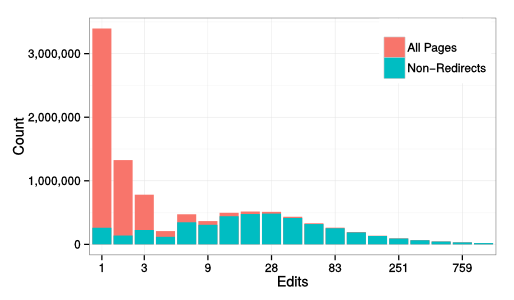
In wikis, redirects are special pages that silently take readers from the page they are visiting to another page. Although their presence is noted in tiny gray text (see the image below) most people use them all the time and never know they exist. Redirects exist to make linking between pages easier, they populate Wikipedia s search autocomplete list, and are generally helpful in organizing information. In the English Wikipedia, redirects make up more than half of all article pages. seattle_redirectOver the years, I ve spent some time contributing to to Redirects for Discussion (RfD). I think of RfD as like an ultra-low stakes version of Articles for Deletion where Wikipedians decide whether to delete or keep articles. If a redirect is deleted, viewers are taken to a search results page and almost nobody notices. That said, because redirects are almost never viewed directly, almost nobody notices if a redirect is kept either! I ve told people that if they want to understand the soul of a Wikipedian, they should spend time participating in RfD. When you understand why arguing about and working hard to come to consensus solutions for how Wikipedia should handle individual redirects is an enjoyable way to spend your spare time where any outcome is invisible you understand what it means to be a Wikipedian. That said, wiki researchers rarely take redirects into account. For years, I ve suspected that accounting for redirects was important for Wikipedia research and that several classes of findings were noisy or misleading because most people haven t done so. As a result, I worked with my colleague Aaron Shaw at Northwestern earlier this year to build a longitudinal dataset of redirects that can capture the dynamic nature of redirects. Our work was published as a short paper at OpenSym several months ago. It turns out, taking redirects into account correctly (especially if you are looking at activity over time) is tricky because redirects are stored as normal pages by MediaWiki except that they happen to start with special redirect text. Like other pages, redirects can be updated and changed over time are frequently are. As a result, taking redirects into account for any study that looks at activity over time requires looking at the text of every revision of every page. Using our dataset, Aaron and I showed that the distribution of edits across pages in English Wikipedia (a relationships that is used in many research projects) looks pretty close to log normal when we remove redirects and very different when you don t. After all, half of articles are really just redirects and, and because they are just redirects, these articles are almost never edited. edits_over_pagesAnother puzzling finding that s been reported in a few places and that I repeated myself several times is that edits and views are surprisingly uncorrelated. I ll write more about this later but the short version is that we found that a big chunk of this can, in fact, be explained by considering redirects. We ve published our code and data and the article itself is online because we paid the ACM s open access fee to ransom the article.

Steve Kemp: Reducing, or redirecting at least, charitable donations.

This is the time of year when there are lots of adverts shown on TV solicating donations for charities, which frequently end with the two words "thank you". I've always felt there were too many charities in the world, and that it was hard to half-heartedly give money to one charity this month, one the next, and still another next year. On that basis I decided long ago to give my money solely to three charities. If I had money that was spare, or I felt generous that month, I would give it to one of "my" charities. Any other appeals I just ignored (with minor exceptions for one-off events like tsunamis, etc). I won't claim credit for this idea, it came directly from my mom who does the same thing. I've given money to the same three charities for twenty years now. Maybe not thousands, but hopefully enough to be useful. Certainly more than I'd have given if my donation were split between more recipients. Now I'm changing. As of next year only one charitable organization will get my pennies. The other two haven't done anything bad, wrong, or failed/succeeded (sadly), but it feels better for me to stick to a single recipient. Happy Christmas. (Details shouldn't matter, but to answer the obvious question the charity I've kept is the RNLI.)

29 December 2014

Lunar: Reproducible builds against RC bugs

One way of working on reproducible builds is to look at packages which fail to build reproducibly on our continuous integration platform. Looking at the output of debbindiff often makes it possible to spot common problems. Sometimes, issues are more singular. sources.debian.net and codesearch are amazing helps to skim over the source code trying to figure out what is happening. When I started to work on reproducible builds for Debian a year and a half ago, I never thought it would be useful to find actual release critical bugs. Until I had a look at libical debbindiff output. Can you understand the issue and how bad it is? Answer is in bug #773916.

Jingjie Jiang: Week2-Week3 OPW Journey.

The Tropy In this period, I have tackled several bugs and got them finally about to be merged in the codebase. Namely, they are:
#761121 allow symbolic links within same version, #761861 override detected language type. I also spent some time on making debsouces runnable on sor.debian.org.
But still there is some db related problem on it. I am not quite familiar with psql, and kinda at a loss as what to do. Zack said he would take it over and I shall focus on what really I likes. Cool. For some non-code tasks, I have a detailed read on machine-readable debian/copyright . The other task is on flask blueprint . The idea of flask blueprint , as far as I am concerned, is sort of what apps are in django. Zack has drafted a specification on debian/copyright which serves as the goal of copyright.debian.net. Combined with the above reading knowledge, and with the help of Flask expert matthieu, I will get my hands dirty in the comming weeks to create a fantastic new site, aka, copyright.d.n. Stay tuned. some thought I did spend some time learning how to use git, and read quite a lot of materials. But, I shamely forgot most of them. So when I am frequently using git these days, I feel kinda incompetent and sometimes awkward. I am thinking now, maybe I shall stop overlearn some technology that I might never use. Only real usage and practice could help me get comfort with those tools. Overlearn something which I am not currently using and either won t in the future might just be a waste of time. and finally, I spent a great Christmas. Wish everyone happy, and merry Christmas!

28 December 2014

Russ Allbery: Review: Some Remarks

Review: Some Remarks, by Neal Stephenson
Publisher: William Morrow
Copyright: June 2013
ISBN: 0-06-202444-2
Format: Trade paperback
Pages: 336
This is going to be another weird review, since I read this essay collection about three months ago, and I borrowed it from a friend. So this is both from fading memory and without a handy reference other than Internet searches. Apologies in advance for any important details that I miss. The advantage is that you'll see what parts of this collection stuck in my memory. Some Remarks is, as you might guess from the title, a rather random collection of material. There's one long essay that for me was the heart of the book (more on that in a moment), two other longer essays, two short stories, and thirteen other bits of miscellaneous writing of varying lengths. I found most of the short essays unremarkable. Stephenson uses a walking desk because sitting is bad for you that sentence contains basically all of the interesting content of one of the essays. I think it takes a large topic and some running room before Stephenson can get up to speed and produce something that's more satisfying than technological boosterism. That means the most interesting parts of this book are the three longer works. "In the Kingdom of Mao Bell" was previously published in Wired and is still available. Some Remarks contains only excerpts; Stephenson says that some of the original essay is no longer that interesting. I had mixed feelings about this one. Some of the sense of place he creates was fun to read, but Stephenson can't seem to quite believe that the Chinese don't care about "freedom" according to his definitions in the same way and therefore don't have the same political reaction to hacker culture that he does. This could have been an opportunity for him to question assumptions, but instead it's mostly an exercise in dubious, sweeping cultural evaluation, such as "the country has a long history of coming up with technologies before anyone else and then not doing a lot with them." A reminder that the detail with which Stephenson crams his writing is not always... true. Stronger is "Atoms of Cognition: Metaphysics in the Royal Society 1715 2010," which covers material familiar to readers of Stephenson's Baroque Cycle. The story of Newton, Leibniz, their rivalry, and the competing approaches to thinking about mathematics and science was my favorite part of that series, and in some ways the non-fiction treatment is better than the fictional one. If you liked the Baroque Cycle, this is worth reading. But the highlight of the book for me was "Mother Earth Mother Board." This is a long essay (50,000 words, practically a small book and the largest part of this collection) about the laying of undersea fiber-optic cables. Those who have read Cryptonomicon will recognize some of the themes here, but there's way more to this essay than there was to the bits about undersea cables in Cryptonomicon. It's mostly about technology, rather than people, which puts Stephenson on firmer ground. The bit about people reads more like a travelogue, full of Stephenson's whole-hearted admiration of people who build things and make things work. There's a bit of politics, a bit of history, a bit of tourism, and a lot of neat trivia about a part of the technological world that I'd not known much about before. I would say this is worth the price of the collection, but it too was previously published in Wired, so you can just read it online. Those reading this review on my web site will notice that I filed it in non-fiction. There are a couple of stories, but they're entirely forgettable (in fact, I had entirely forgotten them, and had to skim them again). But, for the record, here are short reviews of those: "Spew": This originally appeared in Wired and can still be read on-line. The protagonist takes a job as a sort of Internet marketing inspector who looks for deviations from expected profiles. While tracing down an anomaly, though, he finds another use of the Internet that's outside of the marketing framework he's using. It's unlikely that anyone who's been online for long will find much new in this story. Some of that is because it was originally published in 1994, but most of it is just that this isn't a very good story. Stephenson seems to have turned up his normal manic infodump to 11 to satisfy the early Wired aesthetic, and the result is a train wreck of jargon, bad slang, and superficial social observation. (3) "The Great Simoleon Caper": Originally published in TIME, this story too is still available online. It's primarily interesting because it's a story about Bitcoin (basically), written in 1995. And it's irritating for exactly the same reason that Bitcoin enthusiasm often tends to be irritating: the assumption that cryptocurrency is somehow a revolutionary attack on government-run currency systems. I'm not going to get into the ways in which this doesn't make sense given how money is used socially (David Graeber's Debt is the book to read if you want more information); just know that the story follows that path and doesn't engage with any of the social reasons why that outcome is highly unlikely. Indeed, the lengths to which the government tries to go to discredit cryptocurrency in this story are rather silly. Apart from that, this is typical early Stephenson writing. It's very in love with ideas, not as much with characterization, and consists mostly of people explaining things to each other. Sometimes this is fun, but when focused on topics about which considerably more information has become available, it doesn't age very well. (5) Overall, there was one great essay and a few interesting bits, but I wouldn't have felt I was missing much if I'd never read this collection. I borrowed Some Remarks from a friend, and I think that's about the right level of effort. If it falls into your hands, or you see it in a library, some of the essays, particularly "Mother Earth Mother Board," are worth reading, but given that the best parts are available on-line for free, I don't think it's worth a purchase. Rating: 6 out of 10

27 December 2014

Joey Hess: shell monad day 3

I have been hard at work on the shell-monad ever since it was born on Christmas Eve. It's now up to 820 lines of code, and has nearly comprehensive coverage of all shell features. Time to use it for something interesting! Let's make a shell script and a haskell program that both speak a simple protocol. This kind of thing could be used by propellor when it's deploying itself to a new host. The haskell program can ssh to a remote host and run the shell program, and talk back and forth over stdio with it, using the protocol they both speak. abstract beginnings First, we'll write a data type for the commands in the protocol.
data Proto
    = Foo String
      Bar
      Baz Integer
    deriving (Show)
Now, let's go type class crazy!
class Monad t => OutputsProto t where
    output :: Proto -> t ()
instance OutputsProto IO where
    output = putStrLn . fromProto
So far, nothing interesting; this makes the IO monad an instance of the OutputsProto type class, and gives a simple implementation to output a line of the protocol.
instance OutputsProto Script where
    output = cmd "echo" . fromProto
Now it gets interesting. The Script monad is now also a member of the OutputsProto. To output a line of the protocol, it just uses echo. Yeah -- shell code is a member of a haskell type class. Awesome -- most abstract shell code evar! Similarly, we can add another type class for monads that can input the protocol:
class Monad t => InputsProto t p where
    input :: t p
instance InputsProto IO Proto where
    input = toProto <$> readLn
instance InputsProto Script Var where
    input = do
        v <- newVar ()
        readVar v
        return v
While the IO version reads and deserializes a line back to a Proto, the shell script version of this returns a Var, which has the newly read line in it, not yet deserialized. Why the difference? Well, Haskell has data types, and shell does not ... speaking the protocol Now we have enough groundwork to write haskell code in the IO monad that speaks the protocol in arbitrary ways. For example:
protoExchangeIO :: Proto -> IO Proto
protoExchangeIO p = do
    output p
    input
fooIO :: IO ()
fooIO = do
    resp <- protoExchangeIO (Foo "starting up")
    -- etc
But that's trivial and uninteresting. Anyone who has read to here certianly knows how to write haskell code in the IO monad. The interesting part is making the shell program speak the protocol, including doing various things when it receives the commands.
foo :: Script ()
foo = do
    stopOnFailure True
    handler <- func (NamedLike "handler") $
        handleProto =<< input
    output (Foo "starting up")
    handler
    output Bar
    handler
handleFoo :: Var -> Script ()
handleFoo v = toStderr $ cmd "echo" "yay, I got a Foo" v
handleBar :: Script ()
handleBar = toStderr $ cmd "echo" "yay, I got a Bar"
handleBaz :: Var -> Script ()
handleBaz num = forCmd (cmd "seq" (Val (1 :: Int)) num) $
    toStderr . cmd "echo" "yay, I got a Baz"
serialization I've left out a few serialization functions. fromProto is used in both instances of OutputsProto. The haskell program and the script will both use this to serialize Proto.
fromProto :: Proto -> String
fromProto (Foo s) = pFOO ++ " " ++ s
fromProto Bar = pBAR ++ " "
fromProto (Baz i) = pBAZ ++ " " ++ show i
pFOO, pBAR, pBAZ :: String
(pFOO, pBAR, pBAZ) = ("FOO", "BAR", "BAZ")
And here's the haskell function to convert the other direction, which was also used earlier.
toProto :: String -> Proto
toProto s = case break (== ' ') s of
    (w, ' ':rest)
          w == pFOO -> Foo rest
          w == pBAR && null rest -> Bar
          w == pBAZ -> Baz (read rest)
          otherwise -> error $ "unknown protocol command: " ++ w
    (_, _) -> error "protocol splitting error"
We also need a version of that written in the Script monad. Here it is. Compare and contrast the function below with the one above. They're really quite similar. (Sadly, not so similar to allow refactoring out a common function..)
handleProto :: Var -> Script ()
handleProto v = do
    w <- getProtoCommand v
    let rest = getProtoRest v
    caseOf w
        [ (quote (T.pack pFOO), handleFoo =<< rest)
        , (quote (T.pack pBAR), handleBar)
        , (quote (T.pack pBAZ), handleBaz =<< rest)
        , (glob "*", do
            toStderr $ cmd "echo" "unknown protocol command" w
            cmd "false"
          )
        ]
Both toProto and handleProto split the incoming line apart into the first word, and the rest of the line, then match the first word against the commands in the protocol, and dispatches to appropriate actions. So, how do we split a variable apart like that in the Shell monad? Like this...
getProtoCommand :: Var -> Script Var
getProtoCommand v = trimVar LongestMatch FromEnd v (glob " *")
getProtoRest :: Var -> Script Var
getProtoRest v = trimVar ShortestMatch FromBeginning v (glob "[! ]*[ ]")
(This could probably be improved by using a DSL to generate the globs too..) conclusion And finally, here's a main to generate the shell script!
main :: IO ()
main = T.writeFile "protocol.sh" $ script foo
The pretty-printed shell script that produces is not very interesting, but I'll include it at the end for completeness. More interestingly for the purposes of sshing to a host and running the command there, we can use linearScript to generate a version of the script that's all contained on a single line. Also included below. I could easily have written the pretty-printed version of the shell script in twice the time that it took to write the haskell program that generates it and also speaks the protocol itself. I would certianly have had to test the hand-written shell script repeatedly. Code like for _x in $(seq 1 "$ _v#[!\ ]*[\ ] ") doesn't just write and debug itself. (Until now!) But, the generated scrpt worked 100% on the first try! Well, it worked as soon as I got the Haskell program to compile... But the best part is that the Haskell program and the shell script don't just speak the same protocol. They both rely on the same definition of Proto. So this is fairly close to the kind of type-safe protocol serialization that Fay provides, when compiling Haskell to javascript. I'm getting the feeling that I won't be writing too many nontrivial shell scripts by hand anymore! :) the complete haskell program Is here, all 99 lines of it. the pretty-printed shell program
#!/bin/sh
set -x
_handler ()   :
    _v=
    read _v
    case "$ _v%%\ * " in FOO) :
        echo 'yay, I got a Foo' "$ _v#[!\ ]*[\ ] " >&2
    : ;; BAR) :
        echo 'yay, I got a Bar' >&2
    : ;; BAZ) :
        for _x in $(seq 1 "$ _v#[!\ ]*[\ ] ")
        do :
            echo 'yay, I got a Baz' "$_x" >&2
        done
    : ;; *) :
        echo 'unknown protocol command' "$ _v%%\ * " >&2
        false
    : ;; esac
 
echo 'FOO starting up'
_handler
echo 'BAR '
_handler
the one-liner shell program
set -p; _handler ()   :;    _v=;    read _v;    case "$ _v%%\ * " in FOO) :;        echo 'yay, I got a Foo' "$ _v#[!\ ]*[\ ] " >&2;     : ;; BAR) :;        echo 'yay, I got a Bar' >&2;    : ;; BAZ) :;        for _x in $(seq 1 "$ _v#[!\ ]*[\ ] ");      do :;           echo 'yay, I got a Baz' "$_x" >&2;      done;   : ;; *) :;      echo 'unknown protocol command' "$ _v%%\ * " >&2;       false;  : ;; esac;  ; echo 'FOO starting up'; _handler; echo 'BAR '; _handler

26 December 2014

Ritesh Raj Sarraf: Linux Desktop in 2014

We are almost at the end of 2014. While 2014 has been a year with many mixed experiences, I think it does warrant one blog entry ;-) Recently, I've again started spending more time on Linux products / solutions, than spending time focused on a specfic subsystem. This change has been good. It has allowed me to re-cap all the advancements that have happened in the Linux world, umm... in the last 5 years. Once upon a time, the Linux kernel sucked on the Desktop. It led to many desktop improvement related initiatives. Many accepted in kernel, while others stood as it is (out-of-tree) still as of today. Over the years, there are many people that advocate for such out-of-tree features, for example the -ck patchset, claiming it has better performance. Most of the times, these are patches not carried by your distribution vendor, which leads you to alternate sources, if you want to try. Having some spare time, I tried the Alternative Kernel project. It is nothing but a bunch of patchsets, on top of the stock kernel. After trying it out, I must say that these patchsets are out-of-tree, for good. I hardly could make out any performance gain. But I did notice a considerable increase in the power consumption. On my stock Debian kernel, the power consumption lies around 15-18 W. That increased to 20+ W on the alternate kernels. I guess most advocates for the out-of-tree patchsets, only measure the 1-2% performance gain, where as completely neglect the fact that that kernel sleeps less often. But back to the generic Linux kernel performance problem...... Recently, in the last 2 years, the performance suckiness of the Linux kernel is hardly noticed. So what changed ? The last couple of years have seen a rise in high capacity RAM, at affordable consumer price. 8 - 16 GiB of RAM is common on laptops these days. If you go and look at the sucky bug report linked above, it is marked as closed, justified Working as Designed. The core problem with the bug reported, has to do with slow media. The Linux scheduler is (in?)efficient. It works hard to give you the best throughput and performance (for server workloads). I/O threads are a high priority task in the Linux kernel. Now map this scene to the typical Linux desktop. If you end up with doing too much buffered I/O, thus exhausting all your available cache, and trigger paging, you are in for some sweet experience. Given that the kernel highly priotizes I/O tasks, and if your underneath persistent storage device is slow (which is common if you have an external USB disk, or even an internal rotating magnetic disk), you end up blocking all your CPU cycles against the slow media. Which further leads to no available CPU cycles for your other desktop tasks. Hence, when you do I/O at such level, you find your desktop go terribly sluggish. It is not that your CPU is slow or in-capable. It is just that all your CPU slices are blocked. Blocked waiting for your write() to report a completion. So what exactly changed that we don't notice that problem any more ????
  1. RAM - Increase in RAM has led to more I/O be accommodated in cache. The best way to see this in action is to do a copy of a large file, something almost equivalent to the amount of RAM you have. But make sure it is less than the overall amount. For example, if you have 4 GiB of RAM, try copying a file of size 3.5 GiB in your graphical file manager. And at the same time, on the terminal, keep triggering the sync command. Check how long does it take for the sync to complete. By being able to cache large amount of data, the Linux kernel has been better at improving the overall performance in the eyes of the user.
  2. File System - But RAM is not alone. The file system has played a very important role too. Earlier, with ext3 file system, we had a commit interval of (5?) 30 seconds. That led to the above mentioned sync equivalent to get triggered every 30 secs. It was a safety measure to ensure, that at worst, you lose 30 secs worth of data. But it did hinder performance. With ext4, came delayed allocation. Delayed Allocation allowed the write() to return immediate while the data was in cache, and deferred the task of actual write() to the file system. This allowed for the allocator to find the best contiguous slot for the data to be written. Thus it improved the file system. It also brough corruption for some of the apps. :-)
  3. Solid State Drives - The file system and RAM alone aren't the sole factors that led to the drastic improvement in the overall experience of the Linux desktop. If you read through the bug report linked in this article, you'll find the core root cause to be slow persistent storage devices. Could the allocator have been improved (like Windows) to not be so pressing of the Linux desktop ? Maybe, yes. But that was a decision for the kernel devs and they believed (and believe) to keep those numbers to minimum. Thus for I/O, as for today, you have 3 schedulers and for CPU, just 1. What dramatically improved the overall Linux Desktop performance was the general availability of solid state devices. These device are real fast, which in effect made the write() calls return immediate, and did not block the CPU.
So, it was the advancement in both hardware and software that led to better overall desktop performance. Does the above mentioned bug still exist ? Yes. Its just that it is much harder to trigger it now. You'll have to ensure that you max out your cache and trigger paging. And then try to do ask for some CPU cycles. But it wasn't that back then we didn't use Linux on the desktop / laptop. It sure did suck more than, say, Windows. But hey, sometimes we have to eat our own dog food. Even then, there sure were some efforts to overcome the then limitations. The first and obvious one is the out-of-tree patchset. But ther were also some other efforts to improve the situation. The first such effort, that I can recollect, was ulatency. With Linux adding support for Control Groups, there were multiple avenues open on how to tackle and tame the resource starvation problem. The crux of the problem was that Linux gave way too much priority to the I/O tasks. I still wish Linux has a profile mechanism, where in on the kernel command line, we could specify what profile should Linux boot into. Anyways, with ulatency, we saw improvements in the Linux Desktop experience. ulatency had in-built policies to whitelist / blacklist a set of profiles. For example, KDE was a profile. Thus, ulatency would club all KDE processes into a group and give that group a higher precedence to ensure that it had its fair share of CPU cycles. Today, at almost the end of 2014, there are many more consumer of Linux's control groups. Prominent names would be: LXC and systemd. ulatency has hardly seen much development in the last year. Probably it is time for systemd to take over. systemd is expected to bring lots of features to the Linux world, thus bridging the (many) gap Linux has had on the desktop. It makes extensive use of Control Groups for a variety of (good) reasons, which has led it to be a linux-only product. I think it should have never marketed itself as the init daemon. It rather fits better when called as the System Management Daemon. The path to Linux Desktop looks much brighter in 2015 and beyond thanks to all the advancements that have happened so far. The other important players, who should be thanked are Mobile and Low Latency products (Android, ChromeBook), whose engagement to productize Linux has led to better features overall.

Categories:

Keywords:

Lars Wirzenius: 'It Will Never Work in Theory' and software engineering research

It Will Never Work in Theory is a web site that blogs, though slowly, of important research and findings about software development. It's one of the most interesting sites I've found recently, possibly for a long time. I disagree with the term "software engineering" to describe the software development that happens today. I don't think it's accurate, and indeed I think the concept's too much of a fantasy for the term to be used seriously about practicing developers do. For software development to be an engineering discipline, it needs a strong foundation based on actual research. In short, we need to know what works, what doesn't work, and preferably why in both cases. We don't have much of that. This website is one example of how that's now changing, and that's good. As a practicing software developer, I want to know, for example, whether code review actually helps improve software quality, the speed of software development, and the total cost of a software project, and also under what the limits of code review are, how it should be done well, and what kind of review doesn't work. Once I know that, I can decide whether and how to do reviews in my development teams. The software development field is full of anecdotal evidence about these things. It's also full of people who've done something once, and then want to sell books, seminars, and lectures about it. That's not been working too well: it makes research be mostly about fads, and that's no way to build a strong foundation. Now I just need the time to read everything, and the brain to understand big words.

Russ Allbery: pam-krb5 4.7

It's been a long, long time since the last upstream release. Rather too long, as the changes to the portability and test framework were larger than the changes to the module itself. But there are a few bug fixes here and one new feature. The new feature is a new option, no_update_user, which disables the normal update of PAM_USER for the rest of the PAM stack to the canonicalized local username. This allows users to do things like enter Kerberos principals into the login prompt and have the right thing happen, but sometimes it's important to keep the authentication credentials as originally entered and not canonicalize, even if there's a local canonicalization available. This new option allows that. In the bug-fix department, the module now suppresses spurious password prompts from Heimdal while using PKINIT and understands more Kerberos errors for purposes of try_first_pass support and returning better PAM errors. The documentation now notes next to each option the version of pam-krb5 at which it was introduced with its current meaning. You can get the latest version from the pam-krb5 distribution page.

Vasudev Kamath: Notes: LXC How-To

LXC - Linux Containers allows us to run multiple isolated Linux system under same control host. This will be useful for testing application without changing our existing system. To create an LXC container we use the lxc-create command, it can accepts the template option, with which we can choose the OS we would like to run under the virtual isolated environment. On a Debian system I see following templates supported

[vasudev@rudra: ~/ ]% ls /usr/share/lxc/templates
lxc-alpine*    lxc-archlinux*  lxc-centos*  lxc-debian*    lxc-fedora*  lxc-openmandriva*  lxc-oracle*  lxc-sshd*    lxc-ubuntu-cloud*
lxc-altlinux*  lxc-busybox*    lxc-cirros*  lxc-download*  lxc-gentoo*  lxc-opensuse*      lxc-plamo*   lxc-ubuntu*
For my application testing I wanted to create a Debian container for my By default the template provided by lxc package creates Debian stable container. This can be changed by passing the option to debootstrap after -- as shown below.
sudo MIRROR=http://localhost:9999/debian lxc-create -t debian \
     -f   container.conf -n container-name -- -r sid
-r switch is used to specify the release, MIRROR environment variable is used to choose the required Debian mirror. I wanted to use my own local approx installation, so I can save some bandwidth. container.conf is the configuration file used for creating the LXC, in my case it contains basic information on how container networking should b setup. The configuration is basically taken from LXC Debian wiki
lxc.utsname = aptoffline-dev
lxc.network.type = veth
lxc.network.flags = up
lxc.network.link = br0.1
lxc.network.name = eth0
lxc.network.ipv4 = 192.168.3.2/24
lxc.network.veth.pair = vethvm1
I'm using VLAN setup described in Debian wiki: LXC VLAN Networking page. Below is my interfaces file.
iface eth0.1 inet manual
iface br0.1  inet manual
   bridge_ports eth0.1
   bridge_fd 0
   bridge_maxwait 0
Before launching the LXC make sure you run below command
sudo ifup eth0.1
sudo ifup br0.1
# Also give ip to bridge in same subnet as lxc.network.ipv4
sudo ip addr add 192.168.3.1/24 dev br0.1
I'm giving ip address to bridge so that I can communicate with container from my control host, once it comes up. Now start the container using below command
sudo lxc-start -n container -d -c tty8
We are starting lxc in daemon mode and attaching it to console tty8. If you want, you can drop -d and -c option to start lxc in foreground. But its better you start it in background and attach using lxc-console command shown below.
sudo lxc-console -n container -t tty8
You can detach from console using Ctrl+a q combination and let lxc execute in background. Its also possible to simply ssh into the running container since we have enabled networking. Stopping the container should be done using lxc-stop command, but without -k switch (kill) this command never returned. Even with timeout container is not stopped.
sudo lxc-stop -n container
-r can be used for reboot of container. Since I couldn't get clean shutdown I normally attach the console and issue a halt command in container itself. Not sure if this is the right way, but it gets the thing done. I consider Linux container as a better alternative for spawning a virtual Linux environment instead of running a full blown VM like Virtualbox or VMware.

24 December 2014

Chris Lamb: 8:20AM. Sunday, 22 December 2013

Running east into the sun, he hadn't seen another human for over half an hour. He navigates Westferry Circus and heads south, cutting from the road through to the riverside pathway. He keeps is breathing steady - no reason to hurry. The wind catches him from Westminster. It smells slightly salty but it's an ersatz attempt, nowhere near bracing enough to be a real sea breeze. Pressing on, the vacant citadel of Canary Wharf disappears behind him. But as the peninsula curves around, a man appears in the distance. Even half a mile away he looks out of place, or rather given the hour time. He's walking purposefully, but it doesn't feel the kind of route someone would be taking to work. He's not wearing quite enough clothes for the weather either, and homeless people are rarely made to feel welcome in the Docklands. His supermarket denim visibly flaps in the breeze. "Relaxed fit", they call it. When he gets within earshot the man cocks his head, not expecting to hear the regular cadence of approaching footsteps. He turns slightly to reveal he's cradling a large bottle of Coca-Cola, meekly wrapped in the swathing bands of two anonymously blue corner-shop plastic bags. The runner eyes the Coke greedily but can quickly see that it has already been opened, tainted. Although only a mouthful or so has gone, a brown froth sloshes against the top of the container. Amateur, he thinks. He'll regret that later. He looks back up to the man, who is now smiling at him. His left hand bccomes visible as he strides: a four-pack of Carling. The man laughs. "Oh, you and me mate are worlds apart!" the man shouts. It's immediately friendly. He starts to raise his Carling as but thinks better of it. It's momentarily awkward. "Worlds apart mate", the man continues. "Have a good one!" The runner smiles back. Only in time, the runner thinks. They both can't stop.

Gunnar Wolf: More on Debian as a social, quasi-familiar project

I have long wanted to echo Gregor's beautiful Debian Advent Calendar posts. Gregor is a dear project member and a dear friend to many of us Debianers, who has shown an amount of stamina and care for the project that inspires everybody; this year, after many harsh flamefests in the project (despite which we are moving at a great rate towards a great release!), many people have felt the need to echo how Debian even as often seen from the outside as a hostile mass of blabbering geeks is actually a great place to work together and to create a deep, strong social fabric And that's quite probably what binds the project together and ensures it will continue existing and excelling for a long time. As for the personal part: This year, my Debian involvement has once again reduced. Not because I care less about Debian, much to the contrary, but because I have taken several responsabilities which require my attention and time. Technically, I'm basically maintaining a couple of PHP-based packages I use for work (most prominently, Drupal7). I have stepped back of most of my DebConf responsabilities, although I stay (and will stay, as it's an area of the project I deeply enjoy doing) involved. And, of course, my current main area of involvement is keyring-maint (for which I have posted here several status updates). I have to say that we expected having a much harder time (read: Stronger opposition and discussions) regarding the expiry of 1024D keys. Of course, many people do have a hard time connecting anew to the web of trust, and we will still face quite a bit of work after January 1st, but the migration has been a mostly pleasant (although clearly intensive) work. Jonathan has just told me we are down to only 306 1024D keys in the keyring (which almost exactly matches the "200-300" I expected back at DC14). Anyway: People predicting doomsday scenarios for Debian do it because they are not familiar with how deep the project runs in us, how important it is socially, almost at a family level, to us that have been long involved in it. Debian is stronger than a technical or political discussion, no matter how harsh it is. And, as a personal thank-you: Gregor, your actions (the GDAC, the RC bug reports) inspire us to stay active, to do our volunteer work better, and remind us of how great is it to be a part of a global, distributed will to Do It Right. Thanks a lot!

Gregor Herrmann: GDAC 2014/24

the last year hasn't been an easy one for debian. we've seen lots of fights, unproductive discussions, & in general behaviour which contributed to what enrico in his brilliant blog post called the "stink in the kitchen". people's feelings were hurt, some became less active, others resigned from a specific position or retired completely. it happened to me as well that reading through threads full of trolling, aggressiveness, finger-pointing, unrespectful or abusive behaviour, etc. made me frustrated, or sad, or angry, or all kinds of other negative feelings. but then I usually told myself: this is not the debian project as I know it; this is only a small part a part which urgently needs improvement! ; but if we only look at it alone, our picture of debian at large is distorted. the much bigger part of the debian life I know doesn't happen on this handful of high-profile mailing lists; it happens on dozens of specialized mailing lists, in many small IRC channels, in the BTS, & in in-person meetings. & what I see there is most of the time constructive, collaborative, respectful communication, & committed, helpful, funny, awesome people. the idea of this advent calendar was to give examples of some of my recent experiences which demonstrate what the bright side of debian is in my opinion & what contributes to my fun in debian. with the aim of sharing my impression that the proverbial "stink" is, if we take a step back, only one piece of the bigger picture, & that we shouldn't let ourselves get demotivated by only staring at this puzzle piece. thanks to all the awesome contributors for polishing existing & adding new shiny puzzle pieces to our common picture every day! finally: thanks for reading this series of posts, & especially thank you to all who provided positive feedback this in turn motivated me to follow through! & now: back to work, & don't forget to help cleaning the kitchen :)
this posting is part of GDAC (gregoa's debian advent calendar), a project to show the bright side of debian & why it's fun for me to contribute.

Benjamin Mako Hill: Images of Japan

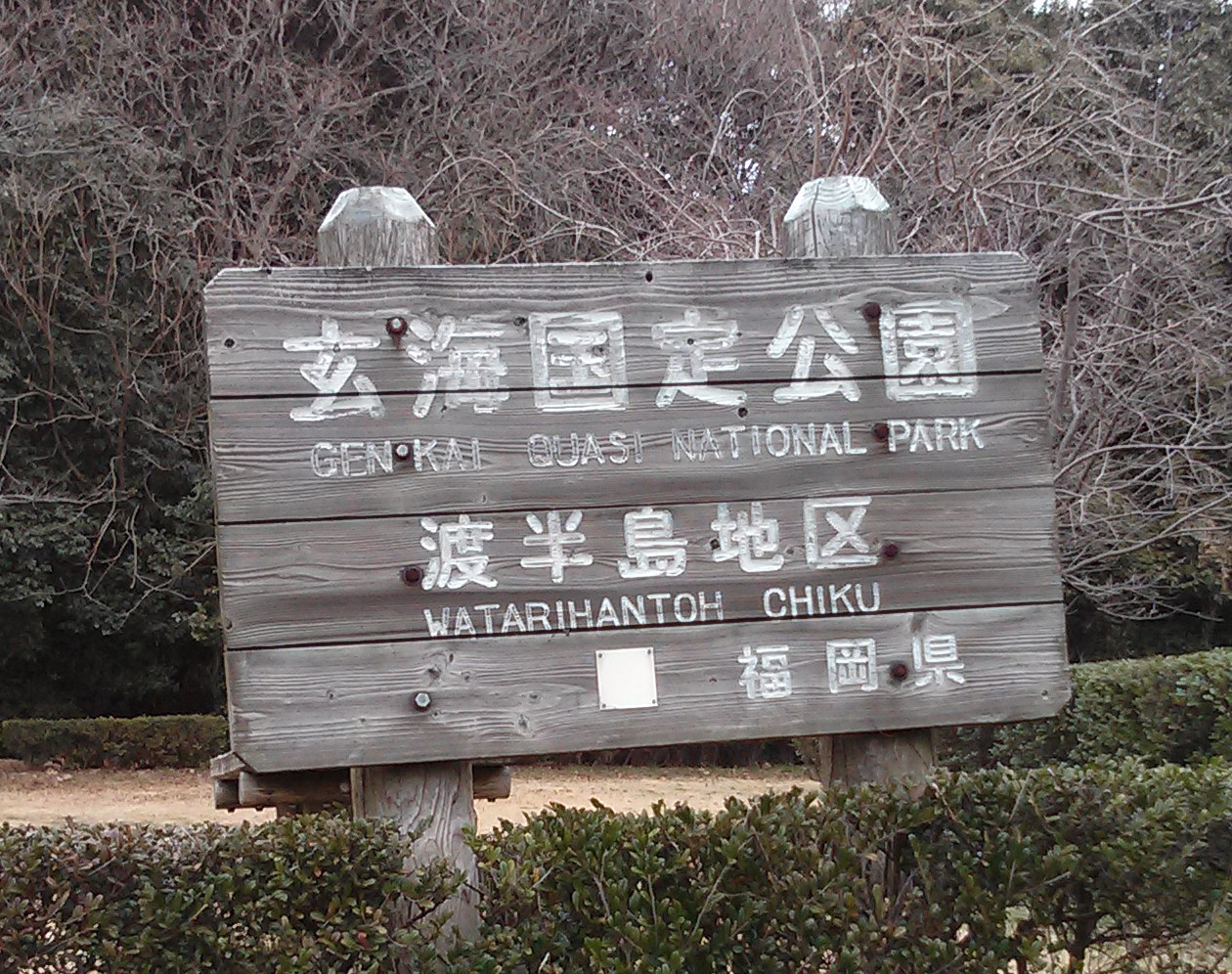
Going through some photos, I was able to revisit some of the more memorable moments of my trip to Japan earlier this year. For example, the time I visited Genkai Quasi National Park a beautiful spot in Fukuoka that had a strong resemblance to, but may not actually have been, a national park. Genkai Quasi National Park There was the time that I saw a Saw a curry fault bread. Saw a Curry Fault Bread And a shrine one could pray at in a barcalounger. Shrine Comfortable Chair There was the also the fact that we had record snowfall while in Tokyo which left the cities drainage system in a rather unhappy state. Japan Unhappy Drain

23 December 2014

Ulrike Uhlig: How does my AppArmor profile get into Debian?

I have spent the last days trying to understand the relationship between AppArmor, the AppArmor profiles and Debian s AppArmor profiles. Let me try to briefly introduce you to this. First of all, let me emphasize that one needs to distinguish between AppArmor, the kernel module, and the AppArmor profiles, which define rules for application confinement. As stated on the project s wiki:
The AppArmor project source is split between the kernel module, available in the Linux kernel and git development tree and the user space tools available in launchpad.
So, we can find the upstream AppArmor profile development taking place at Canonical s launchpad. The profiles which are developed there serve as a basis for those included in Debian. It is thus useful to try to contribute to this upstream when updating a profile for Debian. Since AppArmor 2.9 has been introduced, the rules of a profiles which are not applicable for a system are ignored. Thus, collaboration between different Linux distributions shipping AppArmor will become much simpler. In the aforementioned Ubuntu repository you can find the profiles that are currently in development. Once tested and ready, they are removed from this repository and finally included into the corresponding package. For example, the profile for Evince, the GNOME PDF viewer, is available in the evince package. In Debian on the contrary, there are only some packages which ship their own profiles. This concernes for example bind, clamav, cups, tor.
But many profiles are not yet included with their package, but instead delivered through the apparmor-profiles and apparmor-profiles-extra packages. These are maintained by the the Debian AppArmor packaging team. The team takes care of merging changes from the upstream profiles into Debian. Today, the relationship between Upstream and Debian looks like this:

Upstream/bzr

Debian source package

Debian binary package

Ubuntu source package

Ubuntu binary package

apparmor

apparmor

apparmor-profiles

-

-

apparmor-profiles

apparmor-profiles-extra

apparmor-profiles-extra

-

-

ubuntu-evince

apparmor-profiles-extra

apparmor-profiles-extra

evince

evince

In the future, this should change. It would indeed be desirable that package maintainers include profiles with the packages they maintain and take care of updating them accordingly when the package itself is updated. It is much more logical to to it that way, as changes in a package like Pidgin or Evince can occur at a different point in time then when the apparmor-profiles-extra package is updated. I started working on a documentation for Debian Package Maintainers which describes how to do this.

Michael Stapelberg: Debian Code Search: taming the latency tail

It s been a couple of weeks since I ve launched Debian Code Search Instant, so people have had the chance to use it for a while and that gives me plenty of data points to look at :-). For every query, I log the search term itself as well as the duration the query took to execute. That way, I can easily identify queries that take a long time and see why that is. There is a class of queries for which Debian Code Search (DCS) doesn t perform so well, and that s queries that consist of trigrams which are extremely common. Whenever DCS receives such a query, it needs to search through a lot of files. Note that it doesn t really matter if there are plenty of results or not it s the number of files that potentially contain a result which matters. One such query is arse (we get a lot of curse words). It consists of only two trigrams ( ars and rse ), which are extremely common in program source code. As a couple of examples, the terms parse , sparse , charset and coarse are all matched by that. As an aside, if you really want to search for just arse , use word boundaries, i.e. \barse\b , which also makes the query significantly faster. Fixing the overloaded frontend When DCS first received the query, arse would lead to our frontend server crashing. That was due to (intentionally) unoptimized code we were aggregating all search results from all 6 source backends in memory, sorted them, and then wrote them out to disk. I addressed this in commit d2922fe92 with the following measures:
  1. Instead of keeping the entire result in memory, just write the result to a temporary file on disk ( unsorted.json ) and store pointers into that file in memory, i.e. (offset, length) tuples. In order to sort the results, we also need to store the ranking and the path (to resolve ties and thereby guarantee a stable result order over multiple search queries). For grouping the results by source package, we need to keep the package name.
  2. If you think about it, you don t need the entire path in order to break a tie the hash is enough, as it defines an ordering. That ordering may be different, but any ordering is good enough for the purpose of merely breaking a tie in a deterministic way. I m using Go s hash/fnv, the only non-cryptographic (fast!) hash function that is included in Go s standard library.
  3. Since this was still leading to Out Of Memory errors, I decided to not store a copy of the package name in each search result, but rather use a pointer into a string pool containing all package names. The number of source package names is relatively small, in the order of 20,000, whereas the number of search results can be in the millions. Using the stringpool is a clear win the overhead in the case where #results < #srcpackages is negligible, but as soon as #results > #srcpackages, you save memory.
With all of that fixed, the query became at all possible, albeit with a runtime of around 20 minutes. Double Writing When running such a long-running query, I noticed that the query ran smooth for a while, but then it took multiple seconds without any visible progress at the end of the query before the results appeared. This was due to the frontend ranking the results and then converting unsorted.json into actual result pages. Since we provide results ordered by ranking, but also results grouped by source packages, it was writing every result twice to disk. What s even worse is that due to re-ordering, every read was essentially random (as opposed to sequential reads). What s even worse is that nobody will ever click through all the hundreds of thousands of result pages, so they are prepared entirely in vain. Therefore, with commit c744b236e I made the frontend generate these result pages on demand. This cut down the time for the ranking phase at the end of each query from 20-30 seconds (for big queries) to typically less than one second. Profiling/Monitoring After adding monitoring to each of the source-backends, I realized that during these long-running queries, the disk I/O and network I/O was nowhere near my expectations: each source-backend was sending only a low single-digit number of megabytes per second back to the frontend (typically somewhere between 1 MB/s and 3 MB/s). This didn t match up at all with the bandwidth I observed in earlier performance tests, so I used wget -O /dev/null to send a query and discard the result in order to get some theoretical performance numbers. Suddenly, I was getting more than 10 MB/s worth of results, maxing out the disks with a read rate of about 200 MB/s. So where is the bottleneck? I double-checked that neither the CPU on any of our VMs, nor the network between them was saturated. Note that as of this point, the CPU of the frontend was at roughly 70% (of one core), which didn t seem a lot to me. Then, I followed this excellent tutorial on profiling Go programs to see where the frontend is spending its time. Turns out, the biggest consumer of CPU time was the encoding/json Go package, which is used for deserializing results received from the backend and serializing them again before sending them to the client. Since I was curious about it for a while already, I decided to give cap n proto a try to replace JSON as serialization mechanism for communication between the source backends and the frontend. Switching to it (commit 8efd3b41) brought down the CPU load immensely, and made the query a bit faster. In addition, I killed the next biggest consumer: the lseek(2) syscall, which we used to call with SEEK_CUR and an offset of 0 so that it would tell us the current position. This was necessary in the first place because we don t know in advance how many bytes we re going to write when serializing a result to disk. The replacement is a neat little trick:
type countingWriter int64
func (c *countingWriter) Write(p []byte) (n int, err error)  
    *c += countingWriter(len(p))
    return len(p), nil
 
// [ ]
// Then, use an io.MultiWriter like this:
var written countingWriter
w := io.MultiWriter(s.tempFiles[backendidx], &written)
result.WriteJSON(w)
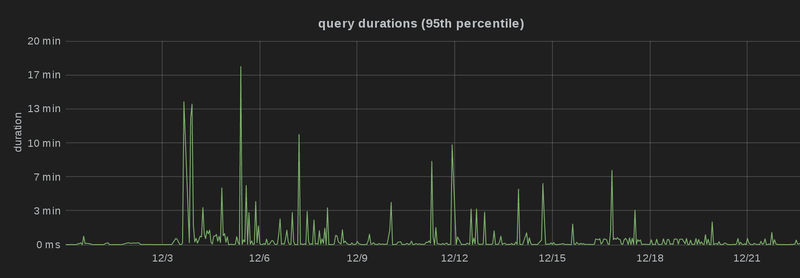
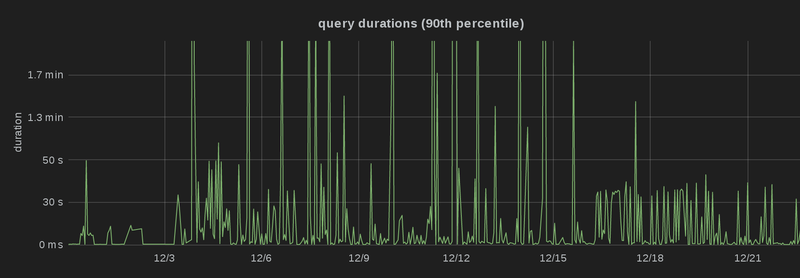
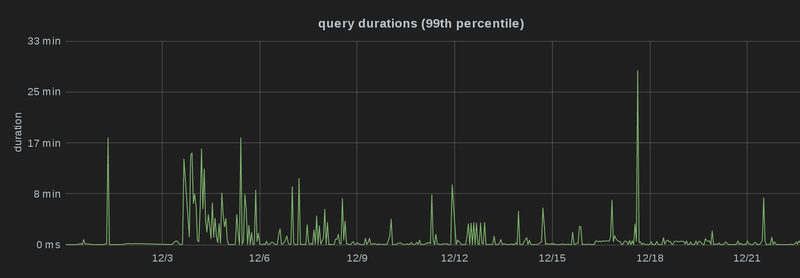
With some more profiling, the new bottleneck was suddenly the read(2) syscall, issued by the cap n proto deserialization, operating directly on the network connection buffer. strace revealed that crunching through the results of one source backend for a long query, read(2) was called about 250,000 times. By simply using a buffered reader (commit 684467ae), I could reduce that to about 2,000 times. Another bottleneck was the fact that for every processed result, the frontend needed to update the query state, which is shared amongst all goroutines (there is one goroutine for each source backend). All that parallelism isn t very effective if you need to synchronize the state updates in the end. So with commit 5d46a572, I refactored the state to be per-backend, so that locking is only necessary for the first couple of results, and the vast vast majority of results can be processed entirely without locking. This brought down the query time from 20 minutes to about 5 minutes, but I still wasn t happy with the bandwidth: the frontend was doing a bit over 10 MB/s of reads from all source backends combined, whereas with wget I could get around 40 MB/s with the same query. At this point, the CPU utilization was around 7% of one core on the frontend, and profiling didn t immediately reveal an obvious culprit. After a bit of experimenting (by commenting out code here and there ;-)), I figured out that the problem was that the frontend was still converting these results from capnproto buffers to JSON. While that doesn t take a lot of CPU time, it delays the network stream from the source-backend: once the local and remote TCP buffers are full, the source-backend will (intentionally!) not continue with its search, so that it doesn t run out of memory. I m still convinced that s a good idea, and in fact I was able to solve the problem in an elegant way: instead of writing JSON to disk and generating result pages on demand, we now write capnproto directly to disk (commit 466b7f3e) and convert it to JSON only before sending out the result pages. That decreases the overall CPU time since we only need to convert a small fraction of the results to JSON, but most importantly, the frontend is now not in the critical path anymore. It can directly pass the data through, and in fact it uses an io.TeeReader to do exactly that. Conclusion With all of these optimizations, we re now down to about 2.5 minutes for the search query arse , and the architecture of the system actually got simpler to reason about. Most importantly, though, the optimizations don t only play out for a single query, but for many different queries. I ve deployed the optimized version at the 15th of December 2014, and you can see that the 99th, 95th and 90th percentile latency dropped significantly, i.e. there are a lot fewer spikes than before, and more queries are processed faster, which is particularly obvious in the third graph (which is capped at 2 minutes):


Russ Allbery: Review: Wakulla Springs

Review: Wakulla Springs, by Andy Duncan & Ellen Klages
Publisher: Tor
Copyright: October, 2013
ASIN: B00EWZDPH4
Format: Kindle
Pages: 99
This is another nominee for the 2014 Hugo Awards (for works published in 2013), this time in the novella category. In this case, though, I read the free ebook version from Tor (Macmillan) rather than the version from the voter packet, since I usually grab all the free ebooks of Tor.com stories. (Even if I'm quite behind in reading them, since I don't read much short fiction.) As an independently-published novella, it gets its own review in the book category. Wakulla Springs is the story of three generations (and four protagonists) who lived near or visited Wakulla Springs in the Florida panhandle. This is a real place: a huge freshwater springs and underwater cave system, now protected as a national park. Two of the four episodes in this story revolve around the filming of movies: a Tarzan movie and Creature from the Black Lagoon. This actually happened as well, although of course the story takes liberties with the details. This is also the story of race relations in the American deep south: the tense and uncertain interactions between black locals and rich white people, both locals and people from the film industry who came for a brief time and then left again. It's also a story about water, swimming, and the sense of being part of the water and knowing it well. This story doesn't develop any particular point; rather, it's more of a collection of character sketches, grabbing moments in time, glimpsing what it's like to cross racial barriers and to feel at home with one's choices. It's also, in a nicely subtle way, about encountering mythical creatures that are not part of one's world. To the locals, the film stars who visit Wakulla Springs are as wild and strange as the imagined creatures of the swamp, and in their way even more foreign. What this is not, though, is science fiction, or even fantasy. One of the complaints I'd heard about Wakulla Springs in the context of the Hugos was that it didn't qualify as a genre story. I'm usually inclined to dismiss these sorts of complaints, since they're often put forth by people with a far narrower definition of genre than mine. But, having read this story, I have to concur. It's very well-written and engaging, but it's not genre in any sense that I'd define it. There are some rare mentions of mythical creatures, but only in ways that are part of the setting, and which are no more fantastic than I'd expect from many mainstream stories. I'm a bit baffled why an SFF publisher would have bought it for an explicitly SFF forum; I have to assume that it's just because it's well-written and the authors have both written SFF. That said, even though this is not the sort of story I'd normally seek out, I'm still glad I read it. I thought the best part of the story was the first, which follows a black woman who takes a job at the Wakulla Springs resort during the filming of a Tarzan movie. The color lines are simply taken for granted by everyone, but Johnny Weissmuller comes off very well in his fictional representation and adds an enthusiastic energy that plays off well against the thoughtful care of the protagonist. The second part echoes this with a boy as the protagonist, but shifts a generation later. This means the color line is fought instead of simply assumed, although with limited success. I thought this part of the story had the best descriptions of the joy of swimming, and once again the movie folks bring a disruptive and positive change to the tightly-drawn lines of local roles and politics. The third and fourth parts I found slighter, elaborating on the story by showing the reader glimpses of the later life of the first two protagonists, but not, I thought, adding anything fundamental to the story. I'm not sure this would be satisfying if you were looking for a science fiction or fantasy story, but it's a solid mainstream story about race, class, and the joy of knowing and feeling a place. It captures an angle of Hollywood that I've rarely seen in movies: a disruptive and almost subversive playfulness and energy that doesn't fix problems but that does provide moments of escape from the realities of the world, even outside of the film. Worth reading, particularly since it's free. Rating: 7 out of 10

Next.

Previous.