Francois Marier: Tweaking Referrers For Privacy in Firefox
 The Referer header has
been a part of the web for a long time. Websites rely on it for a few
different purposes (e.g. analytics, ads, CSRF protection) but it can be
quite problematic from a privacy perspective.
Thankfully, there are now tools in Firefox to help users and developers
mitigate some of these problems.
Description
In a nutshell, the browser adds a Referer header to all outgoing HTTP
requests, revealing to the server on the other end the URL of the page you
were on when you placed the request. For example, it tells the server where
you were when you followed a link to that site, or what page you
were on when you requested an image or a script. There are, however, a few
limitations to this simplified explanation.
First of all, by default, browsers won't send a referrer if you place a
request from an HTTPS page to an HTTP page. This would reveal potentially
confidential information (such as the URL path and query string which could
contain session tokens or other secret identifiers) from a secure page over
an insecure HTTP channel. Firefox will however include a Referer header in
HTTPS to HTTPS transitions unless network.http.sendSecureXSiteReferrer
(removed in Firefox 52) is set to false in about:config.
Secondly, using the new
Referrer Policy specification web
developers can override the default behaviour for their pages, including on
a per-element basis. This can be used both to increase or reduce the amount
of information present in the referrer.
Legitimate Uses
Because the Referer header has been around for so long, a number of
techniques rely on it.
Armed with the Referer information, analytics tools can figure out:
- where website traffic comes from, and
- how users are navigating the site.
Another place where the Referer is useful is as a mitigation against
cross-site request forgeries.
In that case, a website receiving a form submission can reject that form
submission if the request originated from a different website.
It's worth pointing out that this CSRF mitigation might be better implemented
via a separate header that could
be restricted to particularly dangerous requests (i.e. POST and DELETE
requests) and only include the information required for that security check
(i.e. the origin).
Problems with the Referrer
Unfortunately, this header also creates significant privacy and security
concerns.
The most obvious one is that it leaks part of your browsing history to sites
you visit as well as all of the resources they pull in (e.g. ads and
third-party scripts). It can be quite complicated to
fix these leaks in a cross-browser way.
These leaks can also lead to exposing private personally-identifiable
information when they are part of the query string. One of the most
high-profile example is
the accidental leakage of user searches by healthcare.gov.
Solutions for Firefox Users
While web developers can use the new mechanisms exposed through the Referrer
Policy, Firefox users can also take steps to limit the amount of information
they send to websites, advertisers and trackers.
In addition to enabling Firefox's built-in
tracking protection
by setting privacy.trackingprotection.enabled to true in about:config,
which will prevent all network connections to known trackers, users can
control when the Referer header is sent by setting
network.http.sendRefererHeader to:
0 to never send the header1 to send the header only when clicking on links and similar elements2 (default) to send the header on all requests (e.g. images, links, etc.)
It's also possible to put a limit on the maximum amount of information that
the header will contain by setting the network.http.referer.trimmingPolicy
to:
0 (default) to send the full URL1 to send the URL without its query string2 to only send the scheme, host and port
or using the network.http.referer.XOriginTrimmingPolicy option (added in
Firefox 52) to only restrict the contents of referrers attached to
cross-origin requests.
Site owners can opt to share less information with other sites, but they
can't share any more than what the user trimming policies allow.
Another approach is to disable the Referer when doing cross-origin
requests (from one site to another). The
network.http.referer.XOriginPolicy preference can be set to:
0 (default) to send the referrer in all cases1 to send a referrer only when the base domains are the same2 to send a referrer only when the full hostnames match
Breakage
If you try to remove all referrers (i.e. network.http.sendRefererHeader = 0,
you will most likely run into problems on a number of sites, for
example:
- anything that uses the default Django authentication
- Launchpad logins
- AMD driver downloads
- some CDN-hosted images
The first two have been worked-around successfully by setting
network.http.referer.spoofSource to true, an advanced setting
which always sends the destination URL as the referrer, thereby not leaking
anything about the original page.
Unfortunately, the last two are examples of the kind of breakage that can
only be fixed through a whitelist (an approach supported by the smart
referer add-on) or
by temporarily using a different browser
profile.
My Recommended Settings
As with my
cookie recommendations,
I recommend strengthening your referrer settings but not disabling (or
spoofing) it entirely.
While spoofing does solve many the breakage problems mentioned above, it
also effectively disables the anti-CSRF protections that some sites may rely
on and that have tangible user benefits. A better approach is to limit the
amount of information that leaks through cross-origin requests.
If you are willing to live with some amount of breakage, you can simply
restrict referrers to the same site by setting:
network.http.referer.XOriginPolicy = 2
or to sites which belong to the same organization (i.e. same
ETLD/public suffix)
using:
network.http.referer.XOriginPolicy = 1
This prevent leaks to third-parties while giving websites all of the
information that they can already see in their own server logs.
On the other hand, if you prefer a weaker but more compatible solution, you
can trim cross-origin referrers down to just the scheme, hostname and port:
network.http.referer.XOriginTrimmingPolicy = 2
I have not yet found user-visible breakage using this last configuration.
Let me know if you find any!
Referer header has been around for so long, a number of
techniques rely on it.
Armed with the Referer information, analytics tools can figure out:
- where website traffic comes from, and
- how users are navigating the site.
Referer is useful is as a mitigation against
cross-site request forgeries.
In that case, a website receiving a form submission can reject that form
submission if the request originated from a different website.
It's worth pointing out that this CSRF mitigation might be better implemented
via a separate header that could
be restricted to particularly dangerous requests (i.e. POST and DELETE
requests) and only include the information required for that security check
(i.e. the origin).
Problems with the Referrer
Unfortunately, this header also creates significant privacy and security
concerns.
The most obvious one is that it leaks part of your browsing history to sites
you visit as well as all of the resources they pull in (e.g. ads and
third-party scripts). It can be quite complicated to
fix these leaks in a cross-browser way.
These leaks can also lead to exposing private personally-identifiable
information when they are part of the query string. One of the most
high-profile example is
the accidental leakage of user searches by healthcare.gov.
Solutions for Firefox Users
While web developers can use the new mechanisms exposed through the Referrer
Policy, Firefox users can also take steps to limit the amount of information
they send to websites, advertisers and trackers.
In addition to enabling Firefox's built-in
tracking protection
by setting privacy.trackingprotection.enabled to true in about:config,
which will prevent all network connections to known trackers, users can
control when the Referer header is sent by setting
network.http.sendRefererHeader to:
0 to never send the header1 to send the header only when clicking on links and similar elements2 (default) to send the header on all requests (e.g. images, links, etc.)
It's also possible to put a limit on the maximum amount of information that
the header will contain by setting the network.http.referer.trimmingPolicy
to:
0 (default) to send the full URL1 to send the URL without its query string2 to only send the scheme, host and port
or using the network.http.referer.XOriginTrimmingPolicy option (added in
Firefox 52) to only restrict the contents of referrers attached to
cross-origin requests.
Site owners can opt to share less information with other sites, but they
can't share any more than what the user trimming policies allow.
Another approach is to disable the Referer when doing cross-origin
requests (from one site to another). The
network.http.referer.XOriginPolicy preference can be set to:
0 (default) to send the referrer in all cases1 to send a referrer only when the base domains are the same2 to send a referrer only when the full hostnames match
Breakage
If you try to remove all referrers (i.e. network.http.sendRefererHeader = 0,
you will most likely run into problems on a number of sites, for
example:
- anything that uses the default Django authentication
- Launchpad logins
- AMD driver downloads
- some CDN-hosted images
The first two have been worked-around successfully by setting
network.http.referer.spoofSource to true, an advanced setting
which always sends the destination URL as the referrer, thereby not leaking
anything about the original page.
Unfortunately, the last two are examples of the kind of breakage that can
only be fixed through a whitelist (an approach supported by the smart
referer add-on) or
by temporarily using a different browser
profile.
My Recommended Settings
As with my
cookie recommendations,
I recommend strengthening your referrer settings but not disabling (or
spoofing) it entirely.
While spoofing does solve many the breakage problems mentioned above, it
also effectively disables the anti-CSRF protections that some sites may rely
on and that have tangible user benefits. A better approach is to limit the
amount of information that leaks through cross-origin requests.
If you are willing to live with some amount of breakage, you can simply
restrict referrers to the same site by setting:
network.http.referer.XOriginPolicy = 2
or to sites which belong to the same organization (i.e. same
ETLD/public suffix)
using:
network.http.referer.XOriginPolicy = 1
This prevent leaks to third-parties while giving websites all of the
information that they can already see in their own server logs.
On the other hand, if you prefer a weaker but more compatible solution, you
can trim cross-origin referrers down to just the scheme, hostname and port:
network.http.referer.XOriginTrimmingPolicy = 2
I have not yet found user-visible breakage using this last configuration.
Let me know if you find any!
privacy.trackingprotection.enabled to true in about:config,
which will prevent all network connections to known trackers, users can
control when the Referer header is sent by setting
network.http.sendRefererHeader to:
0to never send the header1to send the header only when clicking on links and similar elements2(default) to send the header on all requests (e.g. images, links, etc.)
network.http.referer.trimmingPolicy
to:
0(default) to send the full URL1to send the URL without its query string2to only send the scheme, host and port
network.http.referer.XOriginTrimmingPolicy option (added in
Firefox 52) to only restrict the contents of referrers attached to
cross-origin requests.
Site owners can opt to share less information with other sites, but they
can't share any more than what the user trimming policies allow.
Another approach is to disable the Referer when doing cross-origin
requests (from one site to another). The
network.http.referer.XOriginPolicy preference can be set to:
0(default) to send the referrer in all cases1to send a referrer only when the base domains are the same2to send a referrer only when the full hostnames match
Breakage
If you try to remove all referrers (i.e. network.http.sendRefererHeader = 0,
you will most likely run into problems on a number of sites, for
example:
- anything that uses the default Django authentication
- Launchpad logins
- AMD driver downloads
- some CDN-hosted images
The first two have been worked-around successfully by setting
network.http.referer.spoofSource to true, an advanced setting
which always sends the destination URL as the referrer, thereby not leaking
anything about the original page.
Unfortunately, the last two are examples of the kind of breakage that can
only be fixed through a whitelist (an approach supported by the smart
referer add-on) or
by temporarily using a different browser
profile.
My Recommended Settings
As with my
cookie recommendations,
I recommend strengthening your referrer settings but not disabling (or
spoofing) it entirely.
While spoofing does solve many the breakage problems mentioned above, it
also effectively disables the anti-CSRF protections that some sites may rely
on and that have tangible user benefits. A better approach is to limit the
amount of information that leaks through cross-origin requests.
If you are willing to live with some amount of breakage, you can simply
restrict referrers to the same site by setting:
network.http.referer.XOriginPolicy = 2
or to sites which belong to the same organization (i.e. same
ETLD/public suffix)
using:
network.http.referer.XOriginPolicy = 1
This prevent leaks to third-parties while giving websites all of the
information that they can already see in their own server logs.
On the other hand, if you prefer a weaker but more compatible solution, you
can trim cross-origin referrers down to just the scheme, hostname and port:
network.http.referer.XOriginTrimmingPolicy = 2
I have not yet found user-visible breakage using this last configuration.
Let me know if you find any!
network.http.referer.XOriginPolicy = 2
network.http.referer.XOriginPolicy = 1
network.http.referer.XOriginTrimmingPolicy = 2

 Feel free to contribute to this starting project to help spreading the Monero use by using the PyMoneroWallet project with your Python applications



 Thats So Raven
If I could sum up the past year in one word, that word would be distraction. There have been so many strange, confusing or simply unforseen things going on I have had trouble focusing like never before.
For instance, on the opposite side of the street from me is one of Jersey City's old resorvoirs. It's not used for drinking water anymore and the city eventually plans on merging it into the park on the other side. In the meantime it has become something of a wildlife refuge. Which is nice except one of the newly settled critters was a bird of prey -- the consensus is possibly some kind of hawk or raven. Starting your morning commute under the eyes of a harbinger of death is very goth and I even learned to deal with the occasional piece of deconstructed rodent on my doorstep but nighttime was a big problem. For contrary to popular belief, ravens do not quoth "nevermore" but "KRRAAAA". Very loudly. Just as soon as you have drifted of to sleep. Eventually my sleep-deprived neighbors and I appealed to the NJ division of enviromental protection to get it removed but by the time they were ready to swing into action the bird had left for somewhere more congenial like Transylvania or Newark.
Or here are some more complete wastes of time: I go the doctor for my annual physical. The insurance company codes it as Adult Onset Diabetes by accident. One day I opened the lid of my laptop and there's a "ping" sound and a piece of the hinge flies off. Apparently that also severed the connection to the screen and naturally the warranty had just expired so I had to spend the next month tethered to an external monitor until I could afford to buy a new one. Mix in all the usual social, political, family and work drama and you can see that it has been a very trying time for me.
Dovecot
I have managed to get some Debian work done. On Dovecot, my principal package, I have gotten tremendous support from Apollon Oikonomopolous who I belatedly welcome as a member of the Dovecot maintainer team. He has been particularly helpful in fixing our systemd support and cleaning out a lot of the old and invalid bugs. We're in pretty good shape for the freeze. Upstream has released an RC of 2.2.26 and hopefully the final version will be out in the next couple of days so we can include it in Stretch. We can always use more help with the package so let me know if you're interested.
Debian-IN
Most of the action has been going on without me but I've been lending support and sponsoring whenever I can. We have several new DDs and DMs but still no one north of the Vindhyas I'm afraid.
Debian Perl Group
gregoa did a ping of inactive maintainers and I regretfully had to admit to myself that I wasn't going to be of use anytime soon so I resigned. Perl remains my favorite language and I've actually been more involved in the meetings of

 As I

 A few days ago,
 Back in August, I was looking for a
 When installing the machine, the obvious goal was to use mainline FOSS
components only if possible. Fortunately there's mainline kernel
support for the device as well as mainline
 A large part of the internet became inaccessible today after a botnet



 Choice of smart card
For standard PGP use, the
 Choice of computer to run the clean room environment
There are a wide array of devices to choose from. Here are some principles that come to mind:
 although the software experience will be much the same if lots of individual card readers or USB flash drives are used.
Other devices
One additional idea that comes to mind is a hardware random number generator (TRNG), such as the


 Like
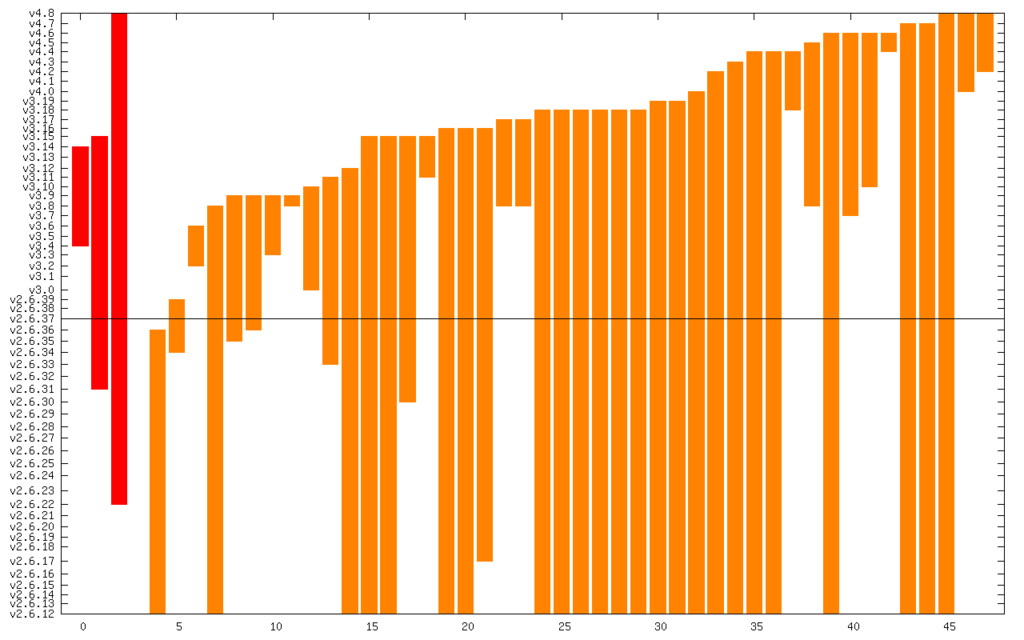
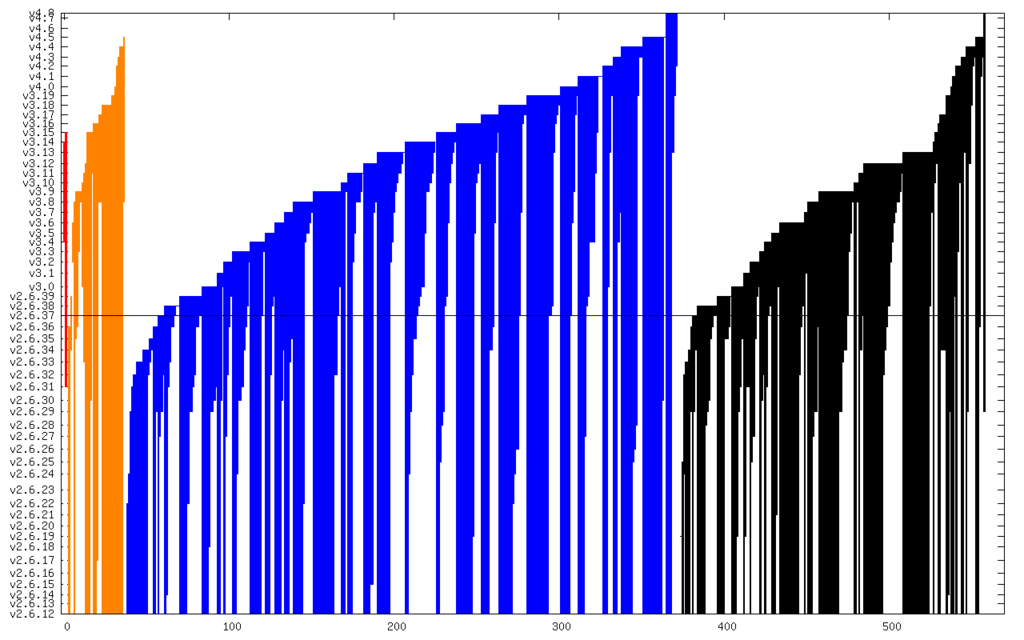 And here it is zoomed in to just Critical and High:
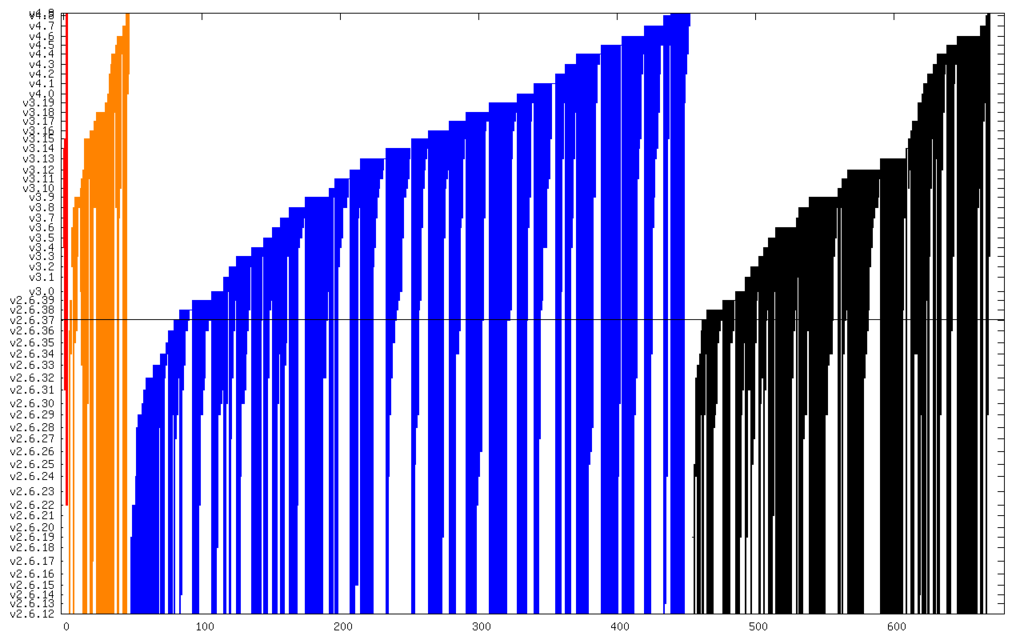
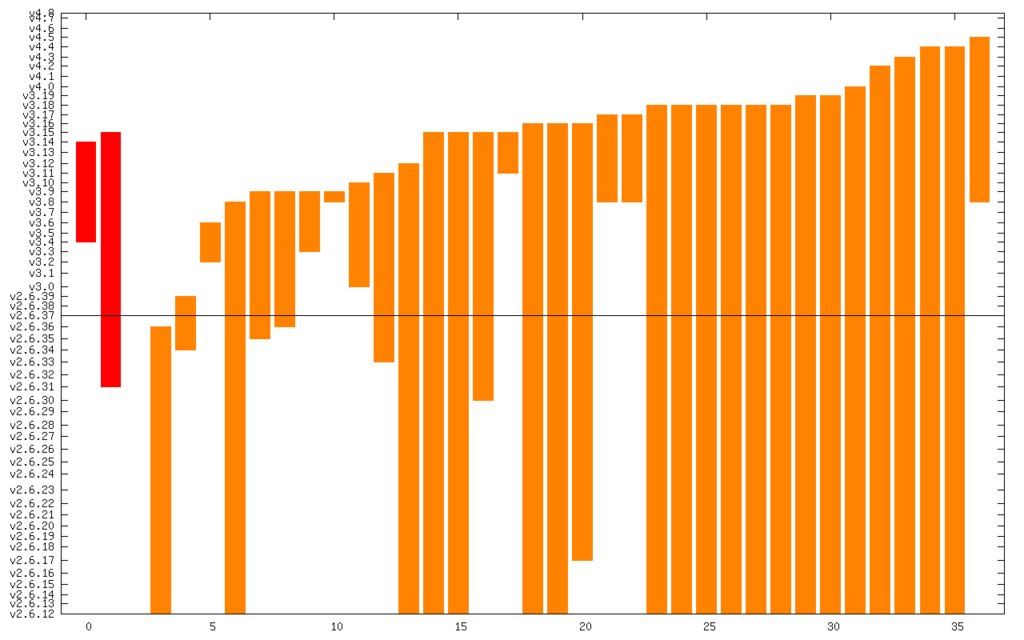 The line in the middle is the date from which I started the CVE search (2011). The vertical axis is actually linear time, but it s labeled with kernel releases (which are pretty regular). The numerical summary is:
 Yesterday