Search Results: "tar"

23 December 2013

Russell Coker: Political Advocacy in Clubs

One topic that often gets discussed when it s near election time is whether clubs and societies should be political . Some organisations are limited in what they can do, for example in some jurisdictions religious organisations can theoretically lose their tax exempt status if they advocate for one party. In practice any organisation that has a wide membership will have a variety of political views represented so a policy of directly supporting one candidate or party is likely to lose some members. A common practice among some clubs is to send questionnaires to parties before elections. This might cause a policy change in the parties that do whatever it takes to get votes (as opposed to the parties who devise policy based on principle). But it also provides members a list of how the parties compare on the basis of the criteria that matter to the club. I think that organisations such as Linux Australia [1] and the Linux Users of Victoria [2] should send such questionnaires and publish an analysis of the results. I previously suggested a few questions that could be asked [3], the last one received some negative comments for being too tabloid but the others got some agreement. But obviously there would need to be some discussion about which questions are in scope and how they should be asked. Such a discussion would take a while and would need to be started well before an election was called, I think if we start now we should be able to get it done before the next federal election is called. There is one Australian political party that has a consistent record of having IT policies that are in line with the general aims of Linux Australia and which also has policies that meet the social standards that are generally agreed by most of the membership (EG opposing discrimination). But I know that there are some members of the Linux community who advocate various forms of discrimination and would vote accordingly so advocating for that party would get some negative reactions. But if someone wants to vote for a party that advocates discrimination against minority groups I don t think that there s any harm in providing information to allow them to vote for a pro-discrimination party that has a reasonable IT policy. In any case it doesn t seem likely that we can get most of the membership of an organisation like Linux Australia to agree on what parties are unacceptable, so sending a questionnaire to all parties avoids that debate. I would like to see this sort of thing done by LUGs for all state and territory elections. I will be involved in the process with LUV for the Victorian elections, but I have to just hope that my blog posts inspire people in other states and territories if anyone has already started on this then please let me know. I will also be involved with getting this done for the federal elections with Linux Australia, hopefully this post will help get people interested in that.

Russell Coker: The Nexus 5

The Nexus 5 is the latest Android phone to be endorsed by Google (and manufactured by LG). It s getting good reviews and the price is good for the specs. I just bought one for my wife, I got her the 32G version because when I bought her a Nexus 4 at the start of the year [1] I chose the 8G version and regretted it ever since. The size of apps is always increasing (some Android games need more than 1G of storage) and higher resolution screens drives the use of high resolution video. Appearance back of Nexus 4, Nexus 5, and Samsung Galaxy Note 2front of Nexus 4, Nexus 5, and Samsung Galaxy Note 2 Above I have pictures of the Nexus 4, the Nexus 5, and the Samsung Galaxy Note 2. The photo of the phone backs captures part of the sparkling pattern on the back of the Nexus 4 and it looks much better in real life (IMHO) because it shimmers as you move the phone. The Nexus 4 looks so good that there s even a transparent case specifically designed to show off the rear panel [2]. It doesn t seem likely that anyone will design such a transparent case for the Nexus 5, it s a good phone to cover up IMHO. The Note 2 isn t the most attractive phone, but I think it has a streamlined elegance of being optimised for it s function. The Nexus 5 has it s camera sticking out, it would be better if they had just made the entire phone thicker and given it a bigger battery but for people who don t want good battery life I guess it s a way of providing a better focal length without making the phone thicker. Sticking the IMEI number on the back of the phone will be useful on rare occasions (and might be a security issue on more occasions) but it definitely makes the phone less attractive. Full HD The quality of the Full HD (1920*1080) display is obvious. The text is slightly clearer when viewing maps and the graphics in Ingress look nicer. Before I used the Nexus 5 I didn t think that there would be any benefit in having such a high resolution in a phone but now I realise that I was wrong. The higher resolution is clearly better. Chris Chavez wrote an article for Phandroid about a rumored Samsung phone with a 2560*1440 display [3]. If such a device had a 6.6 display (IE a new version of the Galaxy Mega) then it would have the same dot-pitch as the Nexus 5. If such a device had a 5.5 display (like the Galaxy Note 3) then it would have a 15% greater DPI than the Nexus 5. It seems that a higher DPI provides a real benefit and this is probably the biggest reason to choose the Nexus 5 over the Nexus 4 and most other Android devices. Comparing with the Nexus 4 The Nexus 5 has the same amount of RAM (2G), a slightly larger display (4.95 vs 4.7 ), higher resolution (a big deal), faster CPU and GPU, and optical zoom. Faster CPU isn t usually going to be a big deal (apart from the fact that more CPU power is needed as well as more GPU power to drive the higher resolution display). The Nexus 5 can come with 16G or 32G of storage while the Nexus 4 has options of 8G and 16G. If you want more than 16G of storage then that s a real benefit for the Nexus 5, but if you only need 16G then it s not an issue. It seems that when playing Ingress on a Nexus 5 it s more likely that running another program (such as Google Hangouts) will cause Ingress to be reloaded than it does on a Nexus 4 or a Galaxy Note 2. While I haven t done a good comparison of the Nexus 4 and the Nexus 5 in this regard I ve compared the Galaxy Note 2 and the Nexus 5 well. My Galaxy Note 2 (which has many daemons running) is much less likely to cause a reload of Ingress (IE have run low on memory and terminated Ingress) than the Nexus 5 my wife is using (which has very little running). So it seems that the OS build on the Nexus 5 uses more memory than the Galaxy Note 2. The Nexus 5 has Gorilla Glass 3 vs Gorilla Glass 2 on the Nexus 4. As my older Android phones with Gorilla Glass 1 (Galaxy S and Sony Ericsson Xperia X10i) didn t get any scratches that matter I don t think this is a benefit for me. Maybe if I lived near a beach I d care more about this. I think that the most significant benefit of the Nexus 5 over the Nexus 4 is the higher resolution display. The optical zoom should provide a theoretical benefit when taking photos, whether that results in better pictures in practice would probably depend on how you hold your phone, the available light, and other factors. I think that if it was possible to buy a Nexus 4 at a sensible price (IE something less than the $250 that Google last charged) then for most people the Nexus 4 would be a better choice than the Nexus 5. But as ebay is full of Nexus 4 phones selling for a higher prices than the Nexus 5 it seems that buying a Nexus 5 is the only option. The range of phones that Kogan sells [4] doesn t have anything for the same price that compares on features. Heat The heat produced by the Nexus 5 is significant and noticable. After some light Ingress playing on a cold day my Galaxy Note 2 with a gel case (that keeps it warm) reported itself as having a battery temperature of 34C. My wife s Nexus 5 reported a temperature of 43C. While the thermometer in the phone might not be the most accurate I don t think there was an accuracy problem, holding my wife s phone was unpleasant and felt like it could burn my hand if I held it tight (40C is the minimum temperature for burns). It seems that a Nexus 5 isn t a good choice if you want to play Ingress in a warm part of the world (EG most of Australia in summer). Also heat dissipated is directly proportional to power use which is going to be a problem for a phone that doesn t permit replacing it s battery. Conclusion I m quite disappointed with the Nexus 5. I expected it to be at least as good as the Nexus 4 in every way and better in many ways. Instead it s not always as good as the Nexus 4 and the ways that it is better won t necessarily provide benefits for everyone. The heat and power use problems are really going to hurt the use of it. But I guess we can always hope that Google release a new Android build that reduces the power use, they might even have a new build that uses less RAM too. I would not consider getting a Nexus 5 for my own use. For my use the Note 2 is clearly more suitable, the larger screen more than compensates for the clarity that the Nexus 5 gets from it s high resolution display. Also I REALLY like having a hardware home button. I ll probably get a Note 3 when the price drops, I m not interested in paying $649 for a phone and I m also not interested in replacing a phone that s less than a year old. So maybe I ll get a Note 3 in the second half of next year.

22 December 2013

Francois Marier: Creating a Linode-based VPN setup using OpenVPN on Debian or Ubuntu

Using a Virtual Private Network is a good way to work-around geoIP restrictions but also to protect your network traffic when travelling with your laptop and connecting to untrusted networks. While you might want to use Tor for the part of your network activity where you prefer to be anonymous, a VPN is a faster way to connect to sites that already know you. Here are my instructions for setting up OpenVPN on Debian / Ubuntu machines where the VPN server is located on a cheap Linode virtual private server. They are largely based on the instructions found on the Debian wiki. An easier way to setup an ad-hoc VPN is to use sshuttle but for some reason, it doesn't seem work on Linode or Rackspace virtual servers.

Generating the keys Make sure you run the following on a machine with good entropy and not a VM! I personally use a machine fitted with an Entropy Key. The first step is to install the required package:
sudo apt-get install openvpn
Then, copy the following file in your home directory (no need to run any of this as root):
mkdir easy-rsa
cp -ai /usr/share/doc/openvpn/examples/easy-rsa/2.0/ easy-rsa/
cd easy-rsa/2.0
and put something like this in your ~/easy-rsa/2.0/vars:
export KEY_SIZE=2084
export KEY_COUNTRY="NZ"
export KEY_PROVINCE="AKL"
export KEY_CITY="Auckland"
export KEY_ORG="fmarier.org"
export KEY_EMAIL="francois@fmarier.org"
export KEY_CN=hafnarfjordur.fmarier.org
export KEY_NAME=hafnarfjordur.fmarier.org
export KEY_OU=VPN
Create this symbolic link:
ln -s openssl-1.0.0.cnf openssl.cnf
and generate the keys:
. ./vars
./clean-all
./build-ca
./build-key-server server  # press ENTER at every prompt, no password
./build-key akranes  # "akranes" as Name, no password
./build-dh
/usr/sbin/openvpn --genkey --secret keys/ta.key

Configuring the server On my server, a Linode VPS called hafnarfjordur.fmarier.org, I installed the openvpn package:
apt-get install openvpn
and then copied the following files from my high-entropy machine:
cp ca.crt dh2048.pem server.key server.crt ta.key /etc/openvpn/
chown root:root /etc/openvpn/*
chmod 600 /etc/openvpn/ta.key /etc/openvpn/server.key
Then I took the official configuration template:
cp /usr/share/doc/openvpn/examples/sample-config-files/server.conf.gz /etc/openvpn/
gunzip /etc/openvpn/server.conf.gz
and set the following in /etc/openvpn/server.conf:
dh dh2048.pem
push "redirect-gateway def1 bypass-dhcp"
push "dhcp-option DNS 74.207.241.5"
push "dhcp-option DNS 74.207.242.5"
tls-auth ta.key 0
cipher AES-128-CBC
user nobody
group nogroup
(These DNS servers are the ones I found in /etc/resolv.conf on my Linode VPS.) Finally, I added the following to these configuration files:
  • /etc/sysctl.conf:
    net.ipv4.ip_forward=1
    
  • /etc/rc.local (just before exit 0):
    iptables -t nat -A POSTROUTING -s 10.8.0.0/24 -o eth0 -j MASQUERADE
    
  • /etc/default/openvpn:
    AUTOSTART="all"
    
and ran sysctl -p before starting OpenVPN:
/etc/init.d/openvpn start
If the server has a firewall, you'll need to open up this port:
iptables -A INPUT -p udp --dport 1194 -j ACCEPT

Configuring the client The final piece of this solution is to setup my laptop, akranes, to connect to hafnarfjordur by installing the relevant Network Manager plugin:
apt-get install network-manager-openvpn-gnome
The laptop needs these files from the high-entropy machine:
cp ca.crt akranes.crt akranes.key ta.key /etc/openvpn/
chown root:francois /etc/openvpn/akranes.key /etc/openvpn/ta.key
chmod 640 /etc/openvpn/ta.key /etc/openvpn/akranes.key
and my own user needs to have read access to the secret keys. To create a new VPN, right-click on Network-Manager and add a new VPN connection of type "OpenVPN":
  • Gateway: hafnarfjordur.fmarier.org
  • Type: Certificates (TLS)
  • User Certificate: /etc/openvpn/akranes.crt
  • CA Certificate: /etc/openvpn/ca.crt
  • Private Key: /etc/openvpn/akranes.key
  • Available to all users: NO
then click the "Avanced" button and set the following:
  • General
    • Use LZO data compression: YES
  • Security
    • Cipher: AES-128-CBC
    • HMAC Authentication: Default
  • TLS Authentication
    • Subject Match: server
    • Verify peer (server) certificate usage signature: YES
    • Remote peer certificate TLS type: Server
    • Use additional TLS authentication: YES
    • Key File: /etc/openvpn/ta.key
    • Key Direction: 1

Debugging If you run into problems, simply take a look at the logs while attempting to connect to the server:
tail -f /var/log/syslog
on both the server and the client. In my experience, searching for the error messages you find in there is usually enough to solve the problem.

Next steps The next thing I'm going to add to this VPN setup is a local unbound DNS resolver that will be offered to all clients. Is there anything else you have in your setup and that I should consider adding to mine?

Russ Allbery: Review: They Had to Go Out

Review: They Had to Go Out, by Gary J. Hudson
Publisher: Xlibris
Copyright: 2008
ISBN: 1-4363-8132-0
Format: Trade paperback
Pages: 165
They Had to Go Out, as noted on the cover, is the story of the tragedy of the Triumph and the Mermaid, a marine incident that occurred off the Oregon coast of the United States near the mouth of the Columbia River on January 12, 1961. But it's also much more than that. It's a detailed and thoroughly-researched account of a Coast Guard rescue operation, starting with background on the two coastal lifeboat stations and the types of ships involved. It covers everything from crew backgrounds to equipment issues to the general shape of the subsequent inquiry, and in the process provides a wealth of detailed information about the nature of Coast Guard rescue operations and the technology and equipment available at the time. But, beyond that, it's a gripping story, in part because of the authenticity of the authorial voice. Gary Hudson spent twenty years in the Coast Guard, ten on coastal lifeboat stations like the ones in this book, and was assigned to Point Adams (the primary station involved in this story) until 12 days before the incident, when he transferred to a light station for unrelated reasons. The writing is rough, the paragraphs are not always well-organized, the punctuation doesn't always end up in the right place, and it could have used an editor (Xlibris is a printing service company for self-publishing). But he understands the subject matter completely, and he clearly spent years of effort putting together all the details of the story. The first few chapters, where he establishes the necessary background and tells a few related stories, feel quite rough, but once he gets into the heart of the story, the rough prose stops mattering. Obviously, one of the things that makes this story so appealing is that it's a gripping human story, with the unconstructed and unexpected twists and turns of reality rather than a plot. Hudson has lived the life of the people he's writing about and can put many of their fears and thoughts into words. He captures some of what it would feel like to be out on the water in the middle of the worst seas that most of them had ever seen. And reality is unpredictable. I'm avoiding giving the exact details of what happened and I would recommend not researching the incident on Google if you plan to read this book; there's a lot of drama here, and spoilers are possible. Hudson's factual, detailed narrative style gives the reader a lot of material with which to build mental pictures, and he preserves the drama and the human impact of the story by telling it in straight chronological order. The writing is rough, but he shows a talent for pacing and perspective in the way he weaves together the viewpoints of multiple Coast Guard stations and ship crews. This is also a case study and an accident report, put together with extensive research and scope, but made approachable for the average reader. Hudson takes out the dryness and technical language and weaves the events into a narrative, but he doesn't lose much of the detail. You can know nothing at all about ships or Coast Guard operations and come away from this book with strong opinions about self-righting capabilities (and, more to the point, accurate communication to crews of the capabilities of their vessels). And, by showing a full day of Coast Guard operations (admittedly, a very unusual and difficult day), Hudson also provides the previously unfamiliar reader with a great "day in the life" picture of what Coast Guard lifesaving operations at their most dangerous look like (or at least looked like; one also gets a sense of just how much has improved, and how important the improvements are, in the final chapters). Finally, unlike most accident reports, Hudson carries the story through to the immediate family impact (which may well bring you to tears) and then, given forty years of hindsight, some of the subsequent effects on the people involved. I really liked this. One of the aspects of stories like this that often gets short shrift is that the people involved carry the incident with them for the rest of their lives, often with profound impact. Unlike a movie, where the movie ends and the characters disappear as soon as the primary action is complete, real life has messy and lingering endings, and I think Hudson manages to capture some of that feeling. Some of the best non-fiction books are not written by professional writers. Instead, they're written by people who have both expertise and passion for a particular topic and who know or teach themselves enough about telling a story to manage to get that expertise and passion out on paper. Hudson puts every aspect of this day into the book, from the people to the family impact, from the questionable decisions to the equipment failures and shortages, from the initial conditions through the inquiry and up to the subsequent impact on the lives of the people involved (including, sadly, the Coast Guard's lack of understanding of how to help people with traumatic stress). Some of the paragraphs clunk, some of the sentence construction is awkward, and some of the short biographies are a bit lost in details, but Hudson's desire to tell the complete truth as he was able to reconstruct it, and his deep empathy and understanding of how it felt to the people involved, shine through and carry this book. This is great stuff, and worth seeking out. Recommended. Rating: 9 out of 10

21 December 2013

Christian Perrier: So, what's up with bubulle in Debian?

This is the end of the year and time for me to look back and summarize what happened to my Debian life during 2013. In short, it clearly seems that this year is the "year after peak of involvment" year. Up to 2010 included, my involvment in Debian constantly increased. 2011 and 2012 have seen some kind of stagnation with still some high involvment in some areas (i18n obviously, DebConf-related stuff, font packaging...) but already some reduction in others (D-I for instance...where the overall involvment of Debian developers is nos quite low, Kibi excepted). But, clearly, in 2013, something changed. And, indeed, it's easy to see what happened. In 2007, I started to motivate myself to resume my practice of sports (I used to be a well-trained volleyball player back in 80's) and I started running. More and more and more and more. 992km in 2008, 1700km in 2009 (and my first marathon), 2200km in 2010 (and my first ultras), 2500km in 2011 (and my first 80km), 2900km in 2012 (and more ultras) and....about 4700km in 2013 (with many many firsts). What changed is now obvious. Running and sports (and related activites such as a lot of socializing with other runners) took over free software activities. Last summer and autumn made it clear, indeed. While I was attending my 10th DebConf in a row (I think we're very few people to have achieved this), it was not my summer's "peak". I spent some great time in Switzerland, still enjoyed a lot meeting again with old and new friends from all over the world. I did some good hacking and achived quite some good things over there. But, still, that was not what I will keep from this summer because.....I had two great moutain races in July and August and *this* is what I'll keep. So, here we are: I'm reducing my involvment in Debian, obviously. Some things are handed over to other people, formally or informally. Some other things will indeed wait for someone to pick them up....or might slowly die as it sometimes happens in this project. I will very probably not attend DebConf14 in Portland even though I have been among the people who were enthusiastic when we picked that bid. But the dates conflict with the Ultra Tour du Mont-Blanc races in Chamonix, where I'll hopefully try to complete my first "over 100km" race in moutains. I will probably decline being part of the Debconf bids team for DC15 as well as the sponsoring team. I nearly stopped working on Samba packages and will not attend SambaXP in May. That's my challenge now. I don't want to completely quit this project and it's indeed harder than it seems, when one's involvment is going down. I'm currently trying to find the right balance to still stay involved in what has been a great part of my life in the last 15-20 years. For instance, I'll try to successfully mentor two applicants from the Outreach Program for Women. Or still continue to work occasionnally on font packages. Or still continue to manage D-I i18n. But you'll be seeing (and hearing) me less. The challenge is to still continue seeing and hearing me about Debian and free software and it's indeed less easy than it seems. I hope I'll succeed.

Kees Cook: DOM scraping

For a long time now I ve used mechanize (via either Perl or Python) for doing website interaction automation. Stuff like playing web games, checking the weather, or reviewing my balance at the bank. However, as the use of javascript continues to increase, it s getting harder and harder to screen-scrape without actually processing DOM events. To do that, really only browsers are doing the right thing, so getting attached to an actual browser DOM is generally the only way to do any kind of web interaction automation. It seems the thing furthest along this path is Selenium. Initially, I spent some time trying to make it work with Firefox, but gave up. Instead, this seems to work nicely with Chrome via the Chrome WebDriver. And even better, all of this works out of the box on Ubuntu 13.10 via python-selenium and chromium-chromedriver. Running /usr/lib/chromium-browser/chromedriver2_server from chromium-chromedriver starts a network listener on port 9515. This is the WebDriver API that Selenium can talk to. When requests are made, chromedriver2_server spawns Chrome, and all the interactions happen against that browser. Since I prefer Python, I avoided the Java interfaces and focused on the Python bindings:
#!/usr/bin/env python
import sys
from selenium import webdriver
from selenium.common.exceptions import NoSuchElementException
from selenium.webdriver.common.keys import Keys
caps = webdriver.DesiredCapabilities.CHROME
browser = webdriver.Remote("http://localhost:9515", caps)
browser.get("https://bank.example.com/")
assert "My Bank" in browser.title
try:
    elem = browser.find_element_by_name("userid")
    elem.send_keys("username")
    elem = browser.find_element_by_name("password")
    elem.send_keys("wheee my password" + Keys.RETURN)
except NoSuchElementException:
    print "Could not find login elements"
    sys.exit(1)
assert "Account Balances" in browser.title
xpath = "//div[text()='Balance']/../../td[2]/div[contains(text(),'$')]"
balance = browser.find_element_by_xpath(xpath).text
print balance
browser.close()
This would work pretty great, but if you need to save any state between sessions, you ll want to be able to change where Chrome stores data (since by default in this configuration, it uses an empty temporary directory via --user-data-dir=). Happily, various things about the browser environment can be controlled, including the command line arguments. This is configurable by expanding the desired capabilities variable:
caps = webdriver.DesiredCapabilities.CHROME
caps["chromeOptions"] =  
        "args": ["--user-data-dir=/home/user/somewhere/to/store/your/session"],
     
A great thing about this is that you get to actually watch the browser do its work. However, in cases where this interaction is going to be fully automated, you likely won t have a Xorg session running, so you ll need to wrap the WebDriver in one (since it launches Chrome). I used Xvfb for this:
#!/bin/bash
# Start WebDriver under fake X and wait for it to be listening
xvfb-run /usr/lib/chromium-browser/chromedriver2_server &
pid=$!
while ! nc -q0 -w0 localhost 9515; do
    sleep 1
done
the-chrome-script
rc=$?
# Shut down WebDriver
kill $pid
exit $rc
Alternatively, all of this could be done in the python script too, but I figured it s easier to keep the support infrastructure separate from the actual test script itself. I actually leave the xvfb-run call external too, so it s easier to debug the browser in my own X session. One bug I encountered was that the WebDriver s cache of the browser s DOM can sometimes get out of sync with the actual browser s DOM. I didn t find a solution to this, but managed to work around it. I m hoping later versions fix this. :)

2013, Kees Cook. This work is licensed under a Creative Commons Attribution-ShareAlike 3.0 License.
Creative Commons License

20 December 2013

Lars Wirzenius: Configuring gitano

I recently set up a Gitano instance as http://git.liw.fi/. Gitano is a very nice git server, which adds user and group management and access control in front of git itself, and keeps all configuration in git, where it's traceable and auditable nicely. It's also a command line based thing, rather than a slow, resource-hungry web application, and so much more to my liking. Daniel, the Gitano upstream, has a "gitano-all" source tree for creating an unofficial Gitano Debian package, which includes cgit, a fast git web interface. This is not ever going to be accepted in Debian, of course, but it makes it easier to install Gitano on your server. This hanky-panky is needed because Gitano and cgit both use libgit2, and that's a library without a stable API at this time. This makes is difficult to package for Debian. cgit seems to embed other such projects as well. Anyway, once you've installed the Gitano software (and cgit, if you want that), there's the matter of setting up a Gitano instance. Each Gitano instance is its own Unix user, accessed over ssh. Thus, one machine can host any number of Gitano instances, and they'll be nicely isolated from each other by normal Unix setup. Each instance manages its own set of Gitano users and group, which only exist within that instance. Users are identified by ssh public keys: there are no passwords. Here's my slightly edited checklist for setting up a Gitano instance. It assumes Gitano and cgit and their dependencies are installed. Setup Gitano itself: Setup a git daemon for public git repositories:
git stream tcp nowait nobody /usr/bin/git 
git daemon --inetd 
--interpolated-path=/home/git/repos/%D /home/git/repos
Setup cgit and Apache:
# CGIT stuff
DirectoryIndex /cgi-bin/cgit/cgit.cgi
Alias /cgit.png /usr/share/cgit/htdocs/cgit.png
Alias /cgit.css /usr/share/cgit/htdocs/cgit.css
<Directory "/home/git/repos">
    Options FollowSymlinks Indexes
    Allow from all
    AllowOverride none
    Order allow,deny
</Directory>
# Enable caching of up to 1000 output entriess
cache-size=1000
# Specify some default clone prefixes
clone-prefix=git://testgit
# Specify the css url
css=/cgit.css
# Specify the logo url
logo=/cgit.png
# Show extra links for each repository on the index page
enable-index-links=1
# Show number of affected files per commit on the log pages
enable-log-filecount=1
# Show number of added/removed lines per commit on the log pages
enable-log-linecount=1
# Set the title and heading of the repository index page
root-title=testgit
root-desc=Lars's test git repositories
# Allow download of tar.gz, tar.bz2 and zip-files
snapshots=tar.gz
#source-filter=/usr/lib/cgit/filters/syntax-highlighting.sh
remove-suffix=1
enable-git-config=1
strict-export=git-daemon-export-ok
scan-path=/home/git/repos
##
## List of common mimetypes
##
mimetype.git=image/git
mimetype.html=text/html
mimetype.jpg=image/jpeg
mimetype.pdf=application/pdf
mimetype.png=image/png
mimetype.svg=image/svg+xml
Finally, you should review, and possibly alter, Gitano access control rules. Some Gitano commands: Happy hacking. PS. I wrote a yarn test suite for my Gitano ACL, which may be interesting if you're new to Gitano.

Matthew Palmer: I am officially smarter than the Internet

Yes, the title is just a scootch self-aggrandising, but I m rather chuffed with myself at the moment, so please forgive me. It all started with my phone (a regular Samsung Galaxy S3) suddenly refusing to boot, stuck at the initial splash screen ( Samsung Galaxy SIII GT-I9300 ). After turning it off and on again a few times (I know my basic problem-solving strategies) and clearing the cache, I decided to start looking deeper. In contrast to pretty much every other Android debugging experience ever, I almost immediately found a useful error message in the recovery system:
E:Failed to mount /efs (Invalid Argument)
Excellent! , thought I. An error message. Google will tell me how to fix this! Nope. The combined wisdom of the Internet, distilled from a great many poorly-spelled forum posts, unhelpful blog posts, and thoroughly pointless articles, was simple: You re screwed. Send it back for service. I tried that. Suffice it to say that I will never, ever buy anything from Kogan ever again. I have learnt my lesson. Trying to deal with their support people was an exercise in frustration, and ultimately fruitless. In the end, I decided I d have some fun trying to fix it myself after all, it s a failure at the base Linux level. I know a thing or two about troubleshooting Linux, if I do say so myself. If I really couldn t fix it, I d just go buy a new phone. It turned out be relatively simple. Here s the condensed version of my notes, in case someone wants to follow in my footsteps. If you d like expansion, feel free to e-mail me. Note that these instructions are specifically for my Galaxy S3 (GT-I9300), but should work with some degree of adaptation on pretty much any Android phone, as far as I can determine, within the limits of the phone s willingness to flash a custom recovery.
  1. Using heimdall, flash the TeamWin recovery onto your phone (drop into download mode first hold VolDown+Home+Power):
    heimdall flash --recovery twrp.img
    
  2. Boot into recovery (VolUp+Home+Power), select Advanced -> Terminal , and take an image of the EFS partition onto the external SD card you should have already in the phone:
    dd if=/dev/block/mmcblk0p3 of=/external_sd/efs.img
    
  3. Shutdown the phone, mount the SD card on your computer, then turn your EFS partition image into a loopback device and fsck it:
    sudo losetup -f .../efs.img
    sudo fsck -f /dev/loop0
    
    With a bit of luck, the partition won t be a complete write-off and you ll be able to salvage the contents of the files, if not the exact filesystem structure. Incidentally, if the filesystem was completely stuffed, you could get someone else s EFS partition and change the IMEI and MAC addresses and you d probably be golden, but that would quite possibly be illegal or something, so don t do that.
  4. Now comes the fun part putting the filesystem back together. After fscking, mount the image somewhere on your computer:
    mount /dev/loop0 /mnt
    
    In my case, I had about a dozen files living in lost+found, and I figured that wasn t a positive outcome. I did try, just in case, writing the fsck d filesystem image back to the phone, in the hope that it just needed to mount the filesystem to boot, but no dice. Instead, I had to find out where these lost soul^Wfiles were supposed to live. Luckily, a colleague of mine also has an S3 (the ever-so-slightly-different GT-I9300T), and he was kind enough to let me take a copy of his EFS partition, and use that as a file location template. Using a combination of file sizes, permissions/ownerships, and inode numbers (I knew the -i option to ls would come in handy someday!), I was able to put all the lost files back where they should be.
  5. Unmount all those EFS filesystems, losetup -d /dev/loop0, and put the fixed up EFS partition image back onto your SD card for the return trip to the phone.
  6. Now, with a filesystem image that looks reasonable, it s time to write it back onto the phone and see what happens. Copy it onto the SD card, boot up into recovery again, get a shell, and a bit more dd:
    dd if=/external_sd/efs.img of=/dev/block/mmcblk0p3
    
  7. With a bit of luck, your phone may just boot back up now. In my case, I d done so many other things to my phone trying to get it back up and running (including flashing custom ROMs and what have you) that I needed to flash Cyanogen, boot it, and wait at the boot screen for about 15 minutes (I shit you not, 15 minutes of Gah is my phone going to work?!? ) before it came up and lo! I had a working phone again. And about 27 SMSes. Sigh, back to work
So, yeah, neener-neener to the collected wisdom of the tubes. I fixed my EFS partition, and in the great, grand scheme of things, it wasn t even all that difficult. For any phone which (a) allows you to flash a custom recovery and (b) you can find another of the same model to play with, EFS corruption doesn t necessarily mean a fight with tech support. Incidentally, if you happen to have an S3 exhibiting this problem, but you re not comfortable fiddling with it, I m happy to put your EFS back together again if you pay shipping both ways. It s about a 5 minute job now I know how to do it. E-mail me.

Dirk Eddelbuettel: New RcppEigen release 0.3.2.0.1 -- and a new maintainer

In a recent email to the Rcpp and lme4 mailing lists, Doug Bates announced that was turning away from R, Rcpp, lme4 and hence also RcppEigen for which he had been both the primary author and maintainer. This is huge loss for the R community. I have known Doug since the 1990s. He has been a fairly central figure around R during all those years in which I got more and more involved with R. I have learned a lot from him, and enjoyed the work together---initially on the Debian R package (which I took over from him), and all the way to joint work on Rcpp and RcppEigen, including our JSS paper. I am certain to miss him around R. Now, in order to keep RcppEigen viable within CRAN and the R ecosystem, I have offered to maintain it. A first new upload is now on CRAN (and I also uploaded it to Debian where I started to maintain it too as a depedency for lme4). I have also started to make a few minor changes such as tightening Suggests: a little, and editing a few descriptive files. Details are in the Github repo. Questions, comments etc about RcppEigen should go to the rcpp-devel mailing list off the R-Forge page.

This post by Dirk Eddelbuettel originated on his Thinking inside the box blog. Please report excessive re-aggregation in third-party for-profit settings.

19 December 2013

Keith Packard: Altos1.3

AltOS 1.3 TeleMega and EasyMini support Bdale and I are pleased to announce the release of AltOS version 1.3. AltOS is the core of the software for all of the Altus Metrum products. It consists of firmware for our cc1111, STM32L151, LPC11U14 and ATtiny85 based electronics and Java-based ground station software. This is a major release of AltOS as it includes support for both of our brand new flight computers, TeleMega and EasyMini. AltOS Firmware New hardware, new features and fixes Our new advanced flight computer, TeleMega, required a lot of new firmware features, including: Our new easy-to-use flight computer, EasyMini also uses a new processor, the LPC11U14, which is an ARM Cortex-M0 part. For our existing cc1111 devices, there are some minor bug fixes for the flight software, so you should plan on re-flashing flight units at some point. However, there aren t any incompatible changes, so you don t have to do it all at once. Bug fixes: AltosUI Redesigned for TeleMega and EasyMini support AltosUI has also seen quite a bit of work for the 1.3 release, but almost all of that was a massive internal restructuring necessary to support flight computers with a wide range of sensors. From the user s perspective, it s pretty similar with a few changes:

18 December 2013

Daniel Pocock: Embedding Python in multi-threaded C++ applications

Embedding Python into other applications to provide a scripting mechanism is a popular practice. Ganglia can run user-supplied Python scripts for metric collection and the Blender project does it too, allowing users to develop custom tools and use script code to direct their animations. There are various reasons people choose Python:
  • Modern, object orientated style of programming
  • Interpreted language (no need to compile things, just edit and run the code)
  • Python has a vast array of modules providing many features such as database and network access, data processing, etc
The bottom line is that the application developer who chooses to embed Python in their existing application can benefit from the product of all this existing code multiplied by the imagination of their users. Enter repro repro is the SIP proxy of the reSIProcate project. reSIProcate is an advanced SIP implementation developed in C++. repro is a multi-threaded process. repro's most serious competitor is the Kamailio SIP proxy. Kamailio has its own bespoke scripting language that it has inherited from the SIP Express Router (SER) family of projects. repro has always been far more rigid in its capabilities than Kamailio. On the other hand, while Kamailio has given users great flexibility, it has also come at a cost: users can easily build configurations that are not valid or may not do what they really intend if they don't understand the intricacies of the SIP protocol. Here is an example of the Kamailio configuration script (from Daniel's excellent blog about building a Skype-like service in less than an hour) Kamailio also has a wide array of plugins for things like database and LDAP access. repro only had embedded bdb and MySQL support. Embedding Python into repro appears to be a quick way to fill many of these gaps and allow users to combine the power of the reSIProcate stack with their own custom routing logic. On the other hand, it is not simply copying the Kamailio scripting solution: rather, it provides a distinctive alternative. Starting the integration Embedding Python is such a popular practice that there is even dedicated documentation on the subject. As well as looking there, I also looked over the example provided by the embedded Python module for Ganglia. Looking over the Ganglia mod_python code I noticed a lot of boilerplate code for reference counting and other tedious activities. Given that reSIProcate is C++ code, I thought I would look for a C++ solution to this and I came across PyCXX. PyCXX is licensed under BSD-like terms similar to reSIProcate itself so it is a good fit. There is also the alternative Boost.Python API, however, reSIProcate has been built without Boost dependencies so I decided to stick with PyCXX. I looked over the PyCXX examples and the documentation and was able to complete a first cut of the embedded Python scripting feature very quickly. Using PyCXX One unusual thing I noticed about PyCXX is that the Debian package, python-cxx-dev does not provide any shared library. Instead, some uncompiled source files are provided and each project using PyCXX must compile them and link them statically itself. Here is how I do that in the Makefile.am for pyroute in repro:
AM_CXXFLAGS = -I $(top_srcdir)
reproplugin_LTLIBRARIES = libpyroute.la
libpyroute_la_SOURCES = PyRoutePlugin.cxx
libpyroute_la_SOURCES += PyRouteWorker.cxx
libpyroute_la_SOURCES += $(PYCXX_SRCDIR)/cxxextensions.c
libpyroute_la_SOURCES += $(PYCXX_SRCDIR)/cxx_extensions.cxx
libpyroute_la_SOURCES += $(PYCXX_SRCDIR)/cxxsupport.cxx
libpyroute_la_SOURCES += $(PYCXX_SRCDIR)/../IndirectPythonInterface.cxx
libpyroute_la_CPPFLAGS = $(DEPS_PYTHON_CFLAGS)
libpyroute_la_LDFLAGS = -module -avoid-version
libpyroute_la_LDFLAGS += $(DEPS_PYTHON_LIBS)
EXTRA_DIST = example.py
noinst_HEADERS = PyRouteWorker.hxx
noinst_HEADERS += PyThreadSupport.hxx
The value PYCXX_SRCDIR must be provided on the configure command line. On Debian, it is /usr/share/python2.7/CXX/Python2 Going multi-threaded My initial implementation simply invoked the Python method from the main routing thread of the repro SIP proxy. This meant that it would only be suitable for executing functions that complete quickly, ruling out the use of any Python scripts that talk to network servers or other slow activities. When the proxy becomes heavily loaded, it is important that it can complete many tasks asynchronously, such as forwarding chat messages between users in real-time. Therefore, it was essential to extend the solution to run the Python scripts in a pool of worker threads. At this point, I had an initial feeling that there may be danger in just calling the Python methods from some other random threads started by my own code. I went to see the manual and I came across this specific documentation about the subject. It looks quite easy, just wrap the call to the user-supplied Python code in something like this:
PyGILState_STATE gstate;
gstate = PyGILState_Ensure();
/* Perform Python actions here. */
result = CallSomeFunction();
/* evaluate result or handle exception */
/* Release the thread. No Python API allowed beyond this point. */
PyGILState_Release(gstate);
Unfortunately, I found that this would not work and that one of two problems occur when using this code:
  • The thread blocks on the call to PyGILState_Ensure()
  • The program crashes with a segmentation fault when the call to a Python method was invoked
Exactly which of these outcomes I experienced seemed to depend on whether I tried to explicitly call PyEval_ReleaseThread() from the main thread after doing the Py_Initialize() and other setup tasks. I tried various permutations of using PyGILState_Ensure()PyGILState_Release() and/or PyEval_SaveThread()/PyEval_ReleaseThread() but I always had one of the same problems. The next thing that occurred to me is that maybe PyCXX provides some framework for thread integration: I had a look through the code and couldn't find any reference to the threading functionality from the C API. I went looking for more articles and mailing list discussions and found implementation notes such as this one in Linux Journal and this wiki from the Blender developers. Most of them just appeared to be repeating what was in the manual, with a few subtle differences, but none of this provided an immediate solution. Eventually, I discovered this other blog about concurrency with embedded Python and it suggests something not highlighted in any of the other resources: calling PyThreadState_New(m_interpreterState) in each thread after it starts and before it does anything else. Combining this with the use of PyEval_SaveThread()/PyEval_ReleaseThread() fixed the problem: the use of PyThreadState_New() was not otherwise mentioned in the relevant section of the Python guide. I decided to take this solution a step further and create a convenient C++ class to encapsulate the logic, you can see this in PyThreadSupport.hxx:
class PyExternalUser
 
   public:
      PyExternalUser(PyInterpreterState* interpreterState)
       : mInterpreterState(interpreterState),
         mThreadState(PyThreadState_New(mInterpreterState))  ;
   class Use
    
      public:
         Use(PyExternalUser& user)
          : mUser(user)
           PyEval_RestoreThread(mUser.getThreadState());  ;
         ~Use()   mUser.setThreadState(PyEval_SaveThread());  ;
      private:
         PyExternalUser& mUser;
    ;
   friend class Use;
   protected:
      PyThreadState* getThreadState()   return mThreadState;  ;
      void setThreadState(PyThreadState* threadState)   mThreadState = threadState;  ;
   private:
      PyInterpreterState* mInterpreterState;
      PyThreadState* mThreadState;
 ;
and the way to use it is demonstrated in the PyRouteWorker class. Observe how PyExternalUser::Use is instantiated in the PyRouteWorker::process() method: when it goes out of scope (either due to a normal return, an error or an exception) the necessary call to PyEval_SaveThread() is made in the PyExternalUser::Use::~Use() destructor. Using other Python modules and DSO problems All of the above worked for basic Python such as this trivial example script:
def on_load():
    '''Do initialisation when module loads'''
    print 'example: on_load invoked'
def provide_route(method, request_uri, headers):
    '''Process a request URI and return the target URI(s)'''
    print 'example: method = ' + method
    print 'example: request_uri = ' + request_uri
    print 'example: From = ' + headers["From"]
    print 'example: To = ' + headers["To"]
    routes = list()
    routes.append('sip:bob@example.org')
    routes.append('sip:alice@example.org')
    return routes
However, it needs a more credible and useful test: using the python-ldap module to try and query an LDAP server appears like a good choice. Upon trying to use import ldap in the Python script, repro would refuse to load the Python script, choking on an error like this:
Traceback (most recent call last):
  File "/usr/lib/python2.7/dist-packages/ldap/__init__.py", line 22, in 
    import _ldap
ImportError: /usr/lib/python2.7/dist-packages/_ldap.so: undefined symbol: PyExc_SystemError
I looked at the file _ldap.so and discovered that it is linked with the LDAP libraries but not explicitly linked to any version of the Python runtime libraries. It expects the application hosting it to provide the Python symbols globally. In my own implementation, my embedded Python encapsulation code is provide as a DSO plugin, similar to the way plugins are loaded in Ganglia or Apache. The DSO links to Python: the DSO is loaded by a dlopen() call from the main process. The main repro binary has no direct link to Python libraries. Adding RTLD_GLOBAL to the top-level dlopen() call for loading the plugin is one way to ensure the Python symbols are made available to the Python modules loaded indirectly by the Python interpreter. This solution may be suitable for applications that don't mix and match many different components. Doing something useful with it Now it was all working nicely, I took a boilerplate LDAP Python example and used it for making a trivial script that converts sip:user@example.org to something like sip:9001@pbx.example.org, assuming that 9001 is the telephoneNumber associated with the user@ email address in LDAP. It is surprisingly simple and easily adaptable to local requirements depending upon the local LDAP structures:
import ldap
from urlparse import urlparse
def on_load():
    '''Do initialisation when module loads'''
    #print 'ldap router: on_load invoked'
def provide_route(method, request_uri, headers):
    '''Process a request URI and return the target URI(s)'''
    #print 'ldap router: request_uri = ' + request_uri
    _request_uri = urlparse(request_uri)
    routes = list()
    
    # Basic LDAP server parameters:
    server_uri = 'ldaps://ldap.example.org'
    base_dn = "dc=example,dc=org"
    # this domain will be appended to the phone numbers when creating
    # the target URI:
    phone_domain = 'pbx.example.org'
    # urlparse is not great for "sip:" URIs,
    # the user@host portion is in the 'path' element:
    filter = "(&(objectClass=inetOrgPerson)(mail=%s))" % _request_uri.path
    #print "Using filter: %s" % filter
    try:
        con = ldap.initialize(server_uri)
        scope = ldap.SCOPE_SUBTREE
        retrieve_attributes = None
        result_id = con.search(base_dn, scope, filter, retrieve_attributes)
        result_set = []
        while 1:
            timeout = 1
            result_type, result_data = con.result(result_id, 0, None)
            if (result_data == []):
                break
            else:
                if result_type == ldap.RES_SEARCH_ENTRY:
                    result_set.append(result_data)
        if len(result_set) == 0:
            #print "No Results."
            return routes
        for i in range(len(result_set)):
            for entry in result_set[i]:
                if entry[1].has_key('telephoneNumber'):
                    phone = entry[1]['telephoneNumber'][0]
                    routes.append('sip:' + phone + '@' + phone_domain)
    except ldap.LDAPError, error_message:
        print "Couldn't Connect. %s " % error_message
    return routes
Embedded Python opens up a world of possibilities After Ganglia 3.1.0 introduced an embedded Python scripting facility, dozens of new modules started appearing in github. Python scripting lowers the barrier for new contributors to a project and makes it much easier to fine tune free software projects to meet local requirements: hopefully we will see similar trends with the repro SIP proxy and other projects that choose Python. The code is committed here in the reSIProcate repository. These features will appear in the next beta release of reSIProcate and Debian packages will be available in unstable in a few days.


C.J. Adams-Collier: Maxine is now running on mariadb

So back when I was working for MySQL AB as support manager for MaxDB, I created an IRC bot to help manage the #maxdb channel on Freenode. We didn t get a lot of traffic, and Daniel De Graaf mentioned that he could use a bot to help manage some iptables factoids over on #netfilter. So I had her join. He taught her all sorts of interesting things. She stored these factoids in a MySQL database. I have just migrated from MySQL to MariaDB which I compiled from source. Here are the packages: http://www.colliertech.org/~cjac/debian/
cjac@mariadb:~$ mysql -u root -p
Enter password: 
Welcome to the MariaDB monitor.  Commands end with ; or \g.
Your MariaDB connection id is 5322
Server version: 5.5.32-MariaDB-1-log (Debian)
Copyright (c) 2000, 2013, Oracle, Monty Program Ab and others.
Type 'help;' or '\h' for help. Type '\c' to clear the current input statement.
MariaDB [(none)]> use maxine;
Reading table information for completion of table and column names
You can turn off this feature to get a quicker startup with -A
Database changed
MariaDB [maxine]> 
15:22 < cj> maxine: iptables?
15:22 < maxine> hmmm... iptables is a generic table structure for the 
                definition of rulesets. Each rule within a chain consists of a 
                number of classifiers (iptables matches) and one optional 
                connected action (iptables target).

Ingo Juergensmann: Debian donation to m68k arrived

The Debian m68k port has been entitled by the DPL to receive a donation of five memory expansion cards for the m68k autobuilders. The cards arrived two weeks ago and are now being shipped to the appropriate buildd admins. Adding those 256 MB memory expansion will have a huge effect to the m68k buildds, because most of them are Amigas that are currently running with "just" 128 MB. The problem with those expansion cards is to make use of them. Sounds strange but this is the story behind it.... Those memory expansion cards, namely it is the BigRamPlus from Individual Computers, are Zorro III bus cards, which has some speed limitations. The Amiga memory model is best described in the Amiga Hardware Reference Manual. For Zorro III based Amigas this is described in the section "A3000 memory map", where you can see that the memory model is divided into different address space. The most important address space is the "Coprocessor Slot Expansion" space, starting at $0800 0000. This is where the memory on the CPU accelerator cards will be found and which runs at full CPU speed. The BigRamPlus, however, is located within "Zorro III Expansion" address space at $1000 0000 and will have transfer rates of about 13 MB/s. Then again there's still the motherboard expansion memory and others like Zorro II expansion memory. Unfortunately the current kernel does not support SPARSEMEM on m68k, but is using DISCONTIGMEM as Geert Uytterhoven explained. In short: we need SPARSEMEM support to easily make use of all available memory chunks that can be found. To make it a little more difficult, Amigas do use some kind of memory priority. Memory on accelerator cards usually has a priority of 40, motherboard expansion memory has a priority of, let's say, 20 and chip memory a pri of 0. This priority usually is equivalent to speed of memory. So, we want to have the kernel loaded to accelerator memory, of course. Basically we could do that by using a memfile and define the different memory chunks in the appropriate priority list like this one:
2097152
0x08000000 67108864
0x07400000 12582912
0x05000000 268435424
Would be an easy solution, right? Except that this doesn't work out. Currently the kernel will be loaded into the first memory chunk that is defined and ignore all memory chunks before that address space. As you can see 0x07400000 and 0x05000000 would be ignored because of this. Getting confused? No problem! It will get worse! ;) There's another method of accessing memory for Amigas: it's called z2ram and will use Zorro II as, let's say, swapping area. But maybe you guessed it: z2ram does not work for Zorro III memory (yet). So, this won't work either. Geert suggested to use that Zorro III memory as mtd device and finally this worked out! You'll need these modules in your kernel:
CONFIG_MTD=m
CONFIG_MTD_CMDLINE_PARTS=m
CONFIG_MTD_BLKDEVS=m
CONFIG_MTD_SWAP=m
CONFIG_MTD_MAP_BANK_WIDTH_1=y
CONFIG_MTD_MAP_BANK_WIDTH_2=y
CONFIG_MTD_MAP_BANK_WIDTH_4=y
CONFIG_MTD_CFI_I1=y
CONFIG_MTD_CFI_I2=y
CONFIG_MTD_SLRAM=m
CONFIG_MTD_PHRAM=m
Then you just need to create the mtd device and configure it as swap space:
/sbin/modprobe phram phram=bigram0,0x50000000,0xfffffe0
/sbin/modprobe mtdblock
/sbin/mkswap /dev/mtdblock0
/sbin/swapon -p 5 /dev/mtdblock0
And then you're done:
# swapon -s
Filename Type Size Used Priority
/dev/sda3 partition 205932 8 1
/dev/sdb3 partition 875536 16 1
/dev/mtdblock0 partition 262136 53952 5
To make it even worse (yes, there's still room for that! ;)) you can put two memory expansion cards into one box:
# lszorro -v
00: MacroSystems USA Warp Engine 40xx [Accelerator, SCSI Host Adapter and RAM Expansion]
40000000 (512K) 01: Unknown device 0e3b:20:00
50000000 (256M) 02: Village Tronic Picasso II/II+ RAM [Graphics Card]
00200000 (2M) 03: Village Tronic Picasso II/II+ [Graphics Card]
00e90000 (64K) 04: Hydra Systems Amiganet [Ethernet Card]
00ea0000 (64K) 05: Unknown device 0e3b:20:00
60000000 (256M)
The two "Unknown device" entries are the two BigRamPlus cards. As you can see card #1 starts at 0x50000000 and card #2 starts at 0x60000000. Unfortunately the phram kernel module can be loaded twice with different start addresses, but the idea to start at 0x50000000 with a size of 512M won't work either as there seems to be a reserved 0x20 bytes a range at the beginning of each card. Anyway... So, to make a very long and weird story short: the donated memory cards from Debian can now be used as additional and fast swap space for the buildds as long as it takes to get SPARSEMEM support working. Thanks again for donating the money for those memory expansion cards for the good old m68k port. Once done SPARSEMEM support in the m68k will benefit not only these cards in Amigas but Ataris as well.
Kategorie:

Daniel Kahn Gillmor: automatically have uscan check signatures

If you maintain software in debian, one of your regular maintenance tasks is checking for new upstream versions, reviewing them, and preparing them for debian if appropriate. One of those steps is often to verify the cryptographic signature on the upstream source archive. At the moment, most maintainers do the cryptographic check manually, or maybe even don't bother to do it at all. For the common case of detached OpenPGP signatures, though, uscan can now do it for you automatically (as of devscripts version 2.13.3). You just need to tell uscan what keys you expect upstream to be signing with, and how to find the detached signature. So, for example, Damien Miller recently announced his new key that he will be using to sign OpenSSH releases (his new key has OpenPGP fingerprint 59C2 118E D206 D927 E667 EBE3 D3E5 F56B 6D92 0D30 -- you can verify it has been cross-signed by his older key, and his older key has been revoked with the indication that it was superceded by this one). Having done a reasonable verification of Damien's key, if i was the openssh package maintainer, i'd do the following:
cd ~/src/openssh/
gpg --export '59C2 118E D206 D927 E667  EBE3 D3E5 F56B 6D92 0D30' >> debian/upstream-signing-key.pgp
And then upon noticing that the signature files are named with a simple .asc suffix on the upstream distribution site, we can use the following pgpsigurlmangle option in debian/watch:
version=3
opts=pgpsigurlmangle=s/$/.asc/ ftp://ftp.openbsd.org/pub/OpenBSD/OpenSSH/portable/openssh-(.*)\.tar\.gz 
I've filed this specific example as debian bug #732441. If you notice a package with upstream signatures that aren't currently being checked by uscan (or if you are upstream, you sign your packages, and you want your debian maintainer to verify them), you can file similar bugs. Or, if you maintain a package for debian, you can just fix up your package so that this check is there on the next upload. If you maintain a package whose upstream doesn't sign their releases, ask them why not -- wouldn't upstream prefer that their downstream users can verify that each release wasn't tampered with? Of course, none of these checks take the the place of the real work of a debian package maintainer: reviewing the code and the changelogs, thinking about what changes have happened, and how they fit into the broader distribution. But it helps to automate one of the basic safeguards we should all be using. Let's eliminate the possibility that the file was tampered with at the upstream distribution mirror or while in transit over the network. That way, the maintainer's time and energy can be spent where they're more needed.Tags: crypto, devscripts, openpgp, package maintenance, signatures, uscan

17 December 2013

Joey Hess: completely linux distribution-independent packaging

Sometimes it makes sense to ship a program to linux users in ready-to-run form that will work no matter what distribution they are using. This is hard. Often a commerical linux game will bundle up a few of the more problimatic libraries, and ship a dynamic executable that still depends on other system libaries. These days they're building and shipping entire Debian derivatives instead, to avoid needing to deal with that. There have been a few efforts to provide so-called one click install package systems that AFAIK, have not been widely used. I don't know if they generally solved the problem. More modern appoaches seem to be things like docker, which move the application bundle into a containerized environment. I have not looked at these, but so far it does not seem to have spread widely enough to be a practical choice if you're wanting to provide something that will work for a majority of linux users. So, I'm surprised that I seem to have managed to solve this problem using nothing more than some ugly shell scripts. My standalone tarballs of git-annex now seem fairly good at running on a very wide variety of systems. For example, I unpacked the tarball into the Debian-Installer initramfs and git-annex could run there. I can delete all of /usr and it keeps working! All it needs is a basic sh, which even busybox provides. Looks likely that the new armel standalone tarball of git-annex will soon be working on embedded systems as odd as the Synology NAS, and it's already been verified to work on Raspbian. (I'm curious if it would work on Android, but that might be a stretch.) Currently these tarballs are built for a specific architecture, but there's no particular reason a single one couldn't combine binaries built for each supported architecture. technical details The main trick is to ship a copy of ld-linux.so, as well as all the glibc libraries and associated files, and of course every other library and file the application needs. Shipping ld-linux.so lets a shell script wrapper be made around each binary, that runs ld-linux.so and passes it the library directories to search. This way the binary can be run, bypassing the system's own dynamic linker (which might not like it) and using the included glibc. For example a shell script that runs the git binary from the bundle:

exec "$GIT_ANNEX_LINKER" --library-path "$GIT_ANNEX_LD_LIBRARY_PATH" "$GIT_ANNEX_SHIMMED/git/git" "$@"
I have to set quite a lot of environment variables, to avoid using any files from the system and instead use ones from my tarball. One important one is GCONV_PATH. Note that LD_LIBRARY_PATH does not have to be set, and this is nice because it allows running a few programs from the host system, such as its web browser. worse is better Of course I'll take a proper distribution package anytime over this. Still, it seems to work quite well, in all the horrible cases that require it.

16 December 2013

Erich Schubert: Java Hotspot Compiler - a heavily underappreciated technology

When I had my first contacts with Java, probably around Java 1.1 or Java 1.2, it felt all clumsy and slow. And this is still the reputation that Java has to many developers: bloated source code and slow performance.
The last years I've worked a lot with Java; it would not have been my personal first choice, but as this is usually the language the students know best, it was the best choice for this project, the data mining framework ELKI.
I've learned a lot on Java since, also on debugging and optimizing Java code. ELKI contains a number of tasks that require a good number chrunching performance; something where Java particularly had the reputation of being slow.
I must say, this is not entirely fair. Sure, the pure matrix multiplication performance of Java is not up to Fortran (BLAS libraries are usually implemented in Fortran, and many tools such as R or NumPy will use them for the heavy lifting). But there are other tasks than matrix multiplication, too!
There is a number of things where Java could be improved a lot. Some of this will be coming with Java 8, others is still missing. I'd particularly like to see native BLAS support and multi-valued on-stack returns (to allow intrinsic sincos, for example).

In this post, I want to emphasize that usually the Hotspot compiler does an excellent job.
A few years ago, I have always been laughing at those that claimed "Java code can even be faster than C code"; because the Java JVM is written in C. Having had a deeper look at what the hotspot compiler does, I'm now saying: I'm not surprised that quite often, reasonably good Java code outperforms reasonably good C code.
In fact, I'd love to see a "hotspot" optimizer for C.
So what is it what makes Hotspot so fast? In my opinion, the key ingredient to hotspot performance is aggressive inlining. And this is exactly why "reasonably well written" Java code can be faster than C code written at a similar level.
Let me explain this at an example. Assuming we want to compute a pariwise distance matrix; but we want the code to be able to support arbitrary distance functions. The code will roughly look like this (not heavily optimized):
for (int i = 0; i < size; i++)  
  for (int j = i + 1; j < size; j++)  
    matrix[i][j] = computeDistance(data[i], data[j]);
   
 
In C, if you want to be able to choose computeDistance at runtime, you would likely make it a function pointer, or in C++ use e.g. boost::function or a virtual method. In Java, you would use an interface method instead, i.e. distanceFunction.distance().
In C, your compiler will most likely emit a jmp *%eax instruction to jump to the method to compute the distance; with virtual methods in C++, it would load the target method from the vtable and then jmp there. Technically, it will likely be a "register-indirect absolute jump". Java will, however, try to inline this code at runtime, i.e. it will often insert the actual distance function used at the location of this call.
Why does this make a difference? CPUs have become quite good at speculative execution, prefetching and caching. Yet, it can still pay off to save those jmps as far as I can tell; and if it is just to allow the CPU to apply these techniques to predict another branch better. But there is also a second effect: the hotspot compiler will be optimizing the inlined version of the code, whereas the C compiler has to optimize the two functions independently (as it cannot know they will be only used in this combination).
Hotspot can be quite aggressive there. It will even inline and optimize when it is not 100% sure that these assumptions are correct. It will just add simple tests (e.g. adding some type checks) and jump back to the interpreter/compiler when these assumptions fail and then reoptimize again.
You can see the inlining effect in Java when you use the -Xcomp flag, telling the Java VM to compile everything at load time. It cannot do as much speculative inlining there, as it does not know which method will be called and which class will be seen. Instead, it will have to compile the code using virtual method invocations, just like C++ would use for executing this. Except that in Java, every single method will be virtual (in C++, you have to be explicit). You will likely see a substantial performance drop when using this flag, it is not recommended to use. Instead, let hotspot perform its inlining magic. It will inline a lot by default - in particular tiny methods such as getters and setters.
I'd love to see something similar in C or C++. There are some optimizations that can only be done at runtime, not at compile time. Maybe not even at linking time; but only with runtime type information, and that may also change over time (e.g. the user first computes a distance matrix for Euclidean distance, then for Manhattan distance).

Don't get me wrong. I'm not saying Java is perfect. There are a lot of common mistakes, such as using java.util.Collections for primitive types, which comes at a massive memory cost and garbage collection overhead. The first thing to debug when optimizing Java applications is to check for memory usage overhead. But all in all, good Java code can indeed perform well, and may even outperform C code, due to the inlining optimization I just discussed; in particular on large projects where you cannot fine-tune inlining in C anymore.

Sometimes, Hotspot may also fail. Which is largely why I've been investigating these issues recently. In ELKI 0.6.0 I'm facing a severe performance regression with linear scans (which is actually the simpler codepath, not using indexes but using a simple loop as seen above). I had this with 0.5.0 before, but back then I was able to revert back to an earlier version that still performed good (even though the code was much more redundant). This time, I would have had to revert a larger refactoring that I wanted to keep, unfortunately.
Because the regression was quite severe - from 600 seconds to 1500-2500 seconds (still clearly better than -Xcomp) - I first assumed I was facing an actual programming bug. Careful inspection down to the assembler code produced by the hotspot VM did not reveal any such error. Then I tried Java 8, and the regression was gone.
So apparently, it is not a programming error, but Java 7 failed at optimizing it remotely as good as it did with the previous ELKI version!
If you are an Java guru, interested at tracking down this regression, feel free to contact me. It's in an open source project, ELKI. I'd be happy to have good performance even for linear-scans, and Java 7. But I don't want to waste any more hours on this, but instead plan to move on to Java 8 for other reasons (lambda expressions, which will greatly reduce the amount of glue coded needed), too. Plus, Java 8 is faster in my benchmarks.

Craig Small: Debian s procps 3.3.9

While the upstream procps which was released last week has a new pidof, the Debian package will continue to not have that binary and the Debian sysvint-utils package will continue to have that file. That stops any messy procps splits and putting one part into Essential etc. This may mean that one distributions pidof doesn t quite work like anothers, but that has been like that already; which is why when I discussed the change as upstream I wondered where they found some of those flags I don t have.

Craig Small: Debian s procps 3.3.9

While the upstream procps which was released last week has a new pidof, the Debian package will continue to not have that binary and the Debian sysvint-utils package will continue to have that file. That stops any messy procps splits and putting one part into Essential etc. This may mean that one distributions pidof doesn t quite work like anothers, but that has been like that already; which is why when I discussed the change as upstream I wondered where they found some of those flags I don t have.

15 December 2013

Chris Lamb: Developing responsive websites using the Awesome window manager

Responsive web design is a techinique for offering the optimal user experience across different browser devices without the overhead of separate "mobile" sites or native applications. Whilst there are hundreds of browser plugins that can make it easier to test responsive websites by resizing your browser window, this can also be achieved with a scriptable window manager such as Awesome:
resize = function(width, height, text)
  return function(c)
    local w = capi.screen[c.screen].workarea
    local geo = c:geometry()
    awful.client.floating.set(c, true)
    -- Float before raising
    c:raise()
    naughty.notify(  text = text, timeout = 0.5  )
    c:geometry( 
      x = geo.x,
      -- Constrain Y to workspace or it can start too high
      y = (w.y > geo["y"]) and w.y or geo["y"],
      width = width,
      height = height,
     )
  end
end
resize_reset = function (c)
  awful.client.floating.set(c, false)
end
clientkeys = awful.util.table.join(
  -- [..]
  awful.key(  modkey  , "1", resize( 460, 650, "Extra small")),
  awful.key(  modkey  , "2", resize( 780, 750, "Small")),
  awful.key(  modkey  , "3", resize(1024, 800, "Medium")),
  awful.key(  modkey  , "4", resize(1250, 850, "Large")),
  awful.key(  modkey  , "5", resize_reset)
)
Alt+ 1,2,3,4 will then float and resize the current window to various common device sizes (mine are based on the Bootstrap 3 breakpoints) and Alt+5 will reset it. Not being a plugin has many advantages: not only is it a browser-agnostic solution and one can use keyboard shortcuts not available to plugin developers, it also feels more aesthetically pleasing to solve a problem at the correct abstraction layer.

Hideki Yamane: my Desktop Environment broken - any help?


Recently, my GNOME environment was broken suddenly. Startup GNOME Shell cause segfault and die. I cannot use GDM3 at all.

henrich@hp:~ $ grep gnome-shell /var/log/syslog
Dec 15 10:51:12 hp kernel: [34944.969581] gnome-shell[10054]: segfault at 84 ip 00007f6c6186a7b9 sp 00007fff59f1dbc0 error 4 in libcogl.so.12.1.1[7f6c61821000+97000]
Dec 15 10:51:12 hp gnome-session[9565]: WARNING: Application 'gnome-shell.desktop' killed by signal 11
Dec 15 10:51:14 hp kernel: [34946.429046] gnome-shell[10202]: segfault at 84 ip 00007ffa2ae877b9 sp 00007fff2bc5c7d0 error 4 in libcogl.so.12.1.1[7ffa2ae3e000+97000]
Dec 15 10:51:14 hp gnome-session[9565]: WARNING: Application 'gnome-shell.desktop' killed by signal 11
Dec 15 10:51:14 hp gnome-session[9565]: WARNING: App 'gnome-shell.desktop' respawning too quickly
So, I've switched to KDM, and install xfce4. However, I faced to another problem - it cannot show any icons (desktop and panel).


Odd Chromium window (why red?).


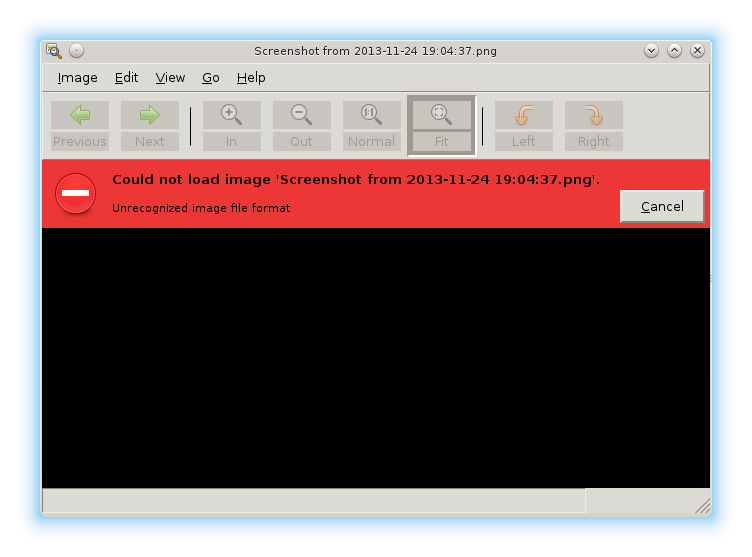
Also eog says "Could not load image" "Unrecognized image file format" - Well, why? It's just a .png file. (screenshot on KDE4)
Shotwell cause segfault, too :-( (and some other GTK applications)

I cannot point out broken component. Dear lazyweb, could you tell me how to fix this situation, please?


Next.

Previous.