Search Results: "otto"

7 May 2011

Amaya Rodrigo: Saturday Cat Blogging


Clara
Originally uploaded by Amayita.

30 April 2011

Thomas Girard: ACE+TAO Debian packaging moved to git

We recently converted Debian ACE+TAO package repository from Subversion to git. This was a long and interesting process; I learned a lot on git in the course. I had been using git for a while for other packages: BOUML, dwarves and GNU Smalltalk. But I did not really get it. A preliminary study led by Pau[1] showed that out of the following three tools: the last one was giving results that look better.
The conversion svn-all-fast-export requires physical access to the repo, so the Alioth SVN repo was copied on my machine svn-pkg-ace/ before running the tool:
svn-all-fast-export --identity-map authors.txt --rules pkg-ace.rules svn-pkg-ace
Here's the content of the pkg-ace.rules configuration file that was used:
create repository pkg-ace
end repository
match /trunk/
  repository pkg-ace
  branch master
end match
match /(branches tags)/([^/]+)/
  repository pkg-ace
  branch \2
end match
The author mapping file authors.txt being:
markos = Konstantinos Margaritis <email-hidden>
mbrudka-guest = Marek Brudka <email-hidden>
pgquiles-guest = Pau Garcia i Quiles <email-hidden>
tgg = Thomas Girard <email-hidden>
tgg-guest = Thomas Girard <email-hidden>
The tool sample configuration file merged-branches-tags.rules recommends to post-process tags, which are just a branch in SVN. That's why the configuration file above treats branches as tags. The conversion was indeed fast: less than 1 minute.
Post-conversion observations Invoking gitk --all in the converted repo revealed different kind of issues:
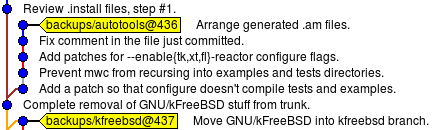
  • svn tags as branches: http://thomas.g.girard.free.fr/ACE/tags-as-branches.png Branches are marked with green rectangles, and tags with yellow arrows. What we have here (expected given our configuration of the tool) are branches (e.g. 5.4.7-5) corresponding to tags, and tags matching the SVN tagging commit (e.g. backups/5.4.7-5@224). We'll review and fix this.

  • merged code that did not appear as such: http://thomas.g.girard.free.fr/ACE/missing-merge-metadata.png Branches that were not merged using svn merge look like they were not merged at all.

  • commits with wrong author: http://thomas.g.girard.free.fr/ACE/wrong-author.png Before being in SVN, the repository was stored in CVS. When it was imported into SVN, no special attention was given to the commit author. Hence I got credited for changes I did not write.

  • obsolete branches: http://thomas.g.girard.free.fr/ACE/obsolete-branches.png The tool leaves all branches, including removed ones (with tag on their end) so that you can decide what to do with them.

  • missing merges: http://thomas.g.girard.free.fr/ACE/missing-merge.png The branch 5.4.7-12 was never merged into the trunk!

Learning git Based on observations above, I realized my limited knowledge won't do to complete the conversion and clean the repository. There are tons of documentation on git out there, and you can find a lot of links from the git documentation page. Here's the one I've used:
The Git Object Model It's described with pictures here. You really need to understand this if you haven't already. Once you do, you understand that git is built bottom-up: the plumbing then the porcelain. If you can't find the tool you need, it's easy to write it.
git fast-import The Migrating to Git chapter explains how you can use the git fast-import tool to manually import anything into git. I've used it to create tags with dates in the past, slightly changing the Custom Importer example in the book:
#!/usr/bin/env ruby
#
# retag.rb
#
# Small script to create an annotated tag, specifying commiter as well as
# date, and tag comment.
#
# Based on Scott Chacon "Custom Importer" example.
#
# Arguments:
#  $1 -- tag name
#  $2 -- sha-1 revision to tag
#  $3 -- committer in the form First Last <email>
#  $4 -- date to use in the form YYYY/MM/DD_HH:MM:SS

def help
  puts "Usage: retag <tag> <sha1sum> <committer> <date> <comment>"
  puts "Creates a annotated tag with name <tag> for commit <sha1sum>, using "
  puts "given <committer>, <date> and <comment>"
  puts "The output should be piped to git fast-import"
end
def to_date(datetime)
  (date, time) = datetime.split('_')
  (year, month, day) = date.split('/')
  (hour, minute, second) = time.split(':')
  return Time.local(year, month, day, hour, minute, second).to_i
end
def generate_tag(tag, sha1hash, committer, date, message)
  puts "tag # tag "
  puts "from # sha1hash "
  puts "tagger # committer  # date  +0000"
  print "data # message.size \n# message "
end
if ARGV.length != 5
  help
  exit 1
else
  (tag, sha1sum, committer, date, message) = ARGV
  generate_tag(tag, sha1sum, committer, to_date(date), message)
end
graft points (graft means greffe in French) Because of missing svn:mergeinfo some changes appear unmerged. To fix this there are graft points: they override git idea of parents of a commit. To create a graft point, assuming 6a6d48814d0746fa4c9f6869bd8d5c3bc3af8242 is the commit you want to change, currently with a single parent 898ad49b61d4d8d5dc4072351037e2c8ade1ab68, but containing changes from commit 11cf74d4aa996ffed7c07157fe0780ec2224c73e:
me@mymachine$ echo 6a6d48814d0746fa4c9f6869bd8d5c3bc3af8242 11cf74d4aa996ffed7c07157fe0780ec2224c73e 898ad49b61d4d8d5dc4072351037e2c8ade1ab68 >> .git/info/grafts
git filter-branch git filter-branch allows you to completely rewrite history of a git branch, changing or dropping commits while traversing the branch. As an additional benefit, this tool use graft points and make them permanent. In other words: after running git filter-branch you can remove .git/info/grafts file. I've used it to rewrite author of a given set of commits, using a hack on top of Chris Johnsen script:
#!/bin/sh

br="HEAD"
TARG_NAME="Raphael Bossek"
TARG_EMAIL="hidden"
export TARG_NAME TARG_EMAIL
filt='
    if test "$GIT_COMMIT" = 546db1966133737930350a098057c4d563b1acdf -o \
            "$GIT_COMMIT" = 23419dde50662852cfbd2edde9468beb29a9ddcc; then
        if test -n "$TARG_EMAIL"; then
            GIT_AUTHOR_EMAIL="$TARG_EMAIL"
            export GIT_AUTHOR_EMAIL
        else
            unset GIT_AUTHOR_EMAIL
        fi
        if test -n "$TARG_NAME"; then
            GIT_AUTHOR_NAME="$TARG_NAME"
            export GIT_AUTHOR_NAME
        else
            unset GIT_AUTHOR_NAME
        fi
    fi
'
git filter-branch $force --tag-name-filter cat --env-filter "$filt" -- $br
(Script edited here; there were much more commits written by Raphael.)

Important

It's important to realize that the whole selected branch history is rewritten, so all objects id will change. You should not do this if you already published your repository.

The --tag-name-filter cat argument ensures our tags are copied during the traversal; otherwise they would be untouched, and hence not available in the new history.

Hint

Once git filter-branch completes you get a new history, as well as a new original ref to ease comparison. It is highly recommended to check the result of the rewrite before removing original. To shrink the repo after this, git clone the rewritten repo with file:// syntax -- git-filter-branch says it all.

Cleaning up the repo To recap, here's how the ACE+TAO git repo was changed after conversion:
  1. Add graft points where needed.

  2. Clean tags and branches. Using git tag -d, git branch -d and the Ruby script above it was possible to recreate tags. During this I was also able to add missing tags, and remove some SVN errors I did -- like committing in a branch created under tags/.

  3. Remove obsolete branches.

  4. Merge missing pieces. There were just two missing debian/changelog entries. I did this before git filter-branch because I did not find a way to use the tool correctly with multiple heads.

  5. Fix commit author where needed. Using the shell script above Raphael is now correctly credited for his work.

That's it. The ACE+TAO git repository for Debian packages is alive at http://git.debian.org/?p=pkg-ace/pkg-ace.git;a=summary.
[1]http://lists.alioth.debian.org/pipermail/pkg-ace-devel/2011-March/002421.html
[2]available in Debian as svn-all-fast-export

26 April 2011

Julien Danjou: Why not Lua

Since my latest announcement of the Lua workshop, I received a couple of emails asking why I discourage the use of Lua. Actually, I already wrote out many of the things I dislike about Lua. I won't come back on this technical issues here, but since Lua 5.2 is not yet released (it's still at alpha stage), they are still relevant nowadays. Stack based API is harder

The ease of integration of Lua into a C program is one of the point of Lua. They claim it's very easy to integrate Lua into your C application, because it does not use pointer, nor reference counting, nor anything that requires a minimum amount of skills to be used. It uses a virtual stack based approach. You push or pop things on a stack, and refers to them using a relative or absolute index. In order to people who never wrote Lua code to understand, here's a quick example on how this work. The L pointer is a Lua environment.

/* Create a table on the stack: index 1 */
lua_newtable(L);
/* Push a string on the stack: index 2 */
lua_pushstring(L, "hello");
/* Push a number on the stack: index 3 */
lua_pushnumber(L, 123);
/* Set newtable["hello"] = 123 */
lua_settable(L, -3);
You first push a table (in Lua, a table is almost equivalent to what you'd call a hash table in other language), then push the key, the value, and do the assignment operation. In the settable, we use -3 as index, meaning the "3rd item on the stack counting from top". We could also have written lua_settable(L, 1), since the table is also the first item on the stack from the bottom. So far, so good. Problems arise when you do more complicated stuff. My previous example is what you would typically find in a tutorial, but of course, real life is different, and usually more complex. If you cut the things in different parts, it can start to be more complicated. Let's take a look at the following:
/* Create a table on the stack: index 1 */
lua_newtable(L);
/* Push a string on the stack: index 2 */
lua_pushstring(L, "hello");
/* Push a number on the stack: index 3 */
lua_pushnumbe(L, mycomputingfunction());
/* Set newtable["hello"] = 123 */
lua_settable(L, -3);
Here, we do exactly the same thing, but we do not push 123 directly: we compute it. And here's the trick: if your computing function is also using the Lua stack, things can become very messy. As long as your computing function use the stack cleanly by pushing and poping all its item, and returning the stack in the same state it was before, you're safe. The problem is that in a complex program, you also write bugs. You do not chose to, but you do. And sometimes, you forget to pop one of the item you fetched from a table. Imagine that mycomputingfunction is:
int
mycomputingfunctiong(void)
 
  /* Just push the table we want to fetch
     the number from on the stack */
  pushatableonstack(L);
  lua_pushstring(L, "mykey");
  lua_gettable(L, -2);
  return lua_tonumber(L, -1);
 
This function works perfectly. It pushes a table, then a key ("mykey"), then fetches mytable["mykey"] and pops the key (lua_gettable does push value/pop key itself), and then returns the numeric value of the last item (the fetched one) of the stack. However, this function has a bug: it does not pop the table! This does not prevent the function to work. It does not raise a segmentation fault. It does not show any problem under gdb. It does not show any leak under Valgrind. It does now show any problem under any standard C debugging tool. But when you'll start using it, your program will start to do weird things, and you'll have to spend a huge amount of time debugging it manually, dumping the stack content at each step of your program to watch out what's wrong. Another bad thing, that can happen, is some code poping accidentally an item from the stack, or worst, from an empty stack. This does not raise any error on the Lua side, but will break your program in very unfunny way. Even if I've been very meticulous writing awesome, but we hit that problem regularly. The easiest workaround is to use lua_settop(L, 0) to reset the stack to 0 element. Doing this regularly (like after each program event or treatment) can remove left-over items and avoid the never ending stack grow you may experience if your left-over items continue to pile up. Did I tell you I dislike work-around? You could also use lua_call(), which would avoid such an error, but this would require a huge amount of indirection, and would make write more (useless) code. This kind of problem does not exists with pointer based API. If you screw things up, the problem will cause a segmentation fault or leak memory, or cause things you can (easily) debug with standard tools like gdb or Valgrind. No reference counting is a pain in the ass

Userdata objects are variable Lua size objects embedding a C struct you define. It's the equivalent of an object in object oriented language. Lua does not provide any reference counting for the userdata objects. That means you can push this objects on the stack, use them, but they cannot directly reference each others. If you have a "car" userdata and a "wheel" one, the car cannot hold directly a reference to the wheel. This is not possible because userdata are allocated and garbage collected by Lua, and there's no way to increase the reference counting yourself. So the common hack is to store the wheel into a table as a value, and store the table index as an integer into the car data structure. This obviously makes memory leaks tracking harder, add huge level of reference indirection in usage (still more code), and does not make the whole process less error prone (at least in my opinion). No paradigm makes you lose time

Lua is proud to come with no paradigm and to provide metatables. I already showed 3 years ago that it has big flaws. To me, this ain't no good. Lua is not functional, nor it is object oriented. Most people, including me, want one of this paradigm, or any else. Plain old imperative is not enough. So you'll start to build more, or to use something like LOOP, which implements an object model. You'll implement your paradigm. I say life is too short to (re)write a paradigm. In awesome we wanted to have an object oriented approach (this is kind of typical in such a graphical application context), so we tried to build one. To me, this started to be a show stopper when I realized that I've ended writing Python object model into Lua while developing awesome (which aims to be a window manager, not a language). This is one of the reason I stopped hacking on Lua things. I liked Python object model and wanted to have it in Lua, and spending time rewriting Python is just not worth it. I probably should have chose Python, not Lua. YMMV. Embedding may not be a good choice

This is not Lua related, but I want to mention it. Googling for "embedding vs extending" will probably tell you more about why you should double check that you really need to embed Lua rather than to extend it. Being small is not an excuse

One common argument to choose Lua is that it has a small footprint. Yeah, that's true, but that's useless. Bummer! When I program, I don't have any resource usage pressure. People who have such pressure are either paranoids or playing in the world of embedded computers. This is also a no more existing conception since quad core processors equiped phones are coming into the market. I'm rather confident that what we used to call embedded devices are just dead and are now plain computers. But as usual, YMMV. So start to forget about it, run in your underpants and yelling "yay we killed that shit!", and then use real computers stuff. :-) Even if benchmarks show how Lua is damn fast, remember what a benchmark proves: that you can do useless things very fast. Too few extension modules

This is not directly Lua's fault, but there's too few extension modules for Lua. The community is quite small compared to other big languages' ones. So think twice

before you choose Lua (or any other language). My recommendations these days would be not to embed, but to extend. If you really have no choice and need to embed a language into your application, GNU Guile is probably worth considering, because it's a Scheme and therefore a functional language :-), and because it can provides also different languages. Including Lua. Flattr this

Anand Kumria: The SciFiRomCom.

In the last few weeks I've seen both The Adjustment Bureau and Limitless. And I've realised they are really both in a new (new to me, that is) category. If you have the chance, they are both worth seeing. They are not particular spectacular and neither will really make you think. But what is this new category about? Basically you have a Romantic Comedy but the trigger is Science Fiction. For example; in the Adjustment Bureau, a man loses an election. He meets an amazing girl who lifts his spirits and inspires him. To not only give a great consilation speech but to not give up. However, he never meets her again. Or he does but "outside forces" (the titular Adjustment Bureau) conspire to keep them apart. The remainder of the story is about him trying to overcome those obsticles. In Limitless, a man reaches rock bottom when his girlfriend leaves him. Whilst bumbling around he gets a 'magic' pill that helps him get into a state of flow and solve problems. Along the way, he arranges to do things that enhance his social proof; like learning (multiple) languages, earning lots of money, etc. Whilst the remainder of the story is about him trying to overcome the obsticles that life with the pill throws up, a significant sub-plot is the relationship with the ex.; and how he tries to win her back. Thus the SciFiRomCom, there are, no doubt many examples of this genre. But the earliest that I can recall seeing is Groundhog Day (which is a classic and MUST be seen). What other classic SciFiRomCom's are out there?

15 April 2011

Amaya Rodrigo: Friday Cat Blogging


New scratching post
Originally uploaded by Amayita.
New scratching post

Amaya Rodrigo: Friday Cat Blogging


Vi
Originally uploaded by Amayita.
Vi, taking a break as I make the bed.

10 April 2011

John Goerzen: The Mennonite Mecca

I d like to paint you a picture of the sorts of things that have been going on around here the past few months, and with growing fervor the past few days. I ll start with church basements. Possibly a little chilly, but with a bunch of women getting together to make some quilts along with some conversation, maybe some snacks. Or perhaps about hundreds of kitchens throughout Kansas, warm with baking pies, cookies, breads, and all sorts of items. Then there are a bunch of wood shops, turning up sawdust, building things from toys to furniture. Or even a body shop donating its time and materials to put some finishing touches on a classic car. I ve also seen around 300 men getting together to practice for a men s chorus concert. I know there was large crowd of people gathering to make verenike. People always wind up running 5km on a particular Saturday morning, rain or shine. Or ride 35 miles on a bicycle on a different Saturday. Or even help build a house using as much volunteer labor and donated materials as possible. And then, of course, comes this week, where Mennonites from all over Kansas start to converge on Hutchinson, KS. I can imagine you might see some odd sights rolling down the road: a vehicle called the borscht buggy for preparing large quantities of the delicious soup. Several old tractors being hauled down the road on trailers. Semi loads of food. Vanloads of pie and cookies. Plants, trees, rugs, quilts, even a lawn mower. And then, yesterday and today, excited people ready to buy all of these things. Families with children excited to get a ride on the largest slide they ve ever seen. And, of course, so many people wanting to eat the famous food that, despite the many parallel serving areas, lines still can extend for blocks. It s all because people are hungry. Not these Kansans with pie-laden kitchens, though it s to help those in need. It s all part of the annual Kansas MCC Relief Sale. The idea is that people make, bake, build, sing, or give things to the sale. The items are then sold, and the proceeds go to Mennonite Central Committee, one of the world s most efficient charities. MCC not only helps with directly bringing people out of hunger, but also supports sustainable projects, such as building hand-operated wells to give those in need a safe source of drinking water. Virtually all of the money you spend on those pies winds up helping someone in poverty. Each year, the relief sale and related events raise around half a million dollars for charity. It s not unusual to see a quilt sell for thousands of dollars. Most of the things sell at more normal prices, but last year someone decided to add a loaf of bread to an auction and it sold for $100. And so it was this that we took the boys to today. We started with the Feeding the Multitude a wonderful meal with some traditional Kansas Mennonite food. Here s a photo: That bread is zwieback, then there is cherry moos, bohne berrogi, verenike, and of course, sausage. Here are Jacob and Oliver enjoying their food: IMG_5548.JPG After that, we went over to the giant slide. I m not sure how many stories tall it is, but it s big enough that they have a strip of carpet there at the bottom to slow people down at the end. Here s a photo of Jacob on my lap after going down the slide. If you zoom in, you can see the giant smile on his face. IMG_5562.JPG After that, we hopped on the mass transit at the sale: a wagon being pulled by a tractor. We checked out the general auction, with Jacob wanting to be sure to peer under the hood of each car present. Then after a stop to buy some kettle corn for Jacob, we checked out the plants, quilt auction, and then on to buy cheese curds. After another stop at the slide, it was time to head home. And then tomorrow is a concert of the Kansas Mennonite Men s Chorus (motto: We Sing That Others May Live). You get around 300 men on a stage signing together and wow no recording can do it justice. It s amazing to hear the power of the choir at the loud parts, but still more amazing to listen to 300 men signing as softly as they possibly can. I ve been singing with that choir for 3 years, and we ve been practicing for a few months now. If you ever hear some Mennonites boasting about something, it s probably going to be about how much money they ve raised for charity. And on that note, I ll nudge those Indiana folks reading this and point out that you have some catching up to do with the Kansas sale

9 April 2011

Cyril Brulebois: Debian XSF News #9

This is the ninth Debian XSF News issue. As can be seen below, I m not yet decided how to present various items. This time, I ll try to gather all updated packages since the previous issue, grouped by category, with a single line summary. Lengthy comments come after that list of updated packages.
  1. Here come the updated packages, with contributors/uploaders between square brackets (Timo = Timo Aaltonen, JVdG = Julien Viard de Galbert, Robert = Robert Hooker). Protocol:
    • [KiBi] x11proto-core: new upstream release, bringing Sinhala support experimental.
    Libraries:
    • [Timo,KiBi] libx11: new upstream release, fixing some hang issues unstable.
    • [KiBi] libxi: new upstream release unstable.
    • [KiBi] libxkbcommon: finally accepted by ftpmasters, needed for wayland experimental.
    Server:
    • [KiBi] xorg-server: stable release 1.9.5, unlikely to cause regressions from the previous release candidate; in other words: a good candidate for testing if the Linux kernel migrates some day unstable.
    • [KiBi] xorg-server: first release candidate for the first stable bugfix release in the 1.10 series, which finally builds experimental.
    Drivers: Others:
    • [KiBi] xorg: originally a few tweaks to make it possible to install X on Hurd unstable
    • [KiBi] xorg: but wkhtmltopdf failed on several buildds, so I disabled PDF generation, and completed the switch to asciidoc mentioned in DXN#8 unstable.
    • [KiBi] xorg-sgml-doctools: new upstream release, adds support for docbook external references unstable.
    • [Robert,KiBi] xutils-dev: new util-macros release, and a version lookup file unstable.
  2. Why am I carefully uploading video driver packages to experimental only? Because bad regressions happen, on a regular basis; so it seems quite nice to keep well-tested versions in unstable for now. Once the X stack has migrated to testing (which as explained in DXN#7 and DXN#8 is waiting for the Linux kernel to migrate), new versions in unstable are welcome, so that one can tell easily whether bugs with those versions are regressions from the versions available in testing. In the meanwhile, one can build packages from the git repositories, using the debian-unstable branch (which is the default).
  3. Why am I so rash then, uploading input drivers to unstable as they are released? First of all, our waiting for the kernel means we have no issues on the 10-day delay front. Second of all, input bugs are usually fixed very quickly upstream (you can go there and thank Peter Hutterer in particular). So staying very close to whatever upstream ships makes some sense.
  4. Why am I uploading drivers twice? Since it isn t specific to the current situation, but a general question when it comes to supporting two versions of the server in parallel, I decided to document that in an handling multiple server versions thanks to experimental page. The answer to this specific question is available in the note at the bottom of that page.
See you in a few days for a follow-up Debian XSF News issue.

7 April 2011

Amaya Rodrigo: Baking for the weekend


Madeleines / Magdalenas
Originally uploaded by Amayita.
Madeleines / Magdalenas (http://en.wikipedia.org/wiki/Madeleine_%28cake%29), home made, and Jolly Roger themed!
And Flan: 4 minutes, pressure cooker made, Cr me caramel (http://en.wikipedia.org/wiki/Cr%C3%A8me_caramel)
I adapted the recipes to make them healthier (fructose instead of sugar, whole brown flour instead of white, refined one).

6 April 2011

Jon Dowland: aero

aero snap was one of the launch features of Windows 7 that was quickly copied into other desktop systems (most recently, gnome 3). I've written about it before. Essentially, dragging windows to hot regions of the screen resizes those windows to occupy some area of the screen. To the top: the whole window area (maximize). To the left or right, 50% of the width of the window area, all of the height. This is a pretty useful feature that I wanted to steal for myself. There is a somewhat fragile-looking (but functional) way of achieving this using compiz and some embedded shell scripts which I used for a while, but has several drawbacks: there's no visual indication that resizing will occur; resizing occurs after a time interval and not in response to you releasing the window from its drag; it's therefore very easy to accidentally resize windows (focussing a window adjacent to an edge and parking the mouse pointer in the edge region is sufficient). Aero snap is not without its own shortcomings: whilst having side-by-side windows is great for comparing two documents, you can't arrange two windows top-to-bottom, each occupying half of the vertical height of the screen. This is very useful for working on two spreadsheets. A less interactive but more functional way of achieving this is the grid plugin for compiz and keyboard shortcuts. The grid plugin can be found in the Debian package compiz-fusion-plugins-extra.

25 March 2011

Amaya Rodrigo: Friday cat blogging


Vi & Clara
Originally uploaded by Amayita.

11 March 2011

Eddy Petri&#537;or: HOWTO: Making Windows usable and avoiding accidental sending of mails in Microsoft Outlook

I've changed jobs recently and after 5 years of not having to work with a Windows system I am having all sorts of adaptation-to-Windows problems at the new job.

First I just had to have the usual X-mouse behaviour and so I installed True X-Mouse Gizmo for Windows. This provides focus under mouse, middle click paste after select (not perfect, but it works), right click to push to bottom the window.

Second I had to have a virtual desktop, so I installed Microsoft's Virtual Desktop Manager from the PowerToys page. I tried another virtual desktop manager before using MSVDM, but I found it too clumsy so I switched to MSVDM which I knew from way back when I used Windows the last time. Good, now I can have my applications organised the way I am used to.

UPDATE:
I gave up on MSVDM in favour of Virtual Dimension since I wasn't able to send a particular window to the intended desktop unless I had in the taskbar all apps visible (Shared Desktop option). I might try other suggestions (Virtual Dimension does not have a way to send a window directly to a specific desktop, but just to the neighbours of the current one.)


Third, I had to make Caps Lock work as Ctrl. I just can't go back to an inferior setup. I found information on this page and ended up at this page from where I got a zip file with various registry keys which allow the deactivation of caps, or turning it into another Ctrl.

Fourth, I am used to write with diacritics in Romanian with the secondary layout of the standard (SR 13392:2004), so I rushed to Cristian Secar 's page for the keyboard driver since on XP the Romanian layout is retarded (some history in which some arbitrary German guy decided y and z had to be switched on Romanian keyboards and some other similarly weird stuff). Since the installation, my keyboard behaves according to this layout:


Things started to look well, but I soon was reminded that Outlook is an idiotic mailer since it doesn't require a confirmation on send, not even if you didn't set a subject. And this is problematic since sending the mail is done via Alt+S, so if the current layer is NOT Romanian, when I want to type (s with a comma below), a fairly common character in Romanian words, you end up looking like an idiot on the recipient side since they receive an incomplete mail. Remember, no confirmation AND no default spell checking before send. Yay!

At my second such accidental mail sending (of which the last two were sent to the same person), I decided to see if this can't be fixed. I initially looked for changing the short cut, but I couldn't find it (I might be inept at finding things in Windows, remember, I haven't touched Windows systems in the last 5 years) but I found another workaround and decided it's good enough to share with other people that might hit the problem.

Just setup a delay rule following these steps.
1. Go to Tools....Rules Wizard
2. Click 'New' Rule
3. Select "Check messages after sending"
4. Click Next on "Which conditions you want to Check?" dialog.
5. Press yes to "This Rule will be applied to every message" message box
6. In the "What do you want to do with message?" dialog, Select "Defer delivery by a number of minutes"
7. Select your favourite number of minutes.... I usually select 2 mins.
8. Select Finish. and close the Rules Wizard.

Now everytime you send an email it will sit in your outbox
for specified number of minutes. If you ever wanted to change it, delete it etc, You have sufficient time to do it :)


I used 3 minutes for the delay. At least now I can prevent looking retarded in front of people... more than necessary :D .


Oh, and Windows' clock display is retarded. It shows, by default, the hour and minutes, but there's no way to change that in a sane way. If you want the date, you must hover over the clock and it shows it, but the day of week is missing. Great job! You can see that information, too, but you have to drag the toolbar to be 2 or even 3 rows high (here it requires 2, but I've seen people saying they needed 3) to get that information, too. Great! One has to choose between wasting desktop real estate and having access to useful information. Or you could install an independent application for the clock... retarded. I am not making this shit up.

I hope this helped.

4 March 2011

Cyril Brulebois: Debian XSF News #7

Time for a seventh Debian XSF News issue!

28 February 2011

Kai Wasserb ch: On the unofficial wine-unstable packages on dev.carbon-project.org

I've been building unofficial wine-unstable packages for some time now and the amount of people apparently using them has become noticable (not only traffic-wise). Thus the amount of questions send to me has also risen quite a bit. In this post I try to address most of the questions in the hope it'll help people understand my motives for building these packages and potential pit falls for users. First of all: I'll stop building those packages as soon as Debian has a for my purposes recent enough version in the archives. This is expected to happen soon as most/all of the blocking issues should be sorted out now/soon. See e.g. #557783 for some insight into the problems. It might happen after updated packages are in Debian, that I'll build one version or the other occasionally to test a certain patch or version. The bottom line of this is: don't rely on me to provide always the latest packages. (This, by the way, is also explanation enough to the question, whether I'm going to build the "official" (I consider only those entering Debian's archives official) Debian packages for upstream (WineHQ).) Another question, which is seen every now and then in my inbox, is, whether I could add patch xyz to the packages. The answer is no. I maintain those packages for myself and if you want to use them, you're welcome. If you need another patch applied, just download the source package and add the patch with quilt to the series. When a certain version/build doesn't work for you, you can ask me for help, but please don't expect me to handle "doesn't work" reports like I would handle bug reports for my packages. The wine-unstable packages are for myself and if they work for me, that's all I aim for. Before spreading the word about my packages, make sure, you and those who read your post/message/whatever about my packages understand, that it is generally a very bad idea to install third-party packages, even though I'm a Debian Developer. Make also sure everybody understands that only the source package is signed with my key. Please don't download all packages (binary and source), unless you really need all of them. Please pick the ones, you need and just download them. Even though this might sound like begging, which I'm not, it'd be nice, if you could consider donating (via PayPal) something, to help cover the traffic costs. The traffic for just the wine-unstable packages has risen dramatically in the last few months. Thanks! Now, I hope I've answered most questions, if not, feel free to contact me.

20 February 2011

Evgeni Golov: Desktop in a shell

People are using computers, everywhere, really! ;)
As you might guess correctly, so do I.Basically, I am using three computers: my laptop (ThinkPad X201s, awesome machine, but pabs told me not to post any more adverts for ThinkPads on Planet Debian *g*), my smartphone (Motorola Milestone, yes, that counts as a computer) and random_pc (for random as in my girlfriends or some other trusted (!!!) friends computer).
My laptop is running Debian GNU/Linux unstable with Xfce4.6, my smartphone is running Android 2.2.1 Froyo, my girlfriend has Ubuntu with GNOME, a friend runs Debian unstable with GNOME, another one Arch Linux with KDE4 and so on. And on all these machines I want be able to work, which means I have to read mail and rss, chat via IRC, JabberXMPP and ICQ, have a look at my to-do list, ssh into different machines, write some code, tweet and dent etc.In the following series of posts I will describe how I can handle about 90% of my work on every (trusted) computer out there, using ssh, screen, mutt, irssi, BitlBee, newsbeuter etc.As I am describing the setup as a Desktop in a shell , let s start with a login- and desktop/window-manager: ssh+screen.sshObviously, you need a machine to ssh into it, where the Desktop will live on. For me, that s my home router/fileserver/vm-server dorei, running Debian GNU/Linux LennySqueeze with OpenSSH as a kind of login manager ;)Yes, my user is allowed to login with a password instead of a public key. And well, that s all for the login-manager, no extra configuration needed.screenAfter logging in, I start my window-manager with screen -rd, -r for reattach a running screen session, -d for detach it if it is already attached somewhere else. Or I can start a new session by just typing screen. Inside the screen I have multiple windows (one can create new ones with ^A c) with all the needed software running. I can switch windows by pressing ^A N, N being the number of the window, ^A n for the next window, ^A p for the previous one or ^A ^a for the last one. Or I can get a window-list with ^A w. If needed, I can rename windows with ^A A, followed by the new name. That should be enough for almost everyone. Let s just add a window-list to the bottom (as you might have seen on GNOME, Xfce, KDE and even Windows ;) by adding the following to the ~/.screenrc:
caption always " "                    # clear line before hardstatus
hardstatus alwayslastline "% = kb [ % B %H:$USER % b ][ %=% w %?%-Lw%?% b (% W %n*%f %t%?(%u)%?% b )% w %?%+Lw%?%?%= % b ][% B  %l % B % W %d.%0m % b ]"
You get the current host- and username, the machine load and the date for free ;)Even if it is possible, I do not have any autostart like stuff in my .screenrc as the machine is running stable and I start the screen and the apps inside maybe once a year after a reboot.screenrcMy .screenrc looks like this:
# detach on hangup
  autodetach on
# don't display the copyright page
  startup_message off
# set scrollback to 2000 lines, default 100
  defscrollback 2000
# set silencewait to 15 seconds, default 30
  silencewait 15
# new shells should be started as login-shells
  shell -$SHELL
# make a fancy statusline
  caption always " "                    # clear line before hardstatus
  hardstatus alwayslastline "% = kb [ % B %H:$USER % b ][ %=% w %?%-Lw%?% b (% W %n*%f %t%?(%u)%?% b )% w %?%+Lw%?%?%= % b ][% B  %l % B % W %d.%0m % b ]"
# make higlighting bold, black on blue background
  sorendition +b bk
# some fixes, no I do not know where they come from :)
  termcap  xterm hs@:cs=\E[%i%d;%dr:im=\E[4h:ei=\E[4l
  terminfo xterm hs@:cs=\E[%i%p1%d;%p2%dr:im=\E[4h:ei=\E[4l
  termcapinfo  xterm Z0=\E[?3h:Z1=\E[?3l:is=\E[r\E[m\E[2J\E[H\E[?7h\E[?1;4;6l
  termcapinfo xterm* OL=100
  termcapinfo xterm 'VR=\E[?5h:VN=\E[?5l'
  termcapinfo xterm 'k1=\E[11~:k2=\E[12~:k3=\E[13~:k4=\E[14~'
  termcapinfo xterm 'kh=\EOH:kI=\E[2~:kD=\E[3~:kH=\EOF:kP=\E[5~:kN=\E[6~'
  termcapinfo xterm 'hs:ts=\E]2;:fs=\007:ds=\E]2;screen\007'
  termcapinfo xterm 'vi=\E[?25l:ve=\E[34h\E[?25h:vs=\E[34l'
  termcapinfo xterm 'XC=K%,%\E(B,[\304,\\\\\326,]\334, \344, \366, \374,~\337'
  termcapinfo xterm* be
  termcapinfo xterm xterms xs ti@:te=\E[2J
  termcapinfo wy75-42 xo:hs@
  termcapinfo wy* CS=\E[?1h:CE=\E[?1l:vi=\E[?25l:ve=\E[?25h:VR=\E[?5h:VN=\E[?5l:cb=\E[1K:CD=\E[1J
  termcapinfo  hp700 'Z0=\E[?3h:Z1=\E[?3l:hs:ts=\E[62"p\E[0$~\E[2$~\E[1$ :fs=\E[0 \E[61"p:ds=\E[62"p\E[1$~\E[61"p:ic@'
  termcap  vt100* ms:AL=\E[%dL:DL=\E[%dM:UP=\E[%dA:DO=\E[%dB:LE=\E[%dD:RI=\E[%dC
  terminfo vt100* ms:AL=\E[%p1%dL:DL=\E[%p1%dM:UP=\E[%p1%dA:DO=\E[%p1%dB:LE=\E[%p1%dD:RI=\E[%p1%dC
  termcapinfo linux C8
# some bindings
  bind k
  bind ^k
  bind .
  bind ^\
  bind \\
  bind ^h
  bind h
  bind 'w' windowlist -b
  bind 'W' windows
  bind 'K' kill
  bind 'I' login on
  bind 'O' login off
  bind ' ' history
  bind = resize =
  bind + resize +3
  bind - resize -3
# Mutt demands this
# http://wiki.mutt.org/?MuttFaq/Appearance
 defbce on
 term screen-bce
That s all for my screen setup. The obvious, boring screenshot follows:See you next time, when I will present my mutt setup here.

18 February 2011

Russell Coker: Sony Ericsson Xperia X10i First Experience

I have just got a new Xperia X10i for my wife. It s with Virgin who use the Optus network. Optus apparently have better coverage than Three (who we have been using for 6.5 years) and Virgin offers the best deals they have good phones on low monthly rates and do nice things like selling most phones unlocked (the Xperia is one that comes unlocked).I chose the phone for use in system administration work. A large screen should be good for reading email and running a ssh client. Hopefully I will be able to use the phone s Wifi to provide mobile net access to a laptop for any problem that can t be solved on a tiny screen. My wife doesn t do much sysadmin work nowadays, but it ll save some effort if we can both use the same model of phone. Also according to Amobil.no the Xperia X10 is the second best phone for camera-phone functionality [1], and my wife would really like to take some good pictures with her phone (she loves the LG U990 Viewty that she has right now).ScreenOne major reason for choosing this phone is that it has the biggest and highest resolution of any phone that doesn t cost a huge amount of money. It does well in this regard, the screen is very good to look at. However it is apparently not particularly sensitive and we still have the protective cover on the screen which makes the swipe to unlock operation quite difficult. My wife generally likes to keep the protective plastic on such screens for a while to prevent damage, but she may take this off sooner than on other devices.Sony FoolishnessOne reason that this phone is cheaper than any other phone with similar specs is that it s made by Sony. Sony won t provide updates to Android 2.2 or better and they have their own stupid applications installed in an intrusive manner. The main screen of the phone has a large icon for the Sony Timescape program. If you choose a background image of a person s face then the Timescape logo is in the ideal location to obscure the person s eyes. Generally it s not desired to have the person in your phone background look like Zorro. Fortunately you can delete icons from the home screen, you just have to press and hold the icon until a trash-can appears at the bottom of the screen and then drag it to the trash.Phone BookThe core phone functionality is fairly important for a mobile phone. But it seems that every modern phone has some serious failings in this regard. The Xperia comes with a phone book that is reasonably good for managing contacts and partially coalesces multiple entries with the same name which is convenient as I somehow managed to import 3 copies of each entry in my wife s phone book. The down-side is that the multiple entries are still stored, so when it comes time to update someone s phone number my wife will have to separate the entries and then delete all but one of them, adding probably a minute of effort for each one. With 60 phone book entries that s probably an hour of wasted time during the course of her phone use.They really should do a time based analysis of phone use and optimise the UI for efficiently performing common tasks. I think that an ideal design would start off by asking the user to rate the importance of phone functionality, camera, facebook, twitter, etc and then give a UI that matches the important tasks. A device that has 384M of RAM, 1G of built-in Flash storage, and an 8G micro-SD card (which Virgin provided with the phone) should be able to offer a selection of UIs.CameraThe configuration for the camera allows some settings to be changed easily and others have to be changed through the advanced settings which requires one more button press and a few extra taps on the screen. One real stupidity is to have the phone light be in the advanced settings, so if the room happens to be a little darker than expected you suddenly need to go to a lot of extra effort to turn on the light.Finally it would be really good to be able to take a quick picture. I would like to be able to be able to press a combination of buttons and have it immediately take a picture regardless of what had been running before. Not press the main menu button, the camera icon (which I made a link from the home screen), wait a second for it to load, and then press the shutter button. Ideally I would like to press a combination of hardware buttons to have it immediately take a picture even when the screen is locked. I don t want to wait for the screen unlock process, sometimes the perfect shot is only available for a second.WifiIt doesn t support ad-hoc networks. This is really annoying for me as I don t own an access point and I don t plan to buy one just for a phone. My laptop (Thinkpad T61 with Intel Corporation PRO/Wireless 3945ABG [Golan]) doesn t seem to support running as an access point, and my EeePC 701 with an Atheros AR5001 has the same problem, here is the error message:# iwconfig wlan0 mode master essid x
Error for wireless request Set Mode (8B06) :
SET failed on device wlan0 ; Invalid argument.I have a cheap Realtec USB Wifi device that claims to support being an access point but just fails when I try it. So presumably it doesn t really support it but the driver is buggy.It seems that I may need to put a custom Android installation on it to get ad-hoc working.Also it s apparently necessary to root the Xperia to get Wifi tethering to work for providing net access to a laptop. So I guess I ll hacking it soon.Internet AccessThe Virgin web site couldn t help me set up the Internet access because I ported a phone number from another Telco. I had to use the phone number supplied by Virgin to login to their web site and the site then wanted to sent (probably SMS) the settings to my phone, but of course it couldn t SMS to that number as I ve got the Three number active. Presumably they were expecting that customers would setup Internet access before porting their old number.I phoned the Virgin tech support and used the settings they suggested, but it didn t work. Then I took the phone to a Virgin store and it started working after they rebooted it with no changes to settings. Just like Windows used to be. :(Email Access Default AppThe email setup defaults to port 143 IMAP access, so even when a mail server provides access on port 993 for IMAPS and on port 995 for POP3S probably most users will not use any encryption because their phone doesn t default to it. Also one annoying feature is that when I gave it the email address test@coker.com.au it decided to use test as the user-name for IMAP by default. It seems that a very large portion of the active email accounts nowadays are on systems that handle multiple domains and thus require the domain name in authentication, and a large portion of the remainder accept domain names even when they aren t required. Besides it s a lot easier to delete a domain name when it s not needed than to type it in when it is.The default hostname for sending and receiving mail is the domain name, if the MUA configuration program had checked the MX record it would have known that smtp.sws.net.au is a better default choice for the mail server. I ve now started the practice of creating a CNAME entry named m in every domain I run, so when someone is setting up a mobile phone they just have to add m. to the start of the default hostname to use for sending and receiving mail. By doing this I can probably save an average user at least 30 seconds of typing, which is particularly important if I happen to be talking them through the process!The MUA uses IMAP commands to load the text of the message without attachments and then loads attachments on demand, this will be handy for when people attach unreasonably large files. With IMAP caching and partial loads the core functionality seems OK, and some quick tests of standard but not commonly used IMAP functions such as noticing that mail has been deleted by another client seemed to work well. The performance of loading a new mailbox with 369 message was quite poor, I m not sure how much of this is due to the network connection and how much is due to the client implementation. This is a real concern for me as I typically have about 7,000 messages in my IMAP account and 3,000 unread messages most of which are in two folders.Another problem is the fact that there seems to be no way of searching in the list of messages, sorting/grouping by subject or sender, or showing unread messages. This makes the Xperia unsuitable for the task of reading mailing lists when on public transport. I would really like to be able to sort through a folder of mailing-list mail, delete messages that I don t need to keep and flag ones that need attention when I have the resources of a desktop system when I m on a tram or in other situations where a laptop can be inconvenient.One undeniable bug I discovered (as opposed to the missing features I listed) is that when a message has a line with a URL followed by many spaces it won t load correctly in the web browser, the spaces will be treated as part of the URL. I ve changed the default signature in my email to have a description followed by a URL to avoid triggering this bug. Presumably other Android phones are bug for bug compatible. :(Moxier MailThere is a complete set of email and calendaring applications preloaded from Moxier.com. The Moxier mail client uses company.com as an example domain name (they should use example.com does no-one read the RFCs?). It s nice that they verify the SSL certificate and display the details when it s not signed.Unfortunately Moxier doesn t support anything other than Exchange, and I can t delete it either as it s part of the base set of applications from Sony.SMSThe SMS application is supposedly conversation based. This doesn t seem like a benefit to me, it s a pity that there is no option to make it act more like every other SMS implementation I ve used over the last 12 years.BatteryThe battery is described as having a capacity of 1500mAh, for comparison a AA rechargeable batteries have capacities ranging from 1800mAh to 2800mAh. My first mobile phone had a rechargeable battery that took the same space as 4*AA batteries and the phone was designed to run on AA batteries if the main battery wasn t charged. I would like to have an Android phone that had a battery pack of similar size to at least 2*AA batteries, and 4*AA would be OK too.The Xperia battery was reported as being half discharged after playing with the phone for less than an hour. Basically when doing anything with the phone that is remotely intensive I need to have it plugged in. Unless of course I m using one of the star-chart applications LightsThere are two white leds in the gaps between the keys for Settings, Main-Menu, and Back on the front. They are quite bright and annoying to look into at night.SSHSSH was one of the reasons for getting an Android phone, but it was one of the last things I worked on because everything else was so much fun. I m currently using ConnectBot, it supports storing ssh host keys, generating a key-pair from random screen touches, locking and unlocking the key-pair (with a pass-phrase) and pasting the public key to an open window. All the basic functions just work although it s rather inconvenient to enter the CTRL keys.The next thing to investigate is a small and light Bluetooth keyboard. Using an external hardware keyboard will save me from the pain of entering CTRL keys (which is even worse than the pain of entering passwords that contain digits and mixed case). It will also allow me to type a lot faster and use the entire screen for the ssh session.Current Bug SummaryWifi doesn t do ad-hoc mode or tethering.MUA doesn t correctly handle URLs in messages if many spaces follow the URL and is also unsuitable for mailing list mail.Sometimes requires a reboot to make Internet access settings take affect.Camera light can t be easily turned on and off.This isn t too bad.ConclusionMost things do what I want. Once I get a MUA working with all my email, Wifi doing what I want, and a Bluetooth keyboard it ll be a fairly ideal mobile sysadmin terminal. I ll probably order one for myself this weekend.

13 February 2011

Andrew Pollock: [life] Zoe at nine months

(The requisite "I have no time any more, it's 10 days late") It certainly feels like 3 months has passed since I last reflected on her development. It feels like forever. As usual, we've managed to do a fair bit in 3 months. She's doing very well. Growing nicely. Still around the 25th percentile for weight, but now up to the 50th percentile for height. We just had to upgrade her from an infant car seat to a "big kid" car seat, because she was maxing it out on height, not weight. She seems to have handled the transition okay, but we haven't done any long car trips since making the change. She's now sitting really well, and pulling herself up into a standing position. She's cruising around on furniture a bit (and sporting various bruises to show for it). She started crawling at six and a half months, and now there's no stopping her. She's into everything. No more teeth have appeared yet. Her top teeth have been looking like they want to do something for ages. I think, given a recent uptick in fussiness, their appearance may be imminent. On the food front, she's eating all sorts of things. We've got a few infant/toddler cookbooks, so we still are predominantly feeding her either a combination of pureed fruits and vegetables, or a few pureed dishes that I've prepared (mainly vegetable stews or risotto). She also enjoys bread, toast and has taken to Vegemite on toast, like a good little Aussie. The other night we ate out at our local Italian restaurant, and she had some garlic bread and some penne pasta with marinara sauce. She's definitely enjoying finger food. We went back to Australia for a couple of weeks recently, and she handled the flights extremely well, and had an absolute ball back in Australia. She'd just started sleeping through the night a few times before we left for the trip, and didn't sleep as well while we were in Australia, but got back into the swing of things in under a week of getting back to the US. She's so much fun at this age. She laughs, she plays. She gets so excited when I get home from work in the evenings. I love her and being a Dad so much. Zoe at 9 months

5 February 2011

Craig Small: Syntax Highlighting with Mid-Century themes

As a site that discusses a variety of programming languages, I thought it would be good to have syntax highlighting for the code snippets. This blog runs Movable Type so it had to fit in with the setup I have already. So I found the Syntax Highlighter module ok and the initial installation went fine, it was simply:
  1. Download the .zip archive
  2. Unzip the archive into a temporary directory
  3. Copy the plugins/SyntaxHighlighter directory to my plugins directory
  4. Copy the mt-static/plugins/SyntaxHighlighter directory to static/plugins
You then need to edit the HTML Head template and add to the bottom of it the following line:
<$MTSyntaxHighlighterInclude$>
Next, I like to use Markdown as my markup language. But you can only have one type text filter. Another plugin called FormatStack solves this. Create a new stack and put Syntax Highlighter before Markdown. You can then create documents with both sorts of tags and it works quite nicely, well almost. Mid Century Problems This is probably not a Mid-Century specific problem but the modern templates or styles may cause a problem. You ll find you switch styles and suddenly, no more syntax highlighting. The problem is the onLoad functions get overloaded. Some styles have an onload property on their body. You ll see lines similiar to
 <body id="blogbase" class="whatever" onload="mtEntryOnLoad">
This onload event stops other onload events, which means Syntax Highlighter cannot do its thing. The fix is rather simple, you just adjust the templates so they look like the following:
<body id="blogbase" class="mt-entry-archive layout-wtt">
<script type="text/javascript">
 mtAttachEvent("load", mtEntryOnLoad);
</script> 
After doing this and publishing it all worked! You may also see this sort of problem with other plugins that use the mtAttachEvent() Javascript call. Reducing Includes By default, the script includes all syntaxes it knows. If you want to only include some, you do this by specifying what brushes you want. For example if you only will highlight perl and python scripts then you can change the line to:
<$MTSyntaxHighlighterInclude brush="perl,python"$>
Syntax Themes The other attribute the Include line will take is theme. There are several themes but default is alternating white on grey with the rest being variations on light text on a dark background.

28 January 2011

Petter Reinholdtsen: Using NVD and CPE to track CVEs in locally maintained software

The last few days I have looked at ways to track open security issues here at my work with the University of Oslo. My idea is that it should be possible to use the information about security issues available on the Internet, and check our locally maintained/distributed software against this information. It should allow us to verify that no known security issues are forgotten. The CVE database listing vulnerabilities seem like a great central point, and by using the package lists from Debian mapped to CVEs provided by the testing security team, I believed it should be possible to figure out which security holes were present in our free software collection. After reading up on the topic, it became obvious that the first building block is to be able to name software packages in a unique and consistent way across data sources. I considered several ways to do this, for example coming up with my own naming scheme like using URLs to project home pages or URLs to the Freshmeat entries, or using some existing naming scheme. And it seem like I am not the first one to come across this problem, as MITRE already proposed and implemented a solution. Enter the Common Platform Enumeration dictionary, a vocabulary for referring to software, hardware and other platform components. The CPE ids are mapped to CVEs in the National Vulnerability Database, allowing me to look up know security issues for any CPE name. With this in place, all I need to do is to locate the CPE id for the software packages we use at the university. This is fairly trivial (I google for 'cve cpe $package' and check the NVD entry if a CVE for the package exist). To give you an example. The GNU gzip source package have the CPE name cpe:/a:gnu:gzip. If the old version 1.3.3 was the package to check out, one could look up cpe:/a:gnu:gzip:1.3.3 in NVD and get a list of 6 security holes with public CVE entries. The most recent one is CVE-2010-0001, and at the bottom of the NVD page for this vulnerability the complete list of affected versions is provided. The NVD database of CVEs is also available as a XML dump, allowing for offline processing of issues. Using this dump, I've written a small script taking a list of CPEs as input and list all CVEs affecting the packages represented by these CPEs. One give it CPEs with version numbers as specified above and get a list of open security issues out. Of course for this approach to be useful, the quality of the NVD information need to be high. For that to happen, I believe as many as possible need to use and contribute to the NVD database. I notice RHEL is providing a map from CVE to CPE, indicating that they are using the CPE information. I'm not aware of Debian and Ubuntu doing the same. To get an idea about the quality for free software, I spent some time making it possible to compare the CVE database from Debian with the CVE database in NVD. The result look fairly good, but there are some inconsistencies in NVD (same software package having several CPEs), and some inaccuracies (NVD not mentioning buggy packages that Debian believe are affected by a CVE). Hope to find time to improve the quality of NVD, but that require being able to get in touch with someone maintaining it. So far my three emails with questions and corrections have not seen any reply, but I hope contact can be established soon. An interesting application for CPEs is cross platform package mapping. It would be useful to know which packages in for example RHEL, OpenSuSe and Mandriva are missing from Debian and Ubuntu, and this would be trivial if all linux distributions provided CPE entries for their packages.

19 January 2011

Rapha&#235;l Hertzog: What I publish on Planet Debian and Planet Ubuntu

Up to now, Planet Debian and Planet Ubuntu were syndicating the main feed of my blog. I changed this recently (remember, I explained how I created my custom WordPress feed). Read on to learn why and subscribe to the main feed now if you want to get all my Debian/Ubuntu articles in the future. Planet Debian/Ubuntu are supposed to be windows into the lives of the contributors. Whatever they are doing. Obviously you get a lot of infos about Debian and Ubuntu since most contributors spend a lot of time working on those distributions. Due to this, those planets have also become dedicated medias to exchange between contributors. The problem I had is that my blog is more than just a place where I speak of what I do within Debian. As part of my evil plan, I set out my blog to become a great documentation resource for Debian/Ubuntu users. So when I wrote articles for users and/or beginners (like 5 reasons why a Debian package is more than a simple file archive or How to rebuild Debian packages), I got some remarks that it was odd to have those articles on Planet Debian because most contributors knew those things already. The bottom line is that from now on I ll decide on a case by case whether the article is suitable for Planet Debian&Ubuntu based on my feelings (and the feedback I get by email). But if you enjoyed my articles for users, I invite you to directly subscribe to my blog to make sure you ll get them all in the future: By the way I would like to thank you all. This blog has been created last July and I m glad to have already more than 1400 regular followers (spread over RSS/email/Twitter/Identi.ca/Facebook, not counting the thousands that read me via Planet Debian/Ubuntu). I hope you ll enjoy 2011 with me, and continue sharing the articles you like.

6 comments Liked this article? Click here. My blog is Flattr-enabled.

Next.

Previous.