Search Results: "ms"

1 October 2014

Keith Packard: chromium-dri3

Chromium (the browser) and DRI3 I got a note on IRC a week ago that Chromium was crashing with DRI3. The Google team working on Chromium eventually sent me a link to the bug report. That's secret Google stuff, so you won't be able to follow the link, even though it's a bug in a free software application when running on free software drivers. There's a bug report in the freedesktop bugzilla which looks the same to me. In both cases, the recommended fix was to switch from DRI3 back to DRI2. That's not exactly a great plan, given that DRI3 offers better security between GPU-using applications, which seems like a pretty nice thing to have when you're running random GL applications from the web. Chromium Sandboxing I'm not entirely sure how it works, but Chromium creates a process separate from the main browser engine to talk to the GPU. That process has very limited access to the operating system via some fancy library adventures. Presumably, the hope is that security bugs in the GL driver would be harder to leverage into a remote system exploit. Debugging in this environment is a bit tricky as you can't simply run chromium under gdb and expect to be able to set breakpoints in the GL driver. Instead, you have to run chromium with a magic flag which causes the GPU process to pause before loading the driver so you can connect to it with gdb and debug from there, along with a flag that lets you see crashes within the gpu process and the usual flag that causes chromium to ignore the GPU black list which seems to always include the Intel driver for one reason or another:
$ chromium --gpu-startup-dialog --disable-gpu-watchdog --ignore-gpu-blacklist
Once Chromium starts up, it will print out a message telling you to attach gdb to the GPU process and send that process a SIGUSR1 to continue it. Now you can happily debug and get a stack trace when the crash occurs. Locating the Bug The bug manifested with a segfault at the first access to a DRI3-allocated buffer within the application. We've seen this problem in the past; whenever buffer allocation fails for some reason, the driver ignores the problem and attempts to de-reference through the (NULL) buffer pointer, causing a segfault. In this case, Chromium called glClear, which tried (and failed) to allocate a back buffer causing the i965 driver to subsequently segfault. We should probably go fix the i965 driver to not segfault when buffer allocation fails, but that wouldn't provide a lot of additional information. What I have done is add some error messages in the DRI3 buffer allocation path which at least tell you why the buffer allocation failed. That patch has been merged to Mesa master, and should also get merged to the Mesa stable branch for the next stable release. Once I had added the error messages, it was pretty easy to see what happened:
$ chromium --ignore-gpu-blacklist
[10618:10643:0930/200525:ERROR:nss_util.cc(856)] After loading Root Certs, loaded==false: NSS error code: -8018
libGL: pci id for fd 12: 8086:0a16, driver i965
libGL: OpenDriver: trying /local-miki/src/mesa/mesa/lib/i965_dri.so
libGL: Can't open configuration file /home/keithp/.drirc: Operation not permitted.
libGL error: DRI3 Fence object allocation failure Operation not permitted
The first two errors were just the sandbox preventing Mesa from using my GL configuration file. I'm not sure how that's a security problem, but it shouldn't harm the driver much. The last error is where the problem lies. In Mesa, the DRI3 implementation uses a chunk of shared memory to hold a fence object that lets Mesa know when buffers are idle without using the X connection. That shared memory segment is allocated by creating a temporary file using the O_TMPFILE flag:
fd = open("/dev/shm", O_TMPFILE O_RDWR O_CLOEXEC O_EXCL, 0666);
This call cannot fail as /dev/shm is used by glibc for shared memory objects, and must therefore be world writable on any glibc system. However, with the Chromium sandbox enabled, it returns EPERM. Running Without a Sandbox Now that the bug appears to be in the sandboxing code, we can re-test with the GPU sandbox disabled:
$ chromium --ignore-gpu-blacklist --disable-gpu-sandbox
And, indeed, without the sandbox getting in the way of allocating a shared memory segment, Chromium appears happy to use the Intel driver with DRI3. Final Thoughts I looked briefly at the Chromium sandbox code. It looks like it needs to know intimate details of the OpenGL implementation for every possible driver it runs on; it seems to contain a fixed list of all possible files and modes that the driver will pass to open(2). That seems incredibly fragile to me, especially when used in a general Linux desktop environment. Minor changes in how the GL driver operates can easily cause the browser to stop working.

Vincent Sanders: It is a bad plan that admits of no modification

I find it somewhat interesting that thousands of years later that our society still uses Publilius Syrus sententiae though I imagine the tendency to leave well enough alone means such phrases stay in usage.

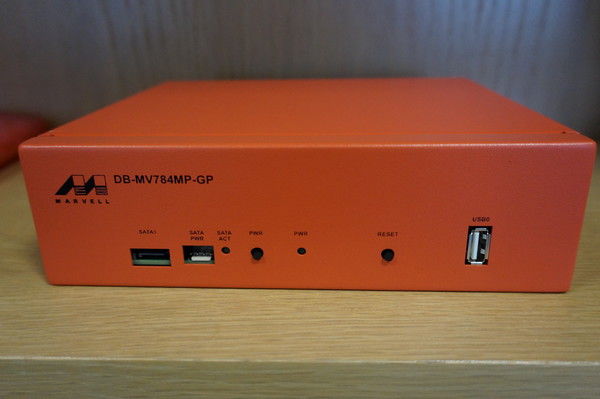
Marvell ARM system - Photo from Steve McIntyre
One weekend Steve McIntyre asked me if I could find a source of some of some 40mm fans for some systems with some pretty strict requirements. They needed to be long life and shift a lot of air to combat a persistent overheating issue.

I sat with him and went through the Farnell utterly hateful parametric web interface and eventually came up with a couple of options which were very expensive. Only then did I stop and ask what the actual problem was.

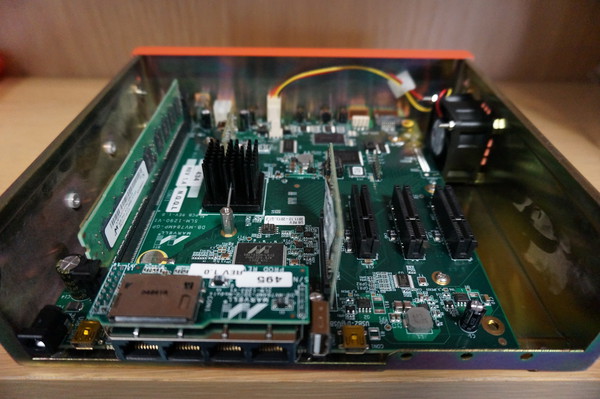
Marvell ARM system Original internal cooling arrangement - Photo from Steve McIntyre
Steve showed me one of the Debian ARM buildd boxes which are Marvell development machines. These systems are powerful quad core machines housed in compact steel enclosures.

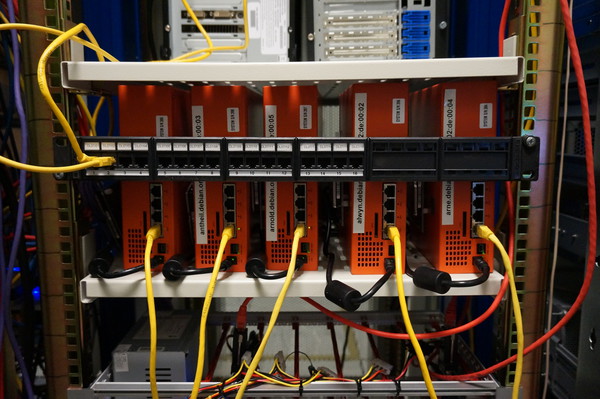
There is a single 40mm fan trying to provide cooling for the entire enclosure. When the units are placed horizontally and used intermittently this proves adequate. Unfortunately when the system are arranged vertically in a rack and run at full load continuously they often overheat and have to be restarted. In addition the small high speed fans need replacing frequently as their bearings wore out quickly.

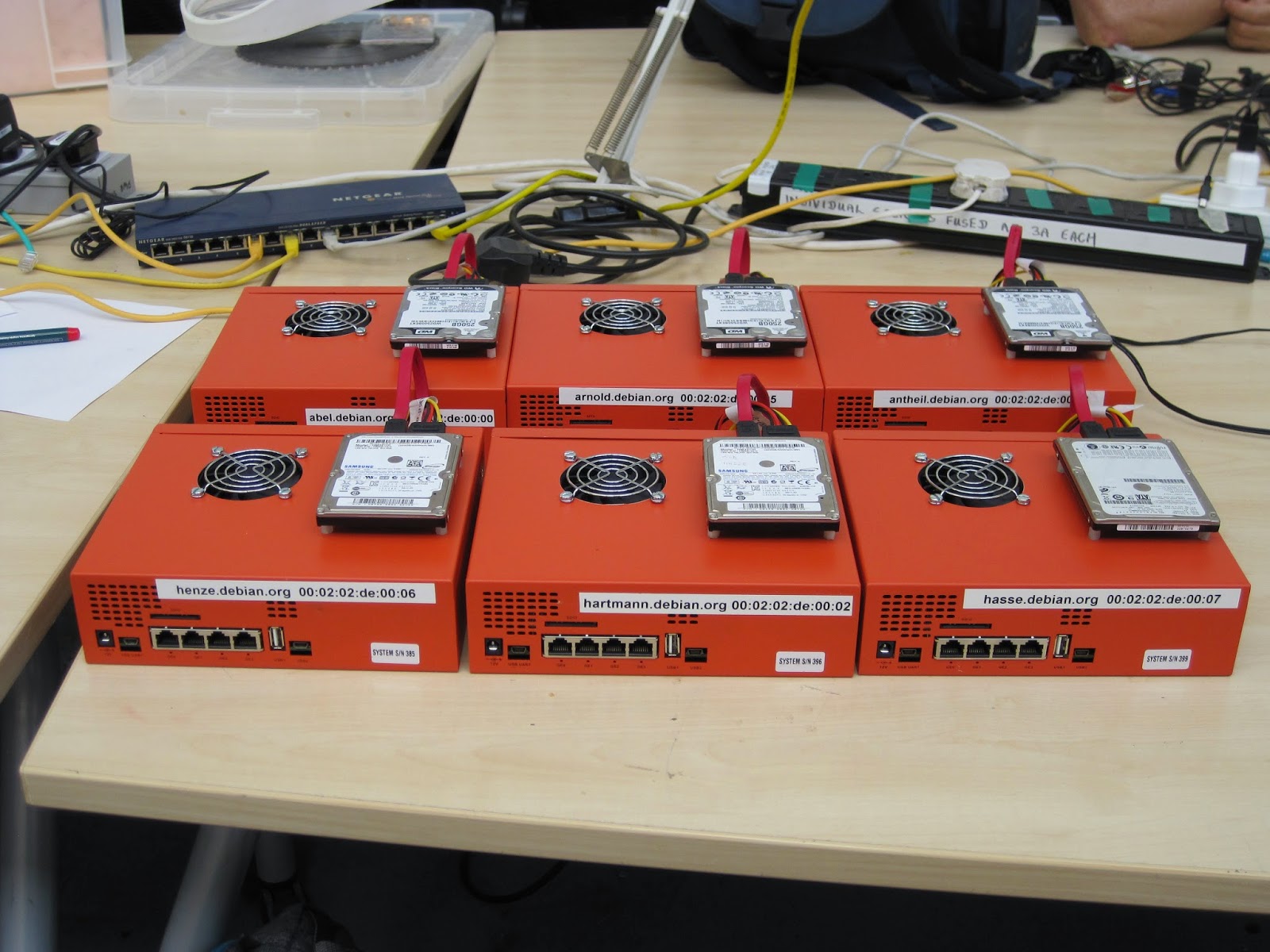
Debian ARM buildd systems - Photo from Steve McIntyreThis was obviously causing some issues for the ARM Debian ports which Steve wanted to rectify. After talking the problem through for a while we came to the conclusion we could use much larger 60mm fans to blow air directly through the top of the case onto the cpu heatsink.

Larger fans can be run much more slowly to move a similar volume of air to the smaller 40mm fans which gives a much longer service life.

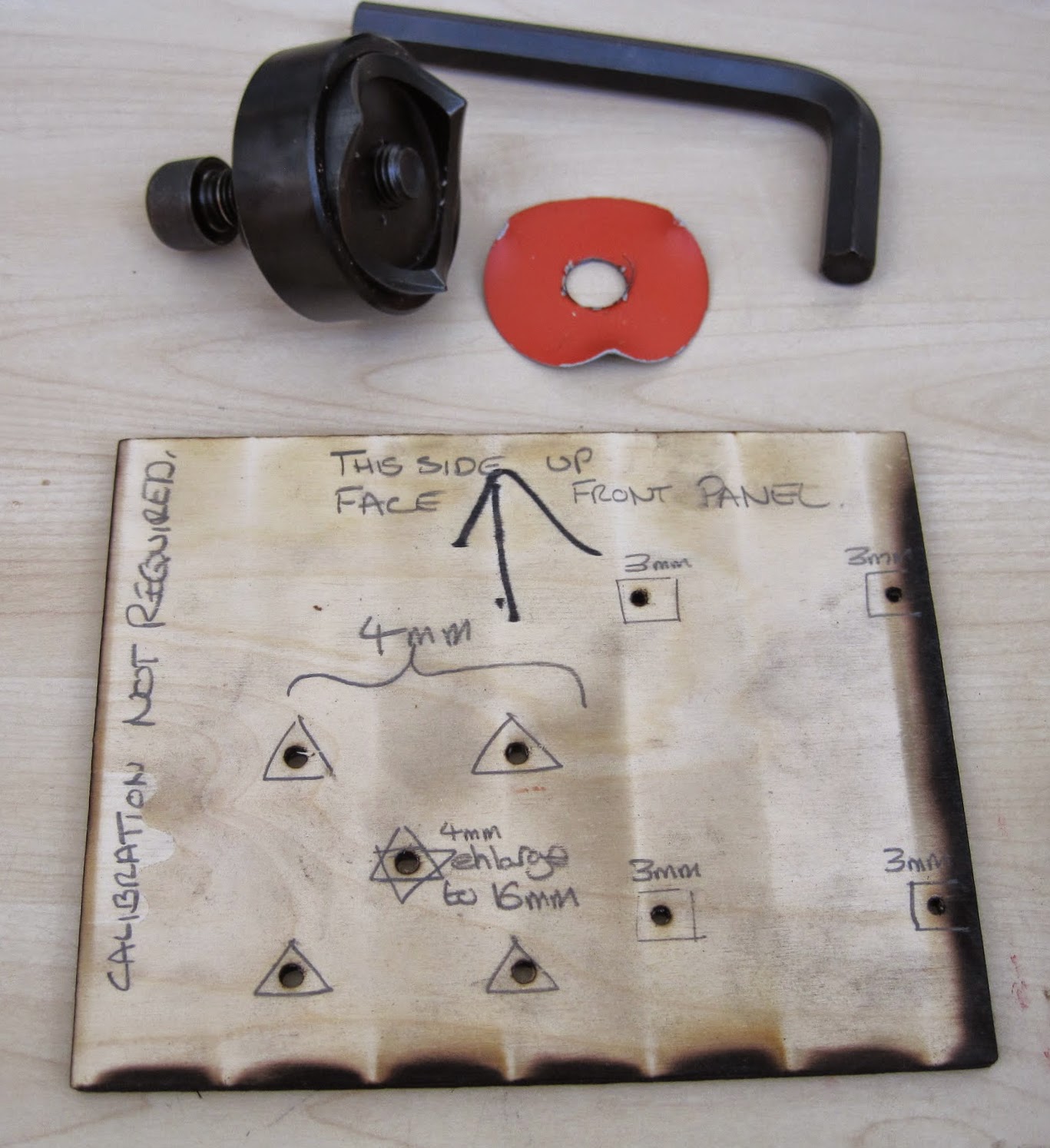
Hole punch and Drilling template
Steve proceeded to order enough parts to allow us to modify all the Debian systems, this worked out cheaper than a single "special" 40mm high volume fan.

I acquired a rather large steel hole punch, I chose this tool because it produces a much superior finish to a hole cutter and this project demanded a high level of finish (not to mention I loved having a valid excuse to own and use a huge allen key!)

If we had simply been modifying a single case I would have measured and marked up by hand. With the prospect of altering at least eight I laser cut a template from plywood which Andy Simpkins took great glee in excessively annotating.

We also used the opportunity to add bolt holes to securely attach the 2.5 inch SATA drives instead of using sticky pads.

Steve and I modified a single system to begin with both to check our alignment and the efficacy of the change. We were pleasantly surprised to discover that hoiby could now repeatedly do kernel compiles with all four cores flat out which was not possible before. The measured CPU temperature, which had previously been around 90 C, did not rise above 40 C

Steve and Andy on the assembly line
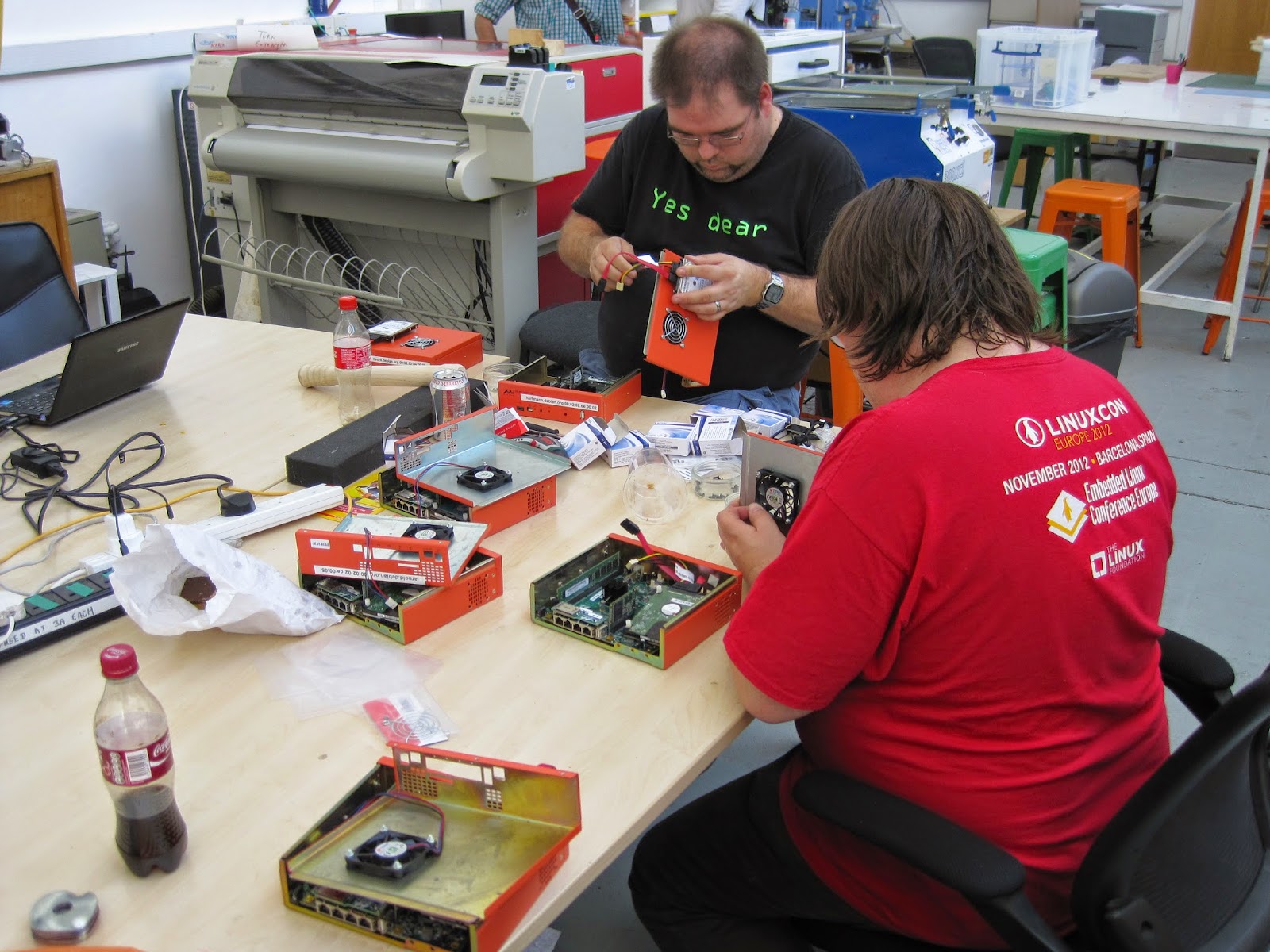
Steve, Andy and I then arranged a day where we took all the remaining units out of the rack at ARM, modified and returned them. We used the facilities at the Cambridge Makespace where I am a member to do the modifications.

I broke two 3mm drill bits and dulled a 4mm bit drilling all the holes, Roger Smith was good enough to loan us the use of his "Christmas tree bit" to ream the fan hole out to 16mm so we could thread the hole punch and cut the 60mm fan aperture out.

six modified systems ready to be re-racked.
We managed to get quite an assembly line going and, in my opinion, the results look pretty professional.

It has been several months since we did this work and these systems continue to run without issue. To complete the story we can see some graphs courtesy of the DSA munin instance.

CPU load on arnold.debian.org
You can clearly see the huge drop in temperature at the end of Week 25 despite the continuously high CPU load. Also there is only a single gap in the data after the changes (these indicate crashes where data was not recorded) where before there were frequent and extensive times where the systems were simply unusable.

CPU Temperature of arnold.debian.org
One reason I continue to enjoy Debian so much is the wide variety of ways in which I can contribute not only by maintaining my packages. Sometimes this kind of work does not receive the credit it deserves and hopefully highlights a small part of the frantic paddling that goes on under the serene surface of the Debian project to keep things "just working".

30 September 2014

Russell Coker: Links September 2014

Matt Palmer wrote a short but informative post about enabling DNS in a zone [1]. I really should setup DNSSEC on my own zones. Paul Wayper has some insightful comments about the Liberal party s nasty policies towards the unemployed [2]. We really need a Basic Income in Australia. Joseph Heath wrote an interesting and insightful article about the decline of the democratic process [3]. While most of his points are really good I m dubious of his claims about twitter. When used skillfully twitter can provide short insights into topics and teasers for linked articles. Sarah O wrote an insightful article about NotAllMen/YesAllWomen [4]. I can t summarise it well in a paragraph, I recommend reading it all. Betsy Haibel wrote an informative article about harassment by proxy on the Internet [5]. Everyone should learn about this before getting involved in discussions about controversial issues. George Monbiot wrote an insightful and interesting article about the referendum for Scottish independence and the failures of the media [6]. Mychal Denzel Smith wrote an insightful article How to know that you hate women [7]. Sam Byford wrote an informative article about Google s plans to develop and promote cheap Android phones for developing countries [8]. That s a good investment in future market share by Google and good for the spread of knowledge among people all around the world. I hope that this research also leads to cheap and reliable Android devices for poor people in first-world countries. Deb Chachra wrote an insightful and disturbing article about the culture of non-consent in the IT industry [9]. This is something we need to fix. David Hill wrote an interesting and informative article about the way that computer game journalism works and how it relates to GamerGate [10]. Anita Sarkeesian shares the most radical thing that you can do to support women online [11]. Wow, the world sucks more badly than I realised. Michael Daly wrote an article about the latest evil from the NRA [12]. The NRA continues to demonstrate that claims about good people with guns are lies, the NRA are evil people with guns.

Raphaël Hertzog: My Debian LTS report for September

Thanks to the sponsorship of multiple companies, I have been paid to work 11 hours on Debian LTS this month. CVE triagingI started by doing lots of triage in the security tracker (if you want to help, instructions are here) because I noticed that the dla-needed.txt list (which contains the list of packages that must be taken care of via an LTS security update) was missing quite a few packages that had open vulnerabilities in oldstable. In the end, I pushed 23 commits to the security tracker. I won t list the details each time but for once, it s interesting to let you know the kind of things that this work entailed: And when I say I reviewed it s a simplification for this kind of process: CVE triaging is often almost half the work in the general process: once you know that you are affected and that you have a patch, the process to release an update is relatively straightforward (sometimes there s still work to do to backport the patch). Once I was over that first pass of triaging, I had already spent more than the 11 hours paid but I still took care of preparing the security update for python-django. Thorsten Alteholz had started the work but got stuck in the process of backporting the patches. Since I m co-maintainer of the package, I took over and finished the work to release it as DLA-65-1.

No comment Liked this article? Click here. My blog is Flattr-enabled.

Mario Lang: A simple C++11 concurrent workqueue

For a little toy project of mine (a wikipedia XML dump word counter) I wrote a little C++11 helper class to distribute work to all available CPU cores. It took me many years to overcome my fear of threading: In the past, whenever I toyed with threaded code, I ended up having a lot of deadlocks, and generally being confused. It appears that I finally have understood enough of this crazyness to be able to come up with the small helper class below.
The problem We want to spread work amongst all available CPU cores. There are no dependencies between items in our work queue. So every thread can just pick up and process an item as soon as it is ready.
The solution This simple implementation makes use of C++11 threading primitives, lambda functions and move semantics. The idea is simple: You provide a function at construction time which defines how to process one item of work. To pass work to the queue, simply call the function operator of the object, repeatedly. When the destructor is called (once the object reachs the end of its scope), all remaining items are processed and all background threads are joined. The number of threads defaults to the value of std::thread::hardware_concurrency(). This appears to work at least since GCC 4.9. Earlier tests have shown that std::thread::hardware_concurrency() always returned 1. I don't know when exactly GCC (or libstdc++, actually) started to support this, but at least since GCC 4.9, it is usable. Prerequisite on Linux is a mounted /proc. The number of maximum items per thread in the queue defaults to 1. If the queue is full, calls to the function operator will block. So the most basic usage example is probably something like:
int main()  
  typedef std::string item_type;
  distributor<item_type> process([](item_type &item)  
    // do work
   );
  while (/* input */) process(std::move(/* item */));
  return 0;
 
That is about as simple as it can get, IMHO. The code can be found in the GitHub project mentioned above. However, since the class template is relatively short, here it is.
#include <condition_variable>
#include <mutex>
#include <queue>
#include <stdexcept>
#include <thread>
#include <vector>
template <typename Type, typename Queue = std::queue<Type>>
class distributor: Queue, std::mutex, std::condition_variable  
  typename Queue::size_type capacity;
  bool done = false;
  std::vector<std::thread> threads;
public:
  template<typename Function>
  distributor( Function function
             , unsigned int concurrency = std::thread::hardware_concurrency()
             , typename Queue::size_type max_items_per_thread = 1
             )
  : capacity concurrency * max_items_per_thread 
   
    if (not concurrency)
      throw std::invalid_argument("Concurrency must be non-zero");
    if (not max_items_per_thread)
      throw std::invalid_argument("Max items per thread must be non-zero");
    for (unsigned int count  0 ; count < concurrency; count += 1)
      threads.emplace_back(static_cast<void (distributor::*)(Function)>
                           (&distributor::consume), this, function);
   
  distributor(distributor &&) = default;
  distributor &operator=(distributor &&) = delete;
  ~distributor()
   
     
      std::lock_guard<std::mutex> guard(*this);
      done = true;
      notify_all();
     
    for (auto &&thread: threads) thread.join();
   
  void operator()(Type &&value)
   
    std::unique_lock<std::mutex> lock(*this);
    while (Queue::size() == capacity) wait(lock);
    Queue::push(std::forward<Type>(value));
    notify_one();
   
private:
  template <typename Function>
  void consume(Function process)
   
    std::unique_lock<std::mutex> lock(*this);
    while (true)  
      if (not Queue::empty())  
        Type item   std::move(Queue::front())  ;
        Queue::pop();
        notify_one();
        lock.unlock();
        process(item);
        lock.lock();
        else if (done)  
        break;
        else  
        wait(lock);


 ;
If you have any comments regarding the implementation, please drop me a mail.

28 September 2014

Ean Schuessler: RoboJuggy at JavaOne

A few months ago I was showing my friend Bruno Souza the work I had been doing with my childhood friend and robotics genius, David Hanson. I had been watching what David was going through in his process of creating life-like robots with the limited industrial software available for motor control. I had suggested to David that binding motors to Blender control structures was a genuinely viable possibility. David talked with his forward looking CEO, Jong Lee, and they were gracious enough to invite me to Hong Kong to make this exciting idea a reality. Working closely the HRI team (Vytas, Gabrielos, Fabien and Davide) with David s friend and collaborators at OpenCog (Ben Goertzel, Mandeep, David, Jamie, Alex and Samuel) a month long creative hack-fest yielded pretty amazing results. Bruno is an avid puppeteer, a global organizer of java user groups and creator of Juggy the Java Finch, mascot of Java users and user groups everywhere. We started talking about how cool it would be to have a robot version of Juggy. When I was in China I had spent a little time playing with Mark Tilden s RSMedia and various versions of David s hobby servo based emotive heads. Bruno and I did a little research into the ROS Java bindings for the Robot Operating System and decided that if we could make that part of the picture we had a great and fun idea for a JavaOne talk. Hunting and gathering I tracked down a fairly priced RSMedia in Alaska, Bruno put a pair of rubber Juggy puppet heads in the mail and we were on our way.
We had decided that we wanted RoboJuggy to be able to run about untethered and the new RaspberryPi B+ seemed like the perfect low power brain to make that happen. I like the Debian based Raspbian distributions but had lately started using the netinst Pi images. These get your Pi up and running in about 15 minutes with a nicely minimalistic install instead of a pile of dependencies you probably don t need. I d recommend anyone interested I m duplicating our work to stay their journey there: Raspbian UA Net Installer Robots seem like an embedded application but ROS only ships packages for Ubuntu. I was pleasantly surprised that there are very good instructions for building ROS from source on the Pi. I ended up following these instructions: Setting up ROS Hydro on the Raspberry Pi Building from source means that all your install ends up being isolated (in ROS speak) and your file locations and build instructions end up being subtly current. As explained in the linked article, this process is also very time consuming. One thing I would recommend once you get past this step is to use the UNIX dd command to back up your entire SD card to a desktop. This way if you make a mess of things in later steps you can restore your install to a pristine Raspbian+ROS install. If your SD drive was on /dev/sdb you might use something like this to do the job:
sudo dd bs=4M if=/dev/sdb   gzip > /home/your_username/image date +%d%m%y .gz
Getting Java in the mix Once you have your Pi all set up with minimal Raspbian and ROS you are going to want a Java VM. The Pi runs the ARM CPU so you need the corresponding version of Java. I tried getting things going initially with OpenJDK and I had some issues with that. I will work on resolving that in the future because I would like to have a 100% Free Software kit for this but since this was for JavaOne I also wanted JDK8, which isn t available in Debian yet. So, I downloaded the Oracle JDK8 package for ARM. Java 8 JDK for ARM At this point you are ready to start installing the ROS Java packages. I m pretty sure the way I did this initially is wrong but I was trying to reconcile the two install procedures for ROS Java and ROS Hydro for Raspberry Pi. I started by following these directions for ROS Java but with a few exceptions (you have to click the install from source link in the page to see the right stuff: Installing ROS Java on Hydro Now these instructions are good but this is a Pi running Debian and not an Ubuntu install. You won t run the apt-get package commands because those tools were already installed in your earlier steps. Also, this creates its own workspace and we really want these packages all in one workspace. You can apparently chain workspaces in ROS but I didn t understand this well enough to get it working so what I did was this:
> mkdir -p ~/rosjava 
> wstool init -j4 ~/rosjava/src https://raw.github.com/rosjava/rosjava/hydro/rosjava.rosinstall
> source ~/ros_catkin_ws/install_isolated/setup.bash > cd ~/rosjava # Make sure we've got all rosdeps and msg packages.
> rosdep update 
> rosdep install --from-paths src -i -y
and then copied the sources installed into ~/rosjava/src into my main ~/ros_catkin_ws/src. Once those were copied over I was able to run a standard build.
> catkin_make_isolated --install
Like the main ROS install this process will take a little while. The Java gradle builds take an especially long time. One thing I would recommend to speed up your workflow is to have an x86 Debian install (native desktop, QEMU instance, docker, whatever) and do these same build from source installs there. This will let you try your steps out on a much faster system before you try them out in the Pi. That can be a big time saver. Putting together the pieces Around this time my RSMedia had finally showed up from Alaska. At first I thought I had a broken unit because it would power up, complain about not passing system tests and then shut back down. It turns out that if you just put the D batteries in and miss the four AAs that it will kind of pretend to be working so watch for that mistake. Here is a picture of the RSMedia when it first came out of the box: wpid-20140911_142904.jpg Other parts were starting to roll in as well. The rubber puppet heads had made their way through Brazilian customs and my Pololu Mini Maestro 24 had also shown up as well as the my servo motors and pan and tilt camera rig. I had previously bought a set of 10 motors for goofing around so I bought the pan and tilt rig by itself for about $5(!) but you can buy a complete set for around $25 from a number of EBay stores. Complete pan and tilt rig with motors for $25 A bit more about the Pololu. This astonishing little motor controller costs about $25 and gives you control of 24 motors with an easy to use and high level serial API. It is probably also possible to control these servos directly from the Pi and eliminate this board but that will be genuinely difficult because of the real-time timing issues. For $25 this thing is a real gem and you won t regret buying it. Now it was time to start dissecting the RSMedia and getting control of its brain. Unfortunately a lot of great information about the RSMedia has floated away since it was in its heyday 5 years ago but there is still some solid information out there that we need to round up and preserve. A great resource is the SourceForge based website here at http://rsmediadevkit.sourceforge.net. That site has links to a number of useful sites. You will definitely want to check out their wiki. To disassemble the RSMedia I followed their instructions. I will say, it would be smart to take more pictures as you are going because they don t take as many as they should. I took pictures of each board and its associated connections as dismantled the unit and that helped me get things back together later. Another important note is that if all you want to do is solder onto the control board and not replace the head then its feasible to solder the board in place without completely disassembling the unit. Here are some photos of the dis-assembly: wpid-20140921_114742.jpg wpid-20140921_113054.jpg wpid-20140921_112619.jpg Now I also had to start adjusting the puppet head, building an armature for the motors to control it and hooking it into the robot. I need to take some more photos of the actual armature. I like to use cardboard for this kind of stuff because it is so fast to work with and relatively strong. One trick I have also learned about cardboard is that if you get something going with it and you need it to be a little more production strength you can paint it down with fiberglass resin from your local auto store. Once it dries it becomes incredibly tough because it soaks through the fibers of the cardboard and hardens around them. You will want to do this in a well ventilated area but its a great way to build super tough prototypes. Another prototyping trick I can suggest is using a combination of Velcro and zipties to hook things together. The result is surprisingly strong and still easy to take apart if things aren t working out. Velcro self-adhesive pads stick to rubber like magic and that is actually how I hooked the jaw servo onto the mask. You can see me torturing its first initial connection here: Since the puppet head had come all the way from Brazil I decided to cook some chicken hearts in the churrascaria style while I worked on them in the garage. This may sound gross but I m telling you, you need to try it! I soaked mine in soy sauce, Sriracha and chinese cooking wine. Delicious but I digress. wpid-20140920_191551.jpg As I was eating my chicken hearts I was also connecting the pan and tilt armature onto the puppet s jaw and eye assembly. It took me most of the evening to get all this going but by about one in the morning things were starting to look good! I only had a few days left to hack things together before JavaOne and things were starting to get tight. I had so much to do and had also started to run into some nasty surprises with the ROS Java control software. It turns out that ROS Java is less than friendly with ROS message structures that are not built in . I had tried to follow the provided instructions but was not (and still have not) been able to get that working. Using unofficial messages with ROS Java I still needed to get control of the RSMedia. Doing that required the delicate operation of soldering to its control board. On the board there are a set of pins that provide a serial interface to the ARM based embedded Linux computer that controls the robot. To do that I followed these excellent instructions: Connecting to the RSMedia Linux Console Port After some sweaty time bent over a magnifying glass I had success: wpid-20140921_143327.jpg I had previously purchased the USB-TTL232 accessory described in the article from Dallas awesome Tanner Electronics store in Dallas. If you are a geek I would recommend that you go there and say hi to its proprietor (and walking encyclopedia of electronics knowledge) Jim Tanner. It was very gratifying when I started a copy of minicom, set it to 115200, N, 8, 1, plugged in the serial widget to the RSMedia and booted it up. I was greeted with a clearly recognizable Linux startup and console prompt. At first I thought I had done something wrong because I couldn t get it to respond to commands but I quickly realized I had flow control turned on. Once turned off I was able to navigate around the file system, execute commands and have some fun. A little research and I found this useful resource which let me get all kinds of body movements going: A collection of useful commands for the RSMedia At this point, I had a usable set of controls for the body as well as the neck armature. I had a controller running the industry s latest and greatest robotics framework that could run on the RSMedia without being tethered to power and I had most of a connection to Java going. Now I just had to get all those pieces working together. The only problem is that time was running out and I only had a couple of days until my talk and still had to pack and square things away at work. The last day was spent doing things that I wouldn t be able to do on the road. My brother Erik (and fantastic artist) came over to help paint up the juggy head and fix the eyeball armature. He used a mix of oil paint, rubber cement which stuck to the mask beautifully. I bought battery packs for the USB Pi power and the 6v motor control and integrated them into a box that could sit below the neck armature. I fixed up a cloth neck sleeve that could cover everything. Luckily during all this my beautiful and ever so supportive girlfriend Becca had helped me get packed or I probably wouldn t have made it out the door. Welcome to San Francisco THIS ARTICLE IS STILL BEING WRITTEN

Clint Adams: Banana Pi is a real thing

Now that I've almost caught up with life after an extended stint on the West Coast, it's time to play. Like Gunnar, I acquired a Banana Pi courtesy of LeMaker. My GuruPlug (courtesy me) and my Excito B3 (courtesy the lovely people at Tor) are giving me a bit of trouble in different ways, so my intent is to decommission and give away the GuruPlug and Excito B3, leaving my DreamPlug and the Banana Pi to provide the services currently performed by the GuruPlug, Excito B3, and DreamPlug. The Banana Pi is presently running Bananian on a 32G SDHC (Class 10) card. This is close to wheezy, and appears to have a mostly-sane default configuration, but I am not going to trust some random software downloaded off the Internet on my home network, so I need to be able to run Debian on it instead. My preliminary belief is that the two main obstacles are Linux and U-Boot. Bananian 14.09 comes with Linux 3.4.90+ #1 SMP PREEMPT Fri Sep 12 18:13:45 CEST 2014 armv7l GNU/Linux, whatever that is, and U-Boot SPL 2014.04-10694-g2ae8b32 (Sep 03 2014 - 20:53:14). I don't yet know what the status of mainline/Debian support is. Someone gave me a wooden cigar box to use as a case, which is not working out quite as hoped. I also found that my hack to power a 3.5" SATA drive does not work, so I'll either need to hammer on that some more or resolve to use a 2.5" drive instead. memory:
Mem:        993700      36632     957068          0       2248      11136
-/+ buffers/cache:      23248     970452
Swap:       524284       1336     522948
cpu:
Processor       : ARMv7 Processor rev 4 (v7l)
processor       : 0
BogoMIPS        : 1192.96
processor       : 1
BogoMIPS        : 1197.05
Features        : swp half thumb fastmult vfp edsp neon vfpv3 tls vfpv4 idiva idivt 
CPU implementer : 0x41
CPU architecture: 7
CPU variant     : 0x0
CPU part        : 0xc07
CPU revision    : 4
Hardware        : sun7i
Revision        : 0000
Serial          : 03c32de75055484880485278165166c9

Jonathan Dowland: What have I been up to?

It's been a little while since I've written about what I've been up to. The truth is I've been busy with moving house - and I'll write a bit more about that at another time. But asides from that there have been some bits and bobs. I use a little tool called archivemail to tidy up old listmail (my policy is to retain 30 days of listmail for most lists). If I unsubscribe to a list, then eventually I end up with an empty mail folder corresponding to that list. I decided it would be nice to extend archivemail to delete mailboxes if, after the archiving has taken place, the mailbox is empty. Doing this properly means adding delete routines to Python's "mailbox" library, which is part of the Python standard library. I've therefore started work on a patch for Python. Since this is an enhancement, Python would only accept a patch for Python 3. Therefore, eventually, I would also have to port archivemail from Python 2 to 3. "archivemail" is basically abandonware at the moment, and the principal Debian maintainer is MIA. There was a release critical bug filed against it, so I joined the Debian Python team to co-maintain archivemail in Debian. I've worked around the RC bug but a proper fix is still to come. In other Debian news, I've been mostly quiet. A small patch for squishyball to get it to build on Hurd, and a temporary fix patch for lhasa to get it to build on the build daemons for all architectures (problems with the test suite). All three of lhasa, squishyball and archivemail need a little bit of love to get them into shape before the jessie freeze. I've had plans to write up some of the more interesting technical things I've been up to at work, but with the huge successes of the School we've been so busy I haven't had time. Hopefully you can soon look forward to some of our further adventures with puppet, including evaluating Shibboleth modules, some stuff about handling user directories, bind mounts and LVM volumes and actually publishing some of our more useful internal modules; I hope we will also (soon) have some useful data to go with our experiments with Linux LXC containers versus KVM-powered virtual machines in some of our use-cases. I've also got a few bits and pieces on Systemd to write up.

27 September 2014

DebConf team: Wrapping up DebConf14 (Posted by Paul Wise, Donald Norwood)

The annual Debian developer meeting took place in Portland, Oregon, 23 to 31 August 2014. DebConf14 attendees participated in talks, discussions, workshops and programming sessions. Video teams captured a lot of the main talks and discussions for streaming for interactive attendees and for the Debian video archive. Between the video, presentations, and handouts the coverage came from the attendees in blogs, posts, and project updates. We ve gathered a few articles for your reading pleasure: Gregor Herrmann and a few members of the Debian Perl group had an informal unofficial pkg-perl micro-sprint and were very productive. Vincent Sanders shared an inspired gift in the form of a plaque given to Russ Allbery in thanks for his tireless work of keeping sanity in the Debian mailing lists. Pictures of the plaque and design scheme are linked in the post. Vincent also shared his experiences of the conference and hopes the organisers have recovered. Noah Meyerhans adventuring to Debian by train, (Inter)netted some interesting IPv6 data for future road and railwarriors. Hideki Yamane sent a gentle reminder for English speakers to speak more slowly. Daniel Pocock posted of GSoC talks at DebConf14, highlights include the Java Project Dependency Builder and the WebRTC JSCommunicator. Thomas Goirand gives us some insight into a working task list of accomplishments and projects he was able to complete at DebConf14, from the OpenStack discussion to tasksel talks, and completion of some things started last year at DebConf13. Antonio Terceiro blogged about debci and the Debian Continuous Integration project, Ruby, Redmine, and Noosfero. His post also shares the atmosphere of being able to interact directly with peers once a year. Stefano Zacchiroli blogged about a talk he did on debsources which now has its own HACKING file. Juliana Louback penned: DebConf 2014 and How I Became a Debian Contributor. Elizabeth Krumbach Joseph s in-depth summary of DebConf14 is a great read. She discussed Debian Validation & CI, debci and the Continuous Integration project, Automated Validation in Debian using LAVA, and Outsourcing webapp maintenance. Lucas Nussbaum by way of a blog post releases the very first version of Debian Trivia modelled after the TCP/IP Drinking Game. Fran ois Marier s shares additional information and further discussion on Outsourcing your webapp maintenance to Debian. Joachim Breitner gave a talk on Haskell and Debian, created a new tool for binNMUs for Haskell packages which runs via cron job. The output is available for Haskell and for OCaml, and he still had a small amount of time to go dancing. Jaldhar Harshad Vyas was not able to attend DebConf this year, but he did tune in to the videos made available by the video team and gives an insightful viewpoint to what was being seen. J r my Bobbio posted about Reproducible builds in Debian in his recap of DebConf14. One of the topics at hand involved defining a canonical path where packages must be built and a BOF discussion on reproducible builds from where the conversation moved to discussions in both Octave and Groff. New helpers dh_fixmtimes and dh_genbuildinfo were added to BTS. The .buildinfo format has been specified on the wiki and reviewed. Lots of work is being done in the project, interested parties can help with the TODO list or join the new IRC channel #debian-reproducible on irc.debian.org. Steve McIntyre posted a Summary from the d-i / debian-cd BoF at DC14, with some of the session video available online. Current jessie D-I needs some help with the testing on less common architectures and languages, and release scheduling could be improved. Future plans: Switching to a GUI by default for jessie, a default desktop and desktop choice, artwork, bug fixes and new architecture support. debian-cd: Things are working well. Improvement discussions are on selecting which images to make I.E. netinst, DVD, et al., debian-cd in progress with http download support, Regular live test builds, Other discussions and questions revolve around which ARM platforms to support, specially-designed images, multi-arch CDs, and cloud-init based images. There is also a call for help as the team needs help with testing, bug-handling, and translations. Holger Levsen reports on feedback about the feedback from his LTS talk at DebConf14. LTS has been perceived well, fits a demand, and people are expecting it to continue; however, this is not without a few issues as Holger explains in greater detail the lacking gatekeeper mechanisms, and how contributions are needed from finance to uploads. In other news the security-tracker is now fixed to know about old stable. Time is short for that fix as once jessie is released the tracker will need to support stable, oldstable which will be wheezy, and oldoldstable. Jonathan McDowell s summary of DebConf14 includes a fair perspective of the host city and the benefits of planning of a good DebConf14 location. He also talks about the need for facetime in the Debian project as it correlates with and improves everyone s ability to work together. DebConf14 also provided the chance to set up a hard time frame for removing older 1024 bit keys from Debian keyrings. Steve McIntyre posted a Summary from the State of the ARM BoF at DebConf14 with updates on the 3 current ports armel, armhf and arm64. armel which targets the ARM EABI soft-float ARMv4t processor may eventually be going away, while armhf which targets the ARM EABI hard-float ARMv7 is doing well as the cross-distro standard. Debian is has moved to a single armmp kernel flavour using Device Tree Blobs and should be able to run on a large range of ARMv7 hardware. The arm64 port recently entered the main archive and it is hoped to release with jessie with 2 official builds hosted at ARM. There is talk of laptop development with an arm64 CPU. Buildds and hardware are mentioned with acknowledgements for donated new machines, Banana Pi boards, and software by way of ARM s DS-5 Development Studio - free for all Debian Developers. Help is needed! Join #debian-arm on irc.debian.org and/or the debian-arm mailing list. There is an upcoming Mini-DebConf in November 2014 hosted by ARM in Cambridge, UK. Tianon Gravi posted about the atmosphere and contrast between an average conference and a DebConf. Joseph Bisch posted about meeting his GSOC mentors, attending and contributing to a keysigning event and did some work on debmetrics which is powering metrics.debian.net. Debmetrics provides a uniform interface for adding, updating, and viewing various metrics concerning Debian. Harlan Lieberman-Berg s DebConf Retrospective shared the feel of DebConf, and detailed some of the work on debugging a build failure, work with the pkg-perl team on a few uploads, and work on a javascript slowdown issue on codeeditor. Ana Guerrero L pez reflected on Ten years contributing to Debian.

Ritesh Raj Sarraf: Laptop Mode Tools 1.66

I am pleased to announce the release of Laptop Mode Tools at version 1.66. This release fixes an important bug in the way Laptop Mode Tools is invoked. Users, now when disable it in the config file, the tool will be disabled. Thanks to bendlas@github for narrowing it down. The GUI configuration tool has been improved, thanks to Juan. And there is a new power saving module for users with ATI Radeon cards. Thanks to M. Ziebell for submitting the patch. Laptop Mode Tools development can be tracked @ GitHub

AddThis:

Categories:

Keywords:

26 September 2014

Holger Levsen: 20140925-reproducible-builds

Reproducible builds? I never did any - manually :) I've never done a reproducible build attempt of any package, manually, ever. But what I've done now is setting up reproducible builds on jenkins.debian.net which will build hundreds or thousands of packages, hopefully reproducibly, regularily in the future. Thanks to Lunar's and many other peoples work, this was actually rather easy. If you want to do this manually, it should take you just a few minutes to setup a suitable build environment. So three days ago when I wasn't exactly bored I decided that it was a good moment to implement some reproducible build jobs on jenkins.d.n, and so I gave it a try and two hours later the basic implementation was working, and then it was an evening and morning of fine tuning until I was mostly satisfied. Since then there has been some polishing, but the basic setup is done and has been working since. What's the result? One job, reproducible_setup will just create a suitable environment for pbuilding reproducible packages as documented so well on the Debian wiki. And as that job runs 3.5 minutes only (to debootstrap from scratch), it's run daily. And then there are currently 16 other jobs, which test reproducible builds in different areas: d-i, core, some six major desktops and some selected desktop applications, some security + privacy related packages, some build chains we have in Debian, libreoffice and X.org. Most of these jobs run several hours, but luckily not days. And they discover packages which still fail to build reproducibly, which already has caused some bugs to be filed, eg. #762732 "libdebian-installer: please do not write timestamps in Doxygen generated documentation". So this is the output from testing the reproducibilty of all debian-installer packages: 72 packages were successfully built reproducibly, while 6 packages failed to do so. I was quite impressed by these numbers as AFAIK noone tried to build d-i reproducibly before.
72 packages successfully built reproducibly: userdevfs user-setup usb-discover udpkg tzsetup rootskel rootskel-gtk rescue preseed pkgsel partman-xfs partman-target partman-partitioning partman-nbd partman-multipath partman-md partman-lvm partman-jfs partman-iscsi partman-ext3 partman-efi partman-crypto partman-btrfs partman-basicmethods partman-basicfilesystems partman-base partman-auto partman-auto-raid partman-auto-lvm partman-auto-crypto partconf os-prober oldsys-preseed nobootloader network-console netcfg net-retriever mountmedia mklibs media-retriever mdcfg main-menu lvmcfg lowmem localechooser live-installer lilo-installer kickseed kernel-wedge kbd-chooser iso-scan installation-report installation-locale hw-detect grub-installer finish-install efi-reader dh-di debian-installer-utils debian-installer-netboot-images debian-installer-launcher clock-setup choose-mirror cdrom-retriever cdrom-detect cdrom-checker cdebconf-terminal cdebconf-entropy bterm-unifont base-installer apt-setup anna 
6 packages failed to built reproducibly: win32-loader libdebian-installer debootstrap console-setup cdebconf busybox 
What's also impressive: all packages for the newly introduced Cinnamon Desktop build reproducibly from the start! The jenkins setup is configured via just three small files: That's it and that's enough to keep several cores busy for days. :-) But as each job only takes a few hours each is scheduled twice a month and more jobs and packages shall be added in future (with some heuristics to schedule known good packages less often...) I guess it's an appropriate opportunity to say "many thanks to Profitbricks", who have been donating the powerful virtual machine jenkins.debian.net is running on since October 2012. I also want to say "many many thanks to Helmut" (Grohne) who has recently joined me in maintaining this jenkins setup. And then I'd like to thank "the KGB trio" (Gregor, Tincho and Dam!) for providing those KGB bots on IRC, which are very helpful for providing notifications on IRC channels and last but not least thanks to everybody who contributed so that reproducible builds got this far! Keep up the jolly good work! And If you happen to know failing packages not included in job-cfg/reproducible.yaml I'd like to hear about those, so they'll get regularily tested and appear on the radar, until finally bugs are filed, fixed and migrated to stable. So one day all binary packages in Debian stable will be build reproducibly. An important step on this road is probably to have this defined as an release goal for Jessie+1. And then for jessie+1 hopefully the first 10k packages will build reproducibly? Or whooping 23k maybe? ;-) And maybe release jessie+2 with 100%?!? We will see! Even Jessie already has quite some packages (someone needs to count them...) which build reproducibly with just modified dpkg(-dev) and debhelper packages alone... So let's fix all the bugs! That said, an easier start for most of you is probably the list of useful things you (yes, you!) can do! :-) Oh, and last but surely not least in my book: many thanks too to the nice people hosting me so friendly in the last days! Keep on rockin'!

Petter Reinholdtsen: How to test Debian Edu Jessie despite some fatal problems with the installer

The Debian Edu / Skolelinux project provide a Linux solution for schools, including a powerful desktop with education software, a central server providing web pages, user database, user home directories, central login and PXE boot of both clients without disk and the installation to install Debian Edu on machines with disk (and a few other services perhaps to small to mention here). We in the Debian Edu team are currently working on the Jessie based version, trying to get everything in shape before the freeze, to avoid having to maintain our own package repository in the future. The current status can be seen on the Debian wiki, and there is still heaps of work left. Some fatal problems block testing, breaking the installer, but it is possible to work around these to get anyway. Here is a recipe on how to get the installation limping along. First, download the test ISO via ftp, http or rsync (use ftp.skolelinux.org::cd-edu-testing-nolocal-netinst/debian-edu-amd64-i386-NETINST-1.iso). The ISO build was broken on Tuesday, so we do not get a new ISO every 12 hours or so, but thankfully the ISO we already got we are able to install with some tweaking. When you get to the Debian Edu profile question, go to tty2 (use Alt-Ctrl-F2), run
nano /usr/bin/edu-eatmydata-install
and add 'exit 0' as the second line, disabling the eatmydata optimization. Return to the installation, select the profile you want and continue. Without this change, exim4-config will fail to install due to a known bug in eatmydata. When you get the grub question at the end, answer /dev/sda (or if this do not work, figure out what your correct value would be. All my test machines need /dev/sda, so I have no advice if it do not fit your need. If you installed a profile including a graphical desktop, log in as root after the initial boot from hard drive, and install the education-desktop-XXX metapackage. XXX can be kde, gnome, lxde, xfce or mate. If you want several desktop options, install more than one metapackage. Once this is done, reboot and you should have a working graphical login screen. This workaround should no longer be needed once the education-tasks package version 1.801 enter testing in two days. I believe the ISO build will start working on two days when the new tasksel package enter testing and Steve McIntyre get a chance to update the debian-cd git repository. The eatmydata, grub and desktop issues are already fixed in unstable and testing, and should show up on the ISO as soon as the ISO build start working again. Well the eatmydata optimization is really just disabled. The proper fix require an upload by the eatmydata maintainer applying the patch provided in bug #702711. The rest have proper fixes in unstable. I hope this get you going with the installation testing, as we are quickly running out of time trying to get our Jessie based installation ready before the distribution freeze in a month.

25 September 2014

Steve Kemp: Today I mostly removed python

Much has already been written about the recent bash security problem, allocated the CVE identifier CVE-2014-6271, so I'm not even going to touch it. It did remind me to double-check my systems to make sure that I didn't have any packages installed that I didn't need though, because obviously having fewer packages installed and fewer services running reduces the potential attack surface. I had noticed in the past I had python installed and just though "Oh, yeah, I must have python utilities running". It turns out though that on 16 out of 19 servers I control I had python installed solely for the lsb_release script! So I hacked up a horrible replacement for lsb_release in pure shell, and then became cruel:

~ # dpkg --purge python python-minimal python2.7 python2.7-minimal lsb-release
That horrible replacement is horrible because it defers detection of all the names/numbers to the /etc/os-release which wasn't present in earlier versions of Debian. Happily all my Debian GNU/Linux hosts run Wheezy or later, so it all works out. So that left three hosts that had a legitimate use for Python: So now 1/19 hosts has Python installed. I'm not averse to the language, but given that I don't personally develop in it very often (read "once or twice in the past year") and by accident I had no python-scripts installed I see no reason to keep it on the off-chance. My biggest surprise of the day was that now that we can use dash as our default shell we still can't purge bash. Since it is marked as Essential. Perhaps in the future.

Aigars Mahinovs: Distributing third party applications via Docker?

Recently the discussions around how to distribute third party applications for "Linux" has become a new topic of the hour and for a good reason - Linux is becoming mainstream outside of free software world. While having each distribution have a perfectly packaged, version-controlled and natively compiled version of each application installable from a per-distribution repository in a simple and fully secured manner is a great solution for popular free software applications, this model is slightly less ideal for less popular apps and for non-free software applications. In these scenarios the developers of the software would want to do the packaging into some form, distribute that to end-users (either directly or trough some other channels, such as app stores) and have just one version that would work on any Linux distribution and keep working for a long while. For me the topic really hit at Debconf 14 where Linus voiced his frustrations with app distribution problems and also some of that was touched by Valve. Looking back we can see passionate discussions and interesting ideas on the subject from systemd developers (another) and Gnome developers (part2 and part3). After reading/watching all that I came away with the impression that I love many of the ideas expressed, but I am not as thrilled about the proposed solutions. The systemd managed zoo of btrfs volumes is something that I actually had a nightmare about. There are far simpler solutions with existing code that you can start working on right now. I would prefer basing Linux applications on Docker. Docker is a convenience layer on top of Linux cgroups and namespaces. Docker stores its images in a datastore that can be based on AUFS or btrfs or devicemapper or even plain files. It already has a semantic for defining images, creating them, running them, explicitly linking resources and controlling processes. Lets play a simple scenario on how third party applications should work on Linux. Third party application developer writes a new game for Linux. As his target he chooses one of the "application runtime" Docker images on Docker Hub. Let's say he chooses the latest Debian stable release. In that case he writes a simple Dockerfile that installs his build-dependencies and compiles his game in "debian-app-dev:wheezy" container. The output of that is a new folder containing all the compiled game resources and another Dockerfile - this one describes the runtime dependencies of the game. Now when a docker image is built from this compiled folder, it is based on "debian-app:wheezy" container that no longer has any development tools and is optimized for speed and size. After this build is complete the developer exports the Docker image into a file. This file can contain either the full system needed to run the new game or (after #8214 is implemented) just the filesystem layers with the actual game files and enough meta-data to reconstruct the full environment from public Docker repos. The developer can then distribute this file to the end user in the way that is comfortable for them. The end user would download the game file (either trough an app store app, app store website or in any other way) and import it into local Docker instance. For user convenience we would need to come with an file extension and create some GUIs to launch for double click, similar to GDebi. Here the user would be able to review what permissions the app needs to run (like GL access, PulseAudio, webcam, storage for save files, ...). Enough metainfo and cooperation would have to exist to allow desktop menu to detect installed "apps" in Docker and show shortcuts to launch them. When the user does so, a new Docker container is launched running the command provided by the developer inside the container. Other metadata would determine other docker run options, such as whether to link over a socket for talking to PulseAudio or whether to mount in a folder into the container to where the game would be able to save its save files. Or even if the application would be able to access X (or Wayland) at all. Behind the scenes the application is running from the contained and stable libraries, but talking to a limited and restricted set of system level services. Those would need to be kept backwards compatible once we start this process. On the sandboxing part, not only our third party application is running in a very limited environment, but also we can enhance our system services to recognize requests from such applications via cgroups. This can, for example, allow a window manager to mark all windows spawned by an application even if the are from a bunch of different processes. Also the window manager can now track all processes of a logical application from any of its windows. For updates the developer can simply create a new image and distribute the same size file as before, or, if the purchase is going via some kind of app-store application, the layers that actually changed can be rsynced over individually thus creating a much faster update experience. Images with the same base can share data, this would encourage creation of higher level base images, such as "debian-app-gamegl:wheezy" that all GL game developers could use thus getting a smaller installation package. After a while the question of updating abandonware will come up. Say there is is this cool game built on top of "debian-app-gamegl:wheezy", but now there was a security bug or some other issue that requires the base image to be updated, but that would not require a recompile or a change to the game itself. If this Docker proposal is realized, then either the end user or a redistributor can easily re-base the old Docker image of the game on a new base. Using this mechanism it would also be possible to handle incompatible changes to system services - ten years down the line AwesomeAudio replaces PulseAudio, so we create a new "debian-app-gamegl:wheezy.14" version that contains a replacement libpulse that actually talks to AwesomeAudio system service instead. There is no need to re-invent everything or push everything and now package management too into systemd or push non-distribution application management into distribution tools. Separating things into logical blocks does not hurt their interoperability, but it allows to recombine them in a different way for a different purpose or to replace some part to create a system with a radically different functionality. Or am I crazy and we should just go and sacrifice Docker, apt, dpkg, FHS and non-btrfs filesystems on the altar of systemd? P.S. You might get the impression that I dislike systemd. I love it! Like an init system. And I love the ideas and talent of the systemd developers. But I think that systemd should have nothing to do with application distribution or processes started by users. I am sometimes getting an uncomfortable feeling that systemd is morphing towards replacing the whole of System V jumping all the way to System D and rewriting, obsoleting or absorbing everything between the kernel and Gnome. In my opinion it would be far healthier for the community if all of these projects would developed and be usable separately from systemd, so that other solutions can compete on a level playing field. Or, maybe, we could just confess that what systemd is doing is creating a new Linux meta-distribution.

Gunnar Wolf: #bananapi On how compressed files should be used

I am among the lucky people who got back home from DebConf with a brand new computer: a Banana Pi. Despite the name similarity, it is not affiliated with the very well known Raspberry Pi, although it is a very comparable (although much better) machine: A dual-core ARM A7 system with 1GB RAM, several more on-board connectors, and same form-factor. I have not yet been able to get it to boot, even from the images distributed on their site (although I cannot complain, I have not devoted more than a hour or so to the process!), but I do have a gripe on how the images are distributed. I downloaded some images to play with: Bananian, Raspbian, a Scratch distribution, and Lubuntu. I know I have a long way to learn in order to contribute to Debian's ARM port, but if I can learn by doing... So, what is my gripe? That the three images are downloaded as archive files:
  1. 0 gwolf@mosca 9 ~/Download/banana$ ls -hl bananian-latest.zip \
  2. > Lubuntu_For_BananaPi_v3.1.1.tgz Raspbian_For_BananaPi_v3.1.tgz \
  3. > Scratch_For_BananaPi_v1.0.tgz
  4. -rw-r--r-- 1 gwolf gwolf 222M Sep 25 09:52 bananian-latest.zip
  5. -rw-r--r-- 1 gwolf gwolf 823M Sep 25 10:02 Lubuntu_For_BananaPi_v3.1.1.tgz
  6. -rw-r--r-- 1 gwolf gwolf 1.3G Sep 25 10:01 Raspbian_For_BananaPi_v3.1.tgz
  7. -rw-r--r-- 1 gwolf gwolf 1.2G Sep 25 10:05 Scratch_For_BananaPi_v1.0.tgz
Now... that is quite an odd way to distribute image files! Specially when looking at their contents:
  1. 0 gwolf@mosca 14 ~/Download/banana$ unzip -l bananian-latest.zip
  2. Archive: bananian-latest.zip
  3. Length Date Time Name
  4. --------- ---------- ----- ----
  5. 2032664576 2014-09-17 15:29 bananian-1409.img
  6. --------- -------
  7. 2032664576 1 file
  8. 0 gwolf@mosca 15 ~/Download/banana$ for i in Lubuntu_For_BananaPi_v3.1.1.tgz \
  9. > Raspbian_For_BananaPi_v3.1.tgz Scratch_For_BananaPi_v1.0.tgz
  10. > do tar tzvf $i; done
  11. -rw-rw-r-- bananapi/bananapi 3670016000 2014-08-06 03:45 Lubuntu_1404_For_BananaPi_v3_1_1.img
  12. -rwxrwxr-x bananapi/bananapi 3670016000 2014-08-08 04:30 Raspbian_For_BananaPi_v3_1.img
  13. -rw------- bananapi/bananapi 3980394496 2014-05-27 01:54 Scratch_For_BananaPi_v1_0.img
And what is bad about them? That they force me to either have heaps of disk space available (2GB or 4GB for each image) or to spend valuable time extracting before recording the image each time. Why not just compressing the image file without archiving it? That is,
  1. 0 gwolf@mosca 7 ~/Download/banana$ tar xzf Lubuntu_For_BananaPi_v3.1.1.tgz
  2. 0 gwolf@mosca 8 ~/Download/banana$ xz Lubuntu_1404_For_BananaPi_v3_1_1.img
  3. 0 gwolf@mosca 9 ~/Download/banana$ ls -hl Lubun*
  4. -rw-r--r-- 1 gwolf gwolf 606M Aug 6 03:45 Lubuntu_1404_For_BananaPi_v3_1_1.img.xz
  5. -rw-r--r-- 1 gwolf gwolf 823M Sep 25 10:02 Lubuntu_For_BananaPi_v3.1.1.tgz
Now, wouldn't we need to decompress said files as well? Yes, but thanks to the magic of shell redirections, we can just do it on the fly. That is, instead of having 3 4GB+1 2GB files sitting on my hard drive, I just need to have several files ranging between 145M and I guess ~1GB. Then, it's as easy as doing:
  1. 0 gwolf@mosca 8 ~/Download/banana$ dd if=<(xzcat bananian-1409.img.xz) of=/dev/sdd
And the result should be the same: A fresh new card with Bananian ready to fly. Right, right, people using these files need to have xz installed on their systems, but... As it stands now, I can suppose current prospective users of a Banana Pi won't fret about facing a standard Unix tool! (Yes, I'll forward this rant to the Banana people, it's not just bashing on my blog :-P ) [update] Several people (thanks!) have contacted me stating that I use a bashism: The <( ) construct is specific to Bash. If you want to do this with any other shell, it can be done with a simple pipe:
  1. $ xzcat bananian-1409.img.xz dd of=/dev/sdd
That allows for less piping to be done on the kernel, and is portable between different shells. Also, a possibility would be:
  1. $ xzcat bananian-1409.img.xz > /dev/sdd
Although that might not be desirable, as it avoids the block-by-block nature of dd. I'm not sure if it makes a realdifference, but it's worth saying :) And yes, some alternatives for not unarchiving the file Here in the blog, an anon commenter suggests (respectively, for zip and .tar.gz files):
  1. $ dd if=<(unzip -p bananian-latest.zip) of=/dev/sdd
  2. $ dd if=<(tar -xOf Lubuntu_For_BananaPi_v3.1.1.tgz) of=/dev/sdd
And a commenter by IRC suggests:
  1. $ paxtar -xOaf Raspbian_For_BananaPi_v3.1.tgz Raspbian_For_BananaPi_v3_1.img sudo dd bs=262144 of=/dev/
Thanks!

Russ Allbery: Review: Turn the Ship Around!

Review: Turn the Ship Around!, by L. David Marquet
Publisher: Portfolio
Copyright: 2012
ISBN: 1-101-62369-1
Format: Kindle
Pages: 272
Turn the Ship Around! (yes, complete with the irritating exclamation point in the title) is marketed to the business and management non-fiction market, which is clogged with books claiming to provide simple techniques to be a great manager or fix an organization. If you're like me, this is a huge turn-off. The presentation of the books is usually just shy of the click-bait pablum of self-help books. Many of the books are written by famous managers best known for doing horrible things to their staff (*cough* Jack Welch). It's hard to get away from the feeling that this entire class of books is an ocean of bromides covering a small core of outright evil. This book is not like that, and Marquet is not one of those managers. It can seem that way at times: it is presented in the format that caters to short attention span, with summaries of primary points at the end of every short chapter and occasionally annoying questions sprinkled throughout. I'm capable of generalizing information to my own life without being prompted by study questions, thanks. But that's just form. The core of this book is a surprisingly compelling story of Marquet's attempt to introduce a novel management approach into one of the most conservative and top-down of organizations: a US Navy nuclear submarine. I read this book as an individual employee, and someone who has no desire to ever be a manager. But I recently changed jobs and significantly disrupted my life because of a sequence of really horrible management decisions, so I have strong opinions about, at least, the type of management that's bad for employees. A colleague at my former employer recommended this book to me while talking about the management errors that were going on around us. It did such a good job of reinforcing my personal biases that I feel like I should mention that as a disclaimer. When one agrees with a book this thoroughly, one may not have sufficient distance from it to see the places where its arguments are flawed. At the start of the book, Marquet is assigned to take over as captain of a nuclear submarine that's struggling. It had a below-par performance rating, poor morale, and the worst re-enlistment rate in the fleet, and was not advancing officers and crew to higher ranks at anywhere near the level of other submarines. Marquet brought to this assignment some long-standing discomfort with the normal top-down decision-making processes in the Navy, and decided to try something entirely different: a program of radical empowerment, bottom-up decision-making, and pushing responsibility as far down the chain of command as possible. The result (as you might expect given that you can read a book about it) was one of the best-performing submarines in the fleet, with retention and promotion rates well above average. There's a lot in here about delegated decision-making and individual empowerment, but Turn the Ship Around! isn't only about that. Those are old (if often ignored) rules of thumb about how to manage properly. I think the most valuable part of this book is where Marquet talks frankly about his own thought patterns, his own mistakes, and the places where he had to change his behavior and attitude in order to make his strategy successful. It's one thing to say that individuals should be empowered; it's quite another to stop empowering them (which is still a top-down strategy) and start allowing them to be responsible. To extend trust and relinquish control, even though you're the one who will ultimately be held responsible for the performance of the people reporting to you. One of the problems with books like this is that they focus on how easy the techniques presented in the book are. Marquet does a more honest job in showing how difficult they are. His approach was not complex, but it was emotionally quite difficult, even though he was already biased in favor of it. The control, hierarchy, and authority parts of the book are the most memorable, but Marquet also talks about, and shows through specific examples from his command, some accompanying principles that are equally important. If everyone in an organization can make decisions, everyone has to understand the basis for making those decisions and understand the shared goals, which requires considerable communication and open discussion (particularly compared to a Navy ideal of an expert and taciturn captain). It requires giving people the space to be wrong, and requires empowering people to correct each other without blame. (There's a nice bit in here about the power of deliberate action, and while Marquet's presentation is more directly applicable to the sorts of physical actions taken in a submarine, I was immediately reminded of code review.) Marquet also has some interesting things to say about the power of, for lack of a better term, esprit de corps, how to create it, and the surprising power of acting like you have it until you actually develop it. As mentioned, this book is very closely in alignment with my own biases, so I'm not exactly an impartial reviewer. But I found it fascinating the degree to which the management situation I left was the exact opposite of the techniques presented in this book in nearly every respect. I found it quite inspiring during my transition period, and there are bits of it that I want to read again to keep some of the techniques and approaches fresh in my mind. There is a fair bit of self-help-style packaging and layout here, some of which I found irritating. If, like me, you don't like that style of book, you'll have to wade through a bit of it. I would have much preferred a more traditional narrative story from which I could draw my own conclusions. But it's more of a narrative than most books of this sort, and Marquet is humble enough to show his own thought processes, tensions, and mistakes, which adds a great deal to the presentation. I'm not sure how directly helpful this would be for a manager, since I've never been in that role, but it gave me a lot to think about when analyzing successful and unsuccessful work environments. Rating: 8 out of 10

24 September 2014

Laura Arjona: 10 short steps to contribute translations to free software for Android

This small guide assumes that you know how to create a public repository with git (or other version control system). Maybe some projects use other VCS, Subversion or whatever; the process would be similar although the commands will be different of course. If you don t want to use any VCS, you can just download the corresponding file, translate it, and send it by email or to the BTS of the project, but the commands required are very easy and you ll see soon that using git (or any VCS) is quite comfortable and less scary than what it seems. So, you were going to recommend a nice app that you use or found in F-Droid to your friend, but she does not understand English. Why not translating the app for her? And for everybody? It s a job that can be done in 15 minutes or so (Android apps have very short strings, few menus, and so). Let s go! 1.- Search the app in the F-Droid website You can do it going to the URL: https://f-droid.org/repository/browse/?fdfilter=wordofappname Example: https://f-droid.org/repository/browse/?fdfilter=pomodoro Then, open the details of the app, and learn where s the source code. 2.- Clone the source code If you have an account in that forge, fork/clone the project into your account, and then, clone your fork/clone in local. If you haven t got an account in that forge, clone the project in local. git clone URLofTheProjectOrYourClone 3.- In local, create a new branch, and checkout to it. cd nameofrepo git checkout -b Spanish 4.- Then, copy the /res/values folder into res/values-XX folder (where XX is your language code) cp ./res/values /res/values-es -R 5.- Translate Edit the strings.xml file that is in the res/values-XX folder, and change the English strings to your language (respect the XML format). 6.- Translate other files, or delete them If there are more files in that folder (e.g. arrays.xml ), review them to know if they have translatable strings. If yes, translate them. If not, delete the files. 7.- Commit When you are finished, commit your changes: git add res/values-es/* git commit -a (Message can be Spanish translation or so) 8.- Push your changes to your public repo If you didn t create a public clone of the repo in your forge, create a public repo and push your local stuff into there. git push --all 9.- Request a merge to the original repo (Using the web interface of the forge, if it is the same for the original repo and your clone, or sending an email or creating an issue and providing the URL of your repo). For example, open a new issue in the project s BTS Title: Spanish translation available for merging Body: Hi everybody. Thanks for your work in "nameofapp". I have completed a Spanish translation, it's available for review/merge in the Spanish branch of my repo: https://urlofyourclone Best regards 10.- Congratulations! Translations are new features, and having a new feature in your app for free is a great thing, so probably the app developer(s) will merge your translation soon. Share your joy with your friends, so they begin to use the app you translated, and maybe become translators too! Comments? You can comment on this post in this pump.io thread.
Filed under: Tools, Writings (translations) Tagged: Android, Contributing to libre software, English, Free Software, libre software, translations

Vincent Sanders: I wanted to go to Portland because it's a really good book town.

Plane at Heathrow terminal 5 taking me to America for Debconf 14Patti Smith is right, more than any other US city I have visited, Portland feels different. Although living in Cambridge, which sometimes feels like where books were invented, might give me a warped sense of a place.

Jo McIntyre getting on the tram at PDX
I have visited Portland a few times previously and I feel comfortable every time I arrive at PDX. Sure the place still suffers from the american obsession with the car but similar to New York you can rely on public transport to get about.

On this occasion my visit was for the Debian Conference which i was excited to attend having missed the previous one in Switzerland. This time the conference has changed its format to being 10 days long and mixing the developer time in with the more formal sessions.

The opening session gave Steve McIntyre and myself the opportunity to present a small token of our appreciation to Russ. The keynote speakers that afternoon were all very interesting both Stefano Zacchiroli and Gabriella Coleman giving food for thought on two very different subjects.

The sponsored accomodation rooms were plesent
Several conferences in the past have experienced issues with sponsored accommodation and food, I am very pleased to report that both were very good this time. The room I was in had a small kitchen area, en-suite bathroom, desks and most importantly comfortable beds.

Andy and Patty in the Ondine dining area
The food provision was in the form of a buffet in the Ondine facility. The menu was not greatly varied but catered to all requirements including vegetarian and gluten free diets.

Neil, Rob, Jo, Steve , Neil, Daniel and Andy dining under the planes
Some of us went on a visit to the Evergreen air and space museum to look at some rare aircraft and rockets. I can thoroughly recommend a visit if you are in the area.

These are just the highlights of the week though, the time in the hack-labs was productive with several practical achievements Including:
- Uploading new packages reducing the bug count
- Sorting out getting an updated key into the Debian keyring.

Overall I had a thoroughly enjoyable time and got a lot out of the conference this year. The new format suited me surprisingly well and as usual the social side was as valuable as the practical.

I hope the organisers have recovered enough to appreciate just how good a job they did and not get hung up on the small number of things that went wrong when the majority of things went perfectly to plan.

Russell Coker: Cheap 3G Data in Australia

The Request I was asked for advice about cheap 3G data plans. One of the people who asked me has a friend with no home Internet access, the friend wants access but doesn t want to pay too much. I don t know whether the person in question can t use ADSL/Cable (maybe they are about to move house) or whether they just don t want to pay for it. 3G data in urban areas in Australia is fast enough for most Internet use. But it s not good for online games or VOIP. It s also not very useful for Youtube and other online video. There is a variety of 3G speed testing apps for Android phones and there are presumably similar apps for the iPhone. Before signing up for 3G at home it s probably best to get a friend who s on the network in question to test Internet speed at your house, it would be annoying to sign up for an annual contract and then discover that your home is in a 3G dead spot. Cheapest Offers The best offer at the moment for moderate data use seems to be Amaysim with 10G for $99.90 and an expiry time of 365 days [1]. 10G in a year isn t a lot, but it s pre-paid so the user can buy another 10G of data whenever they want. At the moment $10 for 1G of data in a month and $20 for 2G of data in a month seem to be common offerings for 3G data in Australia. If you use exactly 1G per month then Amaysim isn t any better than a number of other telcos, but if your usage varies (as it does with most people) then spreading the data use over several months offers significant savings without the need to save big downloads for the last day of the month. For more serious Internet use Virgin has pre-paid offerings of 6G for $30 and 12G for $40 which has to be used in a month [2]. Anyone who uses an average of more than 3G per month will get better value from the Virgin offers. If anyone knows of cheaper options than Amaysim and Virgin then please let me know. Better Coverage Both Amaysim and Virgin use the Optus network which covers urban areas quite well. I used Virgin a few years ago (and presume that it has only improved since then) and my wife uses Amaysim now. I haven t had any great problems with either telco. If you need better coverage than the Optus network provides then Telstra is the only option. Telstra have a number of prepaid offers, the most interesting is $100 for 10G of data that expires in 90 days [3]. That Telstra offer is the same price as the Amaysim offer and only slightly more expensive than Virgin if you average 3.3G per month. It s a really good deal if you average 3.3G per month as you can expect it to be faster and have better coverage. Which One to Choose? I think that the best option for someone who is initially connecting their home via 3g is to start with Amaysim. Amaysim is the cheapest for small usage and they have an Amaysim Android app and web page for tracking usage. After using a few gig of data on Amaysim it should be possible to determine which plan is going to be most economical in the long term. Connecting to the Internet To get the best speed you need a 4G AKA LTE connection. But given that 3G speed is great enough to use expensive amounts of data it doesn t seem necessary to me. I ve done a lot of work over the Internet with 3G from Virgin, Kogan, Aldi, and Telechoice and haven t felt a need to pay for anything faster. I think that the best thing to do is to use an old phone running Android 2.3 or iOS 4.3 as a Wifi access point. The cost of a dedicated 3G Wifi AP is enough to significantly change the economics of such Internet access and most people have access to old smart phones.

Matthew Garrett: My free software will respect users or it will be bullshit

I had dinner with a friend this evening and ended up discussing the FSF's four freedoms. The fundamental premise of the discussion was that the freedoms guaranteed by free software are largely academic unless you fall into one of two categories - someone who is sufficiently skilled in the arts of software development to examine and modify software to meet their own needs, or someone who is sufficiently privileged[1] to be able to encourage developers to modify the software to meet their needs.

The problem is that most people don't fall into either of these categories, and so the benefits of free software are often largely theoretical to them. Concentrating on philosophical freedoms without considering whether these freedoms provide meaningful benefits to most users risks these freedoms being perceived as abstract ideals, divorced from the real world - nice to have, but fundamentally not important. How can we tie these freedoms to issues that affect users on a daily basis?

In the past the answer would probably have been along the lines of "Free software inherently respects users", but reality has pretty clearly disproven that. Unity is free software that is fundamentally designed to tie the user into services that provide financial benefit to Canonical, with user privacy as a secondary concern. Despite Android largely being free software, many users are left with phones that no longer receive security updates[2]. Textsecure is free software but the author requests that builds not be uploaded to third party app stores because there's no meaningful way for users to verify that the code has not been modified - and there's a direct incentive for hostile actors to modify the software in order to circumvent the security of messages sent via it.

We're left in an awkward situation. Free software is fundamental to providing user privacy. The ability for third parties to continue providing security updates is vital for ensuring user safety. But in the real world, we are failing to make this argument - the freedoms we provide are largely theoretical for most users. The nominal security and privacy benefits we provide frequently don't make it to the real world. If users do wish to take advantage of the four freedoms, they frequently do so at a potential cost of security and privacy. Our focus on the four freedoms may be coming at a cost to the pragmatic freedoms that our users desire - the freedom to be free of surveillance (be that government or corporate), the freedom to receive security updates without having to purchase new hardware on a regular basis, the freedom to choose to run free software without having to give up basic safety features.

That's why projects like the GNOME safety and privacy team are so important. This is an example of tying the four freedoms to real-world user benefits, demonstrating that free software can be written and managed in such a way that it actually makes life better for the average user. Designing code so that users are fundamentally in control of any privacy tradeoffs they make is critical to empowering users to make informed decisions. Committing to meaningful audits of all network transmissions to ensure they don't leak personal data is vital in demonstrating that developers fundamentally respect the rights of those users. Working on designing security measures that make it difficult for a user to be tricked into handing over access to private data is going to be a necessary precaution against hostile actors, and getting it wrong is going to ruin lives.

The four freedoms are only meaningful if they result in real-world benefits to the entire population, not a privileged minority. If your approach to releasing free software is merely to ensure that it has an approved license and throw it over the wall, you're doing it wrong. We need to design software from the ground up in such a way that those freedoms provide immediate and real benefits to our users. Anything else is a failure.

(title courtesy of My Feminism will be Intersectional or it will be Bullshit by Flavia Dzodan. While I'm less angry, I'm solidly convinced that free software that does nothing to respect or empower users is an absolute waste of time)

[1] Either in the sense of having enough money that you can simply pay, having enough background in the field that you can file meaningful bug reports or having enough followers on Twitter that simply complaining about something results in people fixing it for you

[2] The free software nature of Android often makes it possible for users to receive security updates from a third party, but this is not always the case. Free software makes this kind of support more likely, but it is in no way guaranteed.

comment count unavailable comments

Next.

Previous.