Noah Meyerhans: Using FAI to customize and build your own cloud images
At this past November's Debian cloud sprint, we classified our image users into three broad buckets in order to help guide our discussions and ensure that we were covering the common use cases. Our users fit generally into one of the following groups:
- People who directly launch our image and treat it like a classic VPS. These users most likely will be logging into their instances via ssh and configuring it interactively, though they may also install and use a configuration management system at some point.
- People who directly launch our images but configure them automatically via launch-time configuration passed to the
cloud-initprocess on the agent. This automatic configuration may optionally serve to bootstrap the instance into a more complete configuration management system. The user may or may not ever actually log in to the system at all. - People who will not use our images directly at all, but will instead construct their own image based on ours. They may do this by launching an instance of our image, customizing it, and snapshotting it, or they may build a custom image from scratch by reusing and modifying the tools and configuration that we use to generate our images.
fai-server package on your instance and clone the fai-cloud-images git repository. (I'll assume the repository is cloned to /srv/fai/config.) In order to generate your own disk image that generally matches what we've been distributing, you'll use a command like:
sudo fai-diskimage --hostname stretch-image --size 8G \
--class DEBIAN,STRETCH,AMD64,GRUB_PC,DEVEL,CLOUD,EC2 \
/tmp/stretch-image.raw
/tmp/stretch-image.raw, create some partitions and filesystems within it, and install and configure a bunch of packages into it. Exactly what packages it installs and how it configures them will be determined by the FAI config tree and the classes provided on the command line. The package_config subdirectory of the FAI configuration contains several files, the names of which are FAI classes. Activating a given class by referencing it on the fai-diskimage command line instructs FAI to process the contents of the matching package_config file if such a file exists. The files use a simple grammar that provides you with the ability to request certain packages to be installed or removed.
Let's say for example that you'd like to build a custom image that looks mostly identical to Debian's images, but that also contains the Apache HTTP server. You might do that by introducing a new file to package_config/HTTPD file, as follows:
PACKAGES install
apache2
fai-diskimage, you'll add HTTPD to the list of classes:
sudo fai-diskimage --hostname stretch-image --size 8G \
--class DEBIAN,STRETCH,AMD64,GRUB_PC,DEVEL,CLOUD,EC2,HTTPD \
/tmp/stretch-image.raw
files subdirectory based on classes. The scripts/EC2/10-apt script provides a basic example of using fcopy to select and install an apt sources.list file. The files/etc/apt/sources.list/ subdirectory contains both an EC2 and a GCE file. Since we've enabled the EC2 class on our command line, fcopy will find and install that file. You'll notice that the sources.list subdirectory also contains a preinst file, which fcopy can use to perform additional actions prior to actually installing the specified file. postinst scripts are also supported.
Beyond package and file installation, FAI also provides mechanisms to support debconf preseeding, as well as hooks that are executed at various stages of the image generation process. I recommend following the examples in the fai-cloud-images repo, as well as the FAI guide for more details. I do have one caveat regarding the documentation, however: FAI was originally written to help provision bare-metal systems, and much of its documentation is written with that use case in mind. The cloud image generation process is able to ignore a lot of the complexity of these environments (for example, you don't need to worry about pxeboot and tftp!) However, this means that although you get to ignore probably half of the FAI Guide, it's not immediately obvious which half it is that you get to ignore.
Once you've generated your raw image, you can inspect it by telling Linux about the partitions contained within, and then mount and examine the filesystems. For example:
admin@ip-10-0-0-64:~$ sudo partx --show /tmp/stretch-image.raw
NR START      END  SECTORS SIZE NAME UUID
 1  2048 16777215 16775168   8G      ed093314-01
admin@ip-10-0-0-64:~$ sudo partx -a /tmp/stretch-image.raw
partx: /dev/loop0: error adding partition 1
admin@ip-10-0-0-64:~$ lsblk
NAME      MAJ:MIN RM    SIZE RO TYPE MOUNTPOINT
xvda      202:0    0      8G  0 disk
 xvda1   202:1    0 1007.5K  0 part
 xvda2   202:2    0      8G  0 part /
loop0       7:0    0      8G  0 loop
 loop0p1 259:0    0      8G  0 loop
admin@ip-10-0-0-64:~$ sudo mount /dev/loop0p1 /mnt/
admin@ip-10-0-0-64:~$ ls /mnt/
bin/   dev/  home/        initrd.img.old@  lib64/       media/  opt/   root/  sbin/  sys/  usr/  vmlinuz@
boot/  etc/  initrd.img@  lib/             lost+found/  mnt/    proc/  run/   srv/   tmp/  var/  vmlinuz.old@
- Attach a secondary EBS volume to your EC2 instance. It must be large enough to hold the raw disk image you created.
- Use
ddto write your image to the secondary volume, e.g.sudo dd if=/tmp/stretch-image.raw of=/dev/xvdb - Use the
volume-to-ami.shscript in thefail-cloud-imagerepo to snapshot the volume and register the resulting snapshot with AWS as a new AMI. Example:./volume-to-ami.sh vol-04351c30c46d7dd6e
volume-to-ami.sh script must be run with access to AWS credentials that grant access to several EC2 API calls: describe-snapshots, create-snapshot, and register-image. It recognizes a --help command-line flag and several options that modify characteristics of the AMI that it registers. When volume-to-ami.sh completes, it will print the AMI ID of your new image. You can now work with this image using standard AWS workflows.
As always, we welcome feedback and contributions via the debian-cloud mailing list or #debian-cloud on IRC.
 I need music to be more productive. Sitting in an open workspace it helps to shut off outside noice too. And often enough I just turn
 An updated
 Since I updated this evening, touch to click with my touchpad is almost
totally broken. Fortunately,
 Unlike other programming languages, Go s runtime doesn t provide
a
 Time for another update of
 Recently
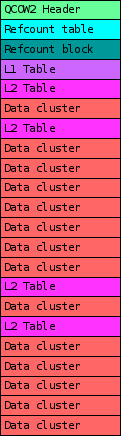
 When choosing a disk image format for your virtual machine one of the factors to take into considerations is its I/O performance. In this post I ll talk a bit about the internals of qcow2 and about one of the aspects that can affect its performance under QEMU: its consistency checks.
As you probably know, qcow2 is QEMU s native file format. The first thing that I d like to highlight is that this format is perfectly fine in most cases and its I/O performance is comparable to that of a raw file. When it isn t, chances are that this is due to an insufficiently large L2 cache. In one of my previous blog posts I wrote about



 . Sharing a small clip I had seen few months back.
Just to give a bit of context, the law as has been shared as passed in 2015 has happened after the

 or for that matter any part of the body. If more people thought like that, probably we wouldn t have to specially grow and then kill lab mice and guinea-pigs to test out theories. Possibly medical innovations would probably be a lot faster than now. Ironically, most medical innovations have happened during


 Last weekend, as a result of my addiction to buying random microcontrollers to play with, I received some
 I m investigating the creation of VM images for different virtualisation solutions.
Among the target platforms is a destop as a service platform based on an OpenStack public cloud.
We ve been working with