Search Results: "mak"

28 May 2013

Russell Coker: SCSI Failures

For a long time it was widely regarded that SCSI was the interface for all serious drives that were suitable for Enterprise Use or for anything else which requires reliable operation. On the other hand IDE was for cheap disks that were only suitable for home use. The SCSI vs IDE issue continues to this day but now we have SAS and SATA filling the same market niches with the main difference between the current debate and the debate a decade ago being that a SATA disk can be connected on a SAS bus. Both SAS and SATA have a single data cable for each disk which avoids the master/slave configuration on IDE and the issue of bus device ID number (from 0-7 or 0-15) and termination on SCSI. Termination When a high speed electrical signal travels through a cable some portion of the signal will be reflected from any cable end point or any point of damage. To prevent the signal reflection from the end of a cable you can have a set of resistors (or some other terminating device) at the end of the cable, see the Terminator(electrical) Wikipedia page [1] for a brief overview. As an aside I think that page could do with some work, if you are an EE with a bit of spare time then improving that page would be a good thing. SCSI was always designed to have termination while IDE never was. I presume that this was largely due to the cable length (18 for IDE vs 1.5m to 25m for SCSI) and the number of devices (2 for IDE vs 7 or 15 for SCSI). I also presume that some of the problems that I ve had with IDE systems have been related to signal problems that could have been avoided with a terminated bus. My first encounter with SCSI was when working for a small business that focused on WindowsNT software development. Everyone in the office knew a reasonable amount about computers and was happy to adjust the hardware of their own workstation. A room full of people who didn t understand termination who fiddled with SCSI buses tended to give a bad result. On the up-side I learned that a SCSI bus can work most of the time if you have a terminator in the middle of the cable and a hard drive at the end. There have been two occasions when I ve been at ground zero for a large deployment of servers from a company I ll call Moon Computers. In both cases there were two particularly large and expensive servers in a cluster and one of the cluster servers had data loss from bad SCSI termination. This is particularly annoying as the terminators have different colours, all that was needed to get the servers working was to change the hardware to make them look the same. As an aside the company with no backups [2] had one of the servers with bad SCSI termination. Heat SCSI disks and now SAS disks tend to be designed for higher performance, this usually means greater heat dissipation. A disk that dissipates a lot of heat won t necessarily work well in a desktop case with small and quiet fans. This can become a big problem if you have workstations running 24*7 in a hot place (such as any Australian city that s not in Tasmania) and turn the air-conditioner off on the weekends. One of my clients lost a few disks before they determined that IDE disks are the only option for systems that are to survive Australian heat without any proper cooling. Differences between IDE/SATA and SCSI/SAS In 2009 I wrote about vibration and SATA performance [3]. Rumor has it that SCSI/SAS disks are designed to operate in environments where there is a lot of vibration (servers with lots of big fans and fast disks) while IDE/SATA disks are designed for desktop and laptop systems in quiet environments. One thing I d like to do is to test performance of SATA vs SAS disks in a server that vibrates. SCSI/SAS disks have apparently been designed for operation in a RAID array and therefore will give a faster timeout on a read error (so another disk can return the data). While IDE/SATA disks are designed for a non-RAID situation and will spend longer trying to read the data. There are also various claims about the error rates from SCSI/SAS disks being better than those of IDE/SATA disks. But I think that in all cases the error rates are small enough not to be a problem if you use a filesystem like ZFS or BTRFS but they are also large enough to be a significant risk with modern data volumes if you have a lesser filesystem. Data Loss from Storage Failure In the data loss that I ve personally observed from storage failures the loss from SCSI problems (termination and heat) is about equal to all the hardware related data loss I ve seen on IDE disks. Given that the majority of disks I ve been responsible for have been IDE and SATA that s a bad sign for SCSI use in practice. But all serious data loss that I ve seen has involved the use of a single disk (no RAID) and inadequate backups. So a basic RAID-1 or RAID-5 installation will solve most hardware related data loss problems. There was one occasion when heat caused two disks in a RAID-1 to give errors at the same time, but by reading from both disks I managed to get almost all the data back, RAID can save you from some extreme error conditions. That situation would have been ideal for BTRFS or ZFS to recover data. Conclusion SCSI and SAS are designed for servers, using them in non-server systems seems to be a bad idea. Using SATA disks in servers can have problems too, but not typically problems that involve massive data loss. Using technology that is too complex for the people who install it seems risky. That includes allowing programmers to plug SCSI disks into their workstations and whoever it was from Moon computers or their resellers who apparently couldn t properly terminate a SCSI bus. It seems that the biggest advantage of SAS over SCSI is that SAS is simple enough for most people to be able to correctly install it. Making servers similar to the systems that the system administrators use at home seems like a really good idea. I think that one of the biggest benefits of using x86 systems as servers is that skills learned on home PCs can be transferred to administration of servers. Of course it would also be a good idea to have test servers that are identical to servers in production so that the sysadmin team can practice and make mistakes on systems that aren t mission critical, but companies seem to regard that as a waste of money apparently the risk of down-time is cheaper.

Andrew Pollock: [life] Running, a year later

So it's been about a year since I started running. In that time, I've gone from just being able to run 5K, to comfortably doing 10K in just under an hour. In that same time, my weight has gone from 77.5 kg to around 69 kg. The thing that started all of this off was the 5K Packard Summer Scamper, and next month I'm going to run in my first 14K fun run, the City2South. I thought I'd have a go at fund raising too, so if you'd like to make a donation, here's my page. I'm raising money for the Heart Foundation. I've constantly surprised myself with my progress. Just the last time I went for a run, I managed to set personal records on 1 km, 1 mile, 5 km and 10 km, which really blew me away. Once upon a time, I had this crazy idea to try and get into the Queensland Police Service, and one of the fitness requirements for applying was you had to be able to run 2.4 km in under 12 minutes, and I remember training away on the treadmill at the gym and only just scraping in under that time on a treadmill. Then I tried it on a running track, and I have these vague memories of it being a total slog. That was probably 10 years or more ago now. Now I could do that easily. I've got quite a nice 10 km running course in my local neighbourhood, so I'm thinking now that I'm comfortably running 10 km on this course, I should try and go for a half-marathon distance, so one of these weekends I'll just try running the same course twice plus a little bit more, just to see if I have it in me. Then maybe I'll consider entering a half-marathon, just for shits and giggles. I'll probably do it after I run 14 km, which will be the longest distance I've run to date. I only learned about the City2South run yesterday. The run that I've been planning on doing since returning to Brisbane is the Bridge to Brisbane. It looks like they've just opened up entries for it now, so I guess I should go sign up for it too.

Johannes Schauer: New bootstrap analysis results

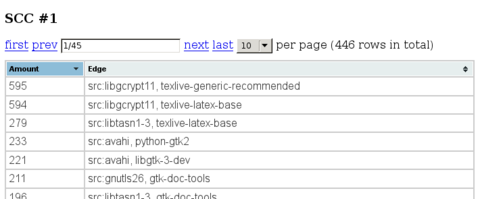
I wrote a small wiki page for botch. It includes links to some hopefully useful resources like my FOSDEM 2013 talk or my master thesis about botch. The final goal of botch is to generate a build order with which Debian can be bootstrapped from zero to more than 18000 source packages. But such a build order can only be generated once enough source packages (by now the number is around 70) incorporate build profiles which allow to compile them with less build dependencies and thereby break all build dependency cycles. So an intermediary goal of botch is, to find a "good" (i.e. a close to minimal amount) selection of such build dependencies that should be dropped from their source packages. So far, the results of all heuristics we use for this task were just dumped to standard output. Since this textual format was hard to read for a human developer and even worse machine readable, that tool now outputs its results in JSON. This data is then converted by another tool to a more human readable format. One such format is HTML and with the help of javascript for sortable and pageable tables, the data can then be presented without producing too much visual clutter (at least compared to the initial textual format). Another advantage of HTML is, that the data can now easily be shared with other developers without them having to run botch or install any other program first. So without further ado, please find the result of running our heuristics on Debian Sid as of 2013-01-01 here: http://mister-muffin.de/bootstrap/stats/ Here is a screenshot of what you can expect (you can see part of the table of edges with most cycles through them): As a developer uses this information to add build profiles to source packages, this HTML page can be regenerated and will show which strongly connected components are now left in the graph and how to best make them acyclic as well. Besides other improvements I also updated the data I used to generate the graphs from this post. I found this update to be necessary since we found and fixed several implementation bugs since October 2012, so this new plot should be more accurate. Here a graph which shows the amount of vertices in the biggest strongly connected component of Debian Sid by date. Some datapoints are missing for dates for which important source packages in Sid were not compilable.

27 May 2013

Bits from Debian: Debian welcomes its 2013 crop of GSoC students!

We are proud to announce that 16 students have been accepted to work on improving Debian this summer through the Google Summer of Code! This is great news, following our 15 accepted students in 2012, and 9 accepted students in 2011. Here is the list of accepted students and projects: If you're interested in one of the projects, please follow the links and talk directly to the students or the mentors, or come hang out with us on IRC. Welcome everyone, and let's make sure we all have an amazing summer!

Petter Reinholdtsen: How to install Linux on a Packard Bell Easynote LV preinstalled with Windows 8

Two days ago, I asked how I could install Linux on a Packard Bell EasyNote LV computer preinstalled with Windows 8. I found a solution, but am horrified with the obstacles put in the way of Linux users on a laptop with UEFI and Windows 8. I never found out if the cause of my problems were the use of UEFI secure booting or fast boot. I suspect fast boot was the problem, causing the firmware to boot directly from HD without considering any key presses and alternative devices, but do not know UEFI settings enough to tell. There is no way to install Linux on the machine in question without opening the box and disconnecting the hard drive! This is as far as I can tell, the only way to get access to the firmware setup menu without accepting the Windows 8 license agreement. I am told (and found description on how to) that it is possible to configure the firmware setup once booted into Windows 8. But as I believe the terms of that agreement are completely unacceptable, accepting the license was never an alternative. I do not enter agreements I do not intend to follow. I feared I had to return the laptops and ask for a refund, and waste many hours on this, but luckily there was a way to get it to work. But I would not recommend it to anyone planning to run Linux on it, and I have become sceptical to Windows 8 certified laptops. Is this the way Linux will be forced out of the market place, by making it close to impossible for "normal" users to install Linux without accepting the Microsoft Windows license terms? Or at least not without risking to loose the warranty? I've updated the Linux Laptop wiki page for Packard Bell EasyNote LV, to ensure the next person do not have to struggle as much as I did to get Linux into the machine. Thanks to Bob Rosbag, Florian Weimer, Philipp Kern, Ben Hutching, Michael Tokarev and others for feedback and ideas.

Daniel Pocock: Upstream packaging and Debian: Drupal third-party libraries API

Many large, successful, de-centralised software projects have a suite of their own packages maintained with their own platform-independent tools. Typical examples are Drupal's collection of module and theme packages, the R Project packages (CRAN) and the Central Repository for Maven packages (Java). In the case of Drupal:
  • Debian only really packages the core Drupal system and not the modules and themes
  • Gunnar's dh-make-drupal can easily Debianize many of the modules from Drupal's collection
  • Drupal has strict rules about the contents of packages distributed from their official collection. In particular, they must all be 100% compatible with the GPL v2 or later.
  • Another rule that is particularly exciting for Debian is that Drupal's hosted modules may not duplicate code (particularly JavaScript) from other projects/repositories: everyone installing a module must download and unpack the required JavaScript, often adding many steps to the module installation.
This is a particular opportunity for Debian to demonstrate it's strengths. Debian's pkg-javascript team has been busy packaging a huge collection of popular JavaScript libraries in a 100% free manner that guarantees adherence to the Debian Free Software Guidelines. This means that they have already done a lot of the groundwork to weed out minified (obfuscated) code that isn't accompanied by readable source code and ensure that there is a mechanism for conveniently and promptly distributing security fixes. The Drupal Libraries API module has now been packaged for Debian and is available in the unstable archive. The goal of this package is to facilitate the automated use of Debian's high-quality JavaScript packages to fulfill the dependency requirements of Drupal modules. Exact details of how these components fit together is currently explained in the README.Debian file distributed in the package. People packaging JavaScript for use by Drupal modules need to consider making a small glue' package to help Drupal's Libraries API discover the JavaScript. In many cases the glue package needs to do little more than creating a symlink from /usr/share/javascript to /usr/share/drupal7/libraries - this process can also potentially be automated by a future version of dh-make-drupal

26 May 2013

Andrew Pollock: [life] Maker Fair 2013 virtual trip report

The Maker Faire is one of the Bay Area things that I'll really miss. Zoe had a ball last year (for weeks afterwards every outing was "Maker Faire!" regardless of what or where it was) Last year I didn't really get to cover it very well, so I ended up doing a bit of a virtual tour via the exhibitor list on their website, and so this year I thought I'd be there in spirit by doing the same thing again. Here's my picks:

25 May 2013

Michael Stapelberg: Cloning git-buildpackage repositories

Whenever I want to work on some package, I usually clone its git repository, make my changes, then push and upload the Debian package. I don t keep those repositories around in order to avoid cruft and also to have a 100% clean, up-to-date setup whenever I start working on something. Everytime I clone such a repository, I struggle with the setup. For example, I usually forget the --pristine-tar flag for gbp-clone. Also, I usually forget to push other branches (working on debian , forgetting upstream ) and, even more often, I forget pushing tags. I spent some time on this and figured out that one can use the following to make --pristine-tar the default:
cat >> ~/.gbp.conf <EOF
[DEFAULT]
pristine-tar = True
EOF
Avoiding my other pain points is not so easy apparently, so I wrote a little shell function (only tested with zsh!) which uses debcheckout to get the git URL, gbp-clone to actually clone it and a few git config calls to make me able to just git push when I am done and not worry about anything:
# Clones the git sources of a Debian package
# needs debcheckout from devscripts and gbp-clone from git-buildpackage
function d-clone()  
    local package=$1
    if debcheckout --print $package >/dev/null
    then
        set -- $(debcheckout --print $package)
        if [ "$1" != "git" ]
        then
            echo "$package does not use git, but $1 instead."
            return
        fi
        echo "cloning $2"
        gbp-clone $2   return
        # Change to the newest git repository
        cd $(dirname $(ls -1td */.git   head -1))   return
        # This tells git to push all branches at once,
        # i.e. if you changed upstream and debian (after git-import-orig),
        # both upstream and debian will be pushed when running  git push .
        git config push.default matching   return
        # This tells git to push tags automatically,
        # so you don t have to use  git push; git push --tags .
        git config --add remote.origin.push "+refs/heads/*:refs/remotes/origin/*"   return
        git config --add remote.origin.push "+refs/tags/*:refs/tags/*"   return
        echo "d-clone set up everything successfully."
    else
        echo "debcheckout $package failed. Is $package missing Vcs tags?"
    fi
 
With that function, starting work on a package becomes as easy as d-clone golang-doc .

Petter Reinholdtsen: How can I install Linux on a Packard Bell Easynote LV preinstalled with Windows 8?

I've run into quite a problem the last few days. I bought three new laptops for my parents and a few others. I bought Packard Bell Easynote LV to run Kubuntu on and use as their home computer. But I am completely unable to figure out how to install Linux on it. The computer is preinstalled with Windows 8, and I suspect it uses UEFI instead of a BIOS to boot. The problem is that I am unable to get it to PXE boot, and unable to get it to boot the Linux installer from my USB stick. I have yet to try the DVD install, and still hope it will work. when I turn on the computer, there is no information on what buttons to press to get the normal boot menu. I expect to get some boot menu to select PXE or USB stick booting. When booting, it first ask for the language to use, then for some regional settings, and finally if I will accept the Windows 8 terms of use. As these terms are completely unacceptable to me, I have no other choice but to turn off the computer and try again to get it to boot the Linux installer. I have gathered my findings so far on a Linlap page about the Packard Bell EasyNote LV model. If you have any idea how to get Linux installed on this machine, please get in touch or update that wiki page. If I can't find a way to install Linux, I will have to return the laptop to the seller and find another machine for my parents. I wonder, is this the way Linux will be forced out of the market using UEFI and "secure boot" by making it impossible to install Linux on new Laptops?

24 May 2013

Wouter Verhelst: Not switching to 3.0 (quilt) just yet

I had a look at the 3.0 source formats just now. I've never been very fond of that, mainly because of the fact that it wants to store individual patches for no particularly good reason1. However, recently I found out about the --single-debian-patch option to dpkg-source, which makes the 3.0 (quilt) format behave somewhat more like the non-native 1.0 format, which is good. Unfortunately, "somewhat more" does not mean "entirely". For some weird reason, after converting the source to a 3.0 source package and running "dpkg-buildpackage", I find that suddenly my source tree is devoid of the patches that I'd applied to it. I'm sure there's another option hidden somewhere to make it not do that either, but I was quickly annoyed about it enough that I didn't care anymore. I just removed the debian/source directory entirely again, instead. Maybe I'll look into this again at some future point, but it's pretty unlikely. 1I have all my packages stored in git with a proper Vcs-Git: header; if people really want to look at individual patches, they can just use debcheckout, kthxbye.

Paul Tagliamonte: python-schroot

I ve been hacking on some static analyses stuff for debuild.me, and i ve been involved in a multi-year long yak shaving exercise. As today s fun part, I wrote python-schroot to help run commands in a schroot chroot (say that 10 times fast!) After a while, I got some neat stuff working. Here s an honest example:
from schroot import schroot
with schroot('unstable-amd64') as chroot:
    chroot.copy('/etc/issue', '/etc/issue', user='root')
This will copy a file (/etc/issue) from the host system into the schroot chroot. Neat! Now, to run something:
with schroot('unstable-amd64') as chroot:
    out, err, ret = chroot.run("whoami")
    print(out)    
Then, in an effort to make a DSL, I set out to create the following syntax:
with schroot('unstable-amd64') as chroot:
    "apt-get update" in chroot
but, hit some issues with implementing it, and got the following to work:
with schroot('unstable-amd64') as chroot:
    "apt-get update" > chroot // "root"  # apt-get update as root
More later!

23 May 2013

Russell Coker: Noise from Shaving

About 10 years ago I started using an electric shaver. An electric shaver is more convenient to use as it doesn t require any soap, foam, or water. It is also almost impossible to cut yourself properly with an electric shaver which is a major benefit for anyone who s not particularly alert in the morning. Generally my experience of electric shavers has been good, although the noise is quite annoying. Recently a friend told me that an electric shaver is as noisy as a chain-saw. Given the inverse-square law and the fact that the shaver operates within 1cm of my ears that sounds plausible. So the risk of hearing loss is a great concern. Disposable ear plugs are very cheap and they can be used multiple times (they don t get particularly dirty while shaving or get squashed in the short time needed to shave). So for a few weeks I ve been using ear plugs while shaving which reduces the noise and presumable saves me from some hearing damage although after 10 years of using electric shavers I may have already sustained some damage. According to Cooper Safety their ear plugs reduce noise by 29dB, [1] I presume that the cheap ones I bought from Bunnings would be good for at least 15dB. According to Better Hearing Sydney the noise from an electric shaver is typically around 90dB, less than the 100dB that is typical of a chain-saw [2]. So if my ear-plugs are good for 15dB then they would reduce the noise from a typical electric shaver to 75dB which is well below the 85dB that will cause hearing damage. Given that the noise from a typical shaver is only slightly above the damage threshold it seems that I might not need particularly good ear-plugs when shaving. A quick scan of shaver reviews indicates that the amount of noise differs by brand and technology. The Hubpages review suggests that rotary shavers tend to make less noise than foil shavers [3], but I m sure that it varies enough between brands that some rotary shavers are louder than the quietest foil shavers. It seems that the best thing to do when buying a new shaver would be to go to a specialised shaver shop (which has many models on offer) and get the staff to demonstrate them to determine which is the quietest. If a typical shaver produces 90dB then it seems likely that one of the more quiet models would produce less than 85dB. Another item on my todo list is to buy a noise meter to measure the amount of noise produced in the places where I spend time. There are some Android apps to measure noise, I m currently playing with the Smart Tools Co Sound Meter [4] which gives some interesting information. The documentation notes that phone microphones are limited to the typical volume and frequencies of human voice, so my Galaxy S3 can t measure anything about 81dB. My wife s Nexus 4 doesn t seem to register anything above 74dB. Additionally there is some uncertainty about the accuracy of the microphone, there is a calibration feature but that requires another meter. Anyway the Sound Meter app suggests that my shaver (a Philips HQ7380/B) produces only 71dB at the closest possible range and drops down to 67dB at the range I would use if I grew sideburns. Conclusion Getting a proper noise meter to protect one s hearing seems like a good idea. An Android app for measuring noise is a good thing to have, even though it s not going to be accurate it s convenient and will give an indication. When buying a shaver one should listen to all the options and choose a quiet one (I might have got a quiet one by luck). Sideburns seem like a good idea if you value your hearing.

Ian Wienand: Stuck keyboard with Fedora 17 under VirtualBox

For a while now, I've been plagued with this ridiculous problem of the keyboard becoming "stuck" in my Fedora 17 VM running under VirtualBox. Keys would stop working until you held them down for several seconds, making typing close to impossible. Of course, my first thought was to blame VirtualBox, since it has a lot to do with the keyboard. I found out some interesting things, like you can send scan-codes directly to virtual-machines with something like
$ VBoxManage controlvm UUID keyboardputscancode aa
(get the UUID via VBoxManage list vms; figuring out scan-codes is left to the reader!). I noticed the problem primarily happening while emacs was in the foreground, meaning I was working on code or an email ... my theory was when I typed too fast some race got hit and put the keyboard into a weird state that a reboot fixed. Well it turns out the problem is almost the exact opposite. Luckily, today I noticed "slow keys enabled" warning that sprung-up and went away quickly just before the keyboard stopped. Once I saw that the game was up; turns out this is a well-known bug that is easily fixed with xkbset -sl. It happens because I was typing too slowly; holding down the shift-key while I thought about something probably. Hopefully this saves someone else a few hours!

22 May 2013

Bits from Debian: Debian GNU/Hurd 2013 released!

It is with huge pleasure that the Debian GNU/Hurd team announces the release of Debian GNU/Hurd 2013. This is a snapshot of Debian "sid" at the time of the Debian "wheezy" release (May 2013), so it is mostly based on the same sources. It is not an official Debian release, but it is an official Debian GNU/Hurd port release. The installation ISO images can be downloaded from Debian Ports in the usual three Debian flavors: NETINST, CD, DVD. Besides the friendly Debian installer, a pre-installed disk image is also available, making it even easier to try Debian GNU/Hurd. Debian GNU/Hurd is currently available for the i386 architecture with more than 10.000 software packages available (more than 75% of the Debian archive, and more to come!). Please make sure to read the configuration information, the FAQ, and the translator primer to get a grasp of the great features of GNU/Hurd. Due to the very small number of developers, our progress of the project has not been as fast as other successful operating systems, but we believe to have reached a very decent state, even with our limited resources. We would like to thank all the people who have worked on GNU/Hurd over the past decades. There were not many people at any given time (and still not many people today, please join!), but in the end a lot of people have contributed one way or another. Thanks everybody! This article appeared originally at GNU Hurd news and in News about Debian GNU/Hurd.

Keith Packard: Altos1.2.1

AltOS 1.2.1 TeleBT support, bug fixes and new AltosUI features Bdale and I are pleased to announce the release of AltOS version 1.2.1. AltOS is the core of the software for all of the Altus Metrum products. It consists of cc1111-based micro-controller firmware and Java-based ground station software. The biggest new feature for AltOS is the addition of support for TeleBT, our ground station designed to operate with Android phones and tablets. In addition, there s a change in the TeleDongle radio configuration that should improve range, some other minor bug fixes and new features in AltosUI AltOS Firmware Features and fixes There are bug fixes in both ground station and flight software, so you should plan on re-flashing both units at some point. However, there aren t any incompatible changes, so you don t have to do it all at once. New features: Bug fixes: AltosUI Easier to use AltosUI has also seen quite a bit of work for the 1.2.1 release. It s got several fun new features and a few bug fixes. New Graph UI features: Other new AltosUI features: Bug fixes:
21 May 2013

Russell Coker: No Backups WTF

Some years ago I was working on a project that involved a database cluster of two Sun E6500 servers that were fairly well loaded. I believe that the overall price was several million pounds. It s the type of expensive system where it would make sense to spend adequately to do things properly in all ways. The first interesting thing was the data center where it was running. The front door had a uniformed security guard and a sign threatening immediate dismissal for anyone who left the security door open. The back door was wide open for the benefit of the electricians who were working there. Presumably anyone who had wanted to steal some servers could have gone to the back door and asked the electricians for assistance in removing them. The system was poorly tested. My colleagues thought that with big important servers you shouldn t risk damage by rebooting them. My opinion has always been that rebooting a cluster should be part of standard testing and that it s especially important with clusters which have more interesting boot sequences. But I lost the vote and there was no testing of rebooting. Along the way there were a number of WTFs in that project. One of which was when the web developers decided to force all users to install the latest beta release of Internet Explorer, a decision that was only revoked when the IE install process broke MS-Office on the PC of a senior manager. Another was putting systems with a default Solaris installation live on the Internet with all default services running, there s never a reason for a database server to be directly accessible over the Internet. No Backups At All But I think that the most significant failing was the decision not to make any backups. This wasn t merely forgetting to make backups, when I raised the issue I received a negative reaction from almost everyone. As an aside I find it particularly annoying when someone implies that I want backups because I am likely to stuff things up. There are many ways of proving that there s a general lack of competence in the computer industry. But I think that one of the best is the number of projects where the person who wants backups has their competence questioned instead of all the people who don t want backups. A decision to make no backups relies on one of two conditions, either the service has to be entirely unimportant or you need to have no bugs in the OS or hardware defects that can corrupt data, no application bugs, and a team of sysadmins who never make mistakes. The former condition raises the question of why the service is being run and the latter is impossible. As I m more persistent than most people I kept raising the issue via email and adding more people to the CC list until I got a positive reaction. Eventually I CC d someone who responded with What the fuck which I consider to be a reasonable response to a huge and expensive project with no backups. However the managers on the CC list regarded the use of profanity in email to be a much more serious problem. To the best of my knowledge there were never any backups of that system but the policy on email was strongly enforced. This is only a partial list of WTF incidents that assisted in my decision to leave the UK and migrate to the Netherlands. Not Doing Much About a year after leaving I returned to London for a holiday and had dinner with a former colleague. When I asked what he was working on he said Not much . It turned out that proximity to the nearest manager determined the amount of work that was assigned. As his desk was a long way from the nearest manager he had spent about 6 months getting paid to read Usenet. That wasn t really a surprise given my observations of the company in question.

Russell Coker: Advice on Buying a PC

A common topic of discussion on computer users group mailing lists is advice on buying a PC. I think that most of the offered advice isn t particularly useful with an excessive focus on building or upgrading PCs and on getting the latest and greatest. So I ll blog about it instead of getting involved in more mailing-list debates. A Historical Perspective the PC as an Investment In the late 80 s a reasonably high-end white-box PC cost a bit over $5,000 in Australia (or about $4,000 without a monitor). That was cheaper than name-brand PCs which cost upwards of $7,000 but was still a lot of money. $5,000 in 1988 would be comparable to $10,000 in today s money. That made a PC a rather expensive item which needed to be preserved. There weren t a lot of people who could just discard such an investment so a lot of thought was given to upgrading a PC. Now a quite powerful desktop PC can be purchased for a bit under $400 (maybe $550 if you include a good monitor) and a nice laptop is about the same price as a desktop PC and monitor. Laptops are almost impossible to upgrade apart from adding more RAM or storage but hardly anyone cares because they are so cheap. Desktop PCs can be upgraded in some ways but most people don t bother apart from RAM, storage, and sometimes a new video card. If you have the skill required to successfully replace a CPU or motherboard then your time is probably worth enough that getting more value out of a PC that was worth $400 when new and is worth maybe $100 when it s a couple of years old probably isn t a good investment. Times have changed and PCs just aren t worth enough to be bothered upgrading. A PC is a disposable item not an investment. Buying Something Expensive? There are a range of things that you can buy. You can spend $200 on a second-hand PC that s a couple of years old, $400 on a new PC that s OK but not really fast, or you can spend $1000 or more on a very high end PC. The $1000 PC will probably perform poorly when compared to a PC that sells for $400 next year. The $400 PC will probably perform poorly when compared to the second-hand systems that are available next year. If you spend more money to get a faster PC then you are only getting a faster PC for a year until newer cheaper systems enter the market. As newer and better hardware is continually being released at low enough prices that make upgrades a bad deal I recommend just not buying expensive systems. For my own use I find that e-waste is a good source of hardware. If I couldn t do that then I d buy from an auction site that specialises in corporate sales, they have some nice name-brand systems in good condition at low prices. One thing to note is that this is more difficult for Windows users due to anti-piracy features. With recent versions of Windows you can t just put an old hard drive in a new PC and have it work. So the case for buying faster hardware is stronger for Windows than for Linux. That said, $1,000 isn t a lot of money. So spending more money for a high-end system isn t necessarily a big deal. But we should keep in mind that it s just a matter of getting a certain level of performance a year before it is available in cheaper systems. Getting a $1,000 high-end system instead of a $400 cheap system means getting that level of performance maybe a year earlier and therefore at a price premium of maybe $2 per day. I m sure that most people spend more than $2 per day on more frivolous things than a faster PC. Understanding How a Computer Works As so many things are run by computers I believe that everyone should have some basic knowledge about how computers work. But a basic knowledge of computer architecture isn t required when selecting parts to assemble to make a system, one can know all about selecting a CPU and motherboard to match without understanding what a CPU does (apart from a vague idea that it s something to do with calculations). Also one can have a good knowledge of how computers work without knowing anything about the part numbers that could be assembled to make a working system. If someone wants to learn about the various parts on sale then sites such as Tom s Hardware [1] provide a lot of good information that allows people to learn without the risk of damaging expensive parts. In fact the people who work for Tom s Hardware frequently test parts to destruction for the education and entertainment of readers. But anyone who wants to understand computers would be better off spending their time using any old PC to read Wikipedia pages on the topic instead of spending their time and money assembling one PC. To learn about the basics of computer operation the Wikipedia page for CPU is a good place to start. Then the Wikipedia page for hard drive is a good start for learning about storage and the Wikipedia page for Graphics Processing Unit to learn about graphics processing. Anyone who reads those three pages as well as a selection of pages that they link to will learn a lot more than they could ever learn by assembling a PC. Of course there s lots of other things to learn about computers but Wikipedia has pages for every topic you can imagine. I think that the argument that people should assemble PCs to understand how they work was not well supported in 1990 and ceased to be accurate once Wikipedia became popular and well populated. Getting a Quality System There are a lot of arguments about quality and reliability, most without any supporting data. I believe that a system designed and manufactured by a company such as HP, Lenovo, NEC, Dell, etc is likely to be more reliable than a collection of parts uniquely assembled by a home user but I admit to a lack of data to support this belief. One thing that is clear however is the fact that ECC RAM can make a significant difference to system reliability as many types of error (including power problems) show up as corrupted memory. The cheapest Dell PowerEdge server (which has ECC RAM) is advertised at $699 so it s not a feature that s out of reach of regular users. I think that anyone who makes claims about PC reliability and fails to mention the benefits of ECC RAM (as used in Dell PowerEdge tower systems, Dell Precision workstations, and HP XW workstations among others) hasn t properly considered their advice. Also when discussing overall reliability the use of RAID storage and a good backup scheme should be considered. Good backups can do more to save your data than anything else. Conclusion I think it s best to use a system with ECC RAM as a file server. Make good backups. Use ZFS (in future BTRFS) for file storage so that data doesn t get corrupted on disk. Use reasonably cheap systems as workstations and replace them when they become too old. Update: I find it rather ironic when a discussion about advice on buying a PC gets significant input from people who are well paid for computer work. It doesn t take long for such a discussion to take enough time that the people involved could spent their time working instead, put enough money in a hat to buy a new PC for the user in question, and still had money left over.

20 May 2013

Daniel Kahn Gillmor: gpg --ask-cert-level considered harmful

Occasionally, someone asks me whether we should encourage use of the --ask-cert-level option when certifying OpenPGP keys with gpg. I see no good reason to use this option, and i think we should discourage people from trying to use it. I don't think there is a satisfactory answer to the question "how will specifying the level of identity certification concretely benefit anyone involved?", and i don't see why we should want one. gpg gets it absolutely right by not asking users this question by default. People should not be enabling this option. Some background: gpg's --ask-cert-level option allows the user who is making an OpenPGP identity certification to indicate just how sure they are of the identity they are certifying. The user's choice is then mapped into four levels of OpenPGP certification of a User ID and Public-Key packet, which i'll refer to by their signature type identifiers in the OpenPGP spec:
0x10: Generic certification
The issuer of this certification does not make any particular assertion as to how well the certifier has checked that the owner of the key is in fact the person described by the User ID.
0x11: Persona certification
The issuer of this certification has not done any verification of the claim that the owner of this key is the User ID specified.
0x12: Casual certification
The issuer of this certification has done some casual verification of the claim of identity.
0x13: Positive certification
The issuer of this certification has done substantial verification of the claim of identity.
Most OpenPGP implementations make their "key signatures" as 0x10 certifications. Some implementations can issue 0x11-0x13 certifications, but few differentiate between the types.
By default (if --ask-cert-level is not supplied), gpg issues certificates ("signs keys") using 0x10 (generic) certifications, with the exception of self-sigs, which are made as type 0x13 (positive). When interpreting certifications, gpg does distinguish between different certifications in one particular way: 0x11 (persona) certifications are ignored; other certifications are not. (users can change this cutoff with the --min-cert-level option, but it's not clear why they would want to do so). So there is no functional gain in declaring the difference between a "normal" certification and a "positive" one, even if there were a well-defined standard by which to assess the difference between the "generic" and "casual" or "positive" levels; and if you're going to make a "persona" certification, you might as well not make one at all. And it gets worse: the problem is not just that such an indication is functionally useless; encouraging people to make these kind of assertions actively encourages leaks of a more-detailed social graph than just encouraging everyone to use the default blanket 0x13-for-self-sigs, 0x10-for-everyone-else policy. A richer public social graph means more data that can feed the ravenous and growing appetite of the advertising-and-surveillance regimes. i find these regimes troubling. I admit that people often leak much more information than this indication of "how well do you know X" via tools like Facebook, but that's no excuse to encourage them to leak still more or to acclimatize people to the idea that the details of their personal relationships should by default be public knowledge. Lastly, the more we keep the OpenPGP network of identity certifications (a.k.a. the "web of trust") simple, the easier it is to make sensible and comprehensible and predictable inferences from the network about whether a key really does belong to a given user. Minimizing the complexity and difficulty of deciding to make a certification helps people streamline their signing processes and reduces the amount of cognitive overhead people spend just building the network in the first place.Tags: openpgp

19 May 2013

Nicolas Dandrimont: Hello world

Or rather, hello Planet! Here s a somewhat traditional introductory post. I m Nicolas Dandrimont, I m French, I m sysadmin in a grande cole, where I m mostly in charge of the GNU/Linux workstations and servers. In Debian, I m a DM, currently in the NM queue, so I might become a DD soon-ish. I am (rather inactively) co-maintaining a few packages. In my Debian career , I have been involved in OCaml packaging and Python packaging, although lately most of my time has been spent on Google Summer of Code (mentor for two mentors.debian.net projects in 2012, org admin for Debian in 2013), and on mentors.debian.net. In other free-software related projects, I own a RepRap 3D printer, and I grew some interest in the related software, e.g. Slic3r and printrun. There have been a lot of action in Fedora about packaging 3D-printing-related software, and it d be great to get a team together to work on that in Debian during the jessie release cycle. Consider this a call for interested parties :) Unrelatedly, paultag has tricked me into working on hy, which is way too much fun. Blame him if you feel that I have been inactive lately, this has been eating way too much of my free time ;) Hopefully I ll be able to make regular updates on the work I do in Debian and free software, so stay tuned!

Benjamin Mako Hill: The Cost of Inaccessibility at the Margins of Relevance

I use RSS feeds to keep up with academic journals. Because of an undocumented and unexpected feature (bug?) in my (otherwise wonderful) free software newsreader NewsBlur, many articles published over the last year were marked as having been read before I saw them. Over the last week, I caught up. I spent hours going through abstracts and downloading papers that looked interesting or relevant to my research. Because I did this for hundreds of articles, it gave me an unusual opportunity to reflect on my journal reading practices in a systematic way. On a number of occasions, there were potentially interesting articles in non-open access journals that neither MIT nor Harvard subscribes to and that were otherwise not accessible to me. In several cases where the research was obviously important to my work, I made an interlibrary request, emailed the papers authors for copies, or tracked down a colleague at an institution with access. Of course, articles that look potentially interesting from the title and abstract often end up being less relevant or well executed on closer inspection. I tend to cast a wide net, skim many articles, and put them aside when it s clear that the study is not for me. This week, I downloaded many of these possibly relevant papers to, at least, give a skim. But only if I could download them easily. On three or four occasions, I found inaccessible articles at this margin of relevance. In these cases, I did not bother trying to track down the articles. Of course, what appear to be marginally relevant articles sometimes end up being a great match for my research and I will end up citing and building on the work. I found several suprisingly interesting papers last week. The articles that were locked up have no chance at this. When people suggest that open access hinders the spread of scholarship, a common retort is that the people who need the work have or can finagle access. For the papers we know we need, this might be true. As someone with access to two of the most well endowed libraries in academia who routinely requests otherwise inaccessible articles through several channels, I would have told you, a week ago, that locked-down journals were unlikely to keep me from citing anybody. So it was interesting watching myself do a personal cost calculation in a way that sidelined published scholarship and that open access publishing would have prevented. At the margin of relevance to ones research, open access may make a big difference.

Next.

Previous.