Search Results: "will"

4 December 2013

Jonathan McDowell: Thoughts on SSDs and encryption

My laptop is just over 3 years old, which is about the point I start to think about a replacement. At present there's nothing that's an obvious contender so I've been looking at an SSD to prolong it by another year or two. One of the other thoughts I had is that I currently use dm-crypt under Linux to provide whole disk encryption for everything except the boot partition - I have a bunch of my personal financial and immigration documents stored that I'd prefer not to get disclosed if my laptop is stolen. Modern drives have started offered integral AES encryption options, so perhaps I could offload that to the drive (my i5 470UM lacks the hardware instructions for this). General consensus in the pub (where all the best security advice is to be found) is that no one present trusted SSD firmware authors to not use some badly chosen AES crypto mode, or leave the key lying around plain text in easily readable flash, or some other implementation mishap. So how hard would it be to retrofit reliable (or at least source verifiable and thus more reliable) crypto to an SSD? There was an impressive article recently about reverse engineering the firmware of a HDD, to the point of modifying data returned to the host and also running Linux on the controller. It seems that SSD firmware should be easier - NAND is simpler to talk to than motors and magnetic sensors, right? It's a case of gluing together a SATA interface, a NAND controller and an AES offload engine, yes? Aside from the minor matter of finding a suitable drive with an available JTAG interface, a controller with docs (or more likely that can be reverse engineered) and enough time to produce a replacement open firmware, that is. Alternatively can anyone provide some idea of how secure the available laptop SSDs on the market actually are? I'm fine with "the NSA can read your data if they want" because a determined attacker will be able to find other ways to get my data anyway, but I don't want "anyone who finds the drive can use this loophole in the firmware by wiggling some bits with jtag to dump the key and read all your data".

3 December 2013

Matthew Garrett: Subverting security with kexec

(Discussion of a presentation I gave at Kiwicon last month)

Kexec is a Linux kernel feature intended to allow the booting of a replacement kernel at runtime. There's a few reasons you might want to do that, such as using Linux as a bootloader[1], rebooting without having to wait for the firmware to reinitialise or booting into a minimal kernel and userspace that can be booted on crash in order to save system state for later analysis.

But kexec's significantly more flexible than this. The kexec system call interface takes a list of segments (ie, pointers to a userspace buffer and the desired target destination) and an entry point. The kernel relocates those segments and jumps to the entry point. That entry point is typically code referred to as purgatory, due to the fact that it lives between the world of the first kernel and the world of the second kernel. The purgatory code sets up the environment for the second kernel and then jumps to it. The first kernel doesn't need to know anything about what the second kernel is or does. While it's conventional to load Linux, you can load just about anything.

The most important thing to note here is that none of this is signed. In other words, despite us having a robust in-kernel mechanism for ensuring that only signed modules can be inserted into the kernel, root can still load arbitrary code via kexec and execute it. This seems like a somewhat irritating way to patch the running kernel, so thankfully there's a much more straightforward approach.

I modified kexec to add an additional loader and uploaded the code here. Build and install it. Make sure that /sys/module/module/parameters/sig_enforce on your system is "Y". Then, as root, do something like:
kexec --type="dummy" --address= printf "0x%x" $(( $(grep "B sig_enforce" /proc/kallsyms awk ' print "0x"$1 ') & 0x7fffffff)) --value=0 --load-preserve-context --mem-max=0x10000 /bin/true
to load it[2]. Now do kexec -e and watch colours flash and check /sys/module/module/parameters/sig_enforce again.

The beauty of this approach is that it doesn't rely on any kernel bugs - it's using kernel functionality that was explicitly designed to let you do this kind of thing (ie, run arbitrary code in ring 0). There's not really any way to fix it beyond adding a new system call that has rather tighter restrictions on the binaries that can be loaded. If you're using signed modules but still permit kexec, you're not really adding any additional security.

But that's not the most interesting way to use kexec. If you can load arbitrary code into the kernel, you can load anything. Including, say, the Windows kernel. ReactOS provides a bootloader that's able to boot the Windows 2003 kernel, and it shouldn't be too difficult for a sufficiently enterprising individual to work out how to get Windows 8 booting. Things are a little trickier on UEFI - you need to tell the firmware which virtual physical map to use, and you can only do it once. If Linux has already done that, it's going to be difficult to set up a different map for Windows. Thankfully, there's an easy workaround. Just boot with the "noefi" kernel argument and the kernel will skip UEFI setup, letting you set up your own map.

Why would you want to do this? The most obvious reason is avoiding Secure Boot restrictions. Secure Boot, if enabled, is explicitly designed to stop you booting modified kernels unless you've added your own keys. But if you boot a signed Linux distribution with kexec enabled (like, say, Ubuntu) then you're able to boot a modified Windows kernel that will still believe it was booted securely. That means you can disable stuff like the Early Launch Anti-Malware feature or driver signing, or just stick whatever code you want directly into the kernel. In most cases all you'd need for this would be a bootloader, kernel and an initrd containing support for the main storage, an ntfs driver and a copy of kexec-tools. That should be well under 10MB, so it'll easily fit on the EFI system partition. Copy it over the Windows bootloader and you should be able to boot a modified Windows kernel without any terribly obvious graphical glitches in the process.

And that's the story of why kexec is disabled on Fedora when Secure Boot is enabled.

[1] That way you only have to write most drivers once
[2] The address section finds the address of the sig_enforce symbol in the kernel, and the value argument tells the dummy code what value to set that address to. --load-preserve-context informs the kernel that it should save hardware state in order to permit returning to the original kernel. --mem-max indicates the highest address that the kernel needs to back up. /bin/true is just there to satisfy the argument parser.

comment count unavailable comments

Iustin Pop: A not so dark sky

I'm aware of how not-dark our modern city night sky is, but sometimes it still heavily surprises me how full of light it actually is. Yesterday I went about five kilometres out of Z rich; I thought at that distance, on a reasonably dark hill, it would be good enough for some night-sky shots. So I setup my tripod, only to realise I can't expose over 30 seconds because (at low ISO and fast aperture, shooting not straight up), everything is bleached out: I couldn't believe my eyes. Yes, I heard that one needs to go 100Km out of big cities, but but So I went and found that since about 2004, all of Switzerland is light polluted - even going on top of Jungfrau, for example, wouldn't completely eliminate it. I also learned about Merle Walker's equation - yeah, 200Km or more away from light sources would be good. Not here, in this quite small, quite populated country in the middle of Europe :/ I realised that as soon as my eyes got acclimated to the location I was at, I could easily see everything around me, due to the light pollution. I miss a really dark sky - I remember a couple of years back, in a different country, stopping at night on the side of the road, and being shocked at how the sky was filled with starts. I didn't have any camera with me at that time Heck, I remember seeing the Milky Way way back as a child, but nowadays when I get out of work, I can barely see 4-5 points of light in the sky. Anyway, enough with ranting Thanks to modern technology, one can recover lots of detail, even in a washed out picture. So in the end, shooting straight up, I could get some resemblance of structure (and this was only at 28mm, which is not that wide): Or alternatively, one can use the glowing light for a bit of play/contrast: I also played with stacking images via Deep Sky Stacker, but stacking - I learned to my surprise - only works to reduce noise in the final image, and not to make it "brighter" or more detailed. Live and learn The result was a bit better than not stacked, but not by much: This was a 25 5s, ISO 800, f/4, same 28mm lens. What I found surprising is the "non-star object" (to call it so) near the centre of the image - I have no idea what it is, it definitely doesn't look like a star, it could be an elliptical galaxy or so. I tried navigating back in time via Stellarium, but I don't remember the orientation of the lens, so it will remain a mystery to me. Anyway, two more pictures and higher resolutions on a Smugmug album. Feel free to leave a comment or drop me an email if you have suggestions where to take nice night sky photos in Switzerland

Antoine Beaupr : Announcing a prettier noping

I have implemented really pretty histograms in the venerable ping software, something I never thought could be improved, until I discovered prettyping.sh, something that was just begging for improvements. Which are now done. But first some history... First, in 1983 (!), there was ping and network operators rejoiced, as they could see if a host was down or not, and have all sorts of geeky statistics:
PING koumbit.net (209.44.112.66): 48 data bytes
56 bytes from 209.44.112.66: icmp_seq=0 ttl=52 time=25.076 ms
56 bytes from 209.44.112.66: icmp_seq=1 ttl=52 time=24.006 ms
56 bytes from 209.44.112.66: icmp_seq=2 ttl=52 time=24.106 ms
^C--- koumbit.net ping statistics ---
3 packets transmitted, 3 packets received, 0% packet loss
round-trip min/avg/max/stddev = 24.006/24.396/25.076/0.483 ms
Then, in 2006, there was noping, and things were, well, not much better, but we had colors, and there was some rejoicing. noping before Then, in october 2013, there was prettyping.sh, and things got really flashy and "oh wow, you can do that?" There was much rejoicing. prettyping animation Then, tonight, I learned ncurses and there was much headaches. But then, I reimplemented prettyping in noping, and I am so happy that I wrote this blog post: noping now Unless you haven't figured out how cool this is, let me break it down for you:
  1. it supports IPv4 and IPv6
  2. it allows you to track multiple hosts at the same time, and compare them
  3. this allows you to easily track down failure points in a network, something for which you usually need smokeping (needs a webserver) or mtr (doesn't have colors)
  4. it allows you to track a lot (the last minute at least) of history by default
  5. it is visually easy to track, even from a distance
You may know of that hack that can make "ping" ring a bell when it receives a packet? This is better: you can see the packets latency (or when they are just dropped!) from a distance, using an intuitive color code. The code is up for review here:
git clone -b prettyping git://src.anarc.at/liboping
Thanks to the well architectured noping, the patches were not that complicated to implemented. I have contacted upstream to get those changes merged, and hopefully this will be in your favorite Debian distribution soon. Rejoice!

2 December 2013

Thorsten Glaser: Neo900

I ve did something I surely will (financially) regret, next year, and designated the Neo900 to be the successor to my PocketPC, due to the latter having only 64 MiB RAM and Geocaching applications being quite hungry. It s got a lovely hardware keyboard, a pen display like the PocketPC (as opposed to the wishy-washy displays that Android and iPhone have), not only GPS but also GLONASS, fully free software with mostly free firmware (I m okay with that, mostly), a Ctrl key (useful in ssh and locally and my text editor; ^I is Tab, so it s useful in shell, too), WLAN, UMTS (I don t think I need LTE and would rather it have the more RAM), USB host (OTG), and lots of other nice features. In short, it s a tinkerable device: one I can not only hack at, but also hack on. Since I use a dumbphone for mobile phone anyway (pro: separate battery from the toy PocketPC/Smartphone we re talking two+ weeks of battery time when using it here, and easier use and less bugs, and a reliable fallback when I tinker too much ), this is perfect for me. I m reposting this in the wlog mostly because it s an interesting technical and OSS project, and because if 1000 people want one it will get less expensive for all of us (while here shameless plug any sponsors willing to contribute some EUR so I don t ruin myself with this, in exchange for services of some kind?). I ll probably run Debian on it (unless it goes systemd), maybe in a chroot if the native OS has functionality needed that I can t simply put into packages; they say Maemo has much better power management, but considering most use will have GPS, GLONASS and backlight on, battery isn t going to last long anyway or maybe even native I ve been wanting to know what this freesmartphone stuff my m68k (Atari VM) buildd has been happily compiling, anyway and some sort of Geocaching application (ideally a cross between something online, CacheWolf and an offline OSM (with most of Europe, but uninteresting tags stripped) and possibly access to the GS Live API but nevertheless supporting TC, NC, OC, gpsgames too), and my usual mksh(1), GNU screen, jupp(1), lynx(1), ssh(1) toolchain.) Delivery is expected for mid to end of 2014, but once it s there I ll keep you informed

Roland Mas: Rsyncing a BackupPC storage pool, efficiently

BackupPC is a pretty good backup system. Its configuration is rather flexible, it has nice expiry policies, and it can store duplicated file contents only once (for files that are shared across hosts or don't change in time) within a compressed pool of data. However, it doesn't do much to help pushing the data to off-site storage, or at least not very efficiently. So if you have a BackupPC instance running on a Raspberry Pi or a plug computer at home, it's a bit tricky to protect your data against loss due to burglary or home fire. The obvious solution would be to rsync the storage pool to a remote site. However, the current pooling system relies heavily on hardlinks, and rsync is notoriously inefficient with those. In the home backup server scenario, this means that even if the computer is more powerful than a Pi and can handle the memory requirements of rsync, you'll often end up transferring way too much data. So, since the obvious solution doesn't work straight away, what do we do? Why, we fix it, of course. With a little look into the storage pool, we notice that the bulk of the data is stored in files with an abstract name (related to the contents) within a $prefix/pool directory; the files with concrete names looking much like their original are stored within $prefix/pc, and they're actually the same files because they're hardlinks. Knowing this (that rsync doesn't), we can make a smarter replication tool, by
  1. pushing only the pool with standard rsync;
  2. storing locally, and recreating remotely, the structure of hardlinks;
  3. pushing everything again with standard rsync.
Steps 1 and 3 are simple invocations of rsync -aH; step 2 can be implemented using the following two scripts. Run store-hardlinks.pl locally, push the links file, then run restore-hardlinks.pl on the remote server. This will ensure that files already present in the pool are also hardlinked in their natural location. store-hardlinks.pl:
#! /usr/bin/perl -w
use strict;
use Storable qw(nstore);
use File::Find;
use vars qw/$prefix $poolpath $pcpath %i2cpool %todo $store/;
$prefix = '/var/lib/backuppc';
$poolpath = '$prefix/cpool';
$pcpath = '$prefix/pc';
$store = '$prefix/links';
# for the convenience of &wanted calls, including -eval statements:
use vars qw/*name *dir *prune/;
*name   = *File::Find::name;
*dir    = *File::Find::dir;
*prune  = *File::Find::prune;
# Scan pool
File::Find::find( wanted => \&wanted_pool , $poolpath);
# Scan PC dirs
File::Find::find( wanted => \&wanted_pc , $pcpath);
nstore \%todo, $store;
exit;
sub wanted_pc  
    my ($dev,$ino,$mode,$nlink,$uid,$gid);
    (($dev,$ino,$mode,$nlink,$uid,$gid) = lstat($_)) &&
      -f _ &&
      ($nlink > 1) &&
      do  
      $name =~ s,$pcpath/,,;
      if (defined $i2cpool $ino )  
      $todo $name  = $i2cpool $ino ;


sub wanted_pool  
    my ($dev,$ino,$mode,$nlink,$uid,$gid);
    (($dev,$ino,$mode,$nlink,$uid,$gid) = lstat($_)) &&
      -f _ &&
      ($nlink > 1) &&
      do  
      $name =~ s,$poolpath/,,;
      $i2cpool $ino  = $name;
     
 
restore-hardlinks.pl:
#! /usr/bin/perl -w
use strict;
use Storable;
use File::Path qw/make_path/;
use vars qw/$prefix $poolpath $pcpath %todo $store/;
$prefix = '/srv/backuppc-mirror';
$poolpath = "$prefix/cpool";
$pcpath = "$prefix/pc";
$store = "$prefix/links";
%todo = % retrieve ($store) ;
my ($dev,$ino,$mode,$nlink,$uid,$gid);
foreach my $src (keys %todo)  
    my $inode;
    my $dest = $todo $src ;
    my $dpath = "$poolpath/$dest";
    my $spath = "$pcpath/$src";
    my $sdir = $spath;
    $sdir =~ s,/[^/]*?$,,;
    make_path ($sdir);
    next unless -e $dpath;
    if (! -e $spath)  
      link $dpath, $spath;
      next;
     
    (($dev,$ino,$mode,$nlink,$uid,$gid) = lstat($spath));
    $inode = $ino;
    (($dev,$ino,$mode,$nlink,$uid,$gid) = lstat($dpath));
    if ($ino != $inode)  
      unlink $spath;
      link $dpath, $spath;
     
 
The initial transfer can still take forever if the pool is large (and if you're pushing it through the small end of an ADSL link ), but at least the files are only transferred once. Note: This is only useful for current versions of BackupPC. Apparently BackupPC 4 will have a different pooling system without hardlinks, and the following hack will no longer be required. For now, though, here it is.

1 December 2013

Raphaël Hertzog: My Free Software Activities in November 2013

This is my monthly summary of my free software related activities. If you re among the people who made a donation to support my work (44.52 , thanks everybody!), then you can learn how I spent your money. Otherwise it s just an interesting status update on my various projects. The Debian Administrator s Handbook Wheezy update completed. Roland and I completed the update of the Debian Administrator s Handbook for Debian 7 Wheezy. We still have some proofreading work to do but you can already enjoy the result here: http://debian-handbook.info/browse/wheezy/ Feel free to report back any problem that you discover. You can also submit us patches ready to apply if you want to go one step further. Publican contributions. The book is generated with publican and I maintain its Debian package. This month I got a release critical bug because it stopped working it turns out that the problem lied in libxml-treebuilder-perl and I thus reassigned #728885 while providing a tentative patch to the upstream author. After a few days without action from the pkg-perl team, and after having received a FTBFS bug on debian-handbook (of course publican was broken in unstable!), I prepared a fixed package myself and I uploaded it (I m still part of the pkg-perl team although I m inactive). Since I used publican heavily this month, I filed two tickets in its bugzilla. I requested a new feature in #1034836 (the possibility to keep around the former string for fuzzy strings to update), and I reported a problem with the handling of \n in PO files in #1036150. Debian France Galette update. I updated the galette package and its paypal plugin, and I deployed those on france.debian.net. It had some fixes for the reminder mails sent to members. Bylaws update. I also resumed my work on preparing new bylaws for Debian France. Sylvestre Ledru came up with a draft (with the help of a lawyer) a few months ago and I m reviewing/improving them now. The main goal is to clarify that Debian France is meant to be a Trusted Organization for the Debian project. Debian France Shop. We had the idea since a few months already but Sylvestre did the leg work to open a Debian France shop with the help of EnVenteLibre. I asked our members to prepare some CSS that better match the Debian colors and this should be fixed in a few days. The first goodies will also start to appear shortly, just in time for Christmas! Misc Debian work Distro Tracker. In the continuation of the Google Summer of Code, I asked the DSA team to setup a new virtual machine to host tracker.debian.org, an instance of Distro Tracker, the rewritten Package Tracking System. They have done their part of the job (except the mail setup), it s now waiting on me to find some time to complete some cleanups and deploy the thing. WordPress. I packaged wordpress 3.7.1 and sent a call for help on debian-mentors. I got 3 replies, I gave them some initial direction but I haven t heard back anything since. WordPress 3.8 is expected in a few days, hopefully one of the new volunteers will take care of preparing the next update. Dpkg regressions. I haven t done anything for multiple months but at least I keep running the git version of dpkg and I detected two regressions. Good to have them squashed before the upcoming 1.17.2 upload to unstable. PTS fix. I fixed some warnings that the PTS code started generating since the upgrade of its host to wheezy. They were generating some annoying backscatter mails to users of the pts@qa.debian.org bot. Ruby security update. I helped the ruby team to prepare the required security updates of ruby1.8 and ruby1.9.1 (see #730178 and #730189). This work was sponsored by Kali/Offensive Security. Smartcard setup. I bought 2 OpenPGP smartcards with a reader and I moved all my private keys on those devices (one card with the master key for signature/certification to be kept at home, one card for daily/mobile usage with the subkeys for encryption/signature/authentication). My laptop s harddrive doesn t contain any private key anymore. I have kept the required offline backup in a safe place, but in the end, my private keys are much harder to steal. I should write down my findings in another article Thanks See you next month for a new summary of my activities.

2 comments Liked this article? Click here. My blog is Flattr-enabled.

Marco d'Itri: Easily installing Debian on a Cubieboard

I recently bought a Cubieboard to replace my old Sheevaplug which has finally blown a power supply capacitor (this appears to be a common defect of Sheevaplugs), so I am publishing these instructions which show how to install Debian on sunxi systems (i.e. based on the Allwinner A10 SoC or one of its newer versions) with no need for cross compilers, emulators or ugly FAT partitions. This should work on any sunxi system as long as U-Boot is at least version 2012.10. The first step is to erase the beginning of SD card to remove anything in the unpartitioned space which may confuse U-Boot, partition and format it as desired. The first partition must begin at 1MB (1024*1024/512=2048 sectors) because the leading unpartitioned space is used by the boot loaders.
dd if=/dev/zero of=/dev/mmcblk0 bs=1M count=1
parted /dev/mmcblk0
  mklabel msdos
  mkpart primary ext4 2048s 15G
  unit s
  print
  mkpart primary linux-swap ... -1
mkfs.ext4 -L root /dev/mmcblk0p1
mkswap --label swap /dev/mmcblk0p2
Download the boot loaders and an initial kernel and install them:
tar xf cubieboard_hwpack.tar.xz
dd if=bootloader/sunxi-spl.bin of=/dev/mmcblk0 bs=1024 seek=8
dd if=bootloader/u-boot.bin of=/dev/mmcblk0 bs=1024 seek=32
mount /dev/mmcblk0p1 /mnt
mkdir /mnt/boot/
cp kernel/script.bin kernel/uImage /mnt/boot/
script.bin is Allwinner's proprietary equivalent of the device tree: it will be needed until sunxi support will be fully merged in mainline kernels. U-Boot needs to be configured to load the kernel from the ext4 file system (join the lines at \\, this is not a supported syntax!):
cat << END > /mnt/boot/uEnv.txt
# kernel=uImage
root=/dev/mmcblk0p1 rootwait
boot_mmc=ext4load mmc 0:1 0x43000000 boot/script.bin && ext4load mmc 0:1 0x48000000 boot/$ kernel  \\
  && watchdog 0 && bootm 0x48000000
END
Now the system is bootable: add your own root file system or build one with debootstrap. My old Sheevaplug tutorial shows how to do this without a working ARM system or emulator (beware: the other parts are quite obsolete and should not be trusted blindly). If you have an old armel install around it will work as well, and you can easily cross-grade it to armhf as long as it is up to date to at least wheezy (the newer, the better). You can also just use busybox for a quick test:
mkdir /mnt/bin/
dpkg-deb -x .../busybox-static_1.21.0-1_armhf.deb .
cp bin/busybox /mnt/bin/
ln -s busybox /mnt/bin/sh
After booting the busybox root file system you can run busybox --install /bin/ to install links for all the supported commands. Until Debian kernels will support sunxi (do not hold your breath: there are still many parts which are not yet in mainline) I recommend to install one of Roman's kernels:
dpkg -i linux-image-3.4.67-r0-s-rm2+_3.4.67-r0-s-rm2+-10.00.Custom_armhf.deb
mkimage -A arm -O linux -T kernel -C none -a 40008000 -e 40008000 \
  -n uImage -d /boot/vmlinuz-3.4.67-r0-s-rm2+ /boot/uImage-3.4.67-r0-s-rm2+
It is not needed with these kernels for most setups, but an initramfs can be created with:
update-initramfs -c -k 3.4.67-r0-s-rm2+
mkimage -A arm -T ramdisk -C none -n uInitrd \
  -d /boot/initrd.img-3.4.67-r0-s-rm2+ /boot/uInitrd-3.4.67-r0-s-rm2+
/boot/uEnv.txt will have to be updated to load the initramfs. Since the Cubieboard lacks a factory-burned MAC address you should either configure one in script.bin or (much easier) add it to /etc/network/interfaces:
iface eth0 inet dhcp
        hwaddress ether xx:xx:xx:xx:xx:xx
To learn more about the Allwinner SoCs boot process you can consult 1 and 2.

30 November 2013

Gunnar Wolf: On errors in exams - Short rant

Blogging from a phone... first time ever. I don't want to forget some specifics for this :) I have just completed an exam to try to enter a postgraduate program (I'll talk more about it once it becomes real ). The exam is administered by CENEVAL, the same evaluation agency Where I presented my graduation equivalency exam some years ago - Only this exam is for all of the postgraduate studies on many national universities and is thus basically just a psychometric test. The exam had 162 questions, all to be filled in a optical reader sheet, on five subjects: mathematical reasoning, Spanish grammar and comprehension, Project management, Computers and technology, And English reading and understanding. It was all in all a fun exam to take, mostly due to the math reasoning part. But... on the Subject I Know I am an expert, I have to complain (and intend to find a easy to do so formally). First, I spotted two absolute mistakes (and answered based on What I knew others would, but knowing the answer is wrong technically). One was a subtlety, on how and why have hard drives should be defragmented (and part of my quip is that it's an obsolete habit, but besides, the answers were all erroneous), but a second one was... just wrong. It asked on what should not be part of an "Internet link" (can only guess they meant An URL). The 4 options were valid parts of a URL - including one very seldom used by most people, but very often by many of us: the @ sign. Anyway, answered it, but my other main gripe is that most of the section was in specific use of Office software. Not only In Office-like, which would be bad enough to begin with, but on specific ways of using Mainly Excel And PowerPoint. Syntax issues, or the name of the menu under which to look for specific functions.
Anyway, I will wait the stipulated 10 days for the exam to be rated, but will anyway look die a way to contact the very opaque and secretive CENEVAL. Not to demand to be better treated, but to try to correct those known mistakes and errors.

Lars Wirzenius: Obnam 1.6.1 (backup software) and larch 1.20131130 (B-tree) releases: serious bug fixes

Backups are fun and exciting! Restores are exciting, in a terrifying and stressful way. Fixing serious bugs is gratifying, in a depressing way. I am glad to announce two software releases: Obnam version 1.6.1 and larch version 1.20131130. Obnam is my backup application, larch is a Python copy-on-write B-tree implementation that Obnam uses. I've uploaded the new versions to Debian unstable and to my own apt repository at [code.liw.fi] (also for wheezy). (I don't have the energy to upload to Debian backports: help is welcome there.) These are mainly bug fix releases, and minor improvements. The larch release fixes serious problems, and everyone should be upgrading. NEWS for larch: NEWS for Obnam (combining versions 1.6 and 1.6.1, both released today): Bug fixes:

Russell Coker: Links November 2013

Shanley wrote an insightful article about microagressions and management [1]. It s interesting to read that and think of past work experiences, even the best managers do it. Bill Stone gave an inspiring TED talk about exploring huge caves, autonamous probes to explore underground lakes (which can be used on Europa) and building a refuelling station on the Moon [2]. Simon Lewis gave an interesting TED talk about consciousness and the technology needed to help him recover from injuries sustained in a serious car crash [3]. Paul Wayper wrote an interesting article about reforming the patent system [4]. He also notes that the patent system is claimed to be protecting the mythical home inventor when it s really about patent trolls (and ex-inventors who work for them). This is similar to the way that ex-musicians work for organisations that promote extreme copyright legislation. Amanda Palmer gave an interesting TED talk about asking for donations/assistance, and the interactions between musicians and the audience [5]. Some part of this are NSFW. Hans Rakers wrote a useful post about how to solve a Dovecot problem with too many files open [6]. His solution was for a Red Hat based system, for Debian you can do the same but by editing /etc/init.d/dovecot. The use of the /proc/N/limits file was interesting, I ve never had a cause to deliberately use that file before. Krebs on Security has an interesting article about Android malware being used to defeat SMS systems to prevent bank fraud [7]. Apparently an infected PC will instruct the user to install an Android app to complete the process. Rick Falkvinge wrote an interesting article about how to apply basic economics terminology to so-called Intellectual Property [8]. Matthew Garrett wrote an interesting post about the way that Ubuntu gets a better result than Debian and Fedora because it has clear fixed goals [9]. He states that many people regard Fedora as a playground to produce a range of niche derivatives , probably a large portion of the Fedora and Debian developers consider this a feature not a bug. Ming Thein wrote an interesting article about the demise of the DSLR [10]. Bruce Schneier wrote an interesting post on the detention of David Miranda by the British authorities [11]. It s mostly speculation as to why they would do such a thing (which seems to go against their own best interests) and whether the NSA even knows which documents Edward Snowden copied. Jaclyn Friedman wrote an interesting article on Mens Rights Movements (MRAs) and how they are bad for MEN as well as for women [12]. Rodney S. Tucker wrote an insightful article for the IEEE about the NBN [13]. Basically the Liberal party are going to spend most of the tax money needed for a full NBN but get a significantly less than the full benefit. Lauren Drell wrote an interesting article for Mashable about TellSpec, a portable spectrometer that communicates with an Android phone to analyse food for allergens [14]. I guess this will stop schools from banning phones. Katie McDonough wrote an interesting article for Salon about the Pope s statements about the problems with unchecked capitalism [15]. His ideas are really nothing new to anyone who has read the Bible and read the news. It seems to me that the most newsworthy part of this is that most Christian leaders don t make similar statements. Daniel Leidert wrote an interesting post about power saving when running Debian on a HP Microserver [16]. Most of it is relevant to other AMD64 hardware too, I ll have to investigate the PCIE ASPM and spin down options on some of my systems that are mostly idle.

29 November 2013

Tanguy Ortolo: Mutt: encrypt all messages sent to known PGP users

GnuPG logo This is one thing I have wanted to do for a long time: configure Mutt to encrypt all messages sent to addresses for which I have a valid public key. Well, here is an awk-based script to generate that configuration. (Yes, I know, a similar script was already written. But I did not see it at first, and I find mine more readable. :-) )Code
#! /bin/sh
set -e
# Specific hooks set global configuration values for Mutt, which are not
# reset for new messages, so a default hook is needed to set the default
# value (do not try encrypting all messages).
printf "send-hook . unset crypt_autoencrypt\n\n"
cat <<EOF
# This group contains all known PGP users, and can be used to define
# hooks, for instance to encrypt all messages sent to PGP users, or to
# add a specific signature to promote PGP usage to non-PGP users.
EOF
# Generate a machine-readable list of known keys
gpg2 --batch --with-colons --list-keys \
      awk -- '
        BEGIN  
            FS = ":"
            # A flag that indicates whether or not we are in a public
            # key with usable encryption capability
            usable = 0
         
        # Detect beginning of public keys with usable encryption
        # capability
        $1 == "pub" && $12 ~ /E/   usable = 1  
        # Detect beginning of public keys without usable encryption
        # capability
        $1 == "pub" && $12 !~ /E/   usable = 0  
        
        # Only consider user IDs from public keys with usable encryption
        # capability and with regular, marginal, full or ultimate
        # validity (n, m, f or u in the second field)
        usable && $1 == "uid" && $2 ~ /[nmfu]/ && $10 ~ /@/  
            # Remove everything before and after the email address in
            # brackets
            sub(/^[^<]*</, "", $10)
            sub(/>[^>]*$/, "", $10)
            # Finally print the email address
            print $10
         ' \
      sort -u \
       
        # Group addresses by ten to reduce the number of Mutt commands
        finished=0
        while [ $finished -ne 1 ]
        do
            addresses=""
            for i in 0 1 2 3 4 5 6 7 8 9
            do
                if read address
                then
                    addresses="$addresses $address"
                else
                    finished=1
                    break
                fi
            done
            # Add PGP users' addresses to a pgp-users group
            printf "group -group pgp-users -addr %s\n" \
                "$addresses"
        done
     
# Build a hook to try encrypting messages sent to PGP users
printf "\n# Encrypt all messages sent to known PGP users\n"
printf "send-hook \"%%C pgp-users\" set crypt_autoencrypt\n" \
printf "\n# Add a specific signature to promote PGP usage to non-PGP users\n"
printf "#send-hook \"!%%C pgp-users\" set signature=~/.signature.use-pgp\n"
Usage Script usage This script generates uses GnuPG to print a list of all known keys, takes only valid ones, and uses them to build a series of configuration instructions for Mutt, that define hooks that are triggered when you write a message to them. This configuration has to be written to your Mutt configuration file:
$ bin/gen-pgp-hooks.sh >> ~/.muttrc
Or better (far better, in fact), to a dedicated configuration file you will refer to in your main one:
$ bin/gen-pgp-hooks.sh > ~/.muttrc.crypt-recipients
$ echo "source ~/.muttrc.crypt-recipients" >> ~/.muttrc
You may want to adapt this script to it directly writes to that file rather than having to redirect it. Also, remember to run it when you refresh your public keyring or add new keys to it. Mutt usage These hooks will make Mutt try to encrypt all messages you send to at least one known PGP user. That means it will try it even for messages you send to a PGP user and to non-PGP ones. In these cases, it will not find keys for all the recipient, and ask you which key to use; as you have none, you will have to quit that prompt by typing ^G, and manually disable encryption by accessing the PGP options menu with the key p.

Keith Packard: Black Friday 2013

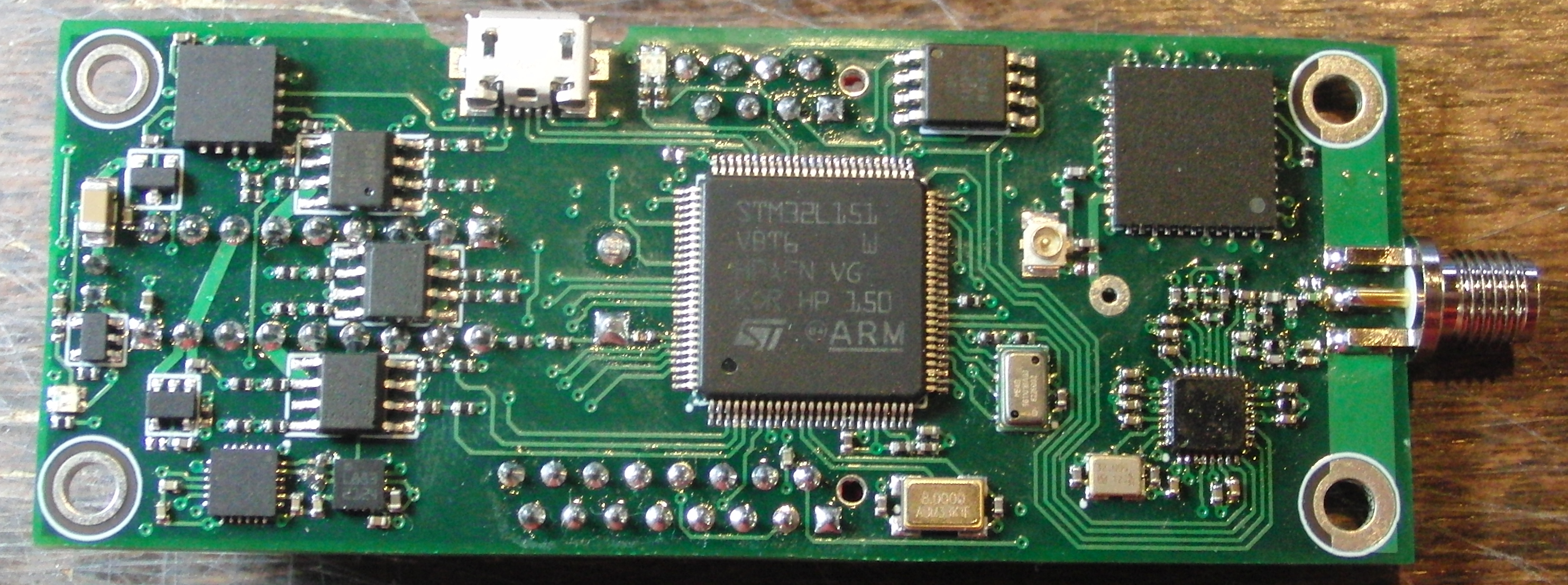
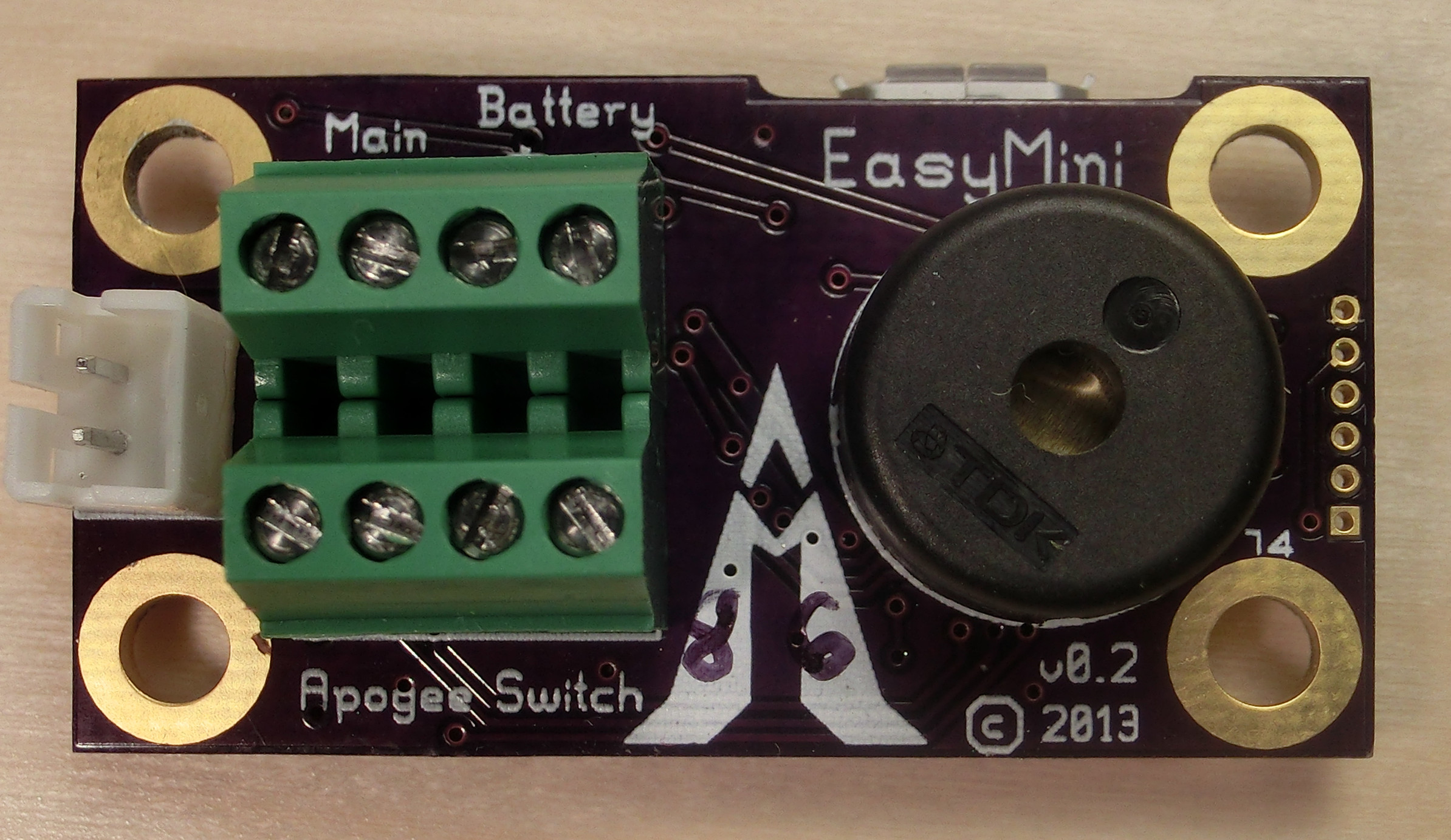
Back on Black (Friday) Event Altus Metrum is pleased to announce our Back on Black (Friday) event! For the first time since the Black Forest fire in June, we re re-opening our web store this weekend with a host of new and classic Altus Metrum products, including a special pre-order discount on our latest-and-greatest flight computer design, TeleMega. This weekend only, Friday, 29 November 2013 through Monday, 2 December, 2013, the first 40 TeleMega direct orders placed through our web store will receive a special $50 pre-order discount (regular $400, now only $350!). TeleMega is an advanced flight computer with 9-axis IMU, 6 pyro channels, uBlox Max 7Q GPS and 40mW telemetry system. We designed TeleMega to be the ideal flight computer for sustainers and other complex projects. TeleMega production is currently in process, and we expect to be ready to ship in mid-December. Pre-order now and we won t charge you until we ship. Learn more about TeleMega at: http://altusmetrum.org/TeleMega/ We are also pleased to announce that TeleBT is back in stock. Priced at $150, TeleBT is our latest ground station that connects to your laptop over USB or your Android device over BlueTooth. Learn more about TeleBT at http://altusmetrum.org/TeleBT/ Another new product we re thrilled to announce is EasyMini! Priced at only $80, EasyMini is a two-channel flight computer with built-in data logging and USB data download. Like our more advanced flight computers, EasyMini is loaded with sophisticated electronics and firmware, designed to be very simple to use yet capable enough for high performance airframes. Perfect as a first flight computer, EasyMini is also great as a backup deployment controller in complext projects. Learn more about EasyMini at: http://altusmetrum.org/EasyMini/ Also in stock for immediate shipment is MicroPeak, our 1.9 gram recording altimeter available for $50. The MicroPeak USB adapter, also $50, has been improved to make data downloading a snap. Read more about these at: http://altusmetrum.org/MicroPeak http://altusmetrum.org/MicroPeakUSB You can learn more about these and all our other Altus Metrum products at http://altusmetrum.org. The special discount on TeleMega pre-orders is available only on orders placed directly through Bdale s web store at http://shop.gag.com Thank you all for your support of Altus Metrum during 2013. It s been a rough year, but we re having a great time updating our existing products and designing new stuff! We look forward to returning products like TeleMetrum and TeleMini to the market soon, and plan to introduce even more new products soon.

28 November 2013

Craig Small: XBMC with MythTv

I have had MythTV running on my server for quite some time. Once I got past the weird problems you often have with the local ABC channel, it has worked very well. One tip, put the recordings into their own partition. MythTV will happily fill it and deleting files only marks them for deletion. This makes perfect sense when it has its own partition but is annoying otherwise. Until recently, the frontend on the television in the living room was a DVD player that spoke DLNA. This worked ok, but was very basic. The recordings were just a list with no graphics or details. Something better had to go here and it has; XBMC. A small (size of a paperback) PC later and we have XBMC running and doesn t it look pretty! The cute thing was it merged my DVD images and my recordings into one, so it didn t matter where the movie came from, it looks the same. It even understands MythTV advertising marks and skips them, all is good. Except, no sound. This is where a combination of my Google skills and XBMC s documentation failed. The documentation either says switch to HDMI output or go through a very long and involved process to get the sound card working. The tests on the command line failed and I thought I was going to be in for that long and involved process fixing alsa. Then in another part of the menus I saw you had Basic, Advanced, Expert levels and wondered what that did? It gave me more things to tweak in the menus. Perhaps that might fix my HDMI sound problem? Going into the System setup and then audio and then switching to a higher level of menu (it s on the left) suddenly I have a screen and a half of options and a few seconds later, sound! So if you are searching for NVIDIA and HDMI and sound, first turn on the advanced menu items and try setting that, it might be all you need (despite what Google and documentation says). One other thing, the C or I button on a remote could be called Guide . It is on mine. Also, SMB shares give a much better result than DLNA ones because SMB all the images and info are done on XBMC and it doesn t do the same for DLNA.

Debian Med: Bits from Debian Med team (by Andreas Tille)

Some of these bits are a bit outdated but there is no point in hiding this information just because it is old. FOSDEM talkAndreas Tille had a talk at FOSDEM which is also Video recorded. A quite similar but updated talk was held at DebConf 13 (see below). Jabber interview by reporter from IndiaThere was an interesting interview between Rajeev Nair and Andreas Tille at So, 17.02.2013 Rajeev Nair is Business head of an health care journal in India held via jabber. Since this might serve as some nice FAQ about Debian Med here is a complete log of this interview (permission to publish it was granted). Article about Debian MedAs a consequence of the interview above the Debian Med team has assembled an article which was originally intended to be published in the Health Cafe journal but somehow this never happened. So we ended up with a nice article targeting at interested readers about Free Software in medicine with not necessarily informatics background. Since the article is considered to be of good quality and has consumed some time of several team members we are seeking for ideas for relevant places where to publish it. It is available as PDFas well as in SVN. Yearly sprint of Debian Med teamThis year we had our third sprint of the Debian Med team and all participants consider it a great success again. The sprint was in end of February and the individual reports are linked from the according wiki page. Since Andreas Tille was able to prove the nice effect of having face to face meetings in Debian teams in the team metrics graphs presented in his talks at DebConf (see below) we will keep on with this good tradition. The next sprint is scheduled for Friday 31st January until Sunday 2nd February in Stonehaven near Aberdeen. If you are interested to meet the people behind Debian Med and want to join us in developing packages which are helpful in health care and bioinformatics you are invited to join us. DebConf 13 in VaumarcusAndreas Tille had two talks with specific influence to Debian Med development(Debian Med as a success story for other Blends, How to attract new developers for your team (MoM, SoB). For those who want to read a full (and lengthy) report about DebConf 13 by Andreas Tille this is online in this blog article. Codefest of the Open Bioinformatics FoundationIvo Maintz and Steffen M ller organised the Codefest of the Open Bioinformatics Foundation in Berlin. About 40 contributors from all over the world attended, connecting the Debian community strongly with upstream. The event triggered a joint paper of participants to Sprints, Codefests and Hackathons alike, presented at the Nettab conference on Semantic, Social, and Mobile Applications for Bioinformatics and Biomedical Laboratories in Venice. Reupload unattended packagesAndreas Tille has mentored the GSoC student Emmanouil Kiagias and as a byproduct some Blends metadata were now kept in UDD. This has inspired some new tools and one of this was an UDD query to return all packages in the interest of the Blend ordered by date when they were uploaded. It has shown that there were packages hanging around in the package pool since five years. So some effort was done to check those packages which were not necessarily "buggy" according to BTS entries and so we were able to fix the following issues in about 20-30 packages: Since it was impressive how many things that deserve fixing are hidden in such long unattended packages it is recommended also to other teams to spend some time into these. The UDD query can be easily tweaked for a team maintainer address. Debian Med Bug Squashing Advent Calendar 2013The Debian Med team will again do the Bug Squashing Advent Calendar. Feel free to join us in our bug squashing effort where we close bugs while other people are opening doors. :-) Kind regards and see you at Debian Med sprint
Andreas.

Pau Garcia i Quiles: Reminder: FOSDEM 2014, Desktops DevRoom Call for Talks

Just a friendly reminder we are inviting people to submit proposals for talks at the Desktops DevRoom at FOSDEM 2014, which will take place in Brussels 1-2 February 2014. Here is the full text for the Call for Talks: http://www.elpauer.org/2013/10/fosdem-desktops-devroom-2014-call-for-talks/ Deadline is approaching! Submit your proposal ASAP!

27 November 2013

Steinar H. Gunderson: Stockfish

The open-source chess program Stockfish recently climbed to the top of the TCEC rating lists. Even though it does not seem likely to win the actual TCEC tournament (it is 15.5 11.5 down in the 48-game superfinal against Komodo, a closed-source commercial program, after winning 4, losing 8 and drawing 15), this is a tremendeous achievement. This is not only because it is highly unusual that the strongest chess program is open-source (it's naturally hard to keep a competitive edge when everybody can see your secrets!), but also because it is a mere 9000 lines of C++ code. (This is without a GUI; it interfaces through a standardized protocol known as UCI.) In comparison, Crafty, a far weaker open-source program, is about four times that, GNU Chess is above 40000, and I seem to recall that the Deep Blue program was something like 65000 lines (in addition to, of course, all the code for the ASIC chess chips it contained, and stood for the majority of its chess strength!). So, the development team is really to be commended. It should also be said that TCEC is testing the latest beta versions of most of these engines and while Stockfish is developed in the open, on GitHub, the latest versions of e.g. Komodo and Houdini are private. (This is probably one of the reasons why Stockfish is slightly lower on e.g. the CCRL list, which also computes chess program rating lists by playing games between them.) Now, why does anyone care? Only a very small handful of players would be able to score even a draw against any of these programs in a 10-game match, so does it really matter which one we choose? Or is this some obscure pissing contest? The answer, of course, is that these engines are not primarily useful for competitive play; they are useful for analysis. Almost any player, right down from beginners to the very top players, can benefit from having someone stronger than them look at their games (or others' games!) and say where things went wrong. (Somehow analyzing losses always seem more instructive than analyzing wins. Nobody ever got better by winning, as the saying goes.) And the better a program is at playing chess, the more likely is its analysis to be correct. Of course, for the weaker players, a chess coach is likely to produce much more understandable guidance ( this creates a weak square on c7 is much more palatable than after these 18 moves here, white is 0.48 pawns stronger than you, so this was a bad move , and engines produce the latter sort of output), but they are always available, incredibly strong, and cost much less than a coach. :-) They also add a lot to the otherwise quite hard-to-comprehend activity of watching high-level human players; while the computers do not understand every kind of position equally well, they at least provide some sort of objective verdict on which player has the upper hand, something which can be really hard to discern unless you have very strong players around for commentary. So, in trying to improve my skills a bit, I've been analyzing my games with engines for a while, and recently I've switched from Rybka to Stockfish. (Rybka, a closed-source program, used to be the clear leader of the pack, but after a huge amount of drama involving accusations of who has copied code from who, it seems no longer to be actively developed, and Stockfish is now somewhat stronger.) This, unfortunately, brings me to the things I don't like too much about Stockfish; it seems to behave more erratically than Rybka did in interactive analysis mode. Its score jumps a lot more around when I move something (worse at remember the analysis from the previous position?), and sometimes, it changes its mind a lot when I move back and forth between moves maybe the huge selectivity that makes chess engines so strong these days also make them behave less usefully when only looking at a move for a few seconds. So, even though Stockfish is a fantastic chess engine, and will only get better in the future, maybe I'll go back to Rybka at some point. But then again, maybe I should then check out Komodo or any of the other engines out there or maybe talk to someone who actually knows chess, that would help a lot, too =)

Kees Cook: Thanks UPS

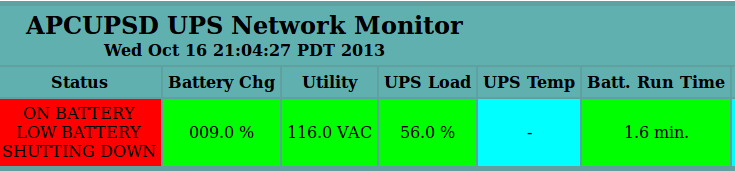
My UPS has decided that every two weeks when it performs a self-test that my 116V mains power isn t good enough, so it drains the battery and shuts down my home network. Only took a month and a half for me to see on the network graphs that my outages were, to the minute, 2 weeks apart. :) APC Monitoring In theory, reducing the sensitivity will fix this
2013, Kees Cook. This work is licensed under a Creative Commons Attribution-ShareAlike 3.0 License.
Creative Commons License

26 November 2013

Daniel Pocock: Real-time streaming market data with free software

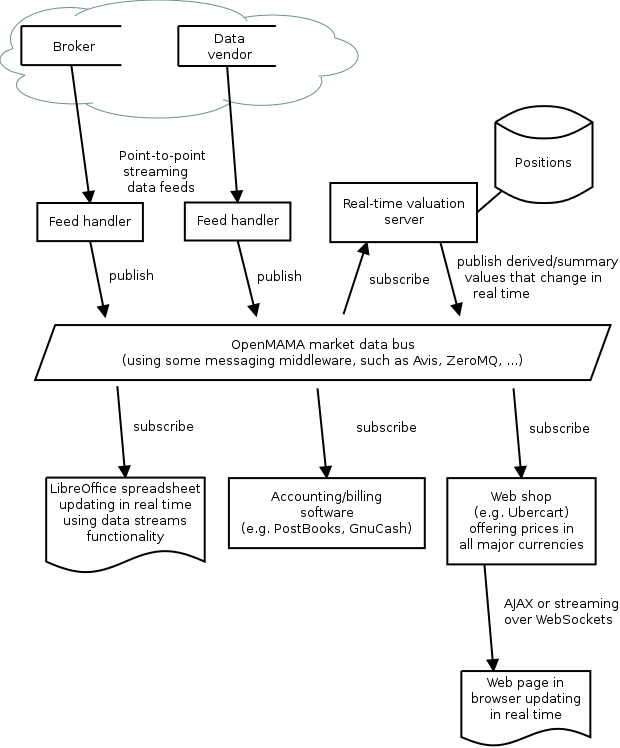
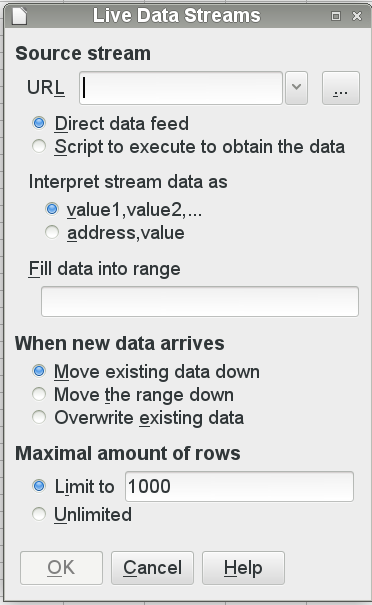
Here is an overview of the real-time market data architecture based on OpenMAMA: All these components may be running on a single host or they may be distributed across different servers and workstations in a LAN. The OpenMAMA market data bus ties them together. External data sources These are external sources of data. These could be currency trading firms, stock brokers, bullion dealers or even Bitcoin exchanges. Some exchanges don't provide data services directly to the general public and they distribute their price data through third-party data vendors such as Reuters and Bloomberg. Feed handlers The feed handlers manage the connections to external data sources. These are typically daemon processes that implement the wire protocols used by the external vendors for transmitting data over the public internet or a leased line. They typically use a point-to-point topology such as TCP connections. The feed handlers publish the data into the market data bus. In practice, the feed handler may be a proprietary application provided by the data vendor or it may simply be a Python script that fetches exchange rates from a URL every five minutes. OpenMAMA The market data bus is a distributed framework that is accessible to all of the local servers and workstations in the LAN. At the lowest level a messaging middleware solution is used to transport the data. The Avis Event Router is a free middleware. There is upcoming support for Apache QPID as well. Some commcercial middleware is supported too - here is the full list OpenMAMA does not provide a daemon or server process of its own. It is a set of libraries that operate on top of the middleware transport. In very general terms, the OpenMAMA libraries let applications publish messages (such as price ticks) or subscribe to receive the messages published by other applications. Spreadsheet application (for example, LibreOffice) LibreOffice is introducing a new data import feature for streaming time series data. This appears to provide a useful integration point for OpenMAMA and discussion is taking place in the development community. The spreadsheet can operate in various ways. A simple application may simply poll the currency prices when the spreadsheet is opened or refreshed. A more demanding application may see the spreadsheet come alive, recalculating all cells on every tick from the data vendor (several times per second). This latter scenario is more common in dealing rooms and hedge funds. Accounting/billing software There are many free accounting applications today, including PostBooks and GnuCash and some more heavyweight solutions like Adempiere and OpenERP. In a world where credit cards and the world wide web have made international trade an everyday activity, many people are using this software to track expenses and accounts in more than one currency. For example, a British business may be paying some suppliers in Euros and a Canadian may be charging some customers in US dollars. A Swiss person may be keeping some of their savings in gold bullion in the vault of one of their world reknowned Swiss banks. A common requirement for all of these users is the balance sheet. Using real-time market data sources, the balance sheet can be refreshed at any time from the live market prices. A home user may just find it convenient that they can open the balance sheet and always see their net worth immediately without having to manually cut and paste the currency prices from a web page. A business user operating in a competitive industry with low margins may be checking the balance sheet several times per day to ensure they remain solvent and profitable. Web shops Many web shops now offer the customers the convenience of viewing prices in their own currency. It is important to make sure these prices are accurate, especially when dealing with volatile currencies or when the products have a low profit margin. The web application server can receive the market data price ticks just like any other application in the network. Using this data, it can insert live prices into the pages as they are generated. If the currencies are particularly volatile, the web application could stream the prices to the browser using WebSockets and a JavaScript client embedded in the page would update the price field in real time. In fact, this web-based streaming price update mechanism is exactly how many online financial trading services offer live market prices to their customers. Real-time valuation server In a large organisation there may be many users looking at the same values. For example, in a trading desk, many users may need to see the desk's overall position in each market. In a busy web shop, many concurrent users may need to see the prices of common products. Rather than recalculating these values for each user in parallel, a common solution involves setting up a server to receive raw values (such as currency prices) from the data feed, calculate values needed by local users and then broadcast those values over the market data bus. How applications can integrate with real-time market data Here are some steps for getting started:
Daniel Pocock: Real-time streaming market data with free software

Here is an overview of the real-time market data architecture based on OpenMAMA: All these components may be running on a single host or they may be distributed across different servers and workstations in a LAN. The OpenMAMA market data bus ties them together. External data sources These are external sources of data. These could be currency trading firms, stock brokers, bullion dealers or even Bitcoin exchanges. Some exchanges don't provide data services directly to the general public and they distribute their price data through third-party data vendors such as Reuters and Bloomberg. Feed handlers The feed handlers manage the connections to external data sources. These are typically daemon processes that implement the wire protocols used by the external vendors for transmitting data over the public internet or a leased line. They typically use a point-to-point topology such as TCP connections. The feed handlers publish the data into the market data bus. In practice, the feed handler may be a proprietary application provided by the data vendor or it may simply be a Python script that fetches exchange rates from a URL every five minutes. OpenMAMA The market data bus is a distributed framework that is accessible to all of the local servers and workstations in the LAN. At the lowest level a messaging middleware solution is used to transport the data. The Avis Event Router is a free middleware. There is upcoming support for Apache QPID as well. Some commcercial middleware is supported too - here is the full list OpenMAMA does not provide a daemon or server process of its own. It is a set of libraries that operate on top of the middleware transport. In very general terms, the OpenMAMA libraries let applications publish messages (such as price ticks) or subscribe to receive the messages published by other applications. Spreadsheet application (for example, LibreOffice) LibreOffice is introducing a new data import feature for streaming time series data. This appears to provide a useful integration point for OpenMAMA and discussion is taking place in the development community. The spreadsheet can operate in various ways. A simple application may simply poll the currency prices when the spreadsheet is opened or refreshed. A more demanding application may see the spreadsheet come alive, recalculating all cells on every tick from the data vendor (several times per second). This latter scenario is more common in dealing rooms and hedge funds. Accounting/billing software There are many free accounting applications today, including PostBooks and GnuCash and some more heavyweight solutions like Adempiere and OpenERP. In a world where credit cards and the world wide web have made international trade an everyday activity, many people are using this software to track expenses and accounts in more than one currency. For example, a British business may be paying some suppliers in Euros and a Canadian may be charging some customers in US dollars. A Swiss person may be keeping some of their savings in gold bullion in the vault of one of their world reknowned Swiss banks. A common requirement for all of these users is the balance sheet. Using real-time market data sources, the balance sheet can be refreshed at any time from the live market prices. A home user may just find it convenient that they can open the balance sheet and always see their net worth immediately without having to manually cut and paste the currency prices from a web page. A business user operating in a competitive industry with low margins may be checking the balance sheet several times per day to ensure they remain solvent and profitable. Web shops Many web shops now offer the customers the convenience of viewing prices in their own currency. It is important to make sure these prices are accurate, especially when dealing with volatile currencies or when the products have a low profit margin. The web application server can receive the market data price ticks just like any other application in the network. Using this data, it can insert live prices into the pages as they are generated. If the currencies are particularly volatile, the web application could stream the prices to the browser using WebSockets and a JavaScript client embedded in the page would update the price field in real time. In fact, this web-based streaming price update mechanism is exactly how many online financial trading services offer live market prices to their customers. Real-time valuation server In a large organisation there may be many users looking at the same values. For example, in a trading desk, many users may need to see the desk's overall position in each market. In a busy web shop, many concurrent users may need to see the prices of common products. Rather than recalculating these values for each user in parallel, a common solution involves setting up a server to receive raw values (such as currency prices) from the data feed, calculate values needed by local users and then broadcast those values over the market data bus. How applications can integrate with real-time market data Here are some steps for getting started:

Next.

Previous.