Search Results: "ms"

19 November 2014

Simon McVittie: still aiming to be the universal operating system

Debian's latest round of angry mailing list threads have been about some combination of init systems, future direction and project governance. The details aren't particularly important here, and pretty much everything worthwhile in favour of or against each position has already been said several times, but I think this bit is important enough that it bears repeating: the reason I voted "we didn't need this General Resolution" ahead of the other options is that I hope we can continue to use our normal technical and decision-making processes to make Debian 8 the best possible OS distribution for everyone. That includes people who like systemd, people who dislike systemd, people who don't care either way and just want the OS to work, and everyone in between those extremes. I think that works best when we do things, and least well when a lot of time and energy get diverted into talking about doing things. I've been trying to do my small part of the former by fixing some release-critical bugs so we can release Debian 8. Please join in, and remember to write good unblock requests so our hard-working release team can get through them in a finite time. I realise not everyone will agree with my idea of which bugs, which features and which combinations of packages are highest-priority; that's fine, there are plenty of bugs to go round! Regarding init systems specifically, Debian 'jessie' currently works with at least systemd-sysv or sysvinit-core as pid 1 (probably also Upstart, but I haven't tried that) and I'm confident that Debian developers won't let either of those regress before it's released as Debian 8. I expect the freeze for Debian 'stretch' (presumably Debian 9) to be a couple of years away, so it seems premature to say anything about what will or won't be supported there; that depends on what upstream developers do, and what Debian developers do, between now and then. What I can predict is that the components that get useful bug reports, active maintenance, thorough testing, careful review, and similar help from contributors will work better than the things that don't; so if you like a component and want it to be supported in Debian, you can help by, well, supporting it.
PS. If you want the Debian 8 installer to leave you running sysvinit as pid 1 after the first reboot, here's a suitable incantation to add to the kernel command-line in the installer's bootloader. This one certainly worked when KiBi asked for testing a few days ago:
preseed/late_command="in-target apt-get install -y sysvinit-core"
I think that corresponds to this line in a preseeding file, if you use those:
d-i preseed/late_command string in-target apt-get install -y sysvinit-core
A similar apt-get command, without the in-target prefix, should work on an installed system that already has systemd-sysv. Depending on other installed software, you might need to add systemd-shim to the command line too, but when I tried it, apt-get was able to work that out for itself. If you use aptitude instead of apt-get, double-check what it will do before saying "yes" to this particular switchover: its heuristic for resolving conflicts seems to be rather more trigger-happy about removing packages than the one in apt-get.

18 November 2014

Laura Arjona: Translating (reviewing) Debian package descriptions

Some days I feel super lazy but I still would like to go on contributing translations to Debian.
Then, I leave the web translations a bit, and change to translate or review Debian package descriptions. It s something that anybody can do without any knowledge of translation tools, since it is a very simple web interface, as you will see. First you need to create a login account, then, login into the system. And then, go to the page of your mother language (in my case, Spanish, es ). You will see some introductory text, and the list of pending translations:
ddtss_es1
At the end of the page, there is the list of translations pending to review:
ddtss_es2 We should begin with this, so the work that other people already made arrives quickly its destination. And it s the easiest part, as you will see. Let s pick one of them (libvformat1-dev): review1
You see the short description in the original English, and the current translation (if there were changes from a former version, they are coloured too). I didn t know what the package libvformat1-dev does, but here s a nice opportunity to learn aobut it a bit :) The short description looks ok for me. Let s go on to the long description: review2 It also looks correct for me. So I leave the text box as is, and go on until the bottom of the page:
review3
and click Accept as is . That s all!! The system brings you back to the page with pending translations and reviews. Let s pick another one: totem
review4
I found a typo and corrected some other words, so I updated the text in the translation box, left a message to the other translators in the comment box, and clicked Accept with changes . And iterate. When 3 translators agree in a translation, it becomes official, and its propagated to apt-cache, aptitude, synaptic, etc., and the website (packages.debian.org). This is the most difficult part (to get 3 reviews for each package description): many language teams are small, and their workforce is spread in many fronts: translations for the website, news and announcements, debconf templates (the messages that are shown to the user when a package is installed), the Debian installer, the documentation, the package descriptions So your help (even when you only review some translations from time to time) will be appreciated, for sure.
Filed under: Tools Tagged: Contributing to libre software, Debian, English, translations

Michal Čihař: Mercurial support in Weblate

Weblate has started as a translation system tightly bound to Git version control system. This was in no means design decision, but rather it was the version control I've used. But this has shown not to be sufficient and other systems were requested as well. And Mercurial is first of them to be supported. Weblate 2.0 already had separated VCS layer and adding another system to that is quite easy if you know the VCS you're adding. Unfortunately this wasn't the case for me with Mercurial as I've never used it for anything more serious than cloning a repository, committing fixes and pushing it back. Weblate needs a bit more than that, especially in regard to remote branches. But nevertheless I've figured out all operations and the implementation is ready in our Git. In case somebody is interested in adding support for another version control, patches are always welcome!

Filed under: English phpMyAdmin SUSE Weblate 0 comments Flattr this!

Josselin Mouette: Introspection (not the GObject one)

Disclaimer: I m not used to writing personal stuff on Debian channels. However, there is nothing new here for those who know me from other public channels.


Yesterday, I received the weirdest email from well-known troll MikeeUSA. He thought I shared his views of a horrible world full of bloodthirsty feminists using systemd in their quest for domination over poor white male heterosexuals. The most nauseating paragraph was probably the one where he showed signs of the mentality of a pedocriminal.

At first, I shrugged it off and sent him an email explaining I didn t want anything with his stinky white male supremacist theories, assorted with a bit of taunting. But after discovering all that stuff was actually sent to public mailing lists, I took the time for a second look and started a bit of introspection.

MikeeUSA thought I was a white male supremacist because of the so-called SmellyWerewolf incident, 6 years ago.
Oh boy, people change in six years. Upon re-reading that, I had trouble admitting I was the one to write it. Memory is selective, and with time, you tend not to remember some gruesome details, especially the ones that conflict most with your moral values.

I can assure every reader that the only people I intended to mock then were those who mistook Debian mailing lists for advertising channels; but I understand now that my message must have caused pain to a lot more people than that. So, it may come late, but let me take this opportunity to offer my sincerest apologies to anyone I may have hurt at that time.


It may seem strange for someone with deeply-rooted values of equality to have written that. To have considered that it was okay to stereotype people. And I think I found this okay because to me, those people were given equal rights, and were therefore equal. But the fight for equality is not over when everyone is given the same rights. Not until they are given the same opportunities to exert those rights. Which does not happen when they live in a society that likes to fit them in little archetypal peg holes, never giving you the chance to question where those stereotypes come from.

For me, that chance came from an unusual direction: the fight against prostitution. This goes way back for me. Since when I was a teenager, I have always been ticked off at the idea of nonconsensual sex that somehow evades criminal responsibility because of money compensation. I never understood why it wasn t considered as rape. Yet it sounded weird that a male heterosexual would hold such opinions; after all, male heterosexuals should go to prostitutes as a kind of social ritual, right?

It was only three years ago that an organization of men against prostitution was founded in France. Not only did I find out that I was not alone with my progressive ideas, I was given the opportunity to exchange with many men and women who had studied prostitution: its effects on victims, its relationship to rape culture and more generally to the place men and women hold in society. Because eventually, it all boils down to little peg holes in which we expect people to fit: the virile man or the faggot, the whore or the mother. For me, it was liberating. I could finally get rid of the discomfort of being a white male heterosexual that didn t enter the little peg holes that were made for me.

And now, after Sweden 15 years ago, a new group of countries are finally adopting laws to criminalize the act of paying for sex. Including France. That s too bad for MikeeUSA, but this country is no longer the eldorado for white male supremacists. And I m proud that our lobbying made a contribution, however small, to that change.

Jaldhar Vyas: And The Papers Want To Know Whose Shirts You Wear

Bayeux Tapestry: Guy in sexist shirt sees a comet Today I was walking past the Courant Institute at NYU when I saw a man wearing a t-shirt with a picture of a cow diagramming all the various cuts of beef. Now I've lost all interest in science. Thanks a lot jerks.

Antoine Beaupr : bup vs attic silly benchmark

after see attic introduced in a discussion about bup, i figured out i could give it a try. it was answering two of my biggest concerns with bup: and seemed to magically out of nowhere and basically do everything i need, with an inline manual on top of it.

disclaimer Note: this is not a real benchmark! i would probably need to port bup and attic to liw's seivot software to report on this properly (and that would amazing and really interesting, but it's late now). even worse, this was done on a production server with other stuff going on so take results with a grain of salt.

procedure and results Here's what I did. I setup backups of my ridiculously huge ~/src directory on the external hard drive where I usually make my backups. I ran a clean backup with attic, than redid it, then I ran a similar backup with bup, then redid it. Here are the results:
anarcat@marcos:~$ sudo apt-get install attic # this installed 0.13 on debian jessie amd64
[...]
anarcat@marcos:~$ attic init /mnt/attic-test:
Initializing repository at "/media/anarcat/calyx/attic-test"
Encryption NOT enabled.
Use the "--encryption=passphrase keyfile" to enable encryption.
anarcat@marcos:~$ time attic create --stats /mnt/attic-test::src ~/src/
Initializing cache...
------------------------------------------------------------------------------
Archive name: src
Archive fingerprint: 7bdcea8a101dc233d7c122e3f69e67e5b03dbb62596d0b70f5b0759d446d9ed0
Start time: Tue Nov 18 00:42:52 2014
End time: Tue Nov 18 00:54:00 2014
Duration: 11 minutes 8.26 seconds
Number of files: 283910
                       Original size      Compressed size    Deduplicated size
This archive:                6.74 GB              4.27 GB              2.99 GB
All archives:                6.74 GB              4.27 GB              2.99 GB
------------------------------------------------------------------------------
311.60user 68.28system 11:08.49elapsed 56%CPU (0avgtext+0avgdata 122824maxresident)k
15279400inputs+6788816outputs (0major+3258848minor)pagefaults 0swaps
anarcat@marcos:~$ time attic create --stats /mnt/attic-test::src-2014-11-18 ~/src/
------------------------------------------------------------------------------
Archive name: src-2014-11-18
Archive fingerprint: be840f1a49b1deb76aea1cb667d812511943cfb7fee67f0dddc57368bd61c4bf
Start time: Tue Nov 18 00:05:57 2014
End time: Tue Nov 18 00:06:35 2014
Duration: 38.15 seconds
Number of files: 283910
                       Original size      Compressed size    Deduplicated size
This archive:                6.74 GB              4.27 GB            116.63 kB
All archives:               13.47 GB              8.54 GB              3.00 GB
------------------------------------------------------------------------------
30.60user 4.66system 0:38.38elapsed 91%CPU (0avgtext+0avgdata 104688maxresident)k
18264inputs+258696outputs (0major+36892minor)pagefaults 0swaps
anarcat@marcos:~$ sudo apt-get install bup # this installed bup 0.25
anarcat@marcos:~$ free && sync && echo 3   sudo tee /proc/sys/vm/drop_caches && free # flush caches
anarcat@marcos:~$ export BUP_DIR=/mnt/bup-test
anarcat@marcos:~$ bup init
D p t Git vide initialis  dans /mnt/bup-test/
anarcat@marcos:~$ time bup index ~/src
Indexing: 345249, done.
56.57user 14.37system 1:45.29elapsed 67%CPU (0avgtext+0avgdata 85236maxresident)k
699920inputs+104624outputs (4major+25970minor)pagefaults 0swaps
anarcat@marcos:~$ time bup save -n src ~/src
Reading index: 345249, done.
bloom: creating from 1 file (200000 objects).
bloom: adding 1 file (200000 objects).
bloom: creating from 3 files (600000 objects).
Saving: 100.00% (6749592/6749592k, 345249/345249 files), done.
bloom: adding 1 file (126005 objects).
383.08user 61.37system 10:52.68elapsed 68%CPU (0avgtext+0avgdata 194256maxresident)k
14638104inputs+5944384outputs (50major+299868minor)pagefaults 0swaps
anarcat@marcos:attic$ time bup index ~/src
Indexing: 345249, done.
56.13user 13.08system 1:38.65elapsed 70%CPU (0avgtext+0avgdata 133848maxresident)k
806144inputs+104824outputs (137major+38463minor)pagefaults 0swaps
anarcat@marcos:attic$ time bup save -n src2 ~/src
Reading index: 1, done.
Saving: 100.00% (0/0k, 1/1 files), done.
bloom: adding 1 file (1 object).
0.22user 0.05system 0:00.66elapsed 42%CPU (0avgtext+0avgdata 17088maxresident)k
10088inputs+88outputs (39major+15194minor)pagefaults 0swaps
Disk usage is comparable:
anarcat@marcos:attic$ du -sc /mnt/*attic*
2943532K        /mnt/attic-test
2969544K        /mnt/bup-test
People are encouraged to try and reproduce those results, which should be fairly trivial.

Observations Here are interesting things I noted while working with both tools:
  • attic is Python3: i could compile it, with dependencies, by doing apt-get build-dep attic and running setup.py - i could also install it with pip if i needed to (but i didn't)
  • bup is Python 2, and has a scary makefile
  • both have an init command that basically does almost nothing and takes little enough time that i'm ignoring it in the benchmarks
  • attic backups are a single command, bup requires me to know that i first want to index and then save, which is a little confusing
  • bup has nice progress information, especially during save (because when it loaded the index, it knew how much was remaining) - just because of that, bup "feels" faster
  • bup, however, lets me know about its deep internals (like now i know it uses a bloom filter) which is probably barely understandable by most people
  • on the contrary, attic gives me useful information about the size of my backups, including the size of the current increment
  • it is not possible to get that information from bup, even after the fact - you need to du before and after the backup
  • attic modifies the files access times when backing up, while bup is more careful (there's a pull request to fix this in attic, which is how i found out about this)
  • both backup systems seem to produce roughly the same data size from the same input

Summary attic and bup are about equally fast. bup took 30 seconds less than attic to save the files, but that's not counting the 1m45s it took indexing them, so on the total run time, bup was actually slower. attic is also (almost) two times faster on the second run as well. but this could be within the margin of error of this very quick experiment, so my provisional verdict for now would be that they are about as fast. bup may be more robust (for example it doesn't modify the atimes), but this has not been extensively tested and is more based with my familiarity with the "conservatism" of the bup team rather than actual tests. considering all the features promised by attic, it makes for a really serious contender to the already amazing bup.

Next steps The properly do this, we would need to:
  • include other software (thinking of Zbackup, Burp, ddar, obnam, rdiff-backup and duplicity)
  • bench attic with the noatime patch
  • bench dev attic vs dev bup
  • bench data removal
  • bench encryption
  • test data recovery
  • run multiple backup runs, on different datasets, on a cleaner environment
  • ideally, extend seivot to do all of that
Note that the Burp author already did an impressive comparative benchmark of a bunch of those tools for the burp2 design paper, but it unfortunately doesn't include attic or clear ways to reproduce the results.

17 November 2014

Vincent Sanders: NetSurf Developer workshop IV

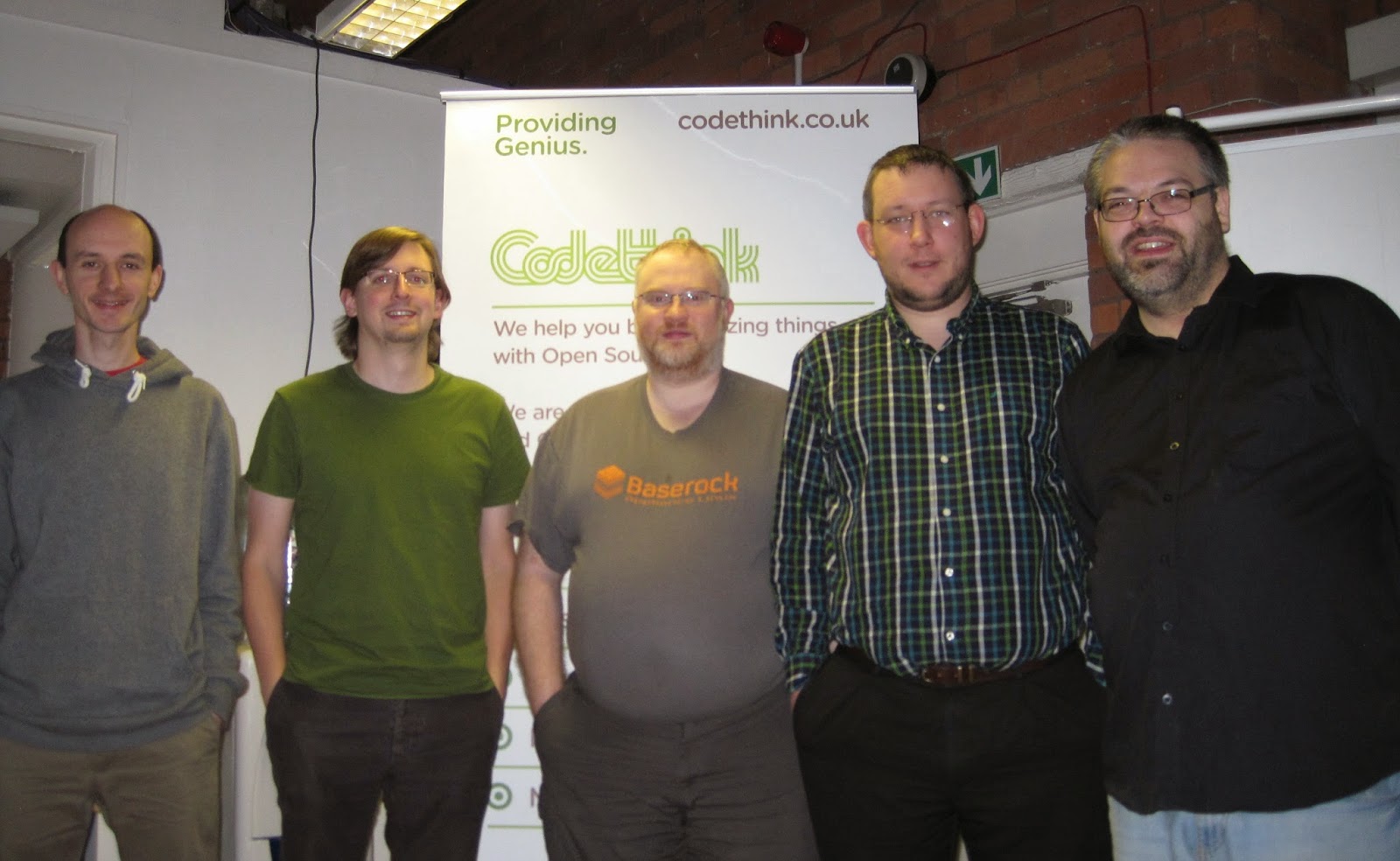
Michael Drake, John-Mark Bell, Daniel Silverstone, Rob Kendrick and Vincent Sanders at the Codethink manchester office
Over the weekend the NetSurf developers met to make a concentrated effort on improving the browser. This time we were kindly hosted by Codethink in their Manchester office in a pleasant environment with plenty of refreshments.

Five developers managed to attend in person from around the UK: Michael Drake, John-Mark Bell, Daniel Silverstone, Rob Kendrick and Vincent Sanders. We also had Chris Young providing some bug fixes remotely.

We started the weekend by discussing all the thorny core issues that had been put on the agenda and ensuring the outcomes were properly noted. We also held the society AGM which was minuted by Daniel.

The emphasis of this weekend was very much on planning and doing the disruptive changes we had been putting off until we were all together.

John-Mark and myself managed to change the core build system as used by all the libraries to using standard triplets to identify systems and use the gnu autoconf style of naming for parameters (i.e. HOST, BUILD and CC being used correctly).

This was accompanied by improvements and configuration changes to the CI system to accommodate the new usage.

Several issues from the bug tracker were addressed and we put ourselves in a stronger position to address numerous other usability problems in the future.

We managed to pack a great deal into the 20 hours of work on Saturday and Sunday although because we were concentrating much more on planning and infrastructure rather than a release the metrics of commits and files changed were lower than at previous events.

Niels Thykier: The first 12 days and 408 unblock requests into the Jessie freeze

The release team receives an extreme amount of unblock requests right now. For the past 22 days[1], we have been receiving no less than 408 unblock/ageing requests. That is an average of ~18.5/day. In the same period, the release team have closed 350 unblocks requests, averaging 15.9/day. This number does not account for number of unblocks, we add without a request, when we happen to spot when we look at the list of RC bugs[2]. Nor does it account for unblock requests currently tagged moreinfo , of which there are currently 25. All in all, it has been 3 intensive weeks for the release team. I am truly proud of my fellow team members for keeping up with this for so long! Also a thanks to the non-RT members, who help us by triaging and reviewing the unblock requests! It is much appreciated. :) Random bonus info: [1] We started receiving some in the 10 days before the freeze as people realised that their uploads would need an unblock to make it into Jessie. [2] Related topics: what is adsb? (the answer being: Our top hinter for Wheezy)

Thorsten Alteholz: Manage own CA with Debian

Self signed SSL certificates are nice, but only provide encryption of retrieved data. Nobody knows who is really sending the data. If one buys an SSL certificate for a website, the browser doesn t complain as much as with a self signed certificate. But can you really trust the other side? Almost every commercial CA has some kind of fast validation or domain validation, issued in minutes , which is done by email or phone. So if required, within minutes everybody might become you. Even with putting money on the table your users can not be sure whether this server really belongs to the right guy. Well, why wasting time and money? Just create your own Root CA and tell users that they need to add something in order to avoid some error messages. In Debian we basically have five packages who claim to be able to manage some kind of CA. easy-rsa is mainly needed to manage certificates used by openVPN. Within this use case it works like a charm, but I don t want to manage a more complex CA with it. gnomint is dead upstream and only uses SHA1 as signature algorithm. This will cause lots of problems as Mircrosoft and Google want to deprecate SHA1 in their products by 2017. Besides, this package is already orphaned and maybe it can disappear now. tinyCA uses more signature algorithms, unfortunately SHA1 seems to be the best it can. There are some patches to support up to SHA512, but they don t work for all parts of the software yet. For example Sub-CAs still use SHA1 despite of choosing something different in the GUI. So nice, but not (yet) usable in Jessie. FreeIPA seems to be great, but didn t make it into Jessie in time. Unfortunately the Release Team has reasons to not unblock it. So nice, but not usable in Jessie. xca is based on QT4. As announced in the 15th DPN of 2014 the deprecated QT4 will be removed from Debian Stretch (= Jessie+1). Apart from this, the software meets all my requirements.

Jonathan Wiltshire: Getting things into Jessie (#2)

If your request doesn t appear on the list, probably the diff was too big There s a size limit for mails to debian-release@lists.debian.org, and in general that s how we read unblock requests. If your mail doesn t appear on the list, but you do get a bug number back, your mail is likely too large.. In this case, that s probably a sign that we won t accept your request without exceptional circumstances. Making so many changes in a package is almost certainly not appropriate for this phase of the cycle. Do use filterdiff to remove automatically-generated files from your diff before sending it, which increases the chances of acceptance. Do follow up to the bug if it doesn t appear on the list; send a short message explaining that happened and why your giant diff should be considered. Don t be surprised if thousands and thousands of lines changed are rejected.
Getting things into Jessie (#2) is a post from: jwiltshire.org.uk Flattr

16 November 2014

Daniel Leidert: Getting the audio over HDMI to work for the HP N54L microserver running Debian Wheezy and a Sapphire Radeon HD 6450

Conclusion: Sound over HDMI works with the Sapphire Radeon HD 6450 card in my HP N54L microserver. It requires a recent kernel and firmware from Wheezy 7.7 backports and the X.org server. There is no sound without X.org, even if audio has been enabled for the radeon kernel module. Last year I couldn't get audio over HDMI to work after I installed a Sapphire Radeon HD 6450 1 GB (11190-02-20g) card into my N54L microserver. The cable that connects the HDMI interfaces between the card and the TV monitor supports HDMI 1.3, so audio should have been possible even then. However, I didn't get any audio output by XBMC playing video or music files. Nothing happened with stock Wheezy 7.1 and X.org/XBMC installed. So I removed the latter two and used the server as stock server without X/desktop and delayed my plans for an HTPC.Now I tried again after I found some new hints, that made me curious for a second try :) Imagine my joy, when (finally) speaker-test produced noise on the TV! So here is my configuration and a step-by-step guide to
  • enable Sound over HDMI for the Radeon HD 6450
  • install a graphical environment
  • install XBMC
  • automatically start XBMC on boot
The latter two will be covered by a second post. Also note, that there is lot of information out there to achive the above tasks. So this is only about my configuration. Some packages below are marked as optional. A few are necessary only for the N54L microserver (firmware) and for a few I'm not sure they are necessary at all. Step 1 - Prepare the systemAt this point I don't have any desktop nor any other graphical environment (X.org) installed. First I purged pulseaudio and related packages completely and only use ALSA:
# apt-get autoremove --purge pulseaudio pulseaudio-utils pulseaudio-module-x11 gstreamer0.10-pulseaudio
# apt-get install alsa-base alsa-utils alsa-oss
Next I installed a recent linux kernel and recent firmware from Wheezy backports:
# apt-get install -t wheezy-backports linux-image-amd64 firmware-linux-free firmware-linux firmware-linux-nonfree firmware-atheros firmware-bnx2 firmware-bnx2x
This put linux-image-3.16-0.bpo.3-amd64 and recent firmware onto my system. I've chosen to upgrade linux-image-amd64 instead to pick a special (recent) linux kernel package from Wheezy backports to keep up-to-date with recent kernels from there.Then I enabled the audio output of the kernel radeon module. Essentially there are at least three ways to do this. I use the one to modify /etc/modules.d/radeon.conf and set the audio parameter there. The hw_i2c parameter is disabled. I read, that it might cause trouble with the audio output here although I never personally experienced it:
options radeon audio=1 hw_i2c=0
JFTR: This is how I boot the N54L by default:
GRUB_CMDLINE_LINUX_DEFAULT="quiet splash acpi=force pcie_aspm=force nmi_watchdog=0"
After rebooting I see this for the Radeon card in question:

# lsmod egrep snd\ radeon\ drm awk ' print $1 ' sort
[..]
drm
drm_kms_helper
i2c_algo_bit
i2c_core
radeon
snd
snd_hda_codec
snd_hda_codec_hdmi
snd_hda_controller
snd_hda_intel
snd_hwdep
snd_pcm
snd_seq
snd_seq_device
snd_timer
soundcore
ttm
[..]
# lspci -k
[..]
01:00.0 VGA compatible controller: Advanced Micro Devices, Inc. [AMD/ATI] Caicos [Radeon HD 6450/7450/8450 / R5 230 OEM]
Subsystem: PC Partner Limited / Sapphire Technology Device e204
Kernel driver in use: radeon
01:00.1 Audio device: Advanced Micro Devices, Inc. [AMD/ATI] Caicos HDMI Audio [Radeon HD 6400 Series]
Subsystem: PC Partner Limited / Sapphire Technology Radeon HD 6450 1GB DDR3
Kernel driver in use: snd_hda_intel
[..]
# cat /sys/module/radeon/parameters/audio
1
# cat /sys/module/radeon/parameters/hw_i2c
0
# aplay -l
**** List of PLAYBACK Hardware Devices ****
card 0: HDMI [HDA ATI HDMI], device 3: HDMI 0 [HDMI 0]
Subdevices: 0/1
Subdevice #0: subdevice #0
# aplay -L
null
Discard all samples (playback) or generate zero samples (capture)
pulse
PulseAudio Sound Server
hdmi:CARD=HDMI,DEV=0
HDA ATI HDMI, HDMI 0
HDMI Audio Output
At this point, without having the X.org server installed, I still have no audio output to the connected monitor. Running alsamixer I only see the S/PDIF bar for the HDA ATI HDMI device, showing a value of 00. I can mute and un-mute this device but not change the value. No need to worry, sound comes with step two. Step 2 - Install a graphical environment (X.org server)Next is to install a graphical environment, basically the X.org server. This is done in Debian by the desktop task. Unfortunately tasksel makes use of APT::Install-Recommends="true" and would install a desktop environment and some more recommended packages. At the moment I don't want this, only X. So basically I installed only the task-desktop package with dependencies:
# apt-get install task-desktop xfonts-cyrillic
Next is to install a display manager. I've chosen lightdm:
# apt-get install lightdm accountsservice
Done. Now (re-)start the X server. Simply ...
# service lightdm restart
... should do. And now there is sound, probably due to the X.org Radeon driver. The following command created noise on the two monitor speakers :)
# speaker-test -c2 -D hdmi:0 -t pink
Finally there is sound over HDMI! Step 3 - Install XBMC To be continued ...

Daniel Leidert: Install automatically starting XBMC to N54L microserver under Debian Wheezy 7.7

This is a followup to my previous post about getting sound output from the Sapphire Radeon HD 6450 card in my HP N54L microserver via HDMI. This post will describe, howto install XBMC from Wheezy backports and how to automatically start it. Again, there are vaious ways and I'll only describe mine. Further, this is, what I did so far: enable the audio output for the Radeon card and install X.org together with lightdm. Step 3 - Install XBMCThis is a pretty easy task. I've chosen to install XBMC 13.2 from the Wheezy backports repository.
# apt-get install -t wheezy-backports xbmc
Step 4 - Automically start XBMCThere are various ways; some involve starting it a s a service using init scripts f r sysvinit or upstrart or systemd. You'll easily find them. I've chosen to create a user, automatically log him into X and start XBMC. The user is called xbmc.
# adduser --home /home/xbmc --add_extra_groups xbmc
I used to choose a password. But I wonder, if using --disabled-password would work too? Next I adjusted /etc/lightdm/lightdm.conf. Below are only the differences to the stock version of this file. I haven't touched other lines.
[SeatDefaults]
greeter-session=lightdm-gtk-greeter
user-session=XBMC
autologin-guest=false
autologin-user=xbmc
autologin-user-timeout=0
The file /usr/share/xsessions/XBMC.desktop is the stock one, no changes made. After restarting lightdm:
# service lightdm restart
XBMC is started automatically. If anything goes wrong or doesn't work, I suggest to check /var/log/auth.log, /home/xbmc/.xsession-errors and /var/log/lightdm/*.log. In a few cases it seems necessary to login the user xbmc manually once although it wasn't necessary here.JFTR: When I checked /var/log/auth.log I saw a few errors and installed gnome-keyring too:
apt-get install --install-recommends gnome-keyring
Step 5 - Useful packagesThere are some packages, which might be useful running XBMC, e.g. ConclusionI'm now running XBMC on top of Debian Wheezy on the N54L microserver without a bloated desktop environment. The system automatically starts the XBMC session on start/reboot. Video and sound are working fine, though it was necessary to install recent firmware and a recent kernel from Wheezy backports to get it done. Thanks to the whole OSS community for aksing, for answering, for blogging, for using and for continue developing! I currently enjoy the results :)

Tollef Fog Heen: Resigning as a Debian systemd maintainer

Apparently, people care when you, as privileged person (white, male, long-time Debian Developer) throw in the towel because the amount of crap thrown your way just becomes too much. I guess that's good, both because it gives me a soap box for a short while, but also because if enough people talk about how poisonous the well that Debian is has become, we can fix it. This morning, I resigned as a member of the systemd maintainer team. I then proceeded to leave the relevant IRC channels and announced this on twitter. The responses I've gotten have been almost all been heartwarming. People have generally been offering hugs, saying thanks for the work put into systemd in Debian and so on. I've greatly appreciated those (and I've been getting those before I resigned too, so this isn't just a response to that). I feel bad about leaving the rest of the team, they're a great bunch: competent, caring, funny, wonderful people. On the other hand, at some point I had to draw a line and say "no further". Debian and its various maintainer teams are a bunch of tribes (with possibly Debian itself being a supertribe). Unlike many other situations, you can be part of multiple tribes. I'm still a member of the DSA tribe for instance. Leaving pkg-systemd means leaving one of my tribes. That hurts. It hurts even more because it feels like a forced exit rather than because I've lost interest or been distracted by other shiny things for long enough that you don't really feel like part of a tribe. That happened with me with debian-installer. It was my baby for a while (with a then quite small team), then a bunch of real life thing interfered and other people picked it up and ran with it and made it greater and more fantastic than before. I kinda lost touch, and while it's still dear to me, I no longer identify as part of the debian-boot tribe. Now, how did I, standing stout and tall, get forced out of my tribe? I've been a DD for almost 14 years, I should be able to weather any storm, shouldn't I? It turns out that no, the mountain does get worn down by the rain. It's not a single hurtful comment here and there. There's a constant drum about this all being some sort of conspiracy and there are sometimes flares where people wish people involved in systemd would be run over by a bus or just accusations of incompetence. Our code of conduct says, "assume good faith". If you ever find yourself not doing that, step back, breathe. See if there's a reasonable explanation for why somebody is saying something or behaving in a way that doesn't make sense to you. It might be as simple as your native tongue being English and their being something else. If you do genuinely disagree with somebody (something which is entirely fine), try not to escalate, even if the stakes are high. Examples from the last year include talking about this as a war and talking about "increasingly bitter rear-guard battles". By using and accepting this terminology, we, as a project, poison ourselves. Sam Hartman puts this better than me:
I'm hoping that we can all take a few minutes to gain empathy for those who disagree with us. Then I'm hoping we can use that understanding to reassure them that they are valued and respected and their concerns considered even when we end up strongly disagreeing with them or valuing different things.
I'd be lying if I said I didn't ever feel the urge to demonise my opponents in discussions. That they're worse, as people, than I am. However, it is imperative to never give in to this, since doing that will diminish us as humans and make the entire project poorer. Civil disagreements with reasonable discussions lead to better technical outcomes, happier humans and a healthier projects.

Gregor Herrmann: RC bugs 2014/45-46

I was not much at home during the last two weeks, so not much to report about RC bug activities. some general observations:
  1. the RC bug count is still relatively low, even after lucas' archive rebuild.
  2. the release team is extremely fast in handling unblock request - kudos! pro tip: file them quickly after uploading, or some thing,one else might be faster :)
my small contributions:

Bernhard R. Link: Enabling Change

Big changes are always a complicated thing to get done and can be the harder the bigger or more diverse an organization is it is taking place in. Transparency Ideally every change is well communicated early and openly. Leaving people in the dark about what will change and when means people have much less time to feeling comfortable about it or arranging with it mentally. Especially bad can be extending the change later or or shortening transition periods. Letting people think they have some time to transition only to force them to rush later will remove any credibility you have and severely reduce their ability to believe you are not crossing them. Making a new way optional is a great way to create security (see below), but making that obligatory before the change even arrives as optional with them will not make them very willing to embrace change. Take responsibility Every transformation means costs. Even if some change did only improve and did not make anything worse once implemented (the ideal change you will never meet in reality), the deployment of the change still costs: processes have adapted to it, people have to relearn how to do things, how to detect if something goes wrong, how to fix it, documentation has to be adopted and and and. Even as the change causes more good than costs in the whole organization (let's hope it does, I hope you wouldn't try to do something if the total benefit is negative), the benefits and thus the benefit to cost ratio will differ for the different parts of your organization or the different people within it. It's hardly avoidable that for some people there will not be much benefit, much less perceived benefit compared to the costs they have to burden for it. Those are the people whose good will you want to fight for, not the people you want to fight against. They have to pay with their labor/resources and thus their good will for your benefit the overall benefit. This is much easier if you acknowledge that fact. If you blame them for having the costs, claim their situation does not even exist or even ridicule them for not embracing change you only prepare yourself for frustration. You might be able to persuade yourself that everyone that is not willing to invest in the change is just acting out of malevolent self-interest. But you will hardly be able to persuade people that it is evil to not help your cause if you treat them as enemies. And once you ignored or played down costs that later actually happen, your credibility in being able to see the big picture will simply cease to exist at all for the next change. Allow different metrics People have different opinions about priorities, about what is important, about how much something costs and even about what is a problem. If you want to persuade them, try to take that into account. If you do not understand why something is a reason, it might be because the given point is stupid. But it might also be that you miss something. And often there is simple a different valuation of what is important, what the costs are and what are problems. If you want to persuade people, it is worth to try to understand those. If all you want to do is persuade some leader or some majority then ridiculing their concerns might get you somewhere. But how do you want to win people over if you do not even appear to understand their problems. Why should people trust you that their costs will be worth the overall benefits if you tell them the costs that they clearly see do not exist? How credible is referring to the bigger picture if the part of the picture they can see does not match what you say the bigger picture looks like? Don't get trolled and don't troll There will always be people that might be unreasonable or even try to provoke you. Don't allow being provoked. Remember that for successful changes you need to win broad support. Feeling personally attacked or feeling presented a large amount of pointless arguments easily results in not bringing proper responses or actually looking at arguments. If someone is only trolling and purely malevolent, they will tease you best if they bring actual concerns of people in a way you likely degrade your yourself and your point in answering. Becoming impertinent with the troll is like attacking the annoying little goblin hiding next to the city guards with area damage. When not being able to persuade people, it is also far to easy to consider them in bad faith and/or attacking them personally. This can only escalate even more. Worst case you frustrate someone in good faith. In most cases you poison the discussion so much that people actually in good faith will no longer contribute the discussion. It might be rewarding short term because after some escalation only obviously unreasonable people will talk against you, but it makes it much harder to find solutions together that could benefit anyone and almost impossible to persuade those that simply left the discussion. Give security Last but not least, remember that humans are quite risk-averse. In general they might invest in (even small) chances to win, but go a long way to avoid risks. Thus an important part of enabling change is to reduce risks, real and perceived ones and give people a feeling of security. In the end, almost every measure boils down to that: You give people security by giving them the feeling that the whole picture is considered in decisions (by bringing them early into the process, by making sure their concerns are understood and part of the global profit/cost calculation and making sure their experiences with the change are part of the evaluation). You give people security by allowing them to predict and control things (by transparency about plans, how far the change will go and guaranteed transitions periods, by giving them enough time so they can actually plan and do the transition). You give people security by avoiding early points of no return (by having wide enough tests, rollback scenarios,...). You give people security by not letting them alone (by having good documentation, availability of training, ...). Especially side-by-side availability of old and new is an extremely powerful tool, as it fits all of the above: It allows people to actually test it (and not some little prototype mostly but not quite totally unrelated to reality) so their feedback can be heard. It makes it more predictable as all the new ways can be tried before the old ones no longer work. It is the ultimate role-back scenario (just switch off the new). And allows for learning the new before losing the old. Of course giving the people a feeling of security needs resources. But it is a very powerful way to get people to embrace the chance. Also in my experience people only fearing for themselves will usually mostly be passive by not pushing forward and trying to avoid or escape the changes. (After all, working against something costs energy, so purely egoistic behavior is quite limiting in that regard). Most people actively pushing back do it because they fear for something larger than only them. And any measure to making them fear less that you ruin the overall organization, not only avoids unnecessary hurdles rolling out the change but also has some small chance to actually avoid running into disaster with closed eyes.

Vincent Bernat: Staging a Netfilter ruleset in a network namespace

A common way to build a firewall ruleset is to run a shell script calling iptables and ip6tables. This is convenient since you get access to variables and loops. There are three major drawbacks with this method:
  1. While the script is running, the firewall is temporarily incomplete. Even if existing connections can be arranged to be left untouched, the new ones may not be allowed to be established (or unauthorized flows may be allowed). Also, essential NAT rules or mangling rules may be absent.
  2. If an error occurs, you are left with an half-working firewall. Therefore, you should ensure that some rules authorizing remote access are set very early. Or implement some kind of automatic rollback system.
  3. Building a large firewall can be slow. Each ip ,6 tables command will download the ruleset from the kernel, add the rule and upload the whole modified ruleset to the kernel.

Using iptables-restore A classic way to solve these problems is to build a rule file that will be read by iptables-restore and ip6tables-restore1. Those tools send the ruleset to the kernel in one pass. The kernel applies it atomically. Usually, such a file is built with ip ,6 tables-save but a script can fit the task. The ruleset syntax understood by ip ,6 tables-restore is similar to the syntax of ip ,6 tables but each table has its own block and chain declaration is different. See the following example:
$ iptables -P FORWARD DROP
$ iptables -t nat -A POSTROUTING -s 192.168.0.0/24 -j MASQUERADE
$ iptables -N SSH
$ iptables -A SSH -p tcp --dport ssh -j ACCEPT
$ iptables -A INPUT -i lo -j ACCEPT
$ iptables -A OUTPUT -o lo -j ACCEPT
$ iptables -A FORWARD -m state --state ESTABLISHED,RELATED -j ACCEPT
$ iptables -A FORWARD -j SSH
$ iptables-save
*nat
:PREROUTING ACCEPT [0:0]
:INPUT ACCEPT [0:0]
:OUTPUT ACCEPT [0:0]
:POSTROUTING ACCEPT [0:0]
-A POSTROUTING -s 192.168.0.0/24 -j MASQUERADE
COMMIT
*filter
:INPUT ACCEPT [0:0]
:FORWARD DROP [0:0]
:OUTPUT ACCEPT [0:0]
:SSH - [0:0]
-A INPUT -i lo -j ACCEPT
-A FORWARD -m state --state RELATED,ESTABLISHED -j ACCEPT
-A FORWARD -j SSH
-A OUTPUT -o lo -j ACCEPT
-A SSH -p tcp -m tcp --dport 22 -j ACCEPT
COMMIT
As you see, we have one block for the nat table and one block for the filter table. The user-defined chain SSH is declared at the top of the filter block with other builtin chains. Here is a script diverting ip ,6 tables commands to build such a file (heavily relying on some Zsh-fu2):
#!/bin/zsh
set -e
work=$(mktemp -d)
trap "rm -rf $work" EXIT
#   Redefine ip ,6 tables
iptables()  
    # Intercept -t
    local table="filter"
    [[ -n $ @[(r)-t]  ]] &&  
        # Which table?
        local index=$ (k)@[(r)-t] 
        table=$ @[(( index + 1 ))] 
        argv=( $argv[1,(( $index - 1 ))] $argv[(( $index + 2 )),$#] )
     
    [[ -n $ @[(r)-N]  ]] &&  
        # New user chain
        local index=$ (k)@[(r)-N] 
        local chain=$ @[(( index + 1 ))] 
        print ":$ chain  -" >> $ work /$ 0 -$ table -userchains
        return
     
    [[ -n $ @[(r)-P]  ]] &&  
        # Policy for a builtin chain
        local index=$ (k)@[(r)-P] 
        local chain=$ @[(( index + 1 ))] 
        local policy=$ @[(( index + 2 ))] 
        print ":$ chain  $ policy " >> $ work /$ 0 -$ table -policy
        return
     
    # iptables-restore only handle double quotes
    echo $ $ (q-)@ //\'/\"  >> $ work /$ 0 -$ table -rules #'
 
functions[ip6tables]=$ functions[iptables] 
#   Build the final ruleset that can be parsed by ip ,6 tables-restore
save()  
    for table ($ work /$ 1 -*-rules(:t:s/-rules//))  
        print "*$ $ table #$ 1 - "
        [ ! -f $ work /$ table -policy ]   cat $ work /$ table -policy
        [ ! -f $ work /$ table -userchains   cat $ work /$ table -userchains
        cat $ work /$ table -rules
        print "COMMIT"
     
 
#   Execute rule files
for rule in $(run-parts --list --regex '^[.a-zA-Z0-9_-]+$' $ 0%/* /rules); do
    . $rule
done
#   Execute rule files
ret=0
save iptables    iptables-restore    ret=$?
save ip6tables   ip6tables-restore   ret=$?
exit $ret
In , a new iptables() function is defined and will shadow the iptables command. It will try to locate the -t parameter to know which table should be used. If such a parameter exists, the table is remembered in the $table variable and removed from the list of arguments. Defining a new chain (with -N) is also handled as well as setting the policy (with -P). In , the save() function will output a ruleset that should be parseable by ip ,6 tables-restore. In , user rules are executed. Each ip ,6 tables command will call the previously defined function. When no error has occurred, in , ip ,6 tables-restore is invoked. The command will either succeed or fail. This method works just fine3. However, the second method is more elegant.

Using a network namespace An hybrid approach is to build the firewall rules with ip ,6 tables in a newly created network namespace, save it with ip ,6 tables-save and apply it in the main namespace with ip ,6 tables-restore. Here is the gist (still using Zsh syntax):
#!/bin/zsh
set -e
alias main='/bin/true  '
[ -n $iptables ]    
    #   Execute ourself in a dedicated network namespace
    iptables=1 unshare --net -- \
        $0 4> >(iptables-restore) 6> >(ip6tables-restore)
    #   In main namespace, disable iptables/ip6tables commands
    alias iptables=/bin/true
    alias ip6tables=/bin/true
    alias main='/bin/false  '
 
#   In both namespaces, execute rule files
for rule in $(run-parts --list --regex '^[.a-zA-Z0-9_-]+$' $ 0%/* /rules); do
    . $rule
done
#   In test namespace, save the rules
[ -z $iptables ]    
    iptables-save >&4
    ip6tables-save >&6
 
In , the current script is executed in a new network namespace. Such a namespace has its own ruleset that can be modified without altering the one in the main namespace. The $iptables environment variable tell in which namespace we are. In the new namespace, we execute all the rule files ( ). They contain classic ip ,6 tables commands. If an error occurs, we stop here and nothing happens, thanks to the use of set -e. Otherwise, in , the ruleset of the new namespace are saved using ip ,6 tables-save and sent to dedicated file descriptors. Now, the execution in the main namespace resumes in . The results of ip ,6 tables-save are feeded to ip ,6 tables-restore. At this point, the firewall is mostly operational. However, we will play again the rule files ( ) but the ip ,6 tables commands will be disabled ( ). Additional commands in the rule files, like enabling IP forwarding, will be executed. The new namespace does not provide the same environment as the main namespace. For example, there is no network interface in it, so we cannot get or set IP addresses. A command that must not be executed in the new namespace should be prefixed by main:
main ip addr add 192.168.15.1/24 dev lan-guest
You can look at a complete example on GitHub.

  1. Another nifty tool is iptables-apply which will apply a rule file and rollback after a given timeout unless the change is confirmed by the user.
  2. As you can see in the snippet, Zsh comes with some powerful features to handle arrays. Another big advantage of Zsh is it does not require quoting every variable to avoid field splitting. Hence, the script can handle values with spaces without a problem, making it far more robust.
  3. If I were nitpicking, there are three small flaws with it. First, when an error occurs, it can be difficult to match the appropriate location in your script since you get the position in the ruleset instead. Second, a table can be used before it is defined. So, it may be difficult to spot some copy/paste errors. Third, the IPv4 firewall may fail while the IPv6 firewall is applied, and vice-versa. Those flaws are not present in the next method.

Vincent Bernat: Intel Wireless 7260 as an access point

My home router acts as an access point with an Intel Dual-Band Wireless-AC 7260 wireless card. This card supports 802.11ac (on the 5 GHz band) and 802.11n (on both the 5 GHz and 2.4 GHz band). While this seems a very decent card to use in managed mode, this is not really a great choice for an access point.
$ lspci -k -nn -d 8086:08b1
03:00.0 Network controller [0280]: Intel Corporation Wireless 7260 [8086:08b1] (rev 73)
        Subsystem: Intel Corporation Dual Band Wireless-AC 7260 [8086:4070]
        Kernel driver in use: iwlwifi
TL;DR: Use an Atheros card instead.

Limitations First, the card is said dual-band but you can only uses one band at a time because there is only one radio. Almost all wireless cards have this limitation. If you want to use both the 2.4 GHz band and the less crowded 5 GHz band, two cards are usually needed.

5 GHz band There is no support to set an access point on the 5 GHz band. The firmware doesn t allow it. This can be checked with iw:
$ iw reg get
country CH: DFS-ETSI
        (2402 - 2482 @ 40), (N/A, 20), (N/A)
        (5170 - 5250 @ 80), (N/A, 20), (N/A)
        (5250 - 5330 @ 80), (N/A, 20), (0 ms), DFS
        (5490 - 5710 @ 80), (N/A, 27), (0 ms), DFS
        (57240 - 65880 @ 2160), (N/A, 40), (N/A), NO-OUTDOOR
$ iw list
Wiphy phy0
[...]
        Band 2:
                Capabilities: 0x11e2
                        HT20/HT40
                        Static SM Power Save
                        RX HT20 SGI
                        RX HT40 SGI
                        TX STBC
                        RX STBC 1-stream
                        Max AMSDU length: 3839 bytes
                        DSSS/CCK HT40
                Frequencies:
                        * 5180 MHz [36] (20.0 dBm) (no IR)
                        * 5200 MHz [40] (20.0 dBm) (no IR)
                        * 5220 MHz [44] (20.0 dBm) (no IR)
                        * 5240 MHz [48] (20.0 dBm) (no IR)
                        * 5260 MHz [52] (20.0 dBm) (no IR, radar detection)
                          DFS state: usable (for 192 sec)
                          DFS CAC time: 60000 ms
                        * 5280 MHz [56] (20.0 dBm) (no IR, radar detection)
                          DFS state: usable (for 192 sec)
                          DFS CAC time: 60000 ms
[...]
While the 5 GHz band is allowed by the CRDA, all frequencies are marked with no IR. Here is the explanation for this flag:
The no-ir flag exists to allow regulatory domain definitions to disallow a device from initiating radiation of any kind and that includes using beacons, so for example AP/IBSS/Mesh/GO interfaces would not be able to initiate communication on these channels unless the channel does not have this flag.

Multiple SSID This card can only advertise one SSID. Managing several of them is useful to setup distinct wireless networks, like a public access (routed to Tor), a guest access and a private access. iw can confirm this:
$ iw list
        valid interface combinations:
                 * #  managed   <= 1, #  AP, P2P-client, P2P-GO   <= 1, #  P2P-device   <= 1,
                   total <= 3, #channels <= 1
Here is the output of an Atheros card able to manage 8 SSID:
$ iw list
        valid interface combinations:
                 * #  managed, WDS, P2P-client   <= 2048, #  IBSS, AP, mesg point, P2P-GO   <= 8,
                   total <= 2048, #channels <= 1

Configuration as an access point Except for those two limitations, the card works fine as an access point. Here is the configuration that I use for hostapd:
interface=wlan-guest
driver=nl80211
# Radio
ssid=XXXXXXXXX
hw_mode=g
channel=11
# 802.11n
wmm_enabled=1
ieee80211n=1
ht_capab=[HT40-][SHORT-GI-20][SHORT-GI-40][DSSS_CCK-40][DSSS_CCK-40][DSSS_CCK-40]
# WPA
auth_algs=1
wpa=2
wpa_passphrase=XXXXXXXXXXXXXXX
wpa_key_mgmt=WPA-PSK
wpa_pairwise=TKIP
rsn_pairwise=CCMP
Because of the use of channel 11, only 802.11n HT40- rate can be enabled. Look at the Wikipedia page for 802.11n to check if you can use either HT40-, HT40+ or both.

Vincent Bernat: Replacing Swisscom router by a Linux box

I have recently moved to Lausanne, Switzerland. Broadband Internet access is not as cheap as in France. Free, a French ISP, is providing an FTTH access with a bandwith of 1 Gbps1 for about 38 (including TV and phone service), Swisscom is providing roughly the same service for about 200 2. Swisscom fiber access was available for my appartment and I chose the 40 Mbps contract without phone service for about 80 . Like many ISP, Swisscom provides an Internet box with an additional box for TV. I didn t unpack the TV box as I have no use for it. The Internet box comes with some nice features like the ability to setup firewall rules, a guest wireless access and some file sharing possibilities. No shell access! I have bought a small PC to act as router and replace the Internet box. I have loaded the upcoming Debian Jessie on it. You can find the whole software configuration in a GitHub repository. This blog post only covers the Swisscom-specific setup (and QoS). Have a look at those two blog posts for related topics:

Ethernet The Internet box is packed with a Siligence-branded 1000BX SFP3. This SFP receives and transmits data on the same fiber using a different wavelength for each direction. Instead of using a network card with an SFP port, I bought a Netgear GS110TP which comes with 8 gigabit copper ports and 2 fiber SFP ports. It is a cheap switch bundled with many interesting features like VLAN and LLDP. It works fine if you don t expect too much from it.

IPv4 IPv4 connectivity is provided over VLAN 10. A DHCP client is mandatory. Moreover, the DHCP vendor class identifier option (option 60) needs to be advertised. This can be done by adding the following line to /etc/dhcp/dhclient.conf when using the ISC DHCP client:
send vendor-class-identifier "100008,0001,,Debian";
The first two numbers are here to identify the service you are requesting. I suppose this can be read as requesting the Swisscom residential access service. You can put whatever you want after that. Once you get a lease, you need to use a browser to identify yourself to Swisscom on the first use.

IPv6 Swisscom provides IPv6 access through the 6rd protocol. This is a tunneling mechanism to facilitate IPv6 deployment accross an IPv4 infrastructure. This kind of tunnel is natively supported by Linux since kernel version 2.6.33. To setup IPv6, you need the base IPv6 prefix and the 6rd gateway. Some ISP are providing those values through DHCP (option 212) but this is not the case for Swisscom. The gateway is 6rd.swisscom.com and the prefix is 2a02:1200::/28. After appending the IPv4 address to the prefix, you still get 4 bits for internal subnets. Swisscom doesn t provide a fixed IPv4 address. Therefore, it is not possible to precompute the IPv6 prefix. When installed as a DHCP hook (in /etc/dhcp/dhclient-exit-hooks.d/6rd), the following script configures the tunnel:
sixrd_iface=internet6
sixrd_mtu=1472                  # This is 1500 - 20 - 8 (PPPoE header)
sixrd_ttl=64
sixrd_prefix=2a02:1200::/28     # No way to guess, just have to know it.
sixrd_br=193.5.29.1             # That's "6rd.swisscom.com"
sixrd_down()  
    ip tunnel del $ sixrd_iface    true
 
sixrd_up()  
    ipv4=$ new_ip_address:-$old_ip_address 
    sixrd_subnet=$(ruby <<EOF
require 'ipaddr'
prefix = IPAddr.new "$ sixrd_prefix ", Socket::AF_INET6
prefixlen = $ sixrd_prefix#*/ 
ipv4 = IPAddr.new "$ ipv4 ", Socket::AF_INET
ipv6 = IPAddr.new (prefix.to_i + (ipv4.to_i << (64 + 32 - prefixlen))), Socket::AF_INET6
puts ipv6
EOF
)
    # Let's configure the tunnel
    ip tunnel add $ sixrd_iface  mode sit local $ipv4 ttl $sixrd_ttl
    ip tunnel 6rd dev $ sixrd_iface  6rd-prefix $ sixrd_prefix 
    ip addr add $ sixrd_subnet 1/64 dev $ sixrd_iface 
    ip link set mtu $ sixrd_mtu  dev $ sixrd_iface 
    ip link set $ sixrd_iface  up
    ip route add default via ::$ sixrd_br  dev $ sixrd_iface 
 
case $reason in
    BOUND REBOOT)
        sixrd_down
        sixrd_up
        ;;
    RENEW REBIND)
        if [ "$new_ip_address" != "$old_ip_address" ]; then
            sixrd_down
            sixrd_up
        fi
        ;;
    STOP EXPIRE FAIL RELEASE)
        sixrd_down
        ;;
esac
The computation of the IPv6 prefix is offloaded to Ruby instead of trying to use the shell for that. Even if the ipaddr module is pretty basic , it suits the job. Swisscom is using the same MTU for all clients. Because some of them are using PPPoE, the MTU is 1472 instead of 1480. You can easily check your MTU with this handy online MTU test tool. It is not uncommon that PMTUD is broken on some parts of the Internet. While not ideal, setting up TCP MSS will alievate any problem you may run into with a MTU less than 1500:
ip6tables -t mangle -A POSTROUTING -o internet6 \
          -p tcp --tcp-flags SYN,RST SYN \
          -j TCPMSS --clamp-mss-to-pmtu

QoS UPDATED: Unfortunately, this section is incorrect, including its premise. Have a look at Dave Taht comment for more details. Once upon a time, QoS was a tacky subject. The Wonder Shaper was a common way to get a somewhat working setup. Nowadays, thanks to the work of the Bufferbloat project, there are two simple steps to get something quite good:
  1. Reduce the queue of your devices to something like 32 packets. This helps TCP to detect congestion and act accordingly while still being able to saturate a gigabit link.
    ip link set txqueuelen 32 dev lan
    ip link set txqueuelen 32 dev internet
    ip link set txqueuelen 32 dev wlan
    
  2. Change the root qdisc to fq_codel. A qdisc receives packets to be sent from the kernel and decide how packets are handled to the network card. Packets can be dropped, reordered or rate-limited. fq_codel is a queuing discipline combining fair queuing and controlled delay. Fair queuing means that all flows get an equal chance to be served. Another way to tell it is that a high-bandwidth flow won t starve the queue. Controlled delay means that the queue size will be limited to ensure the latency stays low. This is achieved by dropping packets more aggressively when the queue grows.
    tc qdisc replace dev lan root fq_codel
    tc qdisc replace dev internet root fq_codel
    tc qdisc replace dev wlan root fq_codel
    

  1. Maximum download speed is 1 Gbps, while maximum upload speed is 200 Mbps.
  2. This is the standard Vivo XL package rated at CHF 169. plus the 1 Gbps option at CHF 80. .
  3. There are two references on it: SGA 441SFP0-1Gb and OST-1000BX-S34-10DI. It transmits to the 1310 nm wave length and receives on the 1490 nm one.

15 November 2014

Jo Shields: mono-project.com Linux packages an update

It s been pointed out to me that many people aren t aware of the current status of Linux packages on mono-project.com, so I m here s a summary: Stable packages Mono 3.10.0, MonoDevelop 5.5.0.227, NuGet 2.8.1 and F# 3.1.1.26 packages are available. Plus related bits. MonoDevelop on Linux does not currently include the F# addin (there are a lot of pieces to get in place for this to work). These are built for x86-64 CentOS 7, and should be compatible with RHEL 7, openSUSE 12.3, and derivatives. I haven t set up a SUSE 1-click install file yet, but I ll do it next week if someone reminds me. They are also built for Debian 7 on i386, x86-64, and IBM zSeries processors. The same packages ought to work on Ubuntu 12.04 and above, and any derivatives of Debian or Ubuntu. Due to ABI changes, you need to add a second compatibility extension repository for Ubuntu 12.04 or 12.10 to get anything to work, and a different compatibility extension repository for Debian derivatives with Apache 2.4 if you want the mod-mono ASP.NET Apache module (Debian 8+, Ubuntu 13.10+, and derivatives, will need this).
MonoDevelop 5.5 on Ubuntu 14.04

MonoDevelop 5.5 on Ubuntu 14.04

In general, see the install guide to get these going. Docker You may have seen Microsoft recently posting a guide to using ASP.NET 5 on Docker. Close inspection would show that this Docker image is based on our shiny new Xamarin Mono docker image, which is based on Debian 7.The full details are on Docker Hub, but the short version is docker pull mono:latest gets you an image with the very latest Mono.
directhex@desire:~$ docker pull mono:latest
Pulling repository mono
9da8fc8d2ff5: Download complete 
511136ea3c5a: Download complete 
f10807909bc5: Download complete 
f6fab3b798be: Download complete 
3c43ebb7883b: Download complete 
7a1f8e485667: Download complete 
a342319da8ea: Download complete 
3774d7ea06a6: Download complete 
directhex@desire:~$ docker run -i -t mono:latest mono --version 
Mono JIT compiler version 3.10.0 (tarball Wed Nov  5 12:50:04 UTC 2014)
Copyright (C) 2002-2014 Novell, Inc, Xamarin Inc and Contributors. www.mono-project.com
	TLS:           __thread
	SIGSEGV:       altstack
	Notifications: epoll
	Architecture:  amd64
	Disabled:      none
	Misc:          softdebug 
	LLVM:          supported, not enabled.
	GC:            sgen
The Dockerfiles are on GitHub.

Don Armstrong: Adding a newcomer ( ) tag to the BTS

Some of you may already be aware of the gift tag which has been used for a while to indicate bugs which are suitable for new contributors to use as an entry point to working on specific packages. Unfortunately, some of us (including me!) were unaware that this tag even existed. Luckily, Lucas Nussbaum clued me in to the existence of this tag, and after a brief bike-shed-naming thread, and some voting using pocket_devotee we decided to name the new tag newcomer, and I have now added this tag to the BTS documentation, and tagged all of the bugs which were user tagged "gift" with this tag. If you have bugs in your package which you think are ideal for new contributors to Debian (or your package) to fix, please tag them newcomer. If you're getting started in Debian, and working on bugs to fix, please search for the newcomer tag, grab the helm, and contribute to Debian.

Next.

Previous.