Search Results: "cas"

31 May 2010

Christian Perrier: [life] Running update

What happened in my running life since my last update? In short, I achieved two races I was planning to do. I ran my first trail on May 16th, Le Trail des Cerfs ("deer trail"). The experience of trail running is awesome. Runners are very friendly and all of them are nature lovers. So, the feeling is completely different from mass macadam races (those are also a must-do, still!). I had a great time running that trail (which ended up to be exactly the distance of an half marathon). I completed it in less than 1h50, which is good, as the positive slope was about 300 meters, with sometimes very though rampswhere walking was nearly mandatory. At this occasion, during the "after", I discovered some members of an online community of runners, named Kikourou ("Who is running where?"), and I'm now a member of this online community (yet another one...). That makes the promise of lots of beers after races...:-) Today, I completed my "Maureparathon", a full marathon ran alone on small roads and bicycle lanes in my home city, and was happy to break my personal best by 6 minutes, down to 3h43'14". Yay. For sure, still very far from SuperNo l (3:03:56 in Mainz), but he's younger..:) As I planned, I'll be running the Sur les Traces du Loup ("The Wolf Track"?) 33km trail in La Ville aux Clercs, 2 hours away from our place. Elizabeth is very happy to come with me in a 2-day trip in Chateaudun neighbourhood. Renaissance castle visit mandatory for the following Sunday...:-) Nice planning, eh? And, guess what? I'm already trying to spot some local 10km races while being in New York. I would find it an interesting experience to run with local runners. Just like free software...and beer...and cheese, running is much better when shared.

Stefano Zacchiroli: document your team - redux

wiki.d.o/Teams to the rescue About 3 years ago (too bad I've actually missed the 3-year anniversary by a few days!), Raphael set up http://wiki.debian.org/Teams. In my recent encounters and contacts with people interested in contributing to Debian, I've found that page to be of invaluable help. In particular, people find it very useful in understanding the macro-structures of Debian and in understanding where they can start to contribute. Approaching a team is most likely "less scary" than contacting a larger forum, and that page offers a good service of team indexing. Of course, the usefulness of wiki.d.o/Teams is directly proportional to how much complete it is and to how much individual team pages are current. So, in case you didn't know about the page or that you just remembered that years ago you set up a page there and then forgot about it, this is probably a good moment to add or update your team information there. To eat my own dog food, I've recently set up Teams/DPL, which is probably not terribly useful, but it contains interesting stuff such as where the daily activity bits are stored. (Yes: I'm just a one-person-team, but given the index is useful to document Debian "parts" in general, I believe we should allow for a slightly semantic abuse of the name.) Incidentally, that shows another way in which wiki team pages can come to the rescue: improve the documentation of our processes. For instance, we are grown accustomed to the fact that d-d-a is an authoritative information source. Well, of course it is, but when you need to find out a 4-year old d-d-a post of some core team, since it is the only documentation of some still current (is it?) procedure, let's be fair and acknowledge that a mailing list archive it's not that handy. So, summarizing relevant d-d-a posts in team pages (with references to the originals) is another way, accessible to everybody, to help in keeping docs current. I've been doing that recently for a handful of teams, and people seem to appreciate (of course it's your responsibility to check that they do appreciate).

30 May 2010

Erich Schubert: Wikipedia contributors are one of a kind

The last weeks, I've occasionally been contributing to Wikipedia. I must say, Wikipedia is a really odd world of its own. Another thing I found quite surprising is the difference between the English and the German Wikipedia.Some things I noticed: So on overall: keep away from Wikipedia contributors, they're all maniacs. And often, don't bother to read a Wikipedia article if you can get an appropriate textbook. The Wikipedia article will just try to sell you a dozen textbooks anyway; you'll also have to read them to check the validity.It is a pity, that despite its size and "eyeballs", Wikipedia so far seems to have not attracted much attention by actual "domain experts", but it seems that it is largely filled by bureocrats, zealots and promoters. (That don't have any real work to do?)There are many things wrong here, that have been pointed out by many others, too. I'm not going to rescue the Wikipedia world, either. And yes, I am aware that you can discuss in Wikipedia, too. I fear that Wikipedia will go the DMOZ road. There was a time that DMOZ was doing quite well. Nowadays, large parts of DMOZ are dead. For two main reasons: it's hard to get in, and the backlog is way too large. If you get into DMOZ for a larger category, you'll be faced with thousands of pending link submissions, where for a large part you don't feel qualified to judge on appropriateness or rewrite their description in a neural manner. I have the impression that the same is happening for Wikipedia: on one hand, users that join are often kicked badly for many of their first contributions and will just leave again. At the same time, many of the old articles are in desparate need for attention, but nobody of the established users is willing to spend the days of cleanup/rewriting needed to get the article into a useful shape again. And a new user will never dare to discard most of the existing article; they usually just add or modify single paragraphs to see what happens. So Wikipedia might be hitting some kind of barrier.Still, I have to admit that I frequently use Wikipedia to look up things. Usually because it just comes up first in Google. I then often follow links to better resources, such as MathWorld. And I wish, Google would have taken me there right away ...And don't assume I'd know how to run things better. I'd sure propose to spend more time at fixing existing articles instead of attacking new contributions that much (you'll lose contributors this way). But I also see the need for fighting spam (although you should also remove old spam ...). But I don't know if there is a solution that will actually attract domain experts to re-write all the badly written and inaccurate articles that don't have their personal zealot to patrol them.P.S. Sorry, no comments on my blog. This isn't Facebook. Instead of commenting on my blog, how about working on Wikipedias backlog instead?P.S. Another example is the German Wikipedia story surrounding Fefe's blog. Many here at the open source communities will know fefe for his work on Dietlibc, libowfat and similar highly respected open source projects. His blog has been famous for being high-quality in security, privacy topics, politics and media critics. Some of his fans (likely) started a Wikipedia page on his blog. There have been at least two huge discussions about deleting the Wikipedia page. "sock puppets" and all such things have been brought up, while Fefe himself was amused. The discussions around deleting the blogs page on Wikipedia made it all the way to the print newspapers. As I said, I'm not actually bringing up new critique on Wikipedia. It's an ongoing problem for years now.[Insert random Deletionism rant against Wikipedia]

29 May 2010

Bernd Zeimetz: installing debian on the guruplug server plus

Yesterday finally my GuruPlug Server Plus arrived. Took longer than expected, but as it seems Globalscale had some issues with the power supplies and they were replaced before shipping the GuruPlugs. GuruPlug Server Plus and JTAG Board

The GuruPlug Basically the GuruPlugs are an enhanced version of the well known SheevaPlugs, the biggest difference is probably the need for an external JTAG/UART<>RS232 board to access the serial console. Good thing is that the board comes with a normal JTAG connector and an additional RS232 connector and 2.5V DC power outlet, so it will be useful for other devices, too. Globalscale could have chosen different connectors with less wiggly cables, though. As I was not able to find a useful howto about installing Debian on the Guruplug, I've written down what I did to install Debian unstable on a micro SD card using the Debian installer for the GuruPlug. I did not have a look who modified the Debian installer to work on the plug, but thanks for that! The instructions below are based on Martin Michlmayer's awesome SheevaPlug documentation, the hints from oinkzwurgl.org/guruplug and various forum posts in the plugforum.

Preparations Please note that I'm not resposible for whatever you're doing with your plug. If you follow this tutorial and end up with a brick, it is your fault, not mine. To install the GuruPlug you need the JTAG Board. Connect the UART port to the GuruPlug and the JTAG board to your computer, it should show up as FTDI (thanks for using good chips!) USB<>Serial converter. Serial port settings are 115200, 8-N-1, no hw/sw flow control. The other thing you should prepare is a working tftpd, I'm using aftpd.
apt-get install aftpd
Recent versions share files from /srv/tftp/, in case you're running Lenny /var/lib/tftpboot/ should be the place to drop your files. When everything is connected properly the boot process should show up in minicom, make sure to press some key to enter uBoot. The first thing you should do is to save the original uBoot environment in case you want to restore the factory settings later. Run
printenv
and save the output somewhere.

Upgrading uBoot Unfortunately the uBoot version on the GuruPlug is pretty old and seems to have some issues in booting from USB devices, so the first thing you should do is to upgrade it. You might want to investigate if there is even a better, more recent uBoot version available somewhere, or build one on your own, but I didn't bother and took the uBoot.guruplug.bin from here. The main issue with that is that booting from USB still seems to be buggy (even for FAT partitions) and that ext2load is still not supported. Otherwise it works well :-). I'm mainly following Martin Michlmayer's tutorial again. Download the uBoot.guruplug.bin and drop it into the tftpd directory. Make sure you always set the plug's IP address (ipaddr) and your server's IP address (serverip) properly. I'll use 192.168.121.253 for the plug and 192.168.121.2 for the server in all examples, make sure to change that for your own needs. Stop if something goes wrong, especially when the tftp download failed.
setenv ipaddr 192.168.121.253
setenv serverip 192.168.121.2
tftp 0x6400000 uBoot.guruplug.bin
nand erase 0x00000000 0x0100000
nand write 0x6400000 0x0000000 0x80000
reset
Enter uBoot again after the reset.

Preparing the installer Download uImage and uInitrd to your tftpd directory. Although I've heard that setting mainlineLinux/arcNumber in the uBoot environment is not necessary anymore for very recent kernel, lets set them to make sure the Debian kernel works:
setenv mainlineLinux yes
setenv arcNumber 2097
saveenv
reset
Again, enter uBoot after the reset.

Running the installer Run the following in the uBoot console:
setenv ipaddr 192.168.121.253
setenv serverip 192.168.121.2
tftpboot 0x01100000 uInitrd
tftpboot 0x00800000 uImage
setenv bootargs console=ttyS0,115200n8 base-installer/initramfs-tools/driver-policy=most
bootm 0x00800000 0x01100000
You should see the installer starting now. You might want to follow the following hints:
  • Before configuring the network, go back and set the debconf priority to low, Then continue. While chosing the Debian mirror, chose sid as the Debian version to install. If you don't have sid as choice, use a different mirror. The kernel in testing does not boot on the GuruPlug, you need 2.6.32-13 from sid.
  • You might want to load the 'network console' installer component and continue via ssh. Makes things fater and colourful.
  • Suggested partitioning: I've installed Debian to an 8GB micro SDcard. The SDcard reader is connected via USB and shows up as /dev/sdb (/dev/sda should be the internal NAND and not shown by the installer). I've used 150MB ext2 for /boot and the rest of the space for /, using ext4. You might want to use the noatime option on both filesystems to avoid unnecessary write access to the SDcard. You might choose to add a swap partition, but SDcards are so slow, so I've skipped that.
When you continue the installation, you will hit the following problem:
  • The installer might fail on 'Make the system bootable' (not sure if it does for you, it did so with the kernel from testing).
  • The uBoot is not able to boot from your /boot anyway. USB support is buggy and ext2load missing.
We'll work around these issues by writing the kernel and initrd into the plug's NAND. To do so, enter a shell in the installer and chroot into the install target. We'll then create the necessary uImage.bin and uInitrd and scp them to our tftpd directory:
chroot /target /bin/bash
cd /boot
mkimage -n vmlinuz -A arm -O linux -T kernel -C none -a 0x00008000 -e 0x00008000 -d /boot/vmlinuz uImage.bin
mkimage -n 'vmlinuz initrd' -A arm -O linux -T ramdisk -C gzip -d /boot/initrd.img uInitrd
scp uI* root@192.168.121.2:/srv/tftp
Now leave the shell, finish the installation and reboot, enter uBoot again.

Make the plug bootable To write kernel and initrd to the NAND memory, we have to transfer it via tftp first, then erase the NAND area we want to write to and then write it to the NAND. The values I've chosen here should be fine for the current Debian kernel, but you might need to change the necessary size for the initrd. To do so have a look at the output while transferring the initrd - the transferred bytes are displayed. They have to fit into the amount of bytes you write (the last option to nand write.e).
setenv ipaddr 192.168.121.253
setenv serverip 192.168.121.2
tftp 0x6400000 uImage.bin
nand erase 0x100000 0x400000
nand write.e 0x6400000 0x100000 0x400000
tftp 0x6400000 uInitrd
nand erase 0x500000 0x1fb00000
nand write.e 0x6400000 0x500000 0x600000
Now we need to set the necessary boot options. Make sure to change the root device if you've chosen a different layout from that I've suggested above, or if you're not using a SDcard.
setenv bootargs_debian 'console=ttyS0,115200 root=/dev/sdb2'
setenv bootcmd_nand 'nand start; nand read.e 0x00800000 0x100000 0x400000; nand read.e 0x01100000 0x500000 0x600000'
setenv bootcmd 'setenv bootargs $(bootargs_debian); run bootcmd_nand; bootm 0x00800000 0x01100000'
saveenv
run bootcmd

Finish Your GuruPlug should boot your new Debian installation now. Have fun! I'll try to keep the howto updated for changes in uBoot and the installer, but I might not have the time to so quickly. Patches and comments are welcome!.
root@guruplug:~# uname -a
Linux guruplug 2.6.32-5-kirkwood #1 Fri May 21 05:44:29 UTC 2010 armv5tel GNU/Linux
root@guruplug:~# cat /proc/cpuinfo 
Processor   : Feroceon 88FR131 rev 1 (v5l)
BogoMIPS    : 1192.75
Features    : swp half thumb fastmult edsp 
CPU implementer : 0x56
CPU architecture: 5TE
CPU variant : 0x2
CPU part    : 0x131
CPU revision    : 1
Hardware    : Marvell GuruPlug Reference Board
Revision    : 0000
Serial      : 0000000000000000
root@guruplug:~# 

Lucas Nussbaum: Ubuntu and Debian

I recently noticed the new Ubuntu and Debian link on every page of http://www.ubuntu.com/. That is very nice, and much better than the previous situation. Debian is also mentioned on the pages about Easy administration and Security. Canonical has clearly improved a lot in the way they communicate about how Ubuntu bases its development on Debian s.

Russell Coker: Logging in as Root

Martin Meredith wrote a blog post about logging in as root and the people who so strongly advocate against it [1]. The question is whether you should ssh directly to the root account on a remote server or whether you should ssh to a non-root account and use sudo or su to gain administrative privileges. Does sudo/su make your system more secure? Some years ago the administrator of a SE Linux Play Machine used the same home directory for play users to login as for administrative logins as for his own logins he used newrole to gain administrative access (like su or sudo but for SE Linux). His machine was owned by one of his friends who created a shell function named newrole in one of his login scripts that used netcat to send the administrative password out over the net. He didn t immediately realise that this was a problem until his friend changed the password and locked him out! This is one example of a system being 0wned due to having the double-authentication of course if he had logged in directly with administrative privs while using the same home directory that the attacker could write to then he would still have lost but the attacker would have had to do a little more work. When you login you have lots of shell scripts run on your behalf which have the ability to totally control your environment, if someone has taken over those scripts then they can control everything you see, when you think you run sudo or something they can get the password. When you ssh in to a server your security relies on the security of the client end-point, the encryption of the ssh protocol (including keeping all keys secure to prevent MITM attacks), and the integrity of all the programs that are executed before you have control of the remote system. One benefit for using sshd to spawn a session without full privileges is in the case where you fear an exploit against sshd and are running SE Linux or some other security system that goes way beyond Unix permissions. It is possible to configure SE Linux in the strict configuration to deny administrative rights to any shell that is launched directly by the sshd. Therefore someone who cracks sshd could only wait until an administrator logs in and runs newrole and they wouldn t be able to immediately take over the system. If the sysadmin suspected that a sshd compromise is possible then a sysadmin could login through some other method (maybe visit the server and login at the console) to upgrade the sshd. This is however a very unusual scenario and I suspect that most people who advocate using sudo exclusively don t use a SE Linux strict configuration. Does su/sudo improve auditing? If you have multiple people with root access to one system it can be difficult to determine who did what. If you force everyone to use su or sudo then you will have a record of which Unix account was used to start the root session. Of course if multiple people start root shells via su and leave them running then it can be difficult to determine which of the people who had such shells running made the mistake but at least that reduces the list of suspects. If you put PermitUserEnvironment yes in /etc/ssh/sshd_config then you have the option of setting environment variables by ssh authorized_keys entries, so you could have an entry such as the following: environment= ORIG_USER=john@example.com ssh-rsa AAAAB3Nz[...]/w== john@example.com Then you could have the .bashrc file (or a similar file for your favorite shell) have code such as the following to log the relevant data to syslogd:
if [ "$SSH_TTY" = "" ]; then
logger -p auth.info "user $ORIG_USER ran command \"$BASH_EXECUTION_STRING\" as root"
else
logger -p auth.info "user $ORIG_USER logged in as root on tty $(tty)"
fi I think that forcing the use of su or sudo might improve the ability to track other sysadmins if the system is not well configured. But it seems obvious that the same level of tracking can be implemented in other ways with a small amount of effort. It took me about 30 minutes to devise the above shell code and configuration options, it should take people who read this blog post about 5 minutes to implement it (or maybe 10 minutes if they use a different shell or have some other combination of Bash configuration that results in non-obvious use of initialisation scripts (EG if you have a .bash_profile file then .bashrc may not be executed). Once you have the above infrastructure for logging root login sessions it wouldn t be difficult to run a little script that asks the sysadmin what is the purpose for your root login and logs what they type. If several sysadmins are logged in at the same time and one of them describes the purpose of their login as to reconfigure LDAP then you know who to talk to if your LDAP server stops working! Should you run commands with minimum privilege? It s generally regarded that running each command with the minimum privilege is a good idea. But if the only reason you login to a server is to do root tasks (restarting daemons, writing to files that are owned by root, etc) then there really isn t a lot of potential for achieving anything by doing so. If you need to use a client for a particular service (EG a web browser to test the functionality of a web server or proxy server) then you can login to a different account for that purpose the typical sysadmin desktop has a dozen xterms open at once, using one for root access to do the work and another for non-root access to do the testing is probably a good option. Can root be used for local access? Linux Journal has an article about the distribution that used to be known as Lindows (later Linspire) which used root as the default login for desktop use [2]. It suggests using a non-root account because If someone can trick you into running a program or if a virus somehow runs while you are logged in, that program then has the ability to do anything at all of course someone could trick you into running a program or virus that attempts to run sudo (to see if you enabled it without password checks) and if that doesn t work waits until you run sudo and sniffs the password (using pty interception or X event sniffing). The article does correctly note that you can easily accidentally damage your system as root. Given that the skills of typical Linux desktop users are significantly less than those of typical system administrators it seems reasonable to assume that certain risks of mistake which are significant for desktop users aren t a big deal with skilled sysadmins. I think that it was a bad decision by the Lindows people to use root for everything due to the risk of errors. If you make a mistake on a desktop system as non-root then if your home directory was backed up recently and you use IMAP or caching IMAP for email access then you probably won t lose much of note. But if you make a serious mistake as root then the minimum damage is being forced to do a complete reinstall, which is time consuming and annoying even if you have the installation media handy and your Internet connection has enough quota for the month to complete the process. Finally there are some services that seek out people who use the root account for desktop use. Debian has some support channels on IRC [3] and I decided to use the root account from my SE Linux Play Machine [4] to see how they go. #debian has banned strings matching root. #linpeople didn t like me because Deopped you on channel #linpeople because it is registered with channel services . #linuxhelp and #help let me in, but nothing seemed to be happening in those channels. Last time I tried this experiment I had a minor debate with someone who repeated a mantra about not using root and didn t show any interest in reading my explanation of why root:user_r:user_t is safe for IRC. I can t imagine that good the #debian people expect to gain from denying people the ability to access that channel with an IRC client that reports itself to be running as root. Doing so precludes the possibility of educating them if you think that they are doing something wrong (such as running a distribution like Lindows/Linspire). Conclusion I routinely ssh directly to servers as root. I ve been doing so for as long as ssh has been around and I used to telnet to systems as root before that. Logging in to a server as root without encryption is in most cases a really bad idea, but before ssh was invented it was the only option that was available. For the vast majority of server deployments I think that there is no good reason to avoid sshing directly as root.

28 May 2010

Ana Beatriz Guerrero Lopez: KOffice 2.2.0 packages for Debian

As some of you might have seen, KOffice 2.2.0 was finally released today. Quoting the release announcement: There are still areas in the user interface that we want to work on before stating that KOffice is fit for the general public. We are, however, at a stage where we think that KOffice can be used for real work by some users.
I agree with this statement and it is still to be decided if KOffice 2.2.0 will make it into Squeeze. I am inclined to do so but I would love some well argumented feedback. Take into consideration some applications are more mature than others. The packages will be uploaded to the official archive soon, but they still need some minor work and given they include new deb files (kformula shape and kexi), they need to go thru the NEW queue, it might take some time. Meanwhile, you can find packages for amd64 & i386 from the semi-official repository at: http://qt-kde.debian.net/.
You also have available the localization packages (see the list here) and braindump, an interesting application based in KOffice libraries. These packages are not in the Debian archive so please *don t* report bugs against them in the Debian Bug Tracking System. If you see any packaging problem, please report it in the debian-kde mailing list.
If you find a bug, miss a feature or have a wishlist, please file a report in the KDE bugzilla: https://bugs.kde.org/ Include all the information you can about your system (Debian experimental, KOffice 2.2.0) and all the details you are able to give. In the case of crashes, install the package koffice-dbg to get a backtrace. Read more at this techbase article.

Russell Coker: Brother MFC-9120CN Color LASER Printer

I have just bought a Brother MFC-9120CN Multi-Function Color LED LASER Printer for a relative. It was a replacement for the Lexmark printer which turned out not to support Linux properly [1]. This printer cost about $545. I bought it from OfficeWorks [2] under their price-matching deal. If you find a better price anywhere else they will beat it by 5%. I went to StaticIce.com.au and found the cheapest online store in Australia that sold the printer and then took the URL of the online store to OfficeWorks on a USB stick. After they verified the price they sold me the printer for 5% less than the online cost plus the delivery cost, which saved my relative a little more than $50. Craig Sanders had convinced me to choose a LASER printer because the toner doesn t have a short shelf-life unlike the ink for ink-jet printers. My parents have been using a LASER printer for more than 12 years and each toner cartridge lasts at least 4 years which is a much better result than all the ink-jet printers I ve supported which tend to regularly need more expensive ink. I guess I ll find out over the next few years whether this printer lives up to the general reputation of LASER printers in this regard. The LED printers use LEDs for the LASER light, this apparently makes them more reliable and efficient but means that they tend to have a lower resolution, and often the horizontal and vertical resolutions are not equal. The printer I got is listed as 600*2400dpi resolution but that might end up giving much the same result as a 600*600dpi printer. But 600*600dpi should be good enough for a long time anyway. A4 paper (the standard size for office paper in Australia) is 210*297mm, that is about 8.27*11.69 inches or 4961*7015 pixels at 600dpi. Even if we assume that 10% of the width and height is wasted on margins that would take a 28 megapixel camera to produce a picture that can actually use 600dpi for the most common case where high quality is needed for home use printing a single photo on an A4 sheet. The printer ships with 64M of RAM which was not enough to print some pictures that I sent it, it has a slot for a 144pin SO-DIMM (laptop RAM) for memory expansion, it can take one SO-DIMM of up to 512M capacity that is at least PC-100. I ve got a spare 256M PC-133 memory module that I will install in it, hopefully that will be enough to print pictures. Buying PC-100/PC-133 RAM nowadays probably isn t going to be easy, particularly not 512M modules as many of the laptops which used PC-100/PC-133 RAM didn t support that capacity (I believe that my ancient Thinkpads which used such memory didn t support 512M modules). The requirement was for a printer that could print photos in reasonable quality, could make photo-copies, and ideally work as a scanner. I got CUPS to talk to it without much effort, I just installed a PPD file from the Brother Solutions Center web site [3] and it just worked. It occurred to me later that I should have tried configuring it before installing the PPD file maybe the version of CUPS in Debian/Squeeze supports the Brother printer natively. So the current state of the printer is that it prints documents very well, it doesn t print photos but that should be solved when I add more RAM, and I just have to try and get scanning to work. Everyone is happy! The only down-side is that the printer is huge. It takes a lot of desk space to run it (they will need a new desk in their computer room), and when it s in it s box it s much larger than most things that you will normally transport by car. Update: I ve installed a 256M PC-133 SO-DIMM and can now print full color pictures. Thanks for Rodney Brown for giving me some Thinkpad parts which included RAM.

27 May 2010

Petter Reinholdtsen: Parallellized boot seem to hold up well in Debian/testing

A few days ago, parallel booting was enabled in Debian/testing. The feature seem to hold up pretty well, but three fairly serious issues are known and should be solved: All in all not many surprising issues, and all of them seem solvable before Squeeze is released. In addition to these there are some packages with bugs in their dependencies and run level settings, which I expect will be fixed in a reasonable time span. If you report any problems with dependencies in init.d scripts to the BTS, please usertag the report to get it to show up at the list of usertagged bugs related to this. Update: Correct bug number to file-rc issue.

Stefano Zacchiroli: Debian-based scientific computing at EDF

why Debian for scientific computing: a case study Yesterday I've been invited to visit EDF R&D center at Clamart, near Paris. They wanted to discuss their Debian usage and present some of the cool stuff they're doing. The most interesting component is an in-house Debian-based distribution called "calibre", which has been presented at RMLL 2008. Even though it is now growing desktop profiles (currently deployed on about 1'200 desktops and counting), calibre was mainly developed for clusters dedicated to scientific computing. Current cluster deployments at EDF are not that big, but still comprise hundreds of machines for about 40 teraFLOPS, with their largest cluster in Top 500. The main goal of calibre was to quickly bring a complete cluster from the bare metal to production state. The goal has been quite successfully achieved: using Debian and FAI they get a cluster of 200 machines ready for production in about 1 hour and a half, installing more than 3'000 packages on each machine (as the cluster will be used for heterogeneous purposes, rather than for a handful of specific applications). What I found most interesting of the visit are the reasons for choosing Debian over other (commercial) distros for their scientific computing purposes: EDF is generally keen of contributing back to Debian (even though the team behind calibre is still small), and I've been happy to walk them through how they can contribute. The last interesting feedback I've to share, is that they feel a bit alone in what they're doing (which is unsurprisingly, given that their communication on the matter has been rather limited thus far ...). Still, there is probably room for synergies that can be better exploited among users with similar needs. So, are you a cluster / scientific computing user of Debian? Then let me know, and I'll be happy to get you in touch with EDF and other users with similar interests.

26 May 2010

Adrian von Bidder: The Debian Umbrella: Soon.

Update: I'm taking orders now. I was planning to take orders for the Debian Swirl umbrella starting tonight, but a bit of research showed that shipping prices for parcels are insane (CHF 37 for europe), but it seems I can get away with sending this as a Swiss Post Maxi Letter instead, which would result in a shipping price of CHF 12.50 for four and CHF 24 for up to eight umbrellas (1kg or 2kg.) So now I'll go and look into getting some kind of flattish box to stay within the allowed dimensions before I can be sure this is possible. In any case, I expect the delivery in the first week of June. Since I'll not be coming to Debconf, it would be nice if somebody could take some umbrellas to New York. I'm currently not travelling much, so I'd have to rely on a friendly volunteer. (I'm based in Basel, Switzerland; I am known to go to Z rich regularly.)

25 May 2010

Lucas Nussbaum: Booting ISO or USB key images directly from Grub2?

I m playing with the idea of booting ISO images and USB key images stored in a disk partition directly from Grub2. That would allow to install Linux or test liveCDs without even using a USB key. It seems that Grub2 has everything needed for that (with a combination of drivemap and chainloader), but I can t seem to get it working and, as usual with boot stuff, it s a pain to understand what s happening. Has somebody recently tried that, or can point me to a howto?

Matt Zimmerman: The behavioral economics of free software

People who use and promote free software cite various reasons for their choice, but do those reasons tell the whole story? If, as a community, we want free software to continue to grow in popularity, especially in the mainstream, we should understand better the true reasons for choosing it especially our own. Some believe that it offers higher quality, that the availability of source code results in a better product with higher reliability. Although it s difficult to do an apples-to-apples comparison of software, there are certainly instances where free software components have been judged superior to their proprietary counterparts. I m not aware of any comprehensive analysis of the general case, though, and there is plenty of anecdotal evidence on both sides of the debate. Others prefer it for humanitarian reasons, because it s better for society or brings us closer to the world we want to live in. These are more difficult to analyze objectively, as they are closely linked to the individual, their circumstances and their belief system. For developers, a popular reason is the possibility of modifying the software to suit their needs, as enshrined in the Free Software Foundation s freedom 1. This is reasonable enough, though the practical value of this opportunity will vary greatly depending on the software and circumstances. The list goes on: cost savings, educational benefits, universal availability, social rewards, etc. The wealth of evidence of cognitive bias indicates that we should not take these preferences at face value. Not only are human choices seldom rational, they are rarely well understood even by the human themselves. When asked to explain our preferences, we often have a ready answer indeed, we may never run out of reasons but they may not withstand analysis. We have many different ways of fooling ourselves with regard to our own past decisions and held beliefs, as well as those of others. Behavioral economics explores the way in which our irrational behavior affects economies, and the results are curious and subtle. For example, the riddle of experience versus memory (TED video), or the several examples in The Marketplace of Perception (Harvard Magazine article). I think it would be illuminating to examine free software through this lens, and consider that the vagaries of human perception may have a very strong influence on our choices. Some questions for thought: If you re aware of any studies along these lines, I would be interested to read about them.

Gunnar Wolf: One more fatal accident in my usual environment

I was about to close down a good day of hard work, a heavy but useful day... I had even decided to take some time off to listen to some good music, and was heading off to bed on a good mood... Until I decided to read my contacts' latest rants. And I found very sad news - again. A ten year old kid was killed while cycling in Calle Nezahualpilli, Colonia Ajusco. I happen to know quite well that precise area - I lived very close to that street for some months in 2008. I eat in a small restaurant (what we call either a cocina econ mica, comida corrida or fondita) on that street. One of my usual bycicle workshops is also on that street - In fact, I wanted to go today, as both of my bikes' rear tires are flat, but had no time to make it. Anyway... Colonia Ajusco and Colonia Santo Domingo ("colonia" is basically... a neighbourhood in es_MX) are two very popular, economically depressed areas, just North-East of the University. Probably hundreds or thousands of students live in rented rooms in the area, as UNAM with its 300,000 students does not have any dorms (due to political reasons leading all the way back to the 1960s). Santo Domingo and Ajusco are also the part where Mexico City's main valley finishes. The hills begin, not too abruptly (we have a ~150m difference in the ~2Km spanned by both colonias). And... When I lived there, I was amazed at the amount of people moving by bike. The streets are too slow for motorized transit to properly flow, and it's often annoying to have to cross the region. It is mostly safe for cyclists. Anyway, this kid was having a good time on the street, and was killed by a microbus driver fighting his fellow over more clients. The driver, yes, was caught (by his passengers and other bystanders, according to the note), and did not run away as they often do in cases such as this one. Still, the kid died almost instantly, so catching the driver serves very little consolation. This Friday we will have BiciUNAMonos second monthly meeting. It is too soon, and I don't think we will end up going there. But I do feel this accident falls squarely inside UNAM user's territory. We cannot ignore it just because it happened outside our University's gates.

Russell Coker: GM Food and Vaccines

Michael Specter gave an interesting TED talk about the dangers of science-denial [1]. Most of his talk is about the people who oppose vaccines, such as the former Playboy model Jenny McCarthy who thinks that she knows more about medicine than people who do medical research. He notes that a doctor who advocates vaccination has been receiving threats from the anti-vaccine lobby, including threats to his children. An good new development is that Andrew Wakefield (the British ex-Doctor behind the discredited research linking Autism and Vaccination) has been barred from practicing by Britain s General Medical Council [2]. Michael also mentions the opposition to GM food which has the potential to save many lives in developing countries that have food shortages. This convinced me to reduce my opposition to GM food, it s really not GM food that I m opposed to but the poor testing, the bad features (such as the Terminator Gene), and the Intellectual Property controls which allow GM companies to sue farmers who accidentally have GM crops grow on their land due to wind-borne seeds. It s also a pity that there is no work being done on GM versions of any food crop which is only used for feeding poor people. Every GM plant is one that is used to provide food for rich people and is essentially a way for farmers in first-world countries to make more money. But GM versions of Cassava (with less of the toxic chemicals among other things) and Sorghum would improve the situation of many poor people. One interesting related development is that Craig Venter has just announced the creation of the first synthetic life [3]. This technical development could lead to dramatic changes in the production of basic foods, such as algae that produce proteins that have the ideal mixture of all the essential amino acids needed for humans as well as the semi-essential ones that children need. While feeding pond slime to children isn t going to be glamorous it would be a lot better than the current situation where a significant number of children in developing countries have their physical and mental development stunted due to malnutrition. Craig mentions the possibility of using his research to develop vaccines much faster, including perhaps the possibility of vaccinating people against fast evolving viruses such as the common cold!

24 May 2010

Julien Danjou: Making startup-notification XCB native

I'm trying to work on XCB this week. And today I've started to accomplish the second step of a long term goal: making an X11 only library using XCB as its primary interface instead of Xlib. Last year, I had extended the API of startup-notification to support XCB as a back-end. This had been made possible by factorizing some code, duplicating the X11 code and translating it into equivalent XCB. Today, I've accomplished the second step, being dropping the Xlib code inside startup-notification to keep only the XCB one. For this, I used the x11-xcb library, which is available when Xlib is compiled with XCB as its transport, which is nowadays the standard. This library provides the function XGetXCBConnection, which can convert a Display pointer to a xcb_connection_t pointer. Consequently, it's now possible to write and execute XCB based code and being compatible with Xlib. I've made some benchmark of my work for the occasion, in order to measure what the gain is. The first table described 1000 launches of a fake application (a modified version of the startup-notification test suite actually). The X server is local (the latency is very minimal then). The gain is computed between the same back-end type for the total time. Full XCB is the "version" I'm working on.
Version - Back-end User time (seconds) Kernel time (seconds) Total time (seconds) Gain
0.10 - libx11 3.20 7.42 12.989 -
0.10 - libxcb 2.76 7.36 12.414 -
Full XCB - libx11 2.74 7.50 12.380 4.6 %
Full XCB - libxcb 2.72 7.16 12.037 3.0 %
The user time and kernel time are provided but are not really interesting. XCB does not offers a big gain in CPU execution time, but is more about latency. Anyhow, there's always a gain with XCB. This second table describe the same test but running only 100 times over a slow network.
Version - Back-end Total time (seconds) Gain
0.10 - libx11 76 -
0.10 - libxcb 35 -
Full XCB - libx11 72 5.2 %
Full XCB - libxcb 33 5.7%
The gain is relatively small, about 5 %. But anyhow, there's still a gain. Note that the difference between the execution time of the same test written in XCB and Xlib is just huge. I've tried to optimize the Xlib test, but I did not manage to win more seconds. In conclusion, considering that startup-notification is only used when an application launches another application, the perceivable gain might be even smaller. But anyhow, I think it's worth it.

David Welton: Erlang: Log to Files

Since I had a heck of a time finding out how to do something that ought to be really easy, I thought I'd post what I found. If you want Erlang to write errors to a file instead of stdout, add this to the command line:
-kernel error_logger ' file, "/tmp/erl.log" '
Maybe there's a better solution, in which case feel free to correct me.

Axel Beckert: Perfect Team: autossh and GNU Screen

SSH is definitely one of my most often used tools, not only for system administration at work but also on the road with my netbook, an EeePC 701 running Debian Sid. On the road, it often happens that I have a flaky WLAN or UMTS connection, so I often have to kill (via <Enter>~.) and reconnect my SSH session due to a changed IP address or so. First step against problems arising from using SSH over unreliable network connections is of course GNU Screen. Second step is use SSH keys and ssh-agent to not needing to type the password on every reconnect. But it s still very annoying to kill the SSH connection and call ssh again manually. For luck there is autossh, a wrapper around SSH which regularily checks via two tunnels connect to each other on the remote side if the connection is still alive, and if not, it kills the ssh and starts a new one with the same parameters (i.e. tunnels, port forwardings, commands to call, etc.). It s quite obvious that this is perfect to be combined with screen s -R and -d options (Reattach if a detached screen is around, else start a new screen; detach a currently attached screen), so I found myself very often typing (or fetching it from the commandline history :-):
autossh -t sym.noone.org 'screen -Rd'
-t is necessary to allocate a terminal device on the remote machine which is not done by default if you directly call a command via ssh. In comparision to OpenSSH, autossh needs the single quotes, because otherwise it would parse -Rd as options to parse to ssh and bail out. That s not a real problem, but when you re used to just type ssh -t sym.noone.org screen -Rd without any quotes, you ll run into this then and when. Update, 25-May-2010, 14:55: As Carsten Hey points out, autossh also supports the -- option to declare that all following options and parameters must be passed to ssh itself. (End of Update) Typing that often and mistyping it then and when cries for an shell alias or an shell function. So I came up with the following shell function:
asc()  
    autossh -x -a -t "$@" 'screen -RdU'
 
I used a function instead of an alias in case of autossh will in future regard all parameters given after the command as part of the command as ssh does. The additional options -x and -a disable X and SSH Agent forwarding which both don t work if you reattach to an already running screen. And if you re using Zsh as I do, you can even add some more format string magic to set the window title more or less to the expanded alias, eh, function:
function asc()  
    # Set the title to something more obvious, e.g. the expanded
    # alias, eh, function
    print -Pn "\e]0;%n@%m: autossh -t $* 'screen -RdU'\a";
    autossh -x -a -t "$@" 'screen -RdU'
 
compdef asc=ssh
Update, 25-May-2010, 14:59: As Hauke points out in a comment, Zsh users should also declare that asc should have the same tab completion as ssh itself. The example above has been updated accordingly. (End of Update) In the meanwhile on the EeePC I use asc on the commandline more often than ssh itself. And I nearly no more type autossh. (The most common exception here is autossh hostname tail -F /path/to/some/logfile.) Using that function you can also add common ssh options for tunneling, etc. I use it most often like this:
asc -D 1080 sym.noone.org
This opens a SOCKS proxy on localhost, port 1080 and that way I can surf via the host I m connecting to by SSH. There s one small drawback though: You didn t expect that I can just invent some new three letter command without a namespace clash, did you? There is a free game called Advanced Strategic Command whose binary (and Debian package) is named asc, too. If you have that game installed, you can always call it using its full path, e.g. /usr/games/asc on Debian. P.S.: My whole grml based .zshrc is also available via git at git.noone.org as well as on github.

Christine Spang: Christine Spang: out with the old, in with the new(er)

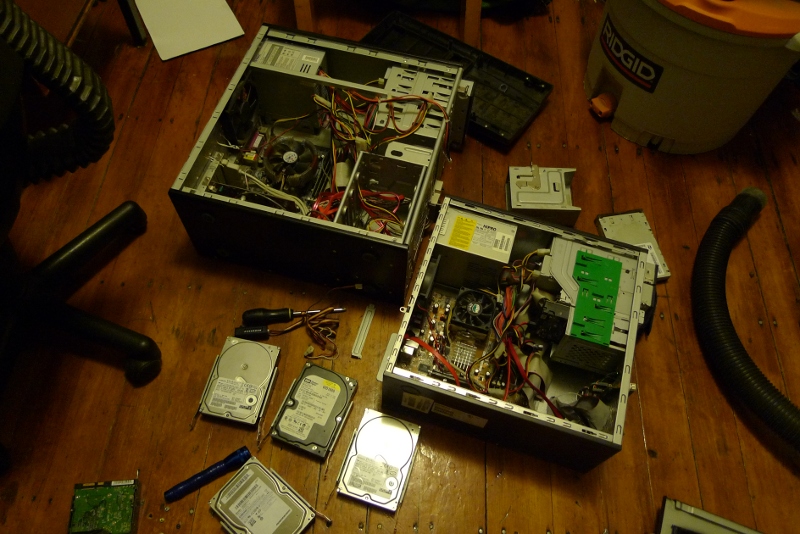
I just replaced my aging 2004-era PC with wait for it a 2005-era PC. A friend is moving across the country so I'm taking it off his hands. Swapping hardware between Freyja and Earlgrey The differences between the two are more than just the year of time, though: one was hand-built from parts, while the other was a commodity off-the-shelf Compaq. So the new machine, while not strictly faster by the clock, is 64-bit and is much more amenable to upgrades. While the added bulk is a bit annoying, the case has a lot more space in it up to 8 or so drive slots (I can't imagine ever needing that many), and 4 RAM slots which is a sure step up from the limitation of two drive slots and two RAM slots in my old machine. The most visibly shiny parts in the new desktop experience are 4G RAM versus 1G, and a nice ATI GPU. While I'm glad my OS allowed me to squeeze six years out of my main machine, I'll be happy to stop shaking my fist at Chromium for eating all my memory! The new machine will keep its old name: earlgrey.
23 May 2010

Thorsten Glaser: Cancelling bash, retrieving a command, mksh rules :

In response to a planet.d.o series (mentioned in #grml on IRC) of postings: In a sensible shell, Esc+# not only pushes it back but also re-enables the command. Try it out: l s Esc # Cursor-Up Esc #
tg@blau:~ $ #ls
tg@blau:~ $ ls
The command sticks in the history, and is not immediately shown in the next interactive input line, which I consider a plus in most use cases. Anyway, try mksh (just a-g i it), there are a lot of goodies. I found out about Ctrl-O only a year or so ago myself I wonder why schizo didn t write about how to do it in posh tho

Next.

Previous.