Search Results: "andy"

22 March 2008

MJ Ray: Looking for Local Tradespeople / Where can I buy these odd-sized washers?

Long-time readers may remember that I struggle to find good plumbers so when our tap started dripping, it was decided to try DIY.  It seems like we have a ceramic disc cartidge tap (Angel Black Base I think) and it was the disc retaining washer which was leaking.  Where the devil can you buy new washers like that?

Levers didn't have anything the right size, not even in the mixed boxes.  All the centre holes are too small, really. According to 0800handyman, CDCs aren't standard sizes. As a temporary fix, we flipped the washer and it's worked for now, but I expect it will fail again soon.  I don't want to junk the whole cartridge as it's likely to get replaced with a single lever mixer tap (a tilt-and-turn or 3D tap, if you prefer) before long, so where can I buy these odd-sized washers?

"quick and cheap way of saving water" indeed!

15 February 2008

Jeff Bailey: Time to talk...

Well, I guess it's time to talk.

I mentioned in my last post some back troubles. These aren't really news - I've had those for a long time. The news is the discovery in early January that there's some sort of growth / lesion / tumour on that spot causing me further problems now.

So I've been for tests. The MRI was a couple weeks ago. The CT scan earlier today. I have an angiogram tomorrow to map it further. The idea in my head was to wait until I had something interesting to tell people. A plan, knowledge, all the rest.

Well, I don't have that yet. But where two days ago, I was thinking that tomorrow was just a day of tests, it seems that as part of the angiogram an embolism is possible - that's where they try to cut off the blood supply to a tumour to make later surgery a bit easier. It carries risks. It carries a night in the ICU and another night in a ward. Surgery would need to follow within two weeks.

So I still have nothing to tell people. I'm used to being one of the ones with the answers handy. I'm obviously a bit nervous, but more in anticipation.

Thoughts and love are appreciated. We get started at 7am pacific.

14 February 2008

Holger Levsen: Dance like no one is watching

Yesterday I decided to add a nice layout to my local ikiwiki setup. So I browsed the CSS market and choose a layout originally developed by Erwin Aligam, which you can see at Winnies blog in action.

And then the expected/desired effect kicked in: inspired by the nice layout I cleaned and reorganized the contents until late at night. Eye candy can be useful indeed!

And for those wondering about the title of this post: it's also the title of my local wiki :-) Dance and look up the full quote!

9 February 2008

Jordi Mallach: Time for GRUB2?

My Apple Powerbook 5,4 just booted for the first time using GRUB, with no manual intervention, from Apple chime to GDM prompt. This is a great milestone for GRUB2 on powerpc-ieee1275 and OpenFirmware, as until now, multiple problems in the loader would drop you to OF console straight away, although other PowerPC hardware with other firmware implementations did manage to work. Recent fixes by Pavel in the core and some other minor fixes for the userland utils have taken grub2 to the point where it is usable on most PowerPC hardware. On Apple, the only minor issue remaining is grub-probe insisting on (hd) not being a valid device name, so for now I have to trick it into believing it's really (hd1). In parallel, many other GRUB2 improvements haven't stopped hitting CVS in the last months, which have seen how new contributors joined grub-devel and helped GRUB2 get the great momentum it's enjoying right now. Vesa, Robert and Bean have been really active lately, and have fixed long standing issues or written a lot of new code. One of the features GRUB2 acquired recently was image loading for background images. Much more powerful than the implementation in GRUB Legacy, GRUB2 can now read images in multiple formats, can handle up to 24bit colour and render a menu in arbitrary resolutions. The menu can now show UTF-8, and the Debian package will configure a pretty theme that matches the rest of the system if desktop-base is installed:


GRUB2 speaking UTF-8 Catalan Although I'm not sure if GRUB2 is completely up-to-par with GRUB Legacy on i386/amd64, it seems the tricky bits, like video, LVM, RAID and the standard filesystems are supported and working. What GRUB2 needs now, in order to finally replace the aging and upstream-lacking GRUB Legacy you probably have installed, is massive testing. Debian has traditionally been a testbed for GRUB Legacy patches, and is also the platform where GRUB2 is being more widely tested. Having GRUB2 included in lenny's debian-installer would be a great step forward, and by the looks, I think we're well on time to manage this. Replacing GRUB Legacy with GRUB2 is trivial. On PCs, just install the grub-pc package. You'll be offered to keep GRUB Legacy, but with an added menu entry to chainload GRUB2. If you're worried that GRUB2 might fail on your hardware, accept this, and try to load GRUB2 from GRUB. If it works, you then know you can get rid of GRUB Legacy completely and keep GRUB2 in the MBR. On PowerPC-based Macs, you'll have to work around the small issue I mentioned above. Install the grub-ieee1275 package. You also need a very recent powerpc-ibm-utils package, which was just uploaded to unstable. Mount your bootstrap partition, probably /dev/hda2 in /boot/grub, and generate a device.map file with grub-mkdevicemap. Check the contents. If your first device name lacks a drive number such as (hd), it's probably correct, although this will make things fail later. Change it to (hd0) for now. As grub-install relies on grub-probe, you'll have to generate your grub image by hand. Copy all .mod files in /usr/lib/grub/powerpc-ieee1275 to your bootstrap partition, and generate a core.img:

root@powerpc:/boot/grub# grub-mkimage -d . -o /boot/grub/core.img *.mod
root@powerpc:/boot/grub# update-grub
root@powerpc:/boot/grub# nvsetenv boot-device hd:2,core.img
The generated grub.cfg will have references to (hd0,X), which you'll have to correct back to (hd,X) if necessary for your OpenFirmware. After this, you are probably ready to reboot, cross two fingers and get a warm "Welcome to GNU GRUB!" message at boot, which will then be followed by a standard GRUB menu, but on your nice PowerPC box. Unfortunately, the eye candy in the screenshot above isn't available yet in this platform, as it lacks VESA. Does someone in the audience want to contribute a video driver for powerpc? :)

2 February 2008

Adeodato Sim : Markdown links with newlines in the anchor text

Links in Markdown can be done in a couple ways. First, similarly to HTML links, where you place the link next to the anchor text, like this:
  I am a [Debian](http://www.debian.org) Developer.
Or, if you feel this clutters your paragraphs too much, you can choose an alternate syntax, which I prefer (particulary handy for very long links):
  I am a [Debian][] Developer. Bla bla bla...
    [debian]: http://www.debian.org
There is however a gotcha with this alternate syntax, namely, anchor text with spaces in them. This works fine:
  I study Computer Science in [this University][].
    [this University]: http://www.ua.es
But this does not:
  Some years ago, I started studying Computer Science in [this
  University][]. Bla bla bla...
    [this University]: http://www.ua.es
This actually happens quite a lot when formatting the paragraphs in the editor, which made this otherwise-pleasant syntax almost a no-go for me. (Well, to be honest you could use it like this, but still:
  Some years ago, I started studying Computer Science in [this
  University][uni]. Bla bla bla...
    [uni]: http://www.ua.es
)
There is a beta version of Markdown in experimental that almost fixes the problem. This version introduces a new but similar syntax for links: you can omit the second pair of empty brackets. And when using that newer syntax, there is code in the program to change newlines into a space when looking for the link definition. It is not applied to the code path of the old syntax, though, which is a pity. This is all explained in bug #459885, with a patch as well (that applies both to 1.0.1 and 1.0.2). You can find packages with that patch applied here.

23 January 2008

Russell Coker: Asus EeePC as a Router

It seems to me that the Asus EeePC (a $AU499 ultra-light laptop with only flash storage) would make a decent router. Often full desktop PCs are used as routers because they run the most common software and have standard interfaces. There have been dedicated router devices with flash for a long time, but without the ability to connect a standard monitor and keyboard they were always more difficult to manage than general purpose PCs. Also dedicated routers have limited RAM and storage which often does not permit running a standard OS. According to the best review I could find [1] EeePC has a minimum of 256M of RAM, a Celeron-M CPU (32bit Intel), and a minimum of 2G of flash storage. This hardware is more than adequate to run most server software that you might want to run (my current router/firewall/server has 192M of RAM). It could run a web server, a mail server, or any other general server stuff. It comes pre-loaded with a modified version of Debian so you get all the Debian software (which incidentally means more pre-packaged software than is available for any other distribution). Bigger versions are common, I believe that the $AU499 version has 512M of RAM and 4G of flash - I’m not sure that I could even obtain a lesser EeePC in Australia. The up-side of flash is that it doesn’t take much power as having a low power device in whatever confined space ends up housing your router is a good thing (the EeePC is listed as using less than 20W no matter what the load and idling at as little as 14W) and that it doesn’t tend to break when dropped or have any moving parts to wear out. The down-side of flash is that a sufficient number of writes will destroy it. Obviously swap is not a suitable use for a flash storage device. But a small mail server (suitable for the needs of a home or a small office) should be fine with it. Squid is commonly run on router devices, to run it on an EeePC I would be inclined to buy 1G USB flash device for the cache, then if Squid’s use destroyed the flash storage it would be easy to spend $20 and buy another. The EeePC has three USB ports and a built-in Ethernet port. I believe that the minimum number of Ethernet ports for a firewall is three, this means either one for the uplink, one for the DMZ, and one for your LAN, or two for uplinks (with a redundant uplink) and one for the LAN. The three USB ports allow using two USB Ethernet devices to provide the minimum three Ethernet ports and one for USB flash storage. One notable advantage of using a laptop as a server is the built-in UPS (the laptop battery). Many people have put old laptops into service as servers for this reason, but usually an old battery gives no more than about 30 minutes of power, while a new EeePC should be able to last for more than 3 hours without mains power. Using a second-hand laptop as a server is usually not viable in a corporate environment as laptops are all different. Repairing an old desktop PC is easy, repairing an old laptop is unreasonably difficult and often more expensive than replacing it. The low price of the EeePC makes it easily affordable (cheaper than some of the desktop machines that might be used for such a purpose) and the fact that it is purchased new at such a price means that you get warranty support etc. It seems to me that a significant disadvantage of using an EeePC (or anything other than a real server) for a server task is that it lacks ECC RAM [2], but as I’m not aware of any device sold for the purpose of running as a low-end router or sold at a price-point such that it could be used as a low-end router which has ECC RAM I guess that’s not a big disadvantage for that purpose. But the lack of ECC RAM and the lack of useful support for RAID does make it a little less suitable for use as a mail server. Finally if you are going to run a VPN then it would be handy to be able to secure the hardware against malicious activity when the office is closed. An EeePC will fit nicely in most safes… Please let me know what you think about this idea. I’ll probably start installing some such machines for clients in the near future if ASUS can keep up with the demand.

20 January 2008

Simon McVittie: A magical xrandr incantation

Here's a handy incantation I use with the Intel X.org graphics driver on my laptop.

Put this script somewhere convenient:

#!/bin/sh
if xrandr   grep '^VGA connected' >/dev/null
then
    #echo "VGA connected"
    xrandr --output VGA --above LVDS --auto
    xrandr --output LVDS --auto
else
    #echo "VGA not connected"
    xrandr --auto
fi 2>&1   logger -t xrandr-hotkey

and bind it to your "switch video mode" key, e.g. Fn+F7 on my Thinkpad X60s. For instance, I run xbindkeys, so I saved it as autoxrandr and put this in ~/xbindkeysrc:

"exec /home/smcv/bin/autoxrandr"
    XF86Display

Now if you press the "switch video mode" key with a monitor plugged in, you'll get the external monitor appearing above the laptop panel (my preferred configuration - I've balanced my monitor on an N800 box to get the bottom of the screen level with the top of my laptop's screen). If you press that key again after unplugging the VGA cable, the laptop will turn off the VGA output and pull all the windows onto the built-in screen.

15 January 2008

Romain Francoise: Shared links for 2008-01-15

1 January 2008

Andrew Pollock: [life] Home again

Well, this is actually our fourth day home, I just haven't had the time or inclination to write anything until now. We had an uneventful trip home on the 29th. I think I'm getting more used to these long-haul flights, the time went pretty quickly. There is much to be said for Qantas' in-flight entertainment system. And Melatonin tablets. We had a good, jam-packed three weeks in Australia. We landed on a Sunday morning, at around 8am. Sarah's Aunty Glenda picked us up from the airport, and we stayed with her for the week. We caught up with two sets of friends on the Sunday, and managed to last until the evening without crashing. I spent the week working from the Sydney office. Jetlag is a wonderful thing for making me into a temporary morning person. I was at my desk by 8am every day. I'd forgotten how early the sun got up in Australia in the summer time. Monday in Sydney is Sunday in California, so Mondays are blissfully quiet and great for getting things done. The beauty of getting in by 8am meant I still caught Mountain View from about about 1pm onwards for the rest of the week, so that was good. I got a lot done while I was in the Sydney office. On Tuesday morning we went to the US Consulate to sort out Sarah's visa renewal. It was a no-brainer, and our passports were back at my parent's place within 48 hours. Thursday night was the Sydney office Christmas party. The Friday night we flew out of San Francisco was the Mountain View office one, so it was good to be able to catch a party somewhere. Got to love working for an international company. Photos here. Sarah spent the week in Sydney pottering around and catching up with relatives. Every night was booked out with dinner with friends. Photos from the week in Sydney are here. Next stop was Canberra for four days. We stayed with different friends each night. We'd really come to appreciate how bug-free California is. Apparently Canberra was having a particularly bad fly season this summer. They were just about carrying us away. We stayed a night with Rusty and Alli on their farm out at Majors Creek, which is always a nice getaway. It was great to see how the place is coming along. We won't recognise it next time we're there. At Canberra airport on the way to Brisbane, totally by chance, we bumped into our old upstairs neighbour Melissa, from when we lived in Turner. Her and her husband and kids moved to Brisbane around the time we moved from Turner to Ainslie, and we hadn't done a very good job of keeping in contact. To cap it off, she ended up sitting in the seat across the aisle from us on the plane, so we had a good old chinwag for an hour and half. Photos from Canberra are here. Then we got to Brisbane and did the family thing. It was good to see my family again, and show them all of the photos of Joshua and just spend time with them. Brisbane traffic has degenerated significantly in the last 12 months. The Gateway Arterial Motorway near the airport is a complete mess. There's a lot of construction going on for the new cross-city tunnel they're putting in. Probably the highlight of the trip was the mass outing to Australia Zoo. It's been a couple of years since we've been there, and boy, does that place just keep getting better. My hot tip is to save yourself a fortune, and a precious couple of hours, and avoid purchasing food from the catering area. It's sheer bedlam, and very expensive. The zoo is getting so big, that you really need all of 9am to 4:30pm to see it all properly, so you can save a lot of time by bringing your own lunch, or getting a pass-out and getting lunch from somewhere nearby. Photos from the zoo trip here The weather in all parts of Australia that we saw was pretty grey and wet for the most part. I'm not complaining, we need all the water we can get. It was sounding like most of the rain was falling outside the catchment areas though. It was nice to see Canberra not looking all brown and dry though. Photos from the time in Brisbane here. In a brief fit of spontaneity we decided to sign up for Qantas Club memberships. I'm really kicking myself for not getting lifetime membership back in 1999 when I sold my share of our business. I've done so much travelling since then, and it'd have really come in handy. As it happened, we got good use out of it this trip. The flight from Brisbane to Sydney was at 8:15am, so we left my parents' place at about 6:15am, sans breakfast or showers, and breakfasted at the Brisbane airport, and showered in the Sydney airport, as we had about 5 hours to kill until our flight to San Francisco departed.

29 December 2007

Steve Kemp: You are the witness of change

As I wrote yesterday I've recently ordered, and now received a new desktop machine. For completeness I've now finished juggling machines around and installed etch twice - so now I have two working desktop machines:
gold.my.flat (unstable)
This is my personal machine, fitted with 4Gb of RAM. It is currently running 6 xen instances of 256Mb each leaving me with more meory free than I have ever had upon my desktop machine - so the upgrade was definitely worthwhile!. (The previous machine had bad sockets and couldn't take more than 1Gb of RAM - hence the replacement rather than mere upgrade.)
vain.my.flat (etch)
This, reinstalled, machine is now running only backuppc and those programs that Meg/random guests wish to run.
In terms of networking I've now split things up into three well-defined ranges. Knowing how things develop I'll not expect this to contining, but right now I'm pleased with: All in all I'm very happy with the work of the day even if I did have to rsync stuff all over the place, juggle power cables and install Etch upon both the new machine, and the re-purposed backup machine. (Since that was previously my mahcine and was running sid.) The following links were helpful. All being well tomorrow will be spent tidying the flat, drinking with my erstwhile cat-sitter, and getting ready for work on Monday.

22 December 2007

Christoph Haas: Handy Firefox/Icewasel keyword searches for (packages bugs *).debian.org

Just wanted to drop a tip on you about the Firefox keyword search feature. I use it to quickly access packages.debian.org on package information or to retrieve the BTS page for a bug number. With it you can use “bts 123456″ instead of “http://bugs.debian.org/123456″. May not appear much shorter but I like it anyway. Here [...]

12 December 2007

David Welton: Programming languages are not like hand tools

I have seen the "right tool for the job" comment one too many times, and felt like writing something about it. Real tools are pretty simple, really. Things like saws and hammers have been around for thousands of years, and don't require a great deal of thinking to understand. Some people are masters with hand tools and create wonderful works of art with them, but the tools themselves are not complex. My programming language, Hecl, is a pretty simple one in a lot of ways (it has to be, to fit on cell phones), and at last count, the core has 7670 lines in a rough count that includes comments. That entails quite a few "moving parts" compared to even something like an electric drill. Programming languages are complex. Certainly to create, but even to use well; to understand the nooks and crannies and ramifications of the language's design is not something that is accomplished in a few days for most people. Your average programmer really doesn't know all that many languages, and even those who know many probably don't use most of them on a day to day basis. I like learning new languages, yet still wouldn't relish the idea of going through the mental task-switch required to move between too many in one day. What this means, is that when there is a job to be done, most programmers will reach for what they already know, rather than the best possible system, and that makes sense. If you know Python, why not write web software in Python, if you get asked to create something for the web? Or if you know Tcl because you create gui's with Tk, you're still likely to pick it when you need to create a little server. There are reasons why something like Erlang might make for a better server platform than Tcl, but is it that much better to justify dropping everything, learning a new language, committing to a new set of infrastructure requirements, and adding another thing to ask of people joining your organization? Most likely, it is not, unless the server you're writing is for a telephony switch that has to be on all the time, in which case, yes, maybe you do need Erlang. If, as is often the case, it wasn't something that had to be the best in the world, all that extra time to learn a new language would have been mostly "wasted" (ignoring, of course, the fact that for individuals, learning new things is almost always good, but that's not what we're talking about). Even the smart folks who hack away in languages like Haskell are fond of using what it has to offer, rather than jumping ship to something else at the first hint of the "something else" being better at their language of choice for a given task. So both Tcl and Erlang were up to the task of creating a little server. You could have used Ruby or Python as well. Java might prove a bit more verbose, but it's certainly up to the task. Any number of languages would be, of course. So it's not like there is a "right tool" and a "wrong tool". Maybe a better analogy is languages are like toolboxes, or even whole workshops, full of tools. Most of them have most of the common tools like hammers and saws, some sort of web libraries or the means to create tcp/ip servers. Where they differ is in things like the amount of tools available, the specialized tools that you get for free, the craftsmanship and ease of use of the tools in the hands of both experts and beginners... or in some cases (lisp, say), some fancy tools and supplies that make it possible to build yourself some new tools if you need to (that only you know how to use, but that's another topic). Some sets of tools really aren't very good for some jobs - you don't want to build blazing fast 3-d shooter games in PHP, just as you wouldn't want to use a regular set of screwdrivers on a delicate watch. However, even though you'd want to use a toolset that also has some specialized tools for working on the watch, you'd rather own a toolbox that came with the watch tools as well as the regular Phillips screwdrivers, because those are pretty handy around the house, and it wouldn't do to have only the watch tools for fixing common household items. The point being, languages are big investments, so those that do more, even if they're not the absolute greatest or first choice for a given task, are generally going to be more useful to more people, especially those just starting out who want a "safe" choice, a language they know will let them do a variety of things, rather than only one or two things (pound nails, say) really well.

10 December 2007

Steve Kemp: Open your eyes, look up to the skies and see

If you have a (public) revision controlled ~/bin/, or bash/shell scripts I'd love to see them. Feel free to post links to your repositories as comments. I'm certain there are some great tools and utilities out there with I could be using. Right now the only external thing I'm using is Martin Krafft's pub script. I don't use it often, but it is very neat and handy when I do want it. (Something that I'd never have considered writing myself, which suggests there are many more gems I'm missing!) In other news my migration to mercurial is going extremely well. With only minimal downtime. Downtime for services really comes about because I have several websites which are powered entirely with a CVS checkout of remote repositories, so the process looks a little like this:

Steve Kemp: Open your eyes, look up to the skies and see

If you have a (public) revision controlled ~/bin/, or bash/shell scripts I'd love to see them. Feel free to post links to your repositories as comments. I'm certain there are some great tools and utilities out there with I could be using. Right now the only external thing I'm using is Martin Krafft's pub script. I don't use it often, but it is very neat and handy when I do want it. (Something that I'd never have considered writing myself, which suggests there are many more gems I'm missing!) In other news my migration to mercurial is going extremely well. With only minimal downtime. Downtime for services really comes about because I have several websites which are powered entirely with a CVS checkout of remote repositories, so the process looks a little like this:

5 December 2007

Evan Prodromou: 14 Frimaire CCXVI

One thing that's been interesting me lately is RSS. Yeah, I know, not exactly cutting-edge technology, but the format -- in its three different forms -- has become the default for machine-to-machine transfer of serial information on the Web. So RSS really represents our individual or collective presence on the Web spread across time, space, and theme. I'm particularly interested in RSS because I'm working on themed portals like Keiki. It's one of our goals to pull in the parenting part of a person's personality spread on other parts of the Web, so you don't have to re-enter it in Keiki if you don't want to. It's a fun problem to be solving. But as I was playing with the format, I realized that I'm spread pretty far across the Web, myself. I make most of my contributions to this blog, but I'm also part of other communities and a user of other services. What if I used some software like Planet to pull together the disparate threads of me into one place? So that's what I did. I ended up using a tool called Gregarius instead of Planet, mostly because I originally intended to install it on Godaddy's hosting service, which doesn't support cron jobs, which Planet needs. Once I realized how ad-infested GD's "free" hosting service is, though, I moved all my sites off of it, and back to Antipater. And my personal aggregator is there, too. It was interesting to pull in the accounts I've listed on About Me and see which ones produced RSS feeds. Some I expected (my Flickr feed, my del.icio.us feed) and others I didn't (my Upcoming feed surprised me). I was also surprised by sites that didn't produce a feed. I really expected something from Pownce and Tribe.net), but I couldn't get them to cough up a feed. Most disappointing was Facebook, which has a really nice mini-feed of my activity there that doesn't seem to translate into an RSS feed in any possible way. But otherwise things went very quick. I found Gregarius really easy to work with, although its inability to pull tag (metadata) and categories out of RSS streams. There's an autotagger plugin, but I haven't gotten it to catch any tags yet. Oh, and the OPML output was horrible -- I think it might generate HTML that looks like raw OPML -- totally useless. In any event, if you feel like cyberstalking me or just seeing what I'm doing around the rest of the Web, keep an eye on evanprodromou.info. There's even a handy aggregated RSS feed... just in case you want it. tags:

Wouter Verhelst: Something is broken

Something recently broke with the setup on my laptop. Symptoms: when I switch from one application to another, suddenly nothing gets updated anymore. I can move my mouse around; but apart from that, the screen shows no updates. Judging by the sound of the fan, it would appear that something or other is looping at that point, too. So far this has only happened when switching from one GTK+ application to another, but I haven't had enough of them to be sure it really is GTK+-related. For reference, I'm using the best window manager out there, using the nv X.Org driver, and for now I've seen the lockups when switching between Liferea, Firefox, and Pidgin. Of course, having a system lock up completely makes it rather hard to debug, especially if you're on the road and don't have a second system handy; but any hints as to what's causing this would be most welcome. Otherwise, I guess I'll have to "hope" to encounter this when I can actually debug it...

1 December 2007

Joey Hess: my mpd setup

One of the hard things about getting started with mpd is that there seems to be little documentation about the details of how other people use it. Instead you're given a collection of great tools and an excellently designed system, and expected to build your own personal music playing setup out of them with little direction. So I thought I'd document mine. There are several computers around the house that run mpd. One in my office, one has speakers in the bedroom. My laptop, of course. And I put a nslu2 in the living room in a fun lego case that embeds the little computer into a remote controlled speaker (photos when I find a camera). All of these machines have their music libraries synchronised using unison. I use sonata as a graphical frontend and browser. I keep one instance of sonata running on my desktop in the office, so I can go there to change music if my laptop's not on. Also so guests can change the music. I like to listen to whole albums at a time, and sonata doesn't make this especially easy in its user interface. I eventually realised that the best way to do it, for me, was to create a separate playlist for each album. Sonata does make it really easy to click on a playlist and start playing it. I wrote mpgenplaylists to automatically generate those playlists for me. I wrote a set of commands that I can use to transfer state between my mpd daemons. The easiest to use and most useful of these is mpswap, which swaps the state of two daemons. Generally I only have one mpd playing at a time, and the others are paused, though it'll also swap the states of two running mpds. So if I run "mpswap dodo dragon", the music that had been playing in my bedroom starts coming out the speakers in the office. Same song, not a single missed note. That's pretty handy. Or I can run "mpswap dodo" to swap state with my laptop, and carry the music out of the house with me. (This would be more seamless if I carried some bluetooth wundergadget so my computers knew where I am, but I think I'll pass.) Another tool I wrote is mpstore, which dumps the mpd daemon state out to stdout, so it can be saved to a file and later loaded with mpload. I use this when I'm listening to audiobooks, to store my place. Another one is mpfade, that can wake me up by slowly fading in music. Or slowly fade out and stop. Writing these little hacks is addictive, but I won't bore you with the rest. On some of the servers I run mpd-dynamic, a daemon that watches the playlist and makes sure it always has 10 unplayed items in it, chosing new items at random. It also removes old played items from the playlist. This is nice if I want music going without the bother of picking what. I typically add some albums to the playlist, and then when they're done, it keeps playing random stuff until I manually add something else. I do want to find something that can more intelligently pick things to play. I tried lastfmpdqc, but didn't like its results. Switching to mpd has meant that the filenames of mp3s matter again, since mpd UIs expose the filenames (a pity). I used exfalso to clean up all my file names based on the music's tags. I also added ReplayGain information to all my music so mpd can use it to normalise volume. BTW, after all this, I'll probably still only listen to music for an average of 3 hours per week.
mpd-dynamic is in the Audio::MPD perl module. mpdswap, mpdstore, mpfade, mpgenplaylists, and more are in mpdtoys.

25 November 2007

Steve Kemp: Open your eyes, look up to the skies and see

If you have a (public) revision controlled ~/bin/, or bash/shell scripts I'd love to see them. Feel free to post links to your repositories as comments. I'm certain there are some great tools and utilities out there with I could be using. Right now the only external thing I'm using is Martin Krafft's pub script. I don't use it often, but it is very neat and handy when I do want it. (Something that I'd never have considered writing myself, which suggests there are many more gems I'm missing!) In other news my migration to mercurial is going extremely well. With only minimal downtime. Downtime for services really comes about because I have several websites which are powered entirely with a CVS checkout of remote repositories, so the process looks a little like this:

23 November 2007

Joachim Breitner: Descendant tree drawing problem

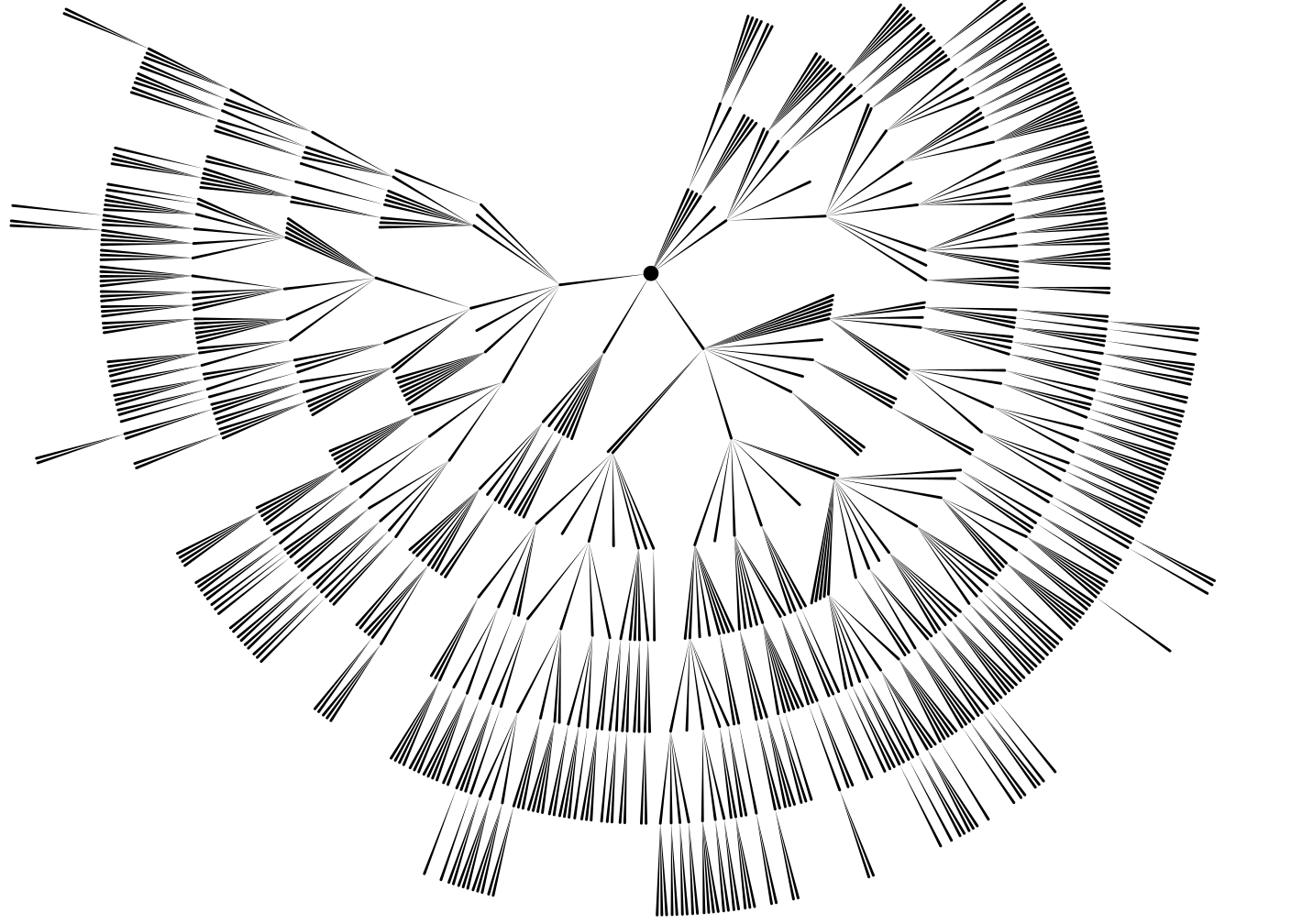
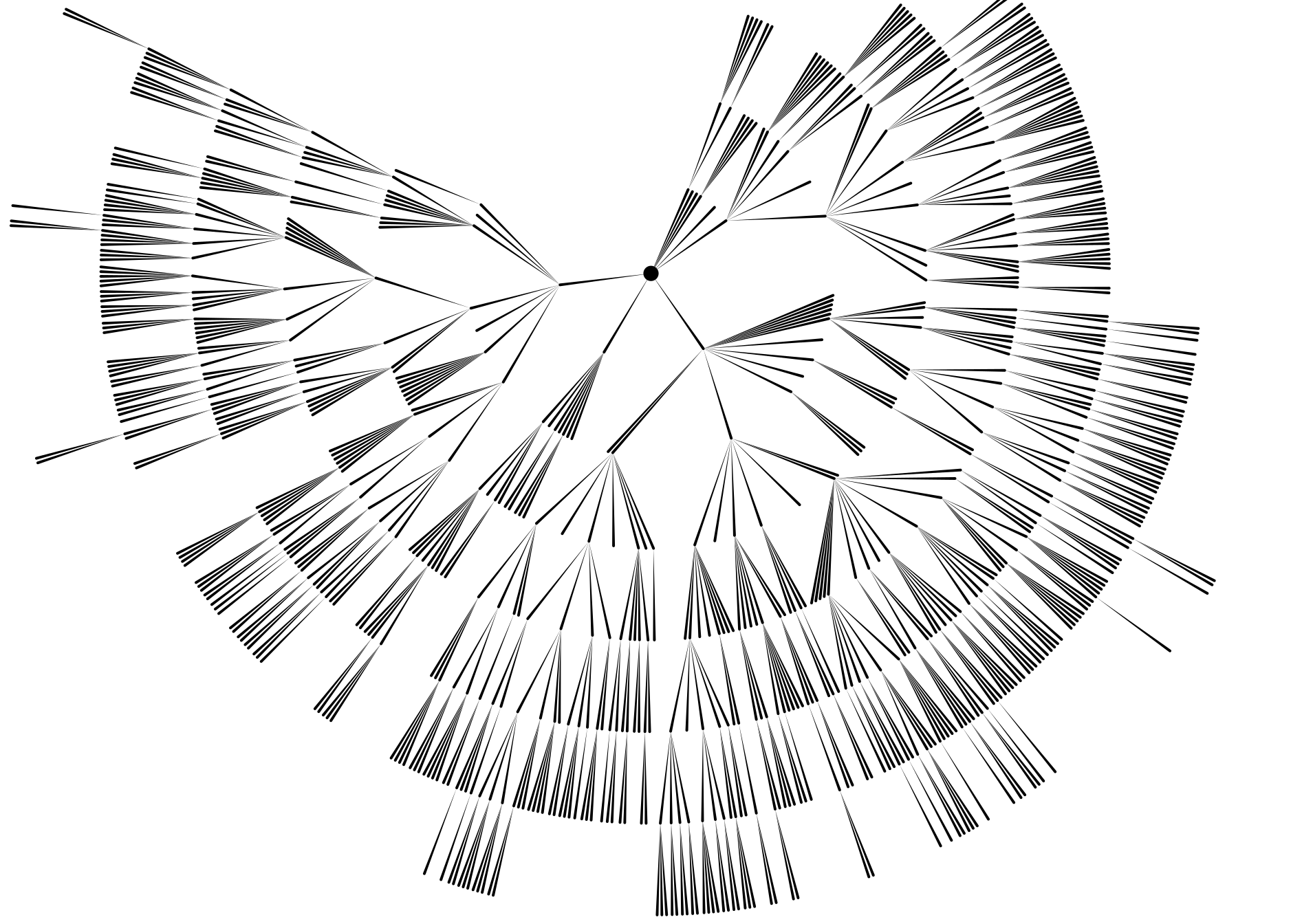
For a geneaology project of my familiy, I generated this fairly straight forward drawing of my Grand-Grand-Grand-Grandfather s descendants (click for full image): Unfortunately, this representation does not give any information about when someone lived, or how long. I tried to add this information to the graph, and I coudn t think of anything better than drawing each person as a rectangle whose upper edge lies above the parent s rectangle, and whose height and vertical possition represent the life span. This is the result (here you really have to click for a full view): This is obviouly not very helpful. Does anyone have a better idea how to draw this?By the way, these graphs are generated using haskell and the cairo bindings provided by gtk2hs very handy, as I also get svg output and pdf output for free.
15 November 2007

Ian Wienand: Truth in names

What is it with the price of cables? Even leaving aside patently absurd enhancements such as gold plated optical connectors, who is buying all these ridiculously overpriced Monster cables? Thus when purchasing a new cable today it was a pleasant surprise to find a cable company who are happy to state their business model prominently in their name: ConCord. The only thing that would have made it better was if their tag line was "we're screwing you for this cable, but at least we're telling you straight up". ConCord;
we're screwing you for this cable, but at least we tell you straight
up It reminded me of the apt rename of the UNSW student centre to the NewSouth Q, which I assume was done to more accurately describe its function as a gigantic queue (though they might as well have gone the whole way and called it the "NewSouth QForAnHourAndWellSayWeCantHelpYouAndYouNeedToStandInThisOtherQ").
Next.

Previous.

