Search Results: "tar"

6 March 2014

Steve Kemp: So I bought some new hardware, for audio purposes.

This week I received a logitech squeezebox radio, which is basically an expensive toy that allows you to listen to either "internet radio", or music streamed from your own PC via a portable device that accesses the network wirelessly. The main goal of this purchase was to allow us to listen to media stored on a local computer in the bedroom, or living-room. The hardware scans your network looking for a media server, so the first step is to install that: The media-server has a couple of open ports; one for streaming the media, and one for a user-browsable HTML interface. Interestingly the radio-device shows up in the web-interface, so you can mess around with the currently loaded playlist from your office, while your wife is casually listening to music in the bedroom. (I'm not sure if that's a feature or not yet ;) Although I didn't find any alternative server-implementations I did find a software-client which you can use to play music from the central server - slimp3slave - and again you can push playlists, media, etc, to this. My impressions are pretty positive; the device was too expensive, certainly I wouldn't buy two, but it is functional. The user-interface is decent, and the software being available and open is a big win. Downsides? No remote-control for the player, because paying an additional 70 is never going to happen, but otherwise I can't think of anything. (Shame the squeezebox product line seems to have been cancelled (?)) Procmail Alternatives?
Although I did start hacking a C & Lua alternative, it looks like there are enough implementations out there that I don't feel so strongly any more. I'm working in a different way to most people, rather than sort mails at delivery time I'm going to write a trivial daemon that will just watch ~/Maildir/.Incoming, and move mails out of there. That means that no errors will cause mail to be lost at SMTP/delivery time. I'm going to base my work on Email::Filter since it offers 90% of the primitives I want. The only missing thing is the ability to filter mails via external commands which has now been reported as a bug/omission.

Andrew Pollock: [life] Day 37, Playgroup, bubble tea, and Android phones

Today was Playgroup. We had a pretty early start to the day, and Zoe wanted porridge for breakfast, so we made that together in the Thermomix, and she got dressed while it cooked. After a bit of TV, we biked over. I got to witness semi-firsthand my first mother-to-mother altercation. I said hi to a mother I'd met a previous week, and asked her how she was, and got "Pissed off" as the response. Apparently a reasonably large boy (I'd put him at about the 4 mark) had been in the face of her daughter, and distressed her daughter a bit, so she'd apparently politely told the boy to back off, and then been revved by the mother of the boy for talking to her son. The boy continued hanging around her daughter, and she left Playgroup not long after telling me all about it. I worked out later on that the mother of the boy was one of the women who helped run the Playgroup. Fun times. He was a bit out of control. He full on screamed at me at the end of Playgroup for no reason. His mother did make him apologise to me for that, without me requesting it. There were some dress ups (mostly skirts) today, so Zoe had a fabulous time cavorting around on the stage in a big pink lacy skirt, doing "ballet". She dragged me up on stage with her, and we danced around for a bit. It was quite fun. She was very helpful at pack up time, and was bringing a lot of equipment back to the storage room at the back of the hall. I was helping load stuff into the large crate in the storage room. After parachute time, I lost sight of her briefly, and after a quick search, deduced that she must have gotten herself locked in the storage room. Sure enough, that's where she was. She was only missing for as long as it took me to notice and search in all the other possible places, so she wasn't particularly distressed. Poor thing. After Playgroup, we biked back home, and I had another photo I wanted to print out, so we drove over to Officeworks and had a sausage sizzle after we got the photo printed out, and then drove back home. Zoe had a pretty good bedtime last night, so I decided to try skipping her nap today. I wanted to get the 5-8 player extension pack for Settlers of Catan, which Mind Games in the Myer Centre had, so we hopped on a bus to the city. When we've been on longer public transport rides, Zoe's asked me if she can play games on my phone. This of course keeps her amused, but leaves me with nothing to amuse myself (I need to remember to bring a book). I have this cupboard full of old Android phones, so I decided to blow the dust off my old Nexus S and make it a dedicated games phone for her when we're on public transport. This worked pretty well today. She also decided to bring her handbag, which was convenient. I think she was pretty excited at the idea of her "own phone", even if it lacked a SIM card. After we'd bought the extension pack, I thought we could do something slightly more fun than just traipse into the city and traipse back out again. I've been meaning to introduce her to bubble tea for a while, so took this opportunity to track some down in the Myer Centre. We settled on some honeydew milk tea. She liked the honeydew, but after a couple of mouth fulls, was over the tapioca balls. She was a good sport and gave them a good college try though. It was fun watching her play around with the phone on the way home, and just fumbling her way around the user interface. She found the alarm setting UI, and was having a great old time creating alarms. (I'm glad I cleared them all out when we got home, there was at least one set for 4am). She had fun exploring all the ring tones. Towards the end of the journey home she figured out the camera, and was having a fabulous time taking snaps out the bus window. She still needs to work on keeping her hands and fingers away from the lens. She watched some TV while I made dinner and then I joined her on the couch for a cuddle while I flicked through my copy of 50 Dangerous Things (you should let your children do) and 365 Science Experiments. My cousin Renata came around for dinner with us tonight. Zoe didn't have a particularly great dinner, but she did go to bed nice and easily. I'm not sure how she'll sleep tonight. I've gone back to having a light-weight doona on her, as it's possible last night's wake up was temperature-related.

5 March 2014

H ctor Or n Mart nez: Debian build system

There are many ways to build Debian distributions from source. None of them are trivial enough for beginners and all of them require complex setups. For instance, the Debian official setup uses the following software components: Around the core components, there are other software components needed to run the Debian distribution: Thanks to Debian ftp-master and buildd team, all software is built for several architectures and several ports. Most Debian infrastructure is managed and maintained by Debian System Administration team.

Simplified Debian build infrastructure

Debian Wiki has been growing different random pages trying to ease the setup and configuration problems concerning to Debian build system infrastructure. The above infrastructure barely documents what it is involved to create and generate Debian unstable ( sid ) distribution suite. In order to produce Debian stable distribution suite, there are software transitions to happen and yet another Debian team gets involved in the process, our beloved Debian release team. Once distribution reaches its maturity level and gets released as in its stable version, it gets updates also lead by release team and security related updates, which yet another team is responsible for them, the Debian security team. and there are lots of Debian teams doing many other things you might enjoy, have a byte

Andrew Pollock: [life] Day 36, Kindergarten, cleaning and pee pee accidents in hardware stores

Today was my "clean the house" day. I made a start, then went for my chiropractic assessment and adjustment. I now only need to see him fortnightly, which is nice. I knocked out most of the cleaning, and then went for a massage and had some lunch. The next thing I knew it was about time to pick up Zoe. I biked to Kindergarten, and she was asleep again. She woke up reasonably easily, but was grumpy not long after that. She was very uncooperative, and didn't want to go home on the bike, and wouldn't let me put sunscreen on her. After a bit of work, I managed to extract from her that she didn't like my "sweaty hands" from riding the bike there, so I washed my hands and then she let me sunscreen her up. I'll try doing pick ups in the car next week I think. We got home, and I needed to get some more kitty litter, so we went out to Pet Barn. Zoe had a great time checking out all the fish, and also playing with aquarium decor. It got me thinking that maybe an aquarium might be a good birthday present for her, if not this year, maybe next year. It turns out that fish aren't particularly expensive, so they'd make for easy presents for people. After that, we popped across to Bunnings, because I needed a couple of things. While we were there, Zoe announced she wanted to go to the toilet, so we started trekking off to where I thought the toilets were. Turned out I was wrong, and they were at the opposite end of the building, so we had to trek all the way back again. Zoe got all the way into the ladies bathroom and failed to make it onto the toilet in time, so that concluded our visit to Bunnings. We got home and she got changed, and I started making dinner. While dinner was cooking, Zoe watched a bit of TV, and then I decided to try making some lunch box pies, essentially a piece of buttered bread jammed into a muffin tray with some creamed corn and bacon in the bottom and beaten egg on top, thrown in the oven. Zoe helped sample the bacon and cracked the eggs for me, while I buttered bread and cut the crusts off and jammed slices into muffin trays. Bedtime was remarkably uneventful for a change.

4 March 2014

H ctor Or n Mart nez: Debian build system

There are many ways to build Debian distributions from source. None of them are trivial enough for beginners and all of them require complex setups. For instance, the Debian official setup uses the following software components: Around the core components, there are other software components needed to run the Debian distribution: Thanks to Debian ftp-master and buildd team, all software is built for several architectures and several ports. Most Debian infrastructure is managed and maintained by Debian System Administration team.

Simplified Debian build infrastructure

Debian Wiki has been growing different random pages trying to ease the setup and configuration problems concerning to Debian build system infrastructure. The above infrastructure barely documents what it is involved to create and generate Debian unstable ( sid ) distribution suite. In order to produce Debian stable distribution suite, there are software transitions to happen and yet another Debian team gets involved in the process, our beloved Debian release team. Once distribution reaches its maturity level and gets released as in its stable version, it gets updates also lead by release team and security related updates, which yet another team is responsible for them, the Debian security team. and there are lots of Debian teams doing many other things you might enjoy, have a byte

Mario Lang: Personal mail server

I used to use Fetchmail and Gnus with its mail splitting capabilites and nnml backend to handle my private mail setup for many years. This worked pretty fine since I am used to accessing my home server through SSH. I have Gnus running inside of a GNU screen session. So I can check mail from remote by using a SSH terminal. This works fine as long as I have a good SSH terminal on a desktop or laptop computer. However, it does not work very well on tablets or smaller mobile devices. Additionally, mail splitting has become a performance burden over the years. I do not want to wait for Gnus to sort incoming mail into different folders while checking for new mail. That is something which should have been done in the background already, and thats what we are going to cover with the setup described below. So I had to change my simple setup to accomodate for the new trends in mobile computing. The obvious core of such a setup is an IMAP server which receives and stores your mail such that different clients can access it. So the time of my Gnus nnml storage are definitely over. Mail is no longer stored in and by my mail client.
Dovecot While there are several IMAP server solutions out there, I find Dovecot fits my needs quite nicely. I've decided to store my mail in Maildir format in ~/Maildir. I prefer storing data like that in the home directory to avoid having to backup separate files from /var/. Maildir also features some index files which should help performance in the long run. Incoming mail will solely be delivered by fetchmail and should be checked for spam. While I can probably configure Exim to run SpamAssassin on mails before delivering them to Dovecot, there is a much more elegant solution: the dovecot local delivery agent (LDA). /usr/lib/dovecot/deliver takes mail from standard input and performs Sieve filtering and updates the mail indexes. We will call this executable more or less directly from fetchmail. Incoming mail from mailing lists will be sorted into different folders using Sieve. Dovecot needs to be told to enable the sieve plugin and to create new folders on demand. /etc/dovecot/local.conf:
disable_plaintext_auth = yes
mail_location = maildir:~/Maildir
lda_mailbox_autocreate = yes
lda_mailbox_autosubscribe = yes
protocol lda  
  mail_plugins = sieve
 
Sieve scripts are actually quite intuitive once you have a template to start from. ~/.dovecot.sieve:
require "fileinto";
if exists "X-Spam-Flag"  
  # Store spam tagged by SpamAssassin into dedicated Spam folder
  if header :contains "X-Spam-Flag" "YES"  
    fileinto "Spam";
   
  elsif exists "X-Cron-Env"  
  # Store mails from Cron daemon in dedicated folder
  fileinto "cron";
  elsif exists "List-Id"  
  # File list-mail into dedicated folders, matching on List-Id
  if header :contains "List-Id" "boost-users.lists.boost.org"  
    fileinto "boost-users";
    elsif header :contains "List-Id" "brltty.mielke.cc"  
    fileinto "brltty";
    elsif header :contains "List-Id" "debian-accessibility.lists.debian.org"  
    fileinto "debian-accessibility";
    elsif header :contains "List-Id" "debian-devel-announce.lists.debian.org"  
    fileinto "debian-devel-announce";
    elsif header :contains "List-Id" "debian-devel.lists.debian.org"  
    fileinto "debian-devel";
    elsif header :contains "List-Id" "spirit-general.lists.sourceforge.net"  
    fileinto "spirit-general";
   
  # ...
 
SpamAssassin Since I want automatic classification of spam messages, I use SpamAssassin. Just install spamassasin and enable spamd in /etc/default/spamassassin:
ENABLE=1
We will use spamc in the Fetchmail configuration.
Fetchmail My ~/.fetchmailrc is a straightforward list of some mailboxes to fetch mail from. I use the mda directive to skip the MTA and send mail through SpamAssassin and deliver it to Dovecot via its LDA mechanism. ~/.fetchmailrc:
set daemon 1200 # Poll at 10 minute intervals
poll blind.guru protocol IMAP: ssl;
# ... add more sources here ...
mda "/usr/bin/spamc -u %T -e /usr/lib/dovecot/deliver -d %T"
To avoid spreading access information in too many configuration files I am using the ability of Fetchmail to use netrc to retrieve account passwords. ~/.netrc:
machine blind.guru login mlang password <hidden>
Gnus I am using Gnus to read mail, newsgroups and RSS feeds since many years now. It would be quite a mouthful to explain all the customizations I am using by now. But there is one very important bit in the context of this article: How to access the IMAP server? In my setup, Emacs and therefore Gnus is running on the same machine as the IMAP server. So I can avoid authentication at all. This configuration will avoid unnecessary password prompts or caching. In ~/.emacs or ~/.gnus:
(setq gnus-secondary-select-methods '((nnimap "localhost"
                                       (nnimap-stream shell)))
      nnimap-shell-program "/usr/lib/dovecot/imap")
With this you should be able to subscribe to your IMAP folders from within Gnus with ease. Sorting incoming mails into folders is now performed by the IMAP server through Sieve scripts. Instead of changing Gnus' configuration I now edit ~/.dovecot.sieve when I subscribe to a new mailing list. If you add a new Sieve rule for a mailing list and the associated folder does not exist yet, Dovecot will autocreate it, very convenient.
Mobile devices Now all that is left is a way for your mobile devices to read and eventually send mail. This is very much dependant on your network setup, so I am not going to go into any detail here. If you are accessing your mail setup from a tablet in your local network you might get away without tinkering with your router configuration. If you want to read/send mail on the go you need some way to get to your external IP. Either it is stable enough or you need some dynamic DNS service. You will definitely want to forward IMAP and maybe SMTP ports from your router to your home server. If you don't have an existing SMTP server for your mobile device that accepts your outgoing mails you can also set one up yourself and deliver outgoing mails from your mobile device to the world with Exim or qmail. I am personally using Exim since I am going with the default MTA for Debian. Configuring Exim to take mail from iOS devices was as simple as enabling an appropriate authentication method and adding an account to /etc/exim4/passwd. I have to admit though that I don't particularily like Exim's configuration files. That is why I ended up using dovecot's LDA in the first place.

Daniel Pocock: Ganglia-Nagios-Bridge and JMXetric new releases

ganglia-nagios-bridge v1.1.0 A new release of ganglia-nagios-bridge is now available. The package has also been uploaded to Debian for those who use that and it will appear in backports soon. The main improvement in this version is slightly better support for generating an UNKNOWN alert in Nagios when fresh metrics fail to appear in Ganglia. There is also a new wiki comparing the various Ganglia and Nagios integration solutions. JMXetric v1.0.6 and gmetric4j v1.0.6 The latest JMXetric and gmetric4j releases improve support for JBoss, specifically, working around some issues that occur when a profiling agent accesses the logger or MBean platform during JVM startup. The page about JBoss, Wildfly and Tomcat integration details for Ganglia/JMXetric performance monitoring has also been updated to cover these improvements. The process of having JMXetric and gmetric4j packaged is now under way and it has been verified that they just work with the tomcat7 packages on Debian and Ubuntu (config sample included).

Andrew Pollock: [life] Day 35, Kindergarten, taxes, makeup BJJ

I foolishly had a late night last night, for no particularly good reason, so I slept in quite late this morning. I didn't start getting going until about 8am. How decadent. I'd forgotten to send Zoe to Kindergarten with her water bottle yesterday, and forgotten to give it to Sarah when she picked her up yesterday, so I dropped it and a fresh set of spare clothes out to Kindergarten after I had breakfast and a shower. I managed to sneak in and out without Zoe seeing me. I did some more work on my taxes before popping out for lunch to discuss my main start up idea. I also renamed my old shelf company today. I biked over to Kindergarten for pick up, and sure enough, Zoe was fast asleep. It took quite a bit of work to rouse her. I was pretty sure she was just faking it though. She moved pretty fast when I said I had a surprise at home for her. We biked home, and I gave her the surprise (some Pop Rocks I'd been saving for a special occasion) and headed out by car to a makeup Brazilian Jiu-Jitsu class to make up for the one she missed on Friday. It turned out that trying to do an afternoon class after Kindergarten and being woken up from a nap wasn't the best idea. Zoe tired out pretty quickly, during the warm up exercises, and was moderately uncooperative for the remainder of the class (she kept going on strike). I've never driven to or from BJJ classes until today, and I wasn't actually sure how best to drive home, since we've always taken the Norman Park Greenway. Zoe was asking for a "different way" anyway, so that worked out well. We winged it through Coorparoo and the back of Norman Park and tacked onto the end of how we'd normally cycle home. Zoe had enough time to watch a little bit of TV before Sarah arrived to pick her up.

3 March 2014

Gunnar Wolf: Pushing keyring updates. Let us bury your old 1024D key!

I have just pushed our pseudo-monthly batch of keyring updates to Debian. I am happy to inform you that, while the situation described in Clint Adams' interesting assessment of the state of the Debian keyring (and the quite constructive conversation that followed) still holds, and we still have way too many weak (1024D) keys in the Debian keyring, we got a noticeable effect as a result of said thread: 20 key upgrade requests in somewhat over a one week period! (mostly from DDs, with two from DMs IIRC). So, for any DD or DM reading this and not following the debian-project list where this thread took place: As keyring maintainers, we no longer consider 1024D keys to be trustable. We are not yet mass-removing them, because we don't want to hamper the project's work, but we definitively will start being more aggressively deprecating their use. 1024D keys should be seen as brute-force vulnerable nowadays. Please do migrate away from them into stronger keys (4096R recommended) as soon as possible. If you have a key with not-so-many active DD signatures (with not-so-many 2) waiting to get it more signed, stop waiting and request the key replacement. If you do not yet have a 4096R key, create a new one as soon as possible and get some signatures on it. Once 2 DDs have signed it, please request us to replace your old key. If you cannot get to meet two DDs in person, please talk to us and we will find out what to do.

Daniel Pocock: Automatically building Java projects

Another of the GSoC project areas I have offered to mentor involves automatically and recursively building Java projects. Why is this important? Recently, I decided to start using travis-ci to automatically build some of my Java projects. One of the projects, JMXetric, depends on another, gmetric4j. When travis-ci builds JMXetric, it needs to look in Maven repositories to find gmetric4j (and also remotetea / oncrpc.jar and junit). The alternative to fetching things from repositories is to stop using Maven and ship the binary JARs of dependencies in the JMXetric repository itself, which is not desirable for various reasons. Therefore, I submitted gmetric4j into the Maven Central repository by using the Sonatype Nexus service. One discovery I made in this process disturbed me: Sonatype allows me to sign and upload my binary JAR, they don't build it from source themselves, so users of the JAR have no way to know that it really is built from the source I publish in Github. In fact, as anybody who works with Java knows, there is no shortage of Java projects out there that have a mix of binary dependencies in their source tree, sometimes without any easy way to find the dependency sources. HermesJMS is one popular example that is crippled by the inclusion of some JARs that are binary-only. No silver bullet, but there is hope Although there are now tens of thousands of JAR libraries out there in repositories and projects that depend on them (and their transitive dependencies and build tools and such), there is some hope:
  • Many JARs provide a -source JAR including source. This doesn't include all of the build artifacts of a true source package or source tarball, it just provides a subset of the source for use with a debugger.
  • Many Maven pom.xml files now include metadata about where the source is located - example
With that in mind, I'm hopeful that a system could be developed to scrape some of these data sources to find some source code and properly build some subset of the thousands of JARs available in the Maven Central Repository. But why bother if you can't completely succeed? One recent post on maven-users suggested that because nobody would ever be able to build 100% of JARs from source, the project is already doomed to failure. Personally, I feel it is quite the opposite: by failing to build 100% of JARs from source, the project will help to pinpoint those hierarchies of JARs that are not really free software and increase pressure on their publishers to adhere to the standards that people reasonably expect for source distribution or provide a red flag to help dependant projects stop using them. On top of that, the confirmation of true free-software status for many other JARs will make it safer for people to rely on them, package them and distribute them in various ways. Dumping a gazillion new Java packages into Debian Just to clear up one point: being able to automatically build JARs from source (or a chain of dependencies involving hundreds of them) doesn't mean they will be automatically uploaded to the official Debian archive by a Debian Developer (DD). Having this view of the source will make it easier for a DD to look at a set of JARs and decide if they are suitable for packaging, but there would still be some manual oversight involved. The tool would simply take out some of the tedious manual steps (where possible) and give the DD the ability to spot traps (JARs without real source hidden in the dependency hierarchy) much more quickly. How would it work? The project - whether completed under GSoC or by other means - would probably be broken down into a few discrete components. Furthermore, it would utilize some existing tools where possible. All of this makes it easier for a student to focus on and complete some subset of the work even if the whole thing is quite daunting. Here are some of the ideas for the architecture of the solution and the different components to be used or developed:
  • The data set:
    • A database schema, tracking each binary artifact, the source repository location (e.g. Git or SVN URL), source tarball location, source JAR availability and dependency relationships (including versions)
    • A local Maven repository - only containing JARs that we have built locally from some source
    • A set of Git repositories to mirror the upstream repositories of projects that need to be tweaked.
  • Tool set:
    • A web interface or command line tool would be necessary for a user to kick-start the process by specifying some artifact they want to build
    • There would need to be a script that tries to work out all the possible ways to get the source for an artifact (e.g. by looking for a Git URL in the pom.xml from the Maven Central repository). This script would be able to do other things, like identifying the existence of -source JARs which may or may not be sufficient to build the artifact.
    • A script would need to be created for testing the artifact's source tarball or repository for binary artifacts (e.g. copies of junit.jar). Whenever such things were found, the script would mirror the repository into our local git and create a branch with binaries removed. A record of the binaries would be added to the local database so we can symlink them from a trusted source when building.
    • A script would need to be created for testing whether the project includes a recognised build system (such as build.xml for ant or pom.xml for Maven). For projects without such artifacts, the script would need to generate a template build.xml and store it in a local clone of the repository
    • Jenkins would be used to build the JARs. A script would need to be created to build the Jenkins job config file for the artifact, pointing Jenkins to the upstream Git or the local Git repository depending upon the situation.
    • If the project is a Maven or Ivy project, then there are likely to be attempts to find dependencies during the build process. Running under Jenkins, these tools would be configured in such a way that they only look to the local repository and use dependencies that we have already built. If the build fails during dependency resolution, this is where the recursive process would kick off: the attempt to find each missing dependency would be logged to a queue, and the requests in this queue would each be handled by restarting the whole process again at the beginning. Each of these requests would also be logged to the database.
    • Sometimes, the system would be unable to proceed (e.g. because there are no clues about source locations in a given pom.xml). A user interface would need to be constructed to show a list of artifacts with exceptions and allow the user to manually locate the source and supply the URLs. The system would then continue iterating with this new data.
  • Reporting: we already know that for some JARs, we will simply fail to make any progress and we are not going to lose any sleep over that. The important thing is to provide accurate reports to help people make decisions that may involve working around those JARs in future:
    • For what percentage of projects could we determine the license from the pom.xml? Reports on licensing: can we spot any license mismatch in the dependency hierarchy?
    • Tools: which build tools in the chain of dependencies don't provide any source code? Are they optional tools (such as code quality analysis) that we can skip in the build process (e.g. by producing a mock version of the tool or plugin)?
    • Which non-free/sourceless JARs are most widely depended upon by other projects in the free Java eco-system? Can we make a list of the top 10 or 20?
    • Abandonware: can we detect JARs that haven't been updated for an extended period of time, with no activity in the source repository? For these projects in particular, it is a really good idea to make backups of the source repositories (or mirrors of their web sites and source download directories) in case they disappear altogether.

Andrew Pollock: [life] Day 34, Kindergarten, recovery, carpentry

I was pretty knackered today. I should have done some Debian stuff, but I just didn't have it in me, and I had a backlog of household stuff to get done. Zoe woke up at 4am, and I didn't have the energy to try and get her to go back to sleep in her bed, so I just let her sleep in my bed. We both slept in until 7am, which was nice. As a result, we didn't have as much time to have a slow start, and Zoe was a bit grumpy and uncooperative as a result. I think there was at least one meltdown before breakfast. It conveniently rained around the time we were ready to leave, so we drove to Kindergarten. Drop off was super smooth. She pretty much waved me off as soon as we got there. I picked up a couple of packages from the post office on the way home, and then started hanging out the washing before I had to go back to see the podiatrist to get my orthotics fitted in my new running shoes. I finished hanging out the washing and putting away stuff from the Coochie trip and Melbourne trip and had some lunch. After lunch I started work on making a little step for Zoe so she can turn the light off in her bedroom. I had enough material left over from the clothes lines I made for her to make a really dodgy little "stool". It rained again around pick up time, so I drove to Kindergarten again, and picked up Zoe. She'd just woken up from a nap before I got there and was in a good mood. Megan's Dad was picking up Megan on foot, and they were going to have a coffee at the local coffee shop, so we joined them. After that, we went to the post office to check my post office box. I had a cheque that needed to be banked, so we went to the bank and the supermarket, and by then it was pretty much time for Sarah to pick up Zoe from me. I did a bit more carpentry before I lost the light, and went to yoga.

2 March 2014

Paul Tagliamonte: Crazy experimental idea: Take sundays off

I ve slowly come to the conclusion that I should likely not work as much as I do. Looking back over my GitHub graphs, and feeling my own internal pressure to do more work is getting to the point of insanity. I can t remember the last time I took a whole day off. As a result, I m going to make a new rule for myself, and put it in a semi-public place to help with peer-pressure enforcing this. I m not going to use my computer (except in vary rare and urgent circumstances) on Sundays, from here on out. The exact rules are still up in the air (Is the Phone OK? Tablet?) Let s see how this goes! I ll start next week (or just stop doing things today)

Daniel Pocock: Google Summer of Code opportunities in JavaScript, HTML5, jQuery and WebRTC

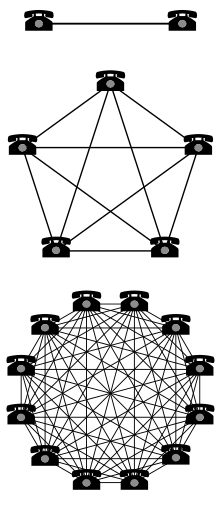
WebRTC is one of the highlights of HTML5. The latest stable releases of Google Chrome (including the free Chromium browser) and Firefox include support for this technology and although the specifications are still being finalized, this is the time when developers can start preparing the first generation of web-apps that will define the future of this technology. The JSCommunicator project aims to make it easy to integrate WebRTC into existing web applications. It provides a high-level API on top of the popular JsSIP SIP stack for JavaScript. The JSCommunicator API provides basic dialing and call control features, allowing you to focus on the application level rather than the SIP level. The configuration file suggests many possible ways it can be deployed and customized without any coding at all. The popular DruCall module for the Drupal CMS provides a practical demonstration of how JSCommunicator can be embedded in other products, multiplying the power of WebRTC for millions of other web developers, bloggers, online shops and other sites. This part of the DruCall source code provides a practical demonstration of how JSCommunicator integrates with PHP and this demonstrates how we extract the parameters from PHP in the JavaScript and convert them to the JSCommunicator configuration object. Practical deployments of WebRTC today The student selected for this GSoC project will focus on two practical, real-world deployments of JSCommunicator: It is particularly important to think about ways to make this technology useful for the Debian Developer community in the pursuit of Debian's work. Not just for Debian A communication product is not much use if there is nobody to talk to. The optimal outcome of this project may involve helping two or three additional free software communities to build portals similar to https://rtc.debian.org so that they can interact with Debian and each other using Federated SIP. As Metcalfe's Law explains, this outcome would be a win-win situation for everybody. Metcalfe's Law - Network effect Mentors needed too The more diverse the mentoring community, the more positive outcomes we can achieve with this project. If you would like to be part of a mentoring team for this project, please email me and subscribe to the Debian SOC co-ordination email list. There is no strict requirement for all mentors in the team to be full Debian Developers and emerging technology like this clearly needs people with strengths in a range of different areas. Get started now For general ideas about getting selected for Google Summer of Code, please see the comments at the bottom of my earlier blog post about Ganglia projects For this project in WebRTC in particular, please:
  • Review the project brief on the Debian wiki
  • Discuss your ideas on the JsSIP Google group
  • Send an email to introduce yourself on the Debian SOC co-ordination email list and give a link to your post on the JsSIP list
  • You must complete a coding test. Please see the open bug list for JSCommunicator, complete one of these tasks and submit a pull request on Github. Please send an email to the JsSIP Google group to discuss your pull request.
  • Explain what features you would create during the summer
  • Explain which other tools or libraries you would like to use
  • Give examples of previous work you have done with HTML and JavaScript
  • Explain how your participation will benefit Debian, free software and the wider world. Give some practical examples.
  • If you are interested in other JavaScript and jQuery opportunities for GSoC 2014, please also read more about the web components in the Ganglia project - if you apply for both Debian and Ganglia, you only have to complete one coding test as part of your application.

1 March 2014

Francois Marier: Using vnc to do remote tech support over high-latency networks

If you ever find yourself doing a bit of technical support for relatives over the phone, there's nothing like actually seeing what they are doing on their computer. One of the best tools for such remote desktop sharing is vnc. Here's the best setup I have come up with so far. If you have any suggestions, please leave a comment!

Basic vnc configuration First off, you need two things: a vnc server on your relative's machine and a vnc client on yours. Thanks to vnc being an open protocol, there are many choices for both. I eventually settled on x11vnc for the server and ssvnc for the client. They are both available in the standard Debian and Ubuntu repositories. Since I have ssh access on the machine that needs to run the server, I simply login and then run x11vnc. Here's what ~/.x11vnrc contains:
noxdamage
That option appears to be necessary when the desktop to share is running gnome-shell / compiz. Afterwards, I start the client on my laptop with the following command:
ssvncviewer -encodings zrle -scale 1280x775 localhost
The scaling factor is simply the resolution of the client minus any window decorations.

ssh configuration As you can see above, the client is not connecting directly to the server. Instead it's connecting to its own vnc port (localhost:5900). That's because I'm tunelling the traffic through the ssh connection in order to avoid relying on vnc extensions for authentication and encryption. Here's what the client's ~/.ssh/config needs for that simple use case:
Host server.example.com:
  LocalForward 5900 127.0.0.1:5900
If the remote host (which has an internal IP address of 192.168.1.2 in this example) is not connected directly to the outside world and instead goes through a gateway, then your ~/.ssh/config will look like this:
Host gateway.example.com:
  ForwardAgent yes
  LocalForward 5900 192.168.1.2:5900
Host server.example.com:
  ProxyCommand ssh -q -a gateway.example.com nc -q0 %h 22
and the remote host will need to open up a port on its firewall for the gateway (internal IP address of 192.168.1.1 here):
iptables -A INPUT -p tcp --dport 5900 -s 192.168.1.1/32 -j ACCEPT

Optimizing for high-latency networks Since I do most of my tech support over a very high latency network, I tweaked the default vnc settings to reduce the amount of network traffic. I added this to ~/.x11vncrc on the vnc server:
ncache 10
ncache_cr
and changed the client command line to this:
ssvncviewer -compresslevel 9 -quality 3 -bgr233 -encodings zrle -use64 -scale 1280x775 -ycrop 1024 localhost
This decreases image quality (and required bandwidth) and enables client-side caching. The magic 1024 number is simply the full vertical resolution of the remote machine, which sports a vintage 1280x1024 LCD monitor.

John Sullivan: Spritz

Spritz seems like a very interesting way to read quickly. It's the opposite of everything I've read (slowly) about speed reading, which focuses on using peripheral vision and not reading word-by-word. You're supposed to do things like move your eyes straight down the page, taking in whole lines at a time. Interruptions seem like a big problem; interruptions that make me look away, or interruptions in my brain, where I might realize I've not been paying attention for some amount of time. Maybe they should have navigation buttons similar to video players, so you can skip backward 15 seconds at a time. I also do want to go back and review previous pages sometimes for reasons that have nothing to do with interruption, so I wouldn't want word-by-word to be the only way to view a text -- especially when reading nonfiction. I might event want it to work in a mode where you hold down the button on the side of your phone or tablet in order to move the words, and then have them automatically pause when you release. It feels like I'd want a lot of short breaks when reading in this style. It should also be free software, but unfortunately I'm guessing it won't be. I hope someone will make a free software application along these lines -- the basics seem pretty basic.

Vasudev Kamath: Installing and Configuring NetBSD on Qemu in Debian

First step will be getting a NetBSD ISO image for installation purpose. It can be downloaded from here. Next step will be creating a disk image for installing NetBSD. This is done using qemu-img tool like below
$ qemu-img create -f raw netbsd-disk.img 10G
Image format used is raw and size is specified as last arugment. Tune the size as per your need. To start the installation run the following command
$ qemu-system-x86_64 -m 256M -hda netbsd-disk.img -cdrom \
             NetBSD-6.1.3-amd64.iso -display curses -boot d \
             -net nic -net user
So this is using user mode networking so you won't be able to have internet access during installation. I couldn't figure out on how to get network working during installation so I configured network after installation. Once you run above command you will be given with 4 options as follows.
  1. install netbsd
  2. install netbsd with ACPI disabled
  3. install netbsd with ACPI and SMP disabled
  4. drop to boot shell
Even though I first installed using the option 1 I couldn't get it boot after installation so had to reinstall with option 2 and it works fine. I'm not gonna explain each step of installation here because the installer is really simple and straight forward! I guess the NetBSD installer is the first simplest installer I have encountered from the day I started with Linux. Its simple but powerful and gets job done very easily, and I didn't read manual for installation before using it.
Enabling Networking This section involves mixture of configuration in Debian host and inside NetBSD to get the network working. The wiki page of Debian on Qemu. helped me here. To share the network with Qemu there are 2 possiblities
  1. Bridged networking between host and guest using bridge-utils
  2. Using VDE (Virtual Distributed Ethernet)
The option 1 which is explained in wiki linked above didn't work for me as I use CDC Ether based datacard for connecting to Internet which gets detected as eth1 on my machine. When bridging happens between tap0 and eth1 I end up loosing Internet on my host machine. So I selected to use VDE instead. First install packages vde2 and uml-utilities once done edit the /etc/network/interfaces file and add following lines:
auto vdetap
iface vdetap inet static
   address 192.168.2.1
   netmask 255.255.255.0
   vde2-switch -t vdetap
We can use dnsmasq as a DHCP server for the vdetap interface, but I'm not gonna explain the configuration of dnsmasq here. Run the below command to get vdetap up
modprobe tun
ifup vdetap
/etc/init.d/dnsmasq restart
newgrp vde2-net # run as user starting Qemu VM's
I couldn't get successful output for newgrp command, I was getting some crypt: Invalid argument output. But I could still get network working on NetBSD so I considered to ignore that for now. Now start the NetBSD qemu instance running using following command
$ qemu-system-x86_64 -m 256M -hda \
             /mnt/kailash/BSDWorld/netbsd-disk.img \
             -net nic -net vde,sock=/var/run/vde2/vdetap.ctl -display curses
Once the system is up login using root user, NetBSD will warn you for this and suggest to create another user but for now ignore it. To find the network interface in NetBSD just run the usual ifconfig command. In my case interface is named wm0. First step will be configuring the IP address for your interface and setting up the gateway route. Run the below command for this purpose
# ifconfig wm0 192.168.2.2 netmask 255.255.255.0
# route add default 192.168.2.1
Note that I added gateway as IP address of vdetap on my host machine. Now try pinging the host and even you can try ssh to host system. But note that this is not persistent over the reboots and for some reason I didn't yet figure out how to make NetBSD get address over DHCP from my host machine. I will update once I figure it out. Now to make the connection address persistent over reboots you need to create a file by name /etc/ifconfg.<interface>. Replace interface with a proper interface on your running NetBSD. In my case this file is /etc/ifconfig.wm0 and has following content.:
192.168.2.2 netmask 0xffffff00 media autoselect
Set the DNS server as host by adding file /etc/resolv.conf with following content.:
nameserver 192.168.2.1
After this you need to do NAT/masquerading using iptables. Just copy following script to a file and execute it as root
#!/bin/sh
# Restart the dnsmasq
/etc/init.d/dnsmasq restart
# Set nat rules in iptables
iptables --flush
iptables --table nat --flush
iptables --delete-chain
iptables --table nat --delete-chain
# Replace accordingly usb0 with ppp0 for 3G
iptables --table nat --append POSTROUTING --out-interface eth1 -j MASQUERADE
iptables --append FORWARD --in-interface vdetap -j ACCEPT
# Enable IP forwarding in Kernel
sysctl -w net.ipv4.ip_forward=1
With the above setup you will be able to get DNS resolution even after you reboot the Qemu instance but Internet connection will not work untill you run the route command I mentioned above. I still didn't figure out how to persist route but I will update it here once I figure it out.
Note that you won't be able to SSH as root to NetBSD (may be its configured to not allow by default), so you would need to create a normal user before trying to SSH from host to guest. Also make sure you add the user to wheel group to allow him execute su command.
So now I've NetBSD running on my laptop with mere 256M ram and its amazingly fast even at such low RAM. I've created a new user and can SSH into it from host machine and use it just like I use a server!. I will put up the notes of my BSD adventure here periodically. The feeling of using a BSD is amazing :-)
Update: I forgot to add masquerading step, I've added it now.

Dirk Eddelbuettel: RcppArmadillo 0.4.100.0

A new minor upstream release 4.100 of the Armadillo templated C++ library for linear algebra was finalised by Conrad yesterday. I rolled up the corresponding RcppArmadillo release 0.4.100.0 which is now on CRAN and will go to Debian shortly.
Changes in RcppArmadillo version 0.4.100.0 (2014-02-28)
  • Upgraded to Armadillo release Version 4.100.0 (Dirt Cruiser)
    • added normalise() for normalising vectors to unit p-norm
    • extended the field class to handle 3D layout
    • extended eigs_sym() and eigs_gen() to obtain eigenvalues of various forms (eg. largest or smallest magnitude)
    • automatic SIMD vectorisation of elementary expressions (eg. matrix addition) when using Clang 3.4+ with -O3 optimisation
    • faster handling of sparse submatrix views
    • workaround for a bug in LAPACK 3.4
Courtesy of CRANberries, there is also a diffstat report for the most recent release As always, more detailed information is on the RcppArmadillo page. Questions, comments etc should go to the rcpp-devel mailing list off the R-Forge page.

This post by Dirk Eddelbuettel originated on his Thinking inside the box blog. Please report excessive re-aggregation in third-party for-profit settings.

Russ Allbery: Review: Air Apparent

Review: Air Apparent, by Mark Monmonier
Publisher: University of Chicago
Copyright: 1999
Printing: 2000
ISBN: 0-226-53423-5
Format: Trade paperback
Pages: 232
Subtitled "how meteorologists learned to map, predict, and dramatize the weather," Air Apparent is a history of weather maps. Mapping the weather is a surprisingly new field, dating only from the early 19th century when a combination of scientific understanding and the ability to combine scattered observations made it practical. They're also a particularly tricky problem since weather is inherently three-dimensional, and even to the present day nearly all of our maps are two-dimensional. Monmonier starts with the earliest observational maps and the attempts to use them for prediction and tracks developments up to the late 1990s, with TV weathermen and (simple) interactive web data viewers. I got a copy of this book after Paul Krugman mentioned it. I don't know a lot about weather forecasting or weather maps, but I remembered finding the science of weather fronts and maps of them fascinating in high school, and I hoped I'd get the same feeling from this. Unfortunately, I probably need to stop reading Monmonier's books; they always sound interesting, but I don't enjoy reading them. One thing that's important to know is that this is not a history of meteorology. One can't hold that against the book, of course, because it never claimed to be. But it has just enough of a history of meteorology mixed into its history of map-making to make at least this reader wish he were reading that other book. I like maps, I really do, but I was hoping for either a book that melded a history of the science of weather forecasting with the maps that were used in that science, or a book that dove deep into the effective and ineffective ways to make weather maps (ideally, Edward R. Tufte for maps). This is neither; it's little more or less than a detailed history of the making of weather maps. Each time it gets close to a clear explanation of the underlying meteorology, it finds a map to examine and skips the rest of the explanation. I kept almost understanding the underlying science, but not enough to really understand the goals of the map makers, or why one presentation was better than another, or how those presentations were used to make forecasts or track weather data. I think I would have found this book more interesting in conjunction with a full history of meteorology, but I suspect that a history of meteorology would include enough about the maps to render this book largely redundant for the casual reader. The other problem I had with this book is that it's very dry. Monmonier is clearly trying, and clearly cares a lot about his topic, but the book has no flow. I kept getting lost in the barrage of names, arguments over technique, and struggles for government funding. It's hard to put a finger on why the book didn't grab me; the closest I can come is that it's a book stuffed full of facts. Monmonier did exhaustive historical research on weather map making, saved numerous quotes from original documents, and laid it all out chronologically. That's fine if you just want the information, but I was looking to be entertained in the process, and that didn't happen. I think the problems get worse in the second half of the book, when weather satellites and computers enter the picture and the laborious, manual map-making fall out, although maybe I was just exhausted with the book by then. The early history of weather maps at least has the benefit of showing the logistical struggles behind creating an effective weather service: insufficient observation points, slow communication methods, and the need for skilled map-makers to turn measurements into visual representations. Once computers and satellite photography enter the picture, the science matters even more, and I think the reader needs a better understanding of the underlying science to make sense of the results. Air Apparent has a tendency to provide a brief introduction to the type of data, a detailed chronological history, and then a discussion of the ways of presenting and representing that data, without ever getting the reader to care about the data itself or see how it ties into forecasting. Part of the problem, I suspect, is that the history of meteorology seems to be full of sensible, careful people who largely did sensible, careful things with the data they had available at the time. This is great for the advancement of science, and not so helpful at making a history engrossing. I wish I could say that I was glad I read this book for the information, if not the presentation, but unfortunately I didn't retain much. I needed some sort of structure or frame on which to hang all of the specifics, some sense of story or controversy or at least scientific understanding, and I didn't get it. It took me a couple of months to finish this book because I kept setting it down to read other things, and I only finished it out of a combination of stubbornness and knowledge that other people liked it. If the topic sounds interesting, well, this book exists, and it's gotten several good reviews. But I'm afraid I can't recommend it. Rating: 4 out of 10

Vasudev Kamath: Gzipped response for CSS/JS with Apache and mod_uwsgi

So it may sound normal to receive compressed response for CSS/JS file from Apache2 but what I faced is completely different behavior, here I saw not just body of response but also header are getting compressed and send to browser and browser was unable to interpret the response there by leading page rendered without CSS and JS. That was long story short, so let me explain in detail the case and what I found out. I have hosted SILPA on my VPS using uWSGI. I had used till date using libapache2-mod-proxy-uwsgi plugin for which uWSGI should be using network socket and in Apache2 config I need ProxyPass directive pointing to uwsgi://host:port and everything used to work out of box. There is a drawback for using network socket in uWSGI that is limited amount of ports (65535) and possible clash with other services if we use wrong port number, additionally network sockets will be slower compared to the file socket so yesterday I thought of changing it to file socket and removed socket directive in the ini file for uWSGI application container for SILPA and here is where all problems started. My updated configuration can be seen in our documentation page that is if you are interested to look my configuration file :-).
Problem Reporting We got selected to Gsoc again this year and we have lot of students jumping in our channel #silpa on irc.freenode.net and yesterday night some students reported they are facing 500 internal server error and subsequently others mentioned there is no theme being rendered. I checked and found everything was fine for me only to notice that my browser was using cached content, and when I clear cache there I go everything vanished, no theme no css no javascript just plain html!!!.
Investigation So I thought I should investigate this and fired up firebug on my iceweasel to observe the network traffic. And below is what I observed in firebug network console!. No response headers So you can see no response header in the above image but there is a response and below how is response content visible on firebug. gzipped response Still weird part was when using wget/curl directly to get the CSS I was getting correct reply and the file, which is puzzling. So I went ahead opened the CSS url directly using browser and saved the resulting file. When I used file command on it, output suggested the saved file in gzip compressed!. I went ahead uncompressed it and opened the file and inside it I found response header and the response body! So what just happened? Did apache some how manage to compress entire respone not just response body? The more puzzling question was why did it work when I was using mod_proxy_uwsgi and failed when I switched to mod_uwsgi. I had no clue at this point why this behavior is coming up.
Possible Solution I was still not sure how to resolve this, and started searching in the network but nothing was coming up in search result which can explain me this. And finally I stumbled on a link which is totally unrelated but I saw the word mod_deflate in the content and wandered on my system to see if its enabled. Yes mod_deflate was enabled I just opened the conf file and saw following.
<IfModule mod_deflate.c>
       # these are known to be safe with MSIE 6
       AddOutputFilterByType DEFLATE text/html text/plain text/xml
       # everything else may cause problems with MSIE 6
       AddOutputFilterByType DEFLATE text/css
       AddOutputFilterByType DEFLATE application/x-javascript application/javascript application/ecmascript
       AddOutputFilterByType DEFLATE application/rss+xml
</IfModule>
Interesting so it suggests to compress css, javascript files etc. So I thought possibly its compressing the result of mod_uwsgi, yeah possibly so why not try disabling mod_deflate and check if it works well and good if not I'm not gonna loose anything. So I disabled mod_deflate and voila! Everything is working fine!
What might be the reason for this behavior? Well I'm not exactly sure but here is my assumption. The whole behavior depends on internal implementation of mod_uwsgi and mod_proxy_uwsgi module. To confirm this I switched back to use mod_proxy_uwsgi module and enabled mod_deflate and observed request response in Firebug network console and below is what I observed. Response with mod_proxy_uwsgi So response is still gziped but this time only response body was gziped and Content-Encoding field was set properly which makes browser to properly uncompress the response body and use it. So it seems like there is a difference between mod_uwsgi and mod_proxy_uwsgi implementation. mod_uwsgi was sending the response along with response headers which was compressed by mod_deflate there by rendering browser helpless to interpret the response. But mod_proxy_uwsgi seems to be only sending the response content without response body and this content was later compressed by mod_deflate and proper response headers were set by apache before sending it to browser. So now whose fault is this? Is it the bug in mod_uwsgi or, mod_deflate not being able to exclude response headers from compression? I've no clue! If you have a clue and you want to share it with me, please consider writing to me over email. My details are available in Contacts

Ben Armstrong: Invisible CSS animations on Iceweasel consuming CPU

Thanks to bernat on #debian @ irc.debian.org for helping me track down this bug and devise a workaround. When working on my wife s netbook, I noticed that when idling on Facebook in iceweasel 24.3.0esr-1, the process was taking far too much CPU. I then retested on a wheezy system with the release iceweasel from mozilla.d.n, which at that time was 26, and I later upgraded to 27. Same problem there, too, on both versions. In fact, it seems the slowdown was amplified by the fact that I was running iceweasel in vnc4server, not the worlds most efficient X implementation. Even with all these versions tested, I have yet to file a Debian bug, as I will need some time on a system where the slowdown is noticeable and I m using a current Debian version. But I wanted to post now to give props to bernat for his help. If you think you have this issue, go read his article linked above, which contains the workaround.

Next.

Previous.