Search Results: "sto"

30 December 2012

Russ Allbery: Term::ANSIColor 4.00

Term::ANSIColor is a Perl core module that provides a few different interfaces to get at the ANSI color and text attribute escape sequences. It can be used to, for example, print out bold text or colorize output. This is a major new feature release, incorporating patches sent to me by Kurt Starsinic and Stephen Thirlwall. Kurt Starsinic contributed support for 256-color emulators. These hang special extended sequences off the otherwise-unused 38 and 48 sequences, providing an alternative naming of the base 16 colors, 216 colors arranged in an RGB namespace, and 24 shades of grey. Those colors are now available via all the normal Term::ANSIColor interfaces. He also contributed a program to print out test data for 256-color emulators that I enhanced to print out test data for the basic and 16-color sets as well, which allowed me to get rid of the static test files in the distribution. Stephen Thirlwall contributed support for creating aliases for the standard colors via an environment variable. I extended his patch to also provide a coloralias() function interface. This feature probably won't be that widely used, but it allows a user to set up custom color names for applications that take color names from user configuration (which might be handy for doing things like using the Solarized color scheme), or to define an alias like "alert" or "warning" in one place and then use it throughout the code. With the new 256-color support, it may be useful to set up more human-readable aliases for some of the RGB colors. Since I was working on this project anyway, I also redid the whole module in the new Perl coding style that I've been experimenting, based on Damian Conway's Perl Best Practices, and added a ton of new tests. There are a lot of great CPAN modules out there to do automated tests of various aspects of Perl code, and most of them don't require much effort to use. I'll probably write a separate post about that later. That sort of comprehensive review of course uncovered a bunch of microbugs and lack of clarity in the code, which is now hopefully much improved. I'm pleased to report that the test suite achieves 100% code coverage as reported by Devel::Cover (and in fact there's a maintainer-only test to ensure that it stays that way). You can get the latest version from the Term::ANSIColor distribution page.

Eddy Petrișor: Looking for a backup application for a small home network

I have been looking at backup solution for the last few days and I am stuck, so I am asking for pointers or suggestions.

Since all backup solutions are appropriate to various needs, here are my requirements for my home network (two laptops backup on a very low powered server with a 3TiB HDD):
These are the basic requirements, and bonus-points requirements include:
According to the info I found, candidates for these criteria are Amanda and BackupPC. I like the rsnapshot idea of deduplication and incremental backups, but it's not available for Windows. BackupPC seems to be OK-ish, but it sounds too much like a bunch of Perl scripts and Windows support sounds like an after-thought and I dislike the idea of installing Cygwin just to provide some *nix tools.

I discarded Bacula, because the general impression I got from what I read is that it is hard to set up, has its own storage and has heavy needs for both clients and server. It sounds like overkill.

So what do other people recommend for my setup? Is Amanda OK? Did I get the wrong impression regarding BackupPC?

Keith Packard: MicroPeakSerial

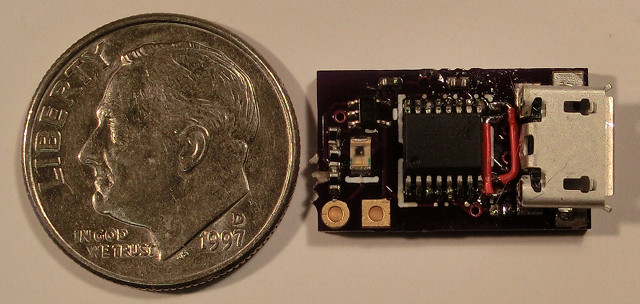
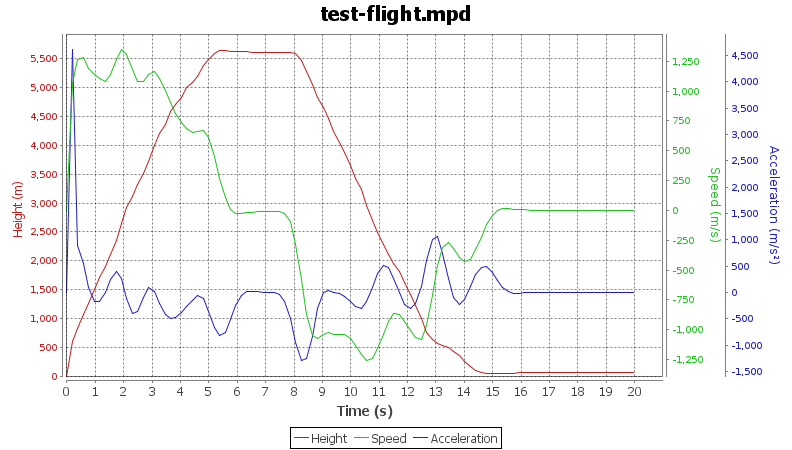
MicroPeak Serial Interface Flight Logging for MicroPeak MicroPeak was original designed as a simple peak-recording altimeter. It displays the maximum height of the last flight by blinking out numbers on the LED. Peak recording is fun and easy, but you need a log across apogee to check for unexpected bumps in baro data caused by ejection events. NAR also requires a flight log for altitude records. So, we wondered what could be done with the existing MicroPeak hardware to turn it into a flight logging altimeter. Logging the data The 8-bit ATtiny85 used in MicroPeak has 8kB of flash to store the executable code, but it also has 512B (yes, B as in bytes ) of eeprom storage for configuration data. Unlike the code flash, the little eeprom can be rewritten 100,000 times, so it should last for a lifetime of rocketry. The original MicroPeak firmware already used that to store the average ground pressure and minimum pressure (in Pascals) seen during flight; those are used to compute the maximum height that is shown on the LED. If we store just the two low-order bytes of the pressure data, we d have room left for 251 data points. That means capturing data at least every 32kPa, which is about 3km at sea level. 251 points isn t a whole lot of storage, but we really only need to capture the ascent and arc across apogee, which generally occurs within the first few seconds of flight. MicroPeak samples air pressure once every 96ms, if we record half of those samples, we ll have data every 192ms. 251 samples every 192ms captures 48 seconds of flight. A flight longer than that will just see the first 48 seconds. Of course, if apogee occurs after that limit, MicroPeak will still correctly record that value, it just won t have a continuous log. Downloading the data Having MicroPeak record data to the internal eeprom is pretty easy, but it s not a lot of use if you can t get the data into your computer. However, there aren t a whole lot of interfaces avaialble on MicroPeak. We ve only got: First implementation I changed the MicroPeak firmware to capture data to eeprom and made a test flight using my calibrated barometric chamber (a large syringe). I was able to read out the flight data using the AVR programming pins and got the flight logging code working that way. The plots I created looked great, but using an AVR programmer to read the data looked daunting for most people as it requires: With the hardware running at least $120 retail, and requiring a pile of software installed from various places around the net, this approach didn t seem like a great way to let people easily capture flight data from their tiny altimeter. The Blinking LED The only other interface available is the MicroPeak LED. It s a nice LED, bright and orange and low power. But, it s still just a single LED. However, it seemed like it might be possible to have it blink out the data and create a device to watch the LED and connect that to a USB port. The simplest idea I had was to just blink out the data in asynchronous serial form; a start bit, 8 data bits and a stop bit. On the host side, I could use a regular FTDI FT230 USB to serial converter chip. Those even have a 3.3V regulator and can supply a bit of current to other components on the board, eliminating the need for an external power supply. To see the LED blink, I needed a photo-transistor that actually responds to the LED s wavelength. Most photo-transistors are designed to work with infrared light, which nicely makes the whole setup invisible. There are a few photo-transistors available which do respond in the visible range, and ROHM RPM-075PT actually has its peak sensitivity right in the same range as the LED. In between the photo-transistor and the FT230, I needed a detector circuit which would send a 1 when the light was present and a 0 when it wasn t. To me, that called for a simple comparator made from an op-amp. Set the voltage on the negative input to somewhere between light and dark and then drive the positive input from the photo-transistor; the output would swing from rail to rail. Bit-banging async The ATtiny85 has only a single serial port , which is used on MicroPeak to talk to the barometric sensor in SPI mode. So, sending data out the LED requires that it be bit-banged directly modulated with the CPU. I wanted the data transmission to go reasonably fast, so I picked a rate of 9600 baud as a target. That means sending one bit every 104 S. As the MicroPeak CPU is clocked at only 250kHz, that leaves only about 26 cycles per bit. I need all of the bits to go at exactly the same speed, so I pack the start bit, 8 data bits and stop bit into a single 16 bit value and then start sending. Of course, every pass around the loop would need to take exactly the same number of cycles, so I carefully avoided any conditional code. With that, 14 of the 26 cycles were required to just get the LED set to the right value. I padded the loop with 12 nops to make up the remaining time. At 26 cycles per bit, it s actually sending data at a bit over 9600 baud, but the FT230 doesn t seem to mind. A bit of output structure I was a bit worried about the serial converter seeing other light as random data, so I prefixed the data transmission with MP ; that made it easy to ignore anything before those two characters as probably noise. Next, I decided to checksum the whole transmission. A simple 16-bit CRC would catch most small errors; it s easy enough to re-try the operation if it fails after all. Finally, instead of sending the data in binary, I displayed each byte as two hex digits, and sent some newlines along to keep the line lengths short. This makes it easy to ship flight logs in email or whatever. Here s a sample of the final data format:
MP
dc880100fec000006800f56d8f63b059
73516447273fa93728301927d91b7712
730bbf0491fe88f7c5ee8ee896e3fadc
9dd9d3d502d1afcea2cbafc6b4c34ec1
bfbfcabf10c03dc05dc070c084c08fc0
9cc0abc0b9c0c1c0ccc0dcc020c152c4
71c9a6cf45d623db7de05ee758edd9f2
b4f9fd00aa074311631a9221c4291330
c035873b2943084bbb52695c0c67eb6b
d26ee5707472fb74a4781f7dee802b84
09860a87e786ad868a866e8659865186
4e8643863e863986368638862e862d86
2f862d86298628862a86268629862686
28862886258625862486
d925
Making the photo-transistor go fast enough The photo-transistor acts as one half of a voltage divider on the positive op-amp terminal, with a resistor making the other half. However, the photo-transistor acts a bit like a capacitor, so when I initially chose a fairly large value for the resistor, it actually took too long to switch between on and off the transistor would spend a bunch of time charging and discharging. I had to reduce the resistor to 1k for the circuit to work. Remaining hardware design I prototyped the circuit on a breadboard using a through-hole op-amp that my daughter designed into her ultrasonic guided robot and a prefabricated FTDI Friend board. I wanted to use the target photo-transistor, so I soldered a couple of short pieces of wire onto the SMT pads and stuck that into the breadboard. Once I had that working, I copied the schematic to gschem, designed a board and had three made at OSHPark for the phenomenal sum of $1.35. Aside from goofing up on the FT230 USB data pins (swapping D+ and D-), the board worked perfectly. The final hardware design includes an LED connected to the output of the comparator that makes it easier to know when things are lined up correctly, otherwise it will be essentially the same. Host software Our AltosUI code has taught us a lot about delivering code that runs on Linux, Mac OS X and Windows, so I m busy developing something based on the same underlying Java bits to support MicroPeak. Here s a sample of the graph results so far: Production plans I ve ordered a couple dozen raw boards from OSH Park, and once those are here, I ll build them and make them available for sale in a couple of weeks. The current plan is to charge $35 for the MicroPeak serial interface board, or sell it bundled with MicroPeak for $75.

Luca Falavigna: Spare Parts TV Set

I don t like watching videos sitting in front of a computer, I usually store them into a USB key to plug into my Samsung LE37 TV set. It s not an easy task, though, as I have to fight with other components of my family who usually like watching something completely different than DebConf videos ;) I could have invested 200 to buy a new one, but I tried a different approach first. Recycling a netbook I received a Tweety device as Christmas gift, and I tried to connect it to my netbook to see how it worked. I was quite impressed by the good quality of the sound (if compared to the really poor quality of the netbook speakers), and I realized I could have recycled the netbook as a brand new TV set with some little adjustments. I plugged my SyncMaster 920n PC monitor into the netbook VGA port, switched Totem to fullscreen mode, and here it is my TV set! Remote control OK, that was quite straightforward to accomplish. A real TV set has a remote control too, but my netbook is not equipped with an IrDA port, so I had to think about a different solution. My BlackBerry is equipped with a cool app called BBSSH, which allows you to connect to any SSH server, this could be a good starting point to implement a remote control device. Then, I had to write an interface to Totem using Python and DBus binding to allow my SSH remote control to issue commands to start and pause the player. I published a first working implementation: at the moment the only supported operations are play, pause, stop and volume adjustments, but there are a lot of opportunities by implementing full MPRIS specification. Just to avoid typing a long command each time, I finally created a set of bash aliases, one for each command, so I just have to type one letter to have the desired function, as much as a real remote control :)

Russ Allbery: Review: Countdown

Review: Countdown, by Mira Grant
Publisher: Orbit
Copyright: August 2011
ISBN: 0-316-20448-X
Format: Kindle
Pages: 75
Countdown is a novella that tells the "origin story" of Grant's Newsflesh universe, the setting for Feed and sequels. It's the story of the initial creation of Kellis-Amberlee and the first zombie Rising, mixed with a small bit of backstory for the Mason family. There are two ways to read this novella that work. It's possible to read it prior to reading any of the Newsflesh books as a sort of teaser. It sets up the universe, shows the devastation of society, and raises the question of how society will respond. Alternately, and I think more effectively, it can be read as an appendix to the Newsflesh trilogy that fills in the backstory. Reading it after all three books led to some fun moments of "oh, that's how that happened." It shows the accidents and bad decisions that led to the Rising, and provides a bit of a counterbalance to some of Georgia and Shaun's snarky comments about the government, scientists, and the media. The way to read it that doesn't work is to try to read it as a stand-alone work. Countdown has very little in the way of a story. It's told in the disaster epic style of brief scenes following numerous characters, some who are only seen once. There are small plot arcs following the Kellis virus, the Amberlee virus, and the Masons, but none of them are satisfying when read as a traditional story. Some events, particularly in the Masons' thread, have no real meaning by themselves and only acquire significance as part of Georgia and Shaun's backstory. The reason to read this novella is because you're invested in the universe, either to whet your appetite for more or to fill in some of the background. With that caveat, I think Countdown is more effective as horror than the Newsflesh trilogy itself is. Feed and its sequels are more action novels that become political thrillers, and the confident first-person narration and snark undermines most of the sense of dread or horror in the world. (Please note: not being a horror fan, I consider this a feature.) Countdown doesn't have that strong narrative presence. Instead, it covers events that are both horrific and inevitable and towards which the characters are largely helpless. Some of the scenes towards the end are haunting. Grant still isn't very subtle, but I think she does a good job writing quiet desperation and leaving some of the emotions for the reader to interpolate. Countdown could be read after Feed, if you're interested enough in the world to want more, but I think it works best after Blackout (for reasons that are minor spoilers). It could be read before the whole series, but I recommend reading it as an appendix instead. Don't expect too much of it it's background filler rather than more story but I thought it was effective and enjoyed the additional filling-in of the world. Rating: 7 out of 10

29 December 2012

Russ Allbery: Review: Blackout

Review: Blackout, by Mira Grant
Series: Newsflesh #3
Publisher: Orbit
Copyright: 2012
ISBN: 0-316-20218-5
Format: Kindle
Pages: 631
Blackout is the third book in the Newsflesh series that started with Feed. As with the second book, Deadline, you do not want to read this book out of order. All the emotional heavy lifting is done in Feed, and the book won't mean as much without that. Also, as with Deadline, be very careful about any information you read bout the sequels if you've not yet read Feed, since it's very easy to spoil that book and most information about subsequent books will do so. I'm going to try to write this review without spoilers. That's going to be a bit tricky due to events in Feed, so bear with me if I'm less specific than normal. This is the grand finale of the series, and it is a firm conclusion. As you might expect, particularly from Deadline, that involves a lot more politics, a few more big revelations, some reunions, escalating scale, and a lot of fighting. Unfortunately, it also involves setup. A lot of setup. I didn't expect that, given that Deadline ended at a run, but it takes about half of Blackout and a whole lot of pages before we get to the events that logically follow from the end of Blackout. And those pages dragged for me. There are some great moments. The banter continues to be strong, there are some deeply affecting scenes with Shaun, and Maggie continues to be wonderful. Grant also introduces some new secondary characters (Monkey and the rest of his household) who are brilliant and feel like they could have come directly from Borderlands. All of Blackout has a bit more of that mad scientist feel, full of slightly deranged people who take the fight to the world in their own ways. But it still drags. One branch of the book has the protagonists going here, there, and everywhere in several roundabout attempts to advance the plot. The other branch is more psychologically tense, but it takes too long to get moving and therefore turns into a repetition of the same emotions and the same complaints. I wanted to get to the key events that happen about halfway through the book in about half as many pages as they took. Thankfully, things do pick up when the two strands of the book come together. Some of the emotional dynamics strengthen as well, which I'd been missing. Grant does a great job here tying the whole series together in a way that shows the differences between Feed and Deadline and digs into their nature a bit more. There is one big reveal that I found disappointing, both because it had been obvious since early in Deadline and yet was treated as a big reveal and because I think it put the book and series onto slightly more conventional territory in a place where it had previously been interestingly distinct. (I'm being vague because of spoilers.) But that didn't bother me too much, and the surrounding character dynamics I think made up for it. The final ending isn't exactly bad, but neither did it entirely work for me. The whole series seems a touch too naive. This worked in Feed (at least for me; some other reviewers disliked it) since the naivete felt like part of the dynamic of the story and the characters, and the stakes were mostly kept small enough that it was believable. The stakes are large enough here that I needed the world to be a touch more complicated and the villains less hissable. (If there's been one consistent flaw throughout this series, it's that Grant's villains are too purely evil.) And, in the end, I didn't quite buy the conflict at the heart of the story; after everything that had happened, I wanted something more complex and nuanced. I'm a bit unsatisfied, but, like Deadline, Blackout is still a good book. Neither of them live up to Feed, but they're both enjoyable, action-filled, and creative looks at a zombie apocalypse. I think Blackout is at its best when it's being Fallout or Borderlands and emphasizing the mad scientist angle of Grant's world, and I would have happily read several more chapters about Monkey. The mix of wacky risk-taking and serious political idealism doesn't quite gel, and the latter never worked for me in Blackout, but I still had a lot of fun with the core character interactions. If you read Deadline, you certainly want to read Blackout. If you stopped at Feed, Blackout is probably not a persuasive argument to continue. Rating: 7 out of 10

Russell Coker: Samsung Galaxy Camera a Quick Review

I recently had a chance to briefly play with the new Samsung Galaxy Camera [1]. The Galaxy Camera is an Android device with a 4.8 display (the same size as the Samsung Galaxy S3) that has a fairly capable camera (IE nothing like a typical phone camera). It runs Android 4.1 (Jelly Bean) and the camera has 21* zoom with a 16 megapixel sensor. Camera Features It seems that professional photographers are often annoyed when they see someone with a DSLR set in auto mode. It s widely regarded that auto mode is a waste of a good camera, although the better lenses used with DSLRs will usually give a better result than any compact camera even when it s in auto mode. The problem is that photography is quite complex, in an earlier post about digital cameras I summarised some of the technical issues related to cameras and even without any great detail it became a complex issue [2]. The Galaxy Camera has a reasonably friendly GUI for changing camera settings which even includes help on some of the terms, I expect that most people who use it will end up using most of the features which could make it a good training camera for someone who is going to move to a DSLR. A DSLR version of the Galaxy Camera could also be an interesting product. The camera also has modes such as Waterfall and Panorama , hopefully the settings for those would be exposed to the user so they could devise their own similar groups of settings. I ve seen the phone criticised for the lack of physical controls as the expert mode in software is inherently slower than manually turning dials on a DSLR. But it seems obvious to me that anyone who knows how to use the controls manually should be using a DSLR or bridge camera and anyone who doesn t already know how to do such things will be better suited by the software controls. It supports 120fps video at 720*480 resolution (with a file format stating that it s 30fps to give 1/4 speed) which could be useful. I used to have a LG Viewty smart-phone that did 120fps video but the resolution was too low to be useful. 720*480 is enough resolution to see some detail and has the potential for some interesting video, one use that I ve heard of is filming athletes to allow them to analyse their performance in slow motion. It also does 60fps video at 720p (1280*720) resolution. One down-side to the device is that the lens cover doesn t seem particularly sturdy. It s quite OK for a device that will be stored in a camera case but not so good for a device that will be used as a tablet. I didn t get to poke at the lens cover (people don t like it if you mess with their Christmas presents) but it s design is a couple of thin flaps that automatically retract when the camera is enabled which looks quite weak. I d like to see something solid which doesn t look like it will slide back if the device is treated as roughly as a phone. I think that the lack of a solid lens cover could be the one factor that prevents it from being used as a replacement for a smart phone. Apart from that a Galaxy Camera and a cheap GSM phone could perform all the functions of a high end phone such as the Galaxy S3 while also producing great pictures. It would probably make sense for retailers to bundle a cheap phone with a Galaxy Camera for this purpose. Tablet Features The device boasts WiFi Direct to allow multiple cameras and phones to talk to each other without a regular WiFi access point [3]. I didn t test this and I don t think it would be particularly useful to me, but it seems like a handy feature for less technical users. It can connect to the Internet via Wifi or 3G, supports automatic upload of pictures (it comes with Dropbox support by default like the Galaxy S3), and has a suite of photo and video editing software. I don t expect that any photo editing software that runs on an Android device would be much good (I think that you really need fine cursor control with a mouse and a high resolution screen), but it would probably be handy for sending out a first draft of photos. Most Android apps should just work, the exceptions being apps that rely on a camera that faces the user or full phone functionality. So the Galaxy Camera can do almost anything that an Android phone or tablet can do. Value The RRP for the Galaxy Camera is $599, that puts it in the same price range as a DSLR with a single lens. While that s not a bad price when compared to smart-phones (it s cheaper than the LTE version of the Galaxy S3 phone) it s still quite expensive for a camera that s not a DSLR. Fortunately Kogan is selling it for $469 and has free shipping at the moment [4]. This still makes it more expensive than some of Bridge Cameras which probably have significantly better optical features, but in terms of what the typical user can do with a camera the Galaxy Camera will probably give a much better result. The sensor in the Galaxy Camera is smaller than that in the Nokia 808 PureView [5] (1/2.3 vs 1/1.2 ) so the Nokia PureView should be able to take better pictures in some situations. Unfortunately the Nokia 808 doesn t run Android, I d probably own one if it did. Some of the reviews are rather harsh, the Verge has a harsh but fair review by Aaron Souppouris which makes a number of negative comparisons to cheaper cameras [6]. I really recommend reading Aaron s review as there s a lot of good information there. But I think that Aaron is missing some things, for example he criticises the inclusion of ebook software by saying that he wouldn t read a book on a camera. But the device is a small tablet computer which also has a compact camera included. I can easily imagine someone reading a book or playing Angry Birds on their camera/tablet while in transit to where they are will photograph something. I can also imagine a Galaxy Camera being a valuable tool for a journalist who wants to be able to write short articles and upload pictures and video when out of the office. Aaron concludes by suggesting that the Galaxy Camera is a $200 camera with $300 of editing features. I think of it as $200 in camera hardware with software that allows less skilled users to take full advantage of the hardware and the ability to do all the software/Internet things that you would do on a $450+ smart-phone. Would I Buy One? No. The Galaxy Camera is among other things a great toy, I d love to have one to play with but I can t spare $469 on one. Part of the reason for this is that my wife just bought a DSLR and is getting lessons from a professional photographer, so I really won t get better pictures from a Galaxy Camera. The DSLR on auto mode will allow me to take pictures that will usually be better than a Galaxy Camera can achieve (sometimes you just can t beat a good lens). For more demanding pictures my wife can tweak the DSLR. The 120fps video is a really nice feature, I don t know if my wife s DSLR can do that, but it s a toy feature not something I really need. I ve just bought a Galaxy S3 which is a great little tablet computer (most of the time it won t be used for phone calls). I don t need another 4.8 tablet so a significant part of the use of the Galaxy Camera doesn t apply to me. I recommend the Galaxy Camera to anyone who wants to take good photos but can t get a DSLR and lessons on how to use it properly. But if you would rather get a 35mm camera with interchangeable lenses that runs Android then it might be worth waiting. I expect that the Galaxy Camera will be a great success in the market (it s something you will love when you see it). That will drive the development of similar products, if Samsung doesn t release a 35mm Android camera soon then someone else will (for example Sony develops both high end cameras and Android phones). If my wife didn t have a DSLR then I d probably have bought a Galaxy Camera already. I will recommend it to my parents and many other people I know who want an OK camera and can benefit from a tablet, but don t know how to use a DSLR properly (or don t want to carry a bulky camera).

Steve Kemp: More polish for slaughter

A couple of days ago I made a new release of slaughter, to add a new primitive I was sorely missing:
if ( 1 != IdenticalContents( File1 => "/etc/foo" ,
                             File2 => "/etc/bar" ) )
 
   # do something because the file contents differ
 
This allows me to stop blindly over-writing files if they are identical already. As part of that work I figured I should be more "visible", so on that basis I've done two things: After sanity-checking my policies I'm confident I'm not leaking anything I wish to keep private - but there is some news being disclosed ;) Now that is done I think there shouldn't be any major slaughter-changes for the forseeable future; I'm managing about ten hosts with it now, and being perl it suits my needs. The transport system is flexible enough to suit most folk, and there are adequate facilities for making local additions without touching the core so if people do want to do new things they don't need me to make changes - hopefully. ObQuote: "Yippee-ki-yay" - Die Hard, the ultimate Christmas film.

Russ Allbery: Review: Dragonhaven

Review: Dragonhaven, by Robin McKinley
Publisher: Ace
Copyright: September 2007
Printing: October 2008
ISBN: 0-441-01643-X
Format: Mass market
Pages: 338
With a title like Dragonhaven from a well-established fantasy author like Robin McKinley, one's first expectations are probably some variety of medieval fantasy, perhaps with a boy or girl who encounters a rare dragon and befriends them. To some extent, those expectations are right: there is a boy, a rare dragon, and a friendship. But they're mostly wrong. Dragonhaven could easily pass for science fiction if one allowed a bit of handwaving, and the setting is contemporary. Jake is the first-person narrator and the center of this story. He lives with his father and a small group of park rangers and other scientists at Smokehill National Park, one of the few remaining reserves for dragons in the world. McKinley's world is much like ours, with the same politics and governments, except that dragons exist: huge, flying dragons that breathe fire. But they've been hunted to near-extinction, including via an actual war in Australia, and are now dwindling in a small handful of isolated reserves. No one is entirely sure how many are left since, for huge creatures, they're remarkably hard to find and document. The Smokehill staff mostly estimate them from prey kills and other indirect signs. This book is Jake's telling of his story, and McKinley goes to quite a bit of effort to find the right tone for a teenage boy. It's more verbal than written in style, with lots of capital letters, italics, tangents, digressions, and short sentences. He's also trying to tell the story in order without skipping ahead but sometimes failing, which turns into a mechanism to do foreshadowing as he slips in comments or mentions things he wasn't aware of at the time. The voice McKinley constructs is very strong and makes this book read unlike any other books of hers I've read. How much you enjoy the book will probably depend heavily on your opinion of Jake's storytelling style. The story proper starts when Jake, on his first overnight trip in the park, encounters a dying dragon and a dead poacher. This is a catastrophe for the park: the dead poacher will provide ammunition for everyone who thinks dragons are too dangerous and should be wiped out. But for Jake, it's a more immediately life-changing event. The dragon was a mother with newborn infants, one of whom has survived and who promptly bonds with Jake. This may sound like it's moving back into traditional fantasy territory, but it's not. Jake's relationship with Lois (the name he gives the baby dragon) is very unlike fantasy bonds with baby hatchlings and quite a bit like taking care of an actual infant. Except the infant is hot enough to burn the skin. And wants to be in a pouch (McKinley's dragons are marsupial, sort of) and therefore needs to crawl inside Jake's clothing and press against skin. And that's not mentioning the smell. Or the excretions. The vast majority of the book is concerned with Jake raising Lois, so you'd better be prepared for lots of description of this. Thankfully, Jake is not the sort to describe in gruesome detail (at least most of the time), and some of the description is quite funny. I was particularly fond of his account of the Smell being so intense and overwhelming that it became a third person in the room. But still, it is a lot of pages of, essentially, child-rearing, and I got tired of it before it was over. Also frustrating is that Jake obviously has never read any science fiction or fantasy. He doesn't even guess at certain aspects of the situation that are immediately obvious to any experienced SFF reader early on. One of those reveals is dragged out until nearly the end of the book. (I'll refrain from spoiling it, but I'll be very surprised if any regular reader of my reviews takes long to pick up on it.) McKinley does a good job with that part of the plot when Jake finally figures out what's going on, but it was still exasperating to have it take so long. Dragonhaven is already somewhat slow-paced due its detailed descriptions of Lois's rearing, and adding an obvious plot element that the protagonist is too dense to figure out makes the pace feel even slower. About a third of the way into this book, I didn't care for it. It was sort of gross, Lois wasn't very interesting, Jake was more frustrating than entertaining, and nothing was happening. But then it started to win me over, and the last part of the book wasn't bad at all. McKinley's best talent is her ability to mix the fantastic with the quotidian and give them equal weight and importance, to embed the reader so thoroughly with the character that one thinks about all the day-to-day impact of fantastic events that is normally skimmed over in books of this type. If you get engrossed in that angle of Jake and Lois's story, Dragonhaven can be quite enjoyable. When you're waiting for the plot to advance, it's a bit painful. Probably the best thing to do with this book, if you can, is read the first chapter or so and see what you think of Jake's voice. If you enjoy reading it, that's probably a good sign for the rest of the book. I do like McKinley's dragons: she avoids the traps of both making them too human and making them too much like animals, and manages to give Lois (once she's a bit older) a sort of intelligence that's inhuman but still canny and clearly sharper than a dog's. You'll likely get tired, as I did, of Jake's omnipresent headache and Lois's endless upbringing, but there is a payoff in the end. Rating: 7 out of 10

John Goerzen: Milk, Cookies, and Delight

Sometimes an attic is all it takes to delight children. This afternoon, the boys and I made cookies. Jacob has been talking about setting out milk and cookies for Santa Claus for several days, and of course the fact that we had made cookies reminded him of this as I figured it would. So after the boys got into their pajamas and all ready for bed, we set out milk and cookies for Santa. The boys have always known that Santa is pretend, but love the stories and traditions anyhow. Never mind that Christmas was 3 days ago, and they ve already opened their presents. It s SANTA! It s magic! It doesn t matter! I asked Jacob, Would you like me to pretend to be Santa tonight? A big grin, then Oh yes, dad! Do it! So after I read them their bedtime story, sang them a song (Jacob chose a Latin hymn that s my boy!), and tucked them into bed, I pretended to be Santa. I went back downstairs. I drank the milk and ate the cookies. Then I went to my small future present stash, selected a few small items, and put them under the tree. I gave it a few minutes. Then I crept up to the attic. I snuck along the wood floors quietly, until I was above the boys room. Then I jumped. And I scraped a wood chair along the floor. And then I yelled out HO HO HO! Merry Christmas! I had a brief conversation with Rudolph, then made some sliding noises. I was silent for a few seconds, then made some more noise and said, Wow, Rudolph, Jacob and Oliver left some great milk and cookies! Let s go deliver the rest of our presents! And made some vague sleigh taking off from the roof of a house noises. I crept back down the stairs. I put my ear to the outside of the closed door to the boys bedroom. I heard Jacob excitedly jabbering, He said milk and cookies! He liked them! He really liked them! Ooo butterfly, he was here! (Butterfly is a stuffed, er, butterfly that he sleeps with.) I gave it a minute or two, then I went in. Jacob, did you hear something? Yes! What was it? Well, it was a loud thud! I sat straight up like this. [ he demonstrates ] Then I heard ho ho ho ! And milk and cookies ! And I was excited like this! [ more demonstrations ] What do you think happened? I don t know! Dad, what did you do? I told him. It only increased his delight. Did it sound like Santa s sleight landing? (annoyed) No, dad. It sounded like a crash. (brightening) And then Santa coming down the chimney with presents! Oh, it is so exciting! (We don t have a chimney) It was still magical, even though he knew exactly what happened. For his part, Oliver slept through it all. He will still discover the empty plate, empty cup, and slightly less empty area underneath the tree. And neither boy knows about the thank you note from Santa yet. I anticipate smiles in the morning!

28 December 2012

Hideki Yamane: How to associate with distribution


I know there is a reason why you rebuild/create your own packages.

  • Unfortunately, there's no official package that is necessary to provide service to your customers
  • distro package is not suitable for your purpose by default
    • maybe since its features
    • maybe since performance issue


However, I want to ask you one question.
Is it necessary that you'd maintain it in your private repository?
Because create custom package repository is a kind of "fork"


  • Of course, you can do folk. But if you don't want to be "upstream", every time you need to follow your upstream to fix bugs, vulnerabilities and introduce new features. Important: Merge cost would become larger and larger from the time you did folk.
  • It's best that if your system can be used "out of box", but you need to modify packages for some reason (as above).
    Then, what would you do? - minimize
    • minimize numbers of private package
      = reduce maintenance cost
    • minimize diff with distro package
      = minimize diff with upstream = reduce maintenance cost

If you could minimize diff with distro, you can update and introduce new attractive features from updated distro package easily (maybe you don't need to maintain your custom package since its feature is merged to upstream).

Yes, you can get Agility.


And, if you would put your package to Debian official repository, we Debian can give you below benefits

  • build daemon with many architectures
  • open bug tracking system
  • world wide mirror network
  • security vulnerabilities tracker
  • users

  1. We can provide build system, including non-x86 arch (none of you have thought arm* architecture become important, right?) You can deal with porting as daily job, no huge jump to support newer architectures. It also brings the view to build cleaner structures in your code.
    It is much work to setup such system, but you can use it without any trouble.
  2. You can get bug report/wishlist/patches from Debian BTS (without any pay for it! :-)
    It will help you to improve software packages, it cannot be sent to you if you would put packages to closed private repository.
  3. Package is mirrored to many repositories in world wide. Robust. You can get binary/source code immediately, anywhere. No need to backup your package source.
  4. Any CVE is tracked. You can analyze security status in your system easily (it means you don't need to pay much money to build such system)
  5. Debian has huge user base. It would work as good "showcase" test (of course, without any pay for it...)


Conclusion)

It's okay to create/modify package. It's FLOSS. As you like! :)

However, to maintain custom package, you need to pay its cost (someone should work for it. If it's in only your own repository, it means you should work, no one can help it).

To maintain packages in distro can reduce its cost, can get many benefit - Less cost, more benefit - why not? Let's get involved to distribution!

Russell Coker: SIM Annoyances

My new Samsung Galaxy S3 phone takes a micro-SIM (see the Wikipedia page about Subscriber Identity Modules for details [1]). All my other mobile devices take a mini-SIM so I can t just put the SIM from my old phone in my new phone. I ve just made my second application to Virgin Mobile for a new micro-SIM, the first time they sent me a nano-SIM by mistake. Also if my new phone breaks I will have difficulty in getting a micro-SIM to run in a mini-SIM device (it should be possible, but will be difficult at least). I may even have to ask my Telco to send me a new mini-SIM to allow the use of an older phone if my Galaxy S3 breaks. The difference between micro and mini SIMs is 25*15mm vs 15*12mm. For a phone with a 4.8 display this doesn t seem to be a great benefit. It doesn t seem that the phone would be much bigger if they had designed it for a mini-SIM. If they had used a nano-SIM which is 0.09mm thinner that might have allowed them to make the entire phone thinner, I think that such thin phones are a bad idea but the reviewers seem to like thin phones with small batteries. I think that any device which is large enough to have a speaker somewhere near my ear and a microphone somewhere near my mouth will be big enough to fit a 25mm long SIM card. It seems to have been a trend in Australia in the last few years towards only selling unlocked phones on contracts (relying on the contract terms to lock the customer in) and only use locked phones for discount sales for pre-paid use. Also the free phones in Australia are considerably more expensive than buying a phone outright [2]. So I m sure that most people have a collection of older phones which in future can t be easily interchanged with new phones due to SIM card size differences. This is more of a problem due to the fact that modern phones seem to have a low quality of hardware production, the majority of Android phones owned by my relatives have failed in some substantial way well within the two year replacement period. I don t believe that I can rely on my Galaxy S3 working until I want to buy something better, I expect that my old Galaxy S (which has a hardware fault that makes it crash regularly but is mostly usable) will be pressed into service again. In terms of phone purchases, buying a phone that takes a micro-SIM seems like a bad strategy as there is an even smaller nano-SIM available. For all I know Samsung will release a Galaxy S4 or Note3 that uses a nano-SIM and give me the same upgrade problem in a couple of years time. I wish that the people who reviewed phones would pay more attention to the real world use cases than to slightly better specifications. The micro and nano SIMs seem to provide no real benefit for users. Saving a fraction of a gram in device mass or a fraction of a millimeter in one dimension might seem nice when aggregated with other small savings, but for the user it s no real benefit. Being able to interchange a bunch of random phones is a real benefit. It s also a real benefit to be able to buy a phone and expect it to just work immediately. With the current state of the market one can t buy a phone and make any assumptions about the SIM size that it will accept, at best this requires some extra research before buying and at worst this could involve some time without phone service. I think that a major feature for a review of an important device like a modern smart phone should be how quickly and easily it can be deployed for full use. When SIM size issues prevent a new device from being used properly for over a week (as has happened for me) then it seems like a design failure.

Russ Allbery: Review: Perl Best Practices

Review: Perl Best Practices, by Damian Conway
Publisher: O'Reilly
Copyright: July 2005
Printing: April 2011
ISBN: 0-596-00173-8
Format: Trade paperback
Pages: 492
I had a rather bad first reaction to this book or, rather, the existence of this book. Some time ago, I started hearing about a new program named perlcritic that served as a lint program for Perl and decided to give it a try. I was taken aback by the flood of diagnostics, but even more taken aback by the fact that most of them were apparently explained only by a reference to a book that I didn't own. It struck me wrong in an open source project and gave me a negative reaction towards the book, which lingered for years. That was exacerbated by discovering that it recommended using use English in some circumstances, something that I consider to be a horrible idea. So, when a coworker recommended it and suggested I really should read it, I was dubious. I'm glad I gave it a chance, since it turns out that nearly all of my objections were based on misunderstandings or false information. (Well, except for the use English part, but more on that in a moment.) Perl Best Practices does provide a lot of advice, explaining that flood of diagnostics, but perlcritic also warns about the same thing repeatedly, inflating a handful of issues into a lot of messages. Most of the recommendations in Perl Best Practices were things I was doing already; most of the rest are entirely sensible. Also, perlcritic does come with complete explanations of its diagnostics once you know where they're hidden (the perldoc of Perl::Critic::Policy modules whose names you can get at by insisting perlcritic divulge them). And, even more delightfully, once I got past my objections, I discovered that Perl Best Practices is one of the best books on coding style that I've read. Coding style is a notoriously difficult subject, since nearly everyone is convinced their personal style is the best (or at least that they don't want to change). Conway acknowledges that up-front, and acknowledges that some things are just arbitrary and consistency with any rule set is better than following some specific rule set. He then spends surprisingly little time on the sorts of things that dominate most coding style discussions (indentation, spacing, commenting, etc.). Instead, this is primarily a book about how to write efficient and transparent Perl code, one that focuses much more on the content and structure of that code than on how it is indented. The best part is that there are no undefended rules here. Perl Best Practices contains 256 separate guidelines, some quite general ("Provide an optimal interface, rather than a minimal one") and some quite specific ("Pass constructor arguments as labeled values, using a hash reference"), but every one of them has a supporting argument and specific reasons behind it. Conway backs up every recommendation with code samples and practical scenarios showing the pluses and minuses of different approaches. This is a book unconcerned with being an authority; rather, it reads like optional advice from a good mentor, complete with insightful discussions on each point raised. You may come away from it disagreeing with Conway's specific recommendation (and I did, in several places), but you'll almost certainly be better-informed about the problem for having read it. Plus, this book is just fun to read. Admittedly, I love this sort of thing; I spend lots of time thinking about coding style in any language, and a lot more time refactoring coding style when working on my own projects to try to achieve clarity and simplicity. But even without sharing my love of the material, I think this book will be a delight for any practicing Perl programmer who hasn't yet read it. Conway clearly has a wealth of experience and years in the trenches of working with other people's Perl code. The examples he draws on are brief, comprehensible, and illuminating. He also gave me a tour of a variety of helper modules and libraries that I didn't know existed. List::Util is the most prominant example; this incredibly helpful supply of list manipulation functions that I've always half-known I wanted but never bothered to write is now part of Perl core (as of 5.7.3), so there's no reason to avoid it. You too can stop using grep when you actually mean first, or rewriting max in ad hoc ways. That does raise two of the rare flaws in this book, though. One is that I disagree (partially) with Conway's willingness to recommend non-core modules. He is a particular champion of the Readonly module over either normal file global variables or use constant, for very good reasons. But making Readonly a prerequisite for all other Perl code that one releases seems a bit annoying (speaking as someone who used to maintain local Perl installations). Maybe this isn't as big of a deal in these days of ubiquitous Linux distributions and willingness to use the CPAN shell, but I still dislike releasing code that depends on a half-dozen (or more) other CPAN modules for reasons of coding convenience and minor readability rather than core functionality. (His advocacy of Sub::Install raised similar objections.) The second flaw is not something Conway could have done anything about: this book is from 2005, and it's now 2012. Now, the Perl ecosystem is now quite mature, so that hampers the book much less than it would a corresponding book about Ruby or even Python. I also aim for compatibility with the oldest thing out there I know someone is still running, so I'm still hesitant to require anything newer than Perl 5.8. But still, this book was written seven years ago, and Perl is now at 5.14. In the meantime, we've seen core language features like given/when added, the addition of state variables, the need for substantial reworking of how Unicode I/O is handled, the addition of the new // operator, and the new package syntax, among many other things. The Perl taught here is a bit dated, and I would love to hear Conway's opinion about when (or if) to use say. Maybe someday we'll get a second edition. There are two other points that I do have to argue with. One is that Conway does advocate, in a limited way, use English. I could almost go along with his recommendation to use it only for those variables that one has to look up, except that in nearly every case there are other options and one can take the much better approach of simply not using those variables at all. But he then writes the remaining examples in the book using $EVAL_ERROR rather than $@, and I'm sorry, but no. One could not construct a more frustrating annoyance for an experienced Perl programmer than sending them on a futile hunt for where the global variable $EVAL_ERROR is defined. One can debate the merits of Larry Wall's original decision to use variables like $_, @_, $?, $!, and $?, but for better or ill this is Perl, and marginal readability gains for inexperienced programmers do not warrant confusing experienced programmers. This is particularly true when the use English variables are completely indistinguishable from normal global variables, and not infrequently look like a global variable that a programmer might choose. The second is more of an amusement that a real disagreement. Conway rightfully points out that Perl OO, and particularly the way that Perl stores object instance data, is awkward, and none of the commonly-used techniques are particularly satisfying. He then introduces a completely new way of doing instance data that, while having some advantages, has a very strange syntax and is utterly unlike how any OO code one finds in the wild is written. While the discussion of the problem that he's trying to solve is still interesting, I think the solutions he proposes will be more of a curiosity than a style that most programmers will adopt. But, those disagreements aside, I thoroughly enjoyed this book. I found it so engrossing that I kept reading it straight through a long train ride rather than switching to fiction halfway, like I do with most programming books. I've since recommended it to several other coworkers, and we're in the process of revising our internal Perl coding style based heavily on it. It's the sort of book that I expect to re-read several times to refresh my memory of Conway's analysis. If you've been avoiding this one due to misconceptions like I had, or because you think it might be too dry, or even just because you're afraid it's outdated, I strongly recommend it. If you're worried about the price of a printed (or electronic) book on this topic and you do Perl programming as part of your job, see if your employer will buy you a copy as training. It's worth it. I've been writing Perl professionally for more than fifteen years, and I learned a ton from this book. (And if it inspires you to change your coding style, take a look at perlcritic. It requires some configuration, and getting started is quite frustrating, but it reliably detects a surprisingly high percentage of the issues discussed here and can help a great deal in making the coding style shift stick until you can build new habits.) Rating: 9 out of 10

27 December 2012

Jan Wagner: Roast Goose

This year it turned out that we had to care the first time for ourself about Christmas dinner. So we decided to try a roast goose. Obtaining the goose is a different story and will maybe told later. The second challenge was to select a recipe. We found a great one at Die Rezeptesammlung der Unix-AG

Russ Allbery: Charity review

I'm thankfully in a place where I can afford to give money to charity, and I've slowly built up a set of charities that I give money to. But I've never been that systematic about it. I've had a vague target for how much I want to give, I add new charities when they seem neat, I'll rarely drop a charity when it doesn't seem to be effective, and I probably spread my money out too much. Recently, I followed a chain of blog references and discovered GiveWell, a site that's devoted to doing more in-depth analysis of charities than the basic financial analysis done by sites like Charity Navigator. In particular, they do literature surveys to try to dig into the effectiveness of particular interventions and take a closer look at how effectively a charity can use new donations. After reading quite a bit on their site and some related sites, I sat down yesterday and did a comprehensive review of my goals and principles and then put together a new plan. Some of that may be interesting to other people, so I'll write up that process here. This will be somewhat US-centric, since charities vary a lot by tax regime, but I think some of the general principles will still apply elsewhere. (But most of my specific examples will be US charities.) First, a few basic principles about charitable giving:
  1. Charity goals cannot be evaluated uniformly. Different types of organizations need different criteria. I've found that charities divide generally into ones that are trying to accomplish a specific task and ones that are trying to create political change. For the former, small and quiet organizations are often the best. For the latter, the charity has to get to a certain size before it's part of the conversation, and that involves a different set of tradeoffs.
  2. When you care about efficiency (number of lives saved or quality of life improvement per dollar spent), don't give money to organizations you've heard about via means other than word of mouth or third-party evaluations. This is for a simple reason: if the charity has successfully made you aware of it, that means they're advertising themselves to you. Advertising generally costs quite a bit of money. That's money they're not spending on whatever they're trying to accomplish. Excellent examples are many of the health research and education charities, such as the American Heart Association and the American Lung Association, or the massive disaster relief organizations like the American Red Cross. These are not efficient organizations. If you're trying to get the most impact for your dollar, this isn't a good place to spend it. As a special case of this, please don't ever give money to any organization that produces TV commercials showing starving children in Africa. If the commercial makes you want to give money, that's great; just don't give it to the organization on TV. TV commercials are extremely expensive, and those organizations are notorious for being some of the least efficient charities in existence (in some cases bordering on scams). You'll be lucky if 50% of your money actually goes to Africa, and the money that is spent probably isn't spent wisely.
  3. If your donation gets you a membership that comes with a glossy magazine, remember that means that the organization is spending your money producing that magazine. This is counted as program funding, not administrative costs, in sites like Charity Navigator because the charity probably counts the magazine as part of their educational mission. If you want to subscribe to the magazine and enjoy it, there's not necessarily anything wrong with this. But if you were giving them money to do something else, be aware that money is being used to produce the magazine (and the Christmas cards and the mailing labels and the tote bag) instead of doing things that you might consider program funding. For example, I stopped giving money to the Audubon Foundation because I want my environmental giving to go directly to protecting the environment, not towards printing calendars and making a glossy magazine full of bird pictures. As a counter-example, I consider the Southern Poverty Law Center to be one of the most effective US political charities, despite the fact that they produce a glossy magazine. That's because a large part of their mission is investigative reporting and research, and that magazine is how they publish that research. In this case, I both want to read the magazine and consider the magazine something that I'm happy to fund.
  4. Efficiency isn't everything. For some types of charities, the charity has to be huge in order to be effective. This is particularly true of political charities. For example, the ACLU is not a particularly efficient charity and has several fund-raising practices that I dislike. However, what the ACLU does requires that they have extensive media access and respect from legislators and the judicial system. It cannot be done effectively by a smaller and more efficient organization. Similar principles apply to a lot of political and environmental charities, and to some international aid charities such as Doctors without Borders (M decins Sans Fronti res).
If you're looking to increase the efficiency and effectiveness of your giving according to objective measures, I highly recommend reading through GiveWell's site. They recommend charities that avoid all the pitfalls above. You've probably never heard of them because they don't spend their money on advertising and marketing. However, keep in mind that efficiency isn't everything. With those principles in mind, and after doing a lot of reading on GiveWell, I redid my charity plan by dividing my giving up into five categories with different goals. Services. There are some things that I use that I think should be paid for by tax dollars but aren't, and are instead funded by charitable donations. I don't consider this charity in the same sense as the rest of this list. Rather, I'm paying for what I use plus some extra so that other people who can't afford it can use the service for free. Efficiency doesn't matter as much because there's usually only one organization supporting the thing that I personally use. Examples include my local PBS (public broadcasting) station, the non-profit that works with city government to support the local library system, and the trust that helps maintain the state parks where I go on vacation. Education. This is a special category for me since I regularly give money to the community college I attended. I know the region and the college and have some idea of what they need and what matters to the students there, so I can make specific choices. I give all the money in this category to the same place. Free software. Here, I know that my donations won't be used as efficiently in terms of quality of life as they could be if sent somewhere else, but this is my community and I want to support it because it's my community. Here, as with education, I have a lot more data and can pick and choose places that I think can use my money. Examples here are the Ada Initiative and the Free Software Foundation. Politics. This is the hardest area for efficiency, since it's so difficult to measure effectiveness in any organization where much of the goal of the organization is to persuade politicians or the general public. I try to measure effectiveness by how many concrete actions the organization takes (rather than press releases), which is easiest for organizations like the ACLU or the EFF that file lawsuits or legal documents and requests. As mentioned above, I think the standout in this area is the Southern Poverty Law Center, but political charities are so targeted that I give to multiple charities to cover my range of interests. I've found environmental charities particularly difficult to evaluate, but the one that appears the most effective to me so far is the Environmental Defense Fund, so that's where I concentrate my environmental money. I used to give to small political charities but have given up on that as basically useless, at least for national politics. I think the charity has to be of a minimum size to get anyone in government to listen to them. Poverty and Health. This is where efficiency matters much more than size. GiveWell's analysis is very interesting here, and sadly shows that most interventions either don't work or at least can't be proven to work. Here, I abandoned nearly all of my traditional large charities and have gone almost entirely with GiveWell's recommendations, with two exceptions. I still cycle money through Kiva (a microfinance support charity) because I have a bit of an emotional attachment to it, although microfinance is looking increasingly suspect as an effective charity method and I may yet drop them. And I still give money to Doctors without Borders because, despite being less efficient, I think their size and history has won them an international credibility that lets them get into areas that smaller, more efficient charities wouldn't be able to help. One of GiveWell's recommendations is my new favorite charity: GiveDirectly. All aid charities run a serious risk of having a colonialist bent, where rich countries come into poor countries and build things or tell them how to do things following the priorities of the rich countries. (This is one of the reasons why I prefer medical charities, since they're less susceptible to this.) GiveDirectly identifies the poorest people in a region (using a very transparent process) and transfers money to them directly using the M-Pesa cell system to spend however they choose, with no strings attached other than some due diligence to protect against fraud. This is refreshingly non-paternalistic and makes me far more comfortable than typical aid projects. Originally, I was going to assign money into those buckets and then break the buckets down further, but I ended up not quite doing that. The services bucket is more driven by the services I use than by an even allocation. Of the rest, it goes approximately three shares to poverty and health, two to politics, and one each to education and free software. I think I've managed to eliminate most of the places where I'm giving money to multiple organizations that do the same thing, but I'm still spreading my money rather widely and could stand to focus it more. That's hard, though; there are a lot of different things that I care about, and political charities in particular aren't very interchangeable. I'm currently not giving locally very much, which might be worth changing. The easiest way to do so would be to find a good local food bank and start donating to them (giving cash, not food). For a more comprehensive list of charities I support, see my charities link page.

Tanguy Ortolo: Tiling window managers

Floating and tiling window managers In the X Window System, the window manager is that piece of software that places your windows and allows you to move them, resize them, hide them, etc. If your windows have titles on top of them, with buttons to close them or reduce them, it is thanks to the window manager. There are two major types of window managers:
Floating window managers
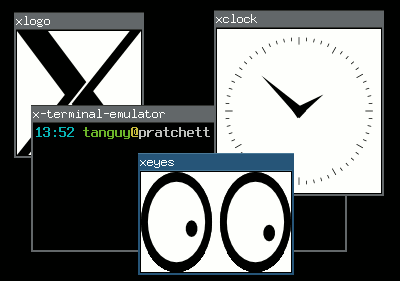
They are the most usual window managers, that allow you to place an size your windows freely on the screen, in a way where they are independent of each other, possibly overlapping, just as you would be able to place sheets of paper on your desk.
Tiling window managers
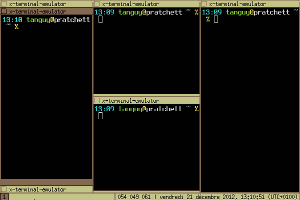
They are a more elitist type of window manager, that adjust the size and position of the windows so there is no overlapping and no space lost between windows, thus tiling the screen.
Four computer windows managed in floating mode

Floating window management

Four computer windows managed in tiling mode

Tiling window management

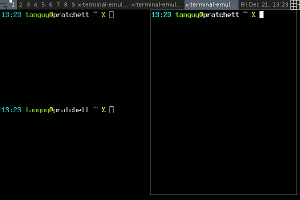
The frontier between these two types is not very tight, because some floating window managers have limited tiling features, and almost all the tiling window manager have floating modes for programs that are not adapted to tiling. For what it is worth, here is a report on my experience with three tiling window managers. Perhaps it may help people that are still hesitating to switch to tiling window management?Using tiling window managers Five years ago I switched to tiling window management, feeling that managing windows was the window manager's job (a quote from larswm). At that time, I started using wmii, then switched to awesome, and now I am trying i3.
Screenshot of the wmii window manager

wmii: three columns, first one stacked ()

Screenshot of the awesome window manager

awesome: fair layout

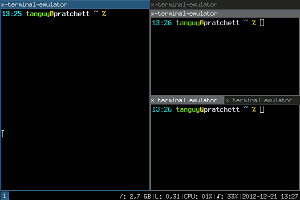
screenshot of the i3 window manager

i3: three containers, second one stacked, third one tabbed

For people in a hurry, here is a comparative table:
wmii awesome i3
Configuration Shell script Lua script config file
Scriptability any language, 9P-based Lua, API-based any language, socket-based
Layout simple, column-based automatic layout-based flexible, manual tiling-based
Multi-monitor sucks OK OK
Modern stuff XCB, Xft, notification area, dock windows XCB, Xft, notification area
Special features
  • tag-based workspace system
  • XDG convention to locate the config file
  • real framework for customization
  • powerful status bar
wmii wmii is a rather minimalist window manager which used to be part of the suckless project, but is now hosted at Google Code and seems to have lost all its documentation during the move (why is it that all the software I have seen hosted at Google Code or worst, at Launchpad, have almost not documentation, and never, ever a single screenshot?). It uses a column-based layout: you place windows in a number of columns, and for each column you can choose either vertical split, stacking or full column mode. This system is very simple to control flexible enough for most situations, but it does not allow for arbitrary tiling. It is fully scriptable in any language, in an interesting way: it exposes all its functions on a 9P virtual filesystem. In fact, wmii itself only implements window management functions, and all the user interaction logic takes place in a distinct script which calls that functions using that 9P filesystem. wmii comes with a default script, written in shell, which makes it a bit hard to extend, and slow if you start calling external programs such as grep, sed and co. You can script it in any language you like however, and there are some already made implementations in Ruby and Python IIRC. A special feature of wmii is that its workspaces are in fact tags, and that you can tag a window so that it will appear in several ones. While this is interesting, in practice I did not find much use for that feature. It is explicitly minimalist, and the developers used to impose themselves a limit on its numbers of lines of codes (not sure if this is still true with the switch to Google Code). While I was using it, it had no notification area, no support for Xft fonts and it sucked with multiple monitors, which is the reason I switched to awesome. awesome awesome is a very flexible window manager that provides advanced automatic layouts. It has become quite popular, and it has a very well documented wiki. It is not officially a tiling window manager but a framework window manager, and to emphasize on that it start in floating mode by default. I think most people use it in tiling mode however. It uses automatic layouts, that place your windows according to rules, for instance the fair layout, which tiles in columns and rows so that each window occupies a similar space. Thanks to that automation, this system is very easy to control and to get used to, and although it certainly does not allow arbitrary tiling, you can cycle between several available layouts which are suitable for most situations (most of them are entirely automatic, but some have parameters you can modify, such as the number and width of columns), and if you miss one, I think you can even code your own. It is fully scriptable using the Lua language. In fact, just as wmii, the user interaction logic is defined in the configuration file, which allows efficient customization. The Lua API is fully documented, and there is a series of useful libraries to extend the basic configuration in any way you like, which is why awesome calls itself a framework window manager . It is not designed to be minimalist, and it implements some modern stuff, such as using XCB rather than Xlib, a notification area, and specific support for dock or utility-type windows such as GIMP's tools. i3 i3 is a window manager inspired by wmii, although they do not have much in common in my opinion. for what I have seen, I think it would be closer the defunct Ion. It uses a layout based on manual splitting: as you open windows you can choose to split an existing window either vertically or horizontally, leading to arbitrarily complex layouts. In addition to that you can tab or stack windows in containers instead of splitting them. This system is very flexible but it requires more user intervention. In its standard mode of operation, i3 is simply configured in a regular way, which allows to customize the user interaction but not to script it in an arbitrary way. It offers an IPC system that can be used for that however, by the mean of a Unix socket, so it can actually be scripted in any language too if needed, although this possibility is probably not as popular and easy as with wmii and awesome. It implements modern features such as XCB, a notification area and a powerful status bar that uses the standard output of a dedicated program that is easy to replace by your own if you need.

Vasudev Kamath: Note to Self: Telling apt to download specific architecture information only

If you have enabled multi-arch enabled in your system and one of the third party repository you use in /etc/apt/sources.list is not providing the foreign arch you have selected then fear not just do the below for that particular repository line.
deb [arch=arch1] uri distribution component
In my case mozilla.debian.net doesn't provide binary-armel hence I just did this
deb [arch=amd64] http://localhost:9999/mdn experimental iceweasel-aurora
and apt stopped complaining about missing foreign arch. Well this is present in man page of sources.list but I just wrote here so I can find it easily next time :-).

Jamie McClelland: Live video streaming using vp8enc and webm on Debian

The vp8 video codec and webm container format (which are alternates for theora/ogg and h264/flv) are getting lots of attention, especially as more web browsers are supporting html5 - which includes a new video tag that plays video directly in a web page, rather than requiring a plugin. With Google fully behind these new formats (and converting YouTube videos) and even skype using vp8, it seems as though it could supplant h264/flash as the default video codec and container. After years under the boot of the proprietary flash video, this change could usher in a lot of exciting developments. While the shift in formats is also significant for on-demand video, I'm focusing on live streaming in this blog. There are a lot of tools needed to successfully stream a live video. Enough of them support vp8 and webm to create a live video stream, however, not all of the right versions of these tools have landed in Debian. Without any patches or changes, if you try to send a live video stream to icecast using vp8 encoding and webm, you'll get something like this:
0 jamie@animal:~$ gst-launch v4l2src ! video/x-raw,width=320,height=240 ! vp8enc ! webmmux ! shout2send ip=icecast.server port=8000 password=secret mount=/test.webm
WARNING: erroneous pipeline: could not link webmmux0 to shout2send0
1 jamie@animal:~$
I've documented the steps for patching/upgrading gstreamer and icecast2 so you can get a live video stream using vp8 encoding and the webmc container that originates on a Debian wheezy machine using gstreamer and streams to a Debian squeeze server running icecast2. On the workstation, you'll need libshout3 version 2.3.0 or higher, which is at the moment available in experimental and installable without bringing in any dependencies. In addition, you will need to bring in gstreamer1.0 from sid and you will need to rebuild gstreamer1.0-plugins-good after libshout-dev has been installed from experimental. So, begin by adding experimental and sid to your sources list by creating the files /etc/apt/sources.list.d/experimental.list and /etc/apt/sources/lists.d/sid.list with the respective contents:
deb http://mirror.cc.columbia.edu/debian experimental main
and
deb http://mirror.cc.columbia.edu/debian sid main 
deb-src http://mirror.cc.columbia.edu/debian sid main
In order to avoid upgrading your entire machine to sid (experimental packages won't upgrade by default), you'll also need to add the file /etc/apt/preferences.d/sid:
Package: *
Pin: release n=sid
Pin-Priority: 200
Then update and install:
apt-get update
apt-get install -t experimental libshout3
apt-get install gir1.2-clutter-gst-1.0 gir1.2-gst-plugins-base-1.0 gir1.2-gstreamer-1.0 gstreamer0.10-ffmpeg  gstreamer1.0-libav:amd64 gstreamer1.0-plugins-bad:amd64 gstreamer1.0-plugins-base:amd64 gstreamer1.0-plugins-base-apps gstreamer1.0-plugins-good:amd64 gstreamer1.0-pulseaudio:amd64 gstreamer1.0-tools gstreamer1.0-x:amd64 libclutter-gst-1.0-0:amd64 libgstreamer-plugins-bad1.0-0:amd64 libgstreamer-plugins-base1.0-0:amd64 libgstreamer-plugins-base1.0 libgstreamer1.0-0:amd64 libgstreamer1.0
Fortunately, the version of gstreamer1.0-plugins-good in sid includes a fix for a bug patched on November 31, 2012 that allows the use of the webm container. However, for it to work properly gstreamer1.0-plugins-good has to be built against libshout version 2.3.0 or higher (which is in experimental, not sid). Therefore, you have install libshout-dev from experimental and then rebuild gstreamer1.0-plugins-good.
sudo apt-get build-dep gstreamer1.0-plugins-good
sudo apt-get -t experimental install libshout-dev
apt-get source gstreamer1.0-plugins-good
cd gst-plugins-good1.0-1.0.4
dch -v 1.0.4-1+webmmux
fakeroot debian/rules binary
sudo dpkg -i ../gstreamer1.0-plugins-good_1.0.4-1+webmmux_amd64.deb
Now if you try the command, things should work on the client side. When streaming to an icecast2 server running squeeze, I don't get any errors, however, when opening the streaming page via the icecast URL, there is a play button, which can be clicked, but no picture is shown. That's because the version of Icecast2 in squeeze doesn't support either vp8 or webm. On the server side, you will need icecast2 version 2.4beta or higher. This version hasn't landed anywhere in Debian as of this writing. However, you can build it from source by following these steps (the patches I'm removing have all been applied to the new upstream version).
apt-get source icecast2
wget http://downloads.xiph.org/releases/icecast/icecast-2.4-beta.tar.gz
tar -xzvf icecast-2.4-beta.tar.gz
cp -r icecast2-2.3.2/debian icecast-2.3.99.0/
cd icecast-2.3.99.0/
rm debian/patches/ 1001_autotools_avoid_debian-subdir.patch,1002_add_missing_xspf_file,1003_fix_memory_leak.patch,series 
dch -v 2.3.99.0-1
fakeroot debian/rules binary
When you install it, be sure to replace the icecast2.xml configuration file and update it with your server-specific customizations. Hopefully this version of icecast2 will make it to experimental soon. And now... you can successfully stream via:
gst-launch-1.0 v4l2src ! video/x-raw,width=320,height=240 ! vp8enc ! webmmux !  shout2send ip=icecast.server port=8000 password=secret mount=/test.webm
If you want full audio and video, here's a more complete pipeline: gst-launch-1.0 v4l2src ! queue ! video/x-raw,width=320,height=240 ! tee name=tscreen ! queue ! autovideosink tscreen. ! queue ! videorate ! video/x-raw,framerate=25/2 ! queue ! vp8enc ! queue ! webmmux name=mux pulsesrc ! queue ! audioconvert ! vorbisenc ! queue ! queue ! mux. mux. ! queue ! shout2send ip=hobo port=8000 mount=jamie.webm password=secret Unfortunately, since I'm not sure how to deal with the python2.7 vs python3 dependecies, my elegant mobi python script that creates this pipeline for you using python-gtk as been reduced to a crude bash script. Another item on the todo list is opus audio encoding. gstreamer doesn't seem able to use opus in the webm container (although it seems to work with ogg). In the course of this research I found directions for getting gstreamer-1.0 installed on debian independent of packages installed on the system. If you follow the directions above, these steps should not be necessary. I'm including in case you need the latest sources for another reason. Extra steps I needed were:

Russ Allbery: Review: Science Fiction: The 101 Best Novels: 1985 2010

Review: Science Fiction: The 101 Best Novels: 1985 2010, by Damien Broderick & Paul Di Filippo
Publisher: Nonstop
Copyright: 2012
ISBN: 1-933065-39-7
Format: Trade paperback
Pages: 288
I like book reviews and lists of best novels, as a follower of my reviews probably noticed, so I couldn't resist when this collection made my radar. A follow-up to the earlier Science Fiction: The 101 Best Novels: 1949 1985 by David Pringle (which I have not read), it is a collection of short (two to three pages, generally) reviews of 101 recent SF novels. The date spread is fairly balanced: at least two novels from each year under consideration are featured, and no year gets more than seven or eight. The authors also clearly tried to cover the range of what falls under the science fiction genre, from alternate history through space opera and including novels normally marketed as mainstream, so the result should contain something to everyone's taste. With those characteristics, you may suspect that the "best" part of the title is a bit questionable, and you would be right. "101 of the better novels" would be a more accurate description. While most Hugo and Nebula winners are included here, the section is at times eclectic. But it's eclectic in the spirit of broad inclusiveness: Jumper, Temeraire, or The Hunger Games would normally not be included on this sort of list because they're too popular or "light," but they're here alongside more obscure books (at least for SF readers) like Galatea 2.2, Distance Haze, or My Dirty Little Book of Stolen Time. I doubt anyone will seriously argue that this selection should have replaced the Hugo or Nebula short lists, but one doesn't read review collections like this only to hear about books one already knows about. Those books one has either already read or already chosen not to read. The wide-ranging selection makes it likely that something here will be new to most readers. The authors, Damien Broderick and Paul Di Filippo, are known reviewers in the SF world, and I've read reviews from both of them before. I bought this book largely on the strength of Broderick's name, since I've usually enjoyed his contributions to The New York Review of Science Fiction. Paul Di Filippo was more of a gamble; he's one of the regular reviewers for Asimov's Science Fiction and not one of my favorites. But what I usually disliked about his columns was their focus on obscure small-press titles, graphic novels, and slipstream, so I was hoping that an SF review collection aiming towards the genre mainstream would be more to my taste. The result is mixed. There are things about this selection, and about the reviews, that I enjoyed, and there are other things I found quite annoying. First, the selection. I could (and will in a moment) talk about good and bad selections, but I also have a good statistical metric for at least the alignment of the authors' taste with mine. Of the 107 novels reviewed here (in several case, duologies and trilogies are given single entries), I've read 39, or a little over a third. (Note that I've read every Nebula or Hugo winner in that time period and most of the Hugo nominees, so that will give you a good feel for how broad-ranging this selection is, and how far afield of the normal award slates it goes.) My average rating for those 39 books was 7.49 (including four perfect 10s). By comparison, my average rating for Hugo winners is 6.68 and for Nebula winners is 7.10. There was one 4 (The White Queen) and one 5 (Red Mars), and in both cases I can see why they're here. Of the rest of the books I read I rated them all at least at 6 out of 10. At least among the books I've read, this seems to be a solid selection. Sometimes the details of those selections are odd, though. For example, the authors make an effort to limit the number of selections for each author, a wise choice since they're clearly going by diversity. But if one is operating within that limitation, choosing Ammonite over Slow River for Nicola Griffith, or particularly Ventus over Lady of Mazes or even Permanence for Karl Schroeder, is baffling. There were several similar places where I thought the selection for an author was obscure, minor, or just missed obvious alternatives. Perhaps this was to fill in one of the other breadth criteria, such as balancing number of novels per year or attempting to cover each subgenre. Also, if one is going to divide science fiction and fantasy and try to cover only the science fiction (a division that I think is quite difficult, which is why I don't do it, but it does have the merit of narrowing the field), including The Falling Woman is quite strange. It's a solid book, to be sure, and a Nebula winner. It is also quite straightforward contemporary fantasy involving ghosts and Mayan mythology, without a hint of science-fictional content. Making the protagonists archeologists and scientists doesn't make the book science fiction. The authors try to defend this (unpersuasively to me), but it wasn't the only instance here where I thought their line between science fiction and fantasy was a bit off. That said, there are a lot of great selections here, including books that I love but that aren't frequently picked for this sort of list (The Fortunate Fall, The Time Traveler's Wife, or China Mountain Zhang, for example). It's great to see underappreciated authors like Linda Nagata, Joan Slonczewski, and Karl Schroeder featured. But, of course, one doesn't buy this sort of book just for the list, if for no other reason than that lists aren't copyrightable and one can easily find the complete list of reviewed novels on the Internet (just one example that turned up in a search). Rather, one reads this sort of book for the reviews. And that's where this book moves onto more questionable ground. First, while I realize that everyone has different thresholds for what they consider spoilers and most professional reviewers are more cavalier about them than I am, Broderick and Di Filippo cross any line that I consider reasonable. Most of the reviews are okay, if skirting the limits, but in several places they give away key reveals of books or discuss plot twists right up to, or even including, the ending. The combined review of The Sparrow and Children of God is particularly egregious, containing unambiguous, book-destroying spoilers for The Sparrow. Giving away the ending of Ammonite is only slightly less bad. And those are just two examples I remember. This is not okay. The whole point of this sort of collection is to expose the reader to books they've not yet read but may want to. Proceeding to spoil the book for them in the course of the review is perverse. This alone would make me hesitant to recommend this collection. Second, quite a few of the reviews in this book are, for lack of a better term, emotionally overreaching. Here's an excerpt of a review picked at random (As She Climbed Across the Table by Jonathan Lethem) that will hopefully illustrate:
Lethem's beautifully balanced, metaphorically rich prose propels this blackly jolly fable to a surprising yet satisfying conclusion. By book's end, a sense that the author had accomplished his takeoff taxiing and was now fully in flight for more cosmopolitan cities pervades the pages.
What's "beautifully balanced prose"? Could you recognize it? Does that phrase communicate anything to you other than that the authors liked the book? The whole review collection is written with adjectives and metaphors like this, and after a while it all seems a bit much. It felt like the authors were straining for ways to describe how important or significant the books are and, in the process, lost sight of the basic goal of conveying information about the book. It feels overwrought rather than informative. Even if one is reviewing the books that one considers the pinnacle of achievement in science fiction, a conversational tone with concrete examples and specifics communicates more than impressive but slippery terms like "metaphorically rich." Lest I sound entirely negative, one thing that I did appreciate is that the reviews go to some effort (particularly for their short length) to put the work in the broader context of the field and within the author's oeuvre. Often there's some discussion of previous and subsequent work or related books, and the reviews that feature books from larger series provide good explanations for why those particular books were singled out. Sometimes the number of dangling references was frustrating; authors of these sorts of collections need to remember that most readers will not be as widely read, and reviewing books largely by comparison to other books runs the risk of missing the reader's knowledge entirely. But the reviews convey a real sense of SF as a broad conversation and provide a sense of the breadth and variety of themes and subgenres available. This is one of the fun explorations that this sort of catalog lets the authors and reader do together. Another, more minor, touch that I appreciated was the cover art. Each review leads with an image of the reviewed book's cover (alas, only in black and white for obvious printing reasons). But rather than taking the obvious approach of using the covers of the first releases, or the covers from a particular country, they're chosen from all of the world-wide editions in all their delightful variety. Typical artistic styles for book covers vary drastically between countries, and getting to see a sample of artwork from different markets is a treat. I want to recommend this book. It casts a much broader net than most collections of its kind and provides some needed attention to smaller corners of the genre. I was impressed by the book list before I bought it, and (with the inevitable quibbles) am even more impressed now that I've read it. Broderick and Di Filippo go out of their way to broaden the reader's horizon and open up new avenues for reading, which is one of the best things a review collection can do. But when reviewers don't avoid spoilers, I just can't recommend their work. For me, this is a cardinal sin. Combine that with a writing style that was occasionally overblown and overwritten and the merits don't quite overcome the flaws. I'm glad I read it; it got me excited about reading many books I've already purchased but not gotten to, and I got from it another slew of books to add to my to-purchase list. But I had to read it uncomfortably and lightly, constantly prepared to jump past a review that was too revealing. Rating: 6 out of 10

26 December 2012

Rudy Godoy: s3tools Simple Storage Service for non-Amazon providers

One of the nicest developments in the cloud arena is the increasing adoption of standards, this of course will impact on maturity and market confidence on such technologies. Amazon, as one of the pioneers, made a good choice on their offering design by making their API implementation public. Now, vendors such as Eucalyptus private/hybrid cloud offering and many other providers can leverage and build upon the specs to offer compatible services without the hassle for their customers to learn a new technology/tool. I ve bare-metal servers siting on Connectria s data-center. A couple of months ago I ve learned about their new cloud storage offering. Since I m working a lot on cloud lately I checked the service. It s was nice to learn they are not re-inventing the wheel but instead implementing Amazon s Simple Storage Service (S3) de-facto standard for cloud storage. Currently there are many S3-compatible tools available both FLOSS and freeware/closed source (Connectria provides a nice list of them). I ve been using s3tools, which is already available in the Debian archive, to interact with S3-compatible services. Usage is pretty straightforward. For my use case I intend to store copies of certain files on my provider s S3 service. I ll need to create buckets to be able to store files. For the ones not very familiar with S3 terminology buckets can be seen as containers or folders (in the desktop paradigm). First thing to do is configure your keys and credentials for accessing S3 from your provider. I do recommend you to use the --configure option to create the $HOME/.s3cfg file because it will put all the available options for a standard S3 service, leaving you the work of just tweaking them based on your needs. You can go and create the file all by yourself if you prefer, of course.
$ sudo aptitude install s3cmd
$ s3cmd --configure
Enter new values or accept defaults in brackets with Enter.
Refer to user manual for detailed description of all options.
Access key and Secret key are your identifiers for Amazon S3
Access Key:
...
You ll be required to enter the access key and the secret key. You ll be asked for a encryption password (use only if you plan to use this feature). Finally, the software will test the configuration against Amazon s service. Since this is not our case it will fail. Tell the configuration instead to not retry configuration and say Y to Save configuration. Now, edit the $HOME/.s3cfg file and set the address for your private/third-party S3 provider. This is done here:
host_base = s3.amazonaws.com
host_bucket = %(bucket)s.s3.amazonaws.com
Change s3.amazonaws.com to your provider s address and the host_bucket configuration also. For my case I had to use:
host_base = rs1.connectria.com
host_bucket = %(bucket)s.rs1.connectria.com
Now, save the file and test the service by listing the available buckets (of course there is none yet).
$ s3cmd ls
If you don t get an error then the tool is properly configured. Now you can create buckets, put files, list, etc.
$ s3cmd mb s3://testbucket
Bucket 's3://testbucket/' created
$ s3cmd put testfile.txt s3://testbucket
testfile.txt -> s3://testbucket/testfile.txt [1 of 1]
8331 of 8331 100% in 1s 7.48 kB/s done
$ s3cmd ls s3://testbucket
2012-12-26 22:09 8331 s3://testbucket/testfile.txt

Next.

Previous.