Christoph Berg: DLV removes all *.de records
 Because of some problem with Denic's DNSSEC testbed and bind resolvers,
dlv.isc.org has removed all DLV records for *.de domains. WTF.
Because of some problem with Denic's DNSSEC testbed and bind resolvers,
dlv.isc.org has removed all DLV records for *.de domains. WTF.
 Conrad Sanderson is preparing version 2.0.0 of his
Armadillo templated C++ library for
linear algebra and has released a first public beta version 1.99.2. This has
been folded into a new release of the
RcppArmadillo
wrapper for R based on
our Rcpp
library.
Also added in this version is a new example of a simulation of a vector
autoregression process which I had blogged about earlier.
The example had been prepared for the
Rcpp workshop / class
at last month's R/Finance conference, and demonstrates a rather nice
speed gain from using
Rcpp and
RcppArmadillo.
The short NEWS file extract follows below.
0.2.20  2011-05-25
    o   Upgraded to Armadillo release 1.99.2 "v2.0 beta 2" (and 1.99.1 before)
          * faster inverse of symmetric matrices
          * faster element access for fixed size matrices
          * faster multiplication of tiny matrices (eg. 4x4)
          * faster compund expressions containing submatrices
          * added handling of arbitrarily sized empty matrices (eg. 5x0)
          * added syl()
          * added strans()
          * added symmatu()/symmatl()
          * added submatrices of submatrices
          * htrans() has been deprecated; use trans() instead
          * trans() now takes the complex conjugate when transposing a
            complex matrix
          * .is_vec() now outputs true for empty matrices
          * most functions with matrix inputs no longer throw exceptions when
            given empty matrices (eg. 5x0)
    o   Added a new subdirectory examples/ seeded with a nice Vector
        Autoregression simulation simulation example by Lance Bachmeier
    o   Rewrote armadillo_version as to no longer require an instance
        of arma::arma_version, with tanks to Conrad for the suggestion
And courtesy of
CRANberries, here is
the
diff to the previous release.
Diff between RcppArmadillo versions 0.2.19 dated 2011-04-24 and 0.2.20 dated 2011-05-26
 RcppArmadillo-0.2.19/RcppArmadillo/inst/include/armadillo_bits/Col_proto.hpp               only
 RcppArmadillo-0.2.19/RcppArmadillo/inst/include/armadillo_bits/Cube_proto.hpp              only
 RcppArmadillo-0.2.19/RcppArmadillo/inst/include/armadillo_bits/GlueCube_proto.hpp          only
 RcppArmadillo-0.2.19/RcppArmadillo/inst/include/armadillo_bits/Glue_proto.hpp              only
 RcppArmadillo-0.2.19/RcppArmadillo/inst/include/armadillo_bits/Mat_proto.hpp               only
 RcppArmadillo-0.2.19/RcppArmadillo/inst/include/armadillo_bits/OpCube_proto.hpp            only
 RcppArmadillo-0.2.19/RcppArmadillo/inst/include/armadillo_bits/Op_proto.hpp                only
 RcppArmadillo-0.2.19/RcppArmadillo/inst/include/armadillo_bits/Row_proto.hpp               only
 RcppArmadillo-0.2.19/RcppArmadillo/inst/include/armadillo_bits/arma_ostream_proto.hpp      only
 RcppArmadillo-0.2.19/RcppArmadillo/inst/include/armadillo_bits/arrayops_proto.hpp          only
 RcppArmadillo-0.2.19/RcppArmadillo/inst/include/armadillo_bits/atlas_proto.hpp             only
 RcppArmadillo-0.2.19/RcppArmadillo/inst/include/armadillo_bits/auxlib_proto.hpp            only
 RcppArmadillo-0.2.19/RcppArmadillo/inst/include/armadillo_bits/blas_proto.hpp              only
 RcppArmadillo-0.2.19/RcppArmadillo/inst/include/armadillo_bits/diagview_proto.hpp          only
 RcppArmadillo-0.2.19/RcppArmadillo/inst/include/armadillo_bits/diskio_proto.hpp            only
 RcppArmadillo-0.2.19/RcppArmadillo/inst/include/armadillo_bits/eGlueCube_proto.hpp         only
 RcppArmadillo-0.2.19/RcppArmadillo/inst/include/armadillo_bits/eGlue_proto.hpp             only
 RcppArmadillo-0.2.19/RcppArmadillo/inst/include/armadillo_bits/eOpCube_proto.hpp           only
 RcppArmadillo-0.2.19/RcppArmadillo/inst/include/armadillo_bits/eOp_proto.hpp               only
 RcppArmadillo-0.2.19/RcppArmadillo/inst/include/armadillo_bits/eglue_core_proto.hpp        only
 RcppArmadillo-0.2.19/RcppArmadillo/inst/include/armadillo_bits/eop_core_proto.hpp          only
 RcppArmadillo-0.2.19/RcppArmadillo/inst/include/armadillo_bits/field_proto.hpp             only
 RcppArmadillo-0.2.19/RcppArmadillo/inst/include/armadillo_bits/fn_htrans.hpp               only
 RcppArmadillo-0.2.19/RcppArmadillo/inst/include/armadillo_bits/forward_proto.hpp           only
 RcppArmadillo-0.2.19/RcppArmadillo/inst/include/armadillo_bits/glue_conv_proto.hpp         only
 RcppArmadillo-0.2.19/RcppArmadillo/inst/include/armadillo_bits/glue_cor_proto.hpp          only
 RcppArmadillo-0.2.19/RcppArmadillo/inst/include/armadillo_bits/glue_cov_proto.hpp          only
 RcppArmadillo-0.2.19/RcppArmadillo/inst/include/armadillo_bits/glue_cross_proto.hpp        only
 RcppArmadillo-0.2.19/RcppArmadillo/inst/include/armadillo_bits/glue_join_proto.hpp         only
 RcppArmadillo-0.2.19/RcppArmadillo/inst/include/armadillo_bits/glue_kron_proto.hpp         only
 RcppArmadillo-0.2.19/RcppArmadillo/inst/include/armadillo_bits/glue_mixed_proto.hpp        only
 RcppArmadillo-0.2.19/RcppArmadillo/inst/include/armadillo_bits/glue_relational_proto.hpp   only
 RcppArmadillo-0.2.19/RcppArmadillo/inst/include/armadillo_bits/glue_solve_proto.hpp        only
 RcppArmadillo-0.2.19/RcppArmadillo/inst/include/armadillo_bits/glue_times_proto.hpp        only
 RcppArmadillo-0.2.19/RcppArmadillo/inst/include/armadillo_bits/glue_toeplitz_proto.hpp     only
 RcppArmadillo-0.2.19/RcppArmadillo/inst/include/armadillo_bits/injector_proto.hpp          only
 RcppArmadillo-0.2.19/RcppArmadillo/inst/include/armadillo_bits/lapack_proto.hpp            only
 RcppArmadillo-0.2.19/RcppArmadillo/inst/include/armadillo_bits/mtGlueCube_proto.hpp        only
 RcppArmadillo-0.2.19/RcppArmadillo/inst/include/armadillo_bits/mtGlue_proto.hpp            only
 RcppArmadillo-0.2.19/RcppArmadillo/inst/include/armadillo_bits/mtOpCube_proto.hpp          only
 RcppArmadillo-0.2.19/RcppArmadillo/inst/include/armadillo_bits/mtOp_proto.hpp              only
 RcppArmadillo-0.2.19/RcppArmadillo/inst/include/armadillo_bits/op_chol_proto.hpp           only
 RcppArmadillo-0.2.19/RcppArmadillo/inst/include/armadillo_bits/op_cor_proto.hpp            only
 RcppArmadillo-0.2.19/RcppArmadillo/inst/include/armadillo_bits/op_cov_proto.hpp            only
 RcppArmadillo-0.2.19/RcppArmadillo/inst/include/armadillo_bits/op_cumsum_proto.hpp         only
 RcppArmadillo-0.2.19/RcppArmadillo/inst/include/armadillo_bits/op_cx_scalar_proto.hpp      only
 RcppArmadillo-0.2.19/RcppArmadillo/inst/include/armadillo_bits/op_diagmat_proto.hpp        only
 RcppArmadillo-0.2.19/RcppArmadillo/inst/include/armadillo_bits/op_diagvec_proto.hpp        only
 RcppArmadillo-0.2.19/RcppArmadillo/inst/include/armadillo_bits/op_dot_proto.hpp            only
 RcppArmadillo-0.2.19/RcppArmadillo/inst/include/armadillo_bits/op_dotext_proto.hpp         only
 RcppArmadillo-0.2.19/RcppArmadillo/inst/include/armadillo_bits/op_find_proto.hpp           only
 RcppArmadillo-0.2.19/RcppArmadillo/inst/include/armadillo_bits/op_flip_proto.hpp           only
 RcppArmadillo-0.2.19/RcppArmadillo/inst/include/armadillo_bits/op_htrans_proto.hpp         only
 RcppArmadillo-0.2.19/RcppArmadillo/inst/include/armadillo_bits/op_inv_proto.hpp            only
 RcppArmadillo-0.2.19/RcppArmadillo/inst/include/armadillo_bits/op_max_proto.hpp            only
 RcppArmadillo-0.2.19/RcppArmadillo/inst/include/armadillo_bits/op_mean_proto.hpp           only
 RcppArmadillo-0.2.19/RcppArmadillo/inst/include/armadillo_bits/op_median_proto.hpp         only
 RcppArmadillo-0.2.19/RcppArmadillo/inst/include/armadillo_bits/op_min_proto.hpp            only
 RcppArmadillo-0.2.19/RcppArmadillo/inst/include/armadillo_bits/op_misc_proto.hpp           only
 RcppArmadillo-0.2.19/RcppArmadillo/inst/include/armadillo_bits/op_pinv_proto.hpp           only
 RcppArmadillo-0.2.19/RcppArmadillo/inst/include/armadillo_bits/op_princomp_cov_proto.hpp   only
 RcppArmadillo-0.2.19/RcppArmadillo/inst/include/armadillo_bits/op_princomp_proto.hpp       only
 RcppArmadillo-0.2.19/RcppArmadillo/inst/include/armadillo_bits/op_prod_proto.hpp           only
 RcppArmadillo-0.2.19/RcppArmadillo/inst/include/armadillo_bits/op_relational_proto.hpp     only
 RcppArmadillo-0.2.19/RcppArmadillo/inst/include/armadillo_bits/op_repmat_proto.hpp         only
 RcppArmadillo-0.2.19/RcppArmadillo/inst/include/armadillo_bits/op_reshape_proto.hpp        only
 RcppArmadillo-0.2.19/RcppArmadillo/inst/include/armadillo_bits/op_shuffle_proto.hpp        only
 RcppArmadillo-0.2.19/RcppArmadillo/inst/include/armadillo_bits/op_sort_proto.hpp           only
 RcppArmadillo-0.2.19/RcppArmadillo/inst/include/armadillo_bits/op_stddev_proto.hpp         only
 RcppArmadillo-0.2.19/RcppArmadillo/inst/include/armadillo_bits/op_sum_proto.hpp            only
 RcppArmadillo-0.2.19/RcppArmadillo/inst/include/armadillo_bits/op_trans_meat.hpp           only
 RcppArmadillo-0.2.19/RcppArmadillo/inst/include/armadillo_bits/op_trans_proto.hpp          only
 RcppArmadillo-0.2.19/RcppArmadillo/inst/include/armadillo_bits/op_trimat_proto.hpp         only
 RcppArmadillo-0.2.19/RcppArmadillo/inst/include/armadillo_bits/op_var_proto.hpp            only
 RcppArmadillo-0.2.19/RcppArmadillo/inst/include/armadillo_bits/podarray_proto.hpp          only
 RcppArmadillo-0.2.19/RcppArmadillo/inst/include/armadillo_bits/running_stat_proto.hpp      only
 RcppArmadillo-0.2.19/RcppArmadillo/inst/include/armadillo_bits/running_stat_vec_proto.hpp  only
 RcppArmadillo-0.2.19/RcppArmadillo/inst/include/armadillo_bits/subview_cube_proto.hpp      only
 RcppArmadillo-0.2.19/RcppArmadillo/inst/include/armadillo_bits/subview_elem1_proto.hpp     only
 RcppArmadillo-0.2.19/RcppArmadillo/inst/include/armadillo_bits/subview_field_proto.hpp     only
 RcppArmadillo-0.2.19/RcppArmadillo/inst/include/armadillo_bits/subview_proto.hpp           only
 RcppArmadillo-0.2.19/RcppArmadillo/inst/include/armadillo_bits/wall_clock_proto.hpp        only
 RcppArmadillo-0.2.20/RcppArmadillo/ChangeLog                                                  20
 RcppArmadillo-0.2.20/RcppArmadillo/DESCRIPTION                                                10
 RcppArmadillo-0.2.20/RcppArmadillo/inst/NEWS                                                  26
 RcppArmadillo-0.2.20/RcppArmadillo/inst/examples                                           only
 RcppArmadillo-0.2.20/RcppArmadillo/inst/include/RcppArmadillo/Mat_meat.h                       8
 RcppArmadillo-0.2.20/RcppArmadillo/inst/include/armadillo                                    199 -
 RcppArmadillo-0.2.20/RcppArmadillo/inst/include/armadillo_bits/Col_bones.hpp               only
 RcppArmadillo-0.2.20/RcppArmadillo/inst/include/armadillo_bits/Col_meat.hpp                  519 +++
 RcppArmadillo-0.2.20/RcppArmadillo/inst/include/armadillo_bits/Cube_bones.hpp              only
 RcppArmadillo-0.2.20/RcppArmadillo/inst/include/armadillo_bits/Cube_meat.hpp                  96
 RcppArmadillo-0.2.20/RcppArmadillo/inst/include/armadillo_bits/GlueCube_bones.hpp          only
 RcppArmadillo-0.2.20/RcppArmadillo/inst/include/armadillo_bits/Glue_bones.hpp              only
 RcppArmadillo-0.2.20/RcppArmadillo/inst/include/armadillo_bits/Mat_bones.hpp               only
 RcppArmadillo-0.2.20/RcppArmadillo/inst/include/armadillo_bits/Mat_meat.hpp                  673 +++-
 RcppArmadillo-0.2.20/RcppArmadillo/inst/include/armadillo_bits/OpCube_bones.hpp            only
 RcppArmadillo-0.2.20/RcppArmadillo/inst/include/armadillo_bits/Op_bones.hpp                only
 RcppArmadillo-0.2.20/RcppArmadillo/inst/include/armadillo_bits/Proxy.hpp                      28
 RcppArmadillo-0.2.20/RcppArmadillo/inst/include/armadillo_bits/ProxyCube.hpp                  20
 RcppArmadillo-0.2.20/RcppArmadillo/inst/include/armadillo_bits/Row_bones.hpp               only
 RcppArmadillo-0.2.20/RcppArmadillo/inst/include/armadillo_bits/Row_meat.hpp                  491 +++
 RcppArmadillo-0.2.20/RcppArmadillo/inst/include/armadillo_bits/arma_ostream_bones.hpp      only
 RcppArmadillo-0.2.20/RcppArmadillo/inst/include/armadillo_bits/arma_ostream_meat.hpp          87
 RcppArmadillo-0.2.20/RcppArmadillo/inst/include/armadillo_bits/arma_static_assert.hpp         31
 RcppArmadillo-0.2.20/RcppArmadillo/inst/include/armadillo_bits/arma_version.hpp                6
 RcppArmadillo-0.2.20/RcppArmadillo/inst/include/armadillo_bits/arrayops_bones.hpp          only
 RcppArmadillo-0.2.20/RcppArmadillo/inst/include/armadillo_bits/arrayops_meat.hpp             143 -
 RcppArmadillo-0.2.20/RcppArmadillo/inst/include/armadillo_bits/atlas_bones.hpp             only
 RcppArmadillo-0.2.20/RcppArmadillo/inst/include/armadillo_bits/auxlib_bones.hpp            only
 RcppArmadillo-0.2.20/RcppArmadillo/inst/include/armadillo_bits/auxlib_meat.hpp               772 ++++-
 RcppArmadillo-0.2.20/RcppArmadillo/inst/include/armadillo_bits/blas_bones.hpp              only
 RcppArmadillo-0.2.20/RcppArmadillo/inst/include/armadillo_bits/compiler_setup.hpp             17
 RcppArmadillo-0.2.20/RcppArmadillo/inst/include/armadillo_bits/debug.hpp                      24
 RcppArmadillo-0.2.20/RcppArmadillo/inst/include/armadillo_bits/diagmat_proxy.hpp              93
 RcppArmadillo-0.2.20/RcppArmadillo/inst/include/armadillo_bits/diagview_bones.hpp          only
 RcppArmadillo-0.2.20/RcppArmadillo/inst/include/armadillo_bits/diagview_meat.hpp             128
 RcppArmadillo-0.2.20/RcppArmadillo/inst/include/armadillo_bits/diskio_bones.hpp            only
 RcppArmadillo-0.2.20/RcppArmadillo/inst/include/armadillo_bits/diskio_meat.hpp               104
 RcppArmadillo-0.2.20/RcppArmadillo/inst/include/armadillo_bits/eGlueCube_bones.hpp         only
 RcppArmadillo-0.2.20/RcppArmadillo/inst/include/armadillo_bits/eGlueCube_meat.hpp             14
 RcppArmadillo-0.2.20/RcppArmadillo/inst/include/armadillo_bits/eGlue_bones.hpp             only
 RcppArmadillo-0.2.20/RcppArmadillo/inst/include/armadillo_bits/eGlue_meat.hpp                 14
 RcppArmadillo-0.2.20/RcppArmadillo/inst/include/armadillo_bits/eOpCube_bones.hpp           only
 RcppArmadillo-0.2.20/RcppArmadillo/inst/include/armadillo_bits/eOp_bones.hpp               only
 RcppArmadillo-0.2.20/RcppArmadillo/inst/include/armadillo_bits/eglue_core_bones.hpp        only
 RcppArmadillo-0.2.20/RcppArmadillo/inst/include/armadillo_bits/eglue_core_meat.hpp           519 ++-
 RcppArmadillo-0.2.20/RcppArmadillo/inst/include/armadillo_bits/eop_core_bones.hpp          only
 RcppArmadillo-0.2.20/RcppArmadillo/inst/include/armadillo_bits/eop_core_meat.hpp             327 +-
 RcppArmadillo-0.2.20/RcppArmadillo/inst/include/armadillo_bits/field_bones.hpp             only
 RcppArmadillo-0.2.20/RcppArmadillo/inst/include/armadillo_bits/fn_accu.hpp                    40
 RcppArmadillo-0.2.20/RcppArmadillo/inst/include/armadillo_bits/fn_det.hpp                      7
 RcppArmadillo-0.2.20/RcppArmadillo/inst/include/armadillo_bits/fn_diagmat.hpp                  7
 RcppArmadillo-0.2.20/RcppArmadillo/inst/include/armadillo_bits/fn_elem.hpp                    62
 RcppArmadillo-0.2.20/RcppArmadillo/inst/include/armadillo_bits/fn_eye.hpp                  only
 RcppArmadillo-0.2.20/RcppArmadillo/inst/include/armadillo_bits/fn_inv.hpp                     18
 RcppArmadillo-0.2.20/RcppArmadillo/inst/include/armadillo_bits/fn_log_det.hpp                  8
 RcppArmadillo-0.2.20/RcppArmadillo/inst/include/armadillo_bits/fn_max.hpp                     38
 RcppArmadillo-0.2.20/RcppArmadillo/inst/include/armadillo_bits/fn_mean.hpp                    42
 RcppArmadillo-0.2.20/RcppArmadillo/inst/include/armadillo_bits/fn_median.hpp                  53
 RcppArmadillo-0.2.20/RcppArmadillo/inst/include/armadillo_bits/fn_min.hpp                     38
 RcppArmadillo-0.2.20/RcppArmadillo/inst/include/armadillo_bits/fn_ones.hpp                    45
 RcppArmadillo-0.2.20/RcppArmadillo/inst/include/armadillo_bits/fn_prod.hpp                    20
 RcppArmadillo-0.2.20/RcppArmadillo/inst/include/armadillo_bits/fn_randn.hpp                   10
 RcppArmadillo-0.2.20/RcppArmadillo/inst/include/armadillo_bits/fn_randu.hpp                   12
 RcppArmadillo-0.2.20/RcppArmadillo/inst/include/armadillo_bits/fn_stddev.hpp                  20
 RcppArmadillo-0.2.20/RcppArmadillo/inst/include/armadillo_bits/fn_strans.hpp               only
 RcppArmadillo-0.2.20/RcppArmadillo/inst/include/armadillo_bits/fn_syl_lyap.hpp             only
 RcppArmadillo-0.2.20/RcppArmadillo/inst/include/armadillo_bits/fn_symmat.hpp               only
 RcppArmadillo-0.2.20/RcppArmadillo/inst/include/armadillo_bits/fn_trans.hpp                   35
 RcppArmadillo-0.2.20/RcppArmadillo/inst/include/armadillo_bits/fn_var.hpp                     20
 RcppArmadillo-0.2.20/RcppArmadillo/inst/include/armadillo_bits/fn_zeros.hpp                   12
 RcppArmadillo-0.2.20/RcppArmadillo/inst/include/armadillo_bits/forward_bones.hpp           only
 RcppArmadillo-0.2.20/RcppArmadillo/inst/include/armadillo_bits/gemm.hpp                      337 --
 RcppArmadillo-0.2.20/RcppArmadillo/inst/include/armadillo_bits/gemm_mixed.hpp                 59
 RcppArmadillo-0.2.20/RcppArmadillo/inst/include/armadillo_bits/gemv.hpp                      208 +
 RcppArmadillo-0.2.20/RcppArmadillo/inst/include/armadillo_bits/glue_conv_bones.hpp         only
 RcppArmadillo-0.2.20/RcppArmadillo/inst/include/armadillo_bits/glue_conv_meat.hpp             16
 RcppArmadillo-0.2.20/RcppArmadillo/inst/include/armadillo_bits/glue_cor_bones.hpp          only
 RcppArmadillo-0.2.20/RcppArmadillo/inst/include/armadillo_bits/glue_cor_meat.hpp              12
 RcppArmadillo-0.2.20/RcppArmadillo/inst/include/armadillo_bits/glue_cov_bones.hpp          only
 RcppArmadillo-0.2.20/RcppArmadillo/inst/include/armadillo_bits/glue_cross_bones.hpp        only
 RcppArmadillo-0.2.20/RcppArmadillo/inst/include/armadillo_bits/glue_cross_meat.hpp            47
 RcppArmadillo-0.2.20/RcppArmadillo/inst/include/armadillo_bits/glue_join_bones.hpp         only
 RcppArmadillo-0.2.20/RcppArmadillo/inst/include/armadillo_bits/glue_join_meat.hpp             46
 RcppArmadillo-0.2.20/RcppArmadillo/inst/include/armadillo_bits/glue_kron_bones.hpp         only
 RcppArmadillo-0.2.20/RcppArmadillo/inst/include/armadillo_bits/glue_mixed_bones.hpp        only
 RcppArmadillo-0.2.20/RcppArmadillo/inst/include/armadillo_bits/glue_relational_bones.hpp   only
 RcppArmadillo-0.2.20/RcppArmadillo/inst/include/armadillo_bits/glue_solve_bones.hpp        only
 RcppArmadillo-0.2.20/RcppArmadillo/inst/include/armadillo_bits/glue_times_bones.hpp        only
 RcppArmadillo-0.2.20/RcppArmadillo/inst/include/armadillo_bits/glue_times_meat.hpp           493 +--
 RcppArmadillo-0.2.20/RcppArmadillo/inst/include/armadillo_bits/glue_toeplitz_bones.hpp     only
 RcppArmadillo-0.2.20/RcppArmadillo/inst/include/armadillo_bits/glue_toeplitz_meat.hpp          5
 RcppArmadillo-0.2.20/RcppArmadillo/inst/include/armadillo_bits/injector_bones.hpp          only
 RcppArmadillo-0.2.20/RcppArmadillo/inst/include/armadillo_bits/lapack_bones.hpp            only
 RcppArmadillo-0.2.20/RcppArmadillo/inst/include/armadillo_bits/mtGlueCube_bones.hpp        only
 RcppArmadillo-0.2.20/RcppArmadillo/inst/include/armadillo_bits/mtGlue_bones.hpp            only
 RcppArmadillo-0.2.20/RcppArmadillo/inst/include/armadillo_bits/mtOpCube_bones.hpp          only
 RcppArmadillo-0.2.20/RcppArmadillo/inst/include/armadillo_bits/mtOp_bones.hpp              only
 RcppArmadillo-0.2.20/RcppArmadillo/inst/include/armadillo_bits/op_chol_bones.hpp           only
 RcppArmadillo-0.2.20/RcppArmadillo/inst/include/armadillo_bits/op_cor_bones.hpp            only
 RcppArmadillo-0.2.20/RcppArmadillo/inst/include/armadillo_bits/op_cor_meat.hpp                14
 RcppArmadillo-0.2.20/RcppArmadillo/inst/include/armadillo_bits/op_cov_bones.hpp            only
 RcppArmadillo-0.2.20/RcppArmadillo/inst/include/armadillo_bits/op_cumsum_bones.hpp         only
 RcppArmadillo-0.2.20/RcppArmadillo/inst/include/armadillo_bits/op_cumsum_meat.hpp              9
 RcppArmadillo-0.2.20/RcppArmadillo/inst/include/armadillo_bits/op_cx_scalar_bones.hpp      only
 RcppArmadillo-0.2.20/RcppArmadillo/inst/include/armadillo_bits/op_diagmat_bones.hpp        only
 RcppArmadillo-0.2.20/RcppArmadillo/inst/include/armadillo_bits/op_diagmat_meat.hpp            10
 RcppArmadillo-0.2.20/RcppArmadillo/inst/include/armadillo_bits/op_diagvec_bones.hpp        only
 RcppArmadillo-0.2.20/RcppArmadillo/inst/include/armadillo_bits/op_dot_bones.hpp            only
 RcppArmadillo-0.2.20/RcppArmadillo/inst/include/armadillo_bits/op_dotext_bones.hpp         only
 RcppArmadillo-0.2.20/RcppArmadillo/inst/include/armadillo_bits/op_find_bones.hpp           only
 RcppArmadillo-0.2.20/RcppArmadillo/inst/include/armadillo_bits/op_flip_bones.hpp           only
 RcppArmadillo-0.2.20/RcppArmadillo/inst/include/armadillo_bits/op_htrans_bones.hpp         only
 RcppArmadillo-0.2.20/RcppArmadillo/inst/include/armadillo_bits/op_htrans_meat.hpp             98
 RcppArmadillo-0.2.20/RcppArmadillo/inst/include/armadillo_bits/op_inv_bones.hpp            only
 RcppArmadillo-0.2.20/RcppArmadillo/inst/include/armadillo_bits/op_inv_meat.hpp                13
 RcppArmadillo-0.2.20/RcppArmadillo/inst/include/armadillo_bits/op_max_bones.hpp            only
 RcppArmadillo-0.2.20/RcppArmadillo/inst/include/armadillo_bits/op_max_meat.hpp                57
 RcppArmadillo-0.2.20/RcppArmadillo/inst/include/armadillo_bits/op_mean_bones.hpp           only
 RcppArmadillo-0.2.20/RcppArmadillo/inst/include/armadillo_bits/op_mean_meat.hpp               34
 RcppArmadillo-0.2.20/RcppArmadillo/inst/include/armadillo_bits/op_median_bones.hpp         only
 RcppArmadillo-0.2.20/RcppArmadillo/inst/include/armadillo_bits/op_median_meat.hpp            214 -
 RcppArmadillo-0.2.20/RcppArmadillo/inst/include/armadillo_bits/op_min_bones.hpp            only
 RcppArmadillo-0.2.20/RcppArmadillo/inst/include/armadillo_bits/op_min_meat.hpp                33
 RcppArmadillo-0.2.20/RcppArmadillo/inst/include/armadillo_bits/op_misc_bones.hpp           only
 RcppArmadillo-0.2.20/RcppArmadillo/inst/include/armadillo_bits/op_pinv_bones.hpp           only
 RcppArmadillo-0.2.20/RcppArmadillo/inst/include/armadillo_bits/op_pinv_meat.hpp               10
 RcppArmadillo-0.2.20/RcppArmadillo/inst/include/armadillo_bits/op_princomp_bones.hpp       only
 RcppArmadillo-0.2.20/RcppArmadillo/inst/include/armadillo_bits/op_princomp_cov_bones.hpp   only
 RcppArmadillo-0.2.20/RcppArmadillo/inst/include/armadillo_bits/op_prod_bones.hpp           only
 RcppArmadillo-0.2.20/RcppArmadillo/inst/include/armadillo_bits/op_prod_meat.hpp               34
 RcppArmadillo-0.2.20/RcppArmadillo/inst/include/armadillo_bits/op_relational_bones.hpp     only
 RcppArmadillo-0.2.20/RcppArmadillo/inst/include/armadillo_bits/op_repmat_bones.hpp         only
 RcppArmadillo-0.2.20/RcppArmadillo/inst/include/armadillo_bits/op_repmat_meat.hpp             29
 RcppArmadillo-0.2.20/RcppArmadillo/inst/include/armadillo_bits/op_reshape_bones.hpp        only
 RcppArmadillo-0.2.20/RcppArmadillo/inst/include/armadillo_bits/op_reshape_meat.hpp            32
 RcppArmadillo-0.2.20/RcppArmadillo/inst/include/armadillo_bits/op_shuffle_bones.hpp        only
 RcppArmadillo-0.2.20/RcppArmadillo/inst/include/armadillo_bits/op_shuffle_meat.hpp            10
 RcppArmadillo-0.2.20/RcppArmadillo/inst/include/armadillo_bits/op_sort_bones.hpp           only
 RcppArmadillo-0.2.20/RcppArmadillo/inst/include/armadillo_bits/op_stddev_bones.hpp         only
 RcppArmadillo-0.2.20/RcppArmadillo/inst/include/armadillo_bits/op_stddev_meat.hpp             34
 RcppArmadillo-0.2.20/RcppArmadillo/inst/include/armadillo_bits/op_strans_bones.hpp         only
 RcppArmadillo-0.2.20/RcppArmadillo/inst/include/armadillo_bits/op_strans_meat.hpp          only
 RcppArmadillo-0.2.20/RcppArmadillo/inst/include/armadillo_bits/op_sum_bones.hpp            only
 RcppArmadillo-0.2.20/RcppArmadillo/inst/include/armadillo_bits/op_sum_meat.hpp                38
 RcppArmadillo-0.2.20/RcppArmadillo/inst/include/armadillo_bits/op_symmat_bones.hpp         only
 RcppArmadillo-0.2.20/RcppArmadillo/inst/include/armadillo_bits/op_symmat_meat.hpp          only
 RcppArmadillo-0.2.20/RcppArmadillo/inst/include/armadillo_bits/op_trimat_bones.hpp         only
 RcppArmadillo-0.2.20/RcppArmadillo/inst/include/armadillo_bits/op_trimat_meat.hpp            190 +
 RcppArmadillo-0.2.20/RcppArmadillo/inst/include/armadillo_bits/op_var_bones.hpp            only
 RcppArmadillo-0.2.20/RcppArmadillo/inst/include/armadillo_bits/op_var_meat.hpp                37
 RcppArmadillo-0.2.20/RcppArmadillo/inst/include/armadillo_bits/operator_times.hpp             12
 RcppArmadillo-0.2.20/RcppArmadillo/inst/include/armadillo_bits/podarray_bones.hpp          only
 RcppArmadillo-0.2.20/RcppArmadillo/inst/include/armadillo_bits/podarray_meat.hpp              57
 RcppArmadillo-0.2.20/RcppArmadillo/inst/include/armadillo_bits/promote_type.hpp               18
 RcppArmadillo-0.2.20/RcppArmadillo/inst/include/armadillo_bits/running_stat_bones.hpp      only
 RcppArmadillo-0.2.20/RcppArmadillo/inst/include/armadillo_bits/running_stat_meat.hpp           2
 RcppArmadillo-0.2.20/RcppArmadillo/inst/include/armadillo_bits/running_stat_vec_bones.hpp  only
 RcppArmadillo-0.2.20/RcppArmadillo/inst/include/armadillo_bits/subview_bones.hpp           only
 RcppArmadillo-0.2.20/RcppArmadillo/inst/include/armadillo_bits/subview_cube_bones.hpp      only
 RcppArmadillo-0.2.20/RcppArmadillo/inst/include/armadillo_bits/subview_cube_meat.hpp          50
 RcppArmadillo-0.2.20/RcppArmadillo/inst/include/armadillo_bits/subview_elem1_bones.hpp     only
 RcppArmadillo-0.2.20/RcppArmadillo/inst/include/armadillo_bits/subview_elem1_meat.hpp         24
 RcppArmadillo-0.2.20/RcppArmadillo/inst/include/armadillo_bits/subview_field_bones.hpp     only
 RcppArmadillo-0.2.20/RcppArmadillo/inst/include/armadillo_bits/subview_field_meat.hpp         37
 RcppArmadillo-0.2.20/RcppArmadillo/inst/include/armadillo_bits/subview_meat.hpp             1423 +++++++++-
 RcppArmadillo-0.2.20/RcppArmadillo/inst/include/armadillo_bits/traits.hpp                     69
 RcppArmadillo-0.2.20/RcppArmadillo/inst/include/armadillo_bits/typedef_u64.hpp             only
 RcppArmadillo-0.2.20/RcppArmadillo/inst/include/armadillo_bits/undefine_conflicts.hpp      only
 RcppArmadillo-0.2.20/RcppArmadillo/inst/include/armadillo_bits/unwrap.hpp                     64
 RcppArmadillo-0.2.20/RcppArmadillo/inst/include/armadillo_bits/wall_clock_bones.hpp        only
 RcppArmadillo-0.2.20/RcppArmadillo/src/RcppArmadillo.cpp                                      27
 253 files changed, 6400 insertions(+), 2358 deletions(-)
More information is on the RcppArmadillo page. Questions, comments etc should go to the rcpp-devel mailing list off the R-Forge page.
I just sent the text below to the
r-sig-finance list:
The organizing committee for the R/Finance 2011 conference is pleased to announce the availability of presentation slides from the 3rd annual R/Finance conference. This year's two-day conference once again attracted over 200 participants from across the globe. Academics, students and industry professionals enjoyed almost 30 talks covering trading, optimization, risk management and more --- all using R! The majority of these presentations are now available for download at:Enjoy!http://www.RinFinance.com/agenda/This year we began offering prizes for the best paper submissions. The 2011 recipients are Robert Gramacy (University of Chicago) and David Matteson (Cornell University) who each won USD 1000. Also new was a graduate student travel award: Mikko Niemenmaa (Aalto University) and Cl ment Dunand-Ch tellet ( cole Polytechnique) each received USD 500. With this, the organizing committee would like to thank our lead conference sponsors, the International Center for Futures and Derivatives at UIC and Revolution Analytics, as well as our conference sponsors OneMarketData, RStudio and Lemnica for their continued support. The organising committee would also like to thank all of the presenters and participants for making R/Finance 2011 so successful. We look forward to seeing you in 2012, with the prospective dates of May 17 - 19 to be confirmed. For the organizing committee,
Gib Bassett, Peter Carl, Dirk Eddelbuettel, Brian Peterson,
Dale Rosenthal, Jeffrey Ryan, Joshua Ulrich
 Well hello there.
A couple of days ago my debian.org account was created, meaning
that I'm one1 of the crop of current new Debian Developers.
Actually the news was broken to me by Rhonda when I attached to irssi
after arriving at work, a nice surprise

<Rhonda> All congratulate Laney on becoming a Debian Developer.  ;)
* Rhonda . o O ( http://db.debian.org/search.cgi?dosearch=1&uid=laney )
<Laney> Rhonda: I did?!?!?!
alsa-tools
package in Ubuntu on February 2nd, 2008. This was sponsored into Hardy
by Daniel Chen. Thereafter followed a myriad of exciting patches
to various packages that somehow managed to convince a bunch of people
that I had enough skill to become an Ubuntu developer.
Fast forward a while and I get sucked into the world of Debian
packaging by the CLI/Mono strike force of Mirco Bauer and
Jo Shields by way of the Mono 2.0 transition. This was where I
got my first Debian upload, and it was in this team that I
fully realised both the excellence and importance of Debian in the
FOSS world2.
At some point the Debian Haskell Group formed and I've been involved
to some extent there all along too.
What I've mainly learned from these two groups is that team
maintenance is a really great way to look after a bunch of related
packages. When I see people touting new packages about, I often
recommend that they look at the list of teams to find a nice
home. Perhaps one or two actually did.
Thanks to everyone who's supported me so far. I hope to be able to do
the same for others in the future.
 I wrote about some EFI implementation issues I'd seen on Macs a while back. Shortly afterwards we started seeing approximately identical bugs on some Intel reference platforms, and fixing it actually became more of a priority.
insteadOf trick.
Here s the bottom of ~/.gitconfig:
[url "git://anonscm.debian.org"]
    insteadOf = "git://git.debian.org"
[url "ssh://git.debian.org"]
    pushInsteadOf = "git://git.debian.org"
debcheckout picks the appropriate service (anonscm for
anonymous access), and one is still able to push (through ssh)
without having to change the URL in each and every .git/config file
(which would also lead to higher CPU usage when updating afterwards).
 I quickly opened it to find myself some goodies and a nice welcome letter
 Ooooh shiny
 Finally the holy grail ;)
 Just thought I d make everyone jealous of my shiny Google things :P
 Guys, we have a problem. The name of that problem is NVidia and their Optimus technology. The idea of that tech is quite neat take a laptop, put two video cards in it, use the powerful card when you need 3D power, use the weak card when you need to conserve battery. The problem is that any laptop with this technology is currently an expensive paperweight on Linux (or rather it was so until a couple weeks ago, see below). And NVidia has no plans for fixing that.
Let me explain the technicalities.
In all modern laptops (such as the new and sexy Dell XPS 15z and many, many others) NVidia Optimus is implemented as follows there is an NVidia card and an Intel card, all display outputs are connected to the Intel card, when the user wants more 3D power, the NVidia card is powered on and it renders an image into a framebuffer in the video memory of the Intel card which is the responsible for actually outputing that framebuffer to a display.
Currently in Linux if you are using NVidia drivers the Intel card is left uninitialised, your session starts up fine on the NVidia card, it outputs the resulting picture onto the video memory of the Intel card, but the Intel card is not configured in any way and so it does not do anything further with this picture and the display stays black.
The alternative is to use Intel video card driver and then the NVidia card stays there in your laptop as dead weight. It does not even power down (out of the box) so you have all the power consumption and none of the functionality. There is some support from NVidia to using that card for CUDA computing purposes in such situation, but nothing else.
After years of neglect and statements from NVidia that Optimus support in Linux is impossible and thus not even planned, one individual stepped up and made it work. Yes, the solution is hacky, yes it is a hassle to set up and make it work, but this is the first glimmer of hope for actually working Optimus on Linux. Over the last couple years the share of laptops with Optimus has greatly increased almost all laptops that have NVidia video cards have Optimus now. This Bumblebee project is currently our only real hope on making Linux work on these laptops.
This project needs our support in a multitude of ways:
I pray that out of his glorious riches he may strengthen you with power through his Spirit in your inner being. I pray that Christ may dwell in your hearts through faith. And I pray that you, being rooted and established in love, may have power, together with all the Lord s people, to grasp how wide and long and high and deep is the love of Christ. And I pray that you will know this love that surpasses knowledge that you may be filled to the measure of all the fullness of God. (3.16-19)
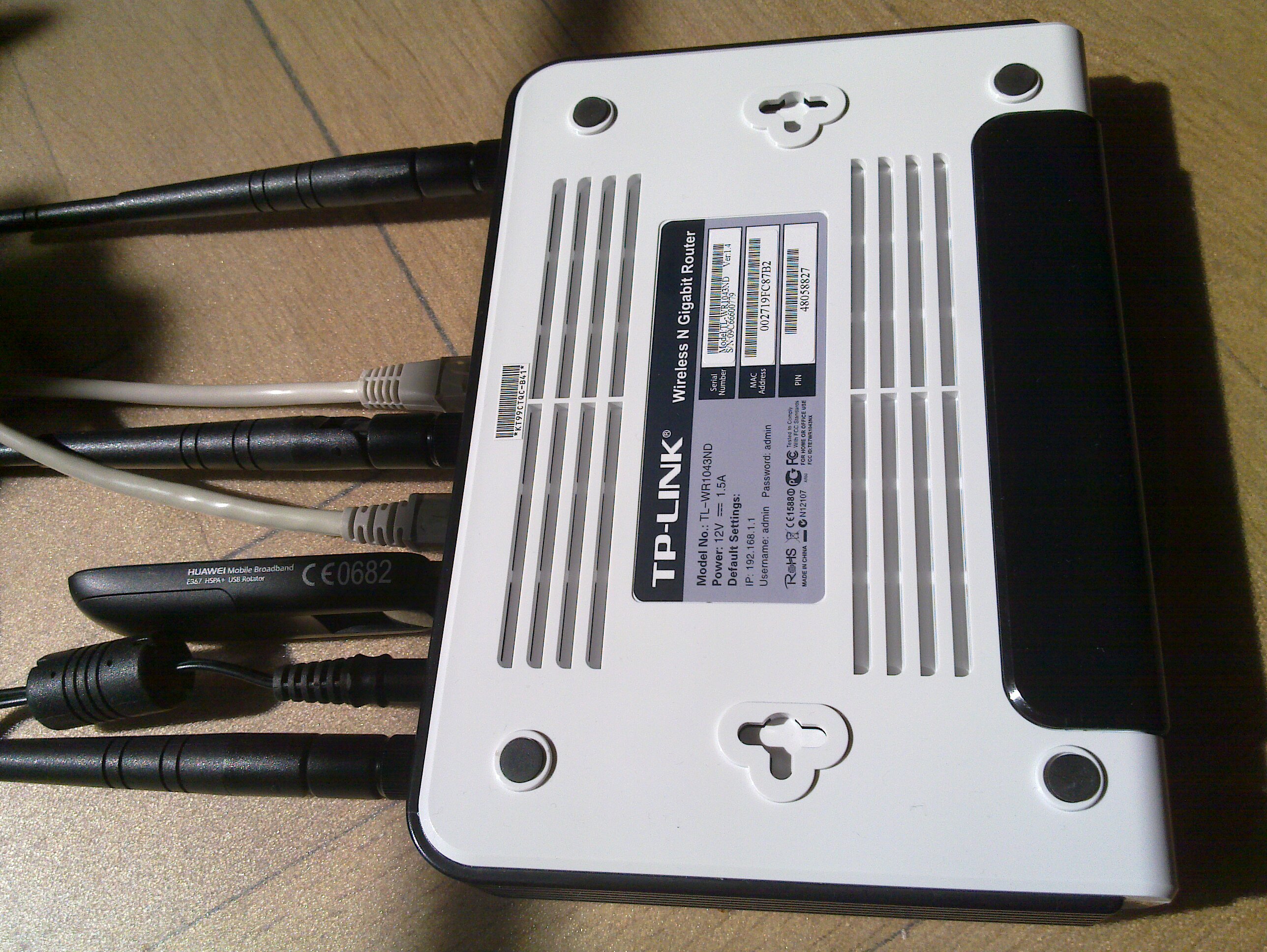
Router and modem
root@choco:~# cd /tmp
root@choco:/tmp# wget http://downloads.openwrt.org/backfire/10.03/ar71xx/openwrt-ar71xx-tl-wr1043nd-v1-squashfs-sysupgrade.bin
Connecting to downloads.openwrt.org (78.24.191.177:80)
openwrt-ar71xx-tl-wr 100%  *******************************   2688k 00:00:00 ETA
root@choco:/tmp# md5sum openwrt-ar71xx-tl-wr1043nd-v1-squashfs-sysupgrade.bin
9927973ba5da65d0d52e255397452b87  openwrt-ar71xx-tl-wr1043nd-v1-squashfs-sysupgrade.bin
root@choco:/tmp# mtd -r write /tmp/openwrt-ar71xx-tl-wr1043nd-v1-squashfs-sysupgrade.bin firmware
Unlocking firmware ...
Writing from /tmp/openwrt-ar71xx-tl-wr1043nd-v1-squashfs-sysupgrade.bin to firmware ...
Rebooting ...
The device will reboot automatically when it is done. After say 30 seconds, try to connect to it using the default IPv4 address 192.168.1.1. I have connected the WAN port to the Internet and connect to the router over local network connected to the router s LAN1 input. Let s configure OpenWRT, I m calling the host choco and giving it the IPv4 address 192.168.1.46. I ll also set a good root password to disable telnet, and add some SSH keys to simplify remote login.
jas@latte:~$ telnet 192.168.1.1
Trying 192.168.1.1...
Connected to 192.168.1.1.
Escape character is '^]'.
 === IMPORTANT ============================
  Use 'passwd' to set your login password
  this will disable telnet and enable SSH
 ------------------------------------------
BusyBox v1.15.3 (2010-04-06 03:14:11 CEST) built-in shell (ash)
Enter 'help' for a list of built-in commands.
  _______                     ________        __
          .-----.-----.-----.          .----.    _
     -      _     -__                   _    _
  _______    __ _____ __ __ ________ __    ____
           __  W I R E L E S S   F R E E D O M
 Backfire (10.03, r20728) --------------------------
  * 1/3 shot Kahlua    In a shot glass, layer Kahlua
  * 1/3 shot Bailey's  on the bottom, then Bailey's,
  * 1/3 shot Vodka     then Vodka.
 ---------------------------------------------------
root@OpenWrt:/# passwd
Changing password for root
New password:
Retype password:
Password for root changed by root
root@OpenWrt:/# sed -i -e 's/OpenWrt/choco/' /etc/config/system
root@OpenWrt:/# sed -i -e 's/192.168.1.1/192.168.1.46/' /etc/config/network
root@OpenWrt:/# cat>/etc/dropbear/authorized_keys
ssh-rsa AAAAB3NzaC1yc2...
^D
root@OpenWrt:/# dropbearkey -y -f /etc/dropbear/dropbear_rsa_host_key
Public key portion is:
ssh-rsa AAAA... root@OpenWrt
Fingerprint: md5 45:fd:62...
root@OpenWrt:/#
You could reboot the machine here to switch from telnet to SSH, but I ll install a bunch of packages while I m at it. Run opkg update to update the package list, and then install the wireless modules for the TL-WR1043ND.
root@OpenWrt:/# opkg update
Downloading http://downloads.openwrt.org/backfire/10.03/ar71xx/packages/Packages.gz.
Inflating http://downloads.openwrt.org/backfire/10.03/ar71xx/packages/Packages.gz.
Updated list of available packages in /var/opkg-lists/packages.
root@OpenWrt:/# opkg install kmod-ath9k wpad-mini
...
Configuring iw.
Configuring kmod-crypto-core.
Configuring kmod-crypto-arc4.
Configuring kmod-crypto-aes.
Configuring wireless-tools.
Configuring kmod-cfg80211.
Configuring kmod-mac80211.
Configuring kmod-ath.
Configuring kmod-ath9k.
Configuring crda.
Configuring wpad-mini.
root@OpenWrt:/#
Next I ll install some packages that will are needed for the modem.
root@OpenWrt:/# opkg install comgt kmod-usb-serial kmod-usb2 kmod-usb-uhci kmod-usb-ohci usb-modeswitch
...
Configuring kmod-nls-base.
Configuring kmod-usb-core.
Configuring chat.
Configuring kmod-usb-ohci.
Configuring kmod-usb2.
Configuring comgt.
Configuring usb-modeswitch.
Configuring kmod-usb-serial.
Configuring kmod-usb-uhci.
root@OpenWrt:/#
Now let s reboot the machine and try to get things to really work.
root@OpenWrt:/# sync
root@OpenWrt:/# reboot
Use SSH to connect to the router, and don t forget the use its new IPv4 address! 3G modems are notoriously known for not acting as a modem directly. Instead they often simulate a CD-ROM that will install device driver software, for inferior operating systems. Fortunately the usb_modeswitch tool fixes the hardware for us. My Huawei E367 start up with the USB vendor/product IDs 0x12d1:0 1446, you normally find this out by looking in /proc/bus/usb/devices. Here is the output on my device:
root@choco:~# cat /proc/bus/usb/devices
...
T:  Bus=01 Lev=01 Prnt=01 Port=00 Cnt=01 Dev#=  2 Spd=480 MxCh= 0
D:  Ver= 2.00 Cls=00(>ifc ) Sub=00 Prot=00 MxPS=64 #Cfgs=  1
P:  Vendor=12d1 ProdID=1446 Rev= 0.00
S:  Manufacturer=Huawei Technologies
S:  Product=HUAWEI Mobile
C:* #Ifs= 2 Cfg#= 1 Atr=c0 MxPwr=500mA
I:* If#= 0 Alt= 0 #EPs= 2 Cls=08(stor.) Sub=06 Prot=50 Driver=(none)
E:  Ad=81(I) Atr=02(Bulk) MxPS= 512 Ivl=0ms
E:  Ad=01(O) Atr=02(Bulk) MxPS= 512 Ivl=0ms
I:* If#= 1 Alt= 0 #EPs= 2 Cls=08(stor.) Sub=06 Prot=50 Driver=(none)
E:  Ad=02(O) Atr=02(Bulk) MxPS= 512 Ivl=0ms
E:  Ad=82(I) Atr=02(Bulk) MxPS= 512 Ivl=0ms
root@choco:~#
This means I have to go find a usb-modeswitch configuration for this device. Fortunately, I found it on my Debian Squeeze box in /etc/usb_modeswitch.d/12d1:1446 (from the usb-modeswitch-data package). There was a slight problem with the file, it didn t specify the correct USB vendor/product ID of the device after it has been switched . My Huawei E367 switches to 12d1:1506, so I add 1506 to the TargetProductList list. Here is the final configuration:
root@choco:~# cat>/etc/usb-modeswitch.conf
EnableLogging=1
DefaultVendor= 0x12d1
DefaultProduct=0x1446
TargetVendor=  0x12d1
TargetProductList="1001,1406,140b,140c,1412,141b,14ac,1506"
CheckSuccess=20
MessageContent="55534243123456780000000000000011062000000100000000000000000000"
root@choco:~#
Now you should be able to run usb_modeswitch to perform the switch :
root@choco:~# usb_modeswitch
Looking for target devices ...
 No devices in target mode or class found
Looking for default devices ...
 Found default devices (1)
Accessing device 002 on bus 001 ...
Using endpoints 0x01 (out) and 0x81 (in)
Inquiring device details; driver will be detached ...
Looking for active driver ...
 No driver found. Either detached before or never attached
SCSI inquiry data (for identification)
-------------------------
  Vendor String: HUAWEI
   Model String: Mass Storage
Revision String: 2.31
-------------------------
USB description data (for identification)
-------------------------
Manufacturer: Huawei Technologies
     Product: HUAWEI Mobile
  Serial No.: not provided
-------------------------
Setting up communication with interface 0 ...
Trying to send the message to endpoint 0x01 ...
 OK, message successfully sent
Checking for mode switch (max. 20 times, once per second) ...
 Waiting for original device to vanish ...
 Original device can't be accessed anymore. Good.
 Searching for target devices ...
 Searching for target devices ...
 Searching for target devices ...
 Searching for target devices ...
 Searching for target devices ...
 Found correct target device
Mode switch succeeded. Bye.
root@choco:~#
The /proc/bus/usb/devices file will now contain information about the real device:
root@choco:~# cat /proc/bus/usb/devices
...
T:  Bus=01 Lev=01 Prnt=01 Port=00 Cnt=01 Dev#=  3 Spd=480 MxCh= 0
D:  Ver= 2.00 Cls=ef(misc ) Sub=02 Prot=01 MxPS=64 #Cfgs=  1
P:  Vendor=12d1 ProdID=1506 Rev= 0.00
S:  Manufacturer=Huawei Technologies
S:  Product=HUAWEI Mobile
C:* #Ifs= 7 Cfg#= 1 Atr=c0 MxPwr=500mA
A:  FirstIf#= 1 IfCount= 2 Cls=02(comm.) Sub=00 Prot=00
I:* If#= 0 Alt= 0 #EPs= 3 Cls=ff(vend.) Sub=01 Prot=01 Driver=(none)
E:  Ad=81(I) Atr=03(Int.) MxPS=  64 Ivl=2ms
E:  Ad=82(I) Atr=02(Bulk) MxPS= 512 Ivl=0ms
E:  Ad=01(O) Atr=02(Bulk) MxPS= 512 Ivl=4ms
I:* If#= 1 Alt= 0 #EPs= 1 Cls=ff(vend.) Sub=01 Prot=09 Driver=(none)
E:  Ad=83(I) Atr=03(Int.) MxPS=  64 Ivl=2ms
I:* If#= 2 Alt= 0 #EPs= 2 Cls=ff(vend.) Sub=01 Prot=08 Driver=(none)
E:  Ad=84(I) Atr=02(Bulk) MxPS= 512 Ivl=0ms
E:  Ad=02(O) Atr=02(Bulk) MxPS= 512 Ivl=4ms
I:* If#= 3 Alt= 0 #EPs= 2 Cls=ff(vend.) Sub=01 Prot=03 Driver=(none)
E:  Ad=85(I) Atr=02(Bulk) MxPS= 512 Ivl=0ms
E:  Ad=03(O) Atr=02(Bulk) MxPS= 512 Ivl=4ms
I:* If#= 4 Alt= 0 #EPs= 2 Cls=ff(vend.) Sub=01 Prot=02 Driver=(none)
E:  Ad=86(I) Atr=02(Bulk) MxPS= 512 Ivl=0ms
E:  Ad=04(O) Atr=02(Bulk) MxPS= 512 Ivl=4ms
I:* If#= 5 Alt= 0 #EPs= 2 Cls=08(stor.) Sub=06 Prot=50 Driver=(none)
E:  Ad=87(I) Atr=02(Bulk) MxPS= 512 Ivl=0ms
E:  Ad=05(O) Atr=02(Bulk) MxPS= 512 Ivl=0ms
I:* If#= 6 Alt= 0 #EPs= 2 Cls=08(stor.) Sub=06 Prot=50 Driver=(none)
E:  Ad=06(O) Atr=02(Bulk) MxPS= 512 Ivl=0ms
E:  Ad=88(I) Atr=02(Bulk) MxPS= 512 Ivl=0ms
root@choco:~#
Let s put that command in /etc/rc.local so that it will be run on every boot.
root@choco:~# cat /etc/rc.local
# Put your custom commands here that should be executed once
# the system init finished. By default this file does nothing.
/usr/bin/usb_modeswitch
exit 0
root@choco:~#
We are not quite ready, the usbserial module needs to be told which USB vendor/product to use. The /etc/modules.d/60-usb-serial file is used during boot to set the right parameters. You can also run rmmod followed by insmod with the proper parameters to avoid a reboot. You can use the gcom info tool to find some information about the modem. Normally you use /dev/ttyUSB0 but for some reason it does not work for me and instead I had to use /dev/ttyUSB3.
root@choco:~# cat>/etc/modules.d/60-usb-serial
usbserial vendor=0x12d1 product=0x1506 maxSize=4096
root@choco:~# rmmod usbserial
root@choco:~# insmod usbserial vendor=0x12d1 product=0x1506 maxSize=4096
root@choco:~# gcom -d /dev/ttyUSB3 info
##### Wireless WAN Modem Configuration #####
Product text:
====
Manufacturer: huawei
Model: E367
Revision: 11.807.05.00.00
IMEI: 353613040739180
+GCAP: +CGSM,+DS,+ES
OK
====
Manufacturer:           huawei
IMEI and Serial Number: 353613040739180
Manufacturer's Revision:
11.807.05.00.
Hardware Revision:      NOT
Network Locked:         ERROR:
Customisation:          NOT SUPPORT
Band settings:          (NOT)
APN:                    ERROR:
##### END #####
root@choco:~#
Let s configure network and wireless. The configurations files are /etc/config/network and /etc/config/wireless. Edit them using your favorite editor, or vi. I m setting up a PSK2 encrypted WLAN and I have a WDS to connect two wireless routers. Note that you need to use the correct PIN for your SIM card (here I m using 8328) and set the APN correctly (I m using bredband.tre.se ). Reboot after making these changes.
root@choco:~# cat /etc/config/network
config 'interface' 'loopback'
       option 'ifname'   'lo'
       option 'proto'    'static'
       option 'ipaddr'   '127.0.0.1'
       option 'netmask'  '255.0.0.0'
config 'interface' 'lan'
        option 'ifname'   'eth0.1'
        option 'type'     'bridge'
        option 'proto'    'static'
        option 'ipaddr'   '192.168.1.46'
        option 'netmask'  '255.255.255.0'
#config 'interface' 'wan'
#        option 'ifname' 'eth0.2'
#        option 'proto' 'dhcp'
config 'switch'
	option 'name' 'rtl8366rb'
        option 'reset' '1'
        option 'enable_vlan' '1'
config 'switch_vlan'
        option 'device' 'rtl8366rb'
        option 'vlan' '1'
        option 'ports' '1 2 3 4 5t'
config 'switch_vlan'
        option 'device' 'rtl8366rb'
        option 'vlan' '2'
        option 'ports' '0 5t'
config interface wan
        option ifname   ppp0
        option proto    3g
        option device   /dev/ttyUSB0
        option apn      bredband.tre.se
        option pincode  8328
root@choco:~# cat /etc/config/wireless
config wifi-device  radio0
	option type     mac80211
	option channel  5
	option macaddr	00:27:19:fc:87:b2
	option hwmode	11ng
	option htmode	HT20
	list ht_capab	SHORT-GI-40
	list ht_capab	DSSS_CCK-40
config wifi-iface
	option device   radio0
	option network  lan
	option mode     ap
	option ssid     Grisslan
	option encryption psk2
	option key	  notforyoutosee
config wifi-iface
        option device     radio0
        option network    lan
        option mode       wds
        option bssid      00:1F:C6:60:D3:11
        option ssid       GrisslanWDS
        option encryption psk2
        option key        thisisalsosecret
root@choco:~# reboot
root@choco:~#
Once the machine have rebooted, you can bring up the 3G connection by using ifup wan . Look at the log by using logread and tail the log in the background by doing logread -f & .
root@choco:~# ifup wan
Trying to set PIN
PIN set successfully
root@choco:~# logread  tail -20
May 21 13:41:20 choco local2.info chat[2419]: send (ATD*99***1#^M)
May 21 13:41:20 choco local2.info chat[2419]: expect (CONNECT)
May 21 13:41:20 choco local2.info chat[2419]: ^M
May 21 13:41:20 choco local2.info chat[2419]: ATD*99***1#^M^M
May 21 13:41:20 choco local2.info chat[2419]: CONNECT
May 21 13:41:20 choco local2.info chat[2419]:  -- got it
May 21 13:41:20 choco local2.info chat[2419]: send ( ^M)
May 21 13:41:20 choco daemon.info pppd[2412]: Serial connection established.
May 21 13:41:20 choco daemon.info pppd[2412]: Using interface ppp0
May 21 13:41:20 choco daemon.notice pppd[2412]: Connect: ppp0 <--> /dev/ttyUSB0
May 21 13:41:24 choco daemon.warn pppd[2412]: Could not determine remote IP address: defaulting to 10.64.64.64
May 21 13:41:24 choco daemon.notice pppd[2412]: local  IP address 95.209.96.115
May 21 13:41:24 choco daemon.notice pppd[2412]: remote IP address 10.64.64.64
May 21 13:41:24 choco daemon.notice pppd[2412]: primary   DNS address 80.251.201.177
May 21 13:41:24 choco daemon.notice pppd[2412]: secondary DNS address 80.251.201.178
May 21 13:41:24 choco daemon.info dnsmasq[1028]: reading /tmp/resolv.conf.auto
May 21 13:41:24 choco daemon.info dnsmasq[1028]: using nameserver 80.251.201.178#53
May 21 13:41:24 choco daemon.info dnsmasq[1028]: using nameserver 80.251.201.177#53
May 21 13:41:24 choco daemon.info dnsmasq[1028]: using local addresses only for domain lan
May 21 13:41:25 choco user.notice rdate: Synced with ptbtime1.ptb.de
root@choco:~#
Hooray! Or almost so usually the first time you connect, I often get incorrect DNS servers from the server. It shows up like this in the log:
May 21 12:25:04 choco daemon.notice pppd[1157]: primary   DNS address 10.11.12.13
May 21 12:25:04 choco daemon.notice pppd[1157]: secondary DNS address 10.11.12.14
The exact reason why this happens is beyond me. There are patches floating around for pppd, but I haven t tried them. A common workaround is to hardcode static DNS servers (like Google DNS or OpenDNS). I have come up with my own workaround, based on the observation that when the problem has occurred it will not happen again if I disconnect and reconnect. Thus I have written a small script which is invoked whenever an interface is brought up (typically the WAN interface).
# Written by Simon Josefsson May 2011.
root@choco:~# cat> /etc/hotplug.d/iface/01-reconnect-if-dns-is-broken
case "$ ACTION:-ifup " in
    ifup)
	    if grep -q 10.11.12.13 /tmp/resolv.conf.auto; then
		(sleep 30 && ifdown wan && ifup wan) &
	    fi
	    ;;
esac
root@choco:~# chmod +x /etc/hotplug.d/iface/01-reconnect-if-dns-is-broken
root@choco:~#
That s it! If you found this writeup useful, please flattr it.
 To setup a virtual network lab, you get a lot of alternatives. You can
for example use GNS3, Netkit, Marionnet
or VNUML. Some of those tools, like GNS3, allow to
add some closed source equipments like a Cisco 7200 or a Juniper router.
All those tools are a great way to setup your network lab. Look at
them! If you want to setup a virtual network lab for educational
purpose, one of those should fit your purpose. However, none of those
solution were a perfect match for me. I did not want to maintain some
root filesystem. I wanted my lab to start in a few seconds. I wanted
to keep all configuration files (including the ones for the virtual
hosts) into one subdirectory of my home and be able to modify them
while the lab was running. I also wanted to be able to plug some Cisco
router using Dynamips/Dynagen.
None of the listed solution above matched all those
criteria. Therefore, I setup my own lab script with
User Mode Linux. This is not a complete solution, but is more
like a home-made solution to match one particular need. You cannot use
the final result without tweaking it. Again, look at the other
solutions first.
We will go step by step to understand how the lab was built. If you
are in a hurry, you can look at the result which is published on
GitHub.
apt-get install user-mode-linux. You get a linux
command that will run your Linux kernel as a simple process. No need
to be root.
1 2 3 4 5 6 7 8 9 10 11 12 13 14 15 16 17 18 19 20 21 22 23 24 25 | $ linux Core dump limits : soft - 0 hard - NONE Checking that ptrace can change system call numbers...OK Checking syscall emulation patch for ptrace...OK Checking advanced syscall emulation patch for ptrace...OK Checking for tmpfs mount on /dev/shm...nothing mounted on /dev/shm Checking PROT_EXEC mmap in /tmp/user/500/...OK Checking for the skas3 patch in the host: - /proc/mm...not found: No such file or directory - PTRACE_FAULTINFO...not found - PTRACE_LDT...not found UML running in SKAS0 mode Adding 5632000 bytes to physical memory to account for exec-shield gap Initializing cgroup subsys cpuset Linux version 2.6.32 (2.6.32) (root@tito) (gcc version 4.4.5 (Debian 4.4.5-10) ) #2 Thu Jan 27 12:49:46 UTC 2011 [...] console [mc-1] enabled Couldn't stat "root_fs" : err = 2 Failed to initialize ubd device 0 :Couldn't determine size of device's file registered taskstats version 1 VFS: Cannot open root device "98:0" or unknown-block(98,0) Please append a correct "root=" boot option; here are the available partitions: Kernel panic - not syncing: VFS: Unable to mount root fs on unknown-block(98,0) |
init from it. Usually, you build some root file
system and give it as an argument to your UML kernel.
/bin/sh as init instead of
/sbin/init. This will be the first process to be started by our UML kernel.
1 2 3 4 5 6 7 8 9 10 11 12 13 | $ linux init=/bin/sh rootfstype=hostfs [...] Linux version 2.6.32 (2.6.32) (root@tito) (gcc version 4.4.5 (Debian 4.4.5-10) ) #2 Thu Jan 27 12:49:46 UTC 2011 [...] VFS: Mounted root (hostfs filesystem) readonly on device 0:12. IRQ 3/console-write: IRQF_DISABLED is not guaranteed on shared IRQs IRQ 2/console: IRQF_DISABLED is not guaranteed on shared IRQs IRQ 10/winch: IRQF_DISABLED is not guaranteed on shared IRQs /bin/sh: can't access tty; job control turned off # uname -a Linux (none) 2.6.32 #2 Thu Jan 27 12:49:46 UTC 2011 x86_64 GNU/Linux # echo $$ 1 |
1 2 3 4 5 6 7 8 9 | # hostname -b R1 # export TERM=xterm # export PATH=/usr/local/bin:/usr/bin:/bin:/sbin:/usr/local/sbin:/usr/sbin # mount -t proc proc /proc # mount -t sysfs sysfs /sys # mount -t tmpfs tmpfs /var/run -o rw,nosuid,nodev # mount -t tmpfs tmpfs /var/log -o rw,nosuid,nodev # mount -o bind /usr/lib/uml/modules /lib/modules # mount -t hostfs hostfs /home/bernat/mylab -o /home/bernat/mylab |
/proc and /sys correctly. We also turn /var/run and
/var/log as tmpfs filesystems. This will allow most daemons to run
correctly: they will be able to write runtime data in /var/run and
to write logs in /var/log. You can even launch your favorite syslog daemon.
The line about /lib/modules is to ensure that our UML kernel is able
to access its kernel modules. For example, we can now use
modprobe tun. The line about /home allows to mount the home
directory of your host inside UML. This was already the case, but
it was mounted as read-only.
One important thing to notice is that while you seem to be root inside
UML, you did not run linux as root. Therefore, when the UML kernel
tries to write a file it will still be bound by the permissions
granted by your host kernel. See this example:
1 2 3 4 | # mount -o remount,rw / # touch /tmp/test1 # touch /etc/test1 touch: cannot touch /etc/test1': Permission denied |
linux as root.
What is interesting with such a setup is that you share the filesystem
with your host. You can modify some configuration file on your host
and your UML will see the modification right away. You can also modify
a file inside UML and see the modification on your host too.
init=/bin/sh. The problem is that you don t have job control. Job
control allows you to put tasks in background and interrupt them while
they are running. It is job control that allows you to stop a program
with ^C. Here, you don t have job control. See:
1 2 | # cat ^C^C^C^C |
linux process
on your host.
Job control is a great mystery for me. I don t know how to enable it
by hand. However, getty is able to enable job control for you. Just
type this command:
1 | # exec getty -n -l /bin/sh 38400 /dev/tty0 |
/bin/sh, but you may prefer /bin/bash
since on most systems, /bin/sh is rather basic.
1 2 3 | # mkdir /var/log/nginx # /etc/init.d/nginx start Starting nginx: nginx. |
/etc/nginx. You don t want to modify this directory for all your
labs. The best way to handle this is to start Nginx with a custom
configuration file:
1 2 | # /etc/init.d/nginx stop # nginx -c /home/bernat/mylab/nginx.conf |
/etc/init.d/nginx script to control Nginx. Moreover, some
daemons do not allow to specify a configuration file. You will then
need to modify your root filesystem.
This is a pretty common problem with Live CD and it is
solved by using an union mount. This is a special kind of mount that
will merge two filesystems into one. One of the two filesystems can be
read-only and all the changes will be reported to the second
one. We will use AUFS. Ensure that you have aufs-tools
package installed. Let s start from scratch for this example.
1 2 3 4 5 6 7 8 9 10 | $ linux init=/bin/sh rootfstype=hostfs [...] # mount -n -t proc proc /proc # mount -n -t sysfs sysfs /sys # mount -o bind /usr/lib/uml/modules /lib/modules # mount -n -t tmpfs tmpfs /tmp -o rw,nosuid,nodev # mkdir /tmp/ro /tmp/rw /tmp/aufs # mount -n -t hostfs hostfs /tmp/ro -o /,ro # mount -n -t aufs aufs /tmp/aufs -o noatime,dirs=/tmp/rw:/tmp/ro=ro # exec chroot /tmp/aufs /bin/bash |
hostfs like this:
1 2 3 4 | # mount -n -t hostfs hostfs /tmp/rw -o /home/bernat/mylab/root,rw # mount -n -t hostfs hostfs /tmp/ro -o /,ro # mount -n -t aufs aufs /tmp/aufs -o noatime,dirs=/tmp/rw:/tmp/ro=ro # exec chroot /tmp/aufs /bin/bash |
/tmp/rw stays
in a tmpfs filesystem. This means that any change to the root
filesystem will be lost. I also was unable to issue a correct
pivot_root before chroot. This is not really important here.
UPDATED: It seems that there are other drawbacks to this
setup. For some reason, if you have a separate /usr partition on
your host system, you won t be able to write to it until you specify
the noxino option to AUFS. Another issue is that AUFS does not
notice most changes on the hostfs filesystem. You can fix this with
option udba=inotify. However, this is incompatible with the noxino
option. Therefore, you need to choose what is best for your
lab. You can also mount some parts of your home with hostfs (for
example, the source directory of the piece of software that you would
like to test).
Let s consider that Nginx configuration is in
/home/bernat/lab/nginx. We simply uses a symbolic link:
1 2 | # rm -rf /etc/nginx # ln -s /home/bernat/mylab/nginx /etc/nginx |
tcpdump on it.
The drawback of such interfaces is that you need to be root to create
them. The application using them does not need to be run as root.
I usually use this nifty shell function to setup TAP interfaces:
1 2 3 4 5 6 7 8 9 10 11 12 13 14 15 16 17 18 19 20 21 22 23 | __add_to_bridge() # Optionally, add it to given bridge [ -z "$2" ] [ -f /sys/class/net/$2/brforward ] sudo brctl addbr $2 sudo brctl stp $2 off sudo ip link set $2 up [ -f /sys/class/net/$2/brif/$1 ] # We need to check if it is in another bridge bridge=$(echo /sys/class/net/*/brif/$1 2> /dev/null \ sed 's+/sys/class/net/\([^/]*\)/.*+\1+') 2> /dev/null [ -n "$bridge" ] && \ sudo brctl delif $bridge $1 sudo brctl addif $2 $1 tap() sudo tunctl -b -u $(whoami) -t $1 > /dev/null sudo ip link set up dev $1 __add_to_bridge $1 $2 |
1 2 | $ tap tap-R1 br-R1R2 $ tap tap-R2 br-R1R2 |
1 2 3 4 | $ linux init=/bin/sh rootfstype=hostfs eth0=tuntap,tap-R1 [...] # ip link set up dev eth0 # ip addr add 192.168.0.1/24 dev eth0 |
1 2 3 4 5 6 7 8 9 | $ linux init=/bin/sh rootfstype=hostfs eth0=tuntap,tap-R2 [...] # ip link set up dev eth0 # ip addr add 192.168.0.2/24 dev eth0 # ping 192.168.0.1 PING 192.168.0.1 (192.168.0.1) 56(84) bytes of data. Warning: time of day goes back (-13832us), taking countermeasures. 64 bytes from 192.168.0.1: icmp_req=20 ttl=64 time=0.633 ms 64 bytes from 192.168.0.1: icmp_req=21 ttl=64 time=0.157 ms |
vde2 package to make use of it. You can
run a switch using vde_switch command. You will get a console by
pressing Enter. From this console, you can configure the switch: add
ports, configure VLAN, etc.
Like for TAP interfaces, let s setup two UML connected to this
switch. The first one is like this:
1 2 3 4 | $ linux init=/bin/sh rootfstype=hostfs eth0=vde [...] # ip link set up dev eth0 # ip addr add 192.168.0.1/24 dev eth0 |
1 2 3 4 5 6 7 8 9 | $ linux init=/bin/sh rootfstype=hostfs eth0=vde [...] # ip link set up dev eth0 # ip addr add 192.168.0.2/24 dev eth0 # ping 192.168.0.1 PING 192.168.0.1 (192.168.0.1) 56(84) bytes of data. 64 bytes from 192.168.0.1: icmp_req=1 ttl=64 time=2.93 ms Warning: time of day goes back (-8101us), taking countermeasures. 64 bytes from 192.168.0.1: icmp_req=2 ttl=64 time=0.503 ms |
 Let s implement this lab. You should grab the sources first:
1 2 | $ git clone https://github.com/vincentbernat/network-lab.git $ cd network-lab/lab-redundant-vpn |
setup script which will setup the whole lab for you. You
also have one directory for each UML. Those directories only contain
configuration for the various daemons used inside UML. To make this
lab work, ensure that you have quagga (Quagga, an Internet
routing daemon supporting both OSPF and BGP) and racoon packages.
1 2 3 4 5 6 7 8 9 10 11 12 13 14 15 16 17 18 19 20 21 22 23 24 25 26 27 | case $$ in 1) # Inside UML. Three states: [...] ;; *) TMP=$(mktemp -d) trap "rm -rf $TMP" EXIT check_dependencies setup_screen # Setup switches setup_switch site1 setup_switch site101 setup_switch internet # Start VM start_vm R1 eth0=vde,$TMP/switch-site1.sock start_vm R2 eth0=vde,$TMP/switch-site101.sock start_vm V1 eth0=vde,$TMP/switch-site1.sock eth1=vde,$TMP/switch-internet.sock start_vm V2 eth0=vde,$TMP/switch-site1.sock eth1=vde,$TMP/switch-internet.sock start_vm V3 eth0=vde,$TMP/switch-site101.sock eth1=vde,$TMP/switch-internet.sock start_vm V4 eth0=vde,$TMP/switch-site101.sock eth1=vde,$TMP/switch-internet.sock start_vm I1 eth0=vde,$TMP/switch-internet.sock display_help cleanup screen -X quit ;; esac |
$$). If it is 1, this means it has
been invoked as init. Otherwise, it means it has been launched by
the user. We will see the init part later. When called, we first
check some dependencies, then we setup screen. Everything is run
inside a screen session. No multiple windows. The next step is to
setup the various switches needed for our lab. We take one switch for
each site and one switch for Internet . The function that setups the
switch just invokes vde_switch with the help of start-stop-daemon
to record the PID (to shutdown the lab properly).
Then, we start our various UML. For each of them, we need to specify
which network adapters we need. For R1 and R2, we don t use a
network adapter to connect to the internal network. We will use a
dummy0 interface. To emulate Internet, we use another UML,
I1.
For each UML, our script will be used as init. In this case, its PID
will be 1. As we have seen earlier, the script checks if it is called
as init. If it is the case, it will setup the UML. During this
setup, host specific configuration will be applied:
1 2 3 4 5 6 7 8 9 10 11 12 13 14 15 16 17 18 19 20 21 22 23 24 25 26 27 28 29 30 31 32 33 34 35 36 37 38 39 40 41 42 43 44 45 46 47 48 49 50 | echo "[+] Setup UML" sysctl -w net.ipv4.ip_forward=1 case $ uts in R1) modprobe dummy ip link set up dev dummy0 ip addr add 192.168.15.1/24 dev dummy0 ip addr add 192.168.1.10/24 dev eth0 setup_quagga ;; R2) modprobe dummy ip link set up dev dummy0 ip addr add 192.168.115.1/24 dev dummy0 ip addr add 192.168.101.10/24 dev eth0 setup_quagga ;; V1) ip addr add 192.168.1.11/24 dev eth0 ip addr add 1.1.2.1/24 dev eth1 ip route add default via 1.1.2.10 setup_quagga setup_racoon 1.1.2.1 1.1.1.1 192.168.0.0/19-192.168.100.0/19 ;; V2) ip addr add 192.168.1.12/24 dev eth0 ip addr add 1.1.2.2/24 dev eth1 ip route add default via 1.1.2.10 setup_quagga setup_racoon 1.1.2.2 1.1.1.2 192.168.0.0/19-192.168.100.0/19 ;; V3) ip addr add 192.168.101.13/24 dev eth0 ip addr add 1.1.1.1/24 dev eth1 ip route add default via 1.1.1.10 setup_quagga setup_racoon 1.1.1.1 1.1.2.1 192.168.100.0/19-192.168.0.0/19 ;; V4) ip addr add 192.168.101.14/24 dev eth0 ip addr add 1.1.1.2/24 dev eth1 ip route add default via 1.1.1.10 setup_quagga setup_racoon 1.1.1.2 1.1.2.2 192.168.100.0/19-192.168.0.0/19 ;; I1) ip addr add 1.1.1.10/24 dev eth0 ip addr add 1.1.2.10/24 dev eth0 ;; esac |
vtysh to get Quagga console):
1 2 3 4 5 6 7 8 9 10 11 | R1# show ip route Codes: K - kernel route, C - connected, S - static, R - RIP, O - OSPF, I - ISIS, B - BGP, > - selected route, * - FIB route C>* 127.0.0.0/8 is directly connected, lo O 192.168.1.0/24 [110/10] is directly connected, eth0, 00:25:42 C>* 192.168.1.0/24 is directly connected, eth0 O 192.168.15.0/24 [110/10] is directly connected, dummy0, 00:25:42 C>* 192.168.15.0/24 is directly connected, dummy0 O>* 192.168.115.0/24 [110/20] via 192.168.1.11, eth0, 00:02:24 * via 192.168.1.12, eth0, 00:02:24 |
1 2 3 4 5 6 7 8 9 10 11 12 | V3# show ip route Codes: K - kernel route, C - connected, S - static, R - RIP, O - OSPF, I - ISIS, B - BGP, > - selected route, * - FIB route K>* 0.0.0.0/0 via 1.1.1.10, eth1 C>* 1.1.1.0/24 is directly connected, eth1 C>* 127.0.0.0/8 is directly connected, lo O 192.168.15.0/24 [110/20] via 192.168.101.14, eth0, 00:04:26 B>* 192.168.15.0/24 [20/20] via 192.168.1.11 (recursive via 1.1.1.10), 00:07:16 O 192.168.101.0/24 [110/10] is directly connected, eth0, 00:07:30 C>* 192.168.101.0/24 is directly connected, eth0 O>* 192.168.115.0/24 [110/20] via 192.168.101.10, eth0, 00:07:18 |
1 2 3 4 | R1# ping -I 192.168.15.1 192.168.115.1 PING 192.168.115.1 (192.168.115.1) from 192.168.15.1 : 56(84) bytes of data. Warning: time of day goes back (-459129us), taking countermeasures. 64 bytes from 192.168.115.1: icmp_req=1 ttl=62 time=1.10 ms |
ip link set down eth1 on V1). The previous multipath route on R1
is now a single route through V2. Moreover, V3 has lost its BGP
route to V1 and is now using its OSPF route through V4:
1 2 3 4 5 6 7 8 9 10 11 | V3# show ip route Codes: K - kernel route, C - connected, S - static, R - RIP, O - OSPF, I - ISIS, B - BGP, > - selected route, * - FIB route K>* 0.0.0.0/0 via 1.1.1.10, eth1 C>* 1.1.1.0/24 is directly connected, eth1 C>* 127.0.0.0/8 is directly connected, lo O>* 192.168.15.0/24 [110/20] via 192.168.101.14, eth0, 00:10:13 O 192.168.101.0/24 [110/10] is directly connected, eth0, 00:13:17 C>* 192.168.101.0/24 is directly connected, eth0 O>* 192.168.115.0/24 [110/20] via 192.168.101.10, eth0, 00:13:05 |
 A while ago, we got another machine for hosting Alioth and so we
started thinking about how to use that machine. It's a used machine
and not massively faster than the current hardware, so just moving
everything over wouldn't actually get us that much of a performance
upgrade.
However, Alioth is using FusionForge, which is supposed to be able to
run on a cluster of machines. After all, this was originally built
for SourceForge.net, which certainly does not run on a single host.
So, a split of services is what we'll do.
This weekend, we're having a sprint in Collabora's office in
Cambridge, actually implementing the split and doing a bit of general
planning for the future.
Last afternoon (Friday), European time, we started the migration. The
first step is to move all the data off the Xen guest on wagner, where
Alioth is currently hosted. This finished a few minutes ago; it turns
out syncing about 8.5 million files across almost 400G of data takes a
little while.
The new host is called vasks and will host the database, run the main
apache and be the canonical location for the various SCM
repositories.
We are not decomissioning wagner, but it'll be reinstalled without Xen
or other virtualisation which should help performance a bit. It'll
host everything that has lower performance requirements such as cron
jobs, mailing lists and so on.
I'll try to keep you all updated and feel free to drop by #alioth on
irc.debian.org if you have any questions.
 This has been several months since I didn t use much my laptop, an
Asus S5N: it was crippled by a short battery life and was hit by
several bugs, most of them targeting the i855GME graphic chipset
thanks to the use of GEM and KMS in the latest Xorg. I did
not want to invest too much in a laptop and I have found
a rebate from Lenovo for Thinkpad Edge series. Voil , I have a
Thinkpad Edge 11 .

 Here is the configuration that I bought:

1 | # dd if=debian-testing-amd64-netinst.iso of=/dev/sdb |
/usr
in the root partition since having a separate /usr is less and less
supported, especially with piece of software like udev.
The partitioning tool in Debian installer do not allow to resize
volumes, you need to destroy them and recreate them as well as their
content. However, this is still faster than writing a patch for this.
When the installation is finished, the laptop boots on a 2.6.38
kernel, asks for the passphrase to decrypt the LUKS volume and display
the login prompt a few seconds later.
/etc/apt/sources.list to get unstable:
deb http://ftp.fr.debian.org/debian/ unstable main
deb-src http://ftp.fr.debian.org/debian/ unstable main
deb http://ftp.fr.debian.org/debian/ experimental main contrib non-free
/etc/apt/preferences.d/experimental:
Package: *
Pin: release experimental
Pin-Priority: 101
zsh, my favourite shell with my hand-made maturating
configuration. I should put it on
GitHub one day.mg, is the editor that I use to quickly edit a configuration
file. I don t like vi. I have used jed for a long time but its
default configuration can be cumbersome and it misses some emacs keybinding.emacs, my work environment. I use it as a text editor and mail
reader (with Gnus). I don t use it as a
browser nor as a terminal. As for zsh, I have my configuration
files ready to be copied anywhere.fvwm, my window manager since quite some time. I use
fvwm-crystal on top of it. My configuration is
described in another post. I also use conky.rxvt-unicode, a terminal. It has a very good terminal emulation
and some fancy features like transparency (using compositing or
not). It is light and fast and allows to search in the
backbuffer. It can use a client/server system that will close all
your windows when the server crashes. This almost never happens.unison, a synchronisation tool that allows me to keep the same
files on my different computers.gdm3 is the only display manager that is able to talk correctly
to ConsoleKit and get the rights set correctly without adding
yourself to a lot of groups.rpcbind and nfs-common. I use ferm to setup a simple
firewall. Here is my ferm.conf:
domain (ip ip6)
  table filter
chain INPUT
    policy DROP;
    mod state state INVALID DROP;
    mod state state (ESTABLISHED RELATED) ACCEPT;
    interface lo ACCEPT;
    proto tcp dport ssh ACCEPT;

chain OUTPUT
    policy ACCEPT;
    mod state state (ESTABLISHED RELATED) ACCEPT;

chain FORWARD
    policy DROP;
unison will then sync my configuration files and my documents. After
this step, my environment is ready.
lspci and lsusb, everything seems pretty easy to get supported.
Here is lspci output:
00:00.0 Host bridge: Intel Corporation Core Processor DRAM Controller (rev 02)
00:02.0 VGA compatible controller: Intel Corporation Core Processor Integrated Graphics Controller (rev 02)
00:16.0 Communication controller: Intel Corporation 5 Series/3400 Series Chipset HECI Controller (rev 06)
00:1a.0 USB Controller: Intel Corporation 5 Series/3400 Series Chipset USB2 Enhanced Host Controller (rev 06)
00:1b.0 Audio device: Intel Corporation 5 Series/3400 Series Chipset High Definition Audio (rev 06)
00:1c.0 PCI bridge: Intel Corporation 5 Series/3400 Series Chipset PCI Express Root Port 1 (rev 06)
00:1c.1 PCI bridge: Intel Corporation 5 Series/3400 Series Chipset PCI Express Root Port 2 (rev 06)
00:1c.5 PCI bridge: Intel Corporation 5 Series/3400 Series Chipset PCI Express Root Port 6 (rev 06)
00:1d.0 USB Controller: Intel Corporation 5 Series/3400 Series Chipset USB2 Enhanced Host Controller (rev 06)
00:1e.0 PCI bridge: Intel Corporation 82801 Mobile PCI Bridge (rev a6)
00:1f.0 ISA bridge: Intel Corporation Mobile 5 Series Chipset LPC Interface Controller (rev 06)
00:1f.2 SATA controller: Intel Corporation 5 Series/3400 Series Chipset 4 port SATA AHCI Controller (rev 06)
00:1f.3 SMBus: Intel Corporation 5 Series/3400 Series Chipset SMBus Controller (rev 06)
00:1f.6 Signal processing controller: Intel Corporation 5 Series/3400 Series Chipset Thermal Subsystem (rev 06)
03:00.0 Network controller: Intel Corporation Centrino Wireless-N 1000
09:00.0 Ethernet controller: Realtek Semiconductor Co., Ltd. RTL8111/8168B PCI Express Gigabit Ethernet controller (rev 03)
ff:00.0 Host bridge: Intel Corporation Core Processor QuickPath Architecture Generic Non-core Registers (rev 02)
ff:00.1 Host bridge: Intel Corporation Core Processor QuickPath Architecture System Address Decoder (rev 02)
ff:02.0 Host bridge: Intel Corporation Core Processor QPI Link 0 (rev 02)
ff:02.1 Host bridge: Intel Corporation Core Processor QPI Physical 0 (rev 02)
ff:02.2 Host bridge: Intel Corporation Core Processor Reserved (rev 02)
ff:02.3 Host bridge: Intel Corporation Core Processor Reserved (rev 02)
lsusb output (I disabled the broadband modem in the BIOS and
therefore, it does not appear here):
Bus 001 Device 001: ID 1d6b:0002 Linux Foundation 2.0 root hub
Bus 002 Device 001: ID 1d6b:0002 Linux Foundation 2.0 root hub
Bus 001 Device 002: ID 8087:0020 Intel Corp. Integrated Rate Matching Hub
Bus 002 Device 002: ID 8087:0020 Intel Corp. Integrated Rate Matching Hub
Bus 001 Device 003: ID 0bda:0158 Realtek Semiconductor Corp. USB 2.0 multicard reader
Bus 001 Device 004: ID 0a5c:217f Broadcom Corp. Bluetooth Controller
Bus 002 Device 003: ID 5986:01a7 Acer, Inc Lenovo Integrated Webcam
thinkpad_acpi will handle most of the
perks under the hood.
I do not use a complete desktop like Gnome. I usually prefer to use
command line tools and put them in .xsession for persistence. There
is usually some graphical utility to do the same thing. There are
however some configuration steps that are now far easier to do with a
graphical tool. Since I use X all the time, I just rely on those tools
when necessary.
lshw output, I see that I already have the latest BIOS
available. No need to update then. In case you need to update, yours,
ThinkWiki has a documentation to upgrade. You can find
memdisk image in syslinux package.
A very recent Linux distribution with kernel 2.6.33 and Intel Xorg driver 2.11 or newer is recommended. Note that XVideo (Xv) playback at certain frame sizes does not work properly unless you have at least version 2.12 of the Intel Xorg driver.With Debian Wheezy, you get version 2.15. Therefore, configuring the graphic card is just a matter of installing
xserver-xorg-video-intel
and that s all. No /etc/X11/xorg.conf needed.
HDMI and VGA outputs are detected without configuring anything. They
can be enabled with xrandr. I did not try if it was possible to use
both of them at the same time.
Screen 0: minimum 320 x 200, current 1366 x 768, maximum 8192 x 8192
LVDS1 connected 1366x768+0+0 (normal left inverted right x axis y axis) 256mm x 144mm
   1366x768       60.0*+   50.0
   1360x768       59.8     60.0
   1024x768       60.0
   800x600        60.3     56.2
   640x480        59.9
VGA1 disconnected (normal left inverted right x axis y axis)
HDMI1 disconnected (normal left inverted right x axis y axis)
DP1 disconnected (normal left inverted right x axis y axis)
i965-va-driver
package. Here is the output of vainfo:
libva: libva version 0.32.0
libva: va_getDriverName() returns 0
libva: Trying to open /usr/lib/dri/i965_drv_video.so
libva: va_openDriver() returns 0
vainfo: VA API version: 0.32
vainfo: Driver version: i965 Driver 0.1
vainfo: Supported profile and entrypoints
  VAProfileMPEG2Simple            : VAEntrypointVLD
  VAProfileMPEG2Main              : VAEntrypointVLD
  VAProfileH264Baseline           : VAEntrypointVLD
  VAProfileH264Main               : VAEntrypointVLD
  VAProfileH264High               : VAEntrypointVLD
ffmpeg-hw=1
in your ~/.config/vlc/vlcrc. We are then greeted by this:
[0x2629040] avcodec decoder: Using VA API version 0.32 for hardware decoding.
xinput
command. Here is the output of xinput list:
  Virtual core pointer                      id=2    [master pointer  (3)]
      Virtual core XTEST pointer                id=4    [slave  pointer  (2)]
      SynPS/2 Synaptics TouchPad                id=11   [slave  pointer  (2)]
      TPPS/2 IBM TrackPoint                     id=12   [slave  pointer  (2)]
  Virtual core keyboard                     id=3    [master keyboard (2)]
  Virtual core XTEST keyboard               id=5    [slave  keyboard (3)]
  Power Button                              id=6    [slave  keyboard (3)]
  Video Bus                                 id=7    [slave  keyboard (3)]
  Power Button                              id=8    [slave  keyboard (3)]
  Integrated Camera                         id=9    [slave  keyboard (3)]
  AT Translated Set 2 keyboard              id=10   [slave  keyboard (3)]
  ThinkPad Extra Buttons                    id=13   [slave  keyboard (3)]
xinput list-props will give you additional information
on each input device listed above. You can then configure any settings
using xinput set-prop. For example, if you want to enable scrolling
by using the edges of the touchpad and enable palm detection, you can
use the following commands:
1 2 | $ xinput set-int-prop "SynPS/2 Synaptics TouchPad" 'Synaptics Edge Scrolling' 8 1 1 0 $ xinput set-int-prop "SynPS/2 Synaptics TouchPad" 'Synaptics Palm Detection' 8 1 |
1 | $ xinput set-int-prop "SynPS/2 Synaptics TouchPad" 'Synaptics Off' 8 1 |
man 4 synaptics. The same applies
for the trackpoint but the correct manual page is man 4 evdev. For
example, if you want to enable scrolling using the middle button, use:
1 2 | $ xinput set-int-prop "TPPS/2 IBM TrackPoint" "Evdev Wheel Emulation" 8 1 $ xinput set-int-prop "TPPS/2 IBM TrackPoint" "Evdev Wheel Emulation Button" 8 2 |
~/.xsession.
xinput list. Therefore, your window manager or any other application
can intercept them and act upon. You can use evtest to check which
key triggers which event on which keyboard.
The acpid daemon listen on those keyboards and can also trigger some
actions. For example, it will run ibm-wireless.sh when you hit the
wireless toggle. By default, this will enable or disable your wireless
card. But you can configure the script to use a multistate toggle and
disable or enable the bluetooth card as well.
~/.asoundrc:
pcm.!default
  type pulse

ctl.!default
  type pulse
firmware-iwlwifi package. Then, iwlagn module needs to be
loaded. You can check with rfkill list that the wireless card has
not been disabled. iw list will then give the status:
Wiphy phy0
Band 1:
    Capabilities: 0x872
        HT20/HT40
        Static SM Power Save
        RX Greenfield
        RX HT20 SGI
        RX HT40 SGI
        No RX STBC
        Max AMSDU length: 3839 bytes
        No DSSS/CCK HT40
    Maximum RX AMPDU length 65535 bytes (exponent: 0x003)
    Minimum RX AMPDU time spacing: 4 usec (0x05)
    HT RX MCS rate indexes supported: 0-15, 32
    TX unequal modulation not supported
    HT TX Max spatial streams: 1
    HT TX MCS rate indexes supported may differ
    Frequencies:
        * 2412 MHz [1] (14.0 dBm)
        * 2417 MHz [2] (14.0 dBm)
        * 2422 MHz [3] (14.0 dBm)
        * 2427 MHz [4] (14.0 dBm)
        * 2432 MHz [5] (14.0 dBm)
        * 2437 MHz [6] (14.0 dBm)
        * 2442 MHz [7] (14.0 dBm)
        * 2447 MHz [8] (14.0 dBm)
        * 2452 MHz [9] (14.0 dBm)
        * 2457 MHz [10] (14.0 dBm)
        * 2462 MHz [11] (14.0 dBm)
        * 2467 MHz [12] (14.0 dBm) (passive scanning, no IBSS)
        * 2472 MHz [13] (14.0 dBm) (passive scanning, no IBSS)
    Bitrates (non-HT):
        * 1.0 Mbps
        * 2.0 Mbps (short preamble supported)
        * 5.5 Mbps (short preamble supported)
        * 11.0 Mbps (short preamble supported)
        * 6.0 Mbps
        * 9.0 Mbps
        * 12.0 Mbps
        * 18.0 Mbps
        * 24.0 Mbps
        * 36.0 Mbps
        * 48.0 Mbps
        * 54.0 Mbps
max # scan SSIDs: 20
Supported interface modes:
     * IBSS
     * managed
     * monitor
iwlagn 0000:03:00.0: Detected Intel(R) Centrino(R) Wireless-N 1000 BGN, REV=0x6C
iwlagn 0000:03:00.0: device EEPROM VER=0x15d, CALIB=0x6
iwlagn 0000:03:00.0: Device SKU: 0X9
iwlagn 0000:03:00.0: Valid Tx ant: 0X1, Valid Rx ant: 0X3
iwlagn 0000:03:00.0: Tunable channels: 13 802.11bg, 0 802.11a channels
iwlagn 0000:03:00.0: irq 44 for MSI/MSI-X
iwlagn 0000:03:00.0: loaded firmware version 128.50.3.1 build 13488
ifup and ifdown commands,
even for servers. It seems that this is not something impossible and
therefore, I think it has become flexible enough to ensure most of the
configuration tasks I need.
hci_usb module will
take care of it. It supports AD2P and can be used to listen to music
with a compatible headset. hciconfig will tell us if the chipset is working.
Again, bluetooth is easier to configure with a graphical
tool. BlueZ, the bluetooth stack in Linux, uses DBus to
communicate with other applications. The command line tools have been
deprecated and therefore, you need to fight with some DBus binding to
pair your computer to your headset.
gnome-bluetooth package comes with an applet which allows you to
quickly pair to any device. If you install
pulseaudio-module-bluetooth package, any bluetooth headset should
work out of the box.
msiexec as instructed (I did have to
execute the installation program first, otherwise, msiexec tells
that the file is invalid). I choosed the default firmware since my
laptop is unlocked. ThinkWiki page explains which firmware to
choose in which situation.
The package gobi-loader needs to be installed. The firmware files
amss.mbn, apps.mbn and UQCN.mbn should be placed in
/lib/firmware/gobi. They will be loaded by udev. To avoid to
reboot, I used this command:
1 | # /lib/udev/gobi_loader -2000 /dev/ttyUSB0 /lib/firmware/gobi
|
rfkill list that your WWAN card is not blocked. I did
not test the GPS part that needs to be enabled on Windows.
uvcvideo module is correctly loaded and you should have something
like this in your dmesg:
uvcvideo: Found UVC 1.00 device Integrated Camera (5986:01a7)
cheese is a small application that can be used to check if the
webcam operates as expected.
uswsusp package which will also pull pm-utils. You
will get pm-suspend and pm-hibernate commands.
pm-suspend will enable suspend to memory. On resume, the system
takes a whole minute to become operational. I get the following message:
r8169 0000:09:00.0: eth0: unable to apply firmware patch
PM: resume of devices complete after 60786.035 msecs
PM: Finishing wakeup.
firmware-realtek package solves this issue. It should
also be solved by a future kernel. I also have this message when I
come back from sleep:
[drm:i915_hangcheck_ring_idle] *ERROR* Hangcheck timer elapsed... render ring idle [waiting on 9297, at 9297], missed IRQ?
i915.semaphores=1 as a kernel parameter but the X server is still
slow. It seems that running powertop restores the original
speed. This is a known problem.
On sleep, the battery loses 2% every 6 hours. This allows you to keep
your laptop on sleep for several days if needed.
pm-hibernate enable suspend to disk. The suspend part works well but
on resume, the kernel freezes after reading back the image into
memory. There are some documentation to debug this problem
but I prefer to wait for 2.6.39 which may just solves this issue.
cpufrequtils
package will slow down the processor when it is not used by using the
ondemand governor. The frequency will drop from 1.33 GHz to 666 MHz.
Several tools are then available:
pm-utils package comes with scripts to enable some powersaving
features. Those scripts are run on ACPI events (for example, when
you unplug the AC adapater). There is no way to put the laptop to
sleep after two hours of inactivity for example. You need something
like sleepd to handle this part. I have found nothing that could
dim the screen on inactivity.laptop-mode-tools is also a set of script to be run on ACPI
events. It is therefore somewhat superseded by pm-utils.gnome-power-manager is a daemon that makes use of
upowerd. Despite its name, you can run it outside of the Gnome
environment. It will put your laptop to sleep on inactivity and
will dim the screen when needed. All other functionalities are
handled to upowerd. This seems the way to go on today Linux desktops.upowerd will call at some point pm-powersave
from pm-utils. This allows to run scripts when unplugging the AC
adapter. There are some scripts shipped in
/usr/lib/pm-utils/power.d. You can add your own in
/etc/pm/power.d. Some scripts are configurable. For example, if you
create /etc/pm/config.d/local and put SATA_ALPM_ENABLE=true in it,
this will enable SATA ALPM mode on battery.
You can check what needs to be done with powertop or go to a website
like Less Watts to get some tips on what to configure to
get a better battery life.
Without adding any script, I get 5 hours of battery life with the
laptop doing almost nothing. Lenovo tells that you should get 6 hours
of battery life. I think that on moderate workloads, you should get 4 hours.

 Connectivity can be a force for autonomy and freedom, or it can be
used for control and subjugation.
The Nintendo 3DS is an example of the latter.
Okay, yeah, I just said a cute video game console is a threat to personal freedom. Hear me out. If you haven't read the highlights of Nintendo's Terms of Service for
the 3DS yet, you should do that.
On one hand, it's "just" a games console. On the other hand, it's a
computer, marketed to children, which monitors your location (based on
proximity to wifi access points), uploads your photos and messages to
Nintendo's servers (giving them a license to re-use that information
in various ways), and tracks your activity. Now that's entertainment.
If you wanted your Nintendo computer to stop doing those things, you
could try to install some 3rd-party "homebrew" software on it. Except
then, according to the Terms, Nintendo would "brick" your device
render it inoperable, when the modified software is detected. Would
you accept Ford disabling your car because you had a mechanic friend
fix a problem using some aftermarket parts? Microsoft breaking your
computer hardware because you installed Firefox?
The ability to stop your electronics from spying on you is an
important freedom to defend, even if you don't ever plan on purchasing
a Nintendo device. Such terms, and the Digital Restrictions Management
software that enforces them, are a problem in all areas of digital
life. It's the same fundamental strategy as Apple controlling what you
can install on the iPhone or iPad, or Sony sending police officers to
a programmer's house because he showed other people how to modify
their own computers to make them able to run non-Sony-approved
software.
If we don't set a strong precedent against this behavior, it will
become more prevalent. If we lose the ability to install what we like
on our computers, then we lose the ability to use those computers in
any way that isn't pre-approved by a corporation. We lose it not only
because we ourselves can't install some software maybe we hate
changing anything on our computers at all but because the people
who write the software we rely on lose that freedom, which ends up
impacting even the most non-technical of computer users.
Companies like to portray anyone arguing for this freedom as criminals just wanting to illegally copy software. But that's obviously not true -- a person who follows all laws, even the most absurd, might still want to install something to stop Nintendo from receiving copies of her photos or reporting on her location. Companies use the threat of illegal copying to justify massive infringements on real personal freedoms.
People often say, "well, just don't buy it then". I agree don't buy
it. But don't think this is merely a consumer issue. Terms like
Nintendo's are backed by the force of criminal law the Digital
Millennium Copyright Act in the US for example which can put you in
jail for helping people to modify their own computers. So this is more
than a mere preference issue, it's also one of law and
ethics. It's not a free market when one side has coercive state
resources in play to prop up its arbitrary business model.
To help send this message, I just donated to send 5 bricks to
Nintendo. I hope you'll send one or five too. The campaign has a goal
of sending 200 bricks by the end of today (Monday, May 16th). Nintendo
clearly wants to get into the brick-making business, so surely they'll
appreciate the extra inventory.
(Disclosure: While I do work for the Free Software Foundation and am
paid partly to run the Defective by Design campaign, I really did
donate, and support this campaign personally.) I was hosting my projects on several
Trac instances on a dedicated
server. However, since several months, spam was pourring.
README files to use the markdown markup and
avoid the use of wiki pages when possible.
I have also put some URL redirections with the help of nginx.
In conclusion, even if maintaining Trac instances was not a lot of
work, one thing that I do not have to do anymore. And no spam on
GitHub, I assume.
head tag, including
<meta property="cc:attributionName" content="Kai Wasserb ch" />
<meta property="dc:creator" content="Kai Wasserb ch" />
Next.