Search Results: "gt"

24 September 2017

Iain R. Learmonth: Free Software Efforts (2017W38)

Here s my weekly report for week 38 of 2017. This week has not been a great week as I saw my primary development machine die in a spectacular reboot loop. Thanks to the wonderful community around Debian and free software (that if you re reading this, you re probably part of), I should be back up to speed soon. A replacement workstation is currently moving towards me and I ve received a number of smaller donations that will go towards video converters and upgrades to get me back to full productivity.

Iain R. Learmonth: Onion Services

In the summer 2017 edition of 2600 magazine there is a brilliant article on running onion services as part of a series on censorship resistant services. Onion services provide privacy and security for readers above that which is possible through the use of HTTPS. Since moving my website to Netlify, my onion service died as Netlify doesn t provide automatic onion services (although they do offer automated Let s Encrypt certificate provisioning). If anyone from Netlify is reading this, please consider adding a one-click onion service button next to the Let s Encrypt button.

Petter Reinholdtsen: Easier recipe to observe the cell phones around you

A little more than a month ago I wrote how to observe the SIM card ID (aka IMSI number) of mobile phones talking to nearby mobile phone base stations using Debian GNU/Linux and a cheap USB software defined radio, and thus being able to pinpoint the location of people and equipment (like cars and trains) with an accuracy of a few kilometer. Since then we have worked to make the procedure even simpler, and it is now possible to do this without any manual frequency tuning and without building your own packages. The gr-gsm package is now included in Debian testing and unstable, and the IMSI-catcher code no longer require root access to fetch and decode the GSM data collected using gr-gsm. Here is an updated recipe, using packages built by Debian and a git clone of two python scripts:
  1. Start with a Debian machine running the Buster version (aka testing).
  2. Run 'apt install gr-gsm python-numpy python-scipy python-scapy' as root to install required packages.
  3. Fetch the code decoding GSM packages using 'git clone github.com/Oros42/IMSI-catcher.git'.
  4. Insert USB software defined radio supported by GNU Radio.
  5. Enter the IMSI-catcher directory and run 'python scan-and-livemon' to locate the frequency of nearby base stations and start listening for GSM packages on one of them.
  6. Enter the IMSI-catcher directory and run 'python simple_IMSI-catcher.py' to display the collected information.
Note, due to a bug somewhere the scan-and-livemon program (actually its underlying program grgsm_scanner) do not work with the HackRF radio. It does work with RTL 8232 and other similar USB radio receivers you can get very cheaply (for example from ebay), so for now the solution is to scan using the RTL radio and only use HackRF for fetching GSM data. As far as I can tell, a cell phone only show up on one of the frequencies at the time, so if you are going to track and count every cell phone around you, you need to listen to all the frequencies used. To listen to several frequencies, use the --numrecv argument to scan-and-livemon to use several receivers. Further, I am not sure if phones using 3G or 4G will show as talking GSM to base stations, so this approach might not see all phones around you. I typically see 0-400 IMSI numbers an hour when looking around where I live. I've tried to run the scanner on a Raspberry Pi 2 and 3 running Debian Buster, but the grgsm_livemon_headless process seem to be too CPU intensive to keep up. When GNU Radio print 'O' to stdout, I am told there it is caused by a buffer overflow between the radio and GNU Radio, caused by the program being unable to read the GSM data fast enough. If you see a stream of 'O's from the terminal where you started scan-and-livemon, you need a give the process more CPU power. Perhaps someone are able to optimize the code to a point where it become possible to set up RPi3 based GSM sniffers? I tried using Raspbian instead of Debian, but there seem to be something wrong with GNU Radio on raspbian, causing glibc to abort().

23 September 2017

Enrico Zini: Systemd unit files

These are the notes of a training course on systemd I gave as part of my work with Truelite. Writing .unit files For reference, the global index with all .unit file directives is at man systemd.directives. All unit files have a [Unit] section with documentation and dependencies. See man systemd.unit for documentation. It is worth having a look at existing units to see what they are like. Use systemctl --all -t unittype for a list, and systemctl cat unitname to see its content wherever it is installed. For example: systemctl cat graphical.target. Note that systemctl cat adds a line of comment at the top so one can see where the unit file is installed. Most unit files also have an [Install] section (also documented in man systemd.unit) that controls what happens when enabling or disabling the unit. See also: .target units .target units only contain [Unit] and [Install] sections, and can be used to give a name to a given set of dependencies. For example, one could create a remote-maintenance.target unit, that when brought up activates, via dependencies, a set of services, mounts, network sockets, and so on. See man systemd.target See systemctl --all -t target for examples. special units man systemd.special has a list of units names that have a standard use associated to them. For example, ctrl-alt-del.target is a unit that is started whenever Control+Alt+Del is pressed on the console. By default it is symlinked to reboot.target, and you can provide your own version in /etc/systemd/system/ to perform another action when Control+Alt+Del is pressed. User units systemd can also be used to manage services on a user session, starting them at login and stopping them at logout. Add --user to the normal systemd commands to have them work with the current user's session instead of the general system. See systemd/User in the Arch Wiki for a good description of what it can do.

Dirk Eddelbuettel: RcppCNPy 0.2.7

A new version of the RcppCNPy package arrived on CRAN yesterday. RcppCNPy provides R with read and write access to NumPy files thanks to the cnpy library by Carl Rogers. This version updates internals for function registration, but otherwise mostly switches the vignette over to the shiny new pinp two-page template and package.

Changes in version 0.2.7 (2017-09-22)
  • Vignette updated to Rmd and use of pinp package
  • File src/init.c added for dynamic registration

CRANberries also provides a diffstat report for the latest release. As always, feedback is welcome and the best place to start a discussion may be the GitHub issue tickets page.

This post by Dirk Eddelbuettel originated on his Thinking inside the box blog. Please report excessive re-aggregation in third-party for-profit settings.

Dirk Eddelbuettel: RcppClassic 0.9.8

A bug-fix release RcppClassic 0.9.8 for the very recent 0.9.7 release which fixes a build issue on macOS introduced in 0.9.7. No other changes. Courtesy of CRANberries, there are changes relative to the previous release. Questions, comments etc should go to the rcpp-devel mailing list off the R-Forge page.

This post by Dirk Eddelbuettel originated on his Thinking inside the box blog. Please report excessive re-aggregation in third-party for-profit settings.

Iain R. Learmonth: VM on bhyve not booting

Last night I installed updates on my FreeNAS box and rebooted it. As expected my network died, but then it never came back, which I hadn t expected. My FreeNAS box provides backup storage space, a local Debian mirror and a mirror of talks from recent conferences. It also runs a couple of virtual machines and one of these provides my local DNS resolver. I hooked up the VNC console to the virtual machine and the problem looked to be that it was booting from the Debian installer CD.

Russell Coker: Converting Mbox to Maildir

MBox is the original and ancient format for storing mail on Unix systems, it consists of a single file per user under /var/spool/mail that has messages concatenated. Obviously performance is very poor when deleting messages from a large mail store as the entire file has to be rewritten. Maildir was invented for Qmail by Dan Bernstein and has a single message per file giving fast deletes among other performance benefits. An ongoing issue over the last 20 years has been converting Mbox systems to Maildir. The various ways of getting IMAP to work with Mbox only made this more complex. The Dovecot Wiki has a good page about converting Mbox to Maildir [1]. If you want to keep the same message UIDs and the same path separation characters then it will be a complex task. But if you just want to copy a small number of Mbox accounts to an existing server then it s a bit simpler. Dovecot has a mb2md.pl script to convert folders [2].
cd /var/spool/mail
mkdir -p /mailstore/example.com
for U in * ; do
  ~/mb2md.pl -s $(pwd)/$U -d /mailstore/example.com/$U
done
To convert the inboxes shell code like the above is needed. If the users don t have IMAP folders (EG they are just POP users or use local Unix MUAs) then that s all you need to do.
cd /home
for DIR in */mail ; do
  U=$(echo $DIR  cut -f1 -d/)
  cd /home/$DIR
  for FOLDER in * ; do
    ~/mb2md.pl -s $(pwd)/$FOLDER -d /mailstore/example.com/$U/.$FOLDER
  done
  cp .subscriptions /mailstore/example.com/$U/ subscriptions
done
Some shell code like the above will convert the IMAP folders to Maildir format. The end result is that the users will have to download all the mail again as their MUA will think that every message had been deleted and replaced. But as all servers with significant amounts of mail or important mail were probably converted to Maildir a decade ago this shouldn t be a problem.

22 September 2017

Enrico Zini: Systemd on the command line

These are the notes of a training course on systemd I gave as part of my work with Truelite. Exploring the state of a system Start and stop services Similar to the System V service command, systemctl provides commands to start/stop/restart/reload units or services: Changing global system state systemctl has halt, poweroff, reboot, suspend, hibernate, and hybrid-sleep commands to tell systemd to reboot, power off, suspend and so on. kexec and switch-root also work. The rescue and emergency commands switch the system to rescue and emergency mode (see man systemd.special. systemctl default switches to the default mode, which also happens when exiting the rescue or emergency shell. Run services at boot systemd does not implement runlevels, and services start at boot based on their dependencies. To start a service at boot, you add to its .service file a WantedBy= dependency on a well-known .target unit. At boot, systemd brings up the whole chain of dependency started from a default unit, and that will eventually activate also your service. See systemctl get-default for what unit is currently the default in your system. You can change it via the systemd.unit= kernel command line, so you can configure multiple entries in the boot loader that boot the system running different services. For example systemd.unit=rescue.target for a rescue mode, systemd.unit=multi-user.target for a non-graphical mode, or add your own .target file to implement new system modes. See systemctl list-units -t target --all for a list of all currently available targets in your system. Notes: systemctl start activates a unit right now, but does not automatically enable it at boot systemctl enable enables a unit at boot, but does not automatically start it right now * a disabled unit can still be activated if another unit depends on it To disable a unit so that it will never get started even if another unit depends on it, use systemctl mask unitname. Use systemctl unmask unitname to undo the masking. Reloading / restarting systemd systemctl daemon-reload tells systemd to reload its configuration. systemctl daemon-reexec tells systemd to restart iself.

Iain R. Learmonth: It Died: An Update

Update: I ve had an offer of a used workstation that I m following up. I would still appreciate any donations to go towards costs for cables/converters/upgrades needed with the new system but the hard part should hopefully be out the way now. (: Thanks for all the responses I ve received about the death of my desktop PC. As I updated in my previous post, I find it unlikely that I will have to orphan any of my packages as I believe that I should be able to get a new workstation soon.

21 September 2017

Clint Adams: PTT

Hello, said Adrian, but Adrian was lying. My name is Adrian, said Adrian, but Adrian was lying. Today I took a pic of myself pulling a train, announced Adrian. Spaniard pulling a train
Posted on 2017-09-21
Tags: bgs

Enrico Zini: Systemd Truelite course

These are the notes of a training course on systemd I gave as part of my work with Truelite. There is quite a lot of material, so I split them into a series of posts, running once a day for the next 9 days. Units Everything managed by systemd is called a unit (see man systemd.unit), and each unit is described by a configuration in ini-style format. For example, this unit continuously plays an alarm sound when the system is in emergency or rescue mode:
[Unit]
Description=Beeps when in emergency or rescue mode
DefaultDependencies=false
StopWhenUnneeded=true
[Install]
WantedBy=emergency.target rescue.target
[Service]
Type=simple
ExecStart=/bin/sh -ec 'while true; do /usr/bin/aplay -q /tmp/beep.wav; sleep 2; done'
Units can be described by configuration files, which have different extensions based on what kind of thing they describe: System unit files can be installed in: Unit files in /etc/ override unit files in /lib/. Note that while Debian uses /lib/, other distributions may use /usr/lib/ instead. If there is a directory with the same name as the unit file plus a .d suffix, any file *.conf it contains is parsed after the unit, and can be used to add or override configuration options. For example: Similarly, a unitname.wants/ or unitname.requires/ directory can be used to extend Wants= and Requires= dependencies on other units, by placing symlinks to other units in them. See also:

Iain R. Learmonth: It Died

On Sunday, in my weekly report on my free software activities, I wrote about how sustainable my current level of activites are. I had identified the risk that the computer that I use for almost all of my free software work was slowly dying. Last night it entered an endless reboot loop and subsequent efforts to save it have failed. I cannot afford to replace this machine and my next best machine has half the cores, half the RAM and less than half of the screen real estate.

20 September 2017

Steve Kemp: Retiring the Debian-Administration.org site

So previously I've documented the setup of the Debian-Administration website, and now I'm going to retire it I'm planning how that will work. There are currently 12 servers powering the site: I've made a bunch of commits recently to drop the event-sending, since no more dynamic actions will be possible. So events can be retired immediately. redis will go when I turn off logins, as there will be no need for sessions/cookies. beta is only used for development, so I'll kill that too. Once logins are gone, and anonymous content is disabled there will be no need to send out emails, so mailer can be shutdown. That leaves a bunch of hosts left: All in all I think we'll just have five hosts left: I think that's sane for the moment. I'm still pondering whether to export the code to static HTML, there's a lot of appeal as the load would drop a log, but equally I have a hell of a lot of mod_rewrite redirections in place, and reworking all of them would be a pain. Suspect this is something that will be done in the future, maybe next year.
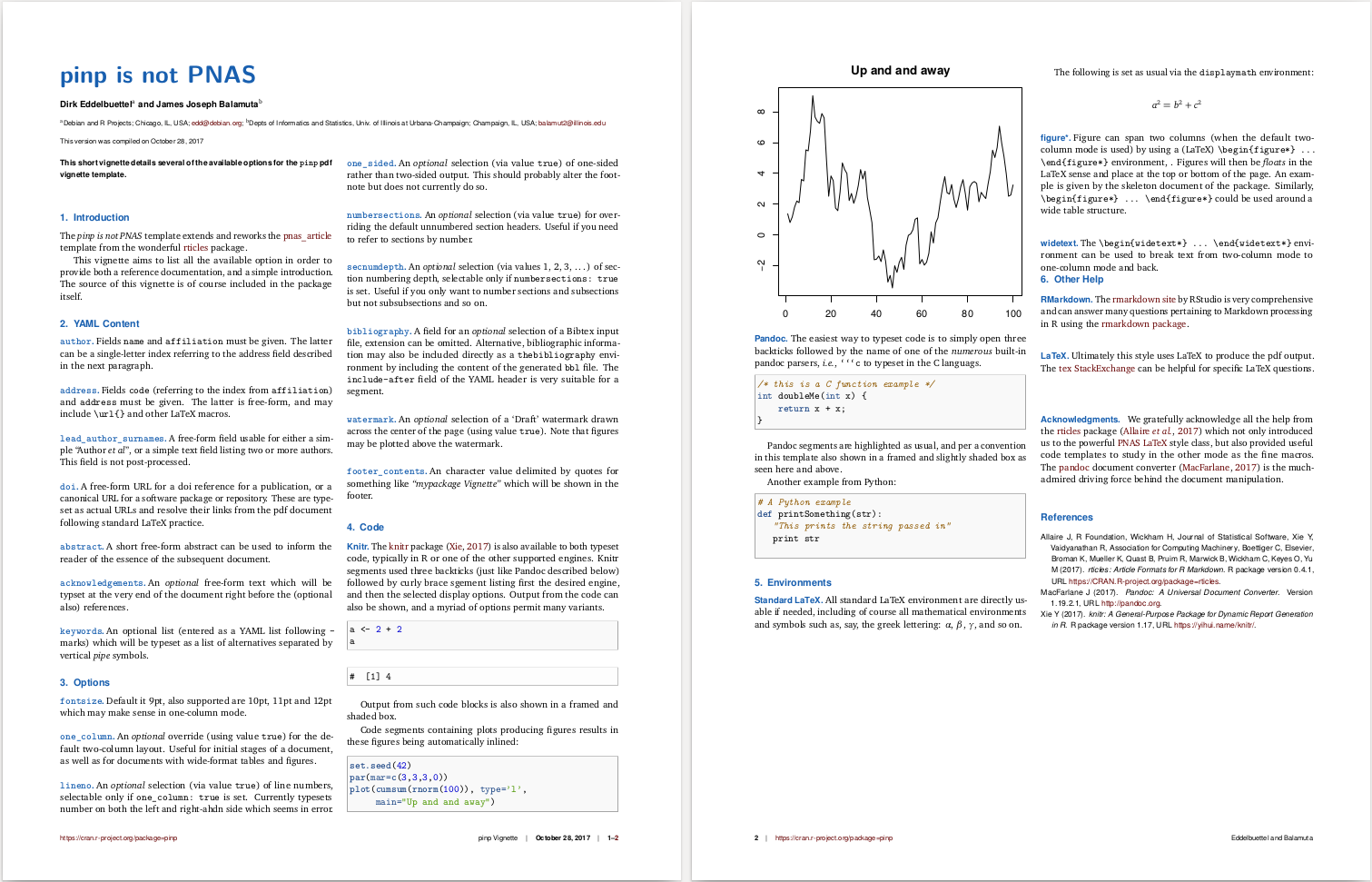
Dirk Eddelbuettel: pinp 0.0.2: Onwards

A first update 0.0.2 of the pinp package arrived on CRAN just a few days after the initial release. We added a new vignette for the package (see below), extended a few nice features, and smoothed a few corners.
The NEWS entry for this release follows.

Changes in tint version 0.0.2 (2017-09-20)
  • The YAML segment can be used to select font size, one-or-two column mode, one-or-two side mode, linenumbering and watermarks (#21 and #26 addressing #25)
  • If pinp.cls or jss.bst are not present, they are copied in ((#27 addressing #23)
  • Output is now in shaded framed boxen too (#29 addressing #28)
  • Endmatter material is placed in template.tex (#31 addressing #30)
  • Expanded documentation of YAML options in skeleton.Rmd and clarified available one-column option (#32).
  • Section numbering can now be turned on and off (#34)
  • The default bibliography style was changed to jss.bst.
  • A short explanatory vignette was added.

Courtesy of CRANberries, there is a comparison to the previous release. More information is on the tint page. For questions or comments use the issue tracker off the GitHub repo.

This post by Dirk Eddelbuettel originated on his Thinking inside the box blog. Please report excessive re-aggregation in third-party for-profit settings.

Iain R. Learmonth: Easy APT Repository

The PATHspider software I maintain as part of my work depends on some features in cURL and in PycURL that have only just been mereged or are still awaiting merge. I need to build a docker container that includes these as Debian packages, so I need to quickly build an APT repository. A Debian repository can essentially be seen as a static website and the contents are GPG signed so it doesn t necessarily need to be hosted somewhere trusted (unless availability is critical for your application). I host my blog with Netlify, a static website host, and I figured they would be perfect for this use case. They also support open source projects. There is a CLI tool for netlify which you can install with:
sudo apt install npm
sudo npm install -g netlify-cli
The basic steps for setting up a repository are:
mkdir repository
cp /path/to/*.deb repository/
cd repository
apt-ftparchive packages . > Packages
apt-ftparchive release . > Release
gpg --clearsign -o InRelease Release
netlify deploy
Once you ve followed these steps, and created a new site on Netlify, you ll be able to manage this site also through the web interface. A few things you might want to do are set up a custom domain name for your repository, or enable HTTPS with Let s Encrypt. (Make sure you have apt-transport-https if you re going to enable HTTPS though.) To add this repository to your apt sources:
gpg --export -a YOURKEYID   sudo apt-key add -
echo "deb https://SUBDOMAIN.netlify.com/ /"   sudo tee -a /etc/apt/sources.list
sudo apt update
You ll now find that those packages are installable. Beware of APT pinning as you may find that the newer versions on your repository are not actually the preferred versions according to your policy. Update: If you re wanting a solution that would be more suitable for regular use, take a look at repropro. If you re wanting to have end-users add your apt repository as a third-party repository to their system, please take a look at this page on the Debian wiki which contains advice on how to instruct users to use your repository. Update 2: Another commenter has pointed out aptly, which offers a greater feature set and removes some of the restrictions imposed by repropro. I ve never use aptly myself so can t comment on specifics, but from the website it looks like it might be a nicely polished tool.

19 September 2017

Gunnar Wolf: Call to Mexicans: Open up your wifi #sismo

Hi friends, ~3hr ago, we just had a big earthquake, quite close to Mexico City. Fortunately, we are fine, as are (at least) most of our friends and family. Hopefully, all of them. But there are many (as in, tens) damaged or destroyed buildings; there have been over 50 deceased people, and numbers will surely rise until a good understanding of the event's strength are evaluated. Mainly in these early hours after the quake, many people need to get in touch with their families and friends. There is a little help we can all provide: Provide communication. Open up your wireless network. Set it up unencrypted, for anybody to use. Refrain from over-sharing graphical content Your social network groups don't need to see every video and every photo of the shaking moments and of broken buildings. Download of all those images takes up valuable time-space for the saturated cellular networks. This advice might be slow to flow... The important moment to act is two or three hours ago, even now... But we are likely to have replicas; we are likely to have panic moments again. Do a little bit to help others in need!

Sylvain Beucler: dot-zed extractor

Following last week's .zed format reverse-engineered specification, Lo c Dachary contributed a POC extractor!
It's available at http://www.dachary.org/loic/zed/, it can list non-encrypted metadata without password, and extract files with password (or .pem file).
Leveraging on python-olefile and pycrypto, only 500 lines of code (test cases excluded) are enough to implement it :)

Reproducible builds folks: Reproducible Builds: Weekly report #125

Here's what happened in the Reproducible Builds effort between Sunday September 10 and Saturday September 16 2017: Upcoming events Reproduciblity work in Debian devscripts/2.17.10 was uploaded to unstable, fixing #872514. This adds a script to report on reproducibility status of installed packages written by Chris Lamb. #876055 was opened against Debian Policy to decide the precise requirements we should have on a build's environment variables. Bugs filed: Non-maintainer uploads: Reproduciblity work in other projects Patches sent upstream: Reviews of unreproducible packages 16 package reviews have been added, 99 have been updated and 92 have been removed in this week, adding to our knowledge about identified issues. 1 issue type has been updated: diffoscope development reprotest development trydiffoscope development Version 65 was uploaded to unstable by Chris Lamb including these contributions: Reproducible websites development tests.reproducible-builds.org Misc. This week's edition was written by Ximin Luo, Bernhard M. Wiedemann, Chris Lamb, Holger Levsen and Daniel Shahaf & reviewed by a bunch of Reproducible Builds folks on IRC & the mailing lists.

Next.

Previous.