Search Results: "ads"

20 September 2015

Dirk Eddelbuettel: RQuantLib 0.4.1

Right before heading off to last week's excellent EARL 2015 conference in London, a new minor release of RQuantLib was released onto CRAN and into Debian. The changes are detailed below.
Changes in RQuantLib version 0.4.1 (2015-09-11)
  • Changes in RQuantLib code:
    • A simple shiny application is now included in the directory shiny/DiscountCurve/ and accessible via the new demo function ShinyDiscountCurve.
    • The option surface plotting example in arrays.R now checks for rgl by using requireNamespace.
    • The files NAMESPACE and DESCRIPTION have been updated to reflect all the suggestions of R CMD check.
    • The Travis CI tests now use binary Debian packages for all package dependencies making the tests a little faster.
Courtesy of CRANberries, there is also a diffstat report for the this release. As always, more detailed information is on the RQuantLib page. Questions, comments etc should go to the rquantlib-devel mailing list off the R-Forge page. Issue tickets can be filed at the GitHub repo.

This post by Dirk Eddelbuettel originated on his Thinking inside the box blog. Please report excessive re-aggregation in third-party for-profit settings.

Michal Čihař: Weblate 2.4

Weblate 2.4 has been released today. It comes with extended support for various file formats, extended hook scripts, better keyboard shortcuts and dozen of bug fixes. Full list of changes for 2.4: If you are upgrading from older version, please follow our upgrading instructions. You can find more information about Weblate on http://weblate.org, the code is hosted on Github. If you are curious how it looks, you can try it out on demo server. You can login there with demo account using demo password or register your own user. Weblate is also being used https://hosted.weblate.org/ as official translating service for phpMyAdmin, Gammu, Weblate itself and other projects. If you are free software project which would like to use Weblate, I'm happy to help you with set up or even host Weblate for you. Further development of Weblate would not be possible without people providing donations, thanks to everybody who have helped so far! PS: The roadmap for next release is just being prepared, you can influence this by expressing support for individual issues either by comments or by providing bounty for them.

Filed under: English phpMyAdmin SUSE Weblate 0 comments

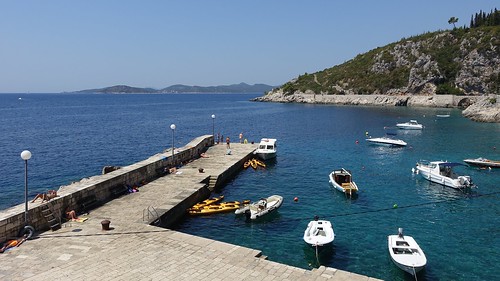
Jonathan Dowland: Kolo ep, Dubrovnik, Dalmatia

Trsteno Trsteno (near Botanical gardens)
This year, Sarah and I spent two weeks off the coast of Dubrovnik, on Kolo ep island. We'd never been to Croatia before, and I was a little nervous that if there wasn't much to do on the island, we wouldn't be able to get elsewhere particularly easily. I needn't have worried: We thoroughly enjoyed our stay. It might even be my favourite holiday so far. We did travel around a bit: twice to Dubrovnik's old town and once to a botanical gardens in Trsteno but there was also loads to see on the island itself. One of our favourite trips was simply to a cave on the opposite side of the island known as a "blue cave" because you looked like a Smurf on the inside. We had to jump into the sea from the boat and swim into and out of the cave before continuing on our trip. Simply puttering about on the boat, either around the island or to Trsteno was a great experience in itself. Our guide Sammi was very friendly, the weather was great and swimming around or just enjoying the sun on the back of the boat was enough for me to want to check property prices out there. On Kolo ep island is a little restaurant called Villa Ruza. We managed to eat there twice during our stay. I think it is considered to be one of the top ten restaurants in Croatia. It's one of the best places I've ever eaten in my life. In terms of price, it was about half that of restaurants in Dubrovnik itself.
Kolo ep Kolo ep bay, from Villa Ruza
Dubrovnik itself was, quite predictably, much busier than Kolo ep. It is a stunningly attractive old town. On our second visit we took a tour. There are a variety of different themed tours that you can take, including Game Of Thrones sight-seeing tours, and there were Game Of Thrones tat shops all over the place. We opted for A Story About The War. One thing we love to do when visiting foreign places is to get an idea of what life is like for people there, and this war was not all that long ago - I can remember the news coverage from the time. We were the only two people on that particular tour, so we had a fairly tailored experience. I wish I could remember our guide's name. She was the same age as us and grew up as a child in the city when it was under siege. Her personal story included details about where her family stayed; what life was like for kids growing up at the time; how people got supplies; which areas were badly affected and much more. It was a very heartfelt tour and gave us an intimate and personal portrait of what life was like for people there at a time that most tour operators tend to prefer to ignore. This was exactly what we were looking for. Sarah and I were both a little teary at the end! We tried to do things a little different on this holiday. Normally we keep ourselves to ourselves and don't socialise much with other guests. We also rarely do trips and excursions, preferring to sort things out for ourselves. This time we made an effort to be more sociable and I'm glad we did because we met some really nice people. The trips we did were great fun and on the last day I blew through most of the rest of our currency by hiring a jet ski for half an hour. Those things are FUN. Top speed on the one I was using was 57 land mph. Every muscle in my body was screaming for a few days afterwards! Often on a two-week holiday we reach a point around 10 days where we've pretty much had enough. This time around I could have stayed for twice as long. This was the first proper test of my new camera and I've uploaded a set of photographs from our holiday to a Flickr gallery.

19 September 2015

Francois Marier: Hooking into docking and undocking events to run scripts

In order to automatically update my monitor setup and activate/deactivate my external monitor when plugging my ThinkPad into its dock, I found a way to hook into the ACPI events and run arbitrary scripts. This was tested on a T420 with a ThinkPad Dock Series 3 as well as a T440p with a ThinkPad Ultra Dock. The only requirement is the ThinkPad ACPI kernel module which you can find in the tp-smapi-dkms package in Debian. That's what generates the ibm/hotkey events we will listen for.

Hooking into the events Create the following ACPI event scripts as suggested in this guide. Firstly, /etc/acpi/events/thinkpad-dock:
event=ibm/hotkey LEN0068:00 00000080 00004010
action=su francois -c "/home/francois/bin/external-monitor dock"
Secondly, /etc/acpi/events/thinkpad-undock:
event=ibm/hotkey LEN0068:00 00000080 00004011
action=su francois -c "/home/francois/bin/external-monitor undock"
then restart udev:
sudo service udev restart

Finding the right events To make sure the events are the right ones, lift them off of:
sudo acpi_listen
and ensure that your script is actually running by adding:
logger "ACPI event: $*"
at the begininng of it and then looking in /var/log/syslog for this lines like:
logger: external-monitor undock
logger: external-monitor dock
If that doesn't work for some reason, try using an ACPI event script like this:
event=ibm/hotkey
action=logger %e
to see which event you should hook into.

Using xrandr inside an ACPI event script Because the script will be running outside of your user session, the xrandr calls must explicitly set the display variable (-d). This is what I used:
#!/bin/sh
logger "ACPI event: $*"
xrandr -d :0.0 --output DP2 --auto
xrandr -d :0.0 --output eDP1 --auto
xrandr -d :0.0 --output DP2 --left-of eDP1

Philipp Kern: Working with z/VM DIRMAINT as a mere user

Two helpful CMS commands to know if the users on the z/VM host you connect to are managed using DIRMAINT:

REVIEW is something I always expire from my mind after a few weeks of not using a mainframe. And then I do not usually find it quickly, even knowing where to look. (For some reason GET won't work unless you are a privileged user of the system.)

I guess by now most of the systems use DIRMAINT, but it's an IBM product that requires a separate license in addition to z/VM. Hence on some systems the user directory is still maintained by hand. In this case the password is written verbatim into the file and the administrator needs to change it manually for you.

Norbert Preining: Movie: Werner Herzog Fata Morgana

Finally I found the time and peace to watch one of the strangest movies that I have ever seen, Werner Herzog s (Offical Site, Wikipedia) Fata Morgana (Wikipedia, IMDb). Footage prepared for a SF movie that never realized, converted into an impressionistic allegory and movie full of phantasms.
Werner_Herzog-Fata_Morgana Fata Morgana is a movie that escapes every description. Having read several critics voices, as well as Herzog s comments in the excellent interview/(auto)biography book Werner Herzog A guide for the perplexed, I was eager to see this old and special movie. Having laid my hand on a collection of Werner Herzog s old movies recently, I prepared some good Japanese sake, and was ready to enjoy the move. The initial sequence of airplanes landing on a very hot day, again and again, sets the stage for a series of dream-like sequences in this movie. Divided into three parts, the movie tells its story only by visual impressions and the reading of the Mayan creation myth Popol Vuh, at times intermixed with some Leonard Cohen songs. Part One Creation introduces the desert as the origin of the world, accompanied by the initial creation myth before humans were formed. Part 2 Paradise is when humans enter into the desert. Full of ramshackle houses and rotten buildings, the contrast of the spoken words and imaginary cannot be more stunning. The final part 3 The Golden Age is full of absurdities and strange appearances, not surprisingly also most humans appear here. Watching this movie is more a visual experience for me than about seeing a story line. While there are many ways to interpret the relation between the Popol Vuh and the movie sequences, for me it is more a visual experiment that tries in some sense to hypnotize the audience. For those who love strange movies, an absolute must. For all others probably a torture.

17 September 2015

Lunar: A key signing party keyserver as a Tor hidden service

Key signing parties are a pain and hopefully, one day, we will have better ways to authentication keys than reading hexadecimal strings out loud. The Zimmermann Sassaman key-signing protocol makes them much more bearable already by having only one single hexadecimal string read out loud. That string is the cryptographic hash of a document given to every participant listing all participants and their fingerprints. If everyone has the same hash, then we assume that everyone has the same document. Then, participants in turn will confirm that they fully recognize the fingerprint listed in the document. Alexander Wirt wrote a small key server dedicated to receive keys from the participants. There is also a script that will generate the document from the submitted keys and a ready-to-use keyring. The latter can be run automatically using inoticoming when a new key arrives. Finally, it would be nice if participants could confirm that their key has been properly added to the document, e.g. by making the list available on a web server. Setting all this up seemed like a good opportunity to play with Tor hidden services and systemd-nspawn. Here's the setup log with some comments. This was done on a small armhf device with Debian Jessie. Create a new hidden service Edit /etc/tor/torrc on the host to setup the hidden service:
HiddenServiceDir /var/lib/tor/ksp/
HiddenServicePort 80 10.0.0.2:80
HiddenServicePort 11371 10.0.0.2:11371
Run:
host# systemctl reload tor.service
Then, to learn the name of the newly created hidden service name:
host# cat /var/lib/tor/ksp/hostname
ksp123456789abcd.onion
Install the container debootstrap as always:
host# debootstrap --variant=minbase jessie /var/lib/container/ksp
Preliminary container configuration We do the following step simply using chroot as we are going to use the host network configuration for this stage. The container itself will not have access to the Internet.
host# chroot ksp
Let's set the hostname:
ksp-chroot# echo 'ksp' > /etc/hostname
Set up APT:
ksp-chroot# echo 'deb http://httpredir.debian.org/debian jessie main' > /etc/apt/sources.list
ksp-chroot# apt update
We need dbus to get systemd to work well:
ksp-chroot# apt-get install dbus
Make sure that we can resolve our own hostname:
ksp-chroot# apt-get install libnss-myhostname
ksp-chroot# sed -e '/^hosts:/s/files/myhostname \0/' -i /etc/nsswitch.conf
These are dependencies of the keyserver:
ksp-chroot# apt-get install --no-install-recommends libhttp-daemon-perl \
                liblog-loglite-perl libproc-reliable-perl
These ones are needed for the script generating the list:
ksp-chroot# apt-get install bzip2 inoticoming
And we will use the smallest HTTP server available:
ksp-chroot# apt-get install netcat-traditional micro-httpd
Finally, let's unconfigure all DNS resolvers:
ksp-chroot# echo > /etc/resolv.conf
And we are done with the chroot:
ksp-chroot# exit
Let's retrieve the ksp-tools repository now:
host# cd /var/lib/container/srv
host# git clone https://github.com/formorer/ksp-tools
Container setup We will now start the container with a shell to configure it:
host# systemd-nspawn -D ksp --network-veth
Let's ask systemd to configure the network for us:
ksp# systemctl enable systemd-networkd
Let's not forget to set a root password:
ksp# passwd
We add a dedicated user to run the keyserver and the list generation script:
ksp# adduser --system --group --disabled-password --disabled-login --home /var/lib/ksp ksp
Let's configure the keyserver:
ksp# cp /srv/ksp-tools/keyserver.conf /var/lib/ksp/keyserver.conf
Let's edit /var/lib/ksp/keyserver.conf:
homedir = /var/lib/ksp
Now create the GnuPG homedir for the keyserve:
ksp# mkdir /var/lib/ksp/keys
ksp# install -d -o ksp -g ksp -m 0700 /var/lib/ksp/keys/gpg
Copy the template list generator:
ksp# cp -r /srv/ksp-tools/example /var/lib/ksp/keys/ksp123456789abcd_onion
Create the key repository:
ksp# install -d -o ksp -g ksp -m 0700 /var/lib/ksp/keys/ksp123456789abcd_onion/keys
Create a directory accessible to the web server where the participant list will be generated:
ksp# mkdir -p /var/www
ksp# install -d -o ksp -g ksp -m 0755 /var/www/keys
Let's configure the list generation script by editing /var/lib/ksp/keys/ksp123456789abcd_onion/conf/vars:
KS=ksp123456789abcd.onion
export GNUPGHOME=/tmp/ksp-gpg
KSPFILE="/var/www/keys/ksp-event.txt"
Don't forget to adjust the header in /var/lib/ksp/keys/ksp123456789abcd_onion/conf/list-header. Now we create a unit file for the keyserver in /etc/systemd/system/keyserver.service:
[Unit]
Description=Key signing party keyserver
[Service]
Type=simple
Environment="KSP_HOMEDIR=/var/lib/ksp"
ExecStart=/srv/ksp-tools/bin/kspkeyserver.pl --nodaemonize
User=ksp
Group=ksp
PrivateTmp=yes
ProtectHome=yes
ProtectSystem=full
ReadOnlyDirectories=/
ReadWriteDirectories=-/var/lib/ksp
CapabilityBoundingSet=CAP_NET_BIND_SERVICE
[Install]
WantedBy=multi-user.target
Another unit for the list generator as /etc/systemd/system/ksp-list-generator.service:
[Unit]
Description=Key signing party list generator
[Service]
Type=simple
EnvironmentFile=/var/lib/ksp/keys/ksp123456789abcd_onion/conf/vars
ExecStart=/usr/bin/inoticoming --foreground /var/lib/ksp/keys/ksp123456789abcd_onion/keys --chdir /var/lib/ksp/keys/ksp123456789abcd_onion bin/generate-list \;
User=ksp
Group=ksp
PrivateTmp=yes
ProtectHome=yes
ProtectSystem=full
ReadOnlyDirectories=/
ReadWriteDirectories=/var/www/keys
CapabilityBoundingSet=
[Install]
WantedBy=multi-user.target
For the web server, we first configure a socket listening on port 80 in /etc/systemd/system/micro-httpd.socket:
[Unit]
Description=micro-httpd socket
[Socket]
ListenStream=80
Accept=yes
[Install]
WantedBy=sockets.target
And then the web server in /etc/systemd/system/micro-httpd@.service:
[Unit]
Description=micro-httpd server
[Service]
ExecStart=-/usr/sbin/micro-httpd /var/www/ksp
StandardInput=socket
PrivateTmp=yes
ProtectHome=yes
ProtectSystem=full
ReadOnlyDirectories=/
CapabilityBoundingSet=
Let's now ask systemd to start all of these at boot time:
ksp# systemctl daemon-reload
ksp# systemctl enable keyserver.service
ksp# systemctl enable ksp-list-generator.service
ksp# systemctl enable micro-httpd.socket
One way to kill the container is to type Control+] three times. Boot the container Let's get this party started!
host# systemd-nspawn -b -D /var/lib/container/ksp --network-veth
Hopefully, things should work now. Participants to the KSP should then be able to send their key with:
$ torsocks gpg --keyserver ksp123456789abcd.onion --send-key $KEYID
(Sadly, this is broken with GnuPG 2.1 at the moment.) The participant list should be available at http://ksp123456789abcd.onion/ksp-event.txt. Final steps We need to tell systemd to start the container started at boot time:
host# systemctl enable systemd-nspawn@ksp.service
But the default command-line will not use a dedicated network, so we need to override that part of the configuration. First create a directory:
host# mkdir /etc/systemd/system/systemd-nspawn@ksp.service.d
And edit /etc/systemd/system/systemd-nspawn@ksp.service.d/use-network-veth.conf:
[Service]
# The empty line because we want to override all previous ExecStart
# and not add an extra command
ExecStart=
ExecStart=/usr/bin/systemd-nspawn --quiet --keep-unit --boot --link-journal=try-guest --directory=/var/lib/container/%i --network-veth
Let's reload systemd and verify that our snippet is there:
host# systemctl daemon-reload
host# systemctl cat systemd-nspawn@ksp.service
All good? Let's start it:
host# systemctl start systemd-nspawn@ksp.service
One should also add a firewall to disallow any outgoing connections from the ve-ksp interface as an extra protection.

Julien Danjou: My interview in le Journal du Hacker

A few days ago, the French equivalent of Hacker News, called "Le Journal du Hacker", interviewed me about my work on OpenStack, my job at Red Hat and my self-published book The Hacker's Guide to Python. I've spent some time translating it into English so you can read it if you don't understand French! I hope you'll enjoy it.
Hi Julien, and thanks for participating in this interview for the Journal du Hacker. For our readers who don't know you, can you introduce you briefly?
You're welcome! My name is Julien, I'm 31 years old, and I live in Paris. I now have been developing free software for around fifteen years. I had the pleasure to work (among other things) on Debian, Emacs and awesome these last years, and more recently on OpenStack. Since a few months now, I work at Red Hat, as a Principal Software Engineer on OpenStack. I am in charge of doing upstream development for that cloud-computing platform, mainly around the Ceilometer, Aodh and Gnocchi projects.
Being myself a system architect, I follow your work in OpenStack since a while. It's uncommon to have the point of view of someone as implied as you are. Can you give us a summary of the state of the project, and then detail your activities in this project?
The OpenStack project has grown and changed a lot since I started 4 years ago. It started as a few projects providing the basics, like Nova (compute), Swift (object storage), Cinder (volume), Keystone (identity) or even Neutron (network) who are basis for a cloud-computing platform, and finally became composed of a lot more projects. For a while, the inclusion of projects was the subject of a strict review from the technical committee. But since a few months, the rules have been relaxed, and we see a lot more projects connected to cloud-computing joining us. As far as I'm concerned, I've started with a few others people the Ceilometer project in 2012, devoted to handling metrics of OpenStack platforms. Our goal is to be able to collect all the metrics and record them to analyze them later. We also have a module providing the ability to trigger actions on threshold crossing (alarm). The project grew in a monolithic way, and in a linear way for the number of contributors, during the first two years. I was the PTL (Project Technical Leader) for a year. This leader position asks for a lot of time for bureaucratic things and people management, so I decided to leave my spot in order to be able to spend more time solving the technical challenges that Ceilometer offered. I've started the Gnocchi project in 2014. The first stable version (1.0.0) was released a few months ago. It's a timeseries database offering a REST API and a strong ability to scale. It was a necessary development to solve the problems tied to the large amount of metrics created by a cloud-computing platform, where tens of thousands of virtual machines have to be metered as often as possible. This project works as a standalone deployment or with the rest of OpenStack. More recently, I've started Aodh, the result of moving out the code and features of Ceilometer related to threshold action triggering (alarming). That's the logical suite to what we started with Gnocchi. It means Ceilometer is to be split into independent modules that can work together with or without OpenStack. It seems to me that the features provided by Ceilometer, Aodh and Gnocchi can also be interesting for operators running more classical infrastructures. That's why I've pushed the projects into that direction, and also to have a more service-oriented architecture (SOA)
I'd like to stop for a moment on Ceilometer. I think that this solution was very expected, especially by the cloud-computing providers using OpenStack for billing resources sold to their customers. I remember reading a blog post where you were talking about the high-speed construction of this brick, and features that were not supposed to be there. Nowadays, with Gnocchi and Aodh, what is the quality of the brick Ceilometer and the programs it relies on?
Indeed, one of the first use-case for Ceilometer was tied to the ability to get metrics to feed a billing tool. That's now a reached goal since we have billing tools for OpenStack using Ceilometer, such as CloudKitty. However, other use-cases appeared rapidly, such as the ability to trigger alarms. This feature was necessary, for example, to implement the auto-scaling feature that Heat needed. At the time, for technical and political reasons, it was not possible to implement this feature in a new project, and the functionality ended up in Ceilometer, since it was using the metrics collected and stored by Ceilometer itself. Though, like I said, this feature is now in its own project, Aodh. The alarm feature is used since a few cycles in production, and the Aodh project brings new features on the table. It allows to trigger threshold actions and is one of the few solutions able to work at high scale with several thousands of alarms. It's impossible to make Nagios run with millions of instances to fetch metrics and triggers alarms. Ceilometer and Aodh can do that easily on a few tens of nodes automatically. On the other side, Ceilometer has been for a long time painted as slow and complicated to use, because its metrics storage system was by default using MongoDB. Clearly, the data structure model picked was not optimal for what the users were doing with the data. That's why I started Gnocchi last year, which is perfectly designed for this use case. It allows linear access time to metrics (O(1) complexity) and fast access time to the resources data via an index. Today, with 3 projects having their own perimeter of features defined and which can work together Ceilometer, Aodh and Gnocchi finally erased the biggest problems and defects of the initial project.
To end with OpenStack, one last question. You're a Python developer for a long time and a fervent user of software testing and test-driven development. Several of your blogs posts point how important their usage are. Can you tell us more about the usage of tests in OpenStack, and the test prerequisites to contribute to OpenStack?
I don't know any project that is as tested on every layer as OpenStack is. At the start of the project, there was a vague test coverage, made of a few unit tests. For each release, a bunch of new features were provided, and you had to keep your fingers crossed to have them working. That's already almost unacceptable. But the big issue was that there was also a lot of regressions, et things that were working were not anymore. It was often corner cases that developers forgot about that stopped working. Then the project decided to change its policy and started to refuse all patches new features or bug fix that would not implement a minimal set of unit tests, proving the patch would work. Quickly, regressions were history, and the number of bugs largely reduced months after months. Then came the functional tests, with the Tempest project, which runs a test battery on a complete OpenStack deployment. OpenStack now possesses a complete test infrastructure, with operators hired full-time to maintain them. The developers have to write the test, and the operators maintain an architecture based on Gerrit, Zuul, and Jenkins, which runs the test battery of each project for each patch sent. Indeed, for each version of a patch sent, a full OpenStack is deployed into a virtual machine, and a battery of thousands of unit and functional tests is run to check that no regressions are possible. To contribute to OpenStack, you need to know how to write a unit test the policy on functional tests is laxer. The tools used are standard Python tools, unittest for the framework and tox to run a virtual environment (venv) and run them. It's also possible to use DevStack to deploy an OpenStack platform on a virtual machine and run functional tests. However, since the project infrastructure also do that when a patch is submitted, it's not mandatory to do that yourself locally.
The tools and tests you write for OpenStack are written in Python, a language which is very popular today. You seem to like it more than you have to, since you wrote a book about it, The Hacker's Guide to Python, that I really enjoyed. Can you explain what brought you to Python, the main strong points you attribute to this language (quickly) and how you went from developer to author?
I stumbled upon Python by chance, around 2005. I don't remember how I hear about it, but I bought a first book to discover it and started toying with that language. At that time, I didn't find any project to contribute to or to start. My first project with Python was rebuildd for Debian in 2007, a bit later. I like Python for its simplicity, its object orientation rather clean, its easiness to be deployed and its rich open source ecosystem. Once you get the basics, it's very easy to evolve and to use it for anything, because the ecosystem makes it easy to find libraries to solve any kind of problem. I became an author by chance, writing blog posts from time to time about Python. I finally realized that after a few years studying Python internals (CPython), I learned a lot of things. While writing a post about the differences between method types in Python which is still one of the most read post on my blog I realized that a lot of things that seemed obvious to me where not for other developers. I wrote that initial post after thousands of hours spent doing code reviews on OpenStack. I, therefore, decided to note all the developers pain points and to write a book about that. A compilation of what years of experience taught me and taught to the other developers I decided to interview in the book.
I've been very interested by the publication of your book, for the subject itself, but also the process you chose. You self-published the book, which seems very relevant nowadays. Is that a choice from the start? Did you look for an editor? Can you tell use more about that?
I've been lucky to find out about others self-published authors, such as Nathan Barry who even wrote a book on that subject, called Authority. That's what convinced me it was possible and gave me hints for that project. I've started to write in August 2013, and I ran the firs interviews with other developers at that time. I started to write the table of contents and then filled the pages with what I knew and what I wanted to share. I manage to finish the book around January 2014. The proof-reading took more time than I expected, so the book was only released in March 2014. I wrote a complete report on that on my blog, where I explain the full process in detail, from writing to launching. I did not look for editors though I've been proposed some. The idea of self-publishing really convince me, so I decided to go on my own, and I have no regret. It's true that you have to wear two hats at the same time and handle a lot more things, but with a minimal audience and some help from the Internet, anything's possible! I've been reached by two editors since then, a Chinese and Korean one. I gave them rights to translate and publish the books in their countries, so you can buy the Chinese and Korean version of the first edition of the book out there. Seeing how successful it was, I decided to launch a second edition in Mai 2015, and it's likely that a third edition will be released in 2016.
Nowadays, you work for Red Hat, a company that represents the success of using Free Software as a commercial business model. This company fascinates a lot in our community. What can you say about your employer from your point of view?
It only has been a year since I joined Red Hat (when they bought eNovance), so my experience is quite recent. Though, Red Hat is really a special company on every level. It's hard to see from the outside how open it is, and how it works. It's really close to and it really looks like an open source project. For more details, you should read The Open Organization, a book wrote by Jim Whitehurst (CEO of Red Hat), which he just published. It describes perfectly how Red Hat works. To summarize, meritocracy and the lack of organization in silos is what makes Red Hat a strong organization and puts them as one of the most innovative company. In the end, I'm lucky enough to be autonomous for the project I work on with my team around OpenStack, and I can spend 100% working upstream and enhance the Python ecosystem.

Raphaël Hertzog: Freexian s report about Debian Long Term Support, August 2015

A Debian LTS logoLike each month, here comes a report about the work of paid contributors to Debian LTS. Individual reports In August, 71.50 work hours have been dispatched among 7 paid contributors. Their reports are available: Evolution of the situation September is stable compared to August (71.50 hours per month) and has not caught up back to the level of July as I hoped. Again it s because 2 sponsors were not able to pay their renewal invoice on time (one of last month paid, but another bigger sponsor failed this month). Those sponsors will continue to support us and I would like to be able to say that things will be back to normal next month, but I can t say it since we have also been informed of the (hopefully temporary) defection of another bronze sponsor that will affect us next month. Fortunately there are also good news, we have 3 new sponsors in the pipe (2 silver, 1 platinum) who shall join the project soon. And Blablacar increased their support from Silver to Gold (from 4h/month to 8h/month). But we still need more support in particular since we would like to commit to support virtualization related packages in Wheezy: that s clearly an objective for us. I recently published the summary of the work session held during DebConf 15 in Heidelberg (video recording). It would be really nice if we could get closer to the goal of funding a full-time position. In terms of security updates waiting to be handled, the situation is close to last month: the dla-needed.txt file lists 18 packages awaiting an update (2 less than last month), the list of open vulnerabilities in Squeeze shows about 30 affected packages in total (8 more than last month). Thanks to our sponsors

No comment Liked this article? Click here. My blog is Flattr-enabled.

Norbert Preining: Debian/TeX Live 2015.20150917-1

Usual regular update of the TeX Live packages. Now that Debian/unstable is back to full development speed thanks to the end of the bit gcc transition, probably this TeX Live update will be lost between the hundreds of others. Anyway a few interesting changes are still in there. Debian - TeX Live 2015 Most importantly the fix for unicode-math that was broken for a short time, and for the Japanese users it seems that the LaTeX3 packages have gained support for upTeX. Good to hear. Of course, these are not the only updates and newcomers, see the list below. Updated packages abc, acro, alegreya, animate, arabxetex, babel-bosnian, babel-french, babel-greek, babel-latin, babel-welsh, beamer-FUBerlin, bidi, bigfoot, blochsphere, bxjscls, chemformula, chemmacros, chet, classicthesis, crossrefware, csplain, ctable, ctanify, datetime2, datetime2-basque, detlev-cm, disser, doclicense, drm, dtxgen, dtxtut, dvips, ecclesiastic, eledmac, embrac, etex-pkg, etoc, factura, fbb, fithesis, font-change, fontname, glossaries, gothic, greek-fontenc, IEEEtran, l3build, l3experimental, l3kernel, l3packages, latexconfig, lettrine, luatexja, mathastext, mcf2graph, media9, metrix, mhequ, minted, moderntimeline, newtx, ocgx2, pagecolor, pdftex, pgf, pstricks, reledmac, resphilosophica, roboto, shdoc, siunitx, suftesi, tetex, tex4ht, texlive-scripts, tikz-bayesnet, translations, ucharcat, udesoftec, ulthese, unicode-math, ut-thesis, withargs, xint. New packages checklistings, cleanthesis, easyreview, fei, medstarbeamer, mfirstuc, nevelok, old-arrows, proofread, uassign, xebaposter. Enjoy.

16 September 2015

Christoph Egger: Welcome Kabel Deutschland

So moving, away from awesome Core-Backbone provided internet at home and to Kabel Deutschland madness. Missing routes for several hours and noone even seems to notice, no mail address to properly report issues. Quality Network.

traceroute to sks-keyservers.net (37.191.220.247), 30 hops max, 60 byte packets
 1  192.168.0.1 (192.168.0.1)  11.033 ms * *
 2  83-169-183-122-isp.superkabel.de (83.169.183.122)  28.413 ms  74.792 ms  75.376 ms
 3  ip5886ea49.dynamic.kabel-deutschland.de (88.134.234.73)  77.083 ms  77.671 ms  79.283 ms
 4  ip5886ee61.dynamic.kabel-deutschland.de (88.134.238.97)  79.833 ms ip5886ed7c.dynamic.kabel-deutschland.de (88.134.237.124)  81.416 ms  83.348 ms
 5  ip5886ca25.dynamic.kabel-deutschland.de (88.134.202.37)  87.592 ms  88.101 ms *
 6  * * *
 7  * * *
 8  * * *
[...]
Needless to say, of course, that it still works perfectly fine from the old network.

Ben Hutchings: Debian LTS work, August 2015

This was my ninth month working on Debian LTS. I was assigned 15 hours of work by Freexian's Debian LTS initiative. Front desk I spent another week in the 'front desk' role, largely overlapping with DebConf. I investigated which new CVEs affected LTS-supported packages in squeeze, recorded this in the secure-testing repository, and mailed the package maintainers to give them a chance to handle the updates. I found that one claimed security flaw in glusterfs was actually harmless for all supported Debian releases. conntrack conntrack had one new issue (CVE-2015-6496, possible remote DoS if certain kernel modules aren't loaded). I didn't find a way to reproduce it, but it still seemed to be applicable to squeeze (but for fewer protocols). I was able to backport the upstream fix without difficulty, after which I uploaded and issued DLA-295-1. DebConf I attended the LTS BoF at DebConf 15 to discuss the plans for wheezy LTS. Raphael just posted a summary of these discussions. linux-2.6 I spent some time on kernel security fixes, but haven't uploaded an update yet. That will probably come in September.

15 September 2015

Norbert Preining: In Memoriam Adrian Frutiger

Just a few days ago another great font designer has passed away, Adrian Frutiger, 24 May 1928 10 September 2015. Famous in particular for his fonts Frutiger, Avenir, and the Univers family. His fonts are used throughout the worlds for visual communication like road signs. Much has been written about him: Linotype s excellent obituary, Adam Twardoch, David Airey, New York Times article. For an interview conducted with Frutiger in 1999, see this Eye Magazine article. An interesting article on Frutiger s typefaces by Charles Bigelow.
frutiger1 Here I want to recall a different quality of Adrian Frutiger his interest in the visual language of symbols, their development and interaction. His book Der Mensch und seine Zeichen (Signs and Symbols) is a profound study on the development, history, and use of all kind of symbols. In this book, translated into many languages, Frutiger explores the depth and breath of symbols, but the most important part for him, easily to be seen from the German title, is the human part ( Der Mensch ). Symbols are created, changed, and used by and for humans. His studies exhibit connections between various cultures when it comes to sign usage and design.
frutiger5 He also explores signets as modern sign language, and their importance for visual communcation and identity building.
frutiger4 The book also discusses the development of the Roman alphabet, and of course passes the Univers font family.
frutiger2 My favorite piece is this overlay of a s from different fonts, to show that there is a common pattern in these fonts.
frutiger3 He concludes this book with a very wise statement:

Zum Festhalten des Gedankens, zur Vermittlung der Aussage gen gen seit langem schon die Alphabet-Zeichen nicht mehr allein. Orientierung und Kommunikation sind heute unm glich ohne Schemata, Zeichen und Signale. Der geschriebene Ausdruck wird durch die Bildvermittlung notwendig erg nzt.
SInce long the alphabet letters alone do not suffice to take hold of thoughts and to transmit statements. Nowadays, orientation and communication are impossible without schemata, signs and signals. The written expression is necessarily enhanced through image transmission.
(my translation) After Hermann Zapf, this is now the second loss of the typographic world in this year. We will miss both of them.

Clint Adams: It's just like that thing

Hi, Craige.

14 September 2015

Julien Danjou: Visualize your OpenStack cloud: Gnocchi & Grafana

We've been hard working with the Gnocchi team these last months to store your metrics, and I guess it's time to show off a bit. So far Gnocchi offers scalable metric storage and resource indexation, especially for OpenStack cloud but not only, we're generic. It's cool to store metrics, but it can be even better to have a way to visualize them! Prototyping We very soon started to build a little HTML interface. Being REST-friendly guys, we enabled it on the same endpoints that were being used to retrieve information and measures about metric, sending back text/html instead of application/json if you were requesting those pages from a Web browser. But let's face it: we are back-end developers, we suck at any kind front-end development. CSS, HTML, JavaScript? Bwah! So what we built was a starting point, hoping some magical Web developer would jump in and finish the job. Obviously it never happened. Ok, so what's out there? It turns out there are back-end agnostic solutions out there, and we decided to pick Grafana. Grafana is a complete graphing dashboard solution that can be plugged on top of any back-end. It already supports timeseries databases such as Graphite, InfluxDB and OpenTSDB. That was largely enough for that my fellow developer Mehdi Abaakouk to jump in and start writing a Gnocchi plugin for Grafana! Consequently, there is now a basic but solid and working back-end for Grafana that lies in the grafana-plugins repository.
With that plugin, you can graph anything that is stored in Gnocchi, from raw metrics to metrics tied to resources. You can use templating, but no annotation yet. The back-end supports Gnocchi with or without Keystone involved, and any type of authentication (basic auth or Keystone token). So yes, it even works if you're not running Gnocchi with the rest of OpenStack.
It also supports advanced queries, so you can search for resources based on some criterion and graphs their metrics. I want to try it! If you want to deploy it, all you need to do is to install Grafana and its plugins, and create a new datasource pointing to Gnocchi. It is that simple. There's some CORS middleware configuration involved if you're planning on using Keystone authentication, but it's pretty straightforward just set the cors.allowed_origin option to the URL of your Grafana dashboard. We added support of Grafana directly in Gnocchi devstack plugin. If you're running DevStack you can follow the instructions which are basically adding the line enable_service gnocchi-grafana. Moving to Grafana core Mehdi just opened a pull request a few days ago to merge the plugin into Grafana core. It's actually one of the most unit-tested plugin in Grafana so far, so it should be on a good path to be merged in the future and have support of Gnocchi directly into Grafana without any plugin involved.

Lunar: Reproducible builds: week 20 in Stretch cycle

What happened in the reproducible builds effort this week: Media coverage Motherboard published an article on the project inspired by the talk at the Chaos Communication 15. Journalists sadly rarely pick their headlines. The sensationalist How Debian Is Trying to Shut Down the CIA got started a few rants here and there. One from OpenBSD developper Ted Unangst lead to a good email contact and some thorough comments. Toolchain fixes The modified version of gettext has been removed from the experimental toolchain. Fixing individual package seems a better approach for now. Chris Lamb sent two patches for abi-compliance-checker: one to drop the timestamp from generated HTML reports and another to make umask and timestamps deterministic in the abi tarball. Bugs submitted by Dhole lead to a discussion on the best way to adapt pod2man now that we have SOURCE_DATE_EPOCH specified. There is really a whole class of issues that are currently undiscovered waiting for tests running on a different date. This is likely to should happen soon. Chris Lamb uploaded a new version of debhelper in the reproducible repository, cherry-picking a fix for interactions between ddebs and udebs. Packages fixed The following packages became reproducible due to changes in their build dependencies: aspic, django-guardian, erlang-sqlite3, etcd, libnative-platform-java, mingw-ocaml, nose2, oar, obexftp, py3cairo, python-dugong, python-secretstorage, python-setuptools, qct, qdox, recutils, s3ql, wine. The following packages became reproducible after getting fixed: Some uploads fixed some reproducibility issues but not all of them: Patches submitted which have not made their way to the archive yet: reproducible.debian.net The configuration of all remote armhf and amd64 nodes in now finished. The remaining reproducibility tests running on the Jenkins host has been removed. armhf results and graphs are now visible in dashboard. We can now test the whole archive in 2-3 weeks using the current 12 amd64 jobs and 3 months using the current 6 armhf builders. We will be looking at improving the armhf sitation, maybe using more native systems or via arm64. (h01ger) The Jenkins UI is now more responsive since all jobs building packages have been moved to remote hosts. (h01ger) A new job has been added to collect information about build nodes to be included in the variation table. (h01ger) The currently scheduled page has been split for amd64 and armhf. They now give an overview (refreshed every minute, thanks to Chris Lamb) of the packages currently being tested. (h01ger) Several cleanup and bugfixes have been made, especially in the remote building and maintenance scripts. They should now be more robust against network problems. The automatic scheduler is now also run closer to when schroots and pbuilders are updated. (h01ger, mapreri) Package reviews 16 reviews have been removed, 54 added and 55 updated this week. Santiago Vila renamed lc_messages_randomness with the more descriptive different_pot_creation_date_in_gettext_mo_files. New issues added this week: timestamps_in_reports_generated_by_abi_compliance_checker, umask_and_timestamp_variation_in_tgz_generated_by_abi_compliance_checker, and timestamps_added_by_blast2. 23 new FTBFS bugs have been filled by Chris Lamb, and Niko Tyni. Misc. Red Hat developper Mike McLean had a talk at Flock 2015 about reproducible builds in Koji. Slides and video recording are available. Koji is the build infrastructure used by Fedora, Red Hat and other distributions. It already keeps track of the environment used for a given build, so the required changes for handling the environment are smaller than the ones in Debian. Fedora is still missing a team effort to fix non-determinism in the package builds, but it is great to see Fedora moving forward.

Francois Marier: Setting up a network scanner using SANE

Sharing a scanner over the network using SANE is fairly straightforward. Here's how I shared a scanner on a server (running Debian jessie) with a client (running Ubuntu trusty).

Install SANE The packages you need on both the client and the server are: You should check whether or your scanner is supported by the latest stable release or by the latest development version. In my case, I needed to get a Canon LiDE 220 working so I had to grab the libsane 1.0.25+git20150528-1 package from Debian experimental.

Test the scanner locally Once you have SANE installed, you can test it out locally to confirm that it detects your scanner:
scanimage -L
This should give you output similar to this:
device  genesys:libusb:001:006' is a Canon LiDE 220 flatbed scanner
If that doesn't work, make sure that the scanner is actually detected by the USB stack:
$ lsusb   grep Canon
Bus 001 Device 006: ID 04a9:190f Canon, Inc.
and that its USB ID shows up in the SANE backend it needs:
$ grep 190f /etc/sane.d/genesys.conf 
usb 0x04a9 0x190f
To do a test scan, simply run:
scanimage > test.ppm
and then take a look at the (greyscale) image it produced (test.ppm).

Configure the server With the scanner working locally, it's time to expose it to network clients by adding the client IP addresses to /etc/sane.d/saned.conf:
## Access list
192.168.1.3
and then opening the appropriate port on your firewall (typically /etc/network/iptables in Debian):
-A INPUT -s 192.168.1.3 -p tcp --dport 6566 -j ACCEPT
Then you need to ensure that the SANE server is running by setting the following in /etc/default/saned:
RUN=yes
if you're using the sysv init system, or by running this command:
systemctl enable saned.socket
if using systemd. I actually had to reboot to make saned visible to systemd, so if you still run into these errors:
$ service saned start
Failed to start saned.service: Unit saned.service is masked.
you're probably just one reboot away from getting it to work.

Configure the client On the client, all you need to do is add the following to /etc/sane.d/net.conf:
connect_timeout = 60
myserver
where myserver is the hostname or IP address of the server running saned.

Test the scanner remotely With everything in place, you should be able to see the scanner from the client computer:
$ scanimage -L
device  net:myserver:genesys:libusb:001:006' is a Canon LiDE 220 flatbed scanner
and successfully perform a test scan using this command:
scanimage > test.ppm

13 September 2015

Norbert Preining: Gaming: The Talos Principle

Over the last weekends I finally managed to finish The Talos Principle, all of its endings. Compared to the actual play time I needed for Portal 2, namely about 12 hours, The Talos Principle challenged me much longer, about 36 hours. An enjoyable ride through many different and stunningly created worlds filled with many many puzzles that need to be solved.
Combined with three different endings the games offers great fun for those who love riddle games. Comparing it to my favorite riddle game (series), Myst, the graphics have of course developed and provide stunning views. I haven t played games in a landscape since the Myst series (Portal is indoors), so I was taken by surprise about all the details and love that has been put into the graphics. Maybe its only me because it was the first game of this quality I have played. And above all, I could actually play it on my normal Intel GPU laptop (but surprisingly only on Linux, the Windows version refused to play on my under-powered laptop).
There are only two slightly negative points I have to mention: Due to the nature of very restricted tool set, the riddles feel a bit repetitive. Some of them stand out, but after having played through the A and B worlds, you feel like you have seen that before when entering a new riddle. Still challenging, and that is what I was looking for, but a bit more variation would be nice. Here is a riddle that stood out due to its funny nature.
The game also has a long list of Easter Eggs, some of which I could find, some of which I surely missed. Most funny of those I found was the Developer World where funny characters lounge. Another I found was this money throwing guy called Fork Parker, who happens to be the financial officer of the developers team. Did they really make sooo much money from the game?
Something a bit uncommon or new to me was the fact that there are three (3!) endings, depending on what you choose to do. The first and easiest one is the ending of the good student you collect enough sigils, and follow Elohims words and ascent to eternity rather boring. Reminds me of an old Viennese song how boring it is to be an angel in heaven.
Bit more challenging is the bad student ending: You ignore Elohim s warnings and ascent the tower, solve several more riddles, and via a few more twists manage to escape to the real world. Nice graphics, great ending.
The most challenging ending is the enlighted student ending. To manage to reach this ending, one needs to collect each and everything that is to be found in the game, including all hidden stars and grey sigils. Here I have to mention the second slightly negative point: Finding the stars is rather luck then problem solving ability. Often one needs to guess a location of a reflector, or stumble over a hidden staircase, or press some arbitrary buttons. For my feeling the riddles for the stars were to arbitrary. So I managed to collect several of the stars by myself, but for many I needed hints on how to solve the riddles. Anyway, in case you managed to listen to all recordings, collect all texts, get all stars and collect all sigils from the extra worlds, you might ascend to the last floor of the tower and become a messenger yourself. Not sure if I want to become a messenger there, though.
Just in time with me finishing the game, the developers shipped out an extension called Road to Gehenna . Stunning graphics, even better, waiting ahead now I only need the time!
All in all a great piece of game, lovingly crafted graphics, interesting game play, lots of small levels, which helps people like me who cannot play for hours overnight, but need to do riddles one by one in short gaming sessions. So if you are in for riddle games, watch out for the next offer on Steam. Enjoy.

Gregor Herrmann: RC bugs 2015/31-37

during the last weeks, I spent time mostly with RC bug prevention but I at least managed to also fix a couple of actual RC bugs:

Steve Kemp: All about sharing files easily

Although I've been writing a bit recently about file-storage, this post is about something much more simple: Just making a random file or two available on an ad-hoc basis. In the past I used to have my email and website(s) hosted on the same machine, and that machine was well connected. Making a file visible just involved running ~/bin/publish, which used scp to write a file beneath an apache document-root. These days I use "my computer", "my work computer", and "my work laptop", amongst other hosts. The SSH-keys required to access my personal boxes are not necessarily available on all of these hosts. Add in firewall constraints and suddenly there isn't an obvious way for me to say "Publish this file online, and show me the root". I asked on twitter but nothing useful jumped out. So I ended up writing a simple server, via sinatra which would allow: This worked, and was even secure-enough, given that I run SSL if you import my CA file. But using basic auth felt like cheating, and I've been learning more Go recently, and I figured I should start taking it more seriously, so I created a small repository of learning-programs. The learning programs started out simply, but I did wire up a simple TOTP authenticator. Having TOTP available made me rethink things - suddenly even if you're not using SSL having an eavesdropper doesn't compromise future uploads. I'd also spent a few hours working out how to make extensible commands in go, the kind of thing that lets you run:
cmd sub-command1 arg1 arg2
cmd sub-command2 arg1 .. argN
The solution I came up with wasn't perfect, but did work, and allow the seperation of different sub-command logic. So suddenly I have the ability to run "subcommands", and the ability to authenticate against a time-based secret. What is next? Well the hard part with golang is that there are so many things to choose from - I went with gorilla/mux as my HTTP-router, then I spend several hours filling in the blanks. The upshot is now that I have a TOTP-protected file upload site:
publishr init    - Generates the secret
publishr secret  - Shows you the secret for import to your authenticator
publishr serve   - Starts the HTTP daemon
Other than a lack of comments, and test-cases, it is complete. And stand-alone. Uploads get dropped into ./public, and short-links are generated for free. If you want to take a peak the code is here: The only annoyance is the handling of dependencies - which need to be "go got ..". I guess I need to look at godep or similar, for my next learning project. I guess there's a minor gain in making this service available via golang. I've gained protection against replay attacks, assuming non-SSL environment, and I've simplified deployment. The downside is I can no longer login over the web, and I must use curl, or similar, to upload. Acceptible tradeoff.

Next.

Previous.