Search Results: "will"

3 March 2014

DebConf team: DebConf11 Sponsored registration date has been extended (Posted by nattie)

The deadline for sponsored registration for DebConf11 in Banja Luka, originally May 8th, has officially been extended to May 19th. The reasons for the extension are as follows: Thanks to a significant increase in sponsorship from one of our main sponsors, we have been permitted and encouraged to welcome more people to the conference. The extension is a one-off occurrence in response to this new development, and to allow any potential attendees time to access more information before registering. Registration is required for everybody who plans to attend any part of Debconf. Access to the conference venue, food and accommodation is controlled through the registration badge. The only exception to the registration requirement is for those who plan to only attend Debian Day. It is possible to request sponsorship for food, accommodation, and travel. Those who have been involved or contributed to Debian or to other open source projects are eligible to apply for sponsorship, which will be decided on a case-by-case basis. The professional and corporate categories are for those who are sent and sponsored by their companies. Professional registration covers the actual costs of conference attendance, while corporate registration is just over double that price, and is aimed at those who, besides paying the actual costs, also want to contribute money and help Debian. the DebConf team

DebConf team: We re off to the daytrip! (Posted by Rodrigo Gallardo)

We are leaving in a couple hours for Xochicalco, one of the many archeological sites here in Mexico. All in all, we are very pleased with the trip we are offering, and really hope everyone likes it.We do have a long day ahead of us, since it will take almost two hours to get there, then we ll be touring the place for about three hours, go for lunch and then head for Cuernavaca, where we ll spend a few more hours before heading back here. I m pretty sure there will be plenty of pictures of the site for those of you following along at home, so check people s galleries afterwards. And, it s kind of late to say this, since everyone has seen Gunnar s feeling better, but still: Gunnar, you ve made some terrific work here! Us mexicans are very proud of you.

DebConf team: DebConf8 registration open and CfP (Posted by Mart n Ferrari)

Registration is now open for DebConf8, which will take place in Mar del Plata from Sunday 10 to Saturday 16 August 2008. To register follow one of the processes outlined below: After you logged in After you successfully logged in, please fill in at least the General , Contact and Travel tabs reachable through the Registration details button on the bar on the left of the page. Please pay special attention to the DebConf and DebCamp boxes on the General tab. You need to select at least the I want to attend this conference checkbox or your registration won t be valid. Note to users who have an account from last year: We did our best in making sure you do not have to reenter all your personal data again, just the conference specific changes. But please check if it is all still valid. We suggest that attendees begin making travel arrangements as soon as possible. Some travel information has already been collected at the DebConf 8 site. Submitting a paper/event To submit papers, first register for DebConf as described above. Then use the New event/paper button on this page and fill in information about your submission on the various tabs. You can use the same interface to submit papers for DebConf and DebCamp, by choosing the appropriate track.

Steve Kemp: Anti-social coding

I get all excited when I load up Github's front-page and see something like:
"robyn has forked skx/xxx to robyn/xxx"
I wonder what they will do, what changes do they have in mind? Days pass, and no commits happen. Anti-social coding: Cloning the code, I guess in case I delete my repository, but not intending to make any changes.

DebConf team: DebConf13 final report (Posted by Rapha l Walther, Didier Raboud, and the DebConf Team)

The DebConf team is pleased to announce the release of the DebConf13 Final Report. It s a 32-page document which gives the reader an idea about the conference as a whole. It includes words from the Debian Project Leader, descriptions of talks, a section about the Debian Birthday Party, attendee impressions, budgeting and DebConf13 in numbers. If you attended Debconf13, the report may refresh some of your memories and bring you closer to the organization team work. If not, it will certainly encourage you to be part of future Debian events. We thank the Matanel foundation, Google, the Republic and Canton of Neuch tel, and all other DebConf13 sponsors for their support that made the event possible. The DebConf team

Daniel Pocock: Automatically building Java projects

Another of the GSoC project areas I have offered to mentor involves automatically and recursively building Java projects. Why is this important? Recently, I decided to start using travis-ci to automatically build some of my Java projects. One of the projects, JMXetric, depends on another, gmetric4j. When travis-ci builds JMXetric, it needs to look in Maven repositories to find gmetric4j (and also remotetea / oncrpc.jar and junit). The alternative to fetching things from repositories is to stop using Maven and ship the binary JARs of dependencies in the JMXetric repository itself, which is not desirable for various reasons. Therefore, I submitted gmetric4j into the Maven Central repository by using the Sonatype Nexus service. One discovery I made in this process disturbed me: Sonatype allows me to sign and upload my binary JAR, they don't build it from source themselves, so users of the JAR have no way to know that it really is built from the source I publish in Github. In fact, as anybody who works with Java knows, there is no shortage of Java projects out there that have a mix of binary dependencies in their source tree, sometimes without any easy way to find the dependency sources. HermesJMS is one popular example that is crippled by the inclusion of some JARs that are binary-only. No silver bullet, but there is hope Although there are now tens of thousands of JAR libraries out there in repositories and projects that depend on them (and their transitive dependencies and build tools and such), there is some hope:
  • Many JARs provide a -source JAR including source. This doesn't include all of the build artifacts of a true source package or source tarball, it just provides a subset of the source for use with a debugger.
  • Many Maven pom.xml files now include metadata about where the source is located - example
With that in mind, I'm hopeful that a system could be developed to scrape some of these data sources to find some source code and properly build some subset of the thousands of JARs available in the Maven Central Repository. But why bother if you can't completely succeed? One recent post on maven-users suggested that because nobody would ever be able to build 100% of JARs from source, the project is already doomed to failure. Personally, I feel it is quite the opposite: by failing to build 100% of JARs from source, the project will help to pinpoint those hierarchies of JARs that are not really free software and increase pressure on their publishers to adhere to the standards that people reasonably expect for source distribution or provide a red flag to help dependant projects stop using them. On top of that, the confirmation of true free-software status for many other JARs will make it safer for people to rely on them, package them and distribute them in various ways. Dumping a gazillion new Java packages into Debian Just to clear up one point: being able to automatically build JARs from source (or a chain of dependencies involving hundreds of them) doesn't mean they will be automatically uploaded to the official Debian archive by a Debian Developer (DD). Having this view of the source will make it easier for a DD to look at a set of JARs and decide if they are suitable for packaging, but there would still be some manual oversight involved. The tool would simply take out some of the tedious manual steps (where possible) and give the DD the ability to spot traps (JARs without real source hidden in the dependency hierarchy) much more quickly. How would it work? The project - whether completed under GSoC or by other means - would probably be broken down into a few discrete components. Furthermore, it would utilize some existing tools where possible. All of this makes it easier for a student to focus on and complete some subset of the work even if the whole thing is quite daunting. Here are some of the ideas for the architecture of the solution and the different components to be used or developed:
  • The data set:
    • A database schema, tracking each binary artifact, the source repository location (e.g. Git or SVN URL), source tarball location, source JAR availability and dependency relationships (including versions)
    • A local Maven repository - only containing JARs that we have built locally from some source
    • A set of Git repositories to mirror the upstream repositories of projects that need to be tweaked.
  • Tool set:
    • A web interface or command line tool would be necessary for a user to kick-start the process by specifying some artifact they want to build
    • There would need to be a script that tries to work out all the possible ways to get the source for an artifact (e.g. by looking for a Git URL in the pom.xml from the Maven Central repository). This script would be able to do other things, like identifying the existence of -source JARs which may or may not be sufficient to build the artifact.
    • A script would need to be created for testing the artifact's source tarball or repository for binary artifacts (e.g. copies of junit.jar). Whenever such things were found, the script would mirror the repository into our local git and create a branch with binaries removed. A record of the binaries would be added to the local database so we can symlink them from a trusted source when building.
    • A script would need to be created for testing whether the project includes a recognised build system (such as build.xml for ant or pom.xml for Maven). For projects without such artifacts, the script would need to generate a template build.xml and store it in a local clone of the repository
    • Jenkins would be used to build the JARs. A script would need to be created to build the Jenkins job config file for the artifact, pointing Jenkins to the upstream Git or the local Git repository depending upon the situation.
    • If the project is a Maven or Ivy project, then there are likely to be attempts to find dependencies during the build process. Running under Jenkins, these tools would be configured in such a way that they only look to the local repository and use dependencies that we have already built. If the build fails during dependency resolution, this is where the recursive process would kick off: the attempt to find each missing dependency would be logged to a queue, and the requests in this queue would each be handled by restarting the whole process again at the beginning. Each of these requests would also be logged to the database.
    • Sometimes, the system would be unable to proceed (e.g. because there are no clues about source locations in a given pom.xml). A user interface would need to be constructed to show a list of artifacts with exceptions and allow the user to manually locate the source and supply the URLs. The system would then continue iterating with this new data.
  • Reporting: we already know that for some JARs, we will simply fail to make any progress and we are not going to lose any sleep over that. The important thing is to provide accurate reports to help people make decisions that may involve working around those JARs in future:
    • For what percentage of projects could we determine the license from the pom.xml? Reports on licensing: can we spot any license mismatch in the dependency hierarchy?
    • Tools: which build tools in the chain of dependencies don't provide any source code? Are they optional tools (such as code quality analysis) that we can skip in the build process (e.g. by producing a mock version of the tool or plugin)?
    • Which non-free/sourceless JARs are most widely depended upon by other projects in the free Java eco-system? Can we make a list of the top 10 or 20?
    • Abandonware: can we detect JARs that haven't been updated for an extended period of time, with no activity in the source repository? For these projects in particular, it is a really good idea to make backups of the source repositories (or mirrors of their web sites and source download directories) in case they disappear altogether.

2 March 2014

Daniel Pocock: Google Summer of Code opportunities in JavaScript, HTML5, jQuery and WebRTC

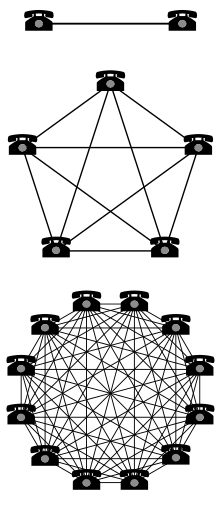
WebRTC is one of the highlights of HTML5. The latest stable releases of Google Chrome (including the free Chromium browser) and Firefox include support for this technology and although the specifications are still being finalized, this is the time when developers can start preparing the first generation of web-apps that will define the future of this technology. The JSCommunicator project aims to make it easy to integrate WebRTC into existing web applications. It provides a high-level API on top of the popular JsSIP SIP stack for JavaScript. The JSCommunicator API provides basic dialing and call control features, allowing you to focus on the application level rather than the SIP level. The configuration file suggests many possible ways it can be deployed and customized without any coding at all. The popular DruCall module for the Drupal CMS provides a practical demonstration of how JSCommunicator can be embedded in other products, multiplying the power of WebRTC for millions of other web developers, bloggers, online shops and other sites. This part of the DruCall source code provides a practical demonstration of how JSCommunicator integrates with PHP and this demonstrates how we extract the parameters from PHP in the JavaScript and convert them to the JSCommunicator configuration object. Practical deployments of WebRTC today The student selected for this GSoC project will focus on two practical, real-world deployments of JSCommunicator: It is particularly important to think about ways to make this technology useful for the Debian Developer community in the pursuit of Debian's work. Not just for Debian A communication product is not much use if there is nobody to talk to. The optimal outcome of this project may involve helping two or three additional free software communities to build portals similar to https://rtc.debian.org so that they can interact with Debian and each other using Federated SIP. As Metcalfe's Law explains, this outcome would be a win-win situation for everybody. Metcalfe's Law - Network effect Mentors needed too The more diverse the mentoring community, the more positive outcomes we can achieve with this project. If you would like to be part of a mentoring team for this project, please email me and subscribe to the Debian SOC co-ordination email list. There is no strict requirement for all mentors in the team to be full Debian Developers and emerging technology like this clearly needs people with strengths in a range of different areas. Get started now For general ideas about getting selected for Google Summer of Code, please see the comments at the bottom of my earlier blog post about Ganglia projects For this project in WebRTC in particular, please:
  • Review the project brief on the Debian wiki
  • Discuss your ideas on the JsSIP Google group
  • Send an email to introduce yourself on the Debian SOC co-ordination email list and give a link to your post on the JsSIP list
  • You must complete a coding test. Please see the open bug list for JSCommunicator, complete one of these tasks and submit a pull request on Github. Please send an email to the JsSIP Google group to discuss your pull request.
  • Explain what features you would create during the summer
  • Explain which other tools or libraries you would like to use
  • Give examples of previous work you have done with HTML and JavaScript
  • Explain how your participation will benefit Debian, free software and the wider world. Give some practical examples.
  • If you are interested in other JavaScript and jQuery opportunities for GSoC 2014, please also read more about the web components in the Ganglia project - if you apply for both Debian and Ganglia, you only have to complete one coding test as part of your application.

1 March 2014

Francois Marier: Using vnc to do remote tech support over high-latency networks

If you ever find yourself doing a bit of technical support for relatives over the phone, there's nothing like actually seeing what they are doing on their computer. One of the best tools for such remote desktop sharing is vnc. Here's the best setup I have come up with so far. If you have any suggestions, please leave a comment!

Basic vnc configuration First off, you need two things: a vnc server on your relative's machine and a vnc client on yours. Thanks to vnc being an open protocol, there are many choices for both. I eventually settled on x11vnc for the server and ssvnc for the client. They are both available in the standard Debian and Ubuntu repositories. Since I have ssh access on the machine that needs to run the server, I simply login and then run x11vnc. Here's what ~/.x11vnrc contains:
noxdamage
That option appears to be necessary when the desktop to share is running gnome-shell / compiz. Afterwards, I start the client on my laptop with the following command:
ssvncviewer -encodings zrle -scale 1280x775 localhost
The scaling factor is simply the resolution of the client minus any window decorations.

ssh configuration As you can see above, the client is not connecting directly to the server. Instead it's connecting to its own vnc port (localhost:5900). That's because I'm tunelling the traffic through the ssh connection in order to avoid relying on vnc extensions for authentication and encryption. Here's what the client's ~/.ssh/config needs for that simple use case:
Host server.example.com:
  LocalForward 5900 127.0.0.1:5900
If the remote host (which has an internal IP address of 192.168.1.2 in this example) is not connected directly to the outside world and instead goes through a gateway, then your ~/.ssh/config will look like this:
Host gateway.example.com:
  ForwardAgent yes
  LocalForward 5900 192.168.1.2:5900
Host server.example.com:
  ProxyCommand ssh -q -a gateway.example.com nc -q0 %h 22
and the remote host will need to open up a port on its firewall for the gateway (internal IP address of 192.168.1.1 here):
iptables -A INPUT -p tcp --dport 5900 -s 192.168.1.1/32 -j ACCEPT

Optimizing for high-latency networks Since I do most of my tech support over a very high latency network, I tweaked the default vnc settings to reduce the amount of network traffic. I added this to ~/.x11vncrc on the vnc server:
ncache 10
ncache_cr
and changed the client command line to this:
ssvncviewer -compresslevel 9 -quality 3 -bgr233 -encodings zrle -use64 -scale 1280x775 -ycrop 1024 localhost
This decreases image quality (and required bandwidth) and enables client-side caching. The magic 1024 number is simply the full vertical resolution of the remote machine, which sports a vintage 1280x1024 LCD monitor.

John Sullivan: Spritz

Spritz seems like a very interesting way to read quickly. It's the opposite of everything I've read (slowly) about speed reading, which focuses on using peripheral vision and not reading word-by-word. You're supposed to do things like move your eyes straight down the page, taking in whole lines at a time. Interruptions seem like a big problem; interruptions that make me look away, or interruptions in my brain, where I might realize I've not been paying attention for some amount of time. Maybe they should have navigation buttons similar to video players, so you can skip backward 15 seconds at a time. I also do want to go back and review previous pages sometimes for reasons that have nothing to do with interruption, so I wouldn't want word-by-word to be the only way to view a text -- especially when reading nonfiction. I might event want it to work in a mode where you hold down the button on the side of your phone or tablet in order to move the words, and then have them automatically pause when you release. It feels like I'd want a lot of short breaks when reading in this style. It should also be free software, but unfortunately I'm guessing it won't be. I hope someone will make a free software application along these lines -- the basics seem pretty basic.

Sune Vuorela: Diploma thesis about media choice and usage in Free Software communities: I need your help

My hard-working KDE friend Mario asked me to help him to get Debian people to help him with his thesis. Here is what he writes: Dear Free Software contributor* I m currently in the process of writing my diploma thesis. I ve worked hard during the last few weeks and months on a questionnaire which shall collect some data for my thesis. Furthermore the data of this survey will be interesting for the Free Software communities as well. So please take some time or add it to your todo list or, even better, go directly to my questionnaire and help me make a great diploma thesis and improve the Free Software community in some ways. The questionnaire takes some 20 to 30 minutes. At the end of the questionnaire you ll find a way to participate in a draw where you can even win something nice. In a first round I got the feedback that the length of the questionnaire and that some questions (mostly the ones at the beginning of the questionnaire about the 12 different tasks) are quite abstract and difficult. But please try it, try your best and take the time and brain power. The remaining part of the questionnaire [1] (after these two pages with the tasks questions) is quite
easy and quickly done. And you have the possibility to come back to where you
have left filling in the questionnaire after a shorter or longer break. And if there are any questions, feedback or you need help don t hesitate a moment to write me an email or ping me on IRC (freenode.net and oftc.net) as unormal. This survey will be open till Sunday, the 9th of March 2014, 23.59 UTC. Thanks to all for reading and helping and towards the summer of 2014 you can read here what all the data you gave me showed us and where we can learn and improve. Thanks in advance and best regards
Mario Fux * By contributor I mean not just developers but translators, artist, usability
people, documentation writers and many more. Everybody who contributes in one
way or the other to Free Software.

Vasudev Kamath: Installing and Configuring NetBSD on Qemu in Debian

First step will be getting a NetBSD ISO image for installation purpose. It can be downloaded from here. Next step will be creating a disk image for installing NetBSD. This is done using qemu-img tool like below
$ qemu-img create -f raw netbsd-disk.img 10G
Image format used is raw and size is specified as last arugment. Tune the size as per your need. To start the installation run the following command
$ qemu-system-x86_64 -m 256M -hda netbsd-disk.img -cdrom \
             NetBSD-6.1.3-amd64.iso -display curses -boot d \
             -net nic -net user
So this is using user mode networking so you won't be able to have internet access during installation. I couldn't figure out on how to get network working during installation so I configured network after installation. Once you run above command you will be given with 4 options as follows.
  1. install netbsd
  2. install netbsd with ACPI disabled
  3. install netbsd with ACPI and SMP disabled
  4. drop to boot shell
Even though I first installed using the option 1 I couldn't get it boot after installation so had to reinstall with option 2 and it works fine. I'm not gonna explain each step of installation here because the installer is really simple and straight forward! I guess the NetBSD installer is the first simplest installer I have encountered from the day I started with Linux. Its simple but powerful and gets job done very easily, and I didn't read manual for installation before using it.
Enabling Networking This section involves mixture of configuration in Debian host and inside NetBSD to get the network working. The wiki page of Debian on Qemu. helped me here. To share the network with Qemu there are 2 possiblities
  1. Bridged networking between host and guest using bridge-utils
  2. Using VDE (Virtual Distributed Ethernet)
The option 1 which is explained in wiki linked above didn't work for me as I use CDC Ether based datacard for connecting to Internet which gets detected as eth1 on my machine. When bridging happens between tap0 and eth1 I end up loosing Internet on my host machine. So I selected to use VDE instead. First install packages vde2 and uml-utilities once done edit the /etc/network/interfaces file and add following lines:
auto vdetap
iface vdetap inet static
   address 192.168.2.1
   netmask 255.255.255.0
   vde2-switch -t vdetap
We can use dnsmasq as a DHCP server for the vdetap interface, but I'm not gonna explain the configuration of dnsmasq here. Run the below command to get vdetap up
modprobe tun
ifup vdetap
/etc/init.d/dnsmasq restart
newgrp vde2-net # run as user starting Qemu VM's
I couldn't get successful output for newgrp command, I was getting some crypt: Invalid argument output. But I could still get network working on NetBSD so I considered to ignore that for now. Now start the NetBSD qemu instance running using following command
$ qemu-system-x86_64 -m 256M -hda \
             /mnt/kailash/BSDWorld/netbsd-disk.img \
             -net nic -net vde,sock=/var/run/vde2/vdetap.ctl -display curses
Once the system is up login using root user, NetBSD will warn you for this and suggest to create another user but for now ignore it. To find the network interface in NetBSD just run the usual ifconfig command. In my case interface is named wm0. First step will be configuring the IP address for your interface and setting up the gateway route. Run the below command for this purpose
# ifconfig wm0 192.168.2.2 netmask 255.255.255.0
# route add default 192.168.2.1
Note that I added gateway as IP address of vdetap on my host machine. Now try pinging the host and even you can try ssh to host system. But note that this is not persistent over the reboots and for some reason I didn't yet figure out how to make NetBSD get address over DHCP from my host machine. I will update once I figure it out. Now to make the connection address persistent over reboots you need to create a file by name /etc/ifconfg.<interface>. Replace interface with a proper interface on your running NetBSD. In my case this file is /etc/ifconfig.wm0 and has following content.:
192.168.2.2 netmask 0xffffff00 media autoselect
Set the DNS server as host by adding file /etc/resolv.conf with following content.:
nameserver 192.168.2.1
After this you need to do NAT/masquerading using iptables. Just copy following script to a file and execute it as root
#!/bin/sh
# Restart the dnsmasq
/etc/init.d/dnsmasq restart
# Set nat rules in iptables
iptables --flush
iptables --table nat --flush
iptables --delete-chain
iptables --table nat --delete-chain
# Replace accordingly usb0 with ppp0 for 3G
iptables --table nat --append POSTROUTING --out-interface eth1 -j MASQUERADE
iptables --append FORWARD --in-interface vdetap -j ACCEPT
# Enable IP forwarding in Kernel
sysctl -w net.ipv4.ip_forward=1
With the above setup you will be able to get DNS resolution even after you reboot the Qemu instance but Internet connection will not work untill you run the route command I mentioned above. I still didn't figure out how to persist route but I will update it here once I figure it out.
Note that you won't be able to SSH as root to NetBSD (may be its configured to not allow by default), so you would need to create a normal user before trying to SSH from host to guest. Also make sure you add the user to wheel group to allow him execute su command.
So now I've NetBSD running on my laptop with mere 256M ram and its amazingly fast even at such low RAM. I've created a new user and can SSH into it from host machine and use it just like I use a server!. I will put up the notes of my BSD adventure here periodically. The feeling of using a BSD is amazing :-)
Update: I forgot to add masquerading step, I've added it now.

Dirk Eddelbuettel: RcppArmadillo 0.4.100.0

A new minor upstream release 4.100 of the Armadillo templated C++ library for linear algebra was finalised by Conrad yesterday. I rolled up the corresponding RcppArmadillo release 0.4.100.0 which is now on CRAN and will go to Debian shortly.
Changes in RcppArmadillo version 0.4.100.0 (2014-02-28)
  • Upgraded to Armadillo release Version 4.100.0 (Dirt Cruiser)
    • added normalise() for normalising vectors to unit p-norm
    • extended the field class to handle 3D layout
    • extended eigs_sym() and eigs_gen() to obtain eigenvalues of various forms (eg. largest or smallest magnitude)
    • automatic SIMD vectorisation of elementary expressions (eg. matrix addition) when using Clang 3.4+ with -O3 optimisation
    • faster handling of sparse submatrix views
    • workaround for a bug in LAPACK 3.4
Courtesy of CRANberries, there is also a diffstat report for the most recent release As always, more detailed information is on the RcppArmadillo page. Questions, comments etc should go to the rcpp-devel mailing list off the R-Forge page.

This post by Dirk Eddelbuettel originated on his Thinking inside the box blog. Please report excessive re-aggregation in third-party for-profit settings.

Michael Prokop: Jenkins on-demand slave selection through labels

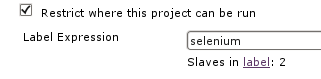
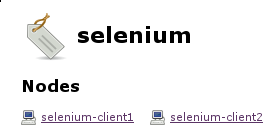
Problem description: One of my customers had a problem with their Selenium tests in the Jenkins continuous integration system. While Perl s Test::WebDriver still worked just fine the Selenium tests using Ruby s selenium-webdriver suddenly reported failures. The problem was caused by Debian wheezy s upgrade of the Iceweasel web browser. Debian originally shipped Iceweasel version 17.0.10esr-1~deb7u1 in wheezy, but during a security-update version 24.3.0esr-1~deb7u1 was brought in through the wheezy-security channel. Because the selenium tests are used in an automated fashion in a quite large and long-running build pipeline we immediately rolled back to Iceweasel version 17.0.10esr-1~deb7u1 so everything can continue as expected. Of course we wanted to get the new Iceweasel version up and running, but we didn t want to break the existing workflow while working on it. This is where on-demand slave selection through labels comes in. Basics: As soon as you re using Jenkins slaves you can instruct Jenkins to run a specific project on a particular (slave) node. By attaching labels to your slaves you can also use a label instead of a specific node name, providing more flexibility and scalability (to e.g. avoid problems if a specific node is down or you want to scale to more systems). Then Jenkins decides which of the nodes providing the according label should be considered for job execution. In the following screenshot a job uses the selenium label to restrict its execution to the slaves providing selenium and currently there are two nodes available providing this label: TIP 1: Visiting $JENKINS_SERVER/label/$label/ provides a list of slaves that provide that given $label (as well as list of projects that use $label in their configuration), like:

TIP 2: Execute the following script on $JENKINS_SERVER/script to get a list of available labels of your Jenkins system:
import hudson.model.*
labels = Hudson.instance.getLabels()
labels.each  label -> println label.name  
Solution: In the according customer setup we re using the swarm plugin (with automated Debian deployment through Grml s netscript boot option, grml-debootstrap + Puppet) to automatically connect our Jenkins slaves to Jenkins master without any manual intervention. The swarm plugin allows you to define the labels through the -labels command line option. By using the NodeLabel Parameter plugin we can configure additional parameters in Jenkins jobs: node and label . The label parameter allows us to execute the jobs on the nodes providing the requested label: This is what we can use to gradually upgrade from the old Iceweasel version to the new one by keeping a given set of slaves at the old Iceweasel version while we re upgrading other nodes to the new Iceweasel version (same for the selenium-server version which we want to also control). We can include the version number of the Iceweasel and selenium-server packages inside the labels we announce through the swarm slaves, with something like:
if [ -r /etc/init.d/selenium-server ] ; then
  FLAGS="selenium"
  ICEWEASEL_VERSION="$(dpkg-query --show --showformat='$ Version ' iceweasel)"
  if [ -n "$ICEWEASEL_VERSION" ] ; then
    ICEWEASEL_FLAG="iceweasel-$ ICEWEASEL_VERSION%%.* "
    EXTRA_FLAGS="$EXTRA_FLAGS $ICEWEASEL_FLAG"
  fi
  SELENIUM_VERSION="$(dpkg-query --show --showformat='$ Version ' selenium-server)"
  if [ -n "$SELENIUM_VERSION" ] ; then
    SELENIUM_FLAG="selenium-$ SELENIUM_VERSION%-* "
    EXTRA_FLAGS="$EXTRA_FLAGS $SELENIUM_FLAG"
  fi
fi
Then by using -labels $FLAGS EXTRA_FLAGS in the swarm invocation script we end up with labels like selenium iceweasel-24 selenium-2.40.0 for the slaves providing the Iceweasel v24 and selenium v2.40.0 Debian packages and selenium iceweasel-17 selenium-2.40.0 for the slaves providing Iceweasel v17 and selenium v2.40.0. This is perfect for our needs, because instead of using the selenium label (which is still there) we can configure the selenium jobs that should continue to work as usual to default to the slaves with the iceweasel-17 label now. The development related jobs though can use label iceweasel-24 and fail as often as needed without interrupting the build pipeline used for production. To illustrate this here we have slave selenium-client2 providing Iceweasel v17 with selenium-server v2.40. When triggering the production selenium job it will get executed on selenium-client2, because that s the slave providing the requested labels: Whereas the development selenium job can point to the slaves providing Iceweasel v24, so it will be executed on slave selenium-client1 here: This setup allowed us to work on the selenium Ruby tests while not conflicting with any production build pipeline. By the time I m writing about this setup we ve already finished the migration to support Iceweasel v24 and the infrastructure is ready for further Iceweasel and selenium-server upgrades.

Vasudev Kamath: Gzipped response for CSS/JS with Apache and mod_uwsgi

So it may sound normal to receive compressed response for CSS/JS file from Apache2 but what I faced is completely different behavior, here I saw not just body of response but also header are getting compressed and send to browser and browser was unable to interpret the response there by leading page rendered without CSS and JS. That was long story short, so let me explain in detail the case and what I found out. I have hosted SILPA on my VPS using uWSGI. I had used till date using libapache2-mod-proxy-uwsgi plugin for which uWSGI should be using network socket and in Apache2 config I need ProxyPass directive pointing to uwsgi://host:port and everything used to work out of box. There is a drawback for using network socket in uWSGI that is limited amount of ports (65535) and possible clash with other services if we use wrong port number, additionally network sockets will be slower compared to the file socket so yesterday I thought of changing it to file socket and removed socket directive in the ini file for uWSGI application container for SILPA and here is where all problems started. My updated configuration can be seen in our documentation page that is if you are interested to look my configuration file :-).
Problem Reporting We got selected to Gsoc again this year and we have lot of students jumping in our channel #silpa on irc.freenode.net and yesterday night some students reported they are facing 500 internal server error and subsequently others mentioned there is no theme being rendered. I checked and found everything was fine for me only to notice that my browser was using cached content, and when I clear cache there I go everything vanished, no theme no css no javascript just plain html!!!.
Investigation So I thought I should investigate this and fired up firebug on my iceweasel to observe the network traffic. And below is what I observed in firebug network console!. No response headers So you can see no response header in the above image but there is a response and below how is response content visible on firebug. gzipped response Still weird part was when using wget/curl directly to get the CSS I was getting correct reply and the file, which is puzzling. So I went ahead opened the CSS url directly using browser and saved the resulting file. When I used file command on it, output suggested the saved file in gzip compressed!. I went ahead uncompressed it and opened the file and inside it I found response header and the response body! So what just happened? Did apache some how manage to compress entire respone not just response body? The more puzzling question was why did it work when I was using mod_proxy_uwsgi and failed when I switched to mod_uwsgi. I had no clue at this point why this behavior is coming up.
Possible Solution I was still not sure how to resolve this, and started searching in the network but nothing was coming up in search result which can explain me this. And finally I stumbled on a link which is totally unrelated but I saw the word mod_deflate in the content and wandered on my system to see if its enabled. Yes mod_deflate was enabled I just opened the conf file and saw following.
<IfModule mod_deflate.c>
       # these are known to be safe with MSIE 6
       AddOutputFilterByType DEFLATE text/html text/plain text/xml
       # everything else may cause problems with MSIE 6
       AddOutputFilterByType DEFLATE text/css
       AddOutputFilterByType DEFLATE application/x-javascript application/javascript application/ecmascript
       AddOutputFilterByType DEFLATE application/rss+xml
</IfModule>
Interesting so it suggests to compress css, javascript files etc. So I thought possibly its compressing the result of mod_uwsgi, yeah possibly so why not try disabling mod_deflate and check if it works well and good if not I'm not gonna loose anything. So I disabled mod_deflate and voila! Everything is working fine!
What might be the reason for this behavior? Well I'm not exactly sure but here is my assumption. The whole behavior depends on internal implementation of mod_uwsgi and mod_proxy_uwsgi module. To confirm this I switched back to use mod_proxy_uwsgi module and enabled mod_deflate and observed request response in Firebug network console and below is what I observed. Response with mod_proxy_uwsgi So response is still gziped but this time only response body was gziped and Content-Encoding field was set properly which makes browser to properly uncompress the response body and use it. So it seems like there is a difference between mod_uwsgi and mod_proxy_uwsgi implementation. mod_uwsgi was sending the response along with response headers which was compressed by mod_deflate there by rendering browser helpless to interpret the response. But mod_proxy_uwsgi seems to be only sending the response content without response body and this content was later compressed by mod_deflate and proper response headers were set by apache before sending it to browser. So now whose fault is this? Is it the bug in mod_uwsgi or, mod_deflate not being able to exclude response headers from compression? I've no clue! If you have a clue and you want to share it with me, please consider writing to me over email. My details are available in Contacts

Ben Armstrong: Invisible CSS animations on Iceweasel consuming CPU

Thanks to bernat on #debian @ irc.debian.org for helping me track down this bug and devise a workaround. When working on my wife s netbook, I noticed that when idling on Facebook in iceweasel 24.3.0esr-1, the process was taking far too much CPU. I then retested on a wheezy system with the release iceweasel from mozilla.d.n, which at that time was 26, and I later upgraded to 27. Same problem there, too, on both versions. In fact, it seems the slowdown was amplified by the fact that I was running iceweasel in vnc4server, not the worlds most efficient X implementation. Even with all these versions tested, I have yet to file a Debian bug, as I will need some time on a system where the slowdown is noticeable and I m using a current Debian version. But I wanted to post now to give props to bernat for his help. If you think you have this issue, go read his article linked above, which contains the workaround.

28 February 2014

Jon Dowland: Farewell, Interzone

New format IZ New format IZ
I've written before of how much I liked the British SF magazine Interzone. Sadly I decided not to renew my subscription last year, as the focus of my reading has been changing and I've not had enough time to keep on top of it. (This is a consequence of my experiment with goodreads, and I'll write more about that sometime.) Back in October 2012 TTA Press reformatted both Interzone and its sister publication Black Static into a half-size, semi-hard backed shape. The size is similar to the US stalwards Analog and Asimov's, but the cover is harder and glossier and it has a flat spine. I really like the new look, and it's a bit of a shame I didn't complete at least a calendar year's worth of them. I will probably pick up the odd issue now and then, when a name I recognise catches my eye. Perhaps one day I'll have the time and inclination to read short fiction regularly again. I'd still wholeheartedly recommend it (and Black Static) if short fiction is your thing.

Daniel Pocock: Google Summer of Code opportunities in data science and machine learning with Ganglia

As mentioned in my blog on Monday, the Ganglia Project is proud to be part of Google Summer of Code in 2014 The Ganglia team are offering various types of projects and different parts of Ganglia would welcome students with different skills, for example:
Component Skills
gmond agent C
gmond modules C or Python
JMXetric Java
gmetad and rrdtool for storing time series data C
Ganglia web interface JavaScript and jQuery
Ganglia integration (e.g. ganglia-nagios-bridge) Python
Big data right under your nose I have had many queries from students about how to get into data science. Very few students will be lucky enough to get an internship where they can study time-series from the financial markets and experiment making their own trading algorithms. On the other hand, network performance data is everywhere. It is real-time. It is surprisingly similar in some ways to processing financial data and it provides excellent opportunities for students to practice data science skills and make a meaningful contribution to solving real problems. Finding public Ganglia data with Google Many large organizations, including universities, governments and corporations are using Ganglia to gather metrics from all the hosts in their networks. Some of them even expose this data to the public. Here are two Google searches you can use to find them:
Courtesy of Universit Montpellier 2, France Some sites may even expose their data as an XML feed, you can try and extract it by connecting to the Ganglia server on one of these ports
Port Comments
8649 gmond: sends an XML snapshot to anybody who connects
8651 gmetad: sends an XML snapshot to anybody who connects
8651 gmetad: works a little bit like HTTP, returns a subset of the XML snapshot when you make a GET request
You can discover a Ganglia environment in your campus by looking for a gmond process on your machine and the gmond.conf file, often in /etc/gmond.conf or /etc/ganglia/gmond.conf. That file may contain a clue about the name of the host where Ganglia data is aggregated:
udp_send_channel  
  host = ganglia-reports.example.edu
  port = 8649
  ttl = 1
 
This tells you that the host ganglia-reports.example.edu is collecting the data - you could try the URL http://ganglia-reports.example.edu/ganglia/ in a web browser or try connecting to one of the TCP ports 8649, 8651 or 8652 on that host. Here is an example with netcat:
$ nc ganglia-reports.example.edu 8649   grep ^.H
It will return a list of all hosts that Ganglia knows about. Once you have a data feed, you can then configure a gmetad process on your own system to poll the remote system and generate local RRDs for you to study. Install your own Ganglia It is very easy to get your own Ganglia setup. On a Debian or Ubuntu system, just do:
# apt-get update
# apt-get install ganglia-monitor ganglia-webfrontend
On Fedora and RPM-based systems (such as CentOS or RHEL with EPEL) you can do:
# yum install ganglia-gmond ganglia-web
Everything should be autoconfigured. You can then browse to http://localhost/ganglia to see the charts. If you have several hosts with the gmond agent (just the ganglia-monitor.deb or ganglia-gmond.rpm) on the same LAN, they will automatically find each other using multicast and you will see an aggregated report on the machine with the web server. The data is real-time It is important to keep in mind that the data is real-time. This means you can often detect problems in real-time. If this blog appears on slashdot, for example, then that image from Universit Montpellier 2 will be hit many times. The image actually shows the network load on the web server producing the image, so you will see the slashdot effect graphically in the image itself. Processing real-time data is often the most advanced step in any data science exercise. Initially, you may simply log a few days of data to RRD files to start studying a static data set with your tool of choice, whether it is the R project, Weka or Hadoop Once you have a a hypothesis (for example, an algorithm that understands the normal characteristics of each metric) you may then take each new real-time value from the gmetad XML and test it with the algorithm. The algorithm would then raise an alert if any metric on any host deviates from its normal behavior. Mixing in other sources of data Depending upon the computing environment in your campus or organization, you may also be able to get other data sources, such as a list of people logged in to different machines at different times and the processes that each user starts and stops. This might help to make more accurate predictions about when network or computing resources will be under stress. For example, if users bob, alice and eve all appear on the same host, your algorithm might conclude that the load average will reach an excessive level within 15 minutes and send those three users a suggestion to each try other machines. Making a successful application for GSoC 2014 Here are some tips
  • For all organizations/projects
  • For Ganglia and the data science project in particular
    • Join the ganglia-general mailing list and send an email to introduce yourself
    • Try Ganglia on your own Linux system. Use the packages, it is really easy. Send an email to the list with any questions.
    • Explore the source code in github - ask us questions about it. For the data science project, you may also need to look at RRDtool source code and documentation about making a plugin for R (using C)
    • You don't have to do it our way: if you prefer to work with another tool instead of R, please tell us your idea
    • Write some skeleton code or make a diagram to explain what you want to do. While you do this, do you think of any new questions or problems? Make a list of them.
    • We want to give every student a small coding task as a test. Please tell us which language you prefer (e.g. C, Java, Python) so we can give you a suitable test. If you are really keen, follow the link to bugs I reported in Debian, look for one that is easy and try to write a small patch for it - helping fix bugs that annoy your mentor is likely to be a good way to get on the short-list for selection.

Michael Prokop: Full-Crypto setup with GRUB2

Update on 2014-03-03: quoting Colin Watson from the comments:
Note that this is spelled GRUB_ENABLE_CRYPTODISK=y in GRUB 2.02 betas (matching the 2.00 documentation though not the implementation; not sure why Andrey chose to go with the docs).
Since several people asked me how to get such a setup and it s poorly documented (as in: I found it in the GRUB sources) I decided to blog about this. When using GRUB >=2.00-22 (as of February 2014 available in Debian/jessie and Debian/unstable) it s possible to boot from a full-crypto setup (this doesn t mean it s recommended, but it worked fine in my test setups so far). This means not even an unencrypted /boot partition is needed. Before executing the grub-install commands execute those steps (inside the system/chroot of course, adjust GRUB_PRELOAD_MODULES for your setup as needed, I ve used it in a setup with SW-RAID/LVM):
# echo GRUB_CRYPTODISK_ENABLE=y >> /etc/default/grub
# echo 'GRUB_PRELOAD_MODULES="lvm cryptodisk mdraid1x"' >> /etc/default/grub
This will result in the following dialog before getting to GRUB s bootsplash:

Michael Prokop: State of the art Debian/wheezy deployments with GRUB and LVM/SW-RAID/Crypto

Moving from Lilo to GRUB, using LVM as default, etc throughout the last years it was time to evaluate how well LVM works without a separate boot partition, possibly also on top of Software RAID. Big disks are asking for partitioning with GPT, just UEFI isn t my default yet, so I m still defaulting to Legacy BIOS for Debian/wheezy (I expect this to change for Debian/jessie and according hardware approaching at my customers). So what we have and want in this demonstration setup: System used for installation:
root@grml ~ # grml-version
grml64-full 2013.09 Release Codename Hefeknuddler [2013-09-27]
Partition setup:
root@grml ~ # parted /dev/sda
GNU Parted 2.3
Using /dev/sda
Welcome to GNU Parted! Type 'help' to view a list of commands.
(parted) mklabel gpt
(parted) mkpart primary 2048s 4095s
(parted) set 1 bios_grub on
(parted) name 1 "BIOS Boot Partition"
(parted) mkpart primary 4096s 100%
(parted) set 2 raid on
(parted) name 2 "SW-RAID / Linux"
(parted) quit
Information: You may need to update /etc/fstab.
Clone partition layout from sda to all the other disks:
root@grml ~ # for f in  b,c,d  ; sgdisk -R=/dev/sd$f /dev/sda
The operation has completed successfully.
Make sure each disk has its unique UUID:
root@grml ~ # for f in  b,c,d  ; sgdisk -G /dev/sd$f
The operation has completed successfully.
SW-RAID setup:
root@grml ~ # mdadm --create /dev/md0 --verbose --level=raid5 --raid-devices=4 /dev/sd a,b,c,d 2
mdadm: layout defaults to left-symmetric
mdadm: chunk size defaults to 512K
mdadm: size set to 1465004544K
mdadm: Defaulting to version 1.2 metadata
mdadm: array /dev/md0 started.
root@grml ~ #
SW-RAID speedup (system dependent, YMMV):
root@grml ~ # cat /sys/block/md0/md/stripe_cache_size
256
root@grml ~ # echo 16384 > /sys/block/md0/md/stripe_cache_size # 16MB
root@grml ~ # blockdev --getra /dev/md0
6144
root@grml ~ # blockdev --setra 65536 /dev/md0 # 32 MB
root@grml ~ # sysctl dev.raid.speed_limit_max
dev.raid.speed_limit_max = 200000
root@grml ~ # sysctl -w dev.raid.speed_limit_max=9999999999
dev.raid.speed_limit_max = 9999999999
root@grml ~ # sysctl dev.raid.speed_limit_min
dev.raid.speed_limit_min = 1000
root@grml ~ # sysctl -w dev.raid.speed_limit_min=100000
dev.raid.speed_limit_min = 100000
LVM setup:
root@grml ~ # pvcreate /dev/md0
  Physical volume "/dev/md0" successfully created
root@grml ~ # vgcreate homesrv /dev/md0
  Volume group "homesrv" successfully created
root@grml ~ # lvcreate -n rootfs -L4G homesrv
  Logical volume "rootfs" created
root@grml ~ # lvcreate -n bootfs -L1G homesrv
  Logical volume "bootfs" created
Check partition setup + alignment:
root@grml ~ # parted -s /dev/sda print
Model: ATA WDC WD15EADS-00P (scsi)
Disk /dev/sda: 1500GB
Sector size (logical/physical): 512B/512B
Partition Table: gpt
Number  Start   End     Size    File system  Name                 Flags
 1      1049kB  2097kB  1049kB               BIOS Boot Partition  bios_grub
 2      2097kB  1500GB  1500GB               SW-RAID / Linux      raid
root@grml ~ # parted -s /dev/sda unit s print
Model: ATA WDC WD15EADS-00P (scsi)
Disk /dev/sda: 2930277168s
Sector size (logical/physical): 512B/512B
Partition Table: gpt
Number  Start  End          Size         File system  Name                 Flags
 1      2048s  4095s        2048s                     BIOS Boot Partition  bios_grub
 2      4096s  2930276351s  2930272256s               SW-RAID / Linux      raid
root@grml ~ # gdisk -l /dev/sda
GPT fdisk (gdisk) version 0.8.5
Partition table scan:
  MBR: protective
  BSD: not present
  APM: not present
  GPT: present
Found valid GPT with protective MBR; using GPT.
Disk /dev/sda: 2930277168 sectors, 1.4 TiB
Logical sector size: 512 bytes
Disk identifier (GUID): 212E463A-A4E3-428B-B7E5-8D5785141564
Partition table holds up to 128 entries
First usable sector is 34, last usable sector is 2930277134
Partitions will be aligned on 2048-sector boundaries
Total free space is 2797 sectors (1.4 MiB)
Number  Start (sector)    End (sector)  Size       Code  Name
   1            2048            4095   1024.0 KiB  EF02  BIOS Boot Partition
   2            4096      2930276351   1.4 TiB     FD00  SW-RAID / Linux
root@grml ~ # mdadm -E /dev/sda2
/dev/sda3:
          Magic : a92b4efc
        Version : 1.2
    Feature Map : 0x0
     Array UUID : 7ed3b741:0774d529:d5a71c1f:cf942f0a
           Name : grml:0  (local to host grml)
  Creation Time : Fri Jan 31 15:26:12 2014
     Raid Level : raid5
   Raid Devices : 4
 Avail Dev Size : 2928060416 (1396.21 GiB 1499.17 GB)
     Array Size : 4392089088 (4188.62 GiB 4497.50 GB)
  Used Dev Size : 2928059392 (1396.21 GiB 1499.17 GB)
    Data Offset : 262144 sectors
   Super Offset : 8 sectors
          State : clean
    Device UUID : c1e4213b:81822fd1:260df456:2c9926fb
    Update Time : Mon Feb  3 09:41:48 2014
       Checksum : b8af8f6 - correct
         Events : 72
         Layout : left-symmetric
     chunk size : 512k
   Device Role : Active device 0
   Array State : AAAA ('A' == active, '.' == missing)
root@grml ~ # pvs -o +pe_start
  PV         VG      Fmt  Attr PSize PFree 1st PE
  /dev/md0   homesrv lvm2 a--  4.09t 4.09t   1.50m
root@grml ~ # pvs --units s -o +pe_start
  PV         VG      Fmt  Attr PSize       PFree       1st PE
  /dev/md0   homesrv lvm2 a--  8784175104S 8773689344S   3072S
root@grml ~ # pvs -o +pe_start
  PV         VG      Fmt  Attr PSize PFree 1st PE
  /dev/md0   homesrv lvm2 a--  4.09t 4.09t   1.50m
root@grml ~ # pvs --units s -o +pe_start
  PV         VG      Fmt  Attr PSize       PFree       1st PE
  /dev/md0   homesrv lvm2 a--  8784175104S 8773689344S   3072S
root@grml ~ # vgs -o +pe_start
  VG      #PV #LV #SN Attr   VSize VFree 1st PE
  homesrv   1   2   0 wz--n- 4.09t 4.09t   1.50m
root@grml ~ # vgs --units s -o +pe_start
  VG      #PV #LV #SN Attr   VSize       VFree       1st PE
  homesrv   1   2   0 wz--n- 8784175104S 8773689344S   3072S
Cryptsetup:
root@grml ~ # echo cryptsetup >> /etc/debootstrap/packages
root@grml ~ # cryptsetup luksFormat -c aes-xts-plain64 -s 256 /dev/mapper/homesrv-rootfs
WARNING!
========
This will overwrite data on /dev/mapper/homesrv-rootfs irrevocably.
Are you sure? (Type uppercase yes): YES
Enter passphrase:
Verify passphrase:
root@grml ~ # cryptsetup luksOpen /dev/mapper/homesrv-rootfs cryptorootfs
Enter passphrase for /dev/mapper/homesrv-rootfs:
Filesystems:
root@grml ~ # mkfs.ext4 /dev/mapper/cryptorootfs
mke2fs 1.42.8 (20-Jun-2013)
Filesystem label=
OS type: Linux
Block size=4096 (log=2)
Fragment size=4096 (log=2)
Stride=128 blocks, Stripe width=384 blocks
262144 inodes, 1048192 blocks
52409 blocks (5.00%) reserved for the super user
First data block=0
Maximum filesystem blocks=1073741824
32 block groups
32768 blocks per group, 32768 fragments per group
8192 inodes per group
Superblock backups stored on blocks:
        32768, 98304, 163840, 229376, 294912, 819200, 884736
Allocating group tables: done
Writing inode tables: done
Creating journal (16384 blocks): done
Writing superblocks and filesystem accounting information: done
root@grml ~ # mkfs.ext4 /dev/mapper/homesrv-bootfs
mke2fs 1.42.8 (20-Jun-2013)
Filesystem label=
OS type: Linux
Block size=4096 (log=2)
Fragment size=4096 (log=2)
Stride=128 blocks, Stripe width=384 blocks
65536 inodes, 262144 blocks
13107 blocks (5.00%) reserved for the super user
First data block=0
Maximum filesystem blocks=268435456
8 block groups
32768 blocks per group, 32768 fragments per group
8192 inodes per group
Superblock backups stored on blocks:
        32768, 98304, 163840, 229376
Allocating group tables: done
Writing inode tables: done
Creating journal (8192 blocks): done
Writing superblocks and filesystem accounting information: done
Install Debian/wheezy:
root@grml ~ # mount /dev/mapper/cryptorootfs /media
root@grml ~ # mkdir /media/boot
root@grml ~ # mount /dev/mapper/homesrv-bootfs /media/boot
root@grml ~ # grml-debootstrap --target /media --password YOUR_PASSWORD --hostname YOUR_HOSTNAME
 * grml-debootstrap [0.57] - Please recheck configuration before execution:
   Target:          /media
   Install grub:    no
   Using release:   wheezy
   Using hostname:  YOUR_HOSTNAME
   Using mirror:    http://http.debian.net/debian
   Using arch:      amd64
   Important! Continuing will delete all data from /media!
 * Is this ok for you? [y/N] y
[...]
Enable grml-rescueboot (to have easy access to rescue ISO via GRUB):
root@grml ~ # mkdir /media/boot/grml
root@grml ~ # wget -O /media/boot/grml/grml64-full_$(date +%Y.%m.%d).iso http://daily.grml.org/grml64-full_testing/latest/grml64-full_testing_latest.iso
root@grml ~ # grml-chroot /media apt-get -y install grml-rescueboot
[NOTE: We're installing a daily ISO for grml-rescueboot here because the 2013.09 Grml release doesn't work for this LVM/SW-RAID setup while newer ISOs are working fine already. The upcoming Grml stable release is supposed to work just fine, so you will be able to choose http://download.grml.org/grml64-full_2014.XX.iso by then. :)] Install GRUB on all disks and adjust crypttab, fstab + initramfs:
root@grml ~ # grml-chroot /media /bin/bash
(grml)root@grml:/# for f in  a,b,c,d  ; do grub-install /dev/sd$f ; done
(grml)root@grml:/# update-grub
(grml)root@grml:/# echo "cryptorootfs /dev/mapper/homesrv-rootfs none luks" > /etc/crypttab
(grml)root@grml:/# echo "/dev/mapper/cryptorootfs / auto defaults,errors=remount-ro 0   1" > /etc/fstab
(grml)root@grml:/# echo "/dev/mapper/homesrv-bootfs /boot auto defaults 0 0" >> /etc/fstab
(grml)root@grml:/# update-initramfs -k all -u
(grml)root@grml:/# exit
Clean unmounted/removal for reboot:
root@grml ~ # umount /media/boot
root@grml ~ # umount /media/
root@grml ~ # cryptsetup luksClose cryptorootfs
root@grml ~ # dmsetup remove homesrv-bootfs
root@grml ~ # dmsetup remove homesrv-rootfs
NOTE: On a previous hardware installation I had to install GRUB 2.00-22 from Debian/unstable to get GRUB working.
Some metadata from different mdadm and LVM experiments seems to have been left and confused GRUB 1.99-27+deb7u2 from Debian/wheezy (I wasn t able to reproduce this issue in my VM demo/test setup).
Just in cause you might experience the following error message, try GRUB >=2.00-22:
  # grub-install --recheck /dev/sda
  error: unknown LVM metadata header.
  error: unknown LVM metadata header.
  /usr/sbin/grub-probe: error: cannot find a GRUB drive for /dev/mapper/cryptorootfs.  Check your device.map.
  Auto-detection of a filesystem of /dev/mapper/cryptorootfs failed.
  Try with --recheck.
  If the problem persists please report this together with the output of "/usr/sbin/grub-probe --device-map="/boot/grub/device.map"
  --target=fs -v /boot/grub" to <bug-grub@gnu.org>

27 February 2014

Stefano Zacchiroli: moar stats for sources.debian.net

Debian: watch your stats! Over the past few weeks, myself and Matthieu Caneill have worked quite a bit on Debsources. As we have now deployed most of the new features on http://sources.debian.net, it's time for another "What's new with Debsources?" blog post. Here is what's new: Want more? Sure, we'll be happy to! But it'll happen faster if you help. Speaking of which: we've got Debsources into the new contributors game (see announcement) and we're looking forward to mentor new contributors.

Next.

Previous.