Search Results: "spa"

22 October 2010

Sylvain Le Gall: Compiling pcre-ocaml with Visual Studio 2008

One big change in the recent OASIS v0.2 release is the replacement of Str by Pcre. The big advantage of Pcre is that it can be used in multi-threaded environment, whereas it is not recommended to do so with Str. Since OASIS is used by the OCsigen part of OASIS-DB, we need to make it work safely with Lwt with multiple users at the same time. Note that, we can probably use Str directly with Lwt, because it is not really multi-threaded. But we want to be safe on this point and Pcre is a very powerful library. But the OCaml Pcre library depends on an external C library (pcre). This is not a problem on Linux et al, where it is shipped with the OS by default. But on Windows, you need to build it yourself. We want to do it using Microsoft Visual Studio 2008, mainly because OCaml was compiled with it -- and it seems the most natural way to build C library on Windows. As usual, building Open Source C libraries using MS Visual Studio, is not the most common way to process. However, the use of CMake enables a simple way to do it. Here is how we can compile pcre and pcre-ocaml for Windows: CMake-GUI with pcre Visual Studio 2008 with pcre The best way to test your newly created OCaml pcre library is to try to compile an example from the examples directory of pcre-ocaml itself. Sylvain Le Gall is an OCaml consultant at OCamlCore SARL

Sandro Tosi: URL shortcuts in Chromium

If you like the Firefox feature to create special bookmarks that are actual templates for specific urls, well, here's how I got the same for Chromium.

That's actually how WordReference is suggesting, so it's defining new search engines: right click on the URL bar, Edit seach engine, and then Add; now you can define what you like, f.e. :


and so now typing "pts package<package>" in the URL bar you'll get to the package PTS page.</package>

That's one of the core points I had to get fixed in order to migrate from FF to chromium, one step closer then.

Andrew Pollock: [debian] Well that's a relief

As readers of my blog (who care about Debian stuff) may know, I've been plugging away at the DHCP 4.x packages for some time now. I first uploaded 4.1.1-P1-7 to unstable in early July, then -8 in mid-July followed by -9 in late July. The main reason for the delay (beyond my lack of spare time) was the coordination with third-party packages that were plonking hooks into /etc/dhcp3/dhclient- enter,exit -hooks.d. Once that got all squared away, the release team gave me the green light to upload to unstable. On the 26th of July, 4.1.1-P1-9 made it into the testing distribution. Rather unfortunately (for me), the release team then declared testing frozen on August 6. I'd been hoping for a few more iterations on the package after getting feedback from the testing user base. Alas, it was not to be. One piece of feedback I did get on August 9 was release critical bug #592361, which made me very sad, because I totally agreed with the severity of it. It was an upstream issue, and I immediately escalated it to upstream. Unfortunately, they did not get back to me particularly quickly (I had to use some back channels to get a response at all). I eventually got the response I was pretty much expecting: I was going to have to directly patch configure.ac to make it stop trying to link with libcrypto. To complicate matters, the LDAP patch also goes and messes with configure.ac, so it required some fiddling with the LDAP patch as well. I figured I could wrap my head around it all, it was just some patch wrangling, but with parenthood and a wife who was trying to be a full-time mother as well as a part-time student-by-correspondence, large chunks of spare time were not in great abundance. So I've had this bug niggling away at the back of my mind for literally months now, when in sails Simon McVittie with a patch. Hallelujah, I said to myself. I could just take this guy's patch, and we'd all be home and hosed. So I spent a bunch of hours yesterday, while I was at home trying to kick a cold, faffing around with his patch and trying to get it to build. Alas, it would not build. I went to bed far too late last night, feeling like I was on the verge of having it work, but it wasn't. I emailed Simon back today, and he quickly got back to me with the (easy) fix, and tonight, I am in business! The much awaited 4.1.1-P1-10 is uploaded to unstable. I'm still not particularly happy with the state of the package though. The supplied dhclient-script doesn't properly support DHCPv6, and I'm in no position to quickly rectify this, unfortunately, especially in light of the freeze. If you are interested in helping test pre-releases of an updated dhclient-script, please feel free to subscribe to pkg-dhcp-devel@lists.alioth.debian.org, and I'll coordinate such activities on that list in the near future.

21 October 2010

Rapha&#235;l Hertzog: The secret plan behind the 3.0 (quilt) Debian source package format

New source package formats do wondersWhile I have spent countless hours working on the new source format known as 3.0 (quilt) , I ve just realized that I have never blogged about its features and the reasons that lead me to work on it. Let s fix this. The good old 1.0 format Up to 2008, dpkg-source was only able to cope with a single source format (now named 1.0 ). That format was used since the inception of the project. While it worked fine for most cases, it suffered from a number of limitations mainly because it stored the Debian packaging files as a patch to apply on top of the upstream source tarball. This patch can have two functions: creating the required files in the debian sub-directory and applying changes to the upstream sources. Over time, if the maintainer made several modifications to the upstream source code, they would end up entangled (and undocumented) in this single patch. In order to solve this problem, patch systems were created (dpatch, quilt, simple-patchsys, dbs, ) and many maintainers started using them. Each implementation is slightly different but the basic principle is always the same: store the upstream changes as multiple patches in the debian/patches/ directory and apply them at build-time (and remove them during cleanup). Design goals for the new formats When I started working on the new source package format, I set out to get rid of all the known limitations and to integrate a patch system in dpkg-source. I wanted to clear up the situation so that learning packaging only requires to learn one patch system and would not require modifying debian/rules to use it. I picked quilt because it was popular, came with a large set of features, and was not suffering from NIH syndrome. This lead to the 3.0 (quilt) source format. I also created 3.0 (native) as a distinct format. 1.0 was able to generate two types of source packages (native and non-native) but I did not want to continue with this mistake of mixing both in a single format. The KISS principle dictated that the user should pick the format of his choice, put it in debian/source/format and be done with it. Now the build can rightfully fail when the requirements are not met instead of doing something unexpected as a fallback. Features of 3.0 (quilt) This is the format that replaces the non-native variant of the 1.0 source format. The features below are specific to the new format and differentiate it from its ancestor: Features of 3.0 (native) This format is very similar to the native variant of the 1.0 source format except for two things: Timeline Looking back at the history is interesting. This project already spans multiple years and is not really over until a majority of packages have switched to the new formats. As you can see this project is not over yet, although the most difficult part is already behind me. For my part, the biggest lesson is that you won t ever get enough review until your work is used within unstable. So if you have a Debian project that impacts a lot of people, make sure to organize an official review process from the start. And specifying your project through a Debian Enhancement Proposal is probably the best way to achieve this. If you appreciate the work that I put into this project, feel free to join Flattr and to flattr dpkg from time to time. Or check out my page Support my work .

Flattr this Share/Bookmark 12 comments Support my work

Ian Wienand: Logging POST requests with Apache

After getting a flood of spam, I became suspicious that there was an exploit in my blog software allowing easy robo-posts. Despite a code audit I couldn't see anything, and thus wanted to log the incoming POST requests before any local processing at all. It took me a while to figure out how to do this, hopefully this helps someone else. Firstly install libapache-mod-security, then the magic incarnation is
SecRuleEngine On
SecAuditEngine on
SecAuditLog /var/log/apache2/website-audit.log
SecRequestBodyAccess on
SecAuditLogParts ABIFHZ
SecDefaultAction "nolog,noauditlog,allow,phase:2"
SecRule REQUEST_METHOD "^POST$" "chain,allow,phase:2"
SecRule REQUEST_URI ".*" "auditlog"
So, to break it down a little, the default action says to do nothing during phase 2 (when the body is available for inspection); the allow means that we're indicating that nothing further will happen in any of the remaining phases, so the module can shortcut through them. The two SecRules work together -- the first says that any POST requests should be tested by the next rule (i.e. the chained rule), which in this case says that any request should be sent to the audit log. After that, the similar allow/phase argument again says that nothing further is going to happen in any of the subsequent phases mod_security can work on. As per the parts between A and Z, we'll log the headers, the request body, the final response and trailer. So, as it turns out, there is no exploit; it seems most likely there is an actual human behind the spam that gets through, because every time they take a guess it is correct. So I guess I'll take a glass-half-full kind of approach and rather than being annoyed at removing the spam, I'll just convince myself that I made a small donation from some spam overlord to one of their poor minions!

Axel Beckert: New upstream versions of xrootconsole and keynav in Debian Experimental

I recently uploaded new upstream versions of two neat small X tools to Debian Experimental: Both packages introduce several new features and I d be happy if users of these packages in Debian Sid or Debian Sid users curious about them could test the versions in Debian Experimental. xrootconsole 0.6 + patches xrootconsole saw no love since 2006 with the last maintainer upload having been in 2002. Nevertheless it never got kicked out of Debian just because of this. The package had been forcibly orphaned just less than a year ago. So it s no big wonder that this new upstream version I packaged was released already back in 2004. :-) But besides packaging a new upstream version, bumping Standards-Version and debhelper compatibility, fixing tons of lintian warnings and some bugs, I also added two patches which add new features not (yet) available upstream: Of course I informed upstream about these feature patches, but I haven t got any feedback yet. But I got feedback from Julien Viard de Galbert, and he ll join me in packaging xrootconsole as co-maintainer. keynav 0.20101014.3067 I adopted the Debian package of keynav recently, subscribed to the keynav mailing list (well, it s a Google group), got a nice welcome mail from the very friendly upstream developer Jordan Sissel who offered to help with any keynav issues. I told him what features I d like to see in keynav to fit better the setup where I m using it. And just a few days later there was a new upstream release including both features I suggested, some more neat new features, and one bug fix. Jordan Sissel writes in the upstream changelog (emphasis and italic text by me): Both packages will be reuploaded to Debian Sid (Unstable) after the release of Debian Squeeze (currently testing ).

20 October 2010

Steve McIntyre: YA spam vector?

Just had an email from twitter.com telling me that my new account was ready for use. Looks like some spammers are trying to abuse people that way too. Simon said he'd got one too. Sigh.

19 October 2010

Kees Cook: CVE-2010-2963 v4l compat exploit

If you re running a 64bit system, and you ve got users with access to a video device (/dev/video*), then be sure you update your kernels for CVE-2010-2963. I ve been slowly making my way through auditing the many uses in the Linux kernel of the copy_from_user() function, and ran into this vulnerability. Here s the kernel code from drivers/media/video/v4l2-compat-ioctl32.c:
static int get_microcode32(struct video_code *kp, struct video_code32 __user *up)
 
        if (!access_ok(VERIFY_READ, up, sizeof(struct video_code32))  
                copy_from_user(kp->loadwhat, up->loadwhat, sizeof(up->loadwhat))  
                get_user(kp->datasize, &up->datasize)  
                copy_from_user(kp->data, up->data, up->datasize))
                        return -EFAULT;
        return 0;
 
Note that kp->data is being used as the target for up->data in the final copy_from_user() without actually verifying that kp->data is pointing anywhere safe. Here s the caller of get_microcode32:
static long do_video_ioctl(struct file *file, unsigned int cmd, unsigned long arg)
 
        union  
                struct video_tuner vt;
                struct video_code vc;
...
          karg;
        void __user *up = compat_ptr(arg);
...
        switch (cmd)  
...
        case VIDIOCSMICROCODE:
                err = get_microcode32(&karg.vc, up);
...
So, the contents of up are totally under control of the caller, and the contents of karg (in our case, the video_code structure) are not initialized at all. So, it seems like a call for VIDIOCSMICROCODE would write video_code->datasize bytes from video_code->data into some random kernel address, just causing an Oops, since we don t control what is on the kernel s stack. But wait, who says we can t control the contents of the kernel s stack? In fact, this compat function makes it extremely easy. Let s look back at the union. Notice the struct video_tuner? That gets populated from the caller s up memory via this case of the switch (cmd) statement:
...
        case VIDIOCSTUNER:
        case VIDIOCGTUNER:
                err = get_video_tuner32(&karg.vt, up);
...
So, to control the kernel stack, we just need to call this ioctl twice in a row: once to populate the stack via VIDIOCSTUNER with the contents we want (including the future address for video_code->data, which starts at the same location as video_tuner->name[20]), and then again with VIDIOCSMICROCODE. Tricks involved here are: the definition of the VIDIOCSMICROCODE case in the kernel is wrong, and calling the ioctls without any preparation can trigger other kernel work (memory faults, etc) that may destroy the stack contents. First, we need the real value for the desired case statement. This turns out to be 0 4020761b. Next, we just repeatedly call the setup ioctl in an attempt to get incidental kernel work out of the way so that our last ioctl doing the stack preparation will stick, and then we call the buggy ioctl to trigger the vulnerability. Since the ioctl already does a multi-byte copy, we can now copy arbitrary lengths of bytes into kernel memory. One method of turning an arbitrary kernel memory write into a privilege escalation is to overwrite a kernel function pointer, and trigger that function. Based on the exploit for CVE-2010-3081, I opted to overwrite the security_ops function pointer table. Their use of msg_queue_msgctl wasn t very good for the general case since it s near the end of the table and its offset would depend on kernel versions. Initially I opted for getcap, but in the end used ptrace_traceme, both of which are very near the top the security_ops structure. (Though I need share credit here with Dan Rosenberg as we were working together on improving the reliability of the security_ops overwrite method. He used the same approach for his excellent RDS exploit.) Here are the steps for one way of taking an arbitrary kernel memory write and turning it into a root escalation: Here s the source for Vyakarana as seen running in Enlightenment using cap_getcap (which is pretty unstable, so you might want to switch it to use ptrace_traceme), and as a stand-alone memory writer. Conclusions: Keep auditing the kernel for more arbitrary writes; I think there are still many left. Reduce the exploitation surface within the kernel itself (which PaX and grsecurity have been doing for a while now), specifically:

Keith Packard: psas-roll-control

The PSAS team planned to have their LV2.3 airframe updates ready for BALLS this year, but RL interfered and they weren t ready to go on time. A quick bit of rescheduling and we decided to fly over the weekend of the 16-17 of October. Tsolo and family welcomed us warmly as we arrived on Saturday afternoon after driving over from Portland. They ve got a new puppy who is also cute and friendly. We managed to get the launch tower and flight operations set up before dark, cooked dinner and spent the evening prepping the airframe. It was cold overnight, but the light cloud cover that had been there when we arrived was nearly gone by morning. I called in to open the waiver and was asked to hold until noon, which suited us just fine. The rocket finally made it onto the rail around 1:30 and we managed to convince the launch controller to actually light the motor at 2:44:39 (according to the GPS data). Flying on a CTI N2850 blue-streak, LV2.3 hit about 380m/s and reached 4851m. This was the first flight with the new fin system, you can see how that works in the video here: <iframe frameborder="0" height="480" src="http://player.vimeo.com/video/15972443" width="640"></iframe>Portland State Aerospace LV2.3 flight with roll control from Keith Packard on Vimeo. The roll control system worked as designed, executing a programmed sequence of maneuvers during ascent. You can see the canard fins moving back and forth in the video, controlling the roll of the airframe. Yes, the fins really do spin separately from the airframe. You can see how that was constructed here: PSAS LV2.3 Spin Can Live telemetry and stored flight data, consisting of GPS coordinates along with barometry altimeter and accelerometer information, was collected using the TeleMetrum flight computer. The airframe was recovered about 800m downrange. Thanks to Portland State University for their support in hosting PSAS and Oregon Rocketry for letting us fly at their launch site.

16 October 2010

David Paleino: How to: database-less local map rendering with Mapnik and OSM

Here's a quick howto for local map rendering, using python, mapnik and data from OpenStreetMap. This tutorial shows how to create a stylesheet for mapnik from scratch, if you're looking for how to tweak OpenStreetMap's mapnik rendering, I plan to write a tutorial on PostGIS-driven rendering at a later time. This post is not for those who want to make a local slippy map, nor those who want to render different areas of big dumps (think of big national dumps). We'll render some features of a residential area of a city with buildings mapped. We'll get a small dump of the area for this, using the XAPI. First, you need to install mapnik. On Debian-like systems, it should be as easy as:
# apt-get install python-mapnik
Then, you need some python code to use the mapnik library. Let's call it render.py:
#!/usr/bin/python
import mapnik
###
# Configuration
###
style = 'style.xml'
output = 'output.svg'
width = 1280
height = 800
bbox = '12.58664,37.65759,12.5945,37.66325'
###
# Don't touch below!
###
bbox = bbox.split(',')
ll = mapnik.Coord(float(bbox[0]), float(bbox[1]))
tr = mapnik.Coord(float(bbox[2]), float(bbox[3]))
mymap = mapnik.Map(width, height)
mapnik.load_map(mymap, style)
map_bbox = mapnik.Envelope(ll, tr)
mymap.zoom_to_box(map_bbox)
mapnik.render_to_file(mymap, output)
For the purposes of this post, we're going to create a 1280x800 map -- adjust that to suit your needs -- and we specified a bounding box corresponding to that area. That's composed as west,south,east,north coordinates. Be sure to get them right :-). Now we need to write a Mapnik stylesheet, we'll call it style.xml. That's a XML document, you can find the documentation at the official website. The skeleton of a stylesheet is as follows:
<?xml version="1.0" encoding="utf-8"?>
<!DOCTYPE Map>
<Map bgcolor="lightblue" srs="+proj=latlong +datum=WGS84">
<Style name="...">
...
</Style>
<Layer name="...">
 <Datasource>
  ...
 </Datasource>
</Layer>
</Map>
The stylesheet has an arbitrary number of Style elements and an arbitrary number of Layer elements. The former class of elements define the appearance of the features, while the latter defines where to get data from. Each layer has a Datasource child: here's where you say where to get your data from. We're going to use the osm input plugin, which lets you parse the dump directly. This has some drawbacks: But works great for small dumps. In this tutorial, we want to pretty render a residential area, so we first need to render the road network. This will mainly be made of highway=residential roads. Each style can have one or more Rule element. These define what elements that particular style should apply to. Each rule can have different rendering settings. The given dump has different roads: residential, unclassified, tertiary and secondary. Let's add a rule for each. Here's the first of them:
<Rule>
 <Filter>[highway] = 'residential'</Filter>
 <LineSymbolizer>
  <CssParameter name="stroke">#ffffff</CssParameter>
  <CssParameter name="stroke-width">5</CssParameter>
  <CssParameter name="stroke-linejoin">round</CssParameter>
  <CssParameter name="stroke-linecap">round</CssParameter>
 </LineSymbolizer>
 <TextSymbolizer name="name" face_name="DejaVu Sans Book" size="8" fill="#000" halo_radius="1" spacing="300" placement="line" />
</Rule>
It is quite straightforward: you define what elements the rule should apply to, and then add some symbolizer. For a detailed description of each symbolizer, please read the documentation. The example dump also has a railway and some steps. To render them, we use the stroke-dasharray property:
<Rule>
 <Filter>[highway] = 'steps'</Filter>
 <LineSymbolizer>
  <CssParameter name="stroke">#ff0000</CssParameter>
  <CssParameter name="stroke-width">5.0</CssParameter>
  <CssParameter name="stroke-dasharray">2,1</CssParameter>
 </LineSymbolizer>
</Rule>
<Rule>
 <Filter>[railway] = 'rail'</Filter>
 <LineSymbolizer>
  <CssParameter name="stroke">#222222</CssParameter>
  <CssParameter name="stroke-width">3</CssParameter>
  <CssParameter name="stroke-linejoin">round</CssParameter>
 </LineSymbolizer>
 <LineSymbolizer>
  <CssParameter name="stroke">white</CssParameter>
 <CssParameter name="stroke-width">1</CssParameter>
  <CssParameter name="stroke-linejoin">round</CssParameter>
  <CssParameter name="stroke-dasharray">10,20</CssParameter>
 </LineSymbolizer>
</Rule>
Also here, it is quite simple. The values given to stroke-dasharray determine the size of the dashes, and they can be alternated. So, for the steps we have 2px of #ff0000 and 1px of trasparency, while for the rail we have 10px of white and 20px of #222222. What if we want to add some markers to the map? Easy, just use another symbolizer, called PointSymbolizer:
<Rule>
 <Filter>[highway] = 'stop'</Filter>
 <PointSymbolizer width='10' height='22' file='stop.png' type='png' allow_overlap='true' opacity='1.0' />
</Rule>
Here we mark stop signals with a pre-rendered stop.png (only png and tiff are currently supported, and svg support is only in the development version). What to do next? Well, we can make this map really nice. We'll render buildings with a pseudo-3D effect, which, however, does not reflect real heights -- but it's rather nice to see. How to achieve this? BuildingSymbolizer is the answer.
<Rule>
 <Filter>[building] &lt;&gt; ''</Filter>
 <BuildingSymbolizer>
  <CssParameter name="fill">#00ff00</CssParameter>
  <CssParameter name="fill-opacity">0.4</CssParameter>
  <CssParameter name="height">0.00007</CssParameter>
 </BuildingSymbolizer>
</Rule>
Here we just draw building=*. Regarding the height, you need to play a bit -- it took a while before I found a good value of it. One thing missing in this stylesheet, is the rendering of coastlines. Since we don't have a coastline here, I'm skipping it, but the easy way is: use another rule. This is really just a trick; OpenStreetMap renders the coastline in a different way respect to other features, that's why I'm using this trick. I'm not posting the whole stylesheet, but you can download it. You can also get the script, the OSM dump and the stop.png image. Now, you should be able to just do:
$ ./render.py
and you will have your map in output.svg :-) Here's what you would get if you use the files provided above (click to see the original SVG version):

Pietro Abate: hidden ssh service via tor

We live in a nat-ed / firewall-ed world. Almost all DSL providers don't give public IPs and when the do, they are often behind a draconian firewall. In this context having an emergency remote shell, despite not fast and not public is very handy. A simple way to solve this problem it to create a hidden server on the tor network and the access the shell from anywhere in the world without caring of change of IPs, routing, dns or anything else. On debian you can just install tor from the official repository. Since Tor is not available in ubuntu (but it is available on debian), we need to get it directly from the tor website. There is a nice write-up on the ubuntu site : https://help.ubuntu.com/community/Tor . And these are the details on the tor website. So we add this to apt.sources
deb http://deb.torproject.org/torproject.org lucid main
and the we aptitude install tor .The package will install and run by default the tor daemon. Next step is to edit /etc/tor/torrc to add the proxy server.
HiddenServiceDir /var/lib/tor/ssh/
HiddenServicePort 22 127.0.0.1:22
Remember also to install the openssh-server server if you don't have it already. And this is it. In the directory /var/lib/tor/ssh/ you will find a file with the hostname on the TOR ring that you have to use to connect to you new hidden server. On the client side we need to aptitude install connect-proxy. It's a simple tool to tunnel ssh through a socks5 connection. Now you are ready to test. In your ~/.ssh/config you can simply add something like
Host *.onion
ProxyCommand connect -R remote -5 -S 127.0.0.1:9050 %h %p
and then ssh-way youronionhost.onion server . The connection will be veeeeery slow since you are going through different layers of encryption and indirection. You should also check the hostid of your server before connecting and dropping in a pub-key as you should never trust your friendly TOR providers (US govt, Chinese gvt, Iranian govt, etc ...). For emergency is actually pretty handy. For anything else if will make you die of boredom ...

Update Ahhh . It seems I've assumed that since TOR was not available on ubuntu, this was the same on debian. Tor is definitely available on debian, but not on ubuntu. Blah... check before asserting wrong information ! Post fixed.

Vincent Sanders: Coming to terms

Yesterday was not a great day. One of the family's cats died.

Molly just after she arrived 26th September 2000
Molly, for that was her name, came to us the week Melodie and I moved into our first house together. September 15th 2000, in the middle of the fuel protests which were raging at the time, we hired a van and moved in.

Most people would have considered that enough for one week! We happened to be in Halifax on the Sunday afternoon at the supermarket and decided to visit the RSPCA because somehow we decided what our new home needed was a cat.

On that day a decade ago we saw Molly and Lucy, a pair of cats who needed a new home as their previous owners had a baby who was allergic to them. I still recall them skulking at the back of their cage in the cattery, Lucy who was reluctant to come down of a perch to be petted and Molly looking generally unhappy. No-one else wanted this misfit pair because they were already both over 5 years old, the warden despairing of ever finding them a home.

Of course they were obviously the right animals for us! ;-) So by the end of the week we had taken them home. Molly immediately showed how things were going to be by shredding her way out of the RSPCA provided double walled cardboard carrier. To the day she died she detested being placed inside a carrier, funny that.

Melodie and Molly in the snow 28th December 2000
By the end of the year, when the snow came, the cats ruled the house and we were all happy together.

Little did we realise that soon in the summer of 2001 there would be another arrival to the family.

Molly with Melodie and Alex 2001
The arrival of our first child in June 2001 was a complete change in all our lives but we all managed to settle back into a routine. Although the banishment of the cats from upstairs remained a point of disagreement for a long time.

As Alex grew up the cats learned that feeding times for Alex could result in all manner of things falling from above. Soon Alex was mobile which resulted in different lessons on cats being sharp objects if not treated with respect. In February 2003 our family grew once more with the arrival of Joshua. The cats, now used to infants, took this in their stride.

Molly in Febuary 2004 hiding on a windowsill
While still about day to day the cats are not captured on camera so often form this point on.

Over the forthcoming months they ensured they were out of reach of the newborn and the precocious toddler.

By the time of Joshuas first birthday in 2004 Molly had taken to hiding "out of the way" as much as possible but remained as affectionate as ever.

Molly in a box March 2007
As the children grew up and life progressed Molly became ever more at home and developed the odd aggravating trait like taking clean washing off airers and dragging it out the window, through the cat flap and upstairs so she could sleep on it!

She still enjoyed participating in claiming boxes and defending them vigorously though!

The kids took on the job of feeding the cats which made their bond closer ensuring they were greeted by happy cats sitting lookout as they came home from school each day.

Molly continued to be a good companion and an infuriating self centred animal like all good cats.
Molly asleep in the kitchen sink
Then on Tuesday evening our Neighbour knocked on our front door. They gave us the news that one of our cats had been run over and taken to the Vet. I immediately went to the back door and called and shook the treat box.

Lucy came running, but molly did not. We rang the vets who confirmed they had molly (we had them electronically tagged back in Halifax) and that they advised we did not come and see her until they had chance to asses her and deal with the shock.

As the days progressed her prognosis improved and then sank. She had a broken jaw, broken teeth, a dislocated hip, extensive bruising and something was definitely wrong with her kidney function.

Thursday evening the whole family went to see her and she purred and seemed happy to see us, she looked as bad as I feared though and somehow I knew there and then that this was probably goodbye. The children stroked her and petted her for a while and we left with an odd sadness, oh and to the sound of molly trying to gouge the veterinary nurse.

Yesterday she was due to have surgery to fix her jaw and hip...Alas when she was anaesthetised and x-rayed once more it became evident the hip was not just dislocated but her femur was fractured and there was additional damage. So just after midday came the call to ask what we wanted to do. The vet could attempt the repairs but due to her age and the other complications it was probably futile. So with heavy heart we agreed the best thing was not to revive her and she died a short time later.

I shall miss her morning greetings, her demands for attention, her sleeping in odd places and her companionship. I keep calling for her at meal times forgetting she will never come. I think Lucy is upset too, after spending their lives together her friend is gone and I cannot explain that to her.

So that is the end of Molly, a good cat.


15 October 2010

Enrico Zini: Award winning code

Award winning code Me and Yuwei had a fun day at hhhmcr (#hhhmcr) and even managed to put together a prototype that won the first prize \o/ We played with the gmp24 dataset kindly extracted from Twitter by Michael Brunton-Spall of the Guardian into a convenient JSON dataset. The idea was to find ways of making it easier to look at the data and making sense of it. This is the story of what we did, including the code we wrote. The original dataset has several JSON files, so the first task was to put them all together:
#!/usr/bin/python
# Merge the JSON data
# (C) 2010 Enrico Zini <enrico@enricozini.org>
# License: WTFPL version 2 (http://sam.zoy.org/wtfpl/)
import simplejson
import os
res = []
for f in os.listdir("."):
    if not f.startswith("gmp24"): continue
    data = open(f).read().strip()
    if data == "[]": continue
    parsed = simplejson.loads(data)
    res.extend(parsed)
print simplejson.dumps(res)
The results however were not ordered by date, as GMP had to use several accounts to twit because Twitter was putting Greather Manchester Police into jail for generating too much traffic. There would be quite a bit to write about that, but let's stick to our work. Here is code to sort the JSON data by time:
#!/usr/bin/python
# Sort the JSON data
# (C) 2010 Enrico Zini <enrico@enricozini.org>
# License: WTFPL version 2 (http://sam.zoy.org/wtfpl/)
import simplejson
import sys
import datetime as dt
all_recs = simplejson.load(sys.stdin)
all_recs.sort(key=lambda x: dt.datetime.strptime(x["created_at"], "%a %b %d %H:%M:%S +0000 %Y"))
simplejson.dump(all_recs, sys.stdout)
I then wanted to play with Tf-idf for extracting the most important words of every tweet:
#!/usr/bin/python
# tfifd - Annotate JSON elements with Tf-idf extracted keywords
#
# Copyright (C) 2010  Enrico Zini <enrico@enricozini.org>
#
# This program is free software: you can redistribute it and/or modify
# it under the terms of the GNU General Public License as published by
# the Free Software Foundation, either version 3 of the License, or
# (at your option) any later version.
#
# This program is distributed in the hope that it will be useful,
# but WITHOUT ANY WARRANTY; without even the implied warranty of
# MERCHANTABILITY or FITNESS FOR A PARTICULAR PURPOSE.  See the
# GNU General Public License for more details.
#
# You should have received a copy of the GNU General Public License
# along with this program.  If not, see <http://www.gnu.org/licenses/>.
import sys, math
import simplejson
import re
# Read all the twits
records = simplejson.load(sys.stdin)
# All the twits by ID
byid = dict(((x["id"], x) for x in records))
# Stopwords we ignore
stopwords = set(["by", "it", "and", "of", "in", "a", "to"])
# Tokenising engine
re_num = re.compile(r"^\d+$")
re_word = re.compile(r"(\w+)")
def tokenise(tweet):
    "Extract tokens from a tweet"
    for tok in tweet["text"].split():
        tok = tok.strip().lower()
        if re_num.match(tok): continue
        mo = re_word.match(tok)
        if not mo: continue
        if mo.group(1) in stopwords: continue
        yield mo.group(1)
# Extract tokens from tweets
tokenised = dict(((x["id"], list(tokenise(x))) for x in records))
# Aggregate token counts
aggregated =  
for d in byid.iterkeys():
    for t in tokenised[d]:
        if t in aggregated:
            aggregated[t] += 1
        else:
            aggregated[t] = 1
def tfidf(doc, tok):
    "Compute TFIDF score of a token in a document"
    return doc.count(tok) * math.log(float(len(byid)) / aggregated[tok])
# Annotate tweets with keywords
res = []
for name, tweet in byid.iteritems():
    doc = tokenised[name]
    keywords = sorted(set(doc), key=lambda tok: tfidf(doc, tok), reverse=True)[:5]
    tweet["keywords"] = keywords
    res.append(tweet)
simplejson.dump(res, sys.stdout)
I thought this was producing a nice summary of every tweet but nobody was particularly interested, so we moved on to adding categories to tweet. Thanks to Yuwei who put together some useful keyword sets, we managed to annotate each tweet with a place name (i.e. "Stockport"), a social place name (i.e. "pub", "bank") and a social category (i.e. "man", "woman", "landlord"...) The code is simple; the biggest work in it was the dictionary of keywords:
#!/usr/bin/python
# categorise - Annotate JSON elements with categories
#
# Copyright (C) 2010  Enrico Zini <enrico@enricozini.org>
# Copyright (C) 2010  Yuwei Lin <yuwei@ylin.org>
#
# This program is free software: you can redistribute it and/or modify
# it under the terms of the GNU General Public License as published by
# the Free Software Foundation, either version 3 of the License, or
# (at your option) any later version.
#
# This program is distributed in the hope that it will be useful,
# but WITHOUT ANY WARRANTY; without even the implied warranty of
# MERCHANTABILITY or FITNESS FOR A PARTICULAR PURPOSE.  See the
# GNU General Public License for more details.
#
# You should have received a copy of the GNU General Public License
# along with this program.  If not, see <http://www.gnu.org/licenses/>.
import sys, math
import simplejson
import re
# Electoral wards from http://en.wikipedia.org/wiki/List_of_electoral_wards_in_Greater_Manchester
placenames = ["Altrincham", "Sale West",
"Altrincham", "Ashton upon Mersey", "Bowdon", "Broadheath", "Hale Barns", "Hale Central", "St Mary", "Timperley", "Village",
"Ashton-under-Lyne",
"Ashton Hurst", "Ashton St Michael", "Ashton Waterloo", "Droylsden East", "Droylsden West", "Failsworth East", "Failsworth West", "St Peter",
"Blackley", "Broughton",
"Broughton", "Charlestown", "Cheetham", "Crumpsall", "Harpurhey", "Higher Blackley", "Kersal",
"Bolton North East",
"Astley Bridge", "Bradshaw", "Breightmet", "Bromley Cross", "Crompton", "Halliwell", "Tonge with the Haulgh",
"Bolton South East",
"Farnworth", "Great Lever", "Harper Green", "Hulton", "Kearsley", "Little Lever", "Darcy Lever", "Rumworth",
"Bolton West",
"Atherton", "Heaton", "Lostock", "Horwich", "Blackrod", "Horwich North East", "Smithills", "Westhoughton North", "Chew Moor", "Westhoughton South",
"Bury North",
"Church", "East", "Elton", "Moorside", "North Manor", "Ramsbottom", "Redvales", "Tottington",
"Bury South",
"Besses", "Holyrood", "Pilkington Park", "Radcliffe East", "Radcliffe North", "Radcliffe West", "St Mary", "Sedgley", "Unsworth",
"Cheadle",
"Bramhall North", "Bramhall South", "Cheadle", "Gatley", "Cheadle Hulme North", "Cheadle Hulme South", "Heald Green", "Stepping Hill",
"Denton", "Reddish",
"Audenshaw", "Denton North East", "Denton South", "Denton West", "Dukinfield", "Reddish North", "Reddish South",
"Hazel Grove",
"Bredbury", "Woodley", "Bredbury Green", "Romiley", "Hazel Grove", "Marple North", "Marple South", "Offerton",
"Heywood", "Middleton",
"Bamford", "Castleton", "East Middleton", "Hopwood Hall", "Norden", "North Heywood", "North Middleton", "South Middleton", "West Heywood", "West Middleton",
"Leigh",
"Astley Mosley Common", "Atherleigh", "Golborne", "Lowton West", "Leigh East", "Leigh South", "Leigh West", "Lowton East", "Tyldesley",
"Makerfield",
"Abram", "Ashton", "Bryn", "Hindley", "Hindley Green", "Orrell", "Winstanley", "Worsley Mesnes",
"Manchester Central",
"Ancoats", "Clayton", "Ardwick", "Bradford", "City Centre", "Hulme", "Miles Platting", "Newton Heath", "Moss Side", "Moston",
"Manchester", "Gorton",
"Fallowfield", "Gorton North", "Gorton South", "Levenshulme", "Longsight", "Rusholme", "Whalley Range",
"Manchester", "Withington",
"Burnage", "Chorlton", "Chorlton Park", "Didsbury East", "Didsbury West", "Old Moat", "Withington",
"Oldham East", "Saddleworth",
"Alexandra", "Crompton", "Saddleworth North", "Saddleworth South", "Saddleworth West", "Lees", "St James", "St Mary", "Shaw", "Waterhead",
"Oldham West", "Royton",
"Chadderton Central", "Chadderton North", "Chadderton South", "Coldhurst", "Hollinwood", "Medlock Vale", "Royton North", "Royton South", "Werneth",
"Rochdale",
"Balderstone", "Kirkholt", "Central Rochdale", "Healey", "Kingsway", "Littleborough Lakeside", "Milkstone", "Deeplish", "Milnrow", "Newhey", "Smallbridge", "Firgrove", "Spotland", "Falinge", "Wardle", "West Littleborough",
"Salford", "Eccles",
"Claremont", "Eccles", "Irwell Riverside", "Langworthy", "Ordsall", "Pendlebury", "Swinton North", "Swinton South", "Weaste", "Seedley",
"Stalybridge", "Hyde",
"Dukinfield Stalybridge", "Hyde Godley", "Hyde Newton", "Hyde Werneth", "Longdendale", "Mossley", "Stalybridge North", "Stalybridge South",
"Stockport",
"Brinnington", "Central", "Davenport", "Cale Green", "Edgeley", "Cheadle Heath", "Heatons North", "Heatons South", "Manor",
"Stretford", "Urmston",
"Bucklow-St Martins", "Clifford", "Davyhulme East", "Davyhulme West", "Flixton", "Gorse Hill", "Longford", "Stretford", "Urmston",
"Wigan",
"Aspull New Springs Whelley", "Douglas", "Ince", "Pemberton", "Shevington with Lower Ground", "Standish with Langtree", "Wigan Central", "Wigan West",
"Worsley", "Eccles South",
"Barton", "Boothstown", "Ellenbrook", "Cadishead", "Irlam", "Little Hulton", "Walkden North", "Walkden South", "Winton", "Worsley",
"Wythenshawe", "Sale East",
"Baguley", "Brooklands", "Northenden", "Priory", "Sale Moor", "Sharston", "Woodhouse Park"]
# Manual coding from Yuwei
placenames.extend(["City centre", "Tameside", "Oldham", "Bury", "Bolton",
"Trafford", "Pendleton", "New Moston", "Denton", "Eccles", "Leigh", "Benchill",
"Prestwich", "Sale", "Kearsley", ])
placenames.extend(["Trafford", "Bolton", "Stockport", "Levenshulme", "Gorton",
"Tameside", "Blackley", "City centre", "Airport", "South Manchester",
"Rochdale", "Chorlton", "Uppermill", "Castleton", "Stalybridge", "Ashton",
"Chadderton", "Bury", "Ancoats", "Whalley Range", "West Yorkshire",
"Fallowfield", "New Moston", "Denton", "Stretford", "Eccles", "Pendleton",
"Leigh", "Altrincham", "Sale", "Prestwich", "Kearsley", "Hulme", "Withington",
"Moss Side", "Milnrow", "outskirt of Manchester City Centre", "Newton Heath",
"Wythenshawe", "Mancunian Way", "M60", "A6", "Droylesden", "M56", "Timperley",
"Higher Ince", "Clayton", "Higher Blackley", "Lowton", "Droylsden",
"Partington", "Cheetham Hill", "Benchill", "Longsight", "Didsbury",
"Westhoughton"])
# Social categories from Yuwei
soccat = ["man", "woman", "men", "women", "youth", "teenager", "elderly",
"patient", "taxi driver", "neighbour", "male", "tenant", "landlord", "child",
"children", "immigrant", "female", "workmen", "boy", "girl", "foster parents",
"next of kin"]
for i in range(100):
    soccat.append("%d-year-old" % i)
    soccat.append("%d-years-old" % i)
# Types of social locations from Yuwei
socloc = ["car park", "park", "pub", "club", "shop", "premises", "bus stop",
"property", "credit card", "supermarket", "garden", "phone box", "theatre",
"toilet", "building site", "Crown court", "hard shoulder", "telephone kiosk",
"hotel", "restaurant", "cafe", "petrol station", "bank", "school",
"university"]
extras =   "placename": placenames, "soccat": soccat, "socloc": socloc  
# Normalise keyword lists
for k, v in extras.iteritems():
    # Remove duplicates
    v = list(set(v))
    # Sort by length
    v.sort(key=lambda x:len(x), reverse=True)
# Add keywords
def add_categories(tweet):
    text = tweet["text"].lower()
    for field, categories in extras.iteritems():
        for cat in categories:
            if cat.lower() in text:
                tweet[field] = cat
                break
    return tweet
# Read all the twits
records = (add_categories(x) for x in simplejson.load(sys.stdin))
simplejson.dump(list(records), sys.stdout)
All these scripts form a nice processing chain: each script takes a list of JSON records, adds some bit and passes it on. In order to see what we have so far, here is a simple script to convert the JSON twits to CSV so they can be viewed in a spreadsheet:
#!/usr/bin/python
# Convert the JSON twits to CSV
# (C) 2010 Enrico Zini <enrico@enricozini.org>
# License: WTFPL version 2 (http://sam.zoy.org/wtfpl/)
import simplejson
import sys
import csv
rows = ["id", "created_at", "text", "keywords", "placename"]
writer = csv.writer(sys.stdout)
for rec in simplejson.load(sys.stdin):
    rec["keywords"] = " ".join(rec["keywords"])
    rec["placename"] = rec.get("placename", "")
    writer.writerow([rec[row] for row in rows])
At this point we were coming up with lots of questions: "were there more reports on women or men?", "which place had most incidents?", "what were the incidents involving animals?"... Time to bring Xapian into play. This script reads all the JSON tweets and builds a Xapian index with them:
#!/usr/bin/python
# toxapian - Index JSON tweets in Xapian
#
# Copyright (C) 2010  Enrico Zini <enrico@enricozini.org>
#
# This program is free software: you can redistribute it and/or modify
# it under the terms of the GNU General Public License as published by
# the Free Software Foundation, either version 3 of the License, or
# (at your option) any later version.
#
# This program is distributed in the hope that it will be useful,
# but WITHOUT ANY WARRANTY; without even the implied warranty of
# MERCHANTABILITY or FITNESS FOR A PARTICULAR PURPOSE.  See the
# GNU General Public License for more details.
#
# You should have received a copy of the GNU General Public License
# along with this program.  If not, see <http://www.gnu.org/licenses/>.
import simplejson
import sys
import os, os.path
import xapian
DBNAME = sys.argv[1]
db = xapian.WritableDatabase(DBNAME, xapian.DB_CREATE_OR_OPEN)
stemmer = xapian.Stem("english")
indexer = xapian.TermGenerator()
indexer.set_stemmer(stemmer)
indexer.set_database(db)
data = simplejson.load(sys.stdin)
for rec in data:
    doc = xapian.Document()
    doc.set_data(str(rec["id"]))
    indexer.set_document(doc)
    indexer.index_text_without_positions(rec["text"])
    # Index categories as categories
    if "placename" in rec:
        doc.add_boolean_term("XP" + rec["placename"].lower())
    if "soccat" in rec:
        doc.add_boolean_term("XS" + rec["soccat"].lower())
    if "socloc" in rec:
        doc.add_boolean_term("XL" + rec["socloc"].lower())
    db.add_document(doc)
db.flush()
# Also save the whole dataset so we know where to find it later if we want to
# show the details of an entry
simplejson.dump(data, open(os.path.join(DBNAME, "all.json"), "w"))
And this is a simple command line tool to query to the database:
#!/usr/bin/python
# xgrep - Command line tool to query the GMP24 tweet Xapian database
#
# Copyright (C) 2010  Enrico Zini <enrico@enricozini.org>
#
# This program is free software: you can redistribute it and/or modify
# it under the terms of the GNU General Public License as published by
# the Free Software Foundation, either version 3 of the License, or
# (at your option) any later version.
#
# This program is distributed in the hope that it will be useful,
# but WITHOUT ANY WARRANTY; without even the implied warranty of
# MERCHANTABILITY or FITNESS FOR A PARTICULAR PURPOSE.  See the
# GNU General Public License for more details.
#
# You should have received a copy of the GNU General Public License
# along with this program.  If not, see <http://www.gnu.org/licenses/>.
import simplejson
import sys
import os, os.path
import xapian
DBNAME = sys.argv[1]
db = xapian.Database(DBNAME)
stem = xapian.Stem("english")
qp = xapian.QueryParser()
qp.set_default_op(xapian.Query.OP_AND)
qp.set_database(db)
qp.set_stemmer(stem)
qp.set_stemming_strategy(xapian.QueryParser.STEM_SOME)
qp.add_boolean_prefix("place", "XP")
qp.add_boolean_prefix("soc", "XS")
qp.add_boolean_prefix("loc", "XL")
query = qp.parse_query(sys.argv[2],
    xapian.QueryParser.FLAG_BOOLEAN  
    xapian.QueryParser.FLAG_LOVEHATE  
    xapian.QueryParser.FLAG_BOOLEAN_ANY_CASE  
    xapian.QueryParser.FLAG_WILDCARD  
    xapian.QueryParser.FLAG_PURE_NOT  
    xapian.QueryParser.FLAG_SPELLING_CORRECTION  
    xapian.QueryParser.FLAG_AUTO_SYNONYMS)
enquire = xapian.Enquire(db)
enquire.set_query(query)
count = 40
matches = enquire.get_mset(0, count)
estimated = matches.get_matches_estimated()
print "%d/%d results" % (matches.size(), estimated)
data = dict((str(x["id"]), x) for x in simplejson.load(open(os.path.join(DBNAME, "all.json"))))
for m in matches:
    rec = data[m.document.get_data()]
    print rec["text"]
print "%d/%d results" % (matches.size(), matches.get_matches_estimated())
total = db.get_doccount()
estimated = matches.get_matches_estimated()
print "%d results over %d documents, %d%%" % (estimated, total, estimated * 100 / total)
Neat! Now that we have a proper index that supports all sort of cool things, like stemming, tag clouds, full text search with complex queries, lookup of similar documents, suggest keywords and so on, it was just fair to put together a web service to share it with other people at the event. It helped that I had already written similar code for apt-xapian-index and dde before. Here is the server, quickly built on bottle. The very last line starts the server and it is where you can configure the listening interface and port.
#!/usr/bin/python
# xserve - Make the GMP24 tweet Xapian database available on the web
#
# Copyright (C) 2010  Enrico Zini <enrico@enricozini.org>
#
# This program is free software: you can redistribute it and/or modify
# it under the terms of the GNU General Public License as published by
# the Free Software Foundation, either version 3 of the License, or
# (at your option) any later version.
#
# This program is distributed in the hope that it will be useful,
# but WITHOUT ANY WARRANTY; without even the implied warranty of
# MERCHANTABILITY or FITNESS FOR A PARTICULAR PURPOSE.  See the
# GNU General Public License for more details.
#
# You should have received a copy of the GNU General Public License
# along with this program.  If not, see <http://www.gnu.org/licenses/>.
import bottle
from bottle import route, post
from cStringIO import StringIO
import cPickle as pickle
import simplejson
import sys
import os, os.path
import xapian
import urllib
import math
bottle.debug(True)
DBNAME = sys.argv[1]
QUERYLOG = os.path.join(DBNAME, "queries.txt")
data = dict((str(x["id"]), x) for x in simplejson.load(open(os.path.join(DBNAME, "all.json"))))
prefixes =   "place": "XP", "soc": "XS", "loc": "XL"  
prefix_desc =   "place": "Place name", "soc": "Social category", "loc": "Social location"  
db = xapian.Database(DBNAME)
stem = xapian.Stem("english")
qp = xapian.QueryParser()
qp.set_default_op(xapian.Query.OP_AND)
qp.set_database(db)
qp.set_stemmer(stem)
qp.set_stemming_strategy(xapian.QueryParser.STEM_SOME)
for k, v in prefixes.iteritems():
    qp.add_boolean_prefix(k, v)
def make_query(qstring):
    return qp.parse_query(qstring,
        xapian.QueryParser.FLAG_BOOLEAN  
        xapian.QueryParser.FLAG_LOVEHATE  
        xapian.QueryParser.FLAG_BOOLEAN_ANY_CASE  
        xapian.QueryParser.FLAG_WILDCARD  
        xapian.QueryParser.FLAG_PURE_NOT  
        xapian.QueryParser.FLAG_SPELLING_CORRECTION  
        xapian.QueryParser.FLAG_AUTO_SYNONYMS)
@route("/")
def index():
    query = urllib.unquote_plus(bottle.request.GET.get("q", ""))
    out = StringIO()
    print >>out, '''
<html>
<head>
<title>Query</title>
<script src="http://ajax.googleapis.com/ajax/libs/jquery/1.4.2/jquery.min.js"></script>
<script type="text/javascript">
$(function() 
    $("#queryfield")[0].focus()
 )
</script>
</head>
<body>
<h1>Search</h1>
<form method="POST" action="/query">
Keywords: <input type="text" name="query" value="%s" id="queryfield">
<input type="submit">
<a href="http://xapian.org/docs/queryparser.html">Help</a>
</form>''' % query
    print >>out, '''
<p>Example: "car place:wigan"</p>

<p>Available prefixes:</p>

<ul>
'''
    for pfx in prefixes.keys():
        print >>out, "<li><a href='/catinfo/%s'>%s - %s</a></li>" % (pfx, pfx, prefix_desc[pfx])
    print >>out, '''
</ul>
'''
    oldqueries = []
    if os.path.exists(QUERYLOG):
        total = db.get_doccount()
        fd = open(QUERYLOG, "r")
        while True:
            try:
                q = pickle.load(fd)
            except EOFError:
                break
            oldqueries.append(q)
        fd.close()
        def print_query(q):
            count = q["count"]
            print >>out, "<li><a href='/query?query=%s'>%s (%d/%d %.2f%%)</a></li>" % (urllib.quote_plus(q["q"]), q["q"], count, total, count * 100.0 / total)
        print >>out, "<p>Last 10 queries:</p><ul>"
        for q in oldqueries[:-10:-1]:
            print_query(q)
        print >>out, "</ul>"
        # Remove duplicates
        oldqueries = dict(((x["q"], x) for x in oldqueries)).values()
        print >>out, "<table>"
        print >>out, "<tr><th>10 queries with most results</th><th>10 queries with least results</th></tr>"
        print >>out, "<tr><td>"
        print >>out, "<ul>"
        oldqueries.sort(key=lambda x:x["count"], reverse=True)
        for q in oldqueries[:10]:
            print_query(q)
        print >>out, "</ul>"
        print >>out, "</td><td>"
        print >>out, "<ul>"
        nonempty = [x for x in oldqueries if x["count"] > 0]
        nonempty.sort(key=lambda x:x["count"])
        for q in nonempty[:10]:
            print_query(q)
        print >>out, "</ul>"
        print >>out, "</td></tr>"
        print >>out, "</table>"
    print >>out, '''
</body>
</html>'''
    return out.getvalue()
@route("/query")
@route("/query/")
@post("/query")
@post("/query/")
def query():
    query = bottle.request.POST.get("query", bottle.request.GET.get("query", ""))
    enquire = xapian.Enquire(db)
    enquire.set_query(make_query(query))
    count = 40
    matches = enquire.get_mset(0, count)
    estimated = matches.get_matches_estimated()
    total = db.get_doccount()
    out = StringIO()
    print >>out, '''
<html>
<head><title>Results</title></head>
<body>
<h1>Results for "<b>%s</b>"</h1>
''' % query
    if estimated == 0:
        print >>out, "No results found."
    else:
        # Give as results the first 30 documents; also use them as the key
        # ones to use to compute relevant terms
        rset = xapian.RSet()
        for m in enquire.get_mset(0, 30):
            rset.add_document(m.document.get_docid())
        # Compute the tag cloud
        class NonTagFilter(xapian.ExpandDecider):
            def __call__(self, term):
                return not term[0].isupper() and not term[0].isdigit()
        cloud = []
        maxscore = None
        for res in enquire.get_eset(40, rset, NonTagFilter()):
            # Normalise the score in the interval [0, 1]
            weight = math.log(res.weight)
            if maxscore == None: maxscore = weight
            tag = res.term
            cloud.append([tag, float(weight) / maxscore])
        max_weight = cloud[0][1]
        min_weight = cloud[-1][1]
        cloud.sort(key=lambda x:x[0])
        def mklink(query, term):
            return "/query?query=%s" % urllib.quote_plus(query + " and " + term)
        print >>out, "<h2>Tag cloud</h2>"
        print >>out, "<blockquote>"
        for term, weight in cloud:
            size = 100 + 100.0 * (weight - min_weight) / (max_weight - min_weight)
            print >>out, "<a href='%s' style='font-size:%d%%; color:brown;'>%s</a>" % (mklink(query, term), size, term)
        print >>out, "</blockquote>"
        print >>out, "<h2>Results</h2>"
        print >>out, "<p><a href='/'>Search again</a></p>"
        print >>out, "<p>%d results over %d documents, %.2f%%</p>" % (estimated, total, estimated * 100.0 / total)
        print >>out, "<p>%d/%d results</p>" % (matches.size(), estimated)
        print >>out, "<ul>"
        for m in matches:
            rec = data[m.document.get_data()]
            print >>out, "<li><a href='/item/%s'>%s</a></li>" % (rec["id"], rec["text"])
        print >>out, "</ul>"
        fd = open(QUERYLOG, "a")
        qinfo = dict(q=query, count=estimated)
        pickle.dump(qinfo, fd)
        fd.close()
    print >>out, '''
<a href="/">Search again</a>

</body>
</html>'''
    return out.getvalue()
@route("/item/:id")
@route("/item/:id/")
def show(id):
    rec = data[id]
    out = StringIO()
    print >>out, '''
<html>
<head><title>Result %s</title></head>
<body>
<h1>Raw JSON record for twit %s</h1>
<pre>''' % (rec["id"], rec["id"])
    print >>out, simplejson.dumps(rec, indent=" ")
    print >>out, '''
</pre>
</body>
</html>'''
    return out.getvalue()
@route("/catinfo/:name")
@route("/catinfo/:name/")
def catinfo(name):
    prefix = prefixes[name]
    out = StringIO()
    print >>out, '''
<html>
<head><title>Values for %s</title></head>
<body>
''' % name
    terms = [(x.term[len(prefix):], db.get_termfreq(x.term)) for x in db.allterms(prefix)]
    terms.sort(key=lambda x:x[1], reverse=True)
    freq_min = terms[0][1]
    freq_max = terms[-1][1]
    def mklink(name, term):
        return "/query?query=%s" % urllib.quote_plus(name + ":" + term)
    # Build tag cloud
    print >>out, "<h1>Tag cloud</h1>"
    print >>out, "<blockquote>"
    for term, freq in sorted(terms[:20], key=lambda x:x[0]):
        size = 100 + 100.0 * (freq - freq_min) / (freq_max - freq_min)
        print >>out, "<a href='%s' style='font-size:%d%%; color:brown;'>%s</a>" % (mklink(name, term), size, term)
    print >>out, "</blockquote>"
    print >>out, "<h1>All terms</h1>"
    print >>out, "<table>"
    print >>out, "<tr><th>Occurrences</th><th>Name</th></tr>"
    for term, freq in terms:
        print >>out, "<tr><td>%d</td><td><a href='/query?query=%s'>%s</a></td></tr>" % (freq, urllib.quote_plus(name + ":" + term), term)
    print >>out, "</table>"
    print >>out, '''
</body>
</html>'''
    return out.getvalue()
# Change here for bind host and port
bottle.run(host="0.0.0.0", port=8024)
...and then we presented our work and ended up winning the contest. This was the story of how we wrote this set of award winning code.

Pietro Abate: network management in an heterogeneous environment

I love titles with plenty of buzz-words :) After a bit of google-ing I finally found the right combination of tools that fit my needs. Luckily they are all packaged for debian and well documented. Auto-configure your network is an old topic. There are plenty of articles and howtos. Moreover the gnome NetworkManager already solves many problems alone. But since I don't use NetworkManager I tried to find a solution that works well with wicd. The "right" combination for me so far is to use guessnet and ifplugd to handle my wired connection and use Wicd for the wireless network. In theory, you can go for a fully automated solution using guessnet and wpa_supplicant, but I find much better to hide all the complexity of wpa_supplicant and just use a simple - and unobtrusive - UI to handle my wireless. First thing is to convince Wicd to leave alone my wired connection. This is pretty easy since Wicd wont touch your wired interface if it finds an entry in /etc/network/interfaces for it. Moreover to selecting always switch to a wired connection when available will make Wicd to leave alone you routing tables even if there is a wireless connection available that is marked as automatically connect to this network. Second you need to install guessnet and ifplugd
aptititude install guessnet ifplugd
I've noticed that the default settings for ifplugd work pretty well except for the -q option that sometimes lives my interface configured even if I've been disconnected for quite a while. Using ifplugd default, I re-obtain an address every time the cable is plugged-in, maybe causing a small delay in some occasion, but I prefer waiting that de-configuring the interface by hand. Guessnet needs a tiny bit of work. The debian package has already nice defaults that you can copy directly in your /etc/network/interfaces.
# Use guessnet
mapping eth0
script guessnet-ifupdown
map default: dhcp
map timeout: 3
map verbose: true

iface interface inet manual
test missing-cable
pre-up echo No link present.
pre-up false

# By default, perform DHCP
iface dhcp inet dhcp
These will make sure you avoid long timeouts and you leave the interface configured even if no cable is connected. Now you have to add one entry per network that you want to configure:
iface home inet dhcp
test1-peer address 192.168.0.30 mac 88:43:e1:xx:xx:xx
For example to use dhcp on your home network (and of course run any if-up / if-down script as you like). Or :
iface work inet static
address 192.168.0.1
netmask 255.255.255.224
gateway 192.168.0.234
dns-search buuu.org
dns-nameservers 192.168.0.30
test peer address 192.168.0.1 mac 00:1e:xx:xx:xx
to set a static address at work. Guessnet is nice and well integrated with ifupdown. Very flexible and documented. I had however the impression that from time to time the documentation I found on the net was not in sync with the latest release... I've also noticed that a component of guessnet is not in the package anymore. Guessnet-scan is a small program that will output a stanza to be used with ifupdown based on values sniffed on the wire. This is a kinda of extreme / hackish way to get connected but i reckon a nice tool to have. Hopefully it will make it back in the package sometimes soon... ps: first post on debian planet !

14 October 2010

Jonathan Wiltshire: Dear CSI and other hi-tech television producers

Please stop perpetuating the myth that any old grainy image can be enhanced beyond all recognition. It s not possible to read a newspaper at a thousand paces any more than it is to see around corners, even with a Really Big Computer. Every time one of my users brings me a photo and asks, can you make it really detailed like they do in CSI , I die a little inside. Love and kisses.
Comments flattr this!

MJ Ray: UCEPROTECT and SORBS SPAM: Two DNSBLs to Avoid

I just had another conflict with a debatable anti-spam configuration. I think it was debatable rather than obviously wrong, so I m not going to rant about the specific setup, but while discussing it with other postmasters, the following two Domain Name Service Blacklist (DNSBL) facts surprised me:
  1. UCEPROTECT3 can be evaded if you pay them EUR 75 every 2 years. UCEPROTECT is a German organisation but refuses to publish the details usually found on an Impressum so you could be funding spammers, for all you know. Their four suggestions to stop spam (no C-R, rate limits, block port 25, refuse to sell) seem so unlikely to stop spam it s either na ve or insincere.
  2. SORBS asks ISPs to pay USD 50 to get delisted from the SORBS SPAM database. It s to charity rather than SORBS, but it still seems like a protection racket. Spammers can get out of jail for a few dollars?
Those lists both seem quite trigger-happy to me, which isn t surprising as these payment demands encourage listing first and asking questions later. It means I won t be using these two lists anywhere soon.

Russ Allbery: pkg-config Generation

A little while back, as part of a discussion on debian-devel, I spent some time bad-mouthing pkg-config, and then later realized (with the help of an IRC conversation) that I was doing so unfairly. So as penance here is some documentation for how to add a pkg-config configuration file to a typical Automake project. This information is also in my build system coding style and will be maintained there (so if you see this some time after I wrote it, check that page for more up-to-date information). pkg-config is a tool to provide the flags required to compile or link against a shared library. It's a replacement for complex Autoconf probes and for all of the incompatible and occasionally buggy *-config scripts. To install a pkg-config configuration file, provide a template pkg-config configuration in a file named after the library but with a .pc.in extension. Here is an example:
    prefix=@prefix@
    exec_prefix=@exec_prefix@
    includedir=@includedir@
    libdir=@libdir@
    Name: <library>
    Description: <short description>
    URL: <upstream url>
    Version: @PACKAGE_VERSION@
    Cflags: -I$ includedir 
    Libs: -L$ libdir  -l<library>
    Libs.private: @KRB5_LDFLAGS@ @KRB5_LIBS@
Replace <library> with the official name of the library (which isn't necessarily the library name with lib removed). This is only informational, may contain spaces, and isn't used to locate the file. Its filename is used for that. Replace <short description> with a short description of the purpose of the library. Often the short description of the package from the start of the README file works well here. Replace <upstream url> with the URL of the package's distribution page. Normally, all Cflags needs to contain is what's indicated above, which lets the compiler find the header files if installed in a non-standard location. For Libs, note that pkg-config distinguishes between the shared libraries that must be linked against on a system with proper transitive dependency support and the libraries that must be linked for a static build or on a system with poor support for shared libraries. For a well-designed shared library, one should rarely need anything in Libs other than what's listed above. Libs.private, on the other hand, needs all the LDFLAGS and LIBS of everything the library itself links with external to this package. In this example, the shared library is linked with the Kerberos libraries and therefore needs the Kerberos LDFLAGS and LIBS; modify as needed for your example. If the dependencies of the shared library also use pkg-config, just list the other pkg-config file names in Requires or Requires.private instead of using Libs or Libs.private for them. Finally, add the Automake code to build and install the pkg-config configuration file. It should look like this:
    pkgconfigdir = $(libdir)/pkgconfig
    nodist_pkgconfig_DATA = lib/libfoo.pc
    lib/libfoo.pc: $(srcdir)/lib/libfoo.pc.in
            sed -e 's![@]prefix[@]!$(prefix)!g' \
                -e 's![@]exec_prefix[@]!$(exec_prefix)!g' \
                -e 's![@]includedir[@]!$(includedir)!g' \
                -e 's![@]libdir[@]!$(libdir)!g' \
                -e 's![@]PACKAGE_VERSION[@]!$(PACKAGE_VERSION)!g' \
                -e 's![@]KRB5_LDFLAGS[@]!$(KRB5_LDFLAGS)!g' \
                -e 's![@]KRB5_LIBS[@]!$(KRB5_LIBS)!g' \
                $(srcdir)/lib/libfoo.pc.in > $@
Replace libfoo with the actual name of the library and change its path in the source package as needed. Note the pattern above and use it for any Autoconf substitution variables that you need to replace in the pkg-config template. The above example adds KRB5_LDFLAGS and KRB5_LIBS to the variables; you may have other ones you need, particularly to construct Libs.private. The above installs the pkg-config configuration file under $(libdir)/pkgconfig. $(datadir)/pkgconfig is appropriate instead if one is certain that the flags required to link with this library will never vary by architecture, but that's not the case for most libraries due to Libs.private. Note that the Automake documentation recommends using comma as the sed delimiter for doing this sort of trick, but LDFLAGS frequently contains a comma since it's the separator for parts of a linker-specific option. I use an exclamation point instead.

11 October 2010

Lars Wirzenius: In defense of Nicole

In the real world, David does not always win over Goliath. That's sad, but it's true. Particularly in the case of a big corporation using its wealth, influence, and minions to stomp down invividuals, to prevent them from reducing those all-important profits. A corporation must profit, by any means necessary. Profit is more important than people. A corporation has exactly as little ethics, morals, conscience, and good behavior as it can get away with. It all pretty much rests the officers, and their personal balance between greed and being good people. While most CEOs and managers and other decision makers in a corporation aren't going to do big evil, say, have people killed, they might not mind being a little bit nasty occasionally. If you have a large corporation, with a culture of profit-worshipping, you'll have a large number of people willing to be a little bit nasty, and that amounts to a lot of nastiness. That's all a long prelude to this: earlier this year, the PTFS corporation bought Liblime, a competitor. They did this to get a controlling interest on Koha, the free software librarary mangament system. Much to their surprise, you can't buy a healthy free software project like that. The community of users and developers of Koha has resisted PTFS's strongarm tactics. PTFS wants control of the code base, version control systems, mailing lists, domains, web pages, wikis, and decision making, but the community doesn't let them. Right now they are attacking Nicole Engard, the documentation manager for the Koha community, spreading lies about her. Nicole is one of the Koha community members who has spoken against PTFS's actions. She also works for a PTFS competitor, another sin against PTFS. This is an unfortunate situation for Nicole, for Koha, and for free software in general. If corporations like PTFS manage to silence their critics by nastiness, then nastiness is a working strategy and will be used more in the future. We need to squash this every time it happens, so it does not spread. However, for PTFS to lose, Nicole will have to have the courage to stand up against even more aggression. In the old world, before the Internet, this would have been quite hard. She would have had to get newspapers interested in her case. PTFS would almost certainly have been able to prevent that, by using their PR muscle to conduct a smear campaign against her. However, with the Internet, it's easier. Anyone can step up and help defend Nicole. That's what this is. I've never actually met Nicole, but in my brief involvement with the Koha community, she was always helpful and professional. She has, personally, helped Koha and free software spread farther than it would otherwise have. She does good. Like pretty much everyone in the Koha community, she is considerate, polite, and just to a fault, even when dealing with those attacking her. PTFS, on the other hand, has done only one honorable thing that I am aware of: they finally released their version of Koha. Every other action from PTFS seems to be an attempt to gain an upper hand by underhanded stratagems. Luckily, they seem to be failing. Let's see if giving more publicity to the attack on Nicole will make it, too, fail. See Nicole's post about this for more information.

Christoph Berg: seq is nice, but ...

$ for i in  seq 1 40  ; do ./something $i ; done
$ for i in $(seq 1 40) ; do ./something $i ; done
seq is nice for that, but the syntax feels a bit hard to type. If you don't need sh compatibility (read: in bash/zsh), try:
$ for i in  1..40  ; do ./something $i ; done
PS: no spaces allowed PS 2: another useful feature is prefixes/suffixes as in "touch 1..40 .txt"

John Goerzen: Pump Organs and Music

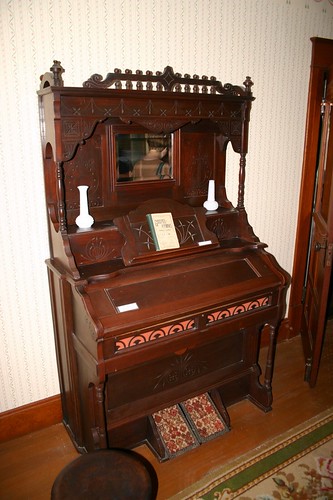
Two years ago, I wrote about Elvera Voth and the power of love. Back then I wrote about her memories of seeing of service workers, who would be away from their home for 7 years at a time. Elvera remembered a gathering of people at the train station to see them off, and how they sang some German hymns at the occasion. Elvera s done a lot since, including starting an arts in prison program. And today, she hosted a hymn sing at the pump organ in the Friesen House parlor. img_4305.jpg The Friesen House is nearly 100 years old, and was on my parents property before it got moved to the Mennonite Heritage and Agricultural Museum. We were among maybe 20 people that showed up for the event. We walked in a few minutes early and Elvera was sitting at the organ already, along with a few other early arrivals. Many of the people there were over 70, and the moment we walked in, she said, Oh good! Another generation! And, of course, asked about us, where we live, who we are related to, etc. The announcement in our church bulletin said to bring a copy of Gesangbuch mit Noten if you have one. That was a common hymn book in Mennonite churches in Kansas (songbook with notes and yes, there was one without notes that had only words.) I pulled out my copy, and just opened it up. I saw my grandma s beautiful handwriting saying it belonged to Mr. and Mrs. R. A. Klassen . This I brought along, but was perhaps the only one. Elvera recognized it and was pleased to hear where it came from. We had a great time, and it turned out to feel like the kind of afternoon people around here used to have: time with friends and family visiting and maybe singing on occasion. After some introduction and some stories, we got to the singing and started with hymn #1 in the 1969 (English) Mennonite Hymnal. That song had German words below as well, which we sang: Grosser Gott, wir loben dich! (Holy God, We Praise Thy Name) Elvera played the organ while we all sang. And then we turned to #556, O Have You Not Heard. We read through the German lyrics (to help those that don t speak German):
Ich weiss einen Strom, dessen herrliche Flut
fliesst wunderbar stille durchs Land,
doch strahlet und gl nzt er wie feurige Glut,
wem ist dieses W sser bekannt? O Seele, ich bitte dich: Komm!
Und such diesen herrlichen Strom!
Sein Wasser fliesst frei und m chtiglich,
o glaub s, es fliesset f r dich!
Elvera translated this herself, a much more powerful translation than we usually get in English. And then we sang, this time a cappella. Elvera told the story about the train station to this group, and then, of course, we sang O Power of Love, one of the songs sung on that occasion. For that, she asked us to stand up and form a circle around the organ, and again we sang mostly a cappella. Singing that song with Elvera left few dry eyes in the room for sure. Someone brought up Nun Ist Sie Erschienen, and so of course we sang that. It wasn t in any hymnal, but I suspect we were the only ones there that didn t have it completely memorized. Elvera told us the story of the museum s pump organ; it had been in her family, and she had paid to have it restored and eventually donated it to the museum. It had been used every evening at twilight for singing and devotions in the family. She also told us that the singing at the Newton train station the same one our family uses a few times a year was what inspired her to a career of choral music. In the end, we probably spent more time visiting than singing, but that was just fine. Next the group went over to the Preparatory School, an old schoolhouse also on the museum grounds. There we had a traditional Faspa, an afternoon meal with coffee, Zwieback and jam, cheese, and various cookies. We all visited for awhile longer and then went on our way. It was a wonderful afternoon, and I hope to have a chance to do that sort of thing again.

Next.

Previous.