I've mentored a number of students in 2013, 2014 and 2015 for
Debian and
Ganglia and most of the companies I've worked with have run internships and graduate programs from time to time. GSoC 2015 has just finished and with all the excitement, many students are already asking what they can do to prepare and be selected for Outreachy or GSoC in 2016.
My own observation is that the more time the organization has to get to know the student, the more confident they can be selecting that student. Furthermore, the more time that the student has spent getting to know the free software community, the more easily they can complete GSoC.
Here I present a list of things that students can do to maximize their chance of selection and career opportunities at the same time. These tips are useful for people applying for GSoC itself and related programs such as GNOME's
Outreachy or graduate placements in companies.
Disclaimers
There is no guarantee that Google will run the program again in 2016 or any future year until the Google announcement.
There is no guarantee that any organization or mentor (including myself) will be involved until the official list of organizations is published by Google.
 Do not follow the advice of web sites that invite you to send pizza or anything else of value to prospective mentors.
Following the steps in this page doesn't guarantee selection.
That said, people who do follow these steps are much more likely to be considered and interviewed than somebody who hasn't done any of the things in this list.
Understand what
free software really is
You may hear terms like
free software and
open source software used interchangeably.
They don't mean exactly the same thing and many people use the term
free software for the wrong things. Not all projects declaring themselves to be "free" or "open source" meet the definition of free software. Those that don't, usually as a result of deficiencies in their licenses, are fundamentally incompatible with the majority of software that does use genuinely free licenses.
Google Summer of Code is about both writing and publishing your code and it is also about community. It is fundamental that you know the basics of licensing and how to choose a
free license that empowers the community to collaborate on your code well after GSoC has finished.
Please review the definition of
free software early on and come back and review it from time to time. The
The GNU Project / Free Software Foundation have excellent resources to help you understand what a free software license is and how it works to maximize community collaboration.
Don't look for shortcuts
There is no shortcut to GSoC selection and there is no shortcut to GSoC completion.
The student stipend (USD $5,500 in 2014) is not paid to students unless they complete a minimum amount of valid code. This means that even if a student did find some shortcut to selection, it is unlikely they would be paid without completing meaningful work.
If you are the right candidate for GSoC, you will not need a shortcut anyway. Are you the sort of person who can't leave a coding problem until you really feel it is fixed, even if you keep going all night? Have you ever woken up in the night with a dream about writing code still in your head? Do you become irritated by tedious or repetitive tasks and often think of ways to write code to eliminate such tasks? Does your family get cross with you because you take your laptop to Christmas dinner or some other significant occasion and start coding? If some of these statements summarize the way you think or feel you are probably a natural fit for GSoC.
An opportunity money can't buy
The GSoC stipend will not make you rich. It is intended to make sure you have enough money to survive through the summer and focus on your project. Professional developers make this much money in a week in leading business centers like New York, London and Singapore. When you get to that stage in 3-5 years, you will not even be thinking about exactly how much you made during internships.
GSoC gives you an edge over other internships because it involves
publicly promoting your work. Many companies still try to hide the potential of their best recruits for fear they will be poached or that they will be able to demand higher salaries. Everything you complete in GSoC is intended to be published and you get full credit for it. Imagine a young musician getting the opportunity to perform on the main stage at a rock festival. This is how the free software community works. It is a meritocracy and there is nobody to hold you back.

Having a portfolio of free software that you have created or collaborated on and a wide network of professional contacts that you develop before, during and after GSoC will continue to pay you back for years to come. While other graduates are being screened through group interviews and testing days run by employers, people with a track record in a free software project often find they go straight to the final interview round.
Register your domain name and make a permanent email address
Free software is all about community and collaboration. Register your own domain name as this will become a focal point for your work and for people to get to know you as you become part of the community.
This is sound advice for anybody working in IT, not just programmers. It gives the impression that you are confident and have a long term interest in a technology career.
Choosing the provider: as a minimum, you want a provider that offers DNS management, static web site hosting, email forwarding and XMPP services all linked to your domain. You do not need to choose the provider that is linked to your internet connection at home and that is often not the best choice anyway. The XMPP foundation maintains a
list of providers known to support XMPP.
Create an email address within your domain name. The most basic domain hosting providers will let you forward the email address to a webmail or university email account of your choice. Configure your webmail to send replies using your personalized email address in the
From header.
Update your
~/.gitconfig file to use your personalized email address in your
Git commits.
Create a web site and blog
Start writing a blog. Host it using your domain name.
Some people blog every day, other people just blog once every two or three months.
Create links from your web site to your other profiles, such as a Github profile page. This helps reinforce the pages/profiles that are genuinely related to you and avoid confusion with the pages of other developers.
Many mentors are keen to see their students writing a weekly report on a blog during GSoC so starting a blog now gives you a head start. Mentors look at blogs during the selection process to try and gain insight into which topics a student is most suitable for.
Create a profile on Github
Github is one of the most widely used software development web sites. Github makes it quick and easy for you to publish your work and collaborate on the work of other people. Create an account today and get in the habbit of
forking other projects, improving them, committing your changes and
pushing the work back into your Github account.
Github will quickly build a profile of your commits and this allows mentors to see and understand your interests and your strengths.
In your Github profile, add a link to your web site/blog and make sure the email address you are using for Git commits (in the
~/.gitconfig file) is based on your personal domain.
Start using PGP
Pretty Good Privacy (PGP) is the industry standard in protecting your identity online. All serious free software projects use PGP to sign tags in Git, to sign official emails and to sign official release files.
The most common way to start using PGP is with the
GnuPG (GNU Privacy Guard) utility. It is installed by the package manager on most Linux systems.
When you
create your own PGP key, use the email address involving your domain name. This is the most permanent and stable solution.
Print your key fingerprint using the
gpg-key2ps command, it is in the
signing-party package on most Linux systems. Keep copies of the fingerprint slips with you.
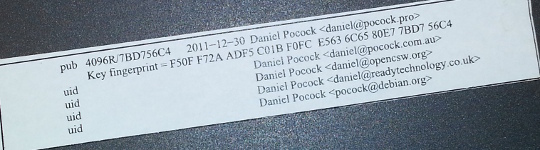 This is what my own PGP fingerprint slip looks like. You can also print the key fingerprint on a business card for a more professional look.
Using PGP, it is recommend that you
sign any important messages you send but you do not have to encrypt the messages you send, especially if some of the people you send messages to (like family and friends) do not yet have the PGP software to decrypt them.
If using the
Thunderbird (
Icedove) email client from
Mozilla, you can easily send signed messages and validate the messages you receive using the
Enigmail plugin.
Get your PGP key signed
Once you have a PGP key, you will need to find other developers to sign it. For people I mentor personally in GSoC, I'm keen to see that you
try and find another Debian Developer in your area to sign your key as early as possible.
Free software events
Try and find all the free software events in your area in the months between now and the end of the next Google Summer of Code season. Aim to attend at least two of them before GSoC.
Look closely at the schedules and find out about the individual speakers, the companies and the free software projects that are participating. For events that span more than one day, find out about the dinners, pub nights and other social parts of the event.
Try and identify people who will attend the event who have been GSoC mentors or who intend to be. Contact them before the event, if you are keen to work on something in their domain they may be able to make time to discuss it with you in person.
Take your PGP fingerprint slips. Even if you don't participate in a formal key-signing party at the event, you will still find some developers to sign your PGP key individually.
You must take a photo ID document (such as your passport) for the other developer to check the name on your fingerprint but you do not give them a copy of the ID document.
Events come in all shapes and sizes.
FOSDEM is an example of one of the bigger events in Europe,
linux.conf.au is a similarly large event in Australia. There are many, many more local events such as the
Debian UK mini-DebConf in Cambridge, November 2015. Many events are either free or free for students but please check carefully if there is a requirement to register before attending.
On your blog, discuss which events you are attending and which sessions interest you. Write a blog during or after the event too, including photos.
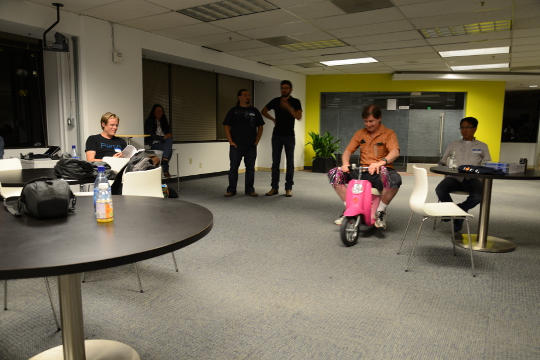 Quantcast generously hosted the Ganglia community meeting in San Francisco, October 2013. We had a wild time in their offices with mini-scooters, burgers, beers and the Ganglia book. That's me on the pink mini-scooter and Bernard Li, one of the other Ganglia GSoC 2014 admins is on the right.
Install Linux
GSoC is fundamentally about
free software. Linux is to free software what a tree is to the forest.
Using Linux every day on your personal computer dramatically increases your ability to interact with the free software community and increases the number of potential GSoC projects that you can participate in.
This is not to say that people using Mac OS or Windows are unwelcome. I have worked with some great developers who were not Linux users. Linux gives you an edge though and the best time to gain that edge is now, while you are a student and well before you apply for GSoC.
If you must run Windows for some applications used in your course, it will run just fine in a virtual machine using
Virtual Box, a free software solution for desktop virtualization. Use Linux as the primary operating system.
Here are links to download ISO DVD (and CD) images for some of the main Linux distributions:
If you are nervous about getting started with Linux, install it on a spare PC or in a virtual machine before you install it on your main PC or laptop. Linux is much less demanding on the hardware than Windows so you can easily run it on a machine that is 5-10 years old. Having just 4GB of RAM and 20GB of hard disk is usually more than enough for a basic graphical desktop environment although having better hardware makes it faster.
Your experiences installing and running Linux, especially if it requires some special effort to make it work with some of your hardware, make interesting topics for your blog.
Decide which technologies you know best
Personally, I have mentored students working with C, C++, Java, Python and JavaScript/HTML5.
In a GSoC program, you will typically do most of your work in just one of these languages.
From the outset, decide which language you will focus on and do everything you can to improve your competence with that language. For example, if you have already used Java in most of your course, plan on using Java in GSoC and make sure you read
Effective Java (2nd Edition) by Joshua Bloch.
Decide which themes appeal to you
Find a topic that has long-term appeal for you. Maybe the topic relates to your course or maybe you already know what type of company you would like to work in.
Here is a list of some topics and some of the relevant software projects:
- System administration, servers and networking: consider projects involving monitoring, automation, packaging. Ganglia is a great community to get involved with and you will encounter the Ganglia software in many large companies and academic/research networks. Contributing to a Linux distribution like Debian or Fedora packaging is another great way to get into system administration.
- Desktop and user interface: consider projects involving window managers and desktop tools or adding to the user interface of just about any other software.
- Big data and data science: this can apply to just about any other theme. For example, data science techniques are frequently used now to improve system administration.
- Business and accounting: consider accounting, CRM and ERP software.
- Finance and trading: consider projects like R, market data software like OpenMAMA and connectivity software (Apache Camel)
- Real-time communication (RTC), VoIP, webcam and chat: look at the JSCommunicator or the Jitsi project
- Web (JavaScript, HTML5): look at the JSCommunicator
Before the GSoC application process begins, you should aim to learn as much as possible about the theme you prefer and also gain practical experience using the software relating to that theme. For example, if you are attracted to the business and accounting theme, install the
PostBooks suite and get to know it. Maybe you know somebody who runs a small business: help them to upgrade to PostBooks and use it to prepare some reports.
Make something
Make some small project, less than two week's work, to demonstrate your skills. It is important to make something that somebody will use for a practical purpose, this will help you gain experience communicating with other users through Github.
For an example, see the
servlet Juliana Louback created for fixing phone numbers in December 2013. It has since been used as part of the
Lumicall web site and Juliana was
selected for a GSoC 2014 project with Debian.
There is no better way to demonstrate to a prospective mentor that you are ready for GSoC than by completing and publishing some small project like this yourself. If you don't have any immediate project ideas, many developers will also be able to give you tips on small projects like this that you can attempt, just come and ask us on one of the mailing lists.
Ideally, the project will be something that you would use anyway even if you do not end up participating in GSoC. Such projects are the most motivating and rewarding and usually end up becoming an example of your best work. To continue the example of somebody with a preference for business and accounting software, a small project you might create is a
plugin or extension for PostBooks.
Getting to know prospective mentors
Many web sites provide useful information about the developers who contribute to free software projects. Some of these developers may be willing to be a GSoC mentor.
For example, look through some of the following:
- Planet / Blog aggregation sites: these sites all have links to the blogs of many developers. They are useful sources of information about events and also finding out who works on what.
- Developer profile pages. Many projects publish a page about each developer and the packages, modules or other components he/she is responsible for. Look through these lists for areas of mutual interest.
- Developer github profiles. Github makes it easy to see what projects a developer has contributed to. To see many of my own projects, browse through the history at my own Github profile
Getting on the mentor's shortlist
Once you have identified projects that are interesting to you and developers who work on those projects, it is important to get yourself on the developer's shortlist.
Basically, the shortlist is a list of all students who the developer believes can complete the project. If I feel that a student is unlikely to complete a project or if I don't have enough information to judge a student's probability of success, that student will not be on my shortlist.
If I don't have any student on my shortlist, then a project will not go ahead at all. If there are multiple students on the shortlist, then I will be looking more closely at each of them to try and work out who is the best match.
One way to get a developer's attention is to look at bug reports they have created. Github makes it easy to see complaints or bug reports they have made about their own projects or other projects they depend on. Another way to do this is to search through their code for strings like
FIXME and
TODO. Projects with standalone bug trackers like
the Debian bug tracker also provide an easy way to
search for bug reports that a specific person has created or commented on.
Once you find some relevant bug reports, email the developer. Ask if anybody else is working on those issues. Try and start with an issue that is particularly easy and where the solution is interesting for you. This will help you learn to compile and test the program before you try to fix any more complicated bugs. It may even be something you can work on as part of your academic program.
Find successful projects from the previous year
Contact organizations and ask them which GSoC projects were most successful. In many organizations, you can find the past students' project plans and their final reports published on the web. Read through the plans submitted by the students who were chosen. Then read through the final reports by the same students and see how they compare to the original plans.
Start building your project proposal now
Don't wait for the application period to begin. Start writing a project proposal now.
When writing a proposal, it is important to include several things:
- Think big: what is the goal at the end of the project? Does your work help the greater good in some way, such as increasing the market share of Linux on the desktop?
- Details: what are specific challenges? What tools will you use?
- Time management: what will you do each week? Are there weeks where you will not work on GSoC due to vacation or other events? These things are permitted but they must be in your plan if you know them in advance. If an accident or death in the family cut a week out of your GSoC project, which work would you skip and would your project still be useful without that? Having two weeks of flexible time in your plan makes it more resilient against interruptions.
- Communication: are you on mailing lists, IRC and XMPP chat? Will you make a weekly report on your blog?
- Users: who will benefit from your work?
- Testing: who will test and validate your work throughout the project? Ideally, this should involve more than just the mentor.
If your project plan is good enough, could you put it on Kickstarter or another crowdfunding site? This is a good test of whether or not a project is going to be supported by a GSoC mentor.
Learn about packaging and distributing software
Packaging is a vital part of the free software lifecycle. It is very easy to upload a project to Github but it takes more effort to have it become an official package in systems like Debian, Fedora and Ubuntu.
Packaging and the communities around Linux distributions help you reach out to users of your software and get valuable feedback and new contributors. This boosts the impact of your work.
To start with, you may want to help the maintainer of an existing package.
Debian packaging teams are existing communities that work in a team and welcome new contributors. The
Debian Mentors initiative is another great starting place. In the Fedora world, the place to start may be in
one of the Special Interest Groups (SIGs).
Think from the mentor's perspective
After the application deadline, mentors have just 2 or 3 weeks to choose the students. This is actually not a lot of time to be certain if a particular student is capable of completing a project. If the student has a published history of free software activity, the mentor feels a lot more confident about choosing the student.
Some mentors have more than one good student while other mentors receive no applications from capable students. In this situation, it is very common for mentors to send each other details of students who may be suitable. Once again, if a student has a good Github profile and a blog, it is much easier for mentors to try and match that student with another project.

Conclusion
Getting into the world of software engineering is much like joining any other profession or even joining a new hobby or sporting activity. If you run, you probably have various types of shoe and a running watch and you may even spend a couple of nights at the track each week. If you enjoy playing a musical instrument, you probably have a collection of sheet music, accessories for your instrument and you may even aspire to build a recording studio in your garage (or you probably know somebody else who already did that).
The things listed on this page will not just help you walk the walk and talk the talk of a software developer, they will put you on a track to being one of the leaders. If you look over the profiles of other software developers on the Internet, you will find they are doing most of the things on this page already. Even if you are not selected for GSoC at all or decide not to apply, working through the steps on this page will help you clarify your own ideas about your career and help you make new friends in the software engineering community.
 I just released sbuild 0.66.0-1 into unstable. It fixes a whopping 30 bugs!
Thus, I'd like to use this platform to:

 Now that OSX 10.11 El Capitan is released and everyone is eagerly updating, in cooperation with the colleagues from the Japanese TeX world we have released new versions of the
 For jfontmaps the changes were minimal,
 Playing with FUSE and git.
I've been playing with FUSE and git to make a file system, for fun.
There's already many filesystems that are implemented with
FUSE, and there are quite a few ones that implement
filesystem for git, but I don't use any of them.
I wondered why that is the case but tried to build one anyway.
It's in github repository
 I've just released new version of

 A friend and I regularly meet to chat over coffee and then usually finish up by walking the maintained trail in the


 Inspired by
 6 years later I am still here at the JAIST, but things have changed considerably, and my future is even less clear than 6 years ago. So it is time to reflect a bit about the last years.
The biggest achievement
My biggest achievement in these 6 years is probably that I managed to learn Japanese to a degree that I can teach in Japanese (math, logic, etc), can read Japanese books to a certain degree, and have generally no problem communicating in daily life. Said that, there is still a long way to go. Reading, and much more writing, is still requiring concentration and power, far from the natural flow in my other languages. While talking feels rather natural, the complexity of the written language is a huge hurdle. But this is probably the good, the high point of the 6 years, a great challenge, that keeps my mind busy and working and challenged over long time, with still more to do.
The happiest thing
Many events here in Japan were of great fun and enjoyment for me. The rich culture, paired with a spectacular love for traditional handicraft I haven t seen anywhere else, is a guarantee for enjoyable and intellectually stimulating activities. But the biggest joy of my time here of course was that I found a lovely, beautiful, and caring wife. Not knowing the challenges of an international marriage, I was caught without preparation, and so we had (and still have) rough times due to the cultural differences, and different expectations. But this is what makes life interesting, and so I am always grateful for this chance. Whatever happens in the future, she will be part of my decisions and the center of my life.
The biggest disappointment
Of course, when you live in a country for some time, you learn to know the highs and lows. As someone interested in politics and social systems, Japan is a pain in the butt in many respects. But the biggest disappointment was in a different area: Working environment. While I love my work and had great surroundings, there is something that always is present in the background: Foreigners here are not considered assets, but embellishment. Meaning that they are the first ones to loose their jobs when times are difficult, meaning that they are not considered as full members. After many years at a university here, and with no outlook on a job after March, I can only say, Japan is a country of Japanese first , especially when it comes to jobs. Of course, other countries are not that different, but looking at the average mixture of nationalities at universities in Europe or the US, and comparing them to Japanese universities, a bleak image is arising. I enjoyed my time here, I worked hard and did a lot for my university, but the economically hard times make it necessary to change things, and that means getting rid of foreigners.
That is the reason why the work environment is the biggest disappointment in these years.
Future
The future is unclear, as it always was. The dire fate of many researchers. Being in my 40ies without a permanent position and a family, I am forced to think hard what my next options are. The hide-and-seek games of Japanese (and other) universities seem to me less and less an option. Sad as it is, after having worked 20+ years in academics, having done some interesting (for me) research and having managed to secure a name in our community, I am not sure where my future is. Continuing on definite contracts does not sound like a great option for me. Several things for the future come to my mind: starting my own business, work as programmer (maybe Google still wants me after I rejected them 2 years ago), work as mountain guide (have done that for some years before going to Japan). All of that is possible, but my loosing the time to research will always be a pain, since I enjoy cracking my brain on some complicated and deep logical problems.
Whatever comes, I will take it as a chance to learn new things. And in one way or another it will work out, I hope.
 As part of my ongoing effort to provide grsecurity patched
kernels for Debian, I gave a

 My monthly report covers a large part of what I have been doing in the free software world. I write it for

 Since there have been a lot of updates, and also changes in the setup and grub config file, I include the full procedure here, that is, merging and updating these previous posts:
 Unity, that is the Ubuntu user interface, that nobody else uses.
Since it is a Ubuntu-only thing, few applications have native support for
its OSX-style hipster "global" menus.
For Java, someone


 What happened in the