Search Results: "uli"

24 September 2014

Julian Andres Klode: APT 1.1~exp3 released to experimental: First step to sandboxed fetcher methods

Today, we worked, with the help of ioerror on IRC, on reducing the attack surface in our fetcher methods. There are three things that we looked at:
  1. Reducing privileges by setting a new user and group
  2. chroot()
  3. seccomp-bpf sandbox
Today, we implemented the first of them. Starting with 1.1~exp3, the APT directories /var/cache/apt/archives and /var/lib/apt/lists are owned by the _apt user (username suggested by pabs). The methods switch to that user shortly after the start. The only methods doing this right now are: copy, ftp, gpgv, gzip, http, https. If privileges cannot be dropped, the methods will fail to start. No fetching will be possible at all. Known issues: We plan to also add chroot() and seccomp sandboxing later on; to reduce the attack surface on untrusted files and protocol parsing.
Filed under: Uncategorized

Robert Collins: what-poles-for-the-tent

So Monty and Sean have recently blogged about about the structures (1, 2) they think may work better for OpenStack. I like the thrust of their thinking but had some mumblings of my own to add. Firstly, I very much like the focus on social structure and needs what our users and deployers need from us. That seems entirely right. And I very much like the getting away from TC picking winners and losers. That was never an enjoyable thing when I was on the TC, and I don t think it has made OpenStack better. However, the thing that picking winners and losers did was that it allowed users to pick an API and depend on it. Because it was the X API for OpenStack . If we don t pick winners, then there is no way to say that something is the X API for OpenStack , and that means that there is no forcing function for consistency between different deployer clouds. And so this appears to be why Ring 0 is needed: we think our users want consistency in being able to deploy their application to Rackspace or HP Helion. They want vendor neutrality, and by giving up winners-and-losers we give up vendor neutrality for our users. Thats the only explanation I can come up with for needing a Ring 0 because its still winners and losers (e.g. picking an arbitrary project) keystone, grandfathering it in, if you will. If we really want to get out of the role of selecting projects, I think we need to avoid this. And we need to avoid it without losing vendor neutrality (or we need to give up the idea of vendor neutrality). One might say that we must pick winners for the very core just by its, but I don t think thats true. If the core is small, many people will still want vendor neutrality higher up the stack. If the core is large, then we ll have a larger % of APIs covered and stable granting vendor neutrality. So a core with fixed APIs will be under constant pressure to expand: not just from developers of projects, but from users that want API X to be fixed and guaranteed available and working a particular way at [most] OpenStack clouds. Ring 0 also fulfils a quality aspect we can check that it all works together well in a realistic timeframe with our existing tooling. We are essentially proposing to pick functionality that we guarantee to users; and an API for that which they have everywhere, and the matching implementation we ve tested. To pull from Monty s post: What does a basic end user need to get a compute resource that works and seems like a computer? (end user facet) What does Nova need to count on existing so that it can provide that. He then goes on to list a bunch of things, but most of them are not needed for that: We need Nova (its the only compute API in the project today). We don t need keystone (Nova can run in noauth mode and deployers could just have e.g. Apache auth on top). We don t need Neutron (Nova can do that itself). We don t need cinder (use local volumes). We need Glance. We don t need Designate. We don t need a tonne of stuff that Nova has in it (e.g. quotas) end users kicking off a simple machine have -very- basic needs. Consider the things that used to be in Nova: Deploying containers. Neutron. Cinder. Glance. Ironic. We ve been slowly decomposing Nova (yay!!!) and if we keep doing so we can imagine getting to a point where there truly is a tightly focused code base that just does one thing well. I worry that we won t get there unless we can ensure there is no pressure to be inside Nova to win . So there s a choice between a relatively large set of APIs that make the guaranteed available APIs be comprehensive, or a small set that that will give users what they need just at the beginning but might not be broadly available and we ll be depending on some unspecified process for the deployers to agree and consolidate around what ones they make available consistently. In sort one of the big reasons we were picking winners and losers in the TC was to consolidate effort around a single API not implementation (keystone is already on its second implementation). All the angst about defcore and compatibility testing is going to be multiplied when there is lots of ecosystem choice around APIs above Ring 0, and the only reason that won t be a problem for Ring 0 is that we ll still be picking winners. How might we do this? One way would be to keep picking winners at the API definition level but not the implementation level, and make the competition be able to replace something entirely if they implement the existing API [and win hearts and minds of deployers]. That would open the door to everything being flexible and its happened before with Keystone. Another way would be to not even have a Ring 0. Instead have a project/program that is aimed at delivering the reference API feature-set built out of a single, flat Big Tent and allow that project/program to make localised decisions about what components to use (or not). Testing that all those things work together is not much different than the current approach, but we d have separated out as a single cohesive entity the building of a product (Ring 0 is clearly a product) from the projects that might go into it. Projects that have unstable APIs would clearly be rejected by this team; projects with stable APIs would be considered etc. This team wouldn t be the TC : they too would be subject to the TC s rulings. We could even run multiple such teams as hinted at by Dean Troyer one of the email thread posts. Running with that I d then be suggesting So OpenStack/NaaS would have an API or set of APIs, and they d be responsible for considering maturity, feature set, and so on, but wouldn t own Neutron, or Neutron incubator or any other component they would be a *cross project* team, focused at the product layer, rather than the component layer, which nearly all of our folk end up locked into today. Lastly Sean has also pointed out that we have large N N^2 communication issues I think I m proposing to drive the scope of any one project down to a minimum, which gives us more N, but shrinks the size within any project, so folk don t burn out as easily, *and* so that it is easier to predict the impact of changes clear contracts and APIs help a huge amount there.

15 September 2014

Julien Danjou: Python bad practice, a concrete case

A lot of people read up on good Python practice, and there's plenty of information about that on the Internet. Many tips are included in the book I wrote this year, The Hacker's Guide to Python. Today I'd like to show a concrete case of code that I don't consider being the state of the art. In my last article where I talked about my new project Gnocchi, I wrote about how I tested, hacked and then ditched whisper out. Here I'm going to explain part of my thought process and a few things that raised my eyebrows when hacking this code. Before I start, please don't get the spirit of this article wrong. It's in no way a personal attack to the authors and contributors (who I don't know). Furthermore, whisper is a piece of code that is in production in thousands of installation, storing metrics for years. While I can argue that I consider the code not to be following best practice, it definitely works well enough and is worthy to a lot of people. Tests The first thing that I noticed when trying to hack on whisper, is the lack of test. There's only one file containing tests, named test_whisper.py, and the coverage it provides is pretty low. One can check that using the coverage tool.
$ coverage run test_whisper.py
...........
----------------------------------------------------------------------
Ran 11 tests in 0.014s

OK
$ coverage report
Name Stmts Miss Cover
----------------------------------
test_whisper 134 4 97%
whisper 584 227 61%
----------------------------------
TOTAL 718 231 67%

While one would think that 61% is "not so bad", taking a quick peak at the actual test code shows that the tests are incomplete. Why I mean by incomplete is that they for example use the library to store values into a database, but they never check if the results can be fetched and if the fetched results are accurate. Here's a good reason one should never blindly trust the test cover percentage as a quality metric. When I tried to modify whisper, as the tests do not check the entire cycle of the values fed into the database, I ended up doing wrong changes but had the tests still pass. No PEP 8, no Python 3 The code doesn't respect PEP 8 . A run of flake8 + hacking shows 732 errors While it does not impact the code itself, it's more painful to hack on it than it is on most Python projects. The hacking tool also shows that the code is not Python 3 ready as there is usage of Python 2 only syntax. A good way to fix that would be to set up tox and adds a few targets for PEP 8 checks and Python 3 tests. Even if the test suite is not complete, starting by having flake8 run without errors and the few unit tests working with Python 3 should put the project in a better light. Not using idiomatic Python A lot of the code could be simplified by using idiomatic Python. Let's take a simple example:
def fetch(path,fromTime,untilTime=None,now=None):
fh = None
try:
fh = open(path,'rb')
return file_fetch(fh, fromTime, untilTime, now)
finally:
if fh:
fh.close()

That piece of code could be easily rewritten as:
def fetch(path,fromTime,untilTime=None,now=None):
with open(path, 'rb') as fh:
return file_fetch(fh, fromTime, untilTime, now)

This way, the function looks actually so simple that one can even wonder why it should exists but why not. Usage of loops could also be made more Pythonic:
for i,archive in enumerate(archiveList):
if i == len(archiveList) - 1:
break

could be actually:
for i, archive in itertools.islice(archiveList, len(archiveList) - 1):

That reduce the code size and makes it easier to read through the code. Wrong abstraction level Also, one thing that I noticed in whisper, is that it abstracts its features at the wrong level. Take the create() function, it's pretty obvious:
def create(path,archiveList,xFilesFactor=None,aggregationMethod=None,sparse=False,useFallocate=False):
# Set default params
if xFilesFactor is None:
xFilesFactor = 0.5
if aggregationMethod is None:
aggregationMethod = 'average'

#Validate archive configurations...
validateArchiveList(archiveList)

#Looks good, now we create the file and write the header
if os.path.exists(path):
raise InvalidConfiguration("File %s already exists!" % path)
fh = None
try:
fh = open(path,'wb')
if LOCK:
fcntl.flock( fh.fileno(), fcntl.LOCK_EX )

aggregationType = struct.pack( longFormat, aggregationMethodToType.get(aggregationMethod, 1) )
oldest = max([secondsPerPoint * points for secondsPerPoint,points in archiveList])
maxRetention = struct.pack( longFormat, oldest )
xFilesFactor = struct.pack( floatFormat, float(xFilesFactor) )
archiveCount = struct.pack(longFormat, len(archiveList))
packedMetadata = aggregationType + maxRetention + xFilesFactor + archiveCount
fh.write(packedMetadata)
headerSize = metadataSize + (archiveInfoSize * len(archiveList))
archiveOffsetPointer = headerSize

for secondsPerPoint,points in archiveList:
archiveInfo = struct.pack(archiveInfoFormat, archiveOffsetPointer, secondsPerPoint, points)
fh.write(archiveInfo)
archiveOffsetPointer += (points * pointSize)

#If configured to use fallocate and capable of fallocate use that, else
#attempt sparse if configure or zero pre-allocate if sparse isn't configured.
if CAN_FALLOCATE and useFallocate:
remaining = archiveOffsetPointer - headerSize
fallocate(fh, headerSize, remaining)
elif sparse:
fh.seek(archiveOffsetPointer - 1)
fh.write('\x00')
else:
remaining = archiveOffsetPointer - headerSize
chunksize = 16384
zeroes = '\x00' * chunksize
while remaining > chunksize:
fh.write(zeroes)
remaining -= chunksize
fh.write(zeroes[:remaining])

if AUTOFLUSH:
fh.flush()
os.fsync(fh.fileno())
finally:
if fh:
fh.close()

The function is doing everything: checking if the file doesn't exist already, opening it, building the structured data, writing this, building more structure, then writing that, etc. That means that the caller has to give a file path, even if it just wants a whipser data structure to store itself elsewhere. StringIO() could be used to fake a file handler, but it will fail if the call to fcntl.flock() is not disabled and it is inefficient anyway. There's a lot of other functions in the code, such as for example setAggregationMethod(), that mixes the handling of the files even doing things like os.fsync() while manipulating structured data. This is definitely not a good design, especially for a library, as it turns out reusing the function in different context is near impossible. Race conditions There are race conditions, for example in create() (see added comment):
if os.path.exists(path):
raise InvalidConfiguration("File %s already exists!" % path)
fh = None
try:
# TOO LATE I ALREADY CREATED THE FILE IN ANOTHER PROCESS YOU ARE GOING TO
# FAIL WITHOUT GIVING ANY USEFUL INFORMATION TO THE CALLER :-(
fh = open(path,'wb')

That code should be:
try:
fh = os.fdopen(os.open(path, os.O_WRONLY os.O_CREAT os.O_EXCL), 'wb')
except OSError as e:
if e.errno = errno.EEXIST:
raise InvalidConfiguration("File %s already exists!" % path)

to avoid any race condition. Unwanted optimization We saw earlier the fetch() function that is barely useful, so let's take a look at the file_fetch() function that it's calling.
def file_fetch(fh, fromTime, untilTime, now = None):
header = __readHeader(fh)
[...]

The first thing the function does is to read the header from the file handler. Let's take a look at that function:
def __readHeader(fh):
info = __headerCache.get(fh.name)
if info:
return info

originalOffset = fh.tell()
fh.seek(0)
packedMetadata = fh.read(metadataSize)

try:
(aggregationType,maxRetention,xff,archiveCount) = struct.unpack(metadataFormat,packedMetadata)
except:
raise CorruptWhisperFile("Unable to read header", fh.name)
[...]

The first thing the function does is to look into a cache. Why is there a cache? It actually caches the header based with an index based on the file path (fh.name). Except that if one for example decide not to use file and cheat using StringIO, then it does not have any name attribute. So this code path will raise an AttributeError. One has to set a fake name manually on the StringIO instance, and it must be unique so nobody messes with the cache
import StringIO

packedMetadata = <some source>
fh = StringIO.StringIO(packedMetadata)
fh.name = "myfakename"
header = __readHeader(fh)

The cache may actually be useful when accessing files, but it's definitely useless when not using files. But it's not necessarily true that the complexity (even if small) that the cache adds is worth it. I doubt most of whisper based tools are long run processes, so the cache that is really used when accessing the files is the one handled by the operating system kernel, and this one is going to be much more efficient anyway, and shared between processed. There's also no expiry of that cache, which could end up of tons of memory used and wasted. Docstrings None of the docstrings are written in a a parsable syntax like Sphinx. This means you cannot generate any documentation in a nice format that a developer using the library could read easily. The documentation is also not up to date:
def fetch(path,fromTime,untilTime=None,now=None):
"""fetch(path,fromTime,untilTime=None)
[...]
"""

def create(path,archiveList,xFilesFactor=None,aggregationMethod=None,sparse=False,useFallocate=False):
"""create(path,archiveList,xFilesFactor=0.5,aggregationMethod='average')
[...]
"""

This is something that could be avoided if a proper format was picked to write the docstring. A tool cool be used to be noticed when there's a diversion between the actual function signature and the documented one, like missing an argument. Duplicated code Last but not least, there's a lot of code that is duplicated around in the scripts provided by whisper in its bin directory. Theses scripts should be very lightweight and be using the console_scripts facility of setuptools, but they actually contains a lot of (untested) code. Furthermore, some of that code is partially duplicated from the whisper.py library which is against DRY. Conclusion There are a few more things that made me stop considering whisper, but these are part of the whisper features, not necessarily code quality. One can also point out that the code is very condensed and hard to read, and that's a more general problem about how it is organized and abstracted. A lot of these defects are actually points that made me start writing The Hacker's Guide to Python a year ago. Running into this kind of code makes me think it was a really good idea to write a book on advice to write better Python code!
The Hacker's Guide to Python
A book I wrote talking about designing Python applications, state of the art, advice to apply when building your application, various Python tips, etc. Interested? Check it out.

11 September 2014

Steve Kemp: A small email utility and other updates.

Last night I was looking for an image I knew a model had mailed me a few months ago, as we were talking about rescheduling a shoot at the weekend. I couldn't find it, even with my awesome mail client and filing system. With some free time I figured I could write a little utility to dump all attachments from email folders, and find it that way. It did cross my mind that there is the simple mail-utility for dumping headers, etc, called formail, which is distributed alongside procmail, but it doesn't handle attachments .. I was tempted to write a general purpose script to dump attachments, email header values, etc, etc but given the lack of time I merely solved my own problem. I suspect there is room for a "mail utilities" package, similar to Joey's "moreutils" and my "sysadmin utils". However I note that there is a GNU Mailutils which does things differently than I'd expect - i.e. it contains a POP3 server. Still if you want to dump attachments from emails, have GMIME installed, and want to filter by attachment-name, or MIME-type, you might look at my trivial attachment-dump program. Related to that I spent some time last night updating my photography site, so the animals & pets section has updated images at least. During the course of that I found a bug in my static-site generator, templer which stopped it from automatically populating image height/widths when called in a glob:
Title: Pets &amp; Animals
Images: file_glob( "*.jpg" )
---
This is the page body, it now has access to a variable called 'images'
which is a HTML::Template loop-structure containing name/height/width/etc
for each image in the current directory.
That should now be resolved, and life should once again be good.

6 September 2014

Russ Allbery: Accumulated hauls

I haven't made one of these in a long time, so I have some catching from random purchases to do, which includes a (repurposed) nice parting gift from my previous employer and a trip to Powell's since I was in the area for DebConf14. This also includes the contents of the Hugo voter's packet, which contained a wide variety of random stuff even if some of the novels were represented only by excerpts. John Joseph Adams (ed.) The Mad Scientist's Guide to World Domination (sff anthology)
Roger McBride Allen The Ring of Charon (sff)
Roger McBride Allen The Shattered Sphere (sff)
Iain M. Banks The Hydrogen Sonata (sff)
Julian Barnes The Sense of an Ending (mainstream)
M. David Blake (ed.) 2014 Campbellian Anthology (sff anthology)
Algis Budrys Benchmarks Continued (non-fiction)
Algis Budrys Benchmarks Revisited (non-fiction)
Algis Budrys Benchmarks Concluded (non-fiction)
Edgar Rice Burroughs Carson of Venus (sff)
Wesley Chu The Lives of Tao (sff)
Ernest Cline Ready Player One (sff)
Larry Correia Hard Magic (sff)
Larry Correia Spellbound (sff)
Larry Correia Warbound (sff)
Sigrid Ellis & Michael Damien Thomas (ed.) Queer Chicks Dig Time Lords (non-fiction)
Neil Gaiman The Ocean at the End of the Lane (sff)
Max Gladstone Three Parts Dead (sff)
Max Gladstone Two Serpents Rise (sff)
S.L. Huang Zero Sum Game (sff)
Robert Jordan & Brandon Sanderson The Wheel of Time (sff)
Drew Karpyshyn Mass Effect: Revelation (sff)
Justin Landon & Jared Shurin (ed.) Speculative Fiction 2012 (non-fiction)
John J. Lumpkin Through Struggle, the Stars (sff)
L. David Marquet Turn the Ship Around! (non-fiction)
George R.R. Martin & Raya Golden Meathouse Man (graphic novel)
Ramez Naam Nexus (sff)
Eiichiro Oda One Piece Volume 1 (manga)
Eiichiro Oda One Piece Volume 2 (manga)
Eiichiro Oda One Piece Volume 3 (manga)
Eiichiro Oda One Piece Volume 4 (manga)
Alexei Panshin New Celebrations (sff)
K.J. Parker Devices and Desires (sff)
K.J. Parker Evil for Evil (sff)
Sofia Samatar A Stranger in Olondria (sff)
John Scalzi The Human Division (sff)
Jonathan Straham (ed.) Fearsome Journeys (sff anthology)
Vernor Vinge The Children of the Sky (sff)
Brian Wood & Becky Cloonan Demo (graphic novel)
Charles Yu How to Live Safely in a Science Fictional Universe (sff) A whole bunch of this is from the Hugo voter's packet, and since the Hugos are over, much of that probably won't get prioritized. (I was very happy with the results of the voting, though.) Other than that, it's a very random collection of stuff, including a few things that I picked up based on James Nicoll's reviews. Now that I have a daily train commute, I should pick up the pace of reading, and as long as I can find enough time in my schedule to also write reviews, hopefully there will be more content in this blog shortly.

1 September 2014

Juliana Louback: Debconf 2014 and How I Became a Debian Contributor

Part 1 - Debconf 2014 This year I went to my first Debconf, which took place in Portland, OR during the last week of August 2014. All in all I have to rate my experience as very enlightening and in the end quite fun. First of all, it was a little daunting to go to a conference in 1 - A city I d never been to before; 2 - A conference with 300+ people, only 3 of which I knew and even then I only knew them virtually. Not to mention I was in the presence of some extremely brilliant and known contirbutors in the Debian community which was somewhat intimidating. Just to give you an idea, Linus Torvalds showed up for a Q&A session last Friday morning! Jealous? Actually I missed that too. It was kind of a last minute thing, booked for coincidentally the exact time I d be flying out of Portland. I found out about it much too late. But luckily for me and maybe you, the session was filmed and can be seen here. Isn t that a treat? Point made, there are lots of really talented people there, both techies and non-techies. It s easy to feel you re out of league, at least I did. But I d highly encourage you to ignore such feelings if you re ever in the same situation. Debian has been built on for a long time now, but although a lot has been done, a lot still needs to be done. The Debian community is very welcoming of new contributors and users, regardless of the level of expertise. So far I haven t been snubbed by anyone. To the contrary, all my interactions with the Debian community members has been extremely positive. So go ahead and attend the meetings and presentations, even if you think it s not your area of expertise. Debconf was organized (or at least this one was) as a series of talks, meet ups and ad hoc sessions, some of which occured simultaneously. The sessions were all about different components of the Debian universe, from presenting new features to overviews of accomplishments to discussing issues and how to fix them. A schedule with the location and description of each session was posted on the Debconf wiki. Sometimes none of the sessions at a certain time was on a topic I knew very much about. But I d sit in anyways. There s no rule to attending the sessions, no minimum qualifications required. You ll likely learn something new and you just might find out there is something you can do to contribute. There are also hackathons that are quite the thing or so I heard. Or you could walk about and meet new people, do some networking. I have to say networking was the highlight of the Debconf for me. Remember I said I knew about 3 people who were at the conference? Well, I had actually just corresponded with those people. I didn t really know them. So on my first day I spent quite some time shyly peeking at people s name tags, trying to recognize someone I had met over email or IRC. But with 300 or so people at the conference, I was unsuccessful. So I finally gave up on that strategy and walked up to a random person, stuck out my hand and said, Hi. My name is Juliana. This is my first Debconf. What s your name and what do you do for Debian? This may not be according to protocol, but it worked for me. I got to meet lots of people that way, met some Debian contributos from my home country (Brazil), some from my current city (NYC), and yet others that had similar interests as I do who I might work with in the near future. For example, I love Machine Learning, I m currently beginning my graduate studies on that track. Several Debian contributors offered to introduce me to a well known Machine Learning researcher and Debian contributor who is in NYC. Others had tried out JSCommunicator and had lots of suggestions for new features and fixes, or wanted to know more about the project and WebRTC in general. Also, not everyone there is a super experienced Debian contributor or user. There are a lot of newbies like me. I got to do a quick 20-min presentation and demo of the work I had done on JSCommunicator during GSoC 2014. Oh my goodness that was nerve-wracking, but not half as painful as I expected. My mentor (Daniel Pocock) wisely suggested that when confronted with a question I didn t know how to answer, to redirect the question to to the audience. Chances are, there is someone there that knows the answer. If not, it will at least spark a good discussion. When meeting new people at Debian, a question almost everyone asked is How did you start working with/for Debian? . So I thought it would be a good topic to post about. Part 2 - How I Became a Debian Contributor Sometime in late October of 2013 (I think) I received an email from one of my professors at UNIRIO forwarding a description of the Outreach Program for Women. OPW is a program organized by the GNOME which endeavors to get more women involved in FOSS. OPW is similar to Google Summer of Code; you work remotely from home, guided by an assigned mentor. Debian was one of the 8 participating organizations that year. There was a list of project proposals which I perused, a few of them caught my eye and these projects were all Debian. I d already been a fan of FOSS before. I had used the Ubuntu and Debian OS, I d migrated to GIMP from Photoshop and to Open Office from Microsoft Office, for example. I d strongly advocated the use of some of my prefered open source apps and programs to my friends and family. But I hadn t ever contributed to a FOSS project. There s no time like the present, so I reached out the the mentor responsible for one of the projects I was interested in, Daniel Pocock. Daniel guided me through making a small contribution to a FOSS project, which serves as a token demonstration of my abilities and is part of the application process. I added a small feature to JMXetric and suggested a fix for an issue in the xTuple project. Actually, I had forgotten about this. Recently I made another contribution to xTuple, it s funny to see things come full circle. I also had to write a profile-ish description of my experience and how I intended on contributing during OPW on the Debian wiki, if you d like you can check it out here. I wouldn t follow my example to a T, because in the end I didn t make the OPW selection. Actually, I take that back. The fact I wasn t chosen for OPW that year doesn t mean I was incompetent or incapable of making a valuable contribution. OPW and GSoC do not have unlimited resources; they can t include everyone they d like to. They receive thousands of proposals from very talented engineers and not everyone can participate at a given moment. But even though I wasn t selected, like I said, I could still pitch in. It s good to keep in mind that people usually aren t paid to contribute to FOSS. It s usually volunteer based, which I think is one of the beauties of the FOSS community and in my opinion one of the causes of it s success and great quality. People contribute because they want to, not because they have to. I will say I was a little disappointed at not being chosen. But after being reassured that this rejection wasn t due to any lack on my part, I decided to continue contributing to the Debian project I d applied to. I was begining the final semester of my undergraduate studies which included writing a thesis. To be able to focus on my thesis and graduate on time, I d stopped working temporarily and was studying full time. But I didn t want to lose practice and contributing to a FOSS project is a great way to stay in coding shape while doing something useful. So continue contributing I did. It paid off. I gained experience, added value to a FOSS project and I think my previous contributions added weight to the application I later made for GSoC 2014. I passed this time. To be honest, I really wasn t counting on it. Actually, I was certain I wouldn t pass for some reason - insecure much? But with GSoC I wasn t too anxious about it as I was with the OPW application because by then, I was already hooked . I d learned about all the benefits of becoming a FOSS contributor and I wasn t stopping anytime soon. I had every intention of still working on my FOSS project with or without GSoC. GSoC 2014 ended a week ago (August 18th 2014). There s a list of things I still want to do with JSCommunicator and you can be sure I ll keep working on them. P.S. This is not to say that programs like OPW and GSoC aren t amazing programs. Try it out if you can, it s really a great experience.

28 August 2014

Gunnar Wolf: Ongoing crypto handling discussions

I love to see there is a lot of crypto discussions going on at DebConf. Maybe I'm skewed by my role as keyring-maint, but I have been involved in more than one discussion every day on what do/should signatures mean, on best key handling practices, on some ideas to make key maintenance better, on how the OpenPGPv4 format lays out a key and its components on disk, all that. I enjoy some of those discussions pose questions that leave me thinking, as I am quite far from having all answers. Discussions should be had face to face, but some start online and deserve to be answered online (and also pose opportunity to become documentation). Simon Josefsson blogs about The case for short OpenPGP key validity periods. This will be an important issue to tackle, as we will soon require keys in the Debian keyring to have a set expiration date (surprise surprise!) and I agree with Simon, setting an expiration date far in the future means very little. There is a caveat with using, as he suggests, very short expiry periods: We have a human factor sitting in the middle. Keyring updates in Debian are done approximately once a month, and I do not see the period shortening. That means, only once a month we (currently Jonathan McDowell and myself, and we expect to add Daniel Kahn Gillmor soon) take the full changeset and compile a new keyring that replaces the active one in Debian. This means that if you have, as Simon suggests, a 100-day validity key, you have to remember to update it at least every 70 days, or you might be locked out during the days it takes us to process it. I set my expiration period to two years, although I might shorten it to only one. I expect to add checks+notifications before we enable this requirement project-wide (so that Debian servers will mail you when your key is close to expiry); I think that mail can be sent at approximately [expiry date - 90 days] to give you time both to you and to us to act. Probably the optimal expiration periods under such conditions would be between 180 and 365 days. But, yes, this is by far not yet a ruling, but a point in the discussion. We still have some days of DebConf, and I'll enjoy revising this point. And Simon, even if we correct some bits for these details, I'd like to have your permission to use this fine blog post as part of our documentation! (And on completely unrelated news: Congratulations to our dear and very much missed friend Bubulle for completely losing his sanity and running for 28 hours and a half straight! He briefly describes this adventure when it was about to start, and we all want him to tell us how it was. Mr. Running French Guy, you are amazing!)

Lior Kaplan: The importance of close integration between distribution and upstream

Many package maintainers need to decide when to upload a new version to Debian. Should the upload be done only after the official release, or is there a place for uploads during the development process. In the latter case there s a need to balance between the benefit of early testing and feedback with the stability and not completely breaking user s environment (and package relationships) too often. With the coming PHP 5.6.0 release, Debian kept being on the cutting edge. Thanks to Ond ej, the new version was available in experimental since alpha1 and in unstable/testing since beta3. Considering the timing of the PHP release related to the Debian freeze, I m happy we started early, and did the transition to PHP 5.6 a few months ago. But just following the development releases (betas ,RCs) isn t enough. Both Ond ej and myself are part of the PHP community, and know the planned timelines, current status and what are the critical points. Such knowledge was very useful this week, when we new 5.6.0 was pending finale tagging before release (after RC4). This made take the report of Debian bug #759381: php5: TLS connections broken in 5.6.0 RC4 seriously and contact the release managers. First it was a heads up and then a real problem. After a quick discussion (both private mails by me and on github by Ond ej), the relevant commit was reverted by the release managers (Julien Pauli & Ferenc Kovacs), and 5.6.0 was retagged. The issue will get more checks towards 5.6.1 without any time pressure. Although 5.6.0 isn t in production for anyone (yet), and like any major release can have issues, the close connectivity between everyone saved complaints from the PHP users and ecosystem. I don t imagine the issue been sorted so quickly 16 hours later. This is also due to the bug been reported on difference between two close release (regression in RC4 comparing to RC3). To close the loop, if we ve uploaded 5.6.0 only after the release, the report would be regression between 5.5.x and 5.6.0, which is obviously much harder to pinpoint. So, I m not sure I have a good answer for the question in the beginning of the post, but for this case our policy proved itself.
Filed under: Debian GNU/Linux, PHP

26 August 2014

Daniel Pocock: GSoC talks at DebConf 14 today

This year I mentored two students doing work in support of Debian and free software (as well as those I mentored for Ganglia). Both of them are presenting details about their work at DebConf 14 today. While Juliana's work has been widely publicised already, mainly due to the fact it is accessible to every individual DD, Andrew's work is also quite significant and creates many possibilities to advance awareness of free software. The Java project that is not just about Java Andrew's project is about recursively building Java dependencies from third party repositories such as the Maven Central Repository. It matches up well with the wonderful new maven-debian-helper tool in Debian and will help us to fill out /usr/share/maven-repo on every Debian system. Firstly, this is not just about Java. On a practical level, some aspects of the project are useful for many other purposes. One of those is the aim of scanning a repository for non-free artifacts, making a Git mirror or clone containing a dfsg branch for generating repackaged upstream source and then testing to see if it still builds. Then there is the principle of software freedom. The Maven Central repository now requires that people publish a sources JAR and license metadata with each binary artifact they upload. They do not, however, demand that the sources JAR be complete or that the binary can be built by somebody else using the published sources. The license data must be specified but it does not appeared to be verified in the same way as packages inspected by Debian's legendary FTP masters. Thanks to the transitive dependency magic of Maven, it is quite possible that many Java applications that are officially promoted as free software can't trace the source code of every dependency or build plugin. Many organizations are starting to become more alarmed about the risk that they are dependent upon some rogue dependency. Maybe they will be hit with a lawsuit from a vendor stating that his plugin was only free for the first 3 months. Maybe some binary dependency JAR contains a nasty trojan for harvesting data about their corporate network. People familiar with the principles of software freedom are in the perfect position to address these concerns and Andrew's work helps us build a cleaner alternative. It obviously can't rebuild every JAR for the very reason that some of them are not really free - however, it does give the opportunity to build a heat-map of trouble spots and also create a fast track to packaging for those heirarchies of JARs that are truly free. Making WebRTC accessible to more people Juliana set out to update rtc.debian.org and this involved working on JSCommunicator, the HTML5/JavaScript softphone based on WebRTC. People attending the session today or participating remotely are advised to set up your RTC / VoIP password at db.debian.org well in advance so the server will allow you to log in and try it during the session. It can take 30 minutes or so for the passwords to be replicated to the SIP proxy and TURN server. Please also check my previous comments about what works and what doesn't and in particular, please be aware that Iceweasel / Firefox 24 on wheezy is not suitable unless you are on the same LAN as the person you are calling.

23 August 2014

Daniel Pocock: Want to be selected for Google Summer of Code 2015?

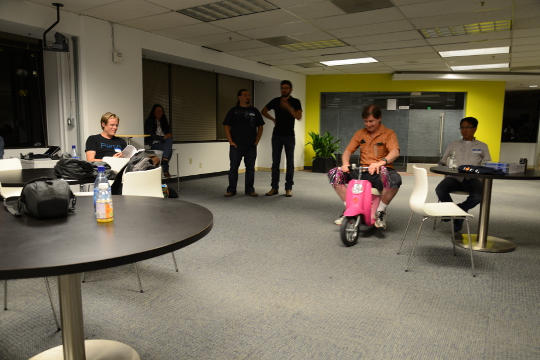
I've mentored a number of students in 2013 and 2014 for Debian and Ganglia and most of the companies I've worked with have run internships and graduate programs from time to time. GSoC 2014 has just finished and with all the excitement, many students are already asking what they can do to prepare and be selected in 2015. My own observation is that the more time the organization has to get to know the student, the more confident they can be selecting that student. Furthermore, the more time that the student has spent getting to know the free software community, the more easily they can complete GSoC. Here I present a list of things that students can do to maximize their chance of selection and career opportunities at the same time. These tips are useful for people applying for GSoC itself and related programs such as GNOME's Outreach Program for Women or graduate placements in companies. Disclaimers There is no guarantee that Google will run the program again in 2015 or any future year. There is no guarantee that any organization or mentor (including myself) will be involved until the official list of organizations is published by Google. Do not follow the advice of web sites that invite you to send pizza or anything else of value to prospective mentors. Following the steps in this page doesn't guarantee selection. That said, people who do follow these steps are much more likely to be considered and interviewed than somebody who hasn't done any of the things in this list. Understand what free software really is You may hear terms like free software and open source software used interchangeably. They don't mean exactly the same thing and many people use the term free software for the wrong things. Not all open source projects meet the definition of free software. Those that don't, usually as a result of deficiencies in their licenses, are fundamentally incompatible with the majority of software that does use genuinely free licenses. Google Summer of Code is about both writing and publishing your code and it is also about community. It is fundamental that you know the basics of licensing and how to choose a free license that empowers the community to collaborate on your code well after GSoC has finished. Please review the definition of free software early on and come back and review it from time to time. The The GNU Project / Free Software Foundation have excellent resources to help you understand what a free software license is and how it works to maximize community collaboration. Don't look for shortcuts There is no shortcut to GSoC selection and there is no shortcut to GSoC completion. The student stipend (USD $5,500 in 2014) is not paid to students unless they complete a minimum amount of valid code. This means that even if a student did find some shortcut to selection, it is unlikely they would be paid without completing meaningful work. If you are the right candidate for GSoC, you will not need a shortcut anyway. Are you the sort of person who can't leave a coding problem until you really feel it is fixed, even if you keep going all night? Have you ever woken up in the night with a dream about writing code still in your head? Do you become irritated by tedious or repetitive tasks and often think of ways to write code to eliminate such tasks? Does your family get cross with you because you take your laptop to Christmas dinner or some other significant occasion and start coding? If some of these statements summarize the way you think or feel you are probably a natural fit for GSoC. An opportunity money can't buy The GSoC stipend will not make you rich. It is intended to make sure you have enough money to survive through the summer and focus on your project. Professional developers make this much money in a week in leading business centers like New York, London and Singapore. When you get to that stage in 3-5 years, you will not even be thinking about exactly how much you made during internships. GSoC gives you an edge over other internships because it involves publicly promoting your work. Many companies still try to hide the potential of their best recruits for fear they will be poached or that they will be able to demand higher salaries. Everything you complete in GSoC is intended to be published and you get full credit for it. Imagine a young musician getting the opportunity to perform on the main stage at a rock festival. This is how the free software community works. It is a meritocracy and there is nobody to hold you back. Having a portfolio of free software that you have created or collaborated on and a wide network of professional contacts that you develop before, during and after GSoC will continue to pay you back for years to come. While other graduates are being screened through group interviews and testing days run by employers, people with a track record in a free software project often find they go straight to the final interview round. Register your domain name and make a permanent email address Free software is all about community and collaboration. Register your own domain name as this will become a focal point for your work and for people to get to know you as you become part of the community. This is sound advice for anybody working in IT, not just programmers. It gives the impression that you are confident and have a long term interest in a technology career. Choosing the provider: as a minimum, you want a provider that offers DNS management, static web site hosting, email forwarding and XMPP services all linked to your domain. You do not need to choose the provider that is linked to your internet connection at home and that is often not the best choice anyway. The XMPP foundation maintains a list of providers known to support XMPP. Create an email address within your domain name. The most basic domain hosting providers will let you forward the email address to a webmail or university email account of your choice. Configure your webmail to send replies using your personalized email address in the From header. Update your ~/.gitconfig file to use your personalized email address in your Git commits. Create a web site and blog Start writing a blog. Host it using your domain name. Some people blog every day, other people just blog once every two or three months. Create links from your web site to your other profiles, such as a Github profile page. This helps reinforce the pages/profiles that are genuinely related to you and avoid confusion with the pages of other developers. Many mentors are keen to see their students writing a weekly report on a blog during GSoC so starting a blog now gives you a head start. Mentors look at blogs during the selection process to try and gain insight into which topics a student is most suitable for. Create a profile on Github Github is one of the most widely used software development web sites. Github makes it quick and easy for you to publish your work and collaborate on the work of other people. Create an account today and get in the habbit of forking other projects, improving them, committing your changes and pushing the work back into your Github account. Github will quickly build a profile of your commits and this allows mentors to see and understand your interests and your strengths. In your Github profile, add a link to your web site/blog and make sure the email address you are using for Git commits (in the ~/.gitconfig file) is based on your personal domain. Start using PGP Pretty Good Privacy (PGP) is the industry standard in protecting your identity online. All serious free software projects use PGP to sign tags in Git, to sign official emails and to sign official release files. The most common way to start using PGP is with the GnuPG (GNU Privacy Guard) utility. It is installed by the package manager on most Linux systems. When you create your own PGP key, use the email address involving your domain name. This is the most permanent and stable solution. Print your key fingerprint using the gpg-key2ps command, it is in the signing-party package on most Linux systems. Keep copies of the fingerprint slips with you. This is what my own PGP fingerprint slip looks like. You can also print the key fingerprint on a business card for a more professional look. Using PGP, it is recommend that you sign any important messages you send but you do not have to encrypt the messages you send, especially if some of the people you send messages to (like family and friends) do not yet have the PGP software to decrypt them. If using the Thunderbird (Icedove) email client from Mozilla, you can easily send signed messages and validate the messages you receive using the Enigmail plugin. Get your PGP key signed Once you have a PGP key, you will need to find other developers to sign it. For people I mentor personally in GSoC, I'm keen to see that you try and find another Debian Developer in your area to sign your key as early as possible. Free software events Try and find all the free software events in your area in the months between now and the end of the next Google Summer of Code season. Aim to attend at least two of them before GSoC. Look closely at the schedules and find out about the individual speakers, the companies and the free software projects that are participating. For events that span more than one day, find out about the dinners, pub nights and other social parts of the event. Try and identify people who will attend the event who have been GSoC mentors or who intend to be. Contact them before the event, if you are keen to work on something in their domain they may be able to make time to discuss it with you in person. Take your PGP fingerprint slips. Even if you don't participate in a formal key-signing party at the event, you will still find some developers to sign your PGP key individually. You must take a photo ID document (such as your passport) for the other developer to check the name on your fingerprint but you do not give them a copy of the ID document. Events come in all shapes and sizes. FOSDEM is an example of one of the bigger events in Europe, linux.conf.au is a similarly large event in Australia. There are many, many more local events such as the Debian France mini-DebConf in Lyon, 2015. Many events are either free or free for students but please check carefully if there is a requirement to register before attending. On your blog, discuss which events you are attending and which sessions interest you. Write a blog during or after the event too, including photos. Quantcast generously hosted the Ganglia community meeting in San Francisco, October 2013. We had a wild time in their offices with mini-scooters, burgers, beers and the Ganglia book. That's me on the pink mini-scooter and Bernard Li, one of the other Ganglia GSoC 2014 admins is on the right. Install Linux GSoC is fundamentally about free software. Linux is to free software what a tree is to the forest. Using Linux every day on your personal computer dramatically increases your ability to interact with the free software community and increases the number of potential GSoC projects that you can participate in. This is not to say that people using Mac OS or Windows are unwelcome. I have worked with some great developers who were not Linux users. Linux gives you an edge though and the best time to gain that edge is now, while you are a student and well before you apply for GSoC. If you must run Windows for some applications used in your course, it will run just fine in a virtual machine using Virtual Box, a free software solution for desktop virtualization. Use Linux as the primary operating system. Here are links to download ISO DVD (and CD) images for some of the main Linux distributions: If you are nervous about getting started with Linux, install it on a spare PC or in a virtual machine before you install it on your main PC or laptop. Linux is much less demanding on the hardware than Windows so you can easily run it on a machine that is 5-10 years old. Having just 4GB of RAM and 20GB of hard disk is usually more than enough for a basic graphical desktop environment although having better hardware makes it faster. Your experiences installing and running Linux, especially if it requires some special effort to make it work with some of your hardware, make interesting topics for your blog. Decide which technologies you know best Personally, I have mentored students working with C, C++, Java, Python and JavaScript/HTML5. In a GSoC program, you will typically do most of your work in just one of these languages. From the outset, decide which language you will focus on and do everything you can to improve your competence with that language. For example, if you have already used Java in most of your course, plan on using Java in GSoC and make sure you read Effective Java (2nd Edition) by Joshua Bloch. Decide which themes appeal to you Find a topic that has long-term appeal for you. Maybe the topic relates to your course or maybe you already know what type of company you would like to work in. Here is a list of some topics and some of the relevant software projects:
  • System administration, servers and networking: consider projects involving monitoring, automation, packaging. Ganglia is a great community to get involved with and you will encounter the Ganglia software in many large companies and academic/research networks. Contributing to a Linux distribution like Debian or Fedora packaging is another great way to get into system administration.
  • Desktop and user interface: consider projects involving window managers and desktop tools or adding to the user interface of just about any other software.
  • Big data and data science: this can apply to just about any other theme. For example, data science techniques are frequently used now to improve system administration.
  • Business and accounting: consider accounting, CRM and ERP software.
  • Finance and trading: consider projects like R, market data software like OpenMAMA and connectivity software (Apache Camel)
  • Real-time communication (RTC), VoIP, webcam and chat: look at the JSCommunicator or the Jitsi project
  • Web (JavaScript, HTML5): look at the JSCommunicator
Before the GSoC application process begins, you should aim to learn as much as possible about the theme you prefer and also gain practical experience using the software relating to that theme. For example, if you are attracted to the business and accounting theme, install the PostBooks suite and get to know it. Maybe you know somebody who runs a small business: help them to upgrade to PostBooks and use it to prepare some reports. Make something Make some small project, less than two week's work, to demonstrate your skills. It is important to make something that somebody will use for a practical purpose, this will help you gain experience communicating with other users through Github. For an example, see the servlet Juliana Louback created for fixing phone numbers in December 2013. It has since been used as part of the Lumicall web site and Juliana was selected for a GSoC 2014 project with Debian. There is no better way to demonstrate to a prospective mentor that you are ready for GSoC than by completing and publishing some small project like this yourself. If you don't have any immediate project ideas, many developers will also be able to give you tips on small projects like this that you can attempt, just come and ask us on one of the mailing lists. Ideally, the project will be something that you would use anyway even if you do not end up participating in GSoC. Such projects are the most motivating and rewarding and usually end up becoming an example of your best work. To continue the example of somebody with a preference for business and accounting software, a small project you might create is a plugin or extension for PostBooks. Getting to know prospective mentors Many web sites provide useful information about the developers who contribute to free software projects. Some of these developers may be willing to be a GSoC mentor. For example, look through some of the following: Getting on the mentor's shortlist Once you have identified projects that are interesting to you and developers who work on those projects, it is important to get yourself on the developer's shortlist. Basically, the shortlist is a list of all students who the developer believes can complete the project. If I feel that a student is unlikely to complete a project or if I don't have enough information to judge a student's probability of success, that student will not be on my shortlist. If I don't have any student on my shortlist, then a project will not go ahead at all. If there are multiple students on the shortlist, then I will be looking more closely at each of them to try and work out who is the best match. One way to get a developer's attention is to look at bug reports they have created. Github makes it easy to see complaints or bug reports they have made about their own projects or other projects they depend on. Another way to do this is to search through their code for strings like FIXME and TODO. Projects with standalone bug trackers like the Debian bug tracker also provide an easy way to search for bug reports that a specific person has created or commented on. Once you find some relevant bug reports, email the developer. Ask if anybody else is working on those issues. Try and start with an issue that is particularly easy and where the solution is interesting for you. This will help you learn to compile and test the program before you try to fix any more complicated bugs. It may even be something you can work on as part of your academic program. Find successful projects from the previous year Contact organizations and ask them which GSoC projects were most successful. In many organizations, you can find the past students' project plans and their final reports published on the web. Read through the plans submitted by the students who were chosen. Then read through the final reports by the same students and see how they compare to the original plans. Start building your project proposal now Don't wait for the application period to begin. Start writing a project proposal now. When writing a proposal, it is important to include several things:
  • Think big: what is the goal at the end of the project? Does your work help the greater good in some way, such as increasing the market share of Linux on the desktop?
  • Details: what are specific challenges? What tools will you use?
  • Time management: what will you do each week? Are there weeks where you will not work on GSoC due to vacation or other events? These things are permitted but they must be in your plan if you know them in advance. If an accident or death in the family cut a week out of your GSoC project, which work would you skip and would your project still be useful without that? Having two weeks of flexible time in your plan makes it more resilient against interruptions.
  • Communication: are you on mailing lists, IRC and XMPP chat? Will you make a weekly report on your blog?
  • Users: who will benefit from your work?
  • Testing: who will test and validate your work throughout the project? Ideally, this should involve more than just the mentor.
If your project plan is good enough, could you put it on Kickstarter or another crowdfunding site? This is a good test of whether or not a project is going to be supported by a GSoC mentor. Learn about packaging and distributing software Packaging is a vital part of the free software lifecycle. It is very easy to upload a project to Github but it takes more effort to have it become an official package in systems like Debian, Fedora and Ubuntu. Packaging and the communities around Linux distributions help you reach out to users of your software and get valuable feedback and new contributors. This boosts the impact of your work. To start with, you may want to help the maintainer of an existing package. Debian packaging teams are existing communities that work in a team and welcome new contributors. The Debian Mentors initiative is another great starting place. In the Fedora world, the place to start may be in one of the Special Interest Groups (SIGs). Think from the mentor's perspective After the application deadline, mentors have just 2 or 3 weeks to choose the students. This is actually not a lot of time to be certain if a particular student is capable of completing a project. If the student has a published history of free software activity, the mentor feels a lot more confident about choosing the student. Some mentors have more than one good student while other mentors receive no applications from capable students. In this situation, it is very common for mentors to send each other details of students who may be suitable. Once again, if a student has a good Github profile and a blog, it is much easier for mentors to try and match that student with another project. GSoC logo generic Conclusion Getting into the world of software engineering is much like joining any other profession or even joining a new hobby or sporting activity. If you run, you probably have various types of shoe and a running watch and you may even spend a couple of nights at the track each week. If you enjoy playing a musical instrument, you probably have a collection of sheet music, accessories for your instrument and you may even aspire to build a recording studio in your garage (or you probably know somebody else who already did that). The things listed on this page will not just help you walk the walk and talk the talk of a software developer, they will put you on a track to being one of the leaders. If you look over the profiles of other software developers on the Internet, you will find they are doing most of the things on this page already. Even if you are not selected for GSoC at all or decide not to apply, working through the steps on this page will help you clarify your own ideas about your career and help you make new friends in the software engineering community.

19 August 2014

Julien Danjou: Tracking OpenStack contributions in GitHub

I've switched my Git repositories to GitHub recently, and started to watch my contributions statistics, which were very low considering I spend my days hacking on open source software, especially OpenStack.
OpenStack hosts its Git repositories on its own infrastructure at git.openstack.org, but also mirrors them on GitHub. Logically, I was expecting GitHub to track my commits there too, as I'm using the same email address everywhere. It turns out that it was not the case, and the help page about that on GitHub describes the rule in place to compute statistics. Indeed, according to GitHub, I had no relations to the OpenStack repositories, as I never forked them nor opened a pull request on them (OpenStack uses Gerrit). Starring a repository is enough to build a relationship between a user and a repository, so this is was the only thing needed to inform GitHub that I have contributed to those repositories. Considering OpenStack has hundreds of repositories, I decided to star them all by using a small Python script using pygithub.
And voil , my statistics are now including all my contributions to OpenStack!

18 August 2014

Julien Danjou: OpenStack Ceilometer and the Gnocchi experiment

A little more than 2 years ago, the Ceilometer project was launched inside the OpenStack ecosystem. Its main objective was to measure OpenStack cloud platforms in order to provide data and mechanisms for functionalities such as billing, alarming or capacity planning. In this article, I would like to relate what I've been doing with other Ceilometer developers in the last 5 months. I've lowered my involvement in Ceilometer itself directly to concentrate on solving one of its biggest issue at the source, and I think it's largely time to take a break and talk about it. Ceilometer early design For the last years, Ceilometer didn't change in its core architecture. Without diving too much in all its parts, one of the early design decision was to build the metering around a data structure we called samples. A sample is generated each time Ceilometer measures something. It is composed of a few fields, such as the the resource id that is metered, the user and project id owning that resources, the meter name, the measured value, a timestamp and a few free-form metadata. Each time Ceilometer measures something, one of its components (an agent, a pollster ) constructs and emits a sample headed for the storage component that we call the collector. This collector is responsible for storing the samples into a database. The Ceilometer collector uses a pluggable storage system, meaning that you can pick any database system you prefer. Our original implementation has been based on MongoDB from the beginning, but we then added a SQL driver, and people contributed things such as HBase or DB2 support. The REST API exposed by Ceilometer allows to execute various reading requests on this data store. It can returns you the list of resources that have been measured for a particular project, or compute some statistics on metrics. Allowing such a large panel of possibilities and having such a flexible data structure allows to do a lot of different things with Ceilometer, as you can almost query the data in any mean you want. The scalability issue We soon started to encounter scalability issues in many of the read requests made via the REST API. A lot of the requests requires the data storage to do full scans of all the stored samples. Indeed, the fact that the API allows you to filter on any fields and also on the free-form metadata (meaning non indexed key/values tuples) has a terrible cost in terms of performance (as pointed before, the metadata are attached to each sample generated by Ceilometer and is stored as is). That basically means that the sample data structure is stored in most drivers in just one table or collection, in order to be able to scan them at once, and there's no good "perfect" sharding solution, making data storage scalability painful. It turns out that the Ceilometer REST API is unable to handle most of the requests in a timely manner as most operations are O(n) where n is the number of samples recorded (see big O notation if you're unfamiliar with it). That number of samples can grow very rapidly in an environment of thousands of metered nodes and with a data retention of several weeks. There is a few optimizations to make things smoother in general cases fortunately, but as soon as you run specific queries, the API gets barely usable. During this last year, as the Ceilometer PTL, I discovered these issues first hand since a lot of people were feeding me back with this kind of testimony. We engaged several blueprints to improve the situation, but it was soon clear to me that this was not going to be enough anyway.
Thinking outside the box Unfortunately, the PTL job doesn't leave him enough time to work on the actual code nor to play with anything new. I was coping with most of the project bureaucracy and I wasn't able to work on any good solution to tackle the issue at its root. Still, I had a few ideas that I wanted to try and as soon as I stepped down from the PTL role, I stopped working on Ceilometer itself to try something new and to think a bit outside the box. When one takes a look at what have been brought recently in Ceilometer, they can see the idea that Ceilometer actually needs to handle 2 types of data: events and metrics. Events are data generated when something happens: an instance start, a volume is attached, or an HTTP request is sent to an REST API server. These are events that Ceilometer needs to collect and store. Most OpenStack components are able to send such events using the notification system built into oslo.messaging. Metrics is what Ceilometer needs to store but that is not necessarily tied to an event. Think about an instance CPU usage, a router network bandwidth usage, the number of images that Glance is storing for you, etc These are not events, since nothing is happening. These are facts, states we need to meter. Computing statistics for billing or capacity planning requires both of these data sources, but they should be distinct. Based on that assumption, and the fact that Ceilometer was getting support for storing events, I started to focus on getting the metric part right. I had been a system administrator for a decade before jumping into OpenStack development, so I know a thing or two on how monitoring is done in this area, and what kind of technology operators rely on. I also know that there's still no silver bullet this made it a good challenge. The first thing that came to my mind was to use some kind of time-series database, and export its access via a REST API as we do in all OpenStack services. This should cover the metric storage pretty well. Cooking Gnocchi
A cloud of gnocchis!
At the end of April 2014, this led met to start a new project code-named Gnocchi. For the record, the name was picked after confusing so many times the OpenStack Marconi project, reading OpenStack Macaroni instead. At least one OpenStack project should have a "pasta" name, right? The point of having a new project and not send patches on Ceilometer, was that first I had no clue if it was going to make something that would be any better, and second, being able to iterate more rapidly without being strongly coupled with the release process. The first prototype started around the following idea: what you want is to meter things. That means storing a list of tuples of (timestamp, value) for it. I've named these things "entities", as no assumption are made on what they are. An entity can represent the temperature in a room or the CPU usage of an instance. The service shouldn't care and should be agnostic in this regard. One feature that we discussed for several OpenStack summits in the Ceilometer sessions, was the idea of doing aggregation. Meaning, aggregating samples over a period of time to only store a smaller amount of them. These are things that time-series format such as the RRDtool have been doing for a long time on the fly, and I decided it was a good trail to follow. I assumed that this was going to be a requirement when storing metrics into Gnocchi. The user would need to provide what kind of archiving it would need: 1 second precision over a day, 1 hour precision over a year, or even both. The first driver written to achieve that and store those metrics inside Gnocchi was based on whisper. Whisper is the file format used to store metrics for the Graphite project. For the actual storage, the driver uses Swift, which has the advantages to be part of OpenStack and scalable. Storing metrics for each entities in a different whisper file and putting them in Swift turned out to have a fantastic algorithm complexity: it was O(1). Indeed, the complexity needed to store and retrieve metrics doesn't depends on the number of metrics you have nor on the number of things you are metering. Which is already a huge win compared to the current Ceilometer collector design. However, it turned out that whisper has a few limitations that I was unable to circumvent in any manner. I needed to patch it to remove a lot of its assumption about manipulating file, or that everything is relative to now (time.time()). I've started to hack on that in my own fork, but then everything broke. The whisper project code base is, well, not the state of the art, and have 0 unit test. I was starring at a huge effort to transform whisper into the time-series format I wanted, without being sure I wasn't going to break everything (remember, no test coverage). I decided to take a break and look into alternatives, and stumbled upon Pandas, a data manipulation and statistics library for Python. Turns out that Pandas support time-series natively, and that it could do a lot of the smart computation needed in Gnocchi. I built a new file format leveraging Pandas for computing the time-series and named it carbonara (a wink to both the Carbon project and pasta, how clever!). The code is quite small (a third of whisper's, 200 SLOC vs 600 SLOC), does not have many of the whisper limitations and it has test coverage. These Carbonara files are then, in the same fashion, stored into Swift containers. Anyway, Gnocchi storage driver system is designed in the same spirit that the rest of OpenStack and Ceilometer storage driver system. It's a plug-in system with an API, so anyone can write their own driver. Eoghan Glynn has already started to write a InfluxDB driver, working closely with the upstream developer of that database. Dina Belova started to write an OpenTSDB driver. This helps to make sure the API is designed directly in the right way. Handling resources Measuring individual entities is great and needed, but you also need to link them with resources. When measuring the temperature and the number of a people in a room, it is useful to link these 2 separate entities to a resource, in that case the room, and give a name to these relations, so one is able to identify what attribute of the resource is actually measured. It is also important to provide the possibility to store attributes on these resources, such as their owners, the time they started and ended their existence, etc.
Relationship of entities and resources
Once this list of resource is collected, the next step is to list and filter them, based on any criteria. One might want to retrieve the list of resources created last week or the list of instances hosted on a particular node right now. Resources also need to be specialized. Some resources have attributes that must be stored in order for filtering to be useful. Think about an instance name or a router network. All of these requirements led to to the design of what's called the indexer. The indexer is responsible for indexing entities, resources, and link them together. The initial implementation is based on SQLAlchemy and should be pretty efficient. It's easy enough to index the most requested attributes (columns), and they are also correctly typed. We plan to establish a model for all known OpenStack resources (instances, volumes, networks, ) to store and index them into the Gnocchi indexer in order to request them in an efficient way from one place. The generic resource class can be used to handle generic resources that are not tied to OpenStack. It'd be up to the users to store extra attributes. Dropping the free form metadata we used to have in Ceilometer makes sure that querying the indexer is going to be efficient and scalable.
The indexer classes and their relations
REST API All of this is exported via a REST API that was partially designed and documented in the Gnocchi specification in the Ceilometer repository; though the spec is not up-to-date yet. We plan to auto-generate the documentation from the code as we are currently doing in Ceilometer. The REST API is pretty easy to use, and you can use it to manipulate entities and resources, and request the information back.
Macroscopic view of the Gnocchi architecture
Roadmap & Ceilometer integration All of this plan has been exposed and discussed with the Ceilometer team during the last OpenStack summit in Atlanta in May 2014, for the Juno release. I led a session about this entire concept, and convinced the team that using Gnocchi for our metric storage would be a good approach to solve the Ceilometer collector scalability issue. It was decided to conduct this project experiment in parallel of the current Ceilometer collector for the time being, and see where that would lead the project to. Early benchmarks Some engineers from Mirantis did a few benchmarks around Ceilometer and also against an early version of Gnocchi, and Dina Belova presented them to us during the mid-cycle sprint we organized in Paris in early July. The following graph sums up pretty well the current Ceilometer performance issue. The more you feed it with metrics, the more slow it becomes.
For Gnocchi, while the numbers themselves are not fantastic, what is interesting is that all the graphs below show that the performances are stable without correlation with the number of resources, entities or measures. This proves that, indeed, most of the code is built around a complexity of O(1), and not O(n) anymore.
Next steps
Cl ment drawing the logo
While the Juno cycle is being wrapped-up for most projects, including Ceilometer, Gnocchi development is still ongoing. Fortunately, the composite architecture of Ceilometer allows a lot of its features to be replaced by some other code dynamically. That, for example, enables Gnocchi to provides a Ceilometer dispatcher plugin for its collector, without having to ship the actual code in Ceilometer itself. That should help the development of Gnocchi to not be slowed down by the release process for now. The Ceilometer team aims to provide Gnocchi as a sort of technology preview with the Juno release, allowing it to be deployed along and plugged with Ceilometer. We'll discuss how to integrate it in the project in a more permanent and strong manner probably during the OpenStack Summit for Kilo that will take place next November in Paris.

14 August 2014

Juliana Louback: JSCommunicator 2.0 (Beta) is Live!

This is the last week of Google Summer of Code 2014 - all good things must come to an end. To wrap things up, I ve merged all my work on JSCommunicator into a new version with all the added features. You can now demo the new and improved (or at least so I hope) JSCommunicator on rtc.debian.org! JSCommunicator 2.0 has an assortment of new add-ons, the most important new features are the Instant Messaging component and the internationalization support. The UI has been reorganized but we are currently not using a skin for color scheme - will be posting about that in a bit. The idea is to have a more neutral look that can be easily customized and integrated with other web apps. A chat session is automatically opened when you begin a call with someone - unless you already started a chat session with said someone. Sound alerts for new incoming messages are optional in the config file, visual alerts occur when an inactive chat tab receives a new message. Future work includes multiple user chat sessions and adapting the layout to a large amount of chat tabs. Currently it only handles 6. (Should I allow more? Who chats with more than 6 people at once? 14 year old me would, but now I just can t handle that. Anyway, I welcome advice on how to go about this. Should we do infinite tabs or if not, what s the cut-off?) About internationalization, I m uber proud to say we currently run in 6 languages! The 6 are English (default), Spanish, French, Portuguese, Hebrew and German. But one thing I must mention is that since I added new stuff to JSCommunicator, some of the new stuff doesn t have a translation. I took care of the Portuguese translation and Yehuda Korotkin quickly turned in the Hebrew translation, but we are still missing an update for Spanish, French and German. If you can contribute, please do. There are about 10 new labels to translate, you can fix the issue here. Or if you re short on time, shoot me an email with the translation for what s on the right side of the = : welcome = Welcome, call = Call chat = Chat enter_contact = Enter contact type_to_chat = type to chat start_chat = start chat me = me logout = Logout no_contact = Please enter a contact. remember_me = Remember me I ll merge it myself but I ll be sure to add you to the authors list.

13 August 2014

Daniel Pocock: WebRTC in CRM/ERP solutions at xTupleCon 2014

In October this year I'll be visiting the US and Canada for some conferences and a wedding. The first event will be xTupleCon 2014 in Norfolk, Virginia. xTuple make the popular open source accounting and CRM suite PostBooks. The event kicks off with a keynote from Apple co-founder Steve Wozniak on the evening of October 14. On October 16 I'll be making a presentation about how JSCommunicator makes it easy to add click-to-call real-time communications (RTC) to any other web-based product without requiring any browser plugins or third party softphones. Juliana Louback has been busy extending JSCommunicator as part of her Google Summer of Code project. When finished, we hope to quickly roll out the latest version of JSCommunicator to other sites including rtc.debian.org, the WebRTC portal for the Debian Developer community. Juliana has also started working on wrapping JSCommunicator into a module for the new xTuple / PostBooks web-based CRM. Versatility is one of the main goals of the JSCommunicator project and it will be exciting to demonstrate this in action at xTupleCon. xTupleCon discounts for developers xTuple has advised that they will offer a discount to other open source developers and contributers who wish to attend any part of their event. For details, please contact xTuple directly through this form. Please note it is getting close to their deadline for registration and discounted hotel bookings. Potential WebRTC / JavaScript meet-up in Norfolk area For those who don't or can't attend xTupleCon there has been some informal discussion about a small WebRTC-hacking event at some time on 15 or 16 October. Please email me privately if you may be interested.

11 August 2014

Juliana Louback: JSCommunicator - Setup and Architecture

Preface During Google Summer of Code 2014, I got to work on the Debian WebRTC portal under the mentorship of Daniel Pocock. Now I had every intention of meticulously documenting my progress at each step of development in this blog, but I was a bit late in getting the blog up and running. I ll now be publishing a series of posts to recap all I ve done during GSoC. Better late than never. Intro JSCommunicator is a SIP communication tool developed in HTML and JavaScript. The code was designed to make integrating JSCommunicator with a website or web app as simple as possible. It s quite easy, really. However, I do think a more detailed explanation on how to set things up and a guide to the JSCommunicator architecture could be of use, particularly for those wanting to modify the code in any way. Setup To begin, please fork the JSCommunicator repo. If you are new to git, feel free to follow the steps in section Setup and Clone in this post. If you read the README file (which you always should), you ll see that JSCommunicator needs a SIP proxy that supports SIP over Websockets transport. Some options are: I didn t find a tutorial for Kamailio setup, I did find one for repro setup. And bonus, here you have a great tutorial on how to setup and configure your SIP proxy AND your TURN server. In your project s root directory, you ll see a file named config-sample.js. Make a copy of that file named config.js. The config-sample.js file has comments that are very instructive. In sum, the only thing you have to modify is the turn_servers property and the websocket property. In my case, debrtc.org was the domain registered for testing my project, so my config file has:
turn_servers: [
	  server:"turn:debrtc.org"       
],
Note that unlike the sample, I didn t set a username and password so SIP credentials will be used. Now fill in the websocket property here we use sip5060.net.
websocket:  
    servers: 'wss://ws.sip5060.net',
    connection_recovery_min_interval: 2,
    connection_recovery_max_interval: 30,
   ,
I m pretty sure you can set the connection_recovery properties to whatever you like. Everything else is optional. If you set the user property, specifically display_name and uri, that will be used to fill in the Login form and takes preference over any Remember me data. If you also set sip_auth_password, JSCommunicator will automatically log in. All the other properties are for other optional functionalities and are well explained. You ll need some third-party javascript that is not included in the JSCommunicator git repo. Namely jQuery version 1.4 or higher and ArbiterJS version 1.0. Download jQuery here and ArbiterJS here and place the .js files in your project s root directory. Do make sure that you are including the correct filename in your html file. For example, in phone-dev.shtml, a file named jquery.js is included. The file you downloaded will likely have version numbers in it s file name. So rename the downloaded file or change the content of src in your includes. This is uber trivial, but I ve made the mistake several times. You ll also need JsSIP.js which can be downloaded here. Same naming care must be taken as is the case for jQuery and ArbiterJS. The recently added Instant Messaging component and some of the new features need jQuery-UI - so far version 1.11.* is known to work. From the downloaded .zip all you need is the jquery-ui-...js file and the jquery-ui-...css file, also to be placed in the project s root directory. If you ll be using the internationalization support you ll also need jquery.i18n.properties.js. To try out JSCommunicator, deploy the website locally by copying your project directory to the apache document root directory (provided you are using apache, which is a good idea.). You ll likely have to restart your server before this works. Now the demo .shtml pages only have a header with all the necessary includes, then a Server Side Include for the body of the page, with all the JSCommunicator html. The html content is in the file jscommunicator.inc. You can enable SSI on apache, OR you can simply copy and paste the content of jscommunicator.inc into phone-dev.shmtl. Start up apache, open a browser and navigate to localhost/jscommunicator/phone-dev.shmtl and you should see: jscommunicatorRaw Actually, pending updates to JSCommunicator, you should see a brand new UI! But all the core stuff will be the same. Architecture Disclaimer: I m explaining my view of the JSCommunicator architecture, which currently may not be 100% correct. But so far it s been enough for me to make my modifications and additions to the code, so it could be of use. One I get a JSCommunicator Founding Father s stamp of approval, I ll be sure to confirm the accuracy. Now to explain how the JSCommunicator code interacts, the use of each code item is described, ignoring all the html and css which will vary according to how you choose to use JSCommunicator. I m also not going to explain jQuery which is a dependency but not specific to WebRTC. The core JSCommunicator code is the following: Each of these files will be presented in what I hope is an intuitive order. The next three files could be considered utils : These two are where the magic happens: Now for some extras: Third party code: Here s a diagram of sorts to help you visualize how the code interacts: jscommArch In sum, 1 - JSCommUI.js handles what is displayed in the UI and feeds data to JSCommManager.js; 2 - JSCommManager.js actually does stuff, feeding data to be displayed to JSCommUI.js; 3 - JSCommManager.js calls functions from the three utils , parseuri.js, webrtc-check.js and jssip-helpher.js which organizes the data from config.js; 4 - JSCommManager.js initializes a SIP User Agent based on the implementation in Arbiter.js. When making any changes to JSCommunicator, you will likely only be working with JSCommUI.js and JSCommManager.js.

6 August 2014

Julian Andres Klode: Configuring an OpenWRT Router as a repeater for a FRITZ!Box with working Multicast

Since some time, those crappy Fritz!Box devices do not support WDS anymore, but rather a proprietary solution created by AVM. Now what happens if you have devices in another room that need/want wired access (like TVs, Playstations) or if you want to extend the range of your network? Buying another Fritz!Box is not very cost efficient What I did was to buy a cheap TP-Link TL-WR841N (can be bought for 18 euros) and installed OpenWRT on it. Here s how I configured it to act as a WiFi bridge. Basic overview: You configure OpenWRT into station mode (that is, as a WiFi client) and use relayd to relay between the WiFi network and your local network. You also need igmpproxy to proxy multicast packages between those networks, other UPnP stuff won t work. I did this on the recent Barrier Braker RC2. It should work on older versions as well, but I cannot promise it (I did not get igmpproxy to work in Attitude Adjustment, but that was probably my fault). Note: I don t know if it works with IPv6, I only use IPv4. You might want to re-start (or start) services after the steps, or reboot the router afterwards. Configuring WiFi connection to the FRITZ!Box Add to: /etc/config/network
config interface 'wwan'
	option proto 'dhcp'
(you can use any other name you want instead of wwan, and a static IP. This will be your uplink to the Fritz!Box) Replace wifi-iface in: /etc/config/wireless:
config wifi-iface
	option device 'radio0'
	option mode 'sta'
	option ssid 'FRITZ!Box 7270'
	option encryption 'psk2'
	option key 'PASSWORD'
	option network 'wwan'
(adjust values as needed for your network) Setting up the pseudo-bridge First, add wwan to the list of networks in the lan zone in the firewall. Then add a forward rule for the lan network (not sure if needed). Afterwards, configure a new stabridge network and disable the built-in DHCP server. Diff for /etc/config/firewall
@@ -10,2 +10,3 @@ config zone
 	list network 'lan'
+	list network 'wwan'
 	option input 'ACCEPT'
@@ -28,2 +29,7 @@ config forwarding
 
+# Not sure if actually needed
+config forwarding
+	option src 'lan'
+	option dest 'lan'
+
 config rule
Add to /etc/config/network
config interface 'stabridge'
	option proto 'relay'
	option network 'lan wwan'
	option ipaddr '192.168.178.26'
(Replace 192.168.178.26 with the IP address your OpenWRT router was given by the Fritz!Box on wlan0) Also make sure to ignore dhcp on the lan interface, as the DHCP server of the FRITZ!Box will be used: Diff for /etc/config/dhcp
@@ -24,2 +24,3 @@ config dhcp 'lan'
        option ra 'server'
+       option ignore '1'
Proxying multicast packages For proxying multicast packages, we need to install igmpproxy and configure it: Add to: /etc/config/firewall
# Configuration for igmpproxy
config rule
	option src      lan
	option proto    igmp
	option target   ACCEPT
config rule
	option src      lan
	option proto    udp
	option dest     lan
	option target   ACCEPT
(OpenWRT wiki gives a different 2nd rule now, but this is the one I currently use) Replace /etc/config/igmpproxy with:
config igmpproxy
	option quickleave 1
config phyint
	option network wwan
	option direction upstream
	list altnet 192.168.178.0/24
config phyint
	option network lan
	option direction downstream
	list altnet 192.168.178.0/24
(Assuming Fritz!Box uses the 192.168.178.0/24 network) Don t forget to enable the igmpproxy script:
# /etc/init.d/igmpproxy enable
Optional: Repeat the WiFi signal If you want to repeat your WiFi signal, all you need to do is add a second wifi-iface to your /etc/config/wireless.
config wifi-iface
	option device 'radio0'
	option mode 'ap'
	option network 'lan'
	option encryption 'psk2+tkip+ccmp'
	option key 'PASSWORD'
	option ssid 'YourForwardingSSID'
Known Issues If I was connected via WiFi to the OpenWRT AP and switch to the FRITZ!Box AP, I cannot connect to the OpenWRT router for some time. The igmpproxy tool writes to the log about changing routes. Future Work I ll try to get the FRITZ!Box replaced by something that runs OpenWRT as well, and then use OpenWRT s WDS support for repeating; because the FRITZ!Box 7270v2 is largely crap loading a page in its web frontend takes 5 (idle) 20 seconds (1 download), and it s WiFi speed is limited to about 20 Mbit/s in WiFi-n mode (2.4 GHz (or 5 GHz, does not matter), 40 MHz channel). It seems the 7270 has a really slow CPU.
Filed under: OpenWRT

3 August 2014

Dimitri John Ledkov: What is net neutrality?

Sorry, the web page you have requested is not available through your internet connection.

We have received an order from the Courts requiring us to prevent access to this site in order to help protect against Lex Julia Majestatis infridgement.

If you are a home broadband customer, for more information on why certain web pages are blocked, please click here.
If you are a business customer, or are trying to view this page through your company's internet connection, please click here.

25 July 2014

Juliana Louback: Extending an xTuple Business Object

xTuple is in my opinion incredibly well designed; the code is clean and the architecture ahderent to a standardized structure. All this makes working with xTuple software quite a breeze. I wanted to integrate JSCommunicator into the web-based xTuple version. JSCommunicator is a SIP communication tool, so my first step was to create an extension for the SIP account data. Luckily for me, the xTuple development team published an awesome tutorial for writing an xTuple extension. xTuple cleverly uses model based business objects for the various features available. This makes customizing xTuple very straightforward. I used the tutorial mentioned above for writing my extension, but soon noticed my goals were a little different. A SIP account has 3 data fields, these being the SIP URI, the account password and an optional display name. xTuple currently has a business object in the core code for a User Account and it would make a lot more sense to simply add my 3 fields to this existing business object rather than create another business object. The tutorial very clearly shows how to extend a business object with another business object, but not how to extend a business object with only new fields (not a whole new object). Now maybe I m just a whole lot slower than most people, but I had a ridiculously had time figuring this out. Mind you, this is because I m slow, because the xTuple documentation and code is understandable and as self-explanatory as it gets. I think it just takes a bit to get used to. Either way, I thought this just might be useful to others so here is how I went about it. Setup First you ll have to set up your xTuple development environment and fork the xtuple and xtuple-extesions repositories as shown in this handy tutorial. A footnote I d like to add is please verify that your version of Vagrant (and anything else you install) is the one listed in the tutorial. I think I spent like two entire days or more on a wild goose (bug) chase trying to set up my environment when the cause of all the errors was that I somehow installed an older version of Vagrant - 1.5.4 instead of 1.6.3. Please don t make the same mistake I did. Actually if for some reason you get the following error when you try using node:
<<ERROR 2014-07-10T23:52:46.948Z>> Unrecoverable exception. Cannot call method 'extend' of undefined
    at /home/vagrant/dev/xtuple/lib/backbone-x/source/model.js:37:39
    at Object.<anonymous> (/home/vagrant/dev/xtuple/lib/backbone-x/source/model.js:1364:3)
    ...
chances are, you have the wrong version. That s what happened to me. The Vagrant Virtual Development Environment automatically installs and configures everything you need, it s ready to go. So if you find yourself installing and updating and apt-gets and etc, you probably did something wrong. Coding So by now we should have the Vagrant Virtual Development Environment set up and the web app up and running and accessible at localhost:8443. So far so good. Disclaimer: You will note that much of this is similar - or rather, nearly identical - to xTuple s tutorial but there are some small but important differences and a few observations I think might be useful. Other Disclaimer: I m describing how I did it, which may or may not be up to snuff . Works for me though. Schema First let s make a schema for the table we will create with the new custom fields. Be sure to create the correct directory stucture, aka /path/to/xtuple-extensions/source/<YOUR EXTENSION NAME>/database/source or in my case /path/to/xtuple-extensions/source/sip_account/database/source, and create the file create_sa_schema.sql, sa is the name of my schema. This file will contain the following lines:
do $$
  /* Only create the schema if it hasn't been created already */
  var res, sql = "select schema_name from information_schema.schemata where schema_name = 'sa'",
  res = plv8.execute(sql);
  if (!res.length)  
    sql = "create schema sa; grant all on schema sa to group xtrole;"
    plv8.execute(sql);
   
$$ language plv8;
Of course, feel free to replace sa with your schema name of choice. All the code described here can be found in my xtuple-extensions fork, on the sip_ext branch. Table We ll create a table containing your custom fields and a link to an existing table - the table for the existing business object you want to extend. If you re wondering why make a whole new table for a few extra fields, here s a good explanation, the case in question is adding fields to the Contact business object. You need to first figure out what table you want to link to. This might not be uber easy. I think the best way to go about it is to look at the ORMs. The xTuple ORMs are a JSON mapping between the SQL tables and the object-oriented world above the database, they re .json files found at path/to/xtuple/node_modules/xtuple/enyo-client/database/orm/models for the core business objects and at path/to/xtuplenyo-client/extensions/source/<EXTENSION NAME>/database/orm/models for exension business objects. I ll give two examples. If you look at contact.json you will see that the Contact business object refers to the table cntct . Look for the type : Contact on the line above, so we know it s the Contact business object. In my case, I wanted to extend the UserAccount and UserAccountRelation business objects, so check out user_account.json. The table listed for UserAccount is xt.usrinfo and the table listed for UserAccountRelation is xt.usrlite. A closer look at the sql files for these tables (usrinfo.sql and usrlite.sql) revealed that usrinfo is in fact a view and usrlite is A light weight table of user information used to avoid punishingly heavy queries on the public usr view . I chose to refer to xt.usrlite - that or I received error messages when trying the other table names. Now I ll make the file /path/to/xtuple-extensions/source/sip_account/database/source/usrlitesip.sql, to create a table with my custom fields plus the link to the urslite table. Don t quote me on this, but I m under the impression that this is the norm for naming the sql file joining tables: the name of the table you are referring to ( usrlite in this case) and your extension s name. Content of usrlitesip.sql:
select xt.create_table('usrlitesip', 'sa');
select xt.add_column('usrlitesip','usrlitesip_id', 'serial', 'primary key', 'sa');
select xt.add_column('usrlitesip','usrlitesip_usr_username', 'text', 'references xt.usrlite (usr_username)', 'sa');
select xt.add_column('usrlitesip','usrlitesip_uri', 'text', '', 'sa');
select xt.add_column('usrlitesip','usrlitesip_name', 'text', '', 'sa');
select xt.add_column('usrlitesip','usrlitesip_password', 'text', '', 'sa');
comment on table sa.usrlitesip is 'Joins User with SIP account';
Breaking it down, line 1 creates the table named usrlitesip (no duh), line 2 is for the primary key (self-explanatory). You can then add any columns you like, just be sure to add one that references the table you want to link to. I checked usrlite.sql and saw the primary key is usr_username, be sure to use the primary key of the table you are referencing. You can check what you made by executing the .sql files like so:
$ cd /path/to/xtuple-extensions/source/sip_account/database/source
$ psql -U admin -d dev -f create_sa_schema.sql
$ psql -U admin -d dev -f usrlitesip.sql
After which you will see the table with the columns you created if you enter:
$ psql -U admin -d dev -c "select * from sa.usrlitesip;"
Now create the file /path/to/xtuple-extensions/source/sip_account/database/source/manifest.js to put the files together and in the right order. It should contain:
 
  "name": "sip_account",
  "version": "1.4.1",
  "comment": "Sip Account extension",
  "loadOrder": 999,
  "dependencies": ["crm"],
  "databaseScripts": [
    "create_sa_schema.sql",
    "usrlitesip.sql",
    "register.sql"
  ]
 
I think the name has to be the same you named your extension directory as in /path/to/xtuple-extensions/source/<YOUR EXTENSION NAME>. I think the comment can be anything you like and you want your loadOrder to be high so it s the last thing installed (as it s an add on.) So far we are doing exactly what s instructed in the xTuple tutorial. It s repetitive, but I think you can never have too many examples to compare to. In databaseScripts you will list the two .sql files you just created for the schema and the table, plus another file to be made in the same directory named register.sql. I m not sure why you have to make the register.sql or even if you indeed have to. If you leave the file empty, there will be a build error, so put a ; in the register.sql or remove the line register.sql from manifest.js as I think for now we are good without it. Now let s update the database with our new extension:
$ cd /path/to/xtuple
$ ./scripts/build_app.js -d dev -e ../xtuple-extensions/source/sip_account
$ psql -U admin -d dev -c "select * from xt.ext;"
That last command should display a table with a list of extensions; the ones already in xtuple like crm and billing and some others plus your new extension, in this case sip_account . When you run build_app.js you ll probably see a message along the lines of <Extension name> has no client code, not building client code and that s fine because yeah, we haven t worked on the client code yet. ORM Here s where things start getting different. So ORMs link your object to an SQL table. But we DON T want to make a new business object, we want to extend an existing business object, so the ORM we will make will be a little different than the xTuple tutorial. Steve Hackbarth kindly explained this new business object/existing business object ORM concept here. First we ll create the directory /path/to/xtuple-extensions/source/sip_account/database/orm/ext, according to xTuple convention. ORMs for new business objects would be put in /path/to/xtuple-extensions/source/sip_account/database/orm/models. Now we ll create the .json file /path/to/xtuple-extensions/source/sip_account/database/orm/ext/user_account.jscon for our ORM. Once again, don t quote me on this, but I think the name of the file should be the name of the business object you are extending, as is done in the turorial example extending the Contact object. In our case, UserAccount is defined in user_account.json and that s what I named my extension ORM too. Here s what you should place in it:
 1 [
 2    
 3     "context": "sip_account",
 4     "nameSpace": "XM",
 5     "type": "UserAccount",
 6     "table": "sa.usrlitesip",
 7     "isExtension": true,
 8     "isChild": false,
 9     "comment": "Extended by Sip",
10     "relations": [
11        
12         "column": "usrlitesip_usr_username",
13         "inverse": "username"
14        
15     ],
16     "properties": [
17        
18         "name": "uri",
19         "attr":  
20           "type": "String",
21           "column": "usrlitesip_uri",
22           "isNaturalKey": true
23          
24        ,
25        
26         "name": "displayName",
27         "attr":  
28           "type": "String",
29           "column": "usrlitesip_name"
30          
31        ,
32        
33         "name": "sipPassword",
34         "attr":  
35           "type": "String",
36           "column": "usrlitesip_password"
37          
38        
39     ],
40     "isSystem": true
41    ,
42    
43     "context": "sip_account",
44     "nameSpace": "XM",
45     "type": "UserAccountRelation",
46     "table": "sa.usrlitesip",
47     "isExtension": true,
48     "isChild": false,
49     "comment": "Extended by Sip",
50     "relations": [
51        
52         "column": "usrlitesip_usr_username",
53         "inverse": "username"
54        
55     ],
56     "properties": [
57        
58         "name": "uri",
59         "attr":  
60           "type": "String",
61           "column": "usrlitesip_uri",
62           "isNaturalKey": true
63          
64        ,
65        
66         "name": "displayName",
67         "attr":  
68           "type": "String",
69           "column": "usrlitesip_name"
70          
71        ,
72        
73         "name": "sipPassword",
74         "attr":  
75           "type": "String",
76           "column": "usrlitesip_password"
77          
78        
79     ],
80     "isSystem": true
81    
82 ]
Note the context is my extension name, because the context + nameSpace + type combo has to be unique. We already have a UserAccount and UserAccountRelation object in the XM namespace in the xtuple context in the original user_account.json, now we will have a UserAccount and UserAccountRelation object in the XM namespace in the sip_account conext. What else is important? Note that isExtension is true on lines 7 and 47 and the relations item contains the column of the foreign key we referenced. This is something you might want to verify: column (lines 12 and 52) is the name of the attribute on your table. When we made a reference to the primary key usr_usrname from the xt.usrlite table we named that column usrlitesip_usr_usrname. But the inverse is the attribute name associated with the original sql column in the original ORM. Did I lose you? I had a lot of trouble with this silly thing. In the original ORM that created a new UserAccount business object, the primary key attribute is named username , as can be seen here. That is what should be used for the inverse value. Not the sql column name (usr_username) but the object attribute name (username). I m emphasizing this because I made that mistake and if I can spare you the pain I will. If we rebuild our extension everything should come along nicely, but you won t see any changes just yet in the web app because we haven t created the client code. Client Create the directory /path/to/xtuple-extensions/source/sip_account/client which is where we ll keep all the client code. Extend Workspace View I want the fields I added to show up on the form to create a new User Account, so I need to extend the view for the User Account workspace. I ll start by creating a directory /path/to/xtuple-extensions/source/sip_account/client/views and in it creating a file named workspace.js containing this code:
XT.extensions.sip_account.initWorkspace = function ()  
	var extensions = [
  	 kind: "onyx.GroupboxHeader", container: "mainGroup", content: "_sipAccount".loc() ,
  	 kind: "XV.InputWidget", container: "mainGroup", attr: "uri"  ,
  	 kind: "XV.InputWidget", container: "mainGroup", attr: "displayName"  ,
  	 kind: "XV.InputWidget", container: "mainGroup", type:"password", attr: "sipPassword"  
	];
	XV.appendExtension("XV.UserAccountWorkspace", extensions);
 ;
So I m initializing my workspace and creating an array of items to add (append) to view XV.UserAccountWorkspace. The first item is this onyx.GroupboxHeader which is a pretty divider for my new form fields, the kind you find in the web app at Setup > User Accounts, like Overview . I have no idea what other options there are for container other than mainGroup , so let s stick to that. I ll explain content: _sipAccount .loc() in a bit. Next I created three input fields of the XV.InputWidget kind. This also confused me a bit as there are different kinds of input to be used, like dropdowns and checkboxes. The only advice I can give is snoop around the webapp, find an input you like and look up the corresponding workspace.js file to see what was used. What we just did is (should be) enough for the new fields to show up on the User Account form. But before we see things change, we have to package the client. Create the file /path/to/xtuple-extensions/source/sip_account/client/views/package.js. This file is needed to package groups of files and indicates the order the files should be loaded (for more on that, see this). For now, all the file will contain is:
enyo.depends(
"workspace.js"
);
You also need to package the views directory containing workspace.js, so create the file Create the file /path/to/xtuple-extensions/source/sip_account/client/package.js and in it show that the directory views and its contents must be part of the higher level package:
enyo.depends(
"views"
);
I like to think of it as a box full of smaller boxes. This will sound terrible, but apparently you also need to create the file /path/to/xtuple-extensions/source/sip_account/client/core.js containing this line:
XT.extensions.icecream =  ;
I don t know why. As soon as I find out I ll be sure to inform you. As we ve added a file to the client directory, be sure to update /path/to/xtuple-extensions/source/sip_account/client/package.js so it included the new file:
enyo.depends(
"core.js",
"views"
);
Translations Remember _sipAccount .loc() in our workspace.js file? xTuple has great internationalization support and it s easy to use. Just create the directory and file /path/to/xtuple-extensions/source/sip_account/client/en/strings.js and in it put key-value pairs for labels and their translation, like this:
(function ()  
  "use strict";
  var lang = XT.stringsFor("en_US",  
    "_sipAccount": "Sip Account",
    "_uri": "Sip URI",
    "_displayName": "Display Name",
    "_sipPassword": "Password"
   );
  if (typeof exports !== 'undefined')  
    exports.language = lang;
   
 ());
So far I included all the labels I used in my Sip Account form. If you write the wrong label (key) or forget to include a corresponding key-value pair in strings.js, xTuple will simply name your lable _lableName , underscore and all. Now build your extension and start up the server:
$ cd /path/to/xtuple 
$ ./scripts/build_app.js -d dev -e ../xtuple-extensions/source/sip_account
$ node node-datasource/main.js
If the server is already running, just stop it and restart it to reflect your changes. Now if you go to Setup > User Accounts and click the + button, you should see a nice little addition to the form with a Sip Account divider and three new fields. Nice, eh? Extend Parameters Currently you can search your User Accounts list using any of the User Account fields. It would be nice to be able to search with the Sip account fields we added as well. To do that, let s create the directory /path/to/xtuple-extensions/source/sip_account/client/widgets and there create the file parameter.js to extend XV.UserAccountListParameters. One again, you ll have to look this up. In the xTuple code you ll find the application s parameter.js in /path/to/xtuple/enyo-client/application/source/widgets. Search for the business object you are extending (for example, XV.UserAccount) and look for some combination of the business object name and Parameters . If there s more than one, try different ones. Not a very refined method, but it worked for me. Here s the content of our parameter.js:
XT.extensions.sip_account.initParameterWidget = function ()  
  var extensions = [
     kind: "onyx.GroupboxHeader", content: "_sipAccount".loc() ,
     name: "uri", label: "_uri".loc(), attr: "uri", defaultKind: "XV.InputWidget" ,
     name: "displayName", label: "_displayName".loc(), attr: "displayName", defaultKind: "XV.InputWidget" 
  ];
  XV.appendExtension("XV.UserAccountListParameters", extensions);
 ;
Node that I didn t include a search field for the password attribute for obvious reasons. Now once again, we package this new code addition by creating a /path/to/xtuple-extensions/source/sip_account/client/widgets/package.js file:
enyo.depends(
"parameter.js"
);
We also have to update /path/to/xtuple-extensions/source/sip_account/client/package.js:
enyo.depends(
"core.js",
"widgets"
"views"
);
Rebuild the extension (and restart the server) and go to Setup > User Accounts. Press the magnifying glass button on the upper left side of the screen and you ll see many options for filtering the User Accounts, among them the SIP Uri and Display Name. Extend List View You might want your new fields to show up on the list of User Accounts. There s a bit of an issue here because unlike what we did in workspace.js and parameter.js, we can t append new things to the list of UserAccounts with the funciton XV.appendExtension(args). First I tried overwriting the original UserAccountList, which works but it s far from ideal as this could result in a loss of data from the core implementation. After some discussion with the xTuple dev community, now there s a better alternative: Create the file /path/to/xtuple-extensions/source/sip_account/client/views/list.js and add the following:
1 var oldUserAccountListCreate = XV.UserAccountList.prototype.create;
2 
3 XV.UserAccountList.prototype.create = function ()  
4   oldUserAccountListCreate.apply(this, arguments);
5   this.createComponent(
6    kind: "XV.ListColumn", container: this.$.listItem, components: [
7         kind: "XV.ListAttr", attr: "uri" 
8    ] )
9  ;
To understand what I m doing, check out the XV.UserAccountList implementation in /path/to/xtuple/enyo-client/application/source/views/list.js the entire highlighted part. What we are doing is extending XV.UserAccountList through prototype-chaining ; this is how inheritance works with Enyo. In line 1 we create a prototype and in line 4 we inherit the features including original components array which the list is based on. We then create an additional component immitating the setup shown in XV.UserAccountList: An XV.ListColumn containing an XV.ListAttr, which should be placed in the XV.ListItem components array as is done with the existing columns (refer to implementation). Components can or should (?) have names which are used to access said components. You d refer to a specific component by the this.$.componentName hash. The components in XV.UserAccountList don t have names, so Enyo automatically names them (apparently) based on the kind name, for example something of the kind ListItem is named listItem. I found this at random after a lot of trial and error and it s not a bullet proof solution. Can be bettered. It s strange because if you encapsulate that code with
XT.extensions.sip_account.initList = function ()  
 //Code here
 ;
as is done with parameter.js and workspace.js (and in the xTuple tutorial you are supposed to do that with a new business object), it doesn t work. I have no idea why. This might be wrong or against xTuple coding norms; I will find out and update this post ASAP. But it does work this way. * shrugs * That said, as we ve created the list.js file, we need to ad it to our package by editing /path/to/xtuple-extensions/source/sip_account/client/views/package.js:
enyo.depends(
"list.js",
"workspace.js"
);
That s all. Rebuild the app and restart your server and when you select Setup > User Accounts in the web app you should see the Sip URI displayed on the User Accounts that have the Sip Account data. Add a new User Account to try this out.

Steve Kemp: The selfish programmer

Once upon a time I wrote a piece of software for scheduling the classes available to a college. There was a bug in the scheduler: Students who happened to be named 'Steve Kemp' had a significantly higher chance (>=80% IIRC) of being placed in lessons where the class makeup was more than 50% female. This bug was never fixed. Which was nice, because I spent several hours both implementing and disguising this feature. I'm was a bad coder when I was a teenager. These days I'm still a bad coder, but in different ways.

Next.

Previous.