Search Results: "pini"

5 September 2012

Russ Allbery: Reacting to excitement

I've been slowly noticing, over a number of years now, a place where I don't react to other people the way that I want to. I've been stumbling over defensive reactions that I didn't realize I had. These are a few rules of thumb that I'm formulating for myself to try to improve that, and I thought it might help to write them down. And maybe they'll be meaningful for someone else.
  1. Things people are excited about are probably exciting. If I don't find them exciting, that's probably because I don't know enough about them to understand why they're exciting. Or perhaps I have a different mindset, and therefore the exciting parts don't connect with me. Both of those are okay! There are way more things to learn about than I will ever possibly have time to learn, and I don't have to get excited about everything other people are excited about. But, equally, just because I'm not excited doesn't mean that the thing is not exciting.
  2. My misplaced sense of obligation should not be someone else's buzzkill. This requires a bit of unpacking, since I only intermittantly realize that I'm doing this. But (partly for cultural reasons, partly due to natural inclinations) I've always felt a strong sense of obligation to "keep up" with things. To know a lot about a lot of topics. And one of the things I've realized is that my brain occasionally twists an interest in knowing lots about the world into a sense of obligation to "stay current" and know something about everything important, at least within my vague field of expertise. And usually that part of my brain has a very expansive notion of field of expertise; all of software development, for example, which is, when I pull it out into the light, ridiculously broad. This then sparks one of the standard failure modes of human cognition. I have an unrealistic expectation of myself. I fail to meet that expectation. This makes me feel guilty and stressed. At that point, my brain starts trying to find targets for me to displace negative feelings onto, and that generally ends up being the next person who is excited about something new that I don't know anything about but feel like I should. This is all very interesting psychologically, in the abstract. However, the concrete result is that I sometimes get all snarky and negative about something that someone else is excited about because it happens to be the moment I hit overload, or because I didn't want to hear about another thing that I feel like I should know more about. And that, in turn, can be either confrontational or discouraging to someone who is legitimately excited (and may rarely get the chance to be excited). And that's not the person I want to be.
  3. It's okay not to have an opinion. Seriously, it's okay. The world is full of stuff, far more stuff than any one person can know anything about. It's okay not to go read about everything people say is exciting. It's okay not to know about something new. It's okay to focus on the things I'm already doing. Really. What's not okay is to make up an opinion about something I know nothing about just so that I can feel better about myself by having an opinion. Particularly since that opinion formed under those circumstances tends to be negative, despite the fact that I have no actual basis for having any opinion at all. I need to practice just quietly not having an opinion. No one else needs to know about my lack of opinion.
  4. Before bristling at imposition, be sure someone is actually imposing. I frequently leap to the conclusion that, when someone raises a topic, they want me to do something about it. It's a gut emotional reaction, I think in part because the emotional part of my brain likes to make everything about me. Intellectually, if I can engage that part of my brain, it's often obvious that it's not about me, or that they're not asking me to do anything. Often, when someone brings something up, they just want to tell someone else about it, or make me aware of it. If I've listened to, or read, all the sentences and understood then, then congratulations! I've done everything that I needed to do and was expected to do and need not feel any further obligation. Even if something further needs to be done, it doesn't necessarily need to be done by me. I'm very protective of my time and available resources because I almost always feel overwhelmed by all the things that I want to work on. This does not entitle me to snap at random people who are being excited around me on the grounds that they're trying to put more obligations on me. They're probably not. If it becomes clear that they really want me to do something I don't have time to do, I can politely decline, but if I just shut up and listen for longer, usually that's not the case at all.
(Please note that this is not prompted by any current discussion happening anywhere, and paticularly not by anything in Debian. Insofar as it was prompted by anything, it was by a throwaway comment in an unrelated private discussion. It's just something that gelled enough to write down while I was walking home from work.)

4 September 2012

Gunnar Wolf: Electronic voting in Panama: Slower, more expensive, more uncertainty... Goodbye!

Panama just underwent a nasty e-voting exercise: Electronic-mediated elections were held for the committee of the PRD party. It sounds simple - Even trivial! There were only 4100 authorized voters, it was geographically trivial (all set inside a stadium)... But it blew up in smoke. I won't reiterate all what happened, I'll rather direct you to our project's (the e-voting observatorium) page: News regarding Panama (for those coming from the future, search starting at 2012-08-27 and yes, it's all in Spanish, but there are free-as-in-beer translation services. Many e-vote proponents/sellers/pushers were very eagerly waiting for this election to brag about one more success... So much that they could not just ignore it, and started rationalizing it away. Anyway, while feeding the observatorium, I came across this opinion-article in the Voto Digital website, which makes quite a bit of pro-e-voting noise. I replied to it, and I think my analysis is worth sharing also with you:
So, lets make some simple numbers, rounding the numbers: The PRD vote in Panama was done for a universe of 4100 voters. It took 10 hours (instead of the planned 4), so 410 people were processed every hour. There were 40 voting (electronic) booths, so each processed 10 people per hour. This means, each person spent 6 minutes by the booth. A manual vote in this fashion is highly parallelizable: Each of the voters can be given ballots with anticipation, or many of them cna be allowed in to be given the ballots in situ (depending on the electoral scheme employed). The contention time is the time it takes to each voter to get near the booth and deposit his ballot (either folded or in an envelope) - And it will very rarely be more than a couple of seconds. So, given that using electronic booths parallelism cannot grow (there is a fixed number of machines) and the queues grew wildly, with traditional voting it would have surely fitted in the expected four hours (they were expected, also, based on their past experiences). As for counting, that's the slowest part of manual voting, it's also highly parallelizable: If each of the 40 booths has slightly over 100 ballots, the party personnel can easily count them in under 30 minutes. Capture and aggregation for the 40 partial results would take an extra 10 minutes, even being generous. Manual voting would have saved them around five hours, without demanding additional resources (and being thus much more economical than having to buy 40 specific-purpose computers). And as an additional advantage, the physical and tangible vote proofs would remain, in case they were ever again needed.

Jon Dowland: Pretty Eight Machine

P8M CD and stickers P8M CD and stickers
Back in June or thereabouts I learned about a project to re-create Nine Inch Nails' first album "Pretty Hate Machine" as a chiptune cover/tribute project. This project is called Pretty Eight Machine. The artist InversePhase was kind enough to send me a copy of the CD as a random prize draw, so I thought I would write a few words about it. I don't know a great deal about the world of chiptunes, besides having heard a variety of "chiptune" covers of various well-known songs, some good, some bad. the backing track to this video, a cover of Tears for Fears' "Mad World", is, in my opinion, good. The front cover for P8M lovingly reflects the recent reworking of the classic PHM cover by Rob Sheridan, for the source album's recent deluxe reissue. There's a great in-depth interview with Rob about the process of reviving that cover at sleevage. That little homage is a good indication of the amount of effort and attention to detail that has gone into this project. One interesting thing about this project is that each track has been composed for a particular vintage chipset, such as the Commodore 64 in the case of the opening track "Head like I/O". InversePhase is very faithful to the original chips here, not just using their tones as part of a modern composition but constraining himself with the actual chipset limitations: for example, the number of voices that can be playing at once. (By contrast, that Tears for Fears chiptune above is the non-authentic type of chiptune). InversePhase tracks Trent's vocal lines as an instrument, so all of the notes that are heard in the original are present on this remake. It would be interesting to hear an "instrumental" mix of these tracks, and perhaps mix isolated vocal tracks from the originals on top My favourite track is probably "Kinda I Want To". I actually really like the original track, in particular the extended breakdown, where a synth noise gradually breaks down and disintegrates bar after bar. It suffered terribly from dated lyrics compared to other PHM tracks, but InversePhase's cover is saved that embarrassment. This particular track (apparently) makes use of a VCR6, a Konami chipset apparently used to supplement the hardware in the Famicom/NES. Yes, back then games came on cartidges that could supply bits of their own hardware if required. Those were the days! And yes InversePhase, you've successfully made the NES sound "dirty": and the synth breakdown sounds great. Any fan of the original album or anyone with an interest in what kind of noises vintage sound synthesis chipsets could produce are thoroughly recommended to give this album a try. You can preview all of the tracks and read per-track information on the bandcamp page.

2 September 2012

Lars Wirzenius: Debian discussion culture: what doesn't work

I claim that the way we conduct discussions on debian-devel has gone quickly downhill this year. The discussions around the default init implementation are particularly sad examples of how Debian debates technical topics. I've whined about this before, and people have suggested various things. Here's a list of things that I think we can conclude do not work: Things that can work: Things that might be worthwhile to try: The current situation, where a few hard-nosed, uncompromising people can prevent any rational discussion about init systems cannot be allowed to continue.

Emanuele Rocca: Story of a bug in Ubuntu

Some months ago I have run into a pretty interesting bug while working on a Ubuntu-based remote desktop system. The whole OS was installed on a server somewhere and users could access their desktop remotely. Some call this stuff Desktop-as-a-Service. The operating system we chose was Ubuntu Oneiric (11.10) and the remote access part was implemented with x2go, which uses nxagent to provide NX transport of X sessions. Users could access their Ubuntu machines remotely, with sound, video, youtube, and all you would expect from a desktop machine. The whole thing was working quite well. Now, as I said that was in May. Ubuntu 12.04 LTS was available, and the choice of upgrading to it sounded pretty much obvious. So we upgraded our test system to Precise and everything seemed to work smoothly. Till we tried to open a PDF document, actually. It took evince about 50 seconds to display a relatively small document. Same story with images opened with the default image viewer, eog. The fix delivered to our users was simple: we have set shotwell-viewer as the default image viewer, and epdfview as the default PDF viewer. Everybody happy. In the meantime, obviously, I was interested in this issue so I ve tried to run run evince from a terminal, getting the following output:
(evince:15833): GRIP-WARNING **: Failed to initialize gesture manager.
Funny. On another test system running Debian Sid (unstable) everything was working smoothly. The diff between Ubuntu s version of evince and Debian s is a 6MB monster. Among other changes, I noticed that Ubuntu s version build-depends on libgrip-dev, which depends on libutouch-geis. Multitouch stuff. Why should multitouch support break my remote session? So on May the 10th I filed a bug on launchpad. How this issue got handled is in my opinion one of the many fine examples of the inherent superiority of free software, coupled with a we won t hide problems mindset. For an example of how bad is the proprietary approach, just check a random bug in Adobe s bug tracking system. But let s go back to the evince bug. Other users reported that their VNC sessions were also affected by the same problem. After a few days it was clear that the culprit was utouch-geis, and a patch appeared. Unfortunately it did not actually address the issue. Somebody else reported that RDP sessions were broken too. At the beginning of June Precise was still affected. Finally, on August the 6th a working patch was submitted by Bradley M. Froehle and included by Chase Douglas (thank you guys). End of August, fixed version of geis accepted into precise-updates, case closed. Now for some considerations. The problem was clearly of a certain importance. A Long Term Support, stable version of Ubuntu shipped with broken PDF and image viewing functionalities. It got fixed properly, even though 3 good months are quite a long time for such a bug to get solved. However, the issue only affected a pretty limited number of users, also certainly not Ubuntu s main target audience. This bug never affected Debian, simply because utouch-geis has not made its way into the archive yet. It takes longer to make changes like this in Debian, but for some categories of users stability is more important than new, cool features. Choice is a good thing.

Erich Schubert: ELKI call for contributions

ELKI is a data mining software project that I have been working on for the last years as part of my PhD research. It is open source (AGPL-3 licensed) and avilable as both a Debian package and Ubuntu package in the official repositories. So a simple aptitude install elki should get you going and give you a menu entry for ELKI. These packages come with the scripts elki to launch the MiniGUI and elki-cli to run from command line. The key feature that sets ELKI apart from existing open source tools used in data mining (e.g. Weka and R) is that it has support for index structures to speed up algorithms, and a very modular architecture that allows various combinations of data types, distance functions, index structures and algorithms. When looking for performance regressions and optimization potential in ELKI, I recently ran some benchmarks on a data set with 110250 images described by 8 dimensional color histograms. This is a decently sized dataset: it takes long enough (usually in the range of 1-10 minutes) to measure true hotspots. When including Weka and R in the comarison I was quite surprised: our k-means implementation runs at the same speed as Rs implementation in C (and around twice that of the more flexible "flexclus" version). For some of the key agorithms (DBSCAN, OPTICS, LOF) we are an order of magnitude faster than Weka and R, and adding index support speeds up the computation by another factor of 5-10x. In the most extreme case - DBSCAN in Weka vs. DBSCAN with R-tree in ELKI - the speedup was a factor of 330x, or 2 minutes (ELKI) as opposed to 11 hours (Weka).
The reason why I was suprised is that I expected ELKI to perform much worse. It is written in Java (as opposed to R's kmeans, which is in C), uses a very flexible architecture which for example does not assume distances to be of type double and just has a lot of glue code inbetween. However, obviously, the Java Hotspot compiler actually lives up to its expectations and manages to inline the whole distance computations into k-means, and then compiles it at a level comparable to C. R executes vectorized operations quite fast, but on non-native code as in the LOF example it can become quite slow, too. (I would not take Weka as reference, in particular with DBSCAN and OPTICS there seems to be something seriously broken. Judging from a quick look at it, the OPTICS implementation actually is not even complete, and both implementations actually copy all data out of Weka into a custom linear database, process it there, then feed back the result into Weka. They should just drop that "extension" altogether. The much newer and Weka-like LOF module is much more comparable.) Note that we also have a different focus than Weka. Weka is really popular for machine learning, in particular for classification. In ELKI, we do not have a single classification algorithm because there is Weka for that. Instead, ELKI focuses on cluster analysis and outlier detection. And ELKI has a lot of algorithms in this domain, I dare to say the largest collection. In particular, they are all in the same framework, so they can be easily compared. R does of course have an impressive collection in CRAN, but in the end they do not really fit together. Anyway, ELKI is a cool research project. It keeps on growing, we have a number of students writing extensions as part of their thesis. It has been extremely helpful for me in my own research, as I could quickly prototype some algorithms, then try different combinations and use my existing evaluation and benchmarking. You need some time to get started (largely because of the modular architecture, Java generics and such hurdles), but then it is a very powerful research tool. But there are just many more algorithms, published sometime, somewhere, but barely with source code available. We'd love to get all these published algorithms into ELKI, so researchers can try them out. And enhance them. And use them for their actual data. So far, ELKI was mostly used for algorithmic research, but it's starting to move out into the "real" world. More and more people that are not computer scientists start using ELKI to analyze their data. Because it has algorithms that no other tools have. I tried to get ELKI into the "Google Summer of Code", but it was not accepted. But I'd really like to see it gain more traction outside the university world. There are a number of cool projects associated with ELKI that I will not be able to do myself the next years, unfortunately. If you are a researcher in cluster analysis or outlier detection, consider contributing your algorithms to ELKI. Spend some time optimizing them, adding some documentation. Because, if ELKI keeps on growing and gaining popularity, it will be the future benchmark platform. And this can give you citations, which are somewhat the currency of science these days. Algorithms available in the major toolkits just do get cited more, because people compare to them. See this list for an overview of work cited by ELKI - scientific work that we reimplemented at least to some extend for ELKI. It is one of the services that we provide with ELKI for researchers: not only the algorithm, but also the appropriate citation.

30 August 2012

Axel Beckert: deepgrep: grep nested archives with one command

Several months ago, I wrote about grep everything and listed grep-like tools which can grep through compressed files or specific data formats. The blog posting sparked several magazine articles and talks by Frank Hofmann and me. Frank recently noticed that we though missed one more or less mighty tool so far. We missed it, because it s mostly unknown, undocumented and hidden behind a package name which doesn t suggest a real recursive grep everything : deepgrep deepgrep is part of the Debian package strigi-utils, a package which contains utilities related to the KDE desktop search Strigi. deepgrep especially eases the searching through tar balls, even nested ones, but can also search through zip files and OpenOffice.org/LibreOffice documents (which are actually zip files). deepgrep seems to support at least the following archive and compression formats: A search in an archive which is deeply nested looks like this:
$ deepgrep bar foo.ar
foo.ar/foo.tar/foo.tar.gz/foo.zip/foo.tar.bz2/foo.txt.gz/foo.txt:foobar
foo.ar/foo.tar/foo.tar.gz/foo.zip/foo.tar.bz2/foo.txt.gz/foo.txt:bar
deepgrep though neither seems to support any LZMA based compression (lzma, xz, lzip, 7z), nor does it support lzop, rzip, compress (.Z suffix), cab, cpio, xar, or rar. Further current drawbacks of deepgrep: deepfind If you just need the file names of the files in nested archives, the package also contains the tool deepfind which does nothing else than to list all files and directories in a given set of archives or directories:
$ deepfind foo.ar
foo.ar
foo.ar/foo.tar
foo.ar/foo.tar/foo.tar.gz
foo.ar/foo.tar/foo.tar.gz/foo.zip
foo.ar/foo.tar/foo.tar.gz/foo.zip/foo.tar.bz2
foo.ar/foo.tar/foo.tar.gz/foo.zip/foo.tar.bz2/foo.txt.gz
foo.ar/foo.tar/foo.tar.gz/foo.zip/foo.tar.bz2/foo.txt.gz/foo.txt
As with deepgrep, deepfind does not implement any common options of it s normal sister tool find. Dependencies The package strigi-utils doesn t pull in the complete Strigi framework (i.e. no daemon), just a few libraries (libstreams, libstreamanalyzer, and libclucene). On Wheezy it also pulls in some audio/video decoding libraries which may make some server administrators less happy. Conclusion Both tools are quite limited to some basic use cases, but can be worth a fortune if you have to work with nested archives. Nevertheless the claim in the Debian package description of strigi-utils that they re enhanced versions of their well known counterparts is IMHO disproportionate. Most of the missing features and documentation can be explained by the primary purpose of these tools: Being backend for desktop searches. I guess, there wasn t much need for proper commandline usage yet. Until now. ;-) 42.zip And yes, I was curious enough to let deepfind have a look at 42.zip (the one from SecurityFocus, unzip seems not able to unpack 42.zip from unforgettable.dk due a missing version compatibility) and since it just traverses the archive sequentially, it has no problem with that, needing just about 5 MB of RAM and a lot of time:
[ ]
42.zip/lib f.zip/book f.zip/chapter f.zip/doc f.zip/page e.zip
42.zip/lib f.zip/book f.zip/chapter f.zip/doc f.zip/page e.zip/0.dll
42.zip/lib f.zip/book f.zip/chapter f.zip/doc f.zip/page f.zip
42.zip/lib f.zip/book f.zip/chapter f.zip/doc f.zip/page f.zip/0.dll
deepfind 42.zip  11644.12s user 303.89s system 97% cpu 3:24:02.46 total
I though won t try deepgrep on 42.zip. ;-)

10 August 2012

Craig Small: Australia Data Retention Scheme Stalled

It s been reported in the mainstream media that the Australian Data Retention Scheme has been referred to another committee, effectively delaying it to after the next election. The Scheme was part of a broad review of the various security agencies powers and how to streamline them. The initial paper originally stated that retention would be for up to 2 years for parts of the data set, without really specifying what the data was. There has been various ideas of what this data is, depending who you ask and when. Some documents state it is only the accounting data; that user X used IP address Y at time Z, while others state it is email logs and a third have been the previous two plus web logs. There are many problems with a scheme such as this. 2 years of everyones web-browsing history is a desirable target for both legitimate and illegitimate access to that data. Leaving aside would the access to the agencies get the right level of access; who else would want this data? I m sure that AFACT (Australia s MPAA effectively) would like this data to go trawling. The recent exposure of AAPT s data by Anonymous shows that there may be some other means of obtaining this data. I actually wonder, if the scheme was in, what they would find? Take email for example; my email leaves my computer and directly communicates with the destination mail server. If someone pulled my email records they d show very little information. If it is too hard to run your own mailserver, I m sure the enterprising no-gooders that they are so interested in finding can work out how to buy a remote mailserver somewhere. If that s too hard, there s always gmail with https, or VPNs, or TOR, or.. well there are plenty of options. It probably comes down to how resourceful (if thats the word) people are. By the way, mentioning https reminded me of the great little plug-in called HTTPS Everywhere by EFF. I m glad to see that this legislation is stalled. To me the paperwork I saw appeared to be saying that they got some bad guys with what powers they have so they will catch more with more powers; therefore more powers are good, OK? It s a rather simplistic view of the world. My only worry is its not stopped, just stalled so it might be re-animated in future.

18 July 2012

Jonathan McDowell: SPI 2012 Board Election

The SPI 2012 board election voting opened up on Sunday and is open until the end of Saturday 28th July. My 3 year term has come to an end, so I'm standing for re-election. Michael Schultheiss (our current treasurer) is also standing again. There are also 2 new candidates in the shape of Gregers Petersen and Selena Deckelmann. My nomination statement doesn't have anything earth shattering in it. I'm largely of the opinion that SPI itself should be a boring organization, dealing with the common admin tasks of its associated projects and letting them get on with the job of changing the world. There are some challenges about how we scale larger that I'd like to see solved, but on the whole I see my role as a board member as being one of ensuring that SPI continues to function in a sensible fashion, rather than one of engaging in altering it in any serious fashion. If you're an SPI contributing member please vote - obviously I'd like you to vote for me if you think I've done a decent job over the past 3 years, but even if you don't I'd still like you to take the time to be involved and vote.

2 July 2012

Raphaël Hertzog: My Debian Activities in June 2012

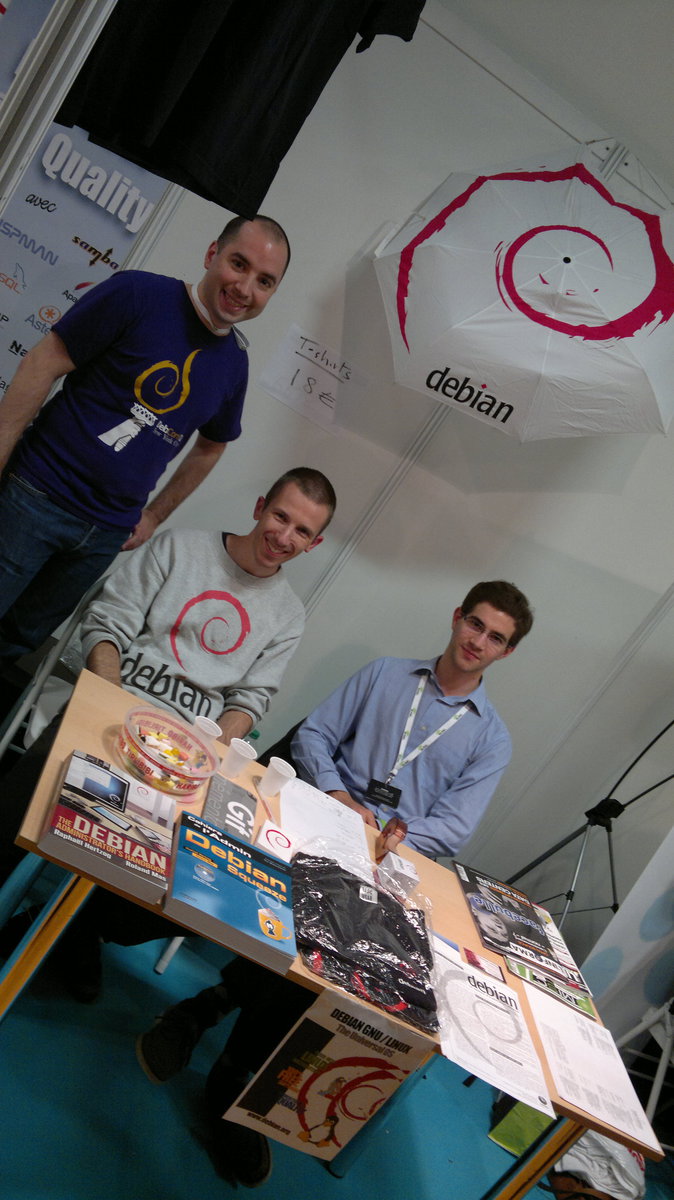
This is my monthly summary of my Debian related activities. If you re among the people who made a donation to support my work (168.12 , thanks everybody!), then you can learn how I spent your money. Otherwise it s just an interesting status update on my various projects. Dpkg This month, I resumed my work on dpkg. I concentrated my efforts on some polishing of the 3.0 (quilt) format. With the latest version (1.16.6 which was uploaded to unstable shortly before the freeze), dpkg-source restores the source tree in a clean state after a failed patch application (#652970), doesn t overwrite the patch header from the pre-existing automatic patch, updates automatically debian/source/include-binaries during dpkg-source commit, and supports a new no-unapply-patches option for those who dislike the auto-unapplication at the end of the process when the patches were not applied at the start. I wanted to go further and offer a new feature that could insert the automatic patch at the bottom of the quilt series but I have been short on time to complete this feature. I just managed to factorize all the quilt handling in a dedicated Perl module (Dpkg::Source::Quilt) to have cleaner code in the module handling the source format (Dpkg::Source::Package::V3::quilt). For those who wonder, this feature is meant primarily for the X Strike Force team which maintains packages in Git and are doings lots of upstream cherry-picks (to fix regressions, etc.). But they also use quilt on top of that tree to keep some lasting Debian specific changes. With the 1.0 format, the automatic diff is a bit messy but at least it gets smaller automatically when a new upstream release gets out, there s nothing to clean out. I d like them to be able to use 3.0 (quilt) while keeping their workflow. I m leaning towards allowing --auto-commit=first:cherry-picks that would name the automatic patch cherry-picks and put it in the first position in the quilt series. (Opinions welcome on that feature, BTW) Packaging There s been quite some packaging in this last month before the freeze: While doing all this packaging work, I found 2 possible improvements that I filed as bug reports: Debian France Booth at Solutions Linux From June 19th to June 21th, I manned the Debian France booth at Solutions Linux together with Carl Chenet, Tanguy Ortolo and other members of the association. We answered lots of questions, sold all t-shirts and umbrellas that Carl imported from Germany and Switzerland (we really need to get our own merchandising stuff produced in France!), got people to join the association. We also presented a printed copy of the Debian Administrator s Handbook and of the corresponding French book. You can see Carl, me and Tanguy on this picture (click on it to see a bigger picture, thanks to S bastien Dubois of Evolix for this one!):
I know lots of people are preparing for Debconf but I decided to not attend this year, the price of the air plane ticket was a bit too hefty for me and it was also in partial conflict with our family vacations. I thought about attending the Libre Software Meeting instead but alas I won t go there either (but Roland Mas will be there!), I have too much work to complete before my own vacation in 2 weeks. Thanks See you next month for a new summary of my activities.

2 comments Liked this article? Click here. My blog is Flattr-enabled.

23 June 2012

Richard Darst: The size of DebConf12

Phil blogged about DebConf12 having many fewer attendees than past DebConfs (10 and 11). Dealing with registration for several years, I can say these numbers tell a different story.First and foremost, these numbers tell me that DebConf12 hasn't happened yet, DC10 and DC11 have. People are told to sign up register early and reconfirm, but in reality, only the people who have accommodations with us have a significant motivation to do it. Once DebConf starts, lots of day-attendees will drop by, be told to register, and greatly inflate our numbers without staying for a very long time. The number of advance registrants also depends on how much advertisement is done. In terms of people who have both dates in the registration system (Phil's updated graph), I don't place much weight on this number, either.It's my opinion that number of beds occupied is a better indication of the scale of a DebConf, and especially at this stage. This also roughly correlates to number of Debian developers staying, though for years with cheap rooms or lots of external funding, even this number can get inflated. We need some things like t-shirts and badges for every attendee (possibly registered before a certain time), but for now, the number of rooms is what matters.In fact, I wouldn't be surprised if DebConf13 had lower "reconfirmed" numbers, because it is further away form population centers, yet still was a "bigger" conference because there are more people staying on-site or coming for multiple days.For DebConf12, I see an average of 130 people/night, for DebConf11, I see an average of 240 people/night, and for DebConf10, I see an average of 200 people/night. So, DebConf12 is smaller, but in a different way than it seems, and even this is subject to change or variable interpretation. I'm not really wanting to predict DebConf sizes at this stage.So basically, one does not simply expect DebConf registration data to make sense. One should not simply dismiss any DebConf before it happens. And most importantly, one can not simply use this data to plan a conference. The registration team has been frantically running around trying to correct every possible inconsistency you can imagine.Tags: debconf

4 June 2012

Steve McIntyre: Small children on long-haul flights...

...should be banned. On the flight back from Hong Kong to London, a collection of about half a dozen small children conspired to cry, shout, wail and shriek nigh-on constantly. For twelve hours. :-( I think it's incredibly selfish to take kids on planes when they're too young to understand what's going on, or to behave reliably. Children make noise, that's natural and expected. Forcing hundreds of other people around you to deal with that noise in an enclosed space for extended periods with no way to escape is just wrong, in my opinion. </rant>

1 June 2012

Pietro Abate: apt-get with external solvers : call for testers

Last year we invited David to work with us for a few days to add a generic interface to apt to call external solvers. After a few iterations, this patch finally landed in master and recently (about 3 months ago), in debian unstable.
  [ David Kalnischkies ]
  * [ABI-Break] Implement EDSP in libapt-pkg so that all front-ends which
    use the internal resolver can now be used also with external
    ones as the usage is hidden in between the old API
  * provide two edsp solvers in apt-utils:
    - 'dump' to quickly output a complete scenario and
    - 'apt' to use the internal as an external resolver
Today the new version of apt-cudf was upload in unstable and with it the latest bug fixes that makes it ready for daily use. I've used it quite a lot myself to upgrade my machine and it seems working pretty well so far... The most important difference with the old version is the support for multi-arch enabled machines. This marks an important milestone in our efforts to integrate external solvers, built using different technologies, directly into apt. From a user prospective, this means that (s)he will have the possibility to check if there exists a better (best ?) solution to an installation problem then what proposed by the internal apt solver. Moreover, even if apt-get gives very satisfactory answers, there are occasions where it fails miserably, leaving the user wondering how to unravel the complex web of dependencies to accomplish his task. Available cudf solvers in debian are at the moment : aspcud, mccs and packup. From an architectural point of view this is accomplished by abstracting the installation problem via a simple textual protocol (EDSP) and using an external tool to do the heavy duty translation. Since all solvers now available in debian are not meant to be debian-specific, using them involve a two step translation. The EDSP protocol specification is for the moment "hidden" in the apt documentation. I hope to find a better place for it soon : it would be cool if other package managers as smart or cupt could add an implementation on EDSP in their code so to automatically benefit of this technology. To make it happen, Apt first creates an EDSP file that is then handled to apt-cudf that takes care of the translation to cudf and back into EDSP that is then read back by apt. Apt-cudf is the bridge between edsp and the external solvers and takes care of doing the book keeping and to select the right optimization criteria. Roberto recently wrote a very nice article explaining how to use apt-get with an external solver. In a nutshell, if you want to try this out you just need to install apt-cudf, one external solver like aspcud from the university of Pasdam and then call apt-get using the --solver option (that is not yet documented #67442 ). For example :
apt-get install -s gnome --solver aspcud
This will install gnome while using the a optimization criteria that tries to minimizing the changes on the system. Various other optimization criteria for all apt-get default actions can be specified in the apt-cudf configuration file /etc/apt-cudf.conf I hope the new release of apt-cudf make it into testing before the freeze. Time to test !!!

31 May 2012

Matthew Garrett: Implementing UEFI Secure Boot in Fedora

Edit 16:17EDT 31/5/12: Clarification of who gets the $99
Edit 02:10EDT 01/6/12: Clarification that it's a one-off payment

(Brief disclaimer - while I work for Red Hat, I'm only going to be talking about Fedora here. Anything written below represents only my opinions and my work on Fedora, not Red Hat's opinions or future plans)

Fedora 17 was released this week. It's both useful and free, and serves as a welcome addition to any family gathering. Do give it a go. But it's also noteworthy for another reason - it's the last Fedora release in the pre-UEFI secure boot era. Fedora 18 will be released at around the same time as Windows 8, and as previously discussed all Windows 8 hardware will be shipping with secure boot enabled by default. While Microsoft have modified their original position and all x86 Windows machines will be required to have a firmware option to disable this or to permit users to enrol their own keys, it's not really an option to force all our users to play with hard to find firmware settings before they can run Fedora. We've been working on a plan for dealing with this. It's not ideal, but of all the approaches we've examined we feel that this one offers the best balance between letting users install Fedora while still permitting user freedom.

Getting the machine booted
Most hardware you'll be able to buy towards the end of the year will be Windows 8 certified. That means that it'll be carrying a set of secure boot keys, and if it comes with Windows 8 pre-installed then secure boot will be enabled by default. This set of keys isn't absolutely fixed and will probably vary between manufacturers, but anything with a Windows logo will carry the Microsoft key[1].

We explored the possibility of producing a Fedora key and encouraging hardware vendors to incorporate it, but turned it down for a couple of reasons. First, while we had a surprisingly positive response from the vendors, there was no realistic chance that we could get all of them to carry it. That would mean going back to the bad old days of scouring compatibility lists before buying hardware, and that's fundamentally user-hostile. Secondly, it would put Fedora in a privileged position. As one of the larger distributions, we have more opportunity to talk to hardware manufacturers than most distributions do. Systems with a Fedora key would boot Fedora fine, but would they boot Mandriva? Arch? Mint? Mepis? Adopting a distribution-specific key and encouraging hardware companies to adopt it would have been hostile to other distributions. We want to compete on merit, not because we have better links to OEMs.

An alternative was producing some sort of overall Linux key. It turns out that this is also difficult, since it would mean finding an entity who was willing to take responsibility for managing signing or key distribution. That means having the ability to keep the root key absolutely secure and perform adequate validation of people asking for signing. That's expensive. Like millions of dollars expensive. It would also take a lot of time to set up, and that's not really time we had. And, finally, nobody was jumping at the opportunity to volunteer. So no generic Linux key.

The last option wasn't hugely attractive, but is probably the least worst. Microsoft will be offering signing services through their sysdev portal. It's not entirely free (there's a one-off $99 fee to gain access edit: The $99 goes to Verisign, not Microsoft - further edit: once paid you can sign as many binaries as you want), but it's cheaper than any realistic alternative would have been. It ensures compatibility with as wide a range of hardware as possible and it avoids Fedora having any special privileges over other Linux distributions. If there are better options then we haven't found them. So, in all probability, this is the approach we'll take. Our first stage bootloader will be signed with a Microsoft key.

Bootloaders
We've decided to take a multi-layer approach to our signing for a fairly simple reason. Signing through the Microsoft signing service is a manual process, and that's a pain. We don't want to have bootloader updates delayed because someone needs to find a copy of Internet Explorer and a smartcard and build packages by hand. Instead we're writing a very simple bootloader[2]. This will do nothing other than load a real bootloader (grub 2), validate that it's signed with a Fedora signing key and then execute it. Using the Fedora signing key there means that we can build grub updates in our existing build infrastructure and sign them ourselves. The first stage bootloader should change very rarely, and we don't envisage updating it more than once per release cycle. It shouldn't be much of a burden on release management.

What about grub? We've already switched Fedora 18 over to using grub 2 by default on EFI systems, but it still needs some work before it's ready for secure boot. The first thing is that we'll be disabling the module loading. Right now you can load arbitrary code into grub 2 at runtime, and that defeats the point of secure boot. So that'll be disabled. Next we'll be adding support for verifying that the kernel it's about to boot is signed with a trusted key. And finally we'll be sanitising the kernel command line to avoid certain bits of functionality that would permit an attacker to cause even a signed kernel to launch arbitrary code. These restrictions will all vanish if secure boot is disabled.

Kernel
Secure boot is built on the idea that all code that can touch the hardware directly is trusted, and any untrusted code must go through the trusted code. This can be circumvented if users can execute arbitrary code in the kernel. So, we'll be moving to requiring signed kernel modules and locking down certain aspects of kernel functionality. The most obvious example is that it won't be possible to access PCI regions directly from userspace, which means all graphics cards will need kernel drivers. Userspace modesetting will be a thing of the past. Again, disabling secure boot will disable these restrictions.

Signed modules are obviously troubling from a user perspective. We'll be signing all the drivers that we ship, but what about out of tree drivers? We don't have a good answer for that yet. As before, we don't want any kind of solution that works for us but doesn't work for other distributions. Fedora-only or Ubuntu-only drivers are the last thing anyone wants, and this really needs to be handled in a cross-distribution way.

Wait signed what
Secure boot is designed to protect against malware code running before the operating system. This isn't a hypothetical threat. Pre-boot malware exists in the wild, and some of it is nastier than you expect. So obviously bootloaders need to be signed, since otherwise you'd just replace the signed bootloader with an unsigned one that installed malware and booted your OS.

But what about the kernel? The kernel is just code. If I take a signed Linux bootloader and then use it to boot something that looks like an unsigned Linux kernel, I've instead potentially just booted a piece of malware. And if that malware can attack Windows then the signed Linux bootloader is no longer just a signed Linux bootloader, it's a signed Windows malware launcher and that's the kind of thing that results in that bootloader being added to the list of blacklisted binaries and suddenly your signed Linux bootloader isn't even a signed Linux bootloader. So kernels need to be signed.

And modules? Again, modules are just code. It's a little trickier, but if your signed kernel loads an unsigned module then that unsigned module can set up a fake UEFI environment and chain into a compromised OS bootloader. Now the attacker just has to include a signed kernel and a minimal initramfs that loads their malware module. It'd slow down boot by a couple of seconds, but other than that it'd be undetectable. X? If you can access the registers on a GPU then you can get the GPU to DMA over the kernel and execute arbitrary code. Trickier again, but still achievable - and if you've locked down every other avenue of attack, it's even attractive.

If we produce signed code that can be used to attack other operating systems then those other operating systems are justified in blacklisting us. That doesn't seem like a good outcome.

Customisation
A lot of our users want to build their own kernels. Some even want to build their own distributions. Signing our bootloader and kernel is an impediment to that. We'll be providing all the tools we use for signing our binaries, but for obvious reasons we can't hand out our keys. There's three approaches here. The first is for a user to generate their own key and enrol it in their system firmware. We'll trust anything that's signed with a key that's present in the firmware. The second is to rebuild the shim loader with their own key installed and then pay $99 and sign that with Microsoft. That means that they'll be able to give copies to anyone else and let them install it without any fiddling. The third is to just disable secure boot entirely, at which point the machine should return to granting the same set of freedoms as it currently does.

But I don't trust Microsoft
A system in custom mode should allow you to delete all existing keys and replace them with your own. After that it's just a matter of re-signing the Fedora bootloader (like I said, we'll be providing tools and documentation for that) and you'll have a computer that will boot Fedora but which will refuse to boot any Microsoft code. It may be a little more awkward for desktops because you may have to handle the Microsoft-signed UEFI drivers on your graphics and network cards, but this is also solvable. I'm looking at ways to implement a tool to allow you to automatically whitelist the installed drivers. Barring firmware backdoors, it's possible to configure secure boot such that your computer will only run software you trust. Freedom means being allowed to run the software you want to run, but it also means being able to choose the software you don't want to run.

You've sold out
We've been working on this for months. This isn't an attractive solution, but it is a workable one. We came to the conclusion that every other approach was unworkable. The cause of free software isn't furthered by making it difficult or impossible for unskilled users to run Linux, and while this approach does have its downsides it does also avoid us ending up where we were in the 90s. Users will retain the freedom to run modified software and we wouldn't have accepted any solution that made that impossible.

But is this a compromise? Of course. There's already inequalities between Fedora and users - trademarks prevent the distribution of the Fedora artwork with modified distributions, and much of the Fedora infrastructure is licensed such that some people have more power than others. This adds to that inequality. It's not the ideal outcome for anyone, and I'm genuinely sorry that we weren't able to come up with a solution that was better. This isn't as bad as I feared it would be, but nor is it as good as I hoped it would be.

What about ARM
Microsoft's certification requirements for ARM machines forbid vendors from offering the ability to disable secure boot or enrol user keys. While we could support secure boot in the same way as we plan to on x86, it would prevent users from running modified software unless they paid money for a signing key. We don't find that acceptable and so have no plans to support it.

Thankfully this shouldn't be anywhere near as much of a problem as it would be in the x86 world. Microsoft have far less influence over the ARM market, and the only machines affected by this will be the ones explicitly designed to support Windows. If you want to run Linux on ARM then there'll be no shortage of hardware available to you.

Is this all set in stone?
No. We've spent some time thinking about all of this and are happy that we can implement it in the Fedora 18 timescale, but there's always the possibility that we've missed something or that a new idea will come up. If we can increase user freedom without making awful compromises somewhere else then we'll do it.

[1] In fact, chances are that everything will carry the Microsoft key. Secure boot requires that UEFI drivers also be signed. The signing format only permits a single signature per binary. For compatibility, approximately all add-on hardware shipped will be signed with Microsoft's key, and that means that all system vendors have to recognise Microsoft's key in order to permit that hardware to run on their systems.
[2] Current source is here. It relies on a port of the UEFI crypto library and OpenSSL that I have building with some handholding, and which I'll upload as soon as possible.

comment count unavailable comments

25 May 2012

Matthew Garrett: Fedora 17 and Mac support

Fedora 17 will be shipping next week. It's got a bunch of new features, none of which I contributed to in the slightest. What I did work on was improving our support for installation on x86 Apple hardware. There's still a few shortcomings in this so it's not an announced or supported feature, but it's sufficient progress that it's worth writing about.

There's a few ways that Apple platforms differs from normal PC hardware. The first is that Apples are very much intended to be EFI first and BIOS second, while that's still not really true for commodity PC hardware. Apple launched Boot Camp shortly after they started shipping x86 Macs (and shortly after I'd got Ubuntu running on one for the first time[1]) but the focus of Boot Camp has always been to be good enough to boot Windows and not much else[2]. The other is the integration with the boot environment. You can boot Linux easily enough by setting the standard EFI boot variables, but if you ever boot back into OS X it's easy to trigger deletion of those. There's then no straightforward way of resetting them, and you're left having to recover your installation.

The other difficult bit has been actually starting the installer at all. If you're happy to use BIOS emulation than this can be done without too much misery, but you're then left with dealing with Apple's custom synchronised GPT/MBR. More modern Macs will boot via the standard EFI mechanisms, but there's a range of problems that can be caused that way. Fedora 17 is the first Linux distribution to ship install media that will EFI boot a Mac when either written to optical media or a USB stick[3]. Put the install media in your system and then either select it in the OS X Startup Disk preferences menu and reboot, or reboot and hold down the alt key. In the latter case there'll be a nice Fedora logo. Click on it and it'll boot.

The biggest difference between Apple hardware and anyone else is that we'd normally put the bootloader in a FAT partition that's shared with any other installed operating systems. That does actually work on Apples, but then you run into the earlier point I mentioned. The Apple startup picker that you get by holding down the alt key doesn't pay any attention to the standard EFI boot variables, so it won't show a FAT partition merely because it's got an EFI bootloader on it. The same is true of the OS X Startup Disk preferences. The best way to get a drive to appear in the menu is to make it look like an OS X drive.

This was problematic in a few ways, due to the requirement for an OS X drive to be HFS+. The first was that we didn't have any support for that in our installer, so work had to be done there. The second was that the state of HFS+ was woefully poor in Linux[4]. Linux will refuse to write to an HFS+ filesystem if it hasn't been cleanly unmounted or fscked, and since we can't rely on everyone always shutting their machine down cleanly that means a working fsck.hfsplus. In theory we were shipping one of those. In practice, it reliably segfaulted on 64-bit systems[5]. So I had to package the latest version of Apple's code, and doing that involved dealing with the fact that Apple now use blocks almost as much as Grub 2 uses nested functions, and that meant using Clang and that meant dealing with a bug where Clang segfaulted if it had been built with gcc 4.7[6], but finally once all of those yaks had been shaven we could trust our filesystem.

Of course, more problems existed. You can't just drop a bootloader onto an HFS+ partition and expect it to work. You need to write its inode value into the superblock. Trivial, except that if you do this from userspace then the kernel kindly overwrites your update when you unmount the disk and it updates the superblock. That required a mechanism for updating that data via the kernel, which meant adding an ioctl. This would have been fine, except the OS X Startup Disk preference looks for a bootloader in a location other than where Fedora installs it. Changing our bootloader install path wasn't a great option, so the easiest thing to do was just to link them together. Except HFS+ doesn't really support hardlinks. When you hardlink something the original file gets moved into a magic directory in the filesystem root and the links are special files that refer to it. And it turns out that it's not actually the inode that the firmware wants when finding the bootloader, it's the catalogue ID, and these aren't the same when hardlinks are involved. So, another kernel patch.

All that was left for the boot partition then was adding an icon and a drive label. We already had code for generating the icon, and the drive label wasn't that difficult. Hurrah!

Ok, so we can construct a filesystem that (a) appears in the bootpicker, and (b) appears in the OS X Startup Disk preferences. We can even put a bootloader on it. This led to the next problem. The bootloader started without any trouble. But the bootloader couldn't read any files off the boot partition, including its configuration. This should have been obvious with hindsight - the problem was simply that grub legacy[7] doesn't support HFS+. Writing an HFS+ driver seemed like an excessive amount of work, especially since the firmware already supported reading HFS+, so instead I wrote a simple grub filesystem driver that uses the UEFI interfaces to read files.

A working bootloader! One more problem there. grub looks in its startup directory to find its configuration file. We have two "copies" of grub hardlinked to each other, each looking in a different directory for configuration. Hardlinking the config files together worked fine, except that most tools that update config files have this irritating habit of writing to a temporary file and moving that over the original, thus breaking the hardlink. Easily solved by using a symlink instead, except that the UEFI filesystem semantics don't really support symlinks because UEFI only really envisaged using FAT. If you use Apple's UEFI HFS+ driver to open a symlink, you get a short file containing the target path of the symlink. Rather less than ideal, and a rather gross hack to cope with it.

All set now, other than a bug in some older Mac firmware where read would return BUFFER_TOO_SMALL without returning the real buffersize and the odd way that Apple treat CDs. Oh, and a bug in Apple's Broadcom wifi driver that could overwrite the kernel, and case-sensitivity, something that obviously isn't something you often hit on UEFI when all you usually see is FAT.

Kernel-side, we had a couple of things. Obviously there the bugs I'd mentioned in the past, but those had already been dealt with. New issues included the fact that we were frequently picking the wrong framebuffer address, especially on machines with multiple GPUs. Fixed now, along with another issue where we'd sometimes get confused by models with different GPU configurations. And at that point, most of the implementation work was done.

Of course, there was also the work of integrating this into the tools that we use to generate our install media, and I'd like to thank Will Woods, Brian Lane and Dennis Gilmore for the work they put into that, along with anyone I've forgotten. Tom Calloway handled getting the device label graphics generated right before deadline. A cast of thousands helped with testing.

So why did I mention shortcomings? First, this only works on machines with 64-bit firmware. Early 64-bit Apples still had 32-bit firmware. In theory we can support that case - in practice it's a moderate amount of writing, including some mildly awkward kernel code. But anything later than mid-2007 should have 64-bit firmware, so it's not a massive concern. Second, we seem to have fairly significant trouble with Radeon hardware on a lot of Macs. We fixed one bug there, but something's still going wrong in setup and you'll frequently end up with a black screen. And thirdly, I'm sure there's some other machines that still don't work for (as yet) undetermined reasons.

With luck we'll get these things dealt with by Fedora 18. But even with these flaws, Fedora 17 will work fine on a lot of Apple hardware, and testing it is as simple as downloading and booting a live image. Bugs go in the usual place.

[1] Note my charming belief that the Ubuntu installer would fully support this hardware via EFI in the near future. 6 years ago. It still doesn't.
[2] This can be fairly easily seen from little things like the name "Windows" being hardcoded into every UI that sees a Boot Camp drive.
[3] I cover this in more depth here
[4] To be fair, it mostly still is - there's plenty of work to be done there.
[5] Approximately nobody had noticed this, which is all kinds of unreassuring.
[6] Thanks to Kalev Lember for dealing with that
[7] Still the EFI bootloader in Fedora 17. We've already swapped Fedora 18 over to grub 2.

comment count unavailable comments

15 May 2012

Christian Perrier: Trip to Nicaragua post-Debconf

This year, the annual Debian conference will be held in Managua, Nicaragua. And I'll be lucky enough to spend two weeks visiting the country after Debconf, along with Elisabeth. Yes, I'll arrive in Nicarague on July 2nd, spend nearly the entire Debcamp, then Debconf, then we'll spend 16 days around the western part of Nicaragua, trying to discover the magic of this country. So, this post is about sharing our plans with my readers. Of course, I do not know the country so we may have made mistakes and bad choices. We'll see. Immediately after Debconf, Elisabeth will join in Managua. She'll be landing on July 15th. We'll then spend a night in an hotel near the airport and immediately leave the day after for Matagalpa, in North Nicaragua. We rented a car for the entire trip indeed, and will be on our own on wild Nicaragua roads..:-) We'll spend two nights in Matagalpa. We plan to visit some coffee or cigar plants, probably have a trip to Lake Apanas and Jinotega. Then, we'll have a short road trip to Esteli where we spend again two nights. We'll be visiting a coffee growing place (beneficio seco de caf ). A full day visit is planned at Miraflor natural reserve to enjoy te beauties of hundreds orchids and some local natural marvels. The next move will be to Leon, where we'll spend 4 nights, visiting a cigar factory (tabacaleras de puros?) on the way, as well as San Jacinto, a place with hydrothermal sources and "Hervideros" (geysers). Four nights in Leon leaves plenty of time for several activities *and* enjoying the colonial city. We'll have a full day at Juan Venado Island reserve with boat trip from Las Penitas (on a fisherman's boat from what the travel agency mentioned), then another full day climbing on the Cerro Negro volcano. Indeed, I was originally considering climbing the Momotombo, but our travel agency warned about the high difficulty. I would have loved that myself but maybe not the two of us...and this is a trip for both of us! So, we played the safe option..:-) After these 4 nights in Leon, we'll move to Granada for 3 nights, through Leon Viejo (the former site of Leon). From Granada, one day will there be used for a visit in the Masaya National Park and see the beauties of Masaya volcano (this is indeed something that could be done for Debconf day trip, IMHO, as it doesn't seem that far from Managua). Another day will be spent to Las Isletas on lake Nicaragua and others visiting the colonial city of Granada. Or, of course, whatever things we don't even known about now..:-) Then we'll move to what I personnally consider the peak of the trip: 3 nights on Ometepe island on lake Nicaragua. Just check Wikipedia to see why Ometepe is, in my opinion, THE place to go in Nicaragua. Here, I'll have my volcano..:-). Indeed, Elizabeth "authorized" me to book a local guide and then climb Concepcion Volcan, if the weather allows for it. 1600m height, that doesn' seem to be a big issue....except when starting from a little bit above sea level and are climbing a volcano that looks like s postcard volcano : nearly a perfect cone shape. So, let's cross fingers for having good weather that day. I promise myself I'll record the GPS track of that one and, even if I'll probably be walking most of the climbing (except if I have a very trained guide...), I'll add it to my run tracks! We might also be going to climb Ometepe's other volcano (Maderas) the day after so that Elizabeth also enjoys these beauties. There also seems to be great places around Maderas such as San Ramon Cascade, Finca el Porvenir, etc. Then, at the end of all this, it will be time to come back to Managua in the final day and fly back to Paris in the early morning of July 31st. All over, I'll be in Nicaragua from July 2nd until July 31st! Full month away, yay! Hurrah for the crazy number of holidays those lazy French people have..:-) During this trip, we might find it interesting some local geeks (not too many as Elizabeth is not that deeply interested in beersigning!) and share a few nice things in local places which are only known by locals. In case you're interested, out (very clever) travel agency is named Nicaragua Adventures and they're definitely worth contacting if you want to travel around .ni, particularly if we prefer booking things in advance as we do. They speak Spanish (of course!), English and French. They're very responsive to e-mail as well.

7 May 2012

Lars Wirzenius: Quality of discussion in free software development

The Online Photographer has a meta-article on some discussion in the photography world. Summary: someone wrote an opinion piece on one site, and people on the discussion forum of another site got his name wrong, possibly repeatedly. And the quality of the discussion went down from there. The quality of the discourse of free software development is frequently of some concern. Debian has a reputation as being a host to, er, particularly vigorous discussions. That reputation is not unwarranted, but, I think, we've improved a lot since 2005. The problem is hardly restricted to Debian, however. How can we improve this? I don't know. As a community, I'm not even sure we agree what the problems are. Here's my list. Insults, personal attacks, and other such outrageously bad behavior is uncommon. It crosses the line so clearly it becomes easy to deal with; I don't think handling this needs much attention. What can we do about this? I'm not sure. I have, for the time being, abandonded Debian mailing lists as a way to influence what goes on in the project, but that's just a way for me to clear some space in my head and time in my day to actually do things. My pet hypothetical solution of the day is that mailing lists might raise the quality of the debates by limiting the number of messages written by each person per day in each thread. This might, I think, induce people to write with more thought and put more effort into making each message count.

30 April 2012

John Goerzen: Review: Amateur Radio Handhelds (HTs), APRS, and Battery Tuning Tips

There are a lot of opinions about handhelds for amateur radio users (these handhelds are often known as HTs). I ve used three of them, two with APRS capability, and thought it s about time I write about them. First, I ll talk about the units in particular, then I ll get to some broader Yaesu vs. Kenwood generalizations and conclusions. Yaesu VX-7R a rugged first HT without APRS Cost: $350 as of 4/30/2012 This was the first HT I got as a ham, at the suggestion of Mike AE0MW. It truly does make a great first handheld for a ham. Radio-wise, one unique feature is a receive that s wideband enough to cover both broadcast FM and broadcast AM, the various ham bands, and plenty of others besides. The battery life quoted in the manual is 6 hours on 2m and 5.5 hours on 440 (using standard 6s TX / 6s RX / 48s squelched metric), and in my experience it seems it must be even better in some cases. The real piece of news about this unit, though, is just how rugged it is. It says submersible across the front and I absolutely believe it. I have personal experience with its ruggedness. I once was at an event and put the radio on my car roof while helping one of my children into the car. I then started driving home and forgot it there. When we got home, I realized what had happened, and also realized what that mysterious CLUNK along the busy county road was. So I drove 45 minutes back to where I heard the clunk, and found the VX-7R still lying in the roadway, where it had been for 1.5 hours on the 55 MPH road. The thing was really beat up. It had obviously been hit by numerous vehicles. The antenna was ripped off, taking the SMA mount with it. But wouldn t you know it, the darn thing still powered up. I took it to a local amateur radio shop, and about $80 later it was repaired. Incredible. The only real problem was the antenna connector. I took this radio with me on my bicycle many days, mounted on my handlebars. It got bounced around, but still worked great. Some days I listened to FM radio from it while riding my bike, monitoring a local repeater while I rode. Other days, I spent most of my ride (about an hour each way) chatting with people on the repeaters I have a mobile antenna mounted on the bike, fed to the VX-7R, and a headset. It all worked fine never a problem at all. The ruggedness has its downside. All of the connectors on the radio, except for DC in, are screw-down even the speaker/mic connector. This obviously helps keep water out, but means that it can take a lot longer than normal to do a simple thing like plug in a speaker/mic. It doesn t need any tools, but can get a little annoying. The radio physically is small (unless you install the belt clip, which has an odd peg-based mechanism that protrudes unnecessarily far and is surprisingly non-rugged). It can easily fit into a pocket. The other downsides of the VX-7R mostly surround its interface. I m not one of the Yaesu haters that seem to be so common. I find the interface usable if you read the manual; it seems a lot of people that complain about it don t. But it is quirky. The SET mode is one long menu in sort of a ring. You scroll with the knob, and when you get to the end, it repeats to the beginning. There are one or two shortcut keys to a specific setting, but overall either you use the thing so much you know exactly where you re going, or you re twisting the knob for awhile until the option you want rolls around. (I know of nobody that uses it so much they know exactly where they re going.) They do have options grouped into categories, but it doesn t help much because there s no quick way to skip between categories. The dual transceivers work less elegantly than on the TH-D72A or VX-8GR. Instead of being two equal transceivers A and B, they are main and sub . The sub transceiver is not broadband receive like the main receiver is. But there are also other limitations that have no apparent logic. For instance, you can program memory groups into the device putting, say, all the local repeaters into a certain group, or all the public safety frequencies (to use as a scanner). You can go to the special set menu, select group, then activate SCAN, and it will scan only the memories in that group. But you can t select the special group mode on the sub transceiver for no apparent reason. One other complaint is that the AC charger introduces so much noise to a transmission that you cannot really use the VX-7R to transmit while the charger is connected. Yaesu sells a programming cable that plugs into the speaker/mic port on one end, and a DB-9 serial port on the other, and includes programming software. For an incredibly high price. For far less, I found a similar cable on eBay that has a USB port on the other end (with a built-in USB/serial converter), and used VX-7R Commander though now that Chirp is available for Linux, I ll probably switch to it. I would probably continue to recommend this transceiver for a new ham. The ruggedness, plus the broadband RX, are features that should make it appealing. It is an excellent emergency preparedness/response radio due to those properties; having TX and RX on ham bands, plus RX on broadcast and public safety could be quite the asset. However, for someone that has any interest in APRS, one of the other two radios I mention is probably a better choice. At only $10 more, the VX-8GR sacrifices ruggedness and broadband receive for APRS functionality and could make a compelling alternative to the VX-7R at the same price point. The very low-power transmit at 50MHz and 220MHz on the VX-7R strikes me as a gimmick feature at best that has very little actual use. Shipped battery: FNB-80LI, 7.4V, 1400 mAh, lithium-ion Kenwood TH-D72A / D72E The Cadillac HT, with APRS and GPS Cost: $464 as of April 30, 2012 It s hard to use any word but incredible to describe this HT, though it does have its own rough edges. Starting with the basics, it has dual transceivers with full duplex (meaning you can be transmitting on one band while receiving on another). Its stored memory system and memory bank scanning system are both a lot easier and faster to use than Yaesu s, and work the same on both transceivers A and B, though perhaps offer slightly less flexibility than Yaesu s (on the VX-7R, a single memory can be a member of more than one group). The quoted operating time is 6 hours, which is probably accurate with APRS and GPS off, matching (or nearly matching) the VX-7R. The TH-D72A has the usual mic and speaker ports. Unlike Yaesu, Kenwood has used the same jack for years, so it is not necessary to purchase new accessories with each upgrade. The unit also has both serial (Kenwood connector) and standard mini USB ports, and even ships with a USB cable. The USB port is designed to interface to a PC, and the radio presents itself as a serial-over-USB device. Kenwood also includes MCP-4A, the programming software for the unit, free. This is one example of several things that Kenwood includes for free but are costly add-ons with Yaesu. Kenwood s configuration menu system is hierarchical. You can scroll through the four top-level menus (RADIO, GPS, APRS, and SKY), then navigate through sub menus. The result is that it s both faster and easier to find what you want than on the Yaesu menus. Plus, as you navigate, the radio shows you the shortcut key to get to a particular option (each level of menu is numbered starting) so, for instance, Menu-1-1-0 takes me directly to the configuration for RX battery saver interval far faster than I could get there on the VX-7R or VX-8GR. Only the APRS menu gets a bit crowded with this setup. The D72A supports Kenwood s Sky Command II an intriguing way of making it essentially a remote for a Kenwood HF rig such as the TS-2000. It works by engaging a crossband repeater for the audio, and setting up a AX.25 packet link for the control. It works, but as the response time to frequency adjustments is measured in seconds, is klunky for tuning around a HF band. A nifty, though perhaps not supremely useful, feature with some hackable potential that I haven t explored yet. The TH-D72A is one of only two shipping general-purpose amateur radios that have a built-in GPS the other is the Yaesu VX-8GR, which I ll review below. The GPS works well, and can get a fix indoors if desired. It has a system of saving waypoints, which you can then navigate back to later (using distance/bearing indicators). It also has a track log. While the track log can t be viewed on the unit, it can be downloaded with the included MCP-4A software and saved in a variety of formats including Google s KML for later importing into Google Maps or Google Earth. I enjoy this feature on trips to see where I went later on. There is also a GPS-only mode, which disables all of the other radio circuitry on the radio for very low power consumption. The GPS navigation screens all support heading-up or north-up indicators. But where this radio really shines is APRS. The D72 has all the basics you d expect sending and receiving beacons, sending and receiving messages and bulletins, etc. It has built-in support for being a digipeater in many different ways, including new-N UI-Trace. Coupled with an MFJ VHF amplifier, this could make a nice temporary (or even permanent) digi. The message interface permits sending, receiving, and shortcuts for replying to messages. Beacon transmission can be completely manual, at set intervals, or using SmartBeaconing. Outbound beacons also support proportional pathing (meaning adjusting via-path to not have wide coverage with every transmission). Also, if not using SmartBeaconing, a decay algorithm can be used to send beacons less frequently when the station s location isn t changing. An alternative tells the system to transmit a beacon every time PTT is released, subject to rate limiting by interval. So lots of choices there. For incoming beacons, there are various filters by callsign pattern, packet type, etc. that control whether they will be processed at all, and what kind of alert (visual or audible) to present. Beacons are also placed in a received beacon list, sorted with the most recent at the top (duplicates from the same station are always removed, so only the most recent is presented.) A long press of the LIST button shows time received and type of device next to the callsign. Selecting a specific beacon shows status text, comment, device type, bearing/distance (with graphical north-up or heading-up display), telemetry (weather information and the like), and a little bit of info about the via-path. Pretty nice to see weather reports from local weather stations on there. You can sort the list by received time, station call, or distance from your position but it doesn t stay sorted by anything other than received time, and takes several seconds to re-sort. Seems like a bit of an oversight there. The D72A supports QSY information in beacons. This can automatically insert the frequency of the other band on the transceiver into your transmitted beacons for you, or give you a quick way to tune to the frequency mentioned on others beacons. Either way, a nice touch. The D72 also supports query packets, such as packets asking your station to transmit its position right now. The TH-D72A can directly interface with several types of weather stations via serial link to read weather sensor information and transmit it into APRS packets directly, with no need for a PC to be in the picture at all. But if you do hook up a PC to it, there are quite a few more possibilities. You can hook it up to PC APRS software (or a hardware device such as the AVMAP) to see locations of other APRS stations on a map. It can emit APRS packets, plus even GPS sentences, down the USB port to the PC. Moreover, in PACKET mode, it acts as a full TNC, with a fairly robust TNC command set. In short, it can do more than APRS; it can also do regular AX.25 such as DX clusters, BBS, nodes, etc. As far as I know, this is the only HT that can interface with a PC in this manner, and only Kenwood s mobile D710 has the same kind of feature set at that. Kenwood includes a lot of documentation with the TH-D72A. The 51-page printed manual is a summary or introductory guide. The included CD-ROM supplies another 75 pages of detailed reference material, and the 92-page in-depth APRS manual has a level of detail that true geeks like me appreciate. I ve referred to Kenwood s documentation more than once while figuring out things about the VX-8GR (which woefully under-documents things like SmartBeaconing). That said, it appears that at least some of the documentation has been copied from the earlier TH-D7A. Page 4 of the printed book is a good example. It talks about the memory effect of the battery, and warns against unplugging and replugging the charger because the charge cycle will be reset and the battery will be over-charged (I find it hard to believe that a Li-Ion charge controller would be that stupid, and furthermore direct observation suggests that it isn t.) Parts of the in-depth APRS guide appear to have been written for the D710, but that s a really minor nit. Unlike Yaesu, Kenwood issues periodic firmware updates to the D72A, which you can apply over USB. They have fixed bugs and added features to the unit over time. Now onto the things that aren t so good about the D72A. I ll start with the battery system, since we were already discussing it. Despite shipping with a much larger battery than the VX-8GR (1800 mAh vs. 1100 mAh), it only manages roughly equal battery life with APRS and GPS engaged. (It will probably do better as a simple voice unit, however.) This has been confirmed by numerous reports on the Internet. I will discuss this topic more below. There is very little else to fault the D72A on, feature-wise. I have a minor nit in that it is impossible to cause the keylock feature to also lock PTT. It would be nice to be able to see raw APRS packets on beacons and messages. Other than that, I can t think of a feature it really lacks. Compared to the VX-7R and VX-8GR, the TH-D72A is significantly larger physically, in every dimension. It is not uncomfortably large, and still fits in my hand fine. But its size is enough different that it feels like the design is dated and could have been more compact if Kenwood would have bothered. It s a nit, sure, but a nontrivial one. With the single exception of the sturdy metal belt clip, the D72 doesn t feel nearly as rugged as the VX-7R, and not even as rugged as the VX-8GR. The keys have a squishy feel to them, the PTT button works fine but has a cheap plastic design (as opposed to the rubberized versions on Yaesu s HTs). The manual doesn t mention it, but one Kenwood brochure mentions and IP54 weatherproofing. That means it is protected against limited ingress of dust and against water sprayed from all directions limited ingress permitted. Contrast that to the VX-7R, which is rated for 30 minutes of submersion at 3ft and has a magnesium case. It seems to be specced similarly to the VX-8GR, though the VX-8GR certainly feels a lot more solid. I have no proof, as I m not about to sacrifice my HTs for science, but I doubt that the TH-D72A would have survived over an hour on a busy road as well as the VX-7R did, and probably not even as well as the VX-8GR would. The case is plastic a stout plastic, but still plastic. Like the VX-8GR, and unlike the VX-7R, the D72A does not have broadband receive. It can receive some bands adjacent to the ham bands it supports, which includes a lot of bands of interest to people with scanners, but still can t receive broadcast FM signals like the VX-7R. Shipped battery: PB-45L, 1800 mAh, lithium-ion Yaesu VX-8GR: Cheaper APRS & GPS Cost: $360 as of 4/30/2012 One could probably call this Yaesu s closest competitor to the D72A. At about $100 cheaper, it doesn t have a featureset that matches Kenwood s, but it does have a few innovations that the D72A lacks. Starting with the basics, it lacks the VX-7R s broadband receive, with the receive roughly matching the TH-D72A s. The 8GR is a dual-transceiver HT, and it works this effectively (moreso than the VX-7R). Yaesu has a bad habit of changing connectors on radios with regularity, and charging an arm and a leg for accessories to boot. Even within the VX-8 line, the 8GR uses different accessories than the 8DR, and of course has different plugs than the 7R (though it appears that the DC power plug is the same, and with some luck you might be able to use a VX-7R speaker/mic on the 8GR, though not the reverse). The menu system on the 8GR is still similar to the 7R, though Yaesu has done several things to improve it. For one, scrolling through the menu now shows several lines of context on the screen at once, making it faster to scan. Also, there are more ways to jump into the menu at a certain location than before and even a small bit of clumsily-implemented hierarchy (there are several settings on the SmartBeaconing page, for instance). The menu key now toggles between various displays: the default frequency/status display, a GPS display, an APRS staion list, and an APRS message list. Just about everything operationally takes more keypresses than the D72A. On the D72A, it s one or two keys (a physical button or F+button) to do almost everything: toggle GPS state, change TNC/APRS state (turn on or off), etc. All of that is in the scrolling menus on the 8GR. The quickest way there, which is documented in the manual, is to press MENU until a certain screen comes up, then press and hold MENU to bring up the settings (defaulting to a certain APRS-related category), then scroll and change settings. It s a pain to turn APRS on and off, because you have to do this process for both the GPS and the APRS modem. Inexplicably, there is a hotkey to change the APRS beacon method (manual, auto, or SmartBeaconing) but not to turn APRS itself on or off. (The D72A has a hotkey to toggle the beaconing, though not to change its method; though in truth, if you do it frequently, the menu shortcuts will get you there rapidly.) Physically, the VX-8GR is closer to the size of the 7R than the size of the D72A, and notably is significantly smaller than the D72A (at least with the standard battery). As noted in the D72A review, the VX-8GR feels more rugged than the D72A, though whether that is actually true or not is hard to pin down. It is definitely less rugged than the VX-7R. The keys require more pressure than the D72A, and in this they are similar to the 7R, but feel satisfyingly solid. Unlike the other radios here, the 8GR does not have a dedicated volume knob, having only one dial on the top. To adjust volume, you hold the volume button on the left while twisting the knob. In practice, this is probably not usually very annoying, but if the radio is on your belt or otherwise not in your hand, this would be a frustration. (I think it would be particularly annoying if using it with a speaker/mic). Setting 99 will let you change the key so you don t have to hold it in, which could probably go a long way to making the situation more tolerable. One unique feature of the VX-8GR, as far as I know completely unique to it, is a vibrating alert. This would most frequently be used with APRS to provide a nearly-silent alert of incoming messages and the like. The screen of the 8G, while similar in size to both the D72A and the 7R, appears to be higher-resolution (or if not, they make better use of it). More information is packed onto the screen at once, and although the D72A does have a small font, it uses it so rarely that lots of scrolling is needed. The 8GR uses a smaller font than the D72A to show content of messages and the like, which makes a much faster experience since there is a lot less scrolling. Neither radio has a setting to change this behavior, so if your eyesight isn t good, you may prefer the D72A anyhow. The VX-8GR supports a heading-up or a north-up view of the received GPS data, but strangely it does not support this when navigating to a received beacon (north-up is the only option). Unlike the TH-D72A, you can engage keylock on the 8GR while someone s beacon is on the display. Also unlike the TH-D72A, you can lock out the PTT key on the 8GR. However, the keylock feature is just a quick press of the power button, which makes me a bit nervous. And worse, if you tell it to lock the PTT key, then it also won t transmit any automatic APRS beacons! There are a lot of things the D72A supports in the APRS area that the 8GR doesn t. Here s a summary of features missing in the 8GR compared to the D72A: voice alert (can t even do it manually since tone/CTCSS are locked out in APRS mode), quick replying to messages, TNC mode (meaning you can t use it with PC-based APRS programs), full AX.25 packet mode, full PC linking, weather station inputs, built-in digipeater mode, heading-up display, GPS track logs, QSY in beacons, quick tuning to others QSY info, responding to position queries, proportional pathing, automatic decay, beaconing on PTT release, sorting of beacon list, hotkey access to many features, and I m sure the list goes on. On the flipside, the only thing feature-wise that you get on the 8GR s APRS implementation that the D72A lacks is ability to inspect raw APRS packets. The VX-8GR has the lowest-capacity battery of the three radios covered in this post, and this is an oft-cited problem for users of the unit. Yeasu does seem to do a much better job of power management than Kenwood, though, so in full APRS and GPS mode, the battery life is roughly the same, amazingly enough. It is unlikely that the talk time on the 8GR would match either the 7R or the D72A, however. Kenwood and Yaesu both have a battery saver feature which cuts power to the RX circuit except for brief checks for signals. Yaesu completely disables this while the APRS modem is on (and STILL matches Kenwood s battery life, despite the smaller battery!) Kenwood doesn t, though recommends changing the signal-check interval from 0.2s to 0.03s in order to avoid truncating APRS packets. Yaesu offers an 1800 mAh extended-life battery which should significantly exceed Kenwood s battery life. Aftermarket vendors have 2000 mAh batteries as well. Either way, expect APRS to be a drain on batteries. More on that below. Although Yaesu includes 168 pages of documentation with the 8GR, don t expect it to match the quality and detail of Kenwood s 218 pages. There are a lot of gimmicky/useless features on the 8GR (WIRES, for one) that get extensive treatment, and there is a fair bit of repetition. I particularly single out the SmartBeaconing documentation on the 8GR as being, at best, woefully incomplete and probably also inaccurate to boot. Read the D72A manuals to figure out how that feature works on your 8GR. I bought the VX-8GR intending it to be something akin to a more versatile TinyTrak. On that score, it mostly succeeds. It may be my go-to rig for use at bicycle rides, marathons, emergencies, etc., while the D72A will probably be the one that goes with me on trips. Shipped battery: FNB-101LI, 7.4V, 1100 mAh, lithium-ion Not covered: VX-8DR poor value for the dollar Cost: $434 ($550 with GPS and GPS connector) Yaesu s top-of-the-line HT is sometimes considered to be the VX-8DR. It maintains the broadband capability of the 7R, is probably almost as rugged as the 7R, and has APRS built in, like the 8GR. It even has an option to add a Bluetooth board. What is doesn t have built-in is a GPS. You can add one on for $77 for the FGPS-2 plus $39 for the CT-136 connector which connects the GPS to the unit. But then you have a unit a lot less rugged than even the D72A (that s a small connector for the GPS), a lot less small, with the same APRS featureset as the 8GR (meaning a lot less than the D72A), which costs about $100 more than the D72A. Frankly I think this makes for a poor APRS package, and would probably only be reasonable for someone that wants other 8DR features and has a desire for some very occasionaly APRS work. Battery Life and APRS One of my first surprises with APRS HTs was the poor battery life I saw. Doing my research seemed to suggest that, contrary to popular opinion, the transmitted beacons were not the culiprit, but the receive circuits were to blame. Because it is not acceptable to cut off the first 200ms of an AX.25 packet like it is with a repeater, the RX circuit is either engaged much more frequently (Kenwood) or continuously (Yaesu), putting a lot more drain on the battery. (This has also been confirmed by multiple others that have done testing) The GPS receiver also adds drain, and on the D72A, so does the TNC, which is always active when APRS is. If you don t care about received beacons, you can dramatically raise the battery life on the D72A by setting the power saver to 1 second or greater as high as 14 hours by one report. On either unit, raising the squelch should have some effect (though not as much; but in any case, weak packets won t decode anyhow, so there s no sense in letting them in.) On the 8GR, getting the extended life 1800 mAh (or aftermarket version) could produce battery life in nearly that same region, without compromising on the RX side of things. Conclusions If you want a HT capable of APRS, seriously think of the TH-D72A before anything else. It is $100 more expensive than the 8GR, but has more than $100 worth of extra features (and included things, like PC link cable and software, that are extra on the 8GR), so it has a better value. If you re particularly budget-conscious or want the most ruggedness you can find, the 7R and 8GR are solid contenders if you can sacrifice the extra APRS features. Update May 1: Clarified what the lack of TNC mode on the VX-8GR means, and also how the VX-8GR PTT keylock also locks out APRS transmissions.

23 April 2012

Julien Danjou: OpenStack Swift eventual consistency analysis & bottlenecks

Swift is the software behind the OpenStack Object Storage service. This service provides a simple storage service for applications using RESTful interfaces, providing maximum data availability and storage capacity. I explain here how some parts of the storage and replication in Swift works, and show some of its current limitations. If you don't know Swift and want to read a more "shallow" overview first, you can read John Dickinson's Swift Tech Overview. How Swift storage works If we refer to the CAP theorem, Swift chose availability and partition tolerance and dropped consistency. That means that you'll always get your data, they will be dispersed on many places, but you could get an old version of them (or no data at all) in some odd cases (like some server overload or failure). This compromise is made to allow maximum availability and scalability of the storage platform. But there are mechanisms built into Swift to minimize the potential data inconsistency window: they are responsible for data replication and consistency. The official Swift documentation explains the internal storage in a certain way, but I'm going to write my own explanation here about this. Consistent hashing Swift uses the principle of consistent hashing. It builds what it calls a ring. A ring represents the space of all possible computed hash values divided in equivalent parts. Each part of this space is called a partition. The following schema (stolen from the Riak project) shows the principle nicely: Consistent hashing ring In a simple world, if you wanted to store some objects and distribute them on 4 nodes, you would split your hash space in 4. You would have 4 partitions, and computing hash(object) modulo 4 would tell you where to store your object: on node 0, 1, 2 or 3. But since you want to be able to extend your storage cluster to more nodes without breaking the whole hash mapping and moving everything around, you need to build a lot more partitions. Let's say we're going to build 210 partitions. Since we have 4 nodes, each node will have 210 4 = 256 partitions. If we ever want to add a 5th node, it's easy: we just have to re-balance the partitions and move 1 4 of the partitions from each node to this 5th node. That means all our nodes will end up with 210 5 204 partitions. We can also define a weight for each node, in order for some nodes to get more partitions than others. With 210 partitions, we can have up to 210 nodes in our cluster. Yeepee. For reference, Gregory Holt, one of the Swift authors, also wrote an explanation post about the ring. Concretely, when building one Swift ring, you'll have to say how much partitions you want, and this is what this value is really about. Data duplication Now, to assure availability and partitioning (as seen in the CAP theorem) we also want to store replicas of our objects. By default, Swift stores 3 copies of every objects, but that's configurable. In that case, we need to store each partition defined above not only on 1 node, but on 2 others. So Swift adds another concept: zones. A zone is an isolated space that does not depends on other zone, so in case of an outage on a zone, the other zones are still available. Concretely, a zone is likely to be a disk, a server, or a whole cabinet, depending on the size of your cluster. It's up to you to chose anyway. Consequently, each partitions has not to be mapped to 1 host only anymore, but to N hosts. Each node will therefore store this number of partitions:
number of partition stored on one node = number of replicas   total number of partitions   number of node
Examples:
We split the ring in 210 = 1024 partitions. We have 3 nodes. We want 3 replicas of data.
Each node will store a copy of the full partition space: 3 210 3 = 210 = 1024 partitions.
We split the ring in 211 = 2048 partitions. We have 5 nodes. We want 3 replicas of data.
Each node will store 211 3 5 1129 partitions.
We split the ring in 211 = 2048 partitions. We have 6 nodes. We want 3 replicas of data.
Each node will store 211 3 6 = 1024 partitions.
Three rings to rule them all In Swift, there is 3 categories of thing to store: account, container and objects. An account is what you'd expect it to be, a user account. An account contains containers (the equivalent of Amazon S3's buckets). Each container can contains user-defined key and values (just like a hash table or a dictionary): values are what Swift call objects. Swift wants you to build 3 different and independent rings to store its 3 kind of things (accounts, containers and objects). Internally, the two first categories are stored as SQLite databases, whereas the last one is stored using regular files. Note that this 3 rings can be stored and managed on 3 completely different set of servers. Swift storage schema Data replication Now that we have our storage theory in place (accounts, containers and objects distributed into partitions, themselves stored into multiple zones), let's go the replication practice. When you put something in one of the 3 rings (being an account, a container or an object) it is uploaded into all the zones responsible for the ring partition the object belongs to. This upload into the different zones is the responsibility of the swift-proxy daemon. Swift proxy schema But if one of the zone is failing, you can't upload all your copies in all zones at the upload time. So you need a mechanism to be sure the failing zone will catch up to a correct state at some point. That's the role of the swift- container,account,object -replicator processes. This processes are running on each node part of a zone and replicates their contents to nodes of the other zones. When they run, they walk through all the contents from all the partitions on the whole file system and for each partition, issue a special REPLICATE HTTP request to all the other zones responsible for that same partition. The other zone responds with information about the local state of the partition. That allows the replicator process to decide if the remote zone has an up-to-date version of the partition. In case of account and containers, it doesn't check at the partition level, but check each account/container contained inside each partition. If something is not up-to-date, it will be pushed using rsync by the replicator process. This is why you'll read that the replication updates are "push based" in Swift documentation.
# Pseudo code describing replication process for accounts
# The principle is exactly the same for containers
for account in accounts:
    # Determine the partition used to store this account
    partition = hash(account) % number_of_partitions
    # The number of zone is the number of replicas configured
    for zone in partition.get_zones_storing_this_partition():
        # Send a HTTP REPLICATE command to the remote swift-account-server process
        version_of_account = zone.send_HTTP_REPLICATE_for(account):
        if version_of_account < account.version()
            account.sync_to(zone)
This replication process is O(number of account number of replicas). The more your number of account will increase and the more you will want replicas for your data, the more the replication time for your accounts will grow. The same rule applies for containers.
# Pseudo code describing replication process for objects
for partition in partitions_storing_objects:
    # The number of zone is the number of replicas configured
    for zone in partition.get_zones_storing_this_partition():
        # Send a HTTP REPLICATE command to the remote swift-object-server process
        verion_of_partition = zone.send_HTTP_REPLICATE_for(partition):
        if version_of_partition < partition.version()
            # Use rsync to synchronize the whole partition
            # and all its objects
            partition.rsync_to(zone)
This replication process is O(number of objects partitions number of replicas). The more your number of objects partitions will increase, and the more you will want replicas for your data, the more the replication time for your objects will grow. I think this is something important to know when deciding how to build your Swift architecture. Choose the right number the number of replicas, partitions and nodes. Replication process bottlenecks Copycat File accesses The problem, as you might have guessed, is that to replicate, it walks through every damn things, things being accounts, containers, or object's partition hash files. This means it need to open and read (part of) a every file your node stores to check that data need or not to be replicated! For accounts & containers replication, this is done every 30 seconds by default, but it will likely take more than 30 seconds as soon as you hit around 12 000 containers on a node (see measurements below). Therefore you'll end up checking consistency of accounts & containers on each all node all the time, using obviously a lot of CPU time. For reference, Alex Yang also did an analysis of that same problem. TCP connections Worst, the HTTP connections used to send the REPLICATE commands are not pooled: a new TCP connection is established each time something has to be checked against the same thing stored on a remote zone. This is why you'll see in the Swift's Deployment Guide this lines listed under "general system tuning":
# disable TIME_WAIT.. wait..
net.ipv4.tcp_tw_recycle=1
net.ipv4.tcp_tw_reuse=1
# double amount of allowed conntrack
net.ipv4.netfilter.ip_conntrack_max = 262144
In my humble opinion, this is more an ugly hack than a tuning. If you don't activate this and if you have a lot of containers on your node, you'll end up soon with thousands of connections in TIME_WAIT state, and you indeed risk to overload the IP conntrack module. Container deletion We also should talk about container deletion. When a user deletes a container from its account, the container is marked as deleted. And that's it. It's not deleted. Therefore the SQLite database file representing the container will continue to be checked for synchronization, over and over. The only way to have a container permanently deleted is to mark an account as deleted. This way the swift-account-reaper will delete all its containers and, finally, the account. Measurement On a pretty big server, I measured the replications to be done at a speed of around 350 account,container,object-partitions /second, which can be a real problem if you chose to build a lots of partition and you have a low number_of_node number_of_replicas ratio. For example, the default parameters runs the container replication every 30 seconds. To check replication status of 12 000 containers stored on one node at the speed of 350 containers/seconds, you'll need around 34 seconds to do so. In the end, you'll never stop checking replication of your containers, and the more you'll have containers, the more your inconsistency window will increase. Conclusion Until some of the code is fixed (the HTTP connection pooling probably being the "easiest" one), I warmly recommend to chose correctly the different Swift parameters for your setup. The replication process optimization consists in having the minimum amount of partitions per node, which can be done by: For very large setups, some code to speed up accounts and containers synchronization, and remove deleted containers will be required, but this does not exist yet, as far as I know.

22 April 2012

Lars Wirzenius: Obnam 1.0 planning

Obnam is my backup program. See http://liw.fi/obnam/ for details. Debian is hopefully going to be freezing the current testing version in June, in preparation for a release late this year. I'd like Obnam 1.0 to be included. In preparation for that I reviewed the currently open bugs and tagged the ones that I think are blockers. See list of 1.0 blocker bugs. Did I miss anything? Is anything there that isn't really a blocker? Other than that, the roadmap for 1.0 has the following things that aren't done yet: Performance is one of those things that's always going to be a problem. I'm hoping to optimize the sftp performance a big, but apart from that, I don't consider it to be a blocker for 1.0. The verification test I'm confident I will pass, but it needs to actually be performed. (See the roadmap for details of the test.) Anyone else have opinions of what needs to be done for Obnam 1.0? PS. There's a mailing list for Obnam now.

Next.

Previous.